#building-and-recc-chat
1 messages · Page 301 of 1
 analog hearth
yeah that's the only one lol
 potent portal
ok then one min
analog hearth
bett thanks
could also be memory though tbh. Felix and I have been trying to troubleshoot some micro stutters (not just in games but also on the desktop without anything too heavy running). Tuning the memory a bit fixed a big portion of that micro stutter issue but it's still there
idk if this BSOD is a related issue though
potent portal
Welp
 analog hearth
interesting
potent portal
No help there
analog hearth
it happened randomly too. I was just browsing on Amazon and then the BSOD happened (it actually looked kinda cool though because the text was there but my wallpaper from Wallpaper Engine was there too instead of a blue background lolll)
potent portal
Yeah that would line up with a memory error... but then SSD errors often look like memory errors so back to square one
analog hearth
It's weird because I've had this issue on the same make and model SSD (different storage amounts) but tuning my memory has sort of fixed another issue
lol Steam Streaming virtual audio devices are in BlueScreenView

no way that's the issue though I'd imagine
potent portal
Probably not but you never know with kernel errors
analog hearth
I'm still kinda leaning towards the SSD I'm using
I've also been using it for years atp lol. Still shows as healthy in CrystalDiskInfo but so did the last SSD I was using with this issue
potent portal
SMART info is only helpful for certain types of failures
analog hearth
true
that's interesting

used to have a bunch of errors almost constantly when I had this issue years ago lol
@potent portal you know what's also interesting? I've tried to install chipset drivers multiple times. I knew something felt wrong with the installation when I'd go to the power profiles and I wouldn't see the AMD power profiles

Multiple other AMD devices have this issue (in Device Manager)
(Actually just "AMD PPM Provisioning File" and "AMD SMBus"*)
(Talking about the "No drivers are installed for this device" btw)
potent portal
analog hearth
<@396513761550270464> you know what's also interesting? I've tried to install ch...
AMD power profiles haven't been a thing since 3000
analog hearth
oh gotcha
potent portal
They just recommend balanced now
potent portal
High performance is actually not recommended because it doesn't let the processor sleep properly
analog hearth
Didn't know that
idk if it matters, but I had my computer on all day yesterday. I put my computer to sleep about midday (actually for the first time since it's been on an AM5 platform). I had this BSOD later last night
Morning: turned on my computer and chilled at my desk for a second
Midday: Put it to sleep
Night: BSOD
But again idk if that matters
potent portal
Actually there is a known issue with sleep on AMD/Windows
analog hearth
maybe that would explain the random BSOD?
potent portal
It hasn't been fully fixed in ages, I completely avoid using sleep now
analog hearth
Kind of a longshot but do you think it's the same with Bulldozer? I recall quite a while ago that I woke my PC up from sleeping and it just immediately gave me a BSOD lol
potent portal
Also a known issue is "memory context restore" when you're overclocking memory; when you reboot it fails to load the old data properly so it's better to disable that setting if you're having blue screens that can't be otherwise explained
potent portal
analog hearth
Kind of a longshot but do you think it's the same with Bulldozer? I recall quite...
No the only issue with bulldozer was AMD outright lying about the physical configuration
analog hearth
I think I read something like that in a random YouTube comment
forgot whether I have that enabled though
analog hearth
potent portal
No the only issue with bulldozer was AMD outright lying about the physical confi...
gotcha lolll that makes sense
potent portal
analog hearth
forgot whether I have that enabled though
Disable for stability, enable for faster boots
It takes me 67 seconds for a cold boot with it disabled, not too bad
analog hearth
I could be wrong but I think I have it disabled already
imma check real quick
it was enabled. I disabled it
potent portal
Hopefully that's the end of it then
analog hearth
First and last would be nice
 cyan ravine
Unstable vcore voltage/vsoc voltage
Also
Your error is so deep in the kernel this could be a bigger problem than you'd like
A new reinstall may be on the cards but your immediate problem is it's a voltage issue
We tested vsoc so I'm wagering it's vcore
Might have a curve optimiser setting the pc can't do, or maybe an undervolt
One way or another it looks like it needs addressing
Postive curve optimising +5 or +10 could do it, or a mild overvolt of 0.05v could also
Either or
Hopefully it's not already running really hot tho
analog hearth
:(
cyan ravine
Needs fixing simple as that
We addressed potentially a lot of the problem
Need to address the other half
analog hearth
My bad I meant to read that earlier
analog hearth
analog hearth
:(
I sent this just to acknowledge your message lol
Yeah I don't have time tonight nor tomorrow morning but hopefully tomorrow afternoon
 drowsy perch
I have a question how many deals do we normally see for components for Black Friday or for Christmas in general
potent portal
It's different every year
drowsy perch
Is it enough to consider waiting a few months?
 astral flame
my cpu is running at max frequency but the load is like 3% and its running at 36 F with youtube on. Is that bad or nah
 obsidian wigeon
use celsius
but no that's perfectly fine
that's how turbo boost works
it's running high clocks but it's not being utilized
just to maintain smoothness
analog hearth
No way it's at 36F 💀
potent portal
drowsy perch
Is it enough to consider waiting a few months?
Only you can answer that. How much value do you put on the time you would be able to spend with it before the sales?
drowsy perch
Ok thanks
analog hearth
I think he meant C but read it as F
Don't know how you wouldn't catch that though 💀
 jagged ember
I suppose both are possible
Not the 2 degrees celcius CPU temp on an air cooler though
analog hearth
Bruh fr 💀💀
analog hearth
Reminder to all the new people:
- SSD cards don't exist. It's either an SSD or an SD card
- M.2 does not mean specifically NVMe. SATA M.2 drives exist too
 runic cedar
https://amzn.eu/d/8Uj8Stk can anyone recommend me any other case that comes with argb fans like this one and has the same build?

MUSETEX bringt Ihnen das K2, ein Gaming PC Gehäuse mit einem großartigen visuellen Erlebnis und einem großartigen Installationserlebnis, mit einer hohen und vielseitigen Konfiguration und einem großartigen Preis-Leistungs-Verhältnis. Das Gehäuse kommt mit 6 vorinstallierten PWM ARGB-Lüftern, extr...
runic cedar
jagged ember
Am I cooked?
I'd say you are frozen
 dusky hearth
runic cedar
I'd say you are frozen
dusky hearth
runic cedar
I'd say you are frozen
let it go
cyan ravine
☠️
cyan ravine
dusky hearth
let it go
Dad?
runic cedar
runic cedar
https://amzn.eu/d/8Uj8Stk can anyone recommend me any other case that comes with...
Anyone got a good case recommendation?
With rgb fans already built in preferably
cyan ravine
Okinos aqua
runic cedar
?
 wheat zealot
runic cedar
With rgb fans already built in preferably
wheat zealot
runic cedar
With rgb fans already built in preferably
Montech cases are always nice
runic cedar
Is it available in germany? And is it <100€?
wheat zealot
runic cedar
Is it available in germany? And is it <100€?
Okinos is like $60-$70 US depends on the model tho I think
runic cedar
runic cedar
https://amzn.eu/d/8Uj8Stk can anyone recommend me any other case that comes with...
And is it the same design as this?
cyan ravine
Antec also has one
runic cedar
wheat zealot
Okinos is like $60-$70 US depends on the model tho I think
Not available for me
wheat zealot
runic cedar
Not available for me
What about Montech XR
runic cedar
Musetex they are also cheaper
85 euros
But non RGB fans
For 10 more I get the version with argb
Nvm its the same company i didnt realoze
Realize

I guess this 95 euros is my only option
Or should I just go with a tradtional case?
 mossy venture
runic cedar
85 euros
mossy venture
runic cedar
85 euros

Phanteks XT View ATX Mid Tower Case (PH-XT523V1-DBK01)
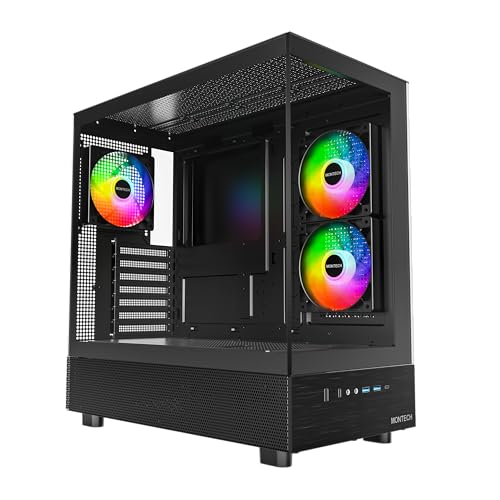
Montech XR ATX Mid Tower Case (XR-B)
runic cedar
mossy venture
Also
https://de.pcpartpicker.com/product/fc88TW/montech-xr-atx-mid-tower-case-xr...
This seems promising but neither have 6 argb fans
mossy venture
Fans are cheap and easily added
Oh also this one
https://de.pcpartpicker.com/product/VT88TW/thermaltake-view-170-argb-microatx-mini-tower-case-ca-1z4-00m1wn-00

Thermaltake View 170 ARGB MicroATX Mini Tower Case (CA-1Z4-00M1WN-00)
 hasty cove
Anyone got any decent laptop recommendations that can reliably run Fortnite and vr games? Maybe something on Amazon that might be on sale 500-700 is the preferred budget 👍
(USD)
mossy venture
hasty cove
Anyone got any decent laptop recommendations that can reliably run Fortnite and ...
i saw a 4060 7735hs laptop on sale in that range
lemme see if i can find it again
Oh rip it was microcenter
https://www.microcenter.com/product/677170/acer-nitro-v-anv15-41-r2ms-156-gaming-laptop-computer-obsidian-black

Micro Center
Get it now! Elevate your gaming adventure with the Acer Nitro V 15, your gateway to an adrenaline-charged journey. This laptop is the perfect blend of power and style, pushing the boundaries of whats possible on a laptop.
I'd check out r/laptopdeals
hasty cove
Ew Reddit
 covert vapor
mossy venture
hasty cove
Ew Reddit
covert vapor
mossy venture
hasty cove
Ew Reddit
?
A lot of people and communities on reddit are gross but it's very useful for tech deals
hasty cove
Jk
runic cedar
MSI MAG CORELIQUID C360
Thoughts on this aio?
I already purchased it but I guess I can return it
Bought it cuz it looks fire
 raven saffron
quick question for yall. how do you go about picking parts for a computer that will work well together on a budget? Do you have some go to tools. I am familiar with pc part picker for checking compatibility. but wanting to get the best bang for my buck.
 stoic island
runic cedar
Bought it cuz it looks fire
stoic island
runic cedar
Bought it cuz it looks fire
The performance is average, you have to keep in mind that it's about double the price of a thermalright frozen prism 360mm while having similar if not worse performance.
If you want to pay that much extra for the looks, that's your choice, but if you just want performance, you can have it for much cheaper.
runic cedar
stoic island
The performance is average, you have to keep in mind that it's about double the ...
Im running it on a ryzen 5 5600 in a place where my cats lay down, its performance probably doesnt need to be as high as some other ones
But if Im unhappy I'll just refund it and buy another one instead
stoic island
raven saffron
quick question for yall. how do you go about picking parts for a computer that w...
for what part specifically? there's various little bits of information for each part that you can find, but pcpartpicker is the main tool
runic cedar
raven saffron
quick question for yall. how do you go about picking parts for a computer that w...
Thats still pc part picker since it lists the prices and lets you compare everything
It gives you the cheapest available prices already
runic cedar
stoic island
The performance is average, you have to keep in mind that it's about double the ...
You think it will matter even if Im not running a high end cpu?
raven saffron
stoic island
for what part specifically? there's various little bits of information for each...
I am trying to build a pc for a golf simulator. and the specs it recommends is a 3080 and a core i5. in each of those there is still tons of options and was wondering how you go about narrowing down the options.
stoic island
runic cedar
Im running it on a ryzen 5 5600 in a place where my cats lay down, its performan...
for a 5600, all you need performance wise is something like a peerless assassin/phantom spirit, which is ~$35, if you just want the looks of an AIO, Frozen prism 360mm is ~$60, Frozen prism 360mm with argb is ~$70, and a MSI C360 is going to cost you ~$130. If you want to spend that much extra money just for looks, go for it
You should just put the prices into perspective
stoic island
raven saffron
I am trying to build a pc for a golf simulator. and the specs it recommends is a...
For that, reviews and benchmarks are your friend
runic cedar
70$ - 100$ for a big difference in looks I would go with the 100$ one if Im not worried about getting through the month
Im so tired

stoic island
as long as you know that money is spent only on looks and not performance, it's your money
runic cedar
If Im good on my bank account after the purchase for the rest of the month then I would go for the more expensive but better looking one
runic cedar
stoic island
as long as you know that money is spent only on looks and not performance, it's ...
Well its still both tho, right? Since Im only using stock atm
stoic island
raven saffron
I am trying to build a pc for a golf simulator. and the specs it recommends is a...
TPU's list is nice for a quick and dirty look at relative performance in a chart, but you should really look at full reviews to look at other options and compare prices and performance
https://www.techpowerup.com/gpu-specs/geforce-rtx-3080.c3621
runic cedar
I also bought a 2 side glasspanel case
stoic island
runic cedar
Well its still both tho, right? Since Im only using stock atm
For a 5600, you are going to get the same performance from a $30 cooler and a $130 AIO
raven saffron
stoic island
TPU's list is nice for a quick and dirty look at relative performance in a chart...
thank you
runic cedar
64 gb, 3600 MHz, C16
Vengeance
RGB
A 116 euro ARGB case (including 6 argb fans)
And an RGB GPU support
I do want a good looking pc now that its capable of running all my games flawlessly and since I wont be making the jump to 4k for atleast another year (in which I will be making a lot more money) I dont really worry about upgrading anything anymore except maybe my gpu on a good rtx 40s series or a rx 7000s deal
Its like pimping out your honda civic, you can always spend more money to upgrade but at some point you got all the performance you need and you just want to have fun with it and make it look nice

 green laurel
can someone help me out that if a frequent pc builder i am having issues, DM me is possible please.
hasty cove
mossy venture
Oh rip it was microcenter
https://www.microcenter.com/product/677170/acer-nitro...
So this can at least run Fortnite pretty well right ? My desktop was having some issues with fps recently because it updated and got more demanding
mossy venture
Go to YouTube and search 4060 mobile fortnite benchmark
 rugged moon
i need help Downloads constantly fail and say "Check Internet Connection" or "Network Error" despite being connected to internet. All file types, sizes, and websites and pc have this same issue.
 haughty void
so does anyone have a suggestion for anti sag brakcet for a 4090 in a Phanteks Enthoo Pro 2
potent portal
Hang it from the HDD bracket with some twine or something
potent portal
 haughty void
thats the default config
either way
im not doing some stupid idea like that
but thanks
potent portal
haughty void
im not doing some stupid idea like that
Is it stupid if it would work though
haughty void
it would but im not installing hdd bracket to just do that
and he doesnt even agree to it
haughty void
my brother in law
he wanted an option to do where it wouldnt look stupid lol
if this was my build
i woldve did lego
potent portal
I'm not sure Lego would be a good option in this case since the bottom is so far from the GPU, and you probably want fans there
haughty void
no i mean with me
i dont use this case
but
i was thinking of
Mnpctech
RTX 4060, 4070, 4080, 4090 Gpu Anti-Sag Support Arm Bracket / Stick / GPU waterblock support is made from 1/8" thick machined aluminum by Mnpctech. You can adjust position and height of the GPU anti-sag bumper. You can also flip it to other side of support bracket to avoid colliding with cooling fan blades. These stron


something like this
but he doesnt like its not a retailer
just some shopify store
jagged ember
potent portal
Good god that's tall af
Just build an entire Lego apartment at that point
 little osprey
what do you guys use to benchmark temperature and stress test o:
jagged ember
Video games and hwinfo and MSI afterburner
jagged ember
No like literally play the game lol
little osprey
oh lmao
jagged ember
That's how we test overclocks if we don't use occt
little osprey
i was trying to see how good my cooling solution and fans are under like, max load
jagged ember
Which needs a bit of tuning that I don't understand
If you wanted a power hog test, p95 and furmark should still be good for that
little osprey
ooo okey ill check it out
jagged ember
Furmark idk as much since it's getting kinda old
Keep in mind you have to manually stop them
little osprey
i gotcha, i've used furmark before but not in a long time
i'm still not happy with my wire management but 😐 i think it's good enough for now
i think i'll have to buy some custom 8 pins for my gpu to be satisfied lol
oh neat it only goes up to 62c with prime95
potent portal
jagged ember
Furmark idk as much since it's getting kinda old
Furmark 2 is out
jagged ember
potent portal
Furmark 2 is out
No way
dusky hearth

green laurel
i am having a bit of an issue. i put together a new pc and when all is done i went to power on and the only thing that recieved power was the asus light on the MB and a red triangle with a exclamation sign in the middle of AIO LCD screen. any ideas?
 languid nebula
Hi guys I'm looking to upgrade my cpu but unfortunately my motherboard is too old to upgrade to a newer cpu, so I will have to get new motherboard cpu and cooler. I am quite nervous and want to make sure the parts I've selected will still work together and with what I've got.
NEW PARTS:
Intel Core i9-12900KF 3.2 GHz 16-Core Processor
Thermalright Phantom Spirit 120 SE 66.17 CFM CPU Cooler
ASRock B660M Pro RS Micro ATX LGA1700 Motherboard
cyan ravine
That sounds pretty fine to me tbh
languid nebula
Old parts I will still use:
Corsair Vengeance LPX 32 GB (2 x 16 GB) DDR4-3600 CL18 Memory
ADATA Premier SP550 480 GB 2.5" Solid State Drive
NVIDIA Geforce GTX 1060 6gb(will be upgrading to 3060 at some point)
and a 600W supply
languid nebula
lol
cyan ravine
Second half, wildly needs work
The ram can be kept
Power supply needs changing
Ssd is ok
Gpu ok
runic cedar
I bought a gpu support with rgb but its saying to not put it in the RGB header but something else? A 3 pin connector, is it just so it doesnt unnecessarily use up a rgb header on my mobo?
cyan ravine
The case, make sure it's not this glass volcano box
languid nebula
case is an older one as well, ibuypower just standard no glass not fancy
also what wattage supply will i need
cyan ravine
Nzxt c750 gold might still be $80, for the case I'd go maybe okinos aqua or sama argb-q5
$140-ish all up
Just cos the 12900kf will get hot under that cooler
Quite hot
runic cedar
@cyan ravine u wanna see my pc on saturday night (german time) when I finish it?
cyan ravine
You want a good airflow case to make that config doable
runic cedar
Its going to look fire
cyan ravine
runic cedar
<@101107951401455616> u wanna see my pc on saturday night (german time) when I f...
Sure
cyan ravine
@languid nebula
https://pcpartpicker.com/list/QwJ3fy
Part List - Okinos Aqua 3 MicroATX Mini Tower
Oh nvm
All good lol
Glad to help
languid nebula
if I'm changing this much is it better just to get a whole new pc or just keep doing what Im doing
runic cedar
https://pcpartpicker.com/list/6B3YpB
@cyan ravine
Part List - AMD Ryzen 5 5600, Radeon RX 6600
Now add these to the mix
cyan ravine
languid nebula
if I'm changing this much is it better just to get a whole new pc or just keep d...
Keep going
cyan ravine
runic cedar
Now add these to the mix
Have you bought any of this
runic cedar
Yes why
Its for aesthetics
Since I will only upgrade my whole setup end of next year
That means new am5 cpu, new gen GPU and ddr5 ram
cyan ravine
Up to you, just curious
runic cedar
Why
cyan ravine
||I can do an am5 build for the same price is all||
stoic island
runic cedar
I bought a gpu support with rgb but its saying to not put it in the RGB header b...
3 pin aRGB is NOT compatible with 4 pin RGB, they're different headers, don't try to use an RGB header for it
runic cedar
cyan ravine
||I can do an am5 build for the same price is all||
Oh no dont get it mixed up, I had to buy my gf a new pc, and now I just bought the stuff like ram, case and extras for my existing pc
I have b 550 plus, ryzen 5 5600, aegis 16 gb ddr4 c16 and rx 6600 already
cyan ravine
Ah
runic cedar
I paid maybe 300 max for aesthetics
So as i was saying to that add

(6 argb fans included)
And this
 runic cedar
My pc is going to look fire
It runs well enough for now
End of next year is when an upgrade seems reasonable probably
RTX still isnt that strong with raytracing atleast not if you have a budget
cyan ravine
I think so too
runic cedar
If I wanted to just upgrade I would have gone with a rtx 30 something series but like I said not really that much difference as I dont even play everything on 1440p max settings
cyan ravine
We're kinda in a lull rn
runic cedar
Exactly
Im waiting for the last advancements to be ironed out fully and new cutting edge technology to jump on instead of going full ham right now
cyan ravine
Fibre optic traces are still something the future holds
cyan ravine
I am hunkering down now I think
5090 might be fun but the day we get optics in everything then it's game over for old tech
runic cedar
Yes
Not really
But yes
Cuz the moment optics take over, everything else will get cheaper and people will buy that instead for a few years
cyan ravine
Well, mostly yes, massive signal integrity improvement leading to big data jumps and ipc, and then you have throughput improvements jumping in magnitudes
Suddenly the 4090 would look like a pipsqueak
runic cedar
Yes
cyan ravine
Get that 6060 Ti pumping out 15x the fps just cos fibre came into play
Data go brrrr
Lol
runic cedar
Im saying in the consumer space the optics would just be a far out dream for a few years
No1 will be able to afford the new OTX 69420 until the next better stuff comes out
Always has been like this sadly
GB of data every second
cyan ravine
Oh yeah def
I'm just excited about it
First time I've seen something that feels like a lightbulb moment for the 21st century
runic cedar
That will probably elevate our species to the next level
stoic island
Knowing Nvidia they'd probably do something like make a 4060ti with optics and call it 5080 and mark up the price a ton
cyan ravine
Then they'll release something like super oled
obsidian wigeon
super tandem oled max
cyan ravine
All the great things about oled but somehow better in every way to life-like appearance
obsidian wigeon

runic cedar
Probably comes with a price tag of 50800$
cyan ravine
Comes with a free kidney transplant program from LG
runic cedar
stoic island
cyan ravine
All the great things about oled but somehow better in every way to life-like app...
Maybe it'll make OLED much brighter
obsidian wigeon
For marketing
stoic island
HDR 9000 when
potent portal
cyan ravine
Then they'll release something like super oled
They're actually working on that now, they have AI working on a plastic they can use instead of the organic layer so no burn in
obsidian wigeon
9000 nits sounds very eye fatiguing
cyan ravine
obsidian wigeon
They might harvest your other organs too
Nah they'll just insert a marketing chip to make me remember they have other organ programs
3 times a day
obsidian wigeon
Fair enough
stoic island
obsidian wigeon
9000 nits sounds very eye fatiguing
Gotta have a huge dynamic range, make looking at the sun in a game just like looking at a sun normally
cyan ravine
potent portal
They're actually working on that now, they have AI working on a plastic they can...
Q-
runic cedar
Talking about having to sell organs to buy a 4090, what about optic gen? Sell my whole body on the black market and still miss a few hundred thousands
cyan ravine
QD-OLED tho???
obsidian wigeon
Gotta wear sun glasses to see the sun in GTA 10
stoic island
It's a feature for realism
cyan ravine
runic cedar
Talking about having to sell organs to buy a 4090, what about optic gen? Sell my...
Jensen would send out security to seize your body
stoic island
obsidian wigeon
Gotta wear sun glasses to see the sun in GTA 10
It'll still be GTA6, we all know that's going to take forever to come out
stoic island
cyan ravine
Jensen would send out security to seize your body
Sell your soul for a 5090
obsidian wigeon
Getting shot will be more realistic than ever
runic cedar
stoic island
It'll still be GTA6, we all know that's going to take forever to come out
Nah I think GTA 6 will probabl release within the next decade or two

potent portal
stoic island
Sell your soul for a 5090
You're assuming my soul has any value
stoic island
We'd probably get hdr9000, if it ever happens, within the next decade or two :p
stoic island
potent portal
You're assuming my soul has any value
One man's trash is another man's treasure
Maybe Nvidia needs to burn souls to make more money, you never know
obsidian wigeon
with HDR9000, you won't need to turn on your lights
dusky hearth
hdreyesgone
obsidian wigeon
the screen is a light source for your room
potent portal
obsidian wigeon
with HDR9000, you won't need to turn on your lights
Dedicated circuit on your breaker required
dusky hearth
one day the monitor is gonna be so bright that someone's gonna shine a 1w laser into their camera and you'll be blinded permanantly from the hdr monitor ong frfr
cyan ravine
obsidian wigeon
the screen is a light source for your room
Hdr 1000 already does that, 9000 would be a flash bang bro
runic cedar
obsidian wigeon
with HDR9000, you won't need to turn on your lights
oh god I can see the youtube videos already "I bought the brightest monitor in the world EXTREME FAIL"
runic cedar
It will you mean
obsidian wigeon
phone screens are already peaking 2000+ nits
tho for a brief period
and in small pixels
cyan ravine
obsidian wigeon
getting flashbanged in cs2 won't feel the same
Actual flashbangs
Gotta duck out the way
runic cedar
obsidian wigeon
getting flashbanged in cs2 won't feel the same
It'll be super realistic
cyan ravine
runic cedar
It'll be super realistic
It even comes with post op care
stoic island
runic cedar
It'll be super realistic
The bang needs to be more impactful than the flash
cyan ravine
Need a cataract surgery
runic cedar
You will see pro players dodge their monitors in tournaments
stoic island
Gotta push 100w through your headphones
runic cedar
obsidian wigeon
in a cs match
I wish
stoic island
runic cedar
You will see pro players dodge their monitors in tournaments <:kekw:741678350791...
They're already so close to the monitor it's as impactful as it can be
cyan ravine
stoic island
Gotta push 100w through your headphones
They gotta duck AND throw the headphones
potent portal
obsidian wigeon
phone screens are already peaking 2000+ nits
There's TVs that can hit 4000 already
obsidian wigeon
jesus
runic cedar
No blood shed just gamers being gamers
potent portal

RTINGS.com
The TCL QM8/QM851G QLED is the highest-end offering in TCL's 2024 North American QLED lineup and sits above the TCL QM7/QM751G QLED. It uses TCL's AIPQ Engine Ge...
stoic island
cyan ravine
They gotta duck AND throw the headphones
Won't be enough, if it lands anywhere in the room it's still going to enough to make you temporarily deaf
potent portal
4167 in SDR 2% window
potent portal
HDR is more color accurate so it only hits 3467 at 10%
cyan ravine
potent portal
There's TVs that can hit 4000 already
 runic cedar
cyan ravine
They gotta duck AND throw the headphones
runic cedar
cyan ravine
They gotta duck AND throw the headphones
The big brain plays that would happen in tournaments would be insane, you flashbang yourself but turn the monitor into your enemies eyes and throw your headphones towards them
stoic island
potent portal
https://www.rtings.com/tv/reviews/tcl/qm8-qm851g-qled#test_179
Only 968nits max for 100% smh
runic cedar
cyan ravine
That'll be my setup once I get my stuff on saturday
cyan ravine
runic cedar
The big brain plays that would happen in tournaments would be insane, you flashb...
It later gets banned for unrealistic gameplay
Lmfao
runic cedar
potent portal
stoic island
Only 968nits max for 100% smh
Because by then it's drawing over 300W with no active fan
runic cedar
Make a sub-category for game only e-sports
obsidian wigeon
a tv drawing more than a laptop doing gaming
runic cedar
And one for actual e-sports
cyan ravine
potent portal
Because by then it's drawing over 300W with no active fan
Is it a demon
cyan ravine
Im waffles
runic cedar
Dude I wish I was the same
runic cedar
Dude
obsidian wigeon
so we can smell the phoods
cyan ravine
Those exist
obsidian wigeon
runic cedar
cyan ravine
Those exist
Not any good ones tho
cyan ravine
You can smell the poop in 4k as you crawl through it in cod multiplayer
obsidian wigeon
lol
potent portal
They have gunpowder scented ones
runic cedar
I want to smell the pooo from my nintendogs, otherwise my immersion is ruined
runic cedar
Nah
cyan ravine
The poop of your enemies 
runic cedar
Unwashed balls because you can smell the players right through the game
And we all know what cod playerd smell like
potent portal
Oh yeah give me that anime convention scent
obsidian wigeon
probably hell on earth
potent portal
Pray that you go to one where people know of the existence of deodorant
Them fur suits get sweaty
runic cedar
I have been to a traditional festival in my city of origin where the president of osaka comes over and show appreciation for the collaborationg with our city, but my god the weebs that end up going there with their badly made costumes walking around ruining the whole festival
Truly a sight and a smell to behold
Reason why Im scared to ever go to a convention
obsidian wigeon
i don't wanna get a fursuit myself
it's expensive
plus you sweat like hell in one
runic cedar
potent portal
Them fur suits get sweaty
I saw those leather dogmask ppl
They were something, I can tell you that much
On a leash
😭
They were holding eachothers leashes eventho they are all in those leather dog fits
Wheres the owner
obsidian wigeon
oof
runic cedar
Or who is the owner I guess
It was confusing but more power to them I guess, as long as they dont go anywhere near children in those latex outfits
(Cuz its very tight so you see a little more than needed)
Thats another level of suit, fursuits are (atleast supposed to be) child friendly
So I dont mind them
Also probably really cozy during winter
How did I end up writing a novel about my most traumatic experience
:PepeHands:
dusky hearth
obsidian wigeon
i don't wanna get a fursuit myself
you gotta get those like air force watercooled suits
obsidian wigeon
lmao
potent portal
runic cedar
:PepeHands:

Our nitro boost level went down so you need to find another server with things
Also fun fact, people have died in the Barney suit because the fan broke and the zipper got stuck... twice
The first time the actor only suffered from some smoke inhalation
obsidian wigeon
wow
potent portal
We've come a long way in suit design since then thankfully
obsidian wigeon
it better be
dusky hearth
barney is a murderer

 ocean ledge
Hey all, I am looking to get some advice on a new pc build. If you are willing to answer some questions, please send me a DM and we can chat there to avoid spamming this channel. Appreciate any help I can get on this!
stoic island
ocean ledge
Hey all, I am looking to get some advice on a new pc build. If you are willing t...
Hey, we prefer using this chat for questions and advice over DMs when possible
potent portal
There's several good reasons for that, like more people looking at a problem means it's more likely to get solved, and the conversation will be here for later if someone has a similar problem.
 frail valve
Sorry zenful didn't see you still typing. I'll ask later
ocean ledge
Sure, no problem. I am looking to build a new PC, and wanted to make sure I am getting what I want before I order all the parts. If links are able to be posted I will post my partpicker list. If not I can copy paste what I’m looking at into the chat directly. If there is anything that can be swapped out or optimized to get the most out of the build I would love to hear some advice. The majority of my pc use is gaming (Mainly MMO’s). I am looking to spend around $1500-$2000. I already have keyboard, mouse, and monitors. My main objective is to build something that will last a few years without needing any upgrades and play on high graphics settings with 120+ fps. I also don’t care to have a lot of RGB if that makes any difference. I would rather get more power out of the system than make it look flashy. Let me know if you need anymore information.
No problem, Wanderer. Thank you
frail valve
Hmm, I'm sure we got people who can use pcpartpicker to find you something. Question though, given you use dollars, can we assume you're american?
The PC market varies wildly from country to country
ocean ledge
Yeah I live in the US. I apologize for not specifying that in the previous message
stoic island
ocean ledge
Sure, no problem. I am looking to build a new PC, and wanted to make sure I am g...
You can send the pcpp list here, what monitor do you currently have?
stoic island
What specific games are you planning to play?
There's a good amount I'd change with the list, do you have any of it bought already or any special reason for choosing anything on the list?
ocean ledge
stoic island
What specific games are you planning to play?
Will plan to play games like World of Warcraft, Final Fantasy XIV, Warzone, or Valorant
frail valve
Yep. Warzone. There's the thing that'll need a lot of power
stoic island
ocean ledge
Sure, no problem. I am looking to build a new PC, and wanted to make sure I am g...
Also, do you live near a microcenter?
ocean ledge
stoic island
There's a good amount I'd change with the list, do you have any of it bought alr...
I haven’t bought anything yet. No specific reason to picking anything
I found a rough list online and changed a couple things, but that was it
ocean ledge
stoic island
Also, do you live near a microcenter?
I live about 3-4 hours from a micro center I believe, but I don’t get up that way very often
If the pricing is significantly less, I would consider making a trip. If not I am okay with paying a little more to order online
stoic island
It's probably not worth it then, microcenter has great bundle deals but prob not worth a long drive
stoic island
I'm wondering if 9700x is worth using now, not sure if the recent agesa update helped much
just remember reading the news but haven't seen numbers
ocean ledge
I would rarely be playing Warzone. I will most likely give the new one a try when it releases, but don’t plan to play it often. I mainly play MMO’s or Riot games for the most part
potent portal
stoic island
I'm wondering if 9700x is worth using now, not sure if the recent agesa update h...
No
stoic island
potent portal
No
only gains for 9900x and 9950x then?
potent portal
It's still zen 5%
stoic island
ah fun
potent portal
stoic island
only gains for 9900x and 9950x then?
Yep the multi CCD got the most of it
stoic island
it's still annoying how 7800x3d stock just kinda disappeared
frail valve
7800x3d still in short supply
stoic island
7600x3d is nice when near microcenter
was thinking 9700x as substitude if the recent updates helped but doesn't seem like it
frail valve
Hard to shill micro center when they don't live near one
potent portal
9800X3D supposedly comes out at the end of this month or early next month
stoic island
potent portal
9800X3D supposedly comes out at the end of this month or early next month
any official news or events?
@ocean ledge here's a start to look at a revised list
https://pcpartpicker.com/list/xjMkkJ
Part List - Intel Core i7-13700K, Radeon RX 7900 XTX, Lian Li Lancool 207 ATX Mid Tower
if 9800x3d is actually coming within a month, it's probably a good idea to wait for that and get that
It can be made cheaper in many places, more ram and more storage are just nice to have and not necessary
 crimson zinc
Could I request a pro gamer to make me a list for $1.5k max, including a monitor, with the cost of a $100 case I have picked out included?
(I will probably only play in 1080p or maybe 1440p)
frail valve
Can't make promises. Can we get more specifics though? What games? Any video edittinf or professional workloads? Care about dlss?
mossy venture
stoic island
<@398293691493646346> here's a start to look at a revised list
https://pcpartpic...
Amd side
https://pcpartpicker.com/list/Nv96vj
Part List - AMD Ryzen 7 7700X, Radeon RX 7900 XTX, Montech XR ATX Mid Tower
crimson zinc
frail valve
Can't make promises. Can we get more specifics though? What games? Any video edi...
Gaming
That’s it
Just a wide variety of games
frail valve
And I assume you live in the US hives you're talking in dollars?
crimson zinc
Nothing like cyberpunk
And yes
I normally do the lists for other people, but I wanna see what others would come up with for me this time
frail valve
Live near a micro center? Only asking because they have good CPU-Motherboard combo deals
crimson zinc
3 hours away
So unfortunately no
mossy venture
crimson zinc
Could I request a pro gamer to make me a list for $1.5k max, including a monitor...
Part List - AMD Ryzen 5 7600, Radeon RX 7900 GRE

Dell G2724D 27.0" 2560 x 1440 165 Hz Monitor (G2724D)
potent portal
stoic island
any official news or events?
Nothing official but tons of different leaks like shipping invoices to retailers, and reliable leakers agree with this timeline
(MLID says no it's not but he's not exactly reliable)
mossy venture
potent portal
Oh and don't bother waiting for next gen Intel, it's more power efficient but similar gaming performance to 14 series, while also being worse in multi core, according to Intel's own internal slides that were leaked.
frail valve
Looking to make an xp system because windows 11 doesn't want to play nice with some of the older games I have on CDs. I've been able to get my hands on a 3570k in an Asus p8z77-v lk and a 3770 in an asus p8z77-v. I've already settled on getting the non lk model, but which CPU should I go for? Do o take the overclockable 3570k out of the other machine or just not bother and keep the 3770?
potent portal
Any game that's made for the XP era or earlier won't need you to overclock
stoic island
potent portal
Nothing official but tons of different leaks like shipping invoices to retailers...
alright lets hope then
frail valve
Unrelated question, in the jump from a 5600 non x to a 5700x3d worth $180?
potent portal
It depends on what you're playing and what settings
imo no unless you play something that REALLY likes the vcache
You'd be better off saving that for a platform upgrade
frail valve
Unfortunately the main game I need an upgrade for is warzone, but given I have a 3060 and a 5600, both need to be upgraded to get me out of that "low settings at 1080p for 144 fps" zone
ocean ledge
stoic island
<@398293691493646346> here's a start to look at a revised list
https://pcpartpic...
I appreciate you sending me this list. I would be okay with moving down to 2TB SSD, but besides that it looks great
@mossy venture Thank you for the AMD list as well
should I be worried about using a 13th gen Intel processor with the issues they were having or did the update take care of that?
also would be curious if either of these lists would change if I were trying to optimize MMO's specifically and not worry about Warzone?
would the 9800x3d be similar in price to the current processor you have chosen? should I worry about availability on release?
mossy venture
ocean ledge
I appreciate you sending me this list. I would be okay with moving down to 2TB S...
As long as you use newer bios you're fine, am5 just has an upgrade path
And is easier to cool
stoic island
ocean ledge
I appreciate you sending me this list. I would be okay with moving down to 2TB S...
as far as we know, it has been dealt with
https://community.intel.com/t5/Blogs/Tech-Innovation/Client/Intel-Core-13th-and-14th-Gen-Desktop-Instability-Root-Cause/post/1633239

Following extensive investigation of the Intel® Core™ 13th and 14th Gen desktop processor Vmin Shift Instability issue, Intel can now confirm the root cause diagnosis for the issue. This post will cover Intel’s understanding of the root cause, as well as additional mitigations and next steps for Int...
stoic island
ocean ledge
I appreciate you sending me this list. I would be okay with moving down to 2TB S...
If you don't care about warzone at all, you can spend less on the GPU, go down from the xtx to like a GRE and either just save the money or use it for a better CPU.
9800x3d should be ~$450 or a little higher, it'll be $100-150 more expensive than what we sent so far
Availability will be unknown until it gets here, we don't have insider info or the ability to predict the supply and demand
ocean ledge
stoic island
If you don't care about warzone at all, you can spend less on the GPU, go down f...
If I were to do this what would you recommend if I stuck with Intel?
What exactly am I gaining/losing with swapping to better GPU instead of better CPU?
I would consider waiting for the 9800x3d. If I did go with that, would I use the same build that you posted originally and just swap in the 9800x3d?
Would it be beneficial to wait until Black Friday/Cyber Monday deals or does that not usually change much PC part wise?
Sorry I'm asking so many questions at once. I don't want to forget to ask later
stoic island
ocean ledge
If I were to do this what would you recommend if I stuck with Intel?
What exactl...
Either way, waiting for 9800x3d would be a good idea, the current lists provided are made for current conditions, things will probably change when 9800x3d drops. It's always good to wait for a sale, but don't expect much from black friday sales, they will be nice but expect something like 10% off on average.
ocean ledge
Ok I appreciate the information.
I will consider waiting until 9800x3d releases later this month and check back then
Would you be able to send me a list with a better CPU and downgraded GPU so I have a choice between the two when I make a decision ("don't care about Warzone version" compared to the one you sent previously "care about Warzone version")
If not, no worries. You guys have already helped me a ton
stoic island
ocean ledge
Ok I appreciate the information.
I will consider waiting until 9800x3d releases ...
On the Intel side, I wouldn't really get a 13900k/14900k, on the AMD side, 7800x3d would be nice but currently it's all out of stock, it should be ~$450 but the current cheapest in stock 7800x3d is $600, either way not ideal at the moment
So at the moment, just take out the 7900xtx and put in a 7900 GRE and just save the money
ocean ledge
ok sounds good, thanks again!
I will keep an eye out for a 7800x3d while waiting for more information on the 9800x3d
 pale star
My husband is trying to figure out what is wrong with the pc we just built yesterday. We did a post test (i think is what it's called), before putting everything in the case. All was good. Then once in the case it won't even turn on. We did the paper clip test and the psu is working. Would anyone with experien ce be willing to help us back track or what ever we need to do?
 subtle halo
pale star
My husband is trying to figure out what is wrong with the pc we just built yeste...
subtle halo
pale star
My husband is trying to figure out what is wrong with the pc we just built yeste...
U install the standoff?
One that makes mobo elevated abit on the case so it wont touch
Maybe something shorting it
On the case
pale star
subtle halo
One that makes mobo elevated abit on the case so it wont touch
He said he got all the standoff in and isn't touching the case.
 pseudo pollen
see if psu is off, something might be shorted or backwards, check all power connections
dusky hearth
pale star
My husband is trying to figure out what is wrong with the pc we just built yeste...
It does sound like some sort of short, assuming that there are no signs of life at all
make sure if you have a seperate io shield that none of the spring things went into any of the ports, and make sure that nothing is plugged in wrong
Try turning on the pc with nothing plugged into the MOBO asides from the PSU cables, and see if the debug LEDs light up
Also yeah make sure PSU switch is on, sometimes people forget, even experienced technicians
 mystic needle
found this description on a used gaming pc from ebay : amd 5900x/2080 ti/ G skill 32gb ddr4 / 1TB samsung SSD /1200W
at 900 dollars is this worth it used?
mossy venture
Do you just use it for gaming, or workstation use too?
mystic needle
i want to find one for my cousin he mainly would be playing games like rocket league and cod
he just wants to game
mystic needle
yeah id probably build one for him
mossy venture
This cpu is off aliexpress, but its widely recommended if you're comfortable with ordering off of it
https://pcpartpicker.com/list/HjLZn6
Part List - AMD Ryzen 5 7500F, SAMA ARGB-Q5 MicroATX Mini Tower
Gpu id buy used with the rest of budget, and its about 15-20% better than the 5900x in games
Otherwise id probably go for that used build
mystic needle
ohhh a none gpu build?
mossy venture
You'd buy a used gpu
mossy venture
Something like a 6700xt, 3070, 3060 ti, etc
2080 ti does fit the bill
You could also go the complete opposite direction

eBay
NVIDIA GeForce RTX 3060. 16 GB DDR4.
And add more storage
$550 after 8% off at checkout
mossy venture
mossy venture
This cpu is off aliexpress, but its widely recommended if you're comfortable wit...
And sorry last link, a gpu option for this build
https://www.ebay.com/itm/387296500969

eBay
NVIDIA® GeForce Experience™. Quad simultaneous display capable. 2nd Gen Ray Tracing Cores. HDCP 2.3 support. Engine boost clock: 1695 MHz.
mystic needle
yikes how do i fix that
found this: https://www.ebay.com/itm/156444361227?_skw=2080

eBay
Model: EVGA NVIDIA GeForce RTX 2080 Ti FTW3 Ultra Hybrid Gaming (11G-P4-2484-KR). It incorporates EVGA’s HYBRID AIO liquid cooling system, which significantly reduces GPU and VRAM temperatures. This self-contained cooling solution uses a 120mm radiator and fan, requiring no custom tubing or maintenance—just plug and play.
this also caught my eye

eBay
Used GPU. Works great, except backlights. BACKLIGHTS DOESN'T WORK! No returns.
no rgb but i dont think my cousin would care
mystic needle
mossy venture
And sorry last link, a gpu option for this build
https://www.ebay.com/itm/38729...
i didnt know they refurbished stuff
mossy venture
mystic needle
https://www.ebay.com/itm/375702403663?_skw=2080
That's pretty good
I think you could get a 6700xt around the same price, unless you want nvidia only
2080 ti has some downsides over the 3060 ti/3070, but the extra vram is a big plus
r/hardwareswap is also pretty good
mystic needle
yeah ive been seeing that
would it be better, in your opinion, to just get a 6700xt?
mossy venture
Can also do this, to have more to spend on gpu
https://pcpartpicker.com/list/9GNMPF
Part List - Intel Core i5-12600KF, SAMA ARGB-Q5 MicroATX Mini Tower
mossy venture
mystic needle
would it be better, in your opinion, to just get a 6700xt?
Yes
1gb more vram isn't a huge deal, about 5% worse perf but lower power draw, and honestly just a more reliable card imo
mystic needle
mossy venture
Can also do this, to have more to spend on gpu
https://pcpartpicker.com/list/9G...
looking epic B-)
mystic needle
mossy venture
1gb more vram isn't a huge deal, about 5% worse perf but lower power draw, and h...
i see i see
would newegg be a good place to look?
wait nvm you meant used
this one looks nice what do you think?https://www.ebay.com/itm/405275583850?_skw=6700

eBay
• Model : XFX Speedster SWFT309 RX-67XTYJ. • Type : Gaming Graphics Card.
crimson zinc
mystic needle
this one looks nice what do you think?https://www.ebay.com/itm/405275583850?_skw...
What’s it like with the 20% coupon?
mossy venture
mystic needle
this one looks nice what do you think?https://www.ebay.com/itm/405275583850?_skw...
That's pretty good
 mossy venture
crimson zinc
What’s it like with the 20% coupon?
mossy venture
crimson zinc
What’s it like with the 20% coupon?
$223 after shipping
mystic needle
nicee ill let him know to buy it asap
Should I use the second list you made or the first?
mossy venture
First one has much better upgradability
But you have to order the cpu off aliexpress
Second one is cheaper, maybe around 5% worse cpu wise
mystic needle
we got the wukong cpu before gta 6

do you have a link you could give me? I can't find one for 130
nononoononono please
pseudo pollen
mossy venture
mystic needle
do you have a link you could give me? I can't find one for 130
Having a good psu like the 750w in there and being on am5 sets your cousin up for a 9800x3d and a great gpu upgrade down the line
mystic needle
thank u, I was seeing a ton of options but they looked a lil more strange
mystic needle
mossy venture
Having a good psu like the 750w in there and being on am5 sets your cousin up fo...
awesome! is there anything else I should think about?
mossy venture
mystic needle
awesome! is there anything else I should think about?
It could be a bit nicer if you wanted to spend a tiny bit more
https://pcpartpicker.com/list/DLZMPF
Part List - AMD Ryzen 5 7500F, Montech XR ATX Mid Tower
Didn't realize that mobo was on sale
mystic needle
that's sum good aim
thanks for the list! thanks for taking time out of your day to help me out, I really appreciate it🙏
 flint sapphire
Hey, I like your wood  @cyan ravine
cyan ravine
flint sapphire
Hey, I like your wood <:HOMI:1027258337332572251> <@101107951401455616>
🪵
It's a little stiff
flint sapphire
cyan ravine
🪵
Might wanna rub some oil on it to preserve the finish
mystic needle
Jarvis, clip that.
 deft raven
hey guys , at the moment I am willing to buy a gaming laptop , any suggestions !
 serene onyx
Ok guys last check before I buy the parts
Part List - AMD Ryzen 5 5500, Radeon RX 6650 XT, Fractal Design Pop Air ATX Mid Tower
What do yall think?

Case im purchasing cause it wasn’t showing up on pc part picker
mossy venture
serene onyx
https://pcpartpicker.com/list/27jBQP
I'd change it around a bit
serene onyx
Constructive criticism welcomed
mossy venture
serene onyx
Constructive criticism welcomed
5600x is a pretty big step up over the 5500
Around 20% iirc
Also one sec I'm checking one other thing
Or 5700x comes with free 32gb ram from newegg, I'm building a combo with it rn for one last option
So 5700x, b550m pro vdh wifi, and teamgroup g50 1tb comes to $296 with newegg combo up savings event, and then a free 32gb ram with it
Part List - AMD Ryzen 7 5700X, Radeon RX 6650 XT
serene onyx
Thanks!
serene onyx
mossy venture
Or 5700x comes with free 32gb ram from newegg, I'm building a combo with it rn f...
Do I have choose it?
Or do they select it for me
I managed to get it lower
Without the savings event
Part List - AMD Ryzen 5 5500, Radeon RX 6600
But the difference is I don’t get the 5700X
dusky hearth
you made a list worse than the first list you sent
dusky hearth
what is your budget
dusky hearth
do you already have a case
dusky hearth
bacca's list is considerably better, it has everything but a case, though technically if you don't mind, you could always use the pc on the mobo box until you can get a case
dusky hearth
this is your pc? or your cousin's?
mossy venture
Part List - AMD Ryzen 5 5600X, Radeon RX 6600
Ideally id use the b550m pro vdh wifi tho
 nova hound
i need some help guys
mossy venture
Better mobo and you gaurantee it works without a bios update
mossy venture
What do you need help with?
serene onyx
dusky hearth
this is your pc? or your cousin's?
Cousins
serene onyx
mossy venture
Ideally id use the b550m pro vdh wifi tho
I’m getting it
little osprey
nova hound
my fans
what's wrong with your fans
serene onyx
@mossy venture on that free 32 gb ram kit how does it work? Do they ship it to me with everything else and they choose or?
mossy venture
Oof it looks like the free ram deal mightve ended
serene onyx
mossy venture
Oof it looks like the free ram deal mightve ended
Dang alright
 scenic slate
Well I guess I can’t post pictures so I’ll get the details on what I want to make sure is compatible together
ASUS ROG Strix Z790-A Gaming WiFi II (WiFI 7) LGA 1700(Intel 14th,13th & 12th Gen) ATX gaming motherboard(16 + 1+2 power stages, DDR5, 5X M.2 slots,
This is the motherboard
Intel Core i7-14700K - Core i7 14th Gen 20-Core (8P+12E) LGA 1700 125W Intel UHD Graphics 770 Processor - Boxed - BX8071514700K
This is the cpu want to make sure they are completely compatible before I order
 vernal crow
Hi, I would like feedback for upgrading my pc
my current use case is mostly for gaming (casual, not fps demanding) and AI training/generation (need 64 gb ram)
I live in singapore so the price parts would be around 1.2x of what's in this list
my budget would be under $2k since I already own some parts
https://pcpartpicker.com/list/jbLtXk
potent portal
scenic slate
Intel Core i7-14700K - Core i7 14th Gen 20-Core (8P+12E) LGA 1700 125W Intel UHD...
They are compatible but you may need to update the BIOS using flashback
scenic slate
Copy that I just want to make sure those two are compatible everything else is compatible with my build list
cyan ravine
vernal crow
Hi, I would like feedback for upgrading my pc
my current use case is mostly for ...
👀

Used 3090/TI
Won't require anything else
As long as you don't have like several hundred rgb lights lol
vernal crow
are you suggesting I should browse for used 3090Ti?
cyan ravine
Ye
A low range 4090 could technically work, but it's a lot more for not a lot better AI gen
Depends on how quickly you could make the money back but 3090 cards are pretty go to for home ai work
potent portal
A 4090 might be hard to come by in Singapore, it would probably be a 4090D instead
cyan ravine
Nah he can
potent portal
The trick is finding it
cyan ravine
I know a couple people there now with one
cyan ravine
If you had an sli or nvlink board I'd say 2 3090's and a psu change
But this wasn't in older plans from memory lol
Have to go to Z690 for that one which is kinda meh
So yeah just one used 3090/Ti
Rest looks fine, not appearing meaningful to otherwise change
cyan ravine
Np
vernal crow
found a used 4090 for 1.2k but
RFS : Intermittent Issues with GPU. Able to get into Windows home screen, normal usage without gaming. Shows up normally in task manager ,can get into bios.
Problem : Computer shuts down when opening games, have to restart afterwards. Gave up and changed GPU.

I see more 3090 listing than 3090Ti, and it seems both have 24GB VRAM, are there any big difference between the two? @cyan ravine
I see this number but it doesn't seem like a big difference Memory speed: 21Gbps vs 19.5Gbps
 strong raft
 vernal crow

I guess I'll go ahead with the rest of the parts and snatch a used 3090ti / 4090 when it comes
cyan ravine
vernal crow
I see more 3090 listing than 3090Ti, and it seems both have 24GB VRAM, are there...
Ti is slightly faster vram, but 4090 vs. 3090/Ti in Ai performance isn't that massive of a gap considering a 4090 is like, 1400 used vs 650-700 for a used 3090/Ti
vernal crow
ah right the price range as well
cyan ravine
Ti in your case is meaningful
Ye
But ye either of the two 30 series ones imo
Unless you really need like all the performance you can get
In which case a basic reference tier 4090
 analog hearth
I mean yeah
runic cedar
analog hearth
I mean yeah
I mean no*
analog hearth
ur mom
runic cedar
I just checked
analog hearth
huh
analog hearth
huh?
runic cedar
analog hearth
man I just took out my airpods to put on my desktop headphones to listen to that only to hear nothing at all
nice job man
runic cedar
analog hearth
tell your cat I said hi
also yeah bigger number releases first
tradition
sells better
build hype. sell the more expensive one first because people are impatient and don't want the crappy one first
runic cedar
? Oh I didnt know that was a trend they followed
analog hearth
yep
analog hearth
yes
runic cedar
Or is the architecture going to evolve a lot within the next months
I dont want to jump on new tech if the future looks 2x as good as current
analog hearth
runic cedar
Is a ryzen x3d processor worth the full pc upgrade next year?
"I know AMD hasn't told us anything about next year's CPUs but..." honestly shut up
"will the X3D be worth it?" yes always. it's just better
runic cedar
Brother calm down
I was asking about if the architecture they are using for x3d has a lot of potential still
Thats a fact you could know
analog hearth
yeah
analog hearth
ur mom
runic cedar
But thx for the help
analog hearth
👍
 ornate condor
I have weird situation with ram kit  got g.skill flare x5 32gb ram kit but it giving blue screen at expo
  but it working alright when I manually set voltage to 1.35V . But 1.2v written on ram and expo giving 1.2v
Idk if I should return this ram or it's alright if I set 1.35v manually and leave it alone
potent portal
ornate condor
Idk if I should return this ram or it's alright if I set 1.35v manually and leav...
What frequency/cas is the expo?
ornate condor
potent portal
What frequency/cas is the expo?
6000MHZ Cl36
potent portal
Hmm yeah that's usually 1.35v
Weird that it's only doing 1.2v, but if it's working at 1.35v then I see little reason to complain
A minor annoyance at most imo
ornate condor
ram sticker says 1.2v and expo also giving 1.2v but it's blue screen right away
When I set 1.35v stress tested it for 10 minutes and it works
 proper night
https://pcpartpicker.com/user/ThelVadam4321/saved/Y387CJ
I'm drafting a build for my sister. She doesn't play many if any current gen games so I predict this will more than suit her needs. The RX580 and the EVGA PSU are parts I have in storage from old builds of my own. Any feedback or helpful suggestions are appreciated.
I'm particularly concerned over whether the PSU selected has enough of an overhead buffer. Let me know if you think I need to go up a little bit more.
Sister PC Build - AMD Ryzen 5 3600, Radeon RX 580, Cooler Master MasterBox Q300L MicroATX Mini Tower
mossy venture
proper night
https://pcpartpicker.com/user/ThelVadam4321/saved/Y387CJ
I'm drafting a build f...
that psu is known for going boom
I'd get that, and add a g50 with the combo savings deal as well. Should come to $238
Part List - Intel Core i5-12400F, MSI MAG FORGE 100R ATX Mid Tower

MSI G255F 24.5" 1920 x 1080 180 Hz Monitor (G255F)
proper night
mossy venture
I'd get that, and add a g50 with the combo savings deal as well. Should come to ...
G50?
mossy venture
sorry, its a 1tb ssd
proper night
I know very little about Intel chips. Is the i5-12400F of similar performance to the Ryzen 5 3600?
mossy venture
proper night
I know very little about Intel chips. Is the i5-12400F of similar performance t...
a good bit better
matches the 5600
proper night
That MOBO in the combo doesn’t appear to have WiFi capability unless I’m misreading the page. How much would a decent wireless card eat into the savings?
I usually just rely on Ethernet, but this build needs wireless for the end user’s convenience
mossy venture
proper night
That MOBO in the combo doesn’t appear to have WiFi capability unless I’m misread...
$20-30

Intel AX200 802.11a/b/g/n/ac/ax M.2 Wi-Fi Adapter (AX200.NGWG.DTK)
proper night
PC parts picker says that particular wifi card isn't compatible with the board from the combo.
mossy venture
ah would need a pcie one then
proper night
Sister PC Build Alt Version - Intel Core i5-12400F, Radeon RX 580, Cooler Master MasterBox Q300L MicroATX Mini Tower
mossy venture
uhh
$140 psu and that case is awful
m60 is a couple dollars more and a good bit better
the cpu mobo and 32gb ram are a combo on newegg
$196 for the three of them
$238 if you add a 1tb g50 to it
mossy venture
mossy venture
https://www.newegg.com/Product/ComboDealDetails?ItemList=Combo.4727182&Source=so...
.
proper night
What would you suggest for PSU and case then. I wanted to go with a smaller form factor since I was using a Micro-ATX board anyway.
mossy venture
mossy venture
https://pcpartpicker.com/list/M67cQP
.
an atx case can fit an matx board fine, but id do m60, sama q5, or im01 for an matx option
proper night
Sister PC Build Alt Version - Intel Core i5-12400F, Radeon RX 580, Cooler Master MasterBox Q300L MicroATX Mini Tower
Went with the 2TB version of the G50.
mossy venture
can you not do the bundle from newegg?
proper night
I can through Newegg, but PC Parts Picker doesn't reflect that.
If there is a way to get the website to reflect the bundle price, I don't know.
mossy venture
i made a list above and edited the pricing of the parts in the bundle
proper night
Sister PC Build Alt Version - Intel Core i5-12400F, Radeon RX 580, Cooler Master MasterBox Q300L MicroATX Mini Tower
This is what I have taking the bundle into account
Figured out how to adjust the prices. Sorry, it's been a while since I've done this.
mossy venture
no youre good
looks good, id just spend the extra for the g255f for the high refresh rate monitor
proper night
Not a bad price dip I must say. Thanks for the help.
I'll have to mull over the monitor. $15 more for 180 hrz is very attractive, but it would also require getting speakers or headphones. That being said, I do actually have a spare HyperX headset lying around somewhere so maybe I'll just throw those in too.
proper night
Fair enough. You've been a great help. Thank you.
mossy venture
Np
proper night
And sorry if I was a little annoying to work with.
runic cedar
So I need some help with my case
I have a controller for the ARGB and fans

What is this
I know how/where to connect the fans but what about the argb? Why is there 2 different connections from the controller to the mobo?
 runic cedar
runic cedar
runic cedar
Is the lower one for adding one additional argb component?
runic cedar
And what gets connected here?
runic cedar
runic cedar
I know how/where to connect the fans but what about the argb? Why is there 2 dif...
 runic cedar
So the reset, right?
Can I pull it apart from the others so that the other cables reach my front panel connector on my mobo?
I plug in the reset sw right? And do I plug it in facing up or facing down?
And can I use the sata daisy chain for the hub as well as my drives?
Cuz I cant find my second sata cable rn
potent portal
runic cedar
I plug in the reset sw right? And do I plug it in facing up or facing down?
Orientation doesn't matter and daisy chains are fine for that
green laurel
May be a dumb question but can I use this cables for gpu? I assume yes considering it is all the cables I have left in box and matches. I just googled and a fee said otherwise.. please help
 potent portal
green laurel
May be a dumb question but can I use this cables for gpu? I assume yes consideri...
potent portal
green laurel
May be a dumb question but can I use this cables for gpu? I assume yes consideri...
What model GPU
That is for the GPU but if the model is more than a 250W TDP then you'll want 2 separate cables
They have been known to melt past that with a single daisy chained cable
proper night
mossy venture
https://www.newegg.com/Product/ComboDealDetails?ItemList=Combo.4727182&Source=so...
Like a fool I waited a tad too long it seems. The combo seems to have expired. I didn't recall seeing an expiration date on the page so I didn't realize it'd be quite so fleeting.
I’m debating waiting until Black Friday/Cyber Monday to order everything and make the build as a Christmas present
 runic cedar
Exactly
Usually I dont bother with RGB but my aio will be used in my future upgrade as well so as long as it lasts i dont care if i have to spend a little more for looks
Also is nice to have built an argb build atleast once
Next I buy 2 RGB strips for the 2 RGB header on my mobo
 runic cedar
Flashbang pc build
runic cedar
cyan ravine
I'm looking at myself from 4 years ago
Nah, honestly I like the looks but I never needed it
I just built it cuz my friends who dont know anything about specs will look at it and be impressed
And cuz I had the money for it
cyan ravine
RGB sells PC's
You right
I'm not against your build or anything btw, just having fun
I've seen too many PC's now to feel anything

runic cedar
Yes
RGB is pretty useless except for when you use it as decoration
Cuz when you game you dont look at the pc anyways
cyan ravine
Or in my case
I got so deep into it I literally had a floodlight in my right eye while I gamed
mossy venture
Rgb=more fps
cyan ravine
💀
mossy venture
Everyone knows that smh
runic cedar
cyan ravine
I got so deep into it I literally had a floodlight in my right eye while I gamed
Me rn fr
runic cedar
runic cedar
Like my gf
But she also cant tell the difference between a pc lag and a network lag
:F_:
Cool
 sand osprey
Do yall know how to fix this?
I got my second ultra wide monitor and it won't let me set it to the right aspect ratio.
The monitor is the exact same size as the one beneath it, 3440x1440, but the one on top won't let me adjust the ratio any larger than 1920x1080.
I have a genforce 3060 which says it can suport 4 monitors, or 2 8k monitors, right now I only have 2 monitors connected.
stoic island
sand osprey
Do yall know how to fix this?
I got my second ultra wide monitor and it won't l...
First, what cable and monitor are you using? It could be a bandwidth issue.
Second, if you check the manufacturer's website for the monitor, do they provide any separate drivers for it?
Third, through nvcp or the Nvidia app, can you create a custom resolution and set it to 3440x1440 manually?
sand osprey
The one that works is using a dp to hdmi cable
The other one is using a dp to hdmi adapter and and hdmi cable
I will check the website for the drivers
When I tried to use the nvidia app custom resolution set to 3440x1440 it says that the monitor does not suport the resolution, and when I tell it to us it anyway, it give me a super narrow strip of display that is blurry.
stoic island
sand osprey
The one that works is using a dp to hdmi cable
The other one is using a dp to hd...
What's the model of the monitor and version of the HDMI cables along with what the adapter is rated for?
sand osprey
Monitor: Deco Gear DGVIEW220
The HDMI cable is made by Ultra Pro and says optimized for 4k, but does not say a version.
The adapter is made by onn, and does not give a rating.
sand osprey
It was the adapter, switch monitor 2 and 3 because 3 is 1080p anyway.
sand osprey
looks liken i was worng, it made the custum screen resultion work, but it is blury
 crimson glade
does anyone have a good recommendation for a mini itx build for under $600?
potent portal
crimson glade
does anyone have a good recommendation for a mini itx build for under $600?
Would that be for gaming or something else?
USD?
 vernal night
I just built my pc last night and when I connect the monitor it says no signal what do I do lil
Lol
flint sapphire
Make sure your monitor is on the correct input check your mobo for any led’s that might indicate a problem
vernal night
flint sapphire
Make sure your monitor is on the correct input check your mobo for any led’s tha...
Wym by input
And no leds are indicating anything bad so idk
flint sapphire
vernal night
Wym by input
Your monitor probably has a display port and hdmi input, you should be able to switch between them using the monitors menu
flint sapphire
There’s probably physical buttons or a nipple/joystick on the monitor on the bottom right, middle or behind the monitor on the right just press one of em
vernal night
Ye there is but do I need to plug it into my pc to work
vernal night
They don't work rn I remember using them in the past tho
flint sapphire
Just plug it into your pc and try turning on 
vernal night
I did yea
 tardy ravine
Hi
Who is own this chair leather version ?
https://www.andaseat.com/products/andaseat-kaiser-3-series-premium-gaming-chair?variant=40634816331835

AndaSeat Official
AndaSeat Kaiser 3 Series Premium Gaming Chair is exceptional design, utilizing high-quality PVC Leather and linen fabric materials. It boasts built-in lumbar support and a movable magnetic neck pillow, guaranteeing unmatched comfort and support. Upgrade your gaming setup with the AndaSeat Kaiser 3 and conquer your opponents in style.
vernal crow
Not sure if this is the correct channel
I found Ryzen 7 7800x3d with the following price
- Bulk Packaging $565
- Retail Box Packaging $625
Does anyone know if it's a big risk to get a bulk packaging for cheaper price
mossy venture
vernal crow
Not sure if this is the correct channel
I found [Ryzen 7 7800x3d with the follow...
I wouldnt pay that much either way
9800x3d is right around the corner
If anything buy a 7500f or 7600 and then drop a 9800x3d in in a month, if you're impatient imo
vernal crow
Ah got it, no rush for me so I'll wait
somehow 7800x3d is out of stock in most stores here, I guess i'll wait
potent portal
It's out of stock almost everywhere
Microcenter might still have some, idk
Yeah they do, for $450, but in stores only

Micro Center
Get it now! Whatever the setting, whatever the resolution, lead your team to victory with this incredible gaming processor. Plus, enjoy the benefits of next-gen AMD 3D V-Cache technology for low latency and even more game performance.
subtle halo
Day 2 of scaring pc builders
analog hearth
subtle halo
Day 2 of scaring pc builders
Happens to me all the time
 upper rock
hey folks
could anyone suggest a good/durable monitor, these are the items that are listed based on priority.
it should work for mac and windows laptop as well flawlessly
- durability
- good to my eyes. i maintain a distance of 2 feet
- type c
- 24 or 27inch
- pivot /tilt / height adjustment
work type: programming
budget: 275$
 formal girder
pretty much a portable monitor is gonna be your choice from the requirements
formal girder
nah durable enough to take a punch or two or more, its programming
dusky hearth
tardy ravine
Hi
Who is own this chair leather version ?
https://www.andaseat.com/products/a...
dont buy gaming chairs
also that isnt leather
that's artificial leather
aka made of plastic
potent portal
Pleather if you will
Which is occasionally superior to real leather because it cracks and fades less but it can be much worse, which tends to be the case on cheap (aka "gaming") chairs
tardy ravine
dusky hearth
dont buy gaming chairs
I don't like the mesh chair
So that is why am not go Herman miller
cyan ravine
Have you sat in the chair you are looking at
dusky hearth
tardy ravine
I don't like the mesh chair
So that is why am not go Herman miller
seat padding is fabric and foam
only the back is mesh
crimson zinc
Budget?
crimson zinc
@serene onyx are you okay with a used gpu?
crimson zinc

eBay
There is a small scuff on the port plate. Functionality: This card has been tested and is fully functional. VRAM 10GB GDDR6X. Model NVIDIA GeForce RTX 3080. Sub-Collection Graphics Card (GPU). Type Graphics Card.
@serene onyx used is entirely dependent on the seller.
serene onyx
Yeah true
crimson zinc
This seller has 900 ratings, so it’s a trusted seller.
mossy venture
serene onyx
I was leaning more towards the 6750 XT
Out of those 100% 6750
6800 should be about that price too
pseudo pollen
crimson zinc
https://www.ebay.com/itm/256676623233?
wouldn't recommend these OEM cards since they have no native software control, so they tend to not turn on their fans, or crash, ect
my brother got a dell 3080 and it sucked so badly, even with manual fan control
pseudo pollen
Damn, you can get a 3080ti for $470. Making me wish I didn't buy my 3070 2 years ago
 marsh kiln
Klipsch a decent brand?
 rough loom
marsh kiln
Klipsch a decent brand?
rough loom
marsh kiln
Klipsch a decent brand?
yes
marsh kiln
Nvm lost the bid
crimson zinc
marsh kiln
Nvm lost the bid
Felt this in my soul
potent portal
pseudo pollen
Damn, you can get a 3080ti for $470. Making me wish I didn't buy my 3070 2 years...
The time you spent with the GPU also has value
pseudo pollen
potent portal
The time you spent with the GPU also has value
stop being logical, I need to complain somewhere
 pseudo pollen
alrighty I'm going to go take some sunset photos, see y'all later
marsh kiln
crimson zinc
Felt this in my soul
It was a sw450 10 inch sub went for 66 dollars plus a 10% buyers few
pseudo pollen
klipsch is a pretty crap brand in comparison to other brands iirc
best "budget" subwoofer is speedwoofer 10e or something used like an svs sb2000
marsh kiln
Yea just figured I'd bid and see if I could get it
pseudo pollen
fair enough, $80-ish isn't bad for a 10" sub
pseudo pollen
not sure what you're talking about when you say almost new
 pseudo pollen
alr, cya
marsh kiln
pseudo pollen
alr, cya
just the prices i seen when i clicked shopping on google showed me around 120 to 90
strong raft
Don't go by google ads/sponsored crap
rough loom
marsh kiln
People said meh brand anyways
you get what you pay for when it comes to audio
a decent sub is going to be 500 to 2 grand depending on what you need it to do
one Im looking at is 500 for a dual sided 6 inch with downfire port
and thats just for a small 10 foot room
dusky hearth
used audio equipment ususally are very reasonably priced though
rough loom
It could also be midly damaged and you wouldnt know
dusky hearth
many audiophiles have the money to burn on brand new "cutting edge" speakers or are spending $$$ on vintage stuff
crimson zinc
not me needing 8 new Bose speakers for my car because they blew because of the previous owners