#building-and-recc-chat
1 messages · Page 272 of 1
 potent portal
Ryzen 9000 isn't even out yet. It WAS announced yesterday.
 little osprey
potent portal
Ryzen 9000 isn't even out yet. It WAS announced yesterday.
little osprey
potent portal
Ryzen 9000 isn't even out yet. It WAS announced yesterday.
i meant ryzen 7000
potent portal
lol yeah they don't make the names too easy do they
 lone flame
potent portal
Ryzen 9000 isn't even out yet. It WAS announced yesterday.
lone flame
potent portal
Ryzen 9000 isn't even out yet. It WAS announced yesterday.
hence my gif lmao
what does the ryzen 3, 5, 7, and 9 mean btw
little osprey
7700xt vs 6800xt?
lone flame
higher number higher core count?
lone flame
little osprey
7700xt vs 6800xt?
6800 XT beats out 7700 XT, but prob cant find 6800xts anymore
 vale epoch
little osprey
i meant ryzen 7000
vale epoch
little osprey
i meant ryzen 7000
I’m feel like a remora now since I’m about to get a 7000 series cpu which is technically last gen so technically leftovers
little osprey
lone flame
6800 XT beats out 7700 XT, but prob cant find 6800xts anymore
on amazon $429
on third party market $390
potent portal
lone flame
what does the ryzen 3, 5, 7, and 9 mean btw
It's just market segmentation, as an indicator of what segment of Intel product they're targeting
little osprey
i got my 6800 for $349.99 exact
vale epoch
lone flame
6800 XT beats out 7700 XT, but prob cant find 6800xts anymore
I got a non xt 6800
lone flame
6800 XT is almost identical to 7800 XT from my limited knowledge
 cyan ravine
vale epoch
I’m feel like a remora now since I’m about to get a 7000 series cpu which is tec...
cyan ravine
vale epoch
I’m feel like a remora now since I’m about to get a 7000 series cpu which is tec...
Just wait a month for benchmarks if you can
 flint sapphire
The non xt 6800 is pretty sick 
cyan ravine
You're pretty sick too ngl
flint sapphire

 scenic stirrup
guys, would it be possible to run this case with 4 monitors already or no, i ovb only have 4 ports for displays and this uses a dp https://pcpartpicker.com/product/dYwmP6/hyte-y70-touch-atx-mid-tower-case-cs-hyte-y70-b-l

HYTE Y70 Touch ATX Mid Tower Case (CS-HYTE-Y70-B-L)
im wonderin if theres work arounds
cyan ravine
scenic stirrup
guys, would it be possible to run this case with 4 monitors already or no, i ovb...
Depends on the GPU
scenic stirrup
i have a 3080 rn but ima trying to get a 4090 really soon
ill build with a 4090 in that case
cyan ravine
scenic stirrup
ill build with a 4090 in that case
Won't do it
scenic stirrup
dang, okay thanks
cyan ravine
Like not physically possible
At all
Nvidia cards are limited to 4 possible displays at any given time unless you do quadros
Radeon 6000 can do 6
Radeon pro W7900 I believe might do 5
scenic stirrup
oh dang, i will keep that in mind thanks, i might just say f it and get a diff case tho. 350 dollar case isnt exactly a hard on for me
cyan ravine
There are some really nice ones for a lot less
O11 vision
NV5
Sky Two
King95 pro
 bright elm
my monitor only shows the very top of the screen when connected to my phone with samsung dex, or when I try to use it with 144hz. Does anyone know how I can fix this?
 stoic island
It may have to do with the cable and bandwidth, if it displays normally at a lower refresh rate and doesn't do so at a higher refresh rate
bright elm
Yes this is my problem. However I've tried different DP and HDMI cables but they all have not changed anything. 100hz works with the same cable on my other monitor
stoic island
What GPU or motherboard or laptop are you outputting from, and what monitor is it?
 velvet hatch
yo can anyone help me out with selecting a pre-built for my friend, (hes completely insistent on getting a prebuilt despite me trying to convince him for ages) hes looking at 1080p gaming with a budget of around £800 ~ £850 max ish and he's located in the uk. I have two main contenders atm.
im preferable to the one from scan but id appreciate a second opinion

Order now online and benefit from fast delivery.
 dusky hearth
velvet hatch
yo can anyone help me out with selecting a pre-built for my friend, (hes complet...
dusky hearth
velvet hatch
yo can anyone help me out with selecting a pre-built for my friend, (hes complet...
Idk if there's better options but out of the 2 you selected, the 2nd one has a better case (more airflow rather than practically none)
1st one is probably better value with a 4060 rather than a 3060, but you might want to mod the case to allow more air to actually get to the components
velvet hatch
ye makes sense, im also not a fan of the sata ssd on the overclockers one
bright elm
stoic island
What GPU or motherboard or laptop are you outputting from, and what monitor is i...
I have an rtx 3060 ti on my pc, a samsung s23 and the monitor is the msi g241
stoic island
bright elm
I have an rtx 3060 ti on my pc, a samsung s23 and the monitor is the msi g241
Do you know what versions your cables are? The ports on the monitor will limit your bandwidth to dp 1.2a and hdmi 1.4b max, with hdmi 1.4, you're limited to about 146hz with 8bit color, but only around 118hz with 10bit color, but with dp 1.2 you're looking at like 288hz max at 8 bit, 237hz at 10 bit
bright elm
I have a dp 1.2 cable, I'm not sure about the other ones though. The only one I haven't tried yet is the one that comes with the ps5, I'll try that tomorrow.
stoic island
Probably try another cable, then see if it'll work with compression like ycbcr422 at higher refresh rate
 bright elm
Thank you! I'll try this tomorrow and let you know how it goes.
 fiery sable
Part List - Intel Core i5-12600KF, GeForce RTX 3050 6GB
Any thoughts on this build? Trying to keep it under $600-800, person who I’m making it for already had a case in mind which is micro atx but I couldn’t find it on part picker
 mossy venture
fiery sable
Any thoughts on this build? Trying to keep it under $600-800, person who I’m mak...
mossy venture
fiery sable
Any thoughts on this build? Trying to keep it under $600-800, person who I’m mak...
I would honestly change most of it
Is it for gaming?
fiery sable
Yea
mossy venture
$840, this would be ideal
https://pcpartpicker.com/list/4DkPpB
Part List - AMD Ryzen 5 7600, Radeon RX 7600, GameMax M60 MicroATX Mid Tower
Part List - Intel Core i5-12400F, Radeon RX 7600, GameMax M60 MicroATX Mid Tower
fiery sable
Thanks
 jagged ember
Very cool build
 languid nimbus

little osprey
mossy venture
$840, this would be ideal
https://pcpartpicker.com/list/4DkPpB
Cheaper
https:/...
um
i dont wanna be mean
but a 650w psu is not ideal for 2024
0 upgrade path
also 7500f

Cougar 80 PLUS Gold Certified Fully Modular Power Supply, 850 Watts, GEX850
b tier psu 850w for $76
after amazon coupon
mossy venture
i mean sure?
it's a good quality 650, it can handle a 4070 super/7900 gre
it's already $40 over budget
7500f if theyll buy from aliexpress yeah
Oh the agl 650 was $70 earlier
Went up $10
 obsidian wigeon
A big concern is shipping
cyan ravine
What if we ship you to pick it up
obsidian wigeon

lone flame
cyan ravine
What if we ship you to pick it up
i am gonna ship you into my car trunk
 cyan ravine
Part List - AMD Ryzen 7 7800X3D, GeForce RTX 4070 SUPER, NZXT H7 Flow ATX Mid Tower
obsidian wigeon
the rare time an nzxt case is in a felix's list
cyan ravine
It's already bought so
cyan ravine
Only time you'll see it
Lol
There isn't a better air cooler than this apart from the Evo or the frost commander
Better afaik for the price
Actually hold on
You know what I'm totally wrong about the ssd
Keep the mp44
Good thing you asked
Anygood budget like mp33, a60, a55, all fine
The others are more or less the same just cost a lot more for basically little to no benefit
On a 7800x3d you won't get better thermals from a better cooler as the chip itself is bad at moving heat
The copper vcache conducts heat really well so it gets trapped
You end up with this naturally hot cpu that maxes out on a cheap cooler pretty much, with further upgrades all the way up to water giving basically minimal to nothing for temperature improvement
Both the 3d vcache and the thick ihs of am5 create this scenario
The fans I put tho are solid for the price
I believe they may be better than the pure wings 3
Possibly worse than the 4th gen but the C12C's are $4 a piece
So it's really hard to beat
If you want them to match, then $4 is $4
It's a nothingburger if you want it
Like it won't do a whole lot, but it won't break the bank either
Links in the pcpp no?

Thermalright TL-C12C X3 CPU Fan 120mm Case Cooler Fan, 4pin PWM Silent Computer Fan with S-FDB Bearing Included, up to 1550RPM Cooling Fan(3 Quantities)
Lol
I'm saying no harm in changing the fan if you want to
I'm chill dw
Ye if you want
rgb also available if you dig that
If you want to buy something like that, P12 max is comparable
1/3 the price
omg the white maxes went up

ARCTIC P12 Max 81.04 CFM 120 mm Fan (ACFAN00293A)
If it fits yeah
Not particularly
It should be ok with a few fans alone
I believe both psus were modular
I can go back and forth on that one
Sometimes semi modular fold up beautifully
Modular meanwhile always seems to have stiff cables with the rare braided option that costs a fortune
Cheaper for more or less the same performance
If the focus was the same price I'd pick it
It's a good unit yes
One of the few things Adata makes that is good
I own a focus GX
I've had it trip out more times than any other psu apart from the gigabyte bomb
If you own a focus then use that
But it didn't say purchased so I assumed you were buying
The adata is a good unit then
Focus is good, but focus isn't $20 more good over the adata
Maybe 5, but really not much of a difference at all
The not atx 3.0 one imo
It being $95
Lol
12vhpwr connectors aren't infallible, if anything they're concerningly poor design despite what it can do
Having more of them in a psu with a native connector imo is worse
But if you really want one, this is $90

SeaSonic FOCUS GX-750 ATX 3.0 750 W 80+ Gold Certified Fully Modular ATX Power Supply (ATX3-FOCUS-GX-750)
I would take the 100W extra though personally
mossy venture
Bfg 850 is also $100
cyan ravine
Adapters are fine as long as it's plugged all the way in
mossy venture
A tier atx 3.0
cyan ravine
Being stressed about psu is probably the best thing you can do with a new pc imo
mossy venture
I'd say around gf1 quality
cyan ravine
mossy venture
A tier atx 3.0
Ok then we can do that one
mossy venture
Bit better
cyan ravine

BitFenix BFG GOLD ATX3.0 850 W 80+ Gold Certified Fully Modular ATX Power Supply (BP-BGA850UMAG)
cyan ravine
They mainly make watercooling parts
cyan ravine
Bitfenix is a very old brand
mossy venture
Listing reviews don't really matter with tech
mossy venture
Yes it's great
cyan ravine
Ah, I don't use that list anymore
mossy venture
Not flawless but a good reference
mossy venture
Bfg atx 3.0 isn't ok it yet
mossy venture
cyan ravine
I use source material from it and take my own opinions
Ye same
Bfg atx 3.0 is just an A tier unit with atx 3.0 connector
But isn't officially on there
Bitfenix formula gold is under multi tail on A tier
cyan ravine
Yeah so it's technically fine
The focus 3.0 is the same
They just put a 12vhpwr connector on
cyan ravine
Hell maybe an RM is under 100
mossy venture
Gex is B tier quality from what I know
Sorry for this conversation with a lot of random terms
This is probably very confusing
cyan ravine
This also ships with 12vhpwr if you want a more known brand

Corsair RM750x (2021) 750 W 80+ Gold Certified Fully Modular ATX Power Supply (CP-9020199-NA)
750w tho
mossy venture
It's 3 am I've barely slept in the last week, especially the last two days
I really need to go to sleep
cyan ravine
Let's simplify this a bit
They're all good choices
Just try and keep the price reasonable
All suggestions so far are decent
Even the GEX tbf
Pick your favourite or pick the 750w seasonic if you want the crazy long warranty
cyan ravine
cyan ravine
https://pcpartpicker.com/product/2gCZxr/seasonic-focus-gx-750-atx-30-750-w-80-go...
^
mossy venture
What budget is this for
cyan ravine
4070 super iirc
7800x3d
You could really run that on a 650w
Good 550w probably even
cyan ravine
He owns most of it rn
mossy venture
Newegg combo builder
cyan ravine
The cpu ram and board look like the MC combo
mossy venture
I'd grab the bfg 850 and call it a day
Best quality, atx 3.0, $100
That psu works
$10 extra for seasonic if you want the brand isn't that bad
Considering that's less than 1% of the build cost lmao
Ok gn
cyan ravine
You're fine man
Once the cpu is in the socket successfully it's kinda hard to mess up
Only other part is making triple sure that 12vhpwr is in perfectly
The 4070 super power plug
Unlikely to happen on a 4070 super but that plug is prone to melting on the higher end
Nah very very unlikely on the 4070 super
Not enough power to make it happen
The 4080 and 4090 tho, happens regularly
Poor contact and low resistance due to wonky angle
Or not all the way in
LMAO I didn't mean to scare you
As I said, very very unlikely on a 4070 super
I've honestly never seen it happen
I touched wood you're ok
All the suggestions are good
Pick your favourite
What colour do you like
cyan ravine

 pallid relic
idc for rbg
cyan ravine

I'm trying to help you pick
What's your favourite colour that isn't white or black
pallid relic
o
cyan ravine
 cyan ravine
BLUE
OK
SEASONIC IT IS
adata
Seasonic brand logo is blue, adata red
💀
Corsair yellow
pallid relic
ok green
jagged ember
that might be Nvidia
cyan ravine
Nature
jagged ember
LOL
cyan ravine
 pallid relic
ur lucky i aint say green before
cyan ravine
His is good cos it's like 5 years old and hasn't blown up
Worth checking
Sometimes the label is next to the power plug
💀💀💀
jagged ember
cyan ravine
His is good cos it's like 5 years old and hasn't blown up
the expensive ROG one yeah
cyan ravine
You know what we might be g
jagged ember
Lemme double check my current 750W
cyan ravine
LOL
Well the blue 8 pins tell me it's maybe silverstone
But that looks old as heck
Whatever it is probably not worth
jagged ember
Mine is now the Revolution DF
cyan ravine
I want to guess the h2o kind
jagged ember
only replaced my old one because GPU kept tripping OCP
cyan ravine
Hyuk
jagged ember
dAMN the super flower leadex VII is on sale
cyan ravine
Love how it says both 6700k and 7700k
jagged ember
dual cpu
cyan ravine
I wish

GX-750
The $90 one
ye more than enough for a focus
If anything almost overkill
Not really
But spending when it's worth vs. spending cos you can is an easy decision
GX-750 is a good unit
Those things will hold their resale
The manual
Breathe easy there's even a manual for the manual

You never want to cut corners on your PC’s power supply. So check out what Seasonic has to offer at: https://geni.us/vrtx
We’ve done plenty of build guides before – But now we’re taking it to the next level. Not only will you know how to build a PC, you’ll know how to build ANY PC – This is the LAST guide you’ll ever need, now updated for 2024!...
obsidian wigeon
nope
evga is meh these days
especially with one time they messed up with shipping cables
fried someone's 22tb worth of drives
obsidian wigeon
lmao felix
cyan ravine

obsidian wigeon
anyway don't need to say sorry to everything
you can ask anything
and we'll answer
jagged ember
as long as you aren't rude or blatantly just ignoring everything
it's all cool haha
(which you aren't either)
cyan ravine
But don't worry, we picked the psus amongst the bunch for the one's we think are more than enough
No need to second guess
jagged ember
techie knows what techie does
cyan ravine
They will all behave the same
cyan ravine
Completely up to you, though the regular is basically equal
Like it's pretty much peak value right there
Core reactor
The adata one
Red
💀
jagged ember
lmao
jagged ember
I SAID NOTHING
cyan ravine
It's fine
jagged ember
if you saw me send a message before, nuh uh
cyan ravine
They're all great, but yeah, I'd say it's a little better
But you know, I'm only one person
Some people hate anything adata
You really don't need to 💀
jagged ember
I just go by the PSU tier list haha
jagged ember
and of course reccomendations
cyan ravine
The phantom probably
If I was baller, the evo looks cool
The regular is basically the same
LOL
Get the normal
Frost is like the marginally best one but it's louder
So it's meh
Something like $15 more for noisier sameness
But objectively it's like 1C better
Evo is a bit noisier yes
27 and 25dba are quiet tho
Imagine like, the slightest whisper
They ain't loud
smaller dba is better
I don't use pcpp for that but the normal is a bit quieter yes
I used to say yes but lately it's both better and worse so not sure
Would say basically the same rn
More reviews have it performing not better than the normal, but equal
So it's not worse worse
Just about equal
Both are good
I currently have 2 waterloops
I want air
Got no reason tho
Probably normal phantom
I like the look of the evo so if I was baller I'd get evo
But it wouldn't really add anything
Hi cow here
💀
That's an older pic
iirc 12900kf, 3090
jagged ember
Tbf you can turn off the fan
And on full tilt other fans would be louder than the psu fan
And you'd probably have headphones on
jagged ember
Button on the back of the psu
But that's a later issue
Not too relevant rn, but just something to know I guess haha
I guess the question is do you want rgb or not
Then you can get the one without rgb
Plus you might not even see it depending on the case
cyan ravine
Ye
cyan ravine
Alr
mossy venture
cyan ravine
I don't use pcpp for that but the normal is a bit quieter yes
Wait
I thought evo was quieter because premium fans?
K12s vs c12cs?
 fiery narwhal
Can anyone please tell me how would I go about improving my storage? Is it better to replace my current ssd? I can provide whatever details you need to anyone who is willing to help
stoic island
fiery narwhal
Can anyone please tell me how would I go about improving my storage? Is it bette...
What storage do you already have, what more do you expect out of your storage, what motherboard do you currently have, and what's your budget?
fiery narwhal
stoic island
What storage do you already have, what more do you expect out of your storage, w...
- I currently have 1TB of storage, 2. I’d like to double that, 3. Intel B460M, 4. That depends, but the budget is flexible
stoic island
fiery narwhal
1. I currently have 1TB of storage, 2. I’d like to double that, 3. Intel B460M, ...
What specific b460m motherboard and what specific ssd do you have right now?
fiery narwhal
stoic island
What specific b460m motherboard and what specific ssd do you have right now?
- Im not sure but will try to find out, 2. I believe 1TB intel M.2 NVMe SSD
fiery narwhal
stoic island
What specific b460m motherboard and what specific ssd do you have right now?
https://www.newegg.ca/abs-ali525/p/N82E16883360130 this is the link to the pc
obsidian wigeon
Any m.2 pcie/nvme ssds will work
stoic island
just want to check if it has 2 m.2 slots or not
obsidian wigeon
Sure
Go ahead
@fiery narwhal So, your board only has one ssd slot
You'll have replace the original drive with another ssd of larger size
Can't keep the existing drive
It's a B460M DS3H V AC
stoic island
But if you just need storage space and don't need the speed, you can choose to get an extra sata ssd
obsidian wigeon
^
potent portal
SATA SSDs are perfectly fine for games too for the record
potent portal
A one second difference in loading levels in the worst case scenario
And it turned out that directstorage didn't do anything much so that's irrelevant
cyan ravine
mossy venture
I thought evo was quieter because premium fans?

So Thermalright has launched another Phantom Spirit, this time its the 120 EVO. The only problem is that in a market that's cluttered with the original Phantom Spirit, Peerless Assassin, Frost Spirit and Frost Commander, where does the EVO actually fit in and can the Phantom Spirit 120 EVO offer cooling performance that makes it all that much d...
Seemed not everything is as we thought necessarily
stoic island
fiery narwhal
Can anyone please tell me how would I go about improving my storage? Is it bette...
Anyways, options are:
Cheap 2tb extra sata drive to supplement current storage
https://www.amazon.com/dp/B07Q37V1C9
Reasonable 2tb nvme drive to replace the m.2 drive, takes more effort, but a little bit better
https://www.amazon.com/dp/B08CDM2HSS

High Transfer Speeds for Fast Start Up Powered by high quality controller and original synchronous NAND flash, Ace A55 delivers incredibly high transfer speeds that enable short boot time, fast application loading and quick file processing. SLC Cache Technology for Performance Boost and Longer Li...

TEAMGROUP MP33 M.2 PCIe Solid State Drive uses a high-speed PCIe Gen3 x4 interface and complies with the NVMe 1.3 standard. With 3D NAND flash memory, the transfer speed is 3 times faster than SATA III. Suitable for players who have needs in speed, and it is the top choice when it comes to upgrad...
cyan ravine
A55 stonk
 cyan ravine
 teal dome
What is that plastic thingy
teal dome
What is that plastic thingy
Keeps the ssd flat
teal dome
cyan ravine
Keeps the ssd flat
How do I install it
So far

The plastic thingy on the screw not the plastic thingy before it
Do I remove it
teal dome
The m.2 screw
cyan ravine
I'm also about to leave for work so I can't really guide here
teal dome
Like a littleplastic thingy
 cyan ravine
Yes twist it
teal dome
There's a little plastic thingy
cyan ravine
Open close twist
It should be one of those quick release ssd clamps
If not then idk, manual will say
I g2g
teal dome
Ok good luck at work
cyan ravine

teal dome
@mossy venture
teal dome
mossy venture
I'm at work
ok myb
mossy venture
No you're good
teal dome
cyan ravine
<@568131468803702784> still having trouble
kinda

What do u think so far
I gave up on the m.2 and used a 4.0 one
Instead of the heat sink one
That's the fan layout for the cooler
 cyan ravine
teal dome
I gave up on the m.2 and used a 4.0 one
cyan ravine
teal dome
I gave up on the m.2 and used a 4.0 one
Surely the manual says something about it
I would want a gen 4 under a heatsink tbh
teal dome
cyan ravine
Surely the manual says something about it
I looked at it and I found it, but like I don't think my screw driver was small enough
It's fine
It's only 1 tb
cyan ravine
No I mean I don't think the MP44L is a low power ssd to go sink-less
teal dome
cyan ravine
No I mean I don't think the MP44L is a low power ssd to go sink-less
It's probably fine
I gotta get a new screwdriver for it
I'll do it after I get a new one
Also it's motherboard and then psu and then gpu right
cyan ravine
Maybe I'm wrong
The power looks ok on mp44l
Though I would use a sink if available, you get more copy time the cooler it runs
 potent portal
That side plugs into the power supply
potent portal
Afraid not I was just popping in
 potent portal
Only one 8 pin connector is required
The other is optional for extreme overclocking
teal dome
 teal dome
potent portal
The other is optional for extreme overclocking
teal dome
potent portal
The other is optional for extreme overclocking
Ok so just one?
teal dome
The split end goes into motherboard?
 potent portal
The ends on the left goes to the PSU
The end on the right goes to the mobo
teal dome
Which cable do I use for gpu
potent portal
https://youtu.be/s1fxZ-VWs2U?si=m-sjCWkNXoXM1Ftq
https://youtu.be/WpnLehvOM6E?si=4ld3MhuLLWXIfcIW
And with that I need to go
You never want to cut corners on your PC’s power supply. So check out what Seasonic has to offer at: https://geni.us/vrtx
We’ve done plenty of build guides before – But now we’re taking it to the next level. Not only will you know how to build a PC, you’ll know how to build ANY PC – This is the LAST guide you’ll ever need, now updated for 2024!...

Go to http://www.Thorum.com and get 20% off by using the code LTT at checkout!
Before you game, work, or watch on your new PC, there are some important things to ensure your CPU, GPU, RAM, and more are all working the way they’re intended. Good news: It’s easy to set up when you know how!
Discuss on the forum: https://linustechtips.com/topic/...
potent portal
teal dome
Which cable do I use for gpu
It'll usually be labeled "PCIe"
teal dome
 teal dome
potent portal
https://youtu.be/s1fxZ-VWs2U?si=m-sjCWkNXoXM1Ftq
https://youtu.be/WpnLehvOM6E?si...
teal dome
potent portal
https://youtu.be/s1fxZ-VWs2U?si=m-sjCWkNXoXM1Ftq
https://youtu.be/WpnLehvOM6E?si...
Ok thanks for the help
fiery narwhal
Thank you so much @stoic island @potent portal and @obsidian wigeon for the help🙏

 dusky hearth
Boot led just means os isn't installed or bootable
teal dome
dusky hearth
Boot led just means os isn't installed or bootable
I downloaded windows on a flash's drive
How abt the boot order
dusky hearth
With what?
teal dome
dusky hearth
With what?
How's the boot order
dusky hearth
Looks fine
 dusky hearth
How did you install windows into your usb
teal dome
dusky hearth
How did you install windows into your usb
Via another computer
Windows installation media
dusky hearth
Did you try plugging into the rear usb ports instead
dusky hearth
Though
Idk if it's the skin of the bios or if it's not enabled, but my msi bios shows enabled boot options as red
Though it probably is just the skin since I use an older ish board for am4
teal dome
dusky hearth
Idk if it's the skin of the bios or if it's not enabled, but my msi bios shows ...
So do u think it's something else?
I'm using z690- pro
teal dome
dusky hearth
Could be either your boot media or usb port or some bios setting
Do u think it's my gpu
dusky hearth
No
teal dome
If it booted it means the gpu is working right?
dusky hearth
Quite unlikely to be your gpu
teal dome
I plugged my monitor into gpu
dusky hearth
It hasn't booted
teal dome
I mean gone into bios
dusky hearth
Yeah
jagged ember
If you see anything yeah
teal dome
I'm legit scared bruh
jagged ember
Well, bios I mean
dusky hearth
No visual artifacts and you can see the bios properly, GPU is very unlikely to be the problem
jagged ember
It's just windows being dumb again
dusky hearth
I forget how you check if your boot option is enabled though
jagged ember
Other than setting boot priority, you can try booting from-
Okay reinstall it is lol
teal dome
jagged ember
Other than setting boot priority, you can try booting from-
Wdym by boot from
jagged ember
Already resetting so
teal dome
dusky hearth
I forget how you check if your boot option is enabled though
Idk either the bios is weird
teal dome
jagged ember
Already resetting so
Alright
jagged ember
Not relevant anymore
teal dome
@jagged ember @dusky hearth thanks I got it,
mossy venture
I could go either way
I think I'd take the b650-e from asus
Though asus hasn't had the best track record recently
dusky hearth
teal dome
<@354025720273436672> <@297812853174566913> thanks I got it,
You got it to boot?
mossy venture
Bro it took me five days after my pc was built to turn it on
dusky hearth
mossy venture
Bro it took me five days after my pc was built to turn it on
Damn
mossy venture
First I didn't do power sw right
mossy venture
I didn't name the file properly
dusky hearth
Ahh
teal dome
💀💀
mossy venture
I think I named it msi.rom instead of MSI.rom
teal dome
I legit named mine " bios moment"
dusky hearth
Yeah they don't really make that too clear if you don't read the fine text in the manual
potent portal
I'd hate to recommend Asus because of the RMA scandal that they still haven't fully addressed.
As far as specs go, those boards are basically identical in nearly every way except the Asus has 2 additional fan headers and the Gigabyte board has an additional PCIe x16 slot instead of a x1 slot.
mossy venture
Recently I took my cooler off to put on a contact frame
teal dome
My thermal paste pattern was horrendous, I legit just put the whole tube in there 💀💀💀
mossy venture
It took me three hours of troubleshooting and taking the cooler off, redoing paste, redoing mounts, etc to realize I unplugged the aio header
dusky hearth

teal dome
mossy venture
It took me three hours of troubleshooting and taking the cooler off, redoing pas...
Bro I thought mine was bad

Yall wanna see my cable management


Tips?
mossy venture
I'm clumsy, heavy handed, and I don't think through things slowly
Ok I will say my cable management is better
That I do have you beat on, although mine is still not good
mossy venture
B650e vs regular b650 but there really isn't much of a benefit
Fal is right I'd do the gigabyte
teal dome
mossy venture
Ok I will say my cable management is better
I haven't managed it yet, soon I will, I was just trynna get it to boot and stuff
Download drivers
Also are there cpu drivers?
mossy venture
Chipset drivers
teal dome
mossy venture
Chipset drivers
Where do I download
mossy venture
Good question
This is more informational than I could ever be
https://www.amd.com/en/resources/support-articles/faqs/CHIPSET-INSTALL.html
teal dome
Thanks
potent portal
mossy venture
B650e vs regular b650 but there really isn't much of a benefit
In this case the only benefit is there's one more PCIe slot running at 4.0. They're not using the "E" part of the chipset at all.
teal dome
I have a intel chip lol
mossy venture
Ah
mossy venture
Intel
Where to find Intel® chipset software and drivers support for Intel® products.
Forgot about that
potent portal
Intel chipset drivers are on the motherboard support pages
potent portal
Intel doesn't distribute them any more. They haven't since Z490.
teal dome
I totally forgot how to change my hertz
mossy venture
I've never actually downloaded my chipset drivers
teal dome
mossy venture
I've never actually downloaded my chipset drivers
I didn't either lmao
Bro
Is this bad

Or will it pop up after I download gpu drivers
potent portal
The fact there's a display at all is good
The lack of stats in task manager is due to the lack of driver
teal dome
Bro I'm not gonna lie
I almost cried
Because I tried putting my gpu on the first slot but it got stuck
I thought I damaged the pins when I pulled it out
dusky hearth
There's a latch
teal dome
Wish my WiFi worked
teal dome
dusky hearth
There's a latch
Yeah but it was stuck
potent portal
You'll need the wifi driver
teal dome
potent portal
You'll need the wifi driver
Me when I don't have WiFi to download WiFi driver
Ok lemme get my Ethernet cord
potent portal
Download it on your phone
dusky hearth
They have a second pc
teal dome
Download lan drivers right?
potent portal
It'll be under that category yes
dusky hearth
Might be under wlan
potent portal
It'll say wifi and bluetooth in the driver names for the respective drivers there
teal dome
Oki thank you
Downloading the driver onto my usb gonna take forever cuz the read and write is slow
potent portal
It'll be inside the zip folder
teal dome
I extracted

I found something

Got WiFi
Let's go
So what did I do now
Download chrome
Get drivers for gpu
Update windows
What r those cables
 teal dome
Aight
 south snow
Can someone send me a good build for accounting and office work?
 severe dove
good mobo that handles 7800x3d 7900 gre?
mossy venture
south snow
Can someone send me a good build for accounting and office work?
Budget, country, are you gonna do any gaming, do you need wifi or are you using ethernet
mossy venture
severe dove
good mobo that handles 7800x3d 7900 gre?
B650m pro rs, with or without wifi
Or b650 eagle ax
Assuming you're in US
south snow
should be fine without wifi
yes im in the US, no microcenter deals pref. since its far
no gaming
Budget is <500
usd
severe dove
mossy venture
B650m pro rs, with or without wifi
they're priced around $260, is that normal pricing? Saudi Arabia
teal dome
south snow
Budget is <500
I'd say just buy a computer off of eBay for office work
mossy venture
severe dove
they're priced around $260, is that normal pricing? Saudi Arabia
nah
try looking for b650m hdv, any riptide variant, d3hp is acceptable, gaming plus wifi, gaming x ax
a620m pro rs wifi
b650-s wifi, livemixer, m-a wifi, ud ac
fiery sable
Thoughts on this build?
Theme is all white, and is there things I can swap out to make it cheaper. Person I made it for, likes the case, wants a lcd aio and a 4060 ti
And a i7 cpu
Part List - Intel Core i7-12700K, GeForce RTX 4060 Ti, Lian Li O11 Vision ATX Mid Tower
Managed to knock about $200 off
mossy venture
before you say it's not an i7 it has more cores, and faster cores than the 12700k
https://pcpartpicker.com/list/JpF6Wt
Part List - Intel Core i5-13600KF, GeForce RTX 4060 Ti, Lian Li O11 Vision ATX Mid Tower
i would really suggest grabbing a 4070 super with the money saved
fiery sable
Thank you, who wouldn’t say yes to better performance lol
mossy venture
Also the aio has an lcd display, and the mobo was chosen because Z boards have been feeding K cpus power until they thermal throttle. Example, my 13600k was getting 315w at over 1.415v and 100c under a 280mm aio
B760 and b660 boards don't do that
And its an easy fix on z boards, but why not avoid it all together
mossy venture
^ ye
lone flame
mossy venture
Also the aio has an lcd display, and the mobo was chosen because Z boards have b...
intel cpus make no sense to me
why people use them in gaming rigs over amd is 
obsidian wigeon
I mean
lone flame
cpus got no business drawing that much wattage
obsidian wigeon
They're decent
obsidian wigeon
And 13th gen was before AM5
Besides the cpu murdering problem wasn't shown to light too
obsidian wigeon
It's only recently that 13-14th gen K skus are being killed by boards feeding too much power
Just to try and win over amd
lone flame
oh i didnt get what you meant by your wording
arent the new high end intel cpus OCed so high out of the box they just crash
intel name scheming has made no sense to me ever so im not gonna try and say which
i just know 13/14th are current
obsidian wigeon
No, it's the board makers being allowed to run em that fast
Intel's fault tho
Leads to degradation and eventual damage in half of cpus tested
You don't lose anything in gaming, but multi core does take a notable hit in perf after applying Intel's reference boost
severe dove
good cooler for 7800x3d?
lone flame
severe dove
good cooler for 7800x3d?
can get away with like a 20 dollar aircooler
7800X3D is pretty easy to cool

Thermalright Peerless Assassin 120 SE 66.17 CFM CPU Cooler (PA120 SE-D3)
severe dove
alr i need ur opinion on something, im planning on getting 7800x3d and 7900 gre for 2k/4k gaming. but been wondering if there's any difference from 7600 to 7800x3d
obsidian wigeon
PA120SE is plenty good for the X3D
lone flame
i play at 1440p 170 HZ
severe dove
Will do, thank you both ❤️
lone flame

Thermalright Phantom Spirit 120 SE 66.17 CFM CPU Cooler (PS120SE)
severe dove
should I take 850w psu?
lone flame
severe dove
should I take 850w psu?
yes, although I don't know enough to recommend one to you
mossy venture
For 4k 7800x3d doesn't really make a difference except with 4090 in most games
mossy venture
severe dove
should I take 850w psu?
SeaSonic FOCUS GX-750 ATX 3.0 750 W 80+ Gold Certified Fully Modular ATX Power Supply (ATX3-FOCUS-GX-750)
BitFenix BFG GOLD ATX3.0 850 W 80+ Gold Certified Fully Modular ATX Power Supply (BP-BGA850UMAG)
jagged ember
Yes you do
obsidian wigeon
If you buy a new cooler tho, they all come with paste
jagged ember
You always need it for a cooler
obsidian wigeon
So you don't have to worry
Any kind of cooling requires paste
Or some form of thermal interface material
mossy venture
Or mx-6
They'll perform within 2-4 degrees of eachother, but mx-6
Any of the above is fine
obsidian wigeon
Nope
 manic mango


 burnt bough
Guys my friend scratched the motherboard while taking the gpu out of the motherboard is that fine?
 obsidian wigeon
The very same mistake I did
It killed the board
That looks like a pretty deep scratch too
obsidian wigeon
burnt bough
Guys my friend scratched the motherboard while taking the gpu out of the motherb...
Does the pc turn on at all?
burnt bough
obsidian wigeon
Does the pc turn on at all?
ya
obsidian wigeon
burnt bough
ya
Any signs of life?
burnt bough
obsidian wigeon
Any signs of life?
he just turn it on
obsidian wigeon
If it's still working, that's some luck right there
Audio might not work anymore tho
burnt bough
obsidian wigeon
Audio might not work anymore tho
he says the audio also works fine
burnt bough
obsidian wigeon
huh
he just installed that new gpu and its shows this after a while and after that got small pixel
 potent portal
burnt bough
he just installed that new gpu and its shows this after a while and after that g...
potent portal
burnt bough
he just installed that new gpu and its shows this after a while and after that g...
Did you clean out the old drivers with DDU
Weird things happen when they conflict
burnt bough
potent portal
Did you clean out the old drivers with DDU
yeas he did
mossy venture
The fans in there are fine and
https://pcpartpicker.com/product/XYPQzy/thermalright-tl-c12cw-s-x3-6617-cfm-120-mm-fans-3-pack-tl-c12cw-s-x3-d6
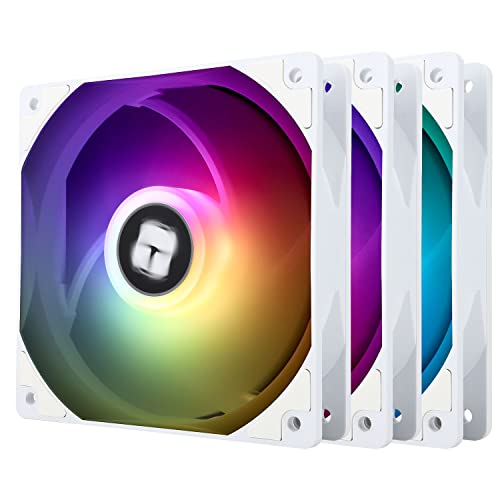
Thermalright TL-C12CW-S X3 66.17 CFM 120 mm Fans 3-Pack (TL-C12CW-S X3 D6)

Thermalright TL-S12W X3 47.6 CFM 120 mm Fans 3-Pack (TL-S12W X3)
No it's fine
Only reason I wouldn't use a fan made in the last 5 years is it's broken or loud as hell
Also if you're very very noise sensitive
https://pcpartpicker.com/product/t7sV3C/thermalright-tl-b14-825-cfm-140-mm-fan-tl-b14w-d6

Thermalright TL-B14 82.5 CFM 140 mm Fan (TL-B14W D6)
potent portal
Front
And the one that's in front already you can move to the top rear
2 or 3, your choice. 3 would look better imo.
No not really
 graceful cargo
im building my first gaming pc, could someone help me?
my budget is $1140
and im in doubt when it comes to my CPU
which is best? AMD Ryzen 5 7600X, AMD Ryzen 5 6500X or AMD Ryzen 5 7600?
mossy venture
graceful cargo
which is best? AMD Ryzen 5 7600X, AMD Ryzen 5 6500X or AMD Ryzen 5 7600?
I can do you one better and make a whole list, but id have to ask some questions first
graceful cargo
mossy venture
I can do you one better and make a whole list, but id have to ask some questions...
i would love that
mossy venture
And I would do the 7600. 6500x isn't a thing, and 7600x is only 1-2% better than the 7600, and doesn't include a stock cooler
mossy venture
graceful cargo
i would love that
What country are you buying in, and if the US do you know if there's a microcenter nearby?
Any preference for size/aesthetic (rgb, black, white, etc,) what's the pc being used for, do you need wifi or are you using ethernet, and do you already have a monitor?
graceful cargo
mossy venture
What country are you buying in, and if the US do you know if there's a microcent...
I'm from Brazil, but i will travel to the US
mossy venture
Ah ok
graceful cargo
mossy venture
Any preference for size/aesthetic (rgb, black, white, etc,) what's the pc being ...
i need something that i can fit in my lugagge and im going to use my pc for playing games
im using ethernet
and i already have a monitor
graceful cargo
graceful cargo
i need something that i can fit in my lugagge and im going to use my pc for play...
suitcase*
mossy venture
graceful cargo
i need something that i can fit in my lugagge and im going to use my pc for play...
That might be difficult but I'll see what I can do
graceful cargo
like, medium size
mossy venture
Alright, I'm gonna make a few options
graceful cargo
thanks :)
mossy venture
https://pcpartpicker.com/list/W9mMWt
Here's one, but it goes over $1140 with tax
Part List - AMD Ryzen 5 7600, Radeon RX 7800 XT, BitFenix Nova Mesh M ARGB MicroATX Mini Tower
So I figured you'd want it cheaper
graceful cargo
yeah, i need it a little cheaper
so that i can use the rest of the money for my mousepad, headphone and maybe a keyboard
mossy venture
This is a good bit cheaper
https://pcpartpicker.com/list/t2cDRK
Part List - AMD Ryzen 5 7600, Radeon RX 6800, BitFenix Nova Mesh M ARGB MicroATX Mini Tower
And one more coming up, maybe 2
Ok one more after this, this is again cheaper and the case is a bit smaller I believe
https://pcpartpicker.com/list/Ww2s34
Part List - AMD Ryzen 5 7600, Radeon RX 6750 XT, GameMax M60 MicroATX Mid Tower
graceful cargo
okok
mossy venture
Part List - AMD Ryzen 7 5700X, Radeon RX 7900 GRE, GameMax M60 MicroATX Mid Tower
The cpu, mobo, and case are using neweggs combo up savings
And the ssd is free with the cpu
 weary galleon
For fitting in a suitcase I gotta plug the SAMA im01
mossy venture
12700kf is also $215 with b760 ds3h with the combo up savings
mossy venture
weary galleon
For fitting in a suitcase I gotta plug the SAMA im01
Oos
Oh open box works
Great case choice ^, m60 and bitfenix whatever it is I linked are fine as well though. Im01 I think is the smallest of the three
weary galleon
Or the pro, bit more expensive tho
https://www.newegg.com/black-sama-im01-micro-atx-mini-itx/p/2AM-009W-00034?Item=9SIB41TJWF0977
mossy venture
mossy venture
https://pcpartpicker.com/list/vtDRmD
Get this
There is just one other option I'm pricing out rn
graceful cargo
ok thx
mossy venture
If you dm waiting a few more min
graceful cargo
i have an idea actually
mossy venture
This is with the 12700kf + b760 ds3h for $215 with the newegg combo builder
https://pcpartpicker.com/list/ZQJ3YN
Part List - Intel Core i7-12700KF, Radeon RX 7900 GRE, GameMax M60 MicroATX Mid Tower
graceful cargo
i can save the case money and spend it on the rest of the pc
mossy venture
I wouldnt really bother
graceful cargo
and i buy here in brazil a case, so that i wont be careful with the size
mossy venture
mossy venture
This is with the 12700kf + b760 ds3h for $215 with the newegg combo builder
htt...
This will come up a good bit under $1140
mossy venture
Only reason spending more would be worth it is getting on am5
weary galleon
Yeah buying case locally is definitely something to consider
graceful cargo
Intel Core i7-12700KF 3.6 GHz 12-Core Processor this thingy
im new with this, so im not good with pricing
but im really suprised
lol
weary galleon
215 for cpu + motherboard is great
Personally (assuming this is primarily for gaming) I'd probably drop to 16gb ram and try to fit in a 2tb ssd
mossy venture
I wouldnt
graceful cargo
like, i'm not a HUGE gamer, i dont need a pc that can play GTA 6 and Elden Ring all in once
mossy venture
16gb ram is more limiting than 1tb of storage, and storage you can add to. Ram most of the time you'd just replace
mossy venture
graceful cargo
like, i'm not a HUGE gamer, i dont need a pc that can play GTA 6 and Elden Ring ...
We can do cheaper if you'd like to
I was aiming for around the $1000 mark
graceful cargo
im just saying that, idk what part is responsible for the memory
but i dont need a lot of that
mossy venture
Reddit
Explore this post and more from the buildapcsales community
weary galleon
16gb ram more limiting than 1tb...? Maybe if you have gigabit internet I suppose. Games are huge these days
graceful cargo
mossy venture
The money saved I'd invest in a good monitor
what the monitor do to make the build better?
mossy venture
If your build can produce high fps at 1440p, and you're using a low quality 1080p 60 hz monitor, what's the point of getting such a nice pc
weary galleon
Transporting a monitor via air sounds like a nightmare to me, maybe another thing to try locally
graceful cargo
mossy venture
If your build can produce high fps at 1440p, and you're using a low quality 1080...
ooh, now i get it
mossy venture
weary galleon
Transporting a monitor via air sounds like a nightmare to me, maybe another thin...
That's true
graceful cargo
yeah, im in NEED of a better monitor
graceful cargo
weary galleon
Transporting a monitor via air sounds like a nightmare to me, maybe another thin...
yeah
mossy venture
Even if it meant downgrading the gpu a bit to get a 1440p 144hz+ IPS monitor, I would
graceful cargo
you're right
mossy venture
6750xt, 6800, 7700xt, and 7800xt are all 1440p capable gpus. 6750xt, 1080p 144hz+ wouldn't be a bad idea
graceful cargo
im going to buy my monitor and case locally
graceful cargo
mossy venture
6750xt, 6800, 7700xt, and 7800xt are all 1440p capable gpus. 6750xt, 1080p 144hz...
i dont know what that mean

graceful cargo
can i DM you so that i dont lose this building pc angel?
its a bit late here in Brazil
so i will eat and then sleep
can i chat with you tomorrow?
mossy venture
graceful cargo
can i DM you so that i dont lose this building pc angel?
Sure
vale epoch
So i was at microcenter earlier and was recommended a few cases by the salesman there wondering if these are worth it or not


 vale epoch
So i was at microcenter earlier and was recommended a few cases by the salesman ...
vale epoch
vale epoch
So i was at microcenter earlier and was recommended a few cases by the salesman ...
I was planning on using the montech 903 base

A Mid-Tower Case Designed for both Air and Liquid Cooling 360mm Radiator Support at the Top and Front 180mm Height for a Top-Class Air cooler Innovative Mesh Front Panel for the Best Cooling Performance High-Performance HP140 PWM Fans Support for Vertical GPU Mounting Ample Space for Flagship 409...
mossy venture
vale epoch
https://a.co/d/2pX4gzY
903 base is solid, if you're fine with rgb phanteks xt pro ultra is $70 and comes with 3 140mm fans and 1 120mm fan
And it looks really nice
Those cases recommended aren't necessarily bad, just overpriced for what you get
Some other options include g360a, sky two, nv5, king 95
vale epoch
mossy venture
903 base is solid, if you're fine with rgb phanteks xt pro ultra is $70 and come...
So the 903 base has 3 140mm fans 2 in the front and 1 in the back is that enough cooling?
If i dont add exhaust fans on the top
The king 95 has piqued my interest tho
mossy venture
vale epoch
So the 903 base has 3 140mm fans 2 in the front and 1 in the back is that enough...
I don't believe it has that many
Does it?
I was taking about the xt pro ultra
And yes that's plenty of fans
2 is bare minimum, 3-5 you're chilling
Any more is just excessive
King 95 doesn't come with any fans, but thermalright c12c 3 pack is $13
Grab two of those and you'll have a good (and cool looking) build
 tawny violet
Have you ever had issues with the lighting doing it's own thing and randomly switching away from the setting you chose?
I'm likely gonna get one of them myself, but I heard some people have issues with the controller
potent portal
Isn't that just about every RGB thing ever
tawny violet
TBF I'm just gonna connect the controller to mobo and not bother
Plug all the fan lighting connectors into the controller, switch it to mobo control and be done with it
if it gets screwy and switch things, it'll switch all of them at least
tawny violet
potent portal
Isn't that just about every RGB thing ever
Read some people have issues specifically with the Air X controller just deciding to no longer obey mobo commands
potent portal
That still sounds like something I've encountered on every RGB controller I've owned, including the motherboard itself.
 glacial spire
Hi good people! Soon I'll build my first gaming PC. Now, everything about the process is clear to me except one thing: Fans.
I'm sure these questions might sound stupid to most of you but bear with me. I'm gonna build on a lian LI o11d evo with 10 fans configuration (3 top w/ an AIO cooler, 3 front, 3 bottom and 1 rear). Considering the number of fans my first doubt/question is:
Do motherboards have all the necessary pins for all 10 fans? (For instance I'm going with a b650e or x670e mobo)
Is it necessary to use a hub?
And last question, do I have to use the same brand and model for all fans??
 sudden jewel
It may not be necessary to use a hub depending on the number of headers on the motherboard. But usually you can daisychain 3-4 fans together. You just need to check what the header can support
For AIO if I’m not mistaken you’ll want fans with higher static pressure. For the others, Thermalright has some good cheap options. I’m not sure about mixing fan models, though I don’t think it would be a problem, just not sure how that would work with daisychaining.
The number of fan headers should be listed in the specs. Usually they’ll have at least 3-4 headers which would work fine if you’re able to daisychain
glacial spire
sudden jewel
It may not be necessary to use a hub depending on the number of headers on the m...
Thanks Seth for clearing part of my doubts. I didn't know about chaining fans which makes sense thinking about it. Hopefully someone will answer my question about mixing models, the reason being that I was looking to put non RGB in the bottom and rear, and something more "fancy" in the front and top side.
sudden jewel
Yeah, that should be totally fine. They will be all controlled through the mobo, and I think there’s free software that can sync RGB etc
Also there’s usually multiple RGB headers, and usually you can daisychain those as well
burnt bough
https://youtu.be/5ZQDFtRn4Z8?si=k8Y-Rwcrqq1IN4j_ any one have another solution for this problem? I try everything with my new 6800xt

 molten rune
Hey, friend's having an issue with his comp not booting past bios.
Only has an NVME drive
Getting error code A9 on an Asus rog crosshair dark hero
Currently showing no size attached in bios, the short self test result showed no gigs
Ideas?
WHEA uncorrectable error was mentioned
My first thought was to check and see if it recognized anything in boot priority at all
Tried getting him to check a bootable (flash) drive but after swapping it to that, apparently that was the first time it had since even recognized the m.2 drive at all since the failure.
Not sure if it was related, but this was after installing Ace Combat, trying to close out of windows explorer after going to firefox
cyan ravine
molten rune
Hey, friend's having an issue with his comp not booting past bios.
Only has an N...
A9 is just bios
molten rune
Apparently 2 weeks ago they had had a similar failure, rebooting did fix it the
cyan ravine
molten rune
WHEA uncorrectable error was mentioned
Problem ram
molten rune
cyan ravine
Problem ram
I suggested trying to boot one stick
molten rune
Checking it now after the self test on M.2
Noted
Let me look up where to change that setting in Asus bios
cyan ravine
Whea error is ram or fclk and specifically only related to these
Reset ram, change ram
Change fclk under ai tweaker next to docp
Reseat cpu
Things like that
Turn off xmp
cyan ravine
You want the 2nd and 4th slots away from the cpu filled
cyan ravine
You can try 1 and 3 if it's better then yeah odds are it's a dead slot or memory controller channel
But 2 and 4 is ideal
Esp. on am5
cyan ravine
Am4 ye
molten rune
cyan ravine
1800
Changing from auto to 1800
If it was 3200 should we try 1600
It's saying current target is 1600
molten rune
Dram voltage flat 3500
cyan ravine
It's to test
cyan ravine
molten rune
Dram voltage flat 3500
Sorry?
cyan ravine
Ok I could tell that was probably what he meant
But I wanted to be sure
Just do fclk 1200
Try again
If not better, try other slots
If not better, it's possibly overclock settings
If still not better, probably dead slot or ram
cyan ravine
Mhm
molten rune
I think that's f10
Bios again -- checking to see if it recognized the drive
Still showing total size 0
Stick swapping next?
cyan ravine
What slot is the m.2 in
cyan ravine
Try the other ram slots
molten rune
Try that next?
cyan ravine
Turn off all oc
cyan ravine
Ye
molten rune
Trying to explain it lul
cyan ravine
All good
cyan ravine
They shouldn't be at 1.35v
cyan ravine
molten rune
Like warmer than phone in sun
Kinda ok
molten rune
I mean like physically warm but yeah
cyan ravine
Ik
molten rune
Sorry on mobile data
cyan ravine
All good I'm watching a video
molten rune
Dropping voltage to 1.25 as well, solo boot on 2 didn't work
Or at least-- went straight to bios, fastboot off
Error code 20