#building-and-recc-chat
1 messages · Page 251 of 1
 reef moss

 crimson zinc

Montech AIR 903 MAX, E-ATX Mid Tower Case, High Airflow, 3X 140mm ARGB PWM & 1x 140mm PWM Fans Pre-Installed, Tempered Glass Side Panel, Mesh Front, Type-C, Support 4090 GPUs, White


Just Amazon prices there
reef moss
What's the max b and max w difference?
crimson zinc
If you like good looking cases

This is a cheap case at the moment with a rebate at Newegg. Really high quality case. @cyan ravine actually showed me this a while ago
reef moss
Is this a better ssd for me to upgrade to?
crimson zinc
If you can ever find this in stock, this is probably the best case for just about anything.
 reef moss
crimson zinc
If you can ever find this in stock, this is probably the best case for just abou...
reef moss
crimson zinc
If you can ever find this in stock, this is probably the best case for just abou...
Do they have it in black?
WD_BLACK 2TB SN850X NVMe Internal Gaming SSD Solid State Drive - Gen4 PCIe, M.2 2280, Up to 7,300 MB/s - WDS200T2X0E https://a.co/d/5JRm7Z2

Strap in for breakneck gaming speeds with the WD_BLACK SN850X NVMe™ SSD. Crush load times and slash throttling, lagging, and texture pop-ins for a smooth, fast experience that lets you compete at your absolute peak. This purpose-built gaming drive comes in capacities of 1TB to 4TB(2), with an opt...
reef moss
reef moss
Is this a better ssd for me to upgrade to?
Also this^
crimson zinc
crimson zinc
reef moss
WD_BLACK 2TB SN850X NVMe Internal Gaming SSD Solid State Drive - Gen4 PCIe, M.2 ...
I’m not an expert on ssds yet, so ask fal about that
 potent portal
crimson zinc
For some reason it costs $15 to make it white<:kekw:741678350791081994>
potent portal
crimson zinc
For some reason it costs $15 to make it white<:kekw:741678350791081994>
White tax™️
reef moss
Oh fallllll
crimson zinc
potent portal
White tax™️
 potent portal
Everything costs more when it's white
reef moss
potent portal
Everything costs more when it's white
Need better ssd to upgrade to 
Or.... want
potent portal
WD is good as far as quality but not so good for value
reef moss
Reccomendations?
potent portal
You were in the US?
reef moss
Yeah
potent portal
one sec
reef moss
I have a teamgroup 1tb create rn
crimson zinc
This is my recommendation
 reef moss
How fast is that one?
 mossy venture
reef moss
I have a teamgroup 1tb create rn
mossy venture
reef moss
I have a teamgroup 1tb create rn
Grab mp44l or gm7000 for 2tb
reef moss
Baccaaa
crimson zinc
^ that
reef moss
mossy venture
Grab mp44l or gm7000 for 2tb
I built what you helped me with by the way!
I changed the cpu and motherboard but kept the rest
mossy venture
Nice
reef moss
Added to cart (gm7000)
potent portal
If you want something top tier, comparable to the SN850X, https://www.amazon.com/dp/B09F5W62N8

NEW GENERATION GAMING SSD EXCEEDS SPEED LIMITS The Predator GM7000 M.2 SSD removes the speed limits for gaming (with up to 7400 MB/s read speed) and offers up to 2 TB in capacity. It’s a feature-packed SSD using PCIe 4.0, a 12 nm flagship 8-channel controller, independent DRAM cache, 4 K LDPC Err...
Yeah that GM7000 is excellent
reef moss
I'll buy it next week
I play so much modded Mc
And I plan on starting to steam just chatting and some big games
potent portal
This is the kind of drive we would typically recommend for someone that's doing 8k video editing and needs to scrub at 10x speed real time
potent portal
Definitely
reef moss
Any reccomendations for good mouse / keyboard combos? I like fast quite keys
 south cliff
mouse is kinda preference
potent portal
Keyboard I'd recommend building, mouse is 100% personal preference
reef moss
Oh really?
south cliff
you can make a good one for like 100 something dollars
reef moss
And you can build a keyboard? What??
south cliff
a really good sounding one
yeah im no expert but ive seen some videos they are simple like builiing a lego
reef moss
That's crazy
south cliff
if you built your pc you can build a keyboard
potent portal
Yeah you can get a barebones kit that you can hotswap keys (meaning you don't need to solder) and throw some speed silvers or something on there with your keycap of choice
south cliff
yeah lookup some videos of diffrent switches to see what ou like
reef moss
I'll have to give into this on YouTube before I feel confident doing a build lol
south cliff
you should be able to its not really hard
potent portal
If you do hotswap it's really easy. Put a dab of lube, place it in the slot, put keycap on
south cliff
yeah
 potent portal
What kind of mouse do you prefer? I'm more of a heavy mouse with a claw grip myself, so the G502 hero is perfect for me
reef moss
I was scrually just looking at one of those at mijers earlier
I like heavier claw grips
south cliff
I use G402 I like having all the house buttons
reef moss
But I have a cheap razer right now
mossy venture
reef moss
Any reccomendations for good mouse / keyboard combos? I like fast quite keys
Kone pro is cheap and good, but yeah it's personal preference
For quality level of a custom keeb, keychron
Not quite as good, but still great
 elder arch
can anyone send me a pc build thats around 400-600 dollars?
potent portal
Gaming? Just the PC or anything else included?
 dusky hearth
they said gaming
idk if they wanted peripherals with that budget as well though
i would assume so since their budget is that low lmao
mossy venture
Part List - AMD Ryzen 5 5500, Radeon RX 7600, Phanteks Eclipse G360A ATX Mid Tower
Part List - AMD Ryzen 5 5600, Radeon RX 6600, Phanteks Eclipse G360A ATX Mid Tower
 honest knot
that rx 7600 build lookin real good
mossy venture
5500 meh
potent portal
Part List - AMD Ryzen 5 5600, Radeon RX 6600, Cooler Master MasterBox Q300L MicroATX Mini Tower
Similar
potent portal
You can tell by turning fans up and down manually to see if the noise changes
 manic cloak
True
I’m gonna uh stress test first
But could you send me that software again for the fan stuff.. never got to it lol
potent portal
Fan Control?
manic cloak
I have V181
manic cloak
@potent portal So right now fancontrol only identifies my cpu fan as fan 2 and my case fans at fan 4
there are no separates, no fan 1, 3, or 5
Also if I do uninstall Armory crate what should I install to subsitiute for it?
Cause it seems like I need to uninstall it for my fancontrol to work, and i'll need a rgb changer for the fans
potent portal
Openrgb
And if your fans are only occupying 2 headers on the board then that would make sense, which often happens if you have daisy chain fans or a hub
manic cloak
potent portal
And if your fans are only occupying 2 headers on the board then that would make ...
Ya because my 205 case had a fan hub I believe with just one wired all together in just one slot, then my cpu is connected to the board.
so should I just uninstall armory crate?
potent portal
Then you can consider them as fan groups instead of individuals
I'd uninstall it, Asus likes to spy on you and steal some of your precious CPU cycles
It's not the worst program, but there's better
It could be worse, you could have iCue
manic cloak
hmm and does openrgb work for the asus motherboard lighting too? if you know
manic cloak
should be lol
potent portal
It's the program that's the closest to being able to unify every brand of RGB control into one interface
Even keyboard/mouse
manic cloak
alright
@potent portal Sorry for ping but the fancontrol can't identify my gpu fans..
potent portal
Can't identify or can't control?
If there's a rpm reading but it's giving some error, something is interfering like afterburner
manic cloak
potent portal
If there's a rpm reading but it's giving some error, something is interfering li...
Ehh i'll try to find it but I can't get control of my case or gpu fans.
Cpu is detected
potent portal
If it can't read the rpm even then it might need a plugin
potent portal
Is the header the case fans are on set to pwm mode?
potent portal
Bios
potent portal
Then that would make it unable to control anything on the hub due to how hubs work
manic cloak
Alright well time to visit bios :)
potent portal
Most of the time the CPU will default to pwm and others dc
manic cloak
What about my gpu fan though?
potent portal
What model? I'll check for a plugin if you can't find anything interfering
manic cloak
7800xt sapphire pulse
Oh
Well
Looks like deleting armory crate identifies my case fans
potent portal
Yeah that interferes too
manic cloak
Only issue is the fans don't stop spinning when set to 0
for case
so definitely a bios trip
potent portal
Yeah if they're not accepting the commands right then you should change the mode
manic cloak
They accept commands like 100% fan speed n etc, but when put to like 0-5%, they don't listen
so in asus bios where would I go?
potent portal
Not too familiar with Asus bios, but it's usually system monitor or whatever menu you set fan curves
potent portal
Not in bios
manic cloak
Hm
potent portal
Think of the GPU as a separate computer inside your computer
The bios can't control it, only identify it
The GPU has its own bios, and you use the drivers to communicate with that
manic cloak
Mhm, mb for not specifying but i mean like anything with the gpu though? Plugins or perhaps not supported?
Ag
Ah*
potent portal
Oh, we'll check for other interfering programs when you get back to Windows
I'm not at my PC yet
manic cloak
Alright I got to bios
I found monitor
And it gives me a choice of monitor or ignore fan speed

 strong raft
Cpu Fan is generally the only 1 set to ignore, mainly for certain aios that don't have an actual fan cable go to cpu_fan
manic cloak
strong raft
Cpu Fan is generally the only 1 set to ignore, mainly for certain aios that don'...
I have a air cooler
No AIO 😭

Change anything?
Well I set all to PWM mode, refuses to stop.
The cpu doesn’t even do it
strong raft
I have cpu fan stop enabled and mine don't, idk why.
 cyan ravine
probably the fan type
cyan ravine
some don't have 0 rpm enable

 manic cloak
cyan ravine
it's all a preference thing
manic cloak
cyan ravine
it's all a preference thing
i'd like my parts not to overheat is all 😭
cyan ravine
my peak temps are 77C so I set the max fan just below that
and my idle is about 50-ish so I keep the fans low for that
manic cloak
mhm
manic cloak
😭
cyan ravine
it's something you do case-by-case for best results
there's no cheat sheet for this
just open up like, occt stress test, do avx2 small steady extreme all cores
cpu test
adjust accordingly
similarly for gpu
run a gpu test
adjust to your preference
there's no one shoe fits all scenario
manic cloak
I don't think I have a cpu stress test aside from spymark
cyan ravine
go download occt then
manic cloak
@cyan ravine how do I uh.. check the data?
cyan ravine
?
 royal delta
Unsuccessful…
 covert vapor
I feel like this is too much bend for the aio. Thoughts?
 potent portal
covert vapor
I feel like this is too much bend for the aio. Thoughts?
potent portal
covert vapor
I feel like this is too much bend for the aio. Thoughts?
As long as the tube isn't kinked it's fine
 proven salmon
Hay I have a friend that just finished his build but when he tries to exit bios by pressing f10 to start his window setup it just keeps on going back to the bios. Is there another option to exit bios?
 little osprey
Does anyone know the best monitor for esports gaming in the $400 range? Cannot be more than $420
looking for like 400 hz
or some thing
potent portal
little osprey
looking for like 400 hz
Either of these would do https://pcpartpicker.com/products/compare/rVVmP6,RGdG3C/
Acer XV252Q FBMIIPRX 24.5" 1920 x 1080 390 Hz Monitor vs. Asus ROG Strix XG259QN 24.5" 1920 x 1080 380 Hz Monitor
They're quite similar overall (the asus in this comparison is the 360hz model, but the same otherwise) https://www.rtings.com/monitor/tools/compare/acer-nitro-xv252q-fbmiiprx-vs-asus-rog-swift-360hz-pg259qn/26161/17390?usage=3623&threshold=0.10

RTINGS.com
The Acer Nitro XV252Q Fbmiiprx is slightly better for gaming than the ASUS ROG Swift 360Hz PG259QN. The Acer has a slightly faster refresh rate and better motion handling overall, with less blur behind fast-moving objects. The Acer also has better ergonomics, so it's easier to place it in an ideal viewing position. The ASUS is a bit better than ...
manic cloak
When I tab out of games like CS, or even minecraft, fort, etc, the whole computer gets REALLY slow
and it might fix itself or I have to restartr
potent portal
That's usually drivers, sometimes the GPU itself
manic cloak
ah
potent portal
If you press win+alt+B it resets the video drivers, but if you have a game running it might crash
mossy venture
manic cloak
and it might fix itself or I have to restartr
Playing windowed full screen has worked for me, but not all games support it
 obsidian wigeon
no
 fossil cedar
 muted shore
are there cpu drivers that need to be installed?
muted shore
are there cpu drivers that need to be installed?
No but there are motherboard chipset drivers
Go to amds site and there's an auto driver thing which will grab them for you
 maiden mauve
I have an old Antec 900 ATX mid tower ( https://www.newegg.com/p/11-129-021?item=11-129-021&Tpk=11-129-021 ) that I'm wanting to use on a new build, NewEgg customer service has verified the motherboard ( https://www.newegg.com/asus-rog-strix-z790-a-gaming-wifi-ii/p/N82E16813119663?Item=N82E16813119663 ) and cpu ( https://www.newegg.com/intel-core-i7-14700k-core-i7-14th-gen/p/N82E16819118466?Item=N82E16819118466 ) will fit but they were uncertain of the liquid cooler I had picked out ( https://www.newegg.com/deepcool-liquid-cooling-system-lt720/p/N82E16835856234?Item=N82E16835856234 ). I know this is a stretch because there probably aren't a lot of people still using this case, but would anyone have an idea if I would have clearance issues? I do have a fan installed in the door of the case. I was planning on using a 4070 super as well ( https://www.newegg.com/zotac-geforce-rtx-4070-super-zt-d40720h-10m/p/N82E16814500573?Item=N82E16814500573 ). It may not be worth re-using the case, it's been a great one. Thanks...
mossy venture
That would not support a 360mm aio
What are you using the pc for?
If you're gaming, I wouldn't get the 14700k, it's poor value
14600k, 7600x, or 7800x3d would be better choices, and that mobo is really overpriced
maiden mauve
Thanks, I just tossed a few things in the cart, I mostly game (WOT Blitz mainly). I may be better off buying a pre-built system. I'm still running an old Asus Rampage III MB with an i7 950 3.07 and a GeForce GTX750., so it's been awhile since I've upgraded or built anything.
mossy venture
maiden mauve
Thanks, I just tossed a few things in the cart, I mostly game (WOT Blitz mainly)...
What's your budget to upgrade?
Also, what monitor are you on?
maiden mauve
1500-2k budget and I currently have a Samsung UE510 28"
mossy venture
The mp33 is free with the cpu on newegg
https://pcpartpicker.com/list/2K2Yz6
Part List - AMD Ryzen 5 7600X, GeForce RTX 4070 SUPER, Antec Nine Hundred ATX Mid Tower
And you could get a case upgrade for $50 if you'd like

Phanteks XT PRO ATX Mid Tower Case (PH-XT523P1-BK01)
Could spend more if you'd like to, but that'll get what you need done and then some
I would recommend a monitor upgrade though, I included one in the list
The monitor you have is 4k, but its a TN panel, which has poor image quality
maiden mauve
thanks for your time, I guess I hate to toss something like the 900 when it's been a hell of a case...heck, I'm still using a Logitech G15 because I can't stand to part with it 😄 . Yes, I knew my monitor had some restrictions.
proven salmon
Hay I have a friend that just finished his build but when he tries to exit bios by pressing f10 to start his window setup it just keeps on going back to the bios. Is there another option to exit bios?
 stoic island
proven salmon
Hay I have a friend that just finished his build but when he tries to exit bios ...
stoic island
proven salmon
Hay I have a friend that just finished his build but when he tries to exit bios ...
First, is windows installed?
proven salmon
Don’t think so
stoic island
Then you need to install windows first, if the usb with windows installation media is already plugged in, you might need to check the boot order to make sure it tries to boot to the windows usb first.
proven salmon
Alr thx
proven salmon
stoic island
Then you need to install windows first, if the usb with windows installation med...
The windows usb is in the first boot option but it still doesn’t work
 hearty cairn
Hey guys, I’m currently in the market to build a new PC, and this will be the first PC that I build on my own.
I have a list of parts that I think I want, but I would appreciate your feedback on anything I might be missing, other than the CPU thermal compound. I believe I need a fan splitter/hub and would welcome your recommendations. If you notice anything else that I’m missing, please let me know. Thank you very much. https://newegg.io/61cc1e5
stoic island
proven salmon
The windows usb is in the first boot option but it still doesn’t work
On the USB end, can you double check that the USB is formatted to fat32? On the computer end, is there anything that shows up before it goes back to bios?
stoic island
hearty cairn
Hey guys, I’m currently in the market to build a new PC, and this will be the fi...
Well, to start, everything is on the overpriced end, are there any reasons for each of those choices or would you be fine with swapping out most of the parts for cheaper versions that practically functions the same?
proven salmon
stoic island
On the USB end, can you double check that the USB is formatted to fat32? On the...
There was one time it showed a yellow text but didn’t get a chance to read it
I’ll tell him to double check the format thing
Checked and yes it’s in fat32
manic cloak
mossy venture
Playing windowed full screen has worked for me, but not all games support it
@potent portal still happening.
 cursive wharf
manic cloak
cursive wharf
manic cloak
I assume you DDU'd but did you also attempt OS fix?
Set RAM to lowest common JEDEC in BIOS (DDR5 4800MT/s or DDR4 2133MT/s). In admin CMD run CHKDSK /scan, if it finds "offline based" errors then run CHKDSK /f (requires restart), then no matter what CHKDSK says run SFC /scannow && DISM /Online /Cleanup-Image /CheckHealth && DISM /Online /Cleanup-Image /ScanHealth && DISM /Online /Cleanup-Image /RestoreHealth && SFC /scannow.
little osprey
Can someone here help me put a PC build together? My budget is $1600
mossy venture
little osprey
Can someone here help me put a PC build together? My budget is $1600
what're you using it for? do you need wifi? Is this just for the pc, or does the budget includ anything like monitor, keyboard, mouse, etc?
also im assuming the US, but if not what country?
(sorry for so many questions)
do you care about aesthetics at all, or just functionality
oh last question, is size an issue, or doesn't matter
little osprey
I'm using it for gaming mainly. Yes, I will need WiFi since I don't live next to my router. While the majority of the budget should go towards the PC itself, I also will need a cheap (but quality) mouse/keyboard combo instead of a basic office mouse and keyboard. My country is the US. I do like the look of RGB but if it saves money it might not matter to me all that much. I like ATX-sized cases.
mossy venture
cool, give me 2 min
mossy venture
first option, $5 over budget https://pcpartpicker.com/list/BhpMdH
Part List - AMD Ryzen 5 7600X, Radeon RX 7900 XTX, Phanteks XT PRO ATX Mid Tower
cyan ravine
2tb good gen 4
mossy venture
the ssd is free with the cpu
can swap gpu as wanted between 4070 super/ti, or 7800xt, 7900 gre, or 7900xt.
cyan ravine
yeah I can see the other option here
7900XT +7800X3D
but change the keeb and mouse doe
little osprey
Kid you not before knowing NOTHING about PC's I was literally about to spend all my hard earned dineros on the Alienware Aurora R16 💀
mossy venture
Part List - AMD Ryzen 7 7800X3D, Radeon RX 7900 XT, Phanteks XT PRO ATX Mid Tower
same gpu options
mossy venture
cyan ravine
but change the keeb and mouse doe
keeb i knew nothing about, whats wrong with the mouse?
i had a good experience with it
cyan ravine
can you verify the switch that's in it
and a good review
if not pick deathadder essential
mossy venture
ill defer to you on this
obsidian wigeon
kone pro is a pretty good mouse, seen reviews
little osprey
BTW this it what I had been cooking with initally but I'm pretty sure its garbage teir: https://pcpartpicker.com/list/zbgQ9c @mossy venture
obsidian wigeon

RTINGS.com
The ROCCAT Kone Pro is an excellent ultra-lightweight gaming mouse. It feels sturdy despite being very lightweight and has a comfortable right-handed shape with ...
pretty good rtings scores
cyan ravine
obsidian wigeon
https://www.rtings.com/mouse/reviews/roccat/kone-pro
more than enough to say it's worth having there
but the keey def change
obsidian wigeon
ye
cyan ravine
steelseries keebs are an L
mossy venture
obsidian wigeon
kone pro is a pretty good mouse, seen reviews
happy bday foxy!
 little osprey
Bacca how would you rate the build I had initally?
crimson zinc
obsidian wigeon
you're one day late but ye
Remind me in 3 months and 22 days to wish you one
little osprey
Is it the AIO?
crimson zinc
It’s everything
little osprey
How about compared to the Alienware Aurora R16
crimson zinc
Mb is unnecessary, aio isn’t needed, etc etc
little osprey
How about THEn?
mossy venture
ram, aio, psu, case, ssd,
cyan ravine
lol if we just say everything you're gonna break this man lol
mossy venture
little osprey
How about compared to the Alienware Aurora R16
better
little osprey
See it is good
mossy venture
the list is
crimson zinc
Just let some of these guys build you something
obsidian wigeon
alienware is pretty poor
crimson zinc
They’re much better
crimson zinc
obsidian wigeon
alienware is pretty poor
I can attest, had an Alienware 14 and it ran like garbage, even when it came out almost a decade ago
cyan ravine
@little osprey my take:
https://pcpartpicker.com/list/fFDT9c
Part List - AMD Ryzen 7 7800X3D, Radeon RX 7900 XT, SAMA IM01 MicroATX Mini Tower
obsidian wigeon
idk why but that sama case here is sold under the name of
cyan ravine
I need to check on switches though
obsidian wigeon
Sama IM THE ONE
cyan ravine
obsidian wigeon
idk why but that sama case here is sold under the name of
it has like 30 names
obsidian wigeon
it's screaming to be bought 
cyan ravine
lol
 little osprey
Can I switch to NVIDIA GPU? I really want to mess around with RTX
Unless it's ovverrated
crimson zinc
That case looks more boring every time I see it
I mean, it works perfectly fine
But it’s bland lmao
cyan ravine
you could do 4070 super
crimson zinc
little osprey
Unless it's ovverrated
Overrated
But ^
Why not 4080 super? @cyan ravine
cyan ravine
that's about as much as I'd recommend from the NV side
obsidian wigeon
And xtx has decent rt
crimson zinc
Oh budget
obsidian wigeon
4080 super is extra money
cyan ravine
4080 super still kinda meh compared to a 700$ 7900xt
little osprey
Could I get a case that has tempered glass panels? I want to be able to see the inside of it
crimson zinc
G360a is $49
obsidian wigeon
then one from bacca
cyan ravine
little osprey
Could I get a case that has tempered glass panels? I want to be able to see the ...
Part List - AMD Ryzen 7 7800X3D, Radeon RX 7900 XT, Montech AIR 100 ARGB MicroATX Mid Tower
oh wait the mobo hold on
crimson zinc
obsidian wigeon
mobo and cooler
cyan ravine
Part List - AMD Ryzen 7 7800X3D, Radeon RX 7900 XT, Montech AIR 100 ARGB MicroATX Mid Tower
cyan ravine
obsidian wigeon
mobo and cooler
single tower is more than fine
cyan ravine
over budget if I do
 cyan ravine
I'm gonna go scan for a better keyboard cos I know this isn't the 100% choice
obsidian wigeon

Thermalright Assassin Spirit 120 EVO DARK 70.4 CFM CPU Cooler (AS120 EVO DARK D6-DE)
dis
proven salmon
Just finished building my pc apart from windows what else do I need? I have an Rx 6600, a ryzen 5 5600 and the pro b550m vc WiFi motherboard
proven salmon
Is that for the motherboard?
cyan ravine
obsidian wigeon
https://pcpartpicker.com/product/khJp99/thermalright-assassin-spirit-120-evo-dar...
meh fan
obsidian wigeon
aw ok
cyan ravine
proven salmon
Is that for the motherboard?
ye
proven salmon
Alr thx
cyan ravine
@little osprey what kind of keyboard do you like
like
what do you want the perfect keyboard to feel like
sound like
@little osprey https://pcpartpicker.com/list/7KwKgB
Part List - AMD Ryzen 7 7800X3D, GeForce RTX 4070 SUPER, Montech AIR 100 ARGB MicroATX Mid Tower
if you wanted to try nvidia
I put a pretty good keyboard in there, kailh box white is supposed to feel nice but it's a clicky keyboard
 inland parrot
Hey, I have an issue, I turn on my pc, it will run then for some time then turn off, then back on again. The CPU and DRam lights are switching back and forth, I tried to use a different ram and it will do the same thing again
cyan ravine
cyan ravine
<@456226577798135808> https://pcpartpicker.com/list/7KwKgB
made it better
obsidian wigeon
Gotta know about the pc's specs too, especially the psu
little osprey
Sorry i was gone for a bit
Let me check
I like it!
What about this: "Warning: The MSI PRO B650M-A WIFI Micro ATX AM5 Motherboard supports the AMD Ryzen 7 7800X3D 4.2 GHz 8-Core Processor with BIOS version 7D77v16. If the motherboard is using an older BIOS version, updating the BIOS will be necessary to support the CPU."
little osprey
Would you say micro ATX is better if I'm worried about making sure i have enough space?
cyan ravine
it's a generic popup from pcpartpicker that they don't address
cyan ravine
little osprey
Would you say micro ATX is better if I'm worried about making sure i have enough...
it's more about maximising your budget
mATX is very powerful in the AMD space particularly
unless you have a specific need for more pcie slots that you should be well aware of by now, you won't need ATX
little osprey
Well TBH I don't really know that much about PC's yet, so I will take your word for it.
I just want a good gaming experience
cyan ravine
the main reasons for ATX died in the last few years
it was practically dead, now it really is dead
unless you do specific things like movie production on a large scale
machine learning and ai
etc
for gaming though, it's long lost it's purpose really
 rain carbon
little osprey
Well TBH I don't really know that much about PC's yet, so I will take your word ...
rain carbon
little osprey
Well TBH I don't really know that much about PC's yet, so I will take your word ...
theres so much to learn its not even funny
little osprey
I'm going to be going to trade school this year to learn computer engineering
cyan ravine
oooo ok
little osprey
I want to have my own business where I make people PC's one day
rain carbon
not to mention certain big companys COUGH COUGH intel go out of their way to make it more annoying as well with parts
little osprey
It's a certificate
rain carbon
i didnt even know you could learn comp engineering at trade tbh
little osprey
I'm planning on getting A+ certified
cyan ravine
go with the 4070 super one
the last one I posted
if we wanted to be extra careful with any software requirements....
one sec
@little osprey https://pcpartpicker.com/list/Zdy3kJ
Part List - AMD Ryzen 7 7800X3D, GeForce RTX 4070 SUPER, Montech AIR 100 ARGB MicroATX Mid Tower
I bumped the ram up to 64gb
should make an excellent engineering system
might be overkill for a certificate though

little osprey
I'm really excited about this experience
cyan ravine
it should be more than enough for a lot of things
great thing about 7800x3d is it's still a good workhorse
albeit a gaming cpu
you can fit a larger ssd if you wanted to swap to 7700 instead of 7800x3d for example, and the system will be a little quieter
Part List - AMD Ryzen 7 7700, GeForce RTX 4070 SUPER, Montech AIR 100 ARGB MicroATX Mid Tower
I'd pin that to your own preference though
it'll be a little slower in games but not much
any further questions lmk, I'll be around later
crimson zinc
@austere condor send that pc to me, I’ll give you $100
Except all in $5 bills
except I have actual questions about your business, pls dm if you’re okay with that
inland parrot
obsidian wigeon
Check for loose connectors
I check there are no loose connections
Let me try to change the motherboard power cable to see if that will work
 molten rune
Apologies about the phone video but obviously I can't record the screen itself internally to show the burnout
molten rune
cyan ravine
any further questions lmk, I'll be around later
Any familiarity with (likely AMD driver/) Monitor weirdness?
It's like a section of the monitor is getting pixel burnout but it goes away on restart / occasionally comes back
that shadowing across the wing is not a difference in lighting
at least not in my room
and i'm 99% sure it's software related because i've seen it do it on multiple monitors
 weary galleon
If it goes away on restart it's probably gpu related
molten rune
it seemingly randomly does this on startup
sometimes yes sometimes no, diceroll of which monitor, usually the corner ones
 jolly riverBOT
DDU (Display Driver Uninstaller) Guide by Pato
https://github.com/NeweggTechie/Graphics-cards/wiki/How-to-use-DDU

GitHub
Contribute to NeweggTechie/Graphics-cards development by creating an account on GitHub.
molten rune
if anything i think it's Adrenalin (AMD's graphic suites)
something about it when i do driver updates brings the issue back
then i dont update it for a while and forget what the issue /fix was in the first place
but after installing new drivers for tekken 8, it's back
weary galleon
Try ddu for a full wipe and reinstall of drivers and see if that helps
molten rune
trying to describe it into google is also no help either because "darkened portion of screen" just gets me dead pixel results

 manic cloak
cursive wharf
I assume you DDU'd but did you also attempt OS fix?
Set RAM to lowest common JED...
manic cloak
cursive wharf
I assume you DDU'd but did you also attempt OS fix?
Set RAM to lowest common JED...
I haven't tried to DDU yet, but i'll try this
But are you 100% certain I should try this before anyhing else?
Also my ram can go as low as 800 if you’d like, but I’ll set to 2133.
So @cursive wharf I hit no corruption on the first SFC and DISM CheckHealth but had a “component store is repairable” on DISM ScanHealth, DISM RestoreHealth is stuck on 62.3% which I don’t know if I should be concerned about lmfao
Oh nvm, it said restore operation was completed. Running SFC.
little osprey
what is a good montitor that at least has 1440p and 165hz average with the best budget possible.....I'm preferebly looking for a curved monitor. I saw this, thought I'd get some opinions on it. Anything other options would be appreciated. Currently running an RTX4070/5800x3D
https://www.amazon.com/dp/B0C4P2KB9K/ref=twister_B0CXJLW875?_encoding=UTF8

Specifications: Display size: 34 inches Resolution : 3440 x 1440 Brightness (Max): 400cd/m2 Screen technology: VA Response Time: 1ms MPRT Refresh rate: 165Hz Connections: HDMI 2.0*2, DisplayPort 1.4, headphone output Audio input: 3.5mm mini jack Contrast Ratio (DCR): 20000000:1 Contrast Ratio:30...
 bitter mason
little osprey
what is a good montitor that at least has 1440p and 165hz average with the best ...
bitter mason
little osprey
what is a good montitor that at least has 1440p and 165hz average with the best ...
ngl, I'm definitely not the person to ask about monitors, but just wait a little while & I'm sure you'll get a much better answer than I can offer you
mossy venture
little osprey
what is a good montitor that at least has 1440p and 165hz average with the best ...
The main issue with curved is that it's either VA or cheap IPS, so you'll have worse panel quality than a flat monitor
If you're still set on curved, I can take a look
little osprey
see what you can do
mossy venture
https://pcpartpicker.com/product/9F9wrH/msi-g273cq-270-2560-x-1440-170-hz-curved-monitor-g273cq
https://pcpartpicker.com/product/dt92FT/dell-s3222dgm-315-2560x1440-165-hz-monitor-s3222dgm

MSI G273CQ 27.0" 2560 x 1440 170 Hz Curved Monitor (G273CQ)

Asus ROG Strix XG27AQV 27.0" 2560 x 1440 170 Hz Curved Monitor (XG27AQV)

Dell S3222DGM 31.5" 2560 x 1440 165 Hz Curved Monitor (S3222DGM)

Gigabyte G34WQC A 34.0" 3440 x 1440 144 Hz Curved Monitor (G34WQC A-SA)
little osprey
okok
not bad
That gigabyte one 144hz tho
I liked the size however
so with those compared to what I sent. What would be the difference
little osprey
And I'm just now hearing about this, but IPS and VA
Not sure what they are, I'ma do research to get a better understanding, but from the looks of it, if I'm looking for a curved monitor, then there's no question that VA may be the only option
obsidian wigeon
VA is panel type
obsidian wigeon
IPS also another type of display, ya
little osprey
I'm guessing if I'm strictly looking for a curved monitor then VA is the way to go
May not be the best, but it's my only option
If I'm not mistaken of course
From what I'm seeing the IPS curved monitors are basically flat
cyan ravine
molten rune
and i'm 99% sure it's software related because i've seen it do it on multiple mo...
Ye try DDU as to what steve said. The fact it goes away is likely to be gpu related, try also a different display plug on the gpu itself too
 vital magnet
little osprey
I'm guessing if I'm strictly looking for a curved monitor then VA is the way to ...
vital magnet
little osprey
I'm guessing if I'm strictly looking for a curved monitor then VA is the way to ...
i got a VA monitor and works great. People say there are “black spots” and things like that but there’s really no difference. I’ve had many different monitors and my VA is the best one i’ve had
 analog hearth
vital magnet
i got a VA monitor and works great. People say there are “black spots” and thing...
analog hearth
vital magnet
i got a VA monitor and works great. People say there are “black spots” and thing...
Try this HTML file that I just wrote. If you can, compare the test with different panel types
I whipped this file up real quick for educational purposes lol (it's nothing dangerous. I promise. It's strictly just HTML and CSS)
The text should look a lot less detailed and a lot blurrier on VA panels (unless you somehow have a really good VA panel). This isn't very noticeable on IPS panels
analog hearth
I'm also not on a VA panel, so I couldn't test it
I kinda just whipped up this file and just hoped that it would work lol
 lyric thistle
lol
 jagged ember
I don't think I have VA panels to test this either
analog hearth
My brother has a VA panel but I don't want to invade his room
lyric thistle
 lyric thistle
just keep unfolding your z flod
analog hearth
flod
lyric thistle
 crimson zinc

 red oasis
I bought a zotac 4080 a 12vhpwr connector that require 3 pcie cables and a 850w
psu from corsair and only have 2 pcie 8 pin to 2x8 pin and 3 cpu cables 8 pin
cables.
I need 3 pcie cable to go my gpu. What do I do? Can I use the CPU cable since it
looks the same?

These are the remaining ones
 vital magnet
analog hearth
Try this HTML file that I just wrote. If you can, compare the test with differen...
vital magnet
analog hearth
Try this HTML file that I just wrote. If you can, compare the test with differen...
Don’t have a IPS panel with me unfortunately but i’ve used both. Had an IPS before I got my current monitor with a VA panel and prefer my VA
potent portal
red oasis
I bought a zotac 4080 a 12vhpwr connector that require 3 pcie cables and a 850w
...
Use the daisy chain connectors on your PCIe connectors. Corsair cables are plenty good enough to do so.
The CPU connectors have a different pin out and would cause a short circuit if you forced them in
potent portal
vital magnet
Don’t have a IPS panel with me unfortunately but i’ve used both. Had an IPS befo...
Cheap IPS can absolutely be worse than good VA.
vital magnet
potent portal
Cheap IPS can absolutely be worse than good VA.
Understandable, my old IPS was about the same price as my current VA. Same resolution and size but i like my current one better
potent portal
IPS generally costs more than VA so you're comparing lower end to good effectively
vital magnet
potent portal
IPS generally costs more than VA so you're comparing lower end to good effective...
really just depends on brand honestly. You can get an LG 2560x1440 IPS for $300. I’ve never spent over $400 on a monitor so i’m not sure how they compare at price ranges higher than that
mossy venture
You can get good quality 1440p IPS for $200-220

MSI G272QPF 27.0" 2560 x 1440 170 Hz Monitor (G272QPF)
vital magnet
but i’m not a big tech guy, im just going off little research i’ve done prior to buying a product and experience based. As long as i have a monitor with good quality im happy 😂
mossy venture
This would be cheap ips
https://pcpartpicker.com/product/4xWJ7P/gigabyte-gs27q-270-2560-x-1440-170-hz-monitor-gs27q

Gigabyte GS27Q 27.0" 2560 x 1440 170 Hz Monitor (GS27Q)
red oasis
potent portal
Use the daisy chain connectors on your PCIe connectors. Corsair cables are plent...
Thanks. I did it but my pc refuses to post. Everything is lighting up but nothing show on my monitor
strong raft
If using displayport, remove it and use the hdmi cable then restart pc w/ monitor already on. I wouldn't be surprised if you also had a gap in a power cable somewhere anyways. Common thing w/ newbies. No offense. For instance on the gpu itself:
 little osprey
is there a 360 hz monitor thats good? and cheap? 200$ ish?
potent portal
little osprey
is there a 360 hz monitor thats good? and cheap? 200$ ish?
Not anywhere near $200, cheapest is $350. (the $230 one on amazon is suspiciously low so probably a scam, that's normally a $600 monitor)
potent portal
red oasis
Thanks. I did it but my pc refuses to post. Everything is lighting up but nothin...
How long did you wait for it to boot? First POST can take 5-10 minutes to train the memory.
What do the debug LEDs say? There's usually 4 near the big 24 pin cable, and they indicate what part of the POST it's stuck on.
little osprey
potent portal
Not anywhere near $200, cheapest is $350. (the $230 one on amazon is suspiciousl...
what about a 260hz
potent portal
You can get this one direct from Dell for $200, it's 280Hz
https://www.dell.com/en-us/shop/dell-25-gaming-monitor-g2524h/apd/210-bhyc/monitors-monitor-accessories?cjdata=MXxOfDB8WXww&tfcid=39138382&cjevent=bdabd7f8e17011ee82b5007e0a1cb82b&dgc=CJ&publisherid=2993279&publisher=&aff=PCPartPicker%2C+LLC&affid=2993279&aff_webid=3938566&aff_user_id=&gacd=9684992-28463632-5750457-345576786-177846717&dgc=af&VEN1=13502820-3938566--PCPartPicker, LLC&dclid=CKaY9-798YQDFcivOgUdVGkNOg

Dell
Shop the Dell 25" Gaming Monitor (G2524H), featuring a fast IPS display and an overclocked refresh rate of up to 280Hz. Or view all computer monitors at Dell.com.
little osprey
potent portal
You can get this one direct from Dell for $200, it's 280Hz
https://www.dell.com/...
is dell a good brand for gaming?
mossy venture

eBay
Acer XB273 GZ - 27" Monitor FullHD 1920x1080 IPS 280Hz 1ms 400Nit HDMI.
potent portal
They've got good ones
mossy venture
Also a good option, though 1080p at 27"
little osprey
got one one for 1080p, 260hz around $220?
Looking for something with good quality
0.5 ms or lower
stuff like that
potent portal
Don't bother with rated response times, it's all marketing. They use unrealistic situations at unusable overdrive modes.
fwiw the dell is 0.5ms marketed
little osprey
potent portal
Don't bother with rated response times, it's all marketing. They use unrealistic...
and is that dell with internal speakers?
Just need one with that

The 27” ASUS TUF Gaming VG279QM features Fast IPS technology which enables 1ms (GTG) response time for sharp gaming visuals with high frame rates at 280Hz refresh rate (overclocked). Enjoy a super-smooth gameplay with ASUS-Exclusive ELMB Sync Technology which enables motion blur reduction and ada...
Thoughts on this?
$199 like new
potent portal
little osprey
and is that dell with internal speakers?
No speakers on the dell
potent portal
little osprey
Thoughts on this?

RTINGS.com
The ASUS VG279QM is a great gaming monitor. The 280Hz refresh rate delivers exceptional motion handling, with an extremely fast response time, low input lag, and...
little osprey
potent portal
https://www.rtings.com/monitor/reviews/asus/vg279qm
You think I should get it for $199?
potent portal
Seller seems ok to me, could be worth it
potent portal
Florida based business with 888 ratings in a year is sus?
mossy venture
Seems like they consistently mix up models
potent portal
Most of those 1 stars complain about shipping
Up to you if you want to take the chance
little osprey
might never ship 💀
potent portal
At least it's not an obvious scam
mossy venture
Maybe not on purpose, but
mossy venture
mossy venture
https://www.ebay.com/itm/266148050757?mkcid=16&mkevt=1&mkrid=711-127632-2357-0&s...
Is it better than this one?
lyric thistle
 mossy venture
I mean there's also this
https://pcpartpicker.com/product/rMXV3C/acer-vg272u-w2-270-2560-x-1440-240-hz-monitor-umhv2aa201

Acer VG272U W2 27.0" 2560 x 1440 240 Hz Monitor (UM.HV2AA.201)
But iirc the panel quality isn't the best
inland parrot
i found the problem now, it was the ram slots form the motherboard
crimson zinc
@cyan ravine @mossy venture @potent portal I have a task for each of you
I need help from you guys to make a few Etsy options.
Specifically; beginner pc, beefy beginner, mid-level, mid-high level, high end, ultra high end.
I need help with a build list for each of those. No peripherals will be included. Costs ranging from $600 on the low end(1080 style), to $3,000 on the high end(4090 style)
Do you think you could make me lists with the most compatible+trustworthy parts possible?
crimson zinc
I don’t need help on the Etsy end, fiancé has been doing Etsy selling for years.
I just need help making standardized builds for each of those tiers.
potent portal
Oh so these are priced to sell on etsy?
crimson zinc
Yes.
So basically, I would get the order, get ahold of the parts, put it together, then send it to the person. Effectively making prebuilts.
potent portal
And 3000 for a 4090 build is very optimistic, the gpu alone is over 2k
mossy venture
It's around 1800-1850 atm I believe
potent portal
Ah it's gone down a tad then
potent portal
Ok, are we doing the "cheap out where we can get away with it" route?
Storage, PSU, etc
crimson zinc
The most trustworthy, but cheap parts.
mossy venture
Part List - AMD Ryzen 7 7800X3D, GeForce RTX 4090, Phanteks XT PRO ATX Mid Tower
crimson zinc
I don’t wanna get a refund request for a $3000 purchase order because the PSU blew up lmao
mossy venture
Well under budget though
Yeah fair
Swap to gf a3
Pmd is B tier iirc
Part List - AMD Ryzen 7 7800X3D, GeForce RTX 4090, Phanteks XT PRO ATX Mid Tower
Can go to 2tb ssd, nicer case maybe
crimson zinc
Some things I’m looking for;
The second tier of each level having RGB. That’s usually what people spend for.
And trustworthy-ness.
mossy venture
I think this would have better resale value
https://pcpartpicker.com/list/MTmhJy
Part List - AMD Ryzen 7 7800X3D, GeForce RTX 4080 SUPER, Phanteks XT PRO ATX Mid Tower
crimson zinc
mossy venture
https://pcpartpicker.com/list/mrGzgB
This build being the first high end, and the ultra high having RGB everywhere
potent portal
sigh My computer is lagging with just discord and browser open, I'm going to be no help right now
I can't wait for my new processor 
crimson zinc
That’s okay lmao
I have like 3 weeks to set this up
mossy venture
Part List - AMD Ryzen 5 7600X, GeForce RTX 4070 Ti, Phanteks XT PRO ATX Mid Tower
crimson zinc
I’m waiting on a few friends to send me “demo” pictures of their high end rigs for eye candy.
@mossy venture what tiers would some of these go in?
 cerulean plinth
@mossy venture You helped me build a PC on Reddit the other day. This is what you came up with
https://pcpartpicker.com/list/HP2T9c
I've been talking with some people and they say it's a great build, but they would change the PSU and ram to this. What do you think?
https://pcpartpicker.com/list/bbxmHG
If anyone else has some advice as well I would greatly appreciate it thanks
@crimson zinc asking cuz of ur name, would these builds above be Great for destiny 2? (It's the only game I play)
mossy venture
Also looks fine
Both are good iptions, won't really notice a difference either way
cyan ravine
Both are solid
Though I agree with the $5 more for the better psu
Whoever suggested that knew what they were doing @cerulean plinth
muted shore
@cyan ravine


 cyan ravine
ye
muted shore
Okay
cyan ravine
see this number

the last 5 need to match
I believe(????) Samsung C also runs well with Nanya C, could be wrong though
so it's dual rank nanya C
cyan ravine
muted shore
He said 550 better
it doesn't matter as long as it has heatsinks and a bios flash button
if it's missing one or both it's useless to you
muted shore
Yeah okay
cyan ravine
without heatsinks I can't guarantee it's an even semi-decent motherboard, usually the naked ones have poor staging and/or doubling
meanwhile bios flash means the cpu can work out of the box 100% guaranteed
you can't count on the motherboard to be necessarily up to date
I've tried counting on it before and been proven wrong


 cyan ravine
muted shore
cyan ravine
muted shore
not the same one, no bios flash...
no heatsinks
4 pin cpu power and stage doubling
that ticks all the wrong boxes lol
muted shore
Lol bruh
cyan ravine
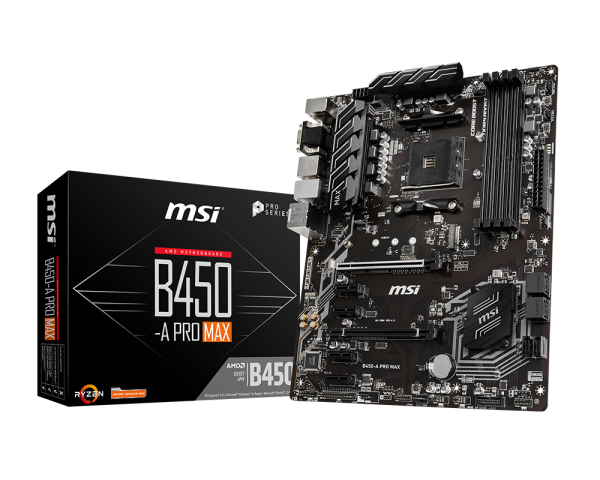
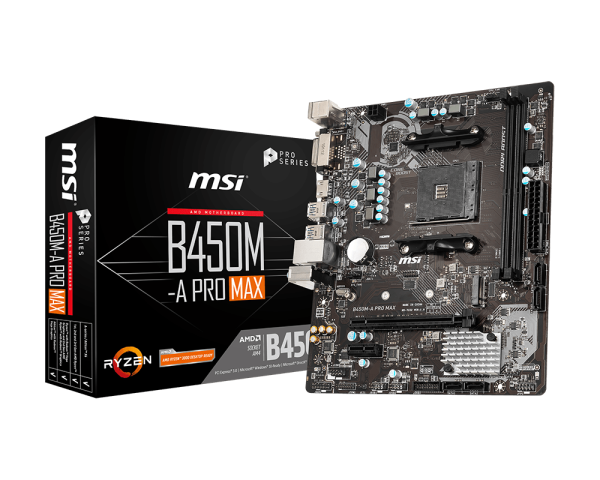
the B450, is the good one
the b450m is the blegh one it seems
should look like this

instead you got this
potent portal
muted shore
B450 vs 550
B550 has PCIe 4.0, which usually doesn't matter
 potent portal
5700X shouldn't use too much power so the lack of VRM heatsinks is unlikely to matter, but it might in the future if you ever decided to upgrade


 potent portal
If you don't have one of those you're crossing your fingers that the bios version installed is new enough
potent portal
Most of the time that doesn't matter for gamers
potent portal
Ah, well in that case you might benefit from a faster SSD using PCIe 4.0 but with the GPU it makes zero difference still
cyan ravine
@muted shore everything else looks correct apart from the motherboard
230V MWE bronze iirc is the full range model (MPG-ACAAG?)
which is the good tier B
potent portal
To verify real quick, you're outside of north america correct?
cyan ravine
india
potent portal
Good
muted shore
 cyan ravine
so far the build looks ok, just waiting on a ram stick and hopefully you can swap the motherboard
potent portal
230V only version would be a major problem in US/CAN
muted shore
Is this psu good?
muted shore
Okay
cyan ravine
you can confirm by sending the sticker on the unit itself
muted shore
 muted shore
Oh okay
Seems fine lol
He just opened the mobo 😞

ASUS Prime B450M II Series motherboards provide the solid foundation needed for your first build, plus flexibility to grow with your ambitions. We've melded all the good stuff that's packed into AMD Ryzen processors with essential ASUS design and engineering, so you benefit from industry-leading ...
Pleas check this one
cyan ravine
vs the one we originally decided? no
but if that asus is your only option it's good enough
just don't upgrade to anything more powerful
5700X is the limit for that board
muted shore
Okay
cyan ravine
don't touch pbo or overclock with it either on that one
muted shore
Yeah I only got 5700x
muted shore
cyan ravine
don't touch pbo or overclock with it either on that one
And on gaming plus max?
cyan ravine
probably can do pbo
muted shore
Pbo?
cyan ravine
much more beefier design
cyan ravine
muted shore
Pbo?
amd's form of easy overclocking
muted shore
Okay
So I should go for gaming plus max then
For better
Cuz they're literally the same price
muted shore
Alright 👍
cyan ravine
just checking
your pc case is atx ye
or is it matx
I can't remember at this point what it was
 muted shore
 cyan ravine
not the b450m version but the b450 ATX version
muted shore
Yes
So I'll go for b450 gaming plus max then
Other than that
Is everything alright
R7 5700x
cyan ravine
so far ye
muted shore
Mwe 650
potent portal
muted shore
Psu sticker
It'll look like this

 potent portal
@cyan ravineACABW
cyan ravine
meh, still ok
I thought all 230V were full range my mistake
but should still be fine
potent portal
Low C, still acceptable for this
 potent portal
At least it won't explode under load
Especially since it likely will never be stressed
potent portal
C tier is perfectly acceptable for lower end parts
Which the 5700X and 3060 qualify as
You'll probably have a peak wattage during gaming of 300W or something, you'll never stress it enough to matter
potent portal
5700X uses 65W and 3060 uses maybe 200W assuming both are loaded 100%, plus the rest of the system
muted shore
Also can you recommend some b550 mobo
muted shore
potent portal
5700X uses 65W and 3060 uses maybe 200W assuming both are loaded 100%, plus the ...
Okay
 lone flame
@potent portal #general-chat message
cerulean plinth
mossy venture
Both are good iptions, won't really notice a difference either way
Do I need to include a copy of windows as well? Not sure how all that works
If so is windows 10 or 11 ideal
muted shore
Can someone recommend a b550 mobo pls
potent portal
muted shore
Also can you recommend some b550 mobo
I'm not too familiar with sites in India so I can only offer general recommendations.
Cheaper full ATX ones with flashback include the Gigabyte B550 UD AC (wifi), Gigabyte B550 Gaming X V2 (no wifi, better board), MSI B550 A-Pro, Gigabyte B550 Aorus Elite AX V2
potent portal
cerulean plinth
Do I need to include a copy of windows as well? Not sure how all that works
Windows is free to use, you just get limited access to the personalization menu. When it asks for the key just press "I don't have this".
11 is more ideal because 10 is end-of-life next year
muted shore
potent portal
I'm not too familiar with sites in India so I can only offer general recommendat...
What do you say
potent portal
Good board
muted shore
Alright
potent portal
Not 100% on price comparing between regions
muted shore
B450 gaming plus max vs gigabyte b550 gaming x v2
Price is not the main concern
It has pcie gen 4 ig
potent portal
Gen 4 slots make it "future proof" which doesn't really matter on AM4 since it's mostly a dead platform
But hey if you wanted to add a 4090 later it would do that about 5% better
muted shore
potent portal
I'm not too familiar with sites in India so I can only offer general recommendat...


Any one of them?
potent portal
Tuf works
Both MSI models in pic 3 work
potent portal
Pro-VDH works
muted shore
MSI gaming plus and msi b550 tomahawk
potent portal
That works well. It's the B550 version of the board I used to use.
It would handle any AM4 processor
potent portal
Basically yes
potent portal
Still has all the basics you need and should support up to a 5950X at stock speeds
potent portal
That would work. You'd lose PCIe 4.0 support and it would support up to a 5900X comfortably for extended workloads.
But it's cheaper as you say
muted shore
How much would pcie 3 mobo affect a pcie 4 ssd
potent portal
You'd never notice a difference
muted shore
So no difference
potent portal
Unless you're copying hundreds of GB from one SSD to another, no perceptible real world difference
potent portal
You could upgrade it to the 5900X easily, or the 5950X if you put a fan near the heatsinks
And any GPU you want to throw at it will be fine too
muted shore
Thankfully both sticks are 8gbit Nanya C die
What is 8gbit Nanya C die tho
Sounds cute
 night rock
Yo guys should I get a rx7800xt and a ryzen 5 7600x I will mainly just play like fortnite and some games
 dry remnant
night rock
Yo guys should I get a rx7800xt and a ryzen 5 7600x I will mainly just play like...
dry remnant
night rock
Yo guys should I get a rx7800xt and a ryzen 5 7600x I will mainly just play like...
AMD cards for whatever reason kinda suck at running Fortnite (as well as blender) so I’d go with the nvidia equivalent, probably a 3080. You can save some money if you get it used as well
Local markets can have some good deals so I’d check fb marketplace
cyan ravine
Can confirm this is true in some situations yeah
7600x also has (or had, I hope it's still going) the free 1tb ssd with it
So would be solid, otherwise I'd do 7600 or 12600K with a matx board and good pcb for said board
crimson zinc
cerulean plinth
<@423224499849134081> asking cuz of ur name, would these builds above be Great f...
D2 runs great on a gtx 1080, you’re gonna be just fine
cerulean plinth
crimson zinc
D2 runs great on a gtx 1080, you’re gonna be just fine
Currently have a
GeForce Rtx 2060
I7 10700f
16gb ram
And I get like 40 fps during Crotas end 😭
Anyways I'm about to buy this today
https://pcpartpicker.com/list/bbxmHG
I don't know much about PCs. Is everything here good to go? Like will everything fit, there's enough space, everything compatible. Do I need thermal paste?
crimson zinc
cerulean plinth
Anyways I'm about to buy this today
https://pcpartpicker.com/list/bbxmHG
I don...
Should be all set. If you want a white case, the g360a has a rebate deal going on.
You’ll be alright. Everything looks completely fine.
cerulean plinth
Idrc about aesthetic. Just want performance. Do you think 32gb ram is enough? Would I ever be able to add more if needed?
I think I might've asked yesterday but I forgot
cerulean plinth
Yeah have a desk I could prolly use a new chair tbh. I have a gt player but it's like falling apart
Have all accessories too
crimson zinc
Good, good.
Just go through a reputable seller for chairs. If you play competitive games, don’t hesitate to get the cooling support ones.
cerulean plinth
I didn't know those existed I might have to get one lol
crimson zinc
They get very expensive, just warning you now lmao
cerulean plinth
Oh actually do you have a recommendation for a curved monitor? I have one In the list but it's not curved
https://aoc.com/us/gaming/products/monitors/c27g2
My current monitor. I really like this one but want an upgrade
crimson zinc
I’d stick with the one in the list. Curved<non-curved.
mossy venture
cerulean plinth
Oh actually do you have a recommendation for a curved monitor? I have one In the...
did i explain to you the downsides to a curved monitor alr?
if yeah then ill take a look and link some
otherwise ill explain first and then you can decide if you still want one
crimson zinc
I’d explain either way
cerulean plinth
mossy venture
did i explain to you the downsides to a curved monitor alr?
Nah I don't think so
Are they bad?
mossy venture
curved panels are either VA or cheap IPS, which means worse image quality, clarity, color accuracy, etc
mossy venture
if you want a larger screen this is solid https://pcpartpicker.com/product/yyTZxr/hp-omen-32q-315-2560-x-1440-165-hz-monitor-omen-32q

HP OMEN 32Q 31.5" 2560 x 1440 165 Hz Monitor (OMEN 32Q)
cerulean plinth
I'll think I'll stick with the 27in as I like my current monitor size
I don't need to apply thermal paste for my build do I?
mossy venture
your cooler will come w some
cerulean plinth
Alright well thanks for all the help
I'll probably be in here a lot when I start building it
cerulean plinth
Should I get protection plans with any of my parts or is it not needed
@mossy venture
cerulean plinth
👍
 gentle pollen
So I am rebuilding my 5700G system and decided to use my Fractal Torrent's built in fan hub. Whenever the PSU is on, the fans spin rather then when the PC is on. Is that normal?
potent portal
You have the fan hub model from after the recall right?
 opal perch
hey - is this good guys? https://www.newegg.com/acer-po3-650-ub91-predator-orion-3000/p/N82E16883101905?Item=N82E16883101905 (if this isn't the place to put this let me know)
cyan ravine
it was good until I read 3050
opal perch
ohh? wdym is 3050 not good for CPU? is there something else maybe that would be better?
cyan ravine
ok @opal perch
let me ask a serious question
how adverse are you to building a pc all on your own
if I told you, you could have something, some, probably, 40%-ish better for the same money
mossy venture

eBay
(The PC will boot up in a matter of seconds.). Graphics Card: New NVIDIA GeForce RTX 4060 with 8GB GDDR6 VRAM. The new Phoenix line of gaming computers are ready to go out of the box! The average computer at this price will not give you nearly as much gaming performance as this PC.
cyan ravine
ok you know what
opal perch
cyan ravine
if I told you, you could have something, some, probably, 40%-ish better for the ...
i could try! i mean i would watch a lot of tutorials
 crimson zinc
eBay is really a lot better than what it used to be @opal perch
opal perch
oh fr?
crimson zinc
They’re not garbage anymore
They still have some problems, but they’re definitely trustworthy now.
cyan ravine
this was the limit
Part List - AMD Ryzen 5 5600, Radeon RX 6650 XT, GameMax M60 MicroATX Mid Tower
the ebay article beats this
quite handily
WAIT
@turbid cypress

OMG
IT'
IT-
 mossy venture
Part List - AMD Ryzen 5 5600, Radeon RX 7600, Phanteks XT PRO ATX Mid Tower

 mossy venture
oh
cyan ravine

opal perch
Im so confused haha
mossy venture
Basically we thought it was a 13th or 14th gen intel cpu
It's actually a different cpu that's far worse
cyan ravine
yeah, turned out to be something way older
so instead, one of the two above lists
mine or bacca's
both are great
performance is about the same
opal perch
tbh i just want something like premadee (sorryy) and something i can stream with if that makes sense
 celest horizon
Broadwell 14c 
mossy venture
cyan ravine
1080p 60? should be alright
mossy venture
5600 even beats it in multi core
celest horizon
x264? Better off with anything modern, lol.
opal perch
tyy
cyan ravine
^^^ Click ^^^
mossy venture

eBay
1TB SSD + 3TB HDD. -Assembly ( The Case, Motherboard, CPU, GPU, and RAM are new and installed at our facilty). -64GB DDR4. -32GB DDR4.
This is good
10700f 2080 32gb ram for $800
mossy venture
I am still looking though
cyan ravine
2080
2080 would be a fair bit better for streaming over 6650xt and a bit better than 7600 generally speaking
64gb ram at that
potent portal
mossy venture
10700f 2080 32gb ram for $800
Am I missing something? Is my computer glitching again? Because the embed says that's a 11700KF, 64GB, and 3080
opal perch
https://www.hp.com/us-en/shop/pdp/omen-25l-gaming-desktop-gt15-0245m-4u9d5av-1 what about this one?
& ty @mossy venture
cyan ravine
potent portal
Am I missing something? Is my computer glitching again? Because the embed says t...
click the link it shows 10700f 32gb and 2080
cyan ravine
opal perch
https://www.hp.com/us-en/shop/pdp/omen-25l-gaming-desktop-gt15-0245m-4u9d5av-1 ...
nah
every other pc we've looked at so far, even the trap one would be better unfortunately
potent portal
cyan ravine
click the link it shows 10700f 32gb and 2080
Oh weird, it's the listing title but you pick customizations? That's a poorly made store
opal perch
btw anything on amazon y'all?
cyan ravine
amazon doesn't usually have anything too exciting
cyan ravine
mossy venture
10700f 2080 32gb ram for $800
this for 800 is excellent tbh
you get a pc that's roughly equal to something worth about 950-ish new
mossy venture

Skytech Gaming Skytech Archangel Gaming PC Desktop – Intel Core i5 12400F 2.5 GHz, NVIDIA RTX 4060 Ti, 1TB NVME SSD, 16GB DDR4 RAM 3200, 650W Gold PSU, 11AC Wi-Fi, Windows 11 Home 64-bit,White