#building-and-recc-chat
1 messages · Page 248 of 1
 mossy venture
Part never functioned
Not your fault, not builders fault
But he could also be an idiot
And it works perfectly fine
Idfk
 crimson zinc
@vagrant thistle are you asking what mb is compatible with the 7800x3d?
 vagrant thistle
Yes
 split cliff
yoooo that’s sick. do u mind for another friend? (thank u in advance!)
Black with RGB that they can turn off
games he play: Minecraft for ram, voltex (rhythm game) for good sound graphics, Rainbow six siege, use PC for simulation cuz he’s an engineering student
2 Monitors: 4K screen and 1080p 144hz
Budget: $2000
vagrant thistle
crimson zinc
<@1097670104839372850> are you asking what mb is compatible with the 7800x3d?
Yeah
Apparently the b650 I have is faulty or isn’t compatible
crimson zinc
That MB is. The board might have been dead on arrival.
So it never worked even before you got it.
vagrant thistle
Man wth do I do then I’m just tryna get this thing started not waste time with shipping
crimson zinc
You can just ask for a refund/reorder and it’ll usually get sent back.
mossy venture
split cliff
yoooo that’s sick. do u mind for another friend? (thank u in advance!)
Black wi...
Part List - AMD Ryzen 7 7800X3D, Radeon RX 7900 XTX, Montech SKY TWO ATX Mid Tower
If he's only gaming at 4k swap the cpu to 7600x
vagrant thistle
But the mb is good with that build ?
mossy venture
7800x3d is such overkill for 4k
crimson zinc
Although, that list Bacca sent is much better and more cost effective.
vagrant thistle
Dawg
mossy venture
Was for someone else
crimson zinc
^ or that
split cliff
mossy venture
https://pcpartpicker.com/list/VF839c
thank u kind sir
crimson zinc
vagrant thistle
To even get a new one
Some companies don’t need it.
mossy venture
split cliff
thank u kind sir
He could also do 4080 super, 7900xt, or 4070 ti
Preferably the 7900xtx or 4080 super for 4k
Or zotac has had a 4080 on sale for $830 open box on their website
If that comes back in stock, that's fantastic value
vagrant thistle
crimson zinc
Some companies don’t need it.
Man look let’s say ima just get a new motherboard forget about the saving
Should I go for the same one
?
vagrant thistle
No but
mossy venture
Sure get the plus wifi
vagrant thistle
It ain’t about comparing the other board
mossy venture
It will not make a difference if it makes you happy
split cliff
mossy venture
He could also do 4080 super, 7900xt, or 4070 ti
would 3080 ti be good too? he said he doesn’t always play in 4K
mossy venture
split cliff
would 3080 ti be good too? he said he doesn’t always play in 4K
Depends on the price
vagrant thistle
Just what would be the best option in general
mossy venture
For an atx mobo, literally any b650 under $200. It does not make a difference.
crimson zinc
^
crimson zinc
I was just about to type that lmao

 little osprey
vagrant thistle
little osprey
vagrant thistle
I got the same thing but for a Mini ATX White
little osprey
vagrant thistle
Hella good
vagrant thistle
For this though
vagrant thistle
little osprey
Hella good
Part List - AMD Ryzen 7 7800X3D, Radeon RX 7900 XTX, NZXT H9 Flow ATX Mid Tower
Thad what I’m running
crimson zinc
Yes
crimson zinc

little osprey
vagrant thistle
https://pcpartpicker.com/list/36nh89
L CPU cooler
and L storage
tbh
vagrant thistle
What’s wrong w it
vagrant thistle
little osprey
L CPU cooler
?
little osprey
vagrant thistle
?
not worth the price
 analog hearth
Overpriced asf
little osprey
Storage too
vagrant thistle
Ohhh
Yeah I know
I just like the aesthetic
And so far they’re the only parts that come perfectly fine
little osprey
if you got the money
vagrant thistle
Lol
little osprey
then you can
vagrant thistle
Apparently
little osprey
7900 XTX is def worth it
vagrant thistle
I had to switch my power supply
analog hearth
Mf got the "it ain't much but it's my first PC" case
vagrant thistle
From 850x to 1000x gold
little osprey
@vagrant thistle got a monitor? keyboard and mouse
little osprey
so I can see it
analog hearth
vagrant thistle
Now I gotta switch motherboard cause it came dead
RMA it
little osprey
put it in pcpartpicker
little osprey
can go for 64GB of Ram tbh
analog hearth
little osprey
can go for 64GB of Ram tbh
For what? 💀
vagrant thistle
Na too much
Not worth it
I’m good with the 32
Just kinda pissed since I have to waste money
Then wait to get it back
little osprey
analog hearth
For what? 💀
bro is already burning money
vagrant thistle
Plus they charging me 300 to take it apart and rebuild it which I guess is fine cause they usually charge 200 anywhere u go from normal builds sealed
little osprey
why not go for it
vagrant thistle
And they gotta take apart mine and rebuild it so I guess
Dude thing is I’m not burning it
I’m just too invested
I can’t afford to lose
analog hearth
$200 build fee is nuts. I'd just do it myself
analog hearth
Yeah that’s why I learned. Now I work in IT
vagrant thistle
Bro ima car guy
analog hearth
Gotcha understandable fellow car guy
vagrant thistle
Exactly like this is just my hobby gaming it isn’t something I know si much about just something I want to enjoy
Wtv though it’s Alr for now just the mother board apparently came faulty
So we’ll see
mossy venture
little osprey
can go for 64GB of Ram tbh
Why
64gb actively hurts performance for gaming
analog hearth
mossy venture
64gb actively hurts performance for gaming
 mossy venture
Causes higher latency, and can affect the speed
analog hearth
We're talking like maybe a five fps difference, aren't we? 💀
mossy venture
True, but its also twice as expensive
 south cliff
Dang I gotta wait till tomorrow to finish my build the psu and gpu said they were gonna be here today and then rescheduled to tomorrow
 rough loom
There are certain combos that you actually gain performance with higher capacity double sided ram
south cliff
This monotech 903 case is actually surprisingly good
vagrant thistle
The whole point of higher ram ?
mossy venture
It's great, I just think it looks a lil silly
analog hearth
south cliff
This monotech 903 case is actually surprisingly good
Montech in general is surprisingly good
mossy venture
vagrant thistle
The whole point of higher ram ?
For gaming, nothing
south cliff
Actually feels high quality
analog hearth
vagrant thistle
The whole point of higher ram ?
You can handle more programs (and other stuff) simultaneously. Doesn't help much in games unless you're increasing from like 8GB or something that low
Great if you have like 10K+ tabs open
south cliff
Sadly I’m only gonna have 3 intake till Thursday
mossy venture
Yeah it won't help you
vagrant thistle
Barely have tabs open really
south cliff
3 140 intake the then the cpu cooler is going to be the outtake
Until I can get some fan screws
Which I’m getting Thursday
So hopefully it doesn’t mess up temps that much
little osprey
mossy venture
64gb actively hurts performance for gaming
really?
vagrant thistle
So deadass
south cliff
Want what?
vagrant thistle
I’ll send it to y’all if u need it
analog hearth
little osprey
really?
It's marginal
south cliff
vagrant thistle
I’ll send it to y’all if u need it
I’m listening
analog hearth
vagrant thistle
I’ll send it to y’all if u need it
Me
vagrant thistle
U guys actually need it
vagrant thistle
I’m deadass lol
analog hearth
I'll also confirm whether the PSU was the problem to begin with too lol. I have spare motherboards
analog hearth
ah gotcha
vagrant thistle
I was running 9 Lin li fans and this
analog hearth
What's the PSU though? (Brand and model?)
analog hearth
Corsair RM850X?
vagrant thistle
Yeee
south cliff
I mean I will take it lol
analog hearth
ooooh gimme
vagrant thistle
Ok wait I’ll send u pic gimme a sec
analog hearth
I don't really need it though tbh
analog hearth
But would be nice (give it to @south cliff lol)
analog hearth
Nah just come to think of it I already have like too many computers
south cliff
I didn’t buy it
vagrant thistle
Why not
analog hearth
ye and he doesn't even have a PSU lollll
south cliff
I sold my other pc and got 1800 for it and it just bought this one
No
I’m getting one tomorrow
vagrant thistle
What u got
mossy venture
vagrant thistle
And I got a 850x
Did he tell you an 850w rmx isn't enough for your pc?
Cause if so God he's an idiot
vagrant thistle
Yeah
south cliff
Either return it keep it or give it to someone who will actually need it
mossy venture
Hes an idiot
vagrant thistle
Dawg please give me an excuse
To whoop his ass please
Look okay
I did start off the build myself with the motherboard
And I have it to him like this
 mossy venture
Yeah nah he talked you into buying more expensive parts so he can charge more I'd imagine
mossy venture
Does he have a set price you pay him, or is it a % of the budget
mossy venture
vagrant thistle
It looks normal
Doesn't mean much honestly
vagrant thistle
I mean
mossy venture
There can be a tiny tiny defect that's even underneath the surface
vagrant thistle
He went from 250 to 300
mossy venture
I paid 150 for my pc to be assembled, though it was much lower budget
vagrant thistle
He said it doesn’t start cause of the motherboard
After I bought the power supply etc
He said if he started it with the power supply it would blow
south cliff
He just trying to milk you
mossy venture
Did he troubleshoot it or smthn? Because there's no way to automatically say something is faulty unless it had a visible defect, it could be multiple things
mossy venture
vagrant thistle
He said if he started it with the power supply it would blow
Hes an idiot
100%
south cliff
Yeah that’s actually crazy
mossy venture
No pc would "blow" unless the psu exploded
vagrant thistle
I’m not buggin ab the price just he told me wouldn’t even turn on
south cliff
And if it’s a bad psu
mossy venture
A faulty mobo wouldn't cause that
south cliff
But rm850x ran my 3090 build no problem what do you have
south cliff
CPU?
vagrant thistle
Gpu
south cliff
That’s a really good card
south cliff
Same as mine
vagrant thistle
Yeee
south cliff
And I’m getting a 850 watt
vagrant thistle
Ruben all the way
south cliff
With a 4080
vagrant thistle
Ryzen
mossy venture
The rm650x can handle a 7900xt lmao
south cliff
Went from 12600k
mossy venture
7800x3d pulls about 85w typically
south cliff
Can’t wait to test it tomorrow
vagrant thistle
Yeah plus the gpu
mossy venture
The rm650x could handle an xtx+7800x3d
vagrant thistle
Plus
mossy venture
This dude is a complete moron
mossy venture
That pulls maybe 15w
south cliff
Yeah
south cliff
My estimated wattage is 628
south cliff
Damn gpus are getting crazy
south cliff
He trying to milk you
mossy venture
To charge more
vagrant thistle
Bro 50 bux ?
mossy venture
And he's probably unkowledgable honestly
south cliff
Or he dumb
south cliff
vagrant thistle
Bro 50 bux ?
Well your thinking about it the wrong way
vagrant thistle
Well yeah it’s his job every dollar counts but
Damn
Oh wait
Damn
What a a virgin dude
vagrant thistle
Na ur right wtv
south cliff
Do you know him?
vagrant thistle
No
south cliff
Personally
vagrant thistle
Met this dude
No man
Just called some store
I found
I was desperate and deprived and stressed
Spent 8 hours nonstop just looking at cables
Didn’t know what to do wtv
Well wtv milking the milk man
Ain’t always good
south cliff
Yeah I would at least do it by yourself even if it’s not the greatest and then look for tips
south cliff
Your overthinking it
south cliff
I’m just trying to help you
 potent portal
As far as "risk" there's actually very little. Things are designed so they only fit one way.
south cliff
Can’t just let someone step over you just because he knows more than you
vagrant thistle
Bro it’s not my playground
I can’t say what I know or don’t because I genuinely don’t know half of what he’s saying
No point in arguing
With him
It’s like u arguing to me about what’s wrong with your transmission
When you don’t know what is wrong is it the torque converter the clutch the gears ?
vagrant thistle
And what am I gonna do
vagrant thistle
I already bought the 1000x bra
I’m returning the 850x whenever I can if not I’ll just give it away
south cliff
See if you can return it
vagrant thistle
I’ll try but idk
 sage widget
My motherboard is overheating and has a blinking orange light after buying and putting in a new cpu, i would appreciate any help i can get
south cliff
vagrant thistle
I’ll try but idk
If not you can either sell it on local market or give it to someone who actually needs it
south cliff
sage widget
My motherboard is overheating and has a blinking orange light after buying and p...
What’s the orange light next to
sage widget
a battery
vagrant thistle
And that’s the problem I def don’t want to have
So either way people’s work come with warranty
If it ends up messing up it’s on him he got the parts brand new etc
No technically but yk what I mean
 obsidian wigeon
sage widget
My motherboard is overheating and has a blinking orange light after buying and p...
obsidian wigeon
sage widget
My motherboard is overheating and has a blinking orange light after buying and p...
what cpu are you pairing with what board?
that sounds like a basic problem of bios not being updated to support the newer cpu
mobos don't overheat
well if they do they just throttle the cpu instead, if the vrms are that crap
sage widget
alright give me 1 sec
i updated the bios recently because i got this cpu

its a crappy motherboard i guess but it never did this before
sage widget
ill send a pic
obsidian wigeon
alright
sage widget
Its blinking orange
 obsidian wigeon
isn't that the ethernet port's lights?
sage widget
shiii i think your right 😭
sage widget
the weird thing is I have been checking it with HWinfo64 and I have a very high temp but when i looked at it in BIOS it was fine
obsidian wigeon
maybe cmos reset too
sage widget
obsidian wigeon
maybe cmos reset too
thats just taking out the battery right?
sage widget
yeah my only issue so far is when I play helldivers 2 it shuts off after a few minutes
obsidian wigeon
that's a possible cooling issue
sage widget
yeah
obsidian wigeon
run the game for a min and watch the temps
 obsidian wigeon
do you know which psu do you have?
sage widget
but it was way lower in BIOS
sage widget
obsidian wigeon
do you know which psu do you have?
1 sec
obsidian wigeon
114c on chipset seems ok enough to me
sage widget
obsidian wigeon
do you know which psu do you have?
XPG Core Reactor Modular PSU: 80 Plus Gold - ATX - Fully Modular Power Supply 750 Watt
sage widget
obsidian wigeon
114c on chipset seems ok enough to me
really?
ok imma start the game and watch it
sage widget
i thought so
obsidian wigeon
but it could be bad reading since you said bios reads a different thing
sage widget
yeah in BIOS it was like 40
but if its a misread here then why is it shutting off my pc
obsidian wigeon
there's a bunch of other reasons besides the board
like i mentioned, watch the temps
obsidian wigeon
cpu?
sage widget
54
obsidian wigeon
try running the game
sage widget
 obsidian wigeon
aight
maybe just try it for long enough so it crashes
try to take note of what it reads right before that
sage widget
im just in what is essentially the menu rn it usually crashes when im in a mission so ill ho in one
sage widget
Alright
sage widget
Running longer than usual
could be a problem with the game specifically right?
not my pc

they also say this
so im thinking your right about misread
it shut off 😐
doing the cmos reset
sage widget
obsidian wigeon
if they're fine, i would try a cmos reset
didnt work btw
obsidian wigeon
reinstall it basically
 earnest olive
yeah, should just be inaccurate sensors
it's not like the passive heatsink on the chipset is gonna fail and stop cooling
if psu is overkill and temps look normal you could try a ram stability test
entry level a320 is not exactly synonymous with amazing memory signal integrity
DR 3200c16 should work with that setup but worth a look
sage widget
earnest olive
yeah, should just be inaccurate sensors
but if it is why is my pc shutting off then?
ill look into the ram like both of you said
thanks
 sharp bear
Which radiator size should I go for <arctic liquid freezer III> on the be quiet 500dx?
 cyan ravine
depends on the cpu not the case
potent portal
Looks like you can fit up to the 420mm on that case if I'm looking at it right so pick your poison
sharp bear
cyan ravine
depends on the cpu not the case
i5-12400f
sharp bear
potent portal
Looks like you can fit up to the 420mm on that case if I'm looking at it right s...
Size doesn’t benefit?
potent portal
Air cool that thing don't even bother with liquid
mossy venture
an aio is silly on a 12400f
cyan ravine
is this, a new build
potent portal
sharp bear
Size doesn’t benefit?
Absolutely zero benefit
sharp bear
cyan ravine
is this, a new build
Nah
sharp bear
Just wanted to upgrade the cooler
potent portal
Unless you're overheating there's no reason to, you can't even overclock the CPU
cyan ravine
as long as you have anything single tower or better you'll never see benefit to swapping to such a huge cooler
mossy venture
if you really want a better cooler, grab the phantom spirit evo for $42. It will cool almost any cpu on lga 1700, so you have room to upgrade cpu without swapping cooler, and it has a much longer lifespan than an aio
and if you want an aio for the aesthetic, grab a 240-360mm thermalright aio for $45-65
 cyan ravine
 vague oracle
<:monkagigagun:651816940754436107>
vague oracle
<:monkagigagun:651816940754436107>
it's almost as good as an EK nucleus and has GT's
$45
you pay $18 for the pump and radiator
vague oracle
“Future proof”
cyan ravine
it's actually great
vague oracle
I know it’s good 
vague oracle
I may or may not have one
cyan ravine

obsidian wigeon
thermalright makes ridiculously cheap aios
vague oracle
trying to find a build to put it on
obsidian wigeon
and i love them for that
sharp bear
Alright got you! So a future CPU upgrade would not require a cooler upgrade?
I actually didn't want to upgrade the cooler, but Arctic is currently offering great deals
obsidian wigeon
good product for cheap
cyan ravine
sharp bear
Alright got you! So a future CPU upgrade would not require a cooler upgrade?
I...
If it's with the right motherboard and psu, it would yes
vague oracle
be a big boy and custom loop, actual future proof 
 obsidian wigeon
tears of blood
vague oracle
Tell me my 780mm of rad space ain’t future proof
 crimson zinc
vague oracle
Ngl should be fairly easy as long as I stick to an EK cpu block
obsidian wigeon
the liquid
cyan ravine
don't you have hardline too
vague oracle
Inlets/outlets are all in the same place on EK blocks
I found a good method to drain
obsidian wigeon
the liquid is the painful part isn't it
cyan ravine
so it's also change inlet pipes to the cpu
drain the loop
change the cooler
leak test
oh but wait
we gotta take the mobo out first

vague oracle
 crimson zinc
Liquid <<< air
cyan ravine
LOL
vague oracle
cyan ravine
we gotta take the mobo out first
Oh shoot yeah because monoblocked
obsidian wigeon
rough
vague oracle
Otherwise it would be fine
crimson zinc
Guys I promise water cooling is better
cyan ravine
vague oracle
Oh shoot yeah because monoblocked
it's nice until you need to touch it
then it's AGH
vague oracle
60C 13900K is nice
crimson zinc
proceeds to unhook most the pc to change water
 vague oracle
But it’s pretty
cyan ravine
crimson zinc
~~proceeds to unhook most the pc to change water~~
unironically true
vague oracle
I’ll just pay Felix to do it
crimson zinc
I’ll just get an air cooler
cyan ravine
pay me 120 an hour
crimson zinc
Hook it up; then it’s done
cyan ravine
and the plane ticket
obsidian wigeon
ship your pc from us to aus
vague oracle
$3.50 for each time
obsidian wigeon
how expensive would that be
cyan ravine
vague oracle
$3.50 for each time
smh that's not even a happy meal bro
vague oracle
$3.50 is all you need
obsidian wigeon
three fiddy
vague oracle
cyan ravine
smh that's not even a happy meal bro
You can get 3 things off of the dollar menu
obsidian wigeon
lmao
vague oracle
You can get 12 nuggets
cyan ravine
12 nuggets and no water
vague oracle
3x 4 piece
vague oracle
cyan ravine
12 nuggets and no water
Ask for a water cup
obsidian wigeon
nuggets the size of dust particles
vague oracle
Nah them McNuggets are where it’s at
cyan ravine
imagine going to Mcdonalds
vague oracle
Taco Bell>
cyan ravine
buying $3.50 in nuggets
vague oracle
Popeyes>>
obsidian wigeon
tasty bathroom water
vague oracle
Why go to the bathroom? Just go to the soda dispenser
Or you upside down people don’t got a self serve soda dispenser?
 obsidian wigeon
mac here also has none
vague oracle
Damn imagine not being fat
$1 unlimited refill cokes were where it was at in highschool
vague oracle
Get 12 nuggets for $3 and a large soda for an extra $1
cyan ravine
I'll just go to costco thanks
vague oracle
Good ass meal
vague oracle
cyan ravine
I'll just go to costco thanks
Oh shoot that reminds me, I need to start going to Costco now
Got myself a free membership
obsidian wigeon
dollar hotdogs
cyan ravine
hotdoge
vague oracle
Dogehot
cyan ravine

vague oracle

cyan ravine
this came from nowhere
vague oracle
Felix wakes up to spiders cuddling with him
cyan ravine
also yes
obsidian wigeon
my god
cyan ravine
though the spiders have left me alone lately
this little gecko has snuck in
and has been hiding behind the furniture
vague oracle
Catch him and send him over to me
obsidian wigeon
gecko ruining the peace
vague oracle
I want a pet gecko
cyan ravine
ngl I think most normal Australians would be spooked by a man hiding behind their furniture eating spiders
like the makings of some SCP 💩
vague oracle
Protein.
obsidian wigeon
scp facility aus-[REDACTED]
vague oracle
SCP-6969 AlecFencer
cyan ravine
"Don't make direct eye contact, you will be devoured inside his shadow"
vague oracle

obsidian wigeon
especially if you're a spider
cyan ravine
"Crawls on walls and main source of food is insects"
Classification: HIGHLY DANGEROUS
vague oracle
cyan ravine
"Crawls on walls and main source of food is insects"
"Crawls on walls and main source of food is insects and Felix”
vague oracle
I’ll find a way out
vague oracle
obsidian wigeon
must be kept in airlocked enclosure
Among us?
vague oracle
2 brain cells working at their finest
Foxy and Felix each with one, and then my drunk ass with 0
vague oracle
My concussion took away my last one
obsidian wigeon
f
 late fjord
So I swapped my old 5800x into my compact build. Wouldn't post with 4 ram sticks with the 5600. Works with the 5800x so far no issue. 🤞
 potent portal
The 5800X is going to hate having a single tower cooler
That's the second hottest CPU on AM4
Mine sits at the mid to high 70s in games with a 420mm AIO
(or... sat. It died recently...)
mossy venture
potent portal
That's the second hottest CPU on AM4
not the x3d?
potent portal
That's the #1 hottest
5800X3D specifically
Yes, hotter than the 5950X and 5900X because of the heat density
More W per core
cyan ravine
If they keep it stock it probably won't be the worst
But yeah high wattage all concentrated to 8 cores
late fjord
I mean couldn't I just order 2 more clips and tack in another fan to the cooler. Haven't tested any games out yet to check temps
potent portal
5800X stock tdp @ 105W, /8 cores, 13.125W per core on 1 CCD
5900X stock tdp @ 105W, /12 cores 8.75W per core over 2 CCDs (more spread out heat)
5950X stock tdp @ 105W, /16 cores 6.2W per core over 2 CCDs
An extra fan won't solve the problem. The problem being the cooling capacity of the tower itself, not the fans.
What you'll see is the temp will spike immediately to the tjmax of 90C before the fan even has a chance to react
Depending on what you're playing ofc
If you're just doing csgo then it'll be fine lol
late fjord
I have a beefier cooler. I just have to see if clearance allows it. This is more of just a back up pc. Or one I will travel with
This is the other one i have.
 cyan ravine
I think those towers are supposed to be quite alright
 leaden mauve
 sage widget
earnest olive
if psu is overkill and temps look normal you could try a ram stability test
sage widget
earnest olive
if psu is overkill and temps look normal you could try a ram stability test
I did a Windows Memory Diagnostic and had a clean result idk if you mean anything different from that
gonna reseat ram like other person said now
potent portal
That memory test is laughably bad, I've never once seen it give an error even on obviously unstable memory.
south cliff
Ok my I got my psu and got my pc up and running but my m.2 is not getting detected
sage widget
potent portal
That memory test is laughably bad, I've never once seen it give an error even on...
what do you recommend
south cliff
So I can’t install windows
potent portal
south cliff
Ok my I got my psu and got my pc up and running but my m.2 is not getting detect...
Manually set the M.2 slot to the correct PCIe version
 potent portal
sage widget
what do you recommend
potent portal
sage widget
what do you recommend
Run the OCCT GPU test to heat up the case and run testmem5 with the anta extreme profile loaded
potent portal
south cliff
Advanced tab
south cliff
 potent portal
PCI config
south cliff
 potent portal
It's probably under storage configuration then
south cliff
 sage widget
potent portal
Run the OCCT GPU test to heat up the case and run testmem5 with the anta extreme...
sage widget
potent portal
Run the OCCT GPU test to heat up the case and run testmem5 with the anta extreme...
Is this the first thing? I cant find the other 2 you mentioned
 south cliff
 potent portal
Yes the occt test is built into a larger program
The free version gives you an hour before you have to restart it
potent portal
south cliff
Ah good, that gives us a hint. Advanced > AMD CBS
south cliff
 potent portal
Chipset common option
potent portal
sage widget
Is this the first thing? I cant find the other 2 you mentioned
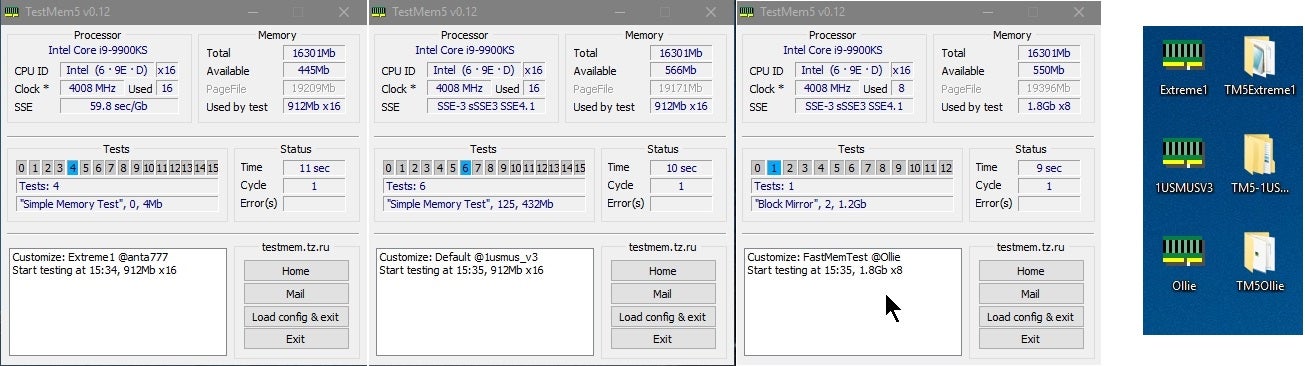
Overclock.net
south cliff
 potent portal
PCIe port config
south cliff
 potent portal
If you click that what options does it give
south cliff
Enable disable and auto
south cliff
Dang that kinda sucks I might gotta take the cooler off
sage widget
potent portal
https://www.overclock.net/threads/memory-testing-with-testmem5-tm5-with-custom-c...
and is this the profile?

Uhh
i just opened testmem
pc shut off after like 6 seconds
wth 😭
south cliff
potent portal
I guess try another M.2 slot because it doesn't have the version option
I’m going to reset it
It doesn’t work still
potent portal
sage widget
and is this the profile?
The anta extreme profile, it's included with the tm5 download
potent portal
sage widget
pc shut off after like 6 seconds
That means bad
sage widget
so what do i need to do
potent portal
What kind of shut down did it do? Sudden power off, blue screen, etc
sage widget
pc just fully shut off
potent portal
That's either very bad memory or bad power
sage widget
everyone ive asked said problem isnt power supply
ill send both for you to see
XPG Core Reactor Modular PSU: 80 Plus Gold - ATX - Fully Modular Power Supply 750 Watt
 south cliff
potent portal
That's either very bad memory or bad power
south cliff
potent portal
That's either very bad memory or bad power
If I update bios could that be the problem?
cyan ravine
sage widget
everyone ive asked said problem isnt power supply
look under event viewer
windows>system
check all critical and error events in the last 20 minutes and look for "Computer rebooted from a bugcheck"
if you have one, send the code it reads out
it should look like
0x00000009f
or 0x000000119
or something similar
sage widget
cyan ravine
check all critical and error events in the last 20 minutes and look for "Compute...
only critical i found so far is "The system has rebooted without cleanly shutting down first. This error could be caused if the system stopped responding, crashed, or lost power unexpectedly."
 flint sapphire
Weird question but is your pc dirty? Like have you dusted it recently
sage widget
I did dust it but not like thoroughly or anything
cyan ravine
sage widget
only critical i found so far is "The system has rebooted without cleanly shuttin...
what cpu is this
I'm going to guess ryzen
flint sapphire
Ah
flint sapphire
I’ve seen dust cause like a weird short in a psu before
flint sapphire
^
sage widget
i have never had this problem until i installed this cpu like 3 days ago now
flint sapphire
Oh
flint sapphire
Swap it back 
sage widget
cyan ravine
did you update bios when you installed
i updated bios right before putting it in
cyan ravine
if it goes away with the old cpu in then I'd call it the cpu
if both cpus get it then I'd be sus of mobo or psu
mobo being some specific bios setting it wants flipped
psu just, dying cos it's dyin'

flint sapphire
Watch it be a msi over volting issue like fals
sage widget
I updated to L8.01 right before putting it in

i still have the old cpu so i can swap
should i just do that and run the game im having an issue with and see what happens/
flint sapphire
I’d say roll back the bios like one update after you try your old cpu
Just knockout as many possibilities as possible
sage widget
flint sapphire
I’d say roll back the bios like one update after you try your old cpu
would this prevent that?
 south cliff
I think I got a dead m.2
flint sapphire

sage widget
so what should i look for in bios?
 sage widget
flint sapphire
Might be mobo
sage widget
flint sapphire
Might be mobo
since we were on the topic of ryzen imma just put this here incase it helps "The AMDRyzenMasterDriverV17 service failed to start due to the following error:
The system cannot find the file specified."
one of the errors i got
south cliff
The one thing that could have gone wrong went wrong
earnest olive
@sage widget do you have XMP on? have you tried with XMP off?
worth seeing if it still crashes with XMP off
earnest olive
south cliff
Which should I do?
if you have to ask this, just use auto
south cliff
I’m going to try without xmp
earnest olive
CO can be quite annoying to deal with and you're not really gonna be gaining performance from it
south cliff
What’s that
earnest olive
especially if you're having stability issues it doesn't make any sense to undervolt it as a troubleshooting step
south cliff
Yeah the m.2 still ain’t there
earnest olive
is it possible you have an m.2 sata in a slot that doesn't support m.2 sata
earnest olive
does the m.2 work in another system? if you're able to test that
south cliff
It does get hot tho
sage widget
earnest olive
<@456225649481482240> do you have XMP on? have you tried with XMP off?
how do i do this
earnest olive
most laptops have an m.2 slot these days
south cliff
I have a laptop
earnest olive
could test it in laptop if you want to rule out the m.2 being bad
south cliff
If it doesn’t work in the laptop it’s bad?
earnest olive
sage widget
how do i do this
if you don't know how to turn XMP off then you probably don't have it on
what memory speed does it say you're running at in windows
earnest olive
south cliff
If it doesn’t work in the laptop it’s bad?
most likely
assuming the laptop works
earnest olive
well could be worth a shot
cyan ravine
south cliff
I’m cooked

sage widget
earnest olive
what memory speed does it say you're running at in windows
how can i check
earnest olive
you can just open task manager
performance tab > memory
and it'll say speed at the bottom right
south cliff
Is there anything else I can do?
earnest olive
south cliff
Is there anything else I can do?
well it's kinda unlikely that every slot on your board is bad so
it's probably a bad drive
south cliff
Bruh
 south cliff
I gotta wait even longer
earnest olive
sage widget
yeah you have XMP off
try removing 1 stick of ram and see if it still shuts off while running the same test
if so put that stick back in and remove the other stick
then try same test again
if it still shuts off every time it might not be the ram
ofc it's possible that both sticks failed so badly that they won't run at jedec speeds but it's not that likely
could be a lot of things causing shutdowns
could be cpu, mobo, psu
sage widget
sage widget
i just opened testmem
^
earnest olive
sage widget
everyone ive asked said problem isnt power supply
the power supply can still be the problem, it's just not LIKELY cause that power supply model is very overspecced for your system
could still be defective
if your pc shut off in 6 seconds after opening testmem5 at jedec speeds something is really doomed in there lol
but yes
try 1 stick at a time with testmem5
sage widget
alright
should i shut off my pc before every test to take out the ram sticks
prob a dumb question
south cliff

Best Buy
Shop Crucial P3 Plus 2TB Internal SSD PCIe Gen 4 x4 NVMe at Best Buy. Find low everyday prices and buy online for delivery or in-store pick-up. Price Match Guarantee.
Would this p3 plus be fine
mossy venture
are you limited to best buy
south cliff
It’s near me so it will be here sooner

Spark Your Imagination with the WD Blue SN580 NVMe SSD with PCIe Gen 4.0 for creators and professionals. Boost productivity or design creatives effortlessly by upgrading to PCIe Gen 4.0 SSDs with up to 4150 MBs read speeds 1TB and 2TB models. With up to 2TB of storage on a slim M.2 2280 form factor applications data and media such as photos 4K v...
There is this one also
south cliff
Get ready to game even faster with the WDBLACK SN770 NVMe SSD. Zoom past load times and get into the action now with a purpose built gaming drive that boasts up to 40percent faster performance and up to 20percent more power efficiency at maximum speed over the previous generation 1TB model. The PCIe Gen4 interface is compatible with leading CPU ...
These 3 are close
south cliff
Yeah I know
But I can get it tomorrow or Thursday
And tomorrow my gpu comes
So I’m trying to play if you get what I’m saying
mossy venture
how long would this take to ship? https://pcpartpicker.com/product/2VJgXL/teamgroup-mp44l-2-tb-m2-2280-pcie-40-x4-nvme-solid-state-drive-tm8fpk002t0c101

TEAMGROUP MP44L 2 TB M.2-2280 PCIe 4.0 X4 NVME Solid State Drive (TM8FPK002T0C101)
south cliff
Friday
mossy venture

Acer Predator GM7000 2 TB M.2-2280 PCIe 4.0 X4 NVME Solid State Drive (BL.9BWWR.106)
otherwise yeah ig p3 plus
south cliff
Friday
sage widget
earnest olive
try 1 stick at a time with testmem5
Ok im doing this rn
took out 1 stick
test has gone on for 1 minute 30 sec no shutdown
still good as we speak
so do i need to replace the stick of ram?
Still good
potent portal
To be sure, let the test run for a bit more, maybe an hour, and then test the other stick
sage widget
 potent portal
That's probably the default profile, the extreme anta one takes a few hours
But still that's promising
late fjord
potent portal
The 5800X is going to *hate* having a single tower cooler
So far with that single tower cooler my 5800x hasn't gone up past 70. Dying light 2, fortnite, enshrouded, valheim and palworld all tested.
PBO set to auto
potent portal
None of those are particularly CPU intensive
And auto means off
Enabled means on
sage widget
potent portal
That's probably the default profile, the extreme anta one takes a few hours
ok so run it again on the anta one?
how do i do that
potent portal
You can just switch sticks now and see how it does
sage widget
alr
late fjord
I'll try some more games tomorrow. But at least I can play some titles no issue lol.
potent portal
If it works for you then it works
My CPU was overclocked so that did contribute to the temps
Though it was also undervolted
potent portal
Potentially yes, the slot can be bad
potent portal
It can also be a bad mount on the CPU causing a memory channel to lose integrity
sage widget
its running longer than usual already
ok no errors
its not the slot or sticks then
so cpu ?
south cliff
CPU or motherboard
 severe hull
 analog hearth
yes
sage widget
south cliff
CPU or motherboard
any way to tell whats what
potent portal
Try both sticks again
Odds are the CPU itself is fine, so it would either be a bad cooler mount causing some pins to not contact right or the motherboard
potent portal
Ok so next thing would be to remove the CPU and cooler, then put them back on. Make sure the screws are tightened evenly, and not over-tightened.
Check the pins while you have the CPU out.
potent portal
Oof, sometimes it's like that
sage widget
ay as long as i get to the bottom of this im cool with it ultimately
cyan ravine
Kekw
sage widget
potent portal
Ok so next thing would be to remove the CPU and cooler, then put them back on. M...
ok, done
nothing wrong with pins and its put in correctly
 limber oyster
Best way to wipe an old os nvme?
potent portal
limber oyster
Best way to wipe an old os nvme?
That depends on just how sensitive the data is. Most people can get away with just erasing the partitions and running the SSD TRIM command so it recycles all the sectors correctly. If you're paranoid, delete the partitions, create a new one, run the CCleaner disk wipe (1 pass only or you can ruin the drive), then delete the partition and TRIM.
sage widget
@potent portal if its not cpu or ram what do i need to do?
potent portal
sage widget
<@396513761550270464> if its not cpu or ram what do i need to do?
If you can rule out both of those then it's most likely the motherboard
So you would exchange/RMA that
south cliff
Ok I got my gpu
The package was one
Like sliced open
And the gpu slots on the back one of them was bent
Got some pliers and bent it back and it works
But obviously no ssd to test it out
Fully
south cliff
Ok well my brother letting me use his ssd
sage widget
potent portal
So you would exchange/RMA that
so basically all i can do is replace it and hope it works
potent portal
The odds are very much in your favor that this fixes it based on all the troubleshooting we did
south cliff
Welp I couldn’t get the laptop open
sage widget
potent portal
The odds are very much in your favor that this fixes it based on all the trouble...
alright well I really appreciate the help
little osprey
obsidian wigeon
it uses your board's rgb
I dont see it on my boards rbg
Let me try openrbg
Only my Mouse and Motherboard
That sucks
nvm
Just changed it 💀
potent portal
If someone in the near future sees this and thinks "hey I have the same problem" make sure you have chipset drivers installed, those are required to be able to control memory rgb
 tawny violet
you gonna do video editing and 3d rendering?
tawny violet
I mean yeah then I can understand the 7950X3D (even though I'd normally recommend the 7800X3D instead)
cyan ravine
How's your experience been with 7950x3d?
Genuinely curious as most people I've talked to have had issues (myself included)
Interesting
@gentle pollen we found someone lol
tawny violet
again I can understand it then
though that being said
I'd still rather recommend the 7800X3D and slot the 7950X into the second rig
since there is no way you could need two 16 core CPUs in 2 different mobos
tawny violet
if you intend to game on the first
The 7950X3D is kinda wasted IMO
cyan ravine
KS and 950X3D
tawny violet
and the 7800X3D is likely more consistently top performer in games
tawny violet
Obviously the decision is yours at the end of the day
My point is that you already have a 16 core CPU in the second rig for those workloads
and arguably the non-3D 7950 is better at those workloads (probably)
but obviously
the decision is yours, I'm not gonna harp at you
I'm simply saying I'd probably rather go for the 8 core in the primary rig and the non-X3D 16 core in the second
tawny violet
If it works for you and you're happy with it
It is the right call for you
cyan ravine
tawny violet
Hey if you think it's the right way to do it
It's your friggin' money
tawny violet
cyan ravine
Well his head's in the right place tho
wait was that a compliment to me?
tawny violet
Wow
cyan ravine
Chill
tawny violet
Oh I am chill lmao
I'm just envying that the man can afford two 16 core AMD chips
Good for you man, make sure you use all dem cores! :3
cyan ravine
tawny violet
I'm just envying that the man can afford two 16 core AMD chips
Direct that at me then I have more cores
I have 4 pcs not 2
tawny violet
cyan ravine
Direct that at me then I have more cores
But you have an I*tel CPU too :3
cyan ravine

cyan ravine

tawny violet
Am poor boi
cyan ravine
Even for workstation, not the greatest, but certainly not a slouch
tawny violet
7000 series is alltogether goated (if it works right)
And damn
Does my mobo not work well
cyan ravine
More cores is always better but dial the clocks back a couple years and a 10900k was worse than a 7600x
Iirc it's like 20% worse than 7600x
tawny violet
Felix did I tell you how my mobo refuses to update BIOS like at aoo?
tawny violet
X670E is honestly unnecessary for 99% of people
But as I already said if you feel it's justified, are happy with the purchase and find a use for it then it's the right call for you
cyan ravine
I'd wait a bit longer past the current agesa
tawny violet
cyan ravine
I'd wait a bit longer past the current agesa
Oh the moment I try updating it's like a PSU trip, everything restarts and it's hardlocked into no display output
like I confirm the BIOS update
The "in progress" bar comes up and 2 seconds later the PC just shuts off and reboots into a no display output state and stays there permanently
cyan ravine
tawny violet
like I confirm the BIOS update
The "in progress" bar comes up and 2 seconds late...
Fascinating, I'd maybe contact asrock about that
tawny violet
Okay to play devil's advocate
X670E is really, REALLY overpriced
It's really cool, but it costs so much
tawny violet
cyan ravine
Fascinating, I'd maybe contact asrock about that
Asus Prime B650M-A Wifi II
tawny violet
the Benchmark Edition™️
cyan ravine
But that's all I'll say about it
tawny violet
dies at mention of price
cyan ravine
Lol
tawny violet
My entire rig with peripherals and monitor costed me as much as your mobo alone
tawny violet
And that 1500 US included 27% VAT
so like
Excuse me but you are actually stupid with that build
Good for you rofl
I don't
Once someone gets a 1000+ USD mobo I'm expecting to see something so vastly overkill that it makes me cry
tawny violet
Storage is actually one of the 2 limitiations I have
I only have a 1tb Gen 3 NVME and a 1tb old HDD
and both are full
tawny violet
Par for the course lmfao
cyan ravine
Unless you like playing 8 games a week
tawny violet
cyan ravine
Unless you like playing 8 games a week
I'm a data hoarder
I refuse to delete basically anything I have on it
cyan ravine
Iirc I got like, 13tb in my main, 15 or something in my second
tawny violet
BTW Felix:
https://ipon.hu/shop/termek/arctic-cooling-mx-6-4g-es-6-darab-mx-cleaner-szett/2130960
That's less than 10 USD for 4 grams of MX-6 and 6 cleaners

iPon Computer
Nézd meg az iPon szédületes Hűtőzsír / Hővezető paszta kínálatát! Arctic Cooling MX-6 4g hőtűzsír fecskendős kiszerelésben és 6 darab MX Cleaner tisztitókendő.
cyan ravine
Another 6 in my third
cyan ravine
tawny violet
BTW Felix:
https://ipon.hu/shop/termek/arctic-cooling-mx-6-4g-es-6-darab-mx-clea...
Goated.
4? I think in my 4th
Lmao
tawny violet
cyan ravine
Iirc I got like, 13tb in my main, 15 or something in my second
Yeah but you're also not a poor like me lmao