#building-and-recc-chat
1 messages · Page 240 of 1
 cyan ravine
So 21:9 27" 1440p

I'd love to see this
It's probably like some high end model from 10yr ago
 analog hearth
you never seen a 32:9?
cyan ravine
I've used 32:9's wym
Time for some real meta, after 32:9, you realise the screen space can increase upwards and you hit big tv meta

Big tv >>>
 potent portal
LG C3 time
42 inch OLED TV that makes an excellent monitor
And probably costs about what a 32:9 screen would
 fading iris
Check this out on @Newegg:Acer Nitro VG271U M3bmiipx 27" WQHD (2560 x 1440) IPS Monitor with AMD FreeSync Premium Technology, Up to 180Hz, Up to 0.5ms, DCI-P3 95% (1 x Display Port 1.2, 2 x HDMI 2.0 and 1 x Audio Out) https://www.newegg.com/black-acer-nitro-vg271u-m3bmiipx-27/p/N82E16824011467?Item=N82E16824011467&Source=socialshare&cm_mmc=snc-social-_-sr-_-24-011-467-_-02132024
Thinking of getting it since it's ips and a good price imo
potent portal
Yeah they just mislabeled it. QHD would be a more standardized way to describe that but sadly it's not a standard.
fading iris
Saw a IPS. 27 inch 1440 for cheap but somehow only 60hz lol
They lied😮
Good deal?
Not good deal but do specs look bad I mean
potent portal
You can never tell with Acer. They have so many different models and they're all intentionally confusing names so it's impossible to decode which ones are good.
fading iris
😭
potent portal
They do that on purpose so they can push a vg271u m3bmiipx and people think it's good because the XG271U m3bmiipx got a good review, but it's a totally different panel.
potent portal
cyan ravine
I've used 32:9's wym
https://www.newegg.com/p/N82E16824005220
1366x480
683:240 aspect ratio
fading iris
😭
 crimson zinc
Man, Discord is perfect

 lone flame
hardline water looks so good I want to do it one day 
 cyan ravine
It's a lot of work.
lone flame
cyan ravine
It's a lot of work.
i can imagine
cyan ravine
that ek block is interesting though
lone flame
was just scrolling through some images and saw that one, the vertical mount is so cool
cyan ravine
I'd never trust EK for water as far as I'm concerned but it looks cool
Yeah I have that mount
lone flame
cyan ravine
I'd never trust EK for water as far as I'm concerned but it looks cool
oh really?
cyan ravine
it's the o11 evo upright config
cyan ravine
it's the brand everyone knows but the number of issues you see from watercooling most of the time involve some EK in it
potent portal
That's what they want you to think. They price it like a premium product but they're just average.
cyan ravine
and also that
they're kinda meh
it's still
water
but meh
they're fittings look amazing to me but I simply can't trust them
lone flame
cyan ravine
it's the brand everyone knows but the number of issues you see from watercooling...
well if they are the most known and used brand,., wouldnt majority of the issues come from them regardless
since they are most used
cyan ravine
you could say that
we've had people in here before with bad experiences with them too tho
Personally my experience has been fine, I'm just scared to try
what when anything that could break in my system would maybe start at a couple hundred dollars
lone flame
cyan ravine
what when anything that could break in my system would maybe start at a couple h...
what does your loop look like
i dont think ive seen it
cyan ravine
@lone flame

 lone flame
2 systems?
cyan ravine
mhm
cyan ravine
I definitely prefer the AM5 (Black) one
but I want a new set of fans
P12's are really nice, but they aren't like, quality looking
My needs vs. my wants tho sort of come into play
Like I really don't need new fans lmao
lone flame
silent wings?
cyan ravine
nooo
Thermalright B12's
$12 a piece, T30 levels of performance
braided cable
@lone flame
 lone flame
im so torn between blackout and rgb when i do a case swap this summer
lone flame
cyan ravine
<@486271010161819648>
what am I looking at
lone flame
temps i assume
cyan ravine
yes
Sickleflow vs Noctua A12 vs B12 vs. C12(C) vs P12
and IPPC (If you like cancerous levels of noise)
K12's I'm also kinda interested in. B12's but mild rgb
omg
they have B12-S


eBay
ARGB Port:5V/3Pin. Rated Speed: 2150 RPM±10% (MAX). Air Flow: 69 CFM (MAX). Weight: 205 g. TL-B12S SPECIFICATION:. Air Pressure: 2.87 mm H2O (MAX).
WTFFFF
WAIT
fading iris
Does anybody or has anybody played on a curved monitor? That isn't a 32 inch and closer to 27inch
 cloud hull
fading iris
Does anybody or has anybody played on a curved monitor? That isn't a 32 inch and...
cloud hull
fading iris
Does anybody or has anybody played on a curved monitor? That isn't a 32 inch and...
I have and currently do
fading iris
Do u play fps games with it if so how is the experience,
There is a nice budget friendly 27inch 1440p ips flat monitor I like which I know would do good for gaming in fps. But there is a 27inch ultra wide curved monitor that is 1440 but sadly Va
For aesthetic and racing games and car games I know I’m gonna wanna go with the curved despite it being Va. but for gaming I know flat is better. I don’t mind buying a second monitor in less then 5 months but just curious as to how the curved holds up and if it’s harder to view in certain games or at certain times
 obsidian wigeon
Curved is almost always VA on the cheaper end
And curved gives you no benefit if it's so narrow and so little of a curve angle
cloud hull
I love mine and all I play is fps games
fading iris
Foxy I know but I'm not crazy into gaming so don't have highest expectations
Also I don't look of curved
It's like spending more money on white or RGB knowing it has no effect lol
obsidian wigeon
VA is inferior though
fading iris
Yes
potent portal
I have a M27QC and I regret my purchase, but I needed a monitor that day and it was all that was in stock at Best Buy that had more than 90hz
cyan ravine
fading iris
There is a nice budget friendly 27inch 1440p ips flat monitor I like which I kno...
Vast majority are VA if you want a curve
fading iris
Idk I feel like despite VA being inferior my last PC has terrible specs and I had to go into the game file to change val resolution to make it even lower
I feel like I won't even notice VA being that bad kinda like how u start off with 120hz u will think it's fine until u compare to 160 and so on after that y'know
potent portal
I would compare the quality of this $280 curved monitor to my 14 year old 60hz TV that I was gaming on before, the blur is that bad from ghosting
cyan ravine
Imo don't really bother with VA unless you hybrid with colour accurate/tone accurate production work or you run qled
cyan ravine
fading iris
I know I'm saying I won't notice difference since I have never had ips
That's like saying I don't know what food like cos I always ate grass

If you really want curve, go for a good curve
fading iris
True but if ur used to dried grass n then u get watered grass ur gonna like it new option regardless
cyan ravine
But there aren't many good curve displays
fading iris
I want curved but at same time my expectations aren't that high so I don't need super good panel or super good anything but I know I'm long run I may regrey
potent portal
The halfway decent curved stuff starts at over $300 which is more than the IPS ones we normally recommend
crimson zinc
^
cyan ravine
I think you might be wise to go check out a lot of displays and weigh up in person what you want
crimson zinc
Curved looks cool, but that’s really where the benefits end lmao
fading iris
I didn't see prime difference between VA and IPS so lemme go watch it for that rq
crimson zinc
They’re expensive if you want a good one
cyan ravine
VA you get nice colours, good response, but meh viewing angles and ghosting
IPS decent colours, meh contrast, good viewing angles and great ghosting
i.e very little bad if you just throw out contrast typically
And if you get one with ulmb2 it's even more true
potent portal
The in store demos aren't great at showcasing motion clarity typically
fading iris
I always would be watchin a lot of shoes n possibly drawing which is what makes me wanna go back curved VA aswell
cyan ravine
cyan ravine
VA you get nice colours, good response, but meh viewing angles and ghosting
These things are also true for QLED just less pronounced
Much less pronounced
fading iris
I think I'ma check out yt n then maybe go with ips and get the va 2 months later but idk
crimson zinc
^
Oled is an investment but much better overall

LG 27GR95QE-B 26.5" 2560 x 1440 240 Hz Monitor (27GR95QE-B)
cyan ravine

AOC AG276QZD 26.5" 2560 x 1440 240 Hz Monitor (AG276QZD)
Better^
There's also another one that's off brand rebrand that I can never remember the name of
KTC that's it

Introducing the KTC G27P6 OLED Gaming Monitor - the ultimate display for gamers, designers, and office workers who demand the highest level of performance and quality. With a sleek and modern design, this 27 inch OLED monitor boasts a stunning 240Hz 1440p resolution, offering crystal clear visual...
Comes with a kvm this last one iirc, which makes it a leg up in value over the others
 cursive wharf
Idk, at $800 - $1000 I think the average gamer would rather AW3423DWF
cyan ravine
That's $640
obsidian wigeon
there's a coupon to apply
cyan ravine
Yes
obsidian wigeon
it's a box to tick
obsidian wigeon
ye 160 off
cyan ravine
But I can agree with the uwqhd alienware now as it's passing burn in tests
It's not a bad alternative, bit much for a 7800XT tho iirc
I think he's getting a 7800xt
Can barely remember
cursive wharf
It's "unusable" for even a 4090
cursive wharf
Average modern AAA game cant 165 at uwqhd
cyan ravine
Meanwhile me
4K @120 in most games
144 w/ dlss
We're talking about the same uwqhd right
21:9
Not the 32:9 g9 right
cursive wharf
Ye, that is suw
iirc the guys I know are pushing settings tho
Obv it isnt impossible to get 165 on uwqhd
cyan ravine
Yeah well if you crank things to max then even a 4090 is at it's knees on even 1080p in some situations
But for a reasonable experience you shouldn't, not if you want to maintain good 1% lows
DF got guides on optimised visuals for that stuff
cursive wharf
I mean yeah, but once you're doing OLED HDR10+ becoming a graphics fanatic can be mildly worth it
 mossy venture
cursive wharf
Average modern AAA game cant 165 at uwqhd
mossy venture
cursive wharf
Average modern AAA game cant 165 at uwqhd
Meanwhile I want to get a 4k60hz to play story games on my 3060 ti on
cyan ravine
A lot of buyers of those kinds of oleds play comp on low settings
Not really a selective gamut for these things
cyan ravine
mossy venture
Meanwhile I want to get a 4k60hz to play story games on my 3060 ti on
Genuinely wondering if you have the vram for that rn
cursive wharf
I suppose, but in that case you're already ignoring DF optimised visuals
cyan ravine
Yes but that's the whole other end of the spectrum
At that point we're talking toaster visuals and toaster gpus
I think he did intend to only play comp games now that I think about it
mossy venture
cyan ravine
Genuinely wondering if you have the vram for that rn
I'm probably gonna upgrade with 8000 series anyways (gpus not cpus)
cyan ravine
So maybe he would be more than fine
mossy venture
I also want an oled when they get cheaper
cyan ravine
I think it was like, fortnite, cod and something else
cursive wharf
Anyways back to 7800XT. I have 3080-10 with dwf and it's meh with tuned settings. Usually do 80fps - 100fps in crab like CP77
cyan ravine
I'd believe that
CP77 recently took an update to make it extremely cpu heavy though didn't it
I haven't kept up much with the numbers since that update
cyan ravine
Iirc pre update
In like total raster
Some radeon cards were beating nvidia lol
It was about the time the XTX users were coming out with their EVC mods
You probably don't even use like, fsr 3 with that @cursive wharf do you
Iirc below like 100 fps you get mad ghosting with fsr3
cursive wharf
I use dlss quality
fading iris
cyan ravine
Can barely remember
If ur talking about me then yeah if not mb
fading iris
For most part. It would be val, r6, and fortnite. For car games I wouldn't play off the bad but after a month or so I would go into Forza and maybe some racing games
cyan ravine
That's it, val r6 fortnite
fading iris
While also maybe using it for drawing since I have a drawing tablet
cyan ravine
Yeah you could do AW3423DF too
fading iris
But not fr drawing just fun drawing nothing serious
Before I even search up that long ass name
What's price
cyan ravine

Alienware AW3423DWF 34.2" 3440 x 1440 165 Hz Curved Monitor (AW3423DWF)
This is $800
fading iris
💀
cyan ravine
But it's endgame
fading iris
There is no doing that anytime soon
cyan ravine
$640?
fading iris
Nah first build and idk if I will consistently get into PC after
Max I would go after tax and shipping is 220
cyan ravine
Ah
fading iris
Which is why I'm thinking ips 27 I sent earlier if I didn't mb
cyan ravine
Well that limits options
fading iris
True
cyan ravine
Ooo ok lemme look
cursive wharf
Do consoles have much in HDR support?
cyan ravine

MSI G272QPF 27.0" 2560 x 1440 170 Hz Monitor (G272QPF)
potent portal
cursive wharf
Do consoles have much in HDR support?
 cursive wharf
Then again they dont really care for QHD I think. So prolly not ideal for consoles
cyan ravine
In the same way they have "4K"
HDR is like
Kinda there but not
💀
Yeah G272QPF looking about as peak as it gets @fading iris
mossy venture
cyan ravine
Boop
https://pcpartpicker.com/product/W6QKHx/msi-g272qpf-270-2560-x-1440-170-hz-...
On sale too, W
fading iris
I think ima go with ur suggestion Felix but does anybody know if the bezel or wtv it’s called is big

MSI’s G272QPF gaming monitor delivers you an elevated gaming experience. The monitor comes equipped with a 27" Rapid IPS display that supports up to 2560 x 1440 (QHD) resolution. The G272QPF can operate at up to a 170Hz refresh rate and 1ms (GTG) response time. The G272QPF is NVIDIA G-Sync compat...
Would prefer if it was los or thinner but can’t find answer off of minimal looking
crimson zinc
fading iris
https://a.co/d/fwUX5U9
This looks like it’s on the slimmer side, if that’s what you’re asking.
 rain carbon
potent portal
https://tenor.com/view/well-yes-but-actually-no-meme-aardman-the-pirates-pirate-...
rain carbon
potent portal
https://tenor.com/view/well-yes-but-actually-no-meme-aardman-the-pirates-pirate-...
I felt hurt and lied to learning that that scene actually says "good guess, but actually no"
potent portal
Eh. It's just a gif. Won't stop me from using it.
 stable cove
So whenever I have to change all my fans I wanna see if I can get one with rgb lights. Because my case is awful dark and the cable I have on my case looks like this and there’s nowhere I can put it on my motherboard.
Kinda want some lights in my pc just so I can see all the parts and what’s going on through the glass inside my computer
 mossy venture
stable cove
So whenever I have to change all my fans I wanna see if I can get one with rgb l...
mossy venture
stable cove
So whenever I have to change all my fans I wanna see if I can get one with rgb l...
Thermalright c12c or the other c12 variants
They compete with $20-40 fans, and have the aesthetics to back them up as well
Just pick whatever ones you like the aesthetic of most
potent portal
stable cove
So whenever I have to change all my fans I wanna see if I can get one with rgb l...
The gold pins come out with the little plastic piece, use pliers or something. Then it fits on the motherboard.
stable cove
So pull them off?
potent portal
Yes, and then the connector will fit the argb header
stable cove
So we pull just the tiny pins off or the whole plastic piece?
 weary galleon
stable cove
So we pull just the tiny pins off or the whole plastic piece?
weary galleon
stable cove
So we pull just the tiny pins off or the whole plastic piece?
This part should pull out

Then the remaining connector should be female and able to connect to the motherboard
fading iris
Any videos that can help with cable management or how to properly wire everything
Looking for a actual video somewhat dedicated to it and not how it is in every build video where they skip half of steps
stable cove
Ok that just got my cable broke so later I have to buy a new fan if I want rgb
So never doing that again
I’m just gonna find a different cable to buy for rgb. That probably would be easier
 golden viper
yes xmp is off. in fact it wont even allow me to tunr it on in the bios.
sorry about this delay its been a hell of a day!
 odd moth
Hey chat, I am shopping for a mid tower case with a budget of 100$. Any recommendations? ATX motherboard, AMD Ryzen 7800, and 32G of Ram with the intention to upgrade.
mossy venture
odd moth
Hey chat, I am shopping for a mid tower case with a budget of 100$. Any recommen...
Have you ordered anything yet? If not, could you send the parts list you're looking at?
crimson zinc
odd moth
Hey chat, I am shopping for a mid tower case with a budget of 100$. Any recommen...
Immediately can suggest https://pcpartpicker.com/product/2MwmP6/montech-air-903-max-atx-mid-tower-case-air-903-max-b
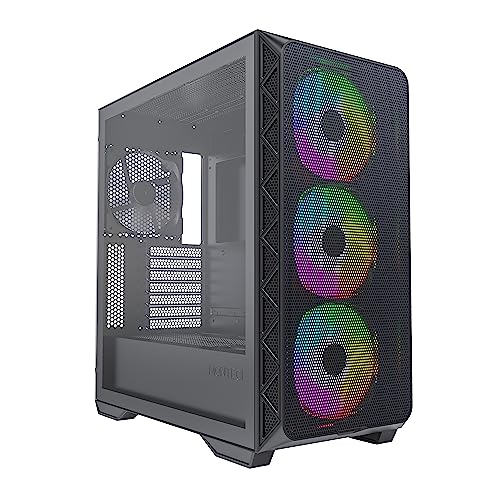
Montech AIR 903 MAX ATX Mid Tower Case (AIR 903 MAX (B))
mossy venture
Specifically for case, check out g360a, p400a, g500a, 4000d airflow, nv5, sky two, king 95, o11, td500, 903 max
Also all of the o11 variants
Basically any case from fractal design with a mesh front from $60-120
crimson zinc
And if you can find this(somehow)
 golden viper
crimson zinc
And if you can find this(somehow)
golden viper
crimson zinc
And if you can find this(somehow)
I have this case and its great!!
golden viper
crimson zinc
And if you can find this(somehow)
 cyan ravine
golden viper
yes xmp is off. in fact it wont even allow me to tunr it on in the bios.
cyan ravine
golden viper
yes xmp is off. in fact it wont even allow me to tunr it on in the bios.
Try looking under windows system events in event viewer for errors or criticals that list what the restarting describes
golden viper
cyan ravine
Try looking under windows system events in event viewer for errors or criticals ...
im un familiar with this but will look into tha1. thank you!
cyan ravine
golden viper
im un familiar with this but will look into tha1. thank you!
it will list any possible reasons for your restarting
since we have nothing to go off of it would take forever to figure out otherwise
my guess is it's kernel-power
which is going to still be vague but better than nothing
 bronze oasis
Hi, very new to pc building. Anyone have experience with revit/other CAD software and have also built a pc for CAD purposes? After looking at autodesk’s software requirements under “Performance: Large, Complex Models” i started to look on newegg’s site for potential parts. Wondering if anyone has had experience/success running CAD seamlessly after building a PC and hoping they could share what worked and what to avoid. Thanks!
mossy venture
bronze oasis
Hi, very new to pc building. Anyone have experience with revit/other CAD softwar...
What's your budget and country?
I dont use CAD myself but I know of it
bronze oasis
3-4k though can change either way. Country is USA @mossy venture
mossy venture
@cyan ravine in cad xtx beats 4090 right?
cyan ravine
bronze oasis
Hi, very new to pc building. Anyone have experience with revit/other CAD softwar...
are you working with any simulation
do you find yourself needing a lot of vram or a lot of ram
bronze oasis
@cyan ravine What i guess do you mean by simulation? Nothing i actually have to simulate, but i do work occasionally with point clouds, and coordination models. So not only my work modeled on CAD/revit, but other trade’s work as well.
I’m gonna have to read up on vram, honestly im not familiar and i couldnt answer that question atm
mossy venture
Do you care about aeshetics of the pc at all? Are you going to use ethernet, or wifi?
Any personal preferences about size, noise level, etc?
cyan ravine
bronze oasis
<@101107951401455616> What i guess do you mean by simulation? Nothing i actually...
could you describe the other work
not like, irl, the tools you'd use
bronze oasis
@mossy venture I’ll ideally want to use wifi
I dont forsee size being an issue, this will be set up at home and ik i have a lot of space.
i would like the noise level at a minimum, ill be using this setup for work
bronze oasis
cyan ravine
not like, irl, the tools you'd use
Hmm wdym by tools? not necessarily understanding.
In terms of my work its more of like using AutoCAD but in 3D, and i work with other teams to model out a house let’s say. We’ll meet weekly to see if there are clashes in our model. For example like if electrical conduit clashes with someone’s ductwork. Im not sure if that answer’s your question?
cyan ravine
bronze oasis
Hmm wdym by tools? not necessarily understanding.
In terms of my work its more o...
like software
you say other trade work
I'm curious, what's your current PC
what are you working with rn, what's your thoughts on a budget
bronze oasis
cyan ravine
what are you working with rn, what's your thoughts on a budget
Got it, I can let you know tomorrow, im not in front of my computer at the moment but ill get back to you on this.
Again im new so i dont know what’s a lot for a budget, but i think id spend 3-4k, and this would be flexible.
cyan ravine
alright
I'm getting the airs about this that you're unfamiliar with something decent for your needs
my thoughts are to go for something relatively lightweight
so way under 3K
so something decent, but not like, something that could do literally anything, if that makes sense
bronze oasis
cyan ravine
I'm getting the airs about this that you're unfamiliar with something decent for...
that’s probably pretty accurate haha
cyan ravine
yeah so what do you do for work mate
if this is for say like, architecture
you won't need anything too crazy
bronze oasis
cyan ravine
so something decent, but not like, something that could do literally anything, i...
I would agree, but i do want something that lasts a long time, i wouldnt have to worry about upgrading for a while. The computer i have at work isnt bad per se but i believe i could build something faster and spend less time waiting for my model to load, especially as models grow larger
bronze oasis
cyan ravine
yeah so what do you do for work mate
I do BIM modeling, i dont know why i didnt mention that before when you asked about work
bronze oasis
cyan ravine
I'm not gonna recommend anything seriously underwhelming
no yeah, no problem! i appreciate your help!
cyan ravine
right so like, real estate representations ye?
bronze oasis
Commercial buildings more so, no residential buildings
cyan ravine
I had the feeling it was something like this, so yeah, I'm feeling like something more mid range would be a bit kinder
bronze oasis
cyan ravine
right so like, real estate representations ye?
But yes that can be part of it, the real estate representations
cyan ravine
let me draft something up rq, you can patch through your current pc specs tomorrow and we can cross check
bronze oasis
cyan ravine
let me draft something up rq, you can patch through your current pc specs tomorr...
that would be awesome, i really appreciate your help
cyan ravine
does it need wifi
bronze oasis
Yes
bronze oasis
not at all
bronze oasis
Don’t necessarily have a preference, i dont need wireless anything but maybe that would be nice 🤷🏻♂️. Yeah id take any recs!!
cyan ravine
do you need a monitor tho?
bronze oasis
No, but if you have a recommendation id be open to considering getting one.
I have 3 monitors at work with my set up at work which works nicely sometimes
bronze oasis
Nope i have a solid pair of headphones! @cyan ravine
cyan ravine
alr
something I'm thinking a bit like this
Part List - Intel Core i5-12600KF, GeForce RTX 4070 SUPER, GameMax Spark MicroATX Mid Tower
for the screen, it's not like, ideal? but it'll have great colours and resolution for viewing things with clients
the thing with the screen as well, show them front-on
not from an angle
the thing with the type of screen is it's not ideal for wide angle viewing, if that's a caveat lmk
but this sort of build is quite serious, bordering high end from just over a year ago
and something like that...is already pretty extreme
that said, I don't know as I said before, what you're working with rn
if you come and tell me you have something like a 3090 or some insane quadro or titan card in the system I'd completely change tune
bronze oasis
cyan ravine
if you come and tell me you have something like a 3090 or some insane quadro or ...
Hahahha well like i said ill lyk tomorrow. The computer isnt bad honestly but i really dont have anything at home, and id like to continue my work at home or whenever id want to ya know
cyan ravine
oh just for home?
bronze oasis
Yes
cyan ravine
hang on, let me change the screen then
bronze oasis
ok no worries, thanks for putting that all together!
cyan ravine
may as well like, the screen is the only change to turn this also into a gaming pc
lmao
bronze oasis
Hahahaha fair enough
cyan ravine
Part List - Intel Core i5-12600KF, GeForce RTX 4070 SUPER, GameMax Spark MicroATX Mid Tower
pretty much this
install the fans two in the bottom, one out the back
that should be pretty extreme for work from home circumstances
bronze oasis
i noticed you put in 2 SSD’s was that on purpose? asking bc im not as familiar w computers
cyan ravine
yes
bronze oasis
nice ok good to know
cyan ravine
Well I can put a second cheaper SSD in
but I figure you want a lot of storage to track work and organise without any performance loss
bronze oasis
absolutely
bronze oasis
is it worth getting a newer intel i series cpu?
cyan ravine
but it's $10 a piece to make them good anyway
nah not really
12600kf is at a great discount
value for performance it's a lot for it's class
I took a whole like, value for money standpoint on this one
good mid range, not overpaying
if that makes sense
bronze oasis
No thats great! i appreciate that
not looking to spend too much if i dont need to
so that helps a lot
i do have some of the specs straight from autodesk btw:
if you are curious/if this would change anything
cyan ravine
oh yeah the 3dmouse I forgot
one sec
@bronze oasis

The SpaceMouse Compact is designed to provide intuitive, effortless and precise 3D navigation in CAD applications that cannot be achieved with a standard mouse and keyboard. It is the ideal tool for modern engineers, architects and designers to review 3D designs and explore 3D spaces.
look around for this as cheap as you can find it
it's called "spacecompact" iirc
or "spacemouse compact"
3d mouse is really nice to have for pivoting
bronze oasis
Nice ive never heard of that actually, ill take a look
cyan ravine
the DA mouse is nice imo
but sometimes I find with a 3dmouse I get some advantages
they have other models, but the knob is what you want really
the extra flair is more just like, single tool use and yet you still kinda need a mouse
bronze oasis
Yeah seems neat, just watched a short video on it, i think the one you linked would be ideal if i went w getting a 3d mouse
mossy venture
Sorry I had to run, I second everything felix said
Felix, is 27q better than the msi $200 one?
mossy venture
mossy venture
Sorry I had to run, I second everything felix said
Haven't even really read it, but I can gaurantee felix knows what he's talking about better than I do
cyan ravine
mossy venture
Felix, is 27q better than the msi $200 one?
It could be, I went for one based on colour less gaming performance
So it's not purely gaming focused
I didn't check g272qpf reviews, it could genuinely be better
Actually it's better in that regard damn
Lmao
@bronze oasis slight amendment to the monitor, this one instead
https://pcpartpicker.com/product/W6QKHx/msi-g272qpf-270-2560-x-1440-170-hz-monitor-g272qpf
MSI G272QPF 27.0" 2560 x 1440 170 Hz Monitor (G272QPF)
Sorry I had a meeting like, 5 minutes after I suggested the first one so I had to pick with what I remembered lol
lone flame
cyan ravine
<@1207493837207900210> slight amendment to the monitor, this one instead
https:/...
i got this one maybe 2 weeks ago and have nothing but good things to say about it, i jumped from 1366x733 60hz to it so it was obv a huge improvement lmao
@bronze oasis ^
fading iris
cyan ravine
It could be, I went for one based on colour less gaming performance
Idk I got confused reading that mb but u r saying the 27 is better or worse
I thought u suggested that one cause the 27q or wtv was worse💀
cyan ravine
Eh
Different reasons I suggested the 27Q to that guy @fading iris
His needs are not the same
I still believe the G272QPF is better for you specifically
fading iris
So don't get the MSI?
So hypothetically if I bought the MSI what is not wrong with it but what r its cons compared to g27
Wait I think I got the g27q idek
fading iris
cyan ravine
I still believe the G272QPF is better for you specifically
This the one or is this diff. If not what's opinion on this one. Idc its the best jus wondering if it's a solid first buy since I chose it over the ultra wide va https://a.co/d/cDOTYn4
MSI’s G272QPF gaming monitor delivers you an elevated gaming experience. The monitor comes equipped with a 27" Rapid IPS display that supports up to 2560 x 1440 (QHD) resolution. The G272QPF can operate at up to a 170Hz refresh rate and 1ms (GTG) response time. The G272QPF is NVIDIA G-Sync compat...
Names r too confusing mb
mossy venture
fading iris
So hypothetically if I bought the MSI what is not wrong with it but what r its c...
The msi one is better
Is what felix is saying
cyan ravine

When I give advice to another, don't assume it's also for you lol
You'll confuse yourself to death
fading iris
😔
I'm a overthinker
And after battling the decision between a perfect looking curved monitor or a decent looking but better quality flat one I thought u were saying ts is ass
Lol
cyan ravine
Lol
I don't mind getting asked a lot of questions, but if I make a suggestion, I'd be saying it directly to you
So yeah, don't stress lol
bronze oasis
lone flame
i got this one maybe 2 weeks ago and have nothing but good things to say about i...
I’ll look into it, thank you!
bronze oasis
cyan ravine
let me draft something up rq, you can patch through your current pc specs tomorr...
So the setup i have at work is:
Processor: AMD Ryzen 7 2700 eight core processor 3.2GHz
Installed RAM: 32.0GB
cyan ravine
Ahhhh yes
No gpu given
Ok well
Whatever gpu it ends up being this should be a significant upgrade
So yeah, I stick by the list I gave earlier with the updated screen
Part List - Intel Core i5-12600KF, GeForce RTX 4070 SUPER, GameMax Spark MicroATX Mid Tower
The SpaceMouse Compact is designed to provide intuitive, effortless and precise 3D navigation in CAD applications that cannot be achieved with a standard mouse and keyboard. It is the ideal tool for modern engineers, architects and designers to review 3D designs and explore 3D spaces.
@bronze oasis
bronze oasis
Awesome, I’ll research each of these just to make sure for myself. Thanks so much!! @cyan ravine
cyan ravine
Np
odd moth
mossy venture
Have you ordered anything yet? If not, could you send the parts list you're look...
mossy venture
nice start! whats your budget for the rest of it, or the total build if that stuff isnt ordered yet
odd moth
crimson zinc
Immediately can suggest https://pcpartpicker.com/product/2MwmP6/montech-air-903-...
That is what I was looking at! I am glad it was smt which could be recommended.
odd moth
mossy venture
Specifically for case, check out g360a, p400a, g500a, 4000d airflow, nv5, sky tw...
I will def go look at those. I have never seen any of the o11 variants in person, what do you think about them aesthetically?
cyan ravine
are those bought parts? can I make some quick amendments
mossy venture
eh, i think it's overdone but can look really good
personally i prefer the sky two
cyan ravine
I will make it basically identical perf but better quality
odd moth
crimson zinc
And if you can find this(somehow)
The eclipse looks rly cool
cyan ravine
@odd moth https://pcpartpicker.com/list/VNsPGP
Part List - Phanteks Eclipse G360A ATX Mid Tower
same performance, better quality, better price
GF1 2024 has no confirmed reviews and has been speculated not to be as good as previous year models
GF A3 is fine tho
odd moth
mossy venture
nice start! whats your budget for the rest of it, or the total build if that stu...
Total build is looking around 1200$ usd
mossy venture
including monitor?
mossy venture
and you just gaming, or do you do anything else?
cyan ravine
wifi yes or no
odd moth
mossy venture
including monitor?
No including monitor
odd moth
mossy venture
and you just gaming, or do you do anything else?
I am learning database and data science programs atm in school
odd moth
cyan ravine
wifi yes or no
Wifi yes
cyan ravine
dammit 7800x3d falls short
fading iris
Is 4100 MB/s good or nc?
cyan ravine
something like this
Part List - Intel Core i5-12600KF, Radeon RX 7800 XT, Phanteks Eclipse G360A ATX Mid Tower
cyan ravine
fading iris
Is 4100 MB/s good or nc?
just a marketing number, not true representation of performance
odd moth
4100MB/s is close to no cutting it, but since this is a personal build I would sacrifice some speed for costs
fading iris
Ok thx also quick question again
I clicked on list u made for him and was curious Abt the ram
I switched ram on my last list to a white one for a little extra and was wondering if the 6400 ddr5 was better or worse or same then 6000
mossy venture
over budget https://pcpartpicker.com/list/6rwHsh
less over budget https://pcpartpicker.com/list/JpVZvj
still over budget https://pcpartpicker.com/list/8nN9vj
and in budget https://pcpartpicker.com/list/6v2Zvj
Part List - AMD Ryzen 5 7600, Radeon RX 7800 XT, Phanteks Eclipse G360A ATX Mid Tower
Part List - Intel Core i5-12400F, Radeon RX 7800 XT, Phanteks Eclipse G360A ATX Mid Tower
Part List - AMD Ryzen 5 7600, Radeon RX 6750 XT, Phanteks Eclipse G360A ATX Mid Tower
Part List - AMD Ryzen 5 7600, Radeon RX 6700, Phanteks Eclipse G360A ATX Mid Tower
fading iris
Because it's 10 bucks cheaper then the white one I had before
cyan ravine
alternative
https://pcpartpicker.com/list/ycN9vj
Part List - AMD Ryzen 5 7600, Radeon RX 7800 XT, Phanteks Eclipse G360A ATX Mid Tower
cyan ravine
fading iris
I switched ram on my last list to a white one for a little extra and was wonderi...
not noticeable difference
but if you want blades
they're decent
fading iris
Blades?
cyan ravine
that's their name
cyan ravine
lol
fading iris
Is blades technically slightly better or slightly worse
Because I have money for the 110 one so if that's even slightly better I don't mind but may as well switch if it's slightly worse despite difference being minimal
fading iris
Ok thx
cyan ravine
it's not that hard to get ram wrong but some brands still manage to do it
cyan ravine
up to you lol
crimson zinc
odd moth
The eclipse looks rly cool
It is a fantastic case. you just really have to find it, because it’s always sold out
crimson zinc
golden viper
@golden viper has it and can attest to its wonder
 hardy remnant
quick question, building rn and noticed that only 1 nvme slot has a heat sink, do I need one for the second? mb is B760M PG Riptide and the nvme for both slots would be wd_Black Sn770
mossy venture
hardy remnant
quick question, building rn and noticed that only 1 nvme slot has a heat sink, d...
nah, you only need a heatsink for a few gen 4 ssds and gen 5
hardy remnant
cool thanks 
so
I have another question, I'm trying to install the cpu rn and pulled the lever up as one does but the socket is not losening / I can't pull it up
 not sure what I did wrong
but I'm already tripping on the first step
bronze oasis
cyan ravine
With this
https://www.amazon.com/3Dconnexion-3DX-700059-Input-Device-Accessory/d...
If i’d want a larger motherboard bc i def have the space to have one, is there anything you recommend based on the parts you picked out? ill spend some time looking at the list of compatible motherboards
mossy venture
btw sidenote, I'd take this over 12600k and just use stock cooler https://pcpartpicker.com/product/7xLFf7/intel-core-i5-13400-25-ghz-10-core-processor-bx8071513400

Intel Core i5-13400 2.5 GHz 10-Core Processor (BX8071513400)
cyan ravine
bronze oasis
If i’d want a larger motherboard bc i def have the space to have one, is there a...
https://pcpartpicker.com/list/hgGtRK
Is there a reason for ATX tho?
Part List - Intel Core i5-12600KF, GeForce RTX 4070 SUPER, Phanteks Eclipse P400A Digital ATX Mid Tower
like do you intend to plug anything in?
cyan ravine
mossy venture
btw sidenote, I'd take this over 12600k and just use stock cooler https://pcpart...
Literally $8 difference for overclocking lol
mossy venture
cyan ravine
Literally $8 difference for overclocking lol
yeah but you can take out the cooler
cyan ravine
oh I thought that was F
mossy venture
also since its rpl cores instead of adl like early revisions were, it's a bit better than 12600k
cyan ravine
if you can overclock it sure
idk 13400 sorta fringes on that edge of what I'd use a dual tower with ima be real
bronze oasis
cyan ravine
like do you intend to plug anything in?
Not sure honestly, what would i be able to plug in? I cant think of anything atm but im sure theres a possibility of needing something plugged in
cyan ravine
bronze oasis
Not sure honestly, what would i be able to plug in? I cant think of anything atm...
That's kinda why I ask like
If there's something you want to plug into the mobo, like ok
but if not, just go matx really
 ocean umbra
Hello! I'm looking at a combo of the MSI pro z690-A LGA 1700 and the LGA 1700 intel i-5 12600K, it mentions this but I havent built a system in quite a while, is this a part I need to buy or does it come with the m/b or CPU?
MSI PRO Z690-A DDR4 LGA 1700 Intel Z690 SATA 6Gb/s ATX Intel Motherboard
CPU Socket Type: LGA 1700 * Dedicated LGA1700 mounting bracket is required.
Option: PRO Z690-A DDR4
mounting bracket part...
 stoic island
Mounting bracket is sometimes needed for the cooler if the cooler doesn't come with the appropriate mounting hardware for lga1700
If the cooler you're getting supports lga1700, you don't need a separate bracket
cyan ravine
which is basically, never nowadays
any new cooler comes with one
pcpartpicker needs to update so many things
ocean umbra
thanks @cyan ravine , i havent build a box in so long i was curious ! last one i built i ordered the wrong mb/ cpu combo they were switching "lake" versions so often so I'm wary 🙂
fading iris
If my PC is going to a blue error screen is there any way to still get info from it like files and etc
potent portal
fading iris
If my PC is going to a blue error screen is there any way to still get info from...
Absolutely. You can usually just plug the storage drive into another computer.
fading iris
Oh sorry needed to specify
It's a all in one so would I just take the back of it off and find the storage drive?
Or would be diff
potent portal
Same deal. All in one PCs are usually just big laptops.
They even use laptop memory and processors
 lyric thistle
or if you're super unlucky it's all soldered to the motherboard like a cheap laptop :)
 weak flint
lyric thistle
or if you're super unlucky it's all soldered to the motherboard like a cheap lap...
weak flint
lyric thistle
or if you're super unlucky it's all soldered to the motherboard like a cheap lap...
or like a 4 thousand dollar macbook
lyric thistle
same thing basically
potent portal
Even most macbooks have removable storage though.
No guarantee it's a standard form factor but it's removable
golden viper
cyan ravine
since we have nothing to go off of it would take forever to figure out otherwise
fortunately and unfortunately since this most recent wipe it hasnt had this issue but I'm not convinced it will go away. I will keep you posted once I'm able to recreate it which if im not wrong wont take long lol
rain carbon
Apple 🤢
bronze oasis
cyan ravine
Whatever gpu it ends up being this should be a significant upgrade
So i realized the gpu i have is an AMD Radeon RX 580… im not sure how this compares to todays gpu’s?
mossy venture
It's a bit worse than the 3050
bronze oasis
how bad is the 3050😂
analog hearth
Just don't even bother
bronze oasis
what does 1660 mean in this context?
mossy venture
I wouldnt suggest a 580 to someone about to build a pc unless they had a $275 budget or something like that
It's a gpu
1660 super
mossy venture
mossy venture
I wouldnt suggest a 580 to someone about to build a pc unless they had a $275 bu...
They go for I think $60-80 used typically
mossy venture
I could be wrong on that
 rough totem
Someone I know would love to have a streaming gamer PC, but balks at a possible $2k price tag. Would anyone recommend a build to beat that?
Uh, please
mossy venture
rough totem
Someone I know would love to have a streaming gamer PC, but balks at a possible ...
How's this
https://pcpartpicker.com/list/R879vj
Part List - AMD Ryzen 5 7600, Radeon RX 7800 XT, Phanteks Eclipse P400A Digital ATX Mid Tower
rough totem
mossy venture
How's this
https://pcpartpicker.com/list/R879vj
Nice. And a couple of monitors?
mossy venture
Msi 27 whatever it is, 1440p IPS at $200
rough totem
MSI’s G272QPF gaming monitor delivers you an elevated gaming experience. The monitor comes equipped with a 27" Rapid IPS display that supports up to 2560 x 1440 (QHD) resolution. The G272QPF can operate at up to a 170Hz refresh rate and 1ms (GTG) response time. The G272QPF is NVIDIA G-Sync compat...
mossy venture
Yeah thats it
rough totem
Wait, does that need a cooler?
mossy venture
rough totem
Wait, does that need a cooler?
Has a stock cooler
Phantom spirit evo, phantom spirit, or 214xt if your friend wants a diff one
rough totem
That case in your build is currently sold out on Newegg
mossy venture
I mean, does it really have to be wegg?
What's the reason?
Oh
I see nvm
Nv5, 903 max, g360a, sky two, td500
Have him check those out
rough totem
Wal-Mart has the G360A for $80
mossy venture
Sky two like $8 more and imo much nicer but it's personal preference
rough totem
And it comes with a free graphics card holder, SCORE
I don't know what he thinks, but I'd prefer g3 myself. I like front mounted fans better
cyan ravine
cos the gpu won't run without them?
same with your motherboard
chipset drivers are important
fading iris
So how does ur PC work in first place
cyan ravine
 fading iris
Do I need to download everything on laptop before hand n put on USB?
cyan ravine
you should
cyan ravine
even linux
windows update doesn't cover good gpu drivers
and gpu drivers are unstable af
imo it's better to be able to download as you learn you have different versions as options
in case things go wrong
fading iris
So I build PC and then download all drivers for motherboard, GPU, and windows and then after turning on PC I install thru there?
When u say be able to. Do u mean that it's possible to do that or it should be possible
cyan ravine
mhm
fading iris
Mb just confused as to if I should do everything before hand
Or wait till turning on PC and then do it
Also got one last question after this
cyan ravine
the usb stick with windows on it will take you to the installer
fading iris
Ok so just pre do windows. Got it
Last question is do u need drivers for CPU cooler and fans
To specify argb for both
fading iris
Then how do u switch cool colors👀
cyan ravine
they want to ig
fading iris
Thermalight for cooler and fans r argb but coming with case
cyan ravine
fading iris
Then how do u switch cool colors👀
you download rgb software, I thought you were talking about fan speeds
fading iris
Ok thx
cyan ravine
often 1 if you plan well
fading iris
3???
cyan ravine
yeah sometimes
fading iris
No planning😎
fading iris
Let's hope lol
Thanks
Wait
So don't need any informative questions answered but another curious question
What Abt the PC builds where it's their first time turning it on and all fans and coolers r same color
Did they just go in and set everything before turning on camera again lol
cyan ravine
yep
fading iris
I have been lied to😔
 vagrant thistle
Is the windows 11 home necessary like the builder
 empty pollen
os is a must on any pc
vagrant thistle
No no I mean the
mossy venture
Paying $100 for it is not a must
vagrant thistle
Disc thing
mossy venture
Nah
vagrant thistle
mossy venture
Paying $100 for it is not a must
Ya that’s what I mean
mossy venture
Especially if you already have a windows device
empty pollen
windows is free anyway
vagrant thistle
mossy venture
Especially if you already have a windows device
Wym like another pc
empty pollen
license only unlock you some security and accesibility things.... and delete that pesky watermark
but you can download and install windows for free
mossy venture
Just search "windows media creation tool" on Google, download it, use the installer to install windows on a USB, plug the USB into new build, download windows, when it asks for an activation key skip it, and then sign into Microsoft account
And it carries the license over
I've used the same license for half a dozen machines
Or you can just leave it inactivated, or you can buy a $10-30 key
vagrant thistle
Alright appreciate it
hardy remnant
Hey there, I finished my build yesterday, but I'm running into 2 issues.
The pc does boot and throw me into BIOS, but the front case fans are not spinning, the rest are. They show up in BIOS though.
One of my DDR5 Ram does not get recognized.
Could this be a bios issue? I really really don't want to take out the ram if there's another fix to try because those sit right under my tower cooler and I would have to take that one out again as well.
cyan ravine
I got a couple minutes
turn off the pc
double check the ram is clipped in properly
make sure all the fans are plugged in
Edit their curves in bios to get them working
stoic island
Ram not being recognized is very very unlikely to be a bios problem
hardy remnant
ram is properly clipped in the correct channels, fans are in
cyan ravine
reseat the ram then
stoic island
Either the CPU has bad contact, or the ram has bad contact
cyan ravine
straight up the ram not showing up yeah, it's a seating issue
 hardy remnant
I might have to ask again later, no time atm
cyan ravine
reseat the ram
stoic island
If the CPU cooler has to come off, make sure to reseat CPU too to cover that too
hardy remnant
which one would be preferable? keep the first one in but just try one of the others?
stoic island
Good luck whenever you do it
hardy remnant
thanks
cyan ravine
sometimes the ram can be in perfectly and it's still a problem
stoic island
Small chance that one slot on the board is dead, small chance one stick is dead, pretty big chance that it just has bad contact
hardy remnant
aye...
stoic island
Like if for some reason a hair is on the contact, it might have problems, even if it's fully inserted
hardy remnant
I'll take it apart later today and come back with my findings, thanks
 potent portal
jfc took long enough
 manic cloak
nearly 3 months 😭
And no joke
The email said "your credit has already been approved since Feb 14 2024"
Like that's the day you sent it out
10.84x2 + 76.50 then 552.70-Ans is..
454.53
For a 7800xt :)
But in reality I only paid an extra 274.53 because I sold my 6650xt for 180$.
cyan ravine
manic cloak
HOLY CRAP FOLKS
We already died and came back
manic cloak
cyan ravine
We already died and came back
I'm naming my kid Hannah istg
she clutched up with enough cashback for Persona 3 Reloaded
 west oxide
Are Thermaltake aio decent or should I avoid them.
cyan ravine
Meh
manic cloak
west oxide
Are Thermaltake aio decent or should I avoid them.
Depends what size, if we’re talking 360mm then ya best bang for buck especially with the Aqua Elite V3 I think it’s called, 240/280 is pointless and buy a air cooler (phantom spirit) for better value and probably better performance
west oxide
Yeah I mean thermaltake they got a 360 with lcd screen looking into.
hardy remnant
hardy remnant
I'll take it apart later today and come back with my findings, thanks
So turns out the clips on the ram slot are broken, just hanging loosely on the side, they have no resistance at all
 what config do i use for my ram now? i really dont want to replace this mb and dont plan on upgrading my ram
4th slot is broken, first ram sits in 2
hardy remnant
hmmm my front fans are still not spinning tho
hardy remnant
I tried to edit the curves to get the fans to start but they won't. They are the SP120 Elite, 3- 1 in cha_Fan 2 and 2 via splitter in cha_Fan 3  tried to set them to PWM and monitor cpu but nothing, they pop up on bios just don't spin
hardy remnant
got them to work  no idea how but I'm not going to question it
cyan ravine
the ram working?
rough totem
How much difference does an NVidia card make for VRChat, compared to AMD?
cyan ravine
not a lot
people will argue there tends to be a bit better frame pacing on nvidia's side
but the variation is so small from the tests I've seen it's basically negligible
I'm talking VR in general btw
I don't remember specifically vrchat
welp I'm out 
weak flint
cyan ravine
welp I'm out <a:peaceout:834458450619531325>
hi out
is there anyway i can set my ram profiles to not reset on bios updatE?
stoic island
You can usually save your bios profile to a USB drive
cyan ravine
hardy remnant
like a charm
Which slots are they in tho
hardy remnant
2, 4
hardy remnant
I blasted them with compressed air, closed the slots again, reopened and pressed a bit harder and they clicked in
hardy remnant
yup
cyan ravine
Ye just bad contact or smthn
hardy remnant
no idea what happened to the fans, i set them to pwm, set one to dc, rebooted a couple times and then they just started working
not going to question that, my temps are fine
but i forgot to edit my ram settings so they are still running slow atm
crimson zinc
hardy remnant
no idea what happened to the fans, i set them to pwm, set one to dc, rebooted a ...
My pc had a problem after switching cpu from 1300x to 4500.
Literally would not let me turn it on, gave me problems galore even with a bios update for compatibility. 7 days of trying different fixes.
All of a sudden it booted one day, I never questioned it after. Never gave me another problem.
hardy remnant
it do be like that sometimes
analog hearth
CPU swaps typically make the motherboard take around five minutes to boot. That’s actually normal and it's never mentioned often for some reason
It's basically like the motherboard is chatting with its new CPU friend
crimson zinc
analog hearth
CPU swaps typically make the motherboard take around five minutes to boot. That’...
I was aware of the dangers and measures taken
And had expected this
I left it on for 3 hours the second day, nothin
crimson zinc
I no longer have that pc
But it’s still a wonder story
analog hearth
I swap CPUs all the time though and I usually never have issues. So that’s quite odd
crimson zinc
@cyan ravine , I need you once more
Friend of mine would like a small, black pc. Doesn’t need fancy lights. Just something the size of his Xbox and cheap.
Medium size is fine(I asked small, medium, or large sized pc
fading iris
https://pcpartpicker.com/user/Jaxx2005/saved/
Would this build fit into this case? (Ignore the case in the list)
Your Account
crimson zinc
mossy venture
budget?
asking and asking. Gimme a moment.
potent portal
crimson zinc
@mossy venture $1250 and doesn’t need to be micro, just not a massive case.
potent portal
fading iris
https://pcpartpicker.com/user/Jaxx2005/saved/
Would this build fit into this ca...
Either your saved parts lists are set to private or you gave the wrong link.
Chances are whatever it is will fit that case, as long as it's not some crazy eATX board or the GPU is longer than 410mm.
mossy venture
crimson zinc
<@654444344274845698> $1250 and doesn’t need to be micro, just not a massive cas...
just gaming?
any other preferences, wifi needed?
crimson zinc
Yes. And yes.
He’s not too into any powerful software. Just a plain Jane black pc.
A cheap monitor, kb and mouse too.
1tb of storage though.
mossy venture
I'd say thishttps://pcpartpicker.com/list/Wq8kmD
with this monitor
https://www.ebay.com/itm/256347779312?mkcid=16&mkevt=1&mkrid=711-127632-2357-0&ssspo=IZv0H-iASTG&sssrc=4429486&ssuid=r8em-zv_qyc&var=&widget_ver=artemis&media=COPY
Part List - Intel Core i5-12600KF, Radeon RX 7800 XT, BitFenix Nova Mesh M ARGB MicroATX Mini Tower

eBay
Acer Nitro - 27" Gaming Monitor WQHD 2560x1440 180Hz IPS 250Nit HDMI DisplayPort.
fading iris
potent portal
Either your saved parts lists are set to private or you gave the wrong link.
Cha...
Part List - AMD Ryzen 5 7600, Radeon RX 7800 XT, Montech AIR 100 ARGB MicroATX Mid Tower
Just want to make sure. Ordered same exact case from one I linked earlier but ordered a full tower so order same one but in mid tower
Want to be able to have my PC on my desk so gotta switch
potent portal
Easy fit
Full tower vs mid tower is just marketing terms, there's no official spec or even guidelines
mossy venture
mossy venture
I'd say thishttps://pcpartpicker.com/list/Wq8kmD
with this monitor
https://www...
@crimson zinchey just wanted to make sure you saw this
fading iris
Ok thx
crimson zinc
mossy venture
<@423224499849134081>hey just wanted to make sure you saw this
Thank you
rough totem
Are micro ATX cases good for gaming?
 prime coral
What do u guys think of LCD screens on CPU coolers, GPUs or even the whole side panels of cases? Do u guys think they're worth the money?
mossy venture
Like $40
prime coral
Fr?
mossy venture
One sec
prime coral
They're like a couple hundred here
analog hearth
Raspberry Pis have gotten expensive. It's best only if you have one on hand
But they make small screens that connect directly to your PC's HDMI port
mossy venture

HMTECH 7 Inch Raspberry Pi Screen Monitor 800x480 HDMI Non-Touch Portable Monitor 16:9 IPS Screen Display for Raspberry Pi 4/3/2/Zero/B/B+ Win10/8/7
prime coral
analog hearth
Raspberry Pis have gotten expensive. It's best only if you have one on hand
That's what I mean. Sorry, should've clarified that I'm only aware of raspberry pis and not their respective displays.
Do standard raspberry pis come with HDMI ports?
mossy venture
You don't need a pi
prime coral
Sorry I feel like this might not be the right channel for this
mossy venture
It just connects to your pc
It's made for a pi but you can put it in your pc for a mini display
analog hearth
I forgot that Pi displays advertise that they work with RPis despite being normal displays lol
prime coral
mossy venture
It's made for a pi but you can put it in your pc for a mini display
Ooooh
Hmmm
Could u sync the display to show like CPU and GPU temps
Like the LCD screens on the CPU Coolers have
If so, I imagine that they would have to connect to the OS first before you can see them, whereas, if I'm not mistaken, the CPU coolers work off of the hardware (so they boot up quite quickly)
Please do correct me if my understanding of this is wrong
I know very little about these things and would love to know when i have got something wrong
mossy venture
prime coral
Could u sync the display to show like CPU and GPU temps
I think so
Displaying cpu temps that way isn't really beneficial
prime coral
mossy venture
Displaying cpu temps that way isn't really beneficial
Most overlays I've dealt with are obnoxious tho. Unless you can recommend one, I do think it can help, at least with higher end CPUs
 warm mesa
Can i send a List of my pc parts in here? (It is in text)
it changes pretty often though...
 pseudo pollen
ok, but why
warm mesa
pseudo pollen
ok, but why
I was curious if it is good
And it is written in a way someone doesn't really usually do
mossy venture
prime coral
Most overlays I've dealt with are obnoxious tho. Unless you can recommend one, I...
?
How would it help
pseudo pollen
warm mesa
And it is written in a way someone doesn't really usually do
Alright, send it here, but preferably send a pcpp list
mossy venture
It's the exact same as using a software to view your temps, like hwinfo64
warm mesa
pseudo pollen
Alright, send it here, but preferably send a pcpp list
Honestly, i'd need to redo the list Then... i can make that though ig...
pseudo pollen
only takes a few minutes to make the list
warm mesa
But there is the already prepared list:```
Mainboard: ─ ASUS TUF GAMING Z490-PLUS (WI-FI) (Nuvoton NCT6798D)
PSU: ─ Be Quiet Straight Power 11 Power Supply, Black 1000W 80 Plus Gold
CPU: ─ Intel Core i9 10900K @3.7GHz Base Frequency
CPU Cooler: ─ Liquid Freezer 2 360
RAM: ┬1. 16GB DDR4 @3100MHz
├2. 8GB DDR4 @3100MHz
├3. 16GB DDR4 @3100MHz
└4. 8GB DDR4 @3100MHz
GPU: ┬1. Intel UHD Graphics 630
├2. Asus Nvidia GeForce RTX 3070 TI TUF Gaming
└3. Gainward Nvidia GeForce GTX 1050 Ti
System drive: Samsung SSD 970 EVO Plus 1TB M.2 (S4EWNM0NC25426B)
Internal HDD/SSD: ┬ Western Digital 1TB SATA 3.5 Hard Drive
└ Intel 180GB SATA SSD
External Storage: WD Elements 25A2 USB Device 2TB
case: ─ be Quiet! Dark Base 700 Window Highend PC Case LED Lighting BGW23
it's an older build
prime coral
mossy venture
How would it help
to keep an eye on your temps
make sure its not overheating
pseudo pollen
with a 1050 ti for some reason?
warm mesa
pseudo pollen
with a 1050 ti for some reason?
i happen to own one so why not?
pseudo pollen
there's really no benefit
maybe taking a bit of the load off the main gpu for secondary monitors
warm mesa
I just use that for Cuda for SheepIt
pseudo pollen
ah fair enough
warm mesa
but it is a competent system with a 2021 CPU?
pseudo pollen
it's more of a 2020 cpu
yeah it was released mid 2020
it's not the best system, with a really weird ram config, but still really decent
warm mesa
pseudo pollen
it's not the best system, with a really weird ram config, but still really decen...
Yeah, i got a PC after a Internship and i yoinked some of it's ram from there...
pseudo pollen
Nice
warm mesa
and since my PC had at the start (about april 2021) had only 32GB of RAM that was a decent upgrade
pseudo pollen
32gb is still a good amount
warm mesa
and now 2x8GB from the other PC is now 48GB of RAM
So i got 2x16GB and 2x8GB at 3.1GHz
pseudo pollen
yeah, that's why I thought it was weird
weary galleon
You might be losing some cpu perf with mixed ram like that
prime coral
 limber oyster
Microcenter is a trap
limber oyster
Microcenter is a trap
bro what cpu u running with the 3080
prime coral
damn I definitely thought u were gonna slap a 128gb kit on me lmao
but very impressive
how much did the build cost altogether?
prime coral
was it an OC or TI?
 limber oyster
With an Asus ROG Thor 1000w+ platinum psu
prime coral
gah dayum
limber oyster
8TB of gen 3 nvme storage
prime coral
bro that's overkill lmao
limber oyster
Not when you have a 400 game steam library and used to get 12Mbps download
limber oyster
Maybe when I go am5
prime coral
ah
prime coral
how much vram does the 3080 have again
limber oyster
10
prime coral
limber oyster
I want to get my monies worth out of my $1500 GPU
logical
prime coral
limber oyster
10
sick
limber oyster
You're good
But yeah, my next upgrade will be a whole new system
And I'm gonna build my own case
prime coral
awesome
limber oyster
4 360mm radiators, 12 120mm fans
 pearl gulch
Does PC Part Picker have any pro services for building someone's rig for their lazy self?
potent portal
pearl gulch
Does PC Part Picker have any pro services for building someone's rig for their l...
If you have a microcenter near you, I know they do that
crimson zinc
potent portal
If you have a microcenter near you, I know they do that
Often times there’s subreddits for most towns. You can always ask on those if you’re in a well-populated town. @pearl gulch
pearl gulch
I think I'm more likely to build it myself at that point. I just remember telling myself last time that the one time for the experience was good enough. I was pretty stressed by the fact that I bought a cheap case for some expensive parts... and the case was like wish.com level cheap.
the case wasn't cheap, but it definitely was made cheap
crimson zinc
Always buy a good quality case.
pearl gulch
i want to buy one of those fake out cases, where it looks like a 90's PC on the outside.
obsidian wigeon
I don't recommend using high end parts with those case designs ngl
They will easily choke those parts from air
potent portal
Generally yes, it takes a lot of work to improve the airflow enough to be acceptable without ruining the aesthetic. But it can be done.
obsidian wigeon
Also you could ask one of us for pc recommendations
Building is always better value than prebuilts
(Unless it's covid prices)
potent portal
Cheap cases are at least going to work, they just tend to be harder to build in unless you pick the right ones.
pearl gulch
potent portal
Cheap cases are at least going to work, they just tend to be harder to build in ...
my cheap case has no bays for HDD's.
lyric thistle
just means you need to get a powered usb cage to put them in 😎
pearl gulch
as a person who has only built 1 PC ever and doesn't look at hardware except once every 2 years...
that sounds inconvenient to not know 😛
potent portal
pearl gulch
my cheap case has no bays for HDD's.
Most modern builds don't use HDDs, they use M.2 drives. But you can still use a HDD, you don't need to mount it down. The mounts only help with vibration.
rough totem
Don't even lay it down. Prop it up against the fans, imagine the HDD temps!
pearl gulch
potent portal
Most modern builds don't use HDDs, they use M.2 drives. But you can still use a ...
that's what I did, my HDD just lays on the bottom of my current PC. I use a combo of 1 SSD and 1 HDD. The HDD holds anything with high read/write.
analog hearth
Lemme tell you about this one dude who used to be in this server named Kenzie
 flint sapphire

analog hearth
Dude kept hard drives on the floor of his PC 💀
pearl gulch
there's literally no place to put mine in the case I got. I can't even install a holder, it lays diagonal at the bottom...
mossy venture
What case?
pearl gulch
a case i bought 2 years ago that looked good, but was not good. 😛
lyric thistle
there's spaces in my case but they're occupied or uninstalled lol
just get a hard drive enclosure
pearl gulch
im in the process of replacing the whole thing right now, it's going to be a hand me down
cyan ravine
@late fjord u like the S12's?
 late fjord
cyan ravine
<@357075195313520641> u like the S12's?
late fjord
cyan ravine
<@357075195313520641> u like the S12's?
So far they have been great
cyan ravine
Sweet
Been a while since I recc'd them, not many I know out there with them
Not a lot of data either
late fjord
I ordered another set in white for another build I'm making for a friend.
rough totem
TWO rear exhaust fans?!?! 😲
analog hearth
I have three exhaust fans
cyan ravine
I have like 6
lyric thistle
I have two
cyan ravine
Lmao
 lyric thistle
one 92mm and one 120mm psu fan lol
analog hearth
might put a screen there though
late fjord
Technically the regular o11 dynamic does not support rear fans but I fit 2 80mm in the slot. Took a bit of creativity
analog hearth
Discord mobile upload is garbage wtf
 analog hearth
It's more worth it to upload it to my Nextcloud server and upload it from there instead 💀
actually imma test that
late fjord
So loading up enshrouded I was getting 50fps in my base. 1440p high settings. Now I'm getting 120-130 fps 👀
cyan ravine
Jeez that's a massive jump
I would've thought the 6750 had a bit more pull than that
analog hearth
took longer than expected because I lack redundancy 💀
 crimson zinc
analog hearth
Discord mobile upload is garbage wtf
crimson zinc
analog hearth
Discord mobile upload is garbage wtf
What, you don’t like 2 separate buttons for files/camera, and pictures?
analog hearth
still looks like trash 💀💀💀
cyan ravine
I love having a button to pay for someone else's subscription available ALL the time
analog hearth
 crimson zinc
cyan ravine
I love having a button to pay for someone else's subscription available ALL the ...
crimson zinc
cyan ravine
I love having a button to pay for someone else's subscription available ALL the ...
Literally
I press the button, and get brought to another page
On accident
cyan ravine
Thank god there's another page
I would probably uninstall the app if there wasn't
I fat finger this app way too much
lyric thistle
who doesn't
crimson zinc
Boom, instantly gifts and charges you every time you push it
lyric thistle
phones are bad
crimson zinc
lyric thistle
phones are bad
Unfortunately, I can’t drag a 20lb pc into a hospital in another state at will
lyric thistle
then don't
 lyric thistle
 potent portal
lyric thistle
https://tenor.com/view/troll-we-do-a-little-trolling-pvz-plants-vs-zombies-sunfl...
potent portal
lyric thistle
https://tenor.com/view/troll-we-do-a-little-trolling-pvz-plants-vs-zombies-sunfl...
 late fjord
Bit of coil whine on this card
potent portal
Set a fps limit and it usually goes away
late fjord
Thankfully I wear headphones usually
cyan ravine
Quiet cards you'll hear the whine more
late fjord
Think part of it was the default fan curve too. Changed that and it's not as bad now
limber oyster
New drive is in, os is cloned over, and new psu is in
fading iris
Just got a 25 dollar gift card. Any good games on steam? Under 25 with tax
In general into more fps games so if there r some that aren't super popular but a nice fan base you could suggest that but I am especially into horror games
potent portal
Battlebit
cyan ravine
Battlebit
 south cliff
W
fading iris
Searched it up does it have a lot of options for guns n stuff or just a nice game when ur bored only