#building-and-recc-chat
1 messages · Page 234 of 1
 mossy venture
 potent portal
True they'd probably go nuts for this one https://pcpartpicker.com/product/fLjRsY/corsair-icue-link-h150i-lcd-631-cfm-liquid-cpu-cooler-cw-9061010-ww

Corsair iCUE LINK H150i LCD 63.1 CFM Liquid CPU Cooler (CW-9061010-WW)
mossy venture
Also smh not enough corsair
Part List - Intel Core i9-14900K, GeForce RTX 4090, Corsair iCUE 5000T RGB ATX Mid Tower
potent portal
If you do all corsair they're going to call you out on that too
Gotta strike the balance if you want to bait them properly
mossy venture
True
 crimson zinc
mossy venture
https://pcpartpicker.com/list/9fMwHG
crimson zinc
mossy venture
https://pcpartpicker.com/list/9fMwHG
Surprised Corsair hasn’t dipped into 4090s and made an RGB one yet
 zenith cargo
what new ryzen am5 cpus can I pair well with my 6900xt for 1080p high fps?
 earnest olive
 earnest olive
zenith cargo
what new ryzen am5 cpus can I pair well with my 6900xt for 1080p high fps?
earnest olive
zenith cargo
what new ryzen am5 cpus can I pair well with my 6900xt for 1080p high fps?
get a 7800x3d
potent portal
The 7800X3D is the single best gaming CPU right now
But even the 7600 can handle a lot of fps
 potent portal
Case in point lol
potent portal
We don't hate them per se, they just make some bad or overhyped products
There's better for cheaper usually
 lone flame
my psu from them is noisy so i prob wont use them again
i had a mech keyboard from them a few years ago that just broke
keys double typed a bunch
got a 70 dollar keychron that i love the feel of last march
potent portal
You can RMA the PSU, whether it's coil whine or the fan they usually honor it
It's not likely you'd get two bad ones in a row
lone flame
potent portal
You can RMA the PSU, whether it's coil whine or the fan they usually honor it
i dont know how to rma stuff lol ive never had to do something like that
potent portal

Corsair
Before you request to replace your product, make sure that your product is under warranty. You can find our warranty policy page for our products here. Our page for our warranty policy for Corsair ...
mossy venture
zenith cargo
what new ryzen am5 cpus can I pair well with my 6900xt for 1080p high fps?
May I ask why you're running 1080p on a 6900xt?
earnest olive
 stable cove
Thought everyone in here hated Corsair
stable cove
Thought everyone in here hated Corsair
they make good products and bad (or good but overpriced) products, they just tend to get memed on because they have dedicated fanboys buying all the products regardless and treating it like a status symbol
it's like the apple of PCs
mossy venture
But ye 7800x3d is the only cpu I'd recommend for 1080p with a gpu that strong
7600 for 1440p would be good
lone flame
mossy venture
May I ask why you're running 1080p on a 6900xt?
if i was actually running my 6950 rn it'd be running 1366x768 
earnest olive
mossy venture
May I ask why you're running 1080p on a 6900xt?
my friend using 3060ti to play league of legends on a 900p 60hz monitor:
stable cove
When we put windows on a flash drive aren’t we gonna have to do on another device? Because all I have right now is my old computer from Dell so that’s where I’ll have to install it from to put on the drive and transfer to my gaming pc
crimson zinc
earnest olive
they make good products and bad (or good but overpriced) products, they just ten...
Just remember the Razer pc case
earnest olive
stable cove
When we put windows on a flash drive aren’t we gonna have to do on another devic...
yes
potent portal
Yes*
earnest olive
you can do it with a laptop
potent portal
Any device really can do it, except some apple ones
I've done it with my android phone
earnest olive
or an android phone if you have a USB-C flash drive or appropriate adapter or whatever
potent portal
A lot of high end phones come with the male C to female A adapter
earnest olive
interesting
potent portal
My pixel 6 did for example
 cyan ravine
earnest olive
cyan ravine
earnest olive
LMAO
 dusky hearth
potent portal
My pixel 6 did for example
dusky hearth
potent portal
My pixel 6 did for example
pixel 8 does as well
actually
wait nvm
nvm about the actually part
it does include it
crimson zinc
What are some of the best sticks of 48GB ram?
mossy venture
2x24 or 2x48
crimson zinc
2x24
mossy venture

G.Skill Ripjaws S5 48 GB (2 x 24 GB) DDR5-6400 CL32 Memory (F5-6400J3239F24GX2-RS5K)

G.Skill Trident Z5 RGB 48 GB (2 x 24 GB) DDR5-6400 CL32 Memory (F5-6400J3239F24GX2-TZ5RK)
mossy venture
^
potent portal
crimson zinc
2x24
Honestly they all use the same die so you can overclock them all to similar potential
crimson zinc
Part List - AMD Ryzen 7 7800X3D, GeForce RTX 4090, Phanteks Eclipse P500A D-RGB ATX Mid Tower
I don’t think I can upgrade and still fit the theme anymore
I used my space age build to swap out some much nicer looking parts.
I get the keyboard for free, so that’s why it’s the only non-priced part
crimson zinc
It hurts me too
But it’s either that or the thermal assassin
Wait


What’s the difference
mossy venture
Se I think stands for slim edition, at least it does on their aios
crimson zinc
Part List - AMD Ryzen 7 7800X3D, GeForce RTX 4090, Phanteks Eclipse P500A D-RGB ATX Mid Tower
mossy venture
So might be skinnier?
crimson zinc
Swapped to the slim then
mossy venture
Not sure if there's any perf difference
dusky hearth
crimson zinc
2x24
then those are 24gb sticks

 weary galleon
I thought SE was special edition lmao
My "slim edition" cooler still works perfectly fine though lol
 wide blaze
I just got my new pc but it keeps booting to bios rather then going straight to windows
I changed the boot priority to windows
but yet it doesnt want to boot to windowes
crimson zinc
@wide blaze it’s telling you to get off Roblox for the 15 hours you’ve been on /s
 strong raft
Se, short edition.  - less fins, shorter.
wide blaze
crimson zinc
<@627878856224669708> it’s telling you to get off Roblox for the 15 hours you’ve...
bro what
potent portal
wide blaze
I just got my new pc but it keeps booting to bios rather then going straight to ...
Does it give any kind of message before it goes to bios?
If not try updating bios.
wide blaze
how to update bios
wide blaze
potent portal
Does it give any kind of message before it goes to bios?
If not try updating bi...
nope just the same message press f1 to startup and then it sends me to bios before I go to windows
potent portal
Can you get a picture of the screen where it says to press F1
Since it lets you boot it might be something simple like you didn't plug anything into the CPU fan header
wide blaze
alright hold on

The thing is the cpu fan is perfectly fine
the speeds are normal
when I checked
potent portal
Yeah it's exactly what I thought
The fan might be working fine, but is it plugged into the header labeled CPU_FAN
If it is then you can go into the settings and tell it to ignore the fan
potent portal
Here's your latest bios too if you want to update that while you're at it
https://dlcdnets.asus.com/pub/ASUS/mb/BIOS/ROG-STRIX-X670E-E-GAMING-WIFI-ASUS-1807.zip?model=ROG STRIX X670E-E GAMING WIFI
wide blaze
I just built the pc today so I was a little scared
potent portal
Generally "if it ain't broke don't fix it" applies to bios so if you have any other issues try that update
Your memory appears to be running at a non-optimal speed, do you have DOCP on?
cyan ravine
Ddr5-3600 seems odd
potent portal
Exactly my thought lol
wide blaze
potent portal
Your memory appears to be running at a non-optimal speed, do you have DOCP on?
uh
I might
Idk I havent tweaked with bios
just installed windows 11
potent portal
It would be on the first screen that comes up with bios on the left
potent portal
Turning that on will help a lot in games. Judging by the memory size you probably have two 32GB sticks?
Hopefully it's 2 and not 4
cyan ravine
Well if you run into problems, first thing I'd point fingers at is the 4 stick config yeah
potent portal
Is it a kit that came with 4 or did you take two 2 stick kits
wide blaze
but the bios
potent portal
wide blaze
I haven't run into anything
Because it's running slower than my DDR4
mossy venture
Wait 4x8 or 4x32
cyan ravine
4x16
potent portal
mossy venture
Wait 4x8 or 4x32
4x16
mossy venture
Ok good lol
cyan ravine
Docp doesn't look like it's running atm
Hence ddr5 3600
Which is worse than ddr4 lol
mossy venture
That's an odd jedec no?
potent portal
Much worse from the jedec latency
potent portal
potent portal
Is it a kit that came with 4 or did you take two 2 stick kits
First answer this
cyan ravine
Alr
potent portal
A link would be fantastic if that's what you're getting
wide blaze
its 4x16

Corsair Dominator Platinum RGB 64 GB (4 x 16 GB) DDR5-5600 CL36 Memory (CMT64GX5M4B5600C36)
potent portal
Ok good, it should be able to do that speed with 4 sticks
cyan ravine
Bleh
wide blaze
so nothings wrong
potent portal
So all you should need to do is go into bios and enable DOCP
cyan ravine
wide blaze
so nothings wrong
It's not running 5600 yet
cyan ravine
Can't say nothing's wrong yet
potent portal
It'll take some time to train when it restarts so don't panic
5 minutes is normal for that much memory
Only the first time too
cyan ravine
To fix your cpu fan speed error it's 1 of 3 things:
- Plug a fan into CPU_Fan
- Fix the existing fan and plug on CPU_Fan so the rpm registers properly (bent pins)
- Under 'monitor' in bios advanced section, set cpu fan warning to ignore (pretty sure it's called low speed limit)
potent portal
cyan ravine
Bleh
B die too 
cyan ravine
Bleh die
wide blaze
cyan ravine
To fix your cpu fan speed error it's 1 of 3 things:
1. Plug a fan into CPU_Fan
2...
I fixed the cpu fan warning
I had it plugged into the right spot
cyan ravine
Good, next thing is make sure docp is working and set your aio pump to max speed (if you have one)
Via bios
potent portal
Honestly... max speed would be overkill. Any AIO would be overkill on a 7800X3D. A 120mm AIO with the pump at 70% would work.
wide blaze
I ddont wanna go max speed
 covert crypt
could someone tell me if this ram i bought is any good ?
DDR5 6000 (PC5 48000)
Timing 30-40-40-96
CAS Latency 30
Voltage 1.40V
wide blaze
I just want standard
potent portal
covert crypt
could someone tell me if this ram i bought is any good ?
DDR5 6000 (PC5 48000)
...
Based on those specs alone it seems good
cyan ravine
covert crypt
could someone tell me if this ram i bought is any good ?
DDR5 6000 (PC5 48000)
...
Good but how much
And how many gb
covert crypt
newegg price lol 284.97 CAD and 64gb
cyan ravine
Ah I see the kit
Not too bad

G.Skill Ripjaws S5 64 GB (2 x 32 GB) DDR5-6000 CL30 Memory (F5-6000J3040G32GX2-RS5K)
covert crypt
Running it with these Specs:
CPU: Ryzen 7 7800X3D
MOBO: Asus Tuf Gaming X670E + Wifi
GPU: None for now waiting on the 4080 Super or ill buy a used 4070 TI and wait for 5000 series
and ya
cyan ravine
wide blaze
I ddont wanna go max speed
Aio pumps are 9/10 times designed for max speed
There are rare occasions like galahad, ek elite, and deepcool LS where something like 70% is acceptable
cyan ravine
covert crypt
Running it with these Specs:
CPU: Ryzen 7 7800X3D
MOBO: Asus Tuf Gaming X670E ...
How much was that board?
cyan ravine
That's what I'm trying to find out lol
earnest olive
how is my anime going to stream fast enough if i don't have 16 5.0x4 nvmes in raid 0?
smh
covert crypt
cyan ravine
How much was that board?
there was a promo Mobo + CPU - $808.99 CAD
 covert crypt
why what happened lol
potent portal
A 200 CAD mobo would have been the most I would recommend
earnest olive
hmm
 potent portal
wide blaze
potent portal
wide blaze
@cyan ravine
covert crypt
oops here https://ca.pcpartpicker.com/list/9tfmRK
Part List - AMD Ryzen 7 7800X3D, Corsair 4000D Airflow ATX Mid Tower
potent portal
POST screen tells all
cyan ravine
Wrong dude
potent portal
derp
cyan ravine
AAAAAA
earnest olive
👀
 wide blaze
uh it no longer offers me the option to go into bios
cyan ravine
covert crypt
oops here https://ca.pcpartpicker.com/list/9tfmRK
HOW MUCH HAVE YOU ORDERED MY DEAR FRIEND
wide blaze
when loading in
covert crypt
cyan ravine
HOW MUCH HAVE YOU ORDERED MY DEAR FRIEND
everything but the GPU
cyan ravine
Ok how much can you cancel
earnest olive
cyan ravine
HOW MUCH HAVE YOU ORDERED MY DEAR FRIEND
i physically recoiled at this LOL
potent portal
wide blaze
uh it no longer offers me the option to go into bios
Mash delete or escape when the keyboard turns on
 obsidian wigeon
omg
earnest olive
oh no...
obsidian wigeon
2.1k cad with no gpu
covert crypt
why whats wrong with it lol
earnest olive
you spent more on your pc with no gpu than i spent on my full 4080 build 😭
cyan ravine
If I told you I could get you virtually the same and save you hundreds
Would you be willing to work with me
obsidian wigeon
expensive mobo, and fans
crimson zinc
And ram
covert crypt
i mean im hoping not to upgrade for a while thats why i went overboard
cyan ravine
There's nothing wrong with being overboard
It's being overboard but smarter
We'd get the same result
earnest olive
gotta go overboard in the right places
crimson zinc
^
potent portal
You could spend way less. That whole PC including the GPU should be 2k cad.
cyan ravine
Well, including the GPU is a stretch
But I can easily see a few hundred
Easily
You just have to trust me
covert crypt
 cyan ravine
That fan hub is fine
I am familiar with it
But the rest
We can improve
A lot
Give me a couple minutes
I will make a list that gives the exact same performance and a better aesthetic
And save you money
covert crypt
i mean i was gonna go silent wings 4 instead of noctua but someone told me noctua better just dont mind the ugly aesthetic cause its gonna be attached under my Secretlab Magnus desk like my current computer
earnest olive
felix did you buy a 4060ti
potent portal
wide blaze
I put the docp
Did it still boot to windows after? If yes then you should be all set
wide blaze
potent portal
Did it still boot to windows after? If yes then you should be all set
yes thank you
potent portal
Awesome
cyan ravine
Jesus I've saved way more than a couple hundred
Part List - AMD Ryzen 7 7800X3D, Corsair 3000D AIRFLOW ATX Mid Tower
Add another mp44l if you want more space
I can go even cheaper than this for identical results
Omg I forgot to change psu
Hold on
covert crypt
oh i like my WD NVME i kinda saved a lot on those and the case i got it as a combo with PSU lol
my list isnt accurate of the amount on list
cyan ravine
How much is it in total
Like nvme's and the combo involved
I fixed the above list and swapped psu
I can go even cheaper and the performance would be identical
potent portal
The thing is the WD drives are so overkill, you can't possibly come close to using their full potential unless you're copying large files from one to the other (200GB+) or if you're doing 8K video editing
cyan ravine
Part List - AMD Ryzen 7 7800X3D, Corsair 3000D AIRFLOW ATX Mid Tower
I can still go cheaper
potent portal
Here's what I ended up with https://ca.pcpartpicker.com/list/LLTpWt
Part List - AMD Ryzen 7 7800X3D, Corsair 4000D Airflow ATX Mid Tower
covert crypt
lets see..
Case + PSU COMBO
Corsair 4000D Airflow w/ Pre-installed RM850e Power Supply, Black $229.99 from $259.99 CAD
Storage:
WD Black SN850X 1TB PCIe Gen4 NVMe M.2 SSD - $119.99 from 214.99CAD
WD Black SN850X 2TB PCIe Gen4 NVMe M.2 SSD - $189.99 from 379.99CAD
Mobo + CPU COMBO
ASUS TUF GAMING X670E-PLUS WIFI 6E Socket AM5 + AMD Ryzen 7 7800X3D 8-Core/16-Thread - $808.99 from $998.99CAD
RAM:
G.SKILL Flare X Series 64GB (2 x 32GB) 288-Pin PC RAM DDR5 6000 (PC5 48000) Desktop Memory Model F5-6000J3040G32GX2-FX5 - $284.97 CAD
Total: 1823.93
potent portal
You could add this to my list and you'd still be spending less than the original list showed https://ca.pcpartpicker.com/product/XPjNnQ/asrock-radeon-rx-6800-xt-16-gb-phantom-gaming-d-oc-video-card-rx6800xt-pgd-16go
Or a 7800 XT

ASRock Phantom Gaming D OC Radeon RX 6800 XT 16 GB Video Card (RX6800XT PGD 16GO)
covert crypt
what i really wanna save on is the Noctua Fans is there a better alternative to them that is just as good cause its 37.90CAD x 6
cyan ravine
Almost fit it all in under 2100
Part List - AMD Ryzen 7 7800X3D, GeForce RTX 4080 SUPER, Asus Prime AP201 MicroATX Mini Tower
I'm down to 1254
potent portal
The absolute biggest money sink in your current parts is the motherboard. No motherboard should cost $800 unless you're doing liquid nitrogen overclocking or need server features.
covert crypt
potent portal
The absolute biggest money sink in your current parts is the motherboard. No mot...
its not $800 for MOBO, its MOBO + CPU total
cyan ravine
covert crypt
lets see..
Case + PSU COMBO
Corsair 4000D Airflow w/ Pre-installed RM850e Power...
Yeah I'm up almost 600, those ssd's are terribly not worth it
covert crypt
 cyan ravine
The mobo combo is not that bad
But not the best either
On a gaming x3d build it won't be better than an a620
Like at all lol
potent portal
That could be worse, but you won't be able to use half the X670E features anyway
cyan ravine
Pretty much
covert crypt
potent portal
That could be worse, but you won't be able to use half the X670E features anyway
why's that? is it because its not supported? how can i utilize all the features
potent portal
X3D doesn't support overclocking
cyan ravine
covert crypt
why's that? is it because its not supported? how can i utilize all the features
Because this is a gaming pc ye?
covert crypt
gaming and video editing/photoshop
cyan ravine
X670E brings features for things absolutely unrelated to gaming
potent portal
And the idea of X670E is to have tons of PCIe lanes for large amounts of PCIe devices, like multiple video cards or 20 SSDs
cyan ravine
More i/o, more lanes
cyan ravine
covert crypt
gaming and video editing/photoshop
Ironically it's cheaper to get 4 sticks of ram in CA
Instead of what we normally suggest, 2
potent portal
4 will be slower though
obsidian wigeon
ddr5-3600
cyan ravine
@covert crypt do you need wifi
obsidian wigeon

potent portal
Also having 64GB WILL sacrifice performance for capacity, the most you can go without losing speed is 48GB (2x24GB)
covert crypt
i use LAN cable, i just like always having the option to use wifi if i ever need to
potent portal
Yeah but it's still cursed
covert crypt
cyan ravine
https://ca.pcpartpicker.com/list/83pzGP
is this fan even good Thermalright TL-C12CW 66.17 CFM 120 mm Fan? i see its 8.99 each
if its just as good compared to Noctua then i can swap that
potent portal
They're decent. A little louder than noctua but that's like comparing a Corvette to a Ferrari
obsidian wigeon
you don't need noctua good but they're very good
covert crypt
its not gonna even be seen so i dont care for RGB even my current build is all black lol

it just hovers under my desk so im not gonna even see it
potent portal
Arctic P12 and P14 fans are usually good and good price if you can find them
Ah nvm, more expensive
Here ya go, 20 cad for 3 https://ca.pcpartpicker.com/product/JmfnTW/thermalright-tl-c12c-x3-6617-cfm-120-mm-fans-3-pack-tl-c12c-x3-d6
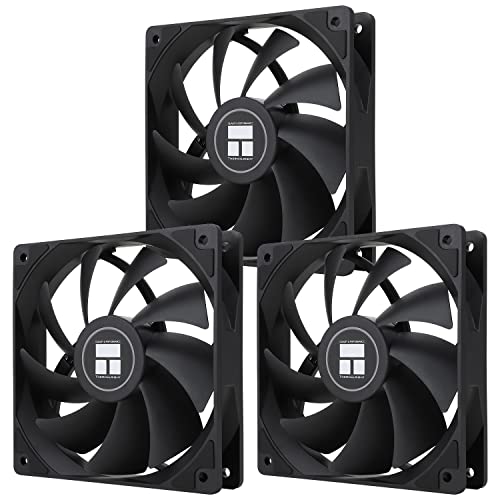
Thermalright TL-C12C X3 66.17 CFM 120 mm Fans 3-Pack (TL-C12C X3 D6)
cyan ravine
Still doing better
https://ca.pcpartpicker.com/list/zpcGt7
Part List - AMD Ryzen 7 7800X3D, GeForce RTX 4080 SUPER, Montech AIR 100 ARGB MicroATX Mid Tower
potent portal
Got the build list itch today eh
covert crypt
ideally i like no RGB lol moved on from it a while ago xD wont be able to see it to enjoy
cyan ravine
That's a small change
potent portal
Same. What little RGB I do have at least is functional. They change color according to CPU and GPU temps.
cyan ravine
Part List - AMD Ryzen 7 7800X3D, GeForce RTX 4080 SUPER, Montech AIR 100 ARGB MicroATX Mid Tower
The fans are swap ins so all rgb gobe
Gone
Or alternatively turn it off
covert crypt
lol lots of swapping, but my main money sink is the MOBO rioght?
cyan ravine
Actually your main money sink was the noctuas
C12C's are barely any worse, and you can get 6 for the price of 1
covert crypt
gonna do a return on those and swap for those thermal takes i was annoyed it costed over 250after tax
gotta wait for amazon to deliver it and then do a return zz
cyan ravine
Ye I would
The ram was ok
The ssd's I'd swap both
If you must have fast perf, the mp44l is good, but we can get a little better
potent portal
Even with the deal you got, if you swap the SSDs to the MP44L you'll save 100 cad
And you'd never notice a difference in performance
cyan ravine
This would be better, far better than the two WD's
https://ca.pcpartpicker.com/list/HBKKxH
Part List - AMD Ryzen 7 7800X3D, GeForce RTX 4080 SUPER, Montech AIR 100 ARGB MicroATX Mid Tower
S70 blade stonks
The cooler you could stick with
Dual tower is fine
For $9 more that's negligible for definitely better
potent portal
The cooler is good for a future CPU upgrade, think of it that way
cyan ravine
The mobo I would swap for sure, but the combo I would say makes it not terrible
If you want a 4000D, I could go either way
potent portal
potent portal
The cooler is good for a future CPU upgrade, think of it that way
It's about as good as the top noctua cooler but half the price
cyan ravine
But the psu could definitely be swapped
Rmx shift is not worth it like ever
Lol
Great unit, even on a deal it's not good
covert crypt
oh its rm850e not shift that was added by accident
cyan ravine
Rm850e huh
potent portal
Ah RMe is good
cyan ravine
225 for both?
potent portal
But honestly even the RM750e would be enough with a 4090
covert crypt
but black not white
 potent portal
Ah yeah that's good
cyan ravine
So fans, def change, ssd def change
Case, psu, mobo, take or leave
Gpu go cheap, aim for a founders
Don't spend more than msrp+50-ish
Before tax obv
potent portal
Even if you just change the fans and SSDs that'll save you 300 cad
cyan ravine
Oh wait cad
covert crypt
CAD and 13% tax lol
covert crypt
$19.90
- $6.49 Shipping. An Import Fees Deposit may apply at checkout.
Thermalright TL-C12C X3 CPU Fan 120mm Case Cooler Fan
cyan ravine
Ram I could go either way, they have cheaper trident sticks tbh, and on x670e I'd be willing to try 4 sticks of 16gb
It can work
If you know what you're doing
I don't normally suggest it though
But in this case it's cheaper
covert crypt
i have 4 DDR4 G SKill Ripjaws 16gb and it caused my current PC problems and i had to remove two and it worked again
cyan ravine
Yes but ddr4 is different
covert crypt
unfortunate i cant use it on the new mobo
cyan ravine
Ddr4 is quad rank* at 4 sticks
Ddr5 is octa rank
It's much harder to run
They use similar memory controllers from the ddr4 days to run ddr5
Iirc sized down to 7nm process
It's quite easy to say it's just twice as hard to run
covert crypt
so MSI PRO B650M-A WIFI Micro ATX AM5 Motherboard instead of the 670E?
cyan ravine
But it might be doable on the x670e
potent portal
The biggest change on DDR5 is moving the PMIC to the sticks themselves for better voltage regulation
covert crypt
gonna have to see if there is a combo lol
cyan ravine
covert crypt
so MSI PRO B650M-A WIFI Micro ATX AM5 Motherboard instead of the 670E?
If you want to save every dollar yeah, it's solid
Most b650's are great
Unless you need a LOT of storage for editing, like, way more than 3tb, I'd consider b650, or even a620
potent portal
4 sticks at 6000 might be tricky but can be done
cyan ravine
It's quite good on am5
covert crypt
no combo deal unfortunately

Canada Computers & Electronics. 47,807 likes · 226 talking about this · 147 were here. Official Facebook page of Canada Computers & Electronics
cyan ravine
I could take or leave the mobo tbh
It looked bad at first but not as bad after I checked everything
If having extra lanes appeals to you for extra storage later, no harm in it
covert crypt
ya i like extra storage my current computer has 2 NVME + SSD + HDD
cyan ravine
But on the other hand, a620m pro rs wifi is cheap af
potent portal
Swapping the mobo to a mATX B650 could save you another 100 cad, or you can keep the X670E "just in case" you need it later by adding another handful of drives
cyan ravine
If you intend to use more than 2 ssd's I can see reason to x670e imo
But if you don't really intend to then I'd consider a lower tier board if possible
covert crypt
im most likely gonna end up with 4+ storage again all my past desktops
i had to add more
 potent portal
cyan ravine
If you intend to use more than 2 ssd's I can see reason to x670e imo
potent portal
cyan ravine
If you intend to use more than 2 ssd's I can see reason to x670e imo
3 is about the limit for me, lots of B650s have 3, but 4 puts you right into $400+ territory
cyan ravine
Yeah but for video editing I am a bit swayed
covert crypt
i was initially going to for this but i needed more NVMe possibilities so i went with the tuf x670e cause i have option to add more
 cyan ravine
Ok that board is just garbage tbh
covert crypt
it just looked nice
cyan ravine
Sorry to be rude lol
potent portal
bios is trash
cyan ravine
covert crypt
it just looked nice
Yeah that's all that it has going for it
It's a asrock spinoff
But the problem isn't that
It's that it's really just some $150 asrock charging 320
potent portal
Gotta pay for that metal covering, all that thin aluminum has to cost $200 alone right?
cyan ravine
Gigabyte gotchu it's called gaming x
potent portal
But, but... that's not the premium aluminum
covert crypt
what was wrong with my current ram selection again? G.Skill Flare X5 64 GB (2 x 32 GB) DDR5-6000 CL30 Memory
cyan ravine
Nothing really, just there was a cheaper trident z kit
I got lazy and kept picking the identical ripjaws lol
I think ultimately you'd have saved a couple hundred talking to us today tho lol
cyan ravine
cyan ravine
Gpu go cheap, aim for a founders
Going back to this. Founders has the best pcb at msrp typically
But 4080S is worth it because of the msrp
covert crypt
ya much appreciated xD , this fan hub in the most unlikely of chances i go rgb it wont be supported on this right
https://www.amazon.ca/gp/product/B0989TTS3H/ref=ppx_yo_dt_b_asin_title_o01_s00?ie=UTF8&psc=1
covert crypt
ya
cyan ravine
That one's fine
I'm pretty sure some circles speak highly of it
The fans we sent you though
They daisy chain
So you may not need it
Daisy chain as in they all link together
Lol
covert crypt
i usually have this but sold out https://www.canadacomputers.com/product_info.php?cPath=8_136&item_id=123778

Canada Computers & Electronics. 47,807 likes · 226 talking about this · 147 were here. Official Facebook page of Canada Computers & Electronics
and ah ok
covert crypt
cyan ravine
But 4080S is worth it because of the msrp
i was actually debating on buying a used 4070TI once the 4080 super comes out thinking it'll lower the prices and people will start selling it cheap and then buy the 5000 series when it comes out
cyan ravine
You could
For the right price
Nothing wrong with a 4070 Ti if you can find it for like
I wanna say
Sub 700 usd?
They wouldn't be that old
covert crypt
my bro got one for 900 CAD today lol for a few months of use apparently
covert crypt
668.57 USD
cyan ravine
Yeah that's not too bad at all
4070 super is also considerable
If 4070 ti seems nice
covert crypt
ill be running the new computer without a gpu for a while think it can run League of legends just fine without a GPU, ill use my old computer until its gone soon for video editing/gaming
obsidian wigeon
it's ok for lol
obsidian wigeon
turn on afmf
potent portal
Not sure that works on iGPU yet
obsidian wigeon
frame gen on LoL
potent portal
Oh good, I know that was the ultimate goal but I didn't know if the beta got that far yet
covert crypt
someone on reddit:
 obsidian wigeon
31st
covert crypt
last question...
my company covers 1K CAD for monitors, any recommendations? i was thinking of selling my two monitors and use a wide screen i heard i can use it to dual monitor as well?
Current monitors:
Monitor 1: GIGABYTE 27" 170Hz IPS 1440P KVM Gaming Monitor 0.5ms FreeSync Premium, 2560 x 1440 SS, 92% DCI P3, HDR Ready, 1x DisplayPort 1.2, 2x HDMI 2.0, 2x USB 3.0, 1x USB Type-C Height Adjustable M27Q
Monitor 2: AORUS CV27Q 27" Frameless Height Adjustable Curved 1500R Gaming Monitor, Quad HD 1440p, 90% DCI-P3 Color Accurate VA Panel, 1ms 165 Hz, HDR, FreeSync Premium Pro, VESA, Zero Bright Dot Policy
Was looking at:
Samsung Odyssey Neo G9 49" LS49AG952NNXZA 5120 x 1440 (2K) 240Hz 1ms (GTG) FreeSync Premium Pro G-Sync Compatible, DisplayPort HDMI, Height Adjust VESA Tilt Swivel Curved Gaming Monitor
obsidian wigeon
them pirates cracking the monitors smh
cyan ravine
Canada Computers & Electronics. 47,807 likes · 226 talking about this · 147 were here. Official Facebook page of Canada Computers & Electronics
covert crypt
cyan ravine
M27q is alright for a decent price
thats my current monitor
cyan ravine
M27Q is good for video work
Alternatively

LG 27GR95QE-B 26.5" 2560 x 1440 240 Hz Monitor (27GR95QE-B)
Or

Alienware AW3423DWF 34.2" 3440 x 1440 165 Hz Curved Monitor (AW3423DWF)
Those are decent
covert crypt
cyan ravine
https://www.canadacomputers.com/product_info.php?cPath=22_700_1965&item_id=17509...
is it good for dual monitor gaming/editing?
in addition:
My bro said that a single ultra wide is not good for gaming as most games aren't optimized for wide screen and dual monitor on one monitor isnt as great compared to two actual monitors?
cyan ravine
He's not wrong
But on the other hand
You can just use the m27Q as a second screen
So you got options
It's really up to how you want to go crazy with it imo
The g9 neo has a dual screen feature that addresses the issue we're discussing but unfortunately again, cracking problems
Quite a fatal flaw
covert crypt
unfortunate 😦
cyan ravine
Vanilla g9 is good tho
potent portal
The G9 also definitely needs to be color calibrated, out of the box it's pretty bad. Once it's calibrated, it's very color accurate.
cyan ravine
QLED stonks
potent portal
cyan ravine
QLED stonks
Too bad about that edge lit tho
cyan ravine
My experience isn't that bad tbh
I wouldn't say it's terribly noticeable
Maybe panel to panel variation
I would definitely say it looks way better than an ips tho by a mile
potent portal

RTINGS.com
The Samsung Odyssey G9 is a super ultrawide gaming monitor. It has a large 49-inch screen with a 32:9 aspect ratio and 5120x1440 resolution, which is the equival...
covert crypt
potent portal
The G9 also definitely needs to be color calibrated, out of the box it's pretty ...
no wonder when i looked at the store display it looked pretty awful .. the non neo version that is
well thanks for your assistance peeps 🙂 i look forward to my new PC
was going to ask about thermal paste but i think Thermalright Peerless Assassin 120 SE 66.17 CFM CPU Cooler already comes with one
potent portal
Yep
 manic cloak
I hate how I wanna throw a AIO on a 7600 or even a 7500F
but it's such low wattage that a low profile could even cool it
potent portal
The stock cooler can even cool those
potent portal
Unnecessary unless you're using liquid metal
Even if thermal paste did manage to get under the IHS it won't hurt anything since it's non conductive
 plucky timber
did someone say challenge
crimson zinc
Yes I did @plucky timber
Would you like one
I actually have quite a unique one for you
crimson zinc
Are you aware of the site “3dbenchmarks”?
plucky timber
nope
plucky timber
oof
crimson zinc
PCGameBenchmark
Find out how your PC ranks up to others. Rate your PC. PCGameBenchmark compares your computer to thousands of configurations to give it a score, based on how many of the top 1000 PC games you can run at recommended level. What's your PC rank?
This instead
Get the lowest possible score.
plucky timber
crimson zinc
Get the lowest possible score.

 plucky timber
More like 127000%
plucky timber
Userbenchmark derivative
obsidian wigeon
timeless gpu??? 
 mossy lion
i was wondering if chat can help me with my build. This is my current build https://pcpartpicker.com/user/Jrart4216/saved/6hgyFT . Chat told me a buy a monitor first before anything. which i did and this is the new monitor i use for gaming https://www.amazon.com/dp/B0C4Z8RFY9?ref=ppx_yo2ov_dt_b_product_details&th=1 . I was wondering what would be the next item to upgrade my build

In competitive gaming, every frame matters. Introducing Acer's XV271U gaming monitor - the WQHD (2560 x 1440) resolution monitor that can keep up with your game play. This AMD FreeSync Premium monitor takes gameplay to the next level of smooth, the game’s frame rate is determined by your graphics...
 vivid copper
mossy lion
i was wondering if chat can help me with my build. This is my current build http...
vivid copper
mossy lion
i was wondering if chat can help me with my build. This is my current build http...
List is set to private
vivid copper
Still private
mossy lion
Part List - AMD Ryzen 9 5900X, Radeon RX 6800, Fractal Design Focus G ATX Mid Tower
obsidian wigeon
if you're just gaming, 5800x3d is a step up
and gpu upgrade maybe, if you want more fps at 1440p
vivid copper
mossy lion
https://pcpartpicker.com/list/MRCZjH
Unless you're unhappy with your performance you don't need to upgrade anything. Enjoy your PC.
vivid copper
Only thing i would do is get rid of those mixed ram kits and just get a solid 2x32 or 4x16 kit if you need that much ram....
mossy lion
obsidian wigeon
and gpu upgrade maybe, if you want more fps at 1440p
what did you have in mind
obsidian wigeon
like a 4070 super?
mossy lion
vivid copper
Only thing i would do is get rid of those mixed ram kits and just get a solid 2x...
i did want to change it any suggetions maybe something in white and rgb?
mossy lion
obsidian wigeon
like a 4070 super?
can you post a link?
obsidian wigeon
you should only buy one at 600 btw, which is the msrp
cyan ravine
You really have 48gb?
mossy lion
obsidian wigeon
you should only buy one at 600 btw, which is the msrp
still don't know what that lol
mossy lion
cyan ravine
You really have 48gb?
yes...
cyan ravine
My better question is do you need 48gb or has 32 been ok
Cos just taking out 16gb would make the pc quicker
mossy lion
cyan ravine
My better question is do you need 48gb or has 32 been ok
not sure i just always thought more ram was better...
cyan ravine
Not really
Even if you buy the same sku the chance of mixing sticks is really high
What I mean by that is
obsidian wigeon

Gigabyte WINDFORCE OC GeForce RTX 4070 SUPER 12 GB Video Card (GV-N407SWF3OC-12GD)
like this thing
cyan ravine
Mixing chips because brands use multiple suppliers
obsidian wigeon
or perhaps this

Asus DUAL GeForce RTX 4070 SUPER 12 GB Video Card (dual-rtx4070s-12g)
cyan ravine
And no 2 different chips behave the same
4070 super is a decent suggestion
Also new psu, case, even ssd I would wager be a decent idea
vivid copper
If he does all that he might as well do a new build...lol...
cyan ravine
He's asking for suggestions
I'm not gonna pretend like these things don't deserve it
It's a question of what he wants to do
cyan ravine
Bbq psu, mixed ram and mid tower are all deserving of it
obsidian wigeon
oh the evga bbq
mossy lion
cyan ravine
Bbq psu, mixed ram and mid tower are all deserving of it
in all honesty i was planning on making another build because this chat has always mentioned that i spent to much on the build...
cyan ravine
You would get a fair bit for flipping the cpu board and ram tbh
Sell the 16gb kit separately
People like strix, it inflates the value for no reason other than it has strix in it
Like when people read the word "sport" on a car lmao
mossy lion
ok so one thing at a time what is the next part i should change then please?
cyan ravine
For me it would be solving your ram situation
Personally thinking running just 32gb might be enough for your needs
Then sell the 16gb kit
Then I'd consider psu or case
The NV1 is a mid ssd but if it works, it works. It could be an old one before they swapped the parts to be a terrible ssd
i.e really quite good
The 4070 super would be the next genuine upgrade after that
A 5900x should be fine with that at 1440p
I say the same about the psu btw, if it works, it works. But I'd consider swapping it out in the future
mossy lion
cyan ravine
Personally thinking running just 32gb might be enough for your needs
should i also change the ram i have or should i just keep the 2x16?
cyan ravine
I would stick to 2x16
But that's said
Provided it's enough for you
You mention "chat" a lot
So I'm guessing you stream, edit, and all that
There could be a valid requisite there to have more if you find 32gb isn't enough (You'd know quite easily)
mossy lion
cyan ravine
I would stick to 2x16
so the current 2x16 i have is good, or should i buy a new one?
2x16
cyan ravine
Current is good
mossy lion
cyan ravine
So I'm guessing you stream, edit, and all that
no here in discord
cyan ravine
Ah
Well 32gb is probably enough then if it's just discord streaming
Depends on the game though a bit
Like tarkov for example eats 32gb
But 32gb is typically more than enough for a vast majority of things
crimson zinc
I have 48 cuz I plan on doing a lot of heavy duty stuff with modeling
mossy lion
Well typical games I play are turn based, wow, pal word, and war frame I find myself gaming the most
cyan ravine
Those sound fine
Reason I'm not listing 64gb is ddr4 is outgoing
If you need more, I'd flip the am4 mobo, ram and cpu
Then go to a new platform with ram that can carry over
Give me a sec, I'll make a list
Things that could be healthy suggestions
You can compartmentalise it and take from it what you think may help
mossy lion
So if I wanted to change my 2x16 to white and one that has rgb would say that's a yea or naw?
vivid copper
mossy lion
So if I wanted to change my 2x16 to white and one that has rgb would say that's ...
Then do that...you don't have to ask for anyone's permission to do so...you're looking for validation not suggestions...rememeber it's your build do what you want to make yourself happy b....
if you're okay with your parts then you're good...don't feel the need to upgrade because somebody told you, you should
mossy lion
I was asking for more if it's a good idea or not before I go searching something that might not be good for my build 😁
mossy lion
Not sure I am new to building pc this is my first build so if there is a way to improve I'll take any advice
If anything I wanted to change it for the since of the rgb and I wanted to have a white build
vivid copper
Let's put it like this...there is always something to improve or upgrade...it literally will be a never ending cycle
new hardware is constantly coming out...you will never have the latest or newest or best parts
cyan ravine
@mossy lion https://pcpartpicker.com/list/bW7sPF
Part List - AMD Ryzen 5 7600X, GeForce RTX 4070 SUPER, Montech X3 Mesh ATX Mid Tower
Pick from this any of the things we suggested
But remember cpu mobo and ram all go together
You can also do the 32gb version of the ram, I believe that one is near $100
I'd start by just taking out the 16gb kit tho from what you have first
That will make the pc faster alone
mossy lion
cyan ravine
That will make the pc faster alone
Can you explain what you mean by faster?
cyan ravine
mossy lion
Can you explain what you mean by faster?
Mixed sticks no longer a factor
Your pc will be literally snappier
mossy lion
cyan ravine
But remember cpu mobo and ram all go together
So you mean I can't change one part but instead I need to change all three at once?
cyan ravine
Ye
If you do one, all 3 need to be done on just those
If you're still not clear on the ram thing I can explain a bit deeper
mossy lion
Please 😁
cyan ravine
So ram is sold in this case by OLOy
But oloy itself, supplies from several manufacturers
To apply the ram chips, to each ram stick
Those ram chips work to completely different pcb schematics (the stick itself) and run under different favourable conditions on each motherboard
Think of it like
Apple juice, orange juice, pineapple juice etc
They're all juice
All nice
But all different flavours
From completely different circumstances
vivid copper
mossy lion
If anything I wanted to change it for the since of the rgb and I wanted to have ...
then grab some rgb ram, sell and get rid of the two unmatched kits you have and go back to gaming....like i said you'll always be trying to get new stuff if you come back and keep asking what more can i do.....the only time you need to upgrade is when you're not getting the performance you want....but i'll leave you to it....that's your ram.....https://pcpartpicker.com/product/fkBG3C/team-t-force-delta-rgb-32-gb-2-x-16-gb-ddr4-3200-cl16-memory-tf4d432g3200hc16fdc01

TEAMGROUP T-Force Delta RGB 32 GB (2 x 16 GB) DDR4-3200 CL16 Memory (TF4D432G3200HC16FDC01)
cyan ravine
cyan ravine
From completely different circumstances
DDR4 famously has a reputation at the 3200MHz mark of selling most of any chips at that speed. And Oloy has many suppliers
Corsair vengeance is particularly bad at this
Sometimes with a lone kit having chips from two different suppliers
When these chips mix, they require different, parameters to run on a motherboard
mossy lion
vivid copper
then grab some rgb ram, sell and get rid of the two unmatched kits you have and ...
Thank you for the advice 😁
vivid copper
no problem b...good luck
cyan ravine
Or in this case we call it timings
Ram can be very finicky
If the timings aren't a good match, the board will use slower timings until it does match
Bit like gears inside a clock
So when you mix ram together
From different manufacturers
The board can potentially run it, but it will stretch to wider timings to make both work
And the result from this is, the wider timings are much slower
This can also lead to things like windows instability, blue screens, dying windows installs
World's your oyster really on that one
By taking out the two 16gb sticks, it allows the ram that remains in there, to train much faster
They refresh and cycle faster, and can make the system wayyy more stable
Mixing kits is generally considered just a bad idea from the implications
mossy lion
Ok this makes more sense
cyan ravine
There's a chance that's not zero but close to zero, that both kits in there are identical just in different capacities
But it's so rare I've never seen it, like ever
mossy lion
So basically I am spreading the resource from my PC to thin which is causing my PC to work more then it should
cyan ravine
cyan ravine
But it's so rare I've never seen it, like ever
Unless the person knows how to match them, never by chance
cyan ravine
mossy lion
So basically I am spreading the resource from my PC to thin which is causing my ...
A little bit? It's more like the pc has an injured foot so it can't run as fast
Even though it has the better ability
mossy lion
Ok got it
cyan ravine
And I really would opt against buying new ddr4
At the very most get a used white kit, if that's an imperative
And sell what you have rn
Ddr4 is getting old now, no point putting new investment into it
cyan ravine
Like I'd have a bit of a different take if this was a brand new pc and it was entry tier
But not really for an existing pc imo
mossy lion
So just for the since of asking then if I ever wanted to have more ram in a build its always best to buy sticks that are in the same package. Example 4x8 right?
mossy lion
obsidian wigeon
at least 300 bucks
umm does it make a difference if i don't have the box i bought it in...
obsidian wigeon
nope
cyan ravine
Not really
obsidian wigeon
doesn't matter as long as the gpu is in good condition
mossy lion
cyan ravine
Or 2 packages from the same place at the same time
so never online then?
cyan ravine
Online counts
obsidian wigeon
offline would be easiest to match, but online works too
cyan ravine
If you bought 2 lots of 2x16 off amazon from the same article at the exact same time, it counts
obsidian wigeon
only offline option i recc is if you're close to a micro center
cyan ravine
Very very low chance it's a different batch
I would definitely say 4x16 is easily the safer bet tho
But 2x 2x16 would have a pretty good chance of matching as well
Just as long as it was purchased the same time
cyan ravine
I'd be picking between psu and case personally
mossy lion
does it matter which one?
cyan ravine
Not... particularly?
Maybe a bit more urge for psu
But both would be good QoL changes
mossy lion
well to be honest i do want to run a dual pc set up
cyan ravine
Say an igpu build, maybe arc a580 build, 6600xt maybe
mossy lion
should i just save it then?
cyan ravine
Hey there you go, arc a580 encoder build might be nice
I would yeah
Used psu's especially the meh ones don't sell for a lot
Only the really good ones
Like, rmx, ax, g6, gf1 etc
mossy lion
should it wouldn't be wise to reuse my old pc parts from this build for my second one then?
cyan ravine
No it would be quite a decent idea tbh
There is real merit to running dual pc for streaming, just more of a question of how valuable that would be to you
Like if you're very much capable of doing what you can rn, and it won't feel like an enormous upgrade, then maybe not
It does boil down to objectivity
A half decent laptop can be quite useful for this role instead, for example
mossy lion
well what if i told i have never stream yet so i am not sure...
mossy lion
but i do like the idea of dual pc step u, and that is something would like to get done before i start
cyan ravine
All down to you at the end of the day
I would wait until I got my groove first tho
You might find you need something else first
Like for example, a touch deck
Better mic
Green screen
Ambient lighting
Software licenses
Etc etc
All these little things can make a big difference
Camera
Anyway
That's a topic for another day, I gotta get going
Hopefully this was useful 
mossy lion
so i have a pretty decent mic. With a sound mixer, and xlr cable, and nexigo webcam
ok thank you for your help 🙂
cyan ravine
No worries
 jagged ember
mossy lion
so i have a pretty decent mic. With a sound mixer, and xlr cable, and nexigo web...
jagged ember
mossy lion
so i have a pretty decent mic. With a sound mixer, and xlr cable, and nexigo web...
I'd say you can start off trying to stream on the same PC you're playing the game on
If you're totally fine with that for now, maybe you won't need to spend extra on the second pc just yet
stable cove
So there’s something I should told you all a bit ago. I’ve had all this saved money in my safe for a while now. Like since Felix got me down to a $2,000 pc price there should still be at least $12,000 left in there after I buy my computer. So if you’re wondering why I’m not the most concerned about money then that’s why. My pc should last at least 5 years and whenever I’ll need to buy another one I’ll be long ready. Especially if it doesn’t cost that much
I’ve been holding onto that money since 2019
dusky hearth
there's no such thing as futureproofing in pc hardware, but 5 years is fairly easily doable
also why do you keep that amount of money in a safe and not a bank or investing it lmao
the value of that money will just continue to fall
but usually you dont just buy a computer and leave it for 5 years, you normally upgrade x part after like 2 years or whatever, or until you need some better hardware
and then once you upgrade to the point that your cpu doesnt keep up, or such, then you upgrade the whole system
 analog hearth
it's probably possible to buy a whole setup at the beginning of a new generation for consoles and have it last until the end of said console generation (including the cost of the computer)
dusky hearth
yeah
analog hearth
theoretically
dusky hearth
most servers are put into service and retired after 10 years
gaming is slightly different, and you probably want to upgrade your gpu once every few years or so, so that you can keep up with modern games, but if you're fine with lowering some settings for more newer games, even at 1080ti is still capable
hell, some people even play vr with a 1060 even though it's absolute 💩
analog hearth
it's crazy to me that some people still use a 1060 despite it being released in 2016 lol
mossy venture
stable cove
So there’s something I should told you all a bit ago. I’ve had all this saved mo...
This pc will easily last you five years. That's exactly why you're better off with a heatsink
An aio is much less likely to last you 5 years, and unless something kills your pc like a power surge or something being faulty, it will easily last 5 years and beyond
stable cove
dusky hearth
but usually you dont just buy a computer and leave it for 5 years, you normally ...
Upgrading a single part will only cost a few hundred dollars except maybe the graphics card
stable cove
In 2 years I’ll definitely be ready to buy a new part
dusky hearth
if you stick with only mid-high end (not top of the line) then it's going to remain around $700-800 ish for the gpus
ram upgrade may be more like $100-200 ish
i would probably upgrade the parts only as required or 3 years + for gpu
stable cove
Well people said 4090 was the best gpu on the market and 4080 is right next to that I shouldn’t have to change it for a while should still be an excellent graphics card
dusky hearth
3090 was the best gpu on the market just a bit over a year ago though lmao
now it's just a high end card basically
and yeah, like bacca said, if you want to have a reliable pc, use an air cooler, aios have more points of failure
servers are almost always air cooled
 weak flint
GeForce 256 was the bet gpu on the market just abit over 24 years ago though lmao
dusky hearth
real
stable cove
24 years ago was before I was born I’m only 21. But gonna be 22 in June
weak flint
stable cove
24 years ago was before I was born I’m only 21. But gonna be 22 in June
oh nice im gonna be 54 soon too!
stable cove
Ok so we got people in here who are much older
weak flint
woops wrong chat shouldnt continue before i get ban lol
dusky hearth
stable cove
Ok so we got people in here who are much older
honestly i think the majority of active members here are in their 20's-30's
mossy venture
dusky hearth
ram upgrade may be more like $100-200 ish
Ram won't need to be upgraded likely, it's gauranteed hynix they could easily do 6400c28-30-30-68
Well if the cpu will handle it
stable cove
dusky hearth
also why do you keep that amount of money in a safe and not a bank or investing ...
And about that investing might not be a bad idea but I’ve heard markets can always crash so that’s a serious responsibility. And savings accounts a bank normally only draw one penny a month so the interest is just pathetic. That’s work I’ll have to do outside the server. Pretty irrelevant here
dusky hearth
mossy venture
Ram won't need to be upgraded likely, it's gauranteed hynix they could easily do...
true
dusky hearth
stable cove
And about that investing might not be a bad idea but I’ve heard markets can alwa...
hedge funds have less risk, and normally you would have a diverse portfolio, though yes do your own research for risk/reward analysis
also savings accounts are more than just a penny/m if you put all 14k into it
sure, it wont be much more
probably more like 8 cents a month or smth
stable cove
I should be good with rtx 4080 for a while. Felix got me a fairly cheap pc for one of the best cards in the market and performance should be absolutely amazing
The graphics in vr might look a dozen times better than they did on my meta quest and through my Dell computer
I should’ve ditched that thing long ago
 tawny violet
stable cove
I should be good with rtx 4080 for a while. Felix got me a fairly cheap pc for o...
tawny violet
stable cove
I should be good with rtx 4080 for a while. Felix got me a fairly cheap pc for o...
As I already said
If you can afford to, wait until the 4080 Super is out
it's significantly cheaper for about the same performance (supposedly)
analog hearth
tawny violet
If you can afford to, wait until the 4080 Super is out
I second this. The 4080 Super releases January 31st. Just wait lol that's like three more days from now
 vale birch
Hello channel, I'm hoping someone has advice for this. I recently purchased a Lenovo Legion T5 AMD Ryzen 9 7900 w Nvidia RTX 4070 Ti. It's been pretty good so far but looking to get some extra vram. Is it possible to purchase a second vcard (let's say a 3090 24GB and use them in combination? If so, what's the best way to go about this?
mossy venture
vale birch
Hello channel, I'm hoping someone has advice for this. I recently purchased a Le...
What do you use the pc for?
And you would likely need a new power supply
tawny violet
vale birch
Hello channel, I'm hoping someone has advice for this. I recently purchased a Le...
VRAM is specific to your graphics card
You'd need to entirely replace the 4070 Ti
I think you should probably just keep that 4070 Ti and wait for 5000 series
Or potentially get something like a 7900 XTX if you really wanna upgrade
But like those are also like 900 USD so
It'd be a costly upgrade
 frosty roost
Looking for a build that will PUMP this game, https://store.steampowered.com/app/2429640/THRONE_AND_LIBERTY/

Welcome to THRONE AND LIBERTY, a free-to-play MMORPG that takes place in the vast open world of Solisium. You can scale expansive mountain ranges for new vantage points, scan open skies, traverse sprawling plains, explore a land full of depth and opportunity. Adapt your fight to survive and thrive through strategic decisions in PvP, PvE or both ...
Release Date
Coming soon
tawny violet
frosty roost
Looking for a build that will PUMP this game, https://store.steampowered.com/app...
Do you mind getting used parts to save on cost?
Cuz if you don't
tawny violet
Cuz that's not a very demanding game you wanna play so
You don't need something insane
tawny violet
manic cloak
I think FMFR is a bust with Fortnite
Isn't that AMD frame gen?
tawny violet
Honestly frame gen is a bust for competitive games as a whole
manic cloak
Techincally it works with Direct 11 but.. It's only for the little overlay stats
tawny violet
Just why bother?
manic cloak
fr
frosty roost
Budget or brand new any which way works
manic cloak
Cause Fortnite as "Performance" aka chapter 1 very original graphics, direct 11 and direct 12.
tawny violet
Besides with a 7800 XT you'd never need frame gen for comp gaming
frosty roost
But before you go on making something here are my current 2 rigs
tawny violet
frosty roost
Budget or brand new any which way works
Do you plan to play anything else or only that particular game?
What resolution do you wanna play it at?
frosty roost
@tawny violethttps://pcpartpicker.com/list/sYGdt7 X-99 DELUXE
Part List - Intel Core i7-5820K, GeForce GTX 970
Part List - Intel Core i5-6600K, GeForce GTX 970
mossy venture
frosty roost
Looking for a build that will PUMP this game, https://store.steampowered.com/app...
Budget?
tawny violet
mossy venture
Budget?
I mean the rec is a 1660 Ti
frosty roost
If i could upgrade either LMK
mossy venture
I mean
tawny violet
I was wrong
mossy venture
It's pretty demanding
tawny violet
That's the min spec
mossy venture
Ye
mossy venture
frosty roost
<@405396333650903042>https://pcpartpicker.com/list/sYGdt7 X-99 DELUXE
https://p...
I would keep ssd from first and psu from second
mossy venture
tawny violet
My bad
No you're good
tawny violet
Hm 2070 as recommended
I guess a 6750 XT would be really good with a 7600 and 32gb 5600 CL32
mossy venture
frosty roost
If i could upgrade either LMK
What is your budget to spend?
tawny violet
But I'd have to check the other 2 rigs to see what's worth salvaging
mossy venture
tawny violet
But I'd have to check the other 2 rigs to see what's worth salvaging
Imo only the rmx and the ssd in the first one
tawny violet
And yeah budget determines a lot
mossy venture
Possibly the cooler from one
frosty roost
So budget for a new one 1500$
mossy venture
Alright, few min
tawny violet
Cuz markets are different
mossy venture
frosty roost
Basically any you suggest if i could upgrade me current 2
Wifi or ethernet?
manic cloak
tawny violet
Cuz markets are different
performance "rn" for Fortnite yet i'm only rocking with barely 144 frames on all epic on 1440p
 mossy venture
And you in the US?
mossy venture
Got a microcenter nearby?
frosty roost
i think they just made one
tawny violet
tawny violet
Hm 2070 as recommended
I guess a 6750 XT would be really good with a 7600 and 32...
@mossy venture you think this would work for 1500?
mossy venture
1500 I'd do a better gpu
mossy venture
frosty roost
i think they just made one
Check if they have the 7800x3d bundle for 500
tawny violet
You can probs fit a 6800 XT into that cost
With the 7800X3D
And it'd be a better experience
frosty roost
PC Parts me a build if you all could, most welcome!
tawny violet
We're trying to play off of Micro Center being based and stocking a cheap 7800X3D bundle
Which you can't really PCPartPicker sadly
Check their website if the bundle is available
frosty roost
I usually search onto newegg so its all good
mossy venture
frosty roost
PC Parts me a build if you all could, most welcome!
Without microcenter, I would do this with your ssd and rmx 850 https://pcpartpicker.com/list/48NB7R
Part List - AMD Ryzen 5 7600X, GeForce RTX 4070 Ti, Fractal Design Pop Air ATX Mid Tower
tawny violet
Ya don't have to lock yourself to one store
frosty roost
Ok thanks for ur help
If you would chose a more less expensive video card which one?
mossy venture
And with microcetner
https://pcpartpicker.com/list/rWhY89
Part List - AMD Ryzen 7 7800X3D, GeForce RTX 4070 Ti, Fractal Design Pop Air ATX Mid Tower
mossy venture
frosty roost
If you would chose a more less expensive video card which one?
7800xt
tawny violet
You can go 6800 XT even (if you can find one in stock)
Depending on price it can be better value
mossy venture
frosty roost
If you would chose a more less expensive video card which one?
For a cheaper build I would say
https://pcpartpicker.com/list/WhHnMV
Part List - Intel Core i5-12600KF, Radeon RX 7800 XT, Fractal Design Pop Air ATX Mid Tower
frosty roost
Great thanks!
@mossy venture could you let me know which M.2 DRIVE and power supply for this build https://pcpartpicker.com/list/48NB7R
Part List - AMD Ryzen 5 7600X, GeForce RTX 4070 Ti, Fractal Design Pop Air ATX Mid Tower
mossy venture
The rmx 850 you already have for psu
And the ssd in this list
https://pcpartpicker.com/list/sYGdt7
Part List - Intel Core i7-5820K, GeForce GTX 970
You could also contact the cooler manufacturer and get an am5 mounting bracket
That cooler would be fine
frosty roost
Well you see i have those on display
mossy venture
?
frosty roost
So I talked it over and i may not disasemble them
mossy venture
Ah
Ok one min
How would you feel about swapping the psu in that build and using that one for this build?
mossy venture
If you did swap it out, this would be fine
https://pcpartpicker.com/product/bVD7YJ/asus-tuf-gaming-b-450-w-80-bronze-certified-atx-power-supply-tuf-gaming-450b

Asus TUF Gaming B 450 W 80+ Bronze Certified ATX Power Supply (TUF GAMING 450B)
Part List - AMD Ryzen 5 7600X, GeForce RTX 4070 Ti, Fractal Design Pop Air ATX Mid Tower
Ssd and a good 850w in that list, if you decide not to swap the other psu out
frosty roost
Cool thanks
Ill go the route
@mossy ventureHey Bacca sorry to bother you again but with those 2 builds i gave you not a simple Graphics card upgrade would run that game without issues?
Thanks for you help again
mossy venture
frosty roost
<@654444344274845698>Hey Bacca sorry to bother you again but with those 2 builds...
It would likely run but I doubt well. Look up a YouTube video of either of those cpus with say a 6700xt in the games you're trying to run
If it seems satisfactory, then go for it
Overall a cheap new build would be better imo, even less than the cheap list I linked earlier
frosty roost
Well if you have the time, let me know im a noob at building CPUS a friend is helping me as well
I will reference this info to him
mossy venture
Part List - AMD Ryzen 5 5600, Radeon RX 7600, Cougar MX331 MESH-X ATX Mid Tower
mossy venture
frosty roost
Thanks for ur help bud your great
Anytime, and feel free to ping me if you have any other questions
A used gpu is also a great option
You could likely find a 6700xt/3060 ti around 260 or less, and around 150-200 something 20 series 2070 super or better, or 6600xt/6650xt
frosty roost
@mossy venturehttps://www.newegg.com/gigabyte-radeon-rx-7600-gv-r76gaming-oc-8gd/p/N82E16814932621?Item=N82E16814932621&nm_mc=AFC-RAN-COM&cm_mmc=afc-ran-com--PCPartPicker&utm_medium=affiliate&utm_campaign=afc-ran-com--PCPartPicker&utm_source=afc-PCPartPicker&AFFID=2558510&AFFNAME=PCPartPicker&ACRID=1&ranMID=44583&ranEAID=2558510&ranSiteID=8BacdVP0GFs-HUD3Q5GHZMWFcHe1c1hqIQ This has raytracing right
opps
long link
mossy venture
It can do ray tracing but I wouldn't really recommend it
frosty roost
I see, alright just checking
mossy venture
If you want rtx I wouldnt go for anything less than a 4070 honestly
frosty roost
right ill compare
mossy venture
Ray tracing especially on 30 series and earlier, and any amd gpus currently, is not a very pleasant experience
frosty roost
RTX is amazing
mossy venture
7000 series is at about where 30 series was for Ray tracing, which is a big step up from 6000 series and it will keep improving, just right now it tanks fps
mossy venture
frosty roost
RTX is amazing
From what I've experienced it's mediocre most of the time. Some games it's implemented well, but for the most part it just tanks your frames without making much of a visual difference
cyan ravine
stable cove
I should be good with rtx 4080 for a while. Felix got me a fairly cheap pc for o...
4080 super releases in 2 days. Better card for less money.
Wait for it.
frosty roost
Ok
 gentle pollen
I am trying to reinstall windows on my PC. I forgot how to wipe my boot drive from bios. Can someone help me? Thank you in advance!
stable cove
Alright I’ll wait.
stable cove
cyan ravine
4080 super releases in 2 days. Better card for less money.
Wait for it.
Just message me a new build when it releases. I don’t wanna pick a wrong unfitting pc part again.
potent portal
gentle pollen
I am trying to reinstall windows on my PC. I forgot how to wipe my boot drive f...
You shouldn't need to wipe it from bios, but some boards have a "secure erase SSD" function.
Normally you can just delete the partitions from the Windows installer.
gentle pollen
potent portal
You shouldn't need to wipe it from bios, but some boards have a "secure erase SS...
Just found out when I watched a video. Currently my issue is I am not getting to the windows install so I changed boot priority
Oh wait, is the Win11 download I installed onto my USB a one time use?
tawny violet
Installed?
gentle pollen
?
gentle pollen
Where do I find that?
potent portal
It's normally under something like "windows 8 settings"
Disable secure boot, restart, enable
gentle pollen
I do it from within windows?
potent portal
Secure boot is the only name I know for it
gentle pollen
I found secure boot outside of search window but it has no enable or disable option.
potent portal
Then it's probably just a status page and the actual setting is elsewhere
gentle pollen
It should be with boot settings shouldn't it?
Could it be called Bootup NumLock State?
potent portal
No and no
It'll be under some advanced settings menu
Alternatively you can clear your CMOS and it should wipe the secure boot too
gentle pollen
Will do that
potent portal
It'll undo your overclock though
gentle pollen
That's fine.
My goal right now is to simply get my PC stable without any issues with curseforge and such.
Once that's resolved I can always redo my oc or whatever
What is fTPM?
Ahhh my boot priorities aren't detecting my boot drive?
potent portal
gentle pollen
What is fTPM?
Firmware Trusted Platform Module
You don't need to worry about it right now
stable cove
mossy venture
From what I've experienced it's mediocre most of the time. Some games it's imple...
Is rtx really bad?
Because that’s what I’m focused on