#building-and-recc-chat
1 messages · Page 202 of 1
 little osprey
little osprey
How much would my 3000g mobo 16gb 2400 512gb aio combo sell for?
little osprey
little osprey
little osprey
How much would my 3000g mobo 16gb 2400 512gb aio combo sell for?
Depends on the specific parts
What’s the motherboard, RAM, and storage?
Also 2400 is pretty slow for DDR4 let alone when the market is shifting towards DDR5
I'm aware
I'll get you the parts list in a bit
Alright
 obsidian wigeon
my guesstimate is
little osprey
Gonna be blunt you’re not gonna get much noting the 3000G is only dual core
obsidian wigeon
$60-70
little osprey
For all of it?
obsidian wigeon
yes
little osprey
Unfortunately that sounds about right
little osprey
obsidian wigeon
$60-70
Oh hail naw 🤣😅
 potent portal
Without knowing specific parts, here's my guess
3000g - $20
Mobo - $40
Memory -$15
SSD - $15
AIO - $25
I can give a more exact number once you put together the part list
little osprey
I had one and I can't get into my account 
Athlon 3000G
MSI B450M Gaming Plus
ADATA XPG Z1 8x2 2400MHz
PC711 SK Hynix 512GB
Corsair H55
+- EVGA SuperNOVA 120-GP-0650-X1
The motherboard has issues with the audio controller not working
So id probably have to list the combo as fp/nw
little osprey
little osprey
The motherboard has issues with the audio controller not working
And the CPU and Ram have been OC'd
Which I'm pretty sure is important?
Not ever for longer than 2 months though
potent portal
I was almost dead on once I checked ebay used prices.
3000g - $25
Mobo - $40
Memory -$15
SSD - $15
AIO - $25
You don't need to list as "for parts" just make sure that you list any defects
No one needs to know it was overclocked, it barely matters unless you pushed the voltage too high
little osprey
potent portal
I was almost dead on once I checked ebay used prices.
3000g - $25
Mobo - $40
Mem...
So it'd be fine to list the whole combo somewhere for about 120$? Thanks
Decent enough I suppose-ish
potent portal
You can list it a little higher than that because people will try to haggle it down
little osprey
I was hoping the egpu would pay for itself though 😭
potent portal
Maybe list for $150 and take an offer above $120
potent portal
I've done a lot of selling lol
That way the buyer thinks they won but in reality you did
little osprey
potent portal
That way the buyer thinks they won but in reality you did
Yeah
little osprey
little osprey
I was thinking r/hwswap
Idk that you can even post a listing like this on eBay? 😭
What would you post it under
potent portal
You can but the shipping would be really expensive
I'd post locally, facebook market, craigslist, etc
little osprey
Alright
potent portal
You can sell just about anything that isn't illegal or expired on ebay
little osprey
little osprey
Athlon 3000G
MSI B450M Gaming Plus
ADATA XPG Z1 8x2 2400MHz
PC711 SK Hynix 512G...
Should I add my PSU to this and just get a new cheaper one or nah?
Edited it to include it in the message
potent portal
Honestly I'd keep the power supply, that's a decent enough B tier unit
You could put that into the eGPU dock
Whatever you could sell the PSU for isn't worth buying another one
 winged crystal
Gonna be a silly question.... what direction should i face the cpu fan when i install it on the motherboard?

 mossy venture
winged crystal
Gonna be a silly question.... what direction should i face the cpu fan when i in...
mossy venture
winged crystal
Gonna be a silly question.... what direction should i face the cpu fan when i in...
What cooler
Though generally, you want the fan to blow the air out the back of the case
little osprey
potent portal
Honestly I'd keep the power supply, that's a decent enough B tier unit
Alright thanks
winged crystal
What would be better (if it matters) the enermax little packet of thermal paste that came with it or (i have a tube) silicon 500 thermal paste?
 jagged ember
winged crystal
jagged ember
winged crystal
Hopefully i didn't break anything.... had to put quite a bit of force to get it to clasp...
potent portal
That's normal. It can be scary the first few times.
 split cliff
what is this
 potent portal
Heatsink for a SSD
 cyan ravine
One with a fan that's probably loud but also good too
 pseudo pollen
good for you
 tepid crater
See now that's what I need. Cause the only ssd port I have with a heat sink is disabled. But the other one is enabled with no heat sink. Thinking that's why my ssd fried
potent portal
Temperature won't kill the drive, it'll just slow itself down and keep itself about 20 degrees below any kind of critical temp
tepid crater
Hmm. Has to have been that PSU then
 leaden raft
my pc is back to running like doodoo and i just do NOT understand why
leaden raft
tepid crater
Your using a HDD?
no
leaden raft
tepid crater
Virus's?
no
leaden raft
tepid crater
Background programs running?
dont think so
im pretty mindful w task manager
tepid crater
If macaffy has found its way into your pc it'll cause your pc to run terribly aswell
leaden raft
tepid crater
If macaffy has found its way into your pc it'll cause your pc to run terribly as...
whats that
tepid crater
It's an "ant virus" that's just malware in disguise
leaden raft
o
tepid crater
Same for Norton anti virus
tepid crater
If you've downloaded mods for a game it's possible it piggy backed onto them. Programs it should, virus scan no
Also when was the last time you did a driver update?
and I don't mean just your graphics drivers
 high field
So I’m going to be building a new pc
And I’m going to be using the then 7 5800x3d with a Msi 4070 ti and a Corsair iCUE H100i Elite CAPELLIX XT Liquid CPU Cooler with it over heat
potent portal
The 5800X3D is one of the hottest processors that is currently relevant
It will overheat on just about anything but the best 360mm AIOs
And I wouldn't put anything Corsair makes into any list that starts with "best"
leaden raft
tepid crater
Also when was the last time you did a driver update?
only ones i see for options are Intel Corp bluetooth and Intel - net
but i have on intel pieces
so idk
 austere basalt
Alright, update guys
cyan ravine
high field
So I’m going to be building a new pc
And I’m going to be using the then 7 5800...
Would strongly recommend not going 5800x3d new
7600 is cheaper, cooler, newer, faster
austere basalt
PC worked fine Monday, then yesterday evening it crashed 8 times 🙃
leaden raft
if i sent my hwinfo64 summary would it reveal anything bad?
austere basalt
All I did was have a few partial installs on games but that's about it, no new software. Oh and a windows update and new graphics driver
potent portal
leaden raft
if i sent my hwinfo64 summary would it reveal anything bad?
There's no personal info in the data if that's what you're asking, just specs and sensors
leaden raft
potent portal
There's no personal info in the data if that's what you're asking, just specs an...
could i send that here?
potent portal
Yeah
 austere basalt
I ran a 4 hour memory test on Occt and got a blue screen with memory_management... so am I looking at faulty ram?
leaden raft
i feel that these specs shouldnt be running games at 60fps on low-mid settings or have tearing when i dont have applications open...
high field
cyan ravine
Would strongly recommend not going 5800x3d new
Is for msfs only
So the 3d would be the best option for me
cyan ravine
Ah
Still try and get one used instead
The new price is not really worth it unless you already have an AM4 motherboard
high field
Used? Or I could get the 7800x3d
cyan ravine
7800x3d would be a better buy
high field
And the motherboard I got is the b550 with the 5800x3d
cyan ravine
It also can run on the stock box coolers unlike the 5800x3d
high field
Or should I do the b650 with the 7800x3d
potent portal
7800X3D is the single best gaming processor right now so if it's in budget there's no reason not to get it
cyan ravine
I'd do a620m with a $20 tower cooler and 7800x3d
Cos 7800x3d does NOT overheat easily at all
And doesn't need any extra features in a mobo to run at full performance
You weigh it up vs a 5800x3d with a b550 and h100i aio, I bet the 7800x3d could end up cheaper
And a solid 20% odd faster if not more
little osprey
||You need LN2 to cool the 7800X3D otherwise it’ll explode||
little osprey
I’m bored in class
leaden raft
leaden raft
anything raising eyebrows?
potent portal
little osprey
||You need LN2 to cool the 7800X3D otherwise it’ll explode||
That's the 14900k
little osprey
Nuh uhhh
potent portal
leaden raft
anything raising eyebrows?
You could try adding some memory voltage and see if that helps stabilize it
cyan ravine
leaden raft
anything raising eyebrows?
Yes, corsair vengeance ram
potent portal
If you're ok with being hard capped on power
high field
Would my collier still be good for my setup though
cyan ravine
Like, the highest candidate for both bad memory chips and rma in the ddr4 department
cyan ravine
high field
Would my collier still be good for my setup though
You can use a $20 tower cooler on a 7800x3d let alone any aio
You could use a stock cooler even, it runs just fine on the basic amd one
It's been tested before
7000x3d is much better for heat management than 5000x3d
potent portal
high field
Would my collier still be good for my setup though
If you got the 5800X3D, no it would not be enough. It would be more than fine for the 7800X3D.
austere basalt
@potent portal
cyan ravine
leaden raft
anything raising eyebrows?
It would not surprise me if your sticks are basically Samsung C, and have decided to die on their own and need a warranty claim
potent portal
cyan ravine
It would not surprise me if your sticks are basically Samsung C, and have decide...
3600c16 tho
cyan ravine
I thought it was 3200
high field
Corsair iCUE H100i Elite CAPELLIX XT Liquid CPU Cool
potent portal
I misread
potent portal
Yeah it's probaly C dead
potent portal
austere basalt
<@396513761550270464>
Could be memory or your SSD still
leaden raft
wait so my rams dead u think?
austere basalt
Would it help if I gave you the error codes?
potent portal
Not really
cyan ravine
leaden raft
wait so my rams dead u think?
my guess but it might also not be, things like a new windows update or a bios change can also do that
new video drivers
etc etc
potent portal
From what you've described I would say it's 75% chance being the memory, 20% chance it's the SSD, 5% chance other
You can rule out the SSD by installing Windows on another drive
high field
So would I need to get a new mother board the b650 and the 7800x3d and the new AIO cooler
cyan ravine
leaden raft
anyway to diagnose?
ram test
potent portal
Drives are cheap, might not be a bad idea to get another
high field
What do u think
leaden raft
potent portal
Drives are cheap, might not be a bad idea to get another
i have two nvme in here
potent portal
Oh, then you can use the secondary one to install windows and pull the main out
If you still get errors, it's the memory
cyan ravine
high field
So would I need to get a new mother board the b650 and the 7800x3d and the new A...
Part List - AMD Ryzen 7 7800X3D
potent portal
On the same drive though
leaden raft
nah
potent portal
So if the drive itself is bad...
You already tried installing on 2 different drives?
Is that what you're saying?
leaden raft
correct
potent portal
Ok then yes it's your memory
leaden raft
i tried on it both of the nvme on the board
high field
I would want to get liquid cooler not a fan got any suggestions for one?
cyan ravine
high field
I would want to get liquid cooler not a fan got any suggestions for one?
Part List - AMD Ryzen 7 7800X3D
potent portal
Why though, liquid coolers are louder and don't live as long
high field
potent portal
Why though, liquid coolers are louder and don't live as long
Just always used them this will be my 5th pc
cyan ravine
it'll be $30 extra just on aesthetics basically
no performance gain
nor sound gain
potent portal
Air cooling has come a long way in the last decade, $40-50 air coolers compete with $125 240mm AIOs
leaden raft
potent portal
Air cooling has come a long way in the last decade, $40-50 air coolers compete w...
rlly??
cyan ravine
yes
leaden raft
might gotta consider for my sff build
cyan ravine
Thermalright peerless assassin >>>>>
leaden raft
is there a way to test the memory to see
cyan ravine
cyan ravine
nor sound gain
to explain what I mean by this, new Ryzen just runs hot no matter what unless you do some really jank modding like delidding, so you will have basically the same results from a $20* tower vs an $800 triple radiator custom loop
cyan ravine
leaden raft
is there a way to test the memory to see
try testmem5 anta777 extreme
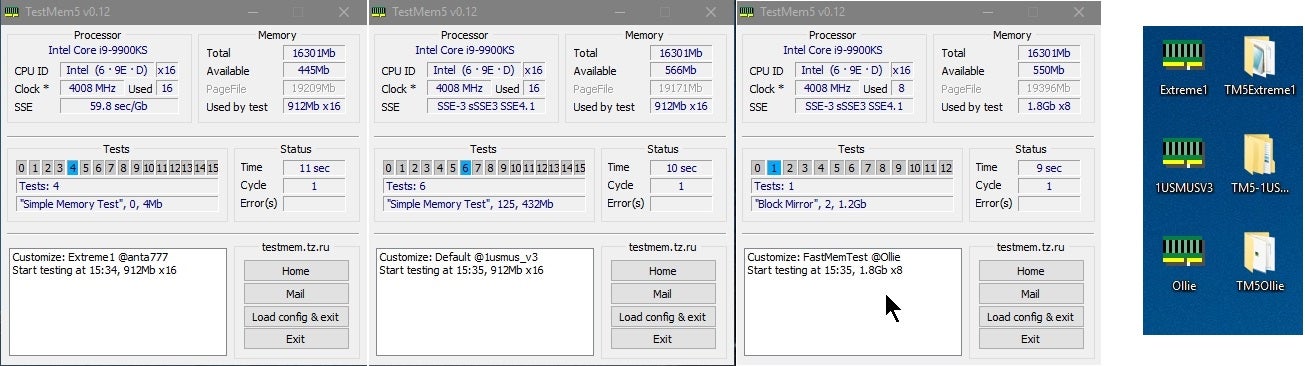
Overclock.net
Hello everybody
I am just making a very light tutorial with a collection of custom config files and a DOWNLOAD LINK for TM5 v0.12
anta777 absolut config Official Intel DDR4 24/7 Memory Stability Thread
None of the work is mine but it seems like a pretty good and fast testing app
Update...
leaden raft
cyan ravine
it's showing numbers up to 14 yes?
huh
 austere basalt
I'm curious, if I have occasional crashes while installing games (sometimes not) would that still be indicative of ram issues?
leaden raft
cyan ravine
tests up to 15 no?
no
potent portal
austere basalt
I'm curious, if I have occasional crashes while installing games (sometimes not)...
Yes
leaden raft
up to 5
austere basalt
On top of it crashing during a ram test
cyan ravine
leaden raft
no
then you need to load the anta777 config
click load config
and search the same folder for anta777 config
then it'll close, then you relaunch it as administrator and it should show the profile has loaded
cyan ravine
ok, let it run for 3 cycles
if it shows any errors at all, you have a ram problem
if not, then you most likely don't have a ram problem
it should take about a couple hours
potent portal
Well, you still have a ram problem. It's called Corsair.
leaden raft
what am i doing wrong lol
cyan ravine
yes but we can look past that
leaden raft
i cant open it
potent portal
Open what
leaden raft
call function. core #22 invalid DLL
cyan ravine
wot
leaden raft
cyan ravine
then you need to load the anta777 config

i did run as administrator
riddle me that
leaden raft
why does it pop up 25 times lol
 cyan ravine
oh no it's not
wrong config

anta777 extreme config
2020high is different
load coonfig and try again
cyan ravine
yes
 potent portal
leaden raft
my computer is LAGGING
potent portal
leaden raft
my computer is LAGGING
Because it's hitting every core 100% and filling your memory, it's supposed to do that
leaden raft
ok
cyan ravine
it's time to close the things you are doing and let it run until it's finished (will take a couple hours)
leaden raft
You mean no more fortnite???😭😭
potent portal
Just be glad we didn't suggest the pcbdestroyer profile
Took like 12 hours on my computer last I ran it
leaden raft
Where will I see errors
potent portal
In the box under where it says "start testing"
 potent portal
Or a pop up dialog box
potent portal
Probably not bad but memory is a pain to diagnose
leaden raft
Unless the tests take progressively longer this is flying
cyan ravine
leaden raft
 potent portal
It starts to combine the different tests as it progresses
cyan ravine
big red number in box
cyan ravine
leaden raft
Unless the tests take progressively longer this is flying
it's something like, 25 or more tests in one cycle
 leaden raft
I c
 rustic linden
Anyone know why when I enable launch csm mode, save it and exit, it turns back off?
potent portal
Probably because you have a UEFI OS installed
rustic linden
How do I fix that?
potent portal
Uninstall windows
rustic linden
I’m trying to install it
potent portal
CSM is for older operating systems and hardware that can't support UEFI
Like older than Windows 7 old
potent portal
What's the error you're getting
potent portal
What processor do you have
rustic linden
I5 8400
potent portal
Ok yeah you'll need to enable TPM and secure boot
Newer versions of BIOS do that automatically but an older board might not
potent portal
If it doesn't you can bypass the checks
rustic linden
Um pc isn’t posting anymore
Great
Is it like installing something?
It’s on but no post
potent portal
It's probably setting up the secure keys
potent portal
You might need to do something like set secure boot to custom mode and then back to standard
Or you can remake your windows USB using rufus and use the bypass option
rustic linden
It still hasn’t posted
potent portal
Right so you probably need to clear cmos
Did you check if there was an update for your bios?
rustic linden
No
potent portal
What model motherboard
rustic linden
B360m
potent portal
That's the chipset
rustic linden
 rustic linden
Just realized
rustic linden
Can I put that and windows on the same usb?
potent portal
Yes
rustic linden
Alr
 potent portal
nope
potent portal
ye
 untold pecan
what’s a good list of parts for liquid cooling pc
i currently have a NZXT starter pro PC with a kraken X in it
but it’s having issues with over heating
mossy venture
untold pecan
what’s a good list of parts for liquid cooling pc
Custom loop?
There is not a single cpu or gpu that would require a custom loop
Is the case in that kit an h510 or h510 elite?
rustic linden
potent portal
Yes
Damnit not enough space
potent portal
What, really? The bios is only a few MB
untold pecan
H510
potent portal
:h510:
untold pecan
sad beans
i wanted to do a prebuilt again but ima build a new pc and sell this nzxt pc
i have a parts list and it’s just expensive
potent portal
Dangit discord why you take my money and then no nitro
leaden raft
potent portal
ye
How do I know when I’m done
rustic linden
@potent portal

 lyric thistle
most functional computer
mossy venture
untold pecan
i have a parts list and it’s just expensive
How much do you want to spend
Do you need wifi, do you care about looks and if so what aesthetic would you like, what do you use the pc for, what resolution is your monitor/do you want a new one
untold pecan
3k , i do need wifi and i’d like a white theme , Im just using it for gaming with mediocre coding skills . i have a 2560x1440 monitor
mossy venture
untold pecan
3k , i do need wifi and i’d like a white theme , Im just using it for gaming wit...
Dope, do you want an aio?
Also how much storage would be suitable?
untold pecan
preferably 2 TB , i do want an AIO
potent portal
rustic linden
<@396513761550270464>
Just hit enter
potent portal
leaden raft
How do I know when I’m done
It'll tell you in a popup "testing completed, of errors not found" which is because the original programmer speaks russian natively
mossy venture
untold pecan
preferably 2 TB , i do want an AIO
Part List - AMD Ryzen 7 7800X3D, Radeon RX 7900 XTX, Lian Li Lancool II Mesh C RGB ATX Mid Tower
Plenty of other case options if you're not a fan of that one
You could do a 4090, but the cheapest right now is over 2k, which is very very much not worth it
Also I forgot to ask if you're in the US?
If you're not that list likely won't work
untold pecan
I am in the US
mossy venture
Ah alright
Could also do a 4080, but xtx is a lil bit better and is cheaper
Cheapest 4080 white last I checked is 1280 or so
Ah 1260
potent portal
Not a lot of white AMD cards though
mossy venture
If fine with black gpu, could do $1070 for a 4080 or $950 for an xtx
https://pcpartpicker.com/product/PGWzK8/gigabyte-eagle-geforce-rtx-4080-16-gb-video-card-gv-n4080eagle-16gd
https://pcpartpicker.com/product/GtXJ7P/xfx-speedster-merc-310-black-edition-radeon-rx-7900-xtx-24-gb-video-card-rx-79xmercb9

Gigabyte EAGLE GeForce RTX 4080 16 GB Video Card (GV-N4080EAGLE-16GD)

XFX Speedster MERC 310 Black Edition Radeon RX 7900 XTX 24 GB Video Card (RX-79XMERCB9)
leaden raft
potent portal
It'll tell you in a popup "testing completed, of errors not found" which is beca...
thats what happened

so whats the issue
high field
Which option would be better for msfs
Ryzen 9 7900X 12 Core 24 Thread
Red Devil RX 7900 XTX
MSI Mag Mortar Mobo
Trident Z Neo 32GB 6000mhz CL30
Arctic Liquid Freezer II 360MM AIO
Corsair SF1000L
WD Black SN850X 2TB NVME
Arctic P12 Max Case Fans
ASUS AP201 Tempered Glass Case
Or
Ryzen 5800x3d 8 core 16 thread processor
Msi 4070 ti gaming x slim 12 GB
Corsair icue h100i elite capellix xt
Msi mag b550 tomahawk max WiFi atx am4 mobo
Team group t force 32 gb (4x8) ddr4-3200 cl16 memory
Team group t-force z 1 tb solid state drive
Corsair 5000d case
Evga supernova 750 gt
Corsair icue sp120 elite 47.7 com 120 mm fans
potent portal
Yes
The 7900 XTX beats the 4080, except in ray tracing which that game doesn't have iirc
Ah no it does have RT but you have to manually enable it?
high field
potent portal
Ah no it does have RT but you have to manually enable it?
How would I do that
potent portal
There's a config file you have to edit
It's a beta feature so that's why it's not in the regular settings, ok that explains why I thought it didn't have it
potent portal
Yeah bacca is right the 7800X3D would be the better CPU for gaming
I think it's a prebuilt system though
potent portal
In that case there's a LOT that I would change on that list
You could easily save $500 and get better performance
high field
From which pc
potent portal
The first one
mossy venture
mossy venture
Do you need wifi, do you care about looks and if so what aesthetic would you lik...
Answer these questions
And what's the budget
high field
Me?
mossy venture
Ye
I asked someone else but the same questions apply
So just easier to reply to it then type them out again
high field
Completely new build just for Microsoft simulator
mossy venture
Sorry for the blunt phrasing
high field
I want the graphics to look the best in ultra settings
It’s use is just for Microsoft simulator
mossy venture
But there's other things to consider
potent portal
Part List - AMD Ryzen 7 7800X3D, Radeon RX 7900 XTX, Cooler Master MasterBox TD500 Mesh w/ Controller ATX Mid Tower
mossy venture
Like do you need wifi or are you using ethernet
high field
Ethernet
high field
potent portal
https://pcpartpicker.com/list/sBYCrv
Why not a liquid cooler?
I want it to last years
I don’t want it to reach high temperatures
high field
mossy venture
Do you care about aesthetics
No not really performance and keeping it cool temperatures
mossy venture
Liquid coolers have a life span of 3-5 years typically
potent portal
high field
I want it to last years
This is exactly why not a liquid cooler
Plus the 7800X3D runs very cool, it runs on the stock Wraith cooler
So if anything a 5 pipe single tower is more than it needs
mossy venture
Psu is very overkill https://pcpartpicker.com/list/rR6Z28
Part List - AMD Ryzen 7 7800X3D, Radeon RX 7900 XTX, Phanteks Eclipse G360A ATX Mid Tower
Also mobo tbf
mossy venture
Actually this mobo https://pcpartpicker.com/product/n8nypg/asrock-b650m-pg-riptide-micro-atx-am5-motherboard-b650m-pg-riptide

ASRock B650M PG RIPTIDE Micro ATX AM5 Motherboard (B650M PG RIPTIDE)
Since you don't need wifi
Fals list is also really good
Can have your pick between the two or a mix thereof
potent portal
potent portal
5 heat pipes, single tower
A dual tower looks like this

2 metal sections
So a single tower has just one
potent portal
If you're running ultra then the GPU will be doing most of the work and the CPU will be chilling, maybe 60C tops
high field
What monitor would u recommend
high field
potent portal
If you're running ultra then the GPU will be doing most of the work and the CPU ...
Oh ok
potent portal
high field
What monitor would u recommend
How much are you willing to spend
$750 gets you an OLED these days I think
high field
potent portal
How much are you willing to spend
Less then 500$
potent portal

Gigabyte M27Q-P 27.0" 2560 x 1440 170 Hz Monitor (M27Q-P)
mossy venture
@high field
high field
mossy venture
Would you rather 1440p 144hz, 1440p 240hz, or 4k144hz
Lemme see
mossy venture
potent portal
https://pcpartpicker.com/product/mQbTwP/gigabyte-m27q-p-270-2560x1440-170-hz-mon...
^, m27q-x, 27qs, m32u
high field
This so stressful on what to get lol
potent portal
4k at ultra settings you're looking at 60 fps
mossy venture
Imo 27qs at $300 is what I'd go for

HP OMEN 27QS 27.0" 2560 x 1440 240 Hz Monitor (Omen 27qs)
potent portal
potent portal
4k at ultra settings you're looking at 60 fps
Which is perfectly acceptable for that game, but I prefer higher so I'd go 1440p
mossy venture
Though if it's literally just msfs you won't be getting over 144-170
So ye I'd agree with fal on m27q-p for 1440p
high field
potent portal
Which is perfectly acceptable for that game, but I prefer higher so I'd go 1440p
Yeah same I want the best of best
high field
high field
Which option would be better for msfs
Ryzen 9 7900X 12 Core 24 Thread
Red Dev...
What do u guys thinks temps would be on the 2nd option
potent portal
Thermal limit
high field
What’s that mean
high field
potent portal
https://pcpartpicker.com/product/mQbTwP/gigabyte-m27q-p-270-2560x1440-170-hz-mon...
So would this be my best option for monitor though?
potent portal
high field
What’s that mean
The highest the CPU allows itself to get, and the point where performance is reduced to produce less heat
The 5800X3D is one of the hottest CPUs right now
It throttles on everything but the best 360mm+ AIOs
potent portal
high field
So would this be my best option for monitor though?
That's one of the best in category, even compared to higher priced monitors
And I did a little double checking and MSFS does prefer the 4080 over the 7900 XTX by a fair bit, which makes it one of the rare exceptions. So here's what you end up with now. https://pcpartpicker.com/list/bXq2rv
Part List - AMD Ryzen 7 7800X3D, GeForce RTX 4080, Cooler Master MasterBox TD500 Mesh w/ Controller ATX Mid Tower
Plus then you get frame gen if you want it
high field
Frame gen?
Also let me get back to u on everything u sent really like the build u made me I heard that graphics card pretty heavy 😂💀
This video I believe he uses the same card
But the 5800x3d
potent portal
high field
Frame gen?
DLSS 3.0 where it uses AI to generate every third frame. It can get a little muddy looking at low fps but it can be used to smooth things out.
high field
potent portal
DLSS 3.0 where it uses AI to generate every third frame. It can get a little mud...
Oh on that monitor?
potent portal
high field
https://youtu.be/2cDHiTplmH8?si=o-iG6gVAMh4UkxWw
Youtube is borked for me for some reason I don't want to deal with right now
high field
Oh
potent portal
high field
Oh on that monitor?
No it's a Nvidia 40 series feature
high field
Oh
potent portal
So you could get the DLSS 3.0 by going nvidia instead of AMD for the GPU, which will also be good for when they take RT out of beta since Nvidia still pretty much wipes the floor with AMD in that.
And it's only an extra $100 so not too bad imo
And yes the GPU is heavy but you can add any kind of support to it and it's fine. Whether that's 3D printed, bought, or built out of Lego.
 tawdry lance
What would you guys recommend for a gaming pc for around $1250 USD?
potent portal
1080p or 1440p? Wifi? Any other needs or preferences?
tawdry lance
1440p, no wifi, just a general gaming pc for all types of games.
potent portal
tawdry lance
1440p, no wifi, just a general gaming pc for all types of games.
Part List - AMD Ryzen 5 7600, Radeon RX 6950 XT, Phanteks Eclipse G300A (3 Fan) ATX Mid Tower
high field
potent portal
And yes the GPU is heavy but you can add any kind of support to it and it's fine...
Do u have a suggestions for stands?
mossy venture
I was about to post one but thats better
potent portal
That $500-700 range on GPUs is pretty bad selection right now
But $600 for one of the best 6950 models is decent enough
potent portal
high field
Do u have a suggestions for stands?
Like a GPU support?
high field
Got a quick question about that 2nd option I said in my original option what if I where to change the cpu to 7800x3d and change the motherboard
high field
potent portal
Like a GPU support?
Yeah
potent portal
You could go simple https://www.amazon.com/Graphics-Card-GPU-Support-Bracket/dp/B0BZ87YT7S
Or fancy https://www.amazon.com/upHere-Addressable-Graphics-Adjustable-G276ARGB/dp/B08YYB3WM2?th=1

Graphics Card Gpu Support Bracket GPU Sag Bracket Video Card Stand GPU Holder Graphics Card Support

G276ARGB GPU Brace Support Video Card Sag Holder
high field
potent portal
You could go simple https://www.amazon.com/Graphics-Card-GPU-Support-Bracket/dp/...
Thank you
high field
high field
Got a quick question about that 2nd option I said in my original option what if ...
But keep everything else in the 2nd option I sent just change the cpu and mobo
potent portal
high field
Got a quick question about that 2nd option I said in my original option what if ...
You'd need to change the memory too
But it's still a much worse GPU
mossy venture
potent portal
But $600 for one of the best 6950 models is decent enough
Yeah, id say it's a toss up between that and 6800xt at 485
7900xt is down to 730 which isn't terrible
potent portal
That's only slightly out of reach for this budget though
mossy venture
It's decently ahead of 6950xt now, but still meh value
high field
potent portal
You'd need to change the memory too
But it's still a much worse GPU
Just why so to change the 4070 ti cause I heard it super good for msfs
mossy venture
Yeah this is the closest I could do with it https://pcpartpicker.com/list/Xw4QRK
Part List - AMD Ryzen 5 7600, Radeon RX 7900 XT, Phanteks Eclipse G300A (3 Fan) ATX Mid Tower
The 4080 fits in your budget very easily
And its much better value than the 4070 ti
potent portal
high field
Just why so to change the 4070 ti cause I heard it super good for msfs
The XTX compares to the 4080 in msfs, not the 4070 ti which falls a good 15-20% behind
Which is why we're about to get a 4070 ti super that falls between the 4070 ti and 4080
💩
potent portal
Probably
 lost marsh
Anyone have a mini itx build for around $1300, That can edit and create videos?
potent portal
What program
high field
I’ll let u know if I have any more questions but thank you very much for helping me out I very much appreciate as I was very confused on what to get
potent portal
lost marsh
Anyone have a mini itx build for around $1300, That can edit and create videos?
What program would you be using for editing?
lost marsh
Adobe premiere pro
lost marsh
i was going to get the thermaltake tower 200 mini chassis
potent portal
lost marsh
i was going to get the thermaltake tower 200 mini chassis
How big are the projects in file size and/or resolution?
potent portal
lost marsh
i was going to get the thermaltake tower 200 mini chassis
I think this is about the best you could do https://pcpartpicker.com/list/4RDdFs
Part List - AMD Ryzen 7 7700, GeForce RTX 4070, Thermaltake The Tower 200 Mini ITX Tower
high field
@potent portal
What’s better for msfs 4070 ti or 4070
I know the ti better but is it worth extra 300$
potent portal
high field
What’s better for msfs 4070 ti or 4070
On 1440p ultra the 4070 will not be playable
Below 30 fps in the air, maybe 20 on the ground
tepid crater
@potent portal so here's one for you. Remember how my pc wasn't recognizing my SSD on boot and wouldn't boot from it? Now that I'm running off my HDD it's now showing my SSD as a viable storage with all my data still on it...kinda wondering if windows didn't shut down my pc on me since my windows 10 wasn't an active subscription before
potent portal
No that wouldn't do anything, that just keeps you from using the "personalization" menu
tepid crater
Wondering why it's decided to recognize it now though
potent portal
Bad drives can drop in and out
tepid crater
Think I'm gonna transfer all the data over to my HDD then while I can
high field
potent portal
On 1440p ultra the 4070 will not be playable
So would the TI be better?
potent portal
Very much so, but sheesh there's a lot of veriety in the results people are getting
I'm trying to find a more reliable source
One person with a 5800X3D went from a 4070 to a 4070 ti and got 25% more fps
high field
What’s the source is if u don’t mind me asking
potent portal
Some random on the flight sim forum
high field
Oh could u send a ss
potent portal
That's why I said I'm looking for a more reliable source
potent portal
I can try
high field

Buy Gamekeys at CDKeys ►https://cdkeys.pxf.io/xkJg3v
Please hit the thumbs up button and subscribe if you like what you see.
Recorded with my dedicated RECORDING/STREAMING PC via Capture Card.
This video was directly Captured from my ULTRAWIDE GAMING Monitor OR my OLED 4K HDR GAMING TV.
Resizable Bar / Smart Access Memory is always ON in my vid...
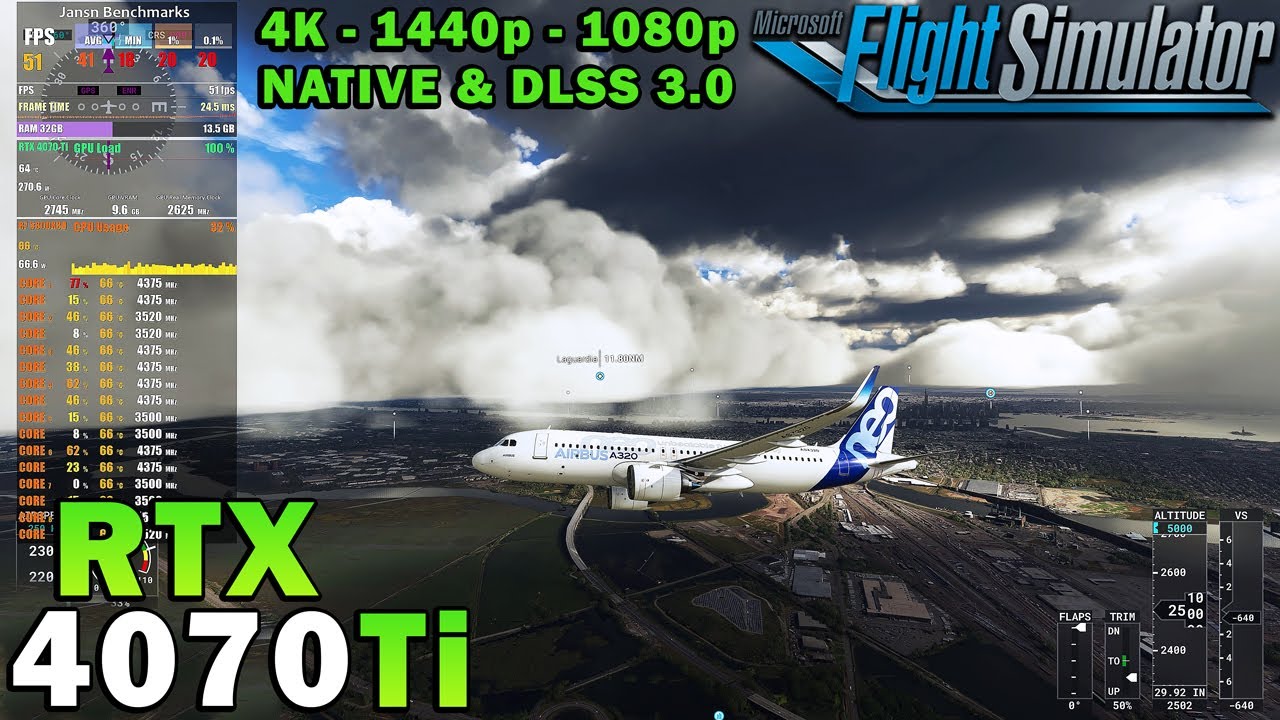
Buy Gamekeys at CDKeys ►https://cdkeys.pxf.io/xkJg3v
Please hit the thumbs up button and subscribe if you like what you see.
Recorded with my dedicated RECORDING/STREAMING PC via Capture Card.
This video was directly Captured from my ULTRAWIDE GAMING Monitor OR my OLED 4K HDR GAMING TV.
Resizable Bar / Smart Access Memory is always ON in my vid...
 lone flame
mossy venture
7900xt is down to 730 which isn't terrible
lone flame
mossy venture
7900xt is down to 730 which isn't terrible

also my canadian friend wanted a red/black themed build w/ basically unlimited budget. made this for him and saved him like 1500 cad so far from his list he made, wanted thoughts
Part List - AMD Ryzen 7 7800X3D, Radeon RX 7900 XTX, HYTE Y60 ATX Mid Tower
potent portal
high field
https://youtu.be/cQTcFRPMAGs?si=KDqL6vXvjAJucO0G
Those numbers don't add up, the 70 ti should be getting fps in the 90s if the 4070 is in the low 70s but for some reason it's in the 60s? There's definitely inconsistency in the testing somewhere.
high field
potent portal
Those numbers don't add up, the 70 ti should be getting fps in the 90s if the 40...
Yeah kinda stuck on which one to get
Cause people say the 4070
Some people say 4070 to
Ti
potent portal
There's one that makes more sense https://youtu.be/bErFaei1LOI?si=fJSm0LC4Et6ydu-M&t=84

RTX 4070 12GB vs RTX 4070 Ti 12GB l 1440p
Prime Tech Mart: 20% Coupon Code for software: TG20
Windows 10 Pro retail key: https://bit.ly/33renoM
Windows 11 Pro retail key: https://bit.ly/3nLcltK
Office 2019 Pro Plus Key: https://bit.ly/33sJJv7
Office 2021 Pro Plus Key: https://bit.ly/32qdzmM
Other Software Products: https://bit.ly/3InDydR
B...
73 fps vs 89
potent portal
"only"
potent portal
Well yes that is one of the major complaints, but to add more memory for parity with AMD cards they'd have to redesign everything down to the core
lone flame
potent portal
Well yes that is one of the major complaints, but to add more memory for parity ...
maybe they should of thought of that when actually designing it lol
high field
So do u think it’s worth the extra money to spend for the ti for msfs
lone flame
lone flame
also my canadian friend wanted a red/black themed build w/ basically unlimited b...
also can you look at this please @potent portal
lone flame
high field
So do u think it’s worth the extra money to spend for the ti for msfs
radeon has competitive options with more vram for cheaper unless you need the benefits nivida has
high field
lone flame
radeon has competitive options with more vram for cheaper unless you need the be...
Nah not getting a amd gpu
My pc is just for msfs
pseudo pollen
lone flame
also can you look at this please <@396513761550270464>
Everything seems fine, I can't do the conversion from cad to USD in my head though, and don't buy that windows key
potent portal
high field
So do u think it’s worth the extra money to spend for the ti for msfs
Personally yes, I think going from 70s fps to 90s is very noticeable, and once you turn on DLSS you'll actually be able to get closer to the monitor refresh rate so it doesn't tear as much.
high field
potent portal
Personally yes, I think going from 70s fps to 90s is very noticeable, and once y...
Sweet
cyan ravine
leaden raft
so whats the issue
Would definitely say not the ram since this passed
Remind me what exactly was the behaviour again
I'm very tired lol
potent portal
lone flame
also can you look at this please <@396513761550270464>
Overpriced fans
Liquid cooling 100% unnecessary
Can go cheaper on memory, that CPU doesn't care
850W is overkill
Saved a couple hundred overall https://ca.pcpartpicker.com/list/syqM34
Part List - AMD Ryzen 7 7800X3D, Radeon RX 7900 XTX, HYTE Y60 ATX Mid Tower
cyan ravine
Ditch the Y60, pick a Y40
potent portal
That was their choice for the theme
potent portal
4080 is an extra 400 cad
cyan ravine
I mean if they insist it's whatever, but most people I see running high end in a Y60 run open case cos it's just that bad
I'd also go pick a <CL34 ram kit
potent portal
7800X3D really doesn't care, you'd be chasing the 1% at that point
cyan ravine
Yes but resale and longevity is actually advantageous
Instead of two or more ram kits, just one across several gens is possible
potent portal
Tell that to my 3200 c16
cyan ravine
Hi 3200 C16
Hynix ram can dial to 10K whereas samsung and Micron can dial to 6K
Boop
Colour matched is nice lol
Actually sapphire pulse would look better with the red accents
Part List - AMD Ryzen 7 7800X3D, Radeon RX 7900 XTX, HYTE Y40 ATX Mid Tower
Then a custom cable kit with red and charcoal @lone flame
Try asiahorse, cablemod, ezdiyfab
 flint sapphire
Oooo I like that colorway, def pick up asiahorse cable extensions
cyan ravine
The one time red vulcan ram could look really nice
Maybe one more S12 fan for a full set of 7 for flair
high field
What do u think of the attic freezer pump instead of the fan
obsidian wigeon
not necessary
high field
Really
obsidian wigeon
for gaming it doesn't matter
high field
It’s for msfs only
obsidian wigeon
ye then 7800x3d should be fine
high field
The Ryzen 7 9550x3d is not better
cyan ravine
high field
What about the 7800x3d vs the 7950x3d
Zero reasons
Just stick with 7800x3d and a single tower
high field
cyan ravine
Just stick with 7800x3d and a single tower
Why not the 2 tower though
Wouldn’t it keep cooler
potent portal
Only slightly. Not enough to affect performance or longevity.
high field
Oh ok
ASUS tuf 4070 ti etc ti oc edition
Is it better then the msi 4070 ti gaming x slim
@potent portal
potent portal
Functionally they're the same, if they're a similar price then pick your favorite

 cyan ravine
split cliff
cyan ravine
split cliff
Swap to arctic mx-6 it's way better than MX-4
Basically the same price as well
<Used both
split cliff
obsidian wigeon
minus paste since coolers come with one
does AIO coolers come with it as well?
obsidian wigeon
yes
split cliff
how do u determine how much fans can connect to your motherboard
need to know that so i know if i need fan splitter cables
obsidian wigeon
you can get fans that you can daisy chain
split cliff

Phanteks D30-120 64.3 CFM 120 mm Fans 3-Pack (PH-F120D30_DRGB_PWM_WT01_3P)
do these come with the splitter cables?
the fans i bought are all in 3 packs
 analog hearth
split cliff
analog hearth
split cliff
Bro getting the wrist strap 💀
Just plug your PSU in and touch it every once in a while if you don't feel comfortable without a wrist strap
 olive cypress
Is this... Good?
Or is it going to become rtx 4000 experience with the power cable?
 obsidian wigeon
that looks like hazard
cyan ravine
The problem with 40 series was the cable plug not seated
It looks seated so doubt it
Pcie cabled have enough redundancy that a couple 12v pins could slip out and the pc is still ok (some gpus/psus will recognise this and shut down the pc)
olive cypress
obsidian wigeon
that looks like hazard
I'll take that
high field
Which one is going to keep my the coolest out of all of these 3 because I don’t want any issues with my new pc running hot


Cause I’m worried it might get to hot with the thermalight assassin
cyan ravine
what I've been trying to say is they'll all run the cpu at the same temperature and same performance
upgrading makes basically no difference because the cooling bottleneck isn't the cooler
mossy venture
high field
Which one is going to keep my the coolest out of all of these 3 because I don’t ...
Ag620 but what cpu is it
Oh 7800x3d
high field
mossy venture
Ag620 but what cpu is it
Yes
cyan ravine
watch this video for the first 5 minutes and it will show you what I'm talking about:
https://www.youtube.com/watch?v=lgiBcD7bBaw

My Patreon: https://www.patreon.com/buildzoid
Teespring: https://teespring.com/stores/actually-hardcore-overclocking
Bandcamp: https://machineforscreams.bandcamp.com/music
Twitch: https://www.twitch.tv/buildzoid
Twitter: https://twitter.com/Buildzoid1
Facebook: https://www.facebook.com/actuallyhardcoreoverclocking
#amd #ryzen #7800x3d
mossy venture
The single tower is fine, but if you really want a better cooler either ag620 or phantom spirit
Am5 is limited by the ihs thickness, and thermal transfer
cyan ravine
it runs at basically max performance even on the stock cooler
mossy venture
Meaning past a certain point it literally just can't transfer heat any better
cyan ravine
mossy venture
Meaning past a certain point it literally just can't transfer heat any better
yes so pretty much all coolers give the same result
high field
So then which one of the 3 would I be having the best temperatures and would last longer
cyan ravine
all the same
high field
How so
cyan ravine
mossy venture
Am5 is limited by the ihs thickness, and thermal transfer
^
look this graph
 mossy venture
If you want to feel better about the cooling, just get the ag620.
high field
mossy venture
If you want to feel better about the cooling, just get the ag620.
Is the single tower just fine though
From the ag620
cyan ravine
yes
 high field
cyan ravine
yes
high field
cyan ravine
yes
What’s the graph representing sorry
cyan ravine
performance
box cooler vs a 240mm aio

this vs. this

it only runs a couple degrees hotter but the performance is identical
i.e making it cooler does absolutely nothing
high field
cyan ravine
it only runs a couple degrees hotter but the performance is identical
The box coolers?
high field
Still don’t understand the graph kinda sorry
cyan ravine
those are all extreme stress tests
pushes the cpu way harder than any game will
and they use scores to determine performance
the resulting score across both test cases is the cpu performs within 1% of itself, basically whether it had a super cooling solution, or an ice block
high field
Oh ok but which one on the graph is the the aio and which one is the box coolers
cyan ravine
it's labelled lol
high field
cyan ravine
the resulting score across both test cases is the cpu performs within 1% of itse...
So inclusion the box coolers are better then the aio
cyan ravine
*as good
as good
because the 7800x3d is not limited by the cooling, but by it's own design
so overspending on cooling makes no sense at all
it should still run within the spec under torturous conditions for a number of years regardless if it's 86C, or 77C, or 50C
it's designed to behave like that
high field
Ok thank you so much appreciate the help I order everything last night just want to make sure the single would be very good for me
cyan ravine
It's ok. If you understand, it was worth it 😂
high field
Yeah for sure
high field
Oh nice
Another quick question which ssd would u recommend also this entire setup is for msfs only
 cyan ravine
cheaper than that but decent
make a list in here
Choose Your Parts
of what you bought
I might make some suggestions
https://pcpartpicker.com/product/VxfFf7/silicon-power-a60-2-tb-m2-2280-nvme-solid-state-drive-sp002tbp34a60m28
https://pcpartpicker.com/product/srvD4D/solidigm-p41-plus-1-tb-m2-2230-pcie-40-x4-nvme-solid-state-drive-ssdpfpnu010tz01
One of these two would be far better bang for the buck

Silicon Power A60 2 TB M.2-2280 PCIe 3.0 X4 NVME Solid State Drive (SP002TBP34A60M28)

Solidigm P41 Plus 1 TB M.2-2230 PCIe 4.0 X4 NVME Solid State Drive (SSDPFPNU010TZ01)
high field
Let me get back to you in 20 mins if that’s all good with u
So I can make a pc part maker
cyan ravine
ok
high field
@cyan ravine
mossy venture
Why is that 4080 so expensive
mossy venture
Ah alright
mossy venture
Also you don't have to pay for windows, especially if you've already had a windows 7 or newer device.
high field
Case I won’t change I know it’s overpriced and same with fans
mossy venture
You just download windows to a USB, install it, and then log in to your Microsoft account
high field
mossy venture
Also you don't have to pay for windows, especially if you've already had a windo...
I got windows 11 pro on my 1070 pc rn lol
mossy venture
Corsair icue is absolutely trash by the way
high field
This new pc will be a huge upgrade
high field
I know all of u guys hate them but many pcs I have are corsair never have had a problem
high field
cyan ravine
motherboard, case, fans
Just curious why the motherboard
mossy venture
Brand means nothing, models are what matters
And just bc you haven't had issues with them doesn't mean there isn't better
The case is fine, psu is fine, just their fans are such bad performance at that price
high field
True
mossy venture
$13 3 pack c12c beats them
high field
Yeah but just wondering about the mobo I got
mossy venture
The mobo isn't bad just really expensive
cyan ravine
high field
Just curious why the motherboard
as I explained before, the $125 options are just as good as the 300$, 500$, 900$ options
mossy venture
$110 b650 hdv can run a 7950x3d without issue
cyan ravine
it's just overspending
the $100 A620m Gaming x can run a 7950x stock without problems
performance is within the same range
like you'd have to give me a really good reason to agree with spending more than $150 on an AM5 motherboard
high field
I’ll think about the mother board but still stuck on the m2.ssd
cyan ravine
the SSD I already gave two suggestions
cyan ravine
cyan ravine
https://pcpartpicker.com/product/VxfFf7/silicon-power-a60-2-tb-m2-2280-nvme-soli...
^
mossy venture
Mp33, a60, m371, m450, m480, p41 plus, ud85
high field
cyan ravine
^
Are none of them from Amazon
What’s the difference from the m2.sad I showed from urs just curious
cyan ravine
much better value for very little real world performance difference
go back to the cooler thing
it's spending a lot for basically no benefit
mossy venture
If you want gen 4 to have gen 4, ud85 is reasonably priced atm
Or was yesterday anyways
leaden raft
cyan ravine
much better value for very little real world performance difference
yo
idk if you saw
that ram test came back no error
cyan ravine
I did but was tired
and I'm not sure what the issue was
I sort of just, inserted myself into that convo following along
leaden raft
cyan ravine
I sort of just, inserted myself into that convo following along
oh ok
you seemed knowledgable about the software so i appreciate the help
cyan ravine
I mean
assuring your ram is ok is a big step
in most of any pc diagnosis
so it's not wasted
I'm just unclear what the initial problem was
leaden raft
cyan ravine
I'm just unclear what the initial problem was
just awful performance
even when not in games or anything
cyan ravine
this is x570 iirc ye?
leaden raft
like discord open was enough to see my cursor skipping
leaden raft
cyan ravine
this is x570 iirc ye?
the mobo?
cyan ravine
mhm
leaden raft
cyan ravine
mhm
i do beliebe
cyan ravine
try adding a positive voltage offset
either through curve optimiser (best way) or straight core voltage
this is NOT a static setting
static is bad
avoid static voltage and static overclocking
only do offset
high field
Silicon Power A60 2 TB M.2-2280 PCIe 3.0 X4 NVME Solid State Drive (SP002TBP34A60M28)
 mossy venture
gen 4 doesn't make a difference for gaming
or download speeds unless you have incredibly fast internet
cyan ravine
yeah, to keep it simple, it's basically, you spend all that extra for basically zero improvements in a gaming pc
mossy venture
you might notice a second or two boot time, but still sn850x is not good value at that price. 1tb gen 4 ssds tend not to be
cyan ravine
cyan ravine
try adding a positive voltage offset
@leaden raft btw when I say this, don't go more than say, +10 on the curve optimiser, or +0.050V on the voltage offset
too much can be a REALLY BAD THING
but this should be relatively fine
mossy venture
https://pcpartpicker.com/product/pJ3gXL/teamgroup-t-force-cardea-z44q-2-tb-m2-2280-nvme-solid-state-drive-tm8fpq002t0c327 this would be my choice for a gen 4 drive atm

TEAMGROUP T-Force Cardea Z44Q 2 TB M.2-2280 PCIe 4.0 X4 NVME Solid State Drive (TM8FPQ002T0C327)
cyan ravine
Windows has an iOPS limit
iOPS iirc is, instruction operations per second
every ssd and hdd runs up to a certain degree of iOPS
high field
mossy venture
or download speeds unless you have incredibly fast internet
My speeds are 800-900 mbps
cyan ravine
and basically once you pass this, going higher makes no difference to your pc experience except in extremely niche scenarios
high field
Wouldn’t I want a gen 5 since my pc am5
cyan ravine
cyan ravine
and basically once you pass this, going higher makes no difference to your pc ex...
like extreme internet speeds, large single files in the gigabytes on constant copying, rendering and video editing for a job
very very niche scenarios that 99% of people don't experience
mossy venture
high field
Wouldn’t I want a gen 5 since my pc am5
No
That has nothing to do with eachother
cyan ravine
cyan ravine
very very niche scenarios that 99% of people don't experience
and that, when it comes to gaming pc's, stops at sata ssd's.
i.e windows can't leverage better iOPS than numbers that can be achieved by even sata ssd's, let alone gen 3, gen 4, gen 5 ssd's
so you run into a bottleneck
high field

Silicon Power UD85 1 TB M.2-2280 PCIe 4.0 X4 NVME Solid State Drive (SP01KGBP44UD8505)
cyan ravine
the funny result is a basic ass ssd can really run to the same speeds as a top of the line ssd in normal conditions
and a gaming pc falls right into this use case
high field
Also keep in mind this pc is just for Microsoft simulator later as well
cyan ravine
yeah
high field
My game alone is 500gb
cyan ravine
I know
but you can definitely cheap out a little on the ssd
going gen 4, gen 5 just for the advertised speeds is a marketing trap that the industry has set for consumers
high field
Oh these ssd are only if I wanna cheap out on it?
cyan ravine
high field
Oh these ssd are only if I wanna cheap out on it?
no my point is you can cheap out and have basically the same results
just like the cheap cooler
you're only playing a game
go with a solidigm p41 plus at most
high field
cyan ravine
go with a solidigm p41 plus at most
Alright I’ll buy that one
Can u send the link again
 strong raft
Should wait for next week, lol.
little osprey
Contemplating if 13600K and 7800 XT was the best I could do for 1440p
Granted at the time of buying my CPU it was cheaper than a 7800X3D
 high field
high field
high field
But this one would be my best option to get then that one I sent a picture of earlier?
Cause they are both the same
Just one is more then the other
cyan ravine
they are basically the same in games
high field
Why do u say basically?
Cause I want the one that will be better performance and will last longer and won’t have any problems
cyan ravine
high field
Cause I want the one that will be better performance and will last longer and wo...
there's no "last longer" in any of these decisions
all pc hardware is made to last a set life by the manufacturer
If you're thinking I'm giving you advice to pick a 10 year ssd over a 5 year one, no one not heavily invested in the pc space would have the knowledge of that
futureproofing is almost completely a myth in the pc space
high field
high field
^
cyan ravine
souunds good lad
you're saving yourself good money with each little change here
money you can put into other things, or just keep for yourself
while you enjoy the same experience
it's the most of what I like to see around here, good value buying
olive cypress
Problems... E V E R Y W H E R E.
I don't know if this is a coincidence but I was running my sleeper build with heaven benchmark to monitor gpu temps, side panel was off, I then wanted to try the temps with it on, as soon as It made contact with the pc it bluescreened wtf
Error is "System_service_exception"
Was it just a big coincidence? Or some strange stuff happening with the cables inside maybe
Idk
potent portal
Loose cable on something is my guess
olive cypress
I mean, there only are two cables directly on the side that get squished (not much) by the panel as I close it but they're just the graphics card cables (cables, not the connectors)... I'm trying again in a few minutes
Why every pc I own and build has a problem uuhh
Maybe I'm the problem :PepeHands:
winged crystal
I was looking to get additional pcie cables and each one i look at says "for this power supply only" do i have to get power supply specific cords or can i get any ?
pseudo pollen
olive cypress
Why every pc I own and build has a problem uuhh
Maybe I'm the problem :PepeHands...
You're not alone, I've built and rebuilt my pc and both times it's had problems (probably due to bad ram/windows) but whenever I build someone else's it's worked fine.
winged crystal
winged crystal
I was looking to get additional pcie cables and each one i look at says "for thi...
@mossy venture
mossy venture
winged crystal
I was looking to get additional pcie cables and each one i look at says "for thi...
Specific to psu
Some manufacturers have a few psus that use the same cables
Like corsair rm, rmx, rme, and a couple others use the same cables
What psu is it?
winged crystal
Thats a shame. Ok.
be quiet! Straight Power 11 850W Fully Modular 80 PLUS Gold Silent Power Supply
mossy venture
Yeah contact be quiet
olive cypress
olive cypress
I mean, there only are two cables directly on the side that get squished (not mu...
Mmmh
Likely a strange coincidence
winged crystal
Totally got (for the old pre built) a coolmaster and thermaltake only cable and used it. The prebuilt is the trident 3 and uses an external power supply like a laptop :p
winged crystal
Oh
Well its been going strong for 2 months running almost 24/7
olive cypress
These are some surprising temps considering the GPU has almost no space to breath

Yeah
It's slowly getting worse
Barely hits 69 nice
But is really really loud
high field
Should I get the small or large gpu support
 high field
Yeah
high field
cyan ravine
you need it for a gigabyte 40 series
Fs cause there so heavy wait does mine already come with one?
Cause I heard some of the 40 series they do
cyan ravine
no clue
but gigabyte card's are fragile around the slot, they need the extra support
like need it
high field
Yeah I’ll definitely be getting one just cause I spend so much money on a graphics card I don’t want it to sag
Would u suggest I get the small or large support
Not sure which one to get
I got the 5000d corsair case
cyan ravine
I have no idea either
 modest arrow
Cpu: https://geni.us/KQIR ($94)
GPU: https://geni.us/cEBWU ($259)
Motherboard: https://bit.ly/453ULnZ ($76)
Memory: https://bit.ly/44YBKn2 ($33)
Storage: https://geni.us/hmuvpYA ($48)
Psu: https://geni.us/GnuA3 ($33)
Case: https://bit.ly/451srm2 ($61)
Psu cables: https://geni.us/aMvR ($20)
Rate the 650 dollar budget pc?
Half of the parts are on Amazon and the other newegg


 mossy venture
modest arrow
Cpu: https://geni.us/KQIR ($94)
GPU: https://geni.us/cEBWU ($259)
Motherboard: ...
mossy venture
modest arrow
Cpu: https://geni.us/KQIR ($94)
GPU: https://geni.us/cEBWU ($259)
Motherboard: ...
Geni.us links aren't working for me
Assuming 12100f and 7600 by the prices?
If you could use tiktok shop I think you could do a lil bit better, but thats ntb
Though I also don't know what the psu is, which is important
This is with estimates, since there are coupons you can use and prices are already lower than basically anywhere else
It's all sold by newegg through tiktok shop
https://pcpartpicker.com/list/QD3YWt
Part List - Intel Core i5-12400, Radeon RX 6700 XT, Fractal Design Pop Mini Air MicroATX Mid Tower
Except gpu
And can do cheaper with 16gb ram or 1tb ssd
Part List - Intel Core i5-12400, Radeon RX 6700 XT, Fractal Design Pop Mini Air MicroATX Mid Tower
pseudo pollen
I wanna make a pc with some parts that I already have (12400, nr400, p12's, ssd)
mossy venture
Pretty decent
 manic cloak
apparently he put in storage after 5 months but no clue how long
mossy venture
Part List - AMD Ryzen 7 7800X3D, GeForce RTX 4080, Phanteks NV7 ATX Full Tower
The aio isn't needed but I figured you wanted the aesthetic of one
Went with a similar case look, but nv7 is a lot better airflow wise than h9 elite
untold pecan
ohhh thank you
mossy venture
H9 or h7 flow wouldn't be a bad choice
If you've any questions about the changes lmk
untold pecan
i enjoy the open glass look
mossy venture
O11d and it's variants are also a good choice
mossy venture
Nah 7800x3d actually beats the 7900x3d at ties
untold pecan
thank you so much
untold pecan
what’s up
mossy venture
One, mobo doesn't have wifi so acrually I'd switch it to b650 aero g if you don't have ethernet
And if you're open to an amd gpu, the 7900xtx slightly beats the 4080 and is cheaper
$950 for a black one and $1070 for a white one
 languid nimbus
Question, I’ve got a 2tb hdd currently. Wanting to replace it with an ssd. If I do so, is there an easy way just to copy everything from my hdd onto the ssd? Is it as easy as literally just “copy+paste” onto the new drive?
mossy venture
languid nimbus
Question, I’ve got a 2tb hdd currently. Wanting to replace it with an ssd. If I ...
Nah, but macrium reflect would do it for you
Free program
untold pecan
ASUS ROG B650 correct
mossy venture
Gigabyte b650 g
One sec lemme see if I'm being stupid
Ah it's not as cheap as it was, not worth anymore
The b650m pro rs wifi would be fine for you, $125, but if you want smthn nicer, you dont see the mobo color much https://pcpartpicker.com/product/Ng2WGX/asrock-b650m-pg-riptide-wifi-micro-atx-am5-motherboard-b650m-pg-riptide-wifi

ASRock B650M PG RIPTIDE WIFI Micro ATX AM5 Motherboard (B650M PG RIPTIDE WIFI)

ASRock B650E PG RIPTIDE WIFI ATX AM5 Motherboard (B650E PG RIPTIDE WIFI)
untold pecan
I added the E
2300 is still really good for my price
i’m trying to sell my starter pro pc from nzxt and use that to pay for most of it
thank you a lot for helping me
 abstract torrent
-i5 11400f 2.6 GHz
-MSI RTX 3060 Ventus 2X 12G OC
-Corsair vengeance rgb pro sl 16gb (2x8) DDR4
-MSI B560-A PRO ATX Motherboard
-Lexar NM610 PRO 500GB ssd
-XIGMATEK Master X Pro with4 ARGB FANS + X-POWER 700W
is this a good build?
obsidian wigeon
abstract torrent
-i5 11400f 2.6 GHz
-MSI RTX 3060 Ventus 2X 12G OC
-Corsair vengeance rgb pro s...
what's the price?
modest arrow
mossy venture
And can do cheaper with 16gb ram or 1tb ssd
Oh dang thanks
analog hearth
@torn peak better than my build
manic cloak
This is only 700$ at my local Best Buy.. Should I pick one up?https://www.amazon.com/OMEN-Generation-i7-10700KF-Processor-GT13-0080/dp/B08KHNNLDK

It’s gaming love at first sight with the OMEN 30L Gaming Desktop PC. This gaming desktop doesn’t just tout performance, but stunning looks as well. With tempered glass front and side panels, a full-metal frame, and complete RGB control, it’ll brighten up your battle station. Upgrade and customize...
mossy venture
thats pretty good, but upgradability is nonexistent in those builds
potent portal
HP would find a way to make proprietary PCIe if they could, but they settled for everything else
mossy venture
with tiktok shop tho, can do this with a used 3080/6800xt or similar https://pcpartpicker.com/list/dCJ389
Part List - Intel Core i5-12400, Fractal Design Pop Mini Air MicroATX Mid Tower
12600k is also 150 or so rn could swap to that
winged crystal
The pc im building for a coworker post :). I found my test bench psu wasn't sufficient enough to get the one im building for myself to post... have to wait for the gpu imma use to come in on monday for proper test
little osprey
@potent portal lookin good?
 potent portal
Looks ok to me
little osprey
alr 👍🏾
 burnt stratus
little osprey
<@396513761550270464> lookin good?
burnt stratus
little osprey
<@396513761550270464> lookin good?
Baby aio
Will handle the 3000g fine
little osprey
burnt stratus
Baby aio
all thats needed for a 3000G 😭
potent portal
Yeah honestly you don't even need to screw down the cooler, just set the heatsink on top of it
 blissful gorge
Hello, can somebody help me i just finished the pc and it doesnt turn on, the cpu cooling fan works and the psu but the gpu doesnt
 little osprey
blissful gorge
little osprey
blissful gorge
Do you only have one eight pin plugged into the GPU?
pseudo pollen
Also work on cable management
mossy venture
Very solid but imo I would change some things. Atx mobo wint help you. What are you using the pc for?
I'd do this https://pcpartpicker.com/list/FvbBrv
Part List - AMD Ryzen 5 7600, GeForce RTX 4070, Phanteks Eclipse G300A (3 Fan) ATX Mid Tower
7600 beats the 13400f by a decent bit in gaming, and stock cooler is fine. That mobo can run a 7950x3d fine, it'll be able to run 8000 series cpus at least, and possibly whatever gen comes after that, so you have an upgrade path
Ram is slightly better, not a major difference but also cheaper so why not. Storage, gen 4 doesn't make a difference for gaming, so did a 2tb gen 3 drive instead. Gpu, all 40 series gpus are kinda overbuilt, meaning even the worst models don't overheat
So can save the $35 there. 7800xt at $485-500 is also a good choice (imo better choice than 4070, but thats just me. If you want nvidia, 4070 at $515 isn't terrible)
If you want an nvidia cpu, 12600kf is $140 atm
And is solid
It's just a gen older 13400f essentially
Part List - Intel Core i5-12600KF, GeForce RTX 4070, Phanteks Eclipse G300A (3 Fan) ATX Mid Tower
Sorry last thing, I just saw this sale, this psu would be fine too, and when you upgrade in the future you won't need a 12vphwr adapter, but the rm750e is a better quality psu https://www.amazon.com/dp/B0CC3QBGDL

MSI MAG A750GL PCIE 5 Gaming Power Supply - Full Modular - 80 PLUS Gold Certified 750W - Compact Size - ATX PSU
 earnest olive
nothing wrong with silicon power ram
i've personally bought and used more than 10 kits from them
there are very little differences between different models of the same GPU
the differences matter a bit more if you plan to overclock, but even then it's not that major
main considerations should just be the company's warranty policy, aesthetics, price, noise
i've overclocked at least one gpu from every major manufacturer
the differences in performance really only matter if you're doing competitive oc
earnest olive
mossy venture
If you want an nvidia cpu, 12600kf is $140 atm
nvidia cpu 
but yeah, bacca knows what they're talking about
just in case an additional vouch would make you feel better about it
earnest olive
nvidia cpus are a thing... not sure if i would recommend them for a typical consumer