
#building-and-recc-chat
1 messages · Page 199 of 1
 pseudo pollen
 teal dome
The cable I have connected it won’t go that far I think idk
Can I remove tho?
I’ll check
pseudo pollen
Let me explain what will happen, so right now if you remove that cable already plugged in, the grey port on top will not work
but both blue ones will
teal dome
That should be fine cuz I don’t even use those
teal dome
Ok
pseudo pollen
just like shove the case usb2 cable somewhere in the back
man me and this guy had like an hour argument or something like that
 teal dome
That should work right?
 pseudo pollen
yeah, just make sure nothing's touching the fans
I actually ran something like that, but the card got too close to the fans and started hitting them
teal dome
I don’t think it’s gonna hit the fans
It looks like it’s not going to
Hope it’s not going to
teal dome
Super close lmao
 pseudo pollen
yeah
teal dome
Do I not have to download drivers?
When I go to the website
Doesn’t show drivers but for me Bluetooth and WiFi works already
teal dome
ok
 austere parrot
hey guys i can get a AMD Radeon RX 6500 XT 4gb for 112 or an rx 580 8gb for 74 ... i do graphic design little to no gaming which should i get??? i have 30 mins left to order 😦
pseudo pollen
Rx 580
austere parrot
thank you
 plucky timber
ahahah wtf
pseudo pollen
He had a ton of these stupid arguments
 unique elm
whats a good mic for under $100
 jagged ember
teal dome
Doesn’t show drivers but for me Bluetooth and WiFi works already
jagged ember
teal dome
Doesn’t show drivers but for me Bluetooth and WiFi works already
You can download the newest drivers for wifi and Bluetooth, it wont hurt anything
Just adds additional fixes and stuff if there are any
teal dome
jagged ember
You can download the newest drivers for wifi and Bluetooth, it wont hurt anythin...
I can’t find them
I went to website but it doesn’t show
jagged ember
teal dome
I can’t find them
Motherboard website?
Or the website of the wifi chip itself
teal dome
jagged ember
Or the website of the wifi chip itself
T-link
I just downloaded lan drivers from motherboard website like when I first built the pcs
 potent portal
teal dome
T-link
potent portal
teal dome
T-link
What chipset does the Wi-Fi use? If it's an Intel chip then Intel has the drivers
jagged ember
Likely an Intel chip
 mossy venture
potent portal
What chipset does the Wi-Fi use? If it's an Intel chip then Intel has the driver...
mossy venture
potent portal
What chipset does the Wi-Fi use? If it's an Intel chip then Intel has the driver...
Ohhhh that's why I didn't have to install drivers, that makes so much sense lol
I always wondered why that was
potent portal
mossy venture
Ohhhh that's why I didn't have to install drivers, that makes so much sense lol
Close, but it's really that windows includes basic drivers for most recent chips but they can be a little late on the latest ones.
That's part of why the windows installer is so huge now, but your windows install isn't much bigger.
teal dome
potent portal
What chipset does the Wi-Fi use? If it's an Intel chip then Intel has the driver...
Prob an intel
I use the t-link t5e
potent portal
Wifi https://www.intel.com/content/www/us/en/download/19351/windows-10-and-windows-11-wi-fi-drivers-for-intel-wireless-adapters.html
Bluetooth https://www.intel.com/content/www/us/en/download/18649/intel-wireless-bluetooth-for-windows-10-and-windows-11.html
Intel
This download record installs the Windows® 10 and Windows 11* WiFi package drivers 22.250.1 for the Intel® Wi-Fi 6E/Wi-Fi 6 and Intel® 9000 series Wireless Adapters.
Intel
Installs Intel® Wireless Bluetooth® version 22.250.0 Driver version varies depending on the wireless adapter installed.
potent portal
 earnest olive
I want my wifi card have intel i7 or i9 thx
earnest olive
I want my wifi card have intel i7 or i9 thx
Then what you want is OPNsense on a desktop
It can be done
earnest olive
no I want put i9 in my m.2 wifi
potent portal
Then build a shrink ray
It's not that hard, you just reduce the space between electon and nucleus
Just a little quantum entanglement here, some 0 kelvin lasers there

 plush latch
can anyone help me with my pc build
potent portal
That depends, what kind of help do you need
 little osprey
plush latch
can anyone help me with my pc build
little osprey
plush latch
can anyone help me with my pc build
Looking for parts? Assembling? Troubleshooting?
potent portal
What part of the assembly are you having trouble with?
little osprey
Alright well lets start out with what parts you're using
potent portal
Have you checked out "how to" build vids on youtube?
plush latch
yes but they don’t help
little osprey
Well yeah there's those two
little osprey
Well yeah, I can walk you through it I guess
plush latch
can you call me?
little osprey
Yeah
plush latch
tysm
potent portal
If you mean like a voice chat thing then I can't, broken mic. (kids 🙄 )
plush latch
damn
little osprey
Server VC?
little osprey
potent portal
If you mean like a voice chat thing then I can't, broken mic. (kids 🙄 )
OLD MAN
Nah I got him for ya
 south cliff
Alr thanks also does the valve index plug directly into my gpu?
sorry if its a simple anwser just gotta make sure so i can move saome things around
so i dont get the cord tangled upo
south cliff
i swear there was a dp i saw in a video maybe im wrong tho
potent portal
If you have a USB C port on your GPU it can plug there
More than just video data is sent, though. So DP alone doesn't work.
south cliff
so it doesnt have a dp?
 obsidian wigeon
my answers have been short due to a fractured shoulder, so please hold sometimes lmao
 gentle pollen
What's the performance difference between 14900K and 7950x?
obsidian wigeon
one hand typing is hard
south cliff
obsidian wigeon
my answers have been short due to a fractured shoulder, so please hold sometimes...
Hope you feel better
gentle pollen
obsidian wigeon
one hand typing is hard
agreed.
gentle pollen
obsidian wigeon
my answers have been short due to a fractured shoulder, so please hold sometimes...
Hope you get better soon.
obsidian wigeon
thanks
south cliff
gentle pollen
What's the performance difference between 14900K and 7950x?
14900k def not worth it its literally the 13900k with higher boost clock not really any performance game
gain*
gentle pollen
True, considering it more for the sake of having it.
south cliff
gentle pollen
True, considering it more for the sake of having it.
just wait till next gen
gentle pollen
Just wanna know what the perf difference is.
south cliff
14th is a waste of money
south cliff
gentle pollen
Just wanna know what the perf difference is.
like maybe a 5 percent
i would say
gentle pollen
Also it's not for gaming.
Blender, Adobe AE, Premier, and some other similar workloads.
south cliff
wont be that big of a diffrence
just boost higher and that means you will need beefy cooling to hit the 6 ghz out of the box
gentle pollen
I have a push/pull LS720 already.
I'd imagine that can handle the 13/14 I9s.
Also picked up a contact frame a while back.
south cliff
yeah i would say it could prob handle it
but get 13900k
instead of 14900k
but also depends off price also
but i would also get other opinions
also not just mine
plush latch
i have everything plugged into my pc but the covers arent on
gentle pollen
It's about $30 difference.
plush latch
can i turn it on?
south cliff
also look at benchmarks
south cliff
plush latch
can i turn it on?
yeah
south cliff
like the glass pannels
gentle pollen
Btw sorry for being rude, how's your day been Vader?
gentle pollen
Neat.
south cliff
gentle pollen
Btw sorry for being rude, how's your day been Vader?
you were not being rude
gentle pollen
Do you by any chance know if the 14900K's are binned with better memory controllers?
south cliff
gentle pollen
Do you by any chance know if the 14900K's are binned with better memory controll...

Sponsor: Lian Li O11 Dynamic Evo XL on Newegg https://geni.us/FAIw
This review tests the new Intel Core i9-14900K CPU and benchmarks the Raptor Lake Refresh part vs. the i9-13900K, AMD R9 7950X, Ryzen 7 7800X3D, the R5 5800X3D, and more. We already reviewed the 14700K when we looked at some of the best CPUs out in 2023, but found that it was unf...
here is a gamers nexus review
it has rendering in it like blender
and cpu rendering
 gentle pollen
Thanks. Currently looking at a Adobe AE benchmark with comparissions between 14th, 13th, and R7000
south cliff
alright if you were also doing gaming the 13900k is also the same exact thing as the 14900k the 7950x is really good expecially being the same price as the 14900k
i dont even know how intel thought the 14900k was worth dropping ngl
gentle pollen
So 14900K is overall about 7% faster then 13900K and 12% faster than 7950x in Adobe AE my heaviest workload.
south cliff
but you gotta have the exact setup they are using
gentle pollen
Interestingly, in some Preview settings the 14900K is around 70% faster.
Heavily debating what to do.
WELL AREN'T I A LUCKY SON OF A ***
14900K same price as 13900K.
south cliff
how much
south cliff
how much is 7950x3d
south cliff
7950x?
gentle pollen
same price.
south cliff
golly
gentle pollen
7950x is $680
south cliff
810 for 7950x3d is insane
gentle pollen
south cliff
810 for 7950x3d is insane
This is low currently.
It was over 900 not to long ago.
south cliff
its like 700 in the us
gentle pollen
Mexico has $#!t taxes on electronics.
south cliff
i had to pay 26 dollars on 375 for taxes
gentle pollen
That's not so bad honestly.
gentle pollen
But yeah after finding the cpu I think I am definitely going 14900K now.
All goes well I will be buying it this week.
south cliff
just know it will run hot
gentle pollen
Undervolting seems to do wonders on 13th/14th so I plan to do that and some overclocking if there's any headroom.
south cliff
thats insane
gentle pollen
south cliff
bro my 12600k is only 150w stock
xD "only 150w".
gentle pollen
True.
Interestingly I saw a fair amount of benches where they were able to get performance within 2-5% of stock while only drawing around 70-80w.
Can't count on myself getting a sample that good but hey my luck for cpus with good bins has been decent so far.
 lone flame
@potent portal remember the other day how i was talking about that weird fan noise when all my stuff was under load?
lone flame
so i was playing around with it
and i manually stopped all my case/cpu fans
and it was still making the noise
it wasnt my gpu either
fans were off at the time
potent portal
Coil whine then, fun
lone flame
that just leaves the psu yes
potent portal
PSU fans I do not recommend replacing because of the risk of death opening them
lone flame
yeah thats a given
ill send a video of the noise in a bit if that would help, maybe its something else idk
 viral horizon
just curious
since im currently on igpu
when i get my gpu eventually
will i have to enter bios?
and how do i enter bios again?
earnest olive
viral horizon
will i have to enter bios?
no
earnest olive
viral horizon
and how do i enter bios again?
spam f2 or del during boot depending on the board
 buoyant birch
should I build a new pc? Currently running a 1660 ti i5 8600k 16g of ddr4 3200mhz and a 970 evo
have a discount at amd for ~20%
potent portal
Depends, what are you playing or want to play that your current system can't handle?
buoyant birch
my gpu at least seems to be overheating on overwatch
potent portal
A quick repaste will fix that
lone flame
potent portal
A quick repaste will fix that
oh yeah the noise i forgot
give me like 2 mins
itll happen like right away as i boot up certain games
potent portal
A little old yeah, but still within the minimum for most games at 1080p currently
buoyant birch
oh ok if I were to upgrade my current one would it be worth
basically would need to swap everything out though right
potent portal
You'd be looking at at least $700 to upgrade yeah, basically everything
buoyant birch
oh ok thanks
potent portal
Maybe 600 if you reuse the case, psu, and storage
You'll probably want better storage though
buoyant birch
was kinda thinking this as a new build assuming the parts fit in the case

haven't looked at pc stuff in a few years so idk if it's bad
potent portal
1800 would easily let you step up to a XTX which is a good bit faster than the XT
You don't need that much memory, it hurts more than it helps past 48GB
lone flame
potent portal
You don't need that much memory, it hurts more than it helps past 48GB
wow it sounds concerning
sending it now one sec
buoyant birch
hmm ok thanks
lone flame
buoyant birch
but at the speed it is at shoudl be minimal right
lone flame
legit will stop as soon as i close the game
potent portal
No actually that speed is bad for ryzen
buoyant birch
oh yikes what should I be looking for?
potent portal
It'll do 6400 if you're lucky before you have to desync and lose performance
6000 is safe
buoyant birch
ok thanks
lone flame
ive heard it so far on fortnite, resident evil 4, i think maybe on the forest
potent portal
lone flame
Sounds like something is caught inside the fan grille
lone flame
potent portal
Sounds like something is caught inside the fan grille
it only happens in certain games tho
potent portal
buoyant birch
ok thanks
I'll throw a list toghether for you, give me a few
lone flame
is that cause its legit just spinning up
when normally it isnt running
i swear it would run more often
potent portal
lone flame
is that cause its legit just spinning up
Yeah probably, full system load means more PSU load which means more psu fan speed
lone flame
thats fair, at first i thought it sounded almost like an electric buzz which had me worried
buoyant birch
potent portal
I'll throw a list toghether for you, give me a few
ok thanks
lone flame
ill have to pop off the back panel tomorrow and try to see if somethings going on
buoyant birch
hmmm perhaps looking for something a bit less overkill mini itx and probably amd cause I have a discount
lone flame
my cables are a nightmare
buoyant birch
well idk perhaps a lot less overkill
potent portal
buoyant birch
hmmm perhaps looking for something a bit less overkill mini itx and probably amd...
Is there anything special you need like wifi? ITX costs more btw
buoyant birch
only run a 165hz 1080p and the rest is for coding
buoyant birch
potent portal
Is there anything special you need like wifi? ITX costs more btw
perhaps wifi just looking for a pc to bring at uni lol
yeah idk if I even need a new setup
potent portal
Any overclocking?
buoyant birch
hmmm just something quiet ig doesn't matter too much I think
here's what I'm currently running if you think an upgrade is feasible

but might swap out the case for a smaller one which might be an issue for the noctua
potent portal
buoyant birch
but might swap out the case for a smaller one which might be an issue for the no...
If you wanted to go all out, here's what you can do.
The cooler you can reuse, contact noctua and they'll send you the AM5 bracket for free if you don't have it already. The storage you can also reuse but I threw a drive in just in case you want more.
https://pcpartpicker.com/list/c6vR4M
Part List - AMD Ryzen 7 7800X3D, Radeon RX 7900 XTX, BitFenix Nova Mesh M ARGB MicroATX Mini Tower
buoyant birch
sounds good thanks 🫡
potent portal
On the other hand, in your case I would consider just upgrading the GPU since you're only at 1080p anyway.
RX 7600 or 6650 would make a good upgrade by itself, even keeping the rest
buoyant birch
ok thanks even the i5 8600k?
was thinking that was definitely going to need to be upgraded
potent portal
The CPU can be upgraded if you want but playing things like overwatch, it's fine
buoyant birch
ok thanks perhaps a repaste might just do it cause it used to work fine
might just be wasting money building / upgrading lol
idk I'll see ig
potent portal
The best CPU you can fit on that board will be a 9900K and it's not really worth getting. It's really only a few percent better, that was deep in Intel's slump.
https://cpu.userbenchmark.com/Compare/Intel-Core-i9-9900K-vs-Intel-Core-i5-8600K/4028vs3941

Based on 619,060 user benchmarks for the Intel Core i5-8600K and the Core i9-9900K, we rank them both on effective speed and value for money against the best 1,426 CPUs.
buoyant birch
yikes didn't realize that lol
potent portal
So not worth considering in that regard
buoyant birch
I thought extra cores would help lol
potent portal
Nope, games like single core speed
obsidian wigeon
just to add, don't use ubm to compare amd and intel cpus
buoyant birch
yeah true
obsidian wigeon
that site has huge intel bias
buoyant birch
oh ok
potent portal
Yes I'm only using it now to compare intel gen to the next intel gen, normally I wouldn't touch it
It was rather hilarious how badly skewed ubm got, according to them the 10105 was better than the 10900k because of memory latency
They really messed up the scaling
potent portal
Yep there's no way it wasn't 100% intentional
Not to mention all the promoted "reviews" for AMD chips were all either super critical or just comments from average fanboys, not even news sites.
But the raw data is fine to look at here
obsidian wigeon
my brain lost a few cells googling 13600k vs 7800x3d
"don't trust cherry picked reviews that only shows cpu bound scenarios"

potent portal
Bruh that's the point lmfao
potent portal
This was a great dive into the issue https://youtu.be/RQSBj2LKkWg?si=HlqztH4d2p7h8i0r

A lot of you are asking where you should get your information instead. Thanks for asking! And I'll try to help:
For a quick summary on the current situation of, say, CPUs, a video like this is awesome: https://youtu.be/qACIqmP8xgw
And he's just done one for GPUs, too. https://youtu.be/yrsUm26SHGI
I've listed these because the information is rece...
obsidian wigeon
Based on 29,855 user benchmarks for the AMD Ryzen 7 7800X3D and the Intel Core i5-13600K, we rank them both on effective speed and value for money against the best 1,426 CPUs.
cringe warning
potent portal
Isn't it funny how AMD has better memory latency now and suddenly it's not important on that site any more
obsidian wigeon
lol ya
potent portal
I think their metric must have shifted to purely GHz
That's the only way I can see this being remotely close
obsidian wigeon
idk why this cpupro guy has something so against amd
he's not paid a dime by intel or amd
potent portal
Shill harder bro
 obsidian wigeon
Based on 1,979 user benchmarks for the AMD Ryzen 7 7735HS and the Intel Core i5-13500H, we rank them both on effective speed and value for money against the best 1,426 CPUs.
LOL
this is straight up hilarious
my lappy's cpu vs intel counterpart
teal dome
Yo guys
Is it possible to build a 500$ pc
My friends wants to build one after seeing mine
Why did Newegg remove all their TikTok products???
WTH
 cursive wharf
obsidian wigeon
idk why this cpupro guy has something so against amd
cursive wharf
obsidian wigeon
idk why this cpupro guy has something so against amd
Rage bait I'd guess. Wants to be popular, but can only do so through rage bait.
 lyric thistle
Of course it is
obsidian wigeon
yeah it's bait
lyric thistle
Just stick your neck into pcpartpicker and aim for under 500
obsidian wigeon
teal dome
Is it possible to build a 500$ pc
doable without tiktok even
maybe get a used gpu if you want to maximize value
lyric thistle
Yea just look on eBay for that lol
obsidian wigeon
https://pcpartpicker.com/list/QjZ2kJ @teal dome
Part List - AMD Ryzen 5 3600, Radeon RX 6600, Phanteks Eclipse G300A (1 Fan) ATX Mid Tower
use this for reference
teal dome
i heard from a youtuber its good
i dont think my friend minds
might change the case only 1 fan
need to buy fans which is 15bucks
teal dome
alright i gotta look for used gpus
teal dome
obsidian wigeon
1 fan is fine
how
obsidian wigeon
a used $150-180 gpu shouldn't be above a 6600xt
well it's cuz the parts aren't gonna be a 4070ti and some i9 lol
teal dome
where can i find good used gpusd
obsidian wigeon
ebay, fb marketplace
teal dome
teal dome
Why did Newegg remove all their TikTok products???
do you know what happened fox?
teal dome
obsidian wigeon
ebay, fb marketplace
ok ill check
all the gpus are so expensive
3060 for 300
in fb
potent portal
teal dome
do you know what happened fox?
No one here works for Newegg so we can only guess as much as you
teal dome
potent portal
No one here works for Newegg so we can only guess as much as you
sadness
no more good deals 😦
 olive cypress
A friend of mine has a problem with his pc, he was using it and a power outage lead to the following problem: when he turns the pc on it starts, led, fans,.. but he gets no display output from his gpu (1660). Either DP or HDMI, what could it be? I'm thinking either motherboard, psu or gpu itself. Any solutions? Reseating stuff?
 manic cloak
I see a bunch of 3080s going for 350$ on my Facebook marketplace no clue if that’s a good or bad thing
manic cloak
olive cypress
A friend of mine has a problem with his pc, he was using it and a power outage l...
What’s his parts, like all of them. From CPU to PSU
olive cypress
3700x, I'll tell you psu and mb in a moment
lone flame
potent portal
No one here works for Newegg so we can only guess as much as you
so I popped open my back panel and there’s nothing caught or blocked on the psu so I have no clue why’d it be making noise
potent portal
olive cypress
A friend of mine has a problem with his pc, he was using it and a power outage l...
Give it the full power drain treatment.
Flip power off, pull cmos battery, hold power button for 30 seconds, unplug, wait 30 minutes, then put everything back.
potent portal
lone flame
so I popped open my back panel and there’s nothing caught or blocked on the psu ...
Maybe give the PSU a shake and see if it rattles like a loose cable inside
olive cypress
potent portal
Give it the full power drain treatment.
Flip power off, pull cmos battery, hold...
Ok, thanks for the suggestion I'll keep you updated if anything happens
lone flame
potent portal
Maybe give the PSU a shake and see if it rattles like a loose cable inside
Nope not that I can tell
I’m never getting this back in my cable management is terrible lol

Well I dusted it off good and rearranged cables, let’s see if that did anything
earnest olive
I've definitely seen worse
viral horizon
i have a friend who wants to buy a gaming pc for around 600 bucks
are there any suggestions you guys have
potent portal
Used parts generally
viral horizon
he wants to buy a prebuilt
only problem is the only way to get a decent pc for that price is building it urself i think
but idk
potent portal
exactly that
Prebuilts suck at that price, like below minimum requirements for newer games
A laptop might even be a better buy at that price
potent portal
viral horizon
he wants to buy a prebuilt
This one's not so bad actually https://www.newegg.com/abs-ali658-master/p/N82E16883360323R
viral horizon
looks good for the price
ill let him know
hey btw im getting city skylines 2 today on my pc
would a radeon 6700xt be good enough for its graphics
on steam they recommend a 6800 xt or 3080
but i could lower graphics
potent portal
Honestly? A 4090 isn't enough for that
It chugs down to 40 fps at 1080p medium, with 95%+ GPU use
Later in game of course, that's at about 10-50k population
potent portal
It's not a waste, there's always upscaling
potent portal
And they are working on improving the performance, it's still early launch
viral horizon
yeah
im a city skylines fan so
and also a 6700xt is still pretty good for the price
and as long as i lower the graphics down
it will work fine
but thanks for the help
and also i downloaded fortnite
would that run fine
i have 32 gb of ram, a ryzen 5 7600, but no gpu
potent portal
Leave RT off and use DX11 mode
DX12 gets lower fps
Besides that go crazy, the gpu can handle it
And cpu
gentle pollen
Who wants a 4090 that costs $4,400 dollars lmao?
https://www.amazon.com.mx/ASPIRING-Colorful-4090-Advanced-Escritorio/dp/B0CM8BMBJ4/ref=sr_1_14?__mk_es_MX=ÅMÅŽÕÑ&crid=2W643E183MMIN&keywords=4090&qid=1699047076&sprefix=4090%2Caps%2C91&sr=8-14&ufe=app_do%3Aamzn1.fos.4e545b5e-1d45-498b-8193-a253464ffa47

ASPIRING Colorful GeForce RTX 4090 Advanced OC 24GB 384 bits Tarjeta Gráfica DDR6X Tarjeta de Vídeo de Juego RTX4090 GPU de Escritorio
 primal linden
it’s colorful
 restive halo
@potent portal Question my friend gave me a hardwire she needs her stuff off of. But when I plug it in, it boots and when I go to select something it immediately crashes. Then pops back up after a few mins
Then I go to select a file and it crashes again
mossy venture
Is it the secondary drive?
Or boot drive
If its secondary, before trying to take anything off of it run a chkdsk on it, I forget what you have to specify for it not to just run on the c drive
restive halo
Their only drive from their laptop
I think maybe it has a virus but it won't stay up long enough for me to check
earnest olive
you can try using a bootable linux usb to isolate whether or not it's the hardware or the windows install, and you'd also be able to examine the files on the drive without being subject to any potential windows virus on there
potent portal
A virus wouldn't normally cause it to completely disappear
You've taken the drive out of the laptop and put it into another computer it sounds like?
restive halo
Nvme enclosure
restive halo
The laptop won't boot
earnest olive
can you view smart data on it?
potent portal
Right but if you can figure out why the drive is crashing then you can get the files off
restive halo
Right
earnest olive
smart data is data reported by the drive controller about its condition
you can use a software like crystaldiskinfo to view it
restive halo
Free software I just download and run?
earnest olive
yes
is the nvme enclosure known good btw?
no stability issues with a known good ssd?
restive halo
No. I put another drive in the enclosure and it worked fine
earnest olive
btw
if it's extremely critical data on there
the best thing you can do is tell her to take it to a professional
the sooner you get a failed drive in the hands of a professional the better the odds of recovery
restive halo
Ok. I was just trying to help her save money
earnest olive
doing stuff with it can lower the odds of data being recovered
restive halo
Heard. Sorry guys. Thank you for your help
earnest olive
just depends on how important that data is cause professional data recovery is not cheap
restive halo
That's what she was afraid of
earnest olive
well, just gotta start making backups of important stuff in the future
unfortunately that's a lesson usually learned the hard way
jagged ember
Unfortunately it's always after data loss people realize how important backups are yeah
If you can boot into windows recovery environment later, you can try running chkdsk on the drives themselves
chkdsk F: /scan /perf /R
Will basically do a fast scan,
chkdsk F: /scan /perf /X
Will fix any issues you find with /R
potent portal
At least 2 sets of backups in different locations is ideal. For example, one local backup on an external drive and a cloud backup. Just in case a backup fails too for whatever reason.
jagged ember
Run those as admin in command prompt
Replace F: with the drive lettering of your actual drive
Like C: if it's your main drive
restive halo
 restive halo
jagged ember
`chkdsk F: /scan /perf /R`
Will basically do a fast scan,
`chkdsk F: /scan /per...
restive halo
jagged ember
`chkdsk F: /scan /perf /R`
Will basically do a fast scan,
`chkdsk F: /scan /per...
Are there spaces or is that just the way it looks
Says Chkdsk is not available for raw drives
potent portal
Possibly a corrupt file system, or the drive is just failing
restive halo
Lame. Thank you guys
potent portal
You might try this, and if it fails then it's definitely the drive https://www.ccleaner.com/recuva
Recover and un-delete files with Recuva, the award-winning file recovery tool by the makers of CCleaner. Download the latest version today.
 bold prism
would I be able to build a decent pc with $900 not including monitor
potent portal
Yes, fairly easily. Probably something with a 6700 xt.
plucky timber
I remember living off a $100 pc in 2018
Q9400, HD 7850, 4GB ram
that GPU was being bottlenecked so hard
potent portal
Core2quad, that's not horrible for it's time
plucky timber
yeah
2018 was when games started utilising more than 4 cores
so it wasn't that bad for the time
upgraded before the quad cores really became an issue
It ran battlefield 1 iirc
it was pretty impressive what i got to run on that hardware
plucky timber
plucky timber
It ran battlefield 1 iirc
might have been my Ryzen 5 1500X tho
don't remember which cpu i ran it on
potent portal
My first PC was a trade with a buddy in college. My PS3 for his gaming rig, he was sick of troubleshooting. It had a phenom II x4 965, pretty comparable to your Q9400, and a HD 5770.
plucky timber
ah yes
phenom
pretty solid cpus for its time
shame that bulldozer came in and killed amd's cpu offerings for a while
potent portal
Granted this was in 2013 so the phenom was a bit newer then, but still a few years old
plucky timber
i mean
in 2013 that's still a pretty capable machine
in 2018 mine was pretty much a low end very low budget gaming machine
potent portal
The GPU really held it back tbh, that was the biggest weakness
plucky timber
lol in my case the 7850 was being bottlenecked by cpu and ram
the 7850 could probably match a RX 550
potent portal
plucky timber
after i upgraded to a 1500x games ran so much better
card was 6 years old at that point
being choked by an even older cpu
1500x saved it
potent portal
GTX 580 beats the 7850
And the 7850 was nearly triple the 5770 💀
potent portal
Yeah, launched the same year as amd hd 7000
plucky timber
wait
passmark trolled me
it shows Q2 2012 on the 5770
580 launched on 2012 according to techpowerup
potent portal
660 wasn't far behind the 580 tbh, only 12%
plucky timber
yeah
7850/7870 was actually pretty close to the 660
pretty good cards for the time
potent portal
Another thing passmark has wrong is the 5770 only has 1GB, not 2GB
potent portal
plucky timber
passmark moment
still better than ubm

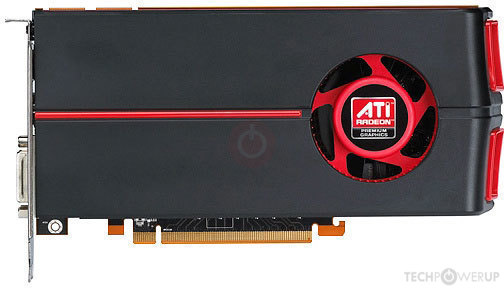 plucky timber
classic ATI
potent portal
Well, have. It's still working in my server.
plucky timber
5700XT is RDNA 1 so that's expected
potent portal
RX 580 still has current win 11 driver
plucky timber
oh
they only dropped vulkan
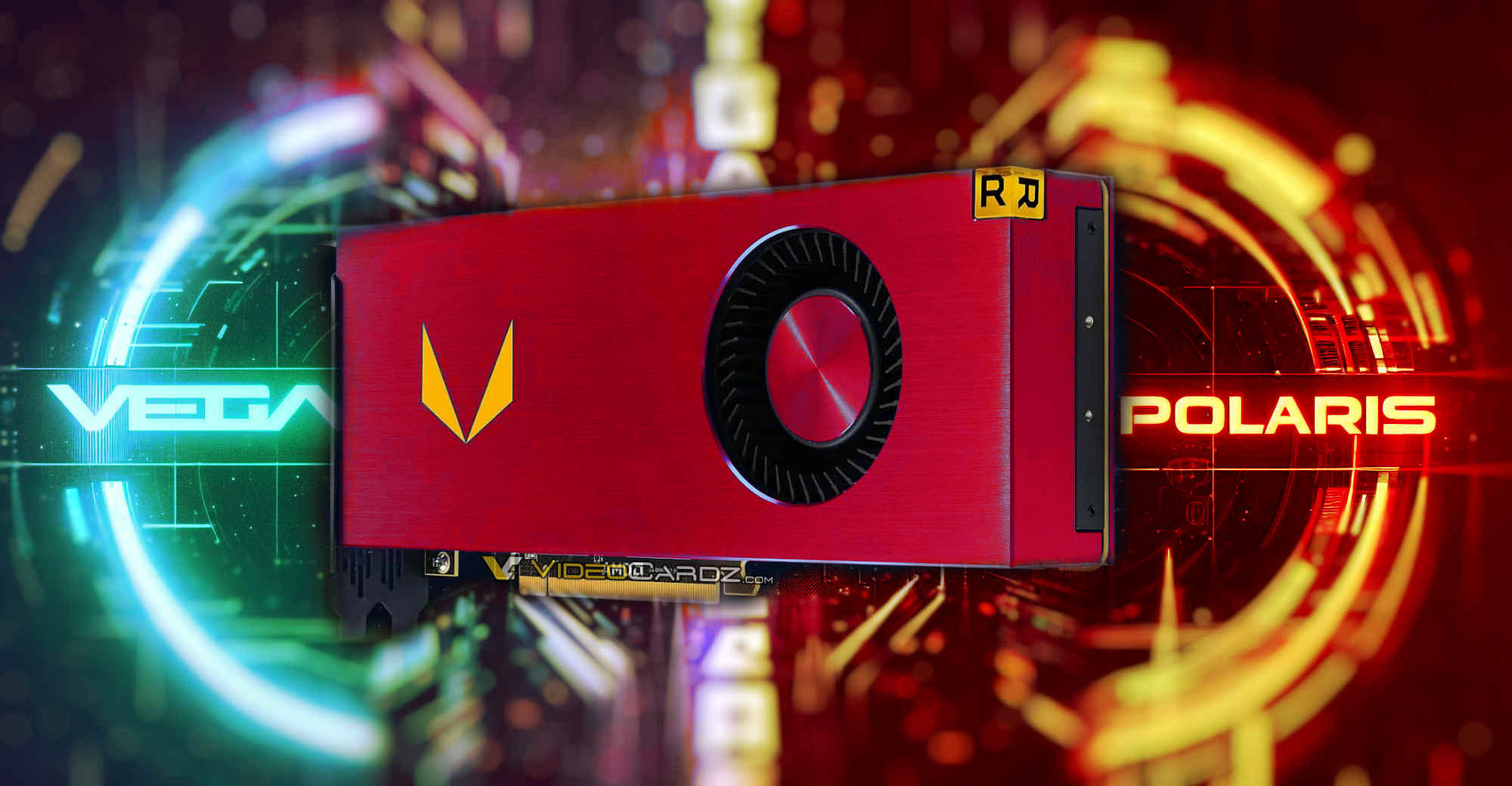
Linux AMDVLK drivers say goodbye to RX 500/Vega series Is Windows next? Gamers using AMD RX Vega and RX 500 series graphics cards are facing uncertainty surrounding AMD’s driver support. In September, these cards were moved from the main branch to a separate package in the Windows driver release. Since then, despite two updates to […]
potent portal
GCN 3.0
potent portal
I had a RX 570
potent portal
I replaced it with a 1060 3GB and never looked back
potent portal
yeesh I forgot how bad this was https://www.videocardbenchmark.net/compare/4179vs3566vs323/Radeon-RX-570X-vs-GeForce-GTX-1060-3GB-vs-Radeon-HD-7850
plucky timber
570x?
potent portal
didn't have 570
plucky timber
shouldn't be too far off
potent portal
Ye
plucky timber
it was also in high demand for a while
mining boom
570s were really popular for a while after that too since miners were dumping them on the market for cheap
compared to my current gpu it's really weak
but at the time it ran siege at 100fps+
potent portal
I'm noticing a pattern with my upgrades. I tend to upgrade when I can roughly double my fps. With the exception of the 570 to 1060. Here's my upgrade path.
https://www.videocardbenchmark.net/compare/6vs3558vs3566vs4001vs4409/Radeon-HD-5770-vs-Radeon-RX-470570-vs-GeForce-GTX-1060-3GB-vs-GeForce-RTX-2070-vs-GeForce-RTX-3080-Ti
plucky timber
hahah
same
my RX 570 was double my HD 7850
and my 5700XT was double my 570
only exception was 5700XT to 3070 mobile
I also tend to favour the mid range
potent portal
I should be happy with my gpu for a good long while if I stick to my pattern. It'll be a while before an affordable gpu doubles the 3080 ti.
plucky timber
same here
would take a while for a decent laptop that's double my 3070
that I can actually use as a laptop for 6-8 hours
potent portal
I'm thinking 6070 would be my next gpu if current patterns hold
plucky timber
I'm gonna go into uni in 2025 so
unless i get a scholarship I'm gonna be sticking to this for a while
budget is gonna be tight
plucky timber
potent portal
I'm thinking 6070 would be my next gpu if current patterns hold
AMD really needs to come up with mobile options
they have no market presence on mobile
mobile gpus that is
ryzen laptops are the goat
potent portal
Because all their potential mobile chips are going to consoles and handhelds
earnest olive
plucky timber
ryzen laptops are the goat
tbf... a lot of that comes down to node advantage
amd has a node advantage over intel
they don't have a node advantage over nvidia
we're now looking at tsmc n4 vs "intel 7" (enhanced 10nm)
they still make some good gpus but it's not quite the same situation as the cpu market
but also, yes, their biggest strength (node) is also a weakness (limited supply)
unfortunately for us it makes more sense for them to focus on the wider console market than the small % of enthusiasts that would actually buy a radeon laptop
plucky timber
sad
 dire venture
hello i’m looking to build or buy a pre built can anyone send me links to good pre builds it’ll be greatly appreciated
potent portal
What budget and country?
Building is highly recommended, you get much more for your money
potent portal
It's not as easy to break as you think
dire venture
okay nice
potent portal
The hard part comes after everything is in place. Cables.
dire venture
cable management there’s things to help with that tho
so builds or parts what are the best for 1500-2000$
 weak flint
dire venture
i’m scared to build i hear it’s easy to break when installing
weak flint
dire venture
i’m scared to build i hear it’s easy to break when installing
If you try and put the components with a hammer I think you'll brake something
mossy venture
dire venture
so builds or parts what are the best for 1500-2000$
Are you in the us?
And do you just need the pc, or do you need monitor, keeb and mouse
Do you care about looks, size, do you need wifi
And if you do care about looks, what would you like the aesthetic to be
Without those answers I'd say either
https://pcpartpicker.com/list/xBJR4M
Of https://pcpartpicker.com/list/fJZrGP
Second one has cheaper cpu with monitor, I included two options it's your choice between them
Part List - AMD Ryzen 7 7800X3D, Radeon RX 7900 XTX, Phanteks Eclipse P400A Digital ATX Mid Tower
Part List - AMD Ryzen 5 7600, Radeon RX 7900 XTX, Phanteks Eclipse P400A Digital ATX Mid Tower
If doing multi core loads https://pcpartpicker.com/list/NcvmL9
Part List - Intel Core i5-14600KF, Radeon RX 7900 XTX, Phanteks Eclipse P400A Digital ATX Mid Tower
dire venture
mossy venture
Are you in the us?
USE, everything, don’t care how it looks.
mossy venture
Is there any way you'd be able to order from a European country or the US?
Namely the UK, Germany, Spain, Italy, few others
dire venture
maybe in not sure
mossy venture
Or I'd need a list of sites you can order from
dire venture
newegg, amazon, the big ones
mossy venture
Oh and you'd just pay shipping? Or wdym
dire venture
yea
mossy venture
Ah alright, few min
mossy venture
dire venture
yea
Do you care about case size? Smaller might have lower shipping
I'd buy keyboard and mouse locally, shipping would likely make it more expensive than buying locally, but I'll include some in the list
dire venture
nah i don’t care just wanna be able to play games
mossy venture
If including shipping this is over budget, you can switch the gpu to a $500 7800xt which should drop it enough
https://pcpartpicker.com/list/TxvmL9
Part List - AMD Ryzen 5 7600, Radeon RX 7900 XT, Lian Li LANCOOL 205M MESH MicroATX Mini Tower
dire venture
looks good what can i play on it
mossy venture
Anything and everything
dire venture
aight bet
mossy venture
Very well too
dire venture
thank you
mossy venture
Np
It would still be a very capable pc with the 7800xt
Would still be able to run anything, just lower settings in some newer demanding ones
dire venture
is that better than what is has? or just cheaper
mossy venture
dire venture
is that better than what is has? or just cheaper
Also mouse and keyboard are a lot of personal preference
I'd probably ask in peripherals for more detailed help on that
little osprey
@mossy venture, got a buddy in Romania with a budget of 1,500 Lei (RON on PC Part Picker)
He wants to upgrade his 8400 and 1050 Ti and I told him GPU since I'm assuming he's running 1080p
Only things showing up are 6600 and 6650 XT
Well 6700 too but non-XT
mossy venture
little osprey
<@654444344274845698>, got a buddy in Romania with a budget of 1,500 Lei (RON on...
Well first, what psu does he have, and does he have an ssd already?
little osprey
mossy venture
Well first, what psu does he have, and does he have an ssd already?
Possibly, sounds like his parents bought him a prebuilt awhile back
mossy venture
The 6700 is much better value, with the price diff being about 200 RON
little osprey
He sent me this
 little osprey
mossy venture
The 6700 is much better value, with the price diff being about 200 RON
little osprey
mossy venture
The 6700 is much better value, with the price diff being about 200 RON
Alright I'll send that to him
mossy venture
little osprey
Alright I'll send that to him
Sorry had to run for a min, it's about a $45 price diff
Which 6700 is what, 10-15% better? Though also I'm fairly sure the 8400 will bottleneck it at 1080p
little osprey
mossy venture
Which 6700 is what, 10-15% better? Though also I'm fairly sure the 8400 will bot...
I would guess so but again he really can't change much without ripping the board out
No where to go with LGA1151
Except 9th gen but even then
He just wants to play CoD which he can't do on his current 1050 Ti
mossy venture
Yeah no reason to upgrade cpu for now with the budget
Gpu upgrade will still be very very noticeable
little osprey
Thought so
 tepid crater
Hey guys I can't get my pc to boot past bios. Its not detecting my SSD at all even though I haven't changed anything in months. It just did this out of the blue
tepid crater
The only other thing it's done a few times is boot to a black screen. Which after a minute will give me an error screen and then shutdown the pc
 sullen spoke
@tepid crater first try clearing the cmos of the motherboard. details on how to do that are in the manual here
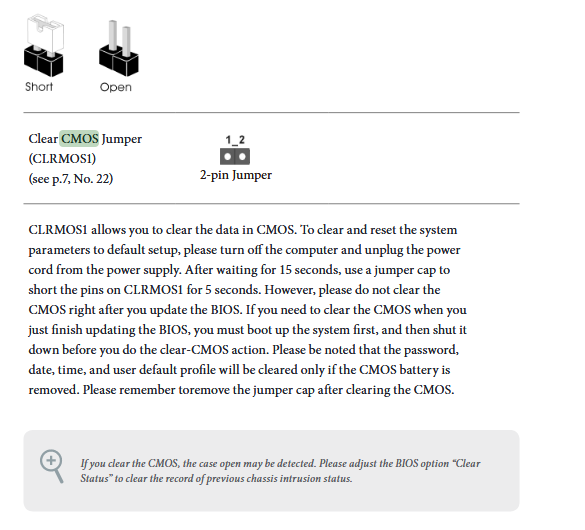
if you don't have a cap another popular thing to short pins is just a screwdriver.
tepid crater
Yeah I'm looking for those pins atm
sullen spoke
oh one sec
plucky timber
Or take out the battery
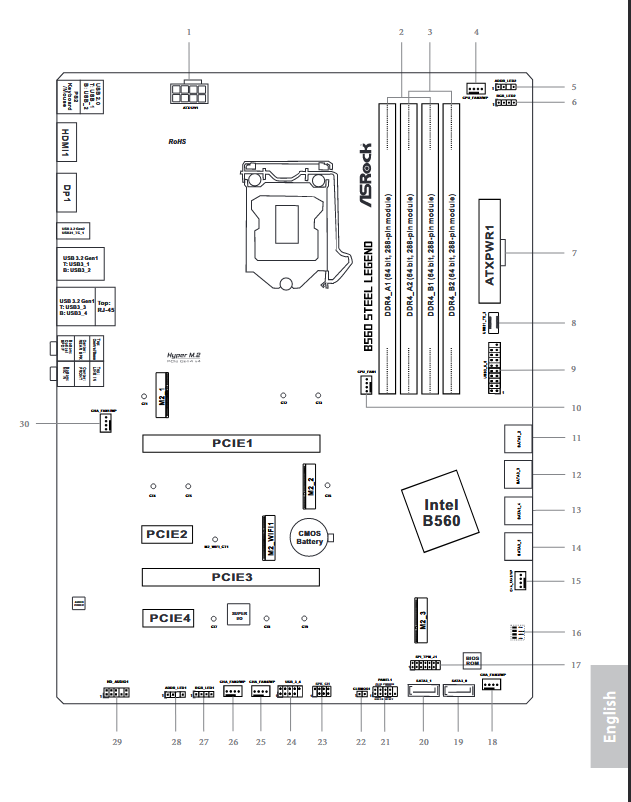 tepid crater
Coin battery is easy to find lol
sullen spoke
then you can replace that step by removing the battery
tepid crater
Yeah I just popped the batteey
lyric thistle
just replace it with a quarter
tepid crater
My blind ass still don't see the pins

 sullen spoke
after removing it you can simply put it back
tepid crater
Done
sullen spoke
so that resets the bios settings. you can power on the pc again and check the same setting, if it appears then we have a few settings to check before attempting to boot it. if not then I have another thing to try
 sullen spoke
setup
sullen spoke
the drive?
 sullen spoke
alright that's nice. now just verify that you have xmp on which it looks like you might? sorry im not familiar with asrock bios. maybe there are some other bios setting that is important that I am forgetting
tepid crater
Xmp? I'm still slowly learning this stuff. My pc is a side hobby haha
sullen spoke
other than that I think you should just be good to try booting it.
XMP is like a preset overclock for your ram to run at the advertised speeds. at default it will run much slower
tepid crater
Where do I find that setting?
sullen spoke
usually some menu related to overclocking, dram config, might be called ai/oc tweaker or something along the lines of
tepid crater
Oc tweaker is a Manuel on here
sullen spoke


whatever menu you were on for the storage i do see xmp profile one and it appears to be active. You can always double check once in windows
tepid crater

I really need some better monitors..
On a side note it kills me how this thing can't make up it's mind which monitor is the primary. It keeps switching on me for some reason. Despite me having set it multiple times
sullen spoke
looks like it should be fine
sometimes that will depend on the gpu it is plugged into, the display connection used, windows settings, etc
tepid crater
M8 I've been through every setting related to it and I can't for the life of me figure it out lol. Both are HDMI. Ive set the primary monitor in the windows settings. I'm still using a 1070ti, which I hope to be upgrading soon BTW. But still. The reason it does it escapes me.
Also the pc booted and took me to a recover menu.
sullen spoke
if it's running a repair just let that do it's thing. if it's recovery mode see if you can just proceed to windows
tepid crater
It asked to restart. It restarted. And my ssd is gone again
sullen spoke
welp
tepid crater
My ssd is also hot af for some reason
sullen spoke
The other thing I was going to suggest was moving the ssd to a different slot like the primary m.2 slot. And that would be located under where the gpu currently is
 plucky timber
How hot does it get?
tepid crater
I can touch it but it's more than a little warm
sullen spoke
hard to say if it disappears from the system so you can't read temps
plucky timber
reference model pascal? 👀
plucky timber
sullen spoke
hard to say if it disappears from the system so you can't read temps
This
sullen spoke
50c is pretty normal for a ssd but that is also very hot to the touch
tepid crater
Not sure off the top of my head. And yeah I cranked up my fan settings aswell
It's just odd how this has happened out of the blue after it being fine for so long
sullen spoke
and yes that would involve removing the gpu. if you don't know how you can probably find images online, but you would have to power off completely including psu, unscrew it from the back panel of the case and push down the tab on the pcie slot when removing it
mossy venture
tepid crater
It's just odd how this has happened out of the blue after it being fine for so l...
sorry just got here, what model ssd is it?
sullen spoke
only other possible thing I can think of is if the ssd is slowly dying
 mossy venture
and how long have you had it? do you do anything that requires daily writes, or are you just gaming?
tepid crater
It better not be. It's only 2 years old
sullen spoke
tepid crater
@mossy venture the adata
tepid crater
Mostly just gaming. A little bit of editing but that's it.
mossy venture
so would be at gen 3 speeds
tepid crater
DDR4
sullen spoke
looks to be ddr4 at 3200
mossy venture
ah, ram heatsinks look ddr3 era
sullen spoke
lol
mossy venture
does your motherboard have another nvme slot?
lyric thistle
if your ram isn't ddr2 you're not a real rammer
mossy venture
oh you alr suggested that ghosty
plucky timber
Ocz ddr2
sullen spoke
yeah lol. the top slot is gen4 but since there aren't any gen4 drives I figure might as well give it a go
mossy venture
if it's cutting in and out, when you are able to boot download crystaldiskinfo
see what the drives health is
sullen spoke
we haven't gotten a full boot yet. attempted to through recovery and drive vaporized again
tepid crater
Any ideas what the red lights on my motherboard are?
mossy venture
with the troubleshooting feature, you're able to access command prompt right?
mossy venture
tepid crater
Any ideas what the red lights on my motherboard are?
debug lights likely
sullen spoke
there is usually a label near it
tepid crater
 mossy venture
they should have text around them that say cpu, vga, dram, and boot
see if it says anything around them
tepid crater
Ah yeah. Cpu. Dram
mossy venture
sometimes they just come on during boot though
doesn't necesarilly mean cpu or dram is the issue, but if it doesn't go off and it still isnt booting you could try reseating ram and cpu
tepid crater
I'm gonna pull the gpu and move the ssd
sullen spoke
according to the manual the red light is either cpu, memory, vga, or storage being dysfunctional. not any particular one
tepid crater
If the ssd is going out I'm going to take it back to the pc shop tomorrow. I had a place install the ssd and do some cleanup work on it awhile back so I'm gonna see if they'll do something about it
sullen spoke
how long ago was that?
tepid crater
Bout 2 years. Little less
sullen spoke
so it was recent to the purchase of the pc?
tepid crater
I've been doing business with them on and off though so they know who I am
The pc was a gift to me from about 3 years ago. I had to do a number of upgrades on it to get it to work again. Motherboard. Cpu. Ram. Etc. The ssd was the last thing that was added. They had a deal on them at the time so I had them put it in
My boot and VGA lights keep coming back on

Gpu is stuck on this tab
plucky timber
Click down on it
mossy venture
yeah it's a pcie lock
plucky timber
That'll release it
mossy venture
it's supposed to hold the gpu in, push it towards the front of the case
sullen spoke
yeah that you are supposed to push down. the other thing I noticed it the ram stick appear to not be in the correct slots. it should be in the 2nd and 4th looking at it left to right
tepid crater
 plucky timber
Could use some dusting
mossy venture
sullen spoke
yeah that you are supposed to push down. the other thing I noticed it the ram st...
yeah if a pc shop built that that's a lil funny
mossy venture
ah alr
sullen spoke
I also misread a diagram. the main m.2 slot is under that white plate on the top
mossy venture
then that's a common mistake
mossy venture
but if a pc shop did it that'd be silly
tepid crater
@sullen spoke main white plate?
plucky timber
The white plate above the pcie slot
sullen spoke
the long one with 2 screws
mossy venture
this i think they mean
 plucky timber
Above where your gpu used to go
sullen spoke
it's a heatsink for ssds
now the million dollar question is did the shop see the ram like that and leave it or was the ram installed after the fact xD
tepid crater
They left it XD
plucky timber
Pretty easy to miss tbh
tepid crater
I only asked them to do some ssd work and cable management
sullen spoke
plucky timber
Pretty easy to miss tbh
not wrong but I also consider that a pretty measurable oversight
plucky timber
Or maybe they're not allowed to touch it
sullen spoke
¯_(ツ)_/¯
sullen spoke
here is a link to how to install the ssd from not asrock but it should be similar https://youtu.be/eR1JY2M74wE
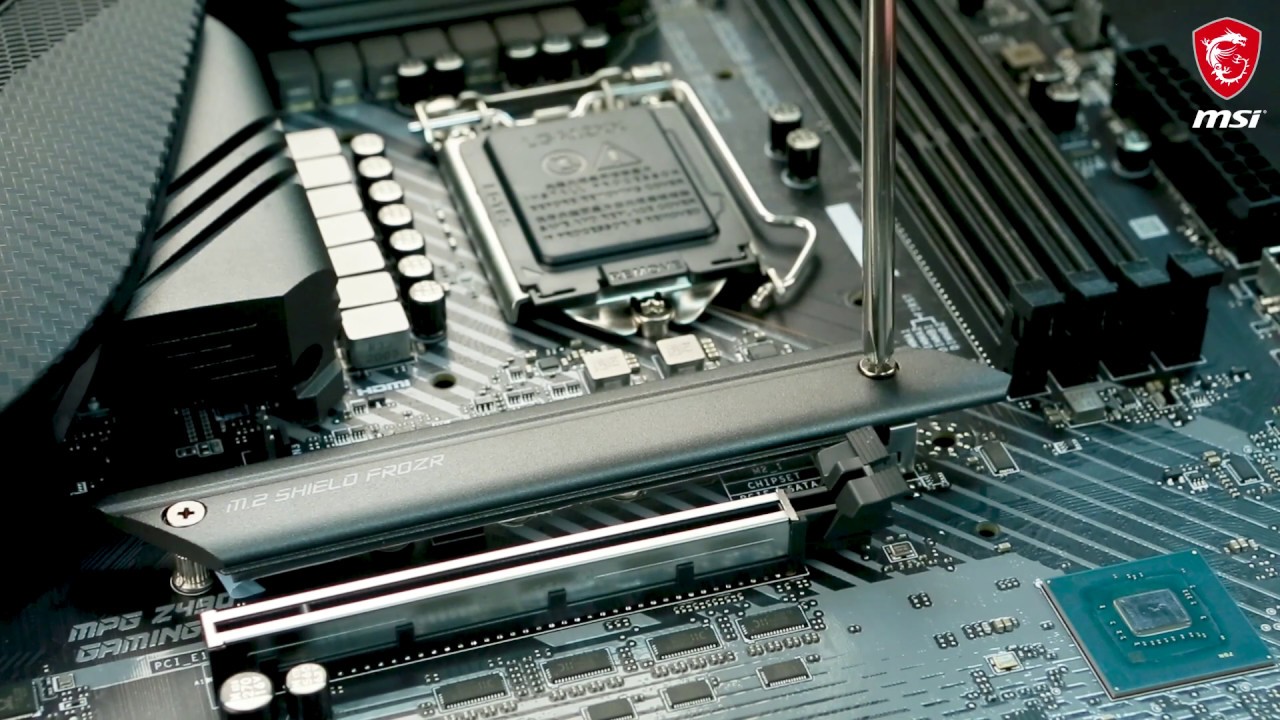
In this demonstration, we will show you how to install M.2 SSD on the M.2 slot with the M.2 SHIELD FROZR heatsink. In addition, we will also show you how to remove the heatsink and reinstall it back.
Follow us to get the latest news!
► Facebook: https://www.facebook.com/MSIGaming/ ...
just make sure you have the standoff there so it doesn't bend
tepid crater
You sure about then ram slots cause my ram light is on and not shutting off lol
sullen spoke
you powered off the pc right?
sullen spoke
and the psu?
sullen spoke
ok lemme just go slow so I can understand. did you power cycle it with everything installed or was something out? and you turn off the psu when installing and uninstalling things right?
sullen spoke
can you send another picture of what it looks like rn
tepid crater

Yes I know about the fan I'm gonna clean it
Also yes I plugged my hdmis back into the gpu
Nvm
I'm just a little stupid
sullen spoke
looks ok from what I can see. just make sure the ram is installed all the way and evenly on both sides. it's too easy to not get that in right
tepid crater
That's exactly what it was. I forgot to push them down all the way 😅
sullen spoke

tepid crater
Yeah it's still not recognizing the ssd
earnest olive
what cpu/board?
tepid crater
B560 steel legend by asrock
earnest olive
ok, 3200 xmp shouldn't be an issue
was wondering if it could be because you turned on 3200 xmp on ryzen 1000 or something
tepid crater
Yeah my pc isn't recognizing my ssd
earnest olive
which led is on?
earnest olive
did you recently change any sata cable?
tepid crater
I've changed nothing
earnest olive
that board has some ports that share bandwidth between bottom m.2 and sata
hmm ok
is your cpu 10th gen or 11th gen
tepid crater
10th
earnest olive
if it's 10th gen then don't bother moving your m.2
the top slot is disabled
need to move it back to bottom slot
tepid crater
Currently doing that
earnest olive
10th gen cpus lack the pcie lanes to communicate with the top slot, which is designed to communicate with the lanes that are there on 11th gen
since b560 is primarily designed for 11th gen and pcie 4
sullen spoke
yeah i can't think of anything else then if it continuously disappears
tepid crater
Even with pulling the battery and resetting bios. It'll recognize it temporarily. Then when it gets to the recovery menu and asks to reboot it suddenly can't find the ssd agai
earnest olive
is this when it's in the top slot or the bottom slot
tepid crater
Bottom
sullen spoke
bottom
earnest olive
it should not recognize anything at all ever if it's in the top slot because there's no connection
tepid crater
Top slot doesn't see it at all
tepid crater
It just started doing this out of the blue
earnest olive
I've used this exact same board with an i5-10400
actually just helped my customer RMA the CPU and the board
there's no default setting that would disable the bottom slot
hardware failure is possible
earnest olive
see if your friends at the shop could try putting a known good ssd in that bottom slot to test it out
sullen spoke
idk if it's possible for a corrupt windows to cause that
earnest olive
no
corrupt windows can cause boot fail but it won't cause the board to stop seeing the drive
pcie is on a lower level than OS
sullen spoke
shouln't
earnest olive
I don't think it is possible for any corrupt OS to do that
tepid crater
 earnest olive
well that's a boot at least
whea uncorrectable error
usually a sign of unstable CPU voltage
however
whea can catch pcie interconnect issues as well
my friend had an issue recently actually with a 10th gen cpu where her ssd was dropping out
and she was getting whea 17 pcie errors
in her case the problem ended up being failing ssd, but it really could be anything from cpu, board, ssd
again, recommend getting the shop to test a known good ssd in there for you
unless you happen to have a spare
tepid crater
I don't
earnest olive
or would rather just buy a spare than ask them
sullen spoke
that's going to be best bet tbh
earnest olive
would they charge you for that? how much?
tepid crater
 earnest olive
ssds are pretty cheap so if they would charge you it's probably better to buy a spare on your own
tepid crater
It's around 200 a pop for a ssd around here
tepid crater
For a 1tb that is
earnest olive
and what currency
tepid crater
USA and USD lol
earnest olive
???
you can easily get a 1tb for like 40 shipped nationwide
probably outdated info from when you bought your ssd 2-3 years ago
the prices of ssds have nosedived
sullen spoke
past few weeks I've seen a lot of ssd sales in #tech-deals
 earnest olive

Optimized for the PCIe Gen3 interface, M370 SSD reaches read/write speeds up to 2400/1850 MB/s. The 3D NAND flash technology brings dense storage in a compact design and allows storage capacities up to 2TB. Built-in data security and error-correction capabilities extend the longevity of the NAND ...
tepid crater
Well damn
earnest olive
when you said 200 for a 1tb SSD I assumed you lived in atlantis and used dogecoin or something
but yeah if the shop would charge you to test a new SSD in there then I'd just buy one
if they'd do that for you for free then let them
cause it's not guaranteed to be failing ssd
tepid crater
I'll just buy the one you linked me. Problem is my boot up and everything else is on THAT ssed
earnest olive
reinstalling windows is trivial
tepid crater
Also any advice for this windows recovery menue?


 earnest olive
try system restore maybe
it's most likely just a hardware fault but if you're waiting on shipping you don't have much better to do than try stuff lol
sullen spoke
yeah you can try the repair or restore, I wouldn't be surprised if it doesn't get anywhere but you can try for the time being
earnest olive
just based on past experiences I'm gonna say 99% chance this is hardware related
tepid crater
Apparently none of my passwords are correct for my user account. Which is BS but not surprising considering this is wondows
It's only 1 of 4 but it's saying none are correct
earnest olive
what model?
tepid crater
Evga 600B
earnest olive
if it's outputting voltage unstable enough to leave spec it could cause damage to SSD over time
just mentioning because you were mentioning your ssd only being 2 years old
tepid crater
Yeah but I don't have anything thay pulls that much juice. My mother board is rgb but that's it. Everything else is bog standard. No bells or whistles
earnest olive
evga 600b is really bad, wouldn't be surprised if it's on its last legs after 3 years
can you see the voltage readouts on the motherboard from bios?
I had a 24-pin melt into the mobo because 12v rail was dropping all the way down to 10.3v
tepid crater
Yeah as soon as the back screen goes away
earnest olive
(spec is 11.4v to 12.6v)
tepid crater
It's giving me my error screen then it'll reboot again
earnest olive
it's not super likely that your PSU did anything to the SSD but it is a nonzero possibility
tepid crater
Since I can't access any recovery options due to my password not being what I set it as
earnest olive
I would definitely recommend upgrading the psu along with your gpu upgrade though
tepid crater
Let's see. Cpu voltage is at .880v
earnest olive
look for +12V, +5V, and +3.3V
that psu was already not good when it was new, looking at some reviews that show 5V and 3.3V rippling out of spec under load
tepid crater

 jagged hill
hi, i’m remaking the handheld i made a month ago
earnest olive
those are really high wow
tepid crater
There's no way for me to force boot this thing either with my HDD I don't think
earnest olive
not a good sign if you've already got 3.3V rail out of spec at idle
and 12V rail is also pushing it
tepid crater
It's all set to auto atm
earnest olive
m.2 ssds are powered by 3.3v rail
and your 3.3v rail is WACK
so yeah maybe your psu actually did kill your ssd
in any case it's time for that psu to go
potent portal
10% tolerance is within spec, so 3.3v can be up to 3.6v and be within tolerance
tepid crater
Or maybe the port isn't correct for it. Is there another port I could try? Seems like there was one under the gpu
earnest olive
it's +/- 5% no?
earnest olive
tepid crater
Or maybe the port isn't correct for it. Is there another port I could try? Seems...
it is correct
tepid crater
Is there another port I could try?
earnest olive
sabrent says m.2 ssds want 3.3v +/- 5%, might be different from atx spec, not sure
earnest olive
tepid crater
Is there another port I could try?
not with a 10th gen cpu no
potent portal
earnest olive
it's +/- 5% no?
Oh wait you're right, 3.3v is 5%, 5v and 12v are 10%
earnest olive
you should order a replacement PSU to go with your new SSD as well
it's time for that PSU to go immediately
tepid crater
Can I use my HDD to boot?
earnest olive
this is why it's never recommended to cheap out on the PSU
if you install windows on it sure
potent portal
Yeah that would make the max 3.465v and just because you're 0.009v inside spec doesn't mean it's safe
earnest olive
the problem is cheaper psus don't end up saving you money a lot of the time
tepid crater
Funny story. I ordered a 10400. It didn't show up for a month, I called the supplier and they found out they didn't have any. So they upgraded me to a 10600 for free as an apology
earnest olive
just seeing that 3.3V rail voltage at idle + the fact that this model failed tests related to 5V and 3.3V regulation when it was brand new
makes me think the SSD being a victim of the PSU is actually quite likely
earnest olive
tepid crater
Funny story. I ordered a 10400. It didn't show up for a month, I called the supp...
ah, fair enough
but anyways if you can't afford a decent psu you just gotta cut budget elsewhere or save up a little more
that's just how it is
simply not the part to be skimping out on
tepid crater
Like I said, at the time it's all I could get. It was better than the EVGA white I had
earnest olive
well for future reference
potent portal
When a PSU dies it usually takes something with it, and that can turn your $15 savings into a $500 expense
tepid crater
For sure
tepid crater
But yeah can I put windows on this HDD via bios?
earnest olive
you'd have to make a windows installation media
potent portal
What voltage does the hdd use
earnest olive
I'd recommend just not using the PC until you can get a new PSU in there personally
potent portal
It'll say on the drive
tepid crater
Which means I'd have to have a pc to do that.
earnest olive
yes you can borrow someone's laptop to do that
tepid crater
5vdc and 12vdc
earnest olive
or an android phone if you have a USB drive compatible with phones
actually
no the phone would only let you move files on not create the media lol
tepid crater
I can use my roommates pc probly