#building-and-recc-chat
1 messages · Page 197 of 1
 cyan ravine
 earnest olive
occt power is nice for stressing cpu and gpu simultaneously
earnest olive
can be good for testing your case airflow lol
 restive halo
Downloading now
cyan ravine

cyan ravine
earnest olive
occt power is nice for stressing cpu and gpu simultaneously
I literally downloaded p95 to run with occt the other day cos I forgot about the power test

I'm getting old ig
earnest olive
alright grandpa let’s get you to bed
restive halo
 cyan ravine
Think I will sleep ye
restive halo
What should I run
cyan ravine
restive halo
Click on power
earnest olive
right I forgot it’s actually nighttime for you lmao
cyan ravine
Then press start
earnest olive
I just got out of a lecture that had no right to be as heavy as it was at 8am
 restive halo
How long do I let it run
earnest olive
until you’re satisfied lol
you really don’t need to run thermal testing on your pc unless you’re suspecting an actual problem
so if you’re just doing this for your own satisfaction then only you can answer your own question
restive halo

 potent portal
Looks perfectly fine to me. GPU is a tad warm but completely within spec.
restive halo
Heard thank you
It's also registering the AMD Radeon graphics and then the 4070ti graphics separately
Is that normal. I have never used this program
potent portal
Normal
restive halo
Ok
potent portal
Your CPU also includes a basic integrated GPU
restive halo
Just like to check everything
earnest olive
what model 4070ti is that?
restive halo
MSI Gaming trio
 mossy venture
Also just out of curiosity, what cooler for the cpu? Stock?
earnest olive
that temperature made me think it was a blower model
or maybe your case is restrictive? idk
mossy venture
earnest olive
didn’t realize the cooling on that model was that underbuilt
Might need custom fan curve
potent portal
It's probably a "silent" fan curve by default
earnest olive
under 2 minutes of load
I hope so lol
that cooler looks pretty beefy, they would have had to screw up the design enormously to get temps like that at higher fan speeds
 minor cypress
Question for anyone that might have an answer. In order for me to do a BIOS flashback on my motherboard, do I have to have another computer to download the file to a usb so I can BIOS flashback the new motherboard???
FYI, I never built a gaming computer before and I’m watching a YouTube video from “PC Builder” that is helping me along with my new gaming computer
I guess another good question is, does every motherboard have to be flashed if I bought it new right out of the box?
The motherboard I bought is brand new called “ASRock B650 Pro RS WI-FI”
potent portal
minor cypress
I guess another good question is, does every motherboard have to be flashed if I...
It's pretty rare that a current AMD motherboard like that requires an update to run.
You could set up the flashback using an android phone with a USB adapter if you didn't have any other computer.
minor cypress
potent portal
It's pretty rare that a current AMD motherboard like that requires an update to ...
Ahh ok. Would I be fine then if I continue to build my computer than? I haven’t put anything together yet
Currently have all my computer parts laid out on a table. I was waiting for a reply before I start to put things together ☺️
potent portal
Yes you're fine to continue
minor cypress
potent portal
Yes you're fine to continue
Awesome thank you @potent portal
potent portal
Flashback doesn't require having other things on the board besides power but it won't hurt if they are on, in case you did need to flash
minor cypress
potent portal
Flashback doesn't require having other things on the board besides power but it ...
Understood ☺️
Alright here I go!
potent portal
Good luck, feel free to ask if you have other questions
 thorn mural
recommendations for gpu thermal pads?
I need a little bit of both 1mm and 0.5mm thickness
potent portal
thorn mural
recommendations for gpu thermal pads?
I went with these personally, but anything right around that W/mK rating
https://a.co/d/bQhieRs
 restive halo
 potent portal
Update your Intel chipset drivers
restive halo
This computer starts up and the as soon as you log in this pops up and you can't use your mouse or keyboard
potent portal
Start it in safe mode and update it
If windows fails to start 3 times, it'll go to the advanced menu where you can select safe mode
So hit the reset button when it tries to start 3 times until the menu comes
potent portal
Holding the power button to force shut down works
Alternative options exist if you have a windows install USB ready
 potent portal
Startup settings
Safe mode
thorn mural
potent portal
I went with these personally, but anything right around that W/mK rating
https:/...
https://www.amazon.com/OwlTree-100x100mm-Efficient-Conductivity-Resistant/dp/B096ZNHY8F so are these a big no no?

The thermal pads fill the air gap between the heat-generating device and the heat sink or metal base. With the characteristics of softness and elasticity, the thermal pads can cover very incomplete surfaces. Heat can be conducted from the internal device to the metal shell or the heat sink plate ...
the w/mk is like half
potent portal
That's enough for GDDR6 but not GDDR6X
potent portal
potent portal
Startup settings
Safe mode
After it reboots pick safe mode with networking and you should be able to download the update
potent portal
thorn mural
Its going on gddr5
GDDR5 only uses about 2.5W so 6 W/mK should be sufficient.
However the one I linked is only a little bit more cost and far better. Your choice.
thorn mural
I need both 1mm and 0.5mm tho
So if i do need a g6x pad ill go with what you sent but for now i think the owltree one has better value
Thx for the input
potent portal
thorn mural
I need both 1mm and 0.5mm tho
There's both in the link I sent. It's not in order, it has 1mm, 1.5mm, then 0.5mm.
Fair enough. Happy to help.
thorn mural
potent portal
There's both in the link I sent. It's not in order, it has 1mm, 1.5mm, then 0.5m...
Ah must have missed that
restive halo
potent portal
Startup settings
Safe mode
Got it in safe mode
potent portal
restive halo
Got it in safe mode
Is that Ryzen 9 in your name your current processor?
restive halo
potent portal
Is that Ryzen 9 in your name your current processor?
That my pc. This is a PC someone dropped off that's a friend lol
potent portal
Gotcha. What CPU?
restive halo
potent portal
Gotcha. What CPU?
3700x I believe
potent portal
Ok so still Ryzen
restive halo
potent portal
Ok so still Ryzen
Nope a 5600 not 5700
potent portal
Alright so you'll need to update this chipset driver (it's the same for all AM4 systems) https://www.amd.com/en/support/chipsets/amd-socket-am4/b550
The winring0x64 driver is usually associated with RGB programs. Which do they have installed? It'll need to be updated too.
restive halo
Signal I think
Server address could not be found
Not registering internet I don't think
minor cypress
@potent portal I have a feeling my psu cables are not compatible with my M/B unless I’m blind
restive halo
minor cypress
<@396513761550270464> I have a feeling my psu cables are not compatible with my ...
What cord exactly?
minor cypress
I’ll take a pic so it’s easier to see. This is my first time building a gaming computer, so I’m not good at explaining things.Lol
restive halo
minor cypress
I’ll take a pic so it’s easier to see. This is my first time building a gaming c...
All good. That how you learn and that's why we are all here.
minor cypress


@restive halo
So I took a picture of my motherboard I’m pretty sure that’s the area of where the cable plugs into and then I also took a picture of the PSU where the motherboard should plug into
And when I’m looking at my cables, it doesn’t look like I have the one I need
restive halo
On the motherboard that looks like your cpu port
restive halo
Is there a cord labled on the plug cpu
potent portal
The 24 pin motherboard one goes on the right side of the board
minor cypress
potent portal
The 24 pin motherboard one goes on the right side of the board
Ahhhhh
potent portal
The CPU 8 pin will be the one that breaks into 4+4 cables
minor cypress
Falcie is correct of what I was asking about
Sorry I didn’t know how to phrase my question right
That first picture I assumed is where I connect the psu to MB
restive halo
Ok well the port you took a picture of on the psu is the 24 pin but the pic on the motherboard is 8 which is your cpu
All good.
minor cypress
I’m going on three hours and I have yet to put my motherboard in my case lol
restive halo
It should be in your case if your wiring the psu
minor cypress
I’m watching a YouTube video from PC builder and pausing and rewinding
restive halo
Unless your testing
@potent portal I don't think mine is registering the internet for some reason in safe mode
minor cypress
Here is the area where I plug my psu I believe what falcie was talking about which is 24 pin
 restive halo
Yes
minor cypress
So the other end of connection to my PSU Hass to be a 10 pin or 18 pin?
 potent portal
restive halo
<@396513761550270464> I don't think mine is registering the internet for some re...
potent portal
restive halo
<@396513761550270464> I don't think mine is registering the internet for some re...
If you're on wifi it might not load the driver. Even though it should if you selected safe mode with networking.
potent portal
minor cypress
So the other end of connection to my PSU Hass to be a 10 pin or 18 pin?
Both, it'll split off
minor cypress
potent portal
Both, it'll split off
Ahh ok I’m looking at my wires that came with my PSU
restive halo
potent portal
If you're on wifi it might not load the driver. Even though it should if you sel...
Ethernet
potent portal
And you picked safe mode with networking?
You can always disable the RGB app in safe mode so it doesn't trigger the driver warning, and download in regular mode
restive halo
potent portal
And you picked safe mode with networking?
I thought I did but it's acting as if I did not lol
minor cypress
What does EPS stand for? In terms of cables
potent portal
Entry-Level Power Supply Specification
It's one of those acronyms that's lost it's meaning and the meaning never mattered to begin with lol
 obsidian wigeon
eps just means it's for cpu basically
don't think too hard
don't plug it into your gpu
or you'll melt the connectors
potent portal
Normally you can't do that anyway because of the keying
obsidian wigeon
right
potent portal
But I've seen some lazy power supply designs where you could...
obsidian wigeon
fair enough
potent portal
Still a scary experience, and some power supplies don't even have short circuit protection
(We'll never, ever recommend one that doesn't have that)
restive halo
@potent portal
 potent portal
Ok so as a stopgap disable (or uninstall) anything having to do with RGB
That could be EVGA software, openrgb, motherboard software, lots of things can access it
iCue is another
potent portal
It might not be obvious
For example EVGA Precision X1 accesses that driver
So does Logitech software
If it's unclear just disable all startup programs
restive halo
Dragon Center
potent portal
That'll do it
restive halo
Delet it
restive halo
He uses it for his rgb
potent portal
You can control the RGB using openrgb, it's lighter impact on the system and has way more options. Plus it doesn't spy on you.
restive halo
Ok I'll put it on there for him
potent portal
Oh and when you uninstall dragon center I recommend using revo uninstaller to do it
MSI loves to leave behind little pieces of itself without telling you
Which of course interferes with other software
minor cypress
@potent portal OK I’m ready to put my motherboard in my case. Do I need to remove these standoffs?

I’m using MicroATX MB
minor cypress
Ok.
I also think I need to rearrange the middle 2 because they don’t line up with the MB That’s the way it was. I haven’t touched anything yet.
Oh actually, never mind
potent portal
Yeah it looks that way. You'll want them on the M peg holes
minor cypress
Ahh ok
potent portal
It looks like that case also allows you to slide the board down a little to make more room at the top for liquid cooling, if you're doing that
minor cypress
No liquid cooling for now. Just a normal fan cooler.
potent portal
Ok, stick with the 7 and 7M holes then
minor cypress
Do I have to use all eight holes on my motherboard? @potent portal
potent portal
No
Technically speaking you could get away with as few as 2
But more is good to be more secure
minor cypress
potent portal
No
Ok 👍🏾
restive halo
@potent portal Deleted Dragon center
Still crashed and won't let me install
Going back to safe mode. I might have to do a fresh install. 😬
potent portal
Next thing to try would be disabling all startup programs
If that doesn't help still then yeah you might have to go nuclear
restive halo
Ugh lol
potent portal
I know Avast will throw a huge fit if you try to uninstall it and probably make you log in to the account to approve the uninstall so that's probably out
Unless you do have access to said account
restive halo
potent portal
Unless you do have access to said account
Disabled all start ups and installed the drivers
potent portal
Ah so it let you this time
Good, that means you can narrow down the misbehaving program to something that was in the auto startup menu
restive halo
Sorry. I did not realize that was a bad word. I apologize
potent portal
That's what the bot is for. It happens.
restive halo
So one of his aps was breaking crap.
@potent portal lol found it first try I was right lol Mobi games playstore
potent portal
Welp sketchy launcher doing sketchy things
I know that driver can be exploited to hide a crypto miner virus
restive halo
Of course lol
 jagged ember
restive halo
Of course lol
jagged ember
restive halo
Of course lol
You can use revouninstaller for an easier time doing a full uninstall
It can check for residual files and registry things apps leave behind
restive halo
jagged ember
You can use revouninstaller for an easier time doing a full uninstall
Thank you
Thank you all as always
 rustic linden
If i am selling my computer and need to get rid of the data on my ssd. How do i do it while keeping windows on it?
mossy venture
rustic linden
If i am selling my computer and need to get rid of the data on my ssd. How do i ...
Factory reset from settings
potent portal
Yes that, and if you want the data to be unrecoverable run a secure wipe of your free space after. Since it's a SSD only do one pass or you can ruin the nand. CCleaner is one tool that can do it.
Technically you can just run the SSD TRIM command and get similar results.
 viral horizon
can i please get some help
i just put the cpu and my cpu cooler in my computer
the motherboard is put on
the 8 pin cpu connector is on
the 24 pin is on
and the caseport where the fans are connected, led switch, p switch are they all are connected to a sata connector
please it wont turn on
i dont want 1000 bucks to go to waste
pelase
jagged ember
Did you flip the PSU switch
viral horizon
yes
jagged ember
Did you plug the display into the GPU
viral horizon
ive turned it on and off
viral horizon
jagged ember
Did you plug the display into the GPU
i dont have a gpu yet
the cpu has igpu
jagged ember
Okay
Probably plugged in front panel io wrong
So just pull that all out, take a screwdriver, confirm the location of the power switch pins
viral horizon
i hope it didnt but i set my motherboard on my bed when working on it
jagged ember
And put your screwdriver between the two power pins
jagged ember
viral horizon
i hope it didnt but i set my motherboard on my bed when working on it
Probably not? Things are pretty static resistant these days but I can't exactly rule it out-
jagged ember
Try shorting the power pins first with a screwdriver or knife
On front panel io on the motherboard
Refer to the manual
And take a pic before you do it just in case
viral horizon
viral horizon
jagged ember
And take a pic before you do it just in case
of the rear io on the motherboard
jagged ember
Ask if you do not understand
viral horizon
or just the motherboard in general
jagged ember
So remember the stupid little bundle of cables that fit one or two pins
viral horizon
yeah
viral horizon
yeah
i have the port connector plugged into a sata connector i think
but i resecured everything, i turned on the psu
i press the power and yea
 viral horizon
jagged ember
viral horizon
jagged ember
oh
jagged ember
I just need you to short the power sw ones
 strong raft
Commonly the 3rd & 4th pin from left on the upper row. Fpanel is also usually bottom right of mobo
 jagged ember
Fair, but still check your manual to be sure
strong raft
Or also look at the mobo, it's often labeled. 
jagged ember
True, sometimes silkscreened into the pcb
 plucky timber
It's always the front panel headers
potent portal
That is often a good starting point for "doesn't turn on at all"
plucky timber
This is the third case I've seen in the last 5 weeks
I mean they are really annoying
there should just be a standard
Like it can be backwards compatible
Just merge the headers all into one thing
The layout could be the same it's just less confusing
potent portal
Well there is a standard. But Asus in their infinite wisdom decided they don't need to listen to the standards and made a giant connector for no reason. Then Gigabyte followed suit.
 lethal tapir
They saw apples proprietary cables and connectors and thought "yeah that's not stupid at all"
plucky timber
💀
potent portal
"10 pin connector? Nah lets do a 20 pin, that won't take up too much space and we can say it's better because different."
plucky timber
What
lethal tapir
How much money did yall "save" by designing, testing, and specially manufacturing proprietary plastic clips instead of using standard
potent portal
plucky timber
Asus moment
 lethal tapir
potent portal
lethal tapir
potent portal
 potent portal
Because everyone knows if you want to combine the normal 10 pin header with the 4 pin speaker header you need a 20 pin header to do it
potent portal
plucky timber
Literally put it next to the 10 pin header
The funny thing is they do when they feel like it

Both of these are X570 too
plucky timber
the industry should come together
And make a single plug for the 10 pin
Like there's no virtually difference across boards
Saves time trying to plug in several tiny little headwrs
potent portal
Some cases do come with a single header
plucky timber
fr?
jagged ember
viral horizon
IT WORKS
Good to hear, enjoy pc
Yeah there's like some cases with one fat header for it
Could probably count the number of cases with that on both hands
lethal tapir
It's too good
potent portal
plucky timber
fr?
If you look closely at the asus 20 pin connector there's 2 sets of pins that do the same thing. They had to modify their 20 pin to match up with the normal 10 pin just in case someone gets a case with that single plug.
plucky timber
ahhhhhhhhhhhhhhhhhhhhhhhhh
viral horizon
oh hey btw
plucky timber
Like
viral horizon
now that i got it on
plucky timber
The usb header is one thing
viral horizon
how do i get windows to boot onto bios?
potent portal
viral horizon
how do i get windows to boot onto bios?
Do you have a USB drive ready with the installer?
plucky timber
viral horizon
how do i get windows to boot onto bios?
You get bios to boot into windows
viral horizon
potent portal
Do you have a USB drive ready with the installer?
yeah
can i plug it into any usb port or
potent portal
Yep any port will do. Preferably rear yes but front should be fine unless there's an issue with it.
viral horizon
i already tried it but it wont let me boot
its an asrock bios
maybe im not using it right
plucky timber
Which boot device did you select?
potent portal
Press F11 when the Asrock logo comes up and it'll bring up a boot selection menu
viral horizon
ok
brb
ok it works
i thank you guys so much
this was such a fun journey
heres my buildb tw
gpu isnt here yet but
it works!
potent portal
That first build is always the most fun imo. I enjoy a good challenge and figuring out problems.
potent portal
Enjoy!
 little osprey

Part List - AMD Ryzen 5 3600X, GeForce GTX 1660, Phanteks Eclipse P300A Mesh ATX Mid Tower
Any idea what’s wrong?
 stoic island
Prob tpm is off
little osprey
BIOS setting?
stoic island
Trusted platform module
little osprey
@honest knot, also the board you found for me has working front IO despite what the listing said
stoic island
Windows 11 decided to mandate the fancy security thing
little osprey
So can I not enable it or something?
 honest knot
little osprey
<@255061019322351618>, also the board you found for me has working front IO desp...
honest knot
little osprey
<@255061019322351618>, also the board you found for me has working front IO desp...
W
little osprey
IKR
stoic island
You should be able to enable it
little osprey
Alright, I'll go look for it RQ
honest knot
little osprey
IKR
It's probably cuz their case front i/o got busted or smth
Or maybe they inserted the case cables in the wrong place?
Eh it doesn't matter at least it works
little osprey
Yeah for $50 it ain't bad
honest knot
✅

 quaint burrow
Hi everyone, first time posting in here and looking for some help. Bought a new comp and I've built a couple PCs in my life but I have no idea why this computer won't even turn on. Yes, I've checked if the power switch was on lol
stoic island
little osprey
?
Should be it?
little osprey
stoic island
Should be it?
It looks already enabled
stoic island
quaint burrow
Hi everyone, first time posting in here and looking for some help. Bought a new ...
Any debug LEDs, any other signs?
little osprey
So I'm confused
quaint burrow
Nothing on the board the only light I get is from the Internet cable in the back
stoic island
little osprey
<@278694081440251905>
Go to CPU configuration and fTPM switch
little osprey
Oh I saw that one sec
stoic island
And switch to CPU fTPM
quaint burrow
I just disassembled it all and put it all back in and double checked all my connections
stoic island
And enable secure boot
little osprey
Alright
stoic island
quaint burrow
I just disassembled it all and put it all back in and double checked all my conn...
Got a part list?
potent portal
quaint burrow
I just disassembled it all and put it all back in and double checked all my conn...
Take the power button connector off and touch the pins together with a screwdriver.
And just double check the PSU is switched to " I "
little osprey
stoic island
And enable secure boot
?
 stoic island
Go to security and enable secure boot
potent portal
If secure boot is already enabled, set it to custom, then set it back to standard, accepting the factory defaults
quaint burrow
Shared List https://newegg.io/fcb5679
Cooler I took off but it was a cooler master ml360L V2 argb
potent portal
You'll probably need a bios update, but that wouldn't cause it to not turn on
little osprey
potent portal
If secure boot is already enabled, set it to custom, then set it back to standar...

Won’t let me enable it
“User Mode”?
potent portal
Try install default keys
little osprey
?
quaint burrow
If it would turn on I could go into the Asus bios to update that. I'm not even sure this thing has any LEDs I didn't see any on the actual board
potent portal
There's usually some near the 24 pin that are used for diagnostics
potent portal
potent portal
Take the power button connector off and touch the pins together with a screwdriv...
Did you try this @quaint burrow
little osprey
It has come to my attention that my BIOS is over a year old
mossy venture
mine is almost a year old, it's not much of an issue
quaint burrow
Ok guys I fiddled with all the power cables and finally got it turned on sooo thanks!
quaint burrow
Now I have no display great more troubleshooting time 😞
little osprey
Yeah now it’s just refusing to boot from the USB with secure boot on
potent portal
quaint burrow
Now I have no display great more troubleshooting time 😞
Make sure the display cable is plugged into the GPU
quaint burrow
Lol it is
potent portal
Always have to start with the basics, I know it gets annoying sometimes lol
Monitor on the right input?
quaint burrow
It's from old comp it better be I haven't changed anything
Resocketed ram and vid card still nothing also
Hmmm do I have to disable on board vid card with a pin still or is that an old school problem?
potent portal
Mostly old school thing but you can try using the integrated GPU if you have one
At least temporarily
Any lights on near the 24 pin cable?
quaint burrow
I mean RGB is real so yes but not the ones you're thinking
potent portal
Ok so it did probably post properly and the issue is somewhere between the GPU and the monitor
quaint burrow
Well I stuck an HDMI and display port with two different monitors and still getting nothing on either screen
potent portal
Did you restart after changing cables
quaint burrow
Yes
viral horizon
so good news
the computer works
im actually using it to write this rn
but anyways its doing just fine]
what are some normal temps btw for the cpu
i usually get around 40 c when im using it for normal activites
and 70 for gaming
 analog hearth
that sounds normal
 lunar abyss
Aye
 obsidian wigeon
don't use that calculator thing
 manic cloak
Ah
potent portal
Every system has a bottleneck, they're fundamentally misusing the term
obsidian wigeon
^
cyan ravine
bottleneck is such a superfluous topic
no point trying to use a calculator because it all comes off assumptions
plucky timber
cyan ravine
bottleneck is such a superfluous topic
it also varies with each workload
It's a dumb metric for measuring performance
viral horizon
can frame rate be affected by the monitor?
cyan ravine
If there's any sync involved yes
viral horizon
wdym by sync
cyan ravine
Gsync, vsync, freesync
viral horizon
like if the monitor is connected to a pc via cable
cyan ravine
There are technologies which are commonly used to sync the gpu with the monitor for frame output
Improves frame pacing
And governs it
viral horizon
im using an igpu for the time being
cyan ravine
Lol
cyan ravine
So why do you want to know this question
viral horizon
idk
i just thought my computer would run faster than it would
i mean it works alot better
i mean it has 32 gb of ram
ryzen 5 7600
1 tb of storage
mossy venture
it's abn 550
 teal dome
@mossy venture
 mossy venture
W
teal dome
You gotta find me a Bluetooth and WiFi card on TikTok if possible
Imma use the coupon and buy
mossy venture
gimme a few and i gotchu
teal dome
mossy venture
gimme a few and i gotchu
Thanks
mossy venture
teal dome
Thanks
 teal dome
How do I connect those antennas
mossy venture
as in you cannot see the pcie slot looking face on at the pc?
 teal dome
Ok
mossy venture
but your solution might be an m.2 wifi card with a USB bluetooth connector
 mossy venture
well thats annoying
mossy venture
not sure it'd fit, I'd ask someone else
teal dome
And my m.2 is behind the gpu I think
mossy venture
that'd be fine, would just have to take ouyt the gpu to put it in

 mossy venture
that small one would normally be what you put a pcie wifi card in
 mossy venture
mm
one sec
It isn't tiktok but this is m.2, if you end up having to buy one not on tiktok https://www.amazon.com/Intel-Wi-Fi-Gig-Desktop-AX200-NGWG-NV/dp/B085M7VPDP/ref=mp_s_a_1_3?

Intel Wi-Fi 6 (Gig+) Desktop kit includes M.2 2230 module, optimized external antenna, standard size mounting bracket with RF cables installed and a low profile mounting bracket. Features Bluetooth 5.0 and WPA3 security. Motherboards must have M.2 key E slots to be compatible.
teal dome
Alright
@mossy venture I got another one
15$ of no min spend
Is this one good? https://www.tiktok.com/t/ZT8kghcFj/
mossy venture
Yeah thats good
teal dome
Alright
little osprey
Alright dumb question
I daisy chained the RGB cable for the Frozen Notte and two Thermalright fans
For some reason the fans and pump are auto defaulting to green and I dunno if it was a software issue or hardware issue because neither were showing up on SignalRGB
I tried downloading the ASRock’s RGB software for the board but it wouldn’t open, I’ll try again tonight but dunno what else to do
Rig ain’t for me so I just wanna put on RGB software that’s easy to use
 cursive wharf
I assume ARGB? If so, did you set the LED count to amt of LEDs that can be addressed (remember to think about what is hooked up in series and what is hooked up in parallel).
@little osprey
little osprey
cursive wharf
I assume ARGB? If so, did you set the LED count to amt of LEDs that can be addre...
There's two ARGB fans and the one ARGB pump
All of which are daisy chained onto a single header
Wait
One second need to check the manual and see if the header was addressable or not
Yeah I should have the three pin daisy chain plugged into 24

SignalRGB was weird, I might try to use ASRock's RGB software again or use OpenRGB just to confirm if the board is reading the header or not
lunar abyss
Which one the best @ or dm me I’m trying to see which one to buy


 mossy venture
lunar abyss
Which one the best @ or dm me I’m trying to see which one to buy
mossy venture
lunar abyss
Which one the best @ or dm me I’m trying to see which one to buy
Would you be willing to build your own? With tiktok shop you can do a lot better for $400
If not, first one is the best
lunar abyss
Na I rather not
mossy venture
lunar abyss
Which one the best @ or dm me I’m trying to see which one to buy
This one
 potent portal
Really? I'd have gone with the 5600x/6600 one
Waaaaay better than a 1660
The 6600 is more comparable to a 1080 even, 2 tiers up
 pseudo pollen
I think he meant the second one
minor cypress
Question for anyone. I currently have only 5 fans to install. I will get more later. What is the best configuration for me to place my 5 fans?

The rear of the case is the top if you are looking at the picture. Sorry I should have taken it the correct way so it doesn’t throw you off
@potent portal
potent portal
minor cypress
Question for anyone. I currently have only 5 fans to install. I will get more la...
3 front intake, 1 top rear exhaust, 1 rear exhaust
pseudo pollen
It would probably be side intake but close enough
potent portal
Same diff
potent portal
Yes
minor cypress
Awesome thank you 😊
potent portal
np
minor cypress
Anyone free for FaceTime? Idk where some wires go 😅 or video chat if that works on this app
minor cypress
Disregard
minor cypress
So I just realized my Motherboard does not have a USB 3.0 and a USB 3.1 Gen 2 connection. Will that be a big problem?
My case is the Lian Li O11 Mini and those are the 2 front panel system I/O ports
Does that mean I bought the wrong MB for my case? Cause if so that sucks cause PC Part Picker said they were compatible
strong raft
usb 3.1/3.2 or w/e are these bigger ones, normal/older usb2.0/3.0 are these smaller ones. USB32 w/e = usb 3.2, which is what you use if the case cable matches. Certain things on mobos are slightly-standardized like this.
 minor cypress
@strong raft so per my manual for my case. I have a usb 3.0 wire and a usb 3.1 gen 2 wire.
Where would each go? 🤔
 strong raft
 minor cypress
strong raft
-
minor cypress
strong raft
-
Cool I’m gonna try it
strong raft
smaller 1 in last pic is usb C, seems to have multiple names on some mobos. haha
minor cypress
strong raft
smaller 1 in last pic is usb C, seems to have multiple names on some mobos. haha
Lol bro you saved my life they fit. The wording in my manual was throwing me off smh 🤦🏽♂️

@strong raft ok 1 more question
HD Audio wire
I’m 99% sure it plugs in here

 pseudo pollen
yeah
minor cypress
The difficulty I’m running into, is it should just slide into place. I also checked that I have the pins lined up so I don’t break anything. But I’m having a hard time putting it on
Is that because the wire is brand new??
minor cypress
Ok, I didn’t want to put too much force cause I didn’t want to break anything 😅.
I’ll try it now and let you know how it goes @pseudo pollen
pseudo pollen
Sounds good
strong raft
props on 1 of the best ssds. If there already something under the top slot ( ssd sized silver/white heatsink)? if not, we just prefer that a single ssd goes there.
minor cypress
Hmm I’m putting pretty good force on it, more than I feel I need to @pseudo pollen
pseudo pollen
make sure that the pins line up, and just push, it will take a bit more force then you think it would
minor cypress
I have the word “HD AUDIO” face up towards the MB to match the pins fyi

Copy I’ll try again
minor cypress
strong raft
props on 1 of the best ssds. If there already something under the top slot ( ssd...
Yes I have a solidigm SSD under there to for a total of 2 SSDs ☺️
cyan ravine
minor cypress
HD Audio wire
I’m 99% sure it plugs in here
Uh, I'd put a heatsink on that p44 pro ssd
It kinda, needs one
minor cypress
Understood
 strong raft
eh not totally if anything like the how a plat P41 normally is, but that's going by TPU who basically couldn't make it thermal throttle even w/ a 600+ GB write on a 2TB model. (although I did heatsink mine gotta admit)
minor cypress
Bruh this dam Hd Audio wire is a pain. I feel like I have to really shove it in
It slides 1/4 of the way so I know for sure it’s matched correctly. But when I try to put it in the rest of the way it’s being difficult
cyan ravine
strong raft
eh not totally if anything like the how a plat P41 normally is, but that's going...
They had a heatsink on it
It's on the same power tier as a 980 pro
It absolutely needs one
pseudo pollen
minor cypress
Bruh this dam Hd Audio wire is a pain. I feel like I have to really shove it in
just shove it in all the way then, it's not the end of the world if you break it, since it doesn't really matter unless you use the from audio ports
minor cypress
Yeah I’m trying rn lol
cyan ravine
@minor cypress ek nvme heatsinks can be found relatively cheap, very effective and low profile. Try anywhere not their main website
Very very good sinks, worth keeping
minor cypress
@pseudo pollen I gave up and just put it on as much as I could sigh
 minor cypress
If anything I’ll take it to my local computer store to find out why
potent portal
Do you even need the front audio ports though
minor cypress
@potent portal idk, I was just plugging it in just because 😅
I was just following my manual
pseudo pollen
no video?
minor cypress
pseudo pollen
no video?
I found a YouTube video where it shows it just sliding in easily but mine doesn’t
So I’m just gonna leave it for now
cyan ravine
I think it's better to leave it loose if it won't fit to avoid any psu overcurrent trips
minor cypress
I spent an hour trying to do it 🤦🏽♂️ 😂
pseudo pollen
It's honestly one of the best connectors for that to happen
potent portal
One of the most optional ones yes
cyan ravine
True, but left alone could be the worst
Audio drivers are terrible
No need to add more fuel to that fire

potent portal
Onboard audio really is garbage 99/100 times
cyan ravine
Ye but it's still usable
potent portal
It'll work after tweaking for 6 hours and then randomly stop working for no reason
cyan ravine
potent portal
It'll work after tweaking for 6 hours and then randomly stop working for no reas...
Ryzen moment
💀
Ryzen is so much worse too
If it breaks it's almost unfixable
To the point where spamming the reinstall is the lottery luck solution
potent portal
Realtek 
potent portal
I'd take an old sound blaster card over onboard
cyan ravine
Guess what's in my two new rigs?

Well I have a dac if I want proper audio
It's useful if I need to just plug my headphones in rq
Which happens a lot if I need a video conference
potent portal
That's why I'm so glad my headset just uses a generic USB DAC
If the headset dies I can still use the dac
 white shadow
Hello, I'm new to this server. I've been playing Cities Skylines for a couple of years. I upgraded my RAM on my basic desktop PC (Dell Inspiron 3670) a few months ago and this has worked out quite well (32GB). With the new CS2, it seems my graphics card just can't cut it. I tried playing CS2 for the first time today and each time I selected a menu item to build out any asset, the entire map turns a bright yellow and I can't see what I'm doing at all. My research implies my low level graphics card is the culprit. I want to be sure I don't purchase a graphics card that won't fit or function in my existing PC. PCs have evolved a lot since I was building desktops in high school so I honestly don't know what specs to be looking for to ensure an appropriate fit and function. I'd prefer to keep the purchase under $100 but would be willing to go up to $200 if necessary. Input greatly appreciated. Thank you 🙂
cyan ravine
True, there's also the apple usbc dac
Subverts the onboard altogether
Idk the gene one seems alright
My ux was apparently decent too by freq response
Those aren't cheap boards tho
It's nothing compared to a separate dac either
potent portal
I have the hyperx cloud 2 so it's pretty independent, I can use the headset on my PS4 by plugging into the controller too
I'm happy with it and that's what matters right?
cyan ravine
white shadow
Hello, I'm new to this server. I've been playing Cities Skylines for a couple of...
Cities skylines 2 seems to struggle on anything rn
When the best in class graphics card can barely do 30 fps in it's home turf, it's a heavy as hell game
Just prefacing this because you might find 100$ or 200$ mightn't be enough
potent portal
Could get a used 6600 XT for $165
white shadow
cyan ravine
Cities skylines 2 seems to struggle on anything rn
Seems people are complaining a lot. part of me wonders if I should wait and see if the patches and bug fixes the devs work out over the next few weeks would be a good call.
cyan ravine
I would say so yeah
potent portal
What do you have now is the question
white shadow
potent portal
Could get a used 6600 XT for $165
What are the specs I need to check to be sure it'll fit? I honestly don't remember and it's been ages since I built PCs from scratch.
cyan ravine
Cpu, gpu, ram, psu
potent portal
1650 super, yeah that'll be showing it's age all right
cyan ravine
Indood
white shadow
Looks like the link with specs gives upgrade options further down the page.
cyan ravine
Do you have an i3 i5 i7 or i9
potent portal
Looks like that stock power supply doesn't have any PCIe connectors
cyan ravine
Does it fit a standard PSU?
obsidian wigeon
it does
it's an atx case
but so tiny it can only fit the mobo itself
gpu can't be too long
cyan ravine
I hope so cos dell uses those sausage ones
 cyan ravine
Hoo boy
obsidian wigeon
whole new rig is a better way
potent portal
Definitely not ATX
 cyan ravine
Or some brute force and carelessness
potent portal
External power for GPU? Adapters? lol
cyan ravine
And that case doesn't look wide enough for a standard psu either
white shadow
cyan ravine
Do you have an i3 i5 i7 or i9
i5. and according to this link i5 should be sufficient https://www.systemrequirementslab.com/cyri/requirements/cities-skylines-2/22585
cyan ravine
potent portal
External power for GPU? Adapters? lol
Yeah it would be LOL
white shadow
Yeah I know this isn't ideal but I can't invest in a whole new computer. When I purchased this desktop in 2020, it was just for working from home
I hoped that some wise upgrading would make it possible for me to play
cyan ravine
Peach, your pc has a common dell problem
white shadow
It's the only game I'm currently playing
cyan ravine
Dell does cheap, out of style, or custom spec
To make things as affordable as possible for them
white shadow
Yeah, I definitely didn't have gaming in mind when I purchased.
cyan ravine
So what you get is a pc that works
cyan ravine
But if you want to change anything it's dead on it's feet
If we recommend you a gpu the best we could do is a higher power LP card
Which isn't that strong
Rather all for a couple options iirc (expensive those ones) it's worse than what you have
Cos the PSU isn't up to scratch
If you wanted to run the psu externally tho, and be a little jank, that works
potent portal
A 3050 would meet the game spec and there's models without supplemental PCIe power
cyan ravine
Does it? At what reso tho lol
potent portal
You'd be looking at 1080p low/medium probably
cyan ravine
The lp 4060 would probably be about as high as I think possible
potent portal
Minimum is a 970
obsidian wigeon
i pray 4050 is 75w for desktop
but looking at laptops..
4050 is probs not 75w card
lol
potent portal
I hate that used 3050s are more expensive than used 6600 XTs
obsidian wigeon
nvidia fee™
on other news..

Wccftech
AMD is rumored to be preparing lower-clocked & lower-power Ryzen 9 7940HX & Ryzen 7 7840HX Dragon Range CPUs for laptops.
they're all equipped with 610m
rip to mini pcs
obsidian wigeon
oof
obsidian wigeon
that's crazy
white shadow
Thanks for trying to help. I'm just going to have to table this for now
cyan ravine
I think your best bet peach
potent portal
cyan ravine
So 2080 super gets 24 fps 1080p
In a high pop city yeah, everything struggles there
cyan ravine
And this is a weird recommendation from me
4060 LP
It's low power, so it'll slot right in
But it's not cheap
It'd run your game tho
Well enough imo
If a 2080S struggles to hit 24fps, it's a big hill to climb LOL
Those cards go second hand near 200
You could grab one of those? And add a separate psu for $52
Apevia prestige 600w
But if you want a clean upgrade it eould be the pricey 4060 LP
Just because dell does what it does
They don't make life easy lol
teal dome
cyan ravine
Apevia prestige 600w
Psu sucks man, the cables come 2 attactched
potent portal
Better than what he has
cyan ravine
Well it's a cheap decent unit
potent portal
Which is basically nothing
teal dome
Yeah
cyan ravine
Yeah peach has none
It's gonna come with caveats anyway
The days of cheap psu's are long behind us
Blame the ukraine conflict for that
teal dome
Caveats? What are those
cyan ravine
Drawbacks
teal dome
cyan ravine
Blame the ukraine conflict for that
Controversial take lmao
cyan ravine
Hey I'm not taking a side saying that lol
teal dome
Wish cheap semi mod or modular psus still exists
cyan ravine
But psus did get more expensive due to sanctions aligning with the event
obsidian wigeon
^
potent portal
The war disrupted a lot, partially due to the major sanctions against russia and allied nations
cyan ravine
Neon supply suffering
white shadow
Well all in all, I appreciate everyone taking the time to try to help me out. Seems I'm correct, the g card is the problem but upgrade options seem moot because of the usual Dell issues. I think I'll need to make a gaming PC a reward for meeting my big end of year goal. I can play CS1 in the meantime.
cyan ravine
Noble gases you need for large caps
teal dome
white shadow
Well all in all, I appreciate everyone taking the time to try to help me out. Se...
Cs1 is still playable?
white shadow
yep
cyan ravine
Cities skyline 1
white shadow
Not an issue with CS1.
cyan ravine
Context
teal dome
Ohhh
white shadow
yes Cities SKylines
cyan ravine
It's not cs1 like csgo
cyan ravine
Yeah ikr lol
white shadow
nope
potent portal
Since the minimum GPU is a GTX 970 and that'll struggle a lot with medium population, the 1650 is below even that
white shadow
Sorry to disappoint, haven't played any FPS games since college and I never enjoyed them or was ever any good
teal dome
white shadow
Sorry to disappoint, haven't played any FPS games since college and I never enjo...
Naw bro it’s fine, I just did not know what it was
white shadow
I loved Civ 3 for ages, was my fave game for a long time. So in 2021 when I was looking for a new game to try, I found Cities and just couldn't stop watching YT videos of others playing.
cyan ravine
@white shadow come back here when you're ready to build a new pc
Aim for a budget of about
white shadow
Thanks. I will
teal dome
Yeah
potent portal
$700 USD would make an awesome starter PC
teal dome
Yes sir and it runs 1440p if I wanted to but prob not gonna get
Picked up a WiFi card for 8 bucks today
From TikTok shop
cyan ravine
Or if not that @white shadow then this like we talked about
https://pcpartpicker.com/product/Mt9wrH/gigabyte-oc-low-profile-geforce-rtx-4060-8-gb-video-card-gv-n4060oc-8gl
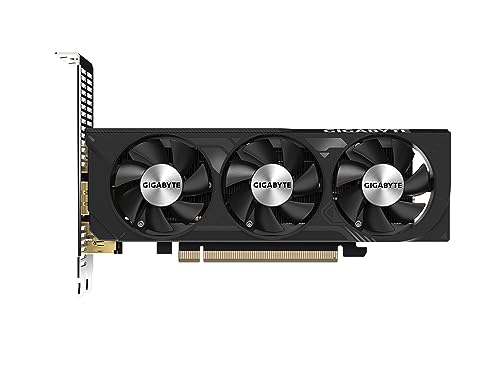
Gigabyte OC Low Profile GeForce RTX 4060 8 GB Video Card (GV-N4060OC-8GL)
$325 before tax
Oh wait
@white shadow nvm it needs a power connector wtf
I was mistaken
pseudo pollen
pinging him so much why
teal dome
And maybe salvage the parts
white shadow
Yeah, seems the consensus
cyan ravine
Yeah, I got no easy answer here haha
white shadow
Yeah I'll def take my ram and both my drives to my build
I'll see what othe parts I can salvage
potent portal
cyan ravine
Yeah, I got no easy answer here haha
Definitely not with the given budget yeah
 potent portal
Molex adapter 
white shadow
Thanks again all, I gotta go. Have a great day/night 🙂
cyan ravine

 vague oracle
cyan ravine
Or if not that <@993279690729062501> then this like we talked about
https://pcpa...
vague oracle
cyan ravine
Or if not that <@993279690729062501> then this like we talked about
https://pcpa...
Bruh I thought that said 4080 for a sec
cyan ravine
Bruh a 4080 LP would be like 10 fans long
Freaking lightsaber with all that rgb
Only missing a grip to swing with
vague oracle
My wallet is itching to buy something, idk what I should
So many good options to buy
cyan ravine
4080 lp
vague oracle
I’ll make one
Is there a decent monitor that’s smaller than the FV43U but bigger than the M32U?
 weary galleon
^for anyone like me who doesn't know how large those are, in between 32" and 43"
weary galleon
vague oracle
Is there a decent monitor that’s smaller than the FV43U but bigger than the M32U...
If you want 16:9 I think the choices are slim
According to pcpp there are 14 monitors in that range, the cheapest is $615
cyan ravine
vague oracle
Is there a decent monitor that’s smaller than the FV43U but bigger than the M32U...
LG C2 42"
Anything in the middle just, doesn't really get recommended if it's not an ultra wide
little osprey
Alright well I’ve nailed down why the ARGB on the AIO and fans isn’t being picked up by software
After reading a few posts and looking at my own box the only mention of ARGB software seems to be Aura Sync which I presume is referring to Asus’s thing
While the fans may support different software, I have them daisy chained onto the AIO ARGB cable
So I’ll get the wifi cable hooked up today and pray to God that the Aura Sync thing works
cyan ravine
why do you need specifically wifi for aura sync?
just use armoury crate to preset it
same thing
or open rgb
if it's not being picked up by the motherboard it may not even be plugged in properly
asus software just auto detects all strips in the stream, I know cos I do it
cyan ravine
have you been using it without any internet
little osprey
Using what?
cyan ravine
the pc
little osprey
Yes
 lyric thistle
Why not grab your own PC for internet
cyan ravine
you know you can usb tether your phone for internet right
little osprey
I can?
cyan ravine
mhm, it's a pretty normal feature nowadays
little osprey
Well yeah I ran a cable
little osprey
Alright I’ll try when I get home
cyan ravine
little osprey
Thanks
lyric thistle
cyan ravine
you know you can usb tether your phone for internet right
I forget how to do that every time
little osprey
Just hook up your charger to your computer and go to your phone settings and enable USB tethering
lyric thistle
Yeah plug in your iPad block
lyric thistle
The two hot pins jammed into two USB C ports
I literally have to spend like 10-30 minutes figuring it out each time because I try via Bluetooth and wifi direct first
cyan ravine
I even do dual connections
lyric thistle
My network module doesn't have functioning Bluetooth for whatever reason so obviously that doesn't work
cyan ravine
like band steering or combine my phone tether and cable net
my net, albeit slow and high ping to the states
it can be quite good if I brute force the hell out of it
 signal olive
Hi. Can anyone help me with finding some parts to build a computer that can run vrchat? Im in California.
 gentle pollen
Any good ways to measure how much power my computer draws in a day on average?
potent portal
Smart UPS
gentle pollen
is that a app?
potent portal
No it's hardware
gentle pollen
Oh. Any software I can use?
Doesn't need to be exact, just need a rough estimation.
potent portal
You could log your stats with hwinfo
gentle pollen
Oh, okay.
How do I log the stats, or is that the same as just running HWinfo in the background.
potent portal
There's a button with a sheet of paper with a green plus over it, the tooltip shows "logging start"
potent portal
Yep
gentle pollen
Will it update to the same log when I start it again or do I need to make a new file?
potent portal
You'll be able to read the data in any app that can open .csv files.
You'll need to start the logging and it'll ask where to put the log every time you want to use it. You can set a hotkey in settings and tell it to start on boot at least.
gentle pollen
Gotcha.
Trying to figure out what my 5700G's power draw will be when I reuse it for a server soon.
signal olive
potent portal
What's your budget for the computer?
My budget is flexible. I have no parts because i dont know which ones to get.
Processor Intel® i5-4590 / AMD FX 8350 equivalent or greater Memory 4 GB RAM Graphics NVIDIA GeForce® GTX 970 / AMD Radeon™ R9 290 equivalent or greater DirectX Version 11 Storage 21.5GB (~1.5GB for application, remaining for content cache)
Vertex shader 5.1
Pixel shader 5.1
Is what it told me i needee to run vrchat but i dont which pieces of hardware are consideree more powerful and bettee than what they suggested
Like id like to get 8 to 12 ram and 2 tb storage memory
potent portal
signal olive
My budget is flexible. I have no parts because i dont know which ones to get.
This would be an ideal starter option. It's decently mid-high end and should handle just about anything you throw at it. You can save some money if you wanted, or go even higher end.
https://pcpartpicker.com/list/p4Rb28
Part List - Intel Core i5-12400F, Radeon RX 6700 XT, Phanteks Eclipse G300A (1 Fan) ATX Mid Tower
signal olive
Wow did you put the list together for me? If thats the case yeah ill probably save up to the get higher end parts then. Would the Seagate brand barracuda work with this setup?
potent portal
You could add any HDD like that to this with no issues for extra storage
There's not a whole lot of reason to get them these days with SSDs being so cheap though
If you had it already then you can pop it in
signal olive
Yeah thats why i asked. I got some 2 tbs seagates in my storage brand new. Wanted to see ifol i could use em. Sweet. Thanks for the help! Greatly appreciate it!
Is there a specific motherboard i need for this?
potent portal
Any B660 or B760 should do. Or if you wanted the option to overclock a K CPU later you can get a Z690 or Z790.
I'd recommend a board with DDR5 memory and not DDR4
You could also go AMD instead for a little bit more performance for a little more money
signal olive
Noted. Again thanks👍
minor cypress
@potent portal dang I thought 3 120mm Lian li fans would fit on the rear as Intake
In the Lian li mini snow case

Would it be ok if I put those 3 on the bottom of case as intake and then my last 2 as 1 rear exhaust and 1 top exhaust?
manic cloak
minor cypress
Would it be ok if I put those 3 on the bottom of case as intake and then my last...
top should be intake
and bottom should be exhausr
if i'm correct
minor cypress
@manic cloak I have 5 fans total
manic cloak
oh
minor cypress
I did 3 bottom as intake
1 top exhaust
1 rear exhaust
minor cypress
 minor cypress
The way the pic is that’s is right side up
manic cloak
ikik
minor cypress
If anything I’ll change it later
manic cloak
you should be fine with 1 exhaust rear, 2 or 3 top intakes
5th fan you can throw anywhere
bottom should usually be exhaust though
cause there's not gonna be as much air flow compared to top from the bottom
I guess you could say air follows gravity?
strong raft
Some of the wackest stuff I've heard.
obsidian wigeon
uh no
you should actually keep the bottom fans as intake for this case
or the gpu will be choked from air
back exhaust
side intake
no need for top fans
teal dome
Is there a way when you press a key it turns on mic but when you press again it like turn off mic
Push to talk sucks and I don’t wanna hold it when I’m talking
teal dome
How do?
obsidian wigeon
not sure how
obsidian wigeon
or use voice activity
teal dome
obsidian wigeon
or use voice activity
Wat dat
teal dome
Hmm alright I’ll try
obsidian wigeon
not speech, but rather loudness of sounds
teal dome
Thanks fox
obsidian wigeon
too sensitive it picks up everything
teal dome
I have a bunch of background noise so yeah
obsidian wigeon
too low and you have to raise your voice
teal dome
Might not be able to do that
jagged ember
manic cloak
you should be fine with 1 exhaust rear, 2 or 3 top intakes
Unhinged
little osprey
Any idea as to why Windows is acting up when I run anything in the USB ports?
Keeps saying power surge or something and the USB port is drawing more than the PSU can handle
It happens with a USB drive and wireless mouse/keyboard
I’ve tried different ports too and it still shows up until I click on the notification and click close even though it claims it won’t work until I restart the PC
But the mouse/keyboard and USB drive work just fine despite this?
Could it be the lack of an IO plate?
mossy venture
little osprey
Keeps saying power surge or something and the USB port is drawing more than the ...
Have you updated bios?
lyric thistle
:(
mossy venture
It sounds like it'd be related to ryzens usb drop out issues, or the mobo is faulty
little osprey
Everything works fine after I close the notification but I’m just confused why it’s showing up in the first place
little osprey
Listing for the motherboard said the USB 3.2 header didn’t work but it works for me
I’ll check but I’m still confused
Everything else works fine, she’s gonna pick it up this evening
Just trying to get everything quirked out before then
cursive wharf
If AMD mobo have you tested CPU, chipset, and "indirect" chipset controllers (indirect being non-internal chipset controllers connected to chipset)?
 frigid night
@south cliff is that bottom fan set to exhaust??
 storm arrow