 austere condor

#building-and-recc-chat
1 messages · Page 140 of 1
 cyan ravine
^
 flint sapphire
Hide the mess with the brand new fractal north! 
 frigid night
What's the cheapest 600-700w c tier atm?
cyan ravine
frigid night
What's the cheapest 600-700w c tier atm?

Super Flower Golden Green HX 650 W 80+ Gold Certified ATX Power Supply (SF-650P14XE (HX))
frigid night
cyan ravine
Boop
https://pcpartpicker.com/product/jvLypg/super-flower-golden-green-hx-650-w-...
This is the one I found
https://www.amazon.com/gp/product/B07NWZQX1J/ref=sw_img_1?smid=AEHA1AAWZIC3L&psc=1

Apevia’s Prestige line of power supplies brings great power and efficiency to your computer system. 80+ Gold certified, and designed for elegant form and function, they bring it to life. Supporting the 12v2. 3 standard and single rail setup, it’s updated for modern platforms. Boasting a 135mm sil...
frigid night
just gonna be running a 9600k (no oc) with a 1080
cyan ravine
Hmmmm I think the $15 is worth it there tbh
@stoic island do you know about this apevia prestige psu?
frigid night
Pato did recomend the apevia to me once for the 12100/1080 build I did for my girlfriend (uwu).
but idk how well it'll work with the 9600k instead
frigid night
lol
cyan ravine
Irish things
 fossil cedar
Potato
cyan ravine
Whoa
fossil cedar
Alcohol
cyan ravine
He's legit reo
frigid night
lol
cyan ravine
Nah like, how good is that apevia
fossil cedar
Which model is it?
cyan ravine
Prestigous
frigid night
fossil cedar
Apevia?
yeah, I had gotten it for the 12100/1080 build for my gf when you suggested it
but now I want to replace the 12100 with a 9600k
but no oc on the cpu
frigid night
frigid night
This is the one I found
https://www.amazon.com/gp/product/B07NWZQX1J/ref=sw_img_...
@fossil cedar
fossil cedar
Speculative C tier
cyan ravine
Hol up
cyan ravine

frigid night
I'm not sidegrading her pc
fossil cedar
No ew 9600k has no ht
frigid night
I'm building a new one
cyan ravine
Hmmm
frigid night
this is for a 11 year old kid
fossil cedar
9600k is 6c6t instead of 4c8t
fossil cedar
fossil cedar
9600k is 6c6t instead of 4c8t
And honestly not gamor as good
cyan ravine
Hmmmm
frigid night
I already has these parts
cyan ravine
How much for the board and cpu reo
 vague oracle
If you can get it for like $25 or dirt cheap
cyan ravine
Ah
frigid night
the only thing I don't have is the psu
vague oracle
I think 1000w is needed
vague oracle

 frigid night
lol
fossil cedar
What gpu gonna be used?
cyan ravine
waht
fossil cedar
https://pcpartpicker.com/product/jvLypg/super-flower-golden-green-hx-650-w-80-gold-certified-atx-power-supply-sf-650p14xe-hx
I'd get this as long as 650w is enjoying
Super Flower Golden Green HX 650 W 80+ Gold Certified ATX Power Supply (SF-650P14XE (HX))
cyan ravine
Ya me too tbh
fossil cedar
5$ more than apevia for a tier upgrade and 50w more rating
cyan ravine
Stonks
fossil cedar
cyan ravine
15
Ohh im blind
cyan ravine
No you're pato
fossil cedar
Reo what gpu
cyan ravine
GP102
 fossil cedar
Okie
cyan ravine
Nicely guessed
fossil cedar
I'd get golden green then if you have the monies
frigid night
alright will do
cyan ravine
It costs many golds and greens
fossil cedar
You could probably do apevia but idk if i feel as comfortable putting it on a speculative c tier, if it was high C or 1070 then I'd say go for it
cyan ravine
CLC stonks
frigid night
how much would you price this build out?
Customer - Intel Core i5-9600K, GeForce GTX 1080, Corsair iCUE 220T RGB Airflow ATX Mid Tower
I know it's not optimal.
but it's parts I have that I don't need and I'm not looking to spend more money.
and it's going to an 11 year old who just wants to simulate farming and play roblox lol
frigid night
should I charge a time fee (knowledge and time building it)?
cyan ravine
You could yeah
frigid night
I believe I can resale the 1080 for 140
cyan ravine
Oh I'm overestimating the 1080 then
fossil cedar
frigid night
minus the fans.
Thermalright c12c's are dirt cheap and has rgb
frigid night
ok so these prices are what I found on ebay recent sold listings.
 fossil cedar
If you're selling it, you could get the apevia
cyan ravine
I'd maybe keep the aio tho
fossil cedar
👀
frigid night
cyan ravine
I'd maybe keep the aio tho
oh?
fossil cedar
Although i suppose better than buying new cooler if he don't wanna sell aio
Also i think aio helps with sale price
frigid night
fossil cedar
Also i think aio helps with sale price
that's what I was thinking. cuz liquid cooling
cyan ravine
The aio does tbh
fossil cedar
Reo just use stock case fans?
cyan ravine
Also that aio is great for sff
frigid night
no stock fans
frigid night
ok sweet
cyan ravine
frigid night
ok so these prices are what I found on ebay recent sold listings.
Also really a 9600K for 110??
frigid night
I may as well grab 2 packs then so he can has 3 in front and 2 on the aio as well as 1 exhaust
frigid night
cyan ravine
Also really a 9600K for 110??
roughly.
frigid night
looks to be 90-120
frigid night
yeah, I'm also factoring in that there will be no shipping costs
cyan ravine
Ofc
I'd buy a cheap single tower
Se 214 xt
And keep the aio
Sell that aio separately for 60-ish and it'll likely sell quickly
The 240 variant specifically works perfectly in a number of sandwich SFF's and it's a discontinued aio
So they're not the easiest to get
frigid night
alright
ok so that's good. It dropped the price below $600
which is what I was wanting
he didn't give me a budget, but I'm not wanting to turn him away from getting it
well haven't added fans yet
cyan ravine
Yeah def
3 clc's should be enough
Put them all on the front
It'll work without problems and have that gamer vibe for him lol
frigid night
no need for a rear exhaust?
cyan ravine
Nah
Intake is more important for that 1080 anyway
You could do 2 front 1 rear if you're conscious about it
fossil cedar
1080 will be self exhausting where the hdmi etc is so
frigid night
ah ok
fossil cedar
And tower cooler will be exhausting basically at the back anyway
cyan ravine
Pretty much ye
frigid night
ok, is that mp33 good enough or can I cut a little cost there as well?
doesn't seem like he's going to play any super demanding games
his dad just wants him off his work laptop
cyan ravine
Msi the new value stonk
frigid night
I have a 512gb sata ssd as well that I could use
frigid night
yeah. tbh, it's never had any of my own info on it
I'll wipe it anyways because good practice
cyan ravine

fossil cedar
frigid night
I have a 512gb sata ssd as well that I could use
Just use that tbh
frigid night
fossil cedar
Just use that tbh

HP S700 500 GB 2.5" Solid State Drive (2DP99AA#ABC)
fossil cedar
That'll do
frigid night
ok
fossil cedar
The kid won't notice anyway
frigid night
What price should I list it?
frigid night
I meant the ssd
frigid night
That's exactly what I was thinking
fossil cedar
25?
frigid night
I'll do 20
fossil cedar
Somewhere in that range
frigid night
alright current total is sitting at $573. I want to say $675 is fair.
that includes the time to build it and the knowledge in building it.
I think I'm going to go as far as installing windows and debloating and all that jaz
fossil cedar
I'd just get rid of like clipchamp and some other things not too over the top
frigid night
well I know someone that made an aio debloater bat file that I intend to use, but I was mainly thinking of making sure all drivers are updated and whatnot
 little osprey
fossil cedar
https://pcpartpicker.com/product/jvLypg/super-flower-golden-green-hx-650-w-80-go...
little osprey
fossil cedar
https://pcpartpicker.com/product/jvLypg/super-flower-golden-green-hx-650-w-80-go...
What tier is that PSU
Kinda tempting because of how cheap it is compared to the RM750e and Revolt Pro 850W
fossil cedar
little osprey
Kinda tempting because of how cheap it is compared to the RM750e and Revolt Pro ...
It's B tier, although if you looking for a 750w, there's an A tier in #tech-deals for 85
little osprey
fossil cedar
It's B tier, although if you looking for a 750w, there's an A tier in <#50010296...
The FSP one right?
fossil cedar
little osprey
The FSP one right?
Fsp ye
little osprey
@fossil cedar https://pcpartpicker.com/product/DKw7YJ/phanteks-revolt-pro-850-w-80-gold-certified-fully-modular-atx-power-supply-ph-p850gc

Phanteks Revolt Pro 850 W 80+ Gold Certified Fully Modular ATX Power Supply (PH-P850GC)
fossil cedar
Not bad for an 850w these days
little osprey
fossil cedar
Not bad for an 850w these days
Do you think it'd be reasonable to grab this over the FSP an Corsair PSU since it's 850W and about the same price as the RM750e?
cyan ravine
I mean for $10 it's a nice upgrade
fossil cedar
Depends on what parts you'll be using
little osprey
7600X and 6700 XT hopefully
fossil cedar
cyan ravine
I mean for $10 it's a nice upgrade
Well if you compare to fsp it's 25$ more
fossil cedar
little osprey
7600X and 6700 XT hopefully
Super Flower Golden Green HX 650 W 80+ Gold Certified ATX Power Supply (SF-650P14XE (HX))
cyan ravine
The that^
fossil cedar
Or if you wanted to future proof and have more budget you could get the fsp
little osprey
fossil cedar
Grab the
https://pcpartpicker.com/product/jvLypg/super-flower-golden-green-hx-6...
What tier?
fossil cedar
B
little osprey
fossil cedar
B
My only issue is it isn't modular
little osprey
Alright, thanks
fossil cedar
Np
 dim forge
Could someone help
Mu cooler doesn’t wanna fit 🙂

I tried pushing rly hard but it doesnt fit
And I dont wanna ruin my mobo
😭

The other side went through
 runic spruce
dim forge
Mu cooler doesn’t wanna fit 🙂
runic spruce
dim forge
Mu cooler doesn’t wanna fit 🙂
Look up an installation guide for the intel stock cooler
Idk if there was something to do before installing it but I don’t think there was
Just push harder, it takes quite a bit of force to break a mobo
dim forge
i did push harder and eventually they all fitted in
Problem is, there are two pins that don’t expand how they should, so I might have to buy a new cooler
That happens for not dismounting the cooler before shipping ur PC 😔😔
 earnest olive
dim forge
Problem is, there are two pins that don’t expand how they should, so I might hav...
earnest olive
dim forge
Problem is, there are two pins that don’t expand how they should, so I might hav...
did you do them in diagonal order
 mossy venture
If anyone else wants a good laugh https://www.reddit.com/r/hardwareswap/comments/143isqu/usafl_h_5600x3060_ti_pc_part_out_or_entire_build/?

reddit
0 votes and 5 comments so far on Reddit
$175 5600x, $60 16gb ddr4, $340 3060 ti
vague oracle
340 3060ti ain’t terrible
dim forge
earnest olive
did you do them in diagonal order
I tried but nothing was working
earnest olive
vague oracle
340 3060ti ain’t terrible
it's pretty bad
dim forge
what happened was, the stock cooler fell off during the shipping
earnest olive
3070s are averaging at like 280-300 now
vague oracle
If a 6700xt is also that range, I’d say $340 for a 3060ti isn’t bad
vague oracle
earnest olive
3070s are averaging at like 280-300 now
Wait actually?
earnest olive
yes lol

 obsidian wolf
Genuine question
are 16gb of ram laptop
viable still?
I know 32 is like the minimun people should be getting now but, if someone doesn't have the oportunity to own a desktop
is it viable to even have a 16gb ram laptop
:V
obsidian wolf
My friend is trying to get a laptop to game
I know prety much any starting gaming laptop
can handle it's own nowadays
when it comes down to gaming
And I was thinking of the Msi Katana 4050 6gb vram, 16gb of ram and the i7 13620h
I could just go ahead and sell him my own old Katana
but I would legit sell it for like 200$ after all the fixing and I know the issues he could run into in the future so I prefer him getting a new one
mossy venture
vague oracle
If a 6700xt is also that range, I’d say $340 for a 3060ti isn’t bad
3060 tis are $330 or lower new, 6700xt $310 new

 paper summit
Ur good
dim forge
it kinda spikes to 90°C
I know it's probably because some of the thermal paste wore off but...
dim forge
okay, I'll buy thermal paste tomorrow
 sharp temple
 mossy venture
I'd avoid that mobo
overpriced and ASUS is having some... brand issues right now
ram is also pretty overpriced
Part List
obsidian wolf
The only problem with that one
is that you need to get the bios updated
I was recommending a similar build the other day
that was the only thing I brought up to my friend
mossy venture
it's very unlikely
obsidian wolf
Part List - AMD Ryzen 7 7800X3D, GeForce RTX 4090
mossy venture
potential, it's because the 7800x3d came out after the other cpus
but it's highly likely, like 99.9% chance they come with updated bios
obsidian wolf
mossy venture
but it's highly likely, like 99.9% chance they come with updated bios
You say that
I sent a build here
a couple of months ago
From a friend who was doing a 7900x build with a mobo that had the same issue from Micro
The mobo wasn't updated
fossil cedar
obsidian wolf
From a friend who was doing a 7900x build with a mobo that had the same issue fr...
all am5 motherboards support 7900x out of the box its a launch cpu, and the board you'r reccomended has bios flashback meaning you can flash the bios with just connected to power and a usb stick
obsidian wolf
fossil cedar
all am5 motherboards support 7900x out of the box its a launch cpu, and the boar...
That was solved a long while ago
 remote fiber
halp
I need to upgrade my gpu anybody got some new ram chips i can replace the old ones with
fossil cedar
You can't feasibly do that
mossy venture
remote fiber
I need to upgrade my gpu anybody got some new ram chips i can replace the old on...
Unless you have years upon years upon years of micro soldering experience, I would not attempt that
Even then it's near impossible
remote fiber
can i make it overclock better then somehow?
 stoic island
What exactly happened to it?
remote fiber
just overclocks very badly not very fast
stoic island
It's normal to have not very good bins, not everything can hit higher clocks
remote fiber
just think it's really bad
 potent portal
If it's crashing at stock settings you have a problem, but if you have issues while overclocking that's just part of the game
vague oracle
remote fiber
I need to upgrade my gpu anybody got some new ram chips i can replace the old on...
VERY difficult to do, I have multiple years of experience with SMD soldering and while doable for me, I still struggle with it
 gentle pollen
vague oracle
VERY difficult to do, I have multiple years of experience with SMD soldering and...
gentle pollen
vague oracle
VERY difficult to do, I have multiple years of experience with SMD soldering and...
Okay I gotta ask then. What was your most difficult GPU upgrade? I am quite curious what it looks like.
vague oracle
I only did it twice, on a 2070 that’s as artifacting heavily and I thought it might’ve been the vram chips
Wasn’t the VRAM sadly
potent portal
gentle pollen
Okay I gotta ask then. What was your most difficult GPU upgrade? I am quite cu...
You normally can't "upgrade" a GPU, you can just replace dead parts with the same ones. The only time you might possibly be able to upgrade is if you got a lower memory model of the same GPU and added more memory to match the higher memory model, and that usually fails because of other differences in the cards.
 leaden mauve
There's someone in hwbot who core swaps 980ti cores to maxwell titan cores 
vague oracle
potent portal
You normally can't "upgrade" a GPU, you can just replace dead parts with the sam...
You can technically add more vram to GPUs but with a good of bios modding
I’ve seen a couple 2070 16Gb and 16Gb 3070s
Me and a friend of mine turned a 3070 into 16Gb over last semester, I only did the hardware part of it. He did all firmware parts of it

 languid nimbus

gentle pollen
vague oracle
Me and a friend of mine turned a 3070 into 16Gb over last semester, I only did t...
was it stable?
 bold prism
Can someone please help me build a decent mini gaming pc? Nothing too crazy if possible less than 800. I have monitor keyboard and mouse already. Thank you
cyan ravine
About as good as it'll get
https://pcpartpicker.com/list/FCDzzf
Part List - AMD Ryzen 5 5600, Radeon RX 6700, Phanteks Eclipse P200A DRGB Mini ITX Tower
potent portal
I came up with something very similar https://pcpartpicker.com/list/Fprcd9
Part List - AMD Ryzen 5 5600, Radeon RX 6700, Fractal Design Meshify 2 Mini MicroATX Mid Tower
potent portal
Flashback is important imo
cyan ravine

potent portal
And case is very swappable
cyan ravine
Def
bold prism
Yes usd
Thank you guys
Do you guys recommend going even cheaper on gpu and other stuff if my main goal is to play simple games and watch shows. It’s for my sister so she doesn’t need anything too crazy
bold prism
Ok thank you
 viral horizon
https://pcpartpicker.com/list/PVdnW4 what fans would be good for this build?
Part List - Intel Core i5-13400F, Radeon RX 6950 XT, Cougar MX330-G Air ATX Mid Tower
 obsidian wigeon
Gimme a moment
 serene onyx
Alright
bold prism
I’m tryin to upgrade my gpu in my build. Is there anything i need to do before replacing it?
obsidian wigeon
bold prism
I’m tryin to upgrade my gpu in my build. Is there anything i need to do before r...
What's your current pc's specs? CPU, ram, board and PSU
@serene onyx https://pcpartpicker.com/list/7gGxyK
Part List - Intel Core i5-13600KF, Radeon RX 6800 XT, BitFenix Nova Mesh TG 4ARGB ATX Mid Tower
I would do this
serene onyx
Alright let's check it out
Looks pretty good
Thanks
What if I make it a water cooled pc 😹😹
obsidian wigeon
That'd remove all the parts just to have it like that, sadly
serene onyx
Yeah ik I was jk
obsidian wigeon
Ah lol
mossy venture
viral horizon
https://pcpartpicker.com/list/PVdnW4 what fans would be good for this build?
Great list, id just change monitor to g27q if you can
P12s are what I'd go with
mossy venture
serene onyx
Alright let's check it out
Are you gaming?
bold prism
obsidian wigeon
What's your current pc's specs? CPU, ram, board and PSU
Cpu: i7 12700k
ram: gskill ripjaws v 32gb ddr4-4000 cl18 memory Psu: bitfenix whisper m850 w 80+ gold Board: msi mpg z690 edge WiFi ddr4. Currently I have a 3070 (dk which one) but I’m trying to build my sister a pc with it and upgrade mine.
bold prism
Ok thanks
fossil cedar
viral horizon
https://pcpartpicker.com/list/PVdnW4 what fans would be good for this build?
Stock fans are enough, buying a 6950xt for 1080p is pretty pointless, you can save on the psu and thermal paste comes with the cooler.
Just to check you are in the US(your name says british so that'd change parts you'd wanna use if you are)? And your budget is 1.45k ish? Assuming those are true this would be better
And you can just use the fans that come with the case
https://pcpartpicker.com/list/J36678
Part List - Intel Core i5-13400F, Radeon RX 6950 XT, Cougar MX330-G Air ATX Mid Tower
mossy venture
What foxy said
Throw in whatever new gpu you want and it'll be fine, psu is A tier I believe
Itd handle even a 4090, though a 7900xtx power spikes might cause issues
fossil cedar
serene onyx
https://newegg.io/89fe96a
This is better
https://pcpartpicker.com/list/hG7vH2
Part List - Intel Core i5-13600KF, Radeon RX 6950 XT, Deepcool CK560 ATX Mid Tower
obsidian wigeon
That was my whole point
fossil cedar
Well then you'd just spend less money?
 serene onyx
I just want it to run almost any game
And look nice
🙏🏽
So which one would be better
mossy venture
if you don't care about looks https://pcpartpicker.com/list/y8Rzzf
Part List - Intel Core i5-13600KF, Radeon RX 6950 XT, Cougar MX330-G Air ATX Mid Tower
this looks decent, not amazing but still nice imo https://pcpartpicker.com/list/P9qhRv
Part List - Intel Core i5-13600KF, Radeon RX 6950 XT, Phanteks Eclipse G300A (1 Fan) ATX Mid Tower
fossil cedar
obsidian wigeon
same moners gets ddr5 <:deviousfroge:1054935096811081768>
Not for the same money, you'd be going over budget
mossy venture
mossy venture
this looks decent, not amazing but still nice imo https://pcpartpicker.com/list/...
best of both worlds here
serene onyx
Alright
mossy venture
yeah, would prob want to add a few more
fossil cedar
@serene onyx do you need wifi?
mossy venture
or get a different case, g360a for example
serene onyx
Yes
mossy venture
I'm a fan of this case too https://pcpartpicker.com/product/R96p99/fractal-design-pop-air-atx-mid-tower-case-fd-c-por1a-02

Fractal Design Pop Air ATX Mid Tower Case (FD-C-POR1A-02)
serene onyx
Alright
mossy venture

Phanteks Eclipse G360A ATX Mid Tower Case (PH-EC360ATG_DBK02)
I could link about 15 different cases lol, but those are two of my favorites
cheaper option I just don't like the front https://pcpartpicker.com/product/34LFf7/deepcool-cg560-atx-mid-tower-case-r-cg560-bkaae4-g-1

Deepcool CG560 ATX Mid Tower Case (R-CG560-BKAAE4-G-1)
fossil cedar
@serene onyx
https://pcpartpicker.com/list/bBgzzf
Part List - Intel Core i5-13600KF, Radeon RX 6950 XT, Cougar MX330-G Air ATX Mid Tower
Id do that
mossy venture
that pa120 just came back in stock, nice price
mossy venture
imo ram is ugly, since they care about looks I'd do something else but that's personal preference
serene onyx
It is ugly
😹
It's fine tho idrc, I just need something that can work
And is good 🙏🏽🙏🏽
mossy venture

TEAMGROUP T-Force Vulcan 32 GB (2 x 16 GB) DDR5-5600 CL32 Memory (FLBD532G5600HC32DC01)
serene onyx
Thanks
mossy venture
$5 more but looks a good bit nicer
mossy venture
?
serene onyx
Seagate.com
Prepare for battle with the Lightsaber Collection Special Edition FireCuda PCIe Gen4 NVMe SSD, featuring three iconic Star Wars faceplates.
 late fjord
earnest olive
who wants red ram
late fjord
earnest olive
who wants red ram
I have red ram in my mini pc
mossy venture
serene onyx
https://www.seagate.com/products/gaming-drives/special-editions/lightsaber-colle...
how much does that cost?
earnest olive
did you want it specifically because it was red
mossy venture
i don't think it's even in stock anywhere
serene onyx
mossy venture
how much does that cost?
240
mossy venture
that is atrocious
late fjord
earnest olive
did you want it specifically because it was red
No. You can't see them though. Cheap ripjaws
earnest olive
exactly
serene onyx
Ik I was jk 😭 but the design is cool tho
mossy venture
and the $73 670p will work exactly the same in gaming
earnest olive
who actually wants red ram because it's red lol
maybe there was a market for it in 2015
but 2023?
late fjord
Actually my sister has red corsair vengeance in her pc too 😂 her favorite color
serene onyx
Coreseir
late fjord
Wait since when is redacted bad 👀
mossy venture
gonna make me vomit, god
earnest olive
first c*rsair now j*va
late fjord
I thought that was a good brand lol
earnest olive
yall have some nerve
serene onyx
Hey
earnest olive
lmao
earnest olive
my programming languages prof visibly and audibly gags every time java is mentioned
stoic island
whoa whoa whoa what's with this java slander
serene onyx
I'm saying
late fjord
No but why are they bad though. Lol
serene onyx
late fjord
No but why are they bad though. Lol
Idk
earnest olive
corsair is a mixed bag
they make some good stuff
and then they're bottom of the barrel for some stuff
stoic island
Corsair is overpriced for at best average products in general
earnest olive
ram is one of those things that they're bottom of the barrel for
stoic island
PSUs they're fine because they get cwt to do it
earnest olive
they price it higher than the competition while also having the most relaxed binning standards
almost every time you see someone asking why xmp is causing bsods they have a corsair kit lol
also, their ever-popular corsair vengance rgb series are some of the worst heat traps ever designed to be put on ram
late fjord
I have 4x 8gb 3600 cl16 vengeance and it runs great for me
earnest olive
sure, but you probably paid more for it than you needed to
serene onyx
Why is Java bad to you
serene onyx
What it do to you
earnest olive
i don't actually hate java that much, that one was a joke
i'm not a fan of it though
stoic island
People don't like Java because of all the boilerplate code you have to do
earnest olive
but there's definitely worse languages out there
stoic island
and it's generally slower than competition
earnest olive
like i'd definitely rather program in java than haskell or lisp
stoic island
but it's still fine
earnest olive
or the final boss of programming languages
late fjord
Eh oh well. I'm not buying a different kit until I switch to am5 or new intel
stoic island
assembly my love
earnest olive
late fjord
Eh oh well. I'm not buying a different kit until I switch to am5 or new intel
hey, if it works it works, no need to replace it
it's just not something that we recommend buying in general
late fjord
I had some cheap oloy 3200mhz cl16 before.
serene onyx
They use Java for everything here. And python
earnest olive
python is like
performance sucks but at least it provides a lot of comfort
nice for stuff where performance doesn't matter
stoic island
python is just easy to write
earnest olive
i had 2 homework assignments where we actually had to care about performance in python and i was like
ok but why
🥴
like we had to compete against other students in the class for the grade
stoic island
damn
earnest olive
80% for correctness and then the last 20% was given based on how your code performed vs the rest of the class
i was optimizing it with external C libraries to make it go faster lol
but yeah python is nice, whenever i have some dumb idea i just turn to python first
 pale monolith
Hi everyone, looking for some ideas on a server build I'm going to be working on.
I have a 18U server rack that has adjustable depth. I'm looking at purchasing 2 enclosures from Protocase. One is a 1U form factor, the other will be 2U. My ultimate concern is water-cooling, specifically around the CPU in a 2U form factor. Is there a specific waterblock that I can use in that system. I was going to build my gaming system inside a Corsair Obsidian 1000D, which I own already and is completely new. But, for sound considering the 1000D is in my bedroom, I decided to just use my existing server rack for both my gaming and video editing/streaming/secondary system.
Does anyone have experience with server enclosures, specifically watercooling a relatively small system (2U)?
earnest olive
i'm not familiar with servers but in general which water block you can use is going to mostly depend on the cpu/socket
pale monolith
I'm going to be throwing in a 7950X3D
earnest olive
then you'd have to look at what am5 waterblocks can fit in 2u
i'd imagine rads would be a bigger issue than the waterblocks
vague oracle
Not sure if this’ll fit in a 2U rack but this water block is one of the best possible for AM5
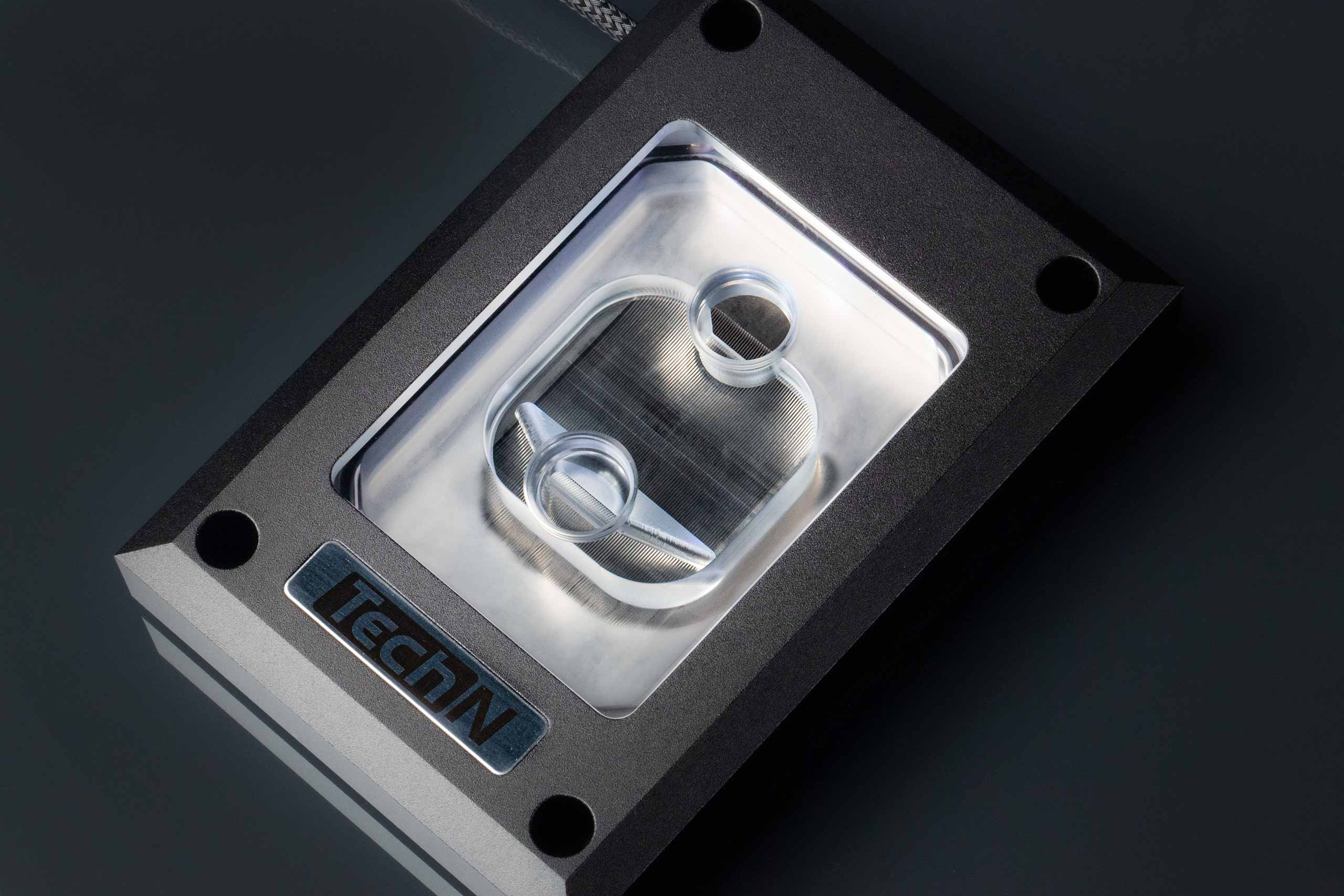
The Waterblock TechN for CPU AM4/AM5 is a watercooling system for CPU AM4/AM5. As a result it enhance performance of your PC while decreasing noise perturbation.
pale monolith
Yeah that's an issue for me as well, I have radiators that I bought for the 1000D, which likely will not end up being used.
Basically my entire cooling system is going to have to be redesigned.
 viral ore
most rackmount cases you buy are desiged with aircooling in mind, liquid cooling servers is only for the highest of power densities
 untold vessel
Does anybody have a news explanation on why PSU prices are so currently high compared to historical trends?
pale monolith
viral ore
most rackmount cases you buy are desiged with aircooling in mind, liquid cooling...
I'm mostly just trying to keep temps down as much as I can. If I have to air cool the systems, then so be it. But, I wanted to at least water-cool the CPU and GPU. Wanting to pick up a 4090.
vague oracle
You could technically just submerge in mineral oil
pale monolith
In a rackmount?
vague oracle
Your best bet will probably just be to air cool
vague oracle
Other than silence
pale monolith
paper summit
Also 4090!??
Yeah, I wanna just go overkill. I'm a graphics nut, and I process a lot of 4K content, so I want to make sure I have more than enough power and computational power to do so.
And not worry about being bogged down in 3 years..
viral ore
you may have to watercool honestly, im not sure what board youre using, but the memory slot orientation would probably be detrimental to air cooling
also mounting a gpu in a 2u case can be tough
vague oracle
Probably would need a water block to fit it in
viral ore
exactly
vague oracle
PCie riser on top of that too
viral ore
you could possibly find a third party cooler optimized for a rackmount chassis
im pretty sure they do exist, but it would be a lot to try to figure out
if you have 18Us, just get a 4U box lol
vague oracle
Honestly, I probably would just go SFF instead of rack mount
pale monolith
Yeah I'm thinking of changing it, I haven't purchased the enclosures yet, so I can modify the design, just was trying to save space.
viral ore
i mean hes got the rack
vague oracle
Oh he already has the rack?
pale monolith
Yes
vague oracle
Must’ve misread then
viral ore
if my rack were bigger than 6Us, my personal pc would be in it too lol
vague oracle
I’ve been too lazy to put my pc into my rack even though it’s big enough
pale monolith
The only thing in the rack is a UDM and a switch, so I have the room to spare for the moment
vague oracle
My rack is completely full LOL
pale monolith
But I want to throw a rackmount NAS, and a NVR Pro from Ubiquiti so I know those take up at least 4U each
is it 4? I might be wrong
I know the NAS is 4, the NVR might just be 2
viral ore
if you want to do yourself a favor in the long run, start with the 4U personal computer
work around that
anything ubiquity would sell to a consumer should be 2U max
idk what you would be doing with 4U network equipment
pale monolith
That's what I thought
viral ore
lol
pale monolith
Well the NAS is 12 bays, I believe that's 4U for that. It's from Synology. I just want one. That's far more than I'll ever need.
viral ore
4U computer cases are essentially just rotated desktop pcs, which makes bulding in them super easy
viral ore
12 bay nas might be 2 or 3
pale monolith
Bet
viral ore
yes, watercooling 4U should be real easy
pale monolith
Awesome.
viral ore
my 12 bay is 2, but if the drives are arranged vertically, it would be 3
pale monolith
Okay yeah it is vertical.
viral ore
look into patch panels too, a 1U should suffice
pale monolith
To be honest, I'm not clear on what patch panels are used for..
viral ore
puts all the network jacks in the same place
can be useful if you are wiring up your whole house
pale monolith
I'm just wiring a couple AP's, my 2 rack mount systems, and I'll end up building that 1000D for my brother in-law. All which will be hard-wired.
fossil cedar
mossy venture
imo ram is ugly, since they care about looks I'd do something else but that's pe...
oh well theres a black version for 5$ more
fossil cedar
serene onyx
https://www.seagate.com/products/gaming-drives/special-editions/lightsaber-colle...
its gonna be covered by the gpu tbh and the ram that you'r linked works, its the same ram just black
viral horizon
fossil cedar
Stock fans are enough, buying a 6950xt for 1080p is pretty pointless, you can sa...
i am american i just have the username as that just cause
and also, https://pcpartpicker.com/product/BM92FT/xfx-radeon-rx-6950-xt-16-gb-speedster-merc-319-video-card-rx-695xatbd9 my graphic card says its around 16 gb. is that how much ram is compatible with it?

XFX Speedster MERC 319 Radeon RX 6950 XT 16 GB Video Card (RX-695XATBD9)
mossy venture
no, it's how much vram the gpu has
it cannot be changed, different gpus have different amounts of vram
16gb is plenty
fossil cedar
viral horizon
and also, https://pcpartpicker.com/product/BM92FT/xfx-radeon-rx-6950-xt-16-gb-sp...
nope thats how much ram it has, and you can go with that one or the one i put, theyre both good and the same price
viral horizon
so even tho im buying 32 gb of ram the gpu can only handle 16?
languid nimbus
No they’re different entities. Gpu vram =/= ram
You can have 128gb ram if you wanted
viral horizon
ok then
languid nimbus
What ram are you looking at?
little osprey
Small story:
I began to build my first pc (still am) and decided to show my dad a few times. My dad got jealous and I decided I might surprise him by letting him build the PC with me next weekend once I get the PSU. I love the man, lol.
little osprey
I've dealt with a bunch of graphics cards before but I'm not sure where to plug this in...

 dusky hearth
that is a terrible image, it shows nothing lmao
 little osprey
dusky hearth
i thought you were going to be like, giving the pc to him LMAO
little osprey
dusky hearth
i thought you were going to be like, giving the pc to him LMAO
He knows I've been wanting to do this for several years. I showed it to him a few times and he mentioned how he used to build computers and whatnot; I kind of gave him his urges to build another one back I guess I could say? This lead to me letting him and I have a little fun together with a computer. Plus, he knows more than I do and can help me out, lol.
dusky hearth
little osprey
it is plugged in, do you have any like, problems? like the pc not booting or smth?
dusky hearth
little osprey
He knows I've been wanting to do this for several years. I showed it to him a fe...
hmm i see
little osprey
dusky hearth
it is plugged in, do you have any like, problems? like the pc not booting or smt...
It is? Then what's this?
 dusky hearth
extra cable
little osprey
What for
dusky hearth
different gpus have different power requirements
some have more connectors than others
little osprey
Is there a need for this cable?
dusky hearth
not for this gpu at least
dusky hearth
np
little osprey
I have my main boot SSD taken out of my old pc. Will anything bad happen if I simply put it into my new PC and boot like normal?
paper summit
If it's intel to intel or amd to amd yeah it will likely do fine
paper summit
Switching platforms may cause issues tho cause drivers and such yk
paper summit
little osprey
it's intel to and unfortunately
Oh
I mean you can try buy you'll likely have issues
And need to reinstall lol
little osprey
damn
paper summit
Yeah
little osprey
is there any usb m.2 SSD reader I can use to quickly shove the files and back up important things?
the old pc is no longer in working condition
paper summit
Yeah they're on amazon for not too much
little osprey
kk
dusky hearth
if your board has 2 m.2 slots, then you won't even need to use a usb to m.2
it might be cheaper to get a pcie to m.2 riser if you don't have two m.2 slots
by like a few bucks though, not too much
little osprey
dusky hearth
if your board has 2 m.2 slots, then you won't even need to use a usb to m.2
well yeah
but I only have one SSD so I'd need to format it anyway
wellll no
I can still create a bootable USB and move everything from that live usb
SSD to second usb and then format the ssd
 little osprey
is atlas a good idea to install on an old secondary laptop lol
it's a little slow so eh
I could make it complicated too
dusky hearth
use linux on the secondary laptop 
little osprey
GOD NO
little osprey
little osprey
I could make it complicated too
by going into safe mode and doing lots of driver managing
dusky hearth
just use linux
little osprey
little osprey
GOD NO
?
dusky hearth
little osprey
GOD NO
if you want to get into server stuff, you gotta use linux
a good like
honestly idk, 80% of servers? are running linux
little osprey
Can't I just use Windows Server?
dusky hearth
that is expensive
dusky hearth
dusky hearth
honestly idk, 80% of servers? are running linux
i've underestimated the amount
 little osprey
So I got this new PC, but it doesn't come with the microsoft store
Uh...isnt this supposed to be spinning?
 dusky hearth
There might be a 0 fan speed mode
Run something and see if it starts spinning
Like a game I mean
Also monitor temps, if it goes to 80 without spinning at all, something is probably wrong
80c
Also windows usually has Microsoft store preinstalled
Not sure if the uhhh
"No bloatware" version comes with it though
little osprey
Idk what version I have, I just got it
the heck now my taskbar isn't functioning properly
dusky hearth
You got all your drivers installed as well? (This won't affect fans, just the software)
paper summit
little osprey
Uh...isnt this supposed to be spinning?
Thats normal practically all gpus now come with a zero rpm mode while idle
Other than a select few
little osprey
dusky hearth
You got all your drivers installed as well? (This won't affect fans, just the so...
I reset the PC as told by the manufacturer
little osprey
paper summit
Thats normal practically all gpus now come with a zero rpm mode while idle
Yeah I noticed, it spins tho 👍
 dusty cedar
little osprey
Uh...isnt this supposed to be spinning?
dusty cedar
little osprey
Uh...isnt this supposed to be spinning?
not if it isn't being used by anything. running your desktop or youtube or anything takes up almost no power or resources for it to be hot enough to be used
i'd be more worried about it staying on when it isn't being used than it is being off
dim forge
hey guys
I need a cheap monitor for home
any recommendation? amazon if you can

24 Inch Computer Monitor, FHD 1920 x 1080p Office PC Monitor IPS Display 75Hz, HDMI, VGA, 75 x 75 mm VESA Mountable, Frameless, Eye Protection and Ergonomic Tilt Adjustment
dusky hearth
little osprey
I reset the PC as told by the manufacturer
Hmmm reinstall? Or just clicking the button
dusty cedar
dim forge
any recommendation? amazon if you can

1.14inch LCD Display Module, IPS Screen, 65K RGB Colors, 240x135 Resolution, SPI Interface,embedded ST7789 driver, using SPI bus Features 240x135 resolution, 65K RGB colors, clear and colorful displaying effect SPI interface, minimizes required IO pins, supports controller boards like Raspberry P...
12.99 
dim forge
dusty cedar
https://www.amazon.com/1-14inch-Resolution-Interface-Compatible-Raspberry/dp/B08...
lol
little osprey
dusky hearth
Hmmm reinstall? Or just clicking the button
Believe it or not, I call the manufacturer and he told me to open up the Xbox app and when you do, at the very bottom it'll tell you that there are some apps that are missing to run it or something. I click on it, and everything is literally there to install, the Microsoft store, and other Microsoft apps
Weird, but the Xbox app already has everything there
But yeah, I got it now
dusky hearth
little osprey
Believe it or not, I call the manufacturer and he told me to open up the Xbox ap...
no i meant windows
did you reinstall windows, or click the reset windows button
dusky hearth
ah
you would ideally want to fully reinstall usually
reset button does nothing but delete everything basically
little osprey
Maybe that's what I did now that I remember it
 rancid lodge
anyone got good suggestions for laptops (school/work), 15in+ around 500-700 USD?
cyan ravine
GF63 thin 10ue if you can find one
With an extra ram stick
It's usually a 10500h + 3060
(no you don't need this much but regular laptops suck in value comparatively)
rancid lodge
yea, I'll take a gander and see if I can find it somewhere, appreciate it
if anyone has any suggestions lower on the budget that'd be cool too
cause looks lke the GF63 is hovering around 800$ and its a bit overkill
cyan ravine
Yeah I went to take a look too and they've jumped up in price again
They used to be near 700
rancid lodge
yeah
plus prob looking for higher res over refresh rate if anything
rather would have 1440p over 144hz tbh
cyan ravine
You might have better luck looking for a used one
Not the greatest feeling but all the <700 ones look horrible tbh
1650 isn't even worthy as a standalone gpu these days
You can get that much out of an all in one
rancid lodge
yeah not doing much gaming so mobile 20 series would be fine prob
cyan ravine
Yeah man, 2060 wouldn't be too bad either
I'd try looking for used
I reckon you'll def find a good lappy under 700
Maybe even something without a discrete gpu but a nice display like 4K touch
rancid lodge
yeah I'll take a look for something used, wouldn't mind it so
rancid lodge
cyan ravine
Maybe even something without a discrete gpu but a nice display like 4K touch
yeah that'd be preferable
maybe not touch but
cyan ravine
The simple laptops imo are a hard sell these days
Gaming laptops are just overall better value for their lifetime
But I do get the need for something objectively better in a different way
If you're after an aesthetic or form factor that's something they mastered a while ago lol
If I had to say anything about business laptops, try and pick a recent Ryzen cpu one
The 5000, 6000, 7000 all have great battery life
And that matters in a laptop
rancid lodge
Yeah I'll prob look ryzen for the battery and look for something higher res maybe without the DGPU, not really a requirement so the screen res and battery life along with aesthetic matter more
cyan ravine
Sounds good
@rancid lodge have a look at this
https://www.reddit.com/r/hardwareswap/comments/11xpmwb/usatx_h_more_cards_macbook_asus_laptop_steck_deck/?

reddit
80 votes and 154 comments so far on Reddit
The asus laptop he's selling for 750 is a brilliant one
First result when I searched laptop in that reddit
Hardwareswap is a good place for this stuff
https://www.reddit.com/r/hardwareswap/comments/144k953/usaiah_asus_zenbook_dual_screen_rtx_2060_laptop/
@rancid lodge

reddit
1 vote and 2 comments so far on Reddit
rancid lodge
cyan ravine
Hardwareswap is a good place for this stuff
yea, definitely need to start browsing more as I look for a GPU upgrade for myself
cyan ravine
Oh I think that one sold nvm
rancid lodge
although 7900xtx seems like a good long term value with fine wine drivers so I may just go new on that cause I wouldn't mind
paper summit
cyan ravine
<@470318177545486336> have a look at this
https://www.reddit.com/r/hardwareswap/...
This guy is incredibly smart 3080ti is 50 more than the 3090 cause strix
cyan ravine
https://www.reddit.com/r/hardwareswap/comments/14434az/usaca_h_2022_asus_rog_zephyrus_g14_6900hs6700s_w/ good one if you can stretch

reddit
5 votes and 7 comments so far on Reddit
cyan ravine
rancid lodge
although 7900xtx seems like a good long term value with fine wine drivers so I m...
It is. The experience with it is great out of the box for most of everyone I've talked to
There's quite a few good buys on there rn
You could even make a post asking for what you want and your budget
Then filter
We're here if you want a second opinion so you don't get scammed
(I'll be busy later tho)
rancid lodge
cyan ravine
It is. The experience with it is great out of the box for most of everyone I've ...
yea, was worried originally awhile back cause of the overheating issue (forgot why that happened lmao) but definitely seems a better value than a 4080 💀
rancid lodge
I thought it was more board partners, thats goofy
but yeah I knew that was resolved though so
cyan ravine
Nah man, there were a lot of people on the megaphone about theirs but a lot weren't even related
rancid lodge
mhm
cyan ravine
Bad hotspots come from all brands, but that was a proper manufacturing fault with the vapour chamber
Biostar was legit to blame, the others are as much normal and every day as any board maker
And that goes for team green or red btw
rancid lodge
gotcha, yeah I've literally only heard of biostar like twice and not on good terms so
cyan ravine
Ye
rancid lodge
not surprising
cyan ravine
In any case the cheapest XTX cards are not the reference cards so you're totally fine
All 3 base options are great, the phantom gaming is probably the best one
Only one better than that one would be the water cooled cards or the merc 310
rancid lodge
yeah I wanted the ASUS TUF model but its fr 100 USD more than all the others
kinda removes the value since most are sub 1k rn
cyan ravine
TUF is decent, not the best
Ye
I'd argue the phantom gaming is better than the tuf
2 reasons, price and the bios on the card is better
Quality wise they're both good
rancid lodge
yeah and I dont really hate the look of the phantom gaming either, dont like the merc's look much though
cyan ravine
Ironically the mercs are the best air cards
rancid lodge
phantom looks good just bit of a weird color unless thats an RGB strip
cyan ravine
rancid lodge
phantom looks good just bit of a weird color unless thats an RGB strip
I believe that's rgb
rancid lodge
oh it is
that just makes it better then
but yeah XFX does go hard ngl
I had a 8gb 580 that honestly did super well a year or so ago, being a card from 2017
cyan ravine
Here ya go
 rancid lodge
yeah wouldn't look bad in my case
got a lian li O11DXL
and got it for cheap literally new as hell too, I think 140$ on amazon, only damage was to the box
cyan ravine

 rancid lodge
was in 2021 though, not sure what the case goes for now but big case and big card
cyan ravine
rancid lodge
and got it for cheap literally new as hell too, I think 140$ on amazon, only dam...
That's quite good for the XL
cyan ravine
rancid lodge
was in 2021 though, not sure what the case goes for now but big case and big car...
Unfortunately the box market hasn't changed much
rancid lodge
cyan ravine
That's quite good for the XL
yeah it was, was afraid of damage or smth but seems like some guy just bought it, box got dented, he returned it, and that was that
rancid lodge
true that
but yeah now I know that the card has RGB hell I might wait another month see if it hits any lower than 950$
its only been dropping so
rancid lodge
fr, apparently it's out performing the 4080 more and more now so
cyan ravine
Ye
It now sits handily in the middle of the 80 and 90
It's always had that raw performance but AMD has always had that maturity after release to date with rdna
The drivers are catching up
cyan ravine
I don't believe in fine wine tbh but yeah, it's there, it's definitely faster lol
untold vessel
The connection is slightly better but is still cutting out every 4 seconds instead of 1 second. Is there hope for me?
cyan ravine
untold vessel
The connection is slightly better but is still cutting out every 4 seconds inste...
Did you insert it the correct direction
There's an input (gpu) and output (display)
If after that you still have issues with two cables....it could still possibly be the cable but I'd doubt, it could be the EDID or bandwidth rate of the resolution selected
2.1 is finicky over fibre to run at max bandwidth
It does work though
potent portal
Could try 4:4:2 or 4:2:2 instead of 4:4:4
cyan ravine
Yeah
In fact that's exactly what you should do
It'll lower the bandwidth significantly
Luckily with amazon if it doesn't work, a return is easy lol
untold vessel
cyan ravine
If after that you still have issues with two cables....it could still possibly b...
I sincerely hope not! What is EDID and what is bandwidth rate?
untold vessel
cyan ravine
2.1 is finicky over fibre to run at max bandwidth
What is max bandwidth, and what is it for this particular cable?
untold vessel
potent portal
Could try 4:4:2 or 4:2:2 instead of 4:4:4
This sounds super cool; What are these settings and how do I change to them?
cyan ravine
untold vessel
I sincerely hope not! What is EDID and what is bandwidth rate?
EDID is what devices talk to each other to say how the picture is displayed
Bandwidth is the max speed of data over the cable
For hdmi 2.1 iirc this is 38.4gbps
untold vessel
cyan ravine
Bandwidth is the max speed of data over the cable
In this case, 8K60hz / 4k120hz?
cyan ravine
Ye
untold vessel
cyan ravine
Ye
I See. so I'm having troubles because I am maxing out the bandwidth?
cyan ravine
It's supposed to
Near 0 loss over long transmission
You wouldn't happen to have any other extensions on the same link?
untold vessel
What do you mean?
cyan ravine
More cable before the fiber starts
untold vessel
More cable?
cyan ravine
Ye like other 2.1 cables
untold vessel
Oh, do you mean to ask if I have any other 2.1 cables connected to this TV and to my GPU>?
cyan ravine
Ok, is the fiber cable a direct link from the gpu to the tv
No other extensions on this one link
untold vessel
Yes, I've directly connected the 100ft 8K60hz Fiber Optic HDMI cord from my GPU's only HDMI slot to the main, fastest, HDMI input #1 of my TCL r646 65"
cyan ravine
And is the pc allowing you to select 4k 120hz
/8k 60hz
Or is there wizardry happening
untold vessel
Yes, But I am currently running at 4k60hz to speak with you, as 4k120hz either cuts out every 3 seconds (genuinely every 3 seconds), or completely loses connection and says "no signal found.", not even a "check your signal" notification, just "no signal at all, connect something" message
potent portal
untold vessel
This sounds super cool; What are these settings and how do I change to them?
It reduces the amount of colors on the screen, but that's hardly noticeable to humans usually. This makes it easier to do higher resolutions and refresh rates.
 cyan ravine
Is the gpu hdmi 2.1 ready
untold vessel
cyan ravine
Is the gpu hdmi 2.1 ready
Unsure; How do I check? I am currently using my EVGA 3070 FTW3 Ultra
cyan ravine
potent portal
It reduces the amount of colors on the screen, but that's hardly noticeable to h...
Do this
untold vessel
cyan ravine
Do this
Attempting now
untold vessel
Which do I select?
potent portal
What options does it give you
untold vessel
444 or 420
potent portal
4:2:0 then and see if it works
untold vessel
Attempting now
Woah, I can't tell the color difference. I think the only difference I can possible see is placebo
potent portal
The only time it might be noticeable is in really dark scenes
untold vessel
Now switching to 4k120hz in windows advanced display settings; Standby
potent portal
You can change that from the same settings page
cyan ravine
Worse??
potent portal
I'd say it has to be the tv then personally
untold vessel
Back; Defaulted to 60hz for stability
potent portal
Windows may have overridden the nvcp setting yeah
cyan ravine
No it'll say that now but it changes when you change reso
It's done that to me before I swear
untold vessel
attempting 120hz again; will quickly try to ensure 420 nvidia settings
Returned, it did* default back to rgb. Successfully changed to only other option, 444, before complete signal loss was achieved
cyan ravine
Ah. Sadge
potent portal
One more thing to try, the list of resolutions will give you multiple options at the top of that settings page. Try the 4k option under the UHD, HD, SD section and the one under PC.
untold vessel
Also, what does (e) arc mean?
potent portal
enhanced audio return channel
untold vessel
both hdmi 1 and hdmi 2 are the same, but hdmi 1 has something called earc
cyan ravine
untold vessel
Also, what does (e) arc mean?
For external passthrough of speakers
untold vessel
oh nice, what's it do?
cyan ravine
Sends audio to speakers
untold vessel
Or rather what is external passthrough
Ah
So If i use hdmi 2, my tv will have no sound?
potent portal
It lets you plug speakers into the TV and the earc device can use them
untold vessel
oh, I see now
potent portal
The internal speakers will work still
cyan ravine
So is it working 4k120
untold vessel
why not make all hdmi ports e ARC compatible? is it a cost thing"?
Testing testing
No current cuts!
potent portal
Yeah basically cost cutting
untold vessel
Oh my God, $56 cable for the win!
cyan ravine
Ok and is it 4 2 0 or 4 4 4
untold vessel
Let's see how long this bliss lasts
Currently I am at 4k120hz in Windows Advanced display settings and am currently applying the YCbCr444 Output color format in "3." of Nvidia Control panel's Display>Change resolution settings tab
cyan ravine
Ok so 4 4 4 means it's worked properly
Ur good
Trial hdr to see if you still have issues, if you do go down to YCbCr422
If still problems then hdr might be too hard for the cable
But I've had the same finicky issues with this stuff so I believe it's just the drivers at fault
Nvidia is very touch and go about changing monitor resos and hz
untold vessel
"since they reduce the color data in the images (422) or (420), if supported by your display, can help you to display at higher refresh rates compared to RGB or (444)"
--What does this message mean?
untold vessel
I am currently running at 444, but 444 is actually the intensive setting?
cyan ravine
Ye
untold vessel
Whoop, first signal cut experienced 2 seconds ago
cyan ravine
The most colour intensive
potent portal
TVs are picky about input settings, way more than monitors
cyan ravine
Ahp, try YCbCr422 then
untold vessel
Update: The only settings availble are RGB and 444
untold vessel
cyan ravine
Ok so 4 4 4 means it's worked properly
What's worked properly?
cyan ravine
untold vessel
What's worked properly?
The cable
untold vessel
cyan ravine
Trial hdr to see if you still have issues, if you do go down to YCbCr422
Testing 4k120hz in 444 + hdr now
untold vessel
cyan ravine
The cable
Woohoo!
untold vessel
Also Felix & Fal'Cie, on a sidenote, the cable is very nice to the touch. It came in nice packaging & the cold-to-the-touch metal on both sides feels premium. Thank you both for the recommendation
untold vessel
Honestly I think it was one of you and/or the frog (sor'ry?) that also recommended the r646
untold vessel
Trial #1, 4k120hz in 444 + hdr, currently stable
Hold on, with all settings set to max, what would be the most intensive combination of all of these?
potent portal
cyan ravine
He likes the hisenses
It's TCL lol
Entirely possible that I was part of that recc
Hmm, maybe the settings on the TV itself would need adjusting
But if it's working now don't worry
untold vessel
cyan ravine
444+hdr is the most intense of all
is 444 more intense than RGB?
Okay, first visual cut seen; Screen of black plus pink and green artifacting in a "wave"-like shape at the bottom middle of the TV
untold vessel
potent portal
One more thing to try, the list of resolutions will give you multiple options at...
More on this, should I choose the 4k x 2k Native, or should i only do 3840 x 2160 "PC" setting?
potent portal
Huh. Supposedly according to rtings the TV shouldn't be able to do 4:4:4. Weird.
untold vessel
And wait a minute, if I'm on 4k120hz (windows advanced display settings), using HDR (windows display settings), currently at 3840 x 2160 PC resolution settings in NVCP, and am using YCbCr444, which I think is the most intensive according to Felix,
Would this combination be the most intensive for my wire?
untold vessel
untold vessel
And wait a minute, if I'm on 4k120hz (windows advanced display settings), using ...
Moreover, if this combination is the most I can stress out the cable over, why am I more stable on these settings than what I was doing before?
potent portal
Yes it is the highest settings you can do, and it's most about finding the correct combination of settings when you're at these extreme resolutions.
untold vessel
I see
Which means I could potentially have a more frequently cutting connection if I change to a different setting, yes?
potent portal
Potentially yes. Video settings are finicky things.
untold vessel
I wonder why that is, though. Is there a eletrical science explanation to that?
I'd love to learn a bit more
potent portal
Not really a scientific reason. I think it's more the combination of firmware on the tv and the drivers on the pc.
untold vessel
Also Fal'Cie, just finished that talos principle after you recommended it to me so long ago, and... wow. I'm glad I purchased it
untold vessel
potent portal
Not really a scientific reason. I think it's more the combination of firmware on...
Ahhhhh got it now
potent portal
Ooh nice, that was one of my favorites. The second one is being made now.
untold vessel
There's a #2!?
Woohoo, this is amazing
First I hear about Cyberpunk Orion & now Talos 2
potent portal

Coming to PC, PlayStation 5, and Xbox Series X|S in 2023, The Talos Principle 2 greatly expands on the beloved original with more mind-bending puzzles to solve, new puzzle mechanics, a richer storyline, more secrets to uncover, and the biggest, weirdest world Croteam has ever built.
Visit http://thetalosprinciple.com for more information.
━━━━...
untold vessel
AND in 2023?!
potent portal
If anyone wants to question the nature of existence and what it means to be human, that's the game to play. Or just play for the Portal-esque puzzles.
cyan ravine
untold vessel
is 444 more intense than RGB?
Same thing
untold vessel
cyan ravine
Same thing
Oh neat! Why are they different, options, though?
potent portal
Different color encoding, same color space
Technically RGB can get brighter and darker colors
But YCbCr is an industry standard so it's more supported
cyan ravine
Much like everything in the technology world, there's 5 ways to describe one thing 💀
little osprey
Is it normal for my Ryzen 5 5600x to be at 80⁰C during a game?
I think it's too high
What should I do to reduce the temperature?
little osprey
It's a cool master
obsidian wigeon
Which cooler master?
little osprey
Specifically the Cooler Master A71C CPU Air Cooler Anodized Black Aluminum + Copper Core 120mm ARGB Master Fan