#building-and-recc-chat
1 messages · Page 71 of 1
 potent portal
Sticker shots on g.skill kits in ebay listings, you'd never go wrong
 vague oracle
Does ram also see degradation like in CPUs?
 cyan ravine
Depends how they used it
Depending on the b die anything daily over, let's be conservative here, 1.7v daily? Possible
So realistically not a chance
potent portal
You'd only see degradation on b-die if they ran it at 1.8v under LN2 for hours a day
vague oracle
Ahh ok
potent portal
B-die is perfectly happy with a little extra cooling at even 1.7v
vague oracle
Out of curiosity how does Hynix DJR compare? I know timings will be a bit looser at higher frequencies
Is it even worth considering if OCing?
potent portal
Hynix does high frequency, low cas, but high other mains
4000 14-19-19 for example
vague oracle
There is that neo forza 4400cl19 kit I was looking at
My indecisive ass can’t settle on buying it or not
potent portal

Neo Forza FAYE 32 GB (2 x 16 GB) DDR4-4400 CL19 Memory (NMUD416E82-4400GG20)
vague oracle
Yeah
potent portal
Looks like trash to me, 19-26-26
vague oracle
If I took out me wanting B-die what would you recommend?
vague oracle
cyan ravine
Ballistonks
Discontinued 
potent portal
cyan ravine
Ballistonks
If you can find it yeah, discontinued AF
cyan ravine
Used is never discontinued 
vague oracle
I mean I have a 4x8 kit but I kinda want a 2x16
But then I’d still have to buy my dad new ram
vague oracle
Still kicking myself in the ass for giving him my pc
potent portal
I think this is the cheapest guaranteed b-die atm https://pcpartpicker.com/product/WtjWGX/gskill-tridentz-rgb-32gb-2-x-16gb-ddr4-3200-memory-f4-3200c14d-32gtzr

G.Skill Trident Z RGB 32 GB (2 x 16 GB) DDR4-3200 CL14 Memory (F4-3200C14D-32GTZR)
vague oracle
That kit OCed really damn well, 3866 mHz iirc at CL14, but I didn’t have the patience to start tightening timings so the rest were pretty loose
cyan ravine
potent portal
I think this is the cheapest guaranteed b-die atm https://pcpartpicker.com/produ...
That's not terrible
But you can def do better used
vague oracle
What about some cheap 3600cl16 kit to give to my dad
potent portal
That's easy
vague oracle
I want my Ballistix back
vague oracle
Definitely not giving my dad bdie 
potent portal
It would have to be straight 16s for b-die, maybe 16-17-17
cyan ravine
Yea, my kit was 3600 16 16 16 36
vague oracle
How much would a 64Gb kit of 3600cl16 run me?
vague oracle
Forget about the bdie
I ain’t buying this for myself now
I’m taking back my Ballistix
cyan ravine
64gb of 3600 c16 is also pain in general
potent portal
64GB? Yeah that'll be hard on any IMC
cyan ravine
I think you'd want hynix for that
potent portal

Mushkin Redline Lumina 64 GB (2 x 32 GB) DDR4-3600 CL16 Memory (MLA4C360GKKP32GX2)
16-19-19 so prob hynix too
vague oracle
It’s going into a 5900x on a Crosshair VIII Hero motherboard if that makes a difference
What if we went for a non RGB kit?
potent portal
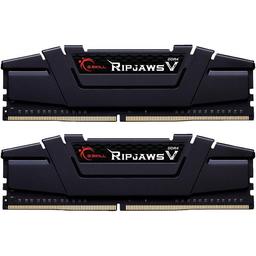
G.Skill Ripjaws V 64 GB (2 x 32 GB) DDR4-3600 CL16 Memory (F4-3600C16D-64GVK)
16-22-22 is kinda 
But still better than c18
cyan ravine
That's hynix tho so it'll run without much problems most likely
potent portal
Funny how some rgb kits are cheaper than non-rgb these days
cyan ravine
64gb moment
vague oracle
Why does ram have to be so finicky
 vague oracle
Yep this is for a workstation
What about this? https://pcpartpicker.com/product/rMK2FT/patriot-viper-4-blackout-64-gb-2-x-32-gb-ddr4-3200-cl16-memory-pvb464g320c6k

Patriot Viper 4 Blackout 64 GB (2 x 32 GB) DDR4-3200 CL16 Memory (PVB464G320C6K)
Rhino 7 likes it’s latency a bit more than the frequencies
potent portal
Fine for a basic "it'll work without complaints" kit
vague oracle
Good enough for a workstation then
cyan ravine
Again hynix or probably micron or some derivative
potent portal
vague oracle
Rhino 7 likes it’s latency a bit more than the frequencies
Remember that the effective latency of a kit is also dependent on the frequency
vague oracle
I know this kit is for my dad, not for me. It won’t be OCed ever
cyan ravine
When it comes to workstation you want reliability first anyway
vague oracle
Yeah
vague oracle
potent portal
Remember that the effective latency of a kit is also dependent on the frequency
Forgot about that
I wonder if he would notice a slightly slower kit
potent portal
Highly unlikely that he would
cyan ravine
In workstation that's even harder to notice
potent portal
When talking workstation stuff the difference is measured in seconds on an hour long job
vague oracle
Patriot vipers it is then
cyan ravine
Forget fps metrics that's like, how much slower an hour am I?

Ah I'm echoing fal rn cos I ain't reading chat
vague oracle
potent portal
When talking workstation stuff the difference is measured in seconds on an hour ...
Oh I know all that stuff, I’ve also been doing this type of stuff for a few years now. Just rusty on the hardware aspect of things
cyan ravine

vague oracle
I had a PC, it worked, stopped tinkering with it
potent portal
cyan ravine
Ah I'm echoing fal rn cos I ain't reading chat
You were almost done typing when I sent it, I was just a hair faster
vague oracle
And now I want a PC for music production
potent portal
Here's an option too https://pcpartpicker.com/product/3GkgXL/oloy-64-gb-2-x-32-gb-ddr4-3200-memory-md4u323216djda

OLOy MD4U323216DJDA 64 GB (2 x 32 GB) DDR4-3200 CL16 Memory (MD4U323216DJDA)
vague oracle
https://pcpartpicker.com/list/pBVWd9 this is the current build rn, case/PSU are place holders since the ones I’m using are not on pcpp
Part List - Intel Core i7-10700K, GeForce RTX 2080 SUPER, Corsair 4000D Airflow ATX Mid Tower
I own basically everything except the mobo
potent portal
Just make sure when you swap the memory you just say "I'm upgrading it to 64GB" and don't mention the speed drop
cyan ravine
Trade your dad back?
Sorry, tech advice, yes tech advice
I am techie
👏 👏 👏
64gb will be fine with that board and cpu
vague oracle
potent portal
Just make sure when you swap the memory you just say "I'm upgrading it to 64GB" ...
Am I a bad person for disguising this as a Christmas gift?
vague oracle
cyan ravine
64gb will be fine with that board and cpu
Oh that’s my build, not my dad’s
cyan ravine
Oh right it's for the 5900X
Well for games the b dead will be better
Sorry ballistonks
Heck even ballistonks
vague oracle
https://pcpartpicker.com/list/R44sfv this is what it’s going into
Part List - AMD Ryzen 9 5900X, GeForce RTX 3080 12GB LHR, Lian Li Lancool II Mesh ATX Mid Tower
I miss this PC
 potent portal
So he gets the 3080 and you're stuck with a lousy 2080 super?!
vague oracle
I might as well take my 3080 back while I’m at it
cyan ravine
What does your dad do for work?
vague oracle
Jewelry design
cyan ravine
Cad??
vague oracle
I mean I bought the whole PC with my own money
I just gave it to him since I went away from college
He was using the 2080 super before
cyan ravine
The thing with cad tho is he'll notice it very quickly with a complex assembly or geometry very fast
vague oracle
Oh I know, I also do the same job as him but not as often
 vague oracle
That’s how I’ve been making money on the side
vague oracle
How much could I get for a 4x8 kit?
cyan ravine
Probably 150?
vague oracle
Ngl I don’t need 64Gb
cyan ravine
I mean if you feel like you don't then don't sell
To me 64gb would be handy
The gpu would make a big difference there tho, not really as much for music but still big
vague oracle
I won’t be doing much cad on this pc anymore, don’t have time to be taking commissions because of college
potent portal
Dual ranks of b-die 
vague oracle
I might upgrade eventually once I start using Siemens NX and Catia again later in college but for now I’ll be fine with 32Gb
cyan ravine
If he's supporting you with that gpu tho I'd say at the least let him buy it from you 
cyan ravine
Call it even by selling the 3080 12gb, sell 2080 super and get your own 3080 12gb used
cyan ravine
potent portal
Nah 7990XTX
Ngl I want
vague oracle
It’s a Lenovo 2080 super, I probably won’t get much for it
cyan ravine
It will likely match 4090
potent portal
It better at over 400W
cyan ravine
vague oracle
It’s a Lenovo 2080 super, I probably won’t get much for it
It's still a 2080 super
Def 280$+
Sell him your 3080 12gb for $400
Then you'll have enough

Hell a 3080 12gb used is like, 600?
650?
vague oracle
cyan ravine
Sell him your 3080 12gb for $400
If I wanted to I could get $1400 for that 3080 from microcenter
potent portal
Considering I see 3080 ti going for $485 no
That was non-working mb
 drowsy plank
potent portal
~~Considering I see 3080 ti going for $485 no~~
That was non-working mb
drowsy plank
potent portal
~~Considering I see 3080 ti going for $485 no~~
That was non-working mb
Where
vague oracle
Microcenter GPU warranty>
 cyan ravine
vague oracle
Microcenter GPU warranty>
cyan ravine
vague oracle
Microcenter GPU warranty>
Is it broken?
drowsy plank
I got a 3080 for 460 shipped no tax
 vague oracle
Nah I won’t break it
drowsy plank
Who needs warranty
vague oracle
Lol the guy told me I can claim warranty on it even if the gpu is just overheating
vague oracle
cyan ravine
They'll send you a new one tho
Nope, they’ll give you a gift card of what you paid
vague oracle
I had a 6800xt I had the warranty on, an LED burned out and I claimed warranty
potent portal
3080 prices seem to have bottomed out in September on ebay
cyan ravine
Warranty is a replacement thing
vague oracle
Walked out that day with this 3080 12gb
Bought it with the gift card I got from that 6800xt’s burnt out LED
potent portal
https://www.ebay.com/itm/155173194096
Someone made out like a bandit

eBay
MSI GeForce RTX 3080 Ti VENTUS 3X OC 12GB GDDR6X Graphics Card.
vague oracle
potent portal
https://www.ebay.com/itm/155173194096
Someone made out like a bandit
Thaaaaat doesn’t look like a ventus
potent portal
vague oracle
Thaaaaat doesn’t look like a ventus
Stock photos be like
drowsy plank
potent portal
Stock photos be like
300 reviews be like
vague oracle
I wonder who the ballsy person was who bought that
I would’ve thought it was a scam
drowsy plank
3080 is mid low end now
vague oracle
Yeahhhhh no.
potent portal
No it's still high end, it's just the 40 series is targeting the 4k market
drowsy plank
drowsy plank
3080 is mid low end now
Now = 3 years later
potent portal
When comparing at 1440p it's a much smaller difference than at 4k between 30 and 40
cyan ravine
Well yeah
Cpu bottleneck is a thing
As I said in general earlier, 11900K gets bottlenecked by a 4080
potent portal
7800X3D wen
cyan ravine
potent portal
(february I know)
drowsy plank
11900k is ass
drowsy plank
Its a glorified i7 10700
drowsy plank
Multicore
vague oracle
Lol first time I heard someone compare an 11900k to a 10700
potent portal
drowsy plank
300 reviews be like
The profile looks fine, member since 2013, sold GPUs previously, sales spread out over time, recent sales...
cyan ravine
11900K is basically a 10900K but a waste of silicon and RnD
potent portal
So yeah someone just got a 3080 ti for CHEAP
vague oracle
cyan ravine
11900K is basically a 10900K but a waste of silicon and RnD
At least it has AVX-512
drowsy plank
Not as good as my 10 dollar rx 570 8gb
vague oracle
AVX-512 is the main reason why I’m buying it eventually over a 10900k/10850k
cyan ravine
And that's a reasonable want
drowsy plank
Not worth
cyan ravine
11th gen also has the imc advantage
vague oracle
All of my DAWs love AVX-512
drowsy plank
Sell ur board
cyan ravine
Lol
vague oracle
LOL
drowsy plank
Get b550
potent portal
AV1 is taking over soon since Intel killed AVX512
vague oracle
Aaaand this guy is a troll
drowsy plank
And buy 5800x3d for 300
cyan ravine
Lololol
vague oracle
For audio, AMD is terrible
cyan ravine
Why buy a gaming cpu for a workstation
vague oracle
Don’t you just love USB dropout?
drowsy plank
Or 5900x for 270
potent portal
vague oracle
For audio, AMD is terrible
As an AMD shill I can't deny this, the infinity fabric latency can't be ignored there
vague oracle
AMD is useless for what I need it to do
cyan ravine
@drowsy plank Alec gave away his 5900X
vague oracle
LMAO
potent portal
vague oracle
Don’t you just love USB dropout?
That's fixed in 99% of cases with updates
cyan ravine
Lololol
drowsy plank
Who needs audio
cyan ravine
potent portal
That's fixed in 99% of cases with updates
It's still not perfect, speaking from experience
vague oracle
drowsy plank
Who needs audio
…I do
drowsy plank
When you have sound
vague oracle
Nah sorry but I can bang out a quick Chopin
cyan ravine
Who needs audio for the music work
drowsy plank
cyan ravine
Who needs audio for the music work
Exactly. Just use sound
cyan ravine
drowsy plank
Exactly. Just use sound
I make my music using the sound of usb disconnects and reconnects
drowsy plank
And audiophile sound like zoophile
vague oracle
cyan ravine
I make my music using the sound of usb disconnects and reconnects
Mine is just the screams of AMD shills
drowsy plank
And I don't f with that
cyan ravine
There's a new word
potent portal
cyan ravine
I make my music using the sound of usb disconnects and reconnects
You know I bet someone has done that
vague oracle
I wonder how this guy thinks music is made
cyan ravine
Unga bunga garageband
vague oracle
potent portal
You know I bet someone has done that
If there are bands where the lead vocals are cats and dogs I’m sure that exists
drowsy plank
vague oracle
I wonder how this guy thinks music is made
Electricity
 vague oracle
Damnit Fal, beat me to that gif
drowsy plank
Shadows overrated af
potent portal
I know what I'm doing next time I'm in VC https://www.myinstants.com/en/instant/windows-10-usb-disconnect-8906/
 cyan ravine

 obsidian wigeon
thank god i use win 11
 frigid night
potent portal
*I know what I'm doing next time I'm in VC* https://www.myinstants.com/en/instan...
frigid night
potent portal
*I know what I'm doing next time I'm in VC* https://www.myinstants.com/en/instan...
Forget that button.. all the other buttons on that page XD
potent portal
Oh yes, that site is a great soundboard resource
frigid night
I have bookmarked it.
I will be having fun when I get off work 😄
Especially since I have a stream deck I can map those sounds to.
 fossil cedar
potent portal
*I know what I'm doing next time I'm in VC* https://www.myinstants.com/en/instan...
fossil cedar
potent portal
*I know what I'm doing next time I'm in VC* https://www.myinstants.com/en/instan...

 runic flare
Normal for CPU to be 70C at 30%?
potent portal
Depends on a lot of factors but it's nothing to worry about
runic flare
Is it okay for there to be more air exhaust than intake?
potent portal
It's preferred that there be more intake because positive pressure helps keep things less dusty
Negative pressure is usually fine just not ideal
 still roostBOT
 hardman#3069 has been warned
Reason: Bad word usage
runic flare
Wow
The amount of random things that happen
Like sometimes I just be chilling on yt and it black screens
potent portal
That sounds like some deeper issue
runic flare
I'm sure you've seen me around already
Ive been trying to figure it out for over a year
potent portal
It's entirely possible that I have but I'm terrible with names and I help way too many people here to remember lol
runic flare
I remember you and I appreciate the help from before ahah
Temps look fine now but imma keep investigating
One reboot it overheats, the next it's fine 🤔
 analog pulsar
@cyan ravine Olay a little more into back story I don't remember if I told you but my pc started to act funny after u went into discord and turned on hardware acceleration
I turned it on then then I was getting pop ups "are you have trouble with your audio why don't you trouble shoot it"
We ran like sfc so there should be no corrupt files
But I also don't think a gpu can cause windows to act dumb
i hope razer not breaking my pcx

this is new

theres nothing broken
 cyan ravine
analog pulsar
<@101107951401455616> Olay a little more into back story I don't remember if I t...
cyan ravine
analog pulsar
<@101107951401455616> Olay a little more into back story I don't remember if I t...
Gonna not pay any attention to errors until after you rma parts
Repeated training is sus



 limber oyster
Quick question. Would you run a 6600 or a 2060S? If both are the same price
Was deciding between a b550 upgrade or a GPU upgrade for my younger brother since he's running a 8th gen Intel with an EVGA 12GB 2060S. I have a spare 7 3700x since i upgraded to a 9 5900x.
 mossy venture
limber oyster
Quick question. Would you run a 6600 or a 2060S? If both are the same price
mossy venture
limber oyster
Quick question. Would you run a 6600 or a 2060S? If both are the same price
2060s personally
limber oyster
Gotchya
Probably gonna get him an ASRock b550 then
ASRock B550 PG Velocita specifically
Motherboard ordered
fossil cedar
limber oyster
Quick question. Would you run a 6600 or a 2060S? If both are the same price
Both new/used for the same price?
Motherboard upgrades are almost never worth it
Without changing socket obviously
fossil cedar
I thought you meant for yourself that makes more sense
 echo wyvern
I fixed the issues with some RGB going on after reboots. I shut sleep for the PC off.
Being NVME driven, and fact I run several servers off it. Sleep only caused issues. No SATA drives, so power running drives isn't a problem .
I a few years ago got this game making visual C college course, with a lot of informative videos. Phone I installed it to, took the tidy bowl plunge, so went to install it on new phone, and was refused because it never was un-installed from other device, and it had a section that had some very informative demo, I would love to try on my new system
Udemy!!! That's was it!
analog pulsar
@potent portal yea windows doesn't like slow ram
echo wyvern
analog pulsar
<@396513761550270464> yea windows doesn't like slow ram
I wonder if that's why Sabrent Rocket BSODs when trying to install a fresh copy of Windows onto it. The fast reading and very slow writing.
echo wyvern
When you said Windows doesn't like slow ram, it reminded me of the issues I used to have using Sabrent rocket NVME for a boot drive.
Glitchy.... Games like Minecraft or Terraria?
 stoic island
echo wyvern
I wonder if that's why Sabrent Rocket BSODs when trying to install a fresh copy ...
stoic island
echo wyvern
I wonder if that's why Sabrent Rocket BSODs when trying to install a fresh copy ...
what
analog pulsar
Yea me confused
echo wyvern
analog pulsar
Yea me confused
Sabrent Rocket, 2TB is a very fast SSD type hard drive. I use at least one as the OS drive in every build. For some reason, every time I would do a fresh Windows 10 or 11 install, using a Aorus Master Z390 motherboard, the install would always blue screen of death using the rocket NVME. Switching to Kingston Fury NVME, stopped the BSOD issues I was having.
It always happened right after the PC would normally reboot. Never understood why that happened with the Rocket NVME.
My guess, Kingston Fury NVME are almost the same read/write speeds.
potent portal
That has nothing to do with the memory, or even being slow. That's just plain not working.
cyan ravine
Sounds like either a faulty nvme or something else at play there
stoic island
It might've been registry issues with parts windows didn't actually wipe and reset, it could've been a very unfortunate dead nand cell, it could've even been a certain windows update, or broken drivers
echo wyvern
It happens with all the Rocket NVME I have. When you were talking about slow ram, made me wonder if slow writing speeds during install might have played a part.
stoic island
Which rocket do you have
Sabrent rocket, rocket q, rocket q4, rocket 4, rocket 4 plus?
And none of them are slow enough to cause problems for windows
cyan ravine
Sabrent uses which brand nand?
echo wyvern
I'm at dentist office with my kids. I'll tell you exactly what the model is when I get home.
stoic island
even if you're writing to native qlc
stoic island
cyan ravine
Sabrent uses which brand nand?
depends on the drive
potent portal
cyan ravine
Sabrent uses which brand nand?
Varies by model
echo wyvern
It only happened with the Z390 boards.
cyan ravine
You mentioned you had a lot of bsods with the z390's before
I'm wondering if something else was at play
stoic island
Rocket uses Kioxia 64l, Rocket 4 uses kioxia 96l, Rocket 4 plus early was 96l micron later was micron 176l, Rocket q and q4 is 96l micron
stoic island
cyan ravine
I'm wondering if something else was at play
Could've been something like a screwed up bios or chipset drivers
cyan ravine
stoic island
Rocket uses Kioxia 64l, Rocket 4 uses kioxia 96l, Rocket 4 plus early was 96l mi...
Hm, wonder where I had that idea then that it was hynix lol
stoic island
hynix ddr5 too good
echo wyvern
No, lol, I had many BSOD with the Z390 and rocket during installs. It's the Z690 I don't have issues with.
cyan ravine
Def tech bae
cyan ravine
echo wyvern
No, lol, I had many BSOD with the Z390 and rocket during installs. It's the Z690...
But you mention several rocket drives
So I'm now curious
I wanna see the several rocket drives

echo wyvern
Brb, I'll grab the link off my invoice
SABRENT 1TB Rocket NVMe 4.0 Gen4 PCIe M.2 Internal SSD Extreme Performance Solid State Drive (SB-ROCKET-NVMe4-1TB) https://a.co/d/iVazZSr

The Sabrent 1TB Rocket Nvme PCIe 4.0 M.2 2280 Internal SSD Extreme Performance Solid State Drive (SB-ROCKET-NVMe4-1TB) delivers all the advantages of flash disk technology with PCIe Gen4.0 x4 interface. Based on TLC NAND Flash memory, its performance speeds can reach up to 5000 MB/s (read) and 44...
analog pulsar
potent portal
That has nothing to do with the memory, or even being slow. That's just plain no...
Yea that's what I thought
cyan ravine
analog pulsar
Yea that's what I thought
Ironic that Fal's answer also sort of applied to Kenzie rn
Haha
stoic island
Rocket 4 does 5000/4400 rated seq
even writing to native tlc it does at least 500mb/s
analog pulsar
What you talking about
cyan ravine
echo wyvern
With my older Z390 systems, I could use it as an OS drive, only if I copied an image over. A strait clean windows install, 100% of time BSOD. AORUS Master.
I never gave it another thought after I switched to Fury and P41.
And as I said before, always happened right after the system was supposed to reboot during install process.
potent portal
Sounds like something to do with the boot sectors then, maybe an incompatibility with the controller
stoic island
wait a second
z390
rocket 4 is a gen 4 drive
mobo might've just gotten confused
echo wyvern
It's an old issue never addressed. Only way around it if you look at tech forums, was copying an image over, or buying a different brand. I don't care much as I already switched to Z690 and use Kingston and Hynix.
cyan ravine
Oh true, z390 is gen 3 isn't it
stoic island
yea only gen 3
cyan ravine
You wouldn't have seen the full speed
stoic island
wonder if even though in normal use its backwards compatible, something during windows install gives it issues?
echo wyvern
Write maxed out at 2500
echo wyvern
That I remember clearly
stoic island
yea because the board only does gen 3 lol
stoic island
2500-3000 is normal for gen 3
like even if you stuck a p41 into the z390 board it wouldn't go over 3000
 frigid carbon
Why does my refurb h150 capellix have this weird white coating on the alt pump cap. The new ones come completely clear

Never mind. Apparently it was clear on release and this is a revised version
echo wyvern
Looks like a blown up picture of a desktop shield. The sticker your supposed to put on your case, to show off what the CPU and Motherboard are.
Used to be only the CPU came with one, but now a days, just about every component comes with one that one's tower looks more like a race car, than a PC. Every item that went into my build came with a shield sticker, except the most expensive part, the DDR 5 Dominator ram.
 analog hearth
that's not a sticker 💀

 viral ore
analog hearth
that's not a sticker 💀
viral ore
analog hearth
that's not a sticker 💀
stick her? i barely know her.
echo wyvern
I never much cared for Corsair brand, especially with their shoddy water pumps, but their Dominator ram, is quite impressive.
echo wyvern
viral ore
stick her? i barely know her.
When you start using my jokes, there is no hope in turning back lol.
potent portal
Bold of you to call them "your jokes" when that one is from like the 1920s
viral ore
echo wyvern
When you start using my jokes, there is no hope in turning back lol.
YOUR joke?
bold
analog hearth
bro thinks he owns the world
viral ore
sooner or later every joke is gonna be his joke
analog hearth
bro is typing up a story
echo wyvern
Actually my humor is a lot worse. Once when I took my kids out for dinner for Great report cards, we sat in back of an almost empty restaurant. As luck had it, people started arriving and a few brought their kids who were not only noisy, they decided they just had to sit at a table next to us. One family, kept letting their child run loose, and kept bothering my daughter, so she couldn't eat, without the kid running up to her, and sticking a toy in her face. Asked the parents nicely and they just ignored me. I then crack a joke to my son, saying I'm not allowed to have kids near me being a predator. Was a joke that was meant for the annoying parents to hear. Didn't expect just about every table to get up and move far away from my family 😂
I'm always typing a story lol.
cyan ravine
Omg
analog hearth
bro I'm not reading that 💀
echo wyvern
It's just two paragraphs. Not like my 30 page posts lol.
potent portal
Still long enough that I think discord started warning you that you were close to your character limit lol
viral ore
who was the other person who typed out long ass paragraphs
cant remember the name, super helpful, but holy crap
nobody reading that
echo wyvern
Hmm. That might explain why a lot of mods tell me it's a waste of money to buy Nitro. It gives me more typing space 😂
viral ore
lol
potent portal
I just get the $3 basic nitro so I can use more emotes 
echo wyvern
Ravell. He types as much as I do. Heavy competition 💪
analog hearth
who is Ravell?
echo wyvern
One with tiger avatar.
potent portal
Ooh my MP33 is here, time to completely redo my data layout
echo wyvern
I lost count when I used to work for Geeksquad, how many times I'd be at the counter, doing a memory, video card, or CD player install, where a customer would just walk up to me and ask if I knew anything about computers. I'd just about always say no, which a few times the customer whose system I was working on overheard.
 honest imp
How often does Newegg restock on mobos
potent portal
It varies
echo wyvern
Depending on brand and how well it sells, weekly +
honest imp
Asus b550-a
potent portal
Sometimes twice a week, sometimes never
echo wyvern
What Fal says lol
potent portal
B550 is last gen now though
honest imp
ik but it always sells so quick
potent portal
Well you could email customer service and ask when they expect the next shipment, they might know or might not
honest imp
Alright
echo wyvern
I'm surprised Newegg doesn't do special orders.
potent portal
Why would that surprise you, they offer the prices they do based on buying them in bulk
echo wyvern
I'm talking slower selling items they no longer carry but still manufactured..
potent portal
That's what amazon is for, let someone else pay to store them longer term
honest imp
Send
echo wyvern
No, Amazon takes special orders to pay for stock, then cancels them half the time saying they didn't get enough in, and sells them Five times the price.
cyan ravine
honest imp
Send
Aorus elite ax v2, msi pro b550 vc, tuf gaming plus b550
That's just b550 tier
Memory wise b550-a strix is pretty terrible
Vrm is ok tho
honest imp
It’s 180
cyan ravine
And this for $10 more runs rings around the strix
https://pcpartpicker.com/product/FMxbt6/gigabyte-b550-aorus-pro-ac-atx-am4-motherboard-b550-aorus-pro-ac

Gigabyte B550 AORUS PRO AC ATX AM4 Motherboard (B550 AORUS PRO AC)
echo wyvern
When the 2dxl came out, that's exactly what happened to me. Did a search to see if any other sellers and saw the very same item they said they had no stock, at $289, when I should have gotten mine for $159.
 tawny fiber
Did you ping me Chinese king
cyan ravine
honest imp
170*
The MSI pro's are 130 and 140
honest imp
I’m running a white build and I have a ugly black mobo rn one of the slots r friend and I’m planning on upgrading in the future
Fried*
honest imp
wdym
tawny fiber
Just turn xmp on
cyan ravine
I've seen a good 2 or 3 strix b550's and they ran pretty meh ram overclocking
potent portal
You can get auto notified when it's in stock on Asus if you really want that one https://shop.asus.com/us/90mb15j0-m0aay0-rog-strix-b550-a-gaming.html
tawny fiber
cyan ravine
I've seen a good 2 or 3 strix b550's and they ran pretty meh ram overclocking
Why does it matter for a normal dude like him
echo wyvern
I also put a curb on my humor. For some weird reason, I make something up, it comes true.
cyan ravine
tawny fiber
Why does it matter for a normal dude like him
Why pay extra if you are gonna use normal features lol
Steel legend exists and is cheaper
Sorry not steel legend, pro 4
Still not horrible lol
Wonder what happened to steel legend it was there before
echo wyvern
cyan ravine
Why pay extra if you are gonna use normal features lol
Like me with my I9, using a $30 air CPU cooler?
cyan ravine
No you're just kneecapping a 400W chip with a single tower
honest imp
potent portal
You can get auto notified when it's in stock on Asus if you really want that one...
How’s the shipping eta from the Asus site I’ve never used it before?
potent portal
 honest imp
That’s good
tawny fiber
For regular use should still get the same performance he would get on a Aio
A reality check is needed
cyan ravine
It's used as a server so not really normal
Lad won't touch an aio due to leaks on their tech from like 7 years ago, which I can understand but a 12900KS is kneecapped without it
 little osprey
@hasty cove
 hasty cove
My ram don’t be seeming to go in
The notches are lined up tho
And idk where my SSD goes
 leaden mauve
when you try putting the ram in what does it feel like
I assume none of the clamps are clasping?
or only on one side?
hasty cove
Found where ssd goes
hasty cove
leaden mauve
or only on one side?
Pretty much
leaden mauve
hasty cove
Pretty much
sounds like the notches arent lined up lol
leaden mauve
how hard have you tried pressing down
leaden mauve
when one side snaps in place, push with your thumb on the other side straight down
try not to apply lateral pressure lol
hasty cove
leaden mauve
when one side snaps in place, push with your thumb on the other side straight do...
Do you mind if I dm you for some help
Cant send pics here
leaden mauve
sure i dont mind
honest imp
@potent portal
The motherboard doesn’t show its out of stock for Newegg but it shows back order?
obsidian wigeon
Backorder is simply a maybe
You either have to wait longer than normal to get the product processed, or don't get it
potent portal
I wouldn't mind doing a backorder on a mobo if it's less than a week wait
honest imp
It doesn’t mention any of that tho
obsidian wigeon
It's how backorder works
honest imp
 still roostBOT
 chineseking#2758 has been warned
Reason: Bad word usage
potent portal
 honest imp
Not really
potent portal
And not a guarantee it restocks that day either
honest imp
it’s not like it’s Amazon
potent portal
If it was a GPU you'd definitely be waiting longer, I've seen months of wait time for those after a 1 week eta
obsidian wigeon
ouch
potent portal
Sounds like they're really slowing production to focus on the new B650 and X670 boards
honest imp
Damn
potent portal
It's OOS everywhere

Asus ROG STRIX B550-A GAMING ATX AM4 Motherboard (ROG STRIX B550-A GAMING)
cyan ravine
Oh dear
potent portal
It says in stock at asus but it's backorder
cyan ravine
Well there's this
https://pcpartpicker.com/product/T3XYcf/asrock-b550-pro4-atx-am4-motherboard-b550-pro4

ASRock B550 Pro4 ATX AM4 Motherboard (B550 Pro4)
potent portal
That's more steel colored than white
honest imp
Don’t like it
cyan ravine

ASRock B550 Steel Legend ATX AM4 Motherboard (B550 Steel Legend)
potent portal

Gigabyte X570S AERO G ATX AM4 Motherboard (X570S AERO G)
obsidian wigeon
that's the most white looking one so far
potent portal
That's the white tax at work
obsidian wigeon
but can the same mobo be this price? i very much doubt it
white tax will push it even higher
 wintry crow
My CPU deep cool fan came with a cable splitter for the two fans, so I was able to plug it into the 4 pin cpu fan slot on the motherboard,but the 2 fans that came with the case on the front. Are 3 pin,but the motherboard only has 4 pin connection spots for fan slot 1, 2, 3 etc.
Do I need to buy a fan splitter cable?

 cyan ravine
Just plug the 3 pin fans into the 4 pin slots, unless they're a different plug?
4 pin plugs are compatible with 3 pin plugs when it comes to fans
wintry crow

 potent portal
 wintry crow
Ahhh I see, thanks. I assumed so. Just wanted to play it safe.
potent portal
Just set them to DC mode in bios if it doesn't auto detect them, or else it'll run at 100%
wintry crow
I have 2 of these cabels marked CPU, they're the only ones that'll fit the GPU, would I just plug them into the first 2 slots of GPU? Assuming 3rd slot is redundant on 6800 xt for me.
 obsidian wigeon
check for pcie ones
wintry crow
I have those
obsidian wigeon
hm
then two pcie, one cpu
your cpu really only needs one cpu power
unless you oc it a lot or something
wintry crow
Nah, just wondering since there's a lot of cables.
obsidian wigeon
ah
wintry crow
Powe supplies worst part of this build for me lol.
obsidian wigeon
but anyway you do need all 3 connectors connected for the gpu to work
most cards straight up refuses to turn on unless everything is plugged in
wintry crow
TF is this cable
 obsidian wigeon
6+2
obsidian wigeon
you just snap the 2 extra pins together and you get an 8 pin
yeah use two of those
and just use one from cpu
they're the exact same thing, just labeled diffrently
obsidian wigeon
yes
wintry crow
The +2 is not wanting to go in lol
still roostBOT
 TheKota#9588 has been warned
Reason: Bad word usage
 white osprey
I have 2070s can I put in display port and hdmi in at same time with no issues ?
wintry crow
CPU cord doesnt fit into gpu
I guess that's what the extra dangles are for attached to the pcie cables
 wintry crow

There's 2 squares on the bottom right, only slot like this.
Thr other 2 on the gpu weren't.
Wait they were
The CPU cable doesnt have 2 squares
Only pcie ones.
obsidian wigeon
ah well
wintry crow
Now what do I do?
obsidian wigeon
lemme check for a sec
white osprey
If I get new motherboard can I just put my old hd and ssd into the new mobo and everything is saved? I’m pretty sure the answer is no. Do I have to reinstall windows? Should I have wiped my hdd and ssd first ?
obsidian wigeon
wintry crow
Now what do I do?
There's the third gpu connector right? I would try it even if it doesn't have 8 pin
wintry crow
obsidian wigeon
There's the third gpu connector right? I would try it even if it doesn't have 8 ...
No, 2 CPU, 2 pcie cables.
obsidian wigeon
white osprey
If I get new motherboard can I just put my old hd and ssd into the new mobo and ...
It will be saved, but I would recommend reinstalling windows
white osprey
Ok thanks
obsidian wigeon
wintry crow
No, 2 CPU, 2 pcie cables.
Huh okay, then I would just use the splitter connected to the gpu
Shouldn't be too much risk
wintry crow
obsidian wigeon
Huh okay, then I would just use the splitter connected to the gpu
I just take the splitter on the cable connected to the middle slot and connect it to the 3rd slot?
obsidian wigeon
Yes
wintry crow
Alrighty back to build.
obsidian wigeon
I don't feel exactly safe about that but the only other option would be to get a psu with more pcie connectors
It would still work regardless tho
obsidian wigeon
75w and 300w is plenty safe
Since the 6800xt doesn't even use 375w or something lol
It only hovers at 270-300w mark stock
So as long as you don't oc it you're good
Basically it's redundant for stock, but the gpu requires all 3 connectors to start
potent portal
375W total is within spec for 2 cables easily so running less than that, you're fine
obsidian wigeon
^
wintry crow
Where's this cable go that's plugged into top of motherboard

 wintry crow
Ahh so it doesn't matter.
obsidian wigeon
ye
obsidian wigeon
psu side is unlabeled
line the plastic tab up and just plug the unlabeled end into the psu
 obsidian wigeon
That's molex, unrelated to your build
wintry crow
Phew.
Pretty sure I'm done
Just need to hook up gpu
Are the fans on the GPU really on the underside when installed into motherboard?
wintry crow
Where do I plug the 2 gpu cords at in the motherboard

Also do I plug the power button cable from the pc case into the U32G1_E12 slot?

B660 asus
Doesn't exist
Wait
I see pannel
There's not enough slots on pannel though
Asus Prime b660-plus D4
The U32G1_E12 slot fits it perfectly. Also one of the only slots left.
Yeah that's the cord
Comes right from the usb spots
Well the power buttons there too
Lol
Nah it fit perfectly
Literally only slot on the entire board it can go into lol.
Time to turn it on, if it blows up it just means it was my time.
Do I plug my monitor into the dp port on the GPU or Motherboard
Literally works perfectly
Ez first ever build
😎
 frigid hemlock
-
INTEL CORE I5-12400F 6-CORE $155
-
NVIDIA GEFORCE RTX 3060 12GB $399
-
16GB DDR4 DUAL CHANNEL $79
-
500GB NVME M.2 $69
-
COOLER MASTER HYPER 212 EVO $39
-
QTY 4X CM MASTERFANS RGB $49
-
COOLER MASTER TD500 RGB $129
-
700W ATX 80 PLUS GOLD $89
-
ASUS B660 SERIES | INTEL $149
-
WIRELESS 802.11AC $29
-
WINDOWS 11 HOME + USB RECOVERY $119
Can someone tell me if that is worth the price
I had some website pretty much build it for me and I have no clue about pcs
analog pulsar

Wccftech
What kind of rig will you need to really make The Callisto Protocol sing? You may need to start planning for an upgrade.
frigid hemlock
Is the Ryzen 7 better than the intel i5?
obsidian wigeon
Not by very much in games
limber oyster
New motherboard has shipped
limber oyster
frigid hemlock
Is the Ryzen 7 better than the intel i5?
Depends on generation I think
7000 series Ryzen 7 vs 3rd gen i5....
limber oyster
Lol
 honest timber
Should I get a 13600k or 5800x3d for gaming?
 cyan ravine
honest timber
Should I get a 13600k or 5800x3d for gaming?
cyan ravine
honest timber
Should I get a 13600k or 5800x3d for gaming?
If already on a good AM4 mobo, 5800X3D is really nice, otherwise 13600K is good bang for your buck considering what it can do
honest timber
cyan ravine
If already on a good AM4 mobo, 5800X3D is really nice, otherwise 13600K is good ...
Thanks, do you got any motherboard recommendations for the 13600k?
honest timber
@cyan ravine actually I forgot, I saw a N5 z690 for $150, instead of $240. Would this be a better deal? Cause it is also cheaper than the pro-a
cyan ravine
You....could? I'd do it with a 12600K, not sure about 13600K tbh
Actually? Yeah you could
I knock on N5 but also z690 minimum spec is insane
So it'll be alright
What psu do you have btw @honest timber
cyan ravine
GF1 PE 850W would give me a lot of confidence for whatever you wanted to do tbh
That's a good pick 
honest timber
:) Alr cool, thanks 🙏
 obsidian wigeon
all in one fee
analog pulsar
34 inch monitor yeet
obsidian wigeon
that poor 11900k tho
literally a prebuilt would give you way more value
or itx build
analog pulsar
I could buy a 3090 ti 
 obsidian wigeon
bruh
analog pulsar
Only gpu I seen rn with monthly payments
analog pulsar
Ik it's sad
mossy venture
you can get a 3080 for barely more than a single monthly payment used
 mossy venture
https://www.newegg.com/msi-geforce-rtx-4080-rtx-4080-16gb-suprim-x/p/N82E16814137767?it's with zip, but monthly payment
 analog pulsar
mossy venture
https://www.newegg.com/msi-geforce-rtx-4080-rtx-4080-16gb-suprim-x/p/N82E1681413...
analog pulsar
mossy venture
https://www.newegg.com/msi-geforce-rtx-4080-rtx-4080-16gb-suprim-x/p/N82E1681413...
whats diffrnec between 4080 and 3090
analog pulsar
focus 2 it says its 405mm in length but what about width
mossy venture
it should, worst case scenario you'll need 90 degree adapter
analog pulsar
yea
well i saw some o11 it not fitting in thos case
@cyan ravine you see this lol after restart pc it boots into xmp lol and i played a little last night and today

 upper ore
Wow im kinda surprised that Amazon is selling the Phanteks G500a before Newegg.
fossil cedar
analog pulsar
whats diffrnec between 4080 and 3090
big diff
spending 1200 on a 4080 is bad but spending 1500 is just unbelievable
analog pulsar
fossil cedar
big diff
Well tomie was saying it same
fossil cedar
lol noooooooooooo
analog pulsar
fossil cedar
spending 1200 on a 4080 is bad but spending 1500 is just unbelievable
Msi is cheaper and other cheaper options are back ordered
upper ore
Hey quick question, whats the difference between these types of power supplies?
fossil cedar
analog pulsar
Msi is cheaper and other cheaper options are back ordered
big difference
 upper ore
Forgot to attach this with my question
 analog pulsar
Hm that's at 4k what about 1440p
fossil cedar
 fossil cedar
upper ore
Forgot to attach this with my question
fossil cedar
upper ore
Forgot to attach this with my question
sfx is small form factor i would assume the rest are the same
analog pulsar
fossil cedar
Hm
fossil cedar
go watch the hardware unboxed 4080 reveiew
upper ore
fossil cedar
sfx is small form factor i would assume the rest are the same
Are there any power supply companies that i should keep away from? Whether thats due to being over priced for the quality they offer or maybe they just dont make good power supplies.
obsidian wigeon
Nope
Just refer to tier list pinned in psu channel
B tier at least for starters
analog pulsar
fossil cedar
go watch the hardware unboxed 4080 reveiew
okay'
upper ore
obsidian wigeon
Just refer to tier list pinned in psu channel
What does it mean by the different types of rails? Like multi-rail, Single-rail and so on and so forth +
obsidian wigeon
It's just how the psu regulates power
Multi rail is that each voltage has a rail of its own
Single is everything gets shared
upper ore
obsidian wigeon
Single is everything gets shared
Is one better than the other?
analog pulsar
does msi X have RGB
obsidian wigeon
yes
upper ore
obsidian wigeon
Like how 80+ rating has nothing to do with quality of a unit
https://www.newegg.com/corsair-rmx-white-series-rm850x-white-cp-9020188-na-850w/p/N82E16817139247?Description=white power supply&cm_re=white_power supply-_-9SIAPMXJBK6396-_-Product I might be going with this one it fits the color scheme im going with. And its 850w gold which i need for my new build
upper ore
obsidian wigeon
Jesus
Yeah i had the feeling you would say that lol
mossy venture
white gf1 850 is 115
obsidian wigeon
^
mossy venture

Thermaltake Toughpower GF1 Snow - TT Premium 850 W 80+ Gold Certified Fully Modular ATX Power Supply (PS-TPD-0850FNFAGx-W)
analog pulsar
@fossil cedar is a 4080 really needed or could i go with this and get 2 free games with purchase 🤔
 fossil cedar
upper ore
Are there any power supply companies that i should keep away from? Whether thats...
fossil cedar
upper ore
Are there any power supply companies that i should keep away from? Whether thats...
model matters more a lot of psu companies make great psus and crap ones, use the cultists list in the pins as a guide, b tier or above preferably
analog pulsar
this is better priced
 fossil cedar
analog pulsar
<@191276897227898880> is a 4080 really needed or could i go with this and get 2...
fossil cedar
analog pulsar
<@191276897227898880> is a 4080 really needed or could i go with this and get 2...
jesus dont spend that much on a 6900xt
analog pulsar
fossil cedar
jesus dont spend that much on a 6900xt
newegg doesnt really have 6900xt in stock but 6950xt they do
upper ore
fossil cedar
model matters more a lot of psu companies make great psus and crap ones, use the...
I think i might be going with the one Bacca posted. Im pretty sure i saw it on the A tier list under single-rail
 fossil cedar
upper ore
I think i might be going with the one Bacca posted. Im pretty sure i saw it on t...
fossil cedar
upper ore
I think i might be going with the one Bacca posted. Im pretty sure i saw it on t...
yeah that ones a tier
analog pulsar
fossil cedar
jesus dont spend that much on a 6900xt
also its aorus and it has screen lol
fossil cedar
point still stands
analog pulsar
@fossil cedar https://www.youtube.com/watch?v=U3u_sKJ1Ops is DLSS 3.0 coming too 30 and 20 series

See MSI Z790 Series Motherboards: https://msi.gm/Z790Series
See Intel 13th Gen Processors: https://msi.gm/Intel13thGen
Support us on Patreon: https://www.patreon.com/hardwareunboxed
Join us on Floatplane: https://www.floatplane.com/channel/HardwareUnboxed
Buy relevant products from Amazon, Newegg and others below:
GeForce RTX 3050 - https://g...
 rich void
analog pulsar
also its aorus and it has screen lol
rich void
analog pulsar
also its aorus and it has screen lol
That's so much more than it should be right now
upper ore
Does the B550 Steel legend allow for this connection port? It has an X for Asrock @fossil cedar
 rich void
Also, 4080 is horrendous value so imo just don't with that, especially since Radeon cards haven't released yet

 empty pollen
better to wait for the xtx
before pulling the trigger
also suprim is premium tier while tuf is meh tier
analog pulsar
Hm
empty pollen
upper ore
Does the B550 Steel legend allow for this connection port? It has an X for Asroc...
X to that header in particular, check of rhte other
analog pulsar
empty pollen
better to wait for the xtx
I do want Nvidia bc I do have slight issue with amd

 empty pollen
what am i seein?
analog pulsar
So to play the new modern warfare game I had to download so I download the Optional drivers
empty pollen
still, its too early to judge an unreleased architecture
we dont know how the drivers on the xtx will behave
analog pulsar
this is what its suppose too look like this is on recommended drivers
 analog pulsar
empty pollen
still, its too early to judge an unreleased architecture
analog pulsar
empty pollen
still, its too early to judge an unreleased architecture
amd will always be amd
empty pollen

analog pulsar
and if i download optinal drivers i get driver timeout issues
so i cant even play new games bc i cant use the newest drivers

i also been with nvidia since my nzxt 3090 pc and its nice i like the record screeen thjing
empty pollen
heck thats a very long time
fossil cedar
analog pulsar
<@191276897227898880> https://www.youtube.com/watch?v=U3u_sKJ1Ops is DLSS 3.0 c...
🤷♂️
empty pollen
dlss 3.0... no
fossil cedar
upper ore
Does the B550 Steel legend allow for this connection port? It has an X for Asroc...
i have no idea
empty pollen
it depends on hardware elements
fossil cedar
analog pulsar
<@191276897227898880> what's your opinion on asus tuf gpus
theyre decent but usually overpriceed would drff get a suprim over it especially for cheaper
analog pulsar
i had rx 570, 5700XT, rx 480 gpu for amd and nvidia i had 3090, 3080 Ti, 3070, 3060, 1050 ti, 1080
upper ore
fossil cedar
i have no idea
This is what it shows on the box for my motherboard.
 empty pollen
yeha use the argb headers
fossil cedar
i didnt see a connecter in the pic you showed me that was obviosly for rgb
analog pulsar
fossil cedar
theyre decent but usually overpriceed would drff get a suprim over it especially...
okay
upper ore
fossil cedar
i didnt see a connecter in the pic you showed me that was obviosly for rgb
The pic from before showed an X for Asrock and i got concerned. But i guess they need to update it
empty pollen
X because that was the rgb connector
look at the pictures
must be plugged on an argb connector
one is 12v, the other is 5v
upper ore
empty pollen
look at the pictures
I see now thank you
empty pollen
the thing is, you dont plug those on the rgb ones, but ok on the argb headers
upper ore
Well now that i know itll work with my motherboard im gonna order that and my case
empty pollen
if you plug the argb on a 12v rgb header then you will kill the leds
upper ore
https://www.amazon.com/gp/product/B0BMPG47KQ/ref=ox_sc_act_title_1?smid=A3UTX2N9QZM4AA&psc=1 Getting myself this beauty!

The Eclipse G500A pushes the limit with its high airflow design to unlock next-gen CPU and GPU performance. Both the front and top panels feature Phanteks' Ultra-fine Performance Mesh design that combines high airflow performance with excellent dust filtration, all-in-one. With its spacious inter...
upper ore
empty pollen
if you plug the argb on a 12v rgb header then you will kill the leds
Makes sense
fossil cedar
nice, how does it differ from the p500a though?
upper ore
fossil cedar
nice, how does it differ from the p500a though?
The airflow is insane from the reviews ive seen. Also the back wiring area has some new stuff to it. But here is one of the reviews for it. https://www.youtube.com/watch?v=U8s7dcDYFxE

CPU: AMD Ryzen 7 7700X - Newegg - $399 - https://robeytechdeals.co/3LLmj94
Cooler: Phanteks Glacier One 360 MPH - Newegg - $199 - https://robeytechdeals.co/3EDvvuc
Motherboard: - MSI MPG B650 Carbon Wifi - Newegg - $330 - https://robeytechdeals.co/3hPHJqC
RAM: Kingston FURY KF556C36BBEK2-32 5600MHz 32GB - Newegg - $210 - https://robeytechdeals.c...
upper ore
Watch the video i posted lol

 fossil cedar
cool
analog pulsar
I was looking at the tuf I thought might be better for cooling bc the back end is open and with heat rising it could just leave the heatsink
analog pulsar
Yea
empty pollen
difference could be 1 degree, maybe 2
analog pulsar
Oh
analog pulsar
I'm Nvidia shill
empty pollen
useless
analog pulsar
empty pollen
we tried to reason with him
Well you tried pato just gave good ish priced gpu
I wanna get off my 6600

empty pollen
the sad reality is that as much as people rant, nvidia is calmly waiting for people to realize that the 4080 is the only choice left, cause the 4090s are non existant at msrp
analog pulsar
empty pollen
the sad reality is that as much as people rant, nvidia is calmly waiting for peo...
I mean we can scream but will they listen?

 analog pulsar
No
No newegg it's $2k
I spent $1347
Not $1500
Still cheaper 
$1350 vs $2000
no lol
empty pollen
1347? more like 1380 and not counting taxes
 analog pulsar
should i just cancel order then and wait for newegg restock
analog pulsar
empty pollen
you can walk to microcenter
im doing week payments
empty pollen
the 4090 cant be bought online, you need to walk to a microcenter on restock days
 analog pulsar
empty pollen
the 4090 cant be bought online, you need to walk to a microcenter on restock day...
analog pulsar
empty pollen
the 4090 cant be bought online, you need to walk to a microcenter on restock day...
what about newegg
empty pollen
unpossible
is not about the money kenzie, is about sending a message.... you are just making the problem worse by subsiding nvidia with those prices
analog pulsar
empty pollen
is not about the money kenzie, is about sending a message.... you are just makin...
bruh
viral ore
yall realize who youre talking to, right?
empty pollen
sadly yes
viral ore
on god just walk away
analog pulsar
yea but newer card comes with DLSS 3.0 and less power spikes
well less high power spikes
viral ore
😐
obsidian wigeon
kenzie moment tbh
analog pulsar
You saying not to buy from a company they probs won't listen to you
obsidian wigeon
it's an every day thing
empty pollen
those clearly justify the 600usd tax
still roostBOT
 Naz#9092 has been warned
Reason: Bad word usage
empty pollen
no
upper ore
still roost
That was a Gif lol
obsidian wigeon
i prefer laptop :v
analog pulsar
obsidian wigeon
my coffee table and a couch is obviously better
empty pollen
my parts arrive next week, im so excited as well
mossy venture
empty pollen
my parts arrive next week, im so excited as well
pogggg
analog pulsar
@empty pollen my desk is obviously small
 rich void
analog pulsar
i make my decision on these 2
rich void
analog pulsar
i make my decision on these 2
Just don't, value is so bad
Well it's nonexistent tbh
I want the EVGA next gen GPU tbh
analog pulsar
empty pollen
is not about the money kenzie, is about sending a message.... you are just makin...
@empty pollen well I wanted to get something that will fit in buget and I can comfortably do this but Amazon did have a 3090 Ti for 2k I mean I can still cancel it 

@elfin flame fine i cancel i'll wait some more time
ill wait for 4090 $1500
Ik I said I wanted to get off 6600 but I can wait a bit more ig I gotta grow my patience skill more
@empty pollen also my local microcenter only has 4080 in stock

its just ive been watching and doesnt seem like they coming back into stock
little osprey
LOL
 hollow warren
if my liquid cooler is up top in my case and the front three fans are pulling in air and one rear exhaust fan. do you think the top fans are not getting enough air because of the back exhaust fan? I ask that because when i switched my aio from the front of the case to the top of the case the thermal temps have gone up at idle and in gameplay
analog hearth
Kenzie moment
 earnest olive
are your top fans configured as intake or exhaust
hollow warren
exhaust
earnest olive
try switching your rear exhaust to intake and see what it does to temps
you should generally expect cpu temps to be a bit higher with top mount though
because it's drawing air from inside the case which is being heated by gpu
rather than from outside
earnest olive
top mount will result in better GPU temps usually
it's a tradeoff but either way is valid
for me GPU cooling is more important than CPU cooling, so it makes sense to top mount
13700K is really easy to cool in games
 warm estuary
how many case fans would i need for this?
Part List - Intel Core i5-13600K, Radeon RX 6700 XT, Corsair 4000D Airflow ATX Mid Tower
earnest olive
case fans are never really a matter of need
hollow warren
warm estuary
how many case fans would i need for this?
https://pcpartpicker.com/list/ykTsBj
i have that case and i have 6
earnest olive
they help but are not necessary
mossy venture
there's some other issues with that list besides case fans that i'd address first
warm estuary
like?
earnest olive
running an air cooler in that case, I'd recommend grabbing a 3 pack and putting them up front, then moving the 2 included case fans to be top and rear exhaust
mossy venture
heatsink isn't enough, I'd get ak620
warm estuary
i’ve already ordered most of the parts
earnest olive
cooler will be good enough for light gaming
heavier gaming probably not
the gpu bottleneck might help
warm estuary
alright, which should i get?
earnest olive
but yeah it would be better to get a better cooler
mossy venture
ak620 would be a better choice
earnest olive
rest of the list looks ok to me
mossy venture
have you bought psu yet? it's oos
earnest olive
if you already bought parts you should make a pcpartpicker account and set manual prices at the time of purchase
stoic island
Out of stock
mossy venture
out of stock
warm estuary
yeah i think i got the psu