#building-and-recc-chat
1 messages · Page 26 of 1
 marsh adder
How much?
 frank stirrup
130 euro


 cyan ravine
Probably worth the 10$ tho
marsh adder
We'll see if the store has either in stock ig
frank stirrup
Ping me or pato if it doesnt
marsh adder
Thank you ❤️
frank stirrup
 fossil cedar
Ding ding ding <@499525349109923844> <@101107951401455616>
fossil cedar
Ding ding ding <@499525349109923844> <@101107951401455616>
das what i said
smh
 frank stirrup
U cant prove i didnt say it without mod abusing
ill complain to ur mom if u mod abuse me
see?


 mossy venture
fossil cedar
Ding ding ding <@499525349109923844> <@101107951401455616>
mossy venture
fossil cedar
Ding ding ding <@499525349109923844> <@101107951401455616>
I'm psychic
frank stirrup
mossy venture
I'm psychic
are u do be telepathetic?
fossil cedar
frank stirrup
BRB CALLING UR MOM TO COMPLAIN
Her number is 999
fossil cedar
Nooo
marsh adder
Okay Fnac (French store) didn't have it so we're back on the metro heading to LDLC (other baguette store)
fossil cedar
marsh adder
Okay Fnac (French store) didn't have it so we're back on the metro heading to LD...
Feel free to ping me with options and prices btw
marsh adder
I will ask.
marsh adder
My friend says price is not a problem.
 stoic island
this looks better priced
https://www.ldlc.com/fiche/PB00387602.html

Achat Carte mère Gigabyte B550 AORUS ELITE V2 (B550 AORUS ELITE V2) sur LDLC, n°1 du high-tech. Carte mère ATX Socket AM4 AMD B550 - 4 x DDR4 - SATA 6Gb/s + M.2 - USB 3.1 - PCI-Express 4.0 16x - LAN 2.5 GbE.
frank stirrup
das wat i recommended
fossil cedar
See if they have that yeah mr1 beat me
frank stirrup
I beat mr1
marsh adder
I guess we're going with the ROG one, oof.
fossil cedar
Or the non v2 variant
frank stirrup
reee
fossil cedar
marsh adder
I guess we're going with the ROG one, oof.
Only one they have?
marsh adder
My friend insisted that it was fine so we ended up getting it.
fossil cedar
¯_(ツ)_/¯
stoic island
strix tax paid
 dim forge
guys is 6500 xt really THAT bad?
 weary galleon
Probably better to get a previous gen gpu than 6500xt
 obsidian wigeon
might be worth it looking at used market
 wise axle
 fleet pagoda
Why does my pc say scanning and repairing c drive every time i turn it on
Well ik why but how do i fix it
mossy venture
fleet pagoda
Why does my pc say scanning and repairing c drive every time i turn it on
Run a chkdsk and sfc/scannow
In command prompt
fleet pagoda
Says access denied
fossil cedar
 frigid echo
https://www.wikihow.com/Change-a-Graphics-Card
frigid echo
https://www.wikihow.com/Change-a-Graphics-Card
the theory is kinda outdated but the actual replacing the gpu yeah, instead of control panel uninstalling graphics drivers I would use DDU
frigid echo
Is there by chance a guide for that?
 little osprey
dim forge
If I didn't need a monitor, I'd instabuy the 6600
little osprey
dim forge
If I didn't need a monitor, I'd instabuy the 6600
Use a TV
 forest briar
https://www.youtube.com/watch?v=xn8z39tiEL0 @frigid echo

If you're having trouble uninstalling, removing or deleting your old video card drivers or having trouble installing drivers for a new graphics card? Then DDU may be able to help. This video is a step by step tutorial showing where to download Display Driver Uninstaller, how to install it to your PC and how to use DDU to uninstall your old Dis...
first result on youtube for "ddu guide"
frigid echo
Lol thanks
 empty pollen
frigid echo
Is there by chance a guide for that?
empty pollen
frigid echo
Is there by chance a guide for that?
!ddu
 still roostBOT
DDU (Display Driver Uninstaller) Guide by Pato
https://github.com/NeweggTechie/Graphics-cards/wiki/How-to-use-DDU

GitHub
Contribute to NeweggTechie/Graphics-cards development by creating an account on GitHub.
frigid echo
empty pollen
!ddu
Oh thank you!
frigid echo
So wait would I want to take out the old card, put in the new card, then uninstall my old drivers and get new ones or would I want to uninstall my drivers then swap out the old card for the new?
 autumn acorn
https://pcpartpicker.com/list/7VDQLs
https://pcpartpicker.com/list/pjBzH2
Which one should I go with
PC Builder - Intel Core i5-12600KF, GeForce RTX 3080 10GB LHR, Corsair iCUE 4000X RGB ATX Mid Tower
PC Builder - Intel Core i5-12600KF, GeForce RTX 3080 10GB LHR, Corsair iCUE 4000X RGB ATX Mid Tower
 calm ocean
Hey guys, my friend just built a computer and he was installing windows, when he was doing this he walked away and then came back. When he came back the monitor was saying "No Signal" he kinda freaked out and tried to turn off the pc but it wouldnt turn off and hes just stuck sitting at a blacnk screen saying No signal. Are there any fixes to this?
calm ocean
yeah
weary galleon
calm ocean
Hey guys, my friend just built a computer and he was installing windows, when he...
has he tried unplugging and re-plugging in the monitor
calm ocean
i told him to no idea if he listened haha
mossy venture
autumn acorn
https://pcpartpicker.com/list/7VDQLs
https://pcpartpicker.com/list/pjBzH2
Whic...
I wouldnt really go with either
Do you plan to overclock?
calm ocean
weary galleon
has he tried unplugging and re-plugging in the monitor
he said he did and it didnt do anything
mossy venture
autumn acorn
Why not either
I'll make a list and then explain why
weary galleon
re-seat gpu maybe? idk
mossy venture
Do you plan to overclock the cpu
autumn acorn
A little probably
mossy venture
Well I'll make you two lists then
Cpu oc isn't really worth it if you're doing it for performance, you tend to spend more for less
calm ocean
weary galleon
re-seat gpu maybe? idk
hes saying that the usbs arent working either, the pc is on when he left the mouse and keyboard were lit up now they arent. would it hurt for him to just unplug from wall? its a completely fresh pc built today
weary galleon
I think it would be fine to pull it, i'd have someone else back that up though
mossy venture
No cpu ocing https://pcpartpicker.com/list/msvDmr
With cpu ocing, could switch cpu to 12700k if wanted https://pcpartpicker.com/list/BcNY2m
PC Builder - Intel Core i7-12700F, GeForce RTX 3080 12GB LHR, Phanteks Eclipse G360A ATX Mid Tower
PC Builder - Intel Core i5-12600KF, GeForce RTX 3080 12GB LHR, Phanteks Eclipse G360A ATX Mid Tower
At work, will explain in a bit if you'd like me to
frigid echo
frigid echo
So wait would I want to take out the old card, put in the new card, then uninsta...
Anyone?
mossy venture
frigid echo
So wait would I want to take out the old card, put in the new card, then uninsta...
Either is fine
I did it the first way
 earnest olive
frigid echo
So wait would I want to take out the old card, put in the new card, then uninsta...
earnest olive
frigid echo
So wait would I want to take out the old card, put in the new card, then uninsta...
DDU and choose the shut down option before uninstalling old card
it's better
but it's not the end of the world if you don't do it this way
nothing will explode
frigid echo
I figured it out but thank you!
autumn acorn
@mossy venture able to explain?
autumn acorn
PC Builder - Intel Core i5-12600KF, GeForce RTX 3080 10GB LHR, Phanteks Eclipse G360A ATX Mid Tower
obsidian wigeon
that build really needs some adjustments
obsidian wigeon
ram is overpriced
psu is overkill imo
and ssd choice is weird
imma just fix em for you
ah nvm, the ram is 32 gigs, but the timing is still not that good
cyan ravine
PC Builder - Intel Core i5-12600K, GeForce RTX 3080 12GB LHR, Phanteks Eclipse G360A ATX Mid Tower
OR
PC Builder - Intel Core i7-12700F, GeForce RTX 3080 12GB LHR, Phanteks Eclipse G360A ATX Mid Tower
oh bacca did lists too
I'm like, half in the chat half out rn 
autumn acorn
A couple yes, that’s what I was going off
I like that second one but I’d probably change the ram and Mobo
Ngl idk how you got it so cheap lol
@cyan ravine what does the F for the cpu mean
autumn acorn
Oh perfect
Don’t need that
What do you think of this @cyan ravine
PC Builder - Intel Core i7-12700F, GeForce RTX 3080 12GB LHR, Phanteks Eclipse G360A ATX Mid Tower
cyan ravine
don't need a z board
and that ram I would never recommend
not to mention 3600 on a non-K
obsidian wigeon
hm im slow
but here's what i did so far
not that optimal but here lol
PC Builder - Intel Core i5-12600KF, GeForce RTX 3080 10GB LHR, Phanteks Eclipse G360A ATX Mid Tower
cyan ravine
12gb 3080 is cheaper and faster
A60 similar to mp33 and comes in 2tb for same price
vengememes 
autumn acorn
You wouldn’t recommend the z690 board for this cpu
autumn acorn
Okay next question is why the lower mhz ram
cyan ravine
autumn acorn
Okay next question is why the lower mhz ram
longer answer
obsidian wigeon
cheapest thing with rgb 
autumn acorn
Lol
cyan ravine
The non K cpu's have locked IMC voltages, meaning 3600 isn't guaranteed to run in gear 1
and gear 1
is the fastest gear
obsidian wigeon
ye tru
cyan ravine
gear 2, is a lot slower
obsidian wigeon
3200 would be cheaper anyway
cyan ravine
3200 cl16 xmp and 3600 cl18 xmp's run basically the same speed anyway
maybe 1% difference?
so really the cheapest 3200 kit runs fine if not better in most cases since it's more broadly compatible
autumn acorn
Okay gotcha
PC Builder - Intel Core i7-12700F, GeForce RTX 3080 12GB LHR, Phanteks Eclipse G360A ATX Mid Tower
Think we’re getting somewhere here
autumn acorn
I wanted a decent quality one I’ll take a look
cyan ravine

Gigabyte B660M AORUS Pro AX DDR4 Micro ATX LGA1700 Motherboard (B660M AORUS PRO AX DDR4)
cyan ravine
autumn acorn
I wanted a decent quality one I’ll take a look
MSI B660m pro is one of the best B660 boards btw
it looks barebones but the parts it uses for the VRM's are really good
better than most lol
autumn acorn
PC Builder - Intel Core i7-12700F, GeForce RTX 3080 12GB LHR, Phanteks Eclipse G360A ATX Mid Tower
I might’ve just picked that one
In full atx tho
cyan ravine
that's ok
cyan ravine
autumn acorn
https://pcpartpicker.com/list/Bzn9Rv
that list is good
autumn acorn
How does the 12700F compare to a overclocked 9700k
autumn acorn
Sweet
That’s what I’m looking for
Lol
Selling my current build to a friend who has a 1060 and an fx-8320
So might I as well get an upgrade too. Thanks for all your help! @cyan ravine
cyan ravine
all good 👍
mossy venture
obsidian wigeon
there's team group
Teamgroup has an rgb kit for 110
 paper solstice
Hey I just built a new pc, i5 12400, 32gb g.skills ripjaws V, MSI b660 pro-a, wdblack nvme 1tb sn270, rtx 3060 12gb..... I am not a content creator but I was trying to make a demo video of some gameplay and I got some pretty massive framedrops while recording on OBS. The game is not graphics intensive and runs around 40
% utilization at most. Where would I look to improve my build to avoid those frame drops?
mossy venture
paper solstice
Hey I just built a new pc, i5 12400, 32gb g.skills ripjaws V, MSI b660 pro-a, wd...
Did you install drivers?
paper solstice
I think so. I have the nvidia drivers,
mossy venture
Also did you enable docp?
paper solstice
not sure, what's docp
mossy venture
A setting in bios so the ram will run at its rated speed
paper solstice
it's on xmp , running at 3200
mossy venture
Always get xmp and docp confused with eacother, same difference anyways
Do you have video encoding on in obs settings?
paper solstice
also not sure, I will look at that but it might be a minute. So you would think that faster ram could make a difference?? I see it can go up pretty high on OC on the motherboard support list
paper solstice
I am not familiar with OBS very well,, I don't know where to find video encoding
mossy venture
I dont remember, it's been over a year since I used obs
paper solstice
it looks like there are options, mine is default to "Hardware (NVENC)", I presume this setting is based on autodetection during install.
mossy venture
Yeah thats right
That rules out that anyways
Hmm
Check cpu and gpu Temps under load
paper solstice
The frame drops did not appear to happen on the whole screen, just the game window, I also had two webcams, which I could not tell if they framedropped, because my head and face didn't move the whole time around that moment.
I didn't monitor them during recording,, but during gameplay they were low,
cyan ravine
did you have any framedrops during just gaming
paper solstice
no. it was really smooth
mossy venture
Could try turning settings down a bit maybe
mossy venture
I doubt cpus the issue with nvenc
paper solstice
during gaming cpu utilization was high. The game is "starmade" which is a voxel based game like minecraft,
It took me some setup to get the game to load in all the blocks., so I don't really have much room to change those settings.
it's blocks, but specifically I'm in an area that's very dense with the "segments drawn".
paper solstice
I wasn't sure but it looked like just the game. I wasn't streaming, though, just recording
mossy venture
Is it fullscreen?
Also this might sound stupid, idk the game, have you tried limiting the fps if that's a thing
paper solstice
no i had to run the game at 800*600. maybe i need more cores for that, sounds like what the suggestion is. i5 12400 only has 6.
mossy venture
I cant say for sure since as I said I don't know the game, but I doubt it
Is it really that cpu intensive?
paper solstice
I can limit the fps, and did not try it. that's an idea. I prefer it higher than 60 and the limit is at 120 now. I can try that.
Yes, it seems to be very cpu intensive
mossy venture
What do you use to view usage?
paper solstice
task manager, but I also have hardwareinfo, but didn't look at that for utilization just temp. It was low, though, like 60 degrees.
mossy venture
Looking at min specs, doesn't seem very demanding
Use hwinfo for usage, task manager often misreports
paper solstice
it's not,, until you make a mega-build. I was cruising someones mega-build, which can get really epic if it's a group effort.
mossy venture
Sounds a bit like it could be heavy on multi core
So maybe
Though if cpu wasn't enough, I think the recording would drop frames too
Though maybe not with nvenc, I'm not 100% sure
paper solstice
yeah so sorry,, the recording dropped frames, but I wasn't sure if the webcams did.
mossy venture
Ahh
paper solstice
the game dropped more than the recording I think, but yeah, the resulting recording has a big huge frame drop in it.
mossy venture
So maybe it is the cpu, id wait for a second opinion Though
Why does my autocorrect capitalize random things
paper solstice
well,, nothing's going to happen today, but I better also try some other games.
mossy venture
Yeah, raptor lake does come out soon so does give an easy upgrade path if you do need a stronger cpu
paper solstice
will that be lga 1700?
mossy venture
Though idk if that's possible for you or if it's what you're looking for
paper solstice
I can always try an i7 12700k
mossy venture
I'm too tired to explain the whole thing, but it'll run on your current mobo
Just get 12700f, since you have a b660 it's the exact same cpu with no igpu
K just means it's overclockable
But on a b660 it isn't anyways
paper solstice
that was my original build intent, but I got talked into the i5 would be enough for gaming. ,,,,,, I think the K processors are better performing even if you don't overclock though, as they are not engineered to be K, but are instead binned to be K, meaning they are already the best ones, so will also be the most stable, even without clocking them up
mossy venture
Not really, f has a bit of a lower power usage but that's a simple fix in bios
cyan ravine
so is the cpu utilisation showing like, 95%+?
mossy venture
12700k ans 12700f will perform within margin of error differences with the 12700f having an unlocked pl
cyan ravine
idk if that's been established
paper solstice
I didn't monitor during the recording process
paper solstice
I will do that.
ok thanks, I have two things to try,,, I need to limit the FPS in the game to 60 instead of 120, and then I need to monitor during recording and see how that goes. ,,,,, thanks!
earnest olive
K cpu has higher base clocks and unlocked SA
you won't match a stock K cpu no matter what you make the power limit on a non-K
there shouldn't be any stability difference though, if you have CPU instability with non-K and you're not undervolting then you should RMA it
i7-12700 all-core turbo is 4.5ghz
i7-12700K all-core turbo (stock) is 4.7ghz
cyan ravine
I think it might be a cpu utilisation thing cos rendering 3 sources for preview
like sure nvenc but 2 facecams
cyan ravine
maybe I don't know enough about it tho lol
mossy venture
 icy crater
I need to get that 3080 before it's gone again.
icy crater
I need to get that 3080 before it's gone again.
Why do you need my help with that
icy crater
Can you help me adjust my build?
icy crater
I want it to have a smaller case to be more portable but idk how it will affect the other parts.
icy crater
PC Builder - AMD Ryzen 5 5600X, Corsair 4000D Airflow ATX Mid Tower
I think this was the one you made for me.
mossy venture
Smthn like this https://pcpartpicker.com/list/PY9nNc
PC Builder - AMD Ryzen 5 5600X, Cooler Master MasterBox NR200P Mini ITX Desktop
Would be a bit cheaper with 12400f and matching motherboard
PC Builder - Intel Core i5-12400F, Cooler Master MasterBox NR200P Mini ITX Desktop
icy crater
I'm planning to get the microcenter amd bundle I thought it might save me a bit money.
icy crater

Micro Center
Shopping for an AMD motherboard CPU combo has never been easier! At Micro Center, we’ve bundled your favorite processors with compatible motherboards to get your build started!
Shopping for an Intel motherboard CPU combo has never been easier! At Micro Center, we’ve bundled your favorite processors with compatible motherboards to get your build ...
One of these I think.
Ohh are there microatx cases?
icy crater
I don't need it too small but not as big as mid tower cases.
little osprey
this is a study server ?
mossy venture
little osprey
this is a study server ?
This is a tech server
little osprey
mossy venture
This is a tech server
okay
mossy venture
I don't know many good matx cases, mb311l only one I know and I've heard cable management sucks in it
And its a bit outdated
icy crater
mossy venture
P360a is atx but same size as a lot of Matx cases
Ahh ok.
obsidian wigeon
mb311l does indeed suck to cable manage with
icy crater
Oh isn't that the case flippers love?
mossy venture
P360a is basically the same size as p350x
I'd ask someone tommorow morning
I'm not on pc atm so looking for cases is annoying
Oh actually

Fractal Design Pop Mini Air MicroATX Mid Tower Case (FD-C-POR1M-01)
mossy venture
That looks like a good option
Meh price, but tbf same as 4000d airflow
Alr here https://pcpartpicker.com/list/VTYf2m
PC Builder - AMD Ryzen 5 5600X, Fractal Design Pop Mini Air MicroATX Mid Tower
Changed heatsink while I was at it, if you want can get a bit better of one but if you're not ocing it's not needed
Pa120 white bit expensive rn
Wait I lied, here get this one https://pcpartpicker.com/product/8LGnTW/id-cooling-se-224-xt-7616-cfm-cpu-cooler-se-224-xt-white
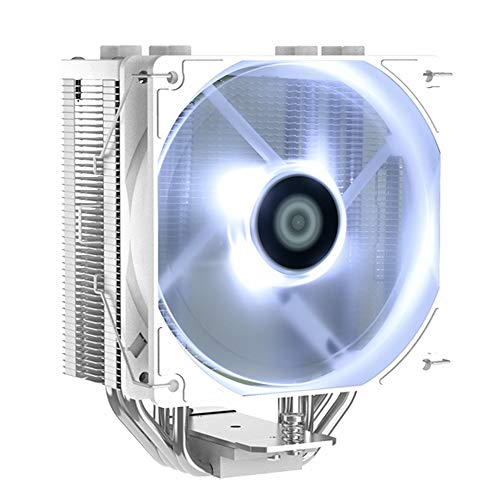
ID-COOLING SE-224-XT 76.16 CFM CPU Cooler (SE-224-XT WHITE)
But better for barely more
icy crater
Thanks bacca. I'll probably go with that one then. Imma look at it more once I eat I'm getting hangry.
 untold beacon
@mossy venture what would be a good case for like $100-$150 because I’m a upgrade my case soon
So I was just wondering what a good case would be
mossy venture
icy crater
Thanks bacca. I'll probably go with that one then. Imma look at it more once I e...
Wait just realized can switch psu back to gf1
Since not mitx
mossy venture
untold beacon
<@654444344274845698> what would be a good case for like $100-$150 because I’m a...
G360a, 4000d airflow, p200a, lian li 215 mesh or whatever it is, o11 Evo
5000d airflow
There's a wide selection
Depends what size you want, if you're using an aio and if so what size
I'm going to sleep, I'm tired
untold beacon
Alright well it would be a 360mm radiator
So a big case
Obviously
Well good night @mossy venture get some good sleep
empty pollen
icy crater
Thanks bacca. I'll probably go with that one then. Imma look at it more once I e...
shouldnt secure the 3080 first before its gone again first then you can worry about the rest of the parts later, i think
icy crater
empty pollen
shouldnt secure the 3080 first before its gone again first then you can worry ab...
NOOO
You're right.
I went to eat and now it's gone. :(
 jagged ember
Rip
empty pollen
yeah rip
why you want to have the pc specs on paper before getting the card is beyond me
jagged ember
What that mean
empty pollen
he made a list of a pc around the waifu pc last time the yeston was on sale
now was on sale again and he missed the chance again
like? ok?
maybe third time is the charm
if you want your waifu pc then next time secure the gpu first then worry about the rest of the pc later, at least thats the way how i deal with deals
if i see a deal that i like, bam! ill worry of the next part later 😛
jagged ember
It’s still important to have your full list first
empty pollen
sadly the eva mobo is a lot expensive 😮
empty pollen
jagged ember
It’s still important to have your full list first
kinda, most of the gaming builds these days are built around the gpu
once you get the gpu you are halfway done
you can fit them on any build later
jagged ember
You also generally want your parts to come in at the same time
empty pollen
well getting a gpu deal is less common than a cpu, plus the cpus are usually a lot cheaper, and they are plenty as well lately
jagged ember
I mean so are gpus
empty pollen
jagged ember
You also generally want your parts to come in at the same time
cant argue against that, you are right on that one
empty pollen
you know... im losing hope about that rumor
we are alreeady at august 30th and no "big vuts on price" yet
jagged ember
Ah
empty pollen
the rumor was that by the end of august we will have a massive price cuts on gpus
again, a rumor ofc
jagged ember
I remember nvidia specifically announcing they needed to rid themselves of 3000 series gpus
empty pollen
im on the lookout for an 80ti below 700, if not then ill keep my watch
jagged ember
For inventory space
jagged ember
Sheesh
empty pollen
sadly you need to be on the states for that 😦
icy crater
empty pollen

icy crater
What is hws?
empty pollen
hardware swap
icy crater
Ohh.
empty pollen
a reddit community
icy crater
I never heard about that.
jagged ember
If you lucky
empty pollen
saw them the other day, yeah
im not entireley on the idea of ddr5, but i have my eye on them just in case
maybe ill build a rpl pc with some ballistonks 3200c16
however i need to see both the reviews of rpl on ddr5 and the prices on ddr5 by that time
to make my final choice
 potent portal
First gen of a new DDR platform is always slow. It'll get better soon.
icy crater
What is ballistonks?
I never heard of these things before. 😭
Ohh crucial.
Are they good ram?
icy crater
All I know is apparently corsair vegenance is bad ram.
empty pollen
you get used to it
stick around and learn from the veterans and you will learn in no time
jagged ember
Cease

 high yew
ever since i switched to an amd card i for some reason can’t restart my pc? i can shut down, just not restart. any ideas?
icy crater
The problem is probably that you didn't send the card to me.
Jk but it's probably a windows issue idk.
high yew
hahaha, no fr though its really frustrating
ends up in me having to force a shutdown on my pc, no reason it shouldn't just reset
 ornate condor
Looking for exhaust case fans will be pairing with ak620. Argb preferred
I guessing ak620 will have big airflow so I need performance exhaust fans
 flint sapphire

 just replace text ez
 formal girder
 well we did get this as a replacement for LF2
 little osprey
I like how the sticker is regular emoji icon size
 covert scarab
Anyone willing to help me pick out pc parts, looking to build my first pc
mossy venture
covert scarab
Anyone willing to help me pick out pc parts, looking to build my first pc
Yeah sure, budget and country?
covert scarab
mossy venture
Yeah sure, budget and country?
Australia and looking to spend around 2.2k but can go slightly higher
mossy venture
You going to use ethernet or wifi?
covert scarab
mossy venture
You going to use ethernet or wifi?
Ethernet
mossy venture
Do you care about looks and or want rgb?
covert scarab
Nah I don’t rlly care about looks tbh or rgb, doesn’t really bother me
mossy venture
Kk
covert scarab
Cuz I’ve been hard educating myself on pcs but just picking out the parts and making sure they are all compatable is very confusing to me
mossy venture
Do you care about cpu overclocking and do you care if it's an amd or nvidia gpu?
covert scarab
mossy venture
Do you care about cpu overclocking and do you care if it's an amd or nvidia gpu?
Nah I don’t care about cpu over clocking but I would prefer a nvidia gpu as they are better for streaming and making content right?
mossy venture
Yep
covert scarab
Well yeah nvidia then
mossy venture
It is over budget, lmk if it's too far over budget and I can bring it down a bit
https://au.pcpartpicker.com/list/7RqwC6
PC Builder - Intel Core i5-12400F, GeForce RTX 3080 12GB LHR, Phanteks Eclipse P360A ATX Mid Tower
covert scarab
mossy venture
It is over budget, lmk if it's too far over budget and I can bring it down a bit...
Yeah a bit far over budget, would you be able to bring it around $60 cheaper?
covert scarab
Legend ty
mossy venture
I actually got it down much more than that, didn't realize yhe price diff between 12gb and 10gb 3080. https://au.pcpartpicker.com/list/8WKNBj
PC Builder - Intel Core i5-12400F, GeForce RTX 3080 10GB LHR, Lian Li LANCOOL 215 ATX Mid Tower
And might be worth adding in an aftermarket heatsink, stock cooler is pretty meh
This would be good https://au.pcpartpicker.com/product/VTqBD3/id-cooling-se-224-xt-basic-7616-cfm-cpu-cooler-se-224-xt-basic
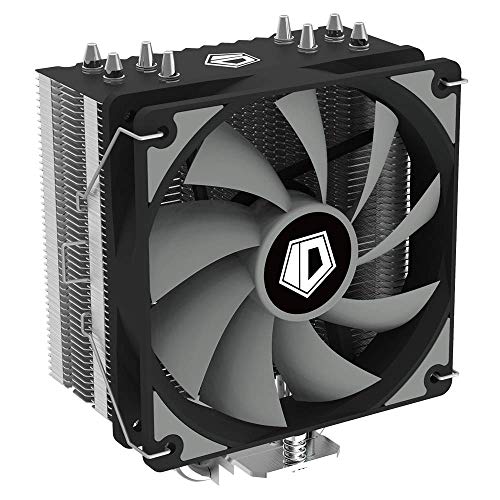
ID-COOLING SE-224-XT Basic 76.16 CFM CPU Cooler (SE-224-XT Basic)
covert scarab
mossy venture
I actually got it down much more than that, didn't realize yhe price diff betwee...
Tysm I rlly appreciate it
mossy venture
Happy to, gl with the build
If you have any questions feel free to either ask here or dm me
covert scarab
mossy venture
If you have any questions feel free to either ask here or dm me
I gotchu tysm 💙
fossil cedar
@covert scarab i would do this for 2.2k
https://au.pcpartpicker.com/list/ywnNBj
PC Builder - Intel Core i5-12600KF, Radeon RX 6800 XT, Phanteks Eclipse G360A ATX Mid Tower
Better cpu + cooler, 2tb ssd instead of 1, gpu is just as good but way cheaper
mossy venture
fossil cedar
<@299850661724422145> i would do this for 2.2k
https://au.pcpartpicker.com/list/...
They need nvenc
Actually
Regular 12600k+6800xt to use igpu for streaming
fossil cedar
mossy venture
They need nvenc
Amd has a good encoder
obsidian wigeon
sorry, i mean 770
fossil cedar
Since 6000 nvenc and whatever radeons one are called, they're pretty close
Or yeah could go quick sync for 20$ more
mossy venture
Also mpg 850 same price I think
fossil cedar
10$ more
mossy venture
Ah
fossil cedar
And mpg has bad power ok so i don't like recommending when same tier available around that price
mossy venture
Oh really? Didn't know that
fossil cedar
Yeah
Nothing major but it's not as perfect as we once thought
Also idk if you saw the sus 33$ amazon listing of evga clc 240 lol
mossy venture
Yeah def real
fossil cedar
Some sus reviews some not hence the point manually to bpbcyte tech or whatever the name

 mighty lantern
No. You’d void the warranty by removing that label
Usually it’ll say to remove the sticker somewhere if you needed to
little osprey
Noted, thank you! I didn't know if I needed to remove it for it to not melt or something
fossil cedar
little osprey
Remove sticker from ssd right?
no leave it
mighty lantern
Nope! In fact most of those labels are designed to spread heat
So they act as heat sinks essentially
 empty pollen
is the only orientation
i mean the 4 corners are at the same distance, you can put it in any way
mighty lantern
just make sure you can connect the cable and everything lines up lol
and of course dont forget the thermal paste, I know it might be a silly reminder but it can be forgotten
earnest olive
it's preapplied on stock cooler
 analog hearth
the orientation doesn’t matter unless there’s a logo statically in place
mighty lantern
earnest olive
it's preapplied on stock cooler
right, if it's stock yea
so it should be fine
analog hearth
doesn’t matter whether it’s stock lol. it’s either on there or not. just have to look
little osprey

Hey guys for my graphics card cables there's a 6 plug and an 8 plug for the cables
Both plugs were split into a 6 piece and a 2 piece. Does it matter which I plug into which slot?
mossy venture
wait what gpu is that?
little osprey
And do I have to have that little 2 plug in something, or since there's no room can I leave it out?
RTX gigabyte 3070
mossy venture
that's a super weird layout
little osprey
Yeah. It's ALL been weird lmao
But is it OK for me to not use that little 2 plug since there isn't room for it?
potent portal
Yeah you can let it hang
mossy venture
i'm not sure, i didnt know 6pin and 8pin gpus were a thing
potent portal
It was pretty common in the 10 series
little osprey
potent portal
Yeah you can let it hang
OK thank you!
Yeah I assume it's this was so it's kinda pluripotent. It can plug into 8-pin graphics cards, or six pin
 strong raft
Amd also has quite a few gpus with a 6pin, some are 6+8+8. That gigabyte looks like the one with Dumb extra wires from the connectors to the pcb. Yep (ignore how vid is a 2x8pin)

Gigglebyte did this on the Eagle 3070/3080 afaik. Hopefully you got v2 at least because v1 has wobbly wires like molex. A better pic:
 potent portal
Still not as bad as some 3090 ti cards. They take 5x 8 pin connectors, adapt it into 2x 20 pin, and then connect to the PCB.
 potent portal
They'll go to your fan/rgb controller
little osprey
I have no idea where to plug any of these in lol
potent portal
The little 3 pin is for fans, the wide one is power that connects to SATA, and the other is for RGB but appears unneeded so it's probably daisy chain.
little osprey
Ah no. I got one of the RBG cords plugged in, but idk where this other one would go...
potent portal
It would be for adding in more things
Like aftermarket fans
Chances are you only need to plug in the SATA power one
little osprey
I don't see anywhere I could plug that one in...
potent portal
It'll go straight to your power supply

 potent portal
Pfft no one reads
I haven't used a manual in years and my kitchen table is perfectly stable except for the extra pieces
little osprey
Ah I forgot I had this
cyan ravine
strong raft
Gigglebyte did this on the Eagle 3070/3080 afaik. Hopefully you got v2 at least ...
Yup they did. Also, wobbly?
little osprey
 strong raft
cyan ravine
Yup they did. Also, wobbly?
strong raft
cyan ravine
Yup they did. Also, wobbly?
I mean the pins. V1 issues were common. Idk if it was only the 3080 or not. @little osprey we literally can't tell if that's sata or even a molex. Just look at the pic I sent.
little osprey
It was a sata. I got it plugged in
 little osprey
Yeah it's plugged in finally. I missed that part because the tutorial I was using didn't include it

Still dunno what these two are. Doesn't look like anything that plugs in
potent portal
That's the negative for using tutorials like that. They might skip important steps they deem common sense that really isn't
cyan ravine
strong raft
I mean the pins. V1 issues were common. Idk if it was only the 3080 or not. <@45...
Ah ok. My eagle 3080 V1 has never had the wobbly pins lol
potent portal
little osprey
Still dunno what these two are. Doesn't look like anything that plugs in
Those are for adding more fans than stock. One is power/speed control and the other is RGB.
strong raft
Example
 little osprey
Gotcha, thank you!
I guess I'm done for now then! Time to try turning it on. I tried to make extra sure I plugged the power cable into the correct positive and negative terminals
potent portal
strong raft
Example
Yep, and then picture more fans chained together like that. There's a loose end no matter what.
strong raft
That's a gif btw 
potent portal
little osprey
I guess I'm done for now then! Time to try turning it on. I tried to make extra ...
The front panel power doesn't care about polarity, it's a dumb switch. Only LEDs care.
 potent portal
strong raft
That's a gif btw <:Pepe_KEK:830213485089652757>
potent portal
strong raft
That's a gif btw <:Pepe_KEK:830213485089652757>
Looks like a black box to me when I tap it, discord has been broken
little osprey
Thank ya!
little osprey
OK my pc turned on, but it isn't connecting to the monitor
potent portal
It's not an Intel 12th gen system is it?
strong raft
Hdmi cable to gpu (for 1st boot) & restarted at least once? Remember turn on monitor before pc.
 little osprey
Nevermind the hdmi was in the motherboard not the graphics carf
*card
But the monitor still doesn't do anything
strong raft
Is it "on" & correct input/channel? Playing 20 questions can get tedious. The above pic is some stuff you should show, excl maybe the pwr wire.
little osprey
I got it
But now

When I try to set up boot sequencer, this is all that's listed
potent portal
Does your drive have a windows install already?
little osprey
Ah darn ok. This is the part where I have to go get a USB, download a key, and put it in here
little osprey
Is it? I thought you needed one to get the pc working?
 gentle pollen
My new work space. Man this desk as a pain to make without instructions and personally I am proud of how I got all my cables neatly tucked and managed.


The cables seen in the background still need to be plugged in but first I need another power supply for that.
potent portal
little osprey
Is it? I thought you needed one to get the pc working?
The OS installer can skip past the key. It'll prompt you to give one later. You can technically use it without a key if you ignore the warnings.
little osprey
potent portal
The OS installer can skip past the key. It'll prompt you to give one later. You ...
Ah OK. Well...I am downloading windows 10 from the Microsoft website onto a USB so...I think I'm good?
potent portal
Yep
strong raft
Remember to use the MCT or w/e. Can't just toss an iso onto a flash drivr
little osprey
Aaaah I got the windows 10 on a USB but now the computer won't turn on 🤣
little osprey
strong raft
Remember to use the MCT or w/e. Can't just toss an iso onto a flash drivr
The what?
potent portal
Media creation tool
little osprey
Oh yeah I used that to download it
strong raft
Ok good*
 little osprey
Now I just need my pc to turn on...idk why it isn't...
Great...it won't turn on now...
No cables are loose. I checked the PSU cables, the external plug-in, the extension cable gas power...
*has
strong raft
strong raft
Hdmi cable to gpu (for 1st boot) & restarted at least once? Remember turn on mon...
Never did show some of these. -- something is loose or wrong, otherwise we wouldn't have an issue, lol.
little osprey
strong raft
Never did show some of these. -- something is loose or wrong, otherwise we would...
I checked everything, it's all in place...
I even pushed on each cable to make for sure they're all plugged in...
strong raft
If you want to test the pwr button, remove it then tap those 2 pins with a screwdriver to turn on pc.
 strong raft
case pwr button is just faulty or what?
little osprey
Dunno. The computer is on and the rgb works
I definitely seated the arrow with the positive terminal.
Yeah the motherboard is dead...awesome......
strong raft
Idk. This is why some people do a test bench. No fans or rgb crap, just cpu, ram, gpu.
jagged ember
little osprey
So...the motherboard is dead...
Uh, but it turns on
How is the motherboard dead
You mean the case power button is dead
If the motherboard was dead nothing would turn on
Or anywhere in between without a display out
And orientation of power switch pins does not matter
little osprey
jagged ember
Uh, but it turns on
When I jump it, yes. No power when I flick the switch
little osprey
So it's the stupid battery?
jagged ember
Wha
No
It’s the case switch lol
I already said above
The power button itself is broken or something
little osprey
Well I could barely manage to plug all these cables in so I'm a bit slow, sorry
Idk how to fix that :/
The case button worked before btw
jagged ember
Yeah I’d try unplugging and replugging those front panel headers
Specifically the power ones
little osprey
You mean unplug everything from the power supply?
strong raft
This....(even unhook all these except pwr button)
 little osprey
I did try that. I mean...idk what else to do with them. I checked the manual and for sure put the power plug-in in its place
Arrow to positive
jagged ember
Arrow?
strong raft
Polarity doesn't matter on the switches anyway. (Just LEDs)
 jagged ember
Usually just says power sw
little osprey

Arrow. It means positive right? I plugged it into the positive power spot and the negative into the negative
jagged ember
Does not matter
little osprey
And I only had one of these cables
still roostBOT
 [Xbox]GreyHound#2615 has been warned
Reason: Bad word usage
jagged ember
Won’t affect it if the button is working properly
little osprey
Oops sorry
I forgot my bad
Should should I say FORGET it and rotate it around and try again?
jagged ember
Sure?
Literally all we’ve been saying is it doesn’t care how you line up the header
That’s why shorting it with a screwdriver even works
strong raft
I just suppose a loose wire on the case or button itself 🤷♂️.
jagged ember
Yeah button dieded then
little osprey
I turned the switch on-and-off and saw a brief flash of red at the bottom. It's hard to see anything with all these cables and parts in the way
I just noticed this btw

It flashes right underneath that metal slab under the graphics card...
It also flashes white as well
little osprey
Update:removed the RAM and CPU and readded each in different combinations to test if it turned on. Same problem
Or not cpu darn it
Graphics card.
strong raft
If you are, Quit flicking the psu switch on and off. That doesn't help. Discord acting up so that vid is totally black.
little osprey
Sorry I did it a few times, but when I attempt to turn it on, it flashes that
little osprey
I GOT IT TO WORK NVM
analog hearth
lmao
little osprey
Now I gotta figure out why I can't find the USB in the bios
stoic island
Use USB 2.0 if possible for windows and such
cyan ravine
thx lol I forgot to crop it
That's my other rig on the left with the white build
I was gonna go ITX or open bench, but I managed to make room for the 220T so I'm running that for a while
I love ITX so would be keen to see it
nice
they lost one?

EVGA is great for CS
I got an eisbaer pro coming from UPS tho
jagged ember
That was unexpected
obsidian wigeon
damn
jagged ember
How’d you even tell them what damaged it
little osprey
Hey, anyone there to answer a quick question?
 leaden mauve
little osprey
Hey, anyone there to answer a quick question?
leaden mauve
little osprey
Hey, anyone there to answer a quick question?
?
little osprey
What's the best browser to use now?
I thought I heard chrome fell off from quality
obsidian wigeon
eh
it really depends on your preference
cause for me chrome is still doing good
little osprey
I'll just stick with chrome
I can always uninstall it. I'm used to using it on every pc
empty pollen
is down to personal preference
all of them are memory-hungry
3 tabs and your pc start to die slowly.... and painfully
leaden mauve
I have 70 tabs open
I always have 60-80 or so tabs open
And I can play most games without issue
32gb of ram
given it's quad channel but yea
empty pollen
yeah it was sarcasm e_e
still... 70 tabs open 😮
with 15 open i start to hyperventilate
little osprey
empty pollen
3 tabs and your pc start to die slowly.... and painfully
Yeah I noticed the CPU fan started spinning faster lmao. Why is that?
little osprey
Also: my computer LIVES. Tomorrow will be the day to reinstall programs like steam, epic, FTB, and forgecraft
Also have to decide on a better desk lmao
empty pollen
fans are programmed in such way so they spin faster if the temp on your cpu rises
you can set a custom fan curve as well
little osprey
And have to re-add the case to enclose it after organizing the wires...
Interesting
empty pollen
and normally a cpu on boost mode generate more heat
little osprey
Also just realized: never set any boot presets. Gonna have to do that tomorrow I guess
empty pollen
you have to manually set xmp/docp, aside from that almost everything is auto these days
you can double check anyway to be sure
 frigid night
@cyan ravine keeb to small, can't be friends anymore. Sorry bb.
little osprey
I assume it set SOMETHING automatically since it boots up properly. Just need to make sure the temp isn't high when it runs
little osprey
What's an xmp profile?
empty pollen
then yes everything else usually is set on auto, like hyperthreading, turbo boost and the default fan curves
empty pollen
little osprey
What's an xmp profile?
memory overclocking
if you bought lets say a 3200mt kit, it will run at 2666mt by default (as an example) unless you turn on the xmp/docp profile on the bios
you can check that on the task manager/perfomance tab/memory and it will say your sctual speed
mine as example is running at 1333 mhz
 little osprey
Oh yeah I vaguely remember this for screen quality as well. When a pc is overclocked does it just stay like that as long as the setting is changed, or does it only overclock at certain performance requirements?
empty pollen
it will stay on as long as the setting is on
is just one click and go
(enable/disable)
appears on most mobo bios as "xmp profile 1" on intel cpus
or "docp mode" if your cpu is an amd
little osprey
Ooooh ok!
Dang, well...other than that I'll see if I need another fan or if I want to add anymore RGB stuff. Thank ya
leaden mauve
empty pollen
still... 70 tabs open 😮
yea i like to keep track of a lot of stuff
oh yea, i run my ram at jedec because i cant be bothered to deal with my garbage dimms lol
cyan ravine
frigid night
<@101107951401455616> keeb to small, can't be friends anymore. Sorry bb.
Once you go small, you can never go back
frigid night
cyan ravine
Once you go small, you can never go back
Sorry I only like big things.
cyan ravine
It's all in the technique in small sizes
empty pollen
cant live without my numpad
frigid night
Don't need technique with big sizes.
cyan ravine

high yew
good asrock mobo for 12700f?
fossil cedar
high yew
good asrock mobo for 12700f?
Why asrock?
high yew
buddy needs a new board and likes mine, thinking of selling it. because i got a asrock gpu, was thinking of matching em
fossil cedar
There's literally no point
I would just get the msi pro b660m a for like 125 or msi b660m bazooka for 130 tbh
high yew
fossil cedar
I would just get the msi pro b660m a for like 125 or msi b660m bazooka for 130 ...
alright sounds good.
do you mind if i bug you about something i haven’t found a solution for for the last 48 hours?
i’ve tried reddit, youtube, amd forums, everything. can’t find someone else with my problem
fossil cedar
Sure
high yew
fossil cedar
Sure
sweet thanks!
ever since i swapped cards from a 3060 ti to my 6800xt - my pc doesn’t like the idea of restarting or shutting down. it gives me the “restarting…” then monitor says no signal, then it goes to a black screen and then nothing happens
i ddu’d the nvidia drivers and shut down the pc before i swapped cards, installed adrenaline with the internet disabled three times now, selecting different starter profiles within the app, and changed power settings within windows. it runs games fine, starts up fine, but when i turn it off it either works the odd time, or i have to hold the power button on my case to do a hard shut down
only thing that i had done to it is change ram as i wanted to see how rgb ram looked in my case, but i switched it back to the 32gb non rgb ram i was using
fossil cedar
high yew
i ddu’d the nvidia drivers and shut down the pc before i swapped cards, installe...
Weird, i would ddu again and clear everything, then reinstall, if that doesn't work try use these in cmd as admin
Sfc /scannow
DISM /Online /Cleanup-Image /CheckHealth
high yew
fossil cedar
Weird, i would ddu again and clear everything, then reinstall, if that doesn't w...
should i try installing the pro version instead of adrenaline? or maybe not the full version of adrenaline when asked for what install i’d want?
little osprey
Was trying to do something for linux and for some reason switching into UEFI mode from CSM makes my PC unusable, at least, on my monitor, just says "Input Not Supported"
 analog pulsar
I need help
why doesnt afterburner show other cpu stuff is there a bug with 6900HS

theres nothing in afterburner to select just cpu usage
empty pollen
👀
analog pulsar
obsidian wigeon
gotta wait for them to update for the cpu
they havent updated yet
sad
little osprey
little osprey
Was trying to do something for linux and for some reason switching into UEFI mod...
Fixed it with bios flashback
then it happened a second time
and now it just doesn't work at all
I can't even bios flashback anymore
so basically, what are some, good motherboards on the market right about now?
💀
little osprey
3000G
obsidian wigeon
ok
erm, any cheapest b550 will do tbh
if you don't plan to put better cpu in it
little osprey
I do
obsidian wigeon
okay, then what's your country?
i kinda forgot about it
i mean, where do you live
little osprey
obsidian wigeon
okay, then what's your country?
US, FL
obsidian wigeon

Gigabyte B550M AORUS PRO-P Micro ATX AM4 Motherboard (B550M AORUS PRO-P)
this one should do
little osprey
Alright thanks
Would it be better to wait for AM5 atp 🤔 @obsidian wigeon, and just do a whole lotta saving
obsidian wigeon
no
am5 is ddr5 only
you'll have to buy ram that's still gonna cost quite a lot
intel would be the better choice because you can continue using ddr4
obsidian wigeon
why though?
liking a company is one thing, but you don't need to be loyal to them
just get whatever gives you the best value at the time being
tech changes rapidly anyway
little osprey
obsidian wigeon
why though?
Linux
obsidian wigeon
that doesn't matter
little osprey
Better direct compatibility with Linux especially on the gpu side
obsidian wigeon
intel cpu works well with linux
and intel has open source igpu drivers
which is as good as amd one on linux
nvidia is the only big problem maker for linux drivers wise
even the notoriously unstable arc gpu from intel works better on linux
little osprey
idk I just kinda prefer having an AMD™️ based system 🤷🏾♀️
obsidian wigeon
i won't stop you if you really insist
little osprey
How much theoretical value is saved by going intel, here
obsidian wigeon
first point is ram
not only will you need to buy mobo and cpu
you're forced to get new ram
which are ddr5
and at first am5 cpus will launch with only higher end models
7600x starts at 299
it's going to be the same case for intel, but without requiring ddr5
the lesser cpus will come later in january, maybe
little osprey
obsidian wigeon
and at first am5 cpus will launch with only higher end models
as per usual
Do we even have the uh
new gen 3100/3300x variants
obsidian wigeon
nah
little osprey
yeah didn't think so 💀
little osprey
oof
obsidian wigeon
i doubt 7000 series will have anything lower than 7600
amd stopped caring about low end
jagged ember
amd is no longer the underdog
obsidian wigeon
they only pushed the 4100 cause intel came out with alder lake
jagged ember
or at least they dropped that identity
obsidian wigeon
yet 12100f is still faster
little osprey
obsidian wigeon
amd stopped caring about low end
that was their whole thing like a year ago too
jagged ember
now intel covers the low end
jagged ember
bless their corporate hearts for caring about us peasants
obsidian wigeon
im just mildly disappointed by intel with 13900k
really? 8 p cores?
sure it has 16 e cores but
damn, that's a bit sad
jagged ember
mm
we'll see how it performs when they release it
maybe it's better than we expect
jagged ember
maybe
little osprey
obsidian wigeon
it's going to be the same case for intel, but without requiring ddr5
honestly I'll probably just go with the B550 then honestly
I'm too broke to not incremental upgrade my system 😭
obsidian wigeon
sounds logical
little osprey
alr
fossil cedar
high yew
should i try installing the pro version instead of adrenaline? or maybe not the ...
Nah just the latest stable version will do
 junior stag
So I’m very new to the building concept of pcs. I “built” what I want on the app but I’m uncertain if any of my parts are compatible with each other and I don’t want to waste the money and break anything.
earnest olive
obsidian wigeon
really? 8 p cores?
what do you need more for?
e-cores are clearly more efficient for boosting multicore performance
earnest olive
so it comes down to what workload needs more than 8 strong ST cores
what workload cares about ST across more than 8 cores
certainly not gaming lol
8+16 makes more sense than 10+8
remember, 1 p-core takes as much space as 4 e-cores
mossy venture
junior stag
So I’m very new to the building concept of pcs. I “built” what I want on the app...
Budget and country?
And use case?
junior stag
Working on budget part but USA. I have screenshots of my “build”
mossy venture
junior stag
Working on budget part but USA. I have screenshots of my “build”
If you give me a general idea of what you want to spend, I'll make you a build list
junior stag
That’s my starting point.
mossy venture
Check dms
little osprey
Anyone rec a good gaming laptop around 500-600$?
little osprey

Does it look like I'd be able to fit a drive bay in here at ALL? The left side doesn't have screws as far left as it can go so I can't set it up over there, and the only spot it may fit in is clutered with the PSU cables
strong raft
Odd. I see what looks like left side of a bay & 2 holes for screws to other 1/2, but idk.
 empty pollen
little osprey
empty pollen
little osprey
which case btw?
little osprey
empty pollen
which case btw?
Phanteks Eclipse G360A ATX Mid Tower Case
It's ok, I don't think I can rebuild the hard drive bay unless I get more compact cables. I'll worry about that another time
empty pollen
yeah, thats the hard drive tray

another shot of the 360a drive bay

hmmm could be in fact that the 2 holes chillin saw are actually part of the drive bay... which is missing in your case
probably to make room for the psu cables
👀
high yew
when dduing an amd card, the card specific options that aren’t ticked are AMD Audio Bus and Remove the driver/filter for AMDKMPFD
are those supposed to be ticked?
 queen heath
Could you anyone help me with an rtx 3080 ti build for $1600 I bought the rtx 3080 ti for $911.
mossy venture
queen heath
Could you anyone help me with an rtx 3080 ti build for $1600 I bought the rtx 30...
Smthn along these lines, can switch cpu to 12400f if you want it cheaper
https://pcpartpicker.com/list/vgwFY9
PC Builder - Intel Core i5-12600KF, Phanteks Eclipse G360A ATX Mid Tower
queen heath
@mossy venture thanks
potent portal
little osprey
Anyone rec a good gaming laptop around 500-600$?
Something used most likely, new laptops with a low end GPU start higher than that
little osprey
empty pollen
probably to make room for the psu cables
Correct
It's not hard to reinstall, but it definitely didn't have room, which is fine.
empty pollen
you can transition to 2.5" sata drives, those can be installed on the side panels above the psu
analog pulsar
Hello
analog pulsar
How do I uninstall audio drivers and reinstall
analog pulsar
Okay thanks
little osprey
potent portal
Something used most likely, new laptops with a low end GPU start higher than tha...
Eh, I saw a few around 600-700 thatuseemed good, 11400H and 3050
For 609.99
That seemed*
Im assuming the 11400H is good
I believe I heard the 3050 is like the laptops 3060
potent portal
 slow coral
Guys why I can’t send pic
slow coral
Guys why I can’t send pic
You need to be level 3. Chat a bit and your name will turn green.
high yew
is it worth to get a 3070 ti over a 3070?
stoic island
Depends on price
little osprey
heres my dream build. i wanna be able to get the bang for my buck. the only thing im most likely not changing is the case, case fan and aio
potent portal
If they're really close in price sure. The ti has much hotter memory though so make sure it's a triple fan model.
stoic island
little osprey
heres my dream build. i wanna be able to get the bang for my buck. the only thin...
The only things you're most likely not changing are the most overpriced stuff lol
little osprey
crap
obsidian wigeon
almost $300 in fans
stoic island
Straight up 300$ for the aio lol
little osprey
i know, i dont have to worry a CRAZY amount because my dads gonna help a bit but still
i dont like the price of the aio but i really want those gifs on my pc
stoic island
Why not get a bigger screen and set it up yourself via micro USB or maybe raspi or smth
obsidian wigeon
the building won't be a problem
but spending so much on a fan is.. honestly
oof
little osprey
stoic island
Why not get a bigger screen and set it up yourself via micro USB or maybe raspi ...
no i mean like on the cooler i wanted the gifs to play not on the pc mb
obsidian wigeon
there's like arctic p12 argb in white
potent portal
stoic island
Why not get a bigger screen and set it up yourself via micro USB or maybe raspi ...
In this vein of thinking https://youtu.be/RTdniu3gn3Y
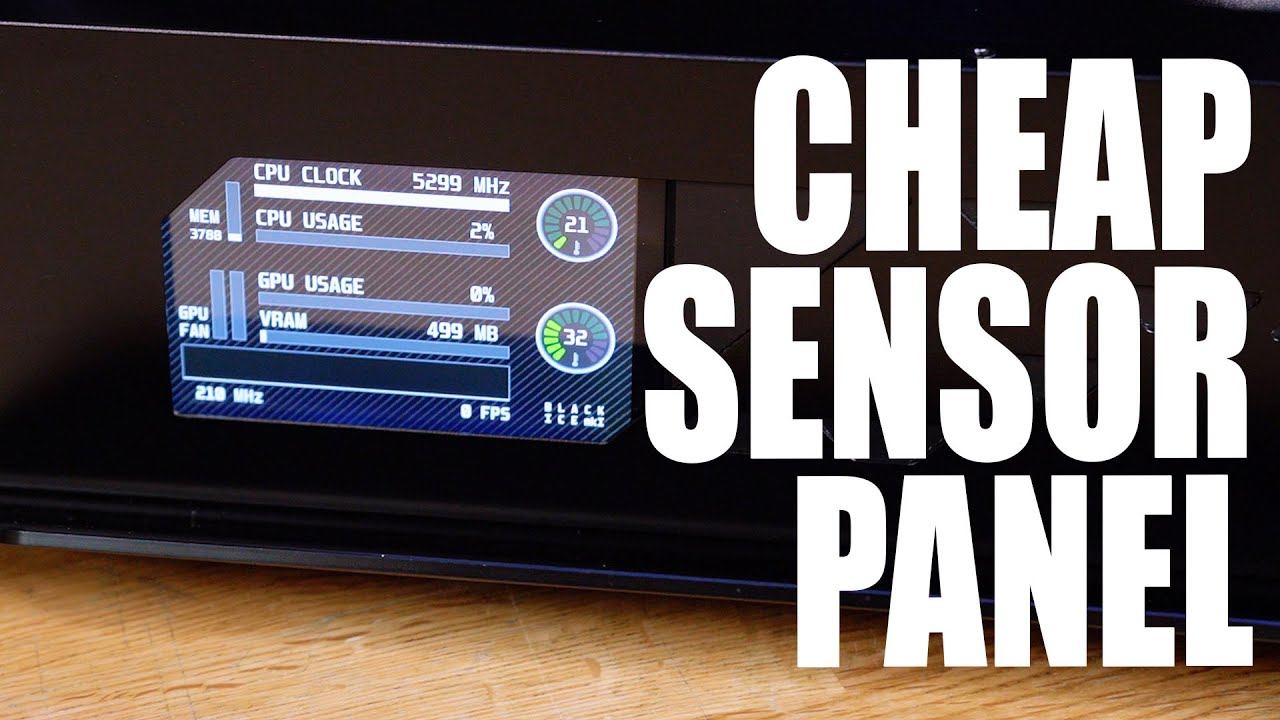
I have been asked MANY times for a tutorial on how to make the custom sensor panel found in Phil's PC, and now my latest gaming rig... well, today we show you how!
Learn more about the Viewsonic Elite XG270QG and see current price at https://amzn.to/37fXdtZ
Recommended Raspberry Pi Panels for this mod
5" Panel - https://amzn.to/386roXY
7" Pan...
little osprey
obsidian wigeon
there's like arctic p12 argb in white
does it play gifs?
stoic island
That's a fan
obsidian wigeon
im talking about case fans
potent portal
little osprey
does it play gifs?
The "sensor panel" would and is cheaper for a bigger screen
obsidian wigeon
you'd save so much money for other peripherals
stoic island
Anyways 300$ kinda ridiculous
little osprey
obsidian wigeon
you'd save so much money for other peripherals
true
 little osprey
those actually look pretty nice
are you able to control how bright or dim the lights are?
little osprey
obsidian wigeon
you'd save so much money for other peripherals
yeah thats true, the peripherals all together are abt 450
little osprey
obsidian wigeon
it's 49.99 per 3 pack
not bad
obsidian wigeon
you're looking to pay half compared to the unifans
little osprey
yeah
obsidian wigeon

ARCTIC offers innovative solutions incessantly - changing impossible user requirements into new. Always focused on our customers, ARCTIC is devoted to deliver excellence through a strong dedication and a high sense of commitment. In light of the ever-changing consumer landscapes, we aspire to con...
they're available on amazon as far as im briefly looking
little osprey
imma def screenshot this
stoic island
It's on pcpp
little osprey
but im insuring all my parts, should i follow through?
stoic island
Don't
Just get something better for the price, and tbh aftermarket insurance isn't necessary
little osprey
really?
oh
because sometimes i see some peoples parts end up weird and i wanted to make sure everythings smooth
potent portal
All the parts will have warranties so unless you're expecting to be clumsy and drop it in the street in front of a truck or spill a cup of water directly on the motherboard while running... Insurance isn't needed
stoic island
Warranty for each part usually covers everything that's not your fault for a year to a couple of years
little osprey
i forgot abt warranty
stoic island
If something comes in the box broken, you can get a replacement without having to pay for any insurance anyways
little osprey
wow
stoic island
Rma process and all
little osprey
this makes me feel like i really know nothing abt all this
ive been looking into this since like jan and now im just figuring all this out
i gotta read more
high yew
potent portal
If they're really close in price sure. The ti has much hotter memory though so m...
if i were to grab an aorus 3070 would you say it’d be stupid to do if there’s a ti for the same price also by gigabyte?
potent portal
If it's a 3 fan model go for it, no reason not to
stoic island
If it's like a 3070ti gaming oc definitely grab it
 stoic island
Yes