#gaming
1 messages · Page 51 of 1
 halcyon fossil
 calm reef
Alright I’ll try out and see how latency is, so far I just try Rec room paintball and it was decent
 untold star
is there a way to connect to my pc without wire
calm reef
Yes google
 stable sigil
untold star
is there a way to connect to my pc without wire
stable sigil
untold star
is there a way to connect to my pc without wire
If you can get virtual desktop its epic
untold star
Okay
untold star
i got vr desktop now
calm reef
wow its pretty nice, i changed a few settings and the latency is not bad at all, tho this is coming from a beat saber beginner haha
any recommendations on free vr games? im gonna try some out
 untold star
@calm reef my quest 2 a little blurry anyway to fix
untold star
yea vr desktop wont work
all my wifi is 2.4 and the wifi thats 5.0 the quest 2 cant reach
 solemn vine
overclock your internet :sunglaso:
 manic mural
Bandwidth as in
speed?

Speedtest.net
Test your Internet connection bandwidth to locations around the world with this interactive broadband speed test from Ookla
solemn vine
ez
solemn vine
LETS GOOOOOOO||/s||
any tips on how to increase this? my download/upload downstairs next to the router and modem are 200/60 i think
manic mural
ethernet
solemn vine
i dont have another router
hmmm maybe i do actually
if i dont i'll ask my dad for that one asus router that linus reviewed like a week ago
https://www.youtube.com/watch?v=mthjxMP4dAc
yep found it

Thanks to ASUS for sponsoring this video! The giveaway has ended, but you can buy this router on Amazon (PAID LINK) at https://geni.us/H7gdFM4
It's been a wee bit since we unboxed a router at Linus Media Group, but it's fairly important to your home networking, especially if you're still using your ISP provided router.
Buy ASUS RT-AX86U AX570...
 worthy spruce
solemn vine
if i dont i'll ask my dad for that one asus router that linus reviewed like a we...
worthy spruce
solemn vine
if i dont i'll ask my dad for that one asus router that linus reviewed like a we...
linus sucks
and that router is meh
solemn vine
be quiet nerd linus is my lord and savior
worthy spruce

Not Just a Wi-Fi Router, It’s a Mesh Wi-Fi System.
here
an actually good product 
manic mural
Mesh networks are interesting
that looks good
dunno why but most mesh systems I see are like 300mbps cap for some reason
worthy spruce
manic mural
that looks good
this is unifi
their consumer line
so hell yeah its good
 hard matrix
Gaming on wifi always going to suck IMO
manic mural
oo okay
worthy spruce
its the best around
manic mural
gaming on wifi is great for me lel
worthy spruce
its fine for me
hard matrix
The answer that said Ethernet is correct
manic mural
ethernet is barely better than wifi for me
hard matrix
It’s just always going to be more consistent
 raw nicheBOT
 jake9876789#0727 has been warned
Reason: Bad word usage
hard matrix
Ethernet with bad router = wifi on $300 router
Gaming never needs the 1-2.5gbs you’re going to get with the good router and unless you’re paying gigabit from your isp it doesn’t matter anyway
manic mural
what
@hard matrix I mean, gaming on wifi with my ~70$ router is great
Gaming wise, basically the exact same as ethernet
worthy spruce
hard matrix
Ethernet with bad router = wifi on $300 router
wrong lul
its all about traffic shaping
hard matrix
Wifi will never be better than Ethernet and if you believe that you’re just wrong. There’s so many things that can interfere with the signal and Ethernet just doesn’t have that problem
With current tech*
worthy spruce
it will never be better but it can def be more convenient
wires will always be superior
i run 10gbe everywhere
im just saying playing on wifi isnt life ending
hard matrix
I’ve never had a good time playing on wifi
Like literally in highschool had my parents run a 100ft from the router to my room because it sucked so bad. In college always ended up buying/using Ethernet because it was terrible. After that I ran a 150ft from the router to my rig again because I got terrible speeds on the wifi(tbf that was isp given)
So if it’s all you’ve got then you’ll learn to live with it I guess but I’ve never considered it acceptable
 hard matrix
Well yea but if you’ve got 3k then you could definitely afford spending like 20$/100ft of Ethernet or even the 500-1000$ to put it in the wall lol
worthy spruce
i mean the APs were like $150 or so
but
everything else is super nice switches with 10gbps all neatly managed with cloud firewalls and load balancing and s tier traffic shaping
i crush on my network setup
thinking of getting a dream machine
hard matrix
Which is what
worthy spruce
only $400

Ubiquiti Inc.
All-in-one enterprise security gateway & network appliance for small to medium-sized businesses. The optimal experience for larger networks.
UniFi Dream Machine Pro (UDM-Pro) is an all-in-one enterprise network appliance. UDM-Pro integrates all current and upcoming UniFi controllers with a security gateway, 10G SFP+ WAN, 8-port Gbps switch and ...
hard matrix
Ahhhh I see it’s a thingy on its own
raw nicheBOT
Invalid command usage, try using it like:
!warn [member] (optional reason)
Arguments:
member: User mention (@User)
reason: Text (may include spaces)
 jaunty pendant
 latent ore
best $25 game on Steam anyone?
halcyon fossil
@latent ore do u have a vr headset?
latent ore
I do not
halcyon fossil
aw
halcyon fossil
makes sense
i was gonna recommend boneworks or budget cuts
buuuuuuuut no vr hearset
headset*
halcyon fossil
if you dont have any valve games somehow.... theyre great lol
portal 1/2, hl 1/2 could get them all for like $8 total
when theyre on sale
latent ore
143 games in library lol
Wife got me a gift card 🙂
Bruh
I was around when HL1 was new
XD
latent ore
It's all good my friend
I have all the HL and Portal games
Including Black Mesa
Just curious if anyone had suggestions, currently in CP2077 like everyone else
 shut quarry
If your a fan of AC, odyssey is under $20
 strong delta
aye, got a quest 2 for xmas
strong delta
but then i slip on the floor, did the splits and something happened to my leg and now i cant move. but i got rec room
halcyon fossil

strong delta
and we got a new router that my quest doesnt like. so amazing day, crap just happened at the end
but i let my grandpa play and he loved shooting stuff
calm reef
I’m loving it so far, my router is from isp but it’s WiFi 6, I been having a few stutters in beat saber which I will look into further tomorrow fixing all the settings. But tracking is great, easy to setup, looks great. There are a few god rays that are only really noticeable in dark scenes
But also the audio is terrible for music lol, I’ll see if I can use my porta pros or ksc75s instead
halcyon fossil
yep, thats the achilles heel of oculus products, the audio
(besides facebook integration)
calm reef
Smh Facebook, I used my moms Facebook account
But ya so far I only played beat saber and rec room
Now I just need to figure out if I want to get link cable irl and elite strap online or vice versa. I do really want cable and strap is out of stock everywhere it seem
 neat hare
strong delta
neat hare
strong delta
bro vr gives me a head acke
solemn vine
@strong delta which headset you got?
stable sigil
@halcyon fossil real quick, is there a way to use discord on the quest 2? I feel like I saw a setting that did but lost it and its annoying having to have my pc connected. I am using virtual desktop btw
halcyon fossil
stable sigil
<@262998794545790977> real quick, is there a way to use discord on the quest 2? ...
i dont know how, i dont have a quest 2
calm reef
I feel like Kenzie said there was a discord app
strong delta
solemn vine
<@!691548652078104647> which headset you got?
i have a quest 2
strong delta
i cant even play it becuase is being weird with my new router
solemn vine
odd
strong delta
ye
it says connected, no internet-connected-saved- connevted, no internet and its just a loop
ive tunred it off fully, restarted it, and did the classic forgot the network and reconnect
 tranquil garnet
warzone, fortnite
 forest bison
Viper prob
The only real diffrents is 1 glorious softwere gui better and u can dubble click wit it if ur not doin that then viper better also it has slitly better clicks lik lighter
tranquil garnet
So viper has an overall better physical build
and glorious slightly better software
@forest bison
manic mural
I feel like they prob have different shapes
forest bison
Lmao i have no clue man
latent ore
You're like, 10 years old Tawny -_-
forest bison
Nah im 13 🙂
tranquil garnet
so viper it is? or glorious? @manic mural
tranquil garnet
for fortnite and warzone
forest bison
I have model o it great
manic mural
I got a Model O wireless
tranquil garnet
why
tranquil garnet
Ok and what mousepad should I get?
manic mural
All personal preference
forest bison
Lol i got just a random off brand super cheap 1 abd is fine
manic mural
some people like better control, some people like their mousepad going brrrrt
tranquil garnet
Glorious also?
latent ore
Finalmouse actually isn't bad according to reviews
forest bison
Well golius better tho
manic mural
I think Finalmouse makes good ambiguous shapes, but the rest leave much to be desired
latent ore
The problem with mice is.....too many things are subjective
tranquil garnet
ok thanks guys
stable sigil
latent ore
The problem with mice is.....too many things are subjective
Ayo where you been
latent ore
WYM
stable sigil
You most likely don't remember me but like last year we talked a bit
then you disappeared
latent ore
I remember you lol
I was being obtuse
XD
Yeah, life happened. My work actually got really busy
Took a break from Discord too
manic mural
that's rare
tranquil garnet
Was gonna get glorious mouse but they charge 11 for shipping
manic mural
not bad
 dim rover
i just set up my glorious mouse and i instantly love it
Oh guess what it's time to finally see up
dim rover
oh my god vr is so cool
dim rover
right now just some of the free stuff like the lobby and labs
soon my buddy is gonna help me set it up for a flight sim
so we can fly together
 feral pasture
Yeah the lab is a great demo for VR
if you like the flight sim, want to try flying combat, and you also like star wars I'd recommend squadrons
dim rover
i already have it and dcs
feral pasture
dcs?
dim rover
Combat Flight Simulator. Realistic simulation of military aircraft, tanks, ground vehicles, navy ships, world war two vehicles, trains and ships. Free download includes the Caucasus region and Black Sea that encompasses much of Georgia. It Including a Russian Sukhoi Su-25T ground attack aircraft and the famous WWII North American TF-51D fighter....
very realistic flight sim base game is free extra planes more cash
feral pasture
oh ok
 little anvil
Can someone help with gaming computer question
worthy spruce
no
 full wing
Night in the woods is free until tomorrow on the epic games store.
 molten kraken
manic mural
molten kraken
manic mural
First bit of pen
 slate wadi
Any recommendations for steering wheels for gaming? I want to run project cars 2 on my oculus and it would be nice to have a solid wheel with it
 vivid shale
I’ve been having issues where my USB slots will overheat and cause loads of latency for my mouse and keyboard is there anyway to fix that without adding fans or increasing my GPU’s fan speed? I don’t have anymore slots available for fans and increasing my GPU’s fan speed does work to fix the issue but it’s very noisy
I’ve tried even the USBs that are on my actual case too not just on the motherboard and they have the same issue
 burnt remnant
vivid shale
I’ve been having issues where my USB slots will overheat and cause loads of late...
burnt remnant
vivid shale
I’ve been having issues where my USB slots will overheat and cause loads of late...
Oddly, I've never heard of a usb port overheating. That shouldn't be the case. I've heard of the controller chip itself getting hot, but not a port overheating (outside of industrial power sources, but that's a different animal!).
Is this a thing now?
You can always buy a USB 3.x PCI-E 3.0 x1 controller card and put it in your computer, provided you don't need more bandwidth than PCI-E 3.0 x1 slot can provide. If you do, and you have the correct slot for it (that won't lower your video card link rate), get a PCI-E 3.0 x2 or x4 card (it's a longer slot, some systems have 2x PCI-E 3.0 x16 slots with the bottom one wired for x8 or x4, it can go live in that slot if using x2 or x4 does not drop your GPU slot speed).
USB controller cards using USB 2.0 are cheap, but might not show up in BIOS. Make sure it shows up in BIOS. Are you absolutely, positively sure it's the PORT overheating and not heat coming off something else?
@slate wadi Logitech makes some good steering wheels for gaming, I see them recommended often for BeamNG Drive, which I mod for, and that's a driving simulator.
vivid shale
I’m pretty certain it’s the slots as no matter what I plug it into USB 2 or 3 slots on my mobo or the case ones it has issues
And when I turned up my GPU fans it did fix the issue
And I do have a extra PCI slot
Actually could my CPU overheating cause the issue? It only happens when I’m playing demanding games such as COD and Cyberpunk
And my CPU is using the stock cooler
burnt remnant
Outside of defective peripherals, that should never be the issue. I don't think it's the ports themselves, it sounds like it's just something getting a bit too toasty in there. If you have an orb-style intel OEM cpu cooler, those can overheat quickly/easily especially with a large powerful video card. If you have a tower cooler, or all-in-one, that's much less likely. Just sounds like something is getting too toasty in the case.
If you do not have extra fan headers, you can always hook fans to case power via molex which is not optimal and can be noisy depending on the fan quality, or you can even get little dials that let you regulate the fan via a fan controller in a 5.25 bay or a single dial that can be mounted facing the back of the case on an empty expansion bracket / slot cover (they're cheaper than the drive bay controller).
I believe 10~12 years ago I was getting ANTEC fans (if I remember right) that came with a little dial on an otherwise 'blank' expansion slot cover that would screw into the back of the case. Those were quite handy, actually.
vivid shale
Alright I have a Antec case
burnt remnant
I would recommend Noctua or Fractal if buying fans, but there's a number of other brands in a range of prices.
vivid shale
Yeah I was thinking if I get a new CPU cooler I’d either go liquid cooling or get a noctua
Going to be a bit though as I’m getting a 5600x soon lol so trying to save up for that as well
burnt remnant
The Noctua fans are DEFINITELY better made, longer lasting, and quieter at full-tilt speed, but the Fractal fans are a nice middle-ground between quiet, affordable, and long-lasting (I've had some going 6 years now that are as good as new, though they've been kept fairly clean too!).
If you have the money, and you have an OEM CPU cooler yet, slap a Noctua cooler on there if you have the room. Noctua makes an off-set model of some of their coolers (I have a D-15-S myself, it's wonderful!), Noctua's website will have a list where you can check what cooler will fit your motherboard without blocking the PCI-E slot for your GPU. That's important - my Asus TUF X570 board can use either a regular or off-set model, but the ASRock X570 Phantom Gaming board (which my 3950x murdered) will only fit the off-set 'S' model of the D15 cooler. The Noctua cooler won't leak and will generally beat some - but not all - 'AIO' liquid coolers.
If buying liquid coolers, DO get one with a warranty (like Corsair has) where it covers collateral component damage if there's a leak from defect in workmanship.
vivid shale
Alright cool
burnt remnant
Well the 5600x will be a step up, I'd recommend more cores but if you do 'only' gaming the 5600x will be just dandy. If you stream or do productivity work in game modding or development, more cores = better, but games often won't use much more than an old i7 quad-core could provide.
If you buy a Noctua cooler now, it will come with brackets for AM4 socket, too, so you can re-use it.
burnt remnant
Streaming, a 5600x should suffice, especially when using NV ENC (nvidia encoder), which loads streaming duties onto the GPU so you won't lose FPS as bad especially on CPU-heavy games that don't use DX12 or Vulkan renderers.
vivid shale
Alright cool I did notice some issues with my current CPU with it actually mostly screen tearing
burnt remnant
I have a 3950x, even paint dot net (free graphics software) can make use of all it's cores. Some operations still take 20+ seconds on this 3950x. The nice thing about AMD processors is you can AIR COOL them, hooray for no leaks. If the fans go out it just will slow down a little. 140w under full load with a stock-settings 3950x on an x570 board would have been a dream 6 years ago when I built my Haswell machine, you will love your AMD chip, though honestly your minimum FPS and stability will definitely go up a lot more than your max or avg FPS.
Screen tearing happens without V-sync enabled.
vivid shale
Alright
Yeah I saw all the stuff about the 5600x I was originally going to go for another CPU which I’ll see what it was but it was also AMD
burnt remnant
If you end up with screen tearing, either get a G-sync capable monitor and keep the video settings set so that you ALWAYS stay above the monitor's MINIMUM refresh rate (or you could get blanking depending on some things), and make sure the G-sync option / V-sync options are on. If you have it on, FPS will be more consistent and keep the game immersion going - the only downside to vsync is in competitive multiplayer deathmatch in FPS games where you could introduce a very slight lag (though it's consistent!).
vivid shale
2700x was my original I was going for
burnt remnant
Don't go from a 9400F to a 2700x.
vivid shale
Alright
Also does Freesync work at all with Nvidia cards? I just got a new monitor and wasn’t really looking for it having G-sync or freesync but I noticed after I got it it has freesync so is it compatible at all or completely useless unless I get a AMD GPU?
burnt remnant
Get at-least a 3900x or a 5600x or better yet, a 5800x / 5900x IF that's within the budget. A 3000-series has similar performance to a 9xxx intel processor, and the 5000 series AMD has 'generally' superior performance to the intel 9 and 10 series.
You can't really make a right or wrong choice if buying the most recent intel or AMD platform, except AMD has PCI-E 4.0. Intel won't have PCI-E 4.0 for 3 more months yet.
It's so close in performance between the AMD and intel top-tier mainstream performance, that you wouldn't notice outside of benchmarks aside of one or two games here or there (which may or may not be patched in the future).
vivid shale
Alright well I already told my dad the 5600x is what I’m saving up for lol since I’m doing work for him to get it
Alright
full wing
Hİ GUYS
vivid shale
Hi
burnt remnant
FREESYNC CAN work with nvidia GPU's if it's a SUPPORTED monitor, they added support for freesync a year or two back. Freesync is just a name for an industry-standard 'Adaptive Sync' ability.
burnt remnant
G-sync is a proprietary 'enhanced' (supposedly!) trademarked version of adaptive sync by Nvidia.
vivid shale
Alright
burnt remnant
Well, see if you can, try it out, if your screen flickers, turn down video settings (as you may be going below the minimum FPS supported by your monitor), if it's fine then 'you win'.
vivid shale
Alright
burnt remnant
You just want to use whatever video settings keep the monitor ABOVE it's minimum supported FPS range of freesync. So if you have a monitor that supports 30~144fps, keep video settings so you almost never go below 30fps.
Going above it won't hurt, but going below = don't do that / bad.
burnt remnant
Honestly, if you crank your video settings up pretty high, or use a higher resolution (if your monitor supports it), it should throw more work to the GPU and less to the CPU (less overheating, if that's the case). The reason turning up GPU fans seems to help, is it's making more airflow.
If you have an Asus, Gigabyte, MSI, or Asrock motherboard, you can generally set your case fan and cpu fan curves - make those speed up sooner and it may help your issues.
Fan curves can be set in motherboard manufacturer's software (if they have some, most do), or in the BIOS (best to adjust the fan curves here as you needn't worry about software then).
burnt remnant
You can install (if you already haven't done so) MSI afterburner, or Hardware info, to check your temperatures and see what's getting too toasty in there.
vivid shale
Yeah I have it already
burnt remnant
Both mentioned apps can be downloaded from GURU3D (dot com) website, and it's 'safe for work'.
vivid shale
Alright
burnt remnant
Okay, good, keep an eye on cpu temperatures, when it gets slow / laggy, ALT+TAB out of the game and check your temps on the GPU / CPU (both!). If they are hitting 90C, that's bad. You ideally don't want to go over 80~84C, or the life of components can be shortened (the higher = the shorter the lifespan).
vivid shale
Alright
I just realized I do have a free fan slot but I don’t know where it is...
I’m in my BIOS right now and noticed there’s a fan that doesn’t show it’s spinning but all of mine are and one is in the pump slot
burnt remnant
On the flip-side of the coin, if you had world's best cooling, when overclocking, you won't damage your stuff (within reason!) if you can keep it cool. However, when overclocking you WILL shorten component lifespan if it gets too hot (and in worst case, especially with intel stock coolers, you could potentially injure something if you go over 90C regularly even at stock speeds/settings).
To put it honestly, I tried my 4790k's stock cooler for one night back in 2014. It hit 100C almost immediately when benchmarking to test the system, and the PC shut off to 'save itself' from damage. The stock coolers are rubbish, and those darn push-pin mounts can come off slightly even just from a modest bump to the case.
burnt remnant
Well it might not know if a fan's spinning or installed if it's a 3-pin plug fan, those are regulated by voltage only, the PWM (pulse width modulation) four-pin fans are the 'smart' fans which your motherboard can chat with and see what speed they're going and regulate them better.
vivid shale
Alright
burnt remnant
3-pin fans were common-place 12+ years ago, but in the last 10 years, PWM fans (four plug fans) have become the new standard. Some cheap 40~50$ cases (in US dollars) still sometimes come with 3-pin fans. The motherboard (if it is not automatic) can be set / told that it has a 3-pin fan hooked to it if needed.
vivid shale
Im actually thinking there might not be an extra slot because they have a board explorer in the BIOS and I don’t see a fan connector 2 that’s highlighted but I see 1, 3, 4, 5, and the pump
burnt remnant
If you have fans hooked to molex connectors, they will run full speed all the time. This is the worst way to hook up a fan with a 4-pin PWM method being best, but if you're plugging them into a dedicated fan controller (like I mentioned a while back), they can be regulated and hence not loud.
vivid shale
Alright
Actually can I use a system panel connector for that or what are those meant for?
burnt remnant
There's likely a #2 somewhere, look in your motherboard manual which came with the board, for a board diagram. Fan headers are usually near the edges of the motherboard, with 2 being near the cpu, a max 2 or 3 along the front edge, and one or two (or more) at the bottom. More expensive boards have two, and there may be one just above the GPU slot behind the CPU area.
vivid shale
Alright
burnt remnant
System panel is a front panel connector, do not plug anything but what is supposed to be plugged in here, only plug a fan in to the dedicated fan plugs on your motherboard, or component damage / failure may result (or the machine won't turn on). Also, do not use more than one y-splitter per fan header on your motherboard if you ever use them, or you could damage your hardware.
vivid shale
Alright
burnt remnant
You can access your board's manual from the website for your board. The board model is listed on the board around the GPU slot (above it usually) or between the CPU and RAM. If you have the paper manual that came with the board, use that if needed. Hopefully you haven't lost it (keep it in your PC desk).
vivid shale
I have the actual box somewhere but it’s 5:20am so I gotta go to bed soon and also I’m going on vacation so won’t be able to look till I get back
Also got the freesync stuff working now
burnt remnant
Well enjoy your vacation. Watch out for Christmas trees if they're still put up, as they can occasionally contain rambunctious squirrels - the TV told me that :x
vivid shale
Lol thanks
burnt remnant
N/P, good luck, and do enjoy! Hope some of this helped. You can save what I said for later if needed by copying it into a text file.
vivid shale
I basically did everything already besides the new cooler lol and I’ll try checking out that slot. Thanks
40°C CPU on windows desktop
GPU 43°C
Well I’m going to sleep now
manic mural
Keep in mind you can use MSI afterburner+RTSS for the OSD to see your temps in-game without alt tabing
 uneven dragon
Hello. I'm new so I have no idea if I'm asking this in the right chat or not. But I'm looking for a computer to play my old windows 95/98 games on. Would anyone have any recommendations on what I should get? Or where I should look? I'm trying not to spend a ton of money. I asked on newegg and they sent me here.
 bleak blade
Just use a Virtual Machine.
bleak blade
Eh, I'd rather use Oracle's VM software.
I forget the name...
But, yeah a VM is 9 times out of 10 the better option.
Unless your game is on GoG then you can just buy a copy off GoG and it will work out of the box on Windows 10 without any DRM!
latent ore
VirtualBox
uneven dragon
Okay so I could just get any computer and put virtualbox on it?
bleak blade
He has an original CD copy, and it doesn't work on Windows 10 sadly, so we spooled up a Windows XP VM.
Well, I'd get one with a reasonable amount of power.
Like, at least a Ryzen 3 3100, 16GB of RAM, and some form of GPU. And I wouldn't buy any kind of prebuilt.
And, I would be cautious about playing any kind of 3D games on a VM. Especially Win 9x era 3D games.
Realistically I would check GoG for any of the games you want to play and see if they are on there. If they are, you can buy them there and they will work out of the box on Windows 10.

GOG.com
Download the best classic and new games on Windows, Mac & Linux. A vast selection of titles, DRM-free, with free goodies and 30-day money-back guarantee.
uneven dragon
I found a box of all my original CD copies but I'll check that out for sure. So you wouldn't recommend just buying a desktop off newegg?
bleak blade
No.
I never do.
Building your own PC will 9 times out of 10 be cheaper.
And its stupid easy to do.
uneven dragon
Oh really? I figured it'd be more expensive.
bleak blade
Give me a minute to make a build that should do well for old games on Windows 10.
uneven dragon
Thank you so much!
bleak blade
https://pcpartpicker.com/list/Z2LXMv This is everything including a Monitor. This thing will run most Modern games at 1080p 144hz Medium settings alright. And it will absolutely run older games at maxed out settings.
And the PC won't have any problems with thermals unlike most prebuilt PCs.
And the motherboard has Wi-Fi also.
The GPU is a little overpriced but that's due to the grand GPU shortage of 2020.
 rain magnet
why not budget intel?
bleak blade
Intel bad, no upgrade path, bad motherboards compared to AMD budget boards.
If Intel actually had decently priced motherboards in the budget category with good features and OC capabilities, along with socket longevity, i'd consider them.
But, Intel's budget boards have poor VRMs and cost a lot for the lack of features they have.
And the 10300 is only marginally faster than the 3100
latent ore
VRM's don't matter for a 10300
bleak blade
I mean, I'd rather have more VRM than barely enough.
And the B550 Pro-VDH Wifi isn't a slacker when it comes to VRM.
I wouldn't put a 5950X in one, but I'd probably be comfortable with a 5800X
Non overclocked that is.
uneven dragon
Thank you for doing that. I appreciate it. I definitely look into that.
bleak blade
No problem. I make builds all the time.
 glad urchin
I'm getting about 160fps on Warzone with a 5800x and 3060ti on 1080p relatively low settings. Does this sound about right? For some reason I thought it would be higher
latent ore
Warzone is terribly optimized
RTX on?
Based on benchmarks I checked, 160 FPS seems normal for 1080p relatively low settings. Yes, this is a 5600x but relatively comparable. For some reason, Ultra settings actually increased FPS a touch or the same as low

Call of duty Warzone benchmark fps test on RTX 3060 Ti paired with Ryzen 5 5600x.
00:00 1080p COMPETITIVE
01:15 1080p ULTRA
02:21 1440p COMPETITIVE
03:40 1440p ULTRA
05:10 4K COMPETITIVE
06:40 4K ULTRA
PC SPECIFICATIONS:
RYZEN 5 5600X
FREEZER ESPORTS 34 DUO
MSI B550 TOMAHAWK MAG
2X8GB 3600 MHZ
RTX 3060 Ti PALIT
CASE SAMA ARK BIG
PSU XFX...
glad urchin
No rtx isn't on lol. But ill watch that video, i've heard that ultra can give more fps because it gives the gpu more of a load. Thanks
latent ore
YW, i was surprised at the numbers there as well
But yours seems in line with that benchmark during actual game play
worthy spruce
bleak blade
Eh, I'd rather use Oracle's VM software.
ewwww oracle
bleak blade
Hey, VirtualBox is free and for the most part just works.
calm reef
VMware is nice too
 rough rock
how's the strap for the quest 2? the elite strap seems kinda unnecessary.
calm reef
So far I’m finding the stock strap ok until about an hour than it starts to hurt especially near the ears than at about 1hr 30min I have to take it off really
bleak blade
I've not used the Quest 2, but I honestly don't understand the complaints about the Quest 1 strap.
calm reef
i think i heard they were stopping shipping the elite straps until they fixed some issues with them breaking
trying to get one eventually
bleak blade
Honestly the Elite strap is overrated for the Q2, just wait for someone to make a Deluxe Audio Strap Mod.
rough rock
that's what I heard. it's kinda a lot between the strap, cable, and case. ends up being more like $500 than $300.
calm reef
depends on cost for me, if the strap is comortable i have no issue using it because it looks nice with the headset. i don't want it looking clunky. also i don't need audio i have several headphones i can use with it
rough rock
have you used an offbrand cable. It doesn't seem like my mobo has a usb-c connection. doesn't the official oculus link cable require one?
 supple crown
anyone want to play rainbow?
calm reef
rough rock
have you used an offbrand cable. It doesn't seem like my mobo has a usb-c connec...
the official cable is a male usb c to male usb c cable
manic mural
Siege..? @supple crown
supple crown
yep
manic mural
Maybe in a bit
supple crown
ok
manic mural
@onyx grove Siege later today?
supple crown
Around when just so I know
manic mural
Ima get on after I finish dinner in a few min
 onyx grove
manic mural
Might ship you my GPW to get new switches >:D
onyx grove
manic mural
Might ship you my GPW to get new switches >:D
soldering isnt that hard, you should get yourself some soldering stuff, its good to have reliable tools when you need them
manic mural
@onyx grove for context, I just bought screwdrivers today
manic mural
Swiss army knife op
onyx grove
lmao
supple crown
how tf can you not have screwdrivers
onyx grove
i would die without my screwdrivers
supple crown
theirs 4 in my perifiral vision
manic mural
It's some random screwdriver kit I picked up at walmart
onyx grove
i lost my main sc, its around here somewhere
supple crown
If you have a pc you need to have a good screwdriver
onyx grove
next on my shopping list is a torque screwdriver
manic mural
Okay what the hell discord
supple crown
what?
manic mural
Aparently a picture of my swiss army knife is "explicit content"
supple crown
thats called liberals
people reported you it wasnt discord
they dont really look over them
manic mural
Lemme take another pic
Okay discord
I see how it is
Aparently my hand can't be in the pic
supple crown
thats a pain in the a$$ to build with though
manic mural
All I can say is Notua screwdriver also nice
onyx grove
hand reveal
onyx grove
manic mural
Aparently my hand can't be in the pic
haha, your hands are not allowed here
supple crown
no hands
manic mural
let's see if it'll let me send it on PC
onyx grove
i did that from fone
manic mural
holy crap discord is actually blocking it for some reason
supple crown
your hands are to dangerous
latent ore
They don't like you. Blocked knife pic too
supple crown
aye vintage
manic mural
okay
so apparently I can send a cropped version
but not the full photo
idk why
cropped version:
supple crown
like i said too dangerouse
latent ore
File size?
supple crown
ignore the spelling
 manic mural
lemme check
@latent ore do remember this discord has a 100MB upload limit
from being a level 3 discord
manic mural
2262x4032 2.3MB
latent ore
I mean, OK, weird. lol
supple crown
we playing rainbow or what?
manic mural
manic mural
This one that got sent through was 2262x4032 3.3MB
was playing TNO in HOI4
gonna get on seg
supple crown
ok
manic mural
@latent ore Pixel 4 camera
manic mural
Like it uploads photos normally
except that one
apparently that one has explicit content
explicit content of my hand and a swiss army knife
latent ore
Yes, YOUR HANDS
latent ore
eye twitches
onyx grove
mr1111 come harass theo with me
manic mural
lemme test screenshot of full photo
WAT
SCREENSHOT OF THE FULL PHOTO NO WORK
@onyx grove where
supple crown
numbers?
manic mural
@latent ore this is the screenshot that discord doesn't allow me to send
https://prnt.sc/wbv18p

try it yourself
supple crown
what is the #
latent ore
supple crown
what are the 4 num,bers after your name
manic mural
and if it'll work, so I'll DM
@supple crown 1 1 1 1
it's 4 1s
no space between them
One thousand one hundred and eleven
supple crown
thats the # under your name in the bottom left
supple crown
ok
manic mural
what
onyx grove
idk man
manic mural
this is my name in siege
supple crown
added you both
burnt remnant
They need more games with cat launchers. Nothing blows off some steam better than a whole settlement armed with cat-launcher nukes in Fallout 4. 🙂 Just stinks when you're building and get hit (and killed) by a stray kitty cat launched by a settler.
Fallout 4 video here of the Cat Launcher: https://www.youtube.com/watch?v=LP8WHVWDH_s

Never before has destruction and devastation been so cuddly. Wreak havoc like never before with this modified Fat Man and Broadsider, the Cat Man and Meowsider. Two mods for the price of one, now with 80% less full stops.
Download: http://www.nexusmods.com/fallout4/mods/5546?
raw nicheBOT
 Nathan LaFlamme#9272 has been warned
Reason: Bad word usage
supple crown
im getting $h*t on rn
manic mural
@burnt remnant I love how retextured the explosives to be cats xD
@supple crown getting around filter not good :(
 elder sand
Anyone want to play black ops cold war zombies
manic mural
@zinc wadi try going straight to the website in a regular browser
https://store.gaijin.net/storefront.php?category=WarThunder&skin_lang=en
make sure you're logged in
 zinc wadi
i tried that
 median blade
Is minecraft more cpu or gpu intensive? I am not talking rtx, just plain minecraft.
 raw sage
Oculus Rift S worth it?
 deft root
median blade
Is minecraft more cpu or gpu intensive? I am not talking rtx, just plain minecra...
deft root
median blade
Is minecraft more cpu or gpu intensive? I am not talking rtx, just plain minecra...
Minecraft is more dependent on your CPU than your GPU. That means that the power of your CPU has a greatest impact on your computer’s performance, and your CPU will often be the component limiting your FPS. Also, adding shader mods will significantly increase the graphical demand on your GPU. Keep that in mind!
full wing
this image is nostalgic
median blade
@deft root oh ok. Just for reference is your cpu bottlenecking your gpu?
 broken garnet
https://docs.google.com/document/d/1dEozF1zvx2pTHRLnlTWq8VqEbwFzRwBcrNW7kgnREvw/edit?usp=sharing
A new version of my MCHosts list has been made, feel free to have a look whenever you feel like getting a minecraft server.

Google Docs
Key: NA = North America, SA = South America, EU = Europe, OC = Oceania, AS = Asia Normal Hosts: Good Hosts Pros Cons Extra PebbleHost Good support, cheap (starts at$1/gb/mo ), great for small servers Not great for larger servers, only extreme gets dedicated threads NA & EU Locations...
 teal trail
hey im new here suggested by a friend can someone help me? i wanna get a pc to run factorio and games like that really
burnt remnant
full wing
this image is nostalgic
That PC is like a heavenly dream compared to my 1st PC in 1994. My first PC was the last set of CPUs before the Pentium line-up, called the '80486' or i486 CPU. Luckily, I had a soundblaster 16 and 2x CD-ROM (which plugged into a controller port on the sound card). So I was set to play Doom until I had eyestrain headaches from the old CRTs on a daily.
 burnt atlas
factorio is fairly unique in its limiters, so the more you can elaborate on the "games like that" part, the better @teal trail
manic mural
Factorio is also very easy to run
burnt atlas
yes and no @manic mural
manic mural
(To start off)
burnt atlas
aye aye :)
teal trail
well
manic mural
But satisfactory, a game like it, is much more intensive
raw nicheBOT
 sharky2709#2360 has been warned
Reason: Bad word usage
manic mural
like
teal trail
just tell me what specifics are good for it 😄
burnt remnant
@manic mural What surprised me is the fact that Rimworld ran 2~4x faster on a 3700x/3950x Ryzen VS my 4.4ghz Haswell 4790k w/2400 mhz cl-11 memory on it.
Go figure. Benchmarks all over the internet never hinted at that.
burnt atlas
factorio can run just fine on a igpu, even at silly base/map sizes
satisfactory? no so.
teal trail
rimworlds good!
manic mural
Fun
burnt atlas
@teal trail the more info you can give us, the easier it is to recommend something that does not limit you soon
burnt remnant
teal trail
rimworlds good!
Heck yeah it is, I have 133 colonists on my Rimworld game right now. It is starting to get a little slow now though, it's still faster than a colony of 30~40 people on a Haswell CPU.
manic mural
(Specific game names would help)
burnt atlas
and while you are thinking about that, also what kind of budget are you looking at?
teal trail
around 700 pou8nds gdp
burnt remnant
2D games usually like a cpu with 1~6 cores that hits high marks on single-threaded apps. It's generally hogging a few cores on the CPU, if it's just 2d that is nothing for the GPU to even spin the fans up on. 5600x is a good cpu or if budget limited, get a 3300x or 4350g.
teal trail
pounds*
burnt atlas
machine only or is that with monitors etc included @teal trail ?
teal trail
moniters too
burnt remnant
If you go ryzen, get some 3600mhz RAM, it'll net you better performance especially if you use an igpu - even on a higher end chip like a 4650g (if you can find those 4xxx g-series, you might have to dig something up on ali express if newegg or amazon can't get your part you want, just make sure your motherboard will support it out of the box).
burnt atlas
you are in the "buy used" segment then
teal trail
not neccicerily
burnt atlas
@burnt remnant let the lad specify the requirements before you overwhelm them with recommendations
burnt remnant
Moniter :x hahaha, it's monitor 🙂 I used to make that mistake in the 90's.
You can get some pretty sweet stuff in the used market if you don't want to buy new stuff with an igpu for 700 or less on a budget.
manic mural
700gbp including Monitor, keyboard, mouse, headphones?
teal trail
nice
burnt remnant
@burnt atlas that's fine bud, I saw the budget when he was typing it out.
teal trail
what kind of moniters can i get like that then
teal trail
manic mural
700gbp including Monitor, keyboard, mouse, headphones?
yeah
manic mural
Fun
burnt atlas
that is a 500-ish £ build then
teal trail
but i can get that stuff overtime
manic mural
I'll brb with screwing around with a budget build in gbp
burnt remnant
700 or less on budget I'd go get a 24~30" TV at the cash-and-carry pawn shop. If you go to a shop you regularly buy from, they may give you a 'DOA' only warranty on it too (but usually not).
burnt atlas
cheers @manic mural, i wont fire up a tab then
teal trail
burnt remnant
700 or less on budget I'd go get a 24~30" TV at the cash-and-carry pawn shop. I...
sure
manic mural
Yea I'm just gonna look around gbp market and see which makes more sense, smth like 3100 or 10100, and if monitors will fit in the budget, etc
teal trail
yes yes
burnt atlas
unless things have changed a lot recently, used is the path that makes sense.
£ aint exactly super strong at the moment
burnt remnant
I mean, if you're not going to run super-high-end 3d games that are really recent, you can start out with a lower-end igpu for a mere pittance and add a dedicated gpu when you have the money, just make sure to get a 600~650w power supply if you intend to add an dedicated gpu later.
AMD is coming out with lower end 5xxx cpus in the next month or two, fairly soon, so those will be great for the 100~250$ market segment.
teal trail
burnt remnant
I mean, if you're not going to run super-high-end 3d games that are really recen...
thank you, someone whos actually human 😄
manic mural
Hm, the uk gpu market is even worse than the US market for last gen cards, sadly
otherwise the market looks fine
220gbp mininum for a 1650 super is quite sad
burnt atlas
(as i said, used is what makes sense)
burnt remnant
So if you wish to wait, you can, or get a cheap cpu like an Athlon 3xx that's based on the Ryzen series cores, which will run 2d games just fine. Then you can update it later if you want. Just make sure to get a decent sized 600w or close-to-it power supply that should be plenty and I mean PLENTY of power even after you later add a dedicated gpu, a bigger processor, more drives etc.
manic mural
But something like this, minus the GPU, are at a fine price new
https://uk.pcpartpicker.com/list/PDgG2V
burnt remnant
Can get a used RX 470, 480, 570, 580 or such with 8gb of VRAM for around 100 pounds GBP.
manic mural
(Vram isn't everything, 580 only outperforms 1650 super by a bit)
burnt remnant
Those cards will power through almost anything today at medium on 1080p and not run low of VRAM. They won't ray trace, they don't have DLSS, but they do game well on a budget.
teal trail
manic mural
But something like this, minus the GPU, are at a fine price new
https://uk.pcpar...
would that run games like satisfactory and factorio?
manic mural
@teal trail Oh and one other thing, are you planning to stream?
teal trail
god no
burnt remnant
VRAM isn't everything but if you can get an 8gb card for 10~15 pounds more than a 4gb card, you'll easily get most your money back when you sell it a year or so from now when you get a better one.
If the price is close ( < 25 GBP difference), it always pays to get the one with double the VRAM just for the longativity of the card.
manic mural
Alright, something like this will be what we're looking at, random cheapo keyboard and headset are just placeholders
https://uk.pcpartpicker.com/list/4sG9nL
Example used GPU:
https://www.ebay.co.uk/itm/Sapphire-RX580-Pulse-4GB-GDDR5/274629401771?epid=20022511439&hash=item3ff1301cab%3Ag%3Aft0AAOSwSnVf6w64&LH_BIN=1
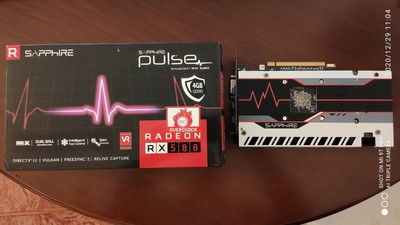
eBay
Sapphire RX580 Pulse 4GB GDDR5, in excellent condition and it's original box.
burnt remnant
E.G. When I got an RX 480 8gb card in fall 2016 (september or october or so), I could barely used half the VRAM at 1080p, but by 2019 in december (a year ago) I was using up most of that VRAM when modding 3d games or using newer games on highest settings. That said, the 2070 super I have now to replace it only has 8gb and personally I do run low on VRAM - BUT I do 3d modeling and such with the game open, so these things happen. Gaming alone won't generally top 8gb of VRAM until you get into the new nvidia-only features like Ray Tracing and DLSS or the other things they do (above 1080p generally). There are a small handful of games that want more than 8gb of vram, but that budget is much higher than what you wish to spend and so out of the question.
If you only play mostly 2d games, an igpu from either intel or AMD will be fine, but it will be cheaper to upgrade the AMD system later even though the AM4 socket is in it's last year of support (to mid 2021). The intel chips tend to be more expensive new and used for some reason. Maybe check the used market before deciding.
manic mural
Games don't really go over 8gb Vram unless they're either downscaling from 1440p+ resolution, or running 1440p+ resolution native
At 1080p, vram is nearly never a concern.
burnt atlas
manic mural
At 1080p, vram is nearly never a concern.
that depends a LOT on what else you are doing on the machine
burnt remnant
manic mural
At 1080p, vram is nearly never a concern.
Yes, I agree. I only go over it with heavy modding, MS Flight Sim, Cyberpunk, and the one new rockstar game I tested on here. Forget what it was, oops. 3D modeling / game designing stuff goes over it, but these are all edge-cases and the exception rather than the rule.
manic mural
(Since we're talking about a gaming machine, I'm assuming normal gaming workloads)
burnt remnant
Now, if the video card budget was 700$ then we could get something with more than 8gb of VRAM, but alas it is not, reality sometimes sucks like that. That depressing bit out of the way, gaming at even medium settings at 1080p on someone's used RX 480 or 470 with even only 4gb of VRAM is way better than last-gen consoles OR not having a PC at all (oh noes!).
burnt remnant
burnt atlas
that depends a LOT on what else you are doing on the machine
Yeah, in a year or two there will be a lot more games that push that 8gb to it's limit, but admittedly, most games I have here won't hit 4gb limits let alone 8gb. It's kind of the chicken-and-the-egg thing here, can't make a game without hardware being there to some extent (saturating the market decently), but no one will buy hardware if no games use it (ray tracing!).
burnt atlas
@burnt remnant you might be misunderstanding, 4gig IF you are doing NOTHING else that uses vram can be fine.
burnt remnant
Don't be me, who was getting too many issues with the AMD drivers on my professional apps like Maya and World Machine 2. So I went out and spent almost 600$ a year ago in dec 3rd 2019 and got a ray tracing card to play Quake II RTX that I paid 5$ for (the game not the card)... but that said, ray tracing is GREAT when rendering models to see if I messed up the UV's AGAIN (lots of muttering swears).
If you have a 700 GBP budget, spending 200~250$ on a video card if you wish to do 3d games is wonderful, even if you end up with an R5 2600x CPU, 3d games use the GPU more.
Conversely, if you run 2d games they are more cpu heavy, so I wouldn't put out much on a video card and only add one later if needed / when needed for 3d stuff / games you may buy.
Everyone's requirements are different. I wouldn't build a machine without a decent higher-end Soundblaster sound card in it for example. Motherboard audio is alien to me - but I make music on here, too, so I hear a large difference. Most 95% of people would never notice a difference even if they had high-end audio hooked up to the PC. So that money for 95% of people is better spent on a CPU or GPU for a gaming machine than how I'd personally choose to spend my own money.
So feel out the used market and see what's there, and if you're not happy with it, buy something new. At-least if you buy new you have a warranty to fall back on if the 'magic smoke' comes out too soon.
Look what's on sale on newegg, look for combo deals, maybe you can get a cpu+mobo+ram+power supply for a decent price. Check the reviews out on what you wish to buy, and then you can feel confident purchasing things.
Jan-Feb are the SLOWEST months for PC sales so they DO have good sales during those months, anytime from Christmas to the end of February / mid-march there's usually good sales to be had. Just sign up for all the tech retailer's flyers / emails and wait for the right deal to come your way.
sees entire page of text, oops, gets quiet and crawls back behind the couch for a while
 dense vale
Well, considering they were talking about amd and NVIDIA, I’d say they were talking about GPUs
calm reef
lol
worthy spruce
 frosty sentinel
not cpus
frosty sentinel
not cpus
last time i checked nvidia's cpus dont really compete with amd or intel rn
frosty sentinel
Shut up
median blade
Is a 5600x with 3070 be a good pair for minecraft or would one be a bottleneck?
Also would it be a good combination for apex, valorant, and rocket league.
rough rock
if you use pc-builds bottleneck calculator its 3.42% gpu bottlneck at 1080,5.56% at 1440p, and 7.32% at 4k so not really a problem. Minecraft and rocket league are more bottlenecked by the cpu but should run at like 160+fps on ultrahigh settings on 4k if your monitor is capable of that. apex is the only one of those games that would really utilize your cpu+gpu and not run at super high fps at high resolution. at least according to pc-builds
whether it's a good combo or not, idk. it's kinda expensive.
calm reef
Bottleneck calculator not great, there is always some kind of bottleneck depending on what you’re doing but that combo should be good. Only thing I will say is the 3060ti and 3080 seem more cost effective, but it also comes down to what you can find and how prices are
rough rock
yeah it said my cpu bottlenecks cyberpunk but my gpu is like a constant 100% just from running the game and cpu goes from like 80-100% depending on what i'm doing so not entirely accurate.
median blade
So I can get away with pairing a 5600x with a 3080?
 errant light
Should I follow this video for advice on better fps?
vivid shale
Should I buy R6 and Rise of the Tomb Raider now or wait for a game I know for sure I’ll like to go on sale?
vivid shale
Already decided to buy them
manic mural
r6 can be fun
vivid shale
Yeah I saw game play of it and it looked fun but now I gotta wait a week to play it since I’m on vacation with a laptop at a hotel that has 600KB/s download speeds...
I get like 25MB/s speeds at my moms house so a huge downgrade compared to that lol
dense vale
It’s a mega deal to get the... I think it’s good edition? Anyways, it’s the one with s1 & 2. Ops unlocked, and it was like $10 on epic last time I checked
Huuuuge time save
 fast solstice
Anyone play Dual Universe? The optimization seems very poor for it but I'd be down to try even at low @ 60fps
 runic fox
median blade
Is a 5600x with 3070 be a good pair for minecraft or would one be a bottleneck?
runic fox
median blade
Is a 5600x with 3070 be a good pair for minecraft or would one be a bottleneck?
I think you were joking but you’ll be perfectly fine
median blade
@runic fox nah, I really do not know much about pcs. Would a 3080 be too much for a 5600x?(note this pc is going to be used mainly just to game)
manic mural
n o
calm reef
^its fine
vivid shale
I looked at it the 5600x is apparently too good for my GPU lmao
Not by much though
2080 super
Alright
I do need to I have been having some issues and I plan to stream and noticed issues while streaming
latent ore
2080 super and issues streaming?
Are you using NVENC encoding?
SO the GPU does the heavy lifting?
And no, the 5600x is not too good for your GPU
Those "bottleneck" calculators are poo
vivid shale
No idea how to do encoding so I guess not
latent ore
You said you stream yeah?
Oh, plan to stream
yeah, set up OBS to use NVENC
GPU does your encoding for the steram
*stream
vivid shale
I have streamed a little but not much but want to do it more
Alright I don’t use OBS so must be why I don’t know what it is lol
I use Player.me
vivid shale
Oh didn’t know that lol
latent ore
Yep, recommend that or OBS
vivid shale
Would 5600x be alright for light streaming though? I don’t do it much
latent ore
Yeah
vivid shale
Alright
latent ore
What do you have now?
vivid shale
i5-9400F
vivid shale
I realized issues with streaming Call of Duty modern warfare
vivid shale
Alright
vivid shale
No the new one
latent ore
Try streaming with OBS and NVENC before you drop cash on a new setup
vivid shale
Alright
latent ore
Might be surprised
nVidia even tells you how to set it up

Configure OBS to get the most quality out of your stream.
vivid shale
Yeah I just found that
vivid shale
Might help me out too if I realize I don’t need a upgrade as I’m looking for a new laptop since I’m realizing my laptop had a huge performance drop in the past year...
Alright
latent ore
Yeah, give it a shot!
vivid shale
I will but I’ll have to wait a week since I’m on vacation lol
In case you were curious this is what I’m looking at
https://www.newegg.com/black-msi-gl-series-gl65-10sek-022-gaming-entertainment/p/N82E16834155402?Item=N82E16834155402&Source=socialshare&cm_mmc=snc-social-_-sr-_-34-155-402-_-12312020
latent ore
KTM 1290 SDR and a couple others
vivid shale
No that’s a desktop I’m upgrading I’m wanting a new laptop
My laptop is a i7-8750H, 8GB RAM, and a 1050 Ti
Which was actually $100 cheaper than that laptop when I got it...
Yeah
latent ore
Has lots, not uncontrollable
vivid shale
Nice
full wing
hi is anyone able to help with my stream? i’m playing warzone and it flickers the in game overlays when i’m in the lobby, looking at the map. playing it’s super weird
 granite heart
my nephew plays a lot of Fortnite and has an AMD Ryzen5-1400 with an NVIDIA GeForce GTX 1060 (3 GB). what would make more of an improvement to his gaming experience upgrading his CPU or his GPU?
 warm belfry
depends on how large the upgrade is, but probably the gpu
manic mural
yall want to see a magic trick?
 near palm
So, Im thinking about buying a VR headset, but the Vive and Index are a bit out of my price range. Is the Rift S a good headset?
warm belfry
@halcyon fossil
halcyon fossil
near palm
So, Im thinking about buying a VR headset, but the Vive and Index are a bit out ...
no, get a quest 2
its better in every way
 bitter valley
If you like fb knowing what you are doing
near palm
But am I able to play steam games on it?
halcyon fossil
if you buy the link cable
quest 2 + link cable = $380, which is much higher res and refresh rate than the rift s, with a lighter design, manual ipd adjustment (somewhat), and new controllers
PLUS
you can use it without the pc
its sort of like the nintendo switch of vr headsets
near palm
The official link cable is $80 itself. Do I need that particular cable, or will any C to C cable work?
halcyon fossil
i cant guarantee other cables will work, but people have said it does work with other ones
i know the official cable is pricy... but its the longest and fastest cable for that purpose
since its fiber optic, it can be longer than traditional usb c cables
plus it comes with a little velcro to attach it to the side of the headset for comfort :P
near palm
So, the 64gb model. Can the storage on that be expanded with like an microsd card? Or would I need to buy the 256gb model?
dense vale
you'd need to buy the larger version for more space, but i really dont see you using up all the 64 gbs
games for vr really arent that big yet as far as i know
also, as long as you buy a good cable, you should be ok (i just searched up oculus link on amazon and a bunch of knock-offs that were half the price showed up, bought one and its been working fine)
calm reef
Oculus seems to certify some off brand cables but the official is nice
rough rock
yeah I ordered a $25 usb-c to usb-a cable since my mobo doesn't have a usb-c connection
dense vale
Is it USB 3.0/3.1/3.2?
rough rock
3.0
rough rock
dense vale
That works
rough rock
oh 3.1
bitter valley
👀
 tepid wadi
android gamers?
calm reef
Hmm quest controller durability at least not terrible, somehow one slide off a cabinet onto a tile floor and it bounced
vivid shale
Only thing I’ve ran mine into is my ceiling because my ceiling is very low for me as I’m 6’2 almost 6’3 and the ceiling is like 7’ high
runic fox
calm reef
Hmm quest controller durability at least not terrible, somehow one slide off a c...
Quest 2 has great overall durability. Go see ThrillSeeker’s Quest 2 Durability Test on YouTube
calm reef
first 10 hrs of beat saber
not my good run but its a pass
and still trying to figure out the bugs with oculus link lol
halcyon fossil
very good for 10 hours
calm reef
The audio blinks out once in a while and occasionally froze a bit. But link should get better as time goes by and I am used to these kind of things
calm reef
alos if anyone got nice custom maps plz send link 🙂
 slate glen
What are some good flight sticks?
Looking for one that doesn’t have a throttle or if it does, it is, it’s a 2 piece. I don’t like how cramped some of them look when they’re on the same piece
 glass temple
I've been satisfied with my Logitech Extreme 3d pro. It's got a little throttle lever throttle built in and if you can find it for $40 it's a good deal imo. I think if one wanted to upgrade in the future they could probably buy a separate throttle and use it with the stick
halcyon fossil
calm reef
alos if anyone got nice custom maps plz send link 🙂
little advanced for your current skill level, but galactic symphony and digital girl are both very fun maps
galactic symphony is actually pretty easy (up to a point) because its just the same repeating pattern
UNTIL about like 3 minutes in
then it goes crazy
calm reef
ty i take a look
halcyon fossil

A really great map for a very interesting and different song. Haven't listened to Mandragora before this, but it was a fun experience. References to 2001 A Space Odyssey was cool, and did I hear a little bit of Jack's Octagon in there? Either way, a fun experience, and worth pretty good pp.
------------------------------------------------------...
looks hard but its just up and down
lol
calm reef
looks doable with a lot of practice haha i really have to work on those things when it go fast, idk what called i guess equivalent to streams in osu
halcyon fossil
i would call them streams yeah
i felt insane after i beat that level
then i realized its just up and down LOL
id say that level is good for practicing streams
calm reef
ye i can tell xD
halcyon fossil
tetris effect is to tetris as beat saber is to osu
actually not really but yeah
lmao
osu!: effect
 golden sable
halcyon fossil
https://www.youtube.com/watch?v=noY9C5to5Ms
golden sable
halcyon fossil
https://www.youtube.com/watch?v=noY9C5to5Ms
tbh thats probably easier than ghost expert+
rough rock
calm reef
https://streamable.com/r1z565
did you have to buy the song or does that one come with it?
calm reef
No that was a custom song with the beatsaverdownloader mod I think it was called
halcyon fossil
golden sable
tbh thats probably easier than ghost expert+
oh of course it is
i cant even beat ghost expert plus lol
its the hardest game in the default sound track by far
untold star
MY VR CABLE CAME IN TODAY
I did a size comparison to the cable that comes into box
And yea
vivid shale
I didn’t get a official one and it works fine I think the main issue is my CPU
calm reef
halcyon fossil
its the hardest game in the default sound track by far
Oh ya I discovered that really fast xD
halcyon fossil
lol
vivid shale
I decided not to since I was getting it as a Christmas present lol
untold star
vivid shale
I didn’t get a official one and it works fine I think the main issue is my CPU
What cpu
untold star
I have a AMD 3600 and it runs fine
untold star
vivid shale
Was trying to play WarThunder
Oh I didn’t try that game yet
halcyon fossil
i doubt your cpu is the issue
vivid shale
Alright
calm reef
Runs mostly fine on my 8600k. Also I think it runs more off the gpu encoder, nvidia preferred because of nvenc
vivid shale
It crashes as soon as it opens
untold star
Today I had this issue with my game I tried to enable everything ultra for vr and i would hit apply the computer would slow down to 1FPS sleeps and screen would move slow so I guess I can’t do it
FLASH WARNING
⚠️
vivid shale
Could it be since I was trying to run off max settings?
calm reef
Also I discovered the bandwidth on my mobo usb c port is half of my gpu port for some reason so I’m going to look into that more
vivid shale
I tried my GPU’s port
untold star
calm reef
Also I discovered the bandwidth on my mobo usb c port is half of my gpu port for...
How do you find out bandwidth
calm reef
You can test connection in oculus app
untold star
i turned up the render resultion and nothing happened
vivid shale
Any idea why it may take me like 5 minutes to load into a game of Phasmophobia though? I tried it on my laptop and it works fine but it takes a long time to load
It’s a i7-8750H and 1050 To
calm reef
What are the specs
calm reef
Might be a little underpowered for vr getting right on the minimum spec for some games
calm reef
But you have a 2080 super also?
vivid shale
In my desktop yeah
calm reef
Have you tried it with that
vivid shale
No not yet I was going to Tuesday when I get home from vacation
calm reef
Ah ok
untold star
@calm reef do you have bigscreen beta
calm reef
I have it but didn’t go on it yet
vivid shale
Ooo
manic mural
@full wing you should inv me >:D
untold star
i might try to caught this movie
latent ore
That one was good
vivid shale
Great I’ll be in the car when the rocket launches probably so can’t watch
latent ore
A little slow to progress but good
untold star
i need beat saber
vivid shale
Beat saber is fun
vivid shale
Only games that made me sick were ones that made you move with the joystick...
untold star
oh
full wing
manic mural
<@456226577798135808> you should inv me >:D
invited
calm reef
No I just use virtual desktop
untold star
okay
it is fast now scrolling discord
YOU CAN TYPE IN VR

awe hand tracking no work in virtal desktop
 reef sparrow
Nice, I see u got a quest then? Or were u lucky enough to get a quest 2?
untold star
how how i findc pikcsx i juyst took
reef sparrow
I think u can do it through OculusTV and press the My Mesia button on the left.
Media*
full wing
lmao
manic mural
@full wing can't believe I got a doublekill with a kapkan trap
manic mural
@dense vale playing with ~60ping so it could just be delayed
@full wing lmao the alpha pack I got from that
dense vale
👀
dense vale
my only black ice is glaz sniper lmao
full wing
mine is G36C and L85A1
dense vale
but my friend has the camrs, ak12 and aug
manic mural
ima clip some other stuff I did in that session later lol
I have jager primary, p90, rook shotgun, Twitch dmr, thermite pistol, and now that pistol black ice
Tho the 9 shot bad thermite pistol black ice, not the nice 21shot pistol
 sour wind
any idea how to fix ping spikes in game? sporadically im getting 900 ping for a couple seconds and have been trying to fix this issue but had no luck, any recommendations?
calm reef
And if Ethernet directly to router don’t work, try calling isp
 latent zodiac
anyone with starwars Squadrons playing it in VR with an oculus rift S? getting really bad first impressions with it refusing to notice my controller and bad frame rates with a 2060 ko super...
glass temple
latent zodiac
anyone with starwars Squadrons playing it in VR with an oculus rift S? getting r...
2060 non-super + Rift S here, I tried the game in VR like twice and while it was a cool experience, it felt pretty laggy and image quality wasn't great either
played it on 2d screen and pretty sure I get 144+ fps at all times, less laggy and better clarity
refusing to notice my controller
it doesn't support oculus touch controllers if that's what you mean
latent zodiac
my ps4 controller got recognized after DS4, but still having terrible frame rates on the FIRST MISSION after the tutorial area... this is terrible atm... even with low VR settings it's laggy as hell...
i have a ryzen 3900x and a 2060 i don't know what the hell is wrong here and playing this in VR was what i wanted but it's so damn frustrating to figure out what's wrong with it
maybe influencers were paid when talking about Squadrons in VR as good...
glass temple
How's the non-VR performance?
latent zodiac
i know non VR performance won't be an issue, the major selling point for me is to play this game in VR and if i can't play it like that, then what's the point of this game for me....
glass temple
Yeah but if it's lagging in non VR that will help find the issue
calm reef
Try tuning your settings, I haven’t played squadrons but my 2070 struggles with some vr games, occasionally stuttering and such
latent zodiac
.......
...even on low settings it's bad for VR...
calm reef
Take a look on forums

reddit
Trying to figure out why I have such strangely poor performance on my i9-9900K/2080ti/32GB PC-3600/M.2 SSD Install. Running latest nvidia...
latent zodiac
i've been looking, so far the band aid is for it to be in full and restrict it to 60Hrz but that's for flat screen, so far VR is still mostly bad from what i'm seeing except for Valve index or HP reverb, even so its still 50/50
toggling VR from the flat screen crashes Steam VR, the game, AND oculus systems... okay...
latent zodiac
i got it workin, the flat screen setting for full screen and 60 hrz lock also effects VR... why?
both displays are different why does the flat screen govern preformance for VR???
well... least its working mostly now, still some dips but i can stomach it
 minor kite
manic mural
<@456226577798135808> can't believe I got a doublekill with a kapkan trap
minor kite
manic mural
<@456226577798135808> can't believe I got a doublekill with a kapkan trap
who do you play in seige
im a frost/cav main 
glass temple
Frost smg is one of my fav guns especially with the custom holo + suppressor
manic mural
by play time I think I'm zof rook main
minor kite
bc it gets banned every time 
manic mural
OH WAIT NO
Therm passed zof in playtime
I'm a therm main
gotta become more of a chanka main
 onyx grove
onyx grove
onyx grove
sure, in a bit
manic mural
@ me whenever
onyx grove
k
manic mural
Ima play doc rook shotgun only and see if I could get fun clips
manic mural
I'm just tickling em
untold star

PART 2 OF DADADADA
Beat Saber Map: https://beatsaver.com/beatmap/922f
Song: https://soundcloud.com/jebofficial/wuki-dadadada-of-the-bumblebee-jeb-vip-edit
Check out my content on other platforms:
https://Twitch.tv/LSToast
https://TikTok.com/@LSToast
https://instagram.com/LSToast
Join my discord for no reason!
https://discord.gg/rtXYA9w
I found zach^^^^^^
onyx grove
@manic mural seg time?
manic mural
seg time.
onyx grove
pog
 sturdy pagoda
Hi @grim pasture
manic mural
fun
vivid shale
Started taking screenshots of JWE so here’s a indoraptor
 glass temple
Hey I got something like that yesterday while playing HL: Alyx
The Oculus home/menu worked fine though
Like the headset was connected and working fine but steamvr decided it didn't wanna work
calm reef
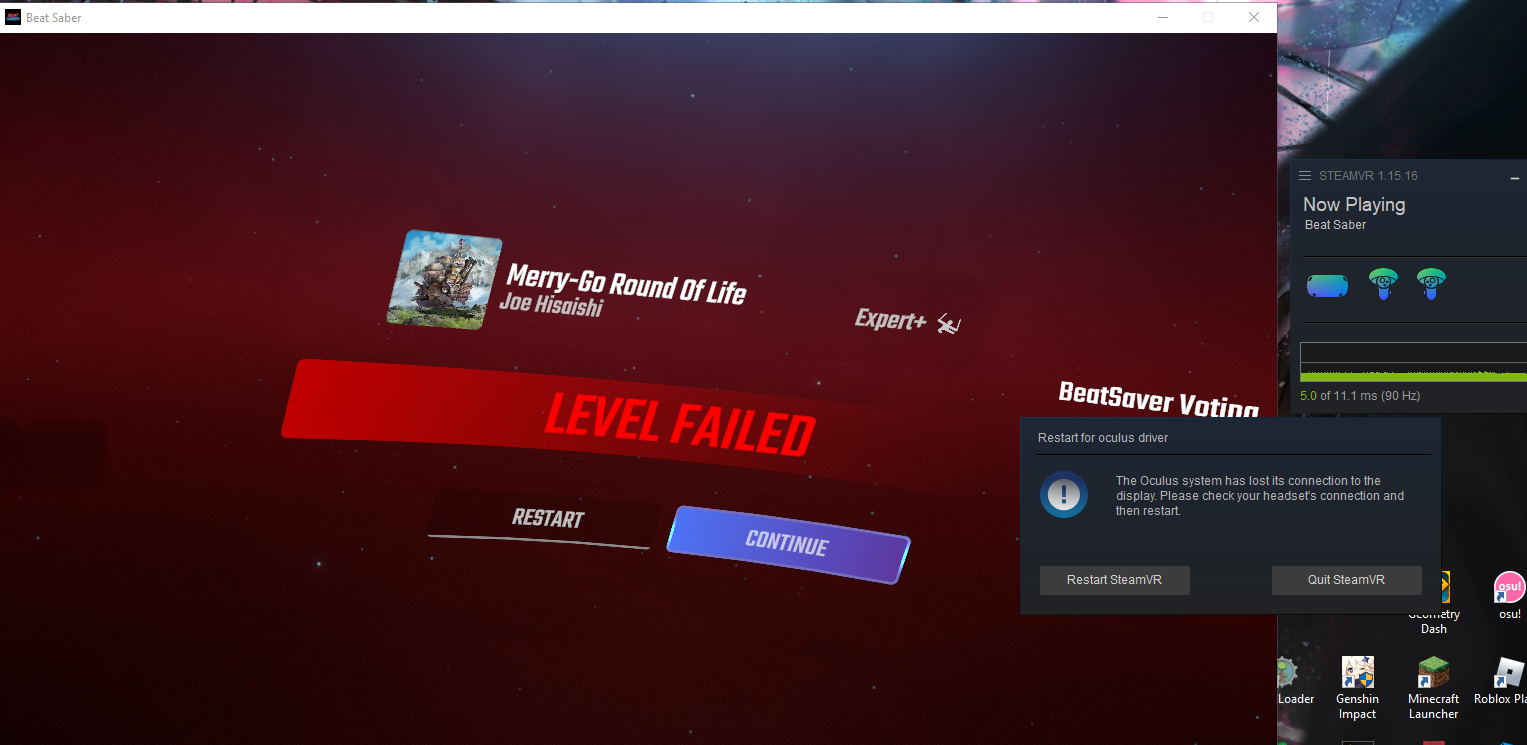
once in a while it just disconnects from my pc its getting a bit annoying
 dense vale
FeelsSadMan
latent ore
bad cable?
calm reef
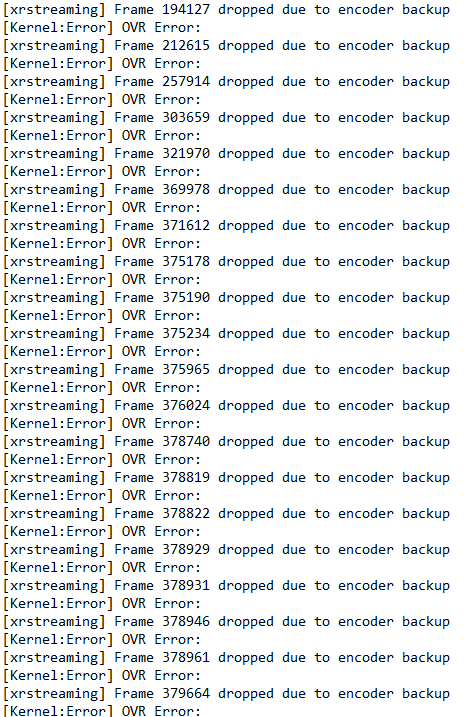
i hope it's not a bad cable. im trying a few things now and sent logs to oculus to see if they think it's a cable problem
this might be the point where is officially disconnects https://i.imgur.com/q97aXC6.png
 latent ore
Front panel USB or motherboard?
calm reef
mobo and gpu, currently gpu
i can deal with an occassional stutter but if it outright crashes it annoying when i am in a good run -_- https://i.imgur.com/JOA9Ks4.png


 bleak blade
Just buy VirtualDesktop at that point.
20 bucks gets you an amazing wireless solution.
Unless your router is just incapable of a 5ghz signal, it should work fine.
Even the meh-tier router that comes with my parent's xFinity service lets me play Beat Saber with no lag.
Also, the 2020 GOTY on Steam is BS.
Although, none of those games deserved GOTY
calm reef
ye it worked ok but vd occassionally blanked out. its a wifi 6 router but my guess its a bit crowded with constant in and out connections
bleak blade
And No Man's Sky definitely deserved Labor Of Love.
And Persona 4 Golden deserved "2020" Best Soundtrack.
But, realistically, the soundtrack wasn't made in 2020.
That's odd that your Wi-Fi 6 router is acting funky
Is it a Quest 1 or Quest 2?
calm reef
2
bleak blade
Even weirder
calm reef
ye i know oculus have some manufacturing issues so its possible, i did contact them but in the meantime im just trying things and checking logs to see what's going on
 jolly prism
runic fox
bleak blade
And Persona 4 Golden deserved "2020" Best Soundtrack.
jolly prism
runic fox
bleak blade
And Persona 4 Golden deserved "2020" Best Soundtrack.
halo has the best soundtrack, but idk who won
bleak blade
Doom Eternal for some reason
Like, you can't even properly listen to Doom Eternal's Soundtrack without playing the game.
golden sable
the doom eternal ost is good in the moment, but listening to it outside of doom eternal is kinda dumb
yeah exactly
bleak blade
No, legitimately you can't listen to it properly without playing the game.
It sounds really dumb without the way the game layers certain OST "songs"
golden sable
cant you just listen to them on yt?
bleak blade
No, they sound incredibly stupid.
golden sable
ah ok
so they get progressively better in game because each layer of the song forms
bleak blade
Yeah.
And to boot the dynamic mixing of the Doom Eternal OST was bad on first release.
And, the composer for Doom Eternal (And Doom 2016) was let go over the entire controversy.
golden sable
geez
 thorny dust
pcccccccccc
 mild creek
Hey everyone! I’m hoping someone can who’s had a similar problem or just knows about it can help me out: I recently got an HTC Vive Cosmos Elite and it looked great while playing with the cord, but after hooking up a wireless adapter I’m left with a shaky picture and poor resolution. Any help is appreciated!
warm belfry
@halcyon fossil
halcyon fossil
never used a vive or the wireless adapter, sorry
warm belfry
bro ur like THE vr guy if you cant help him nobody can