#general-chat
1 messages · Page 206 of 1
 opaque sedge
 velvet summit
Look for the manual is the easiest method
Go to google, look up your MOBO, go to the manufacturer page, support section, then the documents blade and there should be manuals in various languages
 turbid tusk
Msi B550 gaming plus
 keen shale
 keen shale
You probably don't have a speaker so ignore JFP2
opaque sedge
keen shale
Bro wth this looks so much more convenient than mine i had to do some twisty crap for my power switch connectors
velvet summit
The future generations don't know the post beep
turbid tusk
keen shale
My front panel says F_panel
 storm narwhal
opaque sedge
Bro wth this looks so much more convenient than mine i had to do some twisty cra...
storm narwhal
opaque sedge
Bro wth this looks so much more convenient than mine i had to do some twisty cra...
That's every mobo tho lmao
I think F_Panel is a different location entirely
Correlate the graphic with your mobo
velvet summit
Please ATX
Standardize the front panel io connectors
keen shale
turbid tusk
My front panel says F_panel
That picture is straight from the manual.
velvet summit

storm narwhal
Real
keen shale
It may say Front Panel but it should also say JFP1
turbid tusk
keen shale
That picture is straight from the manual.
Yea i saw but my case doesnt have power led power switch hdd led reset switch
velvet summit
If you don't have it then don't plug it
turbid tusk
Mine just says f_panel
keen shale
what case
velvet summit
storm narwhal
No power switch is impossible bro
Must be a case made of cardboard and suspiciously has an image of the mobo on it
storm narwhal
The infamous cardboard case
turbid tusk
keen shale
what case
Mine was a prebuilt but i took everything apart
velvet summit
Oh
turbid tusk
And re add stuff
keen shale
what prebuilt
turbid tusk
keen shale
what prebuilt

keen shale
The prebuilt has to have a manufacturer and model, what was it
turbid tusk
keen shale
The prebuilt has to have a manufacturer and model, what was it
Ibuypower
keen shale
Gonna need a bit more than that, they used a lot of different cases
turbid tusk
I can show yoy the case
storm narwhal
Dig that reciept out
turbid tusk
But i cant say the exaxt one
turbid tusk
storm narwhal
Dig that reciept out
That shi was a long time ago like almost 2-3 years
I donr have that stuff
keen shale
So the front panel connector is just a big block?
turbid tusk
Yea
storm narwhal
Oh my god
turbid tusk
Hold on ill send you a video
storm narwhal
Its beautiful
keen shale
And it only says front panel, nothing else/?
storm narwhal
Not individual stupid pins
keen shale
No other markings?
storm narwhal
Well, if it's what I think it is
turbid tusk
keen shale
And it only says front panel, nothing else/?
I sent you a video
velvet summit
Wtf
My friend sent this in my friend group server
There are so many things strange about this build
https://fixupx.com/SopmodEnjoyerFR/status/1814969668836208730
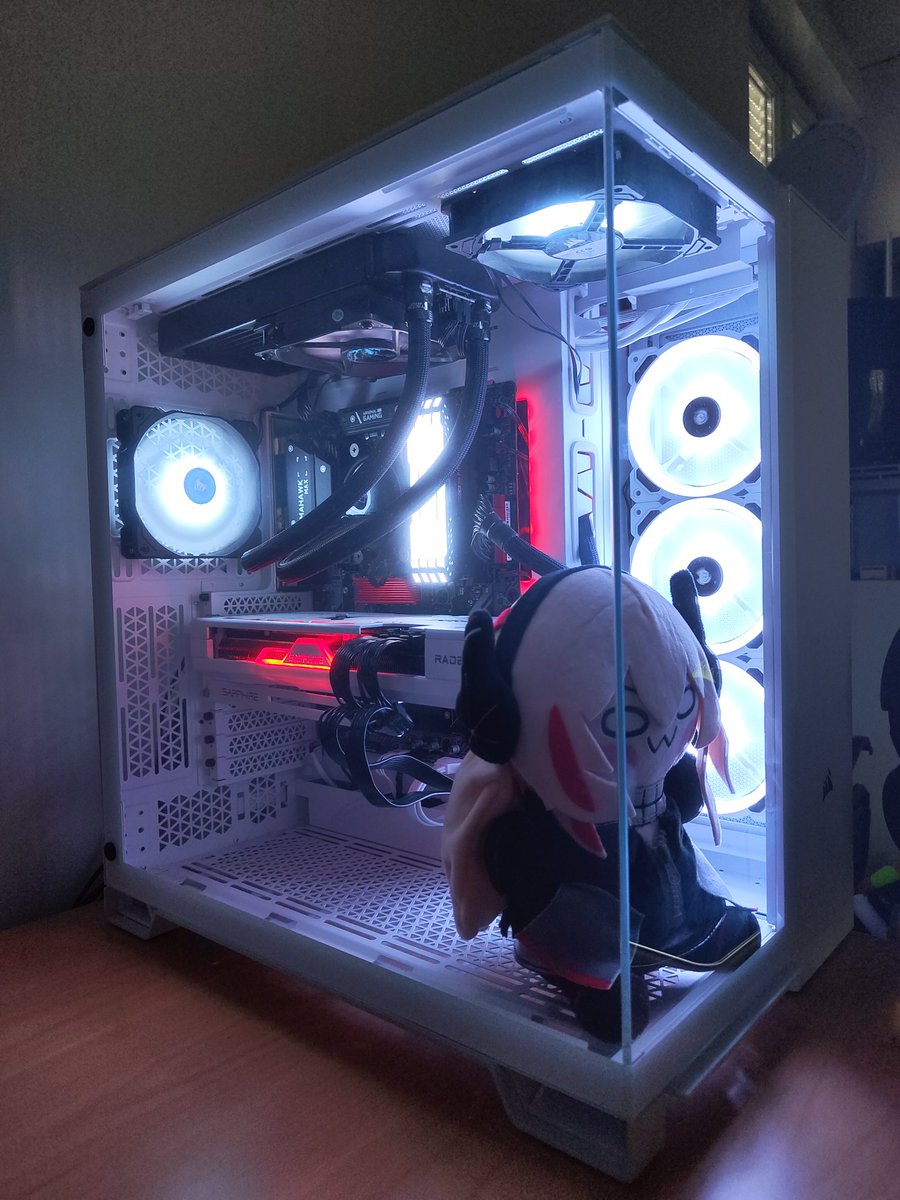
I'm starting slowly to upgrade my PC, beginning with a new case and a new graphic card, Junya for extra frames
storm narwhal
I
 sinful blade
turbid tusk
Ibuypower
sinful blade
turbid tusk
Ibuypower
Iscambuyers, oh no
storm narwhal
The
turbid tusk
sinful blade
Iscambuyers, oh no
Loll
storm narwhal
The aio
turbid tusk
It sorta true
storm narwhal
What is the aio fan setup
velvet summit
😭
turbid tusk
Ur talking about the fans???
sinful blade
turbid tusk
It sorta true
It’s very true
They’re the same as Corsair
They rely on name brand/word of mouth
velvet summit
The worst part is they put the 2nd aio fan as an intake right next to the aio
turbid tusk
sinful blade
It’s very true
They’re the same as Corsair
They rely on name brand/word of mouth
Yea
storm narwhal
The mismatched fan colors pls
velvet summit
Instead of actually putting enough fans in
turbid tusk
storm narwhal
The mismatched fan colors pls
I can show you
storm narwhal
velvet summit
The worst part is they put the 2nd aio fan as an intake right next to the aio
Literally
turbid tusk
storm narwhal
The mismatched fan colors pls
I sent ypu
If you need a close up I can send you one
turbid tusk
storm narwhal
Oh I was talking about the Twitter post lol
Oh ok
I just need help with the pins too be honest
velvet summit
Isn't vintage helping you rn
velvet summit
Rip
turbid tusk
Alright
keen shale
But I gotta go to work here in about 5 minutes
turbid tusk
I can send you a better one
turbid tusk
keen shale
But I gotta go to work here in about 5 minutes
Dam ok
turbid tusk
keen shale
that's the big blue one
Yes
keen shale
That case is nothing proprietary
velvet summit
Need the power switch connected properly
turbid tusk
velvet summit
Need the power switch connected properly
What do you mean by that
velvet summit
The power switch isn't wireless
keen shale
Take a picture of the front panel connector and send it, make sure I can see the wires
keen shale
No, I think the FP connector is wired different but I need to see the wires. Full screened the vid but it was blurry
velvet summit
Could make sure the build works by shorting the pins first
Also make sure the PSU is powered on and plugged in since pretty much everyone has forgotten to do that at least once
turbid tusk
For my 4060
 turbid tusk
keen shale
turbid tusk
keen shale
Have yall never seen this
keen shale
I've seen it, it's just a block instead of individual wires. Need CPU power plugged in in the top left of board, big ATX power connector on the right edge
8 pin CPU power, not 4
turbid tusk
keen shale
8 pin CPU power, not 4
What the difference
keen shale
It may not have an 8 pin and 4 pin, might be 8 only but 4 pin isn't enough juice
It all looks oK here
 keen shale
turbid tusk
What the difference
keen shale
turbid tusk
What the difference
What was the old motherboard>?
turbid tusk
keen shale
What was the old motherboard>?
It was a intel one but i dont know the brand
keen shale
There should be model number on it somewhere
keen shale
unfortunately that doesn't tell me anything
should be model number on it in the screenprinting ink
Probably by the ram slots
You can post pics in here now too, BTW
 keen shale
Between the ram and CPU socket
turbid tusk
It had all the cord connecting
keen shale
Should be something like GA1234PDQ or something
Printed on the board itself
or down by the PCI-E slot
turbid tusk
 turbid tusk
Were would it be at
 craggy shoal
B560 DS3H AC
 gleaming rivet
keen shale
I need a close up of that number
gleaming rivet
keen shale
I need a close up of that number
I'm surprised you didn't just zoom in on the picture. It's clear as day in the pic he sent already, and zooming in took 1 second to do.
I guess even techies forget how to tech.
keen shale
No wonder this place is dead, everyone would rather talk smack than help
turbid tusk
Loll
gleaming rivet
I'm not talking smack. Just surprises me that a techie had to ask a question several times when the answer was staring right at them.
craggy shoal
Interesting how there's no 4x or 1x slots on that Intel motherboard
craggy shoal
velvet summit
Most chill weggian
Search the world's information, including webpages, images, videos and more. Google has many special features to help you find exactly what you're looking for.
turbid tusk
There alor i need too learn
I know some stuff about pc
But there more i need too learn
velvet summit
The more you learn, the more you realize the less you know ☠️
gleaming rivet
None of us know everything about tech. We all learn something new often. It's a never ending book
velvet summit
This goes for pretty much every industry afaik but this one I know firsthand at least
gleaming rivet
True
craggy shoal
You have to relearn a whole different sector of tech once you get too many PC parts and start using them for servers (like I'm doing. And now I self-host a lot of services that you'd normally either be scammed by or you'd have to pay for)
turbid tusk
I dont know if any of these pin as wrong
 gleaming rivet
For example, I've been laying ditra for tile for a year now and just learned that they made a stick down ditra.
gleaming rivet
turbid tusk
I dont know if any of these pin as wrong
You'll want the +2 pin more in line with the 6pin
turbid tusk
In which one
gleaming rivet
Pull them both out and slot them together and push them in together so they are aligned.
gleaming rivet
turbid tusk
In which one
GPU
gleaming rivet
Everything else looks fine. Have you turned this PC on at all?
turbid tusk
Here the cpu
 turbid tusk
gleaming rivet
Everything else looks fine. Have you turned this PC on at all?
turbid tusk
gleaming rivet
Everything else looks fine. Have you turned this PC on at all?
I have
gleaming rivet
If it runs it's good then.
turbid tusk
Here the pins
 turbid tusk
gleaming rivet
If it runs it's good then.
turbid tusk
gleaming rivet
If it runs it's good then.
It not that
It doesnt turn on
Like the stuff doesn’t move any thing
velvet summit
Again, is the PSU switch turned on
gleaming rivet
Ok. If PSU switch is turned on, check your IO cables. Make sure pwr sw is on the correct pins.
Oh I see.
velvet summit
Try shorting the power switch pins to make sure it turns on
gleaming rivet
It's one connector for the front panel io. I dislike those.
Can't quite tell, but almost looks like it's not plugged in all the way.
turbid tusk
velvet summit
Again, is the PSU switch turned on
Yes
gleaming rivet
I'd love to help, but I gotta jet. Gotta get the cooler filled then up to the store to get ice. Supposed to be 44c out today.
turbid tusk
Were the io cables
velvet summit
velvet summit
Try shorting the power switch pins to make sure it turns on
Try this then
craggy shoal
Make sure you didn't put the power switch cables on the reset pins lol
turbid tusk
Uhhh
gleaming rivet
turbid tusk
Were the io cables
The cable connector at the bottom right of your mobo.
Since it's a single connector. It should only go on one way.
turbid tusk
That right there
 gleaming rivet
turbid tusk
That right there
gleaming rivet
turbid tusk
That right there
Yes.
Looks like it's not plugged in all the way.
If it's not going in all the way, don't force it. Turn it upside down and try that way.
velvet summit
Does it power on though
gleaming rivet
Hm
gleaming rivet
Swap it upside and try that.
turbid tusk
 gleaming rivet
Yeah ok nvm
turbid tusk
Im just confused what i did wrong
gleaming rivet
Since I gotta get goin. My next suggestion is to unplug the cables and plug everything back in. Making sure they are fully seated.
turbid tusk
Hd audio is in the jaud1
gleaming rivet
This include into your PSU as well if they are plugs.
velvet summit
Literally
Try shorting the power switch pins with a screwdriver so that we know the PC works
velvet summit
keen shale
Top row last 2 pins
gleaming rivet
velvet summit
Literally
Try shorting the power switch pins with a screwdriver so that we know...
If his cables aren't plugged in all the way, at the PSU or 24pin, then it wouldn't have any effect anyways.
velvet summit
gleaming rivet
If his cables aren't plugged in all the way, at the PSU or 24pin, then it wouldn...
Yeah, so we're trying to figure out if it's the power switch that's not working or if they didn't plug the power in correctly
gleaming rivet
His GPU cable was already plugged in funky so im wondering what other plug might have been funky as well.
turbid tusk
gleaming rivet
His GPU cable was already plugged in funky so im wondering what other plug might...
Everything was right
velvet summit
If it doesn't turn on, then we know it's not the switch
It it does, then it's the fp connector or the switch
gleaming rivet
turbid tusk
Everything was right
Everything can "seem" right. Part of figuring out issues with anything, is troubleshooting. Even the things that look like they are correct.
velvet summit
It's a quick and easy troubleshooting step
turbid tusk
gleaming rivet
Everything can "seem" right. Part of figuring out issues with anything, is troub...
I made suree they were snuggled in
 pliant berry
what motherboard is this
velvet summit
B550 gaming plus
craggy shoal
pliant berry
what motherboard is this
B560 DS3H AC (Don't listen to me)
velvet summit
craggy shoal
~~B560 DS3H AC~~ (Don't listen to me)
Old mobo
craggy shoal
ah gotcha
turbid tusk
craggy shoal
~~B560 DS3H AC~~ (Don't listen to me)
It a different one he wanted to see the old one
velvet summit
New one is the b550
craggy shoal
ur mom
turbid tusk
No no
gleaming rivet
I see
turbid tusk
Msi b550 gaming plus motherboard
pliant berry
Alright so just as @velvet summit said I'd try just shorting the pins to make sure it even works in the first place.
Easiest way is to take a screwdriver and touch it between these 2 pins on the front panel header:
 turbid tusk
pliant berry
Alright so just as <@297812853174566913> said I'd try just shorting the pins to ...
turbid tusk
pliant berry
Alright so just as <@297812853174566913> said I'd try just shorting the pins to ...
It jusy one big block
turbid tusk
pliant berry
Alright so just as <@297812853174566913> said I'd try just shorting the pins to ...
Since my case was a prebuilt
pliant berry
Have you been able to turn on the system yet
turbid tusk
pliant berry
Have you been able to turn on the system yet
What that
craggy shoal
turbid tusk
What that
It's when you press the power button and the system turns on
pliant berry
I am just wondering if this is a new system or it had previously worked


 pliant berry
oh a mobo swap?
velvet summit
Indeed
craggy shoal
bruh
 high star
c c c cooked
craggy shoal
But I can't send more than 7 messages within 10 seconds or I'll get muted for 24 hours lol
high star
brutal
craggy shoal
lol
velvet summit
turbid tusk
It jusy one big block
Try to use a screwdriver to touch the 2 pins on the MOBO highlightef
turbid tusk
velvet summit
Try to use a screwdriver to touch the 2 pins on the MOBO highlightef
Can you circle it please
craggy shoal
The power pins
pliant berry
yeah so what we mean by that is take this cable out and touch the screwdriver to the bare pins I had highlighted before
 velvet summit
pliant berry
Alright so just as <@297812853174566913> said I'd try just shorting the pins to ...
velvet summit
pliant berry
Alright so just as <@297812853174566913> said I'd try just shorting the pins to ...
 turbid tusk
velvet summit
turbid tusk
velvet summit
Do i press down on it
pliant berry
if the system was working properly it would immediately click on
turbid tusk
pliant berry
if the system was working properly it would immediately click on
Dam alright
pliant berry
So btw you replaced the motherboard? Was there a problem before that led to that?
turbid tusk
pliant berry
So btw you replaced the motherboard? Was there a problem before that led to that...
I got a new cpu
And the old one was a intel
And I need a ryzen just too make my 4060 better
Because mad people recommend it too me
What this for
 velvet summit
Gpu
pliant berry
ah ok so an upgrade
velvet summit
Some gpus
turbid tusk
pliant berry
ah ok so an upgrade
Yes
craggy shoal
What CPU are you upgrading to?
high star
bro did not answer the question
craggy shoal
to. not from
turbid tusk
craggy shoal
to. not from
Ryzen 5 5600x
I had tons of people telling me it was fine if i use this
But i dont know
craggy shoal
it's fine
turbid tusk
I have a rtx 4060 ventus 2x
craggy shoal
What's the exact Intel CPU though?
pliant berry
one sec, where do you have these 2 cables connected and would you be able to take another pic at a different angle
 turbid tusk
My friend recommended me another cpu because for that
turbid tusk
craggy shoal
What's the exact Intel CPU though?
I dont remember
craggy shoal
I mean it's either 10th or 11th gen. Can't be that bad I'd imagine
turbid tusk
turbid tusk
craggy shoal
I mean it's either 10th or 11th gen. Can't be that bad I'd imagine
No that shi was bottle necking alot
turbid tusk
turbid tusk
@pliant berry
turbid tusk
turbid tusk
Oml bad quality
craggy shoal
tube moment
velvet summit
real
pliant berry
Also when you have the PSU switched on do any leds light up in the system
turbid tusk
pliant berry
Also when you have the PSU switched on do any leds light up in the system
What do you mean by that
high star
like any indicator lights on the mobo
pliant berry
Usually systems will leave some LEDs on even when shut down as long as the PSU is supplying power
turbid tusk
pliant berry
Usually systems will leave some LEDs on even when shut down as long as the PSU i...
Werr would that be
turbid tusk
craggy shoal
wherever there's LEDs
I DONT KNOW
I HAVE ONE CORD THAT NOT PLUG IN IT CALLED THE MB SIGNAL
high star
chill out dawg
turbid tusk
high star
chill out dawg
Sorry I had on cap lovk
 unique heath
ohh myy
velvet summit
turbid tusk
I don’t im just so confused
dont mind my few messages there, was unrelated lmao
i use a tube amplifier for my headphones so that takes like 30 seconds to warm up
pliant berry
Those cables you pointed out at the end might be fan cables. Could be wrong there I'm not great with that stuff
turbid tusk
Were would they go
pliant berry
it would depend on which fans they are. If you can trace them to see if it is a case fan or cpu fan that would help. My guess would be case fan since you have a cpu fan plugged in already

You have your PSU switched on too when you are attempting to start it right?
craggy shoal
Just send us a photo of the rear of your PSU (where the power switch is)
turbid tusk
pliant berry
Ok
turbid tusk
pliant berry
turbid tusk
pliant berry
You have your PSU switched on too when you are attempting to start it right?
 velvet summit
oh hey it's a hybrid psu
craggy shoal
lol
turbid tusk
velvet summit
oh hey it's a hybrid psu
Wait is that bad
velvet summit
no
velvet summit
all that means is that the psu is quieter when idle since the fan isnt spinning
turbid tusk
velvet summit
all that means is that the psu is quieter when idle since the fan isnt spinning
Ok
I wish i had a micro center close too me
The close one is a hour n 30min drive
 wary fjord
pliant berry
Alright so just as <@297812853174566913> said I'd try just shorting the pins to ...
wary fjord
pliant berry
Alright so just as <@297812853174566913> said I'd try just shorting the pins to ...
 velvet summit
wary fjord
https://tenor.com/view/animation-cartoons-toons-moves-family-guy-gif-14827777
velvet summit
wary fjord
https://tenor.com/view/animation-cartoons-toons-moves-family-guy-gif-14827777
 turbid tusk
I might go to best buy or micro center too see if i did anything wrong i can tell you guys know what ur doing it would be better if i had yall in person
pliant berry
Well I'm starting to get at a loss here, only thing I can think of rn is trying a different outlet since I am seeing no signs of life. That or trying to boot with only 1 stick on ram in 2nd slot but even if it was wrongly configured it should at least briefly turn on
Yeah can be hard to communicate over the interwebs
opaque sedge
 turbid tusk
I went too my bedroom too see if different outlet work alright @pliant berry
wary fjord
turbid tusk
I might go to best buy or micro center too see if i did anything wrong i can tel...
i will tear that apart
lay it down like dismantel gun
put it barebone
and keep adding till it doesnt work
i do recommend ups with avr + surge on it xD incase ur pc is not fond with sudden changes with power delivery from the wall.. tons of pc died that way..
since u suspect that wall of yours to be culprit xD
it only take.. 1 cpu, 1 stick of ram.. cpu pin power and 24 pin and short the power on to see if it has sign of life..
if ur pc dint even pass that then gg xD
turbid tusk
pliant berry
Well I'm starting to get at a loss here, only thing I can think of rn is trying ...
I did everything i dont know what to do now
wary fjord
bring it to micro center
wary fjord
opaque sedge
https://youtube.com/shorts/toyMSdh5a0g?si=3y0TZO8E_4sHyDJ2 💀
4060ti here has same price as 7800xt here xD
opaque sedge
wary fjord
4060ti here has same price as 7800xt here xD
damn wth, the 7800xt has good 1440p performance right? would be the obv choice then
why did I decide to build a pc right after the week deepcool was banned, RIP you will be missed even though I never had the opportunity to use you

 lone mango
 mighty hazel
opaque sedge
why did I decide to build a pc right after the week deepcool was banned, RIP you...
mighty hazel
opaque sedge
why did I decide to build a pc right after the week deepcool was banned, RIP you...
I think you can still buy them
gleaming rivet
What's this about deepcool?
 rancid juniper

VideoCardz.com
NVIDIA is said to be working on a new TITAN But will it ever be released? A recent video from RedGamingTech suggests that there is a new TITAN graphics card from NVIDIA currently under active development. Although designs for TITAN models within the RTX 30 and 40 series were planned, these plans were ultimately scrapped, […]
sinful blade
Okay
Friend of mine needs a mini-pc. Like these

I need to find the most powerful one for £700. He lives in the UK
I have no idea what to look for with these things
opaque sedge
guys stupid question, are there any small screen accessories i can use to track fps and temps outside of my display?
high star
uhhhh
i'm sure they exist
 idle nexus
great news. glad it worked out!
opaque sedge
sinful blade
I need to find the most powerful one for £700. He lives in the UK
Mac mini?
Oh wait
Macs bad
opaque sedge
opaque sedge
Mac mini?
Looks like the m2s are going for 500usd rn but the storage and ram limitations are…
high star
reddit says nzxt h1 mini is okay idk if it's small enough
velvet summit
opaque sedge
Macs bad
?
opaque sedge
velvet summit
?
I’m just frustrated remembering i paid 200 bucks extra for 16 gigs of ram
velvet summit
opaque sedge
guys stupid question, are there any small screen accessories i can use to track ...
well, yeah, buy a mini display and then use some fps/temp monitoring software and make it display on that
sinful blade
opaque sedge
Mac mini?
They wanna do some gaming on it
rancid juniper

VideoCardz.com
Ryzen 9 9900X vs 7800X3D in gaming SaddyTech has the world’s first gaming review of Zen5. Italian tech reviewer SaddyTech has obtained a sample of AMD’s upcoming Ryzen 9 9900X processor shortly before its launch. Officially, these processors are set to be released next week, but it seems there is little reason to wait for […]
opaque sedge
sinful blade
They wanna do some gaming on it
Aren’t there apu systems out rn?
 opaque sedge
rancid juniper
https://videocardz.com/newz/italian-zen-5-review-ryzen-9-9900x-falls-short-again...
opaque sedge
rancid juniper
https://videocardz.com/newz/italian-zen-5-review-ryzen-9-9900x-falls-short-again...
I love you microcenter
 rancid juniper
man i wish microcenter was everywhere
they are like the only tech store with the best deals
no fair
sinful blade
I just need to find him something very small that can handle some video games for $700
Doesn’t have the space for micro atx:(
opaque sedge
rancid juniper
man i wish microcenter was everywhere
Microcenter is really good, and if peeps have extra cash to burn for first time pc builds their protection plans seem to be one of the better ones as well
rancid juniper
mmmm
opaque sedge
rancid juniper
mmmm
It’s accidental dmg, like who knows if they end up bending some pins
Fully covered
rancid juniper
nice
opaque sedge
(Their insurance company is kinda mad at them tho apparently)
opaque sedge
velvet summit
well, yeah, buy a mini display and then use some fps/temp monitoring software an...
Nice
I will check some out
Hopefully i can find one for under 50 bucks
pliant berry
omg this is a godsend
 sinful blade
I just need to find him something very small that can handle some video games fo...
sinful blade
sinful blade
I just need to find him something very small that can handle some video games fo...
If anyone has any suggestions, let me know
wary fjord
rancid juniper
https://videocardz.com/newz/italian-zen-5-review-ryzen-9-9900x-falls-short-again...
why are they comparing x3d to x series
rancid juniper
wary fjord
why are they comparing x3d to x series
i guess to compare how strong the 9900x is without 3d vcache?
rancid juniper
if amd were to make an x3d apu, it might end up looking quite THICC
rancid juniper
 dusk knot
Bored
dusk knot
Bored
lets play fortnite @wary fjord @dusk knot
opaque sedge
rancid juniper
if amd were to make an x3d apu, it might end up looking quite THICC
Their ai apus are long bois right?
dusk knot

rancid juniper
opaque sedge
Their ai apus are long bois right?
lol probably, for desktops its the same size
opaque sedge
rancid juniper
lets play fortnite <@608076552252555264> <@350124341238824960>
You guys play fortnite together 😭
rancid juniper
sometimes
opaque sedge
Does cyberpunk have coop mode?
opaque sedge
Maybe theres a mod for it
opaque sedge
rancid juniper
there is a multiplayer mod in the works
Oh nice
opaque sedge
rancid juniper
im excited for that
I wonder how it would look to see another player use the sandy
rancid juniper
interesting...
opaque sedge
rancid juniper
interesting...
Imagine ur able to recreate the adam smasher vs david fight
That would be sick
rancid juniper
would be awesome for sure
 mortal grail
rancid juniper
https://videocardz.com/newz/italian-zen-5-review-ryzen-9-9900x-falls-short-again...
mortal grail
rancid juniper
https://videocardz.com/newz/italian-zen-5-review-ryzen-9-9900x-falls-short-again...
Not surprised
6c ccd vs 8c ccd
 rancid juniper
mortal grail
6c ccd vs 8c ccd
rancid juniper
mortal grail
6c ccd vs 8c ccd
whats a ccd and how does it work in laymans terms??
i dont know much about ryzen
mortal grail
~10-15%+ IPC not gonna fix 25% less cores
mortal grail
rancid juniper
whats a ccd and how does it work in laymans terms??
i dont know much about ryze...
Core cluster
opaque sedge
mortal grail
Not surprised
felix and the rest of you guys thank you so much for convincing me to get the x3d bundle over the 7700x one
mortal grail
9900x = 6+6
opaque sedge
For 100 more
rancid juniper
AMD OPERATING BIG LITTLE CORES?
rancid juniper
lol
turbid tusk
Im just sad genuinely i made my computer for the first time nothing going right
mortal grail
Ryzen has always been like this
rancid juniper
im mistaking it for how arm does it
sinful blade
@mortal grail halo
mortal grail
6
8
1 ccd
12
16
2 ccd
turbid tusk
And it didnt work
mortal grail
Omg guys one at a time
sinful blade
I need some assist
mortal grail
💀
opaque sedge
turbid tusk
Ive done every trick
There shouldn’t be tricks?
rancid juniper
mortal grail
💀
apparently they said that the 9700x would be better
mortal grail
rancid juniper
apparently they said that the 9700x would be better
Specifically in games yes
turbid tusk
opaque sedge
There shouldn’t be tricks?
No like using a screw too turn it on or taking the ram out
opaque sedge
sinful blade
# No, talk to all of us at once
Make a hivemind system like unity from rick and morty to talk to us at once
turbid tusk
That what people recommend me what to do
mortal grail
Inter ccd latency will have a real impact
mortal grail
opaque sedge
felix and the rest of you guys thank you so much for convincing me to get the x3...
Glad to see it's hitting home. Happy to help
opaque sedge
turbid tusk
No like using a screw too turn it on or taking the ram out
Might be faulty parts, still have its return period? Also did you check all the connections?
turbid tusk
opaque sedge
Might be faulty parts, still have its return period? Also did you check all the ...
Yes the outlet
mortal grail
What's the thing chums got a problem with
turbid tusk
And other stuff
mortal grail
I have no context
opaque sedge
mortal grail
What's the thing chums got a problem with
His pc aint booting apparently
turbid tusk
Like nothing going right and people told me everything seem to be check out
But nothing is booting
high star
mortal grail
What's the thing chums got a problem with
switched mobos and pc is weird now
opaque sedge
turbid tusk
Like nothing going right and people told me everything seem to be check out
Post a pic of your current progress
turbid tusk
opaque sedge
Post a pic of your current progress
I have tons of video
opaque sedge
Connections included
turbid tusk
opaque sedge
Connections included
Everything is connected
opaque sedge
turbid tusk
Like nothing going right and people told me everything seem to be check out
Did you buy the parts new?
turbid tusk
opaque sedge
Did you buy the parts new?
Yes


I might have too buy a new case
Because i was building in a prebuilt
But upgrading everything in it
opaque sedge
turbid tusk
Try removing two ram stick and keep the ones in the a2 and b2 slots
turbid tusk
opaque sedge
Try removing two ram stick and keep the ones in the a2 and b2 slots
Alright
opaque sedge
And if it doesn’t work try swapping one of those with the one from the two you removed
opaque sedge
turbid tusk
Alright
Also are the connecters in the psu itself all the way in?
turbid tusk
It still not showing any life
opaque sedge
turbid tusk
It still not showing any life
Alright now swap one of those with one from the pair you removed
And nothing then swap out the remaining one
Also stupid question
Is the button on your psu on i?
Should’ve asked that first

turbid tusk
opaque sedge
Is the button on your psu on i?
It o/i and yea i know the difference
mortal grail
@turbid tusk so you swapped mobos and what's happening?
turbid tusk
opaque sedge
Alright now swap one of those with one from the pair you removed
Swap the ram around a1 b1
mortal grail
Just not booting?
mortal grail
Ok what's your specs
I see gaming plus, I see amd
I see an rtx card
All from top to bottom if you can
turbid tusk
mortal grail
Ok what's your specs
Rtx 4060 ventus 2x ryzen 5 5600x 32 gb ram and psu 850
 tranquil bronze
hello i need help, just received my Yeyian and i plusgged everything, didn't get instructions if i had to do anything else and the HDMI doesn't do anything my screen doesn't show anything.
turbid tusk
mortal grail
What kind of psu
Thermalake
turbid tusk
mortal grail
What's the rest
 mortal grail
Ok great
opaque sedge
Stupid question felix the pc would still boot into bios even without a drive right?
mortal grail
So you press the power and what happens
mortal grail
opaque sedge
Stupid question felix the pc would still boot into bios even without a drive rig...
That's all it'll do
high star
gf a3 is a good psu innit
mortal grail
Yes
high star
alright good i just bought one
mortal grail
It's decent for most things
turbid tusk
high star
alright good i just bought one
Lol
mortal grail
tranquil bronze
hello i need help, just received my Yeyian and i plusgged everything, didn't get...
Did you change input
turbid tusk
mortal grail
It's decent for most things
I bought it for my gpu
opaque sedge
high star
gf a3 is a good psu innit
Me asking bout my xpg core reactor just because i saw a bad review
mortal grail
turbid tusk
I bought it for my gpu
Your gpu is one of the lowest power drawing gpus in the current gen
tranquil bronze
mortal grail
Did you change input
what do you mean by that
opaque sedge
turbid tusk
I bought it for my gpu
850w kind of overkill for the 4060 no?
mortal grail
tranquil bronze
what do you mean by that
Did you select "hdmi 1" "displayport" "hdmi 2"
 mental yoke
Purely out of curiosity;
Has anyone heard of raptor lake xeons having the same issue that the 13/14900s are having?
I've heard it's a big issue in servers as well, but everything I've seen talking about it are specifically talking about 13/14900 servers
mortal grail
mental yoke
Purely out of curiosity;
Has anyone heard of raptor lake xeons having the same i...
Nope
Not high clocking enough like desktop
turbid tusk
opaque sedge
850w kind of overkill for the 4060 no?
It was on a deal
mortal grail
opaque sedge
850w kind of overkill for the 4060 no?
5600+4060 could work on a 400w unit if it was good enough but put that to one side
tranquil bronze
mortal grail
Did you select "hdmi 1" "displayport" "hdmi 2"
on the pc itself? i thought that's already configured?
mortal grail
tranquil bronze
on the pc itself? i thought that's already configured?
Monitor
turbid tusk
mortal grail
5600+4060 could work on a 400w unit if it was good enough but put that to one si...
I had one but it didn’t work well
opaque sedge
turbid tusk
It was on a deal
Noice
opaque sedge
mortal grail
Well nothing wrong in psu being the biggest spend
My ram costed more than my psu 💀
turbid tusk
opaque sedge
My ram costed more than my psu 💀
😭
mortal grail
Yes but I told you which one
Lol
If you went and bought an ax1600i I'd give you a funny look but wouldn't say it's bad lol
mental yoke
mortal grail
Not high clocking enough like desktop
The xeon e2400 has a boost frequency of 5.6ghz just like the 13900
opaque sedge
mortal grail
Yes but I told you which one
Nope i showed you the list you made some modifications and i swapped bundles and stuff but the psu has been the same since the beginning
mortal grail
mental yoke
The xeon e2400 has a boost frequency of 5.6ghz just like the 13900
Still haven't heard anything to date. It's purely desktop segment
mental yoke
Strange
opaque sedge
opaque sedge
Nope i showed you the list you made some modifications and i swapped bundles and...
You took a look at the cultist web and told me its a good one
mortal grail
opaque sedge
You took a look at the cultist web and told me its a good one
I never look at cultists
opaque sedge
Hmm might have been smn else then
mortal grail
I have hated them since they had mad anti-amd bias for almost 2 years now
I used cmaris
mortal grail
The guy they use to make the list
opaque sedge
mortal grail
I used cmaris
Oh nice new source unlocked
mortal grail
Cmaris is way better
He doesn't do tiers
None of that bs
He objectively reviews each unit comprehensively
rancid juniper
ARE TEE EX FORTY THIRTY TIE
high star
rancid juniper
ARE TEE EX FORTY THIRTY TIE
rahhhh
mortal grail
opaque sedge
Is it a utuber?
Hwbusters website
turbid tusk
Should i use on ram too see if that work
turbid tusk
mortal grail
<@956475570626125845> when you turn it on what happens
It doesnt
mortal grail
Have you pressed the power button
velvet summit
mortal grail
Well nothing wrong in psu being the biggest spend
spend $1000 on a pc case
tranquil bronze
mortal grail
Monitor
i'm checking that right now
turbid tusk
mortal grail
Have you pressed the power button
Yes
velvet summit
i told them to try shorting the mobo headers earlier but idk if they did it since i went to go do other stuff
turbid tusk
opaque sedge
mortal grail
Hwbusters website
Damn they haven’t reviewed the one i have it seems
mortal grail
Which one
opaque sedge
Xpg core reactor 850w 1
mortal grail
opaque sedge
Xpg core reactor 850w 1
Really old review, they did v2 and it's better
opaque sedge
The first one they have only reviews the kybers and core reactor iis
mortal grail
V1 and V2 both good
opaque sedge
Nice
turbid tusk
mortal grail
Fix the fpanel connector
I did multiple times
opaque sedge
Damn I didn’t know xpg made cases and fans
mortal grail
@turbid tusk fix this
 opaque sedge
So they have ram and storage
mortal grail
It's not plugged in
turbid tusk
mortal grail
It's not plugged in
It is
opaque sedge
mortal grail
<@956475570626125845> fix this
Yh doesn’t look like its all the way in
mortal grail
Push it further in then try again
Zero response from pc either means the power button doesn't work, not plugged in properly, or psu is completely fried
And I doubt the last one but not unheard of
opaque sedge
mortal grail
*Zero* response from pc either means the power button doesn't work, not plugged ...
Wbt bad mobo?
mortal grail
Nope
opaque sedge
New info learned
mortal grail
Mobo will turn on unless the 24pin traces were destroyed
Irregardless of how bad it is
opaque sedge
Glad everything went well with my build, i would have started crying ugly if i went thru this stuff 😭
mortal grail
The worst you'd see would be fireworks
opaque sedge
opaque sedge
Glad everything went well with my build, i would have started crying ugly if i w...
(Also a week after i built my pc I discovered my 24 pin connector wasn’t all the way in) 💀
I lucked out a lot ngl
mortal grail
But nothing is something's not turning it on
Very rarely otherwise is it's a dead psu
Or a ruined power pin
turbid tusk
mortal grail
Very rarely otherwise is it's a dead psu
I just bought it like two days
opaque sedge
mortal grail
Very rarely otherwise is it's a dead psu
Chum did say he got his for a deal, do retailers sell refurb psus by any chance?
mortal grail
If it was that bad
mortal grail
opaque sedge
Chum did say he got his for a deal, do retailers sell refurb psus by any chance?
Even still it'd turn on
turbid tusk
opaque sedge
Chum did say he got his for a deal, do retailers sell refurb psus by any chance?
No it has the plastic on and everything was good
mortal grail
Very rare for it to do nothing at all
turbid tusk
And all sorta of stuff
And the front panel is fully push it just look like that
For some reason
mortal grail
So you pushed the power connector further in and tried again?
turbid tusk
mortal grail
So you pushed the power connector further in and tried again?
Yes
If i kept goinf it would break
mortal grail
Send pic
If it's still no better take it out and use a screwdriver
Bad case fpanel connector is a realistic issue
turbid tusk
 opaque sedge
Oh crap felix is this fine? Or should i try pushing it in more?
 mortal grail
opaque sedge
Oh crap felix is this fine? Or should i try pushing it in more?
mortal grail
opaque sedge
Oh crap felix is this fine? Or should i try pushing it in more?
Push in a bit more
Low low risk but I would anyway
turbid tusk
 mortal grail
Ye it looked in
turbid tusk
That my front panel
mortal grail
So you tried it again
mortal grail
Did it work
turbid tusk
Everything fine
mortal grail
So it turned on?
turbid tusk
Im just confused why it wont boot up
turbid tusk
mortal grail
So it turned on?
No
mortal grail
Ok so it still didn't work
 elfin mural
Have you made sure the psu's switch is flipped to on?
turbid tusk
Because i already test thing for it
mortal grail
Go to your mobo manual and use a screwdriver to short the fpanel pins
turbid tusk
elfin mural
Have you made sure the psu's switch is flipped to on?
YESS
mortal grail
For power on
turbid tusk
Im not that dumb
elfin mural
Okie just making sure
mortal grail
Take the fpanel cable out
mortal grail
Unplug from board
turbid tusk
mortal grail
Unplug from board
I did
turbid tusk
Mother board msi b550 gaming plus
mortal grail
Great
Google the manual for it
Go look in there for the front panel plug
Find the two "POWER SWITCH" pins
Bridge them with a screwdriver
opaque sedge
Its not going in any farther
 turbid tusk
I did
mortal grail
And what happens
turbid tusk
mortal grail
And what happens
Nothing
Im just thinking about let some one more smarter build this for me
I swear everrything was right
turbid tusk
mortal grail
That and only that
Different cpu and gpu
velvet summit
opaque sedge
Its not going in any farther
there's alot of friction, it takes a bit of effort to push it in all the way
turbid tusk
And got mpre ram
mortal grail
Ok so several things
turbid tusk
mortal grail
Ok so several things
Yes
mortal grail
Quick test
You could try putting the old cpu and gpu back in just to be sure
If nothing at that point
Mobo dead
Like dead dead
Pretty sure it's dead now but that would make it definitive
turbid tusk
mortal grail
You could try putting the old cpu and gpu back in just to be sure
My first gpu die
mortal grail
Eh
turbid tusk
And the cpu was bad
velvet summit
mortal grail
You could try putting the old cpu and gpu back in just to be sure
they switched from intel to amd though
opaque sedge
Is this tearing by anychance?
 velvet summit
opaque sedge
Is this tearing by anychance?
velvet summit
opaque sedge
Is this tearing by anychance?
the circle makes it harder to see
mortal grail
If it does
velvet summit
☠️
turbid tusk
mortal grail
Put old cpu and mobo in
The motherboard damage it wont
opaque sedge
velvet summit
the circle makes it harder to see
 turbid tusk
The mobo is damaged nothing I can do
high star
what a travesty
velvet summit
opaque sedge
just looks scratched, should be fine?
turbid tusk
No i had a different one
turbid tusk
But it was crappy
It doesnt let you connect it
It has all the stuff connected
In too one big back rope
mortal grail
Non modular
opaque sedge
velvet summit
there's alot of friction, it takes a bit of effort to push it in all the way
This is taking more than effort 😭 i might need that anime power of friendship for this
mortal grail
Typing slow for now
opaque sedge
Like ur limb
mortal grail
Like my arm
craggy shoal
his arm
turbid tusk
When i had my old psu it had all the cord in too this thing
 mortal grail
My arm
mortal grail
Ik what non modular is chum don't worry
mortal grail
opaque sedge
Wth you okay?
Was typing then suddenly extreme pain
Idk never had that before
opaque sedge
mortal grail
Was typing then suddenly extreme pain
Not your left arm by any chance right?
opaque sedge
Phew
 primal kettle
Not sure where else to ask this, is there any way to tell if a laptop's memory and storage is upgradeable or soldered?
velvet summit
mortal grail
Was typing then suddenly extreme pain
forearm?
opaque sedge
mortal grail
Not a stroke
Go check your face in the mirror to be sure
turbid tusk
mortal grail
Ik what non modular is chum don't worry
Alright
mortal grail
primal kettle
Not sure where else to ask this, is there any way to tell if a laptop's memory a...
Opening it
primal kettle
I mean before you buy it
mortal grail
primal kettle
I mean before you buy it
Teardown vid
 gleaming sedge
Look up videos on it
mortal grail
No they don't publish this info
Not normally
@turbid tusk I am suspect of three things
turbid tusk
Ok
opaque sedge
GODDAMMIT THATS IT ITS HAMMER TIME
 primal kettle
Found a video and it does
 worthy meteor
primal kettle
Not sure where else to ask this, is there any way to tell if a laptop's memory a...
worthy meteor
primal kettle
Not sure where else to ask this, is there any way to tell if a laptop's memory a...
Sometimes it's in the specs, when it's not, you have to look for a teardown vid or read reviews
mortal grail
turbid tusk
Ok
- Doa PSU
- Doa mobo
- Somehow a really bad bridge in the case
turbid tusk
What a Doa
turbid tusk
Dam
 mortal grail
opaque sedge
Guys i wanna give up…
mortal grail
opaque sedge
Guys i wanna give up…
Chill
mortal grail
opaque sedge
GODDAMMIT THATS IT ITS HAMMER TIME
Looks fine now
high star
acoustic is not that bad dude
mortal grail
@turbid tusk take either or both back for a swap, come back, try again
I'd do both if same place
Try mobo first
turbid tusk
That what im doing
craggy shoal
I'm eating chicken wings with a fork
mortal grail
Unplug the psu from all the cables except mobo cable
turbid tusk
It seem like you know what ur doing but it would be better help irl
 rough zinc
Best solution is to buy a 5090
mortal grail
Nah nah hear me out
opaque sedge
mortal grail
Looks fine now
Really thank god i was trying to get that lock thing in
opaque sedge
rough zinc
~~Best solution is to buy a 5090~~
Bro wants us to raid nvidia hq for the prototype
mortal grail
mortal grail
Unplug the psu from all the cables except mobo cable
^Do this, then unplug mobo cable from mobo and do a paperclip test
turbid tusk
mortal grail
^Do this, then unplug mobo cable from mobo and do a paperclip test
I dont have a paper clip
turbid tusk
We woudlnt have one
My mom hate paper clip
Because my little brother would turn them in too a shanker
mortal grail
Go to an office supply store and get one
I don't have another alternative to a paperclip
high star
how does one find themself in this sort of situation
worthy meteor
Idk maybe take 3 nails and tape them together
mortal grail
mortal grail
https://help.corsair.com/hc/en-us/articles/360025085372-PSU-How-to-test-a-PSU-Po...
Do this test, if fan spins, psu good, only mobo dead, if fan doesn't spin then psu dead, mobo good
mortal grail
worthy meteor
Idk maybe take 3 nails and tape them together
I like fireworks too
turbid tusk
mortal grail
I like fireworks too
Lol
mortal grail
Paperclip not substitutable
turbid tusk
I took everything out of the psu
opaque sedge
Didn’t lock in but looks a but better than before

 turbid tusk
Im gonna re ass
worthy meteor
You should only be jumping pins that don't carry any current with paperclip test
I don't think it matters what you use
turbid tusk
opaque sedge
Didn’t lock in but looks a but better than before
It look the same or am i blind
worthy meteor
As long as it's conductive
mortal grail
worthy meteor
You should only be jumping pins that don't carry any current with paperclip test
I still wouldn't do something so MacGyver with a 115v mains
Lol
opaque sedge
opaque sedge
You being blind that is <:kekw:741678350791081994>
Jk jk hard to notice the difference
worthy meteor
Fair
mortal grail
But yeah go try that test, you need a paperclip, no way round it
mortal grail
mortal grail
Do this test, if fan spins, psu good, only mobo dead, if fan doesn't spin then p...
^
opaque sedge
opaque sedge
Didn’t lock in but looks a but better than before
Just hoping it doesn’t come loose
It would have been best for the notch to lock in but its not cooperating
turbid tusk
I havent done anything bad too it and it all mess up wtf
 mortal grail
And I mean that as in, fan spins so it's good enough to turn on
It can spin and still be bad
But not never turns on bad
worthy meteor
turbid tusk
I havent done anything bad too it and it all mess up wtf
Wdym messed up? It looks normal
opaque sedge
opaque sedge
Didn’t lock in but looks a but better than before
This look okay to yall?
The first pic
mortal grail
turbid tusk
I havent done anything bad too it and it all mess up wtf
Just the quality of the joins
turbid tusk
worthy meteor
Wdym messed up? It looks normal
The 24pin id slant
opaque sedge
opaque sedge
This look okay to yall?
 turbid tusk
mortal grail
They're rarely ever perfectly straight
turbid tusk
mortal grail
They're rarely ever perfectly straight
Ol
opaque sedge
Whew
rough zinc
mortal grail
I don't have another alternative to a paperclip
Wire
turbid tusk
Well im gonna go too best buy because this shi isnt working i wish yall were here because it would be helpful
rough zinc
3 nails taped together
mortal grail
rough zinc
3 nails taped together
I like fireworks
mortal grail
rough zinc
Wire
Works but if he doesn't have paperclips due to a kleptomaniac bro I would say wires aren't there either
rough zinc
There shouldn’t be sparks lol, you should only be jumping non current carrying pins
mortal grail
mortal grail
I still wouldn't do something so MacGyver with a 115v mains
^
Second person to discuss with me this
Lol
I could trust you or Mr1111 to do it, not a rando I just met
rough zinc
LOL
mortal grail
Nay if either of you lit up like a neon nightclub sign I'd in fact be there with my popcorn front seat
worthy meteor
Lmao we just share the same brain cell
mortal grail
mortal grail
Nay if either of you lit up like a neon nightclub sign I'd in fact be there with...
(Yes ik that wouldn't happen but I still would be there)
opaque sedge
PC didn't explode guys!!
mortal grail
Nice
opaque sedge
typing from pc
opaque sedge
mortal grail
My arm is dead
have you checked you pcie connection
mortal grail
Super felix leaves to save the day again another day
worthy meteor
Yea numbs the pain if nothing else
mortal grail
Be back later
opaque sedge
mortal grail
Real
did you work out real hard recently?
rough zinc
mortal grail
(Yes ik that wouldn't happen but I still would be there)
I can make it happen
mortal grail
opaque sedge
did you work out real hard recently?
Yeah typing solutions to pc builder's pain and suffering
Real burner
elfin mural
im thinking i should use CO offset to tune ma lappy's cpu
mortal grail
elfin mural
im thinking i should use CO offset to tune ma lappy's cpu
Pointless
rough zinc
I may or may not have zapped myself a little too many times because of messing around with vacuum tube amplifiers
elfin mural
i wanna cut down on consumption while not losing too much perf
mortal grail
rough zinc
I may or may not have zapped myself a little too many times because of messing a...
Run a livestream next time you do
elfin mural
why's that?
mortal grail

mortal grail
elfin mural
free extra cooling
Not really how it works
elfin mural
im aware yes
mortal grail
You reduce ppt to lower power draw
opaque sedge
rough zinc
I may or may not have zapped myself a little too many times because of messing a...
i zapped myself as a kid when i jammed a pair of scissors into a wall outlet
mortal grail
CO just makes it boost higher on less
elfin mural
that's why i wanna combine ppt with co
mortal grail
I zapped myself as a kid, I held my hand on a lightning ball until I became lightning itself
 somber skiff
Just try -30 -200, compare the gaeming
opaque sedge
opaque sedge
i zapped myself as a kid when i jammed a pair of scissors into a wall outlet
thankfully only lasted a second cuz the breaker flipped and the fuse broke
mortal grail
elfin mural
it's zen 3+ if it helps
Same as any other CO
velvet summit
mortal grail
I still wouldn't do something so MacGyver with a 115v mains
.... me using a wooden board, deck screws, and a 120v pigtail to get some 120v ac power posts seperated by 1 inch air gap
somber skiff
The new still has some fancier co tuning options
elfin mural
the second is ppt?
mortal grail
-30 curve
somber skiff
I think gn put out a vid on it
mortal grail
+200 core clock
elfin mural
ah
mortal grail
Ppt you reduce from 90
elfin mural
got it
mortal grail
Down to what you want
somber skiff
-30 +200 core offset is very optimistic, idk how cezanne will handle that
elfin mural
i'll tune it when i have time
mortal grail
velvet summit
.... me using a wooden board, deck screws, and a 120v pigtail to get some 120v a...
Standard electrician moment
somber skiff
er, rambrandt
mortal grail
One day you'll explode and there'll just be feet marks in your place
velvet summit
i dont even remember what i was doing with that
elfin mural
rembrandt r
somber skiff
Or do you have phoenix
elfin mural
smol refresh
opaque sedge
mortal grail
One day you'll explode and there'll just be feet marks in your place
and you will lick them i suppose
mortal grail
velvet summit
i dont even remember what i was doing with that
Maybe you did get zapped and you have brain dablage
velvet summit
real
mortal grail

elfin mural
my laptop has 7735hs, which is Rembrandt R
opaque sedge
opaque sedge
and you will lick them i suppose
velvet summit
i think i was dipping it in water or something
mortal grail
opaque sedge
and you will lick them i suppose
Yes
opaque sedge
opaque sedge
and you will lick them i suppose
pun intended
mortal grail
I'm a dentist btw
opaque sedge
mortal grail
I'm a dentist btw
you say that then you say you aren't
how long did dentistry take?
velvet summit
500 years
opaque sedge
…
mortal grail
Wat
mortal grail
Yeah I'm a dentist
mortal grail
also I'm not a dentist
tranquil bronze
I got in now it’s saying install windows the computer restarted unexpectedly or encountered an unexpected error. Windows installation cannot proceed and it’s telling me to press ok to restart. Imputer but it’s always doing the same thing?
tranquil bronze
mortal grail
<@718645200892985427>
Yes and yes yeiyan
opaque sedge
How many gpu generations do you guys think will the 7800x3d last before becoming a bottleneck?
worthy meteor
Wonder if you need to install windows again with a new installation media
worthy meteor
opaque sedge
How many gpu generations do you guys think will the 7800x3d last before becoming...
Ask the magic 8 ball
mental yoke
😎
 elfin mural
It reads no answer
opaque sedge
mental yoke
😎
Bro was banished to the nether realm
mental yoke
Fr bru
mortal grail
tranquil bronze
Yes and yes yeiyan
Arm quite sore so I'll leave it to the other lads to help with the windows stuff
Sorry
And good luck
opaque sedge
elfin mural
It reads no answer <:jensen2:750957116017344513>
It read ask it in a tech discord server as vaguely as possible
Yh it was a stupid question ngl
idle nexus
has anyone installed the Windows option for English that doesn't say "(United States)" next to it? I'm kind of curious how it's different lol
elfin mural
ah
elfin mural
idle nexus
has anyone installed the Windows option for English that doesn't say "(United St...
it's british english ig
colors become colours
craggy shoal
idle nexus
has anyone installed the Windows option for English that doesn't say "(United St...
If you do "English (World)", it'll be a debloated version of Windows that's in English. Just set your region back to United States (or wherever you're from) so you don't have some Windows weirdness later
elfin mural
huh damn
opaque sedge
idle nexus
has anyone installed the Windows option for English that doesn't say "(United St...
It will make you pronounce schedule like your tongue is bound to the bottom of your mouth
craggy shoal
I select that language option every time
idle nexus
for real? why the rest of the world doesn't let tech companies have a field day mining our personal info?
elfin mural
windows 11 has this issue where
opaque sedge
craggy shoal
If you do "English (World)", it'll be a debloated version of Windows that's in E...
Wait damn really
elfin mural
region and languages get mixed up
craggy shoal
opaque sedge
Wait damn really
Yep
elfin mural
i have thai and english as keyboard languages, english as display language and france for region
it displays all three languages in some menus
my login screen would have french, thai and english
opaque sedge
idle nexus
for real? why the rest of the world doesn't let tech companies have a field day ...
Some people say capitalism I say greed
elfin mural
it's a mess