#storage-devices
1 messages · Page 66 of 1
 kind sierra
 blazing musk
I don't know about you but my home PC can't read that
But it sure as hell speaks Google Drive
kind sierra
Lame
kind sierra
Ya know, I think I still have some old 5.25 inchers from the seventies that are still readable
blazing musk
All my floppies demagnetized 
Guess I'm not installing Windows 98 or my old printer drivers
 minor sun
Best solution is to just leave it to backblaze, they're the people figuring out failure rates and endurance and such, just leave the hard work to them and use the service :p
 open gazelle
I mean neither SSD or HDD can go unmanaged for long term, so tbh both work
blazing musk
Yeah neither are ideal for decades long storage
Plus, can you guarantee that you'll be able to read a sata interface at all in 20 years?
It'll probably go the way of PATA
open gazelle
Both should be fine in a managed space tho.
 warm moss
So I removed my nvme and ssd from my pc
Idk if there be any file or login info left behind

 blazing musk
warm moss
Idk if there be any file or login info left behind
blazing musk
warm moss
Idk if there be any file or login info left behind
If you took out all the storage then there's no data that can possibly be stored on it
(except bios data but that doesn't count)
warm moss
No at all
warm moss
blazing musk
(except bios data but that doesn't count)
I still don’t
I want to know
But I don’t know how to
 blazing musk
All that's stored in the bios is basic hardware information, maybe overclocking settings if you messed with that
If you want you can reset the bios to default settings
Should be on the "exit" menu
 red jay
kind sierra
Ya know, I think I still have some old 5.25 inchers from the seventies that are ...
red jay
kind sierra
Ya know, I think I still have some old 5.25 inchers from the seventies that are ...
is it possible to run a crystal disk mark info scan on them?



 real lava
crystaldiskinfo doesn't scan files
it only displays the drive's smart status
and its health
 serene laurel
red jay
are all these files corrupted?
serene laurel
red jay
are all these files corrupted?
No! A cr2 is canons RAW format
They contain all the photo data
Not a junky jpeg
blazing musk
red jay
Click the thing that says "download and install it now" and it'll get the codec it needs to read RAW files.
 solid hill
whats the best and cost effective way to store a steam library of a couple TBs or more? just a single HDD of 8 TB or so?
blazing musk
That's what I'd do, or two in raid 0
 cyan needle
blazing musk
That's what I'd do, or two in raid 0
cyan needle
blazing musk
That's what I'd do, or two in raid 0
I've tried to wrap my brain around raid, but I don't seem to get it.
Is it something that like you combine 2 drives together to act as 1 drive?
blazing musk
Yes, and it effectively doubles the speed in raid 0
red jay
@blazing musk @serene laurel I had the same CR2 files that were readable lol
those ones in particular wouldnt open
blazing musk
What camera exactly are you using? Some of them make weird subformats you need a plugin for
red jay
Nikon D700
serene laurel
Uhh so you should check your camera settings. I don’t have a Nikon, but from what I understand, cr2 files are canons raw format
And yes, you will need to install a converter in order to use them. I think adobe has a raw converter thingy
blazing musk
Indeed, CR2 is called "Canon Raw 2", so idk why a Nikon is using it
blazing musk
red jay
Nikon D700
CR2 is not a file type that camera supports

Maybe try renaming one of them from .cr2 to .nef
red jay
blazing musk
Indeed, CR2 is called "Canon Raw 2", so idk why a Nikon is using it
Oh that rings a bell
I used a canon to shoot some of those photos previously
then switched to nikon 2 years after all
blazing musk
Ok, do you remember which canon?
red jay
blazing musk
Ok, do you remember which canon?
550D
blazing musk
omfg that manual is 260 pages long
I like that it's detailed but... why... the pain...
red jay
blazing musk
I like that it's detailed but... why... the pain...
yeah lol
camera has alot of features designed for beginners
honestly never really read canon manuals
but all of them have hundreds of pages lol
blazing musk
Looks like the plugin was discontinued years ago, and Canon Digital Photo Professional is the only way to read the RAW file data and metadata
red jay
blazing musk
Looks like the plugin was discontinued years ago, and Canon Digital Photo Profes...
Hmm
Doesnt really explain why the other CR2 files on ny system can be read
blazing musk
Looks like Canon has the software download locked and you need the serial number of the camera to unlock access
blazing musk
red jay
Doesnt really explain why the other CR2 files on ny system can be read
There's different modes and settings, and maybe those ones are using more standard options but the ones that aren't reading have more metadata
 red jay
blazing musk
Looks like the plugin was discontinued years ago, and Canon Digital Photo Profes...
red jay
blazing musk
Looks like the plugin was discontinued years ago, and Canon Digital Photo Profes...
I'll try this option to see if theres any luck
otherwise the serial number of the camera has already been lost to time and probably a junkyard
blazing musk
There's an "express" version of the program you can get for mobile
Idk if you need the serial for that
red jay
cant really access my HDD from my phone tho 😂
blazing musk
Oh you can do that too
Set it up as a shared network folder on Windows and download a samba share app
Or go for filezilla FTP
red jay
Those methods use wifi right?
blazing musk
They can
 small carbon
Grabbed a $13 pcie slot adapter and tossed the SN550 into my z77 rig. 
 blazing musk
I was considering doing that too lol. It takes too long to get my server going running on HDDs. A good 8 minutes before I can play a plex video.
small carbon
Ah! Someday might have a plex setup. Even this sn550 could maybe turn that 8min statement into 1 minute or less. Since games don't need much over a sata ssd Idk what to do, but no big deal.
 nova dirge
Heyo, anyone know much about troubleshooting a "alert! Hard drive not found" error message upon booting up a desktop cpu? Doesn't actually boot, just stays black screen with that error message at the top left with 3 options. Need some help there
nova dirge
kind sierra
What model drive?
Alright, so I bought a refurbished dell precisión T1700 "gaming" desktop from Newegg back in January with a 1 tb SSD "3D nand hajaan"
kind sierra
Do you have the link?
nova dirge
Like a link to the ssd or the computer? Or other
kind sierra
Both
 dense merlin
nova dirge
Second link is the exact model I bought
dense merlin
nova dirge
Second link is the exact model I bought
please return it
nova dirge
dense merlin
please return it
I think it'd past warranty. Will returning it still be viable?
I bought it back in January
nova dirge
Was working fine til just yesterday is the thing
Ah. Well. Guess I still need the help troubleshooting then haha
blazing musk
Check for loose cables
nova dirge
blazing musk
Check for loose cables
They seem to be on pretty nice. My trusty friend, Google, keeps hinting at disconnecting and connecting the ssd cables.
Hopefully that's something that tends to work. I've hit a wall in terms of actually fismantelkung the cpu though
Dismantling *
blazing musk
Another thing you can do is try to put the SSD in another computer and see if it can read it
If that doesn't work then it's just another case of a cheap SSD dying
nova dirge
Damn. If that were the case, would that mean that all the information on the ssd is unrecoverable? Not sure if I have another desktop to try it out on
blazing musk
If another computer can't read it then yeah it's probably unrecoverable without an identical drive to swap controllers
nova dirge
That seems fair. I'll try the disconnecting and connecting the SSD to see if that works, if not, then I'll bring it to a shop so they can test it out on another desktop to see if it works.
Thanks btw this did help a bit
Alright so I just saw the sata data cable, I can't share photos here but it seems the putter side of that cable is open. It's a black cable, but I can see Grey in one spot. Which I would assume is not good
Hopefully, it's that cables fault
nova dirge
blazing musk
If another computer can't read it then yeah it's probably unrecoverable without ...
Quick question, would it be wise to patch up any open areas with silicone tape? Or best to buy another wire? 🧐🤔
blazing musk
Just another wire, if there's any damage to the first there could be more inside you don't see
nova dirge
Wise. Alright, new wire it is. Thanks 👍
kind sierra
https://www.amazon.com/dp/B09QX6SL2Y?pldnSite=1
The P41 has arrived

Experience the breakthrough upgrade from a global tech pioneer. SK hynix Platinum P41 delivers the 176-layer NAND, fastest-in-class speed, easy data migration, and 5-year warranty. The latest innovation from the world’s second-largest memory maker, Platinum P41 is designed to provide striking per...
blazing musk
Reasonably priced for a top tier gen 4 drive too
2TB $260
Or, we presume it's top tier
kind sierra
Based off of their announced specs I'd guess it'd outperform the firecuda 530/mp600 pro xt/xs70
minor sun
We wait for review now
small carbon

 sour wadi
How much is the 1tb? Amazon doing their stupid thing of hiding price cus i out of country :/
small carbon
$150 or $140
sour wadi
Seems okay for an s tier drive
Although i never got the point of an s tier 1tb drive when spend like 5$ more and get a 2tb A tier drive
small carbon
Agreed. I figure if gen 4 is needed someone would get a 2TB. Does beat 980 pro write speed quite a bit
cyan needle
What reason would I need a gen4 drive? I'm just gaming so..
 pallid orchid
you wouldnt
cyan needle
I wouldn't see any significant speed increase in load times and whatnot?
pallid orchid
cyan needle
I wouldn't see any significant speed increase in load times and whatnot?
maybe with direct storage, but for now nah
cyan needle
Ok
I just really want it because I already have the p31 lol
And this whole computer thing be burning a big crater in my wallet.
small carbon
Nah even I almost wish I skipped the S70 Blade and saved $60 by getting a 2nd 970 evo plus. Yolo
 sacred wave
Im looking to get a large hard drive, 8-16 tb. It’ll be used for storing footage and a few large games. Any recommendations on what I should look for? The cheaper the better
SSD’s are too expensive.
sour wadi
sacred wave
Im looking to get a large hard drive, 8-16 tb. It’ll be used for storing footage...
What country?
sacred wave
Us
sour wadi
10tb
https://pcpartpicker.com/product/4FNv6h/toshiba-x300-10-tb-35-7200rpm-internal-hard-drive-hdwr11axzsta
12tb
https://pcpartpicker.com/product/mq66Mp/toshiba-12-tb-35-7200rpm-internal-hard-drive-mg07aca12te
14tb
https://pcpartpicker.com/product/9gDJ7P/toshiba-14-tb-35-7200rpm-internal-hard-drive-mg07aca14te
16tb
https://pcpartpicker.com/product/VGxRsY/seagate-exos-enterprise-x18-16-tb-35-7200rpm-internal-hard-drive-st16000nm000j
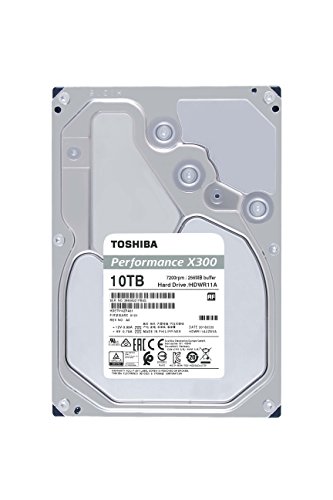
Toshiba X300 10 TB 3.5" 7200RPM Internal Hard Drive (HDWR11AXZSTA)

Toshiba 12 TB 3.5" 7200RPM Internal Hard Drive (MG07ACA12TE)

Toshiba 14 TB 3.5" 7200RPM Internal Hard Drive (MG07ACA14TE)

Seagate EXOS Enterprise X18 16 TB 3.5" 7200RPM Internal Hard Drive (ST16000NM000J)
sacred wave
So, I’ve seen Newegg sell NAS and some other types, what type should I be looking for?
Also thanks
 vast kelp
I've been self-hosting Matrix and Nextcloud on an old laptop board for a couple of years. Given the recent LTT video, I'm definitely in the market for backing up the data on that 4TB HDD that's connected to it.
I'm considering asking a friend to just have a single board computer with another 4TB drive always plugged in, that way I can have a one-time-payment offsite backup. However, Raspberry Pi computers are getting massively scalped here in France. Is there any viable alternative?
pallid orchid
vast kelp
I've been self-hosting Matrix and Nextcloud on an old laptop board for a couple ...
old/second hand dell or hp lower end systems should do fine
vast kelp
I don't want to hand my friend a huge form-factor desktop though. I was thinking of something small that they can plug in and forget about (they're not super experienced with tech).
pallid orchid
vast kelp
I don't want to hand my friend a huge form-factor desktop though. I was thinking...
some dell vostros are pretty small
vast kelp
Oh a laptop?
pallid orchid
nah
pallid orchid
vast kelp
Oh a laptop?
vostros have a desktop lineup as well
vast kelp
ahh I didn't know.
Something like this?
https://www.leboncoin.fr/informatique/2162833003.htm
Seems very affordable.
pallid orchid
vast kelp
Something like this?
https://www.leboncoin.fr/informatique/2162833003.htm
i would go for something a lil more recent tbh
vast kelp
I'm not familiar with the lineup. Any search terms to look out for?
pallid orchid
vast kelp
I'm not familiar with the lineup. Any search terms to look out for?
whats the budget? ill take a looksie on the site
vast kelp
Oh thanks! It's in French though :P
Just looking for something I can convince my parents to buy. Ideally we want to beat $240/yr which is Backblaze's cost, which shouldn't be hard to sell.
pallid orchid
vast kelp
Oh thanks! It's in French though :P
i speak a little dw
vast kelp
But as it's an off-site backup I would prioritize size and not-ugliness vs performance.
pallid orchid
vast kelp
Just looking for something I can convince my parents to buy. Ideally we want to ...
ok defi doable
vast kelp
yeah haha
This would include the 4TB drive to back up onto.
Come to think of it, I probably would need more than that. Matrix is hosted on the 500GB SSD :/
Nah I'll just tell them to only use 3.5TB on Nextcloud. We're way under that.
pallid orchid
https://www.leboncoin.fr/informatique/2163309188.htm
theres the pc
pallid orchid

Remarque: 3.5 NAS HARD DRIVE est la taille du disque dur en pouces. NASware 3.0 est une propriété (logiciel) liée à son utilisation en tant que NAS.
u can fit a 6tb drive in as well
or a 4tb one and a 500gb sata ssd
for os and stuffs
vast kelp
Could run the OS off of the included drive.
Probs Arch or Fedora since Ubuntu Server has been a huge pain.
pallid orchid
vast kelp
Could run the OS off of the included drive.
yep
its got 2 sata ports as far as i can see
 ocean berry
Hey everyone! Looking for some help with cloning my nvme to a 4tb. Can someone recommend a hub that can handle a 4tb? Or just as a hypothetical, if i were to take out the current one(2tb) and put in the 4tb, would i be able to use a hub with the 2tb limit to do a reverse clone onto the 4tb that way?
thanks for any help provided!
pallid orchid
ocean berry
Hey everyone! Looking for some help with cloning my nvme to a 4tb. Can someone r...
are they m.2 drives or sata?
ocean berry
m.2
pallid orchid
ocean berry
m.2
what motherboard u got?
ocean berry
MSI x570 gaming plus, i'm using both slots at the moment
pallid orchid
ocean berry
MSI x570 gaming plus, i'm using both slots at the moment
which drive is the operating system on?
and do u have an external drive?
2tb or more
hard drive works
ocean berry
i have a, 1 tb as my bootdrive and another as my storage for art and games, i'm looking to upgrade my second drive to a 4tb, but i'm looking for solutions on how to do so
not looking for HD's or SSD's i already have an nvme i'm planning on purchasing
ocean berry
No
pallid orchid
ocean berry
No
U in the US yeah?
ocean berry
yes
pallid orchid
ocean berry
yes
the new drive and the old drive are nvme m.2 drives yeah?
not m.2 sata?
ocean berry
Both are M.2 Nvme
pallid orchid
ok cool
ocean berry
including the soon to be replacement
pallid orchid

The Sabrent USB 3.2 Tool-Free Enclosure for M.2 PCIe NVMe and SATA SSDs is the perfect solution for your enclosure needs!FEATURES:CONVENIENCE: 100% Tool-Free, quickly install and remove SSDs without any tools.DESIGN: Ultra-slim Aluminum case with ABS frame. Sleek, Durable, and Convenient. Portabl...
@ocean berry
that will allow you to use the old ssd as an external drive as well
also use a program called macrium reflect to clone old drive onto the new one
ocean berry
Sweet! I was having compatibility issues with all the hubs i've found that had max 2tb support. Thanks for the help!
I got it from here

 steady talon
I’m looking to get a new SSD to use with my desktop for now then in a few months transfer over to my laptop (Asus Scar 17), I need it to be at least 1TB and pcie4 would be preferable if my laptop can support it, I still need to check that out
Also how does the Intel 670P compare to other SSDs?
Looking at benchmarks it seems to beat out the P31 and 980 pro in some benches but I’m not sure how accurate they are
I’m looking at anandtech’s review on it
minor sun
steady talon
Looking at benchmarks it seems to beat out the P31 and 980 pro in some benches b...
From anandtech, dunno about it beating p31 lol
 minor sun
steady talon
I’m looking to get a new SSD to use with my desktop for now then in a few months...
minor sun
steady talon
I’m looking to get a new SSD to use with my desktop for now then in a few months...
For pcie 4.0 drives, until we get p41 reviews, xs70 and s70 blade are nice
blazing musk
EX950 representing on that chart
Too bad they don't make them any more, I really like mine.
small carbon
Doing well or not, 670p is still qlc & lower tbw than 970 evo plus for example. @minor sun I guess p31 is obviously beat in some things. This I don't mind since I didn't get one. plus, 970 evo plus is probably good for all my power outages until I get a UPS.
kind sierra

Tom's Hardware
Well over 1 Million IOPS
Saturates the bus with sequential reads
Not much besides that
small carbon
Hitting 7GBps read isn't crazy, but at least the 6.5GBps write is supposedly quite a bit higher than 980 pro w/ 5.1GBps, but we'll see how they do.
steady talon
So back to my original question, should i just get a P31 for my laptop or is there anything better?
and how can i check if i can use a PCie 4.0 ssd in my laptop?
kind sierra
What CPU do you have
steady talon
5900HX
small carbon
Gen 3 or not, p31 is a great choice (especially for a laptop). Cooler & definitely more power efficient than most others. Any gen 4 would also likely be warmer and/or higher wattage.
sacred wave
dense merlin
sacred wave
Opinions: buy or pass
https://www.newegg.com/team-group-mp33-1tb/p/N82E16820331...
good drive
sacred wave
Good price for it or no
blazing musk
MP33 is one of the better budget tier drives
sacred wave
Also what about this hdd
https://www.newegg.com/toshiba-mg07aca12te-12tb/p/1B0-0011-000E7?item=1B0-0011-000E7
dense merlin
sacred wave
Also what about this hdd
https://www.newegg.com/toshiba-mg07aca12te-12tb/p/1B0-...
x400
or is it the x300
blazing musk
It's neither
sacred wave
I have no idea
blazing musk
Spend the extra $20 on this one https://pcpartpicker.com/product/RjdxFT/toshiba-x300-12-tb-35-7200rpm-internal-hard-drive-hdwr21cxzsta

Toshiba X300 12 TB 3.5" 7200RPM Internal Hard Drive (HDWR21CXZSTA)
 upper quiver
10TB has a promo code
 blazing musk
Ooh not bad at all
sacred wave
Anything bad about the ssd I sent and the hdd you sent?
blazing musk
No
small carbon
Clicked on the pcpp link on my phone & switching hdd sizes did this:
 blazing musk
Just means they've gotten a lot of requests from your IP and they're making sure you're human, it's DDoS protection
sacred wave
That happens to me all the time
small carbon
Ok. Weird though. 1st time I went to pcpp in the past few hrs. Good thing for extra browsers though. 👍
blazing musk
ISPs tend to use shared addresses for their customers and use NAT to direct traffic, so if other people in your area are using the site too it can read as all the same people.
Cell providers especially
small carbon
Ah who knows. No prob. Tried different broswer but it was quick anyways. $177ish 10TB is pretty good.
 ruby verge
I need some advice. I upgraded my laptop a few years ago from two Samsung SM951 256GB drives to two Samsung 970 Evo Plus 1TB Samsung drives.
I have been thinking for years about buying this for my old Samsung NVME drives so I can use them on my laptop (none of our desktops have USBC/TB3 ports):
https://www.amazon.co.uk/dp/B082HQM642
but now I'm wondering if I should just buy this so I can use it on anything with USB3/4 and or TB3/4:
https://www.amazon.co.uk/Yottamaster-Enclosure-Up-Enclosure-Compatible-Thunderbolt/dp/B08PKDVSYZ
I know my old drives are compatible with the first one but can't find anything to say they're compatible (or not) with the USB4 enclosure.
Yottamaster have other enclosures which support USB3 with built in fans, which I like the idea of but I like the speed and broader compatibility, but if there's other brands that are better I'm open to suggestions.
pallid orchid
ruby verge
I need some advice. I upgraded my laptop a few years ago from two Samsung SM951 ...

Description: The Sabrent USB 3.2 Tool-Free Enclosure for M.2 PCIe NVMe and SATA SSDs is the perfect solution for your enclosure needs! FEATURES: CONVENIENCE: Tool-Free, quickly install and remove SSDs without any tools. DESIGN: Ultra-slim Aluminum case with ABS frame. Sleek, Durable, and Convenie...
functionally the same
pretty much no difference in performance
pallid orchid
wont make a difference really
ruby verge
Not for SATA drives no. It does a bit for NVMe.
pallid orchid
wont make a difference really
ruby verge
I like Sabrent's new docking station but I really dislike that you cannot put your own drives into it.
ruby verge
I mean, assuming max theoretical write speed of 1550MB/s for the SM951, that equates to 12,400Mbps = 12.4Gbps
Max read speed is theoretically 2150MB/s. Which equates to 17,200Mbps =17.2Gbps.
Theoretically more than you can take from the basic Sabrent enclosure.
pallid orchid
i mean ur not gonna notice the difference really
its not worth 140 pounds
and those speeds are only sequential
so unless ur copying files over like 5gb in size each only, its not gonna matter
ruby verge
My laptop is an XMG U716. A few years old now. CPU is an i7 6700k slightly overckocked to ~4.2-4.4GHz depending on core load, 64GB 2400MHz DDR4 (manually downloaded to 2133MHz because I was getting BSOD's), GPU is a 180W GTX980 with 8GB VRAM. 17" G-Sync 1080p 75Hz display.
pallid orchid
ruby verge
My laptop is an XMG U716. A few years old now. CPU is an i7 6700k slightly overc...
thats got a usb 3.1 port
ruby verge
Yes. This also does TB3.
Which should be capable of 40Gbps
Assuming it has all the lanes and isn't restricted to 20Gbps.
pallid orchid
or 16gbps
which is also thunderbolt 3 iirc
https://www.amazon.co.uk/Thunderbolt-Certified-Tool-Free-Enclosure-EC-T3NS/dp/B08FT59SB6
Either way half the price and just as good (tb3)

Description: The Sabrent Thunderbolt 3 M.2 NVMe SSD Tool-Free Solid Aluminum Enclosure is the ultimate combination of convenience, performance, and reliability! Thunderbolt 3 technology enables amazing speeds of up to 1600 MBs. TRUST RELIABILITY: Don't entrust your valuable DATA to devices that a...
the 2 enclosures you linked are a waste
ruby verge
Do Sabrent have anything with both TB3 and USB 3?
pallid orchid
pallid orchid
https://www.amazon.co.uk/Thunderbolt-Certified-Tool-Free-Enclosure-EC-T3NS/dp/B0...
yes
ruby verge
The last one you linked is TB3 only
ruby verge
Nope.
pallid orchid
you cant have support for one without the other
ruby verge
They use the same USB C port but entirely different protocols
pallid orchid
The standard literally inclused usb 3.1 tho lol
ruby verge
Lol no
ruby verge
No. USB 3.1 is not the same as Thunderbolt 3
pallid orchid
 pallid orchid
ruby verge
No. USB 3.1 is not the same as Thunderbolt 3
pallid orchid
ruby verge
No. USB 3.1 is not the same as Thunderbolt 3
never said it was
just said its a part of the tb3 standard
ruby verge
Right but you cannot take a TB3 device and plug it into a USB3.1 port and expect it to work
pallid orchid
ruby verge
Right but you cannot take a TB3 device and plug it into a USB3.1 port and expect...
yes because usb 3.1 isnt a port
usb a or usb c are ports
thunderbolt and usb 3.1 just use these ports
ruby verge
🤦
ruby verge
pallid orchid
thunderbolt and usb 3.1 just use these ports
Yes, this is true. But as I said the protocols are different.
 pallid orchid
ruby verge
Yes, this is true. But as I said the protocols are different.
pallid orchid
ruby verge
Yes, this is true. But as I said the protocols are different.
i agree
tb3 includes usb 3.1 tho
pallid orchid
ruby verge
I trust the people who made the protocol a lot more than amazon listing lmfao
read
ruby verge
It should yes. But I cannot take a TB3 enclosure and plug it into a USB 3 A type socket with a Y cable for extra power. 🤷🏻♂️
pallid orchid
ruby verge
It should yes. But I cannot take a TB3 enclosure and plug it into a USB 3 A type...
why do u need extra power?
ruby verge
3.3V at 2.2A is 7.6W
pallid orchid
yes and?
ruby verge
USB 3.0 type A ports were originally limited to 900mA which is 4.5W.
pallid orchid
so they arent doing thunderbolt speeds lmfao
they doing usb 3.1 speeds
anyway do what u want i have more important things to do than arguing with people
ruby verge
And what makes you think it won't need to draw more than 900mA at 5V?
pallid orchid
https://www.thunderbolttechnology.net/blog/thunderbolt-3-usb-c-does-it-all
This is official specification for thunderbolt 3 by the people who designed the standard
if u scroll u will see support for usb 3.1 listed in the features
If amazon listing is ur source of info and not official spec, thats on you
ruby verge
I mean, the official website also says that Thunderbolt 3 compatibility with a USB C 3.1 port is not guaranteed (https://www.thunderbolttechnology.net/tech/faq) and depends entirely on its implementation.
Can I connect a Thunderbolt™ device to a USB computer port?
For full compatibility a Thunderbolt™ device should be plugged into a Thunderbolt computer port. Some functionality may be available over a USB-C port depending on its implementation, but cannot be guaranteed.
I agree that a standard USB 3.1 device will work on a Thunderbolt 3 port. I never disagreed on that. But if something says "Thunderbolt 3 only" you can't take it for a fact that it will be "fine" on a USB C 3.1 port just because the official spec for TB3 includes USB C 3.1.
kind sierra
The cheap ones will need thunderbolt, and that looks like one of the cheap ones
It's basically just a passive adapter
Which means the speed will probably be limited to 1.5 GBps or so
Still more than enough for pretty much any gen 3 drive in a realistic use case
blazing musk
pallid orchid
on any non thunderbolt 3 compliant port
If it's a PCIe device that requires PCIe lanes to function like a GPU or NVMe drive then it won't work over standard USB 3.1
However you can connect any USB compliant device into a port supporting thunderbolt.
Also thunderbolt is included in the new USB 4.0 spec.
pallid orchid
Huh wierd mb
 mental plaza
I've been prepping to get a SATA SSD and only just realized my laptop battery took up the space for said ssd
anyone know a fast ssd that can survive a 100C laptop?
blazing musk
Not even close
Unless it's directly in contact with the CPU heat pipes there's no way the SSD will get that hot. Most run around 40C during transfers, maybe 60 worst case.
And even if it did because you pointed a heat gun at it, you still wouldn't kill it
blazing musk
What kind of slot do you have? M.2 or sata?
mental plaza
only an m.2
blazing musk
Full length 2280?
mental plaza
yeah
blazing musk
What capacity
mental plaza
not quite sure
blazing musk
1TB have been around $80 lately, 2TB $150
mental plaza
people have been telling me to grab a 2tb
might as well
anyone know if Acer makes good ssds?
mental plaza
there is one
real lava
huh, there's good acer ssds?
mental plaza
they hit 6000mbs
real lava
okay, i haven't been catching much on acer stuff
blazing musk
Acer Predator GM7000 - S
Acer Predator GM3500 - B
Acer FA100 - C
blazing musk
mental plaza
people have been telling me to grab a 2tb
What were you planning to use the laptop for?
mental plaza
i wanted to get games like forza, COD, battlefield, other AAA games
I already have 512gb
blazing musk
Easy choice then https://www.amazon.com/dp/B07ZQ97H3W

The P34A60 is an affordable storage solution that doesn't skimp on performance. It's designed for novice users, DIY system builders, purpose-built system manufacturers, and simply those who are looking to upgrade their PC. But with a PCIe Gen3x4 interface, which means four lanes are used for tran...
mental plaza
slow in my opinion
blazing musk
Gamers don't need the highest end stuff, they need good random read/write speeds
You'll never use the full read speed when gaming, ever. Not until more games support Direct Storage in 8 years.
 blazing musk
Rated specs are useless to look at
mental plaza
hm
blazing musk
Everyone measures them differently
blazing musk

GitHub
SSD buying guide & tier list, maintained and updated by select editors - stoRAGE-consumer-SSD-buying-guide/SSD tier list.md at main · windshields/stoRAGE-consumer-SSD-buying-guide
C tier is for gamers, any higher and you're looking at more workstation focused stuff like video editing
cyan needle
Oh. I wonder why I got a p31 then. Maybe it was on sale.
kind sierra
cyan needle
Oh. I wonder why I got a p31 then. Maybe it was on sale.
Because you'll still get better performance
blazing musk
Yeah, instead of an 11 second load time you'll get a 10.5 second load time.
And yes there was pretty good p31 sales last year
small carbon
cyan needle
Oh. I wonder why I got a p31 then. Maybe it was on sale.
Great "random" specs. When it was $92/TB, so worth it.
minor sun
If your budget allows for it, sure, why not.
 urban glade
What's a good one I can pick up from the store?
minor sun
What's your budget?
urban glade
like 80-120
minor sun
If you can just order something,
https://www.amazon.com/dp/B07XHMBQK3

TEAMGROUP MP33 M.2 PCIe Solid State Drive uses a high-speed PCIe Gen3 x4 interface and complies with the NVMe 1.3 standard. With 3D NAND flash memory, the transfer speed is 3 times faster than SATA III. Suitable for players who have needs in speed, and it is the top choice when it comes to upgrad...
 calm blaze
urban glade
Is that one fast?
calm blaze
urban glade
Is that one fast?
 urban glade
thank you
small carbon
We'll ignore listing saying 1800/1500 is 5x the speed of a sata ssd, but don't worry about it. (edit: those are 500MB/S or so.
real lava
any nvme ssds that are decent enough won't have issues loading games
small carbon
Neither will a sata ssd tbh, just can't help seeing that statement in the "about item". We'll be rockin when direct storage is really a thing. Load times? Will be even shorter
real lava
ye
It's funny how around 1500 MB/s is claimed to be 5 times faster
But if directstorage comes, the need for nvme is gonna be even more obvious tbh
Cause by then load times and perf will be an impact with a better drive
small carbon
Oh for sure. Gonna be interesting how .1/1% lows are improved or something.
real lava
HDD is probably gonna become obsolete
That makes me kinda scared
Cause HDDs are cheap mass storage
small carbon
Eh direct storage won't change how useful hdds are for holding 3-4x what an ssd can (per $)
real lava
true
small carbon
I'm still tempted to "replace" all my old hdds w/ basically 1 hdd that's 4-8TB then wipe em all & maybe recycle some.
real lava
I just want a 1tb ssd
Or better yet, 2tb
But I also just wanna focus on getting a better laptop first
 split escarp
minor sun
What's your budget?
split escarp
minor sun
What's your budget?
Mine 10-90
 proven niche
sn750 or sn750se the se is cheaper right now
 olive wadi
proven niche
sn750 or sn750se the se is cheaper right now
olive wadi
proven niche
sn750 or sn750se the se is cheaper right now
depends on your specific use case
the SE is a newer more burst focused drive, and isn't really related to the SN750 at all, SN750s only real advantage is sustained seq write performance which primarily benefits more niche use cases
i'd compare the SN750SE to the SN570 pricewise before buying either
or if you're in the USA and looking at 1tb just buy this https://pcpartpicker.com/product/Y6YLrH/team-mp34-1-tb-m2-2280-solid-state-drive-tm8fp4001t0c101

Team MP34 1 TB M.2-2280 NVME Solid State Drive (TM8FP4001T0C101)
proven niche
looking for a boot drive thatll probably also have a few of my most used apps on and then im going to get a 2tb nvme for games
dense merlin
proven niche
looking for a boot drive thatll probably also have a few of my most used apps on...
just make that one drive
you dont need to have two seperate ones
olive wadi

Patriot VPN100 2 TB M.2-2280 NVME Solid State Drive (VPN100-2TBM28H)
 past grail
Who selling 64GB/s drives for pcie5
My 1 GB/s are to slow for xbox series x
Someone been drinking
kind sierra
past grail
Who selling 64GB/s drives for pcie5
Are you still looking for an answer or did you get it figured out?
small carbon
64 Gbit*/s
minor sun
If it comes down to it, you can get away with taping down the drive tempoarily
urban glade
Take it down?
I mean
I have this cover for it
Do I still need to tape it down with this
 small carbon
If that cover has it's own screw(s), use that. 
small carbon
That film w/ all the black writing on it, yep. That's so the thermal tape & heat spreader work better even if the ssd you use isn't warm.
urban glade
Got it thank you
past grail
kind sierra
Are you still looking for an answer or did you get it figured out?
Still looking https://www.intel.ca/content/www/ca/en/products/details/memory-storage/optane-memory/optane-memory-h10-solid-state-storage.html found this but only pcie3 might try it.

Intel
View products for Intel® Optane™ Memory H10 with Solid State Storage. Find product specifications, technical documentation, downloads and support and more from Intel.
 regal thistle
so basciy on my ssd and hdd i am moving over all my games and i moved over all the games and this was a while ago and it still says there is massive amounts of storage on the files any clue how to find out what it is?


when i click on apps and features wich says 207gb it only comes up with 1 game that takes up around 30gb
kind sierra
past grail
Still looking https://www.intel.ca/content/www/ca/en/products/details/memory-sto...
How much space do you want and what's your budget?
past grail
Love lots of space no set budget just shopping to see what I get get options.
https://www.asus.com/ca-en/Motherboards-Components/Motherboards/Accessories/HYPER-M-2-X16-CARD-V2/ these must be interesting to use
ASUS Canada
ASUS ThunderboltEX 3-TR is a Thunderbolt™ 3 add-on card that delivers 40 Gbps bi-directional bandwidth and DisplayPort™ 1.4 support. It's able to support up to six Thunderbolt-enabled devices in a daisy-chain configuration, and its USB Type-C® port enables up to 100-watt charging for laptops.
I don't think I have built many over the 40Gbps yet.
past grail
128Gbps usb sticks with 4 nmve cards maybe I need that on laptops next.
kind sierra
@past grail what is the drive for again?
past grail
I'm looking at razer asrock 690z motherboard
kind sierra
So for a PC? What will you use the PC for?
past grail
Everything
kind sierra
Define everything
Because my idea of everything is probably very different from yours
past grail
Well not sure if I can use it I will only small cpu so no 1000 Customer loads. But anything I can use it for from ftp servers for a small website and streaming gaming. I'm wondering about stream in local city to steam deck and how many customers with little 16 core cpu.
Them pictures editing and unreal engine 5.0 development
kind sierra
As in running your own game streaming service?
past grail
Yes well not me I don't do servers running anymore. Other mostly do that for me but small groups yes like move theater full of people using steam deck as controller
kind sierra
Why not just get a steam controller for that?
past grail
Maybe 32 to 64 players
kind sierra
No way that's going to happen on the 12900k
I don't think even dual socket epyc would have the bandwidth for that
past grail
We it should be OK stream to small groups even if only one 10 gb nic
kind sierra
I doubt it
past grail
I setup others with a lot
Less power but that's older games like to xbox 360 setup was newest system. You can stream to a few if you use all 10 gb of nic but just stay off internet that upload cost will kill you.
We try on two 2.5 gb nic but software supports sucked bad for two one was a lot better.
kind sierra
64 people streaming games from a single system you're going to want at least 64 cores, 512GB of ram, and some crazy config with GPU that I don't even want to think about
What would the purpose of that even be?
past grail
And the nic had chip for 10 gbps but only wire for 1 gbps had to add wires
Get new firmware software
kind sierra
If you have that many people connecting just set up some sort of cluster
past grail
Well I'm wondering what I can fit into mini case that fits in motor cycle bag. Micro easy to move on bike but mini case give more options
Like setup up driver in movies theater any place
That's fun.
kind sierra
Every node maybe something like a 12 code xeons or epyc with 32 GB of ram and dual GPU. Set up two VMs and run pcie passthrough to a GPU for each VM. Then take a good managed gigabit switch with maybe 10GbE uplink, probably would want more, and run a vlan from a management node to handle people connecting
32 nodes plus the management node and additional hardware, could probably get it to fit in a single rack
I'd estimate TCO of 150-200k
It would not fit on a motorcycle
past grail
I'm more mini/Mico sizes I wonder what it cost factory to make fit in mini/micro size range hmmmm. I know they have gone from a full size room computer to full size pc case build for customers. Room looked empty.
They were only like 8 feet by 8 feet rooms for one pc when they first built it.
I think new laptops need pcie5 slot so I can plug in 4 extra nmve cards making support 6 of them. Just because 6 is great number.
I be asking factory why not.
Well one day I'm guessing
Well I'm off to dream about crazy setups thanks for information
real lava
Just cause it has pcie 5, it automatically doesn't mean it allows for more m.2 nvme slots
It has to have enough lanes of it
minor sun
it almost seems like we'll have less
24 PCIe 5.0 lanes from CPU on Zen 4, has to be for 2 PCIe slots and a NVMe slot
it can't even be x16/x8/x4
not enough lanes
more likely x8/x8/x4 or x16/x4/x4
sour wadi
Is there any reviews on the new crucial p3/p3 plus?
past grail
real lava
Just cause it has pcie 5, it automatically doesn't mean it allows for more m.2 n...
Well I only get one and I never looked but could be shared with others. I know they like to do that with usb caused lots of court cases.
blazing musk
real lava
honestly i'd rather have pcie 4.0 if that's the case lol
Chipset lanes will be 5.0 by all indications, except on lower tiers. 5.0 x8+x8 is more than enough for 2 GPUs, even if the "double performance" claims next gen to also mean "double bandwidth required".
 minor sun
Was refering to this for the 24 lanes
 blazing musk
Yeah that graphic was really vague and probably doesn't account for PCIe lanes since it'll vary by chipset
upper quiver
total platform IO seems to suggest cpu+chipset
so essentially the theoretical maximum
blazing musk
It would suggest that, but also doesn't line up with what they also said about CPU lanes previously
upper quiver
oh they said 24 cpu lanes?
blazing musk
Previous reports have said 28 5.0 lanes from the CPU total, minus 4 for interconnect
upper quiver
yeah, that would make sense
oh but with x670 extreme, it sounds like the chipset will be capable of delivering 5.0 lanes to other slots as well
which should technically increase that theoretical max
blazing musk
Exactly, they'll have the M.2 and other slots at 5.0 as well
upper quiver
they couldnt possibly bring 24 additional lanes right off the chipset, could they?
but those 24 are also for "graphics and storage" not "everything"
blazing musk
upper quiver
they couldnt possibly bring 24 additional lanes right off the chipset, could the...
Including the ones for USB 4.0 and other devices or no?
upper quiver
taking the term total platform io to be strictly talking about the chipset only
theres no way
has to be cpu+chipset
blazing musk
Well X570 had 20 lanes available to users after accounting for USB and other I/O
blazing musk
Yes that was 4.0
upper quiver
i see
blazing musk
24 5.0 lanes wouldn't be too hard if they pulled that off
blazing musk
Or X675 or something
I can understand why no X690, it would sound like an Intel chipset
upper quiver
or literally anything we could easily standardize
its fine, no consumer seeking help here at least needs that much pcie 5.0, so b650 it is
blazing musk
At least we don't see any indication of chipset fans on the X670E boards they revealed
That was a major reason I told people to go B550 over X570
upper quiver
for sure
blazing musk
If that fan fails, and it does, you have to RMA the whole board and take your build apart
upper quiver
and cooler
blazing musk
Oddly enough the X570 chipset appears to be repurposed CPU I/O dies
blazing musk
I was not aware of that myself, checking the source on that one for sure
upper quiver
no wonder it needed a fan lol
blazing musk
Oh well coming straight from Dr. Cutress
https://twitter.com/IanCutress/status/1138443875154944000

So for clarity:
Rome large IO die = GF 14nm
Matisse small IO die = GF 12nm
X570 Chipset = Matisse IO die on GF 14nm
That's right. The X570 chipset is the same floorplan as the Matisse IO die, but with diff chicken bits enabled/disabled. AMD has good reuse of chips
Likes
165
 Twitter
·
upper quiver
Twitter
·
upper quiver
fun
minor sun
Dr Ian Cutress is op
open gazelle
That do be some pretty cool reuse stuff
minor sun
gotta do something with it
 safe torrent
I've got a WD black M.2 NVME drive that I had partitioned a while back, but I just recently reset my computer and now it wont show in partitions. It does show in BIOS, registry and a NVME dashboard. Can anyone help me figure out how to make it visible to partitions?
blazing musk
safe torrent
I've got a WD black M.2 NVME drive that I had partitioned a while back, but I ju...
Reset the computer how? The OS? The bios/cmos?
safe torrent
OS
blazing musk
Ok, if you open disk management (right click the start button) does it show the drive and partitions?
safe torrent
You know what I think it may have renamed itself to my other disk drive. I just disconnected my original D drive and rebooted and the D drive is still there along with te NVME but not the disk drive anymore
Idk how that happened but I think it might be ok
 cinder lantern
Anyone know of anything called a self leveling bracket for hard drives?
blazing musk
That seems incredibly excessive for a hard drive
real lava
^
small carbon
hdds can be sideways and/or upside down afaik. main thing is having them "secured" so their actual vibrations don't mess up em or something.
blazing musk
They have vibration sensors that trigger the read/write arms to unload to avoid damage anyway
But yeah if it's not in a bracket at all then it'll shorten the life span
 graceful rover
Question, how much should 4tb hard drive cost?
blazing musk
HDD? Probably like $75 for a good one
When they're on sales of course
No good sales right now that I see with a quick look
 blazing musk
Eh, good for a cold storage drive but not really if you want to put games on it
graceful rover
Its for gaming clips haha
blazing musk
Clips are fine
graceful rover
wdym by cold storage drive?
blazing musk
Think of it like a deep freezer. You don't really go into it much but you expect everything to still be good when you need it.
graceful rover
ohhh that's actually a great analogy
so u dont think it would negatively affect my clips?
blazing musk
Typically things like music, videos, and stuff like that which you don't need to access at high speed are perfectly happy on a 5400 RPM drive
So yes clips should be fine
graceful rover
Are internal hard drives overall better than external hard drives?
blazing musk
In some ways
External are really good if you don't access the data much, like a backup drive
graceful rover
How exactly are the internal hard drives installed and is it an easy process to put one in?
pallid orchid
hard drives are called "hard" drives because they are difficult to work with when loading off them
graceful rover
Yeah I kinda wanna have it there
pallid orchid
ok bye
blazing musk
It's pretty simple to install a hard drive, just put it in the bracket and attach power and data cables. Other end of data goes to the motherboard.
pallid orchid


So its just 2 cables, one to motherboard and one to power supply
just explained this to someone else today
graceful rover
I appreciate it :)
blazing musk
Oh and when you install it for the first time you'll need to open Windows disk management to initialize and format the drive so you can use it
blazing musk
Nah usually just the side panels to access the drive bay and motherboard
graceful rover
Original Price: $165
Current Price: $95
Is this worth it?
 blazing musk
NAS drives aren't good for PCs
graceful rover
how come?
blazing musk
They're designed for endurance with constant reading and writing. The read/write arms aren't designed for the frequent loading and unloading that a PC does.
graceful rover
ohhhh so not worth it?
blazing musk
Nah
graceful rover
Able to link a good hard drive for my pc with 4tb for a good price? I'm a noob with technology and I need more storage for clips haha
blazing musk
That 4TB blue drive you had before looks to be the best deal currently, $15 per TB is great
graceful rover
Fr?
blazing musk
Yeah you can typically expect around $18-20 per TB
blazing musk
Maybe this one too, not as high reputation but should be faster https://www.newegg.com/seagate-constellation-es-3-st4000nm0033-4tb/p/N82E16822178307
graceful rover
Looks a bit iffy. I'll check into it
graceful rover
So blue is the better option?
Blue = 4TB, Red = 6TB
 blazing musk
Yeah I'd say blue is the better for your uses
graceful rover
Thank you! I appreciate your help a bunch
sour wadi
pallid orchid
You should add to github so would be good to pin
pallid orchid
sour wadi
You should add to github so would be good to pin
okay
 waxen flame
for gaming is there a need for a PCIe Gen 4 or the PCIe Gen 3 is good enough as i noticed the gen 4 have almost double the read speeds for $50 more
dense merlin
waxen flame
for gaming is there a need for a PCIe Gen 4 or the PCIe Gen 3 is good enough as...
gen 3 is fine for gaming
you wont see a diff with gen 4
id recc the mp33, or p31 if going highish end
graceful rover
whats a good RPM for internal HD
dense merlin
5400 for longevity, 7200 for performance
if youre using it for your main drive, get an ssd
kind sierra
Faster but louder and more power hungry
real lava
louder is barely noticeable imo
graceful rover
what is a good interface?
 kind sierra
Agreed
real lava
i'd rather take 7200 any day
 kind sierra
Avoid goharddrive
 kind sierra
Not really
kind sierra
Take a look at the Toshiba X300 if you aren't too worried about price
graceful rover
kind sierra
Take a look at the Toshiba X300 if you aren't too worried about price
i meant i'm not worried about the price between the two 😭
graceful rover
I take clips during gaming sessions like every 2 days
graceful rover
kind sierra
Not sas
wait why
kind sierra
graceful rover
wait why
Your motherboard doesn't have a sas connector
graceful rover
dense merlin
someone else can correct me if im wrong, but id go with this

Western Digital Blue 4 TB 3.5" 5400RPM Internal Hard Drive (WD40EZAZ)
kind sierra
SMR, but should be fine for the use case
graceful rover
dense merlin
https://pcpartpicker.com/product/9wVmP6/western-digital-wd-blue-4-tb-35-5400rpm-...
5400 tho
kind sierra
That's fine
mental plaza
I need an opinion on which to grab

SPECIFICATION Capacity : 1TB/2TB Form Factor :M.2 2280 Interface : PCIe 4.0 x4 NVMe 1.4 Performance : Sequential Read/Write: up to 7400/6800MB/s* * Performance may vary based on SSD capacity, host hardware and software, operating system, and other system variables. MTBF : 2,000,000 Hours Warranty...
or

Are you ready for next-gen performance? The Crucial P5 Plus SSD delivers remarkable speed and data protection with sequential reads up to 6600MB/s for transformative computing. Engineered by Micron with the latest Gen4 NVMe technology, the Crucial P5 Plus includes advanced features like full hard...
im installing it on a laptop that gets hot fairly fast
small carbon
Need gen 4 at all ? @mental plaza Laptop = Hynix P31 is my 1st choice. Also it does beat some gen 4 drives in some ways. Great overall performance even if it's gen 3.
mental plaza
is it fast? since its memorial day i want the best possible, both standard speed and other performance
oh...buying a 6000mbps drive is stupid aint it
minor sun
For a laptop, I'd just grab a p31 for now, higher chance a e18 drive will heat up and the controller might throttle since it's a laptop and a small form factor without dedicated cooling for the NVMe drive
mental plaza
aight thanks! I am concerned with thermal performance but no one else talks about it
minor sun
mental plaza
aight thanks! I am concerned with thermal performance but no one else talks abou...
People do thermal testing, but this would be on an open air bench so the temps and results would be a lot better than if you put it in the middle of a hot laptop
https://www.techpowerup.com/review/adata-xpg-gammix-s70-blade-2-tb/7.html

TechPowerUp
At $300 for the reviewed 2 TB version, the ADATA XPG Gammix S70 Blade is one of the most affordable PCIe 4.0 SSDs available today. Despite its low price, it offers compatibility with Sony's PlayStation 5, and performance is comparable to the Samsung 980 Pro, WD Black SN850, and Corsair MP600 Pro.
minor sun
You're welcome
split escarp
i have 800 gb in my mac book
 unborn scarab
so I got a 980 pro m.2 ssd and was thinking I was going to put the OS on it, what else should I put on it?
blazing musk
980 pro is intended for extremely heavy use cases like 8k video editing and massive open world unreal engine development
unborn scarab
blazing musk
980 pro is intended for extremely heavy use cases like 8k video editing and mass...
I was depressed and blew half my paycheck, I don't do super heavy stuff
blazing musk
In other words, it'll do anything you want it to. If you put games on it they'll load in 8 seconds instead of 9.

 next wharf
Im currently looking for a ssd or hdd for my laptop and im not sure which one to shill out to. ive thought about getting this https://www.newegg.com/1tb-wd10spsx-black/p/1Z4-0002-017H9
blazing musk
next wharf
Im currently looking for a ssd or hdd for my laptop and im not sure which one to...
An SSD would completely crush that

The WD Blue 3D NAND SATA SSD utilizes 3D NAND technology for capacities up to 4TB with enhanced reliability. Featuring an active power draw up to 25% lower than previous generations of WD Blue SSDs, you’re able to work longer before recharging your laptop, while sequential read speeds up to 560MB...
kind sierra

Tested Engineering Sample:
Phison PCIe Gen5 E26 controller + Micron 3D TLC NAND
Compatible with Two Leading Chipset Platforms
Phison’s PCIe Gen5 SSD Controller E26 Reaches over 12GB/s and 10GB/s in Read and Write Performance
Good ol marketing 😊
blazing musk
Really? I rarely get a storage bottleneck lol. They obviously mean very specific applications.
kind sierra
I don't think the bottleneck has been storage for most people for a few years now
upper quiver
yeah it stopped being the bottleneck since Gen3 at best
even though fully saturating sata 3 aint really a bottleneck either
blazing musk
Even just over sata with SSDs I don't get storage bottlenecks. I have 2x 1TB WD Blues in raid 0 over sata.
open gazelle
Will be interesting to see what Direct Storage has for bottlenecks. Tho, that's a soon™️ thing, basically same deal as fusion reactors. Never will happen /s (prolly will in 5+ years or smth, idk).
 coarse vault
I'm looking for an m.2 drive for some extra storage and my OS. My motherboard only supports gen 3 so I don't need anything fancy. What is the main difference between these 2 drives? and is the samsung one worth the extra cost? If you have any other drive suggestions lmk please
https://www.newegg.com/samsung-970-evo-plus-1tb/p/N82E16820147743?Description=1tb m.2 ssd&cm_re=1tb_m.2 ssd-_-20-147-743-_-Product
https://www.newegg.com/team-group-mp33-1tb/p/N82E16820331417?Description=1tb m.2 ssd&cm_re=1tb_m.2 ssd-_-20-331-417-_-Product&quicklink=true
calm blaze
the EVO is up to 3500/3300MBps R/W, the Team is 1800/1500
for $30 more it's almost 2x faster
coarse vault
ah okay thank you
do you think it would be worth the extra $30 just for regular game and os use?
small carbon
Idk, I got it when it was $84 on amazon. Wouldnt pay that full price of $110ish
coarse vault
I'm in no rush so ill just keep an eye on them
real lava
sequential speed doesn't matter much for your use case
i wouldn't pay 30 more for the evo plus imo
or full price on an ssd lol
sales are regular
small carbon
P31 was $92 also when the Samsung was 84.
calm blaze
coarse vault
do you think it would be worth the extra $30 just for regular game and os use?
def do like Chillin and get it on sale, they go on sale quite frequently between NE and Amazon both
 blazing musk
Not while you're running windows
You could boot into Linux from a live USB and hope it works. Keep in mind you cannot move the start of the C volume without rebuilding the windows boot loader.
Of course if you plan on moving those partitions you have selected to the same disk you'll need to rebuild the boot loader anyway probably
pallid orchid
u can use minitool partition wizard too
itll reboot into what i assume is dos shell, shrinks drives and reboots to windows if u shrink or gow c drive
ive used it many times and no data loss
 red jay
Ok so pc is not posting after I cloned all partitions from disk 4 to 3 and used clean command in diskpart on disk 4
 split escarp
My Mac has has 879 gb
blazing musk
red jay
Ok so pc is not posting after I cloned all partitions from disk 4 to 3 and used ...
Not posting as in you can't get into bios? Or just a black screen after the bios splash screen?
You probably just need to rebuild the boot loader like I said, you can do it from an install or recovery drive.
red jay
blazing musk
Not posting as in you can't get into bios? Or just a black screen after the bios...
not getting to bios
blazing musk
Unplug both drives and see if it still can't go to bios
red jay
ok
red jay
blazing musk
Unplug both drives and see if it still can't go to bios
no bios
oh wair
i forgot to unplug my HDDs
we got bios
blazing musk
Ok, do you have a USB with either the recovery environment or the windows installer?
red jay
yes I got the macrium reflect recovery
blazing musk
Does that have the windows command prompt?
red jay
blazing musk
Does that have the windows command prompt?
I think so
lemmie check
it wont post with any storage device connected to it
blazing musk
Clear CMOS next then
red jay
blazing musk
Clear CMOS next then
how to do on this board
i have a rst switch
but not sure if that'll work

i got these pins
how do i use it
pallid orchid
u can either remove reset switch from front panel and put em onto clear cmos header
or u can simply grab a metal object and touch it to the 2 pins at the same time
make sure its not painted or anything
 blazing musk
Well that's a good sign.
See what it does when it tries to boot now that the bios is fixed.
red jay
so dont try to fix the boot problems through macrium reflect?
blazing musk
If it doesn't boot I'll give you the commands to rebuild the boot partition
Well you can give that a go too, shouldn't hurt anything at least
red jay
ok dome
blazing musk
Cool, see if it'll boot now
blazing musk
Kewl
red jay
two people told me to do a fresh windows install
blazing musk
Well that would work but it's kinda the nuclear option
Much better this way, even if it is a little more work
red jay
yeah
i prefer the added work
you learn things
macrium reflect will never leave this usb ever now
blazing musk
That's a good way to look at it
red jay

blazing musk
I personally use ventoy for most of my USB boot needs. Once you make the USB you just drag and drop ISO files to it.
I've got about 20 different operating systems, some with different versions, on that one drive.
red jay
oh I see
seems like a convenient way for you to bring all your linux distros with you if you cant bring a laptop
cyan needle
blazing musk
I personally use ventoy for most of my USB boot needs. Once you make the USB you...
I wonder if the ventoy usb i made with my phone will work the same way if I plug it in my pc.
Suppose I'll check when I get home.
pallid orchid
blazing musk
I personally use ventoy for most of my USB boot needs. Once you make the USB you...
my small tiny brain couldnt figure ventoy out
too many exe files
cyan needle
pallid orchid
my small tiny brain couldnt figure ventoy out
You have far from a smol tiny brain.
cinder lantern
blazing musk
That seems incredibly excessive for a hard drive
It's because I'm in the navy and need to make sure my hdd doesn't get messed up on deployments
small carbon
hdds don't usually need to stay flat/level/ btw (afaik). it's generally just about limiting/lessening drops or sudden movement.
blazing musk
cinder lantern
It's because I'm in the navy and need to make sure my hdd doesn't get messed up ...
Vibration is the killer, not motion. If you're worried about jolting and vibration you want SSDs.
real lava
^
split escarp
i have window 7
 quiet gust
💀

Was wondering why the random HDD i found wasn't even initializing using disk management...
blazing musk
Disk done died.
Too many bad sectors to fix. RIP
real lava
ded
small carbon
Same model I have 2 of, haha. Been good for me, but 1TB really isn't much. I'm putting a bunch of older games on partly to not have to DL again, and even sequential HDD speeds are much faster than my DL.

 blazing musk
Nah
If it was $85 including shipping maybe
Depending which brand you prefer one of these would be good https://pcpartpicker.com/products/compare/9YyFf7,VFvbt6/
Seagate 6 TB 3.5" 7200RPM Internal Hard Drive vs. Toshiba 6 TB 3.5" 7200RPM Internal Hard Drive
Both free shipping from reputable sellers on Amazon
red jay
blazing musk
Depending which brand you prefer one of these would be good https://pcpartpicker...
I turn to HGST for their reliability but barricuda would be 2nd choice
blazing musk
HGST is just an enterprise focused Western digital drive basically. WD owns them after all.
red jay
blazing musk
HGST is just an enterprise focused Western digital drive basically. WD owns them...
yeah it is but the design team was based in Japan and the stats show that they have the lowest failure rates out if the lot
 pale jackal
XPG Gammix S70 Blade is a terrible SSD NVMe drive. Fast as heck, but mine died in just over a month of use. 2TB of gaming storage, gone.
sour wadi
pale jackal
XPG Gammix S70 Blade is a terrible SSD NVMe drive. Fast as heck, but mine died i...
That's just extremely unlucky can happen to any drive tho, xpg will rma it for you
pale jackal
sour wadi
That's just extremely unlucky can happen to any drive tho, xpg will rma it for ...
I thought that too, but there was 5 buyers in a 2 month span with dead drives with the same issue. It wasn't some isolated case.
blazing musk
Still could have happened to any drive. Maybe the machine soldering the controllers was mis-calibrated or something. It's hard to know.
pale jackal
blazing musk
Still could have happened to any drive. Maybe the machine soldering the controll...
quite possibly. Doesn't help that my MB went bad around that time too. luckily I had an MSI MAG Tomahawk Z690 DDR4 spare.
blazing musk
I wish I had spares like that lol
pale jackal
I bought the MSI board, then won an ASUS Z690-F Gaming DDR5 W/ 2x16GB G. Skill 6000mhz ram sticks in the shuffle.
 daring swan
How can you tell if a hard drive is dying without the usage of software?
because my external SSD can't be used on my console because it's apparently 144 TB, when it's not and when I go to my PC, it shows up but I can't format it or look into its contents
blazing musk
Shuck the SSD out of the enclosure and plug it into your PC using sata/M.2, then see if you can work with it. If it works, it's the USB adapter. If not, it's the drive.
 fossil nexus
anyone know why my ssd wont show up in This Pc
its detected in bios
and aswell as in disk management
just doesnt show up in this pc
blazing musk
Is this a new SSD?
blazing musk
Try to assign it a letter in disk management
fossil nexus
how do i do that?
it seems like i cant do anything with it
when i right click its all greyed out
at the moment its jujst disk 1
blazing musk
You can't do "change drive letter and paths"?
blazing musk
What about properties
blazing musk
Nothing really
fossil nexus
it wont change anything?
blazing musk
Uninstall will prevent you from using it at all until drivers are installed again
blazing musk
You can check event viewer for errors to see why it's not working
daring swan
blazing musk
Shuck the SSD out of the enclosure and plug it into your PC using sata/M.2, then...
don't really know what I need here in order to connect it

I've never seen any other port like this other than the cable my SSD came with
 clever venture
I've seen those from My Passport external drives
https://www.westerndigital.com/products/accessories/wd-my-passport-wireless-usb-3-0-to-micro-b-cable-black#WDCA042RNN
blazing musk
daring swan
don't really know what I need here in order to connect it
It's not fully taken apart yet, there's a sata interface below that
 craggy solstice
blazing musk
It's not fully taken apart yet, there's a sata interface below that
craggy solstice
blazing musk
It's not fully taken apart yet, there's a sata interface below that
sometimes there's not. good ol WD specials are straight drive to USB
WD shenanigans
 daring swan
blazing musk
It's not fully taken apart yet, there's a sata interface below that
daring swan
blazing musk
It's not fully taken apart yet, there's a sata interface below that
wait what?
if you're talking about the metal sheets, I don't really think I should take them off
daring swan
I plugged it into my computer and I hear hard disk sounds
but after a while I don't hear anything but the fans. light indicator isn't on in both scenarios
and I don't think it's doing anything after the sounds stop
pale jackal
daring swan
don't really know what I need here in order to connect it
That drive has been through some stuff.
 edgy lynx
Hey so im about to throw in a second drive into my pc which also has an OS on it. How do i make sure I dont boot off that OS? I also want to totally clear that drive once I put it on my pc how coul dI do that?
daring swan
pale jackal
That drive has been through some stuff.
what do you mean?
pale jackal
daring swan
what do you mean?
It looks kind of beat up.
daring swan
eh, not really
sure, the case might because it took a while to get it off
but the drive itself looks fine
daring swan
okay, I took the metal sheets off
there's no sata interface below it
but I want to look at the hard drive itself and the disk to see if it is damaged in any capacity but I can't see a way to take off the metal plating
blazing musk
NO
daring swan
okay I guess I won't do that
blazing musk
Do not open the drive or it will be damaged beyond repair from simply exposing it to air
daring swan
I'm not going to do that now that you've told me it can be damaged in that way
but I have no idea what else I can do with the drive itself, given that it seems corrupted in the first place
blazing musk
Good. A single speck of dust can destroy one of those disks. They can only be opened in clean room environments.
If you don't have the right USB 3.0 cable that goes to that interface there's not much you can do
daring swan
at this point I don't think it is the cable
why would a cable cause a hard drive to be recognized as having 144 TB when it has 2 TB?
and why would it be able to crash an entire console's OS when the console attempts to access it?
it's likely the hard drive so I'm giving up
blazing musk
If the cable is frayed internally it could be shorting to ground, causing hard crashes on the console.
daring swan
that would also explain why my PC won't let me access the drive or look at it in disk management, correct?
blazing musk
Potentially yes. If a PC detects a short on the USB it'll simply shut off the USB.
But the controller on the disk could cause the same symptoms.
daring swan
alright, just going to look into replacing the cable itself
blazing musk
The cable is cheaper than replacing the whole drive at least
Start with the cheapest fix is my method too
daring swan
at least I'll have a replacement cable if another hard drive's cable breaks, if my current hard drive is actually broken
craggy solstice
daring swan
why would a cable cause a hard drive to be recognized as having 144 TB when it h...
Usually encryption or failed firmware
daring swan
don't really think it can be that, because it worked yesterday and wasn't encrypted or had firmware
daring swan
ohhh
cyan needle
Is it possible to take the drive out of this and put it in my NVME slot on my mobo?
https://www.amazon.com/HP-6MC15AA-ABC-SATAIII-Internal/dp/B07QJ2BXN8

Specifications Mfr Part Number: 6MC15AA#ABC Capacity: 1TB Form Factor: 2.5 inch Interface: SATA III 6 Gb/s NAND Flash: 3D TLC Latency: Read - 0.022ms; Write - 0.299ms Performance: Sequential Read Speed: Up to 561 MB/s Sequential Write Speed: Up to 523 MB/s 4K Random Read Speed: Up to 82K IOPS 4K ...
small carbon
That is the drive, lol. Also it's not nvme or m.2. people sure are missing out not growing up before nvme. Plus, if you did want a sata drive get something like the MX500 that is old but good.
 real lava
ye
almost all of sata ssds on the market rn are at least a year or more older lmao
they're like already at their best
cause of sata interface limit
if only there was faster sata standard
it'd be great
cause 2.5" form factor has better cooling
small carbon
Not a bad thing.yep, They never throttle and run cooler. Their "rnd" speeds could potentially get better. 870 evo is best, MX500 I'd say is close 2nd. The 870 just of course is usually overpriced. A 1200MB/s "sata 4" or w/e would've been neat, but probably won't happen since nvme is here to stay.
kind sierra
real lava
if only there was faster sata standard
You mean like SATAe?
real lava
huh
small carbon
 kind sierra
About six years back when SSDs were getting faster than sata 6Gb there were a few different interfaces proposed
SATAe, m.2, u.2, and SAS 12Gb we're the big ones
M.2 stayed in consumer and u.2 and SAS 12Gb stayed in server. SATAe didn't make it
blazing musk
Yeah that was my thought when reading this too, "you just described SAS". It's even 12Gb/s
pallid orchid
tbh theres a lotta cool tech in enterprise that would be really helpful to consumers
blazing musk
You can get SAS expansion cards and use the drives in consumer hardware
cyan needle
small carbon
That is the drive, lol. Also it's not nvme or m.2. people sure are missing out n...
I did not see these replies until now. I see.. I got this drive with the pc I bought from my friend. I just wasn't sure what the difference was between the 2. I thought that it was a nvme drive in a case that was connected with SATA. I grew up with HDD and never heard of SSD until recently.
cyan needle
small carbon
Not a bad thing.yep, They never throttle and run cooler. Their "rnd" speeds cou...
What application would be best for me to use this? I only really play games and I currently have a Hynix Gold that I've been keeping everything on atm.
The PC I got it with has a itx or matx? board that has a 6th gen intel cpu so I don't think it has a slot for a nvme drive. I am thinking of cleaning the PC up and installing windows onto that drive.. (he has been booting into some weird windows with limited function from a usb stick).
daring swan
I got a fresh new cable and tried using it with my external HDD
Problems still happened, so it's definitely a problem with the drive itself
small carbon
cyan needle
What application would be best for me to use this? I only really play games and ...
Sata ssd can be for any "normal" stuff, games, storage, etc. Game load times aren't much faster on nvme stuff either.
quiet gust
I kind of understood compatibility for M.2 SSDs, B key, M key, M & B key, but is there also a compatibility with SATA and NVMe SSD?
Or will they all work in any M.2 slot
blazing musk
A slot needs to specifically support sata for sata M.2 to work, and there's also the rare M.2 slot that only does sata
quiet gust
How do I know what the slot can support, I have a client-PC and maybe it only supports SATA
Who knows ...
minor sun
Mobo website
Like key M is usually NVMe and B+M is usually SATA but a B+M slot can sometimes only support NVMe, weird stuff
quiet gust
Does SATA M.2 have a maximum speed of 600MB/s or similar?
sour wadi
6gb/s
quiet gust
Is it the same as normal SATA SSD via cable?
sour wadi
Not really I've never actually seen a sata drive get close to 6gb/s
quiet gust
Me neither
But I know that if it can get past 750MB/s it's NVMe
NVMe:
M key ; B & M key
SATA:
B key ; B & M key
Is this right?
There are no B key NVMe and no m key SATA
minor sun
It's probably a yes to both on technicalities
NVMe drives are mainly M key, there's like 2 that's B+M
cyan needle
small carbon
Sata ssd can be for any "normal" stuff, games, storage, etc. Game load times are...
Alright. Do you know of a good 500gb sata ssd? Just needs enough room for win10/diablo3/maybe a couple other games.
cyan needle
cyan needle
Alright. Do you know of a good 500gb sata ssd? Just needs enough room for win10/...
A cheap one preferably. It won't get a super large amount of use. Just store pictures most likely.
quiet gust
On my HP client ther is a preinstalled B+M on a B slot (I guess)
blazing musk
quiet gust
Me neither
But I know that if it can get past 750MB/s it's NVMe
I've seen nvme drives that can't get past that too
quiet gust
That means B+M SATA is compatible with B slot
And B+M NVMe is compatible with M slot
quiet gust
blazing musk
I've seen nvme drives that can't get past that too
Yeah, NVMe, ---SATA--- M.2 should stay under that number
NVMe = the fast one
SATA = slow one
blazing musk
You can immediately tell what the drive is just by looking at the keying of the pins on the drive
 blazing musk
One notch, nvme.
Two notch, sata
quiet gust
6 or 5 pins, let's check
minor sun
blazing musk
One notch, nvme.
Two notch, sata
Until you get to stuff like this

B+M NVMe drive
minor sun
It's like a smol sm550
 blazing musk
Looks like nvme to me
blazing musk
Unless it's the super weird sata one that uses m-key. I wouldn't put it past HP.
quiet gust
non volatile = NV(Me)
I guess it's NVMe M key

I also saw a video of a person putting a normal m.2 NVMe from gigabyte
Guess it is NVMe
quiet gust
quiet gust
I also saw a video of a person putting a normal m.2 NVMe from gigabyte
He did not show what he did after with the client, you can't even know if it worked
quiet gust
If both SATA and NVMe use the B+M slot does that mean that if I have a B+M slot I can put both SATA and NVMe?
🤨  🔨 🔨
🔨 🔨

now I have another doubt... what they mean with PCIe? is that always NVMe?
minor sun
Afaik that'd always be NVMe, since NVMe uses pcie lanes
quiet gust
the only thing i got is this: M.2 SSDs have two categories: SATA and NVMe. SATA has B and B+M connectors (rarely M connector only), it is slow (max. 750MB/s). NVMe has M and B+M connectors, it is fast and could be called PCIe M.2
are there more things about M.2 SSDs?
(except for thicc mSATA that is not m.2)
minor sun
Mmm
blazing musk
quiet gust
If both SATA and NVMe use the B+M slot does that mean that if I have a B+M slot ...
No, since 99% of nvme drives are M-key only the B-key will block you from installing the drive
quiet gust
No, I meant B+M m.2 SATA on B+M m.2 NVMe slot or vice versa
But apparently you can't because the slot will only support one of them
Either NVMe or SATA
The pin layout is compatible but they should not work
Maybe I'm wrong
Maybe the slot is compatible unless the pin layout is different
blazing musk
There are some slots compatible with both. You can put a B+M key drive into M-key slots.
quiet gust
blazing musk
There are some slots compatible with both. You can put a B+M key drive into M-ke...
Yeah, I know, the HP client comes with a B+M in a M slot
quiet gust
blazing musk
There are some slots compatible with both. You can put a B+M key drive into M-ke...
So it is always compatible unless pinout is different or the drive can't physically enter
And if the slot is restricted to like NVMe or SATA only
blazing musk
That's mostly up to how the slot is wired. Slots that do both are tied to both PCIe and sata lanes.
Firmware plays a big part too of course
quiet gust
I'm sure that if they use the same pinout there is a reason... It's probably because theyre just both compatible with the slot
I would never create a connector identical to another to just not work in certain cases
blazing musk
It's because M.2 is only the form factor, and all drives have to use that pinout because it's defined in the spec
Otherwise it's not m.2
quiet gust
Bruh
Like making a phone charger with the same pinout as another one but one doesn't charge the device
Nothing in electronics can be simple
blazing musk
Yeah that's phone manufacturers being a-holes
quiet gust
HP website says the slot is for non-volatile
(NVMe)? Should be...
I'll just by a M or B+M key m.2
Still can't figure out why some clients have the SATA-data connector in the motherboard but not the SATA-power connector
Are you supposed to buy an external ATX psu to power an HDD? 😎
blazing musk
Are you referring to 12VO standard boards?
quiet gust
Idk
Client PC boards
Don't know
Just to know what type of m.2 the hp client uses I'll download crystaldisk mark or cristaldisk info to see if it is SATA or NVMe, maybe the M connector somehow supports SATA too...?
minor sun
quiet gust
Still can't figure out why some clients have the SATA-data connector in the mot...
I mean, I don't know any boards that do give sata power ..?
quiet gust
This is only getting more confusing
 quiet gust
minor sun
I mean, I don't know any boards that do give sata power ..?
quiet gust
minor sun
I mean, I don't know any boards that do give sata power ..?
I have a few clients (dell, HP, other Chinese brands...) And some of them have SATA-data connector but not SATA-power
minor sun
quiet gust
This is only getting more confusing
This makes sense to me,
Most m.2 sata drives are b+m
B+M drives can fit in B or M
Most m.2 NVMe drives are M
minor sun
quiet gust
I have a few clients (dell, HP, other Chinese brands...) And some of them have S...
Consumer boards don't really give sata power from the board
minor sun
Wat
quiet gust
Yeah
minor sun
quiet gust
This is only getting more confusing
I'm guessing that says m.2 and the m. is just cut off in the front


