#storage-devices
1 messages · Page 59 of 1
 sour wadi
 real lava
^
 olive wadi
sour wadi
Is there a p31 non gold?
olive wadi
sour wadi
Is there a p31 non gold?
p31 80+ platinum
sour wadi
olive wadi
p31 80+ platinum
I've never even seen anything about the p31 platinum, what's the differences?
olive wadi
sour wadi
I've never even seen anything about the p31 platinum, what's the differences?
uuuh die is denser iirc
idk is it even int he wild yet i stopped paying attention
sour wadi
olive wadi
idk is it even int he wild yet i stopped paying attention
Not that i can tell from a quick google search
real lava
It's not out yet
 indigo arch
What's peoples thoughts on the firecuda drives(3.5inch)?
Thinking of getting a 2TB one for a game drive
real lava
eh
Just get normal barracuda
You don't need to go fancy on hdd, it won't matter much
Unless it's an enterprise drive
Oh it's an sshd, that's even sadder
indigo arch
Unless there is something else you recomend as a game drive other than the normal baracuda drives
real lava
SSHDs are just poor choice over plain old spinny bois
indigo arch
yeah i know its an SSHD. I remember they were once looked down on. Wasnt sure if that was still the case
real lava
They still suck
Their nand part is so small it doesn't even matter for storing lots of stuff
You're best off spend more on an ssd or save with plain old hdd
indigo arch
I got a WD Black 2TB right now but its making some pretty funky noises
real lava
Yeah that one's dyin
indigo arch
Yeah kinda sucks cos it was running perfectly fine until i installed a new AIO cooler and i must have bashed it. Since then it's been making noises like its spinning up and then stopping over and over or something like that
What would you suggest as a good 2.5 SSD for games?
 pallid orchid
indigo arch
What would you suggest as a good 2.5 SSD for games?
pallid orchid
indigo arch
What would you suggest as a good 2.5 SSD for games?
check the pins
and look at the sata ssds
indigo arch
Check the pins?
indigo arch
Oh ok that makes more sense now
pallid orchid
the pin from windshields
indigo arch
"Check the pins" sounds like you mean the pins of the drive
pallid orchid
yeah I can see how that can happen
sour wadi
indigo arch
What's peoples thoughts on the firecuda drives(3.5inch)?
Thinking of getting a 2...
Just get a wd blue 2tb hdd instead
olive wadi
indigo arch
I got a WD Black 2TB right now but its making some pretty funky noises
hdds do make very funky noises
 minor sun
Clicky hdds
indigo arch
olive wadi
hdds do make very funky noises
Oh i know they make some weird noises but this one sounds more like when a turtle is getting busy....
pallid orchid
indigo arch
Oh i know they make some weird noises but this one sounds more like when a turtl...
That is.... oddly specific and mildly disturbing
indigo arch
pallid orchid
That is.... oddly specific and mildly disturbing
It might be oddly specific but it's oddly true if you were to look up the noise...
I think there was a video that went around a while ago of a turtle with a ceramic one in a garden and it was making the noise.
But that's the best way i can think to describe the noise that my drive is making if you wanted to try and find out 😂
pallid orchid
indigo arch
It might be oddly specific but it's oddly true if you were to look up the noise....
I dont wanna watch that
indigo arch
pallid orchid
I dont wanna watch that
It's not a graphic video haha don't worry.
But sure thing
 astral sorrel
Hi All! Looking for replacement hard drive / current: WD UltraSlim WD5000MPCK / Looking for SSD / this is for a Lenovo Yoga 211 / hard drive connector is for a HD that has a 10 pin connector ... any ideas where to find and get one?
 dense merlin
Do gold hynix ssds come with a Sata cable?
 blazing musk
astral sorrel
Hi All! Looking for replacement hard drive / current: WD UltraSlim WD5000MPCK ...
blazing musk
astral sorrel
Hi All! Looking for replacement hard drive / current: WD UltraSlim WD5000MPCK ...
There's a buying guide posted in the pins. Get one of the sata drives, whichever is cheapest in your area.
dense merlin
My friend is currently putting one into my partners pc and they don't have a sata cable
blazing musk
Drives in general don't typically come with cables
blazing musk
It's usually the motherboard that comes with a couple cables
blazing musk
I hate when they're so cheap they can't even be bothered to include the spare parts...
dense merlin
Yeah
Guess it'll have to wait till next weekend
Neither of them had a flash drive so they were going to boot from the hdd
And install windows onto the ssd doing that
But they only have the one cable from the hdd so there's no way, right?
blazing musk
It's possible to install windows from a HDD, but it does need both power and data cables of course
dense merlin
Yeah thats what I meant
They only have the one sata cable
So even if they installed windows on the hdd, they couldn't get it onto the ssd
 red jay
sour wadi
Just get a wd blue 2tb hdd instead
red jay
sour wadi
Just get a wd blue 2tb hdd instead
Aren't those SMR drives? That would be pretty bad for a game drive
sour wadi
red jay
Aren't those SMR drives? That would be pretty bad for a game drive
its smr but its fine
red jay
I'm not sure about that, not for playing games off of
sour wadi
red jay
I'm not sure about that, not for playing games off of
when playing games only part that is affected is launch time/map loading time
red jay
Well yea
 plush crag
SMR's write more slowly, read should be the same
 cloud berry
my question will probably be answered with "who even sells that anymore" but where could i find an expresscard 54 storage device
all i can find is usb 3.0 cards
blazing musk
cloud berry
my question will probably be answered with "who even sells that anymore" but whe...
It's been forever since I used one of those!
If I'm not mistaken you can put an expresscard 34 device into a 54 slot, and there's NVMe M.2 2242 adapters that would fit like this https://thinkmods.store/products/expresscard-to-nvme-adapter?variant=31805779148872

ThinkMods
All orders are preorders! Please check here for updates regarding development and shipping. The ExpressCard to NVMe adapter allows you to install any PCI-E based M.2 2242 SSD in your EC-equipped ThinkPad. It supports plug and play, hotswap, and is even bootable. SSD is not included. FAQ What laptop models are compatibl
The SSDs that were originally made for expressport are all dead or otherwise trash so avoid those. Sabrent Rocket 2242 is a good option like it says on that page.
cloud berry
blazing musk
It's been forever since I used one of those!
If I'm not mistaken you can put an ...
genius\
 kind sierra
It's a pity that interface didn't catch on, it was pretty slick
blazing musk
Yeah it'd be pretty nice to have expandable slots like that on mainstream consumer models again
I guess the modular laptops that are coming out more kinda count
cloud berry
my dad thought it was a sata port lol
real lava
expresscard to nvme is so cool
 toxic thicket
2TB Seagate drive valid?
sour wadi
Yes? Wdym by valid?
 blissful night
I would assume they mean are they good?
sour wadi
I mean hdds are hdds for most people
As long as you've a boot ssd it's fine for other stuff but usually wd blue is cheaper
blissful night
HDDs are great for general purpose storage still
toxic thicket
Yeah but ssds exist
blissful night
They are very expensive for mass storage
You should always use a SSD for your boot drive, but HDDs are very cheap for mass storage and is fast enough for general purpose storage
 torpid adder
If you don't store your shader data on a floppy drive are you even gaming
kind sierra
toxic thicket
Yeah but ssds exist
SSDs are expensive, HDD still wins for bulk except in extreme budget builds
 trim cloak
there is always a chance of used ssd’s 🤷♂️
and if you’re against that idea cause it’s used, you’re dumb 
kind sierra
Ah yes, buying a used part that wears out quickly and can be used for crypto
Storage is basically the one thing I wouldn't buy used
trim cloak
and how does it wear out quickly exactly 🤨
under what conditions
for how long
in what environment
red jay
prob a cartel
trim cloak
goes to show they give techie role to anyone 
red jay
i dont reccomend buying used electronics
trim cloak
and why not
red jay
bad luck
kind sierra
trim cloak
and how does it wear out quickly exactly 🤨
Pretty much any SSD can start getting failures in a year
trim cloak
especially under the case in which was presented (the real real budget case)
red jay
im stupid
kind sierra
Also HDD should still be cheaper than used SSD
red jay
literally just ignore i even chatted here ive been awake for 2 days
trim cloak
possibly, but there’s always a chance, as i said
kind sierra
And if you're okay buying used storage used hard drives will be even cheaper
trim cloak
and there’s fluctuations all throughout the world
ofc they will be, or if you want something half decent 
kind sierra
Get a good SSD for the most commonly used stuff, HDD for everything else
There's no point buying used storage to get less storage at a higher price for basically no gain
sour wadi
toxic thicket
Yeah but ssds exist
But hdds cheaper 
kind sierra
All SSD just isn't practical at the budget where you'd consider buying used
trim cloak
for a cheap cheap ass budget system you won’t have both drives
and booting off a decent ssd for cheap is more ideal than a slightly cheaper hdd
kind sierra
Cheap cheap you have a single SSD, anything up to maybe 2k USD is SSD + HDD. Everything beyond that depends on the use case
You'd never run on just HDD, that's just dumb
 rancid pike
Has anyone actually determined a difference between a Seagate hard drive and WD? as in they're both say, 2tb and 7200 rpm, would there be any discernible difference?
last i checked it was still opinion based lol
minor sun
It's just opinion based bar bits of info we do have
Like WD telling which drives are smr and cmr
But other than that, a brand is just a name
rancid pike
alr, thanks
red jay
kind sierra
You'd never run on just HDD, that's just dumb
Yes They're Damn Slow
toxic thicket
I have a barracuda 2TB drive (I have a nvme ssd as boot drive) and use it for storing games and stuff
trim cloak
kind sierra
You'd never run on just HDD, that's just dumb
that’s why i’m saying to get a used ssd for cheap cheap💀
cause i’m not saving a little bit more just to run off of one used hdd
WHICH as you brought up, can fail easier
frickin moving parts noob. me and my homies love stationary storage
kind sierra
When did I say HDD could fail easier?
Used SSD is gonna be way more error prone and still more expensive than a good HDD
And the HDD is new
minor sun
Tbh in situations I see, more often then not they can do all SSD and work well
1tb SSD on the low end, they can choose to do 1tb+2tb SSD on the higher end
kind sierra
Still better to used mixed than to buy used SSD though
kind sierra
Used SSD sucks
They also aren't even good deals

Like the best deal I've seen was an $50 1TB intel 660p that the seller says that they mined on for three months
So a dead drive
 spice hedge
kind sierra
Used SSD _sucks_
spice hedge
kind sierra
Used SSD _sucks_
I would never buy any of them used but I wouldn't mind an open-box one if it was never used
trim cloak
ok i didn’t say you said that, i did
also don’t look on ebay for used, your acting like that’s the only place for used items 💀
and even then, you have to scroll a bit to get to the good deals
like a 1tb s rocket for $60
(obv not that drive and capacity you should look for, but an example)
if you simply search quickly on ebay you’ll get nowhere
kind sierra
trim cloak
also don’t look on ebay for used, your acting like that’s the only place for use...
I never said that, now shut up and stop trolling
https://www.ebay.com/itm/265329497211?epid=6035792194&hash=item3dc6ded47b:g:3yQAAOSwYqVhPguo
This is the "$60" drive you mentioned, it's an auction that for all intents and purposes hasn't even started yet

eBay
I will send as shown in the photo.
It also screams scam
trim cloak
i said “you’re acting like” because you showed one screenshot of one page with only three drives. i never said you said that
trim cloak
kind sierra
https://www.ebay.com/itm/265329497211?epid=6035792194&hash=item3dc6ded47b:g:3yQA...
no i’m talking about past purchases…
from me and my friends
who i help build their computer
i’m not trolling, you’re just wrong 💀
i’m being so serious rn, i just don’t get why you can comprehend
 upper quiver
not really sure how the convo got to this point, but basically, i wouldnt trust used storage, and i certainly dont trust "new" storage either. its all about the source, and without the ability to track where a storage device has been and what its been used for, i will only recommend that people purchase their storage from trustworthy sources.
ebay is not a trustworthy source, and with both amazon and newegg, paying attention to the seller you are buying from is very important
minor sun
trim cloak
no i’m talking about past purchases…
tbh used deals are annoying, just because demonmit can buy say a new 1tb drive for 30$ doesn't mean everyone can
upper quiver
but sometimes, getting refurbished hard drives off ebay for cheap for something like game storage is fine, but the inconvenience of having to redownload all your games when the drive fails much sooner than most other new drives isnt worth the 20 dollars in savings imo
minor sun
with chia, I just don't trust used ssds in general
upper quiver
yes, ssds are a totally different story
forgot to specify which kind of drive i was talking about lmao
minor sun
sure there might be some good deals with good drives out there, but that's annoying to find and often not the case
kind sierra
If all you're looking for is budget game storage, save the money and the hassle and go HDD
kind sierra
I guess if you don't have that many games, sure
minor sun
often people don't
upper quiver
you can get 4x the capacity for the same price tho
upper quiver
but yeah, i guess it depends on what ya play
upper quiver
minor sun
but most gamers don't need 4tb of game storage
in the same way your average consumer will never need more than 640k of ram?
minor sun
lol yes
minor sun
I'm speaking from information now for advice now
upper quiver
true
minor sun
your average cod gamer that downloads that 200gb cod game usually only plays that 1 big cod game
upper quiver
ive got friends who arent big gamers though, and they have to constantly uninstall and reinstall games on their 1tb hdd
kind sierra
For now, I'd aim for 1-2 TB in a system
plush crag
I think it really depends how much game storage you need
minor sun
I still think 1tb is good enough for most people
kind sierra
I see 1TB and under fill up way too much
plush crag
Like, if you're on dial up and never want to have to re-download something ever, yeah get an 8TB HDD / nas etc
minor sun
I can still game fine on some games I want to play with
 upper quiver
i think people think 1TB will be enough, but then a year later suddenly its not
minor sun
plush crag
Like, if you're on dial up and never want to have to re-download something ever,...
yea that's another consideration
upper quiver
then they have to redownload fortnite everytime we want to play it
but also uninstall some other game
plush crag
For something like a $2k build, I like recommending 1-2TB boot drives if I know the user doesn't want to fuss with installing things in different places
minor sun
Honestly I kinda like how I have to re-evaluate what I've downloaded and what I actually play and/or need
minor sun
plush crag
For something like a $2k build, I like recommending 1-2TB boot drives if I know ...
and yea, that's what I would suggest too
upper quiver
does depend on the user though, cuz my 4k build only has a 512gb ssd
if someone knows how to make a steam library folder, then let them save money
plush crag
My daily still has a 500gb 960 evo because I'm too lazy to move my install
upper quiver
if not, then yeah, 2tb ssd all the way lol
kind sierra
I have my windows install on 300GB SSD with 1TB of HDD for storage
upper quiver
i would agree thats all most people really need, assuming they arent playing AAA games
once you install mw2019 though, its all over
plush crag
Storage is also one of the easiest things to expand, especially now with multiple m.2's on a mobo + the option to use the x4 slot with a riser
I think I have about 1TB of games installed, but only play faster than light 
I use a 860 evo 1TB off ebay for games/ large-ish files
Kinda want to make a workstation out of the 9980
kind sierra
I personally probably only have about 200-300GB of games installed
Maybe more, I never check what epic is doing, so there might be some space there
plush crag
But my x299 board is only 4 dimm and I don't own >16GB udimms in ddr4
kind sierra
I think I'm getting close to 3TB of storage used overall though. I'm not an average use case
minor sun
Welp, 1tb ssd just wouldn't really hurt in a build
not too expensive, not too small, not hard to install, not hard to expand upon
plush crag
My daily is basically just a discord, chrome, faster than light, and ssh terminal machine lol
minor sun
mmm
plush crag
Downloaded the new diablo, but haven't touched it
minor sun
I probably have like 600gb of games actually installed total, but the games I actually play take like 200gb
 devout tulip
Hello I was wondering if someone could help me with a problem
 winged sapphire
devout tulip
Hello I was wondering if someone could help me with a problem
winged sapphire
devout tulip
Hello I was wondering if someone could help me with a problem
Whats the problem?
devout tulip
So I’m having a problem with loading up games Ive tried everything possible clean the pc updates everything I’m able to do I’m starting to think it’s my hard drive
I do have an ssd but I have no idea how to transfer files over
dense merlin
devout tulip
So I’m having a problem with loading up games Ive tried everything possible clea...
Do they not load or is it just a long load time?
winged sapphire
Id say ask a techie
dense merlin
winged sapphire
Id say ask a techie
Kinda why he's here
devout tulip
I can get into online like rainbow but stuck loading up ranked and eventually I give up
dense merlin
Could also be internet
dense merlin
Whats your ping like when you load in?
minor sun
Is loading the issue or is the game just freezing/crashing
minor sun
The game is responsive, and you're just stuck loading?
devout tulip
Yes
minor sun
often just a siege issue tbh, any other game you can test?
dense merlin
Gta also has long loading lol
minor sun
gta loading is just really annoying, it's slow no matter the drive xD
dense merlin
I used to call it loading simulator
dense merlin
It loads the same on my current pc with an ssd as it did on my old pc with an hdd
minor sun
Siege I can often just get stuck loading with no issues and the game just doesn't want to work with me
dense merlin
Warzone should work
devout tulip
It’s only 2 years old
dense merlin
Probably not the best of situations
minor sun
could just cdm it if you want to
dense merlin
Hdds tend to last around 3 years iirc (on average) depends on what type of hdd it is
minor sun
lmao that's what I had
dense merlin
Question
devout tulip
Yea
dense merlin
Why have no ssd in a pc with a 2070
dense merlin
Ah
minor sun
dense merlin
Hdds tend to last around 3 years iirc (on average) depends on what type of hdd i...
I mean, backblaze have some drive models that are 5 years old ON AVERAGE
that are still working
devout tulip
I have a wd blue
minor sun
with low afr
devout tulip
Just not plugged in
dense merlin
I mean I currently have a used hgst that's 3 years old
minor sun
drives can last decades sometimes
minor sun
HGST is great
dense merlin
But the average hdd life span is 3 years, I think someone here told me that
minor sun
I disagree with them
devout tulip
So I should switch my drive then?
minor sun
backblaze with a large dataset
 dense merlin
devout tulip
So I should switch my drive then?
dense merlin
devout tulip
So I should switch my drive then?
It couldn't hurt to test it, but an hdd is an hdd
dense merlin
My external hdd died after less than a year
After corrupting once around the two month mark
Seagate too
minor sun
dense merlin
But externals aren't internals
(often are)
devout tulip
I’m gonna go m.2
minor sun
just internal drive in an enclosure
dense merlin
Oh true
Mine was an actual portable, not an enclosure
Bought it when I was trying a gaming laptop
The laptop sucked and I returned that but kept the hard drive
Had got it on sale for 45$, 2tb
dense merlin
Yeah good luck
minor sun
also
dense merlin
There's a guide in pins for buying an ssd
devout tulip
Ok I’ll do that
minor sun
check drive health
minor sun
ssd is nice
hd sentinel and cdi both just give an estimate on drive health using smart data
dense merlin
And you can keep an hdd in the system for storing things
minor sun
cdi is crystal disk info btw
dense merlin
But the games tou want to load better and such could store on the ssd
devout tulip
Quick question @dense merlin how’s your performance I’m thinking abt this setup as my new one
dense merlin
And use it as your boot drive
dense merlin
devout tulip
Quick question <@!654444344274845698> how’s your performance I’m thinking abt t...
Performance for what, my gpu and cpu?
devout tulip
Yes
minor sun
10400/11400 can also work nicely with 3060ti
but 2070 in general still is not bad for 1080p, don't need a gpu upgrade that badly from 2070 atm
dense merlin
Well
devout tulip
Is it comfortable with 1440p
minor sun
2070 starts to struggle with 1440p
devout tulip
Yea
devout tulip
I’m going to go prebuilt sadly but these graphics card proves are through the roof
Prices
dense merlin
There's kinda a shortage rn
I'd reccomend sticking with what you have till it's done, or until you can get a better card at msrp
I like my set up, it performs great @1080p
2700x is also not worth upgrading to a 3600, id reccomend going for a 5600x at that point or sticking with your current cpu. Just my opinion though, others might be different
devout tulip
Ok
dense merlin
Sorry super slow internet rn
devout tulip
I know Ryzen has improved a lot since the 2700
dense merlin
I sent those messages 2min ago
devout tulip
I have a b450 rog
devout tulip
I can upgrade that
dense merlin
What's your psu?
trim cloak
upper quiver
not really sure how the convo got to this point, but basically, i wouldnt trust ...
ok i get the first part, but like i said there’s an abundance of used deals, and you can always ask. what i don’t get is trusting new storage devices…what?
trim cloak
upper quiver
ebay is not a trustworthy source, and with both amazon and newegg, paying attent...
why not. also it’s not only ebay that’s a thing
minor sun
trim cloak
ok i get the first part, but like i said there’s an abundance of used deals, and...
I believe they're talking about listings on ebay that says new, but really aren't
trim cloak
minor sun
tbh used deals are annoying, just because demonmit can buy say a new 1tb drive f...
well that’s why you have patience and look..
no one EVER finds a good deal for cheap
whether it’s house hunting, for cars, or whatever
that’s just common sense?
minor sun
trim cloak
well that’s why you have patience and look..
Problem is deals can often be one-time things
one guy sells something for cheaper
if you want to spend your time deal hunting, sure
I don't like recommending it
it's just no guarantees
trim cloak
minor sun
I believe they're talking about listings on ebay that says new, but really aren'...
i mean, ebay has amazing buyers protection. so it wouldn’t matter, and they most likely are new, what reason would they lost it as that, when it’s easily returnable
trim cloak
minor sun
if you want to spend your time deal hunting, sure
well, i think that’s just part of the process if you want a cheap system, or just wanna save money
oh yea that’s true, shipping. just hope it’s not too bad lol
minor sun
I though the context we were going for was like 1k-2k usd systems where you have a bit of slack in terms of budget
but if you need like a 300$ pc, I agree
you take what you can get
trim cloak
nah, if the budget was $1-2k that wouldn’t make any sense🤷♂️
minor sun
prob the main reason we just really don't like used storage is because we usually talk about and work with builds more like that budget
but when your budget means either a 500gb ssd used vs 250gb ssd new, one is more appealing than the other
or ssd vs no ssd
minor sun
return to 32gb ssd
minor sun
I choose idk
trim cloak
fair enough
upper quiver
trim cloak
i mean, ebay has amazing buyers protection. so it wouldn’t matter, and they most...
you cant say the drive you recieved is a used drive in disguise when you have no proof
and they are almost never new
if they were new, you wouldnt be getting a deal anyway, and you would be better off just buying a drive off newegg
kind sierra
If you want to save money buying used parts, buy used parts that don't wear out as fast and represent a much bigger part of your budget
Used storage just isn't really worth it unless you want to hit a really tight budget
With the exception of drives from personal sources, I'd maybe start thinking of using used storage if I was trying to build a system for less than four or five hundred
That's still a maybe though, 512gb mp33 drops under fifty bucks a lot
red jay
Anyone know how to fix this? Tried everything I can and windows won't re install
 trim cloak
upper quiver
and they are almost never new
trim cloak
upper quiver
and they are almost never new
so how would you know??
as time just said
also yes, you could always look at your drive’s health status
just download CDM💀, also when has anyone gotten a used product listed as new
that’s seems like a whole lotta hoopla
upper quiver
yeah you clearly arent familiar with the storage market, so lets just leave it at that
:P
kind sierra
trim cloak
just download CDM💀, also when has anyone gotten a used product listed as new
Do you mean CDI?
trim cloak
upper quiver
yeah you clearly arent familiar with the storage market, so lets just leave it a...
well then please educate me🤨
why on earth would someone do that
and is there actual reports of that happening?
or are you just butthurt rn, and trying to back away without saying anything
kind sierra
That'd be you
kind sierra
trim cloak
and is there actual reports of that happening?
Yes, that sort of thing happens all the time
You really think people never lie about a product that they're selling on the internet?
kind sierra
Yeah
kind sierra
Yes, they do
kind sierra
They lie about whatever they think they can get away with
trim cloak
find something
cause that wouldn’t make any sense
i’ve bought 3 ssd’s on ebay and 2 on craigslist..both new and all
with “sketchy low prices”
or never seen a review about it
so please, show me
and stop deflecting and coping
kind sierra
Do the people that sell pictures of components count?
Listed as new, it shows up and it's a piece of paper
trim cloak
no, cause that’s just a straight scam, they never had it in the first place
that’s not used lol
kind sierra
You're just going to keep deflecting tighter and tighter no matter what I say, so I'm just going to stop talking to you
kind sierra
Either you are incredibly naive, trolling, or trying to protect some fragile ego. I don't care to find out which
So goodbye
If you want to find example stories of false listings look them up yourself
trim cloak
or you just can’t provide it :)
and here you go backing down when not at least finding one review
or article, post, anything to show who’s dumb enough to list that
dense merlin
yall, you can argue without being rude to eachother
i just got here, but you dont have to ******* do eachother
trim cloak
don’t think i’ve called him a single name lol :D
dense merlin
that isnt all being rude is
youre being passive agressive, and you know it
bob, youre also being rude
you can have an adult conversation without being rude
trim cloak
fair enough 
kind sierra
Fine
There ya go Josh
It happens, and not just in some sketchy back alley
There was a decent sized scandal about some returned items being sold with new items at newegg a while back
Now I am done talking to you
upper quiver
trim cloak
or are you just butthurt rn, and trying to back away without saying anything
no 🙄
upper quiver
the billions of enterprise hdds from datacenters from across the globe are very good
so good infact, that even upon retirement, they are still viable
albeit anywhere from 5-10 years old
what people do is pull as many of these drives as they can from recycling centers and retired servers, clear the SMART data, do their best to wipe the data off these drives, and physically clean the drive.
then they shrink wrap em
put em in a box
sell em as new for cheaper than real new HDDs, but still at a significant markup from what they are really worth
kind sierra
upper quiver
what people do is pull as many of these drives as they can from recycling center...
(fun fact, you can modify the smart data on a lot of drives)
upper quiver
yeah, you make that crap say whatever you want
kind sierra
It's like those tricks used car salesmen used to spin back the odometers
upper quiver
it is almost guarenteed that a "new" HDD off ebay will be in this condition
torpid adder
lol
upper quiver
otherwise you would just be better off paying msrp for a very recently produced hdd
torpid adder
my enterprise drive has the old smart data
upper quiver
its very hard to truly wipe a drive of its data
nearly all of those drives have bits of data that can be recovered from its past use
kind sierra
torpid adder
my enterprise drive has the old smart data
Did you buy it new or used?
torpid adder
used
kind sierra
So they had no reason to wipe it
torpid adder
oo does it have to be labelled new on ebay
ic
it was in the prebuilt I parted out to rebuild in my tt case
upper quiver
well yeah, if its labeled as used or a refurb, then its fine, but most sellers label them as brand new
shrink wrap and everything
upper quiver
then dont buy new drives on ebay smh
kind sierra
(and by think I mean hope)
upper quiver
just go other places
the ones that are actually new are priced normally, meaning you have no reason at all to buy on ebay
the unusually cheap new drives, are unusually cheap because they arent really new, in hopes that people buy a ton of "new cheap storage"
real lava
yep
olive wadi
i got my cm5-r on ebay and then wrote 2pib to it lol
 unreal moth
hello, i have a question reguarding RAID 0 storage. would it be better to get a NVMe enclosure adapter that i can plug in externally with an NVMe drive or try to replace my RAID 0 storage with a better NVMe drive via duplicating my RAID 0 system?
I have an alienware m17 r2, a gaming laptop that came with RAID 0 storage
blazing musk
Honestly, if you get a good drive raid 0 is not necessary at all. There's no difference in game load times. Even load times between the best NVMe drives and SATA drives are only a couple seconds at best.
blazing musk
An enclosure could still be used to make duplicating the system easier if you wanted
unreal moth
hmm alright
would something like this be good to get? https://www.amazon.com/Enclosure-Adapter-Tool-Free-Thunderbolt-External/dp/B08C2THR25/ref=asc_df_B08C2THR25/?tag=hyprod-20&linkCode=df0&hvadid=459410835726&hvpos=&hvnetw=g&hvrand=11658887183128313020&hvpone=&hvptwo=&hvqmt=&hvdev=c&hvdvcmdl=&hvlocint=&hvlocphy=1018117&hvtargid=pla-944873148128&psc=1
blazing musk
Otherwise you could use clonezilla with a backup drive to copy to/from
That looks fine to me
unreal moth
ty for your time and input man
blazing musk
No problem
 small steppeBOT
 TriplePrismG#7275 has been warned
Reason: Bad word usage
TriplePrismG#7275 has been kicked
Reason: Too many infractions
 barren sparrow
I have a MacPro 3,1 early 2008 with an APPLE RAID card. Any recommendations for battery replacement? Is the card an A1247? Thanks!
blissful night
You can get those cards for like $30 on ebay
B922-8964 is the model for the battery itself
The batteries are around $100
barren sparrow
Great. Thanks a million!
blissful night
Check on eBay, you can just look up "apple raid battery"
kind sierra

DIGITIMES
Micron Technology has seen manufacturing yield rates for its 1£\ (1-alpha) DRAM and 176-layer NAND process nodes reach mature levels.
minor sun
kind sierra
https://www.digitimes.com/news/a20210930VL200.html
seems about right, a micron drive w 176l nand came out around june
 arctic forge
I just bought two 8 TB Toshiba HDD's to replace a pair of 8 TB Seagate HDD's that have been making scary amounts of noise at computer start (to the point of triggering a BSOD on the same day the Toshibas showed up). Unfortunately, the Toshibas are making the same noise, and after copying the contents of the remaining Seagate drive onto the Toshibas (everything's Mirrored RAID), the Toshibas have about 0.25TB less free space than the Seagate, with the same number of files and file sizes, etc (I checked each folder individually). My gut reaction is that this means the racket from the Toshibas really was physical damage to the platters and the missing 0.25 TB of space represents the damaged sectors.
If so, it's time for more RMAs... Also, the Toshiba drives are 4096 byte sectors, while the Seagates were 512 byte sectors, and I'm wondering if that has anything to do with why the Toshibas seemed to be so painfully slow as a RAID array.
I have a short video of the graphics cards grinding, to see if that's a "normal" amount of noise or a "damaging" amount of noise, but I can't link youtube videos in this channel.
kind sierra
arctic forge
I just bought two 8 TB Toshiba HDD's to replace a pair of 8 TB Seagate HDD's tha...
If the platters are actually damaged the drive probably wouldn't work at all
My guess is that the decrease in performance would be much more affected by other factors over sector size. If your drive supports it you might try using a 4096 byte logical sector though just to check
What seagate drive did you have before and what toshibas do you have now?
arctic forge
kind sierra
What seagate drive did you have before and what toshibas do you have now?
Seagate EXOS 7E8 (ST8000NM0045), and Toshiba X300.
What I'm wondering is if the slow performance of the Toshiba could have had anything to do with it failing, or with the chattering sound coming from it.
The most concerning issue is the missing 0.25 TB.
(And all the noise the drives were making. It was a worrying amount of noise, since it's the same noise the Seagates only recently started making that prompted me to buy replacements for them in the first place)
One of the Seagates seems to have been making 90% of the noise and has been removed.
kind sierra
The missing space is probably just the increased overhead from having more sectors
arctic forge
More, or bigger?
kind sierra
More sectors
arctic forge
The Seagate should have been the one with more, since its sectors are much smaller.
kind sierra
Mb, I read that backwards
arctic forge
Seagate: 512, Toshiba: 4096
kind sierra
Do you know if your file system is set to use 512 or 4k sectors?
arctic forge
I don't. I'm definitely wondering if the sector size is causing issues with the RAID software (which is just Windows default Disc Management)
I'm here because everything I try to look up through Google is between 6 and 10 years old.
kind sierra
Personally I doubt that the issues are due to physical damage to the drive.
I'd double check your sector sizes and make sure they're aligned properly
It looks like the Seagate drives are definitely faster, so some decrease in performance is to be expected
Hmm, looks like the Seagate drive also uses 4k sectors
arctic forge
Really? That's interesting, because these are Toshiba's "Gaming" drives, which advertise all kinds of speed and such. Honestly, they won't need much speed once they're up and running, because they're being used for bulk storage and video file hosting for in-home media streaming. The sector size thing is even more interesting, because I thought I saw them using the 512's somewhere, and assumed that's why I couldn't replace one of them with a Toshiba drive in the same RAID array.
My original plan was to swap a new drive for an old drive and rebuild the array, then do the same thing again, but the computer wouldn't let me
kind sierra
They have 4k physical sectors but are set up to use 512 logical sectors, probably for compatibility
arctic forge
Ahhhh, okay. One of those types. (I noticed that sort of thing in charts when I was starting to dig into this, but didn't think it applied to me)
kind sierra
Nvm, it's the nm0055 that does that. NM0045 is 4k for logical too
arctic forge
Huh. Which would suggest that Disc Management isn't the issue at all.
One of the concerning things I noticed is that, while all previous Mirrored Raid arrays would show very nearly equal disc usage during all read/write events, these two were all over the map, and frequently one would be near-max while the other was nearly zero.
After a day or so, they quieted down while simultaneously stopping that erratic usage behavior, so I'm curious to know what changed there, too.
kind sierra
I wonder if they have some sort of "eco" mode where they spin down a bit when not in heavy use. I've seen that sort of thing really slaughter raid performance before
arctic forge
My wife's come to pick me up for dinner, but I'll be back to this thread, grateful for any help and insight until this issue is resolved. 🙂 I'm very perplexed... And from a nerdy, techy point of view, I'm really, really curious now. 🙂
arctic forge
Back again: any idea how I would go about definitively proving how much "overhead" a drive naturally uses? I know the best time would have been when it was still empty, but it's too late for that now...
It's still weird to me that one 8 TB drive would have 0.25TB less space than a supposedly identical drive from a different brand...
real lava
arctic forge
It's still weird to me that one 8 TB drive would have 0.25TB less space than a s...
Different brands has different firmwares ofc so ye
arctic forge
But 250 Gigabytes just because of different firmware?! Windows 10 only uses 50-ish GB, and that's already insane!
sour wadi
50gb for windows is pretty reasonable considering how many millions of lines of code it has
kind sierra
arctic forge
But 250 Gigabytes just because of different firmware?! Windows 10 only uses 50-i...
Depending on the configuration of the sectors and a possible difference in the sector count between drives it's not unreasonable
arctic forge
Well, then, I guess I learned something new. That's astounding that the difference is that big, but I guess it must be something about the percentage of the total size of the drive. Best guess, then: I'm probably gonna warranty RMA the Seagate drives, since there's 2 years left on those warranties, and see about doing something else with the Toshibas... On the one hand, I'm guessing they'll run better independently, but on the other hand, I shudder to think of an 8 TB drive without some sort of backup...
 compact cape
ideal cache for an m.2?
minor sun
compact cape
ideal cache for an m.2?
If you're talking about how Samsung markets the size of their cache, doesn't really matter, if you're asking about cache drive for like a nas, completely different kind of question.
 opaque kelp
can anybody help me out? i have the sabrent rocket nvme and its write speeds arent running at its rated speed

how do i fix this? its rated write speed is 3,000
while i only get 1200
it was running at its rated speed earlier (couple days ago), but i installed a hard drive recently so i dont know if it has anything to do with it
olive wadi
opaque kelp
how do i fix this? its rated write speed is 3,000
sometimes it really do just be like that
opaque kelp
😔
 warped rampart
opaque kelp
while i only get 1200
warped rampart
opaque kelp
while i only get 1200
me when marketing
opaque kelp
anybody know how to fix this?
kind sierra
Is windows doing anything in the background?
upper quiver
yeah, your mom
 echo lagoon
idk
trim cloak
opaque kelp
how do i fix this? its rated write speed is 3,000
no
that’s the max sequential sequence of it’s writing
not the rated speeds
it’s a rough estimate of what it can get, while many other drives surpass or fall below it.
just learn to deal with it ig
kind sierra
That low of write speeds an the sabrent rocket is unusual, I'm guessing that there's something odd going on here
Background tasks also writing to the disk, some weird windows driver thing, something along those lines
opaque kelp
well do you guys know how to fix it? or its just like that forever
trim cloak
kind sierra
That low of write speeds an the sabrent rocket is unusual, I'm guessing that the...
oh yea
im just letting them know that it's not gonna retain 3000 always or even get it
opaque kelp
????????????
if you look at reviews, you could see almost everyone of them getting the speeds its rated at?
trim cloak
yea idk how to fix that, either you're unlucky or you're not checking everything
opaque kelp
what do i check?
trim cloak
opaque kelp
if you look at reviews, you could see almost everyone of them getting the speeds...
yea ik, different drives (even if same model) can perform differently
opaque kelp
so i got unlucky??? 
opaque kelp
i’ve tried it at least 10 times now
trim cloak
pcie lanes
olive wadi
opaque kelp
if you look at reviews, you could see almost everyone of them getting the speeds...
drive performance changes with fill state, reviewers condition their drive to get accurate results,
olive wadi
trim cloak
pcie lanes
read speed would be gimped too then
write speed can vary drastically from advertised so idk lol
trim cloak
olive wadi
drive performance changes with fill state, reviewers condition their drive to ge...
only if it’s filled more than that lol, he’s written 250gb out of 1tb
olive wadi
not really something to worry about tbh
olive wadi
trim cloak
only if it’s filled more than that lol, he’s written 250gb out of 1tb
sure, but reviewers also typically test a small unused partition
trim cloak
so it wouldn’t change that drastically out of only 1/4 tbh
trim cloak
olive wadi
sure, but reviewers also typically test a small unused partition
yea yea
trim cloak
olive wadi
read speed would be gimped too then
i’m just trying to think of options 😩
i’m gonna play RL actually, nvm
olive wadi
options: drive is fine ignore it
minor sun
opaque kelp
if you look at reviews, you could see almost everyone of them getting the speeds...
Just keep in mind reviewers use clean install of windows, often stripped, no background apps.
trim cloak
according to newmaxx to maximize your drive’s performance you’re supposed to use linux🤓
olive wadi
trim cloak
according to newmaxx to maximize your drive’s performance you’re supposed to use...
i mean linux is better than windows this isn't new


 limpid snow
Weak.
trim cloak
cry about it
kind sierra
limpid snow
Imagine refusing to admit Linux better than windows.
For raw I/O performance, idk
NTFS is arguably better suited for SSDs than ext4
Unfortunately there's no good way to actually test which is better
Thanks windows
limpid snow
kind sierra
For raw I/O performance, idk
I wouldn’t know. I don’t have an intimate knowledge with how NTFS, ext4, or even SSDs work.
kind sierra
Tldr, ext4 is designed to be much more immune to drive fragmentation at the expense of taking a little bit longer on writes
Since fragmentation is a non-issue on SSDs you lose the advantage from that approach
limpid snow
Ah I see.
kind sierra
https://www.phoronix.com/scan.php?page=article&item=linux-50-filesystems
Here's a comparison of a few different filesystems
No NTFS for obvious reasons
Also btrfs has gotten some performance improvements since 5.0, so the numbers are a little closer to the others now
limpid snow
Interesting, I’ll give it a good read soon.
olive wadi
trim cloak
i just won’t switch…
not yet, ive basically completed switched for laptop useage, but keep it on my desktop for gaming
olive wadi
kind sierra
NTFS is arguably better suited for SSDs than ext4
btrfs king????
jokes aside, SSD performance can matter differently on linux in say a server environment with deep que workloads
trim cloak
olive wadi
not yet, ive basically completed switched for laptop useage, but keep it on my d...
i might get a laptop for college, then switch OS, idk 🤷♂️
kind sierra
olive wadi
btrfs king????
btrfs on SSD is a joke. It's pretty nice for hard drive though
olive wadi
kind sierra
btrfs on SSD is a joke. It's pretty nice for hard drive though
aarrr snapshot or something lol
opaque kelp
opaque kelp
can anybody help me out? i have the sabrent rocket nvme and its write speeds are...
update: smart access memory is the one causing all this trouble smh

its working now
and of course i had to redownload it to this crystaldisk
😎

all ^
poggers
blazing musk
And that is why I leave it off, besides it not giving any benefit in the games I play
sour wadi
A lot of the time it hurts performance in games too
upper quiver
yeah its just for cdi
red jay
My 9 year old hard drives takes about 5 minutes to boot into windows, and another 6 minutes to start the applications I have to open on startup

 solid hill
Which games should have priority on being stored on the nvme 1 tb drive?
Do people normally spread their steam library out over multiple ssds?
sour wadi
solid hill
Which games should have priority on being stored on the nvme 1 tb drive?
The ones you play the most
blazing musk
There's only a few games that actually load any faster on nvme than sata. Maybe a 2 second difference is the most I've seen.
olive wadi
if you want to use directstorage with something that will support it, put it on NVME
echo lagoon
Is blue digital a good ssd brand?
 echo lagoon
torpid adder
https://tenor.com/view/wtf-is-going-on-the-wat-what-what-the-why-gif-17588081
echo lagoon
torpid adder
https://tenor.com/view/wtf-is-going-on-the-wat-what-what-the-why-gif-17588081
Western blue digital sorry
torpid adder
decent products
kind sierra
echo lagoon
Western blue digital sorry
Yup, some are better than others
torpid adder
lmao
echo lagoon
real lava
western digital blue you meant
Lol
minor sun
Western digital = Brand
Blue = Product name
 hasty osprey
which better

WD Blue SN550 1TB High-Performance M.2 PCIe NVME SSD
or this

Kingston A2000 (SA2000M8/1000G) SSD NVMe PCIe M.2 2280, 1 TB
i think blue is but im not sure
upper quiver
prolly the blue
hasty osprey
each exact same price btw too £69.98
minor sun
Sn550 neat
upper quiver
A2000 doesnt seem so bad
hasty osprey
yh but i mean they the same price
hasty osprey
if one goes of sale ill just get the cheaper one but if they stay the same ill go blue
sour wadi
upper quiver
i just havent seen the a2000 before
A2000 good same tier as sn550
upper quiver
yeah, from the TH testing, that what i figured
sour wadi
real lava
a2000 has worse failure rate tho
Ohh really?
real lava
Yep
sour wadi
Sad
real lava
Some people had them die within weeks
So I don't recc it
Not even chia mining
Just normal user
olive wadi
hasty osprey
which better
A2000 if they are both the same price
olive wadi
real lava
a2000 has worse failure rate tho
ok but who cares lol
real lava
Doesn't mp33 exist?
olive wadi
mp33 is worse than both
sour wadi
^
real lava
Whelp
sour wadi
Also sn550 value in uk is 
sour wadi
real lava
Doesn't mp33 exist?
It's 96£ 
real lava
oof
Well yeah that sucks
Tho wd released sn570 lately
I wonder how it performs
Similar price to 550
sour wadi
Hmm i haven't seen it pop up yet
real lava
It's also dramless
It popped on the us amazon
The sn 570 is basically same as 550, pcie 3.0
sour wadi
Interesting
olive wadi
a2000>sn550 if the same price
especially after the a2000s firmware update which boosts performance and fixes its inability to recover SLC
SPONGEBOY ME BOB ME PSLC CACHE RECOVERY TIME IS OVER ONE MONTH!
red jay
Dang, my college's WD740 is pretty much dead
There goes my chance to use a 2nd generation raptor drive :(
real lava
Oh
red jay
Welp nevermind, the wd740 works, just installed windows 10 on it and I'm running crystaldiskmark
It's definitely seen better days though lol

About 30k hours, 705 power ons
blazing musk
red jay
It's definitely seen better days though lol
Reallocated sectors mean it's near the end of its life
red jay
Yea I know
real lava
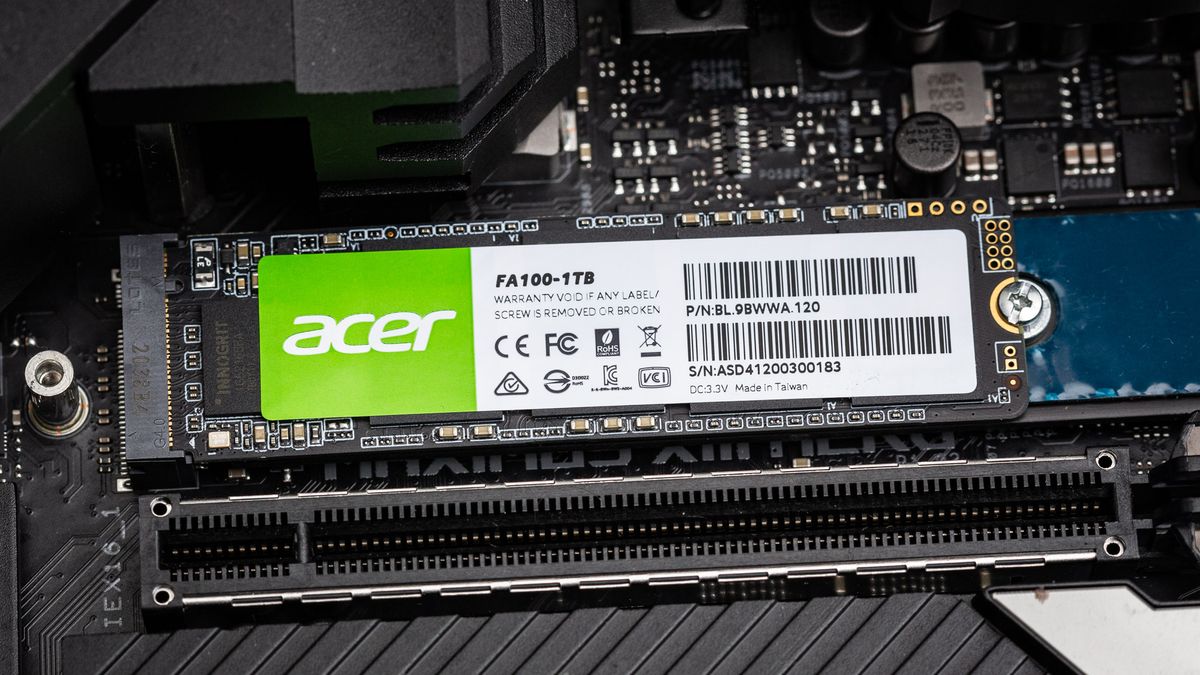
Tom's Hardware
176-Layer TLC flash from the value perspective
I knew it would be mega trash
Costs closely to sn 550
And it's worse
sour wadi
Acer make ssds lol?
real lava
Wait, its randoms is better than 970 evo plus
At low queue depth
It just loads games slower than sn550

Nand is good
But controller sucks 
It uses micron's 176 layer tlc
sour wadi
Rip
real lava
Missed potential by acer
Like they coulda done it better
And it'd be the new budget ssd
olive wadi
real lava
But controller sucks <:200Sad:641084766820761621>
FAKE INNOGRIT IS KING
trim cloak
real lava
Nand is good
i don’t agree
minor sun
trim cloak
i don’t agree
3dxpoint not a viable alternative here
trim cloak
aw shucks
olive wadi
minor sun
3dxpoint not a viable alternative here
SAYS WHO
minor sun
olive wadi
SAYS WHO
SAYS STUFFING 3DXPOINT INTO A SN550
real lava
Then..
Firmware sucks? I guess?
It's acer so idk what to expect from em
They're so trash they probably didn't do anything
sour wadi
Well if it's firmware there's hope
olive wadi
real lava
Firmware sucks? I guess?
why are you surprised that a budget drive is slow just because its using imft 176 layer
real lava
I wasn't surprised, just dunno much lel
trim cloak
olive wadi
why are you surprised that a budget drive is slow just because its using imft 17...
it’s*
 queen fulcrum
what is better for memory, Nvme or SSD?
sour wadi
queen fulcrum
what is better for memory, Nvme or SSD?
Nvme is a protocol just like sata, so do you mean if nvme is better than sata?
queen fulcrum
yea, im still learning all of the terms, i currently have a https://www.newegg.com/western-digital-black-sn750-nvme-500gb/p/N82E16820250112?Item=N82E16820250112, is it worth getting some SSDs?
sour wadi
queen fulcrum
yea, im still learning all of the terms, i currently have a https://www.newegg.c...
That is an ssd, if you want more fast storage you can but there's not a lot of point if you don't need it
queen fulcrum
i just need more storage
sour wadi
How much you looking for and for what ? Do you want it to be fast or do you mind it being slower?
Cuz otherwise you could get a hard drive
queen fulcrum
looking to go to like 1tb
trim cloak
1tb hard drive 
kind sierra
2tb hard drive ftw
sour wadi
trim cloak
1tb hard drive <:Cringe:598228562222514196>
That's why i said 50$ cuz no point getting 1tb hdd anymore
trim cloak
sour wadi
That's why i said 50$ cuz no point getting 1tb hdd anymore
you didn’t specify 2tb🤨
how would they know
sour wadi
trim cloak
you didn’t specify 2tb🤨
Was waiting to see if there was a follow up lol
trim cloak
ahh 
dense merlin
so i got my SO an ssd, they plugged it in and everything, its not showing up ni anything
is there anything you have to do once its in?
ive only installed an hdd after a pc was together
olive wadi
dense merlin
is there anything you have to do once its in?
yes you need to initialize it in disk management (windows)
tool is called create and format hard disk partitions
dense merlin
thanks
dense merlin
im tryna get windows on my SOs ssd
and installation media only lets it upgrade or get on a usb
and they dont have a usb
whats the tool called that copies everything from one drive and puts it on another?
blazing musk
Well lacking a USB you can't do clonezilla
dense merlin
isnt there a software to just copy everything from one drive to the other?
i think pato mentioned it the other day
blazing musk
Macrium Reflect?
dense merlin
maybe?
blazing musk
That would be used to clone the drive to a mirror copy
blazing musk
Everything on drive A would be copied to drive B, including all the system files
dense merlin
they can just format the hdd after
yeah thatd be fine, as long as it works

Save time on systems imaging using multicasting capabilities in KACE Systems Deployment Appliance for Windows and Mac. Download a free trial.
nvm
found it
Macrium Reflect Free allows you to back up your entire computer and schedule backups. For a free program, you get incredibly powerful software that allows you to create effective backups.
blazing musk
Yeah so what you can do then is do the copy, and then once the new computer is running do a pc reset right away so all the system files get reset
dense merlin
blazing musk
Yeah so what you can do then is do the copy, and then once the new computer is r...
cool thanks
dense merlin
blazing musk
Yeah so what you can do then is do the copy, and then once the new computer is r...
ok so
were in the boot manager
i have no clue which drive is the hdd and which is the ssd
the names are similar af
nothing like "gold hynix" or anything
blazing musk
Unplug any drive you don't need to make it simpler
dense merlin
apparently the thing was displaying wrong and it didnt actually copy anything to the ssd
so now we have to actually copy it after formatting it so it dfisplays properly in the software
fun times
blazing musk
That's a lot of floppies
blissful night
Floppy emulator :))
 karmic rock
So I just tried to download debian to my old x58 system
And I thought the download was successful
but all I'm currently seeing is a flashing underscore even after ensuring that my system booted from the correct HDD
Could this have something to do with the fact that the HDD is in a RAID configuration?
I'm not really sure at this point, but I would really like to get an OS on my system
blazing musk
Yeah linux doesn't usually have the correct raid driver out of the box
If any part of the system is on a raid volume it'll fail like that
karmic rock
that and any time I boot, even preceding installing linux, it says hard drive not found
and yet it shows two hard drives, RAID:Intel Fast and 2.2TB Infinity along with my flash drive and cd drive in the boot menu
blazing musk
The boot menu doesn't need drivers like the os does
karmic rock
I'm going to try putting linux on the drive labeled 2.2TB infinity
real lava
m.2 is also ssd
red jay
real lava
m.2 is also ssd
Yeah but it's small in is right?
real lava
m.2 is different form factor than 2.5" sata ones
red jay
sorry i meaan the size
real lava
so yes it's smaller
red jay
Is there speed difference between them?
real lava
m.2 drives these days are almost always nvme
so yes, they're faster
compared to sata ones
red jay
real lava
compared to sata ones
So that's why they are little bit expensive on M.2 drive
sour wadi
red jay
So that's why they are little bit expensive on M.2 drive
Not necessarily sometimes nvme drives are cheaper but yeah
dense merlin
sour wadi
Basically all motherboards from the last few years have at least 1 m.2 slot
Additional question: should I turn the psu off or does it not really matter since it's just storage
sour wadi
dense merlin
Additional question: should I turn the psu off or does it not really matter sinc...
When installing the drive? Nah just have the pc turned off
dense merlin
Actually might have to unplug it anyways
Have to move it off my desk kek
Is this it @sour wadi ?
 sour wadi
That ones for wifi, should be above your gpu
sour wadi
Might need to take out the gpu
dense merlin
I have a pcie wifi card
sour wadi
I can see that lol
dense merlin
Idk how nvme drives work I wasn't sure if they were the same thing lmao
sour wadi
Under the gpu for your board
sour wadi
dense merlin
Idk how nvme drives work I wasn't sure if they were the same thing lmao
What?
dense merlin
Pain
Do I have to take the backplate thing off?
Oh god
I'd have to take the heatsink off to reach the pcie lock
I think
Well I think I see the m.2 slot....
sour wadi
dense merlin
Do I have to take the backplate thing off?
What?
sour wadi
dense merlin
I'd have to take the heatsink off to reach the pcie lock
There should be no heatsink to take off?
sour wadi
dense merlin
No I mean the cpu heatsink
It's under the graphics card
dense merlin
Yes
sour wadi
Take out the gpu and you will see
dense merlin
To take the gpu out i havebto get the pcie lock undone
sour wadi
Yeah just slide your finger underneath
dense merlin
To get the pcie lock undone the heaysink has to come out, since it's blocking me from reaching the lock
Trying that rn
Doesn't seem to be working
sour wadi
Do it from the bottom not the top, going from the top is awkward you'd have to spin the whole pc around so the cpu is closest to you
dense merlin
Can't go from the bottom, psu is in the way
And cables
I just have to push down on the black part, no?
Or up?
dense merlin
And do these screws need to come out?

I got the pci lock undone
Pcie I should say
sour wadi
Yeah undo the screws
dense merlin
Screws out, gpu isn't coming out easily
I dont want to break the lock
Nvm got it
Uhh
Pato?

I see, I gotta take that lil screw off
It doesnt wanna come off tho
Nvm
But I dont have the screw that's supposed to go in there idt
Yo @steady talon
Can I take a screw from s different standoff?
sour wadi
dense merlin
Can I take a screw from s different standoff?
You should be able to use the screw from the m.2 wifi standoff
dense merlin
sour wadi
You should be able to use the screw from the m.2 wifi standoff
Yep my friend just figured that out lol
Just gota find a screw driver small enough now lol
dense merlin
is it worth installing windows on the 660p or should i just my cs900 as my boot ssd? will there be any real differnece?
blazing musk
Windows likes faster random access times. A good nvme can reduce your boot time from 35 to 20 seconds. Granted, that's still really fast so it's up to you either way.
dense merlin
blazing musk
Windows likes faster random access times. A good nvme can reduce your boot time ...
Yeah I knew that, was wondering if there'd be anything else that it would affect?
blazing musk
Overall system responsiveness but nothing major
dense merlin
Ty
 pale anvil
is sata 2 ssd better than hdd
like for booting up times before it being actually usable lol
pale anvil
its because my motherboard doesnt support sata 3 and i have no idea if theres nvme slots on there
real lava
Probably limited by mobo
Yep
That's still faster than hdds tbh
Even tho their sequential speed will be capped at 300 mb/s
pale anvil
lol
real lava
But random speed will be where you'll notice the most
It's still gonna be decently snappy
pale anvil
i mean my mobo specs said 3gb second max but i have no idea
pale anvil
oh so thats what it means
i mean 400 bucks for a pc with 32gb ram and a decent cpu isnt bad so ill take it
red jay
real lava
It is
Okay
sour wadi
red jay
Is 120GB SSD enough only for Windows 10?
It is but don't buy one, a 240gb or 500gb one will be like 5-15$ more most of the time
red jay
sour wadi
It is but don't buy one, a 240gb or 500gb one will be like 5-15$ more most of th...
Yeah it's a low cost for your country, but for our country it's kind of expensive
sour wadi
red jay
Yeah it's a low cost for your country, but for our country it's kind of expensiv...
Ahh okay, what i said is usually the case but if you're somewhere outside the eu or NA it could be different yeah
red jay
sour wadi
Ahh okay, what i said is usually the case but if you're somewhere outside the eu...
Yeah
I understand what you gonna say👍
trim cloak
sour wadi
It is but don't buy one, a 240gb or 500gb one will be like 5-15$ more most of th...
240gb poo
sour wadi
trim cloak
240gb poo
Nah i lived off 240gb ssd for 5ish years
trim cloak
i can’t believe you would suffer yourself like that
sour wadi
trim cloak
i can’t believe you would suffer yourself like that
Wasn't suffering, i didn't need more storage
kind sierra
240gb is plenty for standard browser and word usage
I ran 250gb for most of my computer engineering undergrad. Never used more than half of it
Even with dual booting I was fine
sour wadi
Yeah like i only play a few games so i had like csgo overwatch and minecraft mb installed as well as chrome discord, ms office couple other things
trim cloak
kind sierra
240gb is plenty for standard browser and word usage
but a lil more gets 500gb+🙂
so double capacity with less than double the price😁
sour wadi
trim cloak
but a lil more gets 500gb+🙂
not 5/6 years ago
trim cloak
oh no! i didn’t know i was talking 5 years past tense!
ok but fr, i actually didn’t know you were talking about when you first got it
sour wadi
trim cloak
ok but fr, i actually didn’t know you were talking about when you first got it
well i hardly used it for 5 years buying it 2 years ago 
kind sierra
trim cloak
but a lil more gets 500gb+🙂
Thing is my laptop came with a 250GB drive, so getting a 500 would have cost something like 40-50 more
trim cloak
well i was talking in a sense of buying one, cause that person above wanted to buy one
red jay
kind sierra
I ran 250gb for most of my computer engineering undergrad. Never used more than ...
Okay
pallid orchid
sour wadi
well i hardly used it for 5 years buying it 2 years ago <:thinkies:8078750391009...
Time traveller confirmed?
sour wadi
pallid orchid
Time traveller confirmed?

karmic rock
Anyone know if the HP ZBook Studio G3 has two m2 spaces?
 noble prairie
I'm trying to copy my main drive to a new one, but I'm having some trouble. They're both supposed to be 1TB, but the one I want to clone is 953GB and the new one is 931GB. The original drive actually has over 300GB free, but I can't shrink the C partition to make it the same size as the new drive.
minor sun
dense merlin
could someone help my friend with macrium reflect?
What about it..?
dense merlin
minor sun
What about it..?
its saying not enough space when there is
its 350gb to 450gb

nvm
friend figured it out
blazing musk
It's not the data size that matters there, it's the partition size
sour wadi
Just drag the emptiest partition in last it'll shorten it basically