
#storage-devices
1 messages · Page 49 of 1
 minor sun
2 different M.2 key M slots avaliable
for some reason PCPP thinks there's none
OH WAIt
HAHAHAHAHAHA
I LEFT IN HELIX L
brb
I can upgrade the gpu to a 3060ti then
might as well add a better psu too then
minor sun
 rancid pike
b560? 👀
minor sun
I was looking at prices for the m.2 drives, accidentally added both at the start
 nimble robin
heh
minor sun
I was wondering why only a 3060 fit in the budget
nimble robin
3060Ti fits in a $1000 budget no problem
minor sun
yea
nimble robin
@ msrp of course
 wintry fractal
I have to leave to get the car out of the shop...Thank you for taking some time for me. You've given me something to think about. Is there a way to connect with you folks again later after I close this out? You are really great!! I'd like to pursue this further.
 dusk turtle
Just come back in here
nimble robin
mhmm
its mostly me, Mr1111, and Vintage
some others are here sometimes but its mostly us
we will remember you
 brittle anchor
@minor sun do you have a recommendation for a mini 3080 pc build
minor sun
@brittle anchor well, can you give me which specific 3080 model to work with? Different itx cases can fit different sizes of cards and such, I could also find both myself if you'd like. Also, can you give me a budget and what it'll be used for?
 red jay
If length isn't a problem but thickness is most gigapoop stuff is automatically out
 olive wadi
nimble robin
some others are here sometimes but its mostly us
olive wadi
nimble robin
some others are here sometimes but its mostly us
CEO OF GAMEZOID SSD DOESNT COUNT
minor sun
@olive wadi you're ssd guy not list making guy :P
olive wadi
made a list of ssds
 plush crag
@zenith verge needs a 1TB ssd @olive wadi
 zenith verge
I have a 512GB 660p now, just looking to add more storage in my second m.2. wegg has the 1TB for $99.99
nimble robin
TFW new laptop keeps getting unexpected store exceptions
zenith verge
Ask it to not
olive wadi
zenith verge
I have a 512GB 660p now, just looking to add more storage in my second m.2. wegg...
get the mp33 its 95 rn
™️
zenith verge
Thanks, yo
 blazing musk
nimble robin
TFW new laptop keeps getting unexpected store exceptions
blazing musk
nimble robin
TFW new laptop keeps getting unexpected store exceptions
That's just Windows being Windows. Either a repair with dism or reinstall if that doesn't fix is in order.
blazing musk
I wipe out a factory installation right out of the box anyway, once I pull the drivers I need. Too much bloatware on a laptop.
 indigo pike
so i have a sata ssd as my current boot drive with windows and everything and i just got a m.2 ssd as a gift as i was wondering how would i switch my boot drive to make it the m.2 drive
blazing musk
You'll do that in BIOS, usually under the boot menu in the "device priority" section. Move the new drive to the top priority.
dusk turtle
After you reinstall windows or clone it. 😉
 jaunty elm
@nimble robin i have about a tb of data i want to backup whats the cheapest option for me
mediafire?
IDrive is crazy cheap
$52 annual for 5tb
blazing musk
Backblaze personally if you want cloud storage. I'd just get a 2TB external backup drive for like $40 though.
 willow wing
i have 2 old hard drives from laptops and i was wondering if i could install them in my pc without formatting them
 torpid adder
You can
But you should backup the important data on them and format them to remove the old OS stuff and programs n such
willow wing
how?
torpid adder
The drive can plug in and be usable as is, so you search online about any programs you use and check where the user data is stored, migrate that to a backup drive, and any other files you have on there you don't want to be erased, then once you're sure it's only got programs and operating system on it, you format it
willow wing
ah ok
 heavy dagger
Hey what do y'all think the cheapest way to mount 3.5" drives in 5.25" bays? Ran out of room in my cage and need to put drives in somewhere
 ancient widget
Hello! I am thinking of buying an external HP EH958B LTO-5 tape drive. Can anyone recommend a SAS controller card that would be compatible with this?
dusk turtle
ancient widget
Hello! I am thinking of buying an external HP EH958B LTO-5 tape drive. Can anyon...
ancient widget
Thank you so much @dusk turtle
indigo pike
dusk turtle
After you reinstall windows or clone it. 😉
how do i do that
willow wing
heavy dagger
Hey what do y'all think the cheapest way to mount 3.5" drives in 5.25" bays? Ran...
i think there are 3.5" adapters for the 2.5" vertical mounts
 sour wadi
Hey, is it worth my time updating my ssd's firmware, didn't know it was a thing until now, it says there is speed improvements
 pallid orchid
sour wadi
Hey, is it worth my time updating my ssd's firmware, didn't know it was a thing ...
pallid orchid
sour wadi
Hey, is it worth my time updating my ssd's firmware, didn't know it was a thing ...
Yes.
sour wadi
Okay thanks
 obtuse latch
what is the fastest m.2 for around 40-50$? looking for 256gb
like around that
olive wadi
obtuse latch
what is the fastest m.2 for around 40-50$? looking for 256gb
like around that
buy a 500gb at that point
lol
why do you care about the fastest
especially in that capacity
obtuse latch
for a boot drive @olive wadi
olive wadi
obtuse latch
for a boot drive <@!261617855257116672>
not a good reason for getting the fastest
obtuse latch
o
 zealous oracle
Hi. I have some drive bay and drive compatibility questions.
Is anyone here up for that?
 past peak
sure, what question do you have?
zealous oracle
Hi Jose! It's been over 20 years since I did a desktop build, so forgive me - a lot of this is stuff I don't usually deal with. I went on the cheap for a Rosewill Challenger. It has two 3.5" drive bays. I am considering buying this: https://www.newegg.com/startech-com-hsb220sat25b/p/N82E16817998040?Item=N82E16817998040 Will that take up one or two of these bays?
blazing musk
One
past peak
it looks like it'll just take up one
zealous oracle
Cool! My other question is; Will the drive on this page work with these bays? https://www.newegg.com/sandisk-2tb-ssd-plus/p/N82E16820173423?Item=N82E16820173423&nm_mc=AFC-RAN-COM&cm_mmc=AFC-RAN-COM&utm_medium=affiliates&utm_source=afc-PCPartPicker&AFFID=2558510&AFFNAME=PCPartPicker&ACRID=1&ASID=https%3A%2F%2Fpcpartpicker.com%2F&ranMID=44583&ranEAID=2558510&ranSiteID=8BacdVP0GFs-4a.WdpfCZP5Nrq7ADcGD4A
blazing musk
Seems excessively expensive though, no need to spend $50 on a drive tray
It looks more meant for server hot swap bays
zealous oracle
Hmm.. Guess I need help figuring this out then. I used the NewEgg search bar to find the drive. The case has several 5.25" bays and two 3.5" bays. No 2.5" bays in the case though.
past peak
what case do you have?
zealous oracle
Oh, I want to hotswap externally.
Rosewill Challenger.
I wanted to get that one that had the hotswap bay on the top, but it's sold out for forever.
the 690 ii
I think it was a Cooler Master or Corsair.
past peak
ahh so you want to hotswap
zealous oracle
Yes
blazing musk
Well if you want to hotswap without opening the case you can use a 5.25 bay converter
zealous oracle
Ok
past peak
yee
zealous oracle
I'm searching NewEgg for that now.
zealous oracle
Ok. Looks like that will support two 2.5" drives and one 3.5" drive?
past peak
yeah
past peak
you're welcome, any other questions you might have?
zealous oracle
Well, now for the drive I found.
past peak
any 2.5 in drive would work
blazing musk
Yes, just make sure you set the BIOS option and write caching policy in Windows to allow it to be removed
zealous oracle
I will 🙂
past peak
other alternatives for ssd's are the western digital blue and the mx500, which should be similar in price
zealous oracle
Yeah, I saw that in PC Part Picker too.
I've had great experiences with SanDisk in the past (the little cards), and also have heard great things about the Samsung EVO
past peak
yeah samsung ssd's (the good ones that are worth buying) tend to be more on the expensive side, but when they lower in price, they're a great buy
blazing musk
Samsung is good but overpriced
zealous oracle
Agree
I'll look for sales. I want a good warrantee though, so NewEgg is where I'm likely to buy most of my stuff for this build.
past peak
understandable
zealous oracle
I also think the customers are more honest with their reviews on the NewEgg site. They don't hold back, but know when to be fair too.
I'm pretty glad I found this site.
Anyway, thank you for answering my questions and helping me find the right converter/hotswap bay!
blazing musk
Happy to help!
zealous oracle
Thanks, Fal'Cie. Hi to you too, btw 🙂
olive wadi
blazing musk
Samsung is good but overpriced
samsung is average but overpriced
oof
owned
olive wadi
zealous oracle
Here's the drive I found. https://www.newegg.com/sandisk-2tb-ssd-plus/p/N82E168...
that drive is not worth your money
costs less
and is better
 pastel canyon
Is there a better drive for the price as this one? https://www.newegg.ca/western-digital-black-sn750-nvme-500gb/p/N82E16820250109?Description=m.2&cm_re=m.2-_-20-250-109-_-Product
past peak
no i don't think so
there are other drives at the same price point such as the the barracuda 510, rocket q, rocket, pilot-e and mp34, but it's only like a $5 difference in between the cheapest of those and the sn750
pastel canyon
what would be a better drive than this one in the $100-150 range?
would a better drive make a big difference ?
past peak
i wouldn't pay 100-150 for a 500gb drive
especially since the pilot-e is only $110 for 1tb
 grim glade
$100-150 are 1tb m.2 nvmes already
pastel canyon
just trying to find a fast / good drive in the 500gig range
I only play 1 game so don't need a lot of storage
past peak
pastel canyon
Is there a better drive for the price as this one? https://www.newegg.ca/wester...
wait what
grim glade
sn750 is fast
past peak
why is it prices like that
past peak
pastel canyon
just trying to find a fast / good drive in the 500gig range
fast, as in loading times or write speeds
grim glade
the differences between the great gen3 nvme drives rn is just very minimal
not noticeable
pastel canyon
ok thx
past peak
the 970 evo seems to be cheaper than the sn750 in canada
pastel canyon
yea i was looking that also
past peak
yee so for your case the 970 evo, pilot-e, or sn750, whichever one's cheaper at the time of buying
pastel canyon
awesome thanks
past peak
you're welcome
olive wadi
pastel canyon
Is there a better drive for the price as this one? https://www.newegg.ca/wester...
that much for 500gb is garbo
literally $20 more and you can get a 1tb mushkin pilot-E
read ssd guide
oh its .ca lmao
ssd guide still applies
past peak
ssd guide ftw
pastel canyon
ok thank you...i'll have a look
I dont mind paying more for the drive...just want a decent one
olive wadi
pastel canyon
I dont mind paying more for the drive...just want a decent one
ok well every ssd in that list is decent so
pastel canyon
Thats a great list. A lot of info...thank you
olive wadi
np
 floral verge
h
 fathom pier
Yo, so I found some older hdds and I chose one to use as extra storage. These things r REALLY slow, like in a windows xp system. Anyway, I'm not sure if they have malware on them, and I'm not sure if it's safe to put them in my system. I doubt any malware for windows xp still works on win10 but you can never be too careful. So what do I do?
blazing musk
Format the drive, and if you're paranoid about viruses you can do it from a Linux live USB
fathom pier
Would booting win10 into safemode also help? Just taking some precautions
blazing musk
What antivirus do you have? A lot have a "paranoid" or "hardened" mode for when you're working with potentially risky stuff to lock down critical stuff
Safe mode often stops antivirus from working
fathom pier
I see. I don't download shady stuff, so windows defender has always been fine for me
blazing musk
Should be fine, yeah.
Any ancient viruses that might be on there will be detected the instant they try to load anything, which I seriously doubt they even could from a spare drive Windows isn't even actively accessing. You could use an external dock or turn on hot swapping in BIOS and plug the drive in after Windows boots, then immediately delete all the partitions.
fathom pier
I see, man I hadn't even thought of that. Thanks for the advice, I'll try it out.
blazing musk
If you do the hot swap, plug it into power before you turn it on, then you can plug in SATA after boot.
fathom pier
Okay, and should I delete the partitions through the disk management tool?
blazing musk
Yes that works
fathom pier
Ight. I think on my mobo it's called "hot plug", but yeah I'll see if this works
 river root
any one know what the lowest cost sas controller pci for a Seagate 6TB Enterprise Hard Disk Drive - 7200 RPM SAS 12Gb/s 128MB 3.5" ST6000NM0034
would be ?
thank you
fathom pier
It did work, no viruses, formatting rn. It's write speed when formatting is 140MB/s, is this good for a hdd?
Its*
blazing musk
Not too bad, definitely in the usable range for storage
fathom pier
Good, definitely good since my C drive ssd is only 120gb...that got used fast. Also, oddly enough, the hdd is labeled as 160gb, but it's apparently 232, so I guess I got some luck rn
blazing musk
river root
any one know what the lowest cost sas controller pci for a Seagate 6TB Enterpris...
Server hardware isn't my specialty, but I found an option that should work for you.
https://www.newegg.com/hp-462864-b21-sas/p/N82E16816401116 plus https://www.amazon.com/WORDIMA-Internal-SFF-8643-SFF-8639-Female/dp/B08TH5CNL5
At that price range there's only PCIe 2.0 cards, the 3.0 are much more expensive
nimble robin
at what point would a 1tb SX 8100 start to slow down?
50 gigs left?
20 gigs left?
less?
more?
pallid orchid
I mean its an m.2 so it wouldnt really matter even if it slowed down tbh
pallid orchid
nimble robin
december 4th, 2012
pallid orchid
I mean tech has only improved since then so if it didnt make a difference with 8 year old tech its not gonna make a difference with newer stuff
 pallid orchid
you can do things like trim the ssd as well in the windows defragment and optimise drives menu
dusk turtle
pallid orchid
you can do things like trim the ssd as well in the windows defragment and optimi...
That's not how it works lol
nimble robin
kek
pallid orchid
dusk turtle
That's not how it works lol
trim function has been known to speed up ssds that get slowed down
dusk turtle
TRIM doesn't affect how NVME slows down after 80% capacity is filled
pallid orchid
dusk turtle
TRIM doesn't affect how NVME slows down after 80% capacity is filled
I see
nimble robin
nimble robin
at what point would a 1tb SX 8100 start to slow down?
so vintage, can you answer this?
at what point will I be seeing significant slowdowns?
that is, emphasis on significant
dusk turtle
I don't know, that's a question for windshields or google
olive wadi
pallid orchid
I mean its an m.2 so it wouldnt really matter even if it slowed down tbh
m.2 is just a connector and doesnt gaurantee speed
olive wadi
nimble robin
alright ill ask him
it really depends a lot on the specific drive and how it handles OP and its PSLC cache and how good/bad writing direct to nand performance is
in a consoomer use environment doesnt really matter
you can google it im busy atm 😎
 onyx anvil
Wondering if someone can help me, and I don’t know if this is the right place but here goes. I just finished my first build with my primary OS hard drive being an nvme drive. I got a second 4tb HDD but didn’t have a SATA cable so I didn’t connect it right away. Anyway, now whenever I connect that drive, I can’t boot. According to my motherboard LEDs it has a boot and VGA error. When I unplug the SATA power it goes back to being just fine. I made sure it only boots the ssd with the operating system jn bios. So I’m not sure what I’m missing. Has anyone ever heard of this problem?
pallid orchid
olive wadi
m.2 is just a connector and doesnt gaurantee speed
Yee but that drive is pretty fast...
pallid orchid
onyx anvil
Wondering if someone can help me, and I don’t know if this is the right place bu...
Do you have sata hotplug as a feature on ur mobo?
 tall ore
I think EVERY board has SATA Hotplug nowadays.
So, I'm gonna ask a dumb question.
What size is the screw for an M.2 drive?
And, does anything else in a PC use that screw type/size?
pallid orchid
tall ore
I think EVERY board has SATA Hotplug nowadays.
Nowadays. What if he has an older system?
tall ore
I think like, 90% of systems made after 2010 have SATA Hotplug.
pallid orchid
Eh still worth an ask
pallid orchid
tall ore
And, does anything else in a PC use that screw type/size?
I mean you can try it but you need the little standoff screw thing as well
tall ore
I already have that (apparently)
I didn't check my board, so I just bought a 4 pack of Standoffs and Screws off Amazon for 5 bucks
Before actually checking to see if it HAD the Standoff and Screw on the board.
Standoff? Yes. Screw? No.
pallid orchid
tall ore
Standoff? Yes. Screw? No.
Just try slapping it in and check
Always works with screws
100% guaranteed
tall ore
Yes, but it has to be a specific screw ya dingus.
pallid orchid
tall ore
Yes, but it has to be a specific screw ya dingus.
I mean if it fits its fine
tall ore
Looks like from my preliminary searching, the screw is an M2.0 * 2.5mm
pallid orchid
tall ore
Looks like from my preliminary searching, the screw is an M2.0 * 2.5mm
Just grab all the screws that came with ur mobo and try each one on to check tbh
Cant harm anything tbh
tall ore
I don't HAVE those screws anymore.
I've had the board in my PC for like, darn near 2 years now.
I'm just now adding an M.2 SSD to my rig.
onyx anvil
Yep it has a SATA hot plug. Should that be enabled?
tall ore
Yeah.
pallid orchid
tall ore
And, does anything else in a PC use that screw type/size?
I mean this question kinda dumb if you dont have the screws
tall ore
No it isn't.
pallid orchid
onyx anvil
Yep it has a SATA hot plug. Should that be enabled?
Enable that
tall ore
I have a bajillion screws that my dad has horded from prior PC builds.
onyx anvil
Okay I’ll give that a shot
tall ore
So, I COULD have a screw that fits.
But I needed to know if anything else (Motherboard screw, etc) may have used the same screw size.
pallid orchid
tall ore
So, I COULD have a screw that fits.
Then as I said a while back try em on and see if they fit lol
pallid orchid
tall ore
But I needed to know if anything else (Motherboard screw, etc) may have used the...
I can check if you want IG
pallid orchid
onyx anvil
Okay I’ll give that a shot
So what you want to do is enable hot plug
Then disconnect the hard drive and boot ur pc
Then when its on connect the sata cable to it and format the entire hard disc
Dont unplug the power cable from the psu to the hard disc tho
That shud stay on
pallid orchid
tall ore
But I needed to know if anything else (Motherboard screw, etc) may have used the...
Yeah I checked and the answer is not really
onyx anvil
pallid orchid
Then when its on connect the sata cable to it and format the entire hard disc
Hmmm...Doesn’t show up to be able to format it. Could it just be that I got a DOA drive? It’s brand new.
pallid orchid
onyx anvil
Hmmm...Doesn’t show up to be able to format it. Could it just be that I got a DO...
Yeah i think thats it
onyx anvil
It grinds and shows up in BIOS so it’s being read and powered somewhere. Just zero acknowledgment anywhere else.
pallid orchid
onyx anvil
It grinds and shows up in BIOS so it’s being read and powered somewhere. Just ze...
If it shows up in bios its not dead on arrival
Try opening the windows disk management program
onyx anvil
I’m there now
pallid orchid
Does that read the drive?
pallid orchid
onyx anvil
It grinds and shows up in BIOS so it’s being read and powered somewhere. Just ze...
If it grinds it probably dead tho
onyx anvil
It shows up not initialized. But the option to initialize is grayed out.
pallid orchid
onyx anvil
It shows up not initialized. But the option to initialize is grayed out.
Thats promising
onyx anvil
🤞
pallid orchid
try unplugging it and replugging
and try another sata port on the motherboard this time
onyx anvil
Rescanning now
...Jesus this is taking a while. Could be good could be bad.
Okay! Gives me the option to initialize now.
Tried a GPT and got an error that says “the request could not be performed because of an I/O device error.”
@pallid orchid would MBR make any difference?
onyx anvil
Confirmed.
 upper quiver
is this in windows disk management?
pallid orchid
upper quiver
is this in windows disk management?
YES
onyx anvil
Yep
upper quiver
sounds like a doa drive to me bro
pallid orchid
onyx anvil
<@499525349109923844> would MBR make any difference?
MBR is older but doesnt make a massive difference if its not your boot drive or ssd. Might be wrong tho.
upper quiver
yeah p much
pallid orchid
btw is ur drive a barracuda drive?
upper quiver
GPT is recommended tho
onyx anvil
Got it. No it’s a western digital blue.
upper quiver
onyx anvil
Wondering if someone can help me, and I don’t know if this is the right place bu...
thats a dead drive lol
dont even need to do any other troubleshooting
onyx anvil
Haha nice. All right well thanks for your help guys. I’ll see if I can get a replacement sent and have better luck 🤞
upper quiver
if the bios struggles to recognize a drive, thats the first and last nail in the coffin for that drive lol
onyx anvil
Haha damn
pallid orchid
upper quiver
if the bios struggles to recognize a drive, thats the first and last nail in the...
he said bios reads it tho
pallid orchid
onyx anvil
It grinds and shows up in BIOS so it’s being read and powered somewhere. Just ze...
.
upper quiver
i mean, the way the system literally fails to boot on account of the drive
unless his claim from his initial post was incorrect
regardless
new drives dont act like this
RMA
onyx anvil
Yeah if it’s plugged in, even though I have the SSD set as primary, the only way I can get to the OS is selecting SSD in the boot menu. Then once I’m in, I can’t scan for it in disk management until it does basically 3 shakes and a beep several times like a car that one quite turn over. THEN I can scan it and not be able to initialize it.
pallid orchid
Try getting a replcement tbh
onyx anvil
And that sound is what it makes all the way through boot up as well
pallid orchid
Oh no its VER VERY broken
onyx anvil
Well I know it’s the cheapest 4tb I could get at Best Buy so there’s 2 strikes.
pallid orchid
Like thrown from a delivery truck like a newspaper broken
onyx anvil
Haha that’s what I’m afraid of.
It’s not clicking like I’m used to hearing from dead or dying drives, so hard spins is the best I can describe it. I’ll take it over and have them hook it up just to make it easier to get a new one then
Thanks guys!
olive wadi
pallid orchid
Yee but that drive is pretty fast...
???? You're aware that M.2 doesn't effect speed right
It sounds like you're getting M2 and NVME mixed up, the two are not mutually exclusive
pallid orchid
olive wadi
???? You're aware that M.2 doesn't effect speed right
Guy sent the name of the drive he /she had
lol
pallid orchid
nimble robin
at what point would a 1tb SX 8100 start to slow down?
right here
olive wadi
its not that fast but i sleep
pallid orchid
olive wadi
its not that fast but i sleep
much faster than sata
olive wadi
Depends, if the Realtek RTS5762 is anything like the Realtek RTS5763DL on the adata swordfish than the drive will have worse read latency than a sata drive
Realtek based drives are funny lol
minor sun
@pallid orchid there's a lot more to performance than just rated seq r/w
pallid orchid
minor sun
<@499525349109923844> there's a lot more to performance than just rated seq r/w
I see storage isnt really what Im well read up on my bad
minor sun
And there's no good reviews on sx 8100 yet
For example, read through all the testing on the pilot e, you can see how a drive's performance differ from one task to another, and relative performance to other drives. @pallid orchid
https://www.tomshardware.com/reviews/mushkin-pilot-e-m.2-nvme-ssd,6345.html

Tom's Hardware
Mushkin's new high-end M.2 drive boasts high endurance, fast performance and 256-bit AES encryption. Can it best the plethora of similarly equipped competition?
pallid orchid
minor sun
For example, read through all the testing on the pilot e, you can see how a driv...
will do thanks
minor sun
Do keep in mind there's multiple charts you can scroll through on every test
SSDs are annoyingly complicated
olive wadi
pallid orchid
3500/3000MB/s read and write is what its rated at
that doesn't really have anything to do with read and write latency lol
pallid orchid
olive wadi
that doesn't really have anything to do with read and write latency lol
latency?
 olive wadi
pallid orchid
latency?
olive wadi
pallid orchid
latency?
yes latency lol
minor sun
write latency

 pallid orchid
olive wadi
lower better lmao
pallid orchid
olive wadi
lower better lmao
bruh you dont have to be a prick about it
minor sun
lol Micron dropping out of 3dxpoint moment
olive wadi
pallid orchid
bruh you dont have to be a prick about it
im not
pallid orchid
olive wadi
im not
Im trying to understand this stuff beter and all you say is lol and lmao
olive wadi
ok lol
minor sun
btw @olive wadi does Intel have any fabs that can make 3dxpoint? Or are they semi-screwed if Micron sells the fab off to someone else
olive wadi
minor sun
btw <@!261617855257116672> does Intel have any fabs that can make 3dxpoint? Or ...
nope they don't
latency in nanoseconds is the amount of time it's taking for the addressed data to actually be delivered to the processor
pallid orchid
olive wadi
latency in nanoseconds is the amount of time it's taking for the addressed data ...
Ahhh that makes sense
tall ore
I just got a Pilot-E myself. Tommorow I'll be installing it in my rig
minor sun
nice
tall ore
It's replacing a 860 Evo SATA SSD
tall ore
Honestly, I'm quite annoyed that the Screws come with the Motherboard and not the drive itself.
Cause I never thought I'd install an M.2 in this board, so I didn't keep the screws anywhere easily rememberable.
blazing musk
I always save my spare parts in the box for the motherboard. It's currently sitting next to me.
I have several motherboard boxes with various spare parts for different builds that I've done, dating back to DDR2 days. If I'm looking for a stick of DDR3 memory, I know it'll be in my AM3+ 970 board box.
torpid adder
I have a couple ram packs with ram from my brother's AM3 computer, and some parts computers
blazing musk
My wife thought I was crazy for keeping all my old parts. She doesn't any more after I built her a computer out of those parts and a trash rescue HP that was in surpisingly good shape besides the case. I spent $15 on a second stick of RAM and she got a "new" computer for playing retro games.
torpid adder
Nice
tall ore
I just wish M.2 didn't use such a unique screw. When the M.2 connector was made, they should have made it using the same Standoff and Screw that Motherboards use.
That way a new Standoff and Screw wasn't needed.
But no, it NEEDED an M2x2.5mm
olive wadi
tall ore
I just wish M.2 didn't use such a unique screw. When the M.2 connector was made,...
there's no standardization for motherboard standoffs
tall ore
Uhhh...
olive wadi
different cases have different standoff heights
tall ore
Yes there is.
olive wadi
for the screw itself sure, but different cases have varying standoff heights
tall ore
I have NEVER had a motherboard tray where I couldn't use the standoffs from another case in a pinch.
olive wadi
i have a fair few cases that i've interchanged standoffs with and there is a height difference between them
i can't install the IO shield on one of my systems because of it
motherboard is up higher than it should be
there is an atx spec but it just seems to define a minimum height
which makes sense for clearance between the tray and any surface mount components
 deep mantle
Hi, I want an opinion from someone who knows storage
if mp33 and a ADATA 8100/S7 comes down to the same price, is S7 the better nvme? someone else was saying Realtek controller bad
dusk turtle
MP33 all day
deep mantle
is there any reason for that? when Adata s7 has dram and at the same price
dusk turtle
DRAM isn't the end all be all. We talking 1 TB drives yeah?
deep mantle
500gb. both are $53
 vagrant fractal
Hey Everyone,
my friends dad got a new laptop and needs the data of this harddrive. How can i access the 308,06gb OEM Partition?

 blissful night
Assign a drive letter to it
blissful night
Then it most likely is a recovery partition or something
Not sure why it would be so big
but how is there data on it if you cant assign a drive letter to it
it most likely was never used in the first place
vagrant fractal
i checked one oem partition and it worked. It tells me that the large one is broken
any recovery tools i should try?
tall ore
Uhhh... I'd just take it to DriveSavers or something.
olive wadi
deep mantle
Hi, I want an opinion from someone who knows storage
if mp33 and a ADATA 8100/S7...
8100 probably better
either aren't going to great
olive wadi
 silver island
anyone know a quality Molex to SATA that won't catch fire?
silver island
anyone know a quality Molex to SATA that won't catch fire?
anything that's using a crimped style connector will be fine
molded ones are a no no
silver island
@olive wadi thank you! ah, I See the wires going in properly here.
(my tape didn't work on the 3rd pin >_< )
olive wadi
silver island
(my tape didn't work on the 3rd pin >_< )
poop
 blissful sierra
as they say
Molex to Sata, Lose your Data
but it should be fine, molex can do 5v and 12v rails
sata can do 5v and 12v rails
blissful sierra
should be good
the only time i wont trust molex adapters is when its molex to pcie 8 pin
thats just terrifying
tall ore
Welp, my screws are here, I just need to A. Verify they fit and B. wait until like, late at night to install the thing because I don't feel like telling my parents I spent ~100 bucks on an SSD.
blazing musk
Living dangerously I see. How long do you think you can hide that?
tall ore
Probably forever.
olive wadi
blissful sierra
Molex to Sata, Lose your Data
yep and that's a dumb saying
peoples sata adapters falling on fire has nothing to do with molex being bad
they bought crappy adapters with molded sata ends
dont think ive ever seen a catastrophic failure with crimped molex->sata adapters
plush crag
More of an issue for miners trying to power rx480's which try to draw 100w through the riser
ime
blissful sierra
well i did mention it should be fine because both connectors work off of the same rail
i just think the saying sounds nice
olive wadi
blissful sierra
well i did mention it should be fine because both connectors work off of the sam...
pee pee poo poo
olive wadi
plush crag
More of an issue for miners trying to power rx480's which try to draw 100w throu...
lol have you seen the youtube video of the guy explaining how the molded molex to sata adapters fail
and then he made a video like a week later
plush crag
I haven't
olive wadi
about how his own fell on fire and he should've followed his own advice

In this video I show you how to identify the safe type of computer power adapters.
It happened to me: https://www.youtube.com/watch?v=EYkof-csPfI
I have a second channel:
https://www.youtube.com/channel/UCN3Dgu6CVBcecDkc5DmIIqw
plush crag
I've seen the /r/gpumining bot that'll autoreply with a warning every time someone types sata and adapter in the same post
olive wadi
he made this shortly after

I literally saw this coming, but I'm an idiot and didn't do anything about it. No real damage, other than the fact that my room smells like fire.
Original video: https://www.youtube.com/watch?v=TataDaUNEFc
Autopsy: https://www.youtube.com/watch?v=fAyy_WOSdVc
I have a second channel:
https://www.youtube.com/channel/UCN3Dgu6CVBcecDkc5DmIIqw
2 months after lol
plush crag
That looks awful
plush crag
Or use a backplane, lol
tall ore
Alright. Before I go being terminally stupid. I assume that you cannot hot-plug an NVMe M.2 SSD.
tall ore
https://prnt.sc/10vmkci Pilot-E CDM results

For Reference, here's a mostly full 860 Evo SATA drive. https://prnt.sc/10vmogz
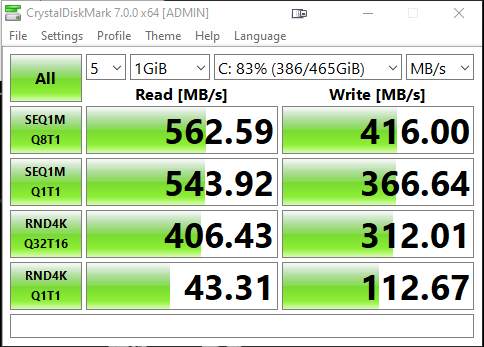
 sand onyx
I don't know super lot about storage but what I can say is if you want 10sec boot times go with an Nvme M.2 boot drive.
 still wigeon
Is wd black 750 good?
red jay
Never heard of Mushkin, is it in US only?
blazing musk
Newegg's brand, or it used to be. They've gotten better over the years
red jay
It’s expensive here in Canada sadly
Im thinking of getting SN550. Is that sufficient for gaming and some media?
grim glade
i think sn550 doesn't have dram
prob cs3030 or a2000 500gb/1tb would be cheap
ours rolled back to 60
grim glade
red jay
It’s expensive here in Canada sadly
500 or 1tb?
grim glade
good price imo
i dunno if canada has omb permit thing for importing drives but if there is, then this is prob not bad of a deal
red jay
No it’s free shipping
It’s not bad its about the same price as SN750 for $175 sale price atm
How does it compare to Sn750?
grim glade
idk, it's a windshields thing i'm too unknowledgable to understand
red jay
Yeahh same
grim glade
(based on the spreadsheet from pins) sn750 is rated as a prosumer nvme, uses wd propreitary controller while cs3030 is only a consumer nvme and uses phison e12 controller
but yea idk what those means
if it won't cause major problems and is cheap, i'll take it
blazing musk
DRAM-less drives can still perform very well. The DRAM only helps with file writes.
Windshields' tier list
grim glade
ooooo
kingston a2000 1tb should only play around $90-100 🙂
it's 120 here coz of omb permit thing
red jay
Yeah I’m not ready for PCIE Gen 4. I don’t know if I’ll benefit much from it, since I’m a basic gamer/consumer
grim glade
nah it doesn't do so much if agains't the other good gen3 pcie drives
red jay
But if Sn750 is considered High End vs the PNY, for $15 more id go for SN750.
blazing musk
Vast majority of people won't benefit from gen 4. Only pro media creators would notice enough to care. Most games (around 98%) won't even use more than a sata SSD amount of bandwidth.
minor sun
Pilot e time bois
And well, just a fraction of the pro media creators alongside some others might actually see improvements through the higher seq perf
red jay
Still can’t decide whether i should get sn550 or sn750
minor sun
1tb?
red jay
Yesz
minor sun
How heavy in terms of media production?
red jay
Light as a feather. More inclined to Music Production rather than media. Maybe some light video editing, nothing crazy
blazing musk
Pilot was more expensive in Canada
minor sun
Sn550 will do just fine
red jay
When should I consider getting Sn750? When I do more intense video editing?
minor sun
Meh, when it's cheaper
red jay
Makes sense
minor sun
The gain is small and not substantial
red jay
Gotcha
Any recommendations to Sn550 equivalent? Or should i just pick from the tier list?
minor sun
Basically any decent hmb drive
grim glade
cs3030 1tb for $135?
minor sun
Helix L, MP33, that kinda thing
grim glade
it's relatively high coz of omb permit thing smh
minor sun
Sn550 is surprisingly well performing tho, keep that in mind
grim glade
main drive
minor sun
Since it shares metadata between hmb and slc cache iirc
red jay
grim glade
cs3030 1tb for $135?
Where did yoy find that?
minor sun
(sn550 slightly over other hmb drives)
red jay
Hmm yeah
grim glade
red jay
Where did yoy find that?
shopee lol
red jay
Ill look out for sales
grim glade
imma put it on "Plan A" canvas
idk but shopee is mostly efficient on SEA idk bout canada
but the deals on amazon canada is kinda lower than here (omb permit makes it higher so yea)
red jay
Rn the difference between sn750 and sn550 in canada is $30 for 1tb in Newegg
🤔
That’s $30 that can go towards a second drive 🥸
grim glade
yea that's a great idea
 teal spade
Can someone recommend me a cheap good ssd that has 500gb-1tb for ASUS X556 Series (laptop
nimble robin
does it have an M.2 port
teal spade
I guess
 nimble robin
teal spade
nimble robin
teal spade
isnt that 1tb?
nimble robin
click the 500gb option
nimble robin
monopoly money
nimble robin
better
nimble robin
gross
teal spade
@nimble robin Ill just buy that
teal spade
teal spade
https://www.emag.ro/solid-state-drive-ssd-crucial-mx500-500gb-2-5-ct500mx500ssd1...
this i mean
nimble robin
teal spade
https://www.emag.ro/solid-state-drive-ssd-crucial-mx500-500gb-2-5-ct500mx500ssd1...
this one good
teal spade
teal spade
https://www.emag.ro/solid-state-drive-ssd-crucialr-bx500-480gb-3d-nand-sata-2-5-...
this @nimble robin
nimble robin
no
nimble robin
teal spade
https://www.emag.ro/solid-state-drive-ssd-kingston-a400-480gb-2-5-sata-iii-sa400...
this one is significantly less cringe
nimble robin
hard to explain to someone who doesnt really understand computers too much
teal spade
nimble robin
hard to explain to someone who doesnt really understand computers too much
I understand computers lol
I just usually buy NVME
 small steppeBOT
 Detective Alpha#4012 has been warned
Reason: Bad word usage
 teal spade
@nimble robin Quick question
nimble robin
ask
teal spade
Do you know any good ram sticks
nimble robin
no
small steppeBOT
Detective Alpha#4012 has been warned
Reason: Bad word usage
olive wadi
nimble robin
this one is significantly less cringe
what
crucial bx500 is better than the kingston a400 lmao
arguably significantly
nimble robin
I think I confused the links
olive wadi
i think so
nimble robin
I said that the first crucial SSD he linked was better than the second crucial SSD
At least I think I did
Idk I was 48 hours sleep deprived
olive wadi
you linked a400
olive wadi
da guide is growing
red jay
Hey I need help understanding Dram-less SSD’s. Comparing SN550 to SN750. Is it bad to have SN550 as boot drive and game/media drive?
dusk turtle
red jay
Hey I need help understanding Dram-less SSD’s. Comparing SN550 to SN750. Is it b...
Just get a Mushkin Pilot -E. Best of all worlds. 1 TB for $100
dusk turtle
And as fast as the SN750
upper quiver
dusk turtle
Just get a Mushkin Pilot -E. Best of all worlds. 1 TB for $100
i still dont understand why people here keep pushing 1TB ssds in peoples faces
i just
dont get it
dusk turtle
Because that's the most asked for size
upper quiver
512 is all anyone really needs, HDDs are still relevant
yes
then you follow up with "yeah, but HDDs are significantly more cost effective"
and point them in the right direction
dusk turtle
512 GB gets burned up quick
 dusk turtle
I'm not going to screen all my drives lol but I have 3.5Tb of NVME and SSD
upper quiver
thats with quite a few large programs installed
dusk turtle
And a little over half that space is used
upper quiver
that no consumer needs more than 512gb of ssd
dusk turtle
Most are happy to have 1 TB or more to save 20-30 seconds load times for their games
minor sun
@upper quiver I'm a consumer and I stuff games on my ssd :p
upper quiver
ya but that doesnt mean you need to
thats my point
yeah, you can
not really necessary tho
also if someone is irked by 30 additional seconds of loading, they can learn some patience too
win-win
minor sun
upper quiver
also if someone is irked by 30 additional seconds of loading, they can learn som...
It's a VERY VERY VERY NICE TO HAVE
red jay
dusk turtle
Just get a Mushkin Pilot -E. Best of all worlds. 1 TB for $100
Those are expensive in Canada
upper quiver
i guess if you switch games every 20 minutes
but like
who does that
yeah i wait 2 minutes before i can queue up for a seg game
but then i play without issues for 4 hrs
if only there was a way to speed up the time it takes to get my friends in my game...
red jay
minor sun
It's a VERY VERY VERY NICE TO HAVE
I second this. This is very nice to have
blissful sierra
As they say once you start using an ssd you cant go back
im guessing its the same for storing games on it
heck siege literally has an in-community joke of if someones taking too long to load, you're required to type amazon.com/ssd in the chat
blissful sierra
i see amazon.com/ssd more than just ssd
blazing musk
It's always fun seeing yourself load the fastest in LoL
blissful sierra
Then you gotta wait for the slow pokes with hdds
atleast you can feel superior with the ssd
minor sun
blissful sierra
i see amazon.com/ssd more than just ssd
I haven't seen amazon.com/ssd in ages lol
Generally just being spamming ssd
blissful sierra
well the jokes the same
but sometimes i can load faster than ssd people while playing from an external 5400 rpm drive
rancid pike
i've never once seen amazon.com/ssd
nimble robin
You’ve never played Rainbow 6
upper quiver
ive seen quite a few newegg.com/ssd before
but its been a long time
idk if seg just optimized loading between rounds or what
tall ore
dusk turtle
Like an MP34 or MP33?
MP34 Good, MP33 Not Good
tall ore
nimble robin
You’ve never played Rainbow 6
I loaded faster on my 7200 RPM 3TB HDD than most people in Siege.
nimble robin
Lmao
I have a feeling most people have it loaded on HDDs anyways
You have no idea if someone has it on a SSD or HDD
tall ore
Even though the meme is "Put siege on your SSD so your load times in the Pick menu will be faster"
When in reality, its actually related to your Internet Speed.
minor sun
upper quiver
ive seen quite a few newegg.com/ssd before
Never seen anyone mention wegg in seg lol
I saw someone named tealios before tho
tall ore
It means you'll never have to hit RAM for caching. DRAMless QLC drives under 4TB kinda suck.
Because the SLC cache in a 1TB DRAMless QLC drive is absolutely tiny.
If you want a good DRAMless QLC drive. You gotta get that 8TB Rocket drive that uses 1TB of SLC cache.
tall ore
Speed
The DRAM is a buffer that can be faster than the drive.
Typically data that is often needed gets put in that DRAM for even faster access.
minor sun
tall ore
Because the SLC cache in a 1TB DRAMless QLC drive is absolutely tiny.
Depends heavily on the drive
For example, sn550 has a really nice slc cache
tall ore
Most of them are like, at most 250gb of SLC Cache if it's a 1TB drive.
minor sun
And not really, dram is not the buffer, the SLC cache is the buffer
Dram is usually only used for metadata
tall ore
So either someone's been lying to me, or you are lying to me. I've always known DRAM to be a buffer for SSDs.
minor sun
Back to the sn550 bit, I guess I misremembered, the slc cache isn't big, but it shares metadata so it performs better than some other hmb drives
"The WD Blue SN550’s write performance is extremely consistent compared to many SSDs, thanks to its static SLC cache, rather than the dynamic cache of most higher-priced drives these days. Even when the write cache is exhausted and without DRAM to aid FTL management, the WD manages to deliver faster performance than even higher-end SSDs. It wrote 12GB of data at a rate of 2 GBps and then degraded to an average write speed of 880 MBps for the remainder of the test. Its write cache recovers quickly too. Within 30 seconds of idle time, it is ready for more writes"
@tall ore quoted from
https://www.tomshardware.com/reviews/wd-blue-sn550-m2-nvme-ssd-review-best-dramless-ssd-yet/3

Tom's Hardware
WD’s Blue SN550 delivers good mainstream performance at rock-bottom prices.
tall ore
Fair enough
olive wadi
minor sun
Dram is usually only used for metadata
nope
it's used for metadata, prefetch data, and some small IO
so it can be used as a read buffer for very small IO
olive wadi
tall ore
So either someone's been lying to me, or you are lying to me. I've always known ...
you won't see it used as a buffer for normal file operations
extremely small IO Background tasks it may be used for
its main function is to act as a read cache for prefetch data and to store metadata
dram caches are small, so the only IO operations they handle are small
minor sun
olive wadi
nope
I call everything that's not reading and writing metadata smh
olive wadi
tall ore
If you want a good DRAMless QLC drive. You gotta get that 8TB Rocket drive that ...
and SLC caches aren't actually SLC nand lol
but you may have already known that
QLC SSDs suffer the most with increase in size because they generally use dynamic PSLC caches
which most modern drives use
olive wadi
So that PSLC cache shrinks
olive wadi
minor sun
Prefetch, metadata
they are very different things
prefetch is just data that needs to be addressed by the system frequently
some IO related to OS for example
minor sun
I thought prefetch was literally relating to pre-fetching things like location of data (metadata things)
olive wadi
minor sun
I thought prefetch was literally relating to pre-fetching things like location o...
no
prefetch would just be using the dram cache as a read cache for data that needs to be read more frequently
and it'll always be small datasets because dram caches are small
minor sun
ah
 river goblet
When I purchase a hard drive from newegg specifically the seagate 1TB will it come with a cord
river goblet
alr
dusk turtle
Your motherboard should have come with a couple tho
river goblet
alr
dusk turtle
@short lodge read up above here
nimble robin
Pretty sure PSU is the thing that comes with SATA cables?
SATA power at least
Idk, am dumb
 short lodge
SATA power not data
Cause yknow, ssds need two cables
One to connect to mobo for data and one to connect to PSU for power
short lodge
olive wadi
it's used for metadata, prefetch data, and some small IO
Prefetch data is just stuff used often stored In cache so that it’s ready when it’s gonna be used right?
olive wadi
short lodge
Prefetch data is just stuff used often stored In cache so that it’s ready *when*...
yep
lower access times
short lodge

dusk turtle
olive wadi
yep
Just so you know, the base question was no DRAM makes the drive slow down when capacity gets filled. That's all controller and NAND type, ya?
olive wadi
dusk turtle
Just so you know, the base question was no DRAM makes the drive slow down when c...
Yep
short lodge
I’ve never understood controllers and nand types, I’ll figure that out once I’m done with PSUs
dusk turtle
Well snap, you can teach an old dog new tricks XD
olive wadi
You slow down because your PSLC cache shrinks, static wear levelling needs to kick in more often (Controllers doing more work), and when writing data the controller has to do more work juggling around erasing blocks and reprograming them
dusk turtle
Right, less extra room to move stuff to and from means longer wait times
nimble robin
olive wadi
You slow down because your PSLC cache shrinks, static wear levelling needs to ki...
Explain that acronym, if you please?
olive wadi
nimble robin
Explain that acronym, if you please?
pseudo SLC
olive wadi
nimble robin
Explain that acronym, if you please?
pseudo single level cell
olive wadi
awesome
 viscid hollow
hi guys
has anyone used the wd blue ssd? how is it compare to the samsung evo 860 series
of course, im using sata 2.5inch drive only
are wd drives as stable and fast as samsung
viscid hollow
because i see wd blue are on discount so im consider buying that one over samsung
past peak
i see
viscid hollow
so i owned a samsung evo and used for around 3-4 years now
past peak
i mean if it's just for general use then get whichever one's cheaper at the time of purchase
another one to look out for might be the mx500, should be at around the same price range
viscid hollow
i think im going to stick it to my ps4
its little bit higher in my local store so i think i will buy the wd blue
but i have heard that mx500 is good right
past peak
yee
viscid hollow
cant wait until a few years when ssd cheaper than a mechanical harddrive
i mean at around 1 tb and less
or maybe <4tb
 modest bolt
yeah imagine
 orchid rock
2 questions. SLC vs MLC? I want to go SLC. Second question, I can only find two brands of SLC on stock, silicon power and silicon, are they good?
Also, SLC seems to be slower than MLC, am I right?
Nope, MLC it is. Nevermind the question.
torpid adder
Drives that are actually SLC are still pretty expensive
TLC drives are decent
And QLC can be okay
orchid rock
torpid adder
Drives that are actually SLC are still pretty expensive
Yup, the ones I was looking at weren't real SLC. They had SLC cache something like that, that's why the price resembled to MLC.
olive wadi
viscid hollow
has anyone used the wd blue ssd? how is it compare to the samsung evo 860 series
they are close enough that it doesn't matter
olive wadi
orchid rock
Yup, the ones I was looking at weren't real SLC. They had SLC cache something li...
there aren't any consumer SSDs which use SLC nand flash
And MLC nand flash is leaving the consumer space aswell (All products discontinued, their might be some left in stock)
Consumer SSDs are either TLC or QLC now
@viscid hollow read my guide and look at the 2.5" category and buy the cheapest of what's available in there
orchid rock
olive wadi
And MLC nand flash is leaving the consumer space aswell (All products discontinu...
In my native country there are plenty of Samsung MLC in stock, I am interested particularly in those.
I haven't checked the others.
olive wadi
orchid rock
In my native country there are plenty of Samsung MLC in stock, I am interested p...
You are probably being confused by samsungs marketting
orchid rock
Plenty, like for Samsung only there are 28 models.
olive wadi
Their drives are not 2 bit MLC which is what MLC generally refers to
They refer to their TLC drives as 3 bit MLC
which is technically correct.
orchid rock
I am probably confused by the shop filter, cause I filtered for MLC 😄
olive wadi
MLC=multi-level-cell
TLC=triple level cell
TLC is by definition 3 bit MLC and samsung takes advantage of this to call their TLC drives MLC
orchid rock
 orchid rock
So if there is any confusion, I am confused by the shop :))
olive wadi
There are no 2-bit MLC consumer drives that haven't been discontinued
actually their might be a samsung 870 pro
970 pro has been discontinued
Either way you really shouldn't be looking at 2-bit MLC drives for any kind of normal consumer use
You're paying a premium for something that will never matter to you unless you're using it as a buffer for your multi-petabyte media server
olive wadi
orchid rock
https://prnt.sc/10z3709
samsung calls their TLC drives MLC so 🤷 probably what's going on here
orchid rock
This is listed as MLC Solid State Drive (SSD) Samsung 970 EVO Plus, 500GB, NVMe, MZ-V7S500BW
olive wadi
basically
but they can cite that samsung calls it MLC
the SLC/MLC/TLC/QLC naming scheme is garbage anyways
they should just call it 1LC, 2LC, 3LC, 4LC
But actual 2-bit MLC/2LC drives are pretty much all discontinued
in the consumer space at least
orchid rock
Do nVME need a new motherboard? I am building a new PC, but i am not done yet, so I was wondering if I could get one and use it on my actual PC until then
olive wadi
Do you have a motherboard that supports M.2 NVME?
orchid rock
I have an old AS rock h7 whatever
So they can't run in some kind of legacy mode 😄
H77 Pro4, going to check
orchid rock
It seems there is a modded BIOS that allows botting from NVME
olive wadi
orchid rock
It seems there is a modded BIOS that allows botting from NVME
An AIC card may work
A PCIE-->M.2 NVME card
orchid rock
I will get it anyway, I am buying the new PC in parts. I only got the case for now, a Be quiet 802
So today I will get the OS drive.
orchid rock
Any downside in using 3 NVME M2 each 250 for OS, work and gaming, and a 5tb old drive for storage?
In the old PC I have 3 SSDs + 1 old drive for storage, not sure how it works with NVMe
blazing musk
As long as you have enough M.2 slots it'll work the same. If not there's PCI-e adapters.
upper quiver
orchid rock
Any downside in using 3 NVME M2 each 250 for OS, work and gaming, and a 5tb old ...
yeah, 256gb ssds are significantly slower
compared to 512gb and up
and theyre also totally not cost effective
2x256gb is much more expensive than 1x512gb
orchid rock
blazing musk
As long as you have enough M.2 slots it'll work the same. If not there's PCI-e a...
I have just noticed that I only have 2 slots, and cancelled the order in the process :)) Luckily
orchid rock
upper quiver
2x256gb is much more expensive than 1x512gb
Yes, but, I like to separate OS from work and from gaming.
upper quiver
thats dumb
orchid rock
For more than 10 15 years
Thanks, you can be the judge for what's dumb 😄
Well, I have a locker full or broken drives.
They show it's not dumb.
I am not a casual PC user.
upper quiver
boot ssd should have OS and programs, then any secondary storage for games and files
and ofc files should be backed up properly
orchid rock
Of course, cause I'd rather have more hassle than separate stuff on multiple drives.
Thanks for the suggestions.
orchid rock
It's not. You buy them once, and that's it.
upper quiver
that doesnt show that the standard way of doing things is more hassle tho
splitting your data over multiple drives doesnt protect your data, it just means you lose less of it when a single drive fails
meaning, you are increasing the likelihood of losing data
by using more than one ssd
orchid rock
Let it go please. For once, they are not slower, get the same model from 250 to 2tb, and they will be the same. For twice, it's easier to have something plug and play once, than to have to deal with system ghost, password changes, software changes for backups, etc.
Thanks again nevertheless for the advice.
upper quiver
you arent making any sense
lol

also heres a good example of what i mean
it just has to do with the number of nand flash chips used
3x256 is more expensive, less efficient, more prone to failure, and uses more PCIe lanes than a single 1tb nvme drive
orchid rock
Oops, yes. You are right.
upper quiver
theyre limited by the SATA III interface
orchid rock
https://www.samsung.com/semiconductor/minisite/ssd/product/consumer/970pro/ on this one the bigger one is slower wtf
 upper quiver
which would have significantly lower write speeds if it existed
orchid rock
I had zero clues, thank you for clarifying that.
upper quiver
imo, get 2x512gb, use raid 1
orchid rock
I didn't even know it's a thing, now I have to check again everything :))
upper quiver
that way, when a drive goes kaput, you can rebuild the array
yeah, you said its been 10-15 years, tech changes fast :)
past peak
hehe
orchid rock
No, I am upgrading PCs each few years. I said that I have drives gathered for the last 10-15 years.
past peak
cloud storage might also be a good friend for you if you don't want to loose data
orchid rock
Not that I last updated a PC 10-15 years ago :))
upper quiver
oh lmao i see
orchid rock
past peak
cloud storage might also be a good friend for you if you don't want to loose dat...
It's complicated cause it's a dynamic environment, so having multiple drives was very nice.
past peak
fair
orchid rock
I will definitely NOT* get 250 tho, cause I have limited slots :)) SO they will be at least 500 512
past peak
yee 2 500gb shouldn't be bad in raid 1, as sassyfish said
orchid rock
Thanks for enlightening me @upper quiver , I really had no idea that same model varies in speed depending on size.
upper quiver
thats what im here to do
orchid rock
upper quiver
thats what im here to do
Also I apologize for jumping like a 2 years old. It's usually what I do best 😄
upper quiver
hey i do it too sometimes :P
olive wadi
orchid rock
Let it go please. For once, they are not slower, get the same model from 250 to ...
Yes 250GB SSDs will be slower than larger capacity drives.
That is how it works
This is in part because the PSLC cache shrinks with smaller capacities
oh you already learned that
epic
orchid rock
Thanks nevertheless, I really had no idea 😄
red jay
So 1tb is better than 500gb drives?
blazing musk
"Better" is objective in some cases but generally speaking yes
Sometimes, depending on the NAND and controller used the 1TB model will be faster than the same drive 500GB model, usually because of increased DRAM cache
minor sun
Most times
olive wadi
more to do with PSLC cache
orchid rock
red jay
So 1tb is better than 500gb drives?
Best thing, pick a model, go to product website, and read the specifications. For what I want to get they are thoroughly explained. Luckily 1tb is similar to 2tb, cause 2tb nvme is a bit expensive for Samsung Pro 980
What happens with the speed for NVMe drives if you make 2 partitions, and copy from a to b?
Full speed for both?
Since it's read/write. Or?
olive wadi
No
nimble robin
Yes, do it
Please
I’m on an iPhone, don’t want to download something and view it in shivers
Files
upper quiver
we should ban windshields from uploading files so he has no choice 
 hollow sphinx
I was pinged?
olive wadi
upper quiver
we should ban windshields from uploading files so he has no choice <:KEKW:771074...
why sshould we ban windshields
upper quiver
i guess "prevent" would be a better term
orchid rock
olive wadi
Uhaa, I am looking to get the 980 Pro Samsung, so it seems I am in the ultra high end :))
nimble robin
980 pro not the best
orchid rock
nimble robin
980 pro not the best
What would be a better option?
olive wadi
orchid rock
Uhaa, I am looking to get the 980 Pro Samsung, so it seems I am in the ultra hig...
ok have fun overspending
lol
olive wadi
hope you have a platform that can properly use PCIE 4.0
or else your ssd will be gimped
olive wadi
nimble robin
SN850?
sn850 is a bit worse than the 980 pro but not by a margin that matters
orchid rock
I will end up buying and returning a bunch of mobos, cpus, drives, etc :)) I have just returned a mobo, cause I want to go AMD :)) The only thing I won't return is the case cause it's too huge 😄
nimble robin
noted
nimble robin
I heard the 905p wasnt nearly as good as the other two previously mentioned
note that im no expert on these kinds of things but thats what I heard
orchid rock
nimble robin
SN850?
No WD for me. I have 2 of those crushed in a drawer :)) I don't say they are bad, but I am never going WD in the next 20 years.
orchid rock
olive wadi
buy intel optane 905p
I have just seen the price =))
I am not sure I am on the right product tho, cause it costs thousands.
Lol, best review for it 😄 "Cheap and good." I would underline cheap.
orchid rock
I think he is joking :)) Cause it costs about 1500 USD
orchid rock
No, the one that reviewed the product.
olive wadi
 red jay
orchid rock
No WD for me. I have 2 of those crushed in a drawer :)) I don't say they are bad...
red jay
orchid rock
No WD for me. I have 2 of those crushed in a drawer :)) I don't say they are bad...
Why?
orchid rock
The one that reviewed the product is joking, cause the price on the page is about 1500 USD.
nimble robin
'cheap' is relative of course
olive wadi
orchid rock
No WD for me. I have 2 of those crushed in a drawer :)) I don't say they are bad...
SILLY
orchid rock
red jay
Why?
Because I don't like to purchase items from brands that failed me. In this case in two situations.
olive wadi
WDs SN SSDs are based 😎
nimble robin
agreed