#storage-devices
1 messages · Page 37 of 1
 whole prawn
i guess this
one other dumb thing i really want
but would probally be dumb
would drive compression be acceptable on a raid array
or would that just inflate rebuild times
 untold grove
dont
whole prawn
duck i just realized the software needs 8GB minimum
untold grove
yep
whole prawn
the thing its running on will have 6GB of memory
i dont have a another 2GB stick kicking arounf
around
whole prawn
well then unraid it is then
ok is a core 2 quad a good enough proccessor?
i have plans for a E5-2690 but well that will take a few months to make happen
untold grove
for just using as a nas?
yea
might even b able to run some vms
btw
again
unraid is not free
i used it for free for over 2 years lu;
whole prawn
oh right so two sketchy memory sticks would be cheaper
untold grove
well unraid is also better for what ur doing
iirc u get 2 trial extensions
and
it only ends the trial when the array is stopped
1 year uptime ftw
whole prawn
ok so now
its
5x 3TB enterprise HGST drives
1x 500w rosewill PSU
1x Core 2 Quad Q6600
Coming soon
8GB of DDR2
1x PCIE raid controller
TrueNAS
is that more ok
whole prawn
im a broke 15 year old so not much more i can do
untold grove
scared of psu
whole prawn
the PSU i have abused like duck
i used the thing to run a
Core 2 Quad, GTX 1050 and GTX 580 + 3 drives
all in one machine and it surived
like a year of this non stop (70% of that time was 100% load everything)
so i think the PSU is fine for 5 drives
untold grove
ur gonna scare my servers
whole prawn
Some random ATI radeon PCI card from like 2002
whole prawn
Dont worry
whole prawn
untold grove
literally all my servers are crying rn
there about to have PTSD
untold grove
it loved my jank config
whole prawn
Hopefully this is PTSD educing enough
 dusk turtle
:eyetwitch:
untold grove
lol nah
just reminds me of when i was starting out
cobbling stuff together, hoping itd work
whole prawn
Is this PTSD enducing enough now?
yes thats chocholate
i made some mistakes that day
untold grove

untold grove
i used to host all of lililabs on a core 2 duo machine with 8gb ram
dusk turtle
I used to have 3 headless nodes next to my desk
untold grove
2x2tb wd blue
dusk turtle
Folding@Home on Arch
dusk turtle
NOICE
whole prawn
here something even more advanced
this is the inside of my current NAS :)
dusk turtle
I'm talking like
Back when AMD Athlon 64 was new
had 4 of those puppies in total
Humming away
untold grove
why is the fan on the top
whole prawn
with a molex powered fan ziptied to it
untold grove

whole prawn
:)
dusk turtle
Why does the fan look like it's installed upside down?
untold grove
missing some storage
 dusk turtle
XD
whole prawn
also random NVIDIA card
dusk turtle
K, I'm not crazy then
untold grove
cursed
whole prawn
dont worry i have some photos of non sketch technology
whole prawn
those dell coolers were absolute behemoths
i knowwww
i love old dell coolers
there so FOKING big
 whole prawn
This is one of the least jank systems i have.. or well had
oh bad photo
quite advanced
untold grove
wdym had lol
whole prawn
i built the thing and then sold it made like 70$ profit
whole prawn
it sounds like a leaf blower i put a server CPU cooler on it
its a E5-2690 with 16GB of DDR3
untold grove
nice
whole prawn
later got paired with a RX 580 8GB and 3TB HDD then i sold it
whole prawn
untold grove
jasmine is rockin 2x E5-1660 V2
oh dating servers are we?
untold grove
i named them cause i used to have a full rack
whole prawn
i want a full rackk
untold grove
easier than saying node 1 and node 2
whole prawn
lol this was the completed build with the E5-2690
i tried to do low budget greenscreen with the TV
untold grove
love that case
and just save up friendo
ull get it some day
i got all my ram when one of my friends died
whole prawn
im trying to start a small business getting old datacenter stuff and turning it into GAYming pc's
untold grove
i got their lab, took the content they wanted me to take, dbanned the drives
oh i do that but with new datacenter stuff
sell quadros and epycs
thinkpads too ❤️
whole prawn
lmao
the person who bought it for me apperently bought the thing for his kid for christmas
untold grove
nice
whole prawn
so i wont even find out if it even turns on untill tommorow
i pray the USPS guy didnt break it
have been waiting like a month for it to become christmas so i can find out of the thing turns on
since the guy wont test it or anything until christmas
untold grove
hope that unrated psu doesnt commit self oof
whole prawn
i did like 2-3 days of burnin testing
but at the same time
considering i ran a Q6600, GTX 580 and GTX 1050 + 3 drives on a 500w rosewill psu
i would think a 450 rosewill can handle a single drive RX 580 and E5-2690
untold grove
still 0 clue why that ws done
whole prawn
oh for Cuda performance
untold grove
in?
whole prawn
well..
lmao i use a different name for BOINC
the GTX 580 in question spent a year crunching Seti
untold grove
nice
whole prawn
i dump spare resources into BOINC projects
never causes issues because i only have it run when the my main is idle
so it automatically starts after 1 minute of no mouse or keyboard input
never has caused a issue
but on every other device i just have it set to run 24/7
untold grove
boinc is cool in concept but id never donate anything ever 
so
esp noy my precious cycles
whole prawn
before i managed (when i had like 5 PCs running BOINC) i got to like i think 800 and somethinth place
out of like 4,700,000
participants
untold grove
nice
untold grove
i remember doing boinc for a little
but it was rly hard to find something that wasnt completely stupid to donate to
whole prawn
well same
untold grove
so many morons doing stuff like "let us find aliens" and stuff like that
finally found one that was abt disease prevention
whole prawn
ok seti is like that
untold grove
and u can see how well that worked
whole prawn
but its interesting
lmao this was my crunching hay day lmao
then i just dropped it for awhile
as the period where its just flat
i was having hardware issues and couldent figure out why
so i just dropped it
then i fixed the issues
and continued again
turns out me running my GPU at 1900MHZ 24/7 for like a year
locked clock speed so it wouldent decrease with lower loads
was not ideal for a pascal GPU
untold grove
well those are cycles youll never get back
whole prawn
lowerd the clock to like 1500mhz and now its fine
untold grove
u do anything else with the machines?
well not much i guess since u arent using linux
whole prawn
there are other things i would like to do but my hardware is to potato
i game and do web browsing
my main struggles to play 1080p youtube back
also want to get into 3D modeling and stuff but that will take awhile
before i can get vastly better hardware
probally like a year or so
whole prawn
yea my main is core 2 quad
untold grove
u can mess with hosting some stuff
whole prawn
the NAS will also be core 2 quad
untold grove
or u can get a vps from lililabs
whole prawn
what
whole prawn
oh i dont want to do any hosting i just want raw local compute resources and lots of storage
thats about it honestly
untold grove
well id do unraid and spin up a pihole instance
untold grove
is ez
whole prawn
really i wanna have a massive rack of servers just a entire small room or something loaded with them

Consolidate servers into a single system: Turn an HPC cluster of up to 32 servers into a single, easy-to-manage system, eliminating all cluster complexity and reducing management overhead.
and just have a single linux instance..
but with immense resources
whole prawn
does it even work
whole prawn
true but
lets imagine you were using EPYC's or something like 20 of them in that config to run one massive linux instance
would software even be able to use all the CPU's or would you need custom software to even use them
whole prawn
i was trying to get some kool server software a week or two ago and well... i got carpet bombed here
22k lmao
untold grove
lol
whole prawn
yes
lesson learned server software is not good for 15 year olds when ethical aquirement methods are used
 dry bane

 elfin ember
well gn merry Christmas hope you get what you asked for 🙂
whole prawn
lol i just got more money
so now im ordering 2 more drives
so now i will have 7x 3TB drives
in a Raid 5 Array
:)))
moarrrr poweeerrr
mmmm
now i will have room for lots of
"Linux Distros"
because i mean what else would i use that storage for
whole prawn
wait is 7x 3TB drives in raid 5 even a good idea for data security
 lean quest
Raid 5 is still only single disk loss allowed
So it depends on how valuable your data is
If you can tolerate the risk of 2 drives failing at once causing complete data loss then yea that’s probably fine
lean quest
Quite low
And you just replace a single failed drive if only one fails
But also what do you need 18tb for 🤔
whole prawn
idk
ill probally go raid 6 tho because there is no way i would manage to fill 15TB in a year or two
and by that time ill be able to just have drives kicking around ready to swap in during a failure
by the time i would fill 15TB
i would probally have a old tape library or something i would use for backups
 vernal geode
Hey guys I need help with ssd migration
whole prawn
yes?
vernal geode
I got a Samsung 970 evo and I have another m.2 ssd so I can’t directly migrate the data using Samsung software but I also have a hard drive. What’s the best way to get everything from my old ssd to the Samsung ssd if the old ssd is my boot device?
 heady raven
@vernal geode macrium reflect does the trick
vernal geode
Yes
whole prawn
and 1 HDD?
vernal geode
Yes
whole prawn
whats the capacity of the HDD
whole prawn
ok so all the devices are 1TB? including the SSD's?
vernal geode
Yes
whole prawn
just image the SSD and save the image to the HDD
then burn the image from the HDD to the other SSD
vernal geode
Ok
whole prawn
and then once you make sure the new SSD is working and stuff and everything has transfered
assuming you want to get rid of the old ssd
just take a hammer to it to make sure the NSA cant get your precious 1's and 0's and have some fun while smashing
lean quest
I’m pretty sure a hammer wouldn’t do much to the data on a ssd
whole prawn
if you smash it really really hard so that the chips break in half or something
yea its dead
lean quest
Hdd sure hammer is going to destroy it pretty darn good
Ssd isn’t just one big thing though you could recover just parts of it
Hdd platter you have to spin to read and you can’t spin it if it’s broken
whole prawn
well then just throw the SSD in a broken microwave
and then RUN
actually i wanna do that
just wipe a drive with a broken sacrifical microwave
just pry the top off the drive so microwaves can get to those platters
whole prawn
a sh1t load of sparks comming off the platter dosent result in data destruction?
i would think a magnetic platter violently sparking for a good minute or two
would be 100% unrecoverable
lmao i would try it anyway just to see what happens
oh nvm metal only sparks in microwaves if it has like pointy edges and stuff
a magnetic platter dosent
:(
now im sad i had my hopes up for hard drive fireworks
untold grove
vernal geode
Ok
Lmao dont listen to them 
Depending on what ssd you got it may come with cloning software
Just saw it didnt work for you
Go with what naed said, reflect works fine
whole prawn
now im just thinking of the most creative and fun way to destroy a hard drive
oh well thats one way
i wonder if you took the platters out of the drive but then.... you put it on some system to spin it crazy fast
how many RPM would you need to get the platters to just violently shatter?
lean quest
I seem to remember a video about that a while back, probably like 30,000+ rpm
whole prawn
hm
untold grove
whole prawn
now im just thinking of the most creative and fun way to destroy a hard drive
i just gutmann them
why destroy drives as long as the data is gone
untold grove
idc abt fun
whole prawn
but its no fun
vernal geode
ok so use reflect
untold grove
yes
or clonezilla
either does the same thing but reflect is easier to use imo
reflect an image of your pc
vernal geode
so i transfer the old ssd stuff to my hard drive, put in new ssd, and retransfer the stuff i put on my hdd to my new ssd?
 late vector
Yea probably
untold grove
whole prawn
Time to kill the chat with another data storage tendency of mine
i dont keep CD's,DVD's, Blu-rays in cases :)
untold grove
these are not things to be proud of
whole prawn
Dont worry all my discs are still protected
basically i have a large 300 CD disc changer, sure it can only read audio CD's but
it has a numbering system so it gives each disc a number
1-300
so it resulted in
with me putting all my discs into it
and numbering them in a txt file
 hazy bridge
@untold grove would be proud
hazy bridge
It’ll be my F drive, for Big F*cking Drive
late vector
No cursing pls
hazy bridge
First amendment lol
whole prawn
ThIs iS a ChRiStiAn MiNeCrAFt SERVer
hazy bridge
Screw that
 minor sun
@untold grove Bought a generic m.2 heatsink, I'll update you on if the writes improve after I get the heatsink
minor sun
alum
whole prawn
Random thing how does one know which drive failed in a raid array?
like if all the drives are all the same model
how do you know which failed
or is this a stupid question to ask
if so i guess im stupid
whole prawn
whole prawn
if so i guess im stupid
whoa i can reply to myself? lol
untold grove
whole prawn
Random thing how does one know which drive failed in a raid array?
u label the S/N and put it on the drive
whole prawn
how does the raid conroller know the serial number?
untold grove
whole prawn
how does the raid conroller know the serial number?
because its in smart?
whole prawn
ohhhhh
well thats gonna be a pain in the azz because like not all the drives are in hotswap bays
there in multiple places some of them even upside down because wierd hard drive mounts in case
so putting a serial number on the front of them would be a pain
would i end up having to do something wierd
like make a map thing of where each drive is?
whole prawn
the hotswap bay 3 of the drives are in
actually isnt hotswap because it was a hotswap bay from the 90
90's
so the backplane for it
whole prawn
was all SCSI drives
untold grove
so dw
whole prawn
so the hotswap bays arnt hot swappable because its missing the hotswap backplane
back plane i think its called
so the bays are more of just a drive cage
its a very ghetto system
OOOp issue
so these drives
dont have a SN on the label
da fug do i do
they dont have a SN anywhere on them
whole prawn
hold on
 next glen
Hi I'm new here and was hoping someone can help me here. I just installed a 2TB Samsung 970 Evo SSD however my computer is seeing it as a 250GB ssd. I am hoping there is a fix to this and not a mislabeled box situation.
untold grove
next glen
Hi I'm new here and was hoping someone can help me here. I just installed a 2TB ...
can u hit start and type diskmgr and hit enter?
then please take a screenshot of what you see
whole prawn
drive label
next glen
Trying to add the picture
whole prawn
yes
all i know about these drives are
is
A: They are working server pulls
B: Relabeled HGST ultrastar drives
have used one of these drives before so i know both are true
untold grove
weird
whole prawn
just never had to do anything complex with one
untold grove
well yeah ull never get the correct into off of one of those puppies
for SN
at least on the label
just plug in each drive 1 by 1 and write sn on the label in sharpie
next glen
I am rookie roll so I cant send pictures lol
untold grove
whered u get the drive from
next glen
microcenter
whole prawn
Goharddrive via there ebay listings
next glen
oh you may not be talking to me lol
whole prawn
three sleezy as h3ll
whole prawn
*there
untold grove
tfw scammed by microcenter
go in device manager
start key and then devmgr
go to storage
sorry
disk drives
and send me a screenshot of what that bit says
untold grove
whole prawn
Goharddrive via there ebay listings
why not buy from someone cool like me

whole prawn
not sure if you can trust the smart data because like i know Goharddrive wipes smart data and defaults everything if the drive had like 60k power on hours they will reset it to say 0 and sell it as new
there sleezy af
whole prawn
there my only option lmao
whole prawn
remember broke 15 year old my money goes to whom ever has the lowest prices
but i have used one of these exact drives before
worked well
no issues
Just never dug indepth into one of these drives
whole prawn
i know they dont compleatly wipe smart data
because the drives in device manager come up as
whole prawn
Hitachi ultrastars
untold grove
instead of me guessing what this random ebay scam seller did to the smart data
whole prawn
it wont be like another 4-5 days before i can check
untold grove
wtf why
whole prawn
tommorow at the earliest because thats when the proccessor comes in for this thing
and also idk how to check SN or anything without being in a OS
do i just boot to like a linux USB and check it that way or what
lean quest
Why wouldn’t you have an os
whole prawn
because the thing isnt even fully assembled yet lmao
currently it has a little celeron acting as a socket cover for the proccessor
lean quest
🤔
minor sun
Linux :P
lean quest
Yea
whole prawn
yes linux but if im gonna get a core 2 quad for it tommorow
as right now it dosent have a cpu cooler or anything installed
so kinda a waste to put the cooler and paste on
to only take it back off the next day
lean quest
True
whole prawn
to then do the same again
untold grove
minor sun
Linux :P
unraid would run
untold grove
please dont bypass filter
whole prawn
ok fair enough
but a 1gram tube of the stuff is like 12$
considering the proccessor itself was 7$...
*the core 2 quad was 7$
so the paste was more expensive then the proccessor
untold grove
whole prawn
so the paste was more expensive then the proccessor
hy510
whole prawn
what
untold grove
google it
whole prawn
also i ordered a Dell prec H710 raid controller
whole prawn
yea the paste is cheap
untold grove
i use it on everything that isnt a laptop
whole prawn
but a core 2 quad is like 105w at stock clock speed
whole prawn
and i also plan to try and do that wierd tape overclock thing with socket 775
so if stock its 105w at 2.4ghz
whole prawn
and the tape overclock is 3.0GHZ... i would imagine it would be like 130-140w or somethin
umm lol
whole prawn
they really like rhinos
whole prawn
interesting branding tho
untold grove
yeah theyre god tier in lab community
youll end up getting something from them eventually
whole prawn
they have some interesting stuff
untold grove
other s tier seller is me
whole prawn
duck i could of bought less sleezy drives from them
lean quest
Oof
whole prawn
like 40$ a piece

 solemn spear
untold grove
whole prawn
i dont even know what your store is lmao
solemn spear
untold grove
whole prawn
i dont even know what your store is lmao
my store is my dms
and homelabber
aka person with home servers that uses them to do fun things
 inner bough
okay so I have a question and I'm a little unsure. If I wanted to run two drives, like say a Sabrent Rocket Q 1TB NVMe PCIe M.2 and Samsung 970 EVO 1TB NVMe M.2 Internal SSD in raid 0 is that a thing you can do? just interested in the concept rn
lean quest
Yea if your mobo supports it
lean quest
You’re going to be limited by your slowest drive
untold grove
inner bough
okay so I have a question and I'm a little unsure. If I wanted to run two drives...
yes
1 drive fails u lose everything tho
so
raid 0 is kinda dumb
i wouldnt bother
youd want 2 tlc ssds for best results
inner bough
well i currently only have one drive with everything on it anyway so full send i guess
the sabrent one is TLC so i guess if it goes on sale tomorrow for boxing day I'll get it
Holy crap its expensive on NewEgg rn
inner bough
oh sorry i was reading the wrong amazon link
sorry i do not know everything about reading names and what abstract letters may mean in them lol
 sly flume
sorry to butt in but do yall have any internal ssd recommendations
untold grove
inner bough
sorry i do not know everything about reading names and what abstract letters may...
all good, just dont want you stuck with qlc
if the sabrent has a white labrl
lean quest
Lili going to recommend Samsung XD
untold grove
avoid
inner bough
Oof
untold grove
sly flume
sorry to butt in but do yall have any internal ssd recommendations
nvme or sata?
inner bough
thats what i have rn 😭
untold grove
inner bough
thats what i have rn 😭
uh oh
sly flume
uhhhhhh whats the difference between the two
lean quest
Sata big cables nvme sits on mobo
untold grove
yep
lean quest
Yea
sly flume
2.5 inch lol
lean quest
M2 is going to be nvme and 2.5 inch is sata
untold grove
get the hynix
sly flume
is there a difference
untold grove
i dont like wd's nand
lean quest
Oof wow no wonder my new drive is so much faster because it’s nvme and my old one was sata
untold grove
yeah i never say 2.5 vs m.2 cause theres 2.5 in nvme and m.2 sata
i just do nvme vs sata cause its the speedz that matter
untold grove
and watt to answer ur question
sly flume
idc if its sata
untold grove
it has to be sata for you lol
2.5in nvme ssds are like
datacenter only
i have a few
but
ur fine with the drive i sent
its cute and it works well
better nand than the wd blue too
untold grove
nope
 turbid torrent
I fried my nvme ssd with liquid metal, anyone know of good bang for the buck 500gb nvme ssds?
 torpid adder
 ebon rampart
any recomendations for a cheap usb 3.0 stick with 32 gb?
 ashen aurora
take the cheapest one?
 frosty condor
Hey guys, asking for a friend, does anyone know what the fastest read/write sata ssd is? Just from browsing, it looks like the 860 evo, but I'm not sure. He doesn't have any m.2 slots, so sata is really his only option
 thick mulch
@frosty condor do not rule out PCI-e SSDs if you want as fast as possible SSDs without m.2
there are also things like this
thick mulch
also, dont rule out used m.2_pcie adapters
heady raven
that would help, because b356 is not automatically a single pci-e board :)
thick mulch
some high end MOBOs come w them and most dont need them
oh wait rlly?!
oh, damn
than an 860 pro is the best you can do
samsung is always good
 jaunty gull
I’m looking at the Qnap TVS-h1688x. Why is it $500 more on Newegg than listed MSRP?
untold grove
jaunty gull
I’m looking at the Qnap TVS-h1688x. Why is it $500 more on Newegg than listed MS...
DO NOT BUY QNAP
EVER
Their software is SO BAD it kills drives and theres so many security holes
Please just get synology
untold grove
uh oh
im so scared that that @jaunty gull person is gonna get a qnap
theyre so bad

thick mulch
just curious do you know if the adata swordfish has a Dram cache?
thick mulch
oh, how much worse is that?
dusk turtle
Depends on if the ADATA you get is actually what they advertise
They got caught doing the old switcheroo
thick mulch
yeah, I got it on sale at a pretty good price
untold grove
friend rolled out hundreds of adata drives
after 2 years
60% fail rate
never adata
thick mulch
damnn
jaunty gull
untold grove
theyre so bad
I’lve used Qnap and Synology for over 5 years with no issue.
 rare anvil
can anyone help me with swapping windows to my ssd i just installed my ssd
untold grove
What ssd?
rare anvil
idk what its called but its a 1 tb ssd that installed after the hardrive
so im trying to put windows on the ssd and transfer some stuff to it'
rare anvil
its a crucial p1 m.2
whole prawn
anyone know of any pieces of linux software that like
allows you to
Like do a bunch of random read and writes to a drive like as a burnin test thing?
since i have dealing with sleezy drives so might as well give them a good stressing
whole prawn
Lol so all the drives are showing in the OS the smart data reads as OK
but at the same time it also says the power on hours are 0
and it also confirms all of these drives are Hitashi Ultrastars
also one is formating at 30MB/s while the others are doing 50MB/s
untold grove
whole prawn
but i also have one of them connected to a sketcy sata controller
whole prawn
well they sell these things as brand new so they wipe the smart data
untold grove
yeah i dont sell new
cause im not a scammer
next time u need drives come to me lol
whole prawn
is 50c bad for a hard drive?
whole prawn
this isnt a server case so i dont have many fans
whoa it just went up to 55c
ill ziptie a fan to the back of it soon
but at the same time
its also doing a complete format so i would imagine it to be stressed right now
oh god 62c
minor sun
heatsink time
minor sun
I think so
whole prawn
but at the same time this thing is a random old dell
with like 7 drives thrown into it
all of which are being 0 filled and formated at once
my god
65ccccc
HOLY S..
i need a FAN
like now lol
untold grove
minor sun
I think so
its called a fan
minor sun
prob can
whole prawn
this thing reached 63c so i got worried and just turned it off
ima zip tie fans to it
 whole prawn
DUck i just ordered something and kinda messed up the order
i ordered a fan adapter thing so i can put fans everywhere in this thing..
But i also ordered zipties
Not realizing its 18LB's of ducking zipties
ill have zipties for life now
untold grove

whole prawn
AnYoNe NeeD sOme ZiPtiEs?
whole prawn
so anyone know does a slow cpu affect raid rebuild times
when you have a hardware raid controller
?
untold grove
not enough to care abt
However, there is one catch. The size of the RAID array matters when it becomes big, 10+ drives or more. No matter if you use hardware- or software- based RAID, the processor must read the contents of all drives simultaneously and use that information to rebuild the replaced drive. When creating a large RAID array, such as in my storage array, with 20 disks, the check and rebuild of the array becomes CPU-bound.
This is because the CPU must process 1,1 GB/s (as in gigabyte!) of data and use that data stream to rebuild that single drive. Using 1 TB drives, it checks or rebuilds the array at about 50 MB/s, which is less than half what the drives are capable of (100+ MB/s). Top shows that indeed the CPU is almost saturated (95%). Please note that a check or rebuild of my storage server takes about 5 hours currently, but that could be way shorter if the CPU was not saturated.
whole prawn
so a Pentium D at 2.8GHZ 2x pentium 4's glued together wont be a issue for a 7 drive array?
untold grove
youll be alright
i envision something else failing in ur dumpster fire setup long before the drives do
and its a 5 drive array
whole prawn
lol i ordered 2 more drives they will be here in a week
untold grove
lmao
whole prawn
so once all the stuff gets here
it will be a
random dell
with a 2.8GHZ pentium D
8GB of DDR2
7x 3TB drives (configured in raid 6)
a 500w Rosewill PSU
a Dell prec H710 raid controller
untold grove
what are you even storing
untold grove
like?
whole prawn
Movies which i definitely payed for
things legally a 15 year old isnt supposed to have
applications
etc
probally games to because games are massive now
untold grove
well enjoy ig
whole prawn
lmao
 rugged socket
does anyone have experience with the intel 660p 2.048 tb nvme ssd?
untold grove
rugged socket
does anyone have experience with the intel 660p 2.048 tb nvme ssd?
intel ssd poo
 short night
Hello
thick mulch
hi
 cerulean depot
 cerulean depot
I was looking at that one as well. Why is it better? Durability?
untold grove
more trusted brand
if you want the best drive out there rn though
this is the drive to get
cerulean depot
Nah that one is overkill and out of my price range. Thanks though
cerulean depot
Lmao alright
 lean horizon
Are SeaGate Barracudas reliable for long-term storage?
For context, I'm in the middle of a NAS build
minor sun
Lili would prob point you towards HGST if possible for a NAS build, WD otherwise
Barracuda's failure rates don't look good
untold grove
lean horizon
Are SeaGate Barracudas reliable for long-term storage?
no
hgst if ur ok with used drives
if u arent
easystore shuck time
or reds if u rly want non white label
NEVER use consumer drives for a nas though
unless u want a bad time
lean horizon
I've considered shucking before...
whole prawn
lol
White label HGST flashbacks
Realizes im actively using White label HGST's
Starts crying in terror
untold grove
every hgst is white label
untold grove
lean horizon
I've considered shucking before...
itsworth
whole prawn
whats shucking im dumb
lean horizon
take external HDD
untold grove
@lean horizon my friend runs https://shucks.top/

Shuck 'em if you got 'em
lean horizon
remove HDD
whole prawn
thats the dumbest thing i have heard of but it sounds fun
lean horizon
I never fully understood it myself
untold grove
whole prawn
thats the dumbest thing i have heard of but it sounds fun
youre the dumbest thing ive ever heard of
whole prawn
fair enough not gonna say your wrong

 whole prawn
thats the dumbest thing ihave seen in awhile
wtf why are they so cheap in the enclosure thingys
untold grove
reds that didnt meat tolerances to be actual reds
plus no one buys the big drives like that so no reason to make another sku
whole prawn
so are those reds less reliable then normal reds or what
untold grove
not enough to care abt
whole prawn
i have something cursed to say
i put krynoaut on my grandmas i3 laptop
and let me mention that i also installed linux onto grandmas laptop :)
untold grove
poor grandma
for a while my grandma had a xeon workstation with like 16 cores
facebook FLEW on 64gb ram
whole prawn
kek
wait why are red drives 5400 rpm and designated for NAS's
are like higher rpm drives bad for nas?
 wary mantle
@whole prawn 5400 is fine because of high density platters for home nas
red drives are basically their entry level consumer drives with different firmware and a higher price tag
untold grove
wary mantle
<@!455799295459983361> 5400 is fine because of high density platters for home na...
?????
5400 is superior because less vibration and power draw
also less heat output
wary mantle
thats true too
untold grove
i have never had the need or the want to go higher
wary mantle
modern 5400 drives read/write much faster than older 5400 drives tho
untold grove
and red drives are nas drives and have higher on time rating
they arent "basically blues"
wary mantle
red drives are just relabeled green drives with different firmware
whole prawn
whats next a RGB drive?
untold grove
which are red drives with firmware that focuses on 24/7 write
untold grove
whole prawn
whats next a RGB drive?
red=nas blue=consumer black=consumer performance purple=surveillance gold=enterprise
wary mantle
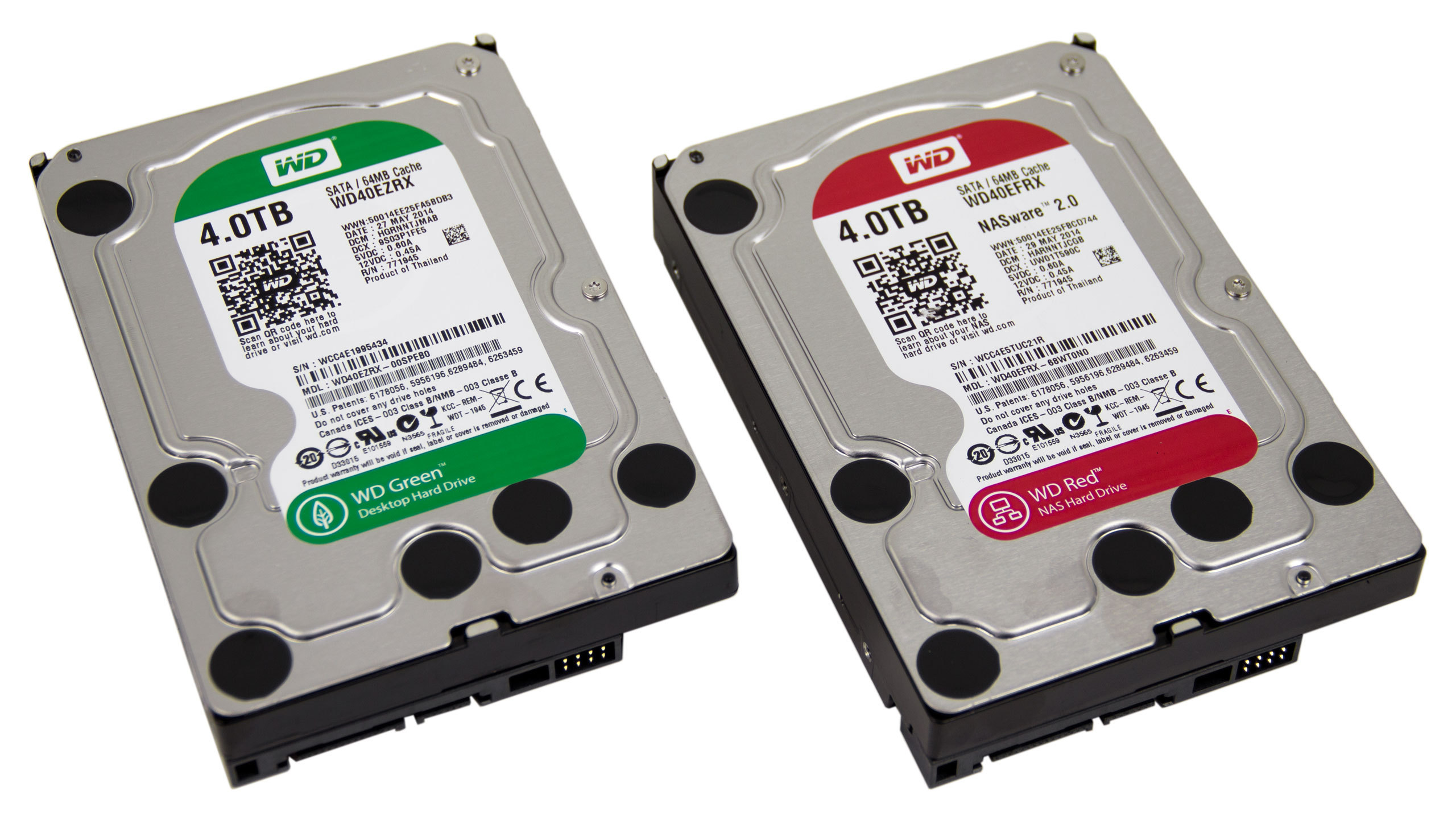
Puget Systems
WD Green drives have a long been a staple in our quiet systems. However, the NAS and RAID oriented Red drives have a few features that make them much more attractive while being just as quiet. In this article, we will go over the differences between Green and Red drives to show why we consider Red drives to be the better choice than Green drives...
Overall, the differences between WD Green and Red drives are very subtle. From a noise, power draw, and performance standpoint Green and Red drives are pretty much identica
whole prawn
red=nas blue=consumer black=consumer performance purple=surveillance gold=enterprise
wheres green
wary mantle
they phased out green, introduced red and marked up 20%
untold grove
and literally proven wrong like 4 lines in
they phased out green because greens had insane fail rates and poor qc
whole prawn
da fug is TLER
untold grove
and half the load/unload cycles
and the no MTBF
and the higher acoustics
almost like theyre different drives
whole prawn
only thing that you have said that i understood is
MTBF thats the only thing i know lmao
untold grove
greens were trash tier and wd killed them to preserve ther brand rep
every other hoarder ive ever talked to doesnt trust greens
because we've all had arrays die
i had 4x 3tb greens that just died one day lol
they arent good drives and reds arent a rebadge
wary mantle
maybe that changed idk but thats how it originally was
i only buy white labels now since its so cheap
untold grove
i mean same here lol
and yes 2014 reds were uh
not good
modern ones are nothing like greens
although if i were buying new id get toshiba/golds
whole prawn
is it dumb to use a enterprise drive in a GAYming pc
untold grove
i just get defensive because rn its basically seagate vs wd and i dont want to see ppl end up with seagates
wary mantle
i havnt had a single toshiba failure that was made with hitachi ip
wary mantle
same with the 5k3000
untold grove
like my entire 200tb array is hitachi
whole prawn
whats different about hitachis
untold grove
save for like 60tb of reds
wary mantle
hitachi made higher quality consumer drives than the others
HGST is not the same tho
whole prawn
i thought HGST and Hitachi are the same
wary mantle
toshiba 3.5 drives were based off the old hitachi ip due to anti trust wd buyout
HGST is post wd hitachi purchase, they arnt the same as hitachi
untold grove
wary mantle
HGST is not the same tho
hgst is still amazing though
100% trust them more than others and for big drives its the best you can really get
whole prawn
so are HGST drives even still in production then i saw something on wikipedia about them not being in production anymore
untold grove
iirc no
whole prawn
Really the only thing that as a dumb person who knows nothing more about a HDD besides they have some spinny things in them
that said QUALITY to me was the fact they had ties to IBM lmao
wary mantle
im not buying more drives until 18tb easystore go under $280
whole prawn
thats the only thing that really makes me think quality about them lmao
untold grove
wary mantle
im not buying more drives until 18tb easystore go under $280
lmao based
how big is ur array?
wary mantle
600tb but i havnt upgraded in a few years
untold grove
theres like 2 other hoarders here asd it makes me sad
niceeee
honestly keeping most of my stuff in cloud nowadays
wary mantle
waiting for 26 18tb drives to swap out the 26 2tb
untold grove
thats where its at
as soon as i can get 18tb easystores for sub 280 im planning on replacing all my 4-3tb drives in my jbods
aiming for 2pb in the next few years
wary mantle
i luckily havnt had a need for more storage this year since live music is pretty much dead
no new video work :/
untold grove
oh you use ur array for work?
wary mantle
half work half homelab
we have 3pb in the cloud but ive got around 250tb of work files at home
untold grove
niceeeee
my stuff is 100% recreational lol
i just also happen to sell stuff to some labbers
if u need epycs lmk 😉
wary mantle
im good, friend hooked me up with 8 7702 for pretty much nothing
4x dual 2670 to 4x dual 7702 was a 1000% boost in performance
wary mantle
yeah its nuts, the most expensive part was the ram tho
wary mantle
each only only has 256 but max is 8tb i think for the boards
untold grove
yeah u can go nuts on the ram
 zealous turret
My Optiplex has a 500 GB, its pretty bad overall and I don't have money for a new computer at the moment
 red jay
is it normal my m2 ssd temperature is 40c 🤔
untold grove
Yes
red jay
when should i worry about ?
untold grove
60+
red jay
thanks 😇
 patent zealot
i got a 860 evo 1tb and where would the sata cables be located
untold grove
patent zealot
i got a 860 evo 1tb and where would the sata cables be located
With ur motherboard
patent zealot
Oky ty
patent zealot
Okay thank you i dumped all my unused pc parts and psu connecters in a box so ill go look for them
untold grove
Lol np
red jay
umm one little question too . i got b450 aorus elite . I just installed 2nd m2 ssd and one of my hdd gone . i have 3 sata drives 
untold grove
You might, check ur board docs
 clear ermine
 upper quiver
no, not really
dusk turtle
No, that's QLC, get the black label Sabrent
 open palm
question so I recently got a 970 evo and I already have a boot drive how do I get the 970 evo as my boot drive without loosing data?
thick mulch
Ok, it is easy. Download mobi-mover US and select clone. Mark the target and host drive and then let it copy. And boom, you have 2 bootable drives! @open palm
After that boot to the 970 in bios and then you might have to assign the old one a drive path in part.manager to get it to show up but then you can do what you want!
red jay
Best 1tb ssd under 100usd?
dusk turtle
mmmm
untold grove
open palm
question so I recently got a 970 evo and I already have a boot drive how do I ge...
wow big url
samsung makes their own clone software that works perfectly
 austere shore
I don't know about that one chief
untold grove
austere shore
I don't know about that one chief

Samsung Semiconductor
Download tools & software for Samsung SSDs. Download Samsung Magician, Data Migration Software, Firmware, Driver, Data Center Toolkit, Activation Software.
here then
i just grab the direct link so i dont have people asking me where the download button is
sly flume
my ssd gets here today pog
 chrome verge
Hey guys, I bought a 12TB External Drive to hook up to my router via USB... but now I’m thinking of returning it and looking into getting my first NAS. I’d appreciate anyone’s opinion on where to start. There’s a lot of information out there... 2 bay NAS in RAID1? Is Synology a good way to start? I do have an old computer tower but it’s big and takes up space. Currently have a router that supports link aggregation.
dusk turtle
@untold grove
untold grove
chrome verge
Hey guys, I bought a 12TB External Drive to hook up to my router via USB... but ...
oh hell yes
ok so
first off 2 bay is kind of a waste of money imo
imo 5 bay is the way to go
you get 4 data drives and 1 parity
with 2 bay youre stuck with either chopping your usable storage in half to have parity
or (even worse) getting all the storage on offer but losing out when it comes to reliability
if one drive fails in a raid 0
all the data is gone
 keen lantern
Exactly why we have lili. I'll agree with her tho if I had the money I would get a 5 bay NAS because of what she mentioned earlier.