#storage-devices
1 messages · Page 28 of 1
 somber remnant
was p2 or p1 with dram
 uncut bramble
P1 has dram iirc
 minor sun
p2 has hmb
minor sun
Yea
somber remnant
alr i keep getting confused
 open gazelle
I believe the P series suffered from the controller the most. Don't really remember tho
 upper quiver
yeah, p1 and 2 are decent, but really only worth it when theyre on sale
so if someone has a 600 dollar budget, and the P2 is 20 dollars off, i suggest it
but otherwise, its worth the extra few dollars for the mp34, or sn750 or MP 510
 viral bolt
Pretty soon I'm gonna have about $100 I think that I want to spend on a storage device. Windows is currently installed on a 1tb Sata 2.5" SSD, I want something faster for games, but should I reinstall windows on my newer drive? and what's a decent 1tb NVME drive that's not too far away from the $100 mark?
 round echo
crucial p1 1tb is $105
round echo
wd blue 1tb is 104
somber remnant
reinstall windows on the 1tb nvme
its giving up performance if u dont
blue is dramless afaik
round echo
also the sn550 1tb is like $104 as well
 zenith condor
i found a WD Blue nvme 500gb for 80 bucks
round echo
i'd probably just get the p1
minor sun
uhh
@zenith condor you sure it's NVMe?
and also that's pretty overpriced
Blue is usually SATA
minor sun
Anyways great 500gb NVMe drives are 70$
open gazelle
Blue 3D is the NVMe iirc. Standard Blue is SATA
 red jay
Hey Guys I need help
I have an NVME SSD and I want to install it on my Mobo which is X570 Aorus Master. There are three spots to install the NVME
The first and second slot are much larger than the third one. But I think I am supposed to use the first slot. Thing is that my storage device is alot shorter than it
These holes are for the standoffs. But my SSD will only line up to the hole I am pointing to. How do I install this SSD M.2 whole also putting the heat sink on? The problem is that the heat sink mounting point lines up with a hole that is different than the hole to mount the SSD
@upper quiver @minor sun you guys always help lmao 😂
red jay
Lmaooo
upper quiver
in all seriousness, typically the slot closest to the cpu uses pcie lanes right from the cpu
you wanna use that one
the 1st slot supports up to 22110 M.2s, but the heatspreadder is whats actually gonna hold the ssd down
so, just slap the heatspreader over the ssd and screw it down and your set
red jay
So do I have to mount the SSD to the motherboard? The issue is that the heat sink is a lot longer than the SSD
here I will show
upper quiver
oh, now that i look closer at the manual image, i think it still does screw down
oh, psh i dumm
the motherboard should come with extra ssd standoffs
red jay
So that picture shows where the SSD would mount into a hole
The NEXT picture will show where the HEATSINK would mount into a hole
upper quiver
yeah, look for a small bag in the motherboard box
red jay
Yes for a stand-off right?
upper quiver
yeah, it should be pretty small
if not, check the other slots for a preinstalled standoff
viral bolt
So is p1 1tb a decent nvme drive or should I go for a 500gb Samsung nvme?
viral bolt
Assuming I can't wander to high over $100
Think I'd be happier with a higher end 500 vs a decent 1tb?
viral bolt
Haha fair
minor sun
Just keep in mind a Samsung 970evo 500gb at 100$ delivers speeds and endurance similar to 70$ 500gb drives such as the SN750 and MP34
viral bolt
Ok. And the p1 won't be as fast but will it have decent endurance?
minor sun
There's also diminishing return once you go past I'd say 1GB/s, where the differences become a lot less noticeable.
Well, P1 is like 2GB/s read/write, something like the 970 evo is like 3GB/s read/write
P1 does suffer as it has QLC, so once you run through the cache, you'll get slowed down by a lot, but that's very unlikely in day to day work, as the cache is something like 30GB iirc
Approx 12-100GB cache
So unless you like writing 30GB files around, it'll be a good drive
upper quiver
does your pc have a gigabit connection, or does your ISP give you a gigabit connection?
viral bolt
It's a Z390-A prime
B&h says it has a Gigibit lan controller
And it's connected to a 5gig port on my modem/routee
red jay
If my motherboard has two M2 slots, is one of them going to be slower if I use both? Trying to figure out if I should buy a smaller nvme right now, save some money for my build and just add more storage to the other slot later or just stick with 1
 gloomy ferry
that depends on the specs of the motherboard in part but in general one will have more pcie lanes dedicated to it than another
gloomy ferry
if I'm looking at the right one it says both have 4 pci lanes so it doesn't matter
red jay
Ah ok thanks
This pci lane stuff is confusing to me lol
red jay
I mean I was asking if it matters how many slots I use, if it affects the performance of the ssds
Bc they're kinda pricy and I'm wondering if I should just buy a smaller 1 for now and upgrade later
minor sun
It doesn't affect the performance of the SSDs
they use separate lanes
and with PCIe 4.0 chipset lanes, x570 boards can support more PCIe 3.0 drives
or run 4.0x2
For example, this is the x570 unify @red jay
red jay
Well I'll be on a z490 probably
But that means both ssds will run at full speed that's good
Thanks
minor sun
SOME boards do shared lanes with M.2 with sata, not too many, mostly lower end boards
 vivid ginkgo
disk 1: kingston 110 gb ssd
disk 2: maxtor 250 gb hdd
red jay
ok so i recently found out that i have a ssd but my computer isn't registering it. I have a theory as to why and its probably that but i wanted to confirm here. The ssd is currently connected to a cable labeled hdd so im guessing thats why its not registering. is it?
red jay
ye windows 10
 heady raven
right click your start button, select disk management
in the window that opens, scroll down
you will most likely have a drive that is "grey"
red jay
it popped up saying i have to initialize a disk before logical disk manager can access it
red jay
should i choose MBR or GPT
heady raven
GPT
red jay
it said a device which not exists was specified oof
heady raven
can you send me a screenshot of that?
winkey + shift + S <- that is the snippet tool that can capture what you select on the screen
and you are going to have to paste it in a pm to me
because our bot wont allow you to post picture here until you have gotten to rank3
(its our anti spam)
red jay
alright
 eternal mirage
.
 red jay
is team gx1 better than kingston a400? looking for a cheap ssd
 cursive cairn
Anyone have an complaints about using add-in card SSD? Motherboard has 3 card plug ins so I know one will be for the graphics card, another one for a sound card. But worried about taking the last slot for the SSD In case I ever needed it for anything else
red jay
Why is the mp34 1tb so cheap? What's wrong with it?
Not a thing
That I know of anyway
Just looks ugly?
Perfect for hiding under a heat sink
minor sun
@red jay I mean it's not that cheap, like Crucial P1 1tb is 105$, SN750 1tb is 130$, it's just a bit cheaper than a sn750
 earnest patrol
Hey guys i have a acer aspire 7741z and want to get a ssd drive can I get any of them as long as its a 2.5 sata
red jay
quick question, is SSD required even if i have an HDD?
heady raven
its is not a requirement.
but it IS a big quality of life improvement for using the system
 sullen current
i want to install a hard drive onto my pc. i currently only have a 500gb ssd. is it difficult to transfer all my games, apps, and other things from the ssd to the hard drive?
heady raven
@sullen current so, you are keeping the OS on the ssd?
sullen current
Yes
heady raven
well, steam games are fairly easy to transfer
most regular apps dont take kindly to just getting "moved"
as for documents etc, its a one time setup you do and things work from that point onwards
that is an example of how it looks on this machine @sullen current
C: is a ssd
and F is a HDD
the advantage of setting it up like that is when you press instal in steam, it will ask you where you want to install
so it is just a question of "does the game benefit from being on a SSD?"
sullen current
i usually play adventure games and a few fps. i mostly use my pc for video editing.
heady raven
the question above is something you have to figure out on your own.
I play a bit of Path Of Exile, and that game is on a ssd, because it really likes that
but a game like factorio? that can easily be on a hdd
sullen current
ah okay. i dont know if it's different for every pc but once i install the hdd, will it just show up in my finder or will my pc give me a notif about it?
heady raven
you are on windows 10 @sullen current ?
well, it doesnt matter much what windows version. Just right click the start button, select disk management.
find the new drive in the list (it will be grey)
click it and format it.
GPT is the type you want. and then it will show up in windows
sullen current
Okie ty!
heady raven
you are very welcome :) best of luck :)
 wary cradle
Sabrent 2TB Rocket Nvme PCIe 4.0 M.2 2280 Internal SSD Maximum Performance Solid State Drive (SB-ROCKET-NVMe4-2TB)
So im looking into getting an m.2 card but not sure which one to get
I was looking at that one but im sure i can get something good and cheaper
Any recommendations?
red jay
Could someone help me with my ssd
I just now put in some more ram on my computer and when i load into bios all the ram is accounted for but now ig says it can’t find a proper boot device
minor sun
@wary cradle
https://www.amazon.com/dp/B07TY2TN64
 wicked flame
Is this pc good
CPU AMD Ryzen 7 3700x, A 7nm architecture , 8 core, 16 threads with a base clock speed of 3.6 Ghz and Overclocked Speeds of upto 4.4 Ghz, With default TDP of 65W and Max temp of 95°C.
Graphics card Gigabyte RTX 2080 Super, 8 Gb of VRAM and 3 Fans
Motherboard Asus TUF GAMING X570-PLUS (WI-FI) ATX AM4 Motherboard
CPU Cooler Corsair Hydro Series H100i RGB PLATINUM 240mm Liquid CPU Cooler
RAM Corsair Vengeance RGB Pro 32 GB (2 x 16 GB) DDR4-3600 CL18 Memory
ROM Samsung 970 Evo 1 TB M.2-2280 NVME Solid State Drive
PSU Corsair RM (2019) 750 W, 80+ Gold Certified Fully Modular ATX Power Supply
Case Corsair iCUE 220T, RGB Airflow Tempered Glass Mid-Tower Smart Case — White
 uneven jackal
That pc is very good
 small ice
What’s some good ram and ssd could I get
 high frost
it depends on ur cpu for ram
small ice
I5
high frost
what generation
well anyways for intel any 16 gig kit of 3200 speed ram cas latency 16 is good
 raven dagger
Crucial mx500 2.5”s and m.2 evo plus is fair enough to me
small ice
Like?
high frost
i mean most of them will offer great boot times
just make sure they're from reliable manufaturers
raven dagger
Like the crucial mx500; cheap 1TB 2.5” SSD. The difference for game loading is marginal
raven dagger
You can also go on UserBenchmark and see what other people think; I use that to compare products usually
 gilded shard
hello everyone
 robust goblet
Just finished building my 1st computer.
I purchased 4x -16gb RAM DDR4 @ 3,200
When I look in CPU-Z, it doesn't appear I'm hitting speeds
Anybody know how to adjust or fix this?
viral bolt
You're hitting 2133mhz (1064.5*2 = double data rate = DDR)
You need to go into your bios and activate xmp or whatever the AMD equivalent is depending on your CPU.
What CPU and Motherboard do you have?
And I guess you're actually hitting 2129mhz, which may be the highest frequency under 2133 that is mathematically possible with your particular sticks.
robust goblet
You need to go into your bios and activate xmp or whatever the AMD equivalent is depending on your CPU.
What CPU and Motherboard do you have?
@viral bolt Motherboard = Tuf X570-Plus (wi-fi)
CPU = Ryzen 9 3900x
Ram = Trident Z CL 16-18-18-38 1.35v
viral bolt
Ok reboot your computer and hit the key to enter your motherboard bios before your computer boots all the way
Usually 'delete' or 'f2'
But it should tell you briefly at the bottom of the screen before windows loads
Then enable 'docp' in the bios. Not sure where the setting is, you may want to look through your motherboard manual or watch a video tutorial.
robust goblet
awesome, thank you @viral bolt
viral bolt
Did you get it running at 3200?
robust goblet
I haven't tried just yet. I'm thinking I want to add an M.2 SSD for boot up only, as I'm using just plain SSD right now. Trying to see which M2 is worth the purchase, since I won't need must GB if I only use it for boot up
viral bolt
Yeah depends what you want to spend. A lot of people recommend the crucial p1, especially at $100 for 1tb, it's hard to beat that price and performance
What I want to know is, will downloading 227gb that is now call of duty: modern warfare (with warzone) on a fiber connection with a 1 gig port to my PC blow up that drive.
heady raven
a 1gig port is only at theoretical max 125/sec
and it wont really get close to that
and that speed is something that even a HDD can handle
viral bolt
Thought a 1gig port could handle...1gig
Is this one of those MBps / mbps things were one of us is talking about 1/8th of the bandwidth the other is?
viral bolt
Ok so my fiber is 940 megabits per second and the p1 can write up to 1,700 megabytes per second or 13,600 megabits
viral bolt
Can it sustain that for an hour
heady raven
the ssd?
viral bolt
Yeah
heady raven
something as low as 1gbit? yes
also, its a serial string
its not random data being thrown all over the place
its a "nice" lump coming in one bit at a time
viral bolt
Ok so it looks for space to put everything then dumps it in a set amount of blocks in one location
 soft pebble
Hey! I just built a new PC and transfered over my raid array from the old one. However it doesn't boot. Would anyone be willing to help me set it up?
 worn holly
My nvme drive wiggles a bit when I put it in all the way, is that normal?
 lunar lodge
 torpid adder
how frequently should I TRIM a drive if I set it to manual optimization 😳
heady raven
@torpid adder you should let the OS handle that
 primal falcon
yo quick question, is there any noticable difference between dram-less SSD and like a 4000mb cache ssd?
im hearing from some that its negligable, but from others that it significantly speeds up day to day smaller tasks
torpid adder
https://answers.microsoft.com/en-us/windows/forum/all/windows-10-2004-optimizationdefrag-bug/4c5498b9-04fe-41c9-8535-ed10313b6f33 oh it's just a 2004 thing ok

Hi all I've just completed the Windows 10 2004 upgrade and I have noticed 2 issues. 1. When I manually trim my SSD in the drive defrag/optimize tool in windows and I reboot it says 'never optimized'
 normal escarp
So i was looking up SSD's that goes into a PCI-E slot and see a company near me selling a M.2 2280 Samsung 1TB drive and was trying to understand where these hard drives would install into my motherboard which is an ASUS Prime B450 Plus. Link is for the picture of the motherboard
https://www.newegg.com/asus-prime-b450-plus/p/N82E16813119138?item=9SIAFVFA8B8902&source=region&nm_mc=knc-googlemkp-pc&cm_mmc=knc-googlemkp-pc-_-pla-deal+targets-_-motherboards+-+amd-_-9SIAFVFA8B8902&gclid=CjwKCAjw4rf6BRAvEiwAn2Q76lMKUicah6nedH-RtWxOeD8Xo8PpphNTvhLmaK3lg7TTZ13HW4HG0hoCNukQAvD_BwE&gclsrc=aw.ds
i do see there's a slot specifically for this kind of hard drive in those pictures and wondered if it'll be installed like horizontally or will it be like a very thin Memory sticking up from the motherboard like the memory does?
primal falcon
that board has 1 m.2 socket, right above the top pci-e slot
also its really simple installing theres tons of guides,
just look up m.2 installation guide
normal escarp
@primal falcon thanks, i'll go and do that then (^ ^)
primal falcon
np
heady raven
@normal escarp you are asking about 2 different types of SSD'
primal falcon
i think he just means m.2 so i assumed that
heady raven
the first type you asked about is a PCI-e based on <- this goes into a slot similar to the one your graphicscard goes into.
The second type goes into the m.2 port
which is a port that is angled in such a way that the ssd runs along the mainboard itself.
normal escarp
Here's one from Best buy and how they labled it "WD - Blue SN550 NVMe 1TB Internal PCI Express 3.0 x4 Solid State Drive with 3D NAND Technology" think i was getting confused on the part that says "PCE Express 3.0 X4" which to me meant it'd take up a PCI Express slot where i'd normally install a Graphics card into, but i was really trying to figure out where an M.2 would get installed and how it'd look like. I took up @primal falcon 's advice and saw a video of an M.2 being installed and see how it looked
heady raven
that just means it uses a transfer protocol (by the name of pci-e express 3.0, and 4 lanes of it)
and yes, your logical conclusion is easy to understand :)
primal falcon
yeah, the lingo gets all weird with storage. m.2 is the form factor which is what you need to worry about to install it. i wouldnt worry about the pci express lanes unless you get really into how the motherboards work and distribute out pci lanes
the only other thing id say for you to keep in mind is whether it is an NVME m.2 or sata 3 m.2. nvme is way faster in transfer speeds, but most people wont notice a difference in day to day use between them, and sata is usually cheaper
normal escarp
that's even better info to consider when i go buy a drive. NVME vs Sata XD
heady raven
which as mentioned, does not matter all that much
but ofc, if price is remotely close, might as well grab a NVME
primal falcon
yeah dont stress over that, youve gotta be an enthusiast to really notice a difference
normal escarp
thank you @heady raven and @primal falcon for answering my questions and clarifying what i was probably already thinking but new to the whole M.2 hard drives
heady raven
best of luck and its Wolffe you should be thanking:)
primal falcon
@heady raven do you know if DRAM cache makes much of a difference in 2.5mm sata ssd? Ive heard sources saying it does and some that it doesnt,
heady raven
unless you are using the ssd for cold storage, cache is preferred for "fluidity" in transfer
(and yes, that is simplified a LOT)
primal falcon
so like more consistent download speeds?
heady raven
think of it like this: the cache helps to make certain that performance is more consistent
instead of "just" being a burst
but, keep in mind, the majority of your interaction with the drive will be done way way before the cache needs to step in
but, rule of thumb: you want a drive with cache
primal falcon
lol alright, thanks
heady raven
you are very welcome :)
 narrow fractal
I'm looking for a component part for a Buffalo external drive - any idea who would carry just the forward facing circuit board with male port (and very fragile copper pins)?
 pastel cairn
I have a HDD Z7K500-500 and want to switch to SDD. What is a compatible drive to order?
heady raven
@narrow fractal your best bet would be finding someone that is selling an old external drive of the same model
@pastel cairn just about any 2.5inch sata ssd
narrow fractal
yeah - I'm thinking you are right. Who knew electronic components were so hard to come by
heady raven
sorry mate, best of luck on the hunt :)
pastel cairn
Ok thanks.
 stuck nacelle
If I have a SATA power cable with multiple headers which one do I plug my new hard drive into?
My previous drive was a M.2 SSD
gloomy ferry
any of them
stuck nacelle
So there’s no difference between the closest one and the furthest one?
And then does it matter if I plug the drive into SATA 1 vs SATA 2?
heady raven
@stuck nacelle wait a sec, which board is that?
stuck nacelle
B450 tomahawk Max
heady raven
those two ports there are the 5th and 6th port
further "up" the board, there is another stack of 2 ports
those are the ports you should be using
or is the max the one with the bum first design
nvm, its the one with the bum first design
 formal urchin
 loud estuary
Not great. DRAM-less nvme, so speeds might get worse than a hdd as it fills up. TLC is good tho. Also priced similarly to a good nvme like a sn750 or mp34 drive
 broken kayak
Is the Western Digital 1tb ssd NVME good? I'm choosing it for storage at a fairly cheap price.
 clever dawn
Hey folks! First time here. Hopefully, this will be a fun place to learn. I have a Nitro 5 (ANA-53-53) and my hard drive sounds like a 1980 chevette. I want to change and upgrade but I can't find good compatibility info.
The HD I now have is a wdc wd10spzx-21z10t0. Any suggestions on what would be a good upgrade and compatible with the connectors in my Nitro? Thanks!
 marsh quiver
minor sun
marsh quiver
minor sun
@broken kayak need model, sn750 or sn550 or something random?
And price matters
If it's 150$, just no, grab a team mp34
@clever dawn laptop wise, is it the model with 8300h and a GTX1050?
(AN515-53)?
Side note, Acer user manuals sucks :(
clever dawn
@clever dawn laptop wise, is it the model with 8300h and a GTX1050?
@minor sun It the GTX1050 model and it is a AN515-53-55h5 model.
Totally agree with the user manual comment. It's not super helpful
minor sun
@broken kayak yea I'd suggest getting a team MP34 1tb, similar speeds, has dram, same controller, quite a bit cheaper
broken kayak
Alright thanks./
minor sun
@clever dawn welp, the manual and such didn't help at all, so I'm gonna go with this for now, and this shows the laptop having a M.2 2280 slot, so I believe you can just install a M.2 SSD in there on top of the hdd that is already present. For the exact SSD model, I'd suggest the Team MP34 512gb at 63$ right now.
https://www.ifixit.com/Guide/Acer+Nitro+5+AN515-53-55G9+SSD+Replacement/121485
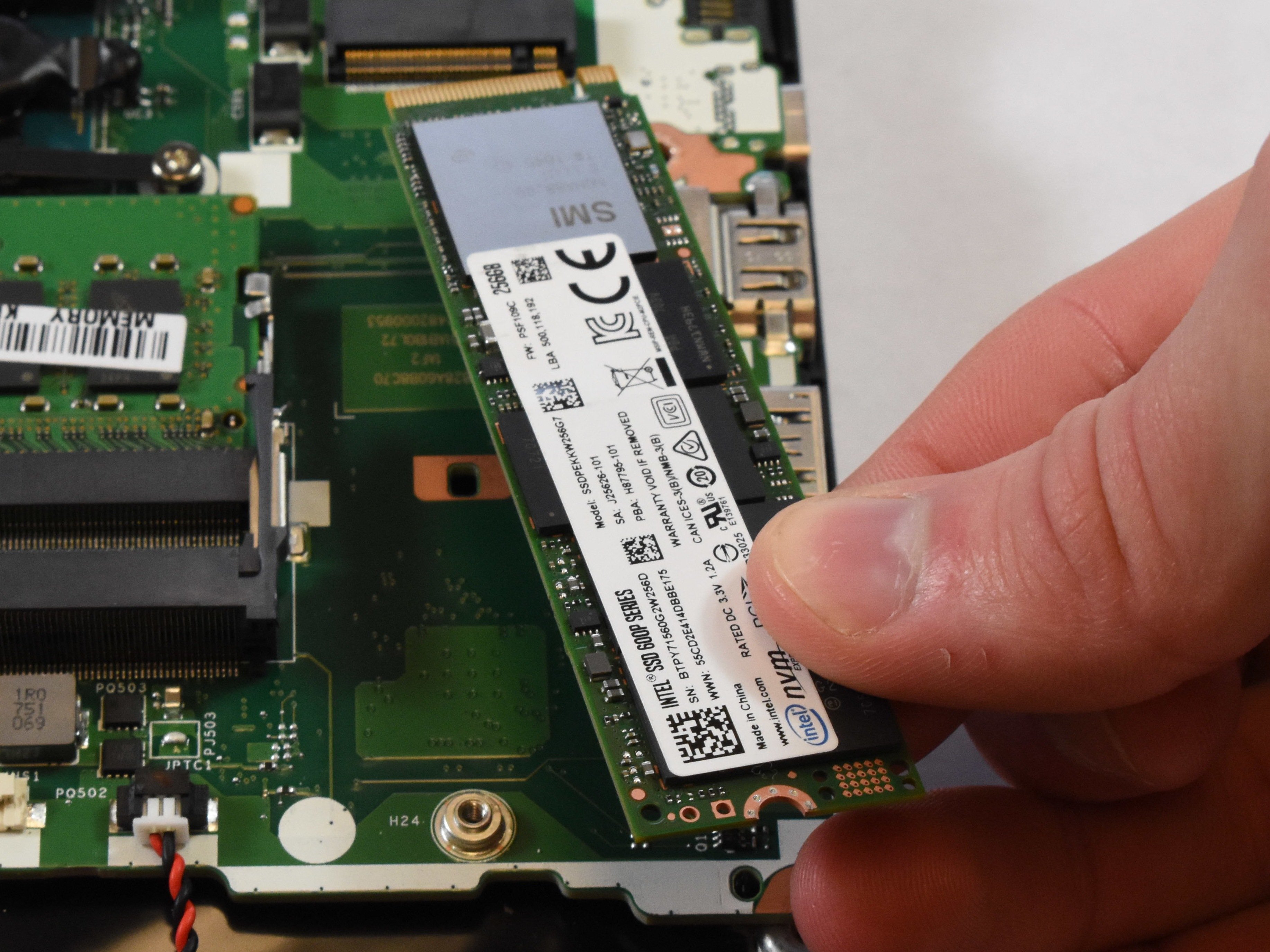 clever dawn
And what about a replacement for the 2.5 HDD? Any suggestions?
minor sun
I'd suggest grabbing an SSD whenever possible, but until I can find something in there that details what exactly the requirements for the 2.5in drive in there is, I can't recommend anything
The reason is some laptops have different standards and requirements on how tall/thick the drive can be
clever dawn
👍
heady raven
the simplest way for the HDD replacement might be to simply open it up and measure the height of the darn thing :)
OR send acer support an email :)
clever dawn
@heady raven ya, I'll do that as soon as my backup is done. Then, what should I be searching for in terms of nomenclature for my new one? Can I replace a 2.5 HHD with a 2.5 SSD?
heady raven
generally yes.
the detail that matters it the "height (thickness)" of the drive itself
there are 3 variations that your drive would fit into
12,5mm, 9,5mm and 7mm
IF your drive is just a regular 9.5mm one, things get very easy :)
clever dawn
Here are the measurements 10 x 7 x 0.7 centimeters
heady raven
hm, so a 7mm tall ssd is the order of the day then :)
something like this is an option for you @clever dawn
clever dawn
Thanks @heady raven . Appreciate the help
heady raven
you are very welcome @clever dawn best of luck :)
 unkempt steppe
need help with my direct x
minor sun
what about it
 quaint fractal
Anyone know what the best 2 tb sata ssd is?
 plush crag
860 evo ain't bad
 foggy pecan
anyone here has any experience with samsung's data migration software?
need to upgrade sata ssd to nvme
torpid adder
Don't mind if I do
red jay
If a 970 evo nvme is on sale cheaper than an mp34 I should get it right
 small breach
your tech store sells guns???
red jay
What's better 2x500gb nvme or 1x1gb? Bc to shave costs on my build I might just get less storage now and get more later
red jay
Looking for an external ssd to use for storing games, preferably around 20-35$, and around 120gb. Reccomendations on which to get?
torpid adder
an internal drive with an adapter or something idk
red jay
Wait would a usb c work and would it be faster than a 3.0 port
 acoustic void
^agreed, then you also have something when attempting to retrieve data form another device not physically connected inside your rig
Something like this would be extremely flexible
red jay
Looking for one for a laptop, sadly didnt come with enough internal and im not able to upgrade it lol
acoustic void
Ah laptop, so you need something portable
red jay
Preferably yeah
acoustic void
If you get an enclosure you can then pic whatever size device you require
red jay
I saw something similar to this, if it would work? https://www.newegg.com/p/2WA-00XB-00002
acoustic void
yep, you're on the right track
red jay
Then like a cheaper 2.5 ssd
acoustic void
Any one of them would be fine
torpid adder
I can't find any fattydove drives 
acoustic void
Anyone here able to assist me with a rackmount NAS setup?
red jay
i think I have an old toshiba hhd from an old laptop but I doubt I could find it
acoustic void
Don't all answer at once, lol
red jay
Would something like this work? Looks to have good feedback https://www.amazon.com/product-reviews/B08CGXG1CF/ref=acr_dp_hist_2?ie=UTF8&filterByStar=two_star&reviewerType=all_reviews#reviews-filter-bar
Only 60gb but I dont really need anything bigger
acoustic void
Looks pretty good, not the fastest available but for your budget should be fine
Depending on the game, access speed can be key
acoustic void
At least if you get it from Amazon you can return it should it not meet your expectations
red jay
True, ty for your help lol
acoustic void
If someone can PM about rackmount NAS solutions I would appreciate it
 wary mantle
@acoustic void budget?
acoustic void
Really haven't put a number on it, but I am not unrealistic either. My current NAS is a 6 disk, 2 TB, unit at a volume of 7.5 TB
wary mantle
you want diy or proprietary ?
acoustic void
Open to either, so looking to see what is best
wary mantle
well if you are looking at less than 10TB of storage i would get a 1U supermicro barebones off ebay and build myself
that would give you 4 hotswap and 2 internal 3.5" drives
acoustic void
I think we need to look at something past 10 TB for a solution
wary mantle
which is enough to hold nearly 120tb
if its for business you probably want something with a service contract
acoustic void
This is my home setup, have a full rack and 5KV UPS. My wife has so much data (music and photos) that I have her profile on the NAS
wary mantle

eBay
Motherboard: X10SLM+-LN4F. Supermicro 1U 4x 3.5" Drive Bays 1 Nodes. 1U Rail kit. RAM: 8GB RAM (2x 4GB). 4x 3.5" Supermicro caddy. Server Chassis/ Case: CSE-815TQ-340C. Seconadary Specs Chasssis/ Motherboard.
you could use that and install freenas on it
acoustic void
I did look at some storage enclosures, and also been looking at a commercial solution. One of which was scalable and ability to communicate with another duplicate setup for DR
heady raven
@acoustic void STH is the site you might want to have a look at
wary mantle
yeah servethehome greatdeals section would have some good stuff
acoustic void
awesome, appreciate the tip
heady raven
didnt mean for the deals thou, more for the "hoarder" mindset they have :)
and i do mean that in a good way :)
wary mantle

eBay
WE HAVE UPDATED THE BIOS AND THERE IS NO LONGER A BIOS PASSWORD -. Update 04-21-20JT BIOS PW cleared and BIOS updated, pricing changed, . Compact 1U Full Depth Rackmount Chassis that fits into standard Rack Cabinets.
that ones a good deal, you just need to add cpu/ram but its got 6x 10g nics
I prefer 4U cases to make them silent since my rack is in the office
acoustic void
Fortunately mine is in the basement. ; )
One of the solutions was looking at.
lol because it was a manufacturers website the link was removed even though Newegg sells it....
heady raven
send me the link @acoustic void
because i am quite curious how it is you are even able to post links at all right now (you are not lvl 3)
acoustic void
newegg link above
heady raven
yeah yeah, i know, but please send me the other one
acoustic void
certainly
heady raven
because the bot should NOT be selective about stuff like that :)
(following is just a test)
Centralize data storage and backup, streamline file collaboration, optimize video management, and secure network deployment to facilitate data management.
hm
acoustic void
Seems pretty reasonable for a solution, and the cost is not too bad
Of course I want my cake and eat it too
lol
wary mantle
my thinking is the last thing i want to do with my data is lock it down with 1 company
acoustic void
There is also a Netgear solution I looked at, but it is a bit more expensive but has some other features that were nice. My current NAS is a ReadyNAS
Has been very reliable, just getting a bit old
heady raven
level1techs is another site you might want to have a gander at @acoustic void
just be aware that Wendel, the main guy over there is a bit of a quirky character
acoustic void
You refering to the forums?
heady raven
and their youtube channel too yes
acoustic void
kk
wary mantle
oh yeah he was the one that made that intel platinum "deal" video
heady raven
keep in mind, he very much does know his stuff
 fallow ginkgo
Cheapest 1tp ssd (link)
high frost
does it have dram
minor sun
Yes
high frost
ooh
 blissful whale
i cant find my hard drive anywhere besides bios so i cant format it what do i do
minor sun
Disk management
blissful whale
it doesnt show up there
only in bios is where i see it
i unplugged and plugged everything in i moved the sata cable to a different location i tried device manager i tried diskpart on command prompt
nothing worked
heady raven
@blissful whale you certain you scrolled down in Disk management?
blissful whale
only have 2 drives and one missing
heady raven
screenshot please.
 shut furnace
Death xD
heady raven
@red jay about the same as any other raid really
its just a question of what hardware does the calculations really
 sleek viper
What’s a decent price for a 4-6tb HDD?
round echo
pretty sure a good 4tb 7200rpm hdd is like 140-150 ish
high frost
alternatively you can get 2 good 2tb hdds and itll be cheaper
round echo
some 6tb 7200rpm hdds im seeing are 200 and under
viral bolt
A 2tb hdd is like $50-60. If you have the sata ports for it they're actually cheaper than larger drives

 dry root
so i'm gonna buy a silicon power 1TB NVMe PCIe 3.0 drive
i have had a lot of silicon power SSDs over the years
0 failures
good performance
and it's like $50 cheaper than the sabrent
 noble atlas
I have one if those
Works well
It's a clone of sabrent and inland premium
Same as all the other Phison E12 drives
 hushed marten
Are wd blue ssds any good
red jay
Do external ssd's work on Xbox one?
minor sun
@hushed marten which one
red jay
The motherboard M.2 slot #1 shares bandwidth with a SATA 6.0 Gb/s port. When the M.2 slot is populated, one SATA 6.0 Gb/s port is disabled. what does this mean
heady raven
Which specific mainboard model @red jay
 wind hazel
I put my old laptop hdd in my desktop, any way I can easily clear all the junk like the old OS and whatnot?
minor sun
@hushed marten you know that a P1 500gb is NVMe while being cheaper right
heady raven
@wind hazel if you dont care about the things on the disk, just format it
hushed marten
Yeah just showed tht link for reference, I found a 1tb wd blue for $78 so was wondering if overall it'll last
wind hazel
Well I kinda have my steam library on it lol
minor sun
Sounds pretty sus to me but
If you can actually confirm it's an unused wd blue that hasn't been tampered with
Go ahead
heady raven
@wind hazel then you could just delete everything else
IF you are certain nothing is being shared across that is :)
minor sun
Format the drive if you just want everything gone
wind hazel
It’s a painful process lol cuz I have to get rid of the TrustedInstaller ownership
heady raven
start by making a shortcut for explorer on your desktop, then run that as admin
that should take care of a number of that
minor sun
Also, you can move steam game install locations
wind hazel
Yes but I don’t have a big enough drive
I have a 250gb drive for my OS and apps but I wanna get rid of everything on the old hdd, was just wondering if there was a simple work around.
minor sun
Afaik there's no way to "delete everything but this folder" in one move
heady raven
there is a way, but it is not simple
because its script based and you would have to know that first before you can do it
so, put on some good music and start plodding away at deleting things @wind hazel
wind hazel
definitely gonna be a process lol
oof I figured it out
I was changing the owner to the general user rather than my own account, now it is no longer a pain in my butt
heady raven
:)
red jay
when will samsungs gen 4 nvme come out?
 sweet badge
 minor sun
we dont know basically
 bold mortar
what’s the best 1tb storage?
minor sun
foggy pecan
is this a right channel for storage tech support?
bold mortar
@minor sun is there anything cheaper? kinda on a budget
minor sun
P1 1tb
 turbid pier
I was gonna get this but in one of the questions, the manufacturer said there’s no dram, how important is it for gaming/everyday tasks
And if it is essential what’s a good ssd with it?
open gazelle
The MP34 NVMe has DRAM, and is a very good NVMe for the price
minor sun
@turbid pier I'll defer you to this.
https://docs.google.com/spreadsheets/d/1B27_j9NDPU3cNlj2HKcrfpJKHkOf-Oi1DbuuQva2gT4/edit#gid=0

Google Docs
Master List
Brand,Model,Interface,Form Factor,Capacities,Controller,Configuration,DRAM,HMB,NAND Brand,NAND Type,2D/3D NAND,Layers,R/W (Up to, in MB/s),Categories,Notes (*),Product Page,Product Page 2,Amazon Affiliate Link,Amazon Price (Coming Soon)
ADATA,Falcon,x4 PCIe 3.0/NV...
Also, the manufacturer said it DID have a dram cache
turbid pier
Huh, I swear the first question I see asks and the seller replies saying it doesn’t, and I can’t post a screenshot for some reason, but thanks for the help! The excel seems like a nice reference
minor sun
MP33 doesn't have dram, MP34 does
turbid pier
Gotcha, ill have to go for it then, thanks!
red jay
Does the Samsung evo 970 (non plus) have dram?
red jay
So yes. Thanks
heady raven
you are welcome.
 viscid mirage
so, I want to get a n.2 mvme ssd, and it says it will need a heat sync. How does on do that, is it on your motherboard? I'm bad a pc knowledge
 dire marlin
yes nvme is on ur motherboard
just a tip, make sure u put the standoff before u insert the nvme
dont directly screw into motherboard
usually nvme heatsinks do not always come with the motherboard (depends on which kind)
and if it does come with nvme heatsink, u gotta screw it off, and then insert nvme, and put heatsink back on
viscid mirage
alright, sweet thanks
dire marlin
np
minor sun
@viscid mirage you likely won't need a heatsink unless you grabbed a 4.0 drive
 lilac patrol
Does pcie 3 work in a pcie 4 slot?
 vapid nebula
yes @lilac patrol (at least it should)
 violet pawn
will an m.2 work on an nvme ssd slot?
violet pawn
i have a motherboard with an nvme ssd slot
minor sun
B+M?
violet pawn
but it look the same as an m.2 drive
can i put an m.2 ssd on that slot
is it compatible?
minor sun
NVMe SSDs are M.2 SSDs, but the M.2 slot can have different keys
minor sun
Your SSD or the slot
violet pawn
ssd
minor sun
And what key is the slot?
violet pawn
wait
ROG rampage vi extreme omega
ohh
stupid me
its an m.2 slot
😆
sorry
@minor sun
i thought it was an nvme slot
violet pawn
yeah
i really thought
it was nvme
lol
but now i can finish my setup
thanks @minor sun !!
minor sun
You're welcome
round echo
anybody have a suggestion for a relatively affordable 2tb nvme ssd
 fallow mulch
Stupid question of the day: I just installed a new SSD that I intend to use as a boot drive. Do I need to get into BIOS to change it to the boot drive, then start a windows 10 installation? Or can I boot from my HDD like always, then start the Windows 10 installer?
heady raven
you start the install process from a usb stick :)
and for your own sake, pull the cable from the hdd/other drives while you do it
so its just the ssd and the usb stick :)
fallow mulch
So just boot up with the HDD unplugged and start the windows 10 installer? Then after that's all done, go into BIOS and change the boot drive to the SSD? All I have to do is put in the SSD and then do these steps right?
fallow mulch
I have the USB already, thank you though
heady raven
:) best of luck :)
fallow mulch
Thanks
fallow mulch
Are we going to need to make new user names and rearrange desktops and everything?
heady raven
if you make a new windows install ? yes
fallow mulch
So I had a HDD before that we've been using for 4 years. Wanted a SSD to boot from and put games onto. Bought one. Was there any way for me to boot from that SSD but continue to use the settings and stuff from the hard drive? Or do we have to start fresh
 agile stone
you could keep the hdd plugged in
heady raven
not going to make the users work @agile stone
agile stone
theres a feature on the install that allows you to install it to a certain drive
i c
well in that case only plug in the boot drive
and then once its loaded on you can plug in the hdd
heady raven
still not going to do what he is asking about @agile stone
agile stone
?
you dont need to get into bois
bios*
just get a usb key with the media and the boot drive
fallow mulch
^^
agile stone
Are we going to need to make new user names and rearrange desktops and everything?
@fallow mulch didnt see this message mb
i only saw the first 2
sorry bout that lol.
heady raven
:)
@fallow mulch cloning is the simple way of doing that
reflect an image of your pc
that is the tool you use for it
the free version
fallow mulch
Basically what I would like to do is run the OS and some games from my ssd so they are fast loading but I want to keep all of my files, music, pictures, etc on the hdd. Can I just clone over the user settings and such and not literally everything?
fallow mulch
Understood. So if I want to make my new SSD a boot drive (and maybe run some games off it later) and leave everything else on my HDD then a) am I doing it right by putting a fresh windows install on there and b) do I need to redo all of our user settings since I do not want to clone my whole hdd.
heady raven
yes, the users etc would have to be redone
because you would be starting from scratch with that particular windows install @fallow mulch
fallow mulch
Okay. But this is the correct way to just turn this SSD into a boot drive right? I'm not missing anything?
Sorry for being annoying, don't want to mess anything up
heady raven
that is indeed the correct way
fallow mulch
Thank you for your help @heady raven
red jay
@heady raven SK hynix Gold P31 1TB vs 970 evo plus what would u choose
minor sun
I say sn750 :D
foggy pecan
@fallow mulch ur SSD manufacturer most likely have their own cloning software
i just cloned my old SATA to a new 970 evo
fallow mulch
So there's no way to clone portions of a drive? I have roughly 1.6tb on my HDD and a 1tb ssd. Manually reinstalling everything and all of our settings sounds like a massive pain
heady raven
@fallow mulch unless you have it partitioned already. no.
foggy pecan
if ur source drive is bigger than you target drive, its a much more pain in the ass to clone imo
fallow mulch
I think I'm going to just clone the drive. I'll backup my HDD and delete stuff until it'll fit the SSD. Just seems way easier than redoing everything on a fresh install of windows. Then I'll delete windows 10 off the HDD and just make it a storage drive. That makes sense right?
heady raven
aye, that is what a lot of people do
fallow mulch
Moving from a 3TB HDD to a 1TB SSD. In Macrium Reflect I'm trying to change partition sizes before cloning. Is anyone available to help me with this?
I think I understand the steps correctly, I just needed to shrink one partition to make the three fit, but can someone tell me if this looks correct/incorrect:
heady raven
thats workable @fallow mulch
fallow mulch
Not to nit pick because I appreciate all of your help today, but is it ideal? Should I be changing anything in your recommendation?
heady raven
well,it would be practical for you if you change the C: on the destination to eat up more of the "spare" space you have on that drive
fallow mulch
I've attempted to change C: from 900GB several times but every time it prevents me from typing a higher number
I tried changing it to 930.51 and then tried several numbers lower.
fallow mulch
It won't even let me do 900.10 lol So I'm assuming 900GB is the most I'll be getting out of it
heady raven
keep in mind, i am doing this from memory, but you could do it in multiple steps
because the problem is most likely the third partition that it doesnt want to move that while doing the resize
but frankly, eff it
its only 30 gigs
fallow mulch
I would strongly prefer to do it all in one to avoid any issues/mistakes. So if the above image is workable, I'm okay with losing the 30GB. I'm still using the 3TB HDD as a storage drive so I won't need it.
heady raven
it should be workable
dont worry, the copy process itself is quite fast
and you are afterall only cloning things
so if something goes wrong, its on the SSD side of things it goes wrong.
fallow mulch
True. Worst case I just delete the SSD and start over.
fallow mulch
I understand. First time doing it though so I want to be thorough. I enjoy learning and understanding, not just being told what's best and what to do, so I ask a ton of questions until I make sure I fully get it.
I do really appreciate the help today though. It's cloning now.
heady raven
you are very welcome :)
and because you are "outside" of the OS
your HDD will be running as fast as it can
not like it does when it is in windows and is busy with 400 other things
fallow mulch
That's good to know. Any reason to leave Windows 10 on the HDD after this if all goes well? Just as a backup option?
heady raven
wait a bit until you are certain everything has gone well
as you say, first time you are doing this
fallow mulch
I understand and I will, but after that, I planned on deleting it once I'm certain I won't need it.
heady raven
meaning, there is bound to be "something" you didnt think about
aye aye, just wipe it when you dont need it
it has no practical purpose after that
fallow mulch
My thoughts as well, just wasn't sure if there would be any reason to keep it. Alright, I'm off to bed. Thanks again! Hopefully this is done by morning lol. 3% through.
fallow mulch
Seems to have worked just fine! I'm just now discovering that in some other cloning programs there's an "optimize for SSD" setting that needs to be selected when changing from a HDD to an SSD. Did I miss this in Macrium Reflect? Or not necessary?
heady raven
nope, you did not miss
its bollocks in general
the ssd will handle that by itself @fallow mulch
red jay
Does the samsung 970 nvme ssd work on a sata only m.2 slot?
fallow mulch
@heady raven Thank you. That should conclude all of my question on this! You're the best
heady raven
you are very welcome @fallow mulch Enjoy the new drive :)
red jay
I guess I'll just get a new pc next year instead of upgrading bit by bit then...
heady raven
@red jay in general, it is a bad idea to upgrade bit by bit, unless its done in a very specific manner, with a well thought out plan ahead of time
red jay
Ok thanks
heady raven
your welcome
minor sun
We can help with upgrading/new build once you want that
 jaunty elm
heyooo I have my first build here with a half a tb M2 that I love. Its really fast but obviously I am running out of room here with only half a tb. I want to get a 4TB HDD to store all of my stuff on but still have my M2 boot things.. Can anyone help me find the right HDD and help me do it? 😄
heady raven
@jaunty elm you located in the US?
the following is what makes the most sense from a value perspective: https://pcpartpicker.com/product/BcQG3C/seagate-barracuda-compute-2-tb-35-7200rpm-internal-hard-drive-st2000dmz08dm008 <- buy 2 of those.
IF it has to be one single drive that has 4tb, then the following is my suggestion
sweet badge
its like $40 cheaper to buy the 2tbs over the single 4tb
jaunty elm
gotcha. I have no idea if my Phanteks p300 case two slots. is that pretty universal?
heady raven
aye, fairly normal
sweet badge
https://www.newegg.com/black-phanteks-eclipse-p300-atx-mid-tower/p/N82E16811854068 if this is the one yes it has 2 3.5" and 2 2.5" slots
also if u can probably just lay them somewhere in the psu compartment and theyll be fine if u have no slots :v
heady raven
no. just no
please dont
people have a tendency to forgot they have drives in their case like that
sweet badge
true
heady raven
and trust me, there is nothing quite as soul crushing as that "clonk!" when you tilt that case
sweet badge
but i mean as long as u dont violently shake or move ur case it should be fine
heady raven
dont build for "its going to be fine" when talking about users
users are the people that can make dirt explode by just standing next to it
i do not trust users with the simplest of things.
sweet badge
fair
heady raven
aye
jaunty elm
also will it automatically be set so the M2 will be doing all the work and the HDDs will just be for storage?
heady raven
in windows? no
its a question of what programs you use and how they are setup
that is an example of how it could look after setup in something like steam
heady raven
any other questions @jaunty elm ?
jaunty elm
hmm so i would have to configure it for steam?
heady raven
yes, it would not "magically" know that you suddenly want to use a random harddrive for some installs
same goes for the other game store clients you might use
jaunty elm
nice. thank you!!! you have been a big help @heady raven
heady raven
you are very welcome @jaunty elm, best of luck :)
 dawn sand
Would it be okay to get 4TB hard drive
Like people say what you need all that space for but it’s for games so I don’t have to wait hours just to play a game the game is already to play
 fallow crescent
If you can afford it, ssd or even m.2 nvme is much quicker than hard drive, I can tell a huge difference in games downloaded on my m.2 vs hard drive. But if you can’t dish out that extra money, 4TB should be a good bit
 jovial cypress
minor sun
jovial cypress
minor sun
P1 500gb, MP34 512gb
minor sun
yw
dawn sand
It’s life changing
@short lodge so is sleeping but people don’t sleep do they
 red jay
users are the people that can make dirt explode by just standing next to it
@heady raven
Ned you said you wouldn't tell anyone about that :(
shut furnace
strange
sweet badge
 good
good
 short lodge

 sacred willow
Does anyone have some quick troubleshooting tips for my PC's HDD? I have a 2TB seagate Barricuda but my system isn't detecting it. As far as I know everything is plugged in correctly.
My motherboard is a Gigabyte B550M Ultra Durable DS3H
heady raven
@sacred willow have you looked in disk management in windows?
sacred willow
I have, and it does not appear anywhere there. When I first booted my PC it showed the hard drive but now it's gone since I activated and updated Windows.
heady raven
in disk management, do notice that you might have to scroll the window for it to show
 sand onyx
Yeah Disk Management can actually help diagnose/fix many drive issues.
 thorn stream
i believe this is where im supposed to be i have a serious question so my gaming laptops original hard drive it finished and i was told to purchase a M.2 2280 but the company says i need an M.2 2230 would the m2 2280 work in my Rog Strix Gaming notebook ?
red jay
pretty sure
heady raven
which specific model do you have?
thorn stream
Gl703
red jay
u have to get a m.2 2230
heady raven
some of them ARE using the shorter versions.
thorn stream
i tried finding it on newegg but i cant find one
red jay
this doesn't give much info
can ur laptop support
a ssd and a hdd

ASUS Canada
With Intel® Core™ i7 processor, up to NVIDIA® GeForce® GTX 1050 graphics & Windows 10 Pro, ROG Strix GL703 equips you to control the competition.
heady raven
specs dont say in enough detail
red jay
yea
thorn stream
i know thats where im stuggling
heady raven
m.2 2280 is supported
in both "key" types
meaning, both NVME and non-NVME work :)
heady raven
aye
thorn stream
so it would work
heady raven
https://dlcdnets.asus.com/pub/ASUS/GamingNB/GL703GS/E14527_GL703GS_GM_V2_B.pdf <- here is the link for the manual @thorn stream
red jay
so i was asking
heady raven
page 75 and forward is what you want
heady raven
yes, that would work. I would recommend a different model thou :)
@red jay you are in the US right?
thorn stream
im new to this
red jay
I am in Canada
thorn stream
me too
heady raven
even better :)
because i cannot access newegg.ca from europe
(and no, that is not a joke)
red jay
that dumb
thorn stream
dang
heady raven
heady raven
crucial p1, the mp34
thorn stream
so what model would u recommend ?
red jay
the p1 is good
heady raven
see above :)
heady raven
"joy"
red jay
@thorn stream how many gb?
thorn stream
i want a 1tb
heady raven
https://www.newegg.com/global/uk-en <- thats the link @red jay , i misremembered. Newegg is not something we use here
heady raven
shrugs
red jay
it first sends me to newegg uk then newegg usa
heady raven
its their problem :)
red jay
@thorn stream https://www.newegg.ca/crucial-p1-1tb/p/N82E16820156199
its their problem :)
yup
thorn stream
thank u so this model is better and is there a reason ?
heady raven
faster controller and flash (storage chips)
red jay
^
heady raven
that is the simple answer :)
thorn stream
would u recommend this over a solid state drive ?
red jay
it is a ssd
heady raven
this IS a solidstate drive
red jay
but a different formfactor
which is m.2
also known as a nvme ssd
nvme ssds are faster than 2.5 inch ssds
and m.2 ssd that are not nvmes
heady raven
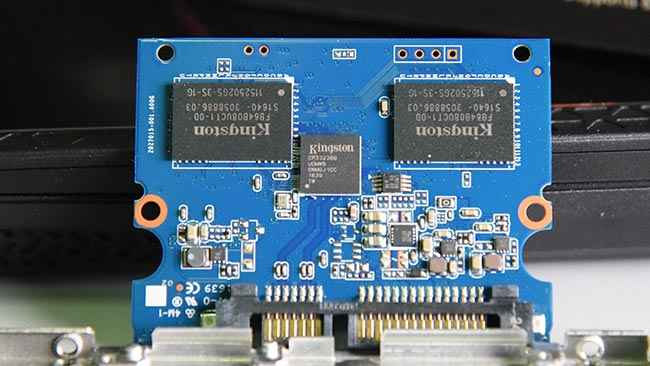
the above picture is what is inside a 2.5 inch ssd.
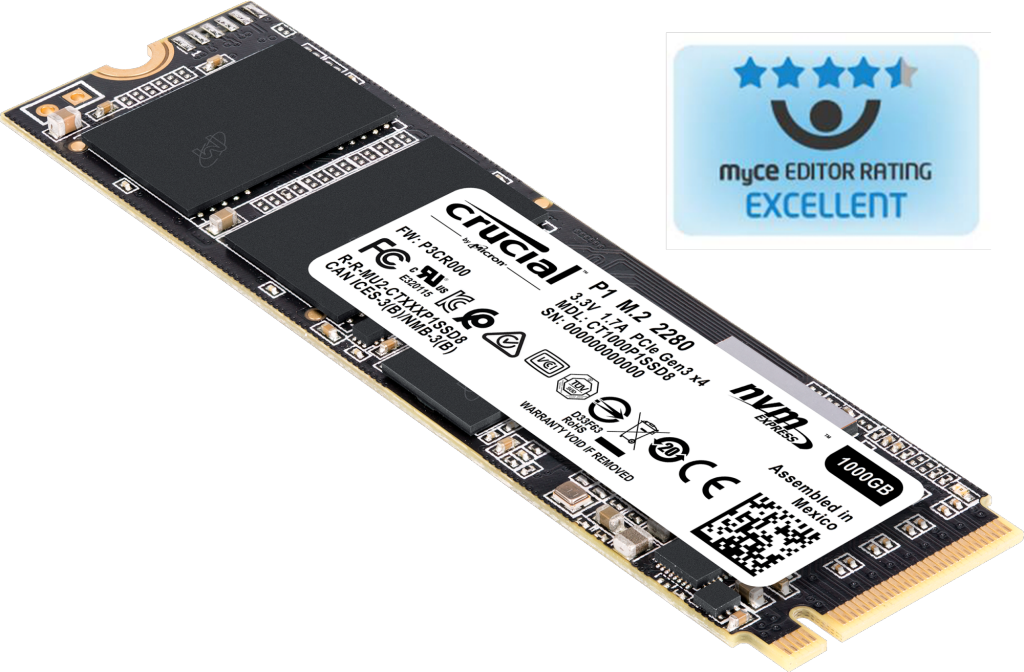

that is how a m.2 2280 ssd looks
same idea, different shape :)
red jay
^
thorn stream
thank u very much 🙂
heady raven
you are very welcome :)
thorn stream
day lol
dry root
so i have a SATA M.2 silicon power SSD i bought forever ago
I want to grab a silicon power for my NVMe
because i find it very reliable over years
there are a couple speed tiers but i feel like it doesn't matter in particular
since all NVMe drives can be perceived as simply "fast"
heady raven
generally, what you want is dram, and a "not silly" controller
dry root
how does one define not silly
heady raven
some of the dram-less ones are the silly ones
basically, dont buy complete bargin bin
and iirc, we have a pin for a list of drives
with what controllers etc
heady raven
basically yes
heady raven
aye, "good enough"
dry root
it's more than good enough for me, my standards are not particularly exacting
heady raven
aye
 small steppeBOT
 Grey#3002 has been warned
Reason: Bad word usage
dry root
oops
heady raven
the process you just went through is the max you need to go through
heady raven
no comment
dry root
i'm gonna get it then
heady raven
:P
dry root
https://smile.amazon.com/dp/B079X7LMLY seriously what i have now so
it'll be an improvement
heady raven
:)
dry root
thanks, as always
i was gonna get the lower end, which is not spectacular. it has flash cache
heady raven
as you say, its going to be an upgrade
just dont be surprised if you dont notice it as such
but do keep the old m.2 around
could be a nice drive for a HTPC or something like it
dry root
oh sure
i'll save it for what i am calling the mom PC
which is a PC i am building specifically to suit my mom's needs
i will likely also include a dual core intel CPU
cannibalize all my old parts
heady raven
aye
you are going to get a LONG way with a drive like that as the backbone for a machine like that
dry root
yeah, certainly
heady raven
you could also try and see if you could pickup an old nuc with m.2 support
dry root
that is a good choice yeah, except i need PCIe x16 for a GPU
heady raven
she games?
dry root
you see, the aforementioned mom is a gamer, casual to be sure but plays a lot of the sims
dry root
though she is an absolute boomer, i grew up playing mario on the NES with her, and even futher back the atari
really, a mid tower is fine for her
heady raven
basically, see if you can snap up an old HTPC from someone else
dry root
she doesn't need anything tiny
ah yes
less effort
i'm also gonna find an H61 board and bring back my i5-2400 for a Linux Box™️, will buy a 2.5" SSD for it of course as the sole drive
heady raven
the reason i circle around the HTPC one is that it is quite likely fairly quiet
dry root
ah
heady raven
which i doubt your mum would complain about :)
dry root
yeah she's literally got this HP business box with a GTX 1050
right now
one of the big chonky ones
short lodge
ok so may or may not be the right place to ask, but im gonna be completely wiping the hard drive on my laptop soon, and there's a minecraft world on there i'd like to save. Any idea of how i would back up my minecraft world? lol
like, just the world. i dont need to back up the whole game lmao
i could if needed tho
open gazelle
zip it and use USB stick, LAN transfer file to other PC, cloud storage or smth? @short lodge
red jay
ok so may or may not be the right place to ask, but im gonna be completely wiping the hard drive on my laptop soon, and there's a minecraft world on there i'd like to save. Any idea of how i would back up my minecraft world? lol
@short lodge and the way to do the above stated by hei is to download the world by pressing it in minecraft
short lodge
ok cool thanks
 worn gate
anyone know if the addlink s70 is a good ssd?
minor sun
Yes
minor sun
HMMMM
sweet badge
garbage
minor sun
HMB and Dram
Hmm who would be knowledgeable about SSDs
@plush crag got any idea on how dram+hmb works?
Or would work?
plush crag
sand onyx
Dual Core go brrrr.
 jade ocean
Anyone know of a good cloud storage array?
heady raven
@jade ocean backblaze
jade ocean
Ill search for it
heady raven

Cloud storage that is astonishingly easy and low-cost.
jade ocean
@heady raven Would you know of an array of HD Storage Capacities that would be good to use out of a home network?
heady raven
you mean, setting up your own "local" cloud storage?
jade ocean
@heady raven Yea is that possible or safe?
heady raven
its possible
if its safe or not, that depends entirely on the person doing the setup and the users using it
Free & Open Source unified file and block storage, VM, and Docker system with templates, a self-healing file system, snapshots, and replication.
jade ocean
@heady raven Thanks for your help Naed
heady raven
you are very welcome :)
jade ocean
@heady raven Naed if your still around any clue on how i could use my cell data network on a laptop do you know if there are like dongles or adapters i could fit my SIM card into and use Cell Network for data on a CPU?
heady raven
there are a couple of ways you can do that
the simplest one is using your phone as a hotspot
upper quiver
just got 2 brand new 3TB hdds for $97.20
jade ocean
Is there a deal?
jade ocean
@upper quiver 👍
 undone widget
what's the best way to move windows 10 from my existing ssd to a new one these days
undone widget
yeah I probably should do that
heady raven
how long ago did you do that windows install @undone widget ?
undone widget
not even that long ago I think
like a few months ago
I also kept the same install when I moved the ssd from my old motherboard/cpu to the new one
I dunno if thats good or not
heady raven
generally its considered good form to do a new install at that point
so you are due a new install of windows
undone widget
yeah, I might as well
 gritty solar
hi
 winter remnant
how much storage should I get
shut furnace
for main drive minimum i say 256gb, but get however much fits your needs
short lodge
T force Vulcannnnn
sand onyx
If you guys are looking for some cheap drives I recommend Netac.
 frigid stag
I have a Synology DS1813+, I think the Power supply is not functioning. Symptoms are no status lights unit cannot be found with with Synology find me app, fan and HDD run. I asked in the Synology forum they referred me here for parts. can you help?
heady raven
@frigid stag https://www.synology.com/en-global/products/spare_parts?search_by=product&model=DS1813%2B
Need replace a fan, disk tray, or power supply in your Synology product? Search by product or part and see which are available to order.
frigid stag
Thanks. I was told in the Synology Forum that Newegg had service for Synology. They don't seem to advertise that anywhere I can find. The link you sent shows the PSU price or availability not mentioned. On the up side, I got more response here in 10 minutes than I have from Synology in a month. 🙂
heady raven
hm
@frigid stag i would recommend you do the following: In neweggs opening hours, there is normally a user online here by the name @teal sequoia
try and ask them about the synology service part
if not, then what you want to do is use the UPC number and start googling
minor sun
Just get a 512gb MP34+2tb barracuda
@twin karma
 twin karma
i always here the barracuda is unreliable though
twin karma
a lot on pc parts picker
twin karma
ok
sand onyx
I'm a big fan of WD and Samsung but that's just me.
minor sun
Samsung HDD?
sand onyx
Storage in general.
sand onyx
Samsung SSDs/M.2, WD HDD.
sand onyx
lol
twin karma
samsung would make 500 gb 5400rpm for $100
minor sun
no 50$
sand onyx
lol
 hollow sphinx
m.2 hdd
just a platter hanging out of your m.2 slot
slicing into your gpu
rotary saw style
 stable pond
Hi to all.
Dose anybody have the experience of setting up and using Gigabyte AIC with Phison memory 8TB?
 glacial adder
hello! I am looking to add an extra ssd (1tb or 2tb) to my build. I want to get one that uses a sata cable so that i can mount it to the slot behind my motherboard (bc i have the nzxt h510 case)
glacial adder
@minor sun thank you!
winter remnant
Is m.2 the fastest type of ssd you can get
minor sun
M.2 NVMe?
winter remnant
Yes