#storage-devices
1 messages · Page 25 of 1
 torpid adder
torpid adder
torpid adder
I think you should
 warped field
can u give a reccomendation for one plz but maybe on the cheaper side
torpid adder
https://www.newegg.com/western-digital-blue-500gb/p/N82E16820250087 250GB one might not be cheap enough to be compelling
but the 500GB one is a good price
warped field
hmmm
but for me im already going to have 2tb of sppace from that hdd so i dont think i need the extra 250gb from the 500
torpid adder
tru
warped field
hmmmm
torpid adder

Google Docs
Master List
Brand,Model,Interface,Form Factor,Capacities,Controller,Configuration,DRAM,HMB,NAND Brand,NAND Type,2D/3D NAND,Layers,R/W (Up to, in MB/s),Categories,Notes (*),Product Page,Product Page 2,Amazon Affiliate Link,Amazon Price (Coming Soon)
ADATA,Falcon,x4 PCIe 3.0/NV...
here's a data sheet of SSDs
if you're interested in a look at most everything in pretty good detail
torpid adder
https://www.newegg.com/sandisk-ultra-3d-250gb/p/N82E16820173352 here's the Sandisk version of the WD Blue 3D, 5 dollars less for the 250
warped field
and it runs just as fast too?
warped field
alright thanks
torpid adder
yw :)
warped field
could u actually hellp me 1 more time plz
lol
I need help with choosing a power supply
 short lodge
Ooh I can help
warped field
ok lol
short lodge
Go to #cases-psu-and-cooling
warped field
yessir
 narrow sorrel
Seagate BarraCuda ST2000DM008 2TB 7200 RPM 256MB Cache SATA 6.0Gb/s 3.5" Hard Drive Bare Drive - OEM https://www.newegg.com/product/N82E16822184773?ignorebbr=1&m_ver=1
Can someone tell me which ones the speed on here
 minor sun
which ones the speed..?
narrow sorrel
Yeah
minor sun
Like whats the speed of the drive?
It doesn't list it, but I have that drive, and I get about 200mb/s sequential rw on cdm
 gaunt agate
Max. Sustained Transfer Rate OD 220MB/s pulled from the data sheet
 lean knoll
Anyone, my hard drive isnt showing up is disk management, file explorer, or device manager
what do I do
 fringe lake
Does anybody know of any retailers which currently have SATA to USB 3.0 physically in stock? I need one ASAP, and many of these retailers are going to take until at least June 1st for shipping
 lethal palm
Hello people, what does the 64mb/256mb buffer thingy on a HDD means?
 vernal inlet
It's the drives cache
lethal palm
is there any significant difference between a 64mb cache and 256 cache 2tb hdd?
performance wise
 vast kelp
This sounds not good. I didn't touch it, it just started happening. I shut it down after recording this vid.
I think it might be one of my HDDs?
I will take both out of the case and boot it back up (with the HDDs plugged in but out of the case).
No sound with this setup:
short lodge
@lethal palm you’ll only see a difference in cache sizes if you have a hard drive as your primary drive. Booting into windows is faster on a 256mb cache than a 32mb cache for example. As a secondary drive, though, what matters is the rotation speed, not the cache
lethal palm
Ohh ok, thank you very much. 🙂
short lodge
Yep no problem
And btw @lethal palm you should not be storing windows on a hard drive... it’s too slow now
It’s best to store windows on an SSD
lethal palm
hahah yea i know about that. i have my windows on a nvme drive now. Just that i want to expand my storage space.
short lodge
Alright awesome. Take care
vast kelp
Considering suspending my hard drives. I think they may be resonating with the case.
I've put one disk back in (with the normal mounting mechanism) and am going to see if the noise happens again.
short lodge
ok
vast kelp
However when it was happening before it seemed to be quite random.
So right now I can feel all disk writes/reads resonating within the wood floor.
After waiting on idle for 5 min, it doesn't seem to be happening with just one disk. I'll add the second one now.
short lodge
ok
 open gazelle
@vast kelp suspending HDDs may or may not be ideal. That does mean that the vibrations go directly to the HDD itself rather then be absorbed by the case/desk/floor. Afaik at least older HDDs had issues with that. Newer ones should theoretically have at least slightly lower lifespan from it but it could be either very minimal or a decent amount.
vast kelp
The noise hasn't happened since.. I don't really trust it tho.
ah
What can I do to avoid hearing my case vibrate extremely loudly at random times, requiring me to move the case so the noise stops?
open gazelle
kinda have same issue. Didnt care a whole lot so I damped the HDD cage. Also probs not too ideal but I guess slightly better then damping the HDDs themselves. As another interesting solution that could be done that I didnt try, finding something that can damp the vibrations from the case itself. I noticed that when I pressed the top of my case with my entire hand with an okay amount of pressure (not that much, tis a bit) vibrations would stop. Could probs do that from internally maybe
with some sort of object of course and not a hand
 opal rapids
Hi I'm searching for a good SSD in France, my budget is 60-70€ max. What is the best for me, I want a SSD for windows and I'll have a 2TB HDD.
NVME is necessary for windows or there's no difference loading windows between a classic SSD and a NVME
torpid adder
there's probably some small difference
max transfer speeds are the primary appeal in NVMe and such
but a good SATA drive is still nice
 uncut bramble
unless you're doing extended periods of read/writes, for a boot drive you're probably not going to notice much of a difference between sata/nvme
sure the numbers are huge on paper, but in the 20 seconds or less it takes to boot , and do stuff like launch apps, it won't really matter that much
torpid adder
that said, if you have an NVMe slot available, you might as well get a 660p or something maybe
¯_(ツ)_/¯
minor sun
@torpid adder France and euros ;)
torpid adder
tru
minor sun
@opal rapids Here, the MX500 is a decent ssd, 70euros
https://www.amazon.fr/dp/B0786QNS9B
oh wait is amazon still not delivering or..?
minor sun
alright it's good
minor sun
also I have a question, the top one aparently translates to "unpack without getting angry", is that what this means..?
opal rapids
Oh and the mouse and keyboard
@minor sun I don't know I found that interesting
I dunno
opal rapids
I have a psu: Seasonic Focus GX 650W
A case : coolermaster Mb511 rgb
For the keyboard I think I'm going to take the g502 hero. And keyboard maybe the hyperx alloy fps pro
But I prefer a more silent keyboard. With other switches
opal rapids
So it's between reds and browns
minor sun
reds also doesn't have a click you can feel, brown does.
opal rapids
It's hard to figure out
I mean, I saw tests and reviews but when you don't have the product in your hands it's hard to determine the differences.
minor sun
CHERRY MX BLUE - The keyswitch with audible and tactile feedback. Learn more now!
this could be useful to determine the differences
 sweet badge
mx blues are bad switches
opal rapids
@sweet badge Why xD
sweet badge
they sound like a dying cat
sweet badge
okay the switches arent even the worst part of that sound test my guy ur space bar
sweet badge
linears are nice
opal rapids
Anyway you know keyboard with those switches under 50-60€
 wild sundial
@warped anvil I am having trouble with a recently bought product I think you sent me a dead hard drive. I got it in quarantine and just now put it in but when I tried to allocate it, nothing showed up. It is a Seagate 2tb hard drive.
@ocean vale @teal sequoia idk if you guys could help sort this out but I am @ing you anywayt
 ocean vale
minor sun
ocean vale
minor sun
DM newegg service
wild sundial
Alright thanks
minor sun
also have you tried to troubleshoot it yet
maybe disabled sata port, cable not fully plugged in, etc?
wild sundial
Sort of but I will tkae any suggestions
Yeah I unplugged it from the sata port and the plugged it in to a different on but that didnt work
 kind sierra
Yay
minor sun
is the power plugged in
wild sundial
Yeah
Just to make sure it is the thing that looks like a sata cord but is longer and has others of the same thing connected to it
minor sun
Yes
wild sundial
Ok good
kind sierra
Always struck me as odd how there are more pins for power than for data on sata
wild sundial
Im am going to try and plug a different hard drive that I have into the same sata port as the one the "broken" one is in and see if the other one shows up
Actually wont that damage the drive
kind sierra
No
wild sundial
Alright hope this doesnt ruin my pc
kind sierra
It won't. I swap harddrives all the time for data recovery
wild sundial
Do I have to back anything up or no
kind sierra
You can if you want to, but you don't have to as long as you don't click any "format drive" buttons or such like
wild sundial
Ok
wild sundial
@kind sierra @minor sun That didnt work I think it is a dead hard drive
@ocean vale @teal sequoia What do I have to do to put in a form
 teal sequoia
Hi there @wild sundial I just replied to your message. Sorry for the delay!
 odd vortex
if i turn off my PC and disconnect my main ssd (windows & all flies are on it) for a couple of minutes and plug it back up and boot, is it going to work the same ? need to mount my ssd and just found out how to
torpid adder
should
but why do you need to unplug it?
wrong cable management that needs to be adjusted?
odd vortex
yes also that
torpid adder
ok
yeah, just make sure you're using the same SATA port on the motherboard that it was plugged into before
 hoary pewter
Ducky has the best and most satisfying sounding switches of all types. Change my mind.
 rare harness
why are we talking about keyboards in the section for storage drives?
hoary pewter
Someone mentioned switches recently. So sorry all mighty section mod @rare harness I'll just be on my way.
rare harness
... I was being sort of silly. I know the conversation in a channel can kind of drift.
 vestal reef
¯\_(ツ)_/¯
kind sierra
I like blues, change my mind
 grand ferry
A 1tb WD Blue costs the same as a 2tb Seagate Barracuda
Unless youre talking about WD Blue ssds
 indigo dune
I found an SSD with 3500 read and 2250 write. And another that is 5$ cheaper that's 3400 read and 2300 write. Which would be the better choice?
 vapid nebula
how cheap do yall think the nvme ssds will get around black friday-cyber monday time?
indigo dune
Sheesh, that's a long time from now
vapid nebula
i dont have anymore money in the budget to fit a 1tb nvme in there
and i have plenty of space so im in no rush
im going to buy a smaller ssd for now until i can get a new one
indigo dune
You don't need to fit an ssd in there right now
indigo dune
But when you ask that question, you have to take into consideration how far from now to that period of time, the price fluctuation in between that time and then, the percentages that are taken off the prices for the SSDs
So there really is no way to tell currently.
vapid nebula
but im sure some will be on sale for a really good price
vapid nebula
okok thanks
indigo dune
No problem
minor sun
Why not m.2
 loud estuary
Go with a m.2 if you can. MP34 NVMe, Sabrient Rocket (The non-Q version is better).
If you can't, the SK Hynix Gold 1 tb is pretty cheap:
https://www.amazon.com/dp/B07SNHB4RC
loud estuary
I think you may need to do some bios tweaking if you want that as your boot drive
Lol, you and them mp34s
minor sun
Team Vulcan 1tb and Team L5 3d 1tb hover around 100$ and are decent drives with dram
sweet badge
also i'd try to avoid the rocket q bc its qlc at that budget, a lot of tlc drives around there
loud estuary
https://www.amazon.com/CT1000BX500SSD1/dp/B07YD579WM/
Alright, I gotta do some price checking for these recommendations. My bad 🙂
minor sun
Lol
vapid nebula
get an nvme lmao
 frosty orbit
imagine defaulting to m.2 over 2.5" lol
i wish pricing was there but we're not there yet
also you mean x3 at 93 ;)
open gazelle
Sunbow has rebrands and it isnt guaranteed to get a good model @frosty orbit
 viral vapor
https://www.newegg.com/silicon-power-ace-a55-256gb/p/N82E16820301380?Item=N82E16820301380 this any good? good reviews and has nand but wanted to see if anyone had any experience with it
frosty orbit
x3 is pretty reliably sm2258 + dram + 32/48l tlc
open gazelle
So took a look and is better then I thought it was for those issues. Tho seq writes are pretty abysmal compared to other SSDs that's just a bit more which is nice for file transfering and such.
 red jay
Anyone got a 16 tb IronWolf pro?
lean knoll
no too much 4 me'
 somber remnant
<30$ ssds?
somber remnant
anything with dram or am i being too ambitious
somber remnant
me apparently
grand ferry
thats a terrible deal, i got a 120gb NVMe SSD for 30$
short lodge
does it have DRAM tho?
minor sun
lol
 potent sluice
There's a new ram speed coming soon.
minor sun
@potent sluice technically it's already out, just not supported on any boards we have access to :P
red jay
WD SN750 or Seagate 510 for a 500GB NVMe SSD? The SN750's on saaale
potent sluice
 ocean osprey
@red jay both are great SSDs (the FireCuda 510 is based on kioxia flash and a phison e12, I think the sn750 uses a custom controller), but depends on if a) the sn750s with heatsinks are on sale too and b) if you want an SSD with a heatsinks to begin with
vast kelp
There's a noticeably loud 120Hz buzz coming from my PC. I think it's due to the hard drives resonating with the case. Is there any way I can try to silence this?
The lighter line at 120Hz is the sound compared to other background noise nearby.
vast kelp
It's louder near the two hard drives.
I just used an app called spectroid to look at the sound spectrum coming thru my mic.
The graph Y axis is time and X axis is Hz, the brighter the color means the sound is louder.
The 120Hz hum is constant (you can see a vertical bright line at X = 120Hz) and gets louder near my PC and especially near the HDDs.
@kind steppe @shut furnace
If I take out the HDDs, the sound gets much less audible.
vast kelp
I am in Europe, I think it's 50Hz.
 plush crag
Are they 7200 rpm drives?
Because 7200 / 60 = 120
And ya, you probably have 50hz power in EU
vast kelp
I have one 7200rpm, and the second I think is 5200
vast kelp
I'm pretty sure it's the hard drives resonating with the case because the noise gets significantly less loud if not inaudible when I take them out of the case.
plush crag
Could get some rubber gromets to keep the drives off the metal.
vast kelp
Looking at them, I think they already do have some rubber pads.
Maybe not enough padding?
vast kelp
Came back into the room my PC is in to this:
The noise is much louder than before.
I moved the case to try to open it up and now it's back to being much quieter.
It came back. It's slowly driving me crazy.
I might build myself a parsec machine and use it solely from another room if I can't solve this.
vast kelp
Thanks! Are these what I want? https://www.amazon.com/Akust-Hard-Drive-Vibration-Screw/dp/B00ZH8DXPY
 tulip dust
is there a noticable difference in 3200mhz ram vs 3600mhz
 shut furnace
Makes more of a difference on amd systems than intel
 crude cobalt
anyone know a good m.2 ssd?
crude cobalt
im looking for something that is good for gaming, is that one?
kind sierra
Yeah
shut furnace
yes this is a fast ssd
crude cobalt
awesome, thank you
shut furnace
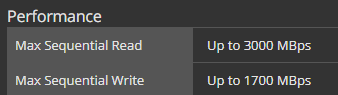 red jay
So my dad is looking for a new hard drive, and he wants to know what the difference between a NAS drive and a computing drive is.
loud estuary
NAS drives are usually built for mass network storage. They can handle sustained read/writes better than a typical drive and are generally rated to withstand more vibration, so you can have, say, 10 drives running in close proximity with little affect to performance. AS you might imagine, fifty high speed mechanical drives can produce a lot of vibration that can damage normal drives
Essentially, more durable, meant for more sustained use. Normal hhds aren't read/write data indefinitely. Usually, NAS drives are meant for multiple people to constantly use. Surveillance drives are similar, but meant for constant writes from security cameras
red jay
So say if he wants to get a 4tb Ironwolf NAS Drive for his laptop that is a work/gaming laptop, could he?
loud estuary
Yes
short lodge
If it was 2.5"
loud estuary
Provided it fits
red jay
2.5
loud estuary
As long as it is the correct form factor (I don't know of any laptops with 3.5" bays), it'll work great for mass storage. You wouldn't want it as a boot drive as NAS hhds are build for mass storage and raw capacity, not sheer performance like a typical sata/NVMe ssd
short lodge
SSD is performance...
red jay
I meant as in Computing drives as in like the Seagate Barracuda, compared to the Seagate Ironwolf(NAS) or Firecuda(Gaming)
plush crag
NAS drives are meant to run 24/7 for years and be able to sustain reasonably high i/o throughput.
loud estuary
Basically, NAS drives are more durable than HHDs. Not necessarily faster or slower. Check RPMs and benchmarks for speed comparison, but I wouldn't classify any mechanical drive as performance these days
plush crag
You'll want to avoid SMR drives, unless for a budget, long-term storage solution.
 naive willow
should i get a hdd or ssd for my build
loud estuary
^
naive willow
so your saying i should buy 1 ssd to put my os on and then a hdd to use as my primarystorage
this is my first build
loud estuary
Yeah. I'd go for like a 250gb or something. That'll fit your OS and some essential programs, then you can configure all your other files (including desktop, downloads, and other libraries) to a hdd
naive willow
my os will be windows 10 home
shut furnace
I usually keep main drive at a minimum of 256gb
naive willow
so i should look for a 250 ssd and 500 hdd
loud estuary
That would be a solid choice, unless you think you need more.
Or if you have the budget, you can go with a ssd large enough for all your programs.
shut furnace
well 500gb hdds are a thing of the past now, mostly HDDs start at 1tb of storage
for the hdd something like a wd blue or a seagate barracuda should do fine
naive willow
@shut furnace what ssd would you reccomend
loud estuary
You have a m.2 slot?
naive willow
yes
short lodge
@loud estuary what were you gonna recommend him
naive willow
m.2 are for nvme drive if im not mistaken right
sweet badge
m.2 is a form factor, there are nvme and sata m.2 drives
naive willow
so what should i get a nvme or sata drive
sweet badge
if you can nvme, m.2 sata and 2.5" sata are the same speeds, just different size
naive willow
what is a good nvme drive that i should get
sweet badge
what size/ budget?
naive willow
right now i aint got a budget but i want it too be as cheap as possible
@sweet badge
sweet badge
how much storage?
shut furnace
as nvme m.2 drives go the mp34 is probably best bet
loud estuary
Was going to recommend ^^
 upper quiver
when it comes to nvme as cheap as possible, its basically a fight between the mp34, crucial P2, and silicon power A80. it all depends on whats cheapest and available for you at the moment
also the MP510
but that one seems to be more expensive usually
but thats just because corsair brand name
naive willow
its just for my os so 250 gb should be fine right
upper quiver
for windows 10, 128gb is a minimum, and that assumes you have additional storage devices, 256gb is ideal for most things
but if you have a huge game library or are working with large files, usually you want an extra hdd
or if you have the budget, 1-2TB of NVMe lol
naive willow
im getting the seagate barracuda hdd
upper quiver
for the price and capacity, its a solid choice
shut furnace
yeah i saw you leading up to it @loud estuary 👍
upper quiver
another thing is that the cost difference between 128 and 256gb isnt a whole lot
naive willow
https://uk.crucial.com/ssd/p2/CT250P2SSD8 @upper quiver is this the one you are taking about

Crucial
Buy Crucial P2 250GB PCIe M.2 2280 SSD CT250P2SSD8. FREE US Delivery, guaranteed 100% compatibility when ordering using our online tools.
upper quiver
yep
naive willow
can you just check over my list to make sure ive got everything
upper quiver
dont buy windows from that website, just go to ebay
i would even say ebay is a safer bet, because that website isnt even legit
kind sierra
(or don't buy windows) <-- obligatory anti windows statement
upper quiver
also that
i would suggest using pc part picker, it makes this sort of thing much easier, because otherwise i have to click all these links
and then try and make suggestions for parts when i could just edit a pcpp list
shut furnace
or neweggs part picker 😉
shut furnace
not sure
I haven't used it either xD
I'm not much of a person the makes build lists
naive willow

eBay
Supplied by authorised Microsoft partners. We believe that most problem can be resolved through our good communication.
shut furnace

upper quiver
yep
naive willow
this seem a bit weird tho 4 quid seems a bit weird
shut furnace
upper quiver
for an OEM key, you paying 50 from a sham website seems even weirder...
kind sierra
That link
naive willow
yeah i dunno what happend there
upper quiver

eBay
Its the best to fresh install Windows 10 professional.
shut furnace
all these chonky links
😤
so ya ebay has a lot of cheap windows keys. if you kind the right seller most of the time it works, amny people here use these $5 ebay keys
upper quiver
and trust me, microsoft isnt losing a DIME on this stuff lol
all their money comes from OEM partners who buy these keys from them lol
shut furnace
if they were then they would actually do something about it
upper quiver
yeah, ms already got the money for this key
then some dude stole it from whatever OEM bought it lol

@naive willow how much storage do you think you might need?
256gb ssd + 2tb hdd = 110
1tb ssd = 130
but if you dont need a ton of space, theres no need for 2tb or storage space
heres kinda what i came up with
the case is just a cheap place holder
naive willow
for the record im not rlly woried about boot time
naive willow
so i should get this instead of the barracuda
naive willow
cheap
rn im looking to use https://www.amazon.co.uk/dp/B07QZDM8K4?tag=pcp0f-21&linkCode=ogi&th=1&psc=1
would i be fine if i just put the os on the hdd
upper quiver
i cant see the cost of that because im US
and no, you do not want win 10 on an HDD
NVMe is somewhat overkill for a budget system in the first place, and when you said you didnt care about boot times, i figured an NVMe drive wasnt the best option
but you NEED an ssd
they have gone from a luxury to a requirement over the past decade
unless you run linux lol
alright
heres what ive come up with
this is cutting corners to the max without being crap
the case really is up to you tho
naive willow
im looking to buy ryzen 5 tho
upper quiver
dont worry about it, looking at the gpu you wanted to buy, this will give you much better performance
the only difference is 2 less cores, which you can live without considering your budget
srry for late response @naive willow i was afk
 midnight orbit
Guys i just installed a nvme to my setup but now my pc wont boot up when I enable m.2 from bios
shut furnace
Did you install windows on the nvme
midnight orbit
No already have windows on another ssd this is just an addition to a already running setup
minor sun
@midnight orbit boot order maybe, it could be trying to boot from the nvme SSD
midnight orbit
I got it to work it has to do with raid / ahci modes
I had to reinstall my whole windows for some reason
and now when I go to my bios all drives are appearing under non raid drives
 dull coyote
So I have this gaming laptop, and I want more storage since it has 512 GB SSD. However, I want an external drive because I don't want to mess with the insides. What do I get? hdd or ssd is fine
torpid adder
Get an internal drive and use a USB interface
dull coyote
what does that mean
torpid adder
It means you get a SATA 2.5" SSD, and use a SATA to USB adapter to connect it to the computer
As an example
kind sierra
Would recommend at least USB 3
 carmine spear
@minor sun you know anything about the mp33?
I know the mp34 is good but what about the mp33
@open gazelle
minor sun
@carmine spear not good, dramless but hmb, slow, wacky controller setup
carmine spear
Aight so not gonna recommend that
open gazelle
I mean if it was $10 - $15 less then DRAM and didnt have the budget for more it'd be fine
as it's mostly just the fact it's usually like $5 uplift to get DRAM
 river yacht
My Western Digital Black NVME 500 GB (old Editon) has been crashing my computer
minor sun
rip
river yacht
Guess how much I paid for the piece of junk a year ago
kind sierra
Probably around $70?
river yacht
130 dollars
kind sierra
oof
river yacht
I wish I could get a better one for free tbh because I was ripped off
Unfortunately nothing is free and all these giveaways I join are rigged
 golden brook
ok
 tender holly
Best 2 tb ssd under 250
golden brook
ok
red jay
anyone have a good reccomendation for a 1tb nvme ssd
kind sierra

plush crag

reddit
vestal reef
Silicon power a80 or team group mp34
 lucid forum
Would somebody be able to help me out with my ssd not appearing in windows?
 calm blaze
@lucid forum does it appear in the Bios?
lucid forum
Yes, I got it all sorted, thank you
calm blaze
no prob
red jay
sweet badge
yeah and the wd black sn750 is the same price https://www.newegg.com/western-digital-black-sn750-nvme-500gb/p/N82E16820250109?
 red jay
Removed from cart 😩
red jay
If I have a spare HDD, but no other slots, could I remove the disk and use it in my cdrom?
kind sierra
red jay
Lol
vapid nebula
ok so i have an external hard drive that has a lot of my games on it
would i just have to re install steam on the new pc and be able to play the games on the external hard drive
or would i have to uninstall and then reinstall
ocean osprey
should be able to just point steam at the library folder on the external once you're logged into the account
provided they're actually installed and not just backups
 eager epoch
steam is weird, but what you gotta do is point the directory to where the games are located. Then you have to go to your library and attempt to install that game, and after a few seconds it should realize its there and verify the files instead of downloading
If the game is already installed on your pc somewhere else though it will just point to that copy of the game.
vapid nebula
okok thanks
red jay
I have 2 different internal hard drives
On my main I have steam and most of my games, on the other I just made a new steam folder and I'm now saving my games there as my main is almost full (931GB used of 1tb)
I'm assuming external would work the same
short lodge
Yep
 distant radish
best ssd?
and what interface should i get m.2pcie 4.0 m.2pcie 3.0 or SATA
and is dual ssds better
minor sun
Always depends on budget
minor sun
the best your budget can buy :P
distant radish
well my pc budget is around 3500 CAD
and i want fast ssd
but not sure which one i should get
is pcie 4.0 better or 3.0
minor sun
if you go intel, you can't have pcie 4.0
minor sun
any x570 board
minor sun
Yes
distant radish
but i am not sure what i want to buy in terms of cpu because the new amd cpus are coming out soon
distant radish
and i hear that the new 10th gen is "too little too late"
loud estuary
@distant radish
Other thing with 4.0 is if you upgrade in the future you may be able to take advantage of it. Not saying you should cash out now tho.
distant radish
ok
 feral tide
Het guys i have a bunch of ssd's that are a fews years old and im trying to update them so they can actually be used but i dont actually know how
and youtube doesnt really have any tutorial vids for it
idk if theres some adapter cable i need so i can update it or somthing
minor sun
I don't think you need to update them, older firmware doesn't stop them from working
open gazelle
pretty rare for an SSD to even get a firmware update as well
torpid adder
update every single day so your ssd doesnt get out of date
 kind steppe
Storage is storage!
shut furnace
nope
vestal reef
@open gazelle you around?
vestal reef
When installing a m.2 drive, do i apply the thermal pad that came with my motherboard directly to the sticker on the drive?
open gazelle
should be fine @vestal reef
vestal reef
Thanks
plush crag
 kind sierra
What drive?
plush crag
970 pro
minor sun
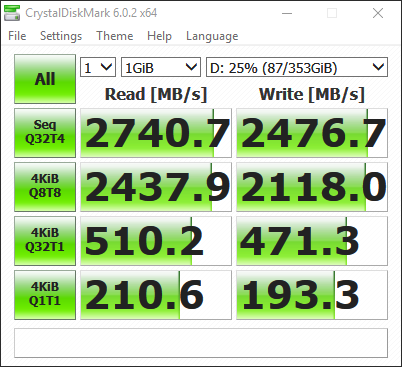
Cleaned up mp510 a lil, still not great writes but they work well for me
66% usage now

 shut tundra
I think I am going to order an nvme to usb external housing for my old intel 600p
plush crag
 shut tundra
its overpriced but I was looking at the asus one the othernight.
might order if it ever comes back in stock
Aorus RGB nvme
red jay
is it worth buying an m.2 to USB 3.0 adapter and an m.2 SSD?
red jay
so basically it's NOT worth it?
upper quiver
its not
shut tundra
@minor sun what motherboard do you have
upper quiver
then get another sata ssd ig
red jay
i have 2 lol
minor sun
MSI b450 gaming pro carbon ac
And I ran CDM when my drive was near empty, I got like 3gb/s write
shut tundra
which slot do you have the drrive in
minor sun
1
shut tundra
ok, second slot on b450 only runs at 2x, but if its in slot 1 thats not the issue
minor sun
Looks good
minor sun
Forks any ideas on my write speed? I'm thinking it has smth to do with software... I haven't overclocked my SSD or anything, operating temps are ~40c and fine, haven't taken a hammer to it or anything. I didn't trim at first, but now I'm regularly trimming the drive.
plush crag
Thermal throttling
minor sun
Interesting
It's semi possible
It's right next to my d15
Anything I could try to fix it with without having to buy anything?
O yea sticker is off
sweet badge
slap a 40mm noctua on it
minor sun
@sweet badge without buying another Noctua fan
minor sun
Without buying anything
sweet badge
build a fan and slap it on it
 proud quail
quick question, can you combine storage through disk management or command prompt? if so how? to better explain it Im saying can you combine unallocated storage from Disk 0 to Disk 1 or somehow make disk 0 run with disk 1
 rustic mountain
If you create a spanned volume in disk management it can go across drives
https://support.microsoft.com/en-us/help/323442/how-to-use-the-disk-management-snap-in-to-manage-basic-and-dynamic-dis worst documentation on it but there are plenty of videos on how to do it
loud estuary
Better than my Evo+ 1 TB

 rustic mountain
lol yeah idk why but mine both did bad at rnd4k, they will get replaced with pcie4 drives eventually
loud estuary
I got one of those. They don't do that great on pcle3 tho 🙂
rustic mountain
I'm in no rush but I do have 5 more m2 slots counting the 4 in my expansion card lol
loud estuary
Nice :)
I think 3 TB of nvme is enough for me ... with, ya know, 20 TB of HDD/SSHD
Then we have the good old ironwolf pro
rustic mountain
lol
short lodge
500gb NVMe + 2Tb HDD gang
loud estuary
I figure in a few years when I upgrade I'll go AMD and get another 2 tb gen 4 nvme
Just so it's an even 4 tb of nvme 🙂
rustic mountain
Yeah when 2tb nvme pcie4 drives get cheap I will upgrade till then I'm happy
loud estuary
That'd be nice
rustic mountain
And when the controllers mature so they get full benefit of pcie4, jump on too soon and drives won't be that much faster
 bleak jolt
Must have a pretty big homework folder to need 80tb
short lodge
vestal reef
somber remnant
marine biology homework
tentacles
oh so thats why the folder is named tentacles
short lodge
🤣🤣
rustic mountain
Mostly movies and a TON of family videos converted off vhs to 1080p or 4k if it was able to going back to the late 70's with my parents and older siblings, lots of music, and idk what my wife has on there
red jay
There's been a disturbance in the woosh
rustic mountain
Lol no just not going to look through her crap she doesn't know how to organize her files in a matter that makes any logical sense and forget about file names its all just dates, makes sense to her
bleak jolt
I hate too do this but... R/woooosh
 bleak jolt

torpid adder
 bleak jolt

red jay

plush crag

 small steppeBOT
 MrManiac3#3473 has been warned
Reason: Duplicated text
plush crag

torpid adder

 past depot
does anyone what size the standoff is suppose to be for a b350 bazooka
past depot
it’s just that i don’t have the stand-off so i can place my m.2 ssd
kind sierra
That standoff would be relative to the motherboard
 keen wave
are these any good? https://www.newegg.ca/tc-sunbow-1tb-x3/p/0D9-00HU-00027?Item=9SIAP0UBEF2414
I heard they have dram cache but seems a lil cheap
kind sierra
They're slow from the SATA part. Not sure if you could get that much faster though
loud estuary
upper quiver
those are good if your on an extreme budget
i wouldnt suggest those unless you only have like 600 dollars or less to work with
sweet badge
yeah iirc hei said they were rebranded drives or something and kind of a hit or miss
open gazelle
Well it may not be. The info is all over the place for it tbh. 480GB specs for example are saying 300 seq r/w and yet apparently achieves much greater based on some benches. idk really what is going on with that
did see some others speculating on rebrands based on some specs
open gazelle
they should all have DRAM
I mean smaller models do have less NAND chips
but their perf decrease is a lot more then usual
keen wave
Anyway it's just for data storage
They have Nvme too https://www.newegg.ca/tc-sunbow-1tb-nvme/p/0D9-00HU-00080
Nvme can use ram as cache so would it be better to get this
minor sun
tcsb made nvme ssds..?
 cosmic linden
What is the most reliable hard drive?
kind sierra
Most harddrives are pretty reliable. If you need really good, look for a nas or server drive
cosmic linden
how about those helium drives?
kind sierra
Very expensive, but reliable
 gritty pecan
Hello.
I purchased an Western Digital WD BLACK SN750 NVMe M.2 2280 1TB PCI-Express 3.0 and my Asus ROG Strix B450-F Gaming won't recognize it. I have the latest BIOS, and I even tried both M.2 Slots on the MoBo.
Any and all suggestions are welcomed.
vestal reef
Might need to initialize it.
Is this the boot drive for a new system?
Or do you already have a running system and you just added this drive?
gritty pecan
Nope. Already have a running system and was looking to use this one for everything
vestal reef
Ya, you probably need to initialize it
gritty pecan
does that come in the instructions?
vestal reef
Probably not, one sec
Just go into disk management in your pc and find the right drive. Right click it and hit initialize
gritty pecan
it's showing my existing SSD of 500gb and a mechanical drive of 1tb
not the new M.2
vestal reef
Hmm
Maybe the actual drive is damaged
But someone else might have an another idea.
gritty pecan
I got one for my wife, but it's Intel
and it worked from the get-go.
same board, same CPU, same everything xD
vestal reef
There ya go lol
kind sierra
There it is
vestal reef
Just right click it and hit initialize
gritty pecan
there's no option for that
gritty pecan
Convert to Dynamic Disk
Convert to MBR Disk
There's an option for Offlien
Offline *
vestal reef
Ok, so its online rn
gritty pecan
I can "New Simple Volume"
vestal reef
I haven't done this in a while so it might not be a right click to find the initialize button.
gritty pecan
or the Convert Options
vestal reef
No, there should be a button that says initialize somewhere lol
vestal reef
Ya, do that
vestal reef
Awesome
gritty pecan
I put it as Z :3
vestal reef
Lol
vestal reef
Yep xD
gritty pecan
to make it my boot drive, I have to transfer everything to it, and then select it in the BIOs as primary Boot, right?
vestal reef
Yes
gritty pecan
once working, just erase the boot from the original one that's currently running.
I shouldn't lose anything
vestal reef
Well, your gonna need to put a os on it
I would back up all your stuff on that mechanical drive you have, and then install windows on the new ssd. Then boot into windows and move all your stuff back
vestal reef
Np lol
small steppeBOT
 kittylexa 💜#6969 has been warned
Reason: Bad word usage
kind sierra
Don't say that
vestal reef
Lol
 velvet timber
can you DM me what i said?
oh. someone told me its probably because i sent a link?
idk.
w/e
vestal reef
@ theo?
velvet timber
I need help. I want to buy a SATA power cable for my PSU (G750H) for my 2 new storage drives, but I don't want to buy the wrong one and end up frying my new GPU.
vestal reef
That is a non modular gpu so you can't buy additional sata power cables for it. It should have enough ports tho unless you already have multiple hdds installed
velvet timber
I currently have a HDD and an SSD installed. I want to add 2 more drives.
There's apparently another cable, but I presume I lost it while moving.
uncut bramble
it might be worth reaching out to gigabyte and see if they can sell one of those modular cables directly, i see some on amazon, but the sellers claim they are for specific brand PSU's
red jay
Is it normal that my Disk or (C:) to be at a constant 100% Active time?
kind sierra
If it's windows with antivirus on an HDD, then that's perfect;y normal
It's not good, but it's normal
kind sierra
My advice: get a 50 dollar ssd, just use windows defender, and don't click and spoopy links
 runic nest
hey guys, starting to look at external hard drives for a work/fun project (ill be switching between 3 computers, so figured it make everything easier). not too familiar with them. was wondering if there is anything to watch out for or one that stands out more than others?
red jay
@kind sierra You say get a $50 would you recommend a M.2? And how can I transfer say my OS to said SSD?
kind sierra
Not sure how you transfer windows... You usually have to talk with microsoft for the key transfer
For a cheap m.2, we've been recommending the team mp34 series. Just pick the biggest one that fits in your budget
 eternal crow
Quick question: I just bought an optiplex and Im about to put in a new hard drive. Do I need to transfer Windows 10 to the second drive?
kind sierra
YEah
eternal crow
How would I go about that?
Put both hard drives in at the same time and transfer data through BIOS settings?
upper quiver
you would need to reinstall windows
so you need a 8gb flash drive, and you need to turn it into a bootable windows installer
red jay
IF you want the system to boot from the new drive....
eternal crow
So, I need a new copy of windows?
kind sierra
No, you can transfer the license for cases like this
red jay
If it's just a secondary drive you don't need to install
open gazelle
Transfer the license to your microsoft account, then install Win on new SSD, log into MS account, unlink license from MS account, log out of MS account (as it tends to be annoying)
 plucky lintel
torpid adder
plucky lintel
torpid adder
Fatty Dove :)
vestal reef
Lol ^

 paper juniper
@bleak jolt sorry deleting
Anyways, the disappointment of not having enough money for a 1TB SSD to upgrade my 8 yo.
She's pretty slow
bleak jolt
Yeah I used a hdd just as old for a long time and it hurt but eventually I got an ssd
tulip dust
So as far as storage goes, what does cache on a hdd do and im assuming more is better?
plush crag
Big cache energy
tulip dust
Sorry not following
sweet badge
big cache energy
vestal reef
Lol
 mellow wind
hey, i have a 2.5 inch LAPTOP hard drive do you think i could put it in my desktop ? thanks
keen wave
Yes, SSDs are 2.5 inch
mellow wind
its not a ssd its a hdd (Seagate 2TB BarraCuda 5400 RPM 128MB Cache SATA 6.0Gb/s 2.5" Laptop Internal Hard Drive ST2000LM015)
but i was more asking it about the connection
keen wave
Yes it'll work
mellow wind
like its the same sata cable and stuff ?
keen wave
Ye
 steel olive
Hi! I want to boost my internal storage. Dell told me that i need a 4TB 7.2K RPM SATA 6Gbps 3.5in Internal Bay Hard Drive,13G,CusKit. Can I just buy something to those specs on NewEgg or do I have to go through Dell?
bleak jolt
You shouldn't have to listen to them
steel olive
@gg-toez., thanks for the advice. Do you know what specs I need to pay attention to?
bleak jolt
Assuming your PC doesn't use some sort of proprietary connector then it doesn't matter that much
steel olive
thanks gg!!!
bleak jolt
Although be sure that it is a 3.5 inch drive bc I'm not sure if your pc has mounting points for anything else
steel olive
so, its easy to install?
loud estuary
You can get an adapter for $5
bleak jolt
Yeah pretty easy there should be a drive bay you just screw it into
loud estuary
for 3.5 to dual 2.5
steel olive
is ram also easy to install? sorry! I'm so new to all of this.
steel olive
sweet! thanks!!
steel olive
so, can i buy a SSD or a HDD for my 3.5" space?
bleak jolt
Well you could buy either but if you want your ssd to not just be floating around you will want an adapter
steel olive
ah! got it. thanks!!!
you guys are great.
i just can't understand why Dell wants to charge me 600+ for a 4tb intenral hard drive..when it seems like I can buy it for $100.
bleak jolt
$600! That's insane
steel olive
right?
loud estuary
$600 could buy you a 16 gb ironwolf pro
@steel olive Do you already have a ssd boot drive?
steel olive
i have now idea what any of those things are. 🙂
loud estuary
Okie lol... do you know the model number of the drive you already have
Or can you find out
steel olive
hah! Yes. I can try to find out!
@loud estuary thank you! I
@loud estuary i'm such a dummy about these things. but, even i could tell that the drive isn't worth $600+
 topaz python
do it good deal i promise im not lyinger please
 warm meteor
@loud estuary here right? sorry.
loud estuary
Okie I lied, it's actually $20 more. Mistaken
warm meteor
is mp34 better than m.2?
warm meteor
thats ok. just looking at options. maybe my hybrid drive of 5 years old is slow? i dunno
oh
ok thanks
warm meteor
tlc?
loud estuary
TLC means three bits per cell, which is better than the drive you had linked
loud estuary
Yes
It may come with a heat spreading pad you can use, but gen 3 don't get that hot
warm meteor
ok. thanks. maybe i can install winblows and then put all my games and trading software on there
ah ok
loud estuary
warm meteor
ty
 blazing breach
.
warm meteor
wheres it say TLC... i'm looking at another one on newegg and cant seem to find it
meh, nvm. goign to keep looking. just saw https://amzn.to/2NcoKEl
warm meteor
what
sorry what do you mean look at pins fo rmaster sheet
wrong box. So the DRAM on the one i linked
warm meteor
ohh
ok so.... next question. added Wattage
ok so on tha tlist "TEAM" is teamgroup?
minor sun
Ye
warm meteor
https://amzn.to/2BiimbR trying to find out what tha tis.
warm meteor
ohhh i think i see tha tin that long drivel of characters
yeah. looking for tha tone
what does HMB stand for in this case? noticing if DRAM is yes HMB is no
minor sun
Forgot what it stood for, it's a slightly worse alternative for dram
warm meteor
oh ok. so is Team group and silicon power basically par with each other?
https://amzn.to/3fETDgC found the p34A80
warm meteor
yeah comparing thes two
minor sun
If you look at a80 and scroll all the way to the right
They switched to a worse controller for later SSDs
So yea
I'd go Mp34
minor sun
Oh yea btw e12 is the ideal controller for NVMe 3.0, and e16 ideal for NVMe 4.0
That's all the controllers you need to know
The other smx stuff are relatively bad
warm meteor
so is thereany real need to do 4.0 over 3.0?
minor sun
Not unless you need raw speed
warm meteor
yeah i just need functionality speed without failure heh
so is the phison e12 bad or good?
you said they switched to the worse controller fo rlater ssds
https://amzn.to/2N72jAk ok so you recommend that one
minor sun
Too expensive to be worth it
Mp34 still better at 130$
Can't check specs rn on mobile and doing other stuff
warm meteor
kk thanks for your help though
minor sun
You're welcome
 fluid sleet
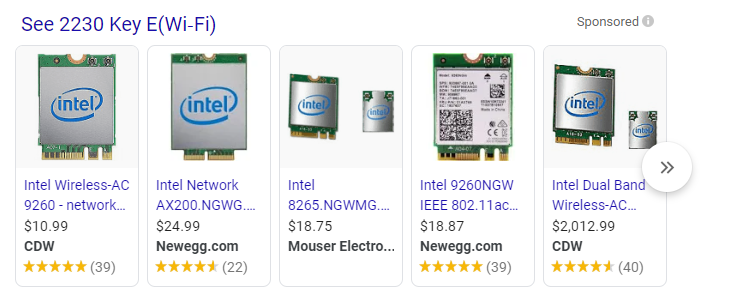
I have a slot that looks like an M.2 but apparently isn't, what could it be?
 fluid sleet
2230 Key E(Wi-Fi) ... is it for wlan cards?
 fluid sleet
I see, thanks
rustic mountain
Interesting https://www.anandtech.com/show/15860/intel-announces-d7-series-pcie-40-enterprise-ssds. If only the write was faster. Nice read speed though
crude cobalt
can someone recommend a good ssd
loud estuary
mp34
crude cobalt
good for gaming i assume 🙂
loud estuary
Yeah. Tho again, you don't really need to have your games on an SSD if you have a SSD boot drive
crude cobalt
i only have a hard drive, no ssd
loud estuary
Okie, yeah, you probably want that then
crude cobalt
awesome thank you
loud estuary
do you have an m.2 slot ?
crude cobalt
i have a z390 prime board, there are 2 m.2 slots i beliebe
loud estuary
Ok, then yeah, that's a very solid choice 🙂
crude cobalt
thanks
loud estuary
Np
fringe lake
I was trying to transfer files from my PC onto an external hard drive, but it's currently formatted for my Mac, so I can't transfer those files from my PC. If I were to connect my PC and Mac via USB, would it be possible to then transfer my PC files, through my Mac, onto the external hard drive?
keen wave
You could install HFS to be able to read it from Windows
fringe lake
@keen wave How would I go about doing that?
keen wave
Read and write APFS-formatted HDD, SSD or flash drive on Windows computer.
or simply format your drive in exfat
both macos and win can read it
fringe lake
The external drive has backups for my Mac on it though. Reformatting at this point could be very risky
The drive contains 2TB of data currently, so I don't really have the ability of backing that up atm
keen wave
then yea your best bet would be to install this ^
fringe lake
It sucks that this only offers you a 10-day trial. The files I wanted to transfer were video files of backed-up Blu-rays, which my PC encodes infinitely faster than my Mac
Either way, thanks for the help!
keen wave
there might be alternatives
fringe lake
What is this type of software technically called? Like does it have a classification?
 amber swan
I have a hard drive from an older computer. Can I put it in my current computer without any issues? Also any cables I will need?
kind sierra
@amber swan As long as it's a sata drive, it will work. All you'll need will be a sata cable
amber swan
Thanks
vestal reef
And a Sata power cable ofc
 undone tusk
Hey does anyone wanna help me? i just got my new M.2 Nvme 970 evo plus, however i already have my hhd installed and i have a boot drive aswell, there are no extra slots for another m.2 but i would want to copy my OS into this new one, my question is how?
rustic mountain
You can use something like ghost image to make an image of your boot drive and then it will boot into a dos mode and let you write the image to a different disk
plush crag
Best to install windows, clean, to the new drive with all other drives disconnected.
Otherwise - check out macrium reflect for an easy solution.
Clonezilla is my go-to
undone tusk
Would i need to pay for any of those solutions?
plush crag
no
undone tusk
like the watermark of Activating windows?
for the first one?
since i need an activation key to get rid of that watermark right?
kind sierra
You may need to transfer the license, but that's pretty easy, just go to MS tech support
minor sun
Or bind to Microsoft account
loud estuary
I've had issues with macrium refract. May just me, but I had two cloned drives that wouldn't boot and I had to reinstall
loud estuary
I don't remember, it was a while back. Very possible I didn't
 upbeat forge

Western Digital Store
The WD BLACK™ SN750 NVMe™ SSD delivers top-tier performance for gaming and hardware enthusiasts who are looking to build or upgrade their PC. Available in capacities up to 2TB, the WD Black SN750 NVMe SSD rivals some of the best performing drives on the market to help give gam...
Good price/good ssd?
upbeat forge
What are good read and write speads for a 500gb ssd?
loud estuary
Mp34 is a good drive
Check the pins for a helpful guide. Has pretty much every ssd. You want to pay attention to their rating, if it has dram, and the bits per cell (slc>mlc>tlc>qlc)
minor sun
And controller, e12 = good, other stuff = likely worse
kind steppe
@upbeat forge depends on if u rlly rlly need ultra high read/write times, and if you are willing to pay extra for a faster ssd
also what type? pcie storage and m.2 is faster than sata
upbeat forge
M.2
open gazelle
M2 can be SATA or PCIe. M2 is a form factor, not a protocol
upbeat forge
I have an hdd that is locked.( when you boot from it it asks for a password to log in) I can erase what’s on it and start new by reformatting it roght?
sweet badge
m.2 is the smol stick factor, you can tell if it’s pcie or sata by the pins
 hidden monolith
Pcie is faster than sata right? What is your favorite M.2 format SSD 1TB for speed and reliability?
hidden monolith
speed and reliability is more important than $20-50. You like the WD Black?
sweet badge
the sn750 is a hella good drive, and the price is a bonus
hidden monolith
Thanks. Thinking about the NUC with 1TB SN750 and 2 8GB memory modules. Now gottta get a 4K monitor, about 27 inches!
loud estuary
Was gonna suggest mp34, but if you can get a sn750 for $134, that's only $4 more than current pricing for 1tb mp34 for a good bit better read/write
open gazelle
could only find SN750 for $150 so idk
undone tusk
Hey it’s me again, so I’ve got my m.2 nvme 970 evo to work and just downloaded a fresh set of windows. My question is, when I disconnected my 1tb hard drive before the windows installation and then reconnected it why does it not appear and why is everything gone
I did have a 12 gig ssd also that I removed to install this new one
I had my games and everything but I can’t seem to understand where my files went
 woeful solar
did you turn off your pc before reconnecting?
undone tusk
Yes
woeful solar
im assuming you've also plugged in SATA power
it's probably a windows disk thing, just open disk manager and check if you can see the drive first
*ahem
undone tusk
I’ve tried it doesn’t show the drive
woeful solar
hm
undone tusk
What I do see is that the drive does appear to show in the bios, but when I look at the files and check my pc there is no hard drive
Until I plug back my old ssd it shows all my games
And the hdd is back
woeful solar
I'd say try different SATA data ports
woeful solar
If other SATA ports dont work, try another SATA cable. if this fails, Check the bios to see if you've enabled the sata port you're plugged into.
Last resort is a BIOS reset
 nocturne burrow
@undone tusk depends, like on my mobo, nvme and sata 1 shares the same connection so when i have something plug onto nvme then sata 1 wont work, so i just connect whatever is in sata 1 to sata 2 etc
woeful solar
kinda weird how that is, but i bet there's a reason for it
kind steppe
pcie x16 storage tho
 compact sentinel
I want to order a PCI IDE Controller card that will run IDE DVD/CD that use 40 pin cables in an HP Pavilion Tower A265C with standard PCI slots, instead of connecting to motherboard as is currently. Could you help me choose a good product please? Thanks
nocturne burrow
@compact sentinel there's one in amazon for like 10 bucks https://www.amazon.com/1233CS-2PORT-Ultra-Cables-Shell/dp/B000FJS8TQ/ or aliexpress for about the same price with sata connections https://www.aliexpress.com/item/4001143725876.html

aliexpress.com
Smarter Shopping, Better Living! Aliexpress.com
 plush silo
are the PCIe cards that have the m.2 slots on them worth getting?
vestal reef
If you need more m.2s than ya lol
plush silo
or if my MOBO doesnt have onboard m.2 slots
compact sentinel
I just want for old IDE DVD/CD drive, not SATA



 upper quiver
what os are you planning to run on this pc
oh, this is an older machine
if you run win xp, then get the pcie card, otherwise it probably wont work with a newer os
for driver compatibility reasons
 noble atlas
is that like an 18 year old computer?