#storage-devices
1 messages · Page 20 of 1
 worldly canopy
 latent smelt
 heady raven
@worldly canopy think about the different "types" as being what defines the longevity of the drives (in theory etc etc)
 dry root
the longevity and speed
green and red are 5400rpm
black, purple, blue are 7200rpm
in addition black is faster than the other 7200rpm drives
purple, red are longer longevity
gold is enterprise class 7200rpm as fast as black and as much longevity as a purple (which is about as much as a red as well)
oh also green has the same longevity as blue but is just slower
it's supposed to be some kind of eco friendly thing
they are good for large storage disks
mainstream... probably not worth bothering
cheapest of the cheap
iirc the mainstream is the white one? and that means it's the disks manufactured on the process inherited from HGST
 minor sun
Think I should be fine
 dusk turtle
Ya
dry root
i'm going to activate again one of these days
i had activated windows on this PC
and then tried to reinstall it
and no activate
no different hardware
dry root
well for now things are working, i might try calling them tomorrow, i don't have an actual product key sticker on the PC is the other thing, i just bought it with win10 pro that was bogged down with HP stuff so I decided to reinstall and oops no work
dusk turtle
Backup partition?
dry root
i'm building my next PC very soon and i will acquire a key for a good proper copy of windows
no there was nothing of the sort
also it would have put the HP malware back on my machine
and yes i go so far as to say malware
dry root
it's just a pain
dry root
and none of it is useful to the user except maybe the driver/software updater because most people don't know how to update stuff and will go years without updates otherwise
and it's easier to install something rather than do tech support
in my experience, HP is not great at tech support, having had one of their laptops years ago and being refused support in warranty having not abused the machine at all
it was probably a bad idea to buy this HP prebuilt in the first place
in the future it is my own builds and nothing else
can get tech support on individual parts and the people doing it are much better at tech support than HP and companies like that
this is supported by a company called AST anyway (no relation to the 80s/90s PC manufacturer)
 silent musk
What's a good and cheap 1 TB M.2 SSD
 sharp folio
Samsung 860 @silent musk, I wouldn't call it budget but it's good.
Oh cheap
Intel 660p
1.02TB
 warm abyss
@silent musk HP EX920 or HP EX950
 open gazelle
I'd go for EX920 or Mushkin Pilot for the better cache instead of the 660p given the price differences being so small
dry root
yeah
the 660p also has the problem that if you fill it completely it eats up the SLC cache, which is not protected from being filled by data for some reason
and without the SLC cache performance tanks
dry root
@open gazelle if you wanna go here instead i mean that's cool
open gazelle
I mean it's whatever to me. But I feel like it'll ease the nerves of the mods
open gazelle
Anyways too lazy to look at 665 but probably will do soon
Also look back to image from whelm in other chat for 2tb
Probs just going to take a bit to hit the market
open gazelle
well that is, if 665 is better than other competitors
Cuz I mean EX920 and Mushkin Pilot are pretty close in price to 660 already. Sabrent Rocket being better than those for like a small bit more
dry root

665p is unnecessary
mushkin pilot is a great price for a great SSD
the Sabrent Rocket as well (i'd avoid the Rocket Q unless i can find evidence of a good cache
intel has like complete butts cache even in the 665p
open gazelle
well does it have any DRAM cache? Pretty sure 660 doesnt
open gazelle
well thought I seen QVO have that as well with DRAM cache to boot
but idk, my 💩 memory cant do much
dry root
tbh I'm getting an Inland drive probably, I dunno if you were the one who chimed in that their flash was bad but someone corrected it and it's a fast drive with TLC and a traditional DRAM cache for $215
I trust the brand because I remember them from the age of CF and early SD cards being one of the major players in flash storage
 torpid adder
what does your motherboard have?
should be able to find a list of supported drive form factors in its specifications or something
 shell mason
4 ram slots, 4 memory slots, 3 PCI-E x16 slots, 3 PCI-E x1 slots, 2 m.2 slots,
torpid adder
nah not mSATA
shell mason
ah
torpid adder
just regular SATA
torpid adder
ah ic
shell mason
im trying to construct the ultimate gaming machine
these are the best three results.
according to my filters.
and terms of compatibility.
torpid adder
I'd go with 860 EVO
torpid adder
and a 7200 rpm hdd of your size/price preference, or two if you want
shell mason
and im looking into the arma-iii modding community as well.
torpid adder
ah
I'm tryina keep my computer under 500GB so I can migrate to an 860 EVO of that size
and then format the 900GB drive I have for yummy space
 unique pecan
i have a question about an m.2 and compatibillity with a motherboard. The motherboard says it supports a samsung 970 evo plus. It gives a base model number. Howevver, looking up what i have found, the model numbers on the m.2s have extra characters while including that base number. It should be fine. Am i correct? Fyi, the motherboard specs dont mention those extra characters at all.
cant seem to find an answer hence why i asked here ^^;
unique pecan
Ok i think i get it. It was a region identifier. Did not realize this at all. So yes i should be good to go!
spent a few hours trying to figure that out x.x i feel silly lol
 red jay
Hello! I want a 6TB or higher capacity hard drive. I haven't had any hard drives over 1TB in the past. 1)What are good picks? 2)Is skyhawk / ironwolf good or they're not good, why? 3)What should I know about hard drives to make an educated pick? 📚
Please just hit me with '@' I'll check your replies deeply
dry root
@red jay do you prefer WD or Seagate? it doesn't matter which you get really
but for a home PC you want a faster drive
@red jay https://www.amazon.com/Western-Digital-Ultrastar-HC310-SATA/dp/B07HF2S1DZ i'd recommend this myself, I am sure someone else will chime in
but this is a good value for money, and is relatively fast
red jay
can someone tell me the dif of a (PCI-Express 3.0 x4, NVMe 1.3) vs a (PCI-Express 3.0 x4) it can be a short explanation lol
dry root
NVMe is by the M.2 connector, PCI Express x4 standard is by the PCI Express 3.0 x4 card slot
NVMe is much slower and lies flat to the board
and is only used for disks
 honest escarp
Can someone tell me how to fix this?
connected new hard drive. computer see's it but gives me this error when i try to initialize it
red jay
Uh can you re-write it?
honest escarp
I bought a new hard drive and plugged it in. The connector had broken off so I had to but a connector piece and heat glue it on. I plugged it in today and this id the display i get. It is having issues initializing it in disk management. Do you have an idea why?
red jay
Uh you super glued it? lmao can you return it?
honest escarp
yea i saw a tutorial on youtube
red jay
I would suggest you return it if you have more problems
dry root
the hot glued part is the problem
 dire lion
60%, zzzzz
red jay
m.2 2280/ m.2 22110 etc are physical form factors for drive sizes. You can have a pcie 3.0 x4 ssd like the optane 900p 280 GB AIC.
Or the same/similar drives in 2.5" form factor using the u.2 connector, still on the pci 3.0 x4 bus.
From some guy on reddit:
https://www.reddit.com/r/pcmasterrace/comments/a4kczw
https://i.redd.it/q5cpa3d9n8321.png
 red jay
@dry root thank you for the response on Hard drives. Appreciated!
I don't have a preference, my old drive is 1tb. I've loosely decided to go with your pick, but don't be mad if I change my mind 🙂
@dry root I really love how you pay attention to RPM. logical. I love it
 torn hatch
which is better: SSD or HDD
torpid adder
yes
torn hatch
(yes) what?
torpid adder
it depends on what you want to achieve
torpid adder
hdd for video games (because of that $/GB)
ssd for boot drive and any programs you want to be speedy
that said, you could go ahead and put games on an ssd, games also benefit from a faster drive
both magnetic and flash storage have their issues
 hazy bobcat
Samsung make great SSDs.
open gazelle
@crisp jungle Is it $65 cheap? Cuz that's how much it is from competitors with SSDs the same perf
 crisp jungle
It's $105 CAD
So not quite $65 USD
What a good similar perf ssd
I'll see if I can find cheaper in CAD stores
I've seen the 660p be used in some builds, hows that one
open gazelle
Adata 8200sx Pro for $80 cad
 unique sapphire
crucial P1 is what im using and its great
unique sapphire
80 wow 20 more for a 1tb
dry root
660p and P1 somewhere at the midway point of being full will start degrading in speed
QLC drives with no DRAM cache are generally bad
i'd be interested to see what QLC with a DRAM cache would actually perform like
since all of them have been DRAMless so far
but the reason they're cheaper is because of that lack of DRAM, not the QLC
red jay
The 660p has a ddr3L write cache.
dry root
and it still does the slowing way down thing
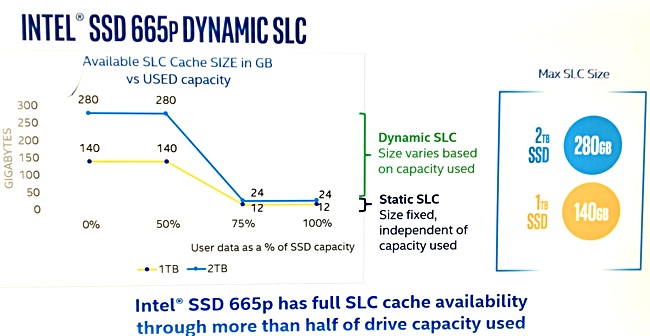
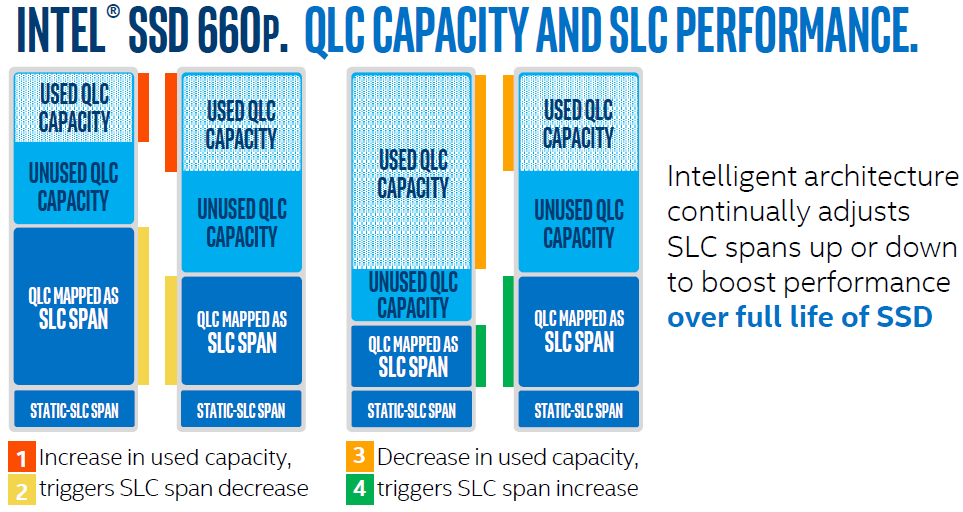
665p boldly claims that it doesn't slow down until the 50% point
intel actually has little images explaining this
red jay
Ya, I think it's ~70GB of SLC cache on a 1TB empty drive (on the 660p). Scales linearly /inverse to utilization %.
dry root
it shouldn't scale though, it should be static and i dunno, they can pay for a bit more QLC
red jay
Why should it be static? You want a static SLC discrete write cache on a 1TB nvme drive?
 dry root
well wouldn't that solve the speed problems that occur with the disk being further written? or am i misunderstanding?
red jay
^ not usually my go-to for storage reviews but good picture haha
dry root
i see how it works
still, being required to keep the disk less than half full to get peak performance
that doesn't sit well with me at all
red jay
That's pretty typical of most modern NAND drives - Intel's optane/3d x-point perform well in that regard though.
dry root
so you're saying a standard TLC drive is going to have mechanical hard disk performance with being 80% full or whatever
red jay
Even with the huge write endurances we see on consumer drives - it's usually just good practice to keep utilization somewhere less than "nearly full" however one defines that lol - remember the drive does implement wear leveling.
Oh hopefully not, do you mean in i/o or sequential r/w?
red jay
Write bandwidth is what suffers most at high utilization ofc
Any read , 4k random qd1t1 or others, shouldn't care nearly as much I'd think
dry root
i see
i care more about reads because i'm going to do more of those
i still won't buy a DRAMless QLC drive
red jay
Oh, anyway - ya I think 80% would still be usable, but it certainly depends a lot on what one asks from the drive , I think 660p's make great media storage or game drives.
dry root
Still not gonna touch the QLC stuff, probably some cheap TLC NVMe
red jay
sx8200's are some of the best we saw this year imo.
dry root
looks good
looking at stuff on anandtech
i'm thinking of skipping the 2TB SSD and going for a 1TB as i've got a big hard disk to store stuff like media and some other things, all the stuff that takes up a lot of space, whereas i could install games and my OS and whatever programs I use on the SSD (obviously not install my entire steam library, rather install games as i want to play them, and then remove them when done)
or, remove them when needed
I/O and transfer speed are going to matter more for that kind of thing than media and other storage
red jay
What mobo/cpu?
dry root
the B450 AORUS I ITX motherboard, CPU will be 2600X

GIGABYTE
AMD B450 AORUS Motherboard with 4+2 Phase IR Digital PWM, Intel® Dual Band 802.11ac Wave2 WIFI, M.2 with Thermal Guard, RGB FUSION 2.0, ALC1220-VB Audio, In...
because i am bad at giving the actual model name
dry root
@red jay out of curiosity, why did you ask about the motherboard and CPU?
 outer bane
probably to make sure he doesnt get gen 4 with an intel
dry root
i'm not going to get gen4, it's more expensive and would not benefit me in any way
outer bane
yeah I just thought that might be why he asked
red jay
Oh, I just asked because some chipsets/boards can accommodate multiple nvme drives better than others without dropping x16 to the gpu.
dry root
oh, got it
i'm sure i could be doing better in that regard
but in reality for any GPU i get x8 is going to be sufficient anyway

i don't think this board even has two M.2 slots
further SSDs will have to be SATA which i'm okay with
i'll get a 2TB SATA and ideally that'll take care of my storage needs
outer bane
1 is enough in my opinion
dry root
can put the mechanical drive out to pasture
outer bane
I have 2 just because and I have a third slot but cant use it because it shares with the gpu
dry root
my board has a socket 1 M.2 slot which is taken up by the wireless card
along with the socket 3 (normal M.2) for disks
 hazy verge
Hi, I’m looking for suggestions regarding an SSD, I’m looking a cheap but reliable 1tb SSD. I’m currently looking at WD Blue or a Samsung. And I’m not sure what my deciding factor is
I have a Ryzen 5 build if that makes a difference
open gazelle
@dry root for Gigabyte just know they have a bad BIOS layout. But they should still have all the features one would expect in their boards
 frigid monolith
@hazy verge 2.5" or M.2
hazy verge
idk the difference
i dont know anything aobut them my brother usually helps me but he is out of town
dry root
a bad BIOS layout?
open gazelle
Settings and options being in sometimes confusing places
dry root
oh
i'm used to that, do you remember BIOS back in the 90s? they were maddening to navigate.
open gazelle
I was not into PCs back then
 lofty quiver
I need some help getting my raid setup and installing os
I'm at a loss at this point I've done everything straight out of the manual and nothing is working
dry root
anyone else want to take this? i've had nothing to do with RAID in all my time building PCs
dry root
it's just being a butt, sometimes a PC build will decide to be a butt
lofty quiver
Its being a pain in mine that's for sure....
dry root
someone else will assist, i'm sure
i just don't feel comfortable doing so because i know nothing about RAID
lofty quiver
Well I'm stuck in my bios with no PC till I can figure this out I refuse to give up on my dreams I know this should work
Lol
dry root
so you've got the setting somewhere with the chosen RAID configuration in the BIOS but it's not recognizing it when you try to install windows? or what
lofty quiver
Yuuuup
dry root
do you have a USB disk with the RAID driver for your motherboard ready?
dry root
windows should have an option to load the driver
lofty quiver
I go through the 3 step process to install said drivers
Then windows is like I can't do anything with this
But it shows up as the one drive ie the raid
I can't find a reason this shouldn't work
But I have to be missing something
If I default my bios and delete the raid both ssds show up for windows install....
Well if anyone can help that would be nice. Just pm if you can.
 edgy pumice
So, my PS4 was using a 2 tb Firecuda 2.5 in SSHD, and the hard drive is toast from trying to close Borderlands 3 with a player in game and a power shut off failure(wouldnt turn off, got unplugged). Not likely to recover that drive, any recommendations on a new one?
 sick dove
@edgy pumice Nobody really invested in SSHDs except Seagate. They exist but nothing modern at a reasonable price, you're kind of stuck going with the same one if you dont go for an SSD or HDD. For HDD something like a WD blue is your most reliable option. WD black can also give you very good performance with reliability at a still somewhat reasonable price
edgy pumice
Im cool with changing type and mfg. just need a good reference in the 2.5 in range for ps4
Those sound like what I was researching too.
sick dove
A 2.5" SSD will set you back $50-100 for 1TB and will give you much faster loading times than an SSHD.
Ive found brand doesnt matter as much with SSDs as hard drives, just listed specs.
edgy pumice
PS4 doesnt exactly do SSD without "extreme methods" involving converters
hazy bobcat
I’m pretty sure it’ll be still at least a tiny bit faster than your SSHD.
I don’t really know how PS4s work, but if they support SSDs, they are definitely the way to go (to replace your SSHD)
edgy pumice
Its model selective, only the ones that have a housing unit, so the ones above as hdd or the few ssd options that are 180 for a 2 tb. I dont really want to lose space or pay 30 more for half the space
 near hemlock
So I currently have a 500 gb m.2 in my laptop and I sorta wanna bring it into my new rig that I’m building. How do I wipe it out before I do so?
dusk turtle
Don't need to. You have the option to Wipe when you reinstall the OS
Or wipe it after if it won't be the boot drive
 burnt ore
I have same problem lol
 wanton void
burnt ore
wanton void
burnt ore
I ordered a 500gb nvme already but Im afraid its not enough. Idk if I should go for 1tb regular ssd for almost same price or just go with a 1tb hdd
wanton void
im going 2 tb hdd and trying to find a good ssd for windows and a game or two
okay so, im gonna settle for a 2tb HDD and an SU800 ssd
burnt ore
You know what I'll just go for the 1tb ssd and return the 500gb. I wont use it for high end work anyway and in the event that I do Im only losing out on 10% performance for 20% more cost
What are you gonna need 2 tb for?
burnt ore
Imo just stay around 1tb and below. You plan to keep 10 games at once?
I just play a game and delete it after Im done with it. I guess different peoplw make different choices
hazy bobcat
No GPU in your PCPP ?
open gazelle
spend the extra $10 (total of $70) on 3600 CL16 RAM
and change case to a better airflow one
 wary urchin
its been a while since ive been on here
i have a question
i just installed my second ssd into my pc, its just for more storage in general
can someone explain what converting to a dynamic or GPT disk means?
from what ive found GPT is a newer one
and my new ssd is only 1tb so im going to convert it to that
wary urchin
though i kinda want just a simple definition of those two things are
dry root
GPTis a good way to go
dynamic disks are interesting
you can extend a volume over multiple disks
dusk turtle
OS SSD is at 73%. Time for a new one.
 sweet lance
dusk turtle
sweet lance
dusk turtle
Sata, 73% life. It's old too
Like, 3-5 years old
Plus I want NVME so...that's my excuse to upgrade
open gazelle
That shouldnt be that bad unless you do a lot of writing to it
 torpid lagoon
Hello
Can someone help me
I have Asus mb and m.2 970 samsung evo is not working
*not showing up anywhere
outer bane
@torpid lagoon If you havent figured it out yet or gotten help I can help you find it
outer bane
ok first download samsung magician software if you havent already

Samsung Semiconductor
Samsung Magician software is designed to help you manage your Samsung SSD with a simple, intuitive user interface. Download files & find supported models.
Magician Software
Version 6.0.0 | 44.5MB DOWNLOAD
you want this one
outer bane
sure
torpid lagoon
 formal vapor
Hi guys, I was wondering if anyone knew the best hard drive I could get for my asrock 970A-G3.1 motherboard. I'm not sure if a Samsung 970 EVO Pro is to much hard drive.
formal vapor
I was just looking for improving performance. I have a SSD in there now
formal vapor
From what I understand I will need to move a hard drive for another slot now but the actual M.2 slot is empty
formal vapor
I just wasn't sure if the motherboard would bottle neck with the transfer rate. I've heard horror stories with upgrading to a M.2 form factor.
dry root
but a 970 EVO Pro is a very expensive performance oriented drive, any way you might be open to something different?
formal vapor
Well, I was thinking of dropping down to the 970 EVO ie non pro option.
I was thinking the speed would help with paging
dry root
well paging on your older SSD is probably better
modern NVMe drives are a little more complicated in how they operate and you could wear the disk out after a while
formal vapor
better as in faster or as in lasting longer? I understand SSD's in general have only so many reads/writes but wouldn't the m.2 speed, speed everything up?
dry root
yes, it would
formal vapor
The only thing I was thinking is my motherboards m.2 to slow for the 970 hard drive.
formal vapor
yes that is were I start getting lost. I was thinking the slot may be too slow for the hard drive
formal vapor
I wasn't sure what PCIe gen they are up to now. I know that the book says it caps out at gen 2x4 or (20gb/s) It looks like the evo runs faster then that.
formal vapor
ok that is what I thought the hard drive is a bit much for the mother board.
dry root
@red jay sorry to ping you, but Norm here has an M.2 NVMe slot on his old AM3+ board, and it's PCIe gen 2 x4, and we're trying to figure out if gen3 M.2 NVMe disks will work still, given that the board page says "up to gen2 x4" and that's a bit odd to say "up to"
dry root
fun
formal vapor
is there a gen 2 hard drive that someone could recommend?
red jay
Yep, they'll work
open gazelle
It'll work, but run at gen2 speeds
@dry root says upto because I've some x2 and x4 PCIe drives. So I assume it's the same for PCIe gen2
@formal vapor how large do you want you drive to be?
dry root
oh x2 really
heady raven
budget tactic on some models
and there are also some controllers that just dont use more than x2
dry root
it was also an AM3+ 970 board
 crisp belfry
Is it bad that I'm considering getting sata ssds for storage drives?
 unique loom
 azure dagger
how hard is it to transfer all the files off an SSD to an NVME?
trying to make an M.2 my boot drive over the SSD i have in it currently
crisp belfry
there's software that can do it pretty well
if you're going samsung to samsung, then it's very easy
heady raven
@azure dagger macrium reflect makes it fairly simple to do a duplication like that
 small stratus
Looking for a good 1tb nvme ssd to use as a steam drive, anyone have any good recs?
 frigid bronze
Sabrent Rocket or Inland Premium
frigid bronze
Yeah, Sabrent will be one of the fastest and cheapest NVMe's
dusk turtle
TLC, QLC slows down the more filled up it gets, if I remeber that right
open gazelle
@dusk turtle All drives slow down as they get used up. What mainly determines that is how much free hidden space is left and the cache setup
small stratus
But TLC is still better for gaming right?
open gazelle
TLC and QLC mean little for gaming. It's everything else, the controller, cache, free hidden space, etc
dusk turtle
QLC is worse than TLC though. Slows down even more but if this a Game only SSD vs OS boot, it doesn't matter.
matter of fact, for games only NVME vs SSD doesn't matter either
heady raven
its the writes that get effected the most @dusk turtle (edit: reads change to writes)
dry root
i'll use the same drive for boot/games so it's unlikely i'll get QLC
nobody try to sell me on QLC pls, i can spend the extra $20
heady raven
not trying to sell you on qlc, just a reminder to people in general. You overestimate how much data you actually write to your drives (by a LOT)
dusk turtle
Why?
dry root
because the swapping is a lot of writes and i'd rather just not, it slows things down
dusk turtle
It doesn't slow things down though
dry root
if you have enough RAM it doesn't matter
heady raven
until you hit that limit and the system just "burps" hard
dry root
hitting 32GB is definitely something i'm gonna do
heady raven
then keep the swap
dry root
i'm not gonna hit 32GB
heady raven
then why buy 32?
dry root
because i want it
dusk turtle
You'd br surprised without a page file
heady raven
that makes no logical sense @dry root
dusk turtle
WIndow unloads programs to page file if they've been minimized a while or not used
heady raven
but that is your choice :)
dry root
logic does not dictate everything i do
i'm this weird person who just wants certain things in my PC
heady raven
as long as you dont advise other people to follow your logic (without giving them proper context for it)
dry root
of course not
and it's not really logic it's just me wanting a thing
i'll save the logic for my recommendations
outer bane
you just say its so you can fill all the slots for aesthetics
dry root
but that's not why
it's so i can have 32GB and in the future when things get more demanding i have the option to upgrade my GPU and CPU and leave the rest
likely CPU first, then GPU
but a couple years on, i'll already have that 32GB
and it'll be like 16GB is now
since 32GB is cheap i have no problem paying for it now
 regal summit
Would it be fine if I have 1 nvme ssd for os and games? I don't think i will play more than 3 or 4
crisp jungle
Yeah you could probably live with a 500gb ssd
sick dove
Can anyone identify any meaningful differences between the Sabrent rocket, and sabrent rocket Q?
regal summit
TLC vs qlc
heady raven
considering the price, it is most likely QLC
which as i have mentioned a number of times, really isnt something regular consumers should worry about
regal summit
@heady raven which one would be better if I'm planning on putting my os and games on the ssd and not having a 2nd drive?
regal summit
Ok thanks
heady raven
np
red jay
Can someone tell me what this means lol. I got a M.2 2280 PCIe Gen3x4 ssd so which would it go to?
heady raven
the m.2 port
what you are looking at is the "available ports" in different configuration scenarios
red jay
so it doesnt matter which m.2 port it goes to? wasnt sure if that page was saying it has to go to a certain one
heady raven
normally you go for the one that is closest to the cpu itself
red jay
ok, thats what i thought until i saw that page and figured id ask lol thx for the clarification 🙂
heady raven
np, enjoy the drive :)
 orchid blaze
Ok so. I have an old windows 10 laptop with about 1.5 Gb of ram. I want to turn it into a NAS server. Anyone wanna help?
dusk turtle
Uh, need a tower for that. laptop drivers are slow. better off getting a NAS box and plugging it into your router/modem
 pallid vessel
depends on how much storage you want it to have. you can get some SBC's that do just fine for that and you can even get a little plastic case with 2 3.5" bays and the whole system is no bigger than a shoe box
open gazelle
@sick dove Lot of people just say that it's QLC vs TLC. But there is also controller and cache to consider as well. I have yet to look into it but I wouldnt be surprised if both of those are worse on the Q
 fresh crypt
Hey guys have any of you seen this on a hardrive before mine stopped working we opened it and found this
@ornate obsidian
@open gazelle
open gazelle
No. Could be damaged platter from read/wrote head scratching on it. Or if that is the backside then could be there to reduce weight while trying to maintain good structure and balance
 naive willow
im looking for a ssd any reccomndations
heady raven
formfactor?
naive willow
2.5
heady raven
for 1tb drives, the samsung 860 evo comes in at the upper end of things, it is also not the cheapest. (125ish usd)
next in line would be something like the Crucial mx500 at 108ish usd
open gazelle
Lol why Samsung SATA for the price of an NVMe?
Even the MX500 isn't worth it. Get a SunBow x3 for $81 or so
heady raven
@open gazelle as was stated. "it is also not the cheapest".
I personally dont have experience with sunbow drives. So recommending them would not seem like s solid thing to do.
open gazelle
I mean have you personally used all the mobos, CPUs, GPUs (specific models), PSUs, etc that you have recommended?
heady raven
yes, i have actually
comes with the work
if i havnt, i say so
which also comes with the work i do.
open gazelle
Well that's cool then
heady raven
it is also why i normally refer to you or bekora when it is not seasonic psu's fx
because i have just about no experience with those
open gazelle
I mean I have basically no actual experience with PSUs. Just look at reviews and such. I have very little actual hardware experience
In comparison to say you or someone who works with hardware
heady raven
the difference is, you have some basis for the statements you make Hei, you have at least read the reviews on those units.
i have little to no knowledge in the consumer side psu's aside from seasonic and a few sfx silverstone one
and my personal preference is that i dont mind paying for seasonic units, because i strongly value their warranty and their quality
open gazelle
I've been a bit worried over some of seasonics popular PSUs. The focus fx has been rumored to have voltage ripple issues. Seems like they were fixed with wires that had some sort of built in cap. Apparently as this specific fix came about even with new models you had to contact Seasonic. Tho now I don't think you have to given what I see with reviews. Also note this rumor info came from people I can trust more than myself on PSUs from LTT server
heady raven
i have not seen anything in the field that i would worry about. (mind, i completely skip the bottom tier of their stuff)
could you take a look at the list that Astro posted, the psu specifically?
open gazelle
Yee, took a look
 plush crag
Aris advocates for output filter caps to live in the housing vs on the cable - I agree mainly because I hate bulky/stiff cables.
People like Luke? Ya, he's the PSU guy over there
naive willow
im look in g to spend £50 or less on a ssd
sick dove
£50 will get you a 500gb SSD, that's pretty much it. Sandisk SSD Plus, Crucial MX500, all of them are in the £45-50 catagory
You can't really go wrong with SSDs from recognisable brands in that price range.
Ive not seen Kingston SSDs in a while actually, despite owning one, but if you see one of those cheap they're usually pretty good.
open gazelle
I mean you kinda can. Kingston a400, Crucial BX500, etc
naive willow
heady raven
if you are willing to go that much above, grab the mx500 instead @naive willow
it is 52.25
naive willow
sick dove
Seagate as a whole is an unreliable hole you don't want to go down.
heady raven
if that works for your budget, then go for it @naive willow
heady raven
@open gazelle can you look at that psu specifically, and only that?
open gazelle
CX450? All 2017 CX should be the same afaik
open gazelle
Or not nvm. Not really the same per say. There are two manufacturers for the CX series. You cant choose which one tho. But 450 is equal to 550
In quality
naive willow
gtg rn be back in 10 20 mins
heady raven
so basically, an okay unit Hei?
open gazelle
Yeah
heady raven
fair
@naive willow with what Hei said, then yes, what you have listed is fair enough.
naive willow
k im back
heady raven
see above :)
naive willow
so ive got everything i need now right
heady raven
aye, looks like it
heady raven
aye, and the cpu cooler is included in the box with the cpu
naive willow
yes
 bold stag
can someone help me?
heady raven
if you ask your question, maybe?
bold stag
well my computer wont let me download anything because it says my disk is full but my local disk has a whole 1TB ready for use
heady raven
just checking here, but you are on windows?
bold stag
yep
bold stag
yea the windows storage or whatever is full but i only have like 1 thing downloaded
heady raven
then congratulations, you have to delete something.
dusk turtle
Change your download location to the new disc....
bold stag
yaaaaa how?
bold stag
well im using google chrome as my browser
heady raven
upper right, click the 3 dots, select "settings"
click advanced
left hand side, click "Downloads"
the location option is at the top
heady raven
you are welcome.
 gleaming flower
Nvme vs sata ssd is the performance difference worth the price difference for games?
red jay
yes
watch the video on NVMe vs sata
NVMe can transfer data at a whopping rate of 6gbs/second
open gazelle
Lol. Games vs datacenter work loads. NVMe is worth it for the latter. But not for the former as you save basically two seconds on load time. Barely anything
frigid monolith
There is a lot of games that you only save .2 to .5 seconds
dry root
In all fairness that is pretty fast
frigid monolith
0.2 seconds is fast?
pallid vessel
idk but it sounds like a speed runners dream especially if the game timer keeps ticking while loading lol
crisp jungle
In open world games where things must be loaded and rendered consistently, an nvme would be nice
pallid vessel
but in all honesty theres really no point in spending the extra money on nvme for gaming. there are a few scenarios where it makes sense but those are typically datacenter and/or NAS type scenarios
a 2.5" sata ssd wont have any trouble keeping up with that
heady raven
depending on how you select your parts. a nvme like fx the sabrent rocket makes sense.
example: IF you are buying a samsung evo as the ssd. Then use that money for a nvme instead. price will be fairly close
pallid vessel
lol with samsung youre paying for a name allot like intel
frigid monolith
https://youtu.be/V3AMz-xZ2VM Only like one game in this whole list that is 2 seconds faster on a NVMe and everything else is 0.1 to 0.9 seconds
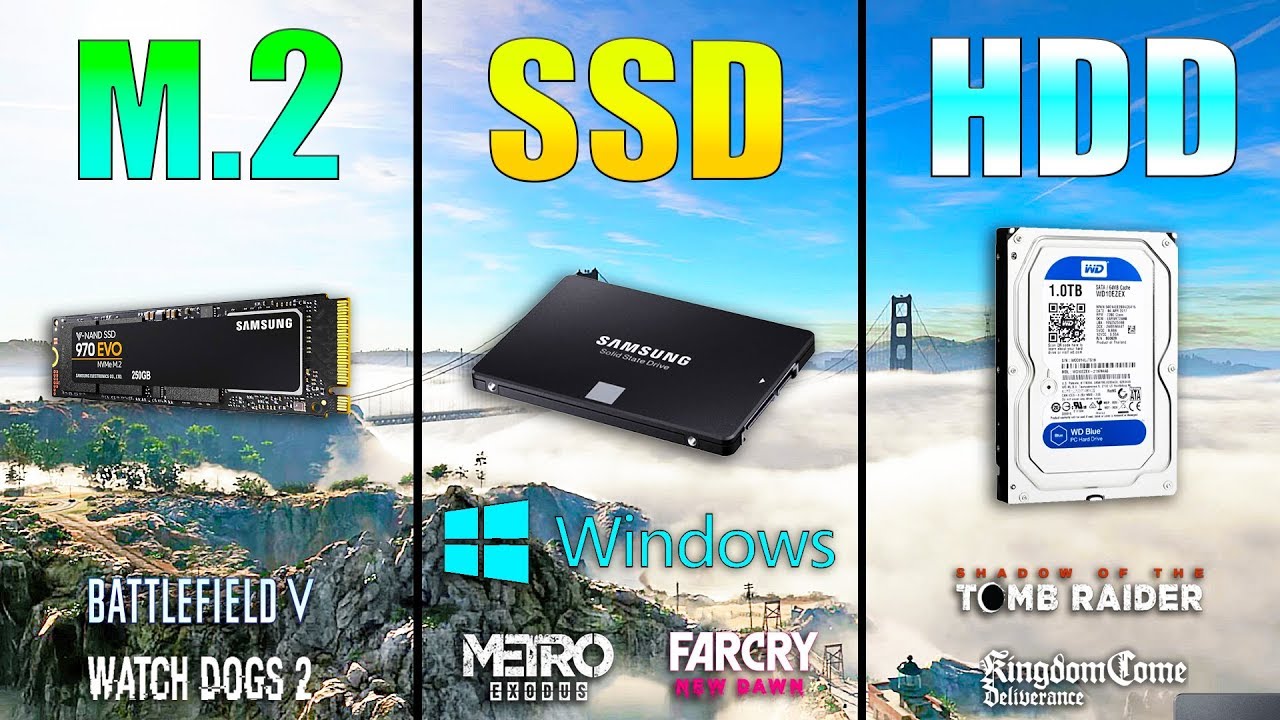
M.2 NVME vs SSD vs HDD Win10 / Game Loading Times
Samsung SSD 860 EVO - https://www.gearbest.com/hdd---ssd/pp_009551735547.html?wid=1349303&lkid=56671149
Games:
Metro Exodus - 00:35
Watch Dogs 2 - 01:24
Far Cry New Dawn - 02:02
Kingdom Come Deliverance - 02:31
Shadow of the...
sick dove
So I bought a brand new WD Blue drive, 4tb. Plugged in using a known working sata (also tried another) and power cable, drive seems powered up, doesn't show in This PC, doesn't show in device management. Strangely enough I had a pop up in device management mentioning a new drive was found and to set it as MBR or GPT, went for GPT, but then no sign of anything after that.
Doesn't show up in the bios, can't find anything to enable/disable it in particular.
First time Ive ever had a drive just not plug in and play, and I don't think its dead.
sick dove
I just said, it doesnt' show up in disk management.
Not even a marker to indicate the drive exists saying its unallocated or whatever.
plush crag
Ah, I just read device management
sick dove
Shows up in device manager though, identifies correctly, driver seems fine.
crisp jungle
Does ur mobo support uefi and is it enabled?
plush crag
Diskpart?
sick dove
It's bios, not Uefi. I'm testing it on a more potato PC I use for testing because I cant be bothered dragging mine out from under my desk where I have minimal access to get any cables back in in a timely fashion.
sick dove
Its not that I no longer see it in bios specifically which is the problem.
crisp jungle
I think that's still the issue
I had similar problems with USB drives
And a friend the same with a new ssd
It just wouldn't be recognized by neither bios nor windows
Iirc, you are able to change the format with a few commands in cmd
But u must Google those as I don't remember them at all :(
sick dove
As far as Ive been able to read up, which agrees with what I remember being correct, Being GPT over MBR is fine on a machine using bios if not being used as a boot drive.
 sick dove
I'll just go through the effort of sticking it in a better PC later, one with a Uefi. Just trying to confirm its not dead before sticking it in my build
 quick patio
what would yall say is a good amount of storage?
I already have a 1 terabyte ssd and harddrivew
sick dove
Good storage for.... An at home gaming PC for a few years? 1tb SSD and 2tb HDD can't really go wrong, I went with 4tb HDD as I keep a lot of video media on hand.
 rose breach
So the 6tb seagate ironwolf is on sale rn for roughly the same price as the 6tb seagate barracuda. Do y’all think it would be better to get the ironwolf. It’s going to be used for games
rose breach
I meant ironwolf but its a nas drive 7200 rpm
torpid adder
Oh
Maybe
Barracuda is about the same rpm unless the higher capacity ones are slower
Iirc don't nas drives have less read/write head parking?
Anyway the difference is probably negligible
Performance wise
NAS drive should probably last longer as it's made for more frequent usage
rose breach
Hmmm I think I’ll go with the ironwolf then
sick dove
Yeah but its still Seagate, the least reliable drives of all kinds on the market.
plush crag
The backblaze data posted earlier , this https://www.pugetsystems.com/labs/articles/What-is-the-most-reliable-hardware-in-our-Puget-Systems-workstations-1550/ - everyone on the servethehome forums, /r/homelab all advocate for judging the model >> maker in priority
But ya, seagate 7200.11's were bricking as if on a timer
HGST, recently HP, samsung F3's - all the big OEMs have had their oopsies
heady raven
welcome to statistics and mass production
it is part of how things work at that scale
no amount of sticking your head in the sand is going to change that.
sick dove
Anyone got a free solution to cloning a drive to another? Its in use from launch (desktop etc are all stored on it) as a main data drive which is the issue.
heady raven
macrium reflect
Macrium Software - the creators of Macrium Reflect backup, imaging and cloning software.
red jay
 noble prairie
I need help
I had a 1TB MX 500 and I added a 1TB Sabrent NVMe. I copied the original drive to the new one, removed the old one, and when I try to boot up it says to select the proper boot device
Now I installed the old drive again and I get the same message, and I can’t get it to boot up again
Now I was able to boot up with the old drive using windows boot manager
heady raven
@noble prairie what did you use to copy the mx500 to the sabrent?
noble prairie
Acronis True Image
I was able to boot up with the MX 500 and am trying to clone it again
sick dove
Sabrent Rocket or WD Blue SN550? Both are TLC, WD are giving a 5 year manufacturers warranty, and currently its cheaper
red jay
So I recently installed an SSD into my laptop. It used to just have a 1TB HDD. I've managed to install the OS on my SSD and I use it as my bootdrive. The SSD, however, only has 240GB of space, which is not nearly enough for all my games. On my SSD I just want to have the two games I play the most and my OS. Drivers, programs and documents I want to be on my HDD (D: drive). Does somebody know how to do this?
minor sun
(You can manually move the files around?)
I don't think its clear what you're asking for
red jay
I want to make my D: drive the main drive where everything gets installed, and where I have all general files. The only things I want on my SSD are two games and the OS
sick dove
I dont know if you can set that to default with a program, but you just manually choose where you want to install games/programs when you install them.
red jay
That's not always possible though.
sick dove
How so? I do it with everything
You can also remap your downloads/desktop/documents etc folders to store on your HDD instead of boot drive
minor sun
Oh you want to move the downloads folder?
red jay
I pretty much want to make it so everything automatically gets installed to my HDD instead of SSD, including programs.
sick dove
Manually change the install directory when you do. Every installer lets you.
minor sun
(I think you can set windows to make the hard drive the default for any download)
red jay
The only problem I have is that my HDD gets really messy when I do that, because it doesn't automatically create folders like Program Files x86.
sick dove
Something in regedit possibly.
red jay
@minor sun Could you explain how?
minor sun
(idk just I think)
sick dove
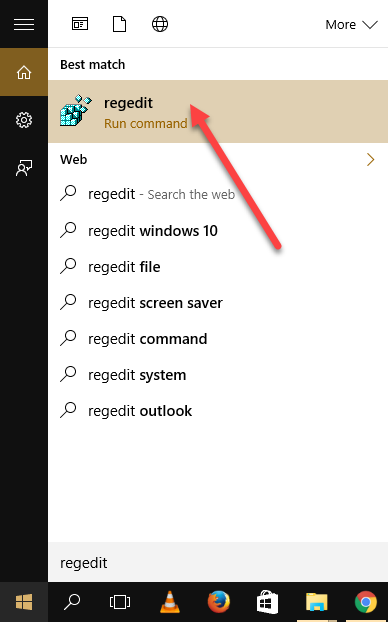
When we install new programs on our System, by default they will be installed in System drive which is C drive mostly. The programs which are 32 bit will b
minor sun
^this man knows
red jay
Going to try this out. Thanks!
sick dove
All I know is how to google very obvious simple questions
minor sun
More than me
open gazelle
Samsung is majorly overpriced. Get 2x the storage for the same price and perf as Samsung
frigid bronze
^This. Sabrent is the best size/performance value
red jay
which sabrent
will work with this motherboard https://www.newegg.com/asrock-x570-phantom-gaming-4/p/N82E16813157884?Item=N82E16813157884
i want to use it as a boot drive
sick dove
The normal Sabrent Rocket.
Not the rocket Q.
I just happened to have this link open, youll need to find it on your country's pages.
red jay
how long should they be for a full atx case
red jay
how long in inches
sick dove
If they're too short you're screwed, they can't be too long because you can always cable manage them unless its ridiculous
Thats like 20 inches or so
red jay
so 18 to 20 should be fine
sick dove
Yeah
I see ones like this on US ebay, should be more than fine
I got mine in black for my build ofc
sick dove
I get the picture, they're sata 3 cables.
sick dove
Well the rosewills are yes, the coboc is one on its own
I cant tell the prices, Newegg redirects me to my local currency
red jay
im using a computer and it doesnt show the picture just the link when i send it
when you send stuff it shows the picture
is this a good liquid cooler https://www.newegg.com/corsair-liquid-cooling-system/p/N82E16835181141?Item=N82E16835181141
sick dove
Get the RGB edition of the h100i
red jay
send the link
sick dove
They're actually available on that link
You can select a different model in the options
 small steppeBOT
 PlusNomad#9804 has been warned
Reason: Bad word usage
sick dove
@undone dune Can you check what word I used there please?
red jay
so i can use the sabrent as a boot drive
 undone dune
alternative word for poop
sick dove
Oh, didn't realise I included one
red jay
@sick dove can i use the m.2 to install windows
sick dove
You can install windows on it, yes.
M.2 drives with around the 2000mb/s speed are the best drives you can really install windows on to boot from atm.
red jay
do i just put the disc in and it will show the drive
sick dove
Well, pci 4 having faster versions
red jay
the one you told me to buy the sebrant rocket
sick dove
You should be able to boot from a CD drive? I think? I havent installed a copy of windows by disk since windows XP, and Ive installed 50+ copies by USB
sick dove
Not a clue, installing by disk is outdated technology to me
Install by USB
Boot from the USB and it should show the sabrent rocket as a volume you can install windows to when you get to that point in the installer
red jay
im using windows 1909
sick dove
Took me a minute to realise that was a version of windows 10.
red jay
my computer kept freezing for no reason out of nowhere so i removed a stick of ram and no more freezing
so i went from 16gigs to 8gigs
i guess a bad stick of ram
ddr3 1866 hyper x
sick dove
Probably, can be DOA. Can return the kit pretty easily probably. Check in the bios though, make sure it comes up saying you only have 8gb when both are installed to confirm one is dead
Ouch DDR3, probably old.
red jay
it showed 16gigs but once i removed the bad stick no more freezing
it hasnt froze since i removed that ram stick
ive had the ram since i built this computer which was last year
sick dove
If its a new problem then its probably just been dying. Every other reason for it to cause freezing I can think of would have been obvious when you first installed it
red jay
im contacting them to see if they will send me a new stick
i even reinstalled it still froze
 kind cape
@sick dove I am booting from a 5000 mb/s T-Force Cardea Zero Z440
 wise spade
Hello all. Happy New Year! A quick question for you guys I built my own rig and ran into 1 issues. My MSI x570 Edge Wifi doesnt read anything in my M.2 Slot 1. I have 2 Samsung 860 Evo and a WD 2TB drive. Everything works except slot 1. What could be the issue? Its doesn't show in BIOS or Disk Management. Possible Settings? Thank you in advance.
dry root
did you try reseating the NVMe drive in your M.2 slot
and screwing it down extra tight after inserting it snugly
this is the cause of so many hardware problems
i'm going to sleep now so feel free to continue asking questions, i just might not get to answer them
open gazelle
In BIOS set the M2 slot to PCIe or SATA. Don't remember that specific drive and which protocol it is. Also some SATA ports get disabled when the M2 port has something in it. I never heard of this being the other way around but... Maybe?
Maybe remove everything that you don't need to post (all drives but the M2, whatever else there is) and then check?
dusk turtle
M.2 slot one goes directly to the CPU. What CPU is in this board? I suspect it's not recognizing it because you're using a SATA M.2 instead of an NVME
@wise spade
Confirmed that on x570 the M.2 SLot 1 needs to be NVME only as it connects directly to the CPU via PCI-E lanes. SATA only works in M.2 Slot 2.
wise spade
@dusk turtle thank you for the clarification. Is there one suggested that will work well?
dusk turtle
Any nvme drive will work in slot one. I personally recommend the sabrent rocket 1tb. $119 for a fast 1 tb drive..
Also just to confirm, the 860 Evo are the m. Two drives you're trying to use on this motherboard?
wise spade
The 860 evos are b and m keys.
open gazelle
the evos are M2 as well?
dusk turtle
Yeah, B+M keys are SATA drives, which explains why it doesn't work in slot one. You'll need a true NVME drive which is M keyed to have it work in that slot.
@wise spade
open gazelle
Should be SATA and PCIe compatible should it not?
dusk turtle
not on x570. The M.2-1 slot connects directly to the CPU via PCI-E. The M.2-2 slot goes to the mobo controller. Mobo controller is Sata compatible, CPU is not.
So while it's physically compatible with the connector, it's not electrically compatible.
 rotund nexus

Google Docs
Master List
Brand,Model,Interface,Form Factor,Capacities,Controller,Configuration,DRAM,HMB,NAND Brand,NAND Type,2D/3D NAND,Layers,R/W (Up to, in MB/s),Categories,Notes (),Product Page,Product Page 2,Product Page 3
ADATA,S40G,4x PCIe 3.0/NVMe,M.2,256GB-1TB,Realtek RTS5762,D...
@keen urchin wanna pin that?
 keen urchin
minor sun
keen urchin
minor sun
wait a second so in reality
Corsair MP510 would be the same perf as Sabrent rocket
same controller same memory tlc same layers nearly identical r/w
wise spade
@dusk turtle Thank you very much for the clarification.
plush crag
scrolled through - m.2's almost always route to chipset lanes in z170/2390?
Did you guys handle it?
Some bios have the choice - moreso when there are >2 m.2 slots , even on an x570 platform.
silent musk
Is one screw enough for a 3.5 inch hdd to keep it from moving if it's on a rack
dusk turtle
2 preferably but one will work
silent musk
Is this important, it snapped off when I was doing the pci brackets
Hard to tell, srry
sick dove
What did it pop off from?
heady raven
looks like one of the wings from a "lock" on a pci-e slot
silent musk
No it was a good thing on the mobo itslef
But.....
It just posted
Now I need to manage some cables
 harsh berry
What is better gpt of mbr
minor sun
@harsh berry what
open gazelle
@minor sun GUID Partition Table vs Master Boot Record
minor sun
looked like wrong spelling to me lol
open gazelle
yeah, took me a sec to remember. Only noticed cuz I remembered MBR
dusk turtle
MBR is legacy boot
GPT is UEFI boot
GPT should be used with Windows 10
but doesn't have to be
MBR is limited to 2 TB partitions though, so for big drives you have to use GPT
red jay
Dose anyone know what speeds i should expect 4 gen 4 drives in raid?https://www.newegg.com/sabrent-rocket-nvme-4-0-1tb/p/1Z4-00H3-00016?Item=9SIAME8AP27964
plush crag
GPT
red jay
if anyone interested in gen 4 drives in raid 0 speeds https://cdn.discordapp.com/attachments/585800283909521418/665370259074711563/image0.jpg

its 4x16 with addon card
 open gazelle
I mean you can do RAM cache to get those seq read/writes
Tho of course you'd want a decent amount of RAM before trying to use it as cache for the SSD
As you're also running your system on it
 hollow sphinx
anyone here have experience using a laptop hard drive in a desktop?
any recommended adapters?
i was looking at this one from sabrent
or this generic one
how much does it matter to cheap out $2.50 here? lol
open gazelle
I mean most desktops should have a 2.5" for SSDs, which you can put laptop drives in
small stratus
Can someone recommend a good NVME PCIE SSD? Looking to use it for games exclusively, my WD BLUE is running out of space, looking to spend $100 or less.
minor sun
Sabrent rocket
open gazelle
Last I checked the rocket increased ln price, now $130. So that is a decent amount over the budget
Probs HP EX920 or Mushkin Pilot
open gazelle
All NVMe has taken a price increase. Right now I think a cheap okay NVMe is Kingston a2000 (I think). That is $110. Any legitimate decent one like the Rocket would be $130. SATA is still same price with being $81 for 1tb
sick dove

HotHardware
Analysts are predicting a rise in NAND flash memory pricing, which would drive up the cost of SSDs.
I remember hearing about a NAND thing going on, never looked it up til now.
red jay
interesting
idk just could be another case where memory makers price fixing again
just doing it with nand this time
torpid adder
aw crap
red jay
That one thing about having only 3 memory makers if wanna be pricks they can with pricing
hollow sphinx
@open gazelle so i don't need any adapter or anything? like to account for a voltage difference or different connectors or anything?
open gazelle
@hollow sphinx no
hollow sphinx
okay nice when i get home from work i'll take apart my laptop and see if i can just plug the drive in
i believe the interface is sata 3


this drive doesn't exactly look the same but it has the same model number
so i am assuming that the one in my laptop is just an OEM part without the sticker or something
it says my case has 2 2.5 inch bays
so hopefully it'll just work
 copper mural
So guys I’m thinking of building a pc from scratch, and was wondering what y’all thought of corsairs force le SSDs as well as intels SSDs
The intel SSD is part of the 530 series if that helps at all
hollow sphinx
@open gazelle alright thanks i had to get a little creative to secure the modified drive but now it works without a hitch
the drive was modded specifically to fit the laptop it came from
 compact osprey
I'm trying to power that SATA drive sitting there on the right. Can I use these 6 pin PCI for that?
heady raven
no
compact osprey
@heady raven 😦 It measures 12v DC on both of those 6 pin. Where do I power my new SATA drive if not there? Thanks for the help!
 old spear
I have an AMD Athlon II X4 620 Processor (4 CPUs) ~2.6GHz. I would like to know what SSD to instal to make Windows 10 improve performance.
heady raven
@compact osprey from the actual sata power connectors that are tucked away behind the shroud
just about any ssd will do the trick for you @old spear, what is the budget?
compact osprey
@heady raven that actually makes me happy. Under this shroud?
old spear
75.00.
heady raven
aye, that looks like a normal powersupply shroud. (just to make things easier on you, what case model is that?)
@old spear what currency?
old spear
Centurion Cooler Master, American Dollars.
minor sun
Ima make a guess and uh Sabrent rocket 500gb should be at about that price if you're looking into nvme m.2 drives
old spear
Should I upgrade my cpu?
outer bane
yes
heady raven
if you dont need a faster machine? no. dont upgrade it
outer bane
does depend on use
heady raven
the ssd will give it a fair amount of boost
minor sun
What socket is that?
heady raven
am3
minor sun
So does he have enough upgradability on that board do you think?
heady raven
that is a complex question to answer without asking him what he needs first :)
old spear
I do basic stuff, no gaming.
minor sun
Alright. (I was just thinking 75$ shouldnt be enough for another board+cpu, but idk am3 cpu prices or anything like that)
heady raven
am3 is a dead platform, and has been for a number of years.
outer bane
if you are just browsing the web and typing up some word docs I would not upgrade anything but getting a ssd
minor sun
Yea.
heady raven
@old spear grab the ssd i linked, that should do the trick for you for a while
outer bane
am3 is still sata 3 right?
old spear
Thanks all for all the help. Bye
heady raven
best of luck @old spear and you are very welcome
outer bane
true story but I saw that linus video where he put a ssd on sata 2 and windows load time stayed exactly the same lol
heady raven
yes/no
cannot comment otherwise without knowing all the details of the setup
its a complicated topic at the best of times
outer bane
did still improve download/transfer speeds
 fleet compass
Have a question:
I bought a Teamgroup ssd 240GB to go with my kingston 240gb ssd(this is where all my os is). So the question is does each SSD need to be connected with their own power supply data cable? because I have it connected to the same data cable that is connected to my kingston ssd but the Teamgroup ssd isn't reading the capacity. It shows that its there but still have the same amount of free space I use to
minor sun
The power supply power cable should be fine when shared, idk any shated data cable... try not to have a shared data cable?
fleet compass
Sorry about that, disregard the "data" cable. I meant the power cable. Ok thats what I imagined since the power cable has for multiple connections. I have the Kingston on sata2 and the TeamGroup on sata3. But still doesn't give me the extra ~240GB from the TeamGroup
dusk turtle
Windows disk management, allocate the space
fleet compass
Thank you, was literally just watching a video on it as you messaged.
dusk turtle
Noice!
torpid adder
yoo
so I'm looking at 500 GB SATA SSDs to replace my hdd as boot drive
is there any better/worse when it comes to this stuff?
brand or what have you?
outer bane
something like this would be fine
I try to stick with name brands but people have been having good luck with new brands especially in the nvme market
Crucial, Mushkin, and Kingston should all be fine as well
Samsungs are great usually faster but cost more
torpid adder
Ok
Thanks
I'll probably go with Crucial
I have to get a weird drive bracket to fit it in my case
The screws are in this wide rectangle
:: kinda like two colons next to each other
: :
Or further apart
outer bane
that should be fine
torpid adder
When cloning a drive, do I need to take into account the drive partition size?
Say a 900GB partition down to a partition size that fits on a 500GB drive
I believe there's only one partition on my disk
outer bane
no it shouldnt cause any issues
torpid adder
Yeah I'll do that
outer bane
after provisioning and what not you should have around 415-420gb on that 500gb drive to use
torpid adder
Ah
outer bane
like my samsung 860 500gb has 417gb of usable space
torpid adder
ic
outer bane
but you dont have to provision until you move things
at that point you will have like 460-465gb
torpid adder
Well you have to have at least one partition
 iron tree
Lol, truth. EFI bcd - then MS likes to put in it's own recovery RE, etc, then a bit at the end
outer bane
I provision because the magician software told me to ☺️
 upbeat dune
I have a 240gb ssd far from being full and a 2tb hdd but I'm wondering if I should invest in an m.2 
dry root
invest in a bigger NVMe drive
sick dove
So far Im enjoying an NVME drive, installing a lot of games I play, and a lot I even dont, not half full yet (1tb drive). Worth every penny. For games like Sea of thieves it makes very little difference but 7days, Metro exodus etc its huge.
red jay
Any one know a good ssd 200 gigs
SATA
Pritty cheep
Plz @ me I WILL NOT SEE IT IF U DONT
@here
 terse drum
how cheap
@red jay
Adata 240gb ssd $30 / £28 - https://www.amazon.com/dp/B07PLNNDL2/https://www.amazon.co.uk/dp/B075R9X8BR
WD Blue 250gb $48 / £39 - https://www.amazon.com/dp/B073SB2MXW/https://www.amazon.co.uk/dp/B073SB2MXW
red jay
Thx
open gazelle
@terse drum Dont recommend the Adata SSD, isnt good for the price
Tis is DRAM-less and doesnt have HMB to make up for that
@red jay I'd go for the Sunbow X3 due to the cache setup and pricing over the Adata and WD Blue. Still $30
https://www.amazon.com/dp/B073W3QX2J?tag=pcpapi-20&linkCode=ogi&th=1&psc=1
terse drum
They wanted as cheap as possible tho

i couldnt find something like that as i was looking from uk amazon and i guess they dont list it there
dry root
i'm looking at 10TB HDs
toshiba has an interesting one which has a NAND write cache, so it retains the information in the write cache on power loss
it seems fast enough without DRAM, 249MB/sec
red jay
U will never need 10 terabytes
 upper quiver
you say that, but dont realize to what extent some people are data hoarders
if I had a reliable 10TB drive 3 years ago, it would be full rn lmao
i would have gotten a second one
red jay
I have a Xbox 1 s with 1tb and I’ve hade it 2years ad I haven’t even used half
I don’t get it
open gazelle
wel... xbox and a desktop are vastly different
red jay
I know
open gazelle
Do you store anything else other then games on the xbox?
red jay
Apps
open gazelle
Which on average are how big (I dont own one so idk)?
red jay
28 gigs
open gazelle
Right, my point for all of this is that 99% of it is just games on an xbox. A PC doesnt have to be just games, it can be basically anything
upper quiver
like disk images
red jay
Ok
I forgot
I have a laptop
That’s 1tb had it. Year not haven’t even used half of disk space
I’m not going to argue
open gazelle
I mean I have a 1x 512gb NVMe, 2x 1tb HDDs, and 1x 1tb SATA SSD. Im a semi data hoarder, Used up about 1.6tb so far. Havent used SATA SSD yet at all as it's a few weeks old
If I had more storage I'd have used up more due to just not uninstalling games, cuz idk
But I mean, all in all, it depends on the person. Some people cant even fathom why you'd need more then a tb of data while some are just like "I nEeD 10tB oF StoRAge"
red jay
Ok