#storage-devices
1 messages · Page 18 of 1
 cold atlas
 red jay
I'm not one for brand loyalty aside from good honest customer service and ethical marketing.
cold atlas
i thought the 2 long greyish slots were the pcie slots
well, as far as amd / intell goes. i lived in Austin Tx when amd was struggling with constant court battles from attacks from intell. so i have a 'bad taste' for intell. nothing in regards to their products, which are great
btw... amd won all cases or intell dropped some. they just want to hurt the compatition... normal business stuff 🙂
again intell makes great stuff, i did but their SSD's after all.
i hope you're not reading all this jibberish... i'm mostly just passing the time 😉
 cold atlas
lol
red jay
Does that help? I just like ms paint.
cold atlas
i'd have to open the case to be sure which slots are used, and therefor which are open
lol
i was wondering how you made a custom image
red jay
I do that often to streamline this type of help
red jay
Wanna run a userbenchmark? it's just an easy way to let me see what's up in there
cold atlas
next one over is where the adapter for the 2 current SSD's is
sure, give me a min
next one is open. the last, furthest to the right, is where the vidio card is
so from left to right: open, open, used, open, used
now it's time to wave your magic wand
oh oh oh oh... i have another question.
my pc will lock up sometimes, dramatic increase during warmer weather... but Speccy and MSI Afterburner show temps well within normal operating range
so is it temperature related... or is it only adding the whatever is causing it to just lock up
red jay
I would uninstall speccy in favor of some of the aforementioned utilities.
cold atlas
well, i no longer use it, but using afterburner now
so, in your personal opinion, stay with Afterburner?
red jay
AB can poll from many different sensors, I really like the software, I use to configure game benchmark overlays
cold atlas
Hmmm, it's looking more and more that I found the right person
I use my PC for gaming... ~98%
red jay
I use the AB + RTSS combo that pulls additional stats from hwinfo64 and aida64 drivers for in game stats overlays . For testing, I use Intel XTU, aida64 engineer. Hwinfo64 , cpu-z, gpu-z, asrock memory configurator (works on any board to read memory timings) , for each of their own uses
cold atlas
One day Afterburner can show a GCPU running at 130F, and pc running fine. next day it will lock up / shut down and temp is only showing 120F
red jay
I'd leave it all in C, even the most "merican" of us seem to do so.
cold atlas
holy bat turds batman... the one comment is all greek to me head spins
leave it all in C?
oooooo
celcius
*facepalm
well i did that because the site i got info from, forget who, but they used F at the time
i think it was techtom or somethinbg like that
red jay
No worries, easy to change it here. https://puu.sh/E9y4E/101ca0f013.png
 cold atlas
currently running 33C on both cpu's
red jay
anyway, lemme get back to the actual advice
cold atlas
kk
red jay
Again, I'll always tech chat, but let's get your original question answered first hah
cold atlas
ya, i'm thinking there is something going on in my system that would require a good tech's full attention. not something to fix in a chat window
indeed, 1st problem 1st
red jay
Ya, userbenchmark tells me a ton of useful info, cuts troubleshooting time to a fraction
As does a pic of the mobo
cold atlas
ok, you want to get that going?

Download.com
Userbenchmark.com has an easy-to-use benchmarking tool that can establish whether your PC is actually running slow and why. It may be that you have an outdated
red jay
Ya, run the userbench, it's quick, can't hurt. People just hate it for reasons that I don't care about.
cold atlas
lol
red jay
Probably fine, but https://www.userbenchmark.com/

Top Market Research & Genuine Product Insight from our Users. Quickly find category leading products with UserBenchmark.
red jay
Borrowing a pic from one of the build pic channel posters:
https://cdn.discordapp.com/attachments/574740748801540107/603715991721213982/image0.jpg
This is a decent example of a picture that can show me what components are where, what cables may or may not be where they should be, etc
You don't have to post a picture, userbench and the info you've given me should be plenty.
 cold atlas
well, i can try using my phone to take a pic ... but never used this phone to take a pic and then mail / post it. (My 1st smartphone, so go gentle with me) 🙂
that looks like a clean, well organized, PC
how about you come on over and clean mine up? I'll give you a cookie
ok... ok.... 2 cookies
red jay
I'll take a new CPU
Anyway, bottom line you'llhave no issues adding m.2 risers, though you may lost some pcie bandwidth to the GPU - but if you're on a 990FX system , I'd assume you're not chasing every last % of performance.
cold atlas
no, not ever last bit. but i do want to keep in within reasonable range
benchmark about 2/3rds done
i took a pic of my system, but lighting not great... and now i have no idea how to post
it's a new phone and i don't have the system learned
actually, i went to an Andriod class today, but they stopped it (was free) for the time being\
but photo shows about same as above pic... just not nearly as pretty
My PC now
ya baby... i did it! dances a jig
red jay
I'd think you could put a pcie x4 to m.2 NGFF riser in the bottom x4 slot no problem.
cold atlas
OK... Userbenchmrk is finished
red jay
In general, I recommend upgrading the CPU/MB/RAM, but only if budget /preference agree.
cold atlas
Well, I'll consider it after truck gets fix... ~$1700.00 😦
also, would you mind if i, when i'm ready, get your help on configurining it? I'll give a dollar range... then we can figure it out
well you know, the mobo and cpu alone are a huge chunk
you think i should upgrade RAM? have max for board, 32G
the MB i can easily see why it needs upgrading... and normally the cpu with it, so that i can see
red jay
If/when you upgrade, I'd recommend selling it all and starting new, recycling maybe some ssd's, PSU, case idk
The ram is DDR3 , new gens are ddr4
The userbench link will tell us everything of relevance in your pc
cold atlas
hmmm, i had to go with the smaller of 2 water cooling systems because of case
oic... ddr4. actually i think that was available at the time, i just went the cheaper... yet still good way
but, it keeps the cpu well within safe operating range, so i'm happy with it so far
ya, the SSD's i'm sure i'd keep
6 TB's? oh hell ya! they staying!
you realize i'm giving up some of my Fallout 4 time for this, so you know it's important
 tulip cypress
damn
cold atlas
oh, dang. how do i get the results from that userbenchmark to ya?
surely you don't want a copy/paste to here?
we'd be talking a wall of text
it looks like it was unable to test a few things.
3 categories show an incomplete; Gaming, Desktop, Workstation.
Well, i can see you're busy. If you care to continue this you can email me at Zeboodes@Charter.net, or post here and I should be checking back soon. will keep this tab up in browser.
l8r t8r
red jay
Oh just post the link here
cold atlas
red jay
Nice, easy enough right? That's one of the main reasons why I like using this tool for this purpose.
cold atlas
ya, it is easy
the results of the test looks like i have a totaly crap for a system 😭
red jay
Do you have windows installed on the seagate
cold atlas
good question
red jay
Your ram is running at half speed I think, also the GPU test didn't seem to complete, nbd.
cold atlas
nbd?
red jay
no big deal - Rather, it's up to you if you want to play with bios settings to get it to run at full speed.
cold atlas
well ofc i'd prefer the components function like they should... that means not at half. cricky
last time i made real changes to a bios, i had to take my pc to a shop
so, either it should be done remotely, in a shop, a tach in house... or i could a dummies instruction guild
*a tech in house
messing with the bios therefore is a bit on the scary side. I can build the pc given the components... but any software related stuff and i'm lost
i was a field CE (Communications / Electronis) mechanic in the army. what i can touch i can work with
red jay
Nice, so idk why the graphics card didn't show up in the userbench, but probably not worth chasing, idk
That $185 2TB 660p drive is hanging out with almost the same value in parts around it haha
cold atlas
bah... he just want to fit it in with the crowd 🙂
anyhow, you think it is possible to add another adapter in order to utilize the ssd still in its box?
which open slot and/or what features of the adapter should i look for?
red jay
Black slot
Check the mobo manual / user testimony forum threads for the mobo to check compatibility.
My main recommendation if you do want an upgrade, sell all but 660p and PSU, then build new with a ryzen 3600 etc
Could keep other ssd's, hdd's if wanted.
cold atlas
Hmmm.... well I will most certainly look into this further. Getting a little late and feeling a little guilty for taking up so much of your time. Again, when I am ready, within 6 mths perhaps, I will give you a shout.
oh
the ssd i have, that intell one, is "M" key style?
red jay
Yes
cold atlas
ok. that adapter is showing it come in differant models, if i'm reading it right, thats why i asked
hell, for $11 even if it doesn't work, only a couple cups of latte lost
red jay
I use one of those adapters myself. Not that exact model though. I think I have a few maybe
Check the 2nd pic of the link i sent, might help.
cold atlas
yup, i saw that
wish that was in the other adapters information
anyhow, i ordered that adapter. it looks like it will work just fine. crosses fingers
 indigo dune
Based on 1,316 user benchmarks for the Intel 900P Optane NVMe PCIe and the Toshiba THNS128GE8BBDC, we rank them both on effective speed and value for money against the best 1,011 SSDs.
Based on 263 user benchmarks for the Seagate ST960821A and the WD Gold (2017), we rank them both on effective speed and value for money against the best 1,015 HDDs.
😂
 fresh heart
anyone using SAS drives in there gaming rigs? besides me 🙂
 small steppeBOT
red jay
small steppeBOT
red jay
SAS drives are cheap, as are SAS HBA's, not a bad option for bulk storage. I use an HP SAS expander and a Dell H310 flashed to IT mode.
fresh heart
cool i have acquired several SAS ssd's and my current rig has a 12gb sas controller in it. so i went a little crazy and whlie i use an Evo 970 for boot. my games are on a 3.84 tb ssd and i have 22tb in bulk storage in 3 rotational drives...over kill yeah but its fun
 low pebble
can someone help?
 turbid harbor
With?
 haughty quarry
I am looking for a adapter for an extra ssd internal solid state drive that have. I would like to put it in a desktop computer and need an adapter to connect it direct to the system board or the pci slot. What do you recommend?
red jay
Link the online listing for the drive and send us your specs, the easiest way to do so is userbenchmark.com
haughty quarry
It is just like this one: https://www.newegg.com/seagate-firecuda-510-1tb/p/N82E16820248079
 fierce star
in the checkout for ssd on newegg . Should i go with a 500gb internal ssd or an m.2 express?
 undone dune
m.2 if you don't want to deal with more cable management @fierce star
fierce star
Ok thanks for the tip
 proud hawk
never going back to SATA 😄
 fierce star
i bought sata and an m.2 My hardrive was on its way out
Making some knarly grinding noises
proud hawk
@keen urchin th are you hoarding that you need more HDDs
 frigid monolith
@proud hawk he is sleeping it is a school night 😛
 keen urchin

 gloomy relic
m.2 gang where you at?
proud hawk
Here
 ashen hearth
I was directed here by Newegg customer service. I have a new motherboard (Aorus Master) with an MP600 NVMe drive. It worked great up until this morning. The bios can see it (I think) but it won't boot any more. Question 1) how can I tell if the motherboard or the NVMe is at fault? I did try a second slot, but have not tried the third slot. Question 2) Is there any chance the data is recoverable? I have a few schematics and code files that I didn't back up yet.... and I wish I had! Thank you for any help.
red jay
Does the board detect the drive in other slots? What does it show up as in bios?
ashen hearth
It shows up at MP600 and (Ubuntu)MP600. I removed all other drives in the system, and it gets to GRUB, so it looks like the NMVe is OK - but GRUB is really messed up. Right now, only the NVMe card is mounted, all other drives have been removed. What I see is a GRUB menu for all the old spinning drives. Since they are not in the system, it just stays on the BOOT menu. So this is a step forward! It looks like I will be able to eventually recover everything - but I have to dive into Linux boot processes and get GRUB to recognize the 18.04 version as the correct thing to boot from. So the answer is yes - it does detect it in a different slot and it is in fact trying to boot from it, but it looks like a Linux problem now, not a hardware problem. All I can say is YAH -HOOO!! It looks like this is recoverable.
 opal orchid
🙂
undone dune

red jay
@simple wyvern Something like this if you need 2.5" https://www.newegg.com/sandisk-ssd-plus-480gb/p/N82E16820173152
From this search
https://www.newegg.com/p/pl?N=100011693 600414919 600038463&Order=BESTMATCH
 simple wyvern
How good is the Seagate FireCuda Gaming SSHD
ashen hearth
I did finally recover. I learned a lot about Linux "emergency.mode" which allowed me to transfer data off the NVMe to a spinning drive. It would not see the USB drives, so it could not mount them. It was a harrowing 10 hours of effort, but my fancy new computer is back to life. Now I just have to reinstall all the software. The MP600 has a 3 year warranty and so does the motherboard (Aorus Master) so even if it was a hardware issue I could have gotten that replaced. The only thing I can think of is that the NVMe lost a few bits in the middle of the Linux kernel, and by rewriting it those bad blocks are now marked out. But it does make backups that much more important!
frigid monolith
@simple wyvern The FireCuda is a good drive it is faster than your everyday hard drive that is for sure but still a slower than your everyday SSD but at least you will have a lot of room as well
https://www.youtube.com/watch?v=Ex3UtTmbV-M best way to explain about it

Buy western digital and seagate hard drives wholesale and retail in Australia. for the best prices visit our shop. We also do drop shipping http://stores.eba...
 tepid forum
Here is a better video on the same thing
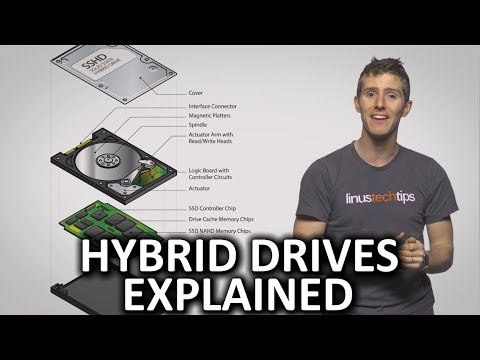
If you're trying to decide between a fast but expensive SSD, and a slower but cheaper and more spacious HDD, could hybrid drives be a good compromise? Thanks...
you won't have much flash capacity, so if you play more then one large game and swap between them you won't get all that speed
Though and SSHD has good caching so even the slow part of it is much faster then an HDD.
 velvet perch
can anyone please hlep me? was send here from newegg support
 wary urchin
ask away
velvet perch
I need an SSD, but I don't know if my PC can use m.2 PCIE, I know it can use SATA III, but Im hoping to use PCIE
Ive had reddit tell me I can use SATA, others PCIE
wary urchin
what mb you got
velvet perch

Supports 9th and 8th Generation Intel Core™ Processors (Socket 1151); Supports DDR4 2666; 1 PCIe 3.0 x16, 1 PCIe 2.0 x1; Graphics Output Options: DVI-D, D-Sub, HDMI; 7.1 CH HD Audio (Realtek ALC887 Audio Codec), ELNA Audio Caps; 4 SATA3; 4 USB 3.1 Gen1 (2 Front, 2 Rear); Su...
thanks a ton for your help
velvet perch
I want to replace my 7200RPM hard drive with a solid state drive
I am hoping to use PCIE as I heard they are better than SATA III, I need to know if its compatible with my mobo
wary urchin
ok
velvet perch
idk what else besides storage you can use them for XD , sorry don't know much about them
wary urchin
click on your link, look through specifications
and see if you can see if it supports it
wary urchin
ye
velvet perch
the problem is I dont know what NVMe is
I was told to get m.2 pcie by my friend
Im think I can
but before I do I want to make sure 🙂
wary urchin
"NVM Express or Non-Volatile Memory Host Controller Interface Specification is an open logical device interface specification for accessing non-volatile storage media attached via a PCI Express bus."
wary urchin
"Their differences are pretty much apples and oranges. One is a protocol, one is an interface, and one is a bus standard. NVMe (Non-Volatile Memory express) is a specification set for SSDs and other storage devices that attach to the PCIe interface. (i.e. all NVMe SSDs are PCIe, but not all PCIe SSDs are NVMe)."
i think so
this one is a better explanation
wary urchin
yEs
wary urchin
your choice
wary urchin
m.2 faster but a bit more expensive, sata is a bit cheaper but still plenty fast for most people nowadays
red jay
Send your system specs and budget range and I'd be happy to
velvet perch
assuming both fit
red jay
@wary urchin m.2 can be SATA or NVME, careful
velvet perch
Supports 9th and 8th Generation Intel Core™ Processors (Socket 1151); Supports DDR4 2666; 1 PCIe 3.0 x16, 1 PCIe 2.0 x1; Graphics Output Options: DVI-D, D-Sub, HDMI; 7.1 CH HD Audio (Realtek ALC887 Audio Codec), ELNA Audio Caps; 4 SATA3; 4 USB 3.1 Gen1 (2 Front, 2 Rear); Su...
wary urchin
yes
velvet perch
I need the best 1SSD for $150 - 200 I can get
wary urchin
but i didnt read all his mb specifications cause im doing hw rn
so i wont have time to see if its either sata or nvme
velvet perch
I need the best 1tb* SSD for $150 - 200 I can get
wary urchin
my bad
red jay
Best you can get for 1TB in that price range? 970 evo at 170 on sale today
velvet perch
ok let me try and find it, thank you
wary urchin
Supports 9th and 8th Generation Intel Core™ Processors (Socket 1151); Supports DDR4 2666; 1 PCIe 3.0 x16, 1 PCIe 2.0 x1; Graphics Output Options: DVI-D, D-Sub, HDMI; 7.1 CH HD Audio (Realtek ALC887 Audio Codec), ELNA Audio Caps; 4 SATA3; 4 USB 3.1 Gen1 (2 Front, 2 Rear); Su...
thats his mobo
list of whatever slots it has or whatever
anyways, good luck finding one @velvet perch
👍
velvet perch
We know its SATA III capable, We think its PCIE capable, just don't know if 2.5 or m.2
thanks a ton e-knock!
wary urchin
anytime you can ask anyone here
red jay
Wait, do you intend to use this as a boot drive? or just for data? Either way you'll need a m.2 PCIe 4x NGFF riser adapter
velvet perch
will do!
Im put all my games on my current 7200rpm and use the SSD for my OS and applications
wary urchin
no no no
velvet perch
Ok so I want an M.2 PCIe 4x with an NGFF riser adapter
wary urchin
put your games on your ssd, if not, they will take ages to load
velvet perch
Id need like a 2tb ssd for just the games 😦
wary urchin
applications are less important for loading times, so its better if you put em on your hdd
lmao
velvet perch
when I have more money I will soon 😄
school and work first 😛
I dont care about boot times, I want my stuff to run faster, copy data over faster, etc.
red jay
You could get a 500 GB 970 evo for 80 and a 2TB sata 2.5" drive, or just a single large 2TB non sansung nvme drive for <$200 easily
red jay
TBH, upgrade that mobo $170 on a samsung 970 evo is considered "too expensive" for people building even $2000 PC's lol
wary urchin
boot times are in the list of benefits of sSdS
yeah, if you're gonna spend that much, just upgrade your mobo like mr core 2 duo said
wait, hUh
C0RE DU0-
are y0u 0k?
velvet perch
so I can use a PCIE m.2 SSD?
Ill just up the budget if I cant afford a good 1TB one
Im still very confused, can I use a PCIE SSD to run my windows and applications on or only SATA III?
I dont want to do a motherboard switch out or get a new motherboard, I just want the best SSD my mobo can handle
red jay
While the 970 evo, evo plus, pro etc are some of most reliable, highest performing and long lasting ssd's, many people turn their nose up at the price in favor of say, an Intel 660p 1TB for $85 on sale, the Crucial P1 for $105, the HP EX920 for 115 etc vs the 970 evo's 1TB $170 price, the evo plus is $220
velvet perch
I dont care about price aslong as it isn't hundreds of dollars, I just want a good compatible SSD
wary urchin
^
 cinder prism
intel is great
wary urchin
ok
cinder prism
i never turn my pc off i had a ssd from them and the intel 760p m.2
cinder prism
nope
cinder prism
been running a 530 series ssd for over 3 years
cinder prism
its on a custom loop and a very large case
wary urchin
dont want a SL33P D3PR1V3D PC DO I
that mofo need some sleep
and is good for it anyways
cinder prism
but the way i see it is if anyone is gonna honor a warranty its intel for sure
when i get my next m.2 unless the 760p comes down ima either buy a 1tb 660p or a firecuda there speeds are like 3400 read/write
red jay
@velvet perch Unless you're also upgrading mobo/cpu/ram, I would actually recommend just getting a SATA 2.5" SSD since the only way to use an NVME boot drive is over the single pcie x16 slot you have on that board
You could install windows on the new sata drive for a big performance boost now, then upgrade mobo/cpu/ram + new nvme m.2 drive for windows later on and keep the sata 2.5" drive for games
cinder prism
i use a intel 530 series ssd u dont really have to have a m.2
they are plenty fast
i use a ssd for boot and m.2 for games
red jay
7200rpm hdd vs modern sata3 2.5" ssd (e.g. 860 evo) is a massive upgrade in itself.
cinder prism
thats over 3x the speed lol
red jay
Ya, those are typical numbers, but it's the I/O performance that's orders of magnitude higher
I have all three types, I'll just test now for the fun of it lol.
cinder prism
im using a 120 u dont need a crap ton for boot
wary urchin
ofc boot
cinder prism
i use it for windows only
wary urchin
makes sense then
velvet perch
sorry had a family call
Unless you're also upgrading mobo/cpu/ram, I would actually recommend just getting a SATA 2.5" SSD since the only way to use an NVME boot drive is over the single pcie x16 slot you have on that board
You could install windows on the new sata drive for a big performance boost now, then upgrade mobo/cpu/ram + new nvme m.2 drive for windows later on and keep the sata 2.5" drive for game
The single PCIE slot, assuming thats open, right? Thats not where my video card is?
So why not just put the PCIE SSD in that slot? What else would go in there anywho?
the PCIe SSDs seem to have write/read speeds of 1500, while SATA only have 550
so Im assuming thats nearly 3x faster, right?
Ok, i do NOT have a free pcie 3.00 slot, my video card is in it
so I have to get a SATA III SSD, thank you all for your help
red jay
Good call. If budget allows, now's a great time to upgrade mobo/cpu/ram, +m.2 NVMe 600 total maybe
velvet perch
i need help please
my SSD just arrived, but it has no cables or instructions
It is SATA III, I have the red sata cables lying around from other PC stuff like dvd-drives and my 7200RPM, will they work? Will they limit the speed?
its an x-NAND SSD 860 evo
also is it supposed to be this small and thin?
wary urchin
there isnt supposed to be any cables or instructions inside
your psu comes with the cables for sata ssds and stuff
frigid monolith
cables are included with your motherboard
wary urchin
yes, its that small, did you do the research on the stuff you were buying?
its like a little rectangular shape thats THIN
frigid monolith
@velvet perch when you buy a new drive you need to buy another Sata cable for it cause your motherboard includes them but usually only 2
wary urchin
yeah
 hard pulsar
keen urchin
hard pulsar
keen urchin
cant beat hard drives for mass storage at that low price
2.5 might become cheaper for mass storage tho
frigid monolith
Costs for 2.5" as well it pretty low
 frigid monolith
27$ for a 240gb SSD is pretty low compared to like 5 years ago when they would be like 80$
wary urchin
ey zack, what time is it for you right now?
keen urchin
10:17
wary urchin
ah ok
cause i see you online almost daily and im like, how the heck does this boy not have hw or stuff to study for lmao
frigid monolith
or not in bed already
red jay
Exactly
frigid monolith
@wary urchin He is in middle school
keen urchin
and we can use our phones during school inbetween classes and at lunch
keen urchin
i am in high school...
wary urchin
just makin sure
frigid monolith
You said middle last time
keen urchin
last year i was in middle school
frigid monolith
So then you're a freshman
keen urchin
thanks i guess lol
wary urchin
once you done with freshy and soph, then the real stuff starts to hit the fan
keen urchin
censorship 100
frigid monolith
When you hit college everything you learned in high school will be pointless lol
frigid monolith
I think the only thing that is useful is Math 436 or something like that
keen urchin
hoping the ap classes i take count as credits
frigid monolith
Also if you are not on that high level of math you won't be able to take any courses in college/university involving computers really
wary urchin
thats why i worry about college
wary urchin
no one in my family has been good at math, look how i am now lol, and it doesnt help that i SKIPPED a year for no real reason, so now i feel UNDERdeveloped
keen urchin
and im taking the honors version of that advanced version
i still dont know mean median or mode

wary urchin
oh.
keen urchin
skipped 3rd grade math
wary urchin
google exists
keen urchin
nah
wary urchin
yEs
keen urchin
id rather be playing minecraft
and youd rather me be playing minecraft right about now too ;)
im sure you will see why sometime in the following months
frigid monolith
Just toss some TNT at it
wary urchin
just gotta craft some things, find a few more, then im going back there
totally didnt lose my lvl 30 diamond pickaxe and diamond sword last time.
totally wasnt bummed out.
BECAUSE I DIDNT HAVE ENOUGH CHICKEN AGHHHHHHHHHHHHHHH
frigid monolith
Oh ya east coast Canada there is no middle school
it is just elementary and high school
keen urchin
i dont live in canadaaaaaaa
frigid monolith
Also we go to grade 11
@wary urchin up here we rarely have bullies and the seniors helps out the freshmen
Also our colleges are just like your expensive one's just for a lot less of the cost for going
wary urchin
lucky we dont got bullies where at my sch00l
even if i did, id prob be so stressed out and not give a crap id probably stick a pencil in their arm if i was aggravated enough lol
could not care less
frigid monolith
and then spend the rest of your kiddie life in juvie
frigid monolith
Free food but when you get out will you have a life still
frigid monolith
until you're 18
wary urchin
dude ima finish math then im desperately gonna take a break.
i can just do my essay later in the night lmayo
 burnt musk
As far as which is better? Why?
red jay
The 860 is TLC NAND vs the QVO's QLC, 3 bits per cell vs 4.
The 860 evo performs better, but not by a ton - the QVO is the cheaper, budget option.
Either is a good pick for a reliable SATA storage drive.
What do you intend to use the drive for?
red jay
Ran this userbench comparing 6 years of samsung ssd's. Also, an Intel 905p and random Sandisk for the boot drive. Running on windows 17736 booting in legacy mode. I was backing up old images and figured I'd run a userbench just to see how they'd compare.
https://www.userbenchmark.com/UserRun/20058159
 somber mantle
Hello can someone help me.I Have a SK hynix SC308 M.2 2280 256GB SATA III Internal Solid State and i was wondering if i can upgrade it to SAMSUNG 860 EVO Series M.2 2280 1TB SATA III V-NAND 3-bit MLC Internal Solid State Drive , will it work ??
red jay
Yes.
red jay
Nope, you posted all the important info. Both are Sata III and m.2 2280. If you want to be sure, link your exact laptop model, or run a userbenchmark / full hwinfo64 or aida64 spec readout.
keen urchin
@simple wyvern any hard drive thats 7200rpm
we have a ton of those
they work well
cinder prism
for 100 u can get a intel 660p 1tb https://www.newegg.com/intel-660p-series-1tb/p/N82E16820167462?Description=intel 660p&cm_re=intel_660p-_-20-167-462-_-Product
frigid monolith
@simple wyvern If you're using a SSD for your OS any hard drive after would be fine for gaming
simple wyvern
Intel Solid State Drive (SSD), 660P Series, 1TB vs Seagate BarraCuda 2.5" 1TB SATA III 3D TLC Internal Solid State Drive (SSD) ZA1000CM1A002
cinder prism
@frigid monolith regular hard drives suck for gaming after using a ssd lol. i have the 760p and its very fast for gaming.
@simple wyvern get the 660p
the intel ssd is 1800mb read write and the 2tb ssd is 560mb read write
simple wyvern
Ok ty for all the help everyone
frigid monolith
@cinder prism The thing is when you have things like steam and other programs like that on the SSD then your games on a hard drive wouldn't really be slow and also if he is using AMD he can use StoreMI which when ever he would load a game the files would transfer to the SSD part and the next game he would play would replace it going through a cycle
cinder prism
i beg to differ dude i play steam games and when i first install them my seagate barracuda 1tb 7200 rpm 64mb buffer takes 10 times as long to prepare the space to install
i go to install them on my m.2 they take no longer than 10 seconds to get the space ready
takes like a minute on my hdd
i have a ryzen m7 1700 and whats this storemi
frigid monolith
You do know i also mentioned StoreMI right if he is using a Ryzen
@cinder prism Watch this https://www.youtube.com/watch?v=ipAkjMr-COM

Learn how AMD StoreMI technology can accelerate game loads, boot times, and application launches by combining the speed of an SSD and the capacity of a hard ...
cinder prism
still man theres a big difference between 560mbs and 1800
my games and apps load hella fast as it is
boots to windows in less than 10 seconds
but thats not a m.2 its a intel ssd 128gb 530 series
frigid monolith
less than 10 seconds for you?
frigid monolith
i am on a 2.5" and it is less than 5 seconds to boot into windows lol
cinder prism
well im on a crappy monitor and its funky
frigid monolith
If you're on a nvme you're not even supposed to see the splash screen
cinder prism
while loading it says no signal so i have to turn off my monitor and turn it back on twice before it boots
o no scroll up
i said a intel ssd
my games are on my m.2
intel ssd 128gb 530 series just for windows
and my 1tb for movies which is a hdd and my m.2 for gaming
once i get my new monitor on 5th i should load normally
im using a crappy dvi to hdmi cable so i think thats the issue
frigid monolith
If you actually watched the video from start to end you would of never continued all this
velvet perch
hello all
I just recieved my SSD, installed it, it shows up on samsung magician, yet it doesnt show up in my PC and I cant store files on it. Typically I had to format HDD into Fat32 or NTFS but this gives me no option, please help
Do SSDs need to be formatted? If so, what format?
it does show up in macrium, but no where else
velvet perch
2 hours
3200 people
no one can spare 5 minutes?
I was told by newegg to come here when the SSD arrived for help
red jay
no
velvet perch
KK, I suppose I just return it then to newegg and tell them I couldn't get any help from their discord
cinder prism
@velvet perch dont listen to him lol here check this video plz. https://www.youtube.com/watch?v=R-qTVkbgMwI

If your new HDD or SSD is not showing up and you have them properly installed in to your motherboard follow the steps on this video. This tutorial will also ...
u need to partition drives before windows will recognize it unless its a boot drive
red jay
reinstall Windows to the SSD, keep the HDD removed during the install
wary urchin
lol
velvet perch
so my SDD has the exact same data as my HDD, I used macrium
Im booting from my SSD
how do I know if Im running on my SSD or my HDD right now tho?
red jay
but yes. i would reinstall because there's stuff that doesn't change that easily
velvet perch
so it is my SSd then nice
I cant
this pc came with windows 10
so idk how id reinstall it
red jay
you can reinstall.
velvet perch
how? I have no thumb drive with it
red jay
the license is stored in the mobo
velvet perch
thats interesting
red jay
if you take any ordinary usb drive, you can make a windows 10 install medium
as long as the drive is bigger than 8 gb
velvet perch
Ok forget windows 10 reinstall please
Im not doing that
I cloned specifically because I didnt want to reinstall windows
red jay
you'd have to ask someone else, as i haven't really had experience with messing with HDD and SSD cloning
velvet perch
Ahh ok, thank you ^_^
red jay
everyone ever says reinstall because there's too many troubles that come with cloning
and i mean
WAY too many
velvet perch
In general, they are wrong, I've done over 1000 clones fine. If thye mean from HDD to SDD, they might be correct, that Ive never done but once
red jay
I'd try to convince you to clean install windows depending on what version you're on now, but it seems as though that's not an option haha.
velvet perch
Im having an issue for some reason while Gaming
The games will crash, saying a critical error has occured, some have said it is because of the video card
but my video card hasnt changed, I literally cloned my HDD to my SDD, and swapped them out
any idea what my cause the crashes? Was going from HDD -> SDD the problem ya think?
velvet perch
apparently im not the only one with the issue: https://www.google.com/search?q=games+crashing+after+install+ssd&oq=games+crashing+after+install+ssd&aqs=chrome..69i57j33l3.4552j0j7&sourceid=chrome&ie=UTF-8
but no one seems to know the solution
red jay
I wonder why?
proud hawk
Clean install
cinder prism
told u cloning has issues i ALWAYS fresh install new windows with my pcs when i change parts especially for motherboards
frigid monolith
I haven't had any issues cloning
 echo moon
so clear install is the best way to go?
my old motherboard is going out and want to switch it out with another one with all new components. Is there a way I can get keep the old hard drive and remove the old drives of the motherboard and still keep my old version of windows 10 going?
red jay
Yes. Though, I'd actually install windows fresh on the new ssd
 viral venture
hey if anyone can help me on finding an ssd. I mostly game and im going to start streaming
so if anyone can help that would be awesome
 cosmic elm
I have the Samsung T5 it's great
viral venture
how much is it
cosmic elm
89 on Amazon for 500gb
viral venture
oooh
 turbid torrent
I need y'alls help. I can't seem to find something I'm looking for.
Does anyone know any good PMR 4tb + hdd's for mass game storage? I don't care if it's 5400, 7200, or 10000 rpm, but I really do not want a shingled hard drive. SMR drives are terrible when you want to keep writing new games to it, it takes FOREVER to download games, and updates to them are agonizing. But on newegg all the ones i'm seeing are secretly SMR drives, which they conveniently hiding until you read reviews.
sharing my games with my downloads on my non-boot/non-priority programs drive (only 1 tb) is becoming problematic when I have like 400gb of coding software and codes on it as well. I want a straight 4tb+ hdd just for games.
red jay
Download the game to a <1TB ssd, then copy over
I used a similar main memory -> ssd cache -> sata or sas HDD workflow for burstcoin plotting on the 20 disk server
turbid torrent
I don't have enough space on my 512 GB SSD and I'm not going to buy another as that defeats my purpose of getting the hard drive.
 novel turret
Getting a laptop soon, will install a clean M2 SSD and install windows os on it. Will I have to boot up windows 10 on HDD to find the product key before installing and activate later on m.2 ssd booted up windows on same laptop?
turbid torrent
So When I cloned mine I didn't need to reactivate it
It's determined by like your model number of your laptop so it doesn't matter what drive it's on, as long as it can identify the laptop it's in.
frigid monolith
If you put in a M.2 and do the windows 10 format method you would need to only activate it but you wont need the key
just make sure not to select if you are selling or giving to someone else
novel turret
Okay much thanks
frigid monolith
np
frigid monolith
in the bios
low pebble
what do you mean
red jay
That's some word soup. Windows OEM pro keys can be legally bought for $5 or less from reputable sellers.
low pebble
nvm
 autumn falcon
Is the Adata xpg nvme a better option than samsung 970 evo
frigid monolith

 floral ingot
is MLC the best ssd for gaming?
undone dune
MLC is more for general gamer and enthusiast builds @floral ingot last time i checked.
red jay
MlC basically means TLC these days, the 970 pro is one of the only true 2 bits per cell SSD. I wouldn't focus too much on that though.
I'd take the 970 Evo over the xpg
fresh heart
i had an adata xpg 500 and i die with in a week. during that week it was a speed demon but i returned it and bought a 970 evo and have not had a problem and the speed is very nice.
proud hawk
Hmmm so I installed my 970 Evo, but it doesn't show up in BIOS or my computer. I've tried in two M.2 slots. DOA or any ideas for how to fix it?
 frozen adder
@proud hawk Did you go through Disk Management? Just search through windows, it will show up as "Create and format hard disk partitions", and you should see an unallocated Chunk around the size of your new drive, right click the bar above Unallocated and select new simple volume and follow the prompts. Hopefully that all it was
at least, thats what I had to do to get mine to show up
Or it should just outright appear as a separate option there
 shut tundra
Windows key+x and select disk managment. If its working it should automatically ask you to initialize the drive.
If it doesn't start automatically you will see it as unallocated apace.
proud hawk
@frozen adder it wasn't in disk management either
red jay
To clarify - what drives are in th system now and do any contain your windows boot volume ?
proud hawk
@red jay 660p only, that's boot volume
red jay
The 970 evo wil lmake a far better boot volume
What do you have in there again? A 9900k, aorus xtreme - some ? ram?
Ya - don't "slum it" /s with a 660p boot
proud hawk
I'm switching to 970 for boot

 nocturne scroll
Need some help
A friend that lives in Ohio without decent internet seems to be having issues with download resets of major games lately
He owns D2 with most the DLC and we suspect due to the recent patch, the game download reset.
I want to download the game to my flashdrive through Steam and send the flashdrive to him
So he can transfer the files onto his computer instead of waiting 13 days (or longer depending on more resets)
Is this doable?
keen urchin
anyone happen to know how to move drives in a raid setup
or do you have to back it up and redownload the data
shut tundra
moving a raid array to a new board doesn't always work
actually it usually doesn't work
backup before attempting
keen urchin
alright, thanks
 spring tulip
anyone knows how to repair USB without formmating?
red jay
I'd avoid the 660p for boot - when on sale for $85 it's ok for a game drive maybe - but I'd spend $15 more and get better
 mild dagger
what would you reccomend then?
frigid monolith
For me i usually tend to stick to using a 240gb SSD for the OS and programs and for games i would use a larger SSD
mild dagger
I already have a cheapo 256 gb ssd for boot but it's defiantly not quality...
mild dagger
how important is the boot being faster...my pc boots in ~5 seconds and I find that to be good enough
is there any actual performance increase when going faster than that
frigid monolith
i haven't used an NVMe personally yet but i think it would shave off like a second or two for just booting into windows
 keen vortex
does anyone have a simple answer for what i would need to add SSD to a PCIE 2.0 x16 slot
 latent smelt
red jay
red jay
latent smelt
red jay
red jay
I actually never thought they might've been asking for a sata controller - I was seeing how "simple" of an adapter newegg sold that didn't look like a fire hazard haha
red jay
Valid question - I would've missed that
red jay
@red jay even at $85 I wouldnt recommend it as what matters is the life span of an ssd. Games are not bandwidth limited when being opened so a 660p would only be a downgrade from the cheaper sm2258g or sm2258 based ssds
@frigid monolith and it wouldnt do that either. Nvme drives dont magically locate files faster (that is about the same between almost all ssds and any difference is mostly error margin) and opening windows also isnt something bandwidth limited.
Isn't that what i said -though, without specifying the controllers on said SSD alternatives?
Anyway, not trying to nitpick your nitpicking of my own nitpicking lol
@red jay no, you said it would make a good game drive which it wont as there are cheaper ssds that will do that as fast with better controllers that will last longer
I agree with you saying it is dumb to get as a boot drive
Disagree that it should be used as a game drive
This?
UCA:I'd avoid the 660p for boot - when on sale for $85 it's ok for a game drive maybe - but I'd spend $15 more and get better"
That doesn't sound like I endorsed it at all
I try to focus on the important things
When a user is asking for advice on how to plug two 2080 ti's into their antec 430w - I'm very clear about advice
The Tc sunbow x3 is about that price is my point. I just dont want people mistakenly getting a 660p
I'm not usually in the business to occupy a far larger portion of an hour of both my time and theirs explaining why somthing like the Intel 660p is not the best - tbh - I coulnd't care - I would really hope that both my time - and that of the user's is more valuable.
 rocky spruce
When you get a new SSD and you're trying to migrate your Windows over to the SSD, but both Acronis True Image and EaseUS Todo Backup throw errors when trying to copy from the HDD but your Windows install USB won't boot because (reasons?!), even after going into the BIOS and telling it to boot to the USB first. Next up, MiniTool Partition Wizard to see if it can do what the others couldn't...
I'd burn a disc to install off that instead of the USB, but I don't keep a spare spindle of discs around anymore.
What would another key give me if I can't get it installed to begin with?
I'm also going to have around 2.2 Terabytes of total storage once I'm done. The boot drive and the new SSD are each 500 GB drives, but I'm not sure what all I'll be missing or corrupting if I just decided to 86 any of the drives once I get the OS pushed over to the SSD
Also, I know Kinguin had Windows licenses for around $23. Not sure where to get a $6 license from. And, is there any sort of buyer protection offered, like Kinguin allows you to opt for protection for like an additional $2 or something silly like that
small steppeBOT
 kaiserarm#0122 has been warned
Reason: Bad word usage
rocky spruce
It's more of me having problems getting to the WinPE interface to install Windows that I'm having a problem with, as opposed to trying to scrimp and save and not buy another Windows key
Getting a new key does me no good if I'm unable to install Windows on the new drive
But, I guess idiod's just think this way
keen urchin
@split plover no personal attacks, this is your last warning. Also watch the swearing.
frigid monolith
Macrium Reflect is so much better
rocky spruce
I ended up finding success with MiniTool Partition Wizard and letting it do its thing overnignt
frigid monolith
With Macrium Reflect i was able to clone my laptop hard drive to an SSD took only 1 hour
 void axle
https://www.newegg.com/p/1Z4-002P-00505
Why does this exist?
Also, why does it cost more if you use the pcpp link
All I did for the first link was remove everything after the first "?" To get rid of the affiliate link
 wild solstice
anyone active in here that can help with a question
red jay
How to ask for help properly on IRC so that you get responses faster. Also relevant to forums and mailing lists
latent smelt
but this isn't IRC, fire away @wild solstice and hopefully someone will respond with an answer.
red jay
Oops. Forgot about this.
 foggy lichen
how do i delete these two allocations on this disk
ashen hearth
For historical purposes I'm commenting on my troubles with an MP600. I did finally get an OK to replace it under warranty. The warranty is 5 years, but it failed in less than 1 month. I used clonezilla to duplicate the MP600 onto a Gigabyte aorus ssd. After removing the MP600, the system just worked exactly as before. When I get the MP600 back I will use it to copy all my spinning drive data I've collected over the past 20 years so I can access all that stuff fast. If the drive fails, I'll still have it on the original drive. I do want to say thanks to Corsair for being both patient and understanding of the problem and being willing to deal with it.
@foggy lichen I'm not sure you can delete those sections - they are too small. In addition, the OEM block might be protected. If you can find a way to talk to the firmware on the drive, you may be able to unprotect the segments and then combine them with the larger block. For .5 GB out of 931 is it really worth the effort?
latent smelt
use magic partition wizard
As a partition magic alternative, Minitool Partition Wizard is the latest partition manager software which be used to manage partition on Windows 10/8/7/XP and Server 2003/2008/2012.
minitool*
foggy lichen
@ashen hearth thanks
 rotund temple
What kind of m.2 can i use for my mobo? I have a Aorus ultra gaming x470
frigid monolith
pretty much any NVMe
rotund temple
Would this be okay? Or is there other faster ones that are more affordable?
Thanks @frigid monolith
wary urchin
there are way more affordable options
you can get that kind of storage for like 50 to 60 bucks
just not as premium as this one though that doesnt matter
frigid monolith
It is hard to take you serious with that avatar
wary urchin
thats the whole point isnt it
rotund temple
Would a samsung be okay with my board?
frigid monolith
There is a lot of great companies out there
rotund temple
Oh ok thankssss ill just keep looking for nvme then
wary urchin
yeah
frigid monolith
I believe the one from Western Digital and Seagate are a lot cheaper
and are good
rotund temple
So as long as its nvme i should be okay?
 long loom
Just go with everyones favorite the rocket sarbent or whatever it's called
also I would avoid m.2 drives with rgb
rotund temple
Rocket sarbent?
rotund temple
Ok ill check that one out. All nvme are fast right? Doesnt matter of the brand?
long loom
they're all fast yeah
frigid monolith
long loom
some faster than others but if you're just gonna be gaming you won't need that extra speed
frigid monolith
If you're only using it for gaming you really wouldn't notice anything different in loading times
rotund temple
Woah this one looks nice
frigid monolith
There is even a YouTuber by the name Yes Tech that even says if you are doing things like video editing you will notice the performance but for just gaming you wont notice anything between a NVMe and a 2.5" SSD
long loom
I got an nvme because it requires less cables 
rotund temple
Ohhhh
wary urchin
lol
frigid monolith
My case all my drives mount in the back so you don't see them 😛
long loom
My case hides them underneath but still no cables
frigid monolith
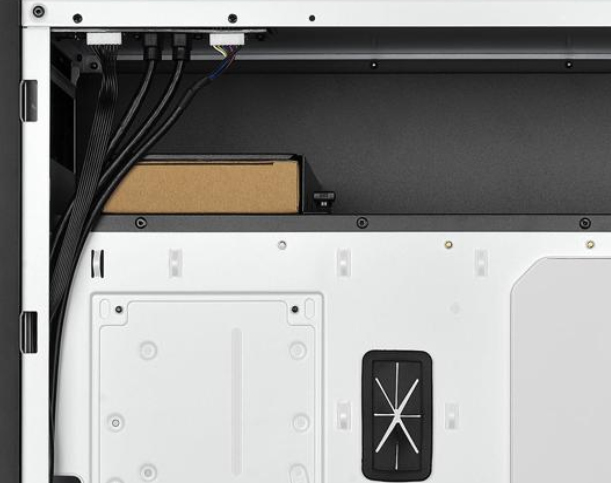
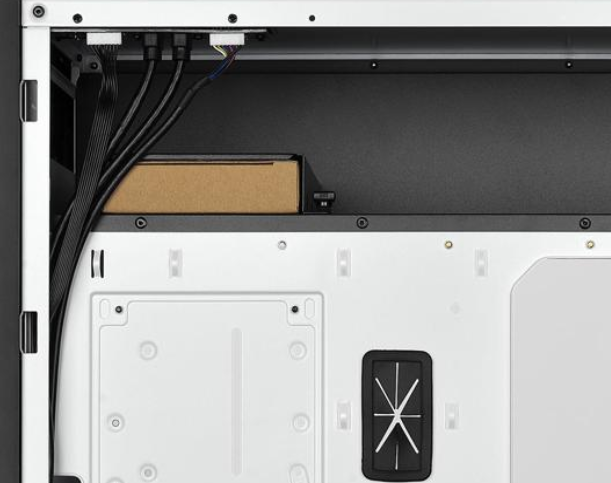
@wary urchin Right where you see the brown box is where my hard drive mounts https://i.gyazo.com/be6e88863593c69d7ea34aec0184a53e.png
 wary urchin
nice
frigid monolith
ya i can have a total of 6 drives mounted or 4 drives and a 240mm Rad
 terse oriole
Hoping I'm in the right section for this (first time attendee) - Want to upgrade my Mac Mini (Early 2012) to a SSD and want to know the difference between the Samsung 860 Pro Series (1 TB) and 850 Pro Series (1TB) other than the price difference
red jay
the chips that store your actual data are different, they'll be very similar in speed
the 850 is older, the 860 is newer and has more longevity, however it's unlikely you would ever exceed the lifespan of either drive
red jay
tbh you will not see much of a difference between the pro and the evo models, i know it's only saving a few bucks but i would get the 860 evo over any of the pro models
terse oriole
thanks @red jay so its looking like I'm leaning towards the 860 evo just on the price point.
red jay
i looked and it's more than saving a few bucks, especially for $!00 i hardly see a point in getting the pro drives unless you need the specific features of them, namely the longer warranty and other support for more prosumer related things (i think the pros have optimizations for not only constant and huge file transfers, but as well as things for better virtualization if you're running a bunch of VMs, whatever that means)
red jay
drives like the 970 pro vs 970 evo are hard to justify unless you have a use case that's heavy in sustained write and/or demanding concurrent mixed i/o.
long loom
I have the evo
very fast
would buy another
if it wasn't so much more expensive compared to other drives 
 solid pelican
970 evo is terrible for value
SX8200 pro is almost as fast
while being significantly cheaper
and if you aren't doing any task that utilizes the bandwidth of the 970 evo or SX8200 pro just get a SATA SSD instead like an MX500
 solemn tree
Wondering if anyone has any insight into connecting external drives with USB mini ports, via Thunderbolt 2 (Mac Mini late 2014)?
Sorry if this is the wrong place, if so please redirect.
Basically I want to connect 2 ext drives to my Mac Mini, one is a Seagate 1TB with FW ports, but it seems it would be easier to find a Thunderbolt or USB 3 connector on the other end for the Mac Mini. The other is a WD My Book Studio with a USB Mini port (FW also).
The Mac Mini has 4x USB 3 ports, 2x Thunderbolt 2 ports, 2x FW800 ports.
 uncut temple
Difference between the intel 660p series and the intel 760p series ssd’s
frigid monolith
read and write speeds
uncut temple
Ok thanks
uncut temple
Suggestions on the 2 TB seagate firecuda m.2 2280 ssd?
red jay
i know it probably is hard but how do i run a 1TB hardrive with a ssd?
 round temple
I have an 11 year old iQube 3.5" HDD enclosure that I last used about 8 years ago with Windows 98 to back-up my old desktop PC. I want to recover some of the data on this HDD using my Windows 10 laptop, but am unable to as my laptop is requesting to know what application to use to open the files. Do I need some software like did any software come with this HDD that I now need to recover my data?
I am unable to locate any information concerning the manufacturer of this HDD or any support sites gthat may be able to help me.
frigid monolith
Karen has some questionable drives
frigid monolith
@undone dune Karen has some drives he is hiding which could be naughty things
Id like to call a vote of no confidence
keen urchin
it's literally icloud and a network drive in my house
i scratched them out so it wouldn't cause confusion
frigid monolith
But what confusion people can see your C and D drive still >_<
keen urchin
what?
 blazing lake
I have two Seagate barracuda hard drives that one out on my Mac pro early 2009 I need a replacement please they’re 7200.9 500 GB I need to go one terabyte help would be greatly appreciated
keen urchin
Seagate BarraCuda ST1000DM010 1TB 7200 RPM 64MB Cache SATA 6.0Gb/s 3.5" Hard Drive Bare Drive - OEM https://m.newegg.com/product/N82E16822179010?m_ver=1
keen urchin
we have like a zillion seagate drives and theyre all fine ¯_(ツ)_/¯
 sweet badge
a zillion more like 3
keen urchin

my dad has two, i have two, and then our synology systems both have 6
so 16
sorry its not a zillion i overestimated
sweet badge
and I found 42 review of them failing on Newegg :v
keen urchin
😧
i found 258 for the wd one on newegg
10% of the reviews of the WD mentioned failing
7% of the seagate one mentioned failing
 unborn plover
What people dont realize about reviews. Theres probably a billion hard drives out there that not a single person would consider writing a review for because it simply worked
If you go off actual websites or businesses that specialize in data recovery off hard drives, than WD is the more reliable
That being said. I've only ever had one hard drive fail on me. And that was a WD velociraptor. I own both WD and Seagate, both worked fine
keen urchin
theyre both good brands
unborn plover
As long as you keep vibration down, both are acceptable brands
latent smelt

red jay
Both brands also make a ton of different models, All of WD, HGST, Samsung, Seagate etc have all had notoriously failure prone models.
Same is the case for Corsair, EVGA, even Seasonic PSU's, motherboards, list goes on. It's best to evaluate reviews on a model specific basis, yet be mindful of "the whole package" with reference to customer support, personal preference etc.
frigid monolith
Remember when Maxtor was the top brand
red jay
Nope
frigid monolith
They were the best during the IDE days and then got bought out buy Seagate
shut tundra
aren't they still the best. I still have 3 Maxtor ide drives that work.
frigid monolith
They are but the company doesn't exist anymore
i still have a 200gb IDE drive from them in my PIII machine
shut tundra
I have a 40GB an 80GB and a 120GB
wary urchin
never heard of that company
shut tundra
only maxtor I ever had fail was one of my 80GB that I was running in raid 0. that was when I gave up on raid 0
 worldly canopy
anyone know if or how much they've improved SSHDs?
the last I heard were that they were Bad and you should just get a regular SSD instead
but I'm seeing more ads and sales for Seagate's FireCuda SSHD lately
wondering if they've gotten better or if they're just trying to clear stock
frigid monolith
Hybrids are good if you want more storage and cant afford a SSD that is like 1TB or more
frigid monolith
You'd mainly get pretty good speeds out of it but still would be a little slower than a 2.5" SSD
worldly canopy
gotcha gotcha.
 rose barn
thats a big 10-4
keen urchin
👍
worldly canopy
got a fun one for y'all I'm not solving quickly
an external hdd of mine is acting finnicky when connected.
I can move the usb cord at the eHDD itself and it'll get better or worse.
I figure that it's either the plug or the board that it all connects to.
so
I got the bright idea to crack open the enclosure and install the hdd from it directly inside my pc, like you would install any other internal hard drive.
however
when I did that, it did not show up in My Computer
and when I checked Disk Management, it said the entire drive was Unallocated and I needed to format it.
instead of doing that and losing near a terabyte of data
I quickly shut down, pulled the drive, put it back on the usb board from the enclosure, restarted, and connected it as if it was still an external hard drive
it shows up fine now and I didn't lose anything.
SO
Where did I go wrong
and how can I put the external hdd inside my desktop without losing any data?
(my searches so far just say that "yes, you can do it" and then instructions on how to put an internal drive into an enclosure to make it in to a portable external hdd)
 hard heath
I just purchased an AMD Ryzen™ 5 3600X CPU. I want to perches 32 GB of RAM. With all the options listed I need help picking the correct RAM modules.
 gloomy ferry
whichever one is 3600 and cheapest
frigid monolith
Why not 32gb
@hasty mauve we're getting closer to the age where 16gb will be the new 8gb and 32gb will be the new 16gb
 hasty mauve
Yeah true
gloomy ferry
16 or 32gb 2400mhz Ram since the ram speed makes no difference for intel
cinder prism
i wouldnt say it makes no difference
faster ram helps all computers
but ryzen needs it more
gloomy ferry
It really, really, doesn't make much of a difference for intel
We're talking like 4 fps gain max
red jay

Haha it's not as important vs CPU, GPU for sure, but decent speed 2x8 is like $60 for 3200c16 hynix cjr
gloomy ferry
where
proud hawk
If you wanna get those last few FPS After you OC your 9900KS paired with a 2080Ti, fast RAM will enable that
red jay
2 years ago, it definitely made more sense to save $100 by going 2400 vs 3200 c15 or so on a 2x8
The ripjaws kit on sale , I think
cinder prism
maybe but faster ram in a intel rig makes stuff load up faster.
its black november alot is on sale lol
 cinder prism
i used to use 2133 but when i switched to 3200 i noticed a nice difference
red jay
High end NVMe sss with 250 to 500k iops, high 4k random read qd1 will have most impact on load times , but single thread compute plus high memory bandwidth is the other half of the equation imo
gloomy ferry
I'll just be here on my 1600....
red jay
Haha you can buy some very highly marked up ddr4 rated to 5000mhz as of late
gloomy ferry
Right I forgot about that
cinder prism
5k mhz lol
gloomy ferry
Kinda silly tbh 
red jay
I wonder how many people who buy that know what they're getting into
cinder prism
wonder what the difference is between 5k and 3200
gloomy ferry
0.0001 seconds
cinder prism
no way
gloomy ferry

red jay
Most Mobo bios will cook the io controller and system agent with over 1.5v if you leave them on auto and just plug and play xmp haha
gloomy ferry
Get a profile picture my dude
cinder prism
not a bad price for 16gb trident z royal 4000 mhz
wow royal are getting cheap
i can get 16gb 3600 speed for 119
sweet badge
intel doesn’t really care about ram speeds tho a lot
red jay
4000c17 is a very high bin haha, nice
cinder prism
maybe not nachos but why not get the faster speeds for the same price?
if i can buy 3200 speed for the same price as 3600 whynot?
red jay
The 4300 17 18 18 28 1t I posted on safe daily settings is a $115 2x8 kit
sweet badge
much ram cheaper is out there for that
cinder prism
as long as im not spending 300 or more for ram ill try and get the most, fastest i can get
red jay
$220 for a 2x16 dual rank 3200c14 Trident z kit is very attractive imo
red jay
Tl dr, yes, but largely because 3200c14 is nearly guaranteed bdie, 3200c16 can be 4 or 5 different ICs
cinder prism
mines hynix
sweet badge
@red jay you talking about the royal that was posted for 250?
cinder prism
its samsung?
sweet badge
yeah but 250 for 16gb is pretty high
red jay
3200c16 hynix is likely mfr
cinder prism
yea but its 4000 lol
sweet badge
you can get 3800mhz cl17 or 18 and just increase the voltage to 1.5
cinder prism
o wow
red jay
If you buy that 4000 c17 and just run it xmp for it's life, that's like buying a viper to drive to church once a week
red jay
Have you guys seen our #overclocking channel? Haha:)
cinder prism
i run my 3200 with just xmp
sweet badge
like if you bought this kit and put it at 1.45-1.5V, you could tighten the timings or bump the speeds for much less https://www.newegg.com/g-skill-16gb-288-pin-ddr4-sdram/p/N82E16820232443
cinder prism
ill need to wait till intel 10 series
my motherboard only allows 3200 atm
its a asrrock fatality x370 gaming x
frigid monolith
Isn't this room supposed to be for storages 🤔
frigid monolith
You can turn it into storage but it isn't by default
 graceful smelt
so, imma go back to storage. do nvme's really go hotter than sata ssds? would you recommend nvme ssd for gaming or i will just stick to 2.5" ssd? thanks! for 1tb variant btw
red jay
there's not a significant real world difference in things like load times between an nvme drive and a conventional SSD
i have two 1tb nvme drives in my system but i'm stupid so
most people would be best suited by a 500gb nvme and a 1tb or larger SSD
for gaming oriented users, that is
throw OS and most used games on the NVME and put the rest on the SSD
graceful smelt
@red jay so i will be ok with a 2.5" sata ssd? im asking because nvme is getting cheaper but reviews says it will make your system hotter or something.
red jay
i think that's just an odd interpretation of whatever data you're looking at
the heat impact from an nvme ssd in a tower is going to be negligible, it only draws a couple watts
now, nvme drives tend to get hotter because of where they're placed in the motherboard (i.e., right next to the GPU generally)
graceful smelt
i mean, reviews says nvme tends to run at much higher temperatures. but they are getting cheaper. saw a 1tb crucial P1 for a very low price
graceful smelt
true.. the additional temps it diffuses wont affect my other components? or make my system hotter? sorry for what seems to be a noob question 😄
red jay
again, it only generates a few watts
like 10-15
or i should say it only pulls that few watts
15 watts in a 500 watt system is not a huge impact
graceful smelt
nice. i think i might actually pull the trigger on that crucial p1. im using a 500gb sandisk atm
red jay
yea i am strong proponent of using them when it makes sense
graceful smelt
do i need a nvme heatsink? my motherboard doesnt come with an nvme heatsink i think
red jay
if you're on a super tight budget the benefits don't really outweigh the extra cost over a normal SSD
but that gap is pretty close now so
graceful smelt
yah, i mean the difference between an nvme and a sata ssd at 1tb variant is a measly 2-3 usd
based on newegg prices where im at
red jay
not all NVME drives are created equal
but generally speaking the intel 660s will suit an overwhelming majority of gaming oriented users
and the other more affordable NVMEs for that matter
graceful smelt
im thinking of the crucial p1 1tb nvme. i dont kn ow about ssds, but this variant has good egg rating
between intel 660p and crucial p1, which is a much bteer buy?
better*
red jay
i had to check something first
graceful smelt
no probs
red jay
the p1 has a proper cache, but unless you need that cache, the difference in performance of the drives will be pretty indistinguishable
that cache only really has an impact when you're doing super heavy duty, large file transfers
that being said i don't see why not to get the p1 when it's the same price as the 660p
graceful smelt
nah, im mostly just play on my pc. some ms office things like word and spreadsheets. no cad, no heavy rendering.
they are mostly at the same price. imma go get the p1 then. or should i wait for cyber monday? im not in a hurry. i still have half of my existing 500gb storage 😄
red jay
hard to say if and how much prices on drives will drop
graceful smelt
hopefully they will drop. thanks btw!
red jay
sure thing, i should have asked but i presume it'll just be an OS and steam dump drive?
graceful smelt
yah, os and steam, origin, etc games. and few spreadsheets, and office stuff. and some vacation photos and such
red jay
cuz what i did before i added all this SSD storage is i had a 256gb 950 evo (os and a few games), a 1tb 860 evo (for most the steam games) and then i had a couple 1tb spinning drives that i never used other than to make space on my other drives
ok yea just wanted to make sure you weren't trying to do some backup that you needed reliably stored or something
now i have two 1tb 970 evo pluses, two 1tb 860 evos and that's it
graceful smelt
evos are pricey where im at. hahaha. im on a sandisk ultra 500gb atm and would either get a 1tb nvme or a 1tb sata ssd. but now im more inclined to the nvme.
red jay
they're definitely not a good value proposition when drives that cost half as much are virtually as fast
at this point most of the drives use actual storage chips from two? three? different flash vendors
and they generally have a controller from one company, or it's a samsung drive (samsung makes their own controllers for their drives)
so what i am saying is the entry level drives have similar parts to the high end drives
in regards to where the data is stored on the actual drive
but i just like having shiny expensive stuff cuz i'm dumb, tbh
graceful smelt
ahh. but the evos are generally faster than entry level ssds? hahaha, my wallet does not allow me to be dumb, sadly.
red jay
oh yeah, but again at a certain point you don't really feel a huge difference in real world speeds
on paper a 970evo+ has roughly twice the read speed of that p1, but the games will not load twice as fast
it'll go down from 15 seconds to...13.5 or something
graceful smelt
oh, so the fast load is for file transfers only? i mean, you will not be noticing such a huge difference in game loading?
red jay
you will not notice a huge difference between a game loading on the p1 and a game loading on a 970evo+, no
few seconds at most
graceful smelt
Ohh, that clears up a lot of things. Thanks!
red jay
i am just fond of NVMe drives, they're just nice
feels nice to have nice tech in your computer
at least for me
and especially seeing as how i've paid more for SATA ssds than the nvme drives you're looking at, i would definitely lean towards an nvme drive at that price
and that was a long convo to just tell you to get what you thought was a good idea in the first place lol
and no i wouldn't bother with a heatsink for the drive, just make sure your case is adequately ventilated and has air moving through it properly
it won't hurt to get one if you want the peace of mind but it's definitely not obligatory
graceful smelt
i have 3 intakes at front, 2 fans exhaust at top (with radiator coz im using an AIO) and 1 exhaust at back. using an ATX tower
red jay
yea should be good to go then
graceful smelt
thanks again!
red jay
sure, forgive my verbosity
graceful smelt
i dont mind, its actually better than direct answers. i mean, i get to know things and ask things that were not on my mind before. 😄
red jay
i remember my first computer having a 200MB hard drive, and now i have 4TB of ssd storage 25 years later
feelstechman
graceful smelt
thats a lot of storage 😄
red jay
i futureproofed as much as i could with this build so
no such thing in reality but i looked at my needs realistically and it made sense at the time
you'll probably be best suited by doing a fresh install of windows on the nvme drive when you get it and fully formatting your other SSD that currently has your OS on it
so make backups now
of whatever you need
graceful smelt
cant i just clone my old ssd first to the new nvme ssd?
red jay
sure, but my personal experience with that is that it's been an absolute crapshoot
ymmv
i usually do a wipe and fresh install of windows on my OS SSD once a year or so
but again i am dumb so
graceful smelt
hahaha, i will try that
red jay
the only things that stay on my OS SSD are windows, and a few games, which i can download again quickly, but i realize not everyone has that luxury
graceful smelt
so im thinking, OS should be on the nvme right? i mean, my would-be old sata ssd will just have some unimportant files, and my Os and games should be in the would-be new nvme?
red jay
yep
i would put your OS and whatever games you play most often on your NVMe and use the second one as just a dump
i.e., when you're done with one game, move it to the second SSD and have space for a new one on your NVMe
graceful smelt
ok then, thanks! usually when i finish a game, i delete it. hahaha. games these days eat up a lot of storage. 100gb atleast for some games today
red jay
yea trust me i had windows 10 and that was about it on my 256GB 950 pro and it was a constant game swapping nightmare
small steppeBOT
 wubs#9878 has been warned
Reason: Bad word usage


 red jay
someone has a nickname in the server way worse than the word i used lol
wary urchin
i doubt thats even allowed
red jay
if i get yelled at for using a word that could be used to describe someone who is very persnickity and exacting, that happens to also be a term for someone's posterior, then that person should definitely be yelled at 😆 but i'm not a narc
to be clear i don't really care that i got yelled at by the bot, i just thought it was kinda funny
red jay
TBH - I think it's more fun to try and abide by the guideline while still conveying the same mesage clearly haha.
 gleaming ermine
I’m looking for a good 2tb or possible 3tb hard drive
keen urchin
5400rpm tho...
red jay
Is that a bad thing in itself?
It's not, the drive will run quieter and cooler. Look at what drives thse guys recommend.
https://forums.servethehome.com/index.php,
https://www.reddit.com/r/DataHoarder/
https://www.reddit.com/r/homelab/
https://forums.unraid.net/ use
sweet badge
it’s good for home storage too
gloomy ferry
7200rpm always
red jay
Not if your using a home server @gloomy ferry
gloomy ferry
Oh for servers yeah