#storage-devices
1 messages · Page 8 of 1
 blazing musk
USD? Is this for gaming?
And do you need anything extra like monitor or peripherals, maybe wifi?
 manic dagger
https://youtu.be/DXT1IXFIFAI moving games is a bit bigger. Loading showed a small increase
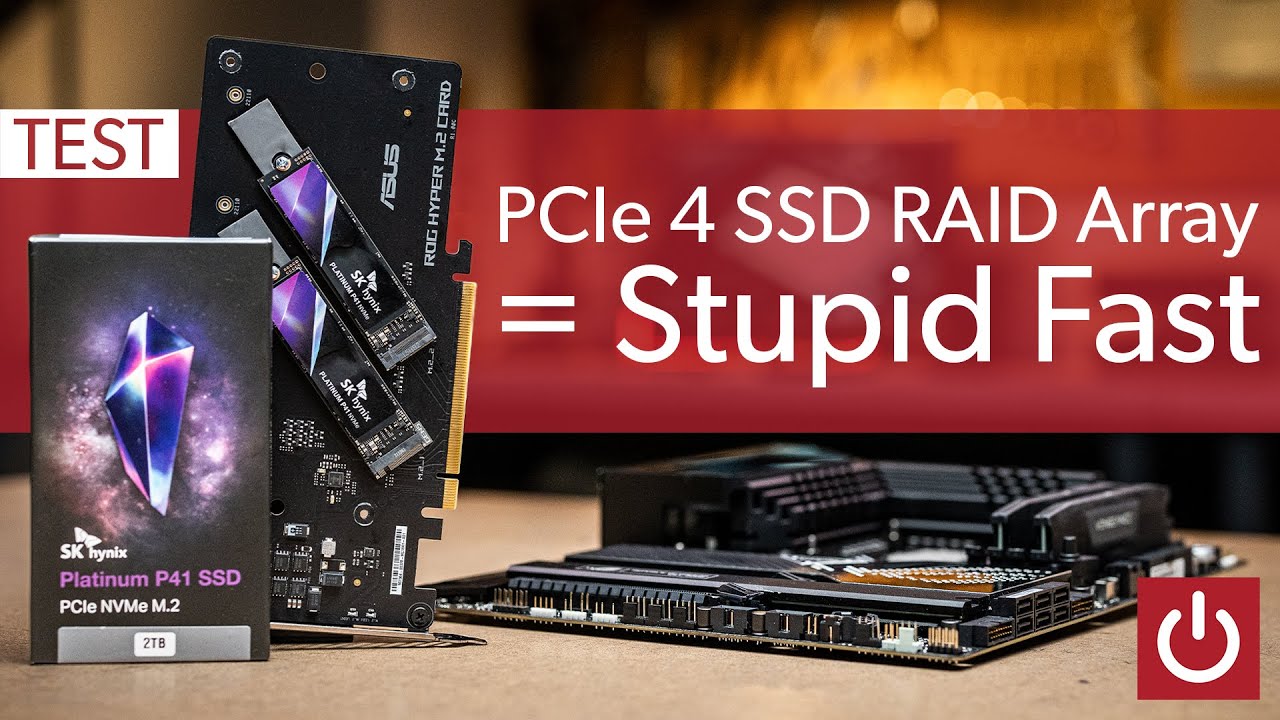
Some people might ask "Who uses RAID in 2022?" to which I say "Who DOESN'T have the need for SPEED" (typed over my 10 gig fiber internet connection). But really, how fast does a RAID 0 array equipped with three 2TB PCIe 4.0 NVMe SSD's perform? Well setting it all up was a real pain, but showing off the stupid fast benchmark numbers was super eas...
blazing musk
Loading games? Sure if a 0.001 second improvement in load times is worth it to you
 unborn kayak
blazing musk
USD? Is this for gaming?
unborn kayak
blazing musk
USD? Is this for gaming?
yessss, USA and for gaming, hmm no monitor needed, just the case
manic dagger
blazing musk
Loading games? Sure if a 0.001 second improvement in load times is worth it to y...
its also sounds fun doing a raid. If its on an x16 slot thats cpu lanes so I can put windows on it and boot right?
also one larger volume is easier to manage imo
blazing musk
Where the lanes come from don't impact whether you can boot off it
manic dagger
ok good to know, but I can boot of raid 0 right?
blazing musk
Yeah but you'll need to install the raid drivers before you install windows
manic dagger
ok thats fine
blazing musk
When you go to install hit load driver
And point it to the raid driver
Then the raid array should come up as an install target
manic dagger
blazing musk
When you go to install hit load driver
this is when I install windows. Also put raid drivers on the usb?
new build btw
blazing musk
Yes you'll need the drivers on the USB when you're installing windows
manic dagger
cool thx
blazing musk
You're on X670 right
blazing musk
Good.
Grab the 3.3MB one. That's just the basic drivers you'll need to set it up. Then you'll install the larger package once you're in windows.
manic dagger
ok thank you for help. Pray for me haha
blazing musk
Good luck. Raid is tricky at best.
blazing musk
unborn kayak
yessss, USA and for gaming, hmm no monitor needed, just the case
If you can afford to do a little higher you can get the absolute best PC anyone can get as far as specs. https://pcpartpicker.com/list/2q8pZw
Part List - AMD Ryzen 7 7800X3D, GeForce RTX 4090, Fractal Design Pop Air RGB ATX Mid Tower
unborn kayak
blazing musk
If you can afford to do a little higher you can get the absolute best PC anyone ...
Thank you!!!!
blazing musk
Could probably shave that down a little closer to 2500 if needed
unborn kayak
I think that 100 wont matter, thanks a bunch!
blazing musk
Happy to help
 dense merlin
Part List - AMD Ryzen 7 7800X3D, Radeon RX 7900 XTX, Phanteks Eclipse G360A ATX Mid Tower
dense merlin
blazing musk
If you can afford to do a little higher you can get the absolute best PC anyone ...
Also a very nice list
That one will perform better
blazing musk
XTX doesn't hold a candle to the 4090. It's a shame there's nothing between them right now.
dense merlin
Yeah, just depends on person if it's worth it
blazing musk
Indeed
dense merlin
Xtx was $830 just yesterday
 dense merlin
Oh is it? That's great
blazing musk
Shockingly still in stock
manic dagger
blazing musk
Good luck. Raid is tricky at best.
actually falcie would it be better to have 1 drive on the x16 adaptor and the other on the 5.0 x4 slot (processor lane, I think). That way each drive gets a full gen 5 x4 slot
manic dagger
and that can still boot. cool
 formal tusk
I could pull the annoying * fine wine * card but fact is that it's legitimately happening rn lmao
blazing musk
BuT FrAm3 GeN
formal tusk
*cries in +40ms latencies *
blazing musk
and smeared frames
 quiet gust
@blazing musk about the LSI 9240 8i you recommend me to buy (since it say flashed with p20 firmware = 9211 8i) will I need to use 9211 or 9240 drivers in windows?
blazing musk
quiet gust
<@396513761550270464> about the LSI 9240 8i you recommend me to buy (since it sa...
Either way it'll use the same default driver, as long as you're not doing raid
 plucky sun
I'm new here and don't know much. I am not even sure if this is the right place to ask this.
I am buying a ASUS ROG Strix SCAR 18 (2023)
I want to upgrade the RAM and run two SSD in RAID 0
I'm trying to see if these components are compatible right out of the box:
ASUS ROG Strix SCAR 18 (2023) Gaming Laptop, 18" Nebula Display 16:10 QHD 240Hz/3ms, GeForce RTX 4090, Intel Core i9-13980HX, 32GB DDR5, 2TB PCIe SSD, Wi-Fi 6E, Windows 11 Pro, G834JY-XS97
G.SKILL Ripjaws SO-DIMM 64GB (2 x 32GB) 262-Pin DDR5 SO-DIMM DDR5 5600 (PC5 44800) Laptop Memory Model F5-5600S4040A32GX2-RS
Two of these to replace the two 1TB SSD the laptop ships with:
WD_BLACK SN850X NVMe M.2 2280 2TB PCI-Express 4.0 x4 Internal Solid State Drive (SSD) WDS200T2X0E
Also, if it were you and you wanted 64gb of DDR5 and two 2TB SSD what would YOU buy? 🙂
Thank you for your help.
 tawdry dove
Just making sure can you have a external hard drive as a another storage?
quiet gust
blazing musk
Either way it'll use the same default driver, as long as you're not doing raid
Ok
I'm ordering it now
I'll test it the 1st or 2nd of August
blazing musk
tawdry dove
Just making sure can you have a external hard drive as a another storage?
Yes, you just can't install windows on an external drive. That's the only restriction.
tawdry dove
ok thank you
blazing musk
You can get a 2TB drive for cheaper, unless there's a specific reason you need a gen 4 drive
 real lava
this intel drive is much cheaper
46 usd for 1tb
wait it dropped to 46?
ah nvm this is about normal price for a usual decent nvme these days at 1tb
2tb gets the price up to 89
blazing musk
The 670p is $40 on amazon right now
A60 2TB is $66 https://pcpartpicker.com/product/VxfFf7/silicon-power-a60-2-tb-m2-2280-nvme-solid-state-drive-sp002tbp34a60m28

Silicon Power A60 2 TB M.2-2280 PCIe 3.0 X4 NVME Solid State Drive (SP002TBP34A60M28)
 quaint drum
https://www.newegg.com/nextorage-1tb-ne1n-series-m-2-2280-pcie-4-0-nvme-ssd/p/0D...
quaint drum
quaint drum
https://www.newegg.com/nextorage-1tb-ne1n-series-m-2-2280-pcie-4-0-nvme-ssd/p/0D...
this one offers like 7000 mb speeds
i want to experience it
i want to fly
blazing musk
What are you doing with it? Gaming?
quaint drum
currently on 530mbps 2.5
real lava
even a gen 3 nvme is plenty fast for gaming
quaint drum
blazing musk
What are you doing with it? Gaming?
windows, so faster startup,
also two browsers, discord, Minecraft with mods and shaders
real lava
upgrading to a gen 3 nvme drive would do the job pretty nicely
blazing musk
 real lava
going faster doesn't benefit you really
blazing musk
blazing musk
https://media.discordapp.net/attachments/500102614680338456/1115505510154768404/...
Load times for Forza
quaint drum
wait sata?
quaint drum
i thought m.2 is x10 faster than sata
blazing musk
Only when you read all the data in order
real lava
only in sequential speeds
^
games, booting into os all have files in differently sized fragments
quaint drum
so if i get an m.2 won't i get faster boot ?
real lava
for boot well, only for a couple seconds
blazing musk
That's for extreme workstations with 64 core processors doing giant blender renders or 8k video editing
quaint drum
all i'm trying to do is bootup faster and play minecraft and watch memes
i ain't about that life

blazing musk
blazing musk
A60 2TB is $66 https://pcpartpicker.com/product/VxfFf7/silicon-power-a60-2-tb-m2...
This will be plenty
quaint drum

 quaint drum

quaint drum
blazing musk
https://cdn.discordapp.com/attachments/885523647400390686/1100323030443511818/im...
"sata" is referring to sata ssds right
the 2.5
quaint drum
ok and m.2 is just the form factor
blazing musk
Yes
quaint drum
is pcie 3.0 m.2 ?
blazing musk
That's a version of M.2 yes
blazing musk
Yep. I have a similar drive in my system, same tier and stuff.
 blazing musk
MX500 is a pretty decent 2.5 inch drive, but you'll be able to load a few seconds faster in certain things like open world games. By a few I mean 0-2.
quaint drum
this is sad

i thought i will go x10 faster in everything
if i go with an m.2
gg wp
blazing musk
Nope. That's just what they want you to think.
quaint drum

blazing musk
"Buy the latest most expensive thing, it's better we promise!"
quaint drum

blazing musk
The only reason I'm recommending M.2 drives at all is they're the same price as 2.5 inch drives now lol
quaint drum
well i'll go make coffee and think about this brain storm 
what do you think of this
10$ more
can't upload a picture rip
blazing musk
UD85 is kinda bad random performance. If you wanted to go up a tier there's this. https://www.amazon.com/dp/B0B9855VGS

Excellent Performance for Everyday Work and PlayThe P41 Plus is an innovative PCIe 4.0 SSD that delivers an excellent value to PC users for everyday productivity and gaming. The free, optional Solidigm Synergy software enhances performance even further by optimizing the relationship between PC an...
dense merlin
quaint drum
this is sad
There's just no point in getting a sata drive for your boot drive anymore for 98% of people, since nvmes are so cheap
quiet gust
Can someone help me figure out if the M2 slot on a dell optiplex 3050 is a 2x or 4x pcie?
real lava
It's an oem prebuilt, so no way to tell exactly from just looking
quaint drum
Funny I've been able to pull up info on lenovo thinkcentre mobos
quaint drum
Right
formal tusk
Should be able to see the traces
quiet gust
https://a.aliexpress.com/_mL7YD0Y
Is there a way to understand if this thing is 1x, 2x or 4x pcie?
real lava
Those are always x1
Don't think about it too deep
Mining doesn't care about pcie lanes anyway, and these products popped up during mining boom
quiet gust
Are there any 4x? (From AliExpress)
real lava
None that I know of
quiet gust
I'll just look at some of those videos of people attaching GPUs to laptops with this adapter and figure out if there are any
Actually... Just so that I don't waste time: would it be possible (if I find a 4x adapter) to hook up a 4x pcie 4port ethernet controller?
Could it work even if it goes through the m2 slot?
I mean, people usually use those for external graphics cards so I think it'd probably work fine
 plush crag
quiet gust
Actually... Just so that I don't waste time: would it be possible (if I find a 4...
plush crag
quiet gust
Actually... Just so that I don't waste time: would it be possible (if I find a 4...
Yes
 red jay
Hey i have a quick question i have the B650i motherboard with the 2 M.2 under the heatsink the bottom one is running 58c idle and this is a open case with no airflow over them is that ok. does not get above 64c during benchmarks. Its a open case
quiet gust
It's likely normal, depends on what ssd you have but some get up to 70C, they won't be affected at all
quaint drum
blazing musk
UD85 is kinda bad random performance. If you wanted to go up a tier there's this...
Most online reviews of this gives it 3-4 stars on average
https://www.tomshardware.com/reviews/solidigm-p41-plus-ssd-review
Any input on this
blazing musk
Tom's rating system is stupid
They say it's a good average and then mark it down for being average lol
Ofc it's average, it's one of the cheapest gen 4 drives
quaint drum

manic dagger
The EZ screw is not fitting. Anyone know what I need to do

The nvme board is above the screw holder thing
Do I need to remove the motherboard thermal pad
real lava
f
manic dagger
real lava
f
could I tape it down?
real lava
you could
manic dagger
also is it best to use the motherboard heatsink or m2 heatsink
real lava
mobo heatsink honestly
manic dagger
wait if the mobo heatsink goes over it do I even need to scew it down
real lava
more surface area
manic dagger
its the td510. the blue one with the fan
real lava
mobo heatsink for ssd doesn't need to be there at all if you don't wanna use it
manic dagger
but gen 5 runs hot
real lava
they do need to be screwed in but that's only when you use em
with that chonk heatsink on it, just give it airflow and it'll be fine
manic dagger
ok ill give it a shot
when removing the cooler, most of the thermal putty came off, what do? Apply some paste or try to salveage the putty?
@real lava ^
real lava
remove that and just put paste on
manic dagger
real lava
remove that and just put paste on
remove the putty?
real lava
ya
manic dagger
thens its paste connected to a thermal pad thats fine?
real lava
should be fine
manic dagger
ok its in. lets hope it doest overheat
manic dagger
real lava
should be fine
after I installed it I realized theres a thermal putty on the bottom that I never removed. There is also a thermal pad on the bottom of the motherboard (in between the motherboard and the putty on the M2) should I remove it or is it fine
I dont see why I would need a thermal pad and thermal putty
 tender phoenix
hi
 fringe cove
can someone help me with my m.2 ssd configuration
blazing musk
fringe cove
can someone help me with my m.2 ssd configuration
I'm sure someone can. Are you able to be more specific?
What are you trying to do, what do you need, etc
fringe cove
blazing musk
What are you trying to do, what do you need, etc
i have this motherboard- https://www.newegg.com/gigabyte-b450-aorus-pro-wifi/p/N82E16813145082?Description=aorus b450 pro wifi&cm_re=aorus_b450 pro wifi-_-13-145-082-_-Product and i was trying to get a pcie 4.0 m.2 (https://www.newegg.com/samsung-1tb-980-pro/p/N82E16820147790?) but i saw that the motherboard only has pcie 3.0 m.2 slots and was wondering if i should even bother getting the pcie 4.0 m.2 or if i should save money and get a pcie 3.0 m.2
 minor sun
You should just stick with a pcie 3.0 drive, you won't get the benefits from a pcie 4.0 drive.
blazing musk
fringe cove
i have this motherboard- https://www.newegg.com/gigabyte-b450-aorus-pro-wifi/p/N...
I'd recommend this instead. It's a good 3.0 drive, plenty fast for gaming. This way you get 2TB also. https://www.amazon.com/dp/B07ZQ97H3W

The P34A60 is an affordable storage solution that doesn't skimp on performance. It's designed for novice users, DIY system builders, purpose-built system manufacturers, and simply those who are looking to upgrade their PC. But with a PCIe Gen3x4 interface, which means four lanes are used for tran...
fringe cove
blazing musk
I'd recommend this instead. It's a good 3.0 drive, plenty fast for gaming. This ...
thanks i appreciate it
quaint drum
All-In-One Performance Booster And Drive Manager
i installed this
with my p41 plus
it does feel more responsive after the install and restart
blazing musk
Could be placebo but if it works for you it's fine
red jay
hello am have question
let’s say for example I bought a prebuilt pc with windows
and for example I want windows to be on the ssd rather than the HDD because it boots quicker.
(This is before setting it up and everything)
how complicated would it be?
and if there is no option to pick when setting up the computer, does it automatically download on the HDD? Or the SSD?
blazing musk
Pretty simple. Use Macrium Reflect to copy Windows to the new drive, and erase the old one.
Once you have it set up, you can tell windows where to download and store basic info.
red jay
blazing musk
Pretty simple. Use Macrium Reflect to copy Windows to the new drive, and erase t...
My pc is coming soon and it has 1 tb hdd and 512gb ssd, when setting it up does it automatically pick a place to store itself or do I pick one ?
or does the prebuilt company pick one beforehand
blazing musk
Oh, they'll usually install the OS on the SSD
red jay
alr thank you!!
red jay
My USB flash drive is not seen in any operating system, regardless of it being the device manager or explorer, or on any port, or any computer.
real lava
Ded usb drive is a possibility
red jay
idk what to do with it now lmao
nothing physically is damaged
I was doing stuff with it weeks ago and I might've done too much with the drive to the point where it literally just doesnt work anymore but idk
i was trying to get disk images dealt with
real lava
I would try cleaning the contacts I suppose
red jay
already did that
real lava
Yeah well, maybe it's your bad luck then
real lava
Weird problem, could mean all ways
red jay
real lava
Weird problem, could mean all ways
tried populating from properties
volume information for the disk cannot be found
fringe cove
blazing musk
I'd recommend this instead. It's a good 3.0 drive, plenty fast for gaming. This ...
earlier when you were helping me i also found this on newegg - https://www.newegg.com/samsung-970-evo-plus-1tb/p/N82E16820147743?Description=samsung pcie 3.0 m.2 ssd&cm_re=samsung_pcie 3.0 m.2 ssd-_-20-147-743-_-Product) and saw that it had way faster read/write speeds than the m.2 you gave me and was wondering if this would be a better alternative
blazing musk
fringe cove
earlier when you were helping me i also found this on newegg - https://www.neweg...
Read and write don't matter if you're just gaming.
 fringe cove
blazing musk
Read and write don't matter if you're just gaming.
fringe cove
blazing musk
Read and write don't matter if you're just gaming.
ok thanks
quaint drum
quaint drum
https://www.solidigm.com/content/solidigm/us/en/support-page/drivers-downloads/k...

Unleash the power of the world’s No.1 memory flash drive brand since 2003. Samsung 980 PRO PCIe 4.0 NVMe SSD for next-level computing delivers twice the data transfer rate of PCIe 3.0, while maintaining compatibility with PCIe 3.0. Experience SSD performance with read speeds of up to 7,000 MB/s² ...
starting to feel bad for getting the p41 plus over this
would be 25$ more for the 980 pro
or maybe i should move on
real lava
980 pro
bleh
if you get it you will need to update firmware asap
this particular samsung drive had a firmware that would prematurely trigger read-only mode
rendering it useless
just don't beat yourself up about it
red jay
yeah so like
do i just put it in
and turn on my pc
and get the firmware and downloaded
real lava
You bought the drive?
red jay
yeah
real lava
And well, yeah, you update the firmware through samsung magician program
So it involves turning on the pc with the drive installed
 valid moon
Does anyone know if these top screw take aprt the hdd or if it takes it off the encasing?
 formal tusk
Why?
valid moon
Tirning the external drive into an internal drive
@formal tusk well?
Figured it out
 real lava
external drive shucking is still a thing?
blazing musk
Yes but external send internal drives have been pretty close in price lately

Shuck 'em if you got 'em
I saw a 20TB 7200 drive for $280 the other day
It's still $290 not a bad deal
https://www.newegg.com/seagate-exos-x20-st20000nm007d-20tb/p/N82E16822185011
 shut berry

Need more storage but getting confused on form factors,only ever dealt with desktop
Is there even a difference
blazing musk
Top is M.2 2230 E key. Bottom is M.2 2280 M key.
Middle also appears to be 2280 M key.
It's the same as you would find on a desktop for the most part.
shut berry
2280 M key I'm looking for, didn't even know keys were a thing
Where can you tell
Isn't a 2280 a desktop one to?
blazing musk
That refers to where the gap in the pins is. It's pretty easy to tell just by looking.
Yeah desktops will use 2280 M key also. It's the standard one used by NVMe drives in general.
shut berry
Samsung 990 PRO Series - 1TB SSD $69.99 https://www.amazon.com/dp/B0BHJF2VRN

Samsung 990 PRO Series - 1TB PCIe Gen4. X4 NVMe 2.0c - M.2 Internal SSD (MZ-V9P1T0B/AM)
So this from tech deal channel works ye?
blazing musk
It would but you can get a 2TB drive for that price. What would you be using it for?
And what model laptop? It might not even have PCIe 4.0 slots
shut berry
MSI, were can I tell what type pcie has
blazing musk
It'll be in the manual
shut berry
Doesn't say
formal tusk
So you already have a gen 4 drive for the os
And considering this is a laptop
I'd just get a cheap low power 2tb
real lava
^
real lava
speeb felix
formal tusk
Don't pick NV2
Or NV1
P31 gold if it's almost as cheap as the others would be great too
You want lower power as high performance ones can run too hot without a heatsink (and said heatsink needs to fit in the laptop)
So stick to the simple stuff
shut berry
TEAMGROUP MP33 2TB SLC Cache 3D NAND TLC NVMe 1.3 PCIe Gen3x4 M.2 2280 Internal Solid State Drive SSD (Read/Write Speed up to 1,800/1,500 MB/s) Compatible with Laptop & PC Desktop TM8FP6002T0C101 https://a.co/d/g3qelRT

TEAMGROUP MP33 M.2 PCIe Solid State Drive uses a high-speed PCIe Gen3 x4 interface and complies with the NVMe 1.3 standard. With 3D NAND flash memory, the transfer speed is 3 times faster than SATA III. Suitable for players who have needs in speed, and it is the top choice when it comes to upgrad...
That?
formal tusk
What's the price
shut berry
68
shut berry
Cool ty
manic dagger
hm, so if i wanted to raid0 two nvmes so i can simply have one large drive for everything, any downsides besides higher chance of data loss?
idk if the added latency is worth it
ok looks like the latency hit is not worth it, i have decided to not go with raid 0
plush crag
manic dagger
hm, so if i wanted to raid0 two nvmes so i can simply have one large drive for e...
Could go with a spanned volume
manic dagger
any downside in latency or read/writes
plush crag
Spanned volume should perform nearly identically to a single drive formatted as usual.
Striped/raid0 at best will have double r/w and identical latency, but it usually hurts latency.
Pasting from another post I made a bit ago :
Somewhat related - ran some quick tests on the server last week with a bench image before we installed esxi -
https://i.imgur.com/fggaYlt.png
C: 800GB IBM SLC U.2
F: Team Group MP34 M.2 2280 4TB PCIe 3.0 x4
H: 4x p31 1TB windows storage pool
I: 1x p31 1TB
J: 990 pro 2TB
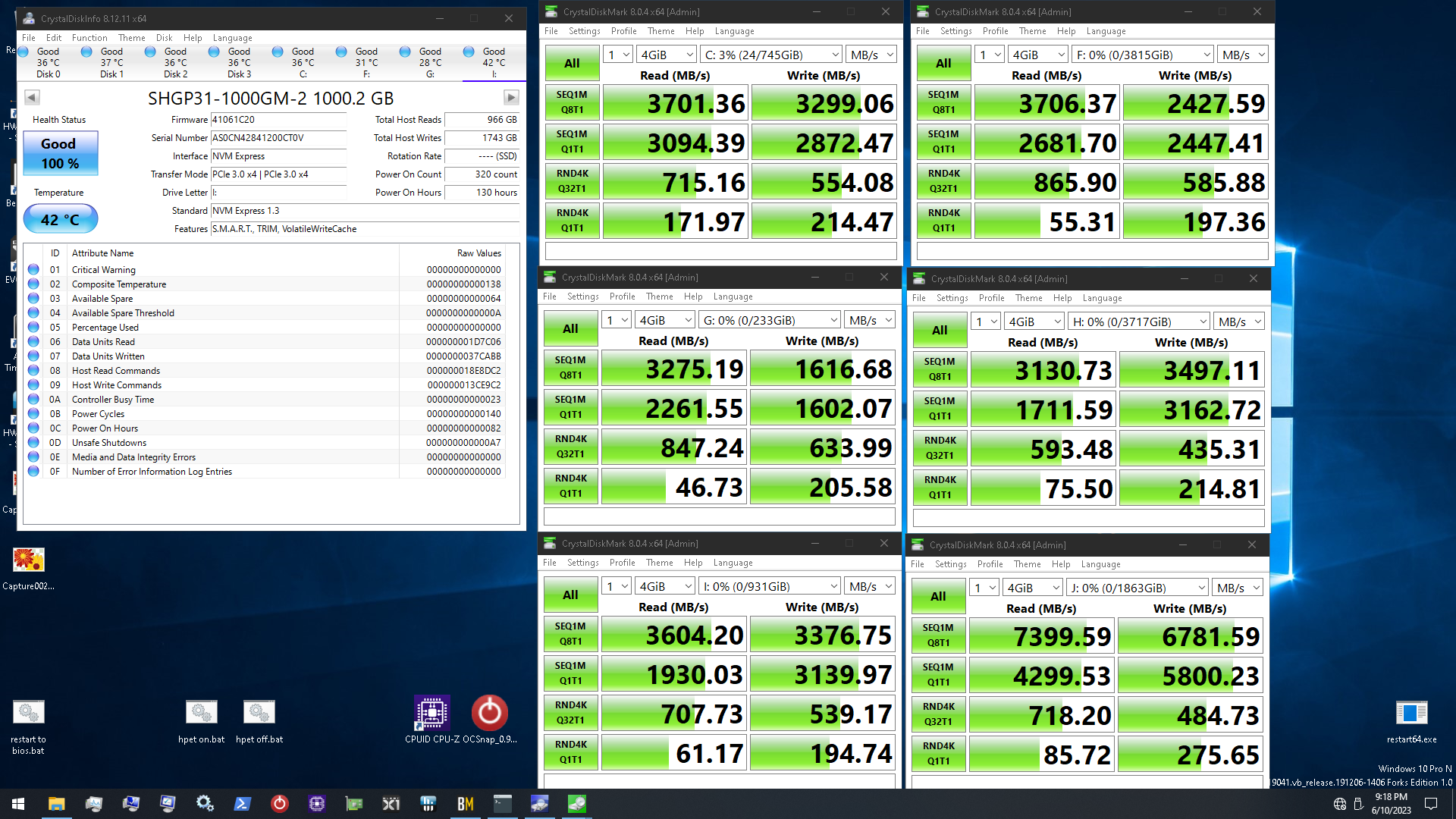
The windows storage pool is kinda sorta a spanned voume
Bottom left number is what you'll notice most in real world use
manic dagger
doenst like like I can but the boot drive on the spanned partition
unless I create a partition just for windows?
plush crag
I think you could do that during the windows install, but I wouldn't.
Just go with some high tier 1 or 2 TB off #tech-deals for boot as a single drive.
manic dagger
i already have two 2TB inland TD510
im fine not combining them but would like to if theres no downside
plush crag
downside is possible future headache if something goes wrong
manic dagger
i rather not have the increased lantency tho
plush crag
If you have budget and need for drives like those 510's, personally I'd pick up a 990 pro 2TB for <160 next sale, use that as boot, make a storage space with the inlands
windows storage space/spanned volume shouldn't incur any latency penalty
spanned is just jbod - mounts as a single volume, fills one drive after the other
manic dagger
but would one file be split across the two physical drives?
plush crag
manic dagger
but would one file be split across the two physical drives?
In windows storage spaces, it shouldn't be unless you configure it that way
manic dagger
or is it more so two physical drives attached to the same letter
manic dagger
ok ill give it a go when I install windows today
plush crag
I would google around "site:reddit.com/r/datahoarder storage spaces vs striped" and similar https://www.reddit.com/r/DataHoarder/comments/uj37kb/help_deciding_raid_5_vs_storage_spaces_vs/
manic dagger
if not im not gonna buy another drive, im fine with two seperte ones but its just a convience
plush crag
A lot of the community recommends 3rd party software, drivepool instead of storage spaces
manic dagger
but then i dont think ill be able to put the OS on it
plush crag
But that's not an option if you want to span the two drives to C:
Storage spaces is nice vs a spanned volume in that you can remove/add drives, it'll re-arrange your files for you
e.g. say 990 pro boot, two 510's in a storage space, you'll have the option to add more to the pool later on
You can do that with spanned volumes, like if you chose to install windows on a spanned 2x 510 for C: - but it's not as seamless, possible headache https://www.reddit.com/r/techsupport/comments/o93r2q/adding_new_drive_to_spanned_volume_failed_now/
 edgy galleon
I need help on what I could possibly do to help recover my files on my SD card please
it says "you need to format the disk in drive before you can use it"
if anyone can help please ping me i'll reply to further questions
edgy galleon
i'm using testdisk but i really don't know how to do this
fringe cove
does anyone know if i need standoffs for my m.2
i have a heatsink and since the heatsink is screwed to the mobo and the m.2 is stuck to it the drive is still horizontal with the port
my mobo does not have extra standoffs so i wanted to know if i need to get some
the heatsink standoff is too long for both the m.2 and the sink to be screwed down together
 jolly schooner
fringe cove
does anyone know if i need standoffs for my m.2
jolly schooner
fringe cove
does anyone know if i need standoffs for my m.2
It may place the connector part on the nvme under more stress which could lead to some damage
It prob would be best to get a stand-off
But again it should be fine if the heat sink is on top of it keeping the nvme in place kinda, I did that with my z490 e for a year and it was fine
fringe cove
jolly schooner
But again it should be fine if the heat sink is on top of it keeping the nvme i...
thanks
blazing musk
edgy galleon
i'm using testdisk but i really don't know how to do this
Personally I use recuva. It's a bit simpler. https://www.ccleaner.com/recuva/download
Download Recuva, the award winning data recovery tool
It's freeware too so it won't be asking for payment after it scans like others would
edgy galleon
blazing musk
Personally I use recuva. It's a bit simpler. https://www.ccleaner.com/recuva/dow...
it seems like it recovered 99% of my data
but
I can't play the videos which is the important part
blazing musk
What format are they? What file extension?
edgy galleon
blazing musk
What format are they? What file extension?
mp4 and mov
what do you mean by format? i play it with VLC if that helps
also ping if you reply i tend to not use much social media anymore lol
blazing musk
edgy galleon
mp4 and mov
Wondershare repairit should help fix the files https://download.wondershare.com/repairit_full5913.exe
edgy galleon
blazing musk
Wondershare repairit should help fix the files https://download.wondershare.com/...
how bad of a situation would you think i'm in?
this has gotten me stressed out for the whole day and i'm really tired :(
blazing musk
Not too bad it should be quick enough to fix
edgy galleon
thanks man
currently downloading, will give an update after a bit
curious on how these work
same with how i got myself into this situation in the first place lmao
blazing musk
For how the programs work, it'll basically try to convert the video to repair damaged headers.
For how this happened, I don't know exactly. There could be lots of ways a SD card gets corrupted.
edgy galleon
neat
edgy galleon
blazing musk
For how the programs work, it'll basically try to convert the video to repair da...
dang i wouldn't really consider them being fixed

it has color issues and artifacts
i really tried what i could
if there's anything else it's to take it to get it repaired
blazing musk
Anything past here gets a little more complicated. You can run the videos through an AI and it can clean it up.
plush crag
I would capture a "forensic image" of the drive first. You can use macrium to do so, or ddrescue/similar.
Then burn that image to an nvme or any fast ssd, attempt recovery from there.
edgy galleon
blazing musk
Anything past here gets a little more complicated. You can run the videos throug...
dang that's cool but I don't think i can do that
edgy galleon
plush crag
Then burn that image to an nvme or any fast ssd, attempt recovery from there.
last time i used macrium it was behind a paywall before i could continue
blazing musk
There's a free trial home edition
edgy galleon
I'll run through it again
blazing musk
The business version is the first one on the page, below it is home
plush crag
 edgy galleon
plush crag
https://www.techspot.com/downloads/5442-macrium-reflect-free.html
edgy galleon
plush crag
https://www.techspot.com/downloads/5442-macrium-reflect-free.html

what do i do?
 ebon dome
My friend needs some extra storage for gaming, pretty sure he has an M.2 slot but don’t want to spend too much. Thinking about getting him a P3 Plus as it’s about $76 right now for 2TB
Good buy?
blazing musk
ebon dome
Good buy?
Yeah that's a great deal
real lava
I would get 670p tho
blazing musk
Sure but gen 4 for only $10 more sounds great to me
real lava
but msi spatium exists lel
blazing musk
Which one? Because the cheap 4.0 one I've seen barely gets above 3.0 speed
dense merlin
blazing musk
Sure but gen 4 for only $10 more sounds great to me
Isn't p3 plus gen 3?
blazing musk
P3 is gen 3, P3 plus is gen 4
red jay
dang
i went to like 9 pc stores in my city
i walked to every single one of them
they weren't able to do anything,,
edgy galleon
what are good usb flash drives??
blazing musk
edgy galleon
what are good usb flash drives??
Good for what purpose?
Also wow we have 2 kaels in the same chat
edgy galleon
uhh reliable and that's it
yeah lol i typed on my discord browser tab instead of the app
i don't wanna lose my main acc:(
blazing musk
Something something SanDisk
They make decently reliable stuff in general for decent prices
 blazing musk
Not bad for the size and speed
edgy galleon
yeah it's just for backup stuff i'll never experience mortal sin of not backing up ever again
- a few games and movies to watch and play with friends instead of bringing my whole external drive
blazing musk
Then the 128gb should be nice for that critical document backup space
edgy galleon
yessir thanks
should i get a sd card reader too?

idk which ones are good, but my current ones definitely need replacing
blazing musk
I'd only get a SD card if you have something that needs a SD card, they're a fair bit slower in general
edgy galleon
sd card for camera that's it
and a sd reader to when i transfer to a pc
flash drive is where i'll put it into instead of a blocky external drive
red jay
How common is it that 2 hard drives would fail at the same time? (Took my PC to the shop n they say they failed)
Should I replace them with ssd? Or get two new hard drives?
real lava
It's likely, but hard drive failures are often because of age or rough handling anyway
blazing musk
Uncommon but not impossible, especially if there's a lot of vibration
real lava
What's the capacity of those hard drives by the way?
Because an average nvme ssd is only $35 for 1TB
real lava
hmm
I would perhaps continue buying hdds
Although 4tb ssds are also dropping in price right now
red jay
Do you or can you recommend a ssd? I already have one 2tb ssd nvme (I think it is
real lava
I would look in #tech-deals
red jay
Ok thank you for the info
red jay
so i play a few mmorpgs and stuff (elder scrolls online, neverwinter, americas army proving ground, call of duty, insurection) would it be more benificial to get a couple ssd drives for them and a couple hdd for the non-online play
edgy galleon
is there any software that can help me with rearranging and managing data/files?
blazing musk
edgy galleon
is there any software that can help me with rearranging and managing data/files?
Without knowing what it is you're trying to do exactly, I can at least recommend you take a look at windirstat. It'll analyze your drives and the contents, giving a visual look at the file structures. It's especially helpful for finding giant rogue files.
blazing musk
I thought MP34 was the successor to the MP33
So maybe it's the successor to the MP34
 hollow sphinx
mp34 is just a higher end brother of mp33 with dram
mp44l doesn't have dram, uses hmb
low cost gen 4
blazing musk
Odd
hollow sphinx
review says it's $43 for 1tb
i see it a little cheaper already
$42 on wegg and amazon
blazing musk
red jay
so i play a few mmorpgs and stuff (elder scrolls online, neverwinter, americas ...
Online games really do favor using SSDs. You'll get much faster load times, especially ESO. They're really cheap right now so it's hard not to get a 2TB drive when good ones are only $70 and then you can just use that for everything, no HDD required.
hollow sphinx
hmmm

could be an attractive alternative to the p41 plus maybe
TPU has it beating the 980 pro in random r/w
edgy galleon
blazing musk
Without knowing what it is you're trying to do exactly, I can at least recommend...
just organizing stuff and also what's defraging? or a more detailed thing to what's it for and what it does
need tips to on how to organize stuff, ex: naming by year month and date for folders
blazing musk
Defrag isn't necessary on SSDs, and in fact can destroy them.
What it does is move the "fragments" of files that are broken up so they're continuous and no longer broken up.
edgy galleon
ohhhhhhh that's cool i didn't think it's mostly for HDDs
what about any general storage tips and maintenance or whatever
lowkey becoming a data hoarder
blazing musk
Windows handles maintenance automatically. It'll "optimize" your drives when it's idle.
red jay
blazing musk
Online games really do favor using SSDs. You'll get much faster load times, espe...
Thank you very much
blazing musk
edgy galleon
what about any general storage tips and maintenance or whatever
Here's a big one: make sure you have backups of everything that's important. Things like game files can be re-downloaded easily but your save files might not be so easy to replace.
hollow sphinx
edgy galleon
ohhhhhhh that's cool i didn't think it's mostly for HDDs
hard drives spin the read arm over the physical disk to read files, so defragging helps a lot because reading a continuous block is much faster so it rearranges files into continuous blocks
ssds don't care because they don't rely on a physical arm to read data
oversimplified but you get the idea
plush crag
The windows defrag utility is SSD aware, it should TRIM or defrag as needed on schedule. Can run it to check.
blazing musk
Install XP on a SSD I dare you
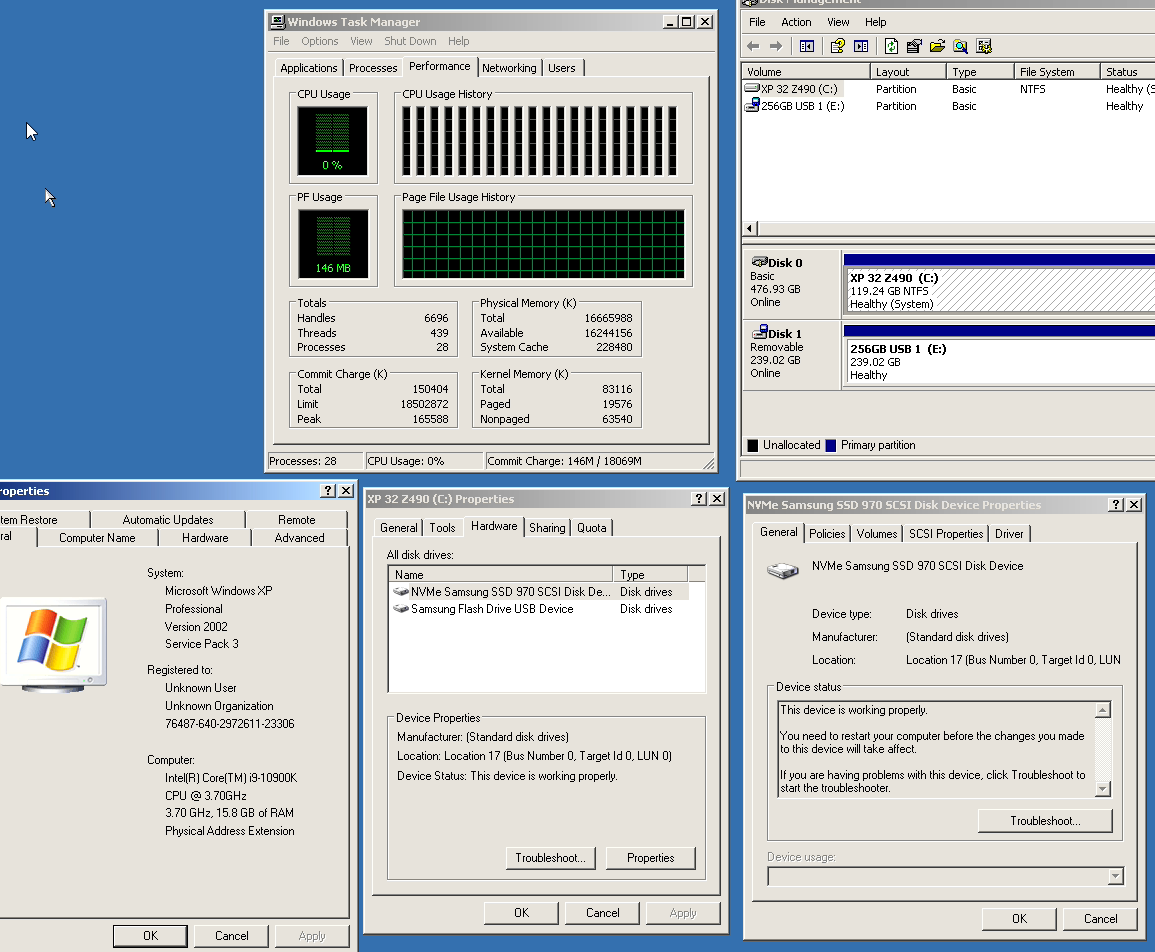 blazing musk
Good, good... Now write several large files concurrently and defrag it muahahaha
plush crag
I run xp images all the time on z790 over sata, never tried, I will out of curiosity next time I boot it up
blazing musk
You'd probably only drop like 5% health tbh but still, that's a few years' worth of wear in a few minutes
plush crag
Depends how full it is, I can't imagine it'd take more than a few drive writes even when 80% full
hollow sphinx
yeah, if you open disk defrag it'll tell you the last time it automatically trimmed
you can just leave it alone
blazing musk
XP isn't SSD aware though. They didn't know how to treat them differently to avoid wear.
You even needed SP3 just to use SATA drives at all
 calm badger
any way of replacing a ssd? i got a new ssd for my laptop it’s a m drive and i’m trying to replace the other m drive but i don’t know how to get windows installed on the new one
real lava
Get a usb drive of at least 8gb capacity
Create windows install media with media creation tool
 fresh bough
Huge
 floral yoke
Question
How can I read or back up a 256GB PCIe-based flash storage from model A1466 serial C1MTT1RNJ1WL Apple MacBook Air (13-inch, Early 2014) ?
Can I remove the HD and find a way to read it?
The MacBook Air is no longer working.
Thanks for your help.
real lava
They seem to use a proprietary connector
 cloud kiln
tfw sd card died after barely using it
it wasn't a main brand microsd
but it was a random one laying around that was still in its original packaging
used it once and it died
anyways
is there like a value pack of actually somewhat trustworthy microsd cards lmao
only needs to be at least 32gb, but fast
also one that is 512gb for expanding my phone storage
cloud kiln
ended up buying one sandisk for my phone and some pny microsds from a random article recommending microsds
 cyan needle
cloud kiln
ended up buying one sandisk for my phone and some pny microsds from a random art...
cyan needle
cloud kiln
ended up buying one sandisk for my phone and some pny microsds from a random art...
There are constant good deals on them from Newegg and Amazon
ebon dome
Bets on how long until WD ships out my 2tb SN850x? Ordered on July 11th and I don’t recall it saying back-ordered at time of purchase
Still crazy to me that when I bought a 1TB sn750 for around $130 I thought it was a good deal. Then a 1TB sn770 for $100. Now I’m getting a 2tb 850x for $90. All in the span of 2 years. SSD market be crazy
 small carbon
Yea that's why I would've done Amazon if I got another
Big Surplus of flash & such is part of it. Last 6 months alone was a good drop. Around march got my 2TB sn850x for $150 & that was decent back then. 4TB models are even around $160 or less on gen 3 now.
red jay
will this make my ssd have a shorter lifespan
 blazing musk
Unless it's got a garbage controller, no
 torpid adder
I don't understand why you would want to prevent sleep and idle states
blazing musk
It would technically improve latency in certain cases but only by a couple ms after leaving it idle for a while
Disabling sleep and idle mostly just uses more power, there's no real world benefit
torpid adder
yeah sounds like the drawbacks completely outweigh the benefits
red jay
im just gonna leave it at power saving
 sour wadi
Standard might be the best of both worlds tbh depending on what they offer in that
 stiff badge
 formal tusk
stiff badge
formal tusk
stiff badge
Macrium reflect
stiff badge
formal tusk
Macrium reflect
Thank you
stiff badge
formal tusk
Macrium reflect
Would installing the second m.2 and then transferring everything over to the second one also work?
formal tusk
Mhm
That's really the only way to do it albeit installing it in some facet
Like an enclosure instead for example
stiff badge
formal tusk
That's really the only way to do it albeit installing it in some facet
Any downsides in doing a clean install by formatting drives— besides having to reinstall everything
formal tusk
Macrium clones the install 1 to 1
With a few extra options like customising the partition
Those are the things I've messed with, anyway
formal tusk
Depends what the system is for and what the mobo it's going in to
stiff badge
formal tusk
Depends what the system is for and what the mobo it's going in to
Mostly gaming, some school work. Asrock b650m hdv/m.2
formal tusk
Just a silicon power a60
Or p34a60
2tb is hella cheap
Or intel 670p if it's $70 for 2tb
formal tusk
I have a bunch of them, they're good
fresh bough
does generation matter with m.2 stuff, ive got a silicon power a60 and my board says it supports gen4
when i try to boot the red indicator led on the stick flashes twice then goes off and the ezdebug on my board shows "boot" which is apparently a storage indicator
I have read that they are backwards and downwards compatible
real lava
nope, they work with any pcie versions, backwards or ahead
fresh bough
gonna buy another? i was eventually going to buy more storage anyways but thats the only thing i can think of, i tried it in my friends laptop and it would do the same two blinks on boot then nothing and will not show up anywhere in the system
i think i can still return this one too which is nice
real lava
the drive is probably DOA
fresh bough
kinda what im thinking
rlly sucks, i was hoping to at least see bios post before Wednesday when my gpu arrives
also hoping this is what causing my display issue and not the mobo!!!
fresh bough
No I’m just an idiot, the monitor I was using for testing was an older tv and either the hdmi cord was bad or the tv itself just wasn’t able to display :P
Gpu on Wednesday and new ssd on Thursday then it’s time for windows and driver updates!
 sand tartan
Guys is it normal for a hard drive to make noises like clicking noises sometimes?
They’re mainly silent but sometimes when I’m transferring stuff to drives other than my hard drive, they making like clicking sounds. I’m not sure if it’s because it’s ironwolf nas drives but they’re brand new
I also haven’t used hard drives in 5yrs so I forgot what they normally sound like
real lava
That's normal unless it's really audible
sour wadi
Hard drive especially nas ones (not designed to be right next to you so they don't care as much) afaik are loud
 worn trail
Hello, I am wondering if there would be any problems if I plugged my desktop's SSD into my laptop which already has a ssd. The desktop and laptop drive still has windows installed. What I want to do is move the drive onto the laptop temporarily so I can update some files while I am at work. Would there be any issues?
blazing musk
worn trail
Hello, I am wondering if there would be any problems if I plugged my desktop's S...
Theoretically, no problem. You might not be able to boot the desktop OS on the laptop, depending on your settings.
 sand onyx
worn trail
Hello, I am wondering if there would be any problems if I plugged my desktop's S...
sand onyx
worn trail
Hello, I am wondering if there would be any problems if I plugged my desktop's S...
Be careful around windows files and you're fine
worn trail
Gotcha.
 acoustic nest
sour wadi
Hard drive especially nas ones (not designed to be right next to you so they don...
acoustic nest
sour wadi
Hard drive especially nas ones (not designed to be right next to you so they don...
yeah my nas drives are super loud
but like
not louder than my laptop fans
You guys got any advice for archiving files?
sour wadi
acoustic nest
You guys got any advice for archiving files?
As in them files using less space because you won't use them often? 7zip ultra compression if so
acoustic nest
looks like .xz gives the best result

still
gonna use .gz for better compatibility
sour wadi
acoustic nest
Is there any risk of data loss?
Nope it just uses a lot of cpu time
sour wadi
acoustic nest
looks like .xz gives the best result
Never heard of xz, but did you use ultra on 7zip because it has multiple compression settings
acoustic nest
sour wadi
Never heard of xz, but did you use ultra on 7zip because it has multiple compres...
Yep
On all of them
I did a bit of research
sour wadi
Hmm, it'll vary a bit on the file type too, fair enough
acoustic nest
xz seems to be a different algorithm that has a higher compression ratio
But I went with .gz for compatibility reasons
sour wadi
Wait in the one you linked xz and 7zip have the same size lol
sour wadi
It's just x was listed first before numbers
Personally i go 7zip because it's on basically all desktop os's
acoustic nest
Yeah
tho I am leaning towards .tar.gz
Since the archive is running on a Linux machine
This is a very small archive tho
Only a few pdfs
So there's not much to compress
sour wadi
Ahh okay very little difference then
stiff badge
Why have a boot drive and another separate m.2 for everything else? Please @ me
formal tusk
Cos you can @stiff badge
stiff badge
formal tusk
Cos you can <@263134587297726464>
Any performance reasons?
stiff badge
Oh ok
formal tusk
If I had to guess - that comment stems from having an ssd for a boot drive and a hdd for extra storage
Which does make a huge difference
Having windows on any ssd is a huge boost
What comes after that is essentially butter
stiff badge
I mean having anything on a ssd is better isn’t it?
 blazing musk
 sterile viper
Hey who knows how to delete these partitions
sterile viper
Hey who knows how to delete these partitions
Open an admin command prompt. Enter these commands:
diskpart
list disk (and then make sure disk 1 is the correct disk, it should be)
select disk 1
clean
That'll wipe out the disk partition schema so it's like a new disk.
sterile viper
im on disk 0 tho
 sterile viper
blazing musk
Open an admin command prompt. Enter these commands:
`diskpart`
`list disk` (and ...
sterile viper
blazing musk
Open an admin command prompt. Enter these commands:
`diskpart`
`list disk` (and ...
 blazing musk
Oof I see what happened
It made that the boot drive
Hang on there's a fix, give me a minute
After considering for a minute, I'll be honest it'll be a lot easier to just shut it down, take out disk 1, wipe disk 0, and reinstall windows.
sterile viper
disk 1 is what I want windows on.. disk 1 is the m.2 in my mother board I would have to take off everything heat sink gpu thats a pain
blazing musk
Ah I see, well you installed windows onto disk 0
sterile viper
Yea to test if windows was broken on the other one
then I just wiped it earlier
except for those partitioons
blazing musk
Take out disk 0, run the windows installer again and delete those partitions. Then tell it to install to the unallocated space.
 blazing musk
Select each of the 3 partitions and delete them
blazing musk
You should end up with only one large continuous unallocated space
sterile viper
So I just did that
blazing musk
Well that works too lol
sterile viper
Yea I'm happy now I don't have two 1gb partitions
blazing musk
Now that there isn't a second disk for it to get confused with it should install to the right location now
sterile viper
1tb
That's another reason why I think windows was cranky personally but idk haveing your boot drive is two different partitions sounds like a bad idea
Hey is there a way to just delete windows from that other disk
blazing musk
Yeah once you're done installing windows you can put the disk back in and format the partition
sterile viper
Yea but wouldn't have to delete everything on it I wantes to keep the game downloads I did already
blazing musk
Easy copy paste before you wipe it then
sterile viper
Oh
Duh
I swear I don't think sometimes
I swear if I now have problems switching to my ssd I'm going g to flip lol
 sterile viper
Its copying off a HDD to a SSD
I gues its ark 300gb thats taking forever
and cyberpunk
blazing musk
Yeah, and mixed read performance of all those small files is horrible on most HDDs, which is where any SSD really shines when you're loading games.
sterile viper
yep idk What I should use the HDD for
blazing musk
I use it for pictures, music, videos, documents, my ISO collection... Stuff I don't access too frequently or doesn't need to be accessed super fast.
sterile viper
sounds like a plan
2tb SSD for game 1 Tb HDD for pictures, music, videos, and documents
Still makes me said when of my passport whichs is 3tb hardrive I gues started clicking on my and died during a power outage
sand onyx
Honestly, I never used more then a 1TB
real lava
I filled 512 gigs so quickly
sterile viper
I used a 1tb for alsmot 10 years and I can tell you it was very painfull my ark alone is 300gb
real lava
I didn't realize that until the laptop started slowing down so much
Cuz the ssd had only 10 gigs left lmao
blazing musk
Ark is easily the worst offender to my disk space I've ever played
real lava
Windows gave me low storage warning
blazing musk
And I play modded bethesda games
sterile viper
real lava
I filled 512 gigs so quickly
Thats how I feel about my laptop my IT teacher wanting to go over VMs and it filled it so quick from downloading all the ISOs
real lava
Stuff was freezing and stuttering
Usual symptomps of a full ssd
Dramless ones especially
Then again I did forget to empty recycle bin
There was like 100 gigs worth of stuff in my recycle bin
blazing musk
I just checked and including my mod staging folder Skyrim is taking up 100GB. Base game Ark uses more than that.
sterile viper
blazing musk
Is it faster than downloading at least?
I guess it went just really slow at the begining I thought it was going to take hours but it just all of sudden zoomed
blazing musk
It probably got to the larger texture files so it got to switch from mixed/random read to sequential
small carbon
100+ MB/s is definitely much nicer than 2MB/s 😂
sand onyx
For srure
 blazing musk
RAID 0 as in you have 0 expectations of reading the data ever again
 harsh sage
pff who cares about read/write errors
when you have
SPEED
im ashamed i paid money for these
blazing musk
It's not the errors I'm concerned about
It's the fact that if a single drive out of 6 fails you lose everything on the array lol
You could do RAID 50 and have parity
2 parity drives and 4 storage
That still won't save you from a total failure though
RAID 10 would be the ideal option if you care about the data on it at all, but then you're only getting half the total space/speed potential. At least you could lose up to 3 drives and be fine as long as they're in different pairs.
harsh sage
lol its funny you think id be putting anything even remotely important on this brick
raid 0 ftw
no parity all speed💪
blazing musk
No I didn't expect anything important, but 3TB of game files or w/e you end up doing would be a pain to re-download
harsh sage
Im just using it to mess with truenas/zfs primarily
itll be in another system
I dont typically like to mess with my daily at all
blazing musk
Ah so it's not going to be anything more than a test array, that's fine then RAID 0 to your heart's content
harsh sage

sand tartan
Guys so I have a windows network share server, I assume the hard drives are on even after setting it to shut down in 30mins, and the pc is idle and no one is accessing it. Should I just turn that function оff?
I’m not sure if the drives are 100% offline but I hear it clicks and rotate sounds sometimes.
ebon dome
after 3 weeks my SN850x finally shipped, woohoo
small carbon
That's why I didn't order from WD or w/e.
blazing musk
Backorder be like
ebon dome
3 extra weeks to save $10 lol
small carbon
probably was close price I ended up paying, lol. 6% back on my card helped. 
ebon dome
The total ended up being exactly $89.99 for 2tb. They didn't charge tax for some reason. Apparently amazon listed it for that price for a bit, but at the time of my purchase amazon was $10 more than WD store
quiet gust
Just installed the LSI 9240 8i in my server and it already needs to be troubleshooted... :/
Basically with the card in and but not plugged to any drive it works fine, (only my main sata SSD is connected but not to the hba). If I connect the 3 sas drives to the hba the pc starts for 2 seconds, shuts off and restarts again, over and over...
Almost if there was some sort of short or power issue... What else could it be? Faulty drives causing it to not work?
quiet gust
Connecting Just one hdd works, trying to figure out where the problem is
 quiet gust
Every hdd and SSD works fine if connected alone when no other drives are attached to the card, 2 4tb HDDs work fine, lets see 2hdds+1ssd if it shuts off again
Oh lord
Fastest hdd I've ever seen

Should I enable cache for writing on my HDDs, right?
quiet gust
Everything works... SSD seems pretty good too
 blazing musk
quiet gust
Everything works... SSD seems pretty good too
blazing musk
quiet gust
Everything works... SSD seems pretty good too
How are you powering the drives? Through the HBA or with a cable that splits data and power?
quiet gust
The drives are being powered from the PSU sata connectors
I added the connectors since there were none
Btw I tested all three sas drives together and it seems to work just fine, boots but there's still a problem somewhere: with all the drives connected, if I shut off my pc, it won't turn on from the button unless I disconnect and reconnect the power cord
Also do you know what's going on with the "SSD" making mechanical sounds like a hdd?
blazing musk
Huh, that's a new one to me
quiet gust
Yeah that's very strange...
It's a IBM 400gb sas 12gbps ssd
But I can't find any specifications online
I'm happy that every drive is on and working fine but the pc really isn't,... It's difficult to work with sff stuff and dell products
I think I found where the problems are with the power.... The sata power cables don't make good contact with the sas adapters and that's why some of the drives rarely don't show up...
Found it out by plugging another HDD and not hearing the spinning noise, moved it and found out the contact issues
Does that explain why it sometimes shuts off completely?
AliExpress stuff 🤓
quiet gust
Seems to work fine... At least for now
I guess the pliers did a good job and I probably shouldn't move the pc around too much to avoid loosening the connectors
Yep, just a bunch of loosen connections because of 💩 cables
That's better

A lot of useless storage I'll probably never use completely
The server is very silent. I like it
quiet gust
quiet gust
Should I enable cache for writing on my HDDs, right?
@blazing musk
blazing musk
Yes you'll want caching on as long as you've got the ram for the HBA
quiet gust
...
Idk
I guess it has onboard cache
Lemme check
I'll just enable the setting and see what improvements I get
(photo shows SSD speeds, not hdd) As for the hdd, the writing speed I marked, went from 70mbps to 180mbps, amazing
 blazing musk
Alright, what drive should I upgrade my laptop to. I have 3 spare HDDs. The current one is 160GB so any of these will be an upgrade. Will it be:
HGST


Western Digital Blue


Or Hitachi


Probably not the Hitachi because that's pretty weak in all areas so realistically between the first 2, faster sequential or faster random iops
blazing musk
That's the one that came out of my PS4 and also the largest of the bunch
Side note: the PS4 makes a buttload of partitions on the disk, no wonder usable space is so low when you've got 15 partitions ranging from 1GB to 16GB
quiet gust
I think I can confirm the problem with the pc completely shutting off and not turning back on. It's probably a short somewhere, I've wired a lot of stuff in this pc and also have some connectors sitting there inside the case, with nothing preventing them from either touching the case or the mobo, I'll open this thing up and try to figure out if that's where the problem is
Tom's Hardware Forum
Page 2 - Seeking answers? Join the Tom's Hardware community: where nearly two million members share solutions and discuss the latest tech.
blazing musk
Based on your previous finding with the bad SAS adapter I would agree
quiet gust
Idk if it's either the sas adapter or the sata power cables that has bad connections but I'll probably figure it out
I could wrap any connector that isn't actually connected to anything to prevent shorts
blazing musk
My question would be, does it still act like this if the HBA is out but the drives are still powered on
quiet gust
Let me try
Actually... Sas drives don't spin unless their data connectors are connected to the hba
But I'll try anyways
Cables that have this sort of protection around should not short anything right?
 blazing musk
Unless the wires inside the sleeving are shorting together, yes
quiet gust
I'm thinking this thing that's shutting off my pc completely is actually a good thing... Because if it's always powered the HDDs keep spinning for some reason. The server is on from 12pm to 12am, I could use a smart plug that removes power for one minute, after the server has shut down (as if I was manually removing the power cord and plugging it back in), that way the pc is actually in that sort of stand-by, no HDDs spinning but Its gonna be able to turn itself back on (since it's scheduled to turn on at 12pm
Even if it's a short it shouldn't be a problem (since the pc is still living)
Right?
blazing musk
That could work
quiet gust
It's probably better than having the HDDs spin 24/7
blazing musk
I won't say you'll be safe from magic smoke but it might work lol
quiet gust
If it's actually a short it's nothing too significant, maybe just a slightly punctured cable
blazing musk
Well any short has the potential to turn into a big problem. Shorting power to ground creates a lot of heat in the cable which can make it worse.
quiet gust
Ok,maybe I should solve this problem and actually use the smart plug to stop the HDDs from spinning when the pc isn't "powered on"
The SSD sas cable was being pulled a bit and that's why it sometimes didn't show in windows
:|
Wait a second
Could I use a multimeter and test continuity from each sata power cable to the case..?
blazing musk
In theory
quiet gust
Can I do that with the HDDs plugged in?
blazing musk
I'd recommend with the power off but yes
quiet gust
Power is off, but the HDDs are connected to the splitter
GND pins make a beeping sound when touching the case.. ok
12v and 5v don't beep but they show some numbers on the multimeter
@blazing musk the 12 and 5v should show anything on the multimeter right?
Both 12v and 5v are showing some continuity, it's over 1200 (I guess ohms) so it's not actually a "big" short
blazing musk
Sorry I'm working on my own projects too rn
You're in resistance mode right? If there's continuity the number should be increasing
quiet gust
I set it to continuity mode, and I guess it shows the resistance too, the number isn't always the same but I see its over 1200
It fluctuates but stays between 1200 and 2000
blazing musk
Should be fine then, you'd see it increasing to 10kohms if it was short
quiet gust
When there's no continuity shows OL cuz it's out of range, the resistance of let's say the air is way too high
If I touch the two ends of the multimeter together it shows 0ohms or 0.1
blazing musk
Yeah there will still be some amount of continuity in a production system, everything runs through the PSU. If it was short you'd be seeing it change as I said above.
quiet gust
Ground cables and the case (when tested for continuity) they show little to no resistance and that's ok, every other positive connector should show a high resistance or should show no resistance at all
blazing musk
The ground is typically the cause of that continuity. The motherboard is grounded to the case and the PSU.
quiet gust
But I guess 1200ohm res. Between 12 or 5 and the gnd means there is a insignificant short somewhere
I'll disassemble and reassemble the hba and the cables to see if I can get rid of this sort of short
And as I told you before, no hba means no HDDs spinning, but also can't get the same problem as before, now that I removed it it doesn't shut off completely
quiet gust
I'm going to leave some info so maybe you can help me figure out a bunch of things
1]
Hba connected in pcie slot but not to the sas splitter cable.
Every sas drive is connected to the sas adapter and to the sata power connectors, works fine, shuts off normally
2]
Hba connected to both pcie and drives, drives receive power and they spin. Right now it shuts off completely. Power cord needs to be re-connected
quiet gust
3]
Hba connected only to the HDDs and not the sas SSD. Shuts off normally, but drives keep spinning when pc is "off"
4]
Hba connected back to all drives, problem occurs.
SSD or SSD's connector/adapter is likely the cause
Maybe there's the problem
 blazing musk
That could very well be the cause
quiet gust
SSD power connector confirmed, idk if the actual sata pwr splitter or the sas adpt
quiet gust
quiet gust
Maybe there's the problem
This was not a problem since the broken pin is a 3.3v, but the way I wired my pc the 3.3 is not even connected, so basically even if it was touching the pin nearby (gnd) it didn't affect anything at all
quiet gust
I finally figured out where the problem is...
There are no shorts, it's an overcurrent protection, when the pc is turned off it goes in standby mode, which uses different 12v lines (the ones you see on the PSU sticker), and since the HDDs apparently would keep spinning after it's turned off they use just enough power to cause the PSU to overload those rails (that have a combined max output of 2.5A at 12v)
Since this pc has only 12v coming out from the cables I converted some of that to 5v, so basically any load on 5v is a load on 12v line(s)
When in standby mode I can't go past 30w.
2HDDs = 2×(12V×0.8A+5V×0.8A) = 2×13.6 = 27.2W
1SSD = 12V×0.5A+5V×0.95A = 10.75W
That's why it shut off with the SSD connected, that few power it used was just enough to trip the oc protection
 blazing musk
Ahhhh interesting
quiet gust
This makes much more sense
blazing musk
Maybe a second power supply is in order
quiet gust
Now I have to figure out a solution
quiet gust
blazing musk
Maybe a second power supply is in order
Yeah
Probably
External one and I could modify it to have sata connectors
Do you know if they sell any external PSUs that output both 5 and 12v?
Doesn't matter what connectors come out of the PSU since I'll cut them :]
I can't do a tfx PSU since the connectors on this dell are proprietary
blazing musk
I'd just use a spare, normal modular power supply and jump the 24 pin. Then the drives can spin all day if they want.
quiet gust
Yeah but it'd be a bit big
I do have some sort of non standard size PSU that's almost a sfx, 200w and already has a few sata connectors but it's a bit loud and old
blazing musk
Fan swap?
quiet gust
Maybe
I didn't consider this thing about the HDDs, it was unexpected and this basically makes the sff server no more sff
blazing musk
I don't have any units smaller than ATX right now
quiet gust
It's like mini computers that have external power bricks
blazing musk
Yeah the only other way around it I see is to make sure it never enters that standby mode
quiet gust
Mmm
I do have some small 12v laptop chargers that provide like 4-5A so I could try adding a DC to DC converter to get both voltages
And then hook up the data connectors
*sata
At least it's a good thing that the oc protection on this PSU works and doesn't actually kill it like some others
blazing musk
That's true. One thing Dell does right is their power supplies.
quiet gust
I wonder who designed the optiplex 3050, 2 HDD slots available but only 1 power connector
blazing musk
Probably the same guy that keeps reusing the same steel chassis in a slightly different way
 amber hound
Can anyone recommend any NVME thats a good storage device for gaming. No budget im just looking for something that has a 2TB that is good for gaming
manic dagger
amber hound
Can anyone recommend any NVME thats a good storage device for gaming. No budget ...
they're a bit pricy, but gen 5 nvmes are a thing now, does your motherboard have a gen 5 slot?
amber hound
manic dagger
they're a bit pricy, but gen 5 nvmes are a thing now, does your motherboard have...
Yep its an am5 board with gen 5 support. If possible too would you be able to recommend any gen 4 too
sour wadi
Gen 5 nvmes are a waste of money so far, gen 4 are barely worth most peoples money, especially for storing games
What country?
manic dagger
sure
so for gen 5 the best is Crucial T700, https://pcpartpicker.com/product/8hkH99/crucial-t700-2-tb-m2-2280-pcie-50-x4-nvme-solid-state-drive-ct2000t700ssd3
gen 4 if u want the best go 990 pro of SN850x

Crucial T700 2 TB M.2-2280 PCIe 5.0 X4 NVME Solid State Drive (CT2000T700SSD3)
but yeah as pato said unless u have a need for gen 5 drives, go gen 4, doenst make much of a difference
sour wadi
All a waste of money for a game drive
manic dagger
only reason is u said no budget
amber hound
sour wadi
What country?
USA
sour wadi
Gen 5 drives actually have kinda crappy rands from what I've seen
manic dagger
ill run a test on my inland td510 later
manic dagger
amber hound
USA
if u want a bit cheaper 980 pro is also good
sour wadi
amber hound
USA

Solidigm P41 Plus 2 TB M.2-2280 PCIe 4.0 X4 NVME Solid State Drive (SSDPFKNU020TZX1)
sour wadi
manic dagger
if u want a bit cheaper 980 pro is also good
980 pro? Well priced? Ahahahahahahaahahaha
manic dagger
theres been some deals
sour wadi
manic dagger
theres been some deals
Also 980 pro has literally been committing the die on old firmware and if you upgrade and the firmware update fails Samsung aren't covering it
manic dagger
ah i see, til
amber hound
manic dagger
if u want a bit cheaper 980 pro is also good
I appreciate it I was looking between the 990 and sn850x bust wasnt sure which one was better
amber hound
sour wadi
https://pcpartpicker.com/product/RqTp99/solidigm-p41-plus-2-tb-m2-2280-pcie-40-x...
I saw these and havent heard of them before but they looked promising
manic dagger
id go 990 pro
sour wadi
amber hound
I saw these and havent heard of them before but they looked promising
I'd old intel/sold to sk hynix, they're really good
sour wadi
amber hound
I appreciate it I was looking between the 990 and sn850x bust wasnt sure which o...
Anything more than p41 plus is honestly a big waste of money for a game drive
blazing musk
manic dagger
id go 990 pro
Same dying issue, just less coverage of it because less popular model
 lone vapor
need a nice ssd
preferably 2tb
relatively cheap
im about to fill up my current one
well not cheap but like a good price for the storage
nothing like $500 for 2tb
blazing musk
Either of these for cheaper options https://pcpartpicker.com/products/compare/VxfFf7,C3xbt6/
Silicon Power A60 2 TB M.2-2280 PCIe 3.0 X4 NVME Solid State Drive vs. TEAMGROUP MP33 2 TB M.2-2280 PCIe 3.0 X4 NVME Solid State Drive
This one is faster in certain applications, but not gaming https://pcpartpicker.com/product/RqTp99/solidigm-p41-plus-2-tb-m2-2280-pcie-40-x4-nvme-solid-state-drive-ssdpfknu020tzx1
Solidigm P41 Plus 2 TB M.2-2280 PCIe 4.0 X4 NVME Solid State Drive (SSDPFKNU020TZX1)
lone vapor
well
what would you get
because i dont need a ton of storage
1tb would work for what i need
i also want speed
formal tusk
There's also 2x m450 1tb for 54$
blazing musk
What would you need the speed for? I have a MP33 personally and it's fantastic, loads all my games quick
lone vapor
idk
not crazy speed but
i used to have a bad sata drive and
it really ruins a pc
thanks for helping falcie
i appreciate it
ill check out the mp33
blazing musk
Cheap sata would have bad random performance, I understand how that would be painful
lone vapor
yeah
dude it was awful
took me like 20 minutes just for all my startup apps to open
now i dont even notice them and i have like 3x more apps opening
quiet gust
Can someone help me find out at what speeds should the IBM 400GB sas 12gbps SSD run at? I can't find them anywhere
plush crag
List the model number
 half flint
looking for a usb c nvme enclosure. sn850x going into it so itll have to be able to cool it to a degree, anyone got any reccomendations? looking for fairly compact, but also decent enough passive cooling. trying to stay under 30 USD and preferably from amazon
blazing musk
half flint
looking for a usb c nvme enclosure. sn850x going into it so itll have to be able...

Performance USB 3.1 Gen 2 and NVMe SSDs let us exceed SATA III SSD performance. The Plugable USBC-NVME M2 Enclosure is capable of raw read and write speeds up to 10 Gbps, compared to 6 Gbps with traditional SSDs. Performance of the SSD NVME adapter depends on the capabilities of your NVMe SSD and...
It won't get the full potential of the SN850X for sequential speed but that's about the best in that price range
half flint
awesome, thanks
what would i need to spend to get full seq speeds with passive cooling?
blazing musk
There is no external interface capable of running at the full speed of that drive
The best you could do is thunderbolt 4 at 40Gbps, or roughly 5000 MBps, which is far less than the rated 7300
half flint
hmmm okay thats fine then, doubt ill need full seq
blazing musk
Thunderbolt 5 will be able to go up to 80Gbps when it launches
And USB C has 80Gbps in it's spec but nothing hits that yet
The dock I linked is only 10Gbps, which is all you'll find under $100
half flint
aight, thanks for the help, ordering the one you linked
you needa get your own affiliate link at some point, damn
blazing musk
That would actually be against the rules
I can't profit in any way here
I prefer it that way though tbh
More unbiased opinions instead of "buy this it's better, yes it costs more" and slipping my referral link in
half flint
good point
cyan needle
blazing musk
https://www.amazon.com/Plugable-Tool-free-Enclosure-Thunderbolt-Compatible/dp/B0...
How does this compare?
https://www.newegg.com/maiwo-k1689p-enclosure/p/0VN-00D8-00037?Item=9SIAVF7JJD6708
blazing musk
Not as good cooling and I've never heard of that brand
Only 3Gbps on a drive that can definitely do more, probably a bad controller
quiet gust
plush crag
List the model number
 plush crag
Did you you google the model?
quiet gust
Yes but I can't find the speed specifications (like seq. Read and write) apart from 12gbps (sas3) which makes me think that's the actual maximum and average speed of the drive
So about 1.2GB/s
blazing musk
lol that's very wishful thinking
 mental plaza
anyone know a good microsd card that will last a few years?
my samsung evo died within the first 2 months
blazing musk
mental plaza
my samsung evo died within the first 2 months
Contact Samsung for a replacement
They're usually decent, you probably got unlucky or got a knockoff.
mental plaza
blazing musk
They're usually decent, you probably got unlucky or got a knockoff.
I just don't know why, i mean i got it from Gamestop but they shouldn't be selling fake stuff
my luck probably got to me
anyway, I can try warranty
blazing musk
Yeah GameStop should have the real deal
ebon dome
It’s crazy how the only one I paid less than $100 for was the newest, largest capacity, and fastest one

 shell cove
I have a Samsung Galaxy Book2 Laptop (Model NP730QED-KA2US) that I wish to expand storage. Which SSD model should I use to expand storage from 256GB to 2TB?
blazing musk
shell cove
I have a Samsung Galaxy Book2 Laptop (Model NP730QED-KA2US) that I wish to expan...
It's hard to find reliable information on this but according to Reddit you should have one M.2 2280 and one 2230 slot. You should be able to fit any M.2 drive without a heatsink.
What budget are you looking at for the upgrade? Drives have been very cheap lately.
shell cove
blazing musk
It's hard to find reliable information on this but according to Reddit you shoul...
Thanks. It has been difficult finding specific SSD stats for the laptop. I did not know if it had 1 or 2 slots. One slot makes things more problematic (for transfer), so if it has 2, that is great. Yes, prices have been cheap lately. You can get 2TB < 100USD!
real lava
shell cove
Thanks. It has been difficult finding specific SSD stats for the laptop. I did n...
The laptop seems to have only one m.2 slot I think?
With a space for sata
Well nevermind
Falcie has already gotten more info than me lel
 deep roost
Hi, everybody. I just wanna ask about the Aorus 5000E nvme, is it good? what other nvme can you compared it to?
blazing musk
deep roost
Hi, everybody. I just wanna ask about the Aorus 5000E nvme, is it good? what oth...
It's decent, but what will you be using it for? Odds are you can get something cheaper and not lose anything noticeable
deep roost
blazing musk
It's decent, but what will you be using it for? Odds are you can get something c...
Just an upgrade for my crucial p1, will not use on any other purpose than casual gaming
blazing musk
You can definitely get something cheaper. Gen 4 drives don't do anything for gamers, even if you play the one game that supports directstorage.
Maybe a MP33 or A60
I have MP33 personally
deep roost
I just saw the 5000e on amazon, and its really cheap considering its pcie4 but i cant see any reviews regarding about it that's why i am asking here lol
blazing musk
Fair enough. If you want it just to have it it's a good drive. It can knock a whole 2 seconds off your windows boot time lol.
deep roost
Is it true that p3 plus is trash? Lol
blazing musk
Pretty much yes
 fringe mesa
So, anything better than the SK Hynix P41 2tb now a days? Saved you all from a three hour text wall of mine, only just now realizing I typed it all on another discord 😅
blazing musk
fringe mesa
So, anything better than the SK Hynix P41 2tb now a days? Saved you all from a t...
P41 is still one of the best for random read/write but if you're looking for sequential speed the Crucial T700 is over 12GBps
cyan needle
fringe mesa
So, anything better than the SK Hynix P41 2tb now a days? Saved you all from a t...
That's what copy/paste is for xD
torpid adder
just type it all again anyway 😎
fringe mesa
cyan needle
That's what copy/paste is for xD
That's the key issue, being able to get to it while on my phone lol. Moment someone talks, it rubber bands me back to the end.
fringe mesa
blazing musk
P41 is still one of the best for random read/write but if you're looking for seq...
Hard to say. Basically it's for games that constantly read and write data, like Minecraft, Terraria, Starbound, and my new all time favorite, Farworld Pioneers, once know as Outworlder. That new system I built last August, no data bottlenecking, no lag spikes, except for other users who placed Fifty 100 slot containers in Starbound. Storage for that game is just horrid. Each slot in a container burns up drive space and ram, regardless if something in it or not. Now multiply that by 8 players, and it's lag city. Well not for me since last year, but others, sorta feel bad 😂
blazing musk
Game servers would be more reliant on random IO
So the P41 Platinum is probably still top 3 easy
fringe mesa
Thanks Fal. I use one on my Steam Deck externally as well. It runs so much better than the 250gb internal one. Mounts itself every boot up, so never have to go through all that chaos of having to load up desktop mode just to mount it like Steam originally told everyone. I didn't want to void the warranty, otherwise I'd have modified the 250gb NVME and swapped it for the 2tb internal which others do when replacing warn out parts like joystick.
blazing musk
Swapping the SSD in the deck doesn't void the warranty
At least not in the US
If you break something while it's open, that's another story though
fringe mesa
In order to access the one that came with it? Steam told me last year that it would.
Otherwise I'd sure as heck have made the swap, instead of having to carry a cable and drive around.
blazing musk
They legally can't void your warranty just because you opened it
If you break it, then that's CID and not covered
Valve even posted a "how to" video on how to open it
(while at the same time covering their butts and saying it's not recommended)
Now the problem comes when you realize that the deck uses M.2 2230 and not 2280, it's not a full size SSD
But you can still swap in up to a 2TB drive
The 2TB ones are just a little slower than 1TB, but that doesn't affect the deck much
blazing musk
Any of these would be good https://pcpartpicker.com/products/compare/9ypQzy,y2V2FT,PHGhP6,srvD4D/
Sabrent Rocket 4.0 1 TB M.2-2230 PCIe 4.0 X4 NVME Solid State Drive vs. Corsair MP600 MINI 1 TB M.2-2230 PCIe 4.0 X4 NVME Solid State Drive vs. TEAMGROUP MP44S 2 TB M.2-2230 PCIe 4.0 X4 NVME Solid State Drive vs. Solidigm P41 Plus 1 TB M.2-2230 PCIe 4.0 X4 NVME Solid State Drive
blazing musk
blazing musk
Valve even posted a "how to" video on how to open it
Here's that vid, time stamped for SSD replacement https://youtu.be/Dxnr2FAADAs?t=210

Learn more about Steam Deck and reserve yours at at http://steamdeck.com
One of the most frequently asked questions we've received about Steam Deck is about the components inside it, and whether they're replaceable or upgradable. The answer is a bit more complicated than just a yes or no, so we've made a video to explain all the details. Spoile...
While you're in there... https://www.amazon.com/Electromagnetic-Steam-Deck-Thumbstick-Replacement-Accessories/dp/B0B31STJDH

This joystick module is used for repair replacement on Steam Deck 1. Steam Deck has its joystick calibrated from factory, and calibration values vary on each of it. 2. After Gulikit joysticks are installed, turn on Steam Deck, press the tiny switch on the board of joystick calibrated. Do not touc...
fringe mesa
Lol, you get in me head way to often Fal. I got distracted when I pulled up this kit, that offers some pretty interesting features. I'm still trying to see what it does to fit a 2280.

JSAUX
【Complete and flexible】This steam deck accessory consists of a protective back case with its own metal stand, a strap to attach other accessories, a front cover to use when the Steam Deck is idle, and a protect case for Steam Deck Dock. 【Perfect Fit】The modular steam deck case cut-outs are perfectly aligned with the h
 fringe mesa
I saw some older videos from last year, where the YouTuber was selling some kind of insert that permitted the 2280 to be inside with some kind of adapter cable from 2230 to 2280. That's what I was looking up when I came across that link
blazing musk
What they probably did was a M.2 riser cable
And then a replacement back with room for the drive would make sense
fringe mesa
I accidentally sent back an NVME enclosure, thinking the fan was bad. Turned out, the NVME never seems to run hot, so fan never runs. Why on earth did manufacturers go to so much trouble, making heat sinks like as if NVME got as hot as CPUs?
Batterys for Steam Deck, now those run very hot. Even when plugged in and deck used same time.
Every multiplayer game that has dedicated server, I run off my desktops using NVME, and log in using my steam deck. It's not exactly portable when you got a controller, keyboard, deck dock, drive enclosure to have to worry about. That spacer I saw last year, suddenly sound quite handy now.
blazing musk
3.0 drives tend to be cool enough that they don't need any extra cooling, maybe passive airflow is needed but nothing direct.
4.0 drives can get hot enough to throttle, and they do so around 80-90C
5.0 drives are even hotter and I'm sure someone is going to make a model with active cooling
Generally they'll be hottest during sustained write operations
manic dagger
blazing musk
5.0 drives are even hotter and I'm sure someone is going to make a model with ac...

Unleash the power of the Inland TD510 PCIe 5x4 NVMe SSD for next-level computing. Get read/ write speeds up to 10,000 MB/s and 9,500 MB/s, pushing the limits of what SSDs can do. Prepare for the next evolution of speed , giving you supreme PCIe Gen 5 technology for your PC so you won't lag out on...
 raw pawn
God damn it my 980 is causing freezing on my computer and I'm probably gonna have to rma it. Any good reccomendations on a good boot drive that won't break the bank for a gaming pc
blazing musk
raw pawn
God damn it my 980 is causing freezing on my computer and I'm probably gonna hav...
If you're in the US: https://www.newegg.com/silicon-power-p34a60-2tb/p/N82E16820301429
raw pawn
blazing musk
If you're in the US: https://www.newegg.com/silicon-power-p34a60-2tb/p/N82E16820...
Thank you kindly


 torpid adder
They're multiplying
quiet gust
Ayoo
quiet gust
There's no way that I bought a 1tb 2.5" SSD for 60€ last year now for the same price you can get double the amount of storage
cyan needle
quiet gust
There's no way that I bought a 1tb 2.5" SSD for 60€ last year now for the same p...
You're surprised?
blazing musk
Silicon overproduction be like
torpid adder
please continue to silicon overproduction please
acoustic nest
Yes please give cheap 4TB nvme