#storage-devices
1 messages · Page 4 of 1
 turbid crater
 indigo condor
Thats not bad
turbid crater
indigo condor
Thats not bad
especially it cost 591 before tax and card cost 650 msrp
 red jay
Im installing forza horizon 4 from the xbox app on to my external hdd but my main os drive (ssd) is at 100%
Is it caching the stuff on my main drive and then moving it to my hard drive?
 turbid crater
red jay
Im installing forza horizon 4 from the xbox app on to my external hdd but my mai...
turbid crater
red jay
Im installing forza horizon 4 from the xbox app on to my external hdd but my mai...
did u try the xbox discord server?
indigo condor
red jay
Im installing forza horizon 4 from the xbox app on to my external hdd but my mai...
I believe in the xbox app you have to change the default drive to your external because it automatically goes to your ssd even when you change it.. it’s happened to me.. but when you change it in settings it creates a new xbox games file you can use from there on
 mild bone
 green wharf
red jay
green wharf
red jay
That’s been my hdd for some reason too, it’s saying it’s at 100% usage but it says it’s not writing or reading anything
 open stump
looking to run my old oem sys on external hd and instll my gaims on a external on my new nitro sys and ruun gaims and audio streaming
forgive spelling
open stump
older sys has only ide and ssd slot and 4 usb2
 tribal jackal
?
open stump
my new on already has m.2 in it looking to expand
working with 2 compleatly diffrent systoms
tribal jackal
do you know where I might be able to add a second storage to that motherboard
open stump
old one is a oem win 10 new one is a nitro let me take pic of my old sys spec
tribal jackal
?
 kind sierra
tribal jackal
where can I plug in a ssd on the ASUS Prime B560M
kind sierra
tribal jackal
where can I plug in a ssd on the ASUS Prime B560M
You have two m.2 connectors, one above the GPU slot that's underneath a metal cover and one that's below the GPU slot
open stump
Sys bus pci express as rock model n68c_s ucc
kind sierra
open stump
looking to run my old oem sys on external hd and instll my gaims on a externa...
Booting windows 10 on an external hard drive is not a very easy thing to do, Microsoft has it set up to not really allow it
open stump
And cipset
tribal jackal
kind sierra
You have two m.2 connectors, one above the GPU slot that's underneath a metal co...
go to dms so I can send a picture of thje motherboard
kind sierra
tribal jackal
go to dms so I can send a picture of thje motherboard
You have two slots
 open stump
No my old bord and Athlon 2x3 450 prosser
kind sierra
Here and here
 tribal jackal
So one is under a cover and the other the gpu is covering it
kind sierra
Yup
The one under the cover is your primary slot, the second one is for extra storage
tribal jackal
ok So I have to take the gpu out
kind sierra
Yes
tribal jackal
is that hard to do
kind sierra
No, just remember to release the little clip on the back. There will be videos online showing how to release it
open stump
I'm hear only upgrade path on older sys is ither ide or ssd or usb
tribal jackal
Dont I just unplug then unscrew at the back and take it out?
kind sierra
open stump
I'm hear only upgrade path on older sys is ither ide or ssd or usb
If it has IDE I probably wouldn't worry about upgrading it
kind sierra
tribal jackal
Dont I just unplug then unscrew at the back and take it out?
No, there's also a clip holding it in. If you try to pull it out without releasing the clip you will break things
kind sierra
Here
 open stump
My new sys is m.2 wanting more storage for games and audio books
kind sierra
Just get a popsicle stick to push on it if you can't reach
open stump
Ok
kind sierra
open stump
My new sys is m.2 wanting more storage for games and audio books
Does it have an IDE connector?
open stump
not the nitro
kind sierra
Is the old drive an IDE drive?
open stump
yes
open stump
has a ssd and ide
kind sierra
open stump
yes
You'll probably spend as much on a USB to IDE converter as you would on a new drive with many times the capacity and speeds, don't bother using the IDE drive
How much storage space is on the SSD?
open stump
1tb
kind sierra
Is it a 2.5" or m.2 SSD?
kind sierra
You'll need to know in order to get the right adapter
kind sierra
Does it look kinda like any of these?
 open stump
yes
kind sierra
Which one?
open stump
big one left
kind sierra
That's a hard drive, not an SSD. Are you sure it's an SSD?
kind sierra
Okay, I wouldn't bother salvaging either of them honestly
The adapter would cost more than a new drive either way
open stump
Ok so can I put a ssd in
kind sierra
Into the nitro system?
open stump
no the older one the new one is the nitro let me pull up its spec
kind sierra
I wouldn't bother putting an SSD in the older one personally. If it's old enough to use ide as its main boot drive it probably won't be running much that'll take advantage of an SSD
kind sierra
That you could put an SSD in
open stump
less than 6 monts old just want more game storage on it
why i was asking abot external
kind sierra
You should be able to add one internally too
open stump
ok new one is acer nitro i5-11400f gaiming
 iron raft
The instructions to installing my m.2 were to simply slide it into its slot and screw it in, but it didn't come with a screw and I'm not at all sure what kind of screw goes here
 soft mirage
Im trying to screw this down, but the screw doesn’t hold it down.

 small carbon
Got a standoff or such? Otherwise, idk
 soft mirage
There’s a standoff in the final screw, but I don’t know if it comes out
I tried twisting it out but nothing happened.
small carbon
Just confirming this isn't happening:
 open stump
thx for help
soft mirage
small carbon
Just confirming this isn't happening:
Yeesh why is it bending like that
Did they put it in wrong in the slot
small carbon
Note the pic before that.
soft mirage
Oh yeah
 vagrant cloak
Can someone help with my ssd
I just installed it but windows isn’t showing it and I can see it in computer management but not in disk drives
I’m running a hard drive with it
small carbon
 small carbon
Can you show a pic of where you "see " the drive.
vagrant cloak
Yep

The hitachi is my had
Hdd
I’m trying to get the ssd to work
It doesn’t show up in disk management or folder
Or windows
@small carbon
small carbon
NgL I'm kind of stumped.
 loud wren
No, I created one 8 TB array in BIOS following the instructions from ASUS. That part seems to work, since the RAID shows up there correctly. The problem is that I still see two 4 TB drives in Windows, instead of a single 8 TB raid.
I submitted a support ticket with ASUS and provided them with screenshots of the BIOS and of Windows Disk Manager and the screens of the details for each device driver to confirm that I am using the correct device drivers. They haven't found an answer yet.
vagrant cloak
Yeah it’s weird the software is up to date and it shows up in the bios still
Just trying to figure out how to make it work
If anyone knows how to fix it lmk
 crimson meadow
Would gen5 drives be backwards compatible? I’m curious.
 sour wadi
crimson meadow
Would gen5 drives be backwards compatible? I’m curious.
sour wadi
crimson meadow
Would gen5 drives be backwards compatible? I’m curious.
Yes all thing pcie is backwards compatible
crimson meadow
Cool thank you
Was wondering because I kinda don’t wanna upgrade to ddr5 right away.
sour wadi
Ddr5 and pcie 5 are completely unrelated
turbid crater
is there anything that uses pcie 5 yet
crimson meadow
sour wadi
Ddr5 and pcie 5 are completely unrelated
Oh I know. I just want to upgrade to it eventually
The reason I asked was because the fast drives
I assumed it would not be worth it while I am still on the ddr4 platform
 kind sierra
turbid crater
is there anything that uses pcie 5 yet
kind sierra
turbid crater
is there anything that uses pcie 5 yet
No consumer drives that I've seen yet, but they should be coming soon. I'd expect to hear more info at CES
turbid crater
kind sierra
No consumer drives that I've seen yet, but they should be coming soon. I'd expec...
yeah thats what i thought. just built ddr4 pc build. no point getting pcie 5 probably wait like 5-7 years for next build.
kind sierra
vagrant cloak
Basically windows couldn't verify that it had the right drivers, you'll want to go and update them manually
vagrant cloak
I tried
crimson meadow
kind sierra
No consumer drives that I've seen yet, but they should be coming soon. I'd expec...
Oh wow, we’re they all just leaks ?
turbid crater
but if its anything like pci 3.0/4.0 drives u wouldnt tell the difference in gaming with pcie gen 5 @kind sierra
vagrant cloak
Well I did technically
kind sierra
crimson meadow
Oh wow, we’re they all just leaks ?
We have official announcements, you just can't buy them yet
sour wadi
crimson meadow
I assumed it would not be worth it while I am still on the ddr4 platform
There's not even gen 5 drives for consumers yet anyway
crimson meadow
Didn’t realize until now lol
That’s why I’ve been thinking if it eventually it’s smarter just to upgrade my gen4 drives capacity instead
kind sierra
vagrant cloak
Is it a compatibility issue
Possibly. Did you download the driver from the manufacturer?
vagrant cloak
Yes
kind sierra
Did it include your SSD model as compatible?
vagrant cloak
Wym
kind sierra
It'll give a list of devices that the driver is compatible with
kind sierra
You can just link the product page here
vagrant cloak
Linkmore PCIe NVMe M.2 XE400 500GB
kind sierra
Interesting
vagrant cloak
It was 70$
kind sierra
Has it worked before?
vagrant cloak
So it’s a cheaper end one
I just bought it I’m using it with my 2 tb hdd
Or I’m trying to use it
kind sierra
Okay
vagrant cloak
It says it’s compatible with win 10
kind sierra
$70 for 500GB?
vagrant cloak
Yeah
kind sierra
How long ago did you buy this and where did you buy it from
vagrant cloak
Amazon like 2 days ago
I was tired of my hdd being so slow so I bought one
To help it
kind sierra
Brand I've never heard of and can't really find much on, costs way too much for the size, and it's having driver issues
Are you from the UK?
kind sierra
Aight, I saw a few UK listings of that model. Lemme see what a good option for the US SSD market is. $70 a good price to go for?
vagrant cloak
If u can send me some cheaper options that you know will workout like a 500agB
500GB
Anything cheaper would be great
I mean I just figured I wanted a good one
Just something that works
Wouldn’t mind if it was bad just helped my hdd
kind sierra
Do you do any heavy duty video editing or deep learning?
kind sierra
https://www.newegg.com/team-group-mp34-1tb/p/N82E16820331309
I'd probably go for this one then
Nice little sale rn
If you want to spend a bit more for a slightly faster drive, there's this one. You won't see much of a performance difference though
https://www.amazon.com/dp/B09QV692XY
vagrant cloak
I have an hdd so anything’s prolly better
@kind sierra thank u will prolly go with the 500 gb one
On Amazon
kind sierra
Those are both 1TB that I linked
vagrant cloak
There’s a 500gb option on the Amazon one
kind sierra
Don't bother with that, 500GB on a gen 4 drive is kinda wonky
kind sierra
If you want to save money, I'd go for the mp34
vagrant cloak
Ok thank you
 worn trail
Kingston KC3000 2TB for $215 is that good?
 dense merlin
Not if that's usd
small carbon
Also not great vs when sn850x/P41 is $170.
worn trail
I am looking on Amazon.com.mx just a heads up.
worn trail
small carbon
Also not great vs when sn850x/P41 is $170.
For me SN850x is $260 and P41 is $400. 🥲
Oh, the KC3000 cost dipped to $205
small carbon
Oh right. If that's the sort of prices you see then KC3000 is a solid decision. Yep I checked, Phison E18 & such. Basically, it's legit top tier. Came out around 1 yr ago. https://www.tomshardware.com/reviews/kingston-kc3000-m2-ssd-review

Tom's Hardware
Kingston’s KC3000 delivers potent speeds for gamers and pros.
 fringe mesa
Was only a matter of time before a bunch of wrongly made NVME steam docks came out. Steam stated they didn't go with the 2280 due to heat build up, but one could be used externally, only if it had an external power supply. One place made one without its own power source, and 10 days later, 8 other manufactures poped up with same non external power supply configuration. Can only imagine how many decks are going to fry.
kind sierra
fringe mesa
Was only a matter of time before a bunch of wrongly made NVME steam docks came o...
What?
 minor sun
If you're trying to say not having external power supply for NVMe drives is going to fry it, no, NVMe drives pull like 5w, just USB will provide it with more than enough
kind sierra
Even the top of the line ones don't crack 10W
An external dock will be able to dissipate that passively with pretty much no issues
Oh, and that's when they're running at full speed too. They won't be in this situation, so the power draw will be even lower
 real lava
what he's trying to say is probably because of the ssd length blocking cooling
but external docks with cooling should solve that issue
 indigo arch
Have any of you ever bought SSDs from eBay before and they worked out ok?
Looking at a few on there now and they appear to be good prices but always feel kinda unsure on that sort of thing and never been able to take the risk
sour wadi
Ssds are one thing I'd almost never buy used personally because of endurance
small carbon
Same. At the very least, drives have a very finite lifespan.
indigo arch
Would you also say the same for HDDs too?
real lava
I can trust it if the seller sends a picture of the drive's data
Like its health, how many terabytes it has been written
I mean even old ssds would still have quite some life left in them
It takes a ton of writing to wear em out lol
I wouldn't go that old of course, but it's just an example
small carbon
Hdds are funny though, they really can "last" a long time. I've just gone new by chance. Various WD blues (7200rpm), 750GB then two 1TBs. Last was 2016 I think. Recently got a well priced 6TB wd black to backup "everything" onto a single place & it's still unused. 
real lava
lolol
indigo arch
I just want to try and get some cheap SSDs that i can use with Raspberry Pis and such for random projects effectively.
So like It's not an issue if i lose data on them for what they will be for but would also like it if they actually last me some time of course
indigo condor
What is Mail Innovations is not a day definite service
Does that mean it can come earlier than jan 4th or just after
I heard everyone talking crap on them
 blazing musk
UPS mail innovations? The package gets transported by UPS to your local post office and the post office handles the final delivery
indigo condor
Gotcha.. i live in pa and the package is in nj is it possible itll come early or is that all up to my local ups and not ups mail innovations
blazing musk
It's possible it will come early, that depends on how backed up UPS is from all the holiday shipping.
Mail Innovations is a low priority service
indigo condor
Ah okay.. didn’t know how innovations work.. that figures much.. i guess thats why people on newegg reddit complain about their waits with them
Thank you for your help!
blazing musk
No problem
small carbon
Mail might be interesting for another few weeks until "holiday" return periods end and such. I'm surprised I didn't get to help UPS this week actually. Was a driver helper for 4weeks to get some extra pay this time of year.
 smoky nebula
oh
language warning go brr
i mightve screwed myself (moreso my data) when disassembling my old pc the family sent for christmas.
so i have a fairly built rig currently (5900x, 6700xt, boot SSD etc) but it started at humble beginnings with my rig i just got back (dual xeon 2 core cpus, gtx 770, two stripped HDDs)
i took the harddrives out forgetting they were stripped and i cant get them to be read as one drive or remember which is which, is there a way to get any data off of the drives or are they lost in the abyss?
blazing musk
Were the drives striped in hardware raid or software?
Rest assured there's plenty of ways to get the data
@smoky nebula It's easy to fix but I need some info from you first
Well when you get around to answering, if you have them built as a hardware array you'll need either a X series motherboard like X570 or a RAID controller card, which costs $27 including the mini SAS to 4x SATA cable. If it's software you don't need any special hardware and you should be able to just install the software you used to build it, or if it's from disk management storage spaces you can repair it from in there.
indigo condor
I have a 250gb nvme as my C drive, i just bought a 2TB 4.0 nvme Drive should i copy everything from c drive to my new nvme or just use the new nvme for my games and such
small carbon
The 2nd part, imo. 👍 (way later on can deal w/ changing os drive if desired)
blazing musk
Windows is perfectly happy having 250gb of space for it and programs, and a faster drive won't help it at all
small carbon
Yea, was gonna mention my setup for past couple years is just 250GB mx500 + 1TB mx500. Sure is much more convenient adding 1 ssd if we can than reinstalling/copying windows.  --
--
 heady salmon
whats a good 1tb ssd for a lower price
small carbon
Mp34/mp33, among a few others.
heady salmon
thanks
 dawn sand
blazing musk
Windows is perfectly happy having 250gb of space for it and programs, and a fast...
dawn sand
blazing musk
Windows is perfectly happy having 250gb of space for it and programs, and a fast...
what really OMG
blazing musk
... I've told you faster drives don't help Windows before
dawn sand
blazing musk
... I've told you faster drives don't help Windows before
yea but i must have not been paying attention
blazing musk
The difference in boot times between sata ssd and 3.0 nvme is only a few seconds, and there's virtually no difference going to 4.0
dense merlin
^^
My 660p compared to my low to mid range sata ssd boot time is maybe 2 second difference
dawn sand
blazing musk
The difference in boot times between sata ssd and 3.0 nvme is only a few seconds...
what about 5.0
blazing musk
Doesn't exist yet
sour wadi
blazing musk
Doesn't exist yet
 blazing musk
But probably still the same rule
blazing musk
sour wadi
https://tenor.com/view/technically-youre-wrong-vinny-assisted-living-s3e10-youre...
You shush it's not consumer grade
dawn sand
blazing musk
Doesn't exist yet
but its on mobos

 formal tusk
I enjoy the fact my sata ssd's can boot to windows faster than my bloated 4.0 windows install
Fun fact of the day: keep ur windows lite kids
blazing musk
Yup nothing like a stripped down bench OS to show you how bad a standard install is at starting
sour wadi
formal tusk
Fun fact of the day: keep ur windows lite kids
So i what you're saying is i should use the N edition for Windows?

formal tusk

blazing musk
If you can find a key for it, 10 N isn't sold any more
But really just uninstall the bloat apps or use a stripped installer like a real techie
sour wadi
blazing musk
But really just uninstall the bloat apps or use a stripped installer like a real...
Well i clearly stripped my install too much, the issue i was having the other day was because i disabled to many features 
Also win 11 still includes a 11n home sooo
formal tusk
What, ur stability?
sour wadi
Nah the security update that just refuses to install
blazing musk
There's an 11 Home N? I thought there was only Pro N
sour wadi
Yeah so I've settled for just removing a few apps n stuff because i cannot tell which feature it is
sour wadi
blazing musk
There's an 11 Home N? I thought there was only Pro N
Pretty sure that's what was on the iso, ran a few vboxs today for testing that issue instead of reinstalling a lot so I'll let you know in a few days when i get the time to reinstall and check the list
blazing musk
Eh I'll just load NTlite
sour wadi
Is that a vbox thing?
 sour wadi
Oh maybe that might be a better way to go about my adventures
Omg why is it 40$ a year
blazing musk
Only for the enterprise edition there's a free home one
You just can't use all the features, but that's fine
sour wadi
Ahh okay because there's a paid one that's 40 and it's called home lol
blazing musk
 sour wadi
Ah cool ty
sour wadi
No i was using different tool like a fool
formal tusk
He was using PatoLite
 quiet gust
Anyone knows why a SSD doesn't show up anywhere in windows except hwinfo or crdisk info?
Can't even see it in disk manager
blazing musk
quiet gust
Anyone knows why a SSD doesn't show up anywhere in windows except hwinfo or crdi...
Does it show in the diskpart command line tool when you list disk?
quiet gust
blazing musk
Does it show in the diskpart command line tool when you `list disk`?
Nothing
blazing musk
Weird. Try another slot if you have any extras. Is it a M.2?
smoky nebula
blazing musk
Well when you get around to answering, if you have them built as a hardware arra...
I dont remember as it was my older brother or dad who set it up and i got the computer handmedowned like 5 years ago maybe more, as far as i can tell it wasnt hardware unless it was on the actual MB, that being said i do have an X570E PG board so it should be able to its just im not sure how to.
sorry for the late response got caught up with life yk how it is
blazing musk
No worries, it happens
See if it detects as an array automatically when following this https://www.asus.com/support/FAQ/1045089/
Official Support | ASUS Global
If not don't force it into an array since it might be software after all
You'd stop at step 8 on the AMD instructions
blazing musk
Here's the ones that are for asrock then https://download.asrock.com/Manual/RAID/B550 Taichi/English.pdf
Same basic steps
formal tusk
smoky nebula
i mightve screwed myself (moreso my data) when disassembling my old pc the famil...
Put them back in the old rig and reenable raid
It'll work
I've done that before
You need to transfer them off there tho
smoky nebula
odds the old pc works is very minimal but i can pull it out and check
formal tusk
Give it a go
Odds are really high it still works
I've done that a couple times on raid 0 of all things
(I don't raid nowadays)
blazing musk
If it's old enough it might be picky on drive order
formal tusk
But it straight up won't read if it doesn't like it
smoky nebula
it is a fairly old setup so heres hoping
blazing musk
Besides in my experience the AMD raid drivers are... iffy
I got less performance on my X470 doing hardware raid than a simple windows storage space
smoky nebula
ancient relic
 blazing musk
Must be a workstation, maybe X79
 blazing musk
It's still $500 on ebay
smoky nebula
until this last year thats all i gamed on
smoky nebula
thing was a trooper for minecraft and roblox on medium graphics
formal tusk
It doesn't even look that dirty
blazing musk
Yeah if it has all the PCIe power cables you need
smoky nebula
8+6
blazing musk
If not you can trick your new PSU into powering the gpu using the jumper trick
smoky nebula
its the old one
formal tusk
Tbh that'd be what, well over a decade old now?
blazing musk
16-17 years
formal tusk
I'd get a new one
smoky nebula
last i checked old as or older than me depending on the pieces
blazing musk
formal tusk
I'd get a new one
This is just to test the raid array
formal tusk
O
blazing musk
On the old pc
formal tusk
I thought this was in new pc nvm
I'm having like 4 convos while testing my new ram my b
blazing musk
ATX 2.0 introduced the PCI-e cables and was introduced in 2003 so it should be compatible if it has enough cables
smoky nebula
i have molex to pcie cables
blazing musk
Normally I'd avoid those but that should be ok for testing only
smoky nebula
i sold the RX 580 that was in it previously
blazing musk
Sheesh that'll be a PCI-e 1.1 slot too since 2.0 was 2007
Should still be compatible in theory with the newer 4.0 on the 6700 XT
smoky nebula
this feels like a monstrosity

 smoky nebula
i think sata 0 and 1 make most sense for the cables but does it matter
blazing musk
We won't know until you try it
It's old enough that the motherboard will build a hardware array based on the exact ports and will fail to read the array otherwise
But if it's software it'll be fine
smoky nebula
got signal and lights on the keyboard
its only displaying part of the screen in the dead center

 blazing musk
TV probably has overscan on
 smoky nebula
alright so itll boot prompt me for my password and after thats done itll do nothing
blazing musk
I think only one drive was detected now that I look at that first screenshot closer
smoky nebula
itll let me ctrlaltdel into the options but thats it
several ram sticks are defective, 24000~ mb detected
im in
 blazing musk
I see you couldn't figure out the overscan, you can set underscan in Windows to compensate
https://helpdeskgeek.com/windows-10/how-to-fix-overscan-in-windows-10-to-fit-to-screen/
"Calibrate your monitor"

In simpler words, an overscan (or over scaling) is when your screen looks like it's zoomed in. The items that typically sit at the border of your screen, like the [...]
smoky nebula
alright so it looks like its one or the other type deal on the raid
either raid or ahci
i have a separate hard drive that isnt raid 0 with the other two what will it do with that
also when i plug them into the new pc it wont start
can i remove sys32 on the raided drives and then plug them in and expect it to work?
blazing musk
See what disk management says about the disks first
It can help pinpoint how the drives are set up
smoky nebula
no disc management access
when both drives are plugged in all my mb leds come on and it refuses to do anything
can i plug the drive in after the pc has booted
smoky nebula
alright
im hoping i can get the old pc to post again so far its crashed 4 times because of memory issues
smoky nebula
true
it booted up again
briefly scanned all my docs pics and what not
collected 6gbs to move onto a usb and hopefully itll be able to move everything before the next crash
i think the drives themselves are nearing the end of life
both are certified refurbished
blazing musk
That's entirely possible as well. The magnets in the drives do have a set life.
small carbon
Reminds me to stop slacking and maybe backup some old drives before they "die". Gotta put that 6TB WDblack to use, lol. (Plus would be handy to put 2 or 3 hdds into 1, then recycle).
quiet gust
blazing musk
Weird. Try another slot if you have any extras. Is it a M.2?
No, SATA, tried on 3 pcs and even with the usb adapter, nothing
worn trail
Am I able to plug the SSD in my laptop to my desktop?
Not sure if it matters but I do have Win 10 installed and activated on that SSD.
minor sun
Theoretically, yes
 humble hemlock
Hello, I'd like some help with something:
So my motherboard has one nvme slot, already populated with a 970 Evo Plus 512GB. I got a good deal on an Intel 670p 1tb so I have that as well. One of these becomes the boot/system drive and the other goes in an external enclosure to be a game/aux drive.
haven't found any conclusive comparison between the two but I should stick with the 970 Evo as my boot drive, right?
blazing musk
humble hemlock
haven't found any conclusive comparison between the two but I should stick with ...
That's what I would do yes
humble hemlock
ogey
quiet gust
quiet gust
No, SATA, tried on 3 pcs and even with the usb adapter, nothing
@blazing musk u know what the problem could be? Cuz I've looked online for solutions but nothing useful
 unique loom

The Sabrent 1TB Rocket Nvme PCIe 4.0 M.2 2280 Internal SSD Extreme Performance Solid State Drive (SB-ROCKET-NVMe4-1TB) delivers all the advantages of flash disk technology with PCIe Gen4.0 x4 interface. Based on TLC NAND Flash memory, its performance speeds can reach up to 5000 MB/s (read) and 44...
is this like an insane discount or just marketing to make it seem discounted??
real lava
unique loom
https://www.amazon.com/Sabrent-Internal-Extreme-Performance-SB-ROCKET-NVMe4-1TB/...
nope, it's all normal
1tb ssds with this fast perf used to be around almost 200
unique loom
real lava
nope, it's all normal
yeah i saw it for 79.99 and thought that was unreal did they just lower them recently?
small carbon
80 for that is indeed a bit normal. It's sort of a gen 3.5 tbh (5k peak read vs 7k of the rocket plus, which is $120). Decent pick though right now, considering prices of other stuff. 1TB besides mp33/34 tier just have stayed near 80+ for a while.
real lava
yep
iron raft
I just upgraded from 1.2 tb of storage to 5tb storage, and I need to move my windows from my 240gb ssd to my 1tb nvme
how do I go about doing that
sour wadi
iron raft
I just upgraded from 1.2 tb of storage to 5tb storage, and I need to move my win...
marcium reflect
real lava
imo I would just keep windows in that small drive
and use the new one for storage and games
iron raft
real lava
imo I would just keep windows in that small drive
I need to remove it to install my 2tb hdd
iron raft
sour wadi
marcium reflect
Thanks for this
My final issue before I can finally enjoy my pc: It's no longer recognizing my original 1tb hdd
I currently have two 1tb m.2 and two hdd installed
I was able to format the three new drives, but the old hdd that has all of my games, mods, and photos isn't recognized even in the partition list
 acoustic nest
what's the difference between regular Raid 1 and ZFS mirroring
iron raft
Is there a limit to how many drives windows can detect?
blazing musk
iron raft
Is there a limit to how many drives windows can detect?
Yes, home PCs assign drives letters to access them so it's limited to 26, the number of letters in the English alphabet. It can technically detect more but can't use more at once.
iron raft
blazing musk
Yes, home PCs assign drives letters to access them so it's limited to 26, the nu...
I definitely don't have 27 drives installed... I have two HDDs installed and two m.2 SSDs installed, and yet my original drive (which was already previously formatted) doesn't even appear in the format list. It's properly plugged in from what I know of
blazing musk
Check disk management, it might just be secured by bitlocker or something
iron raft
Where would I check for that?
blazing musk
You can get to disk management by right clicking the start button
Then just see if it shows the right number of drives
If it does toss up a screenshot of it
iron raft
It does not, the original one was under (K:)

It shows the two SSD and the new 2tb
The original was a 1tb hdd
iron raft
Alright
iron raft
blazing musk
Head into bios and see if it shows there
It does not
In order:
Primary NVME, 2tb HDD, secondary NVME

It's like the original drive isn't plugged in at all
blazing musk
It doesn't show on the SATA configuration page either?
Unplug it, boot up, shut down, and plug it in again
iron raft
Wait now that I'm looking at the sata thing, I'm remembering something
Using the on-board SATA for ssd disables the normal SATA for HDD right?
 blazing musk
Try another sata port then
iron raft
I don't think I have another one
I'm gonna settle with 4tb
I'll remove the m.2 that's blocking the hdd and then copy data from one hdd to the 2tb hdd
blazing musk
You don't have more sata ports? You should have at least 3 according to that
iron raft
I'm assuming the two on the bottom right above the on-board ssd port are two satas and the on-board ssd is the third?

(I remove the ssd prior to taking this image(
iron raft
Ohhh right I forgot about that
iron raft
It is done
5tb in working order
Ty again
This server alone carried me through managing my pc
 old rock
Is this installed correctly? I feel like the cover sticks out when I try to put it over the drive
 old rock
Predator GM7000, maybe?
 old rock
Yep, was I not supposed to peel the predator thing off? Should I leave the metal cover off?
formal tusk
It's not even a metal thin heatsink, I'm not sure actually
@minor sun thoughts ?
It's a graphene thin heatspreader not a metal one
Some heatsinks/heatspreaders don't come off properly so it's worth double-checking this
old rock
That’s the other m2 drive on this mother board, so I think it’s just a case of different m2 s and I leave the metal cover off that one
 minor sun
Leave the stock headspreader as it is unless you feel like the mobo headspreader will do a better job, in which case use the mobo headspreader
old rock
Final solution, thanks @formal tusk @minor sun


 pine otter
anyone have any ideas for game storage besides m.2? looking for best bang for buck
minor sun
pine otter
anyone have any ideas for game storage besides m.2? looking for best bang for bu...
Do you have no m.2 slots left? M.2 drives typically best bang for your buck nowadays
pine otter
yeah i do i just cant drop m.2 money at the moment lol
small carbon
Sata isn't really much cheaper unless in you're outside the usa & it'll help to mention country ssd is being purchased in.
minor sun
pine otter
yeah i do i just cant drop m.2 money at the moment lol
I mean no decent sata drive beats the pricing of this right now
https://www.amazon.com/dp/B082BX6999

The P300 is Patriot’s next generation of mid-tier PCIe gen 3x4 NVMe SSD to hit the market, offering 25% higher transfer speeds and IOPs than standard PCIe 3x2 solutions. The compact m.2 form factor is designed for easy installation and will fit into any PC or laptop, while its low power consumpti...
 cloud kiln
hmm, what's a good m.2 nvme SSD that's 4tb? and equal or similar to a "wd pc sn735" (some oem gen 4? drive from wd. the drive that is in the zeph g15 2022)
(sn735 is supposedly 3400 MB/s read 2700 MB/s write)
minor sun
cloud kiln
hmm, what's a good m.2 nvme SSD that's 4tb? and equal or similar to a "wd pc sn7...
Assuming the platform can use gen 4, try this
https://www.newegg.com/crucial-4tb-p3-plus/p/N82E16820156302
cloud kiln
it uses gen 4 (supposedly) but just preforms like garbage (for a gen 4)
minor sun
Yea but like sn750 SE at least fills the bandwidth of gen 3 but that doesn't even do that
cloud kiln
yeah i was originally thinking of getting the p3+, but was seeing if there were other better options, i'm assuming that the p3+ is probably the best value for the perf/storage?
i was looking at amazon's prices and newegg's prices for the same exact drive and my god
whole $100 more


oops
didn't screenshot the price

wait oh i just noticed that shipping isn't free 
still under $400 though
cloud kiln
yes
 cloud kiln
import fees do be like this
honestly, i bet like most of the $23 is just import duty
huh interesting, i guess not
small carbon
The usd to cad price change is so wild sometimes. (I don't just mean conversion for 1 item, obviously)
dawn sand
blazing musk
They make a helluva lot more than that
Toshiba is working on a 26tb one right now that's consumer grade
When you start looking at Enterprise grade, things get ridiculous https://www.techradar.com/news/at-100tb-the-worlds-biggest-ssd-gets-an-eye-watering-price-tag

TechRadar
Largest ever solid state drive comes with very steep premium
dawn sand

 open gazelle
blazing musk
When you start looking at Enterprise grade, things get *ridiculous* https://www....
open gazelle
blazing musk
When you start looking at Enterprise grade, things get *ridiculous* https://www....
NimbusData apparently getting 200tb soon
dawn sand
oml thats huge
dawn sand
dawn sand
https://www.newegg.com/gold-wd221kryz-22tb/p/N82E16822234525?Description=HARD%20...
@blazing musk but I have a question will a larger size hard drive last longer or to the same amount of time as a lower size drive
Saying they are in a good environment
blazing musk
It depends more on the model than the size
Some models have the larger drives last longer, others literally explode after 3 years
dawn sand

blazing musk
Have you ever seen a drive platter shatter? It's pretty violent
dawn sand
um no i try avoid that
blazing musk

Took a platter from a 2.5" hard drive and found that they are very brittle and look awesome when the shatter.
Here one instant, gone the next
blazing musk
That's more than the majority of people needs
dense merlin
Kenzie what are you downloading to need 12tb
dawn sand
blazing musk
That's more than the majority of people needs
I'm donwloading games into it
dense merlin
You'd have to spend an ungodly amount on games to be able to fill 12tb
blazing musk
dense merlin
You'd have to spend an ungodly amount on games to be able to fill 12tb
Or 5 cod installs
dawn sand
plus im gunna store my google photos into it so i can cancel google planm
dawn sand
dense merlin
You'd have to spend an ungodly amount on games to be able to fill 12tb
well i have steam plus epic plus xbox pass for games
dense merlin
I highly doubt you have more than a few hundred gb of photos. Even that's an insane amount
blazing musk
RAW photos are the only way to use up that much space
dawn sand
dense merlin
I highly doubt you have more than a few hundred gb of photos. Even that's an ins...
well rn its 50GB from 3-4 years ish
dense merlin
Unless you are installing literally every game you own right now, there's no point in buying 12tb right now
I doubt you own enough games to fill a 4tb hdd
dawn sand
dense merlin
Unless you are installing literally every game you own right now, there's no poi...
no im gunna install them first and see where that leads me
blazing musk
dense merlin
I doubt you own enough games to fill a 4tb hdd
Game pass tho
dense merlin
Ok kenzie
dense merlin
blazing musk
Game pass tho
A lot of people don't play a majority of the games on it
blazing musk
I know but that doesn't stop people downloading them and never playing them
dense merlin
blazing musk
I know but that doesn't stop people downloading them and never playing them
Yeah, which is pretty stupid
blazing musk
Flight sim
dense merlin
dawn sand
there forza 5 on it
It's been on it for a while
dawn sand
blazing musk
Flight sim
thats on my C drive brrrr
blazing musk
Takes 150gb on it's own
dawn sand
but also some games are just story games so you play it one time and you can delete after

also battle field is on game pass
dense merlin
I know what games are on game pass
blazing musk
That's true they just added a bunch of EA and Ubisoft games
dense merlin
I still say there is a very high chance you will need nowhere near 12tb
dawn sand
well 12TB would just probs be extra
blazing musk
I barely need 3tb and that's with 4 operating systems installed
dawn sand
well i have 6TB rn
 dawn sand
no im gunna install them first and see where that leads me
dawn sand
dawn sand
no im gunna install them first and see where that leads me
........
im gunna install the games and if i run out of space ill just buy more then
dense merlin
Then why are you here. Saying you are going to buy more storage. Instead of installing them and then coming here
dawn sand
i am installing them but its gunna take time
dense merlin
I do not have words to express my thoughts right now
blazing musk
Damn right it will take time, literally days of downloading
 blazing musk
Yeah I remember your net speed lol
dawn sand
i downloaded a 200GB game took like 4 plus hours
dawn sand
blazing musk
Or 5 cod installs
cod high res pack is like 232GB
also i have a short attention span so i play one game and i go to the next 
blazing musk
I hope your ISP doesn't cap your monthly download capacity. I know Comcast does at 1.2tb monthly.
Then it's like $20 per 100gb over
 blazing musk
I'd double check that before downloading 4tb
dawn sand
they said no cap on websitew
blazing musk
What ISP
dawn sand
centylink
blazing musk
 dawn sand
blazing musk
Luckily they don't seem to charge you, just yell at you
dense merlin
That is incredible lucky
Like, insanely lucky
Other plans charge per gigabyte over your limit
Pretty sure mine is something absurd like $10 per gigabyte over 1tb
Meaning you'd be $1850 in the hole right now if you were on my plan
blazing musk
Mine is actually unlimited and I love it
blazing musk
Oof
dense merlin
1tb is more than enough for my family though
My mom works for Verizon so we all get unlimited data for less than most people pay for 10gb plans, so we use data on our phones at home
blazing musk
Yeah that's plenty for most families, unless you're constantly streaming 4k
dense merlin
My brother, mom and dad are on their computers most of the day though
Parents work from home and my brother doesn't have work/college rn
blazing musk
Most ISPs waived fees during lockdowns during the peak of COVID at least
dense merlin
I actually don't know what our isp is
dawn sand
@blazing musk but im looking to get rid of this internet and go back into my moms which is not 80mpbs its 40
dense merlin
Wait nvm it's Comcast
blazing musk
dawn sand
<@396513761550270464> but im looking to get rid of this internet and go back in...
How's the t-mobile service in your area? 5g active yet? At least 4 bars? $50 gets you unlimited from them
dawn sand
blazing musk
How's the t-mobile service in your area? 5g active yet? At least 4 bars? $50 get...
t-moblie internet no i have there serice tho
 blazing musk
Check availability then https://www.t-mobile.com/home-internet/eligibility
Find out if you're eligible for T-Mobile's fast, in-home 5G Internet. We're working hard to bring our 5G internet across the country, so check back often!
dawn sand
blazing musk
Check availability then https://www.t-mobile.com/home-internet/eligibility
I already did
they said no
blazing musk
Ah, oh well
dawn sand
only other internet would be star link
blazing musk
Cuz I get 600 down and 300 up from them lol, much better than 40
 blazing musk
Ew satellite
dawn sand

 dawn sand
blazing musk
Ew satellite
dawn sand
blazing musk
Ew satellite
yea
cloud kiln
10k rpm hdd fr
blazing musk
dawn sand
but its sas
Because it's too fast on sequential read for SATA
dawn sand
cloud kiln
haved????
Omg
cloud kiln
kenzie, what is the past tense of have
dawn sand
Listen here I failed English class
cloud kiln
ok that works as well
small carbon
15k was/is generally enterprise/server market. WD did have their 10k raptor hdds though. Price was obviously nutty high.
indigo condor
I have an SN550 250gb nvme and i just got a P5 Plus 4.0 NVme would it be faster to switch my windows/os to the p5?
And how would i do that
turbid crater
indigo condor
I have an SN550 250gb nvme and i just got a P5 Plus 4.0 NVme would it be faster ...
Pci 3.0 vs 4.0 for gaming loads only a few seconds faster for gaming when using pci 4.0.
sour wadi
indigo condor
I have an SN550 250gb nvme and i just got a P5 Plus 4.0 NVme would it be faster ...
I would, plus having a larger boot drive is nice
sour wadi
Probably wouldn't see a major difference in day to day
But downloading things to your c drive will be faster and stuff like that
Moving files on the same drive
sour wadi
indigo condor
And how would i do it without losing anything
Macrium reflect
indigo condor
Ahh okay thanks I appreciate it makes sense
Is there a drive that would be noticeable? Just out of curiosity lol
sour wadi
It's more the fact that sn550 already has a pretty decent random performance, p5 plus deff is better tho,random perf is what you are using most of the time
small carbon
If it* was me I probably would just "add" the new ssd & that's it. Very ez to set the default DL spot & steam installs to it.
sour wadi
Sure but that means you have to change location of everything instead of it being auto
small carbon
Steam & a couple web browsers, not much else for me. Partly just 250GB becoming storage drive doesn't seem super useful, but at least the possible clone of sn550 to P5 is pretty ez.
sour wadi
Sure but when installing programs you'll have to change it every time
small carbon
I suppose if installing much that's not from steam or such it* could add up, makes sense.
worn trail
What would happen if I had a Win11 PC setup and decided to add two extra drives but one of those drives had win10 and tried to run the PC?
Just curious.
real lava
worn trail
What would happen if I had a Win11 PC setup and decided to add two extra drives ...
It would simply bring up a menu for you to choose which OS to boot into
worn trail
Ahh I see.
worn trail
real lava
It would simply bring up a menu for you to choose which OS to boot into
Would there be any harm in me plugging my laptop's ssd into my computer?
worn trail
gotcha. this would be my first time trying this, do I just take it out of my laptop, open the back of my pc case and connect the two via a sata cable?
worn trail
currently trying to figure out how the heck I take the back panel off my laptop.
I got the battery unplugged and the screws out but there is no latch or visible way to take it open./
real lava
you might have to use a guitar pick
and pop the bottom panel off
or just a thin card

 worn trail
 worn trail
real lava
I still see screws in the batt bay
worn trail
real lava
I still see screws in the batt bay
Got it.
Done
Now what do I do?
I have a guitar pick if I need one.
real lava
Yeah you will need one
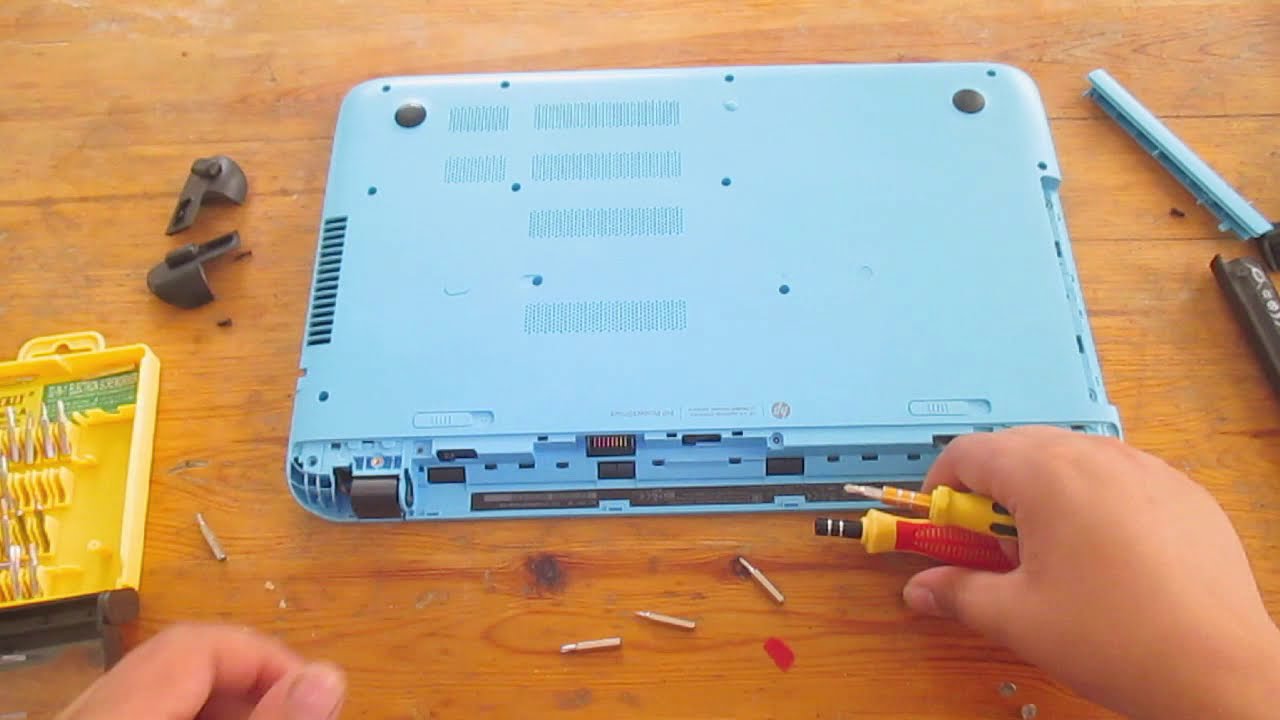
In this new video i will be showing you how to take apart any HP pavilion P series notebook, it is a really easy procedure but as always do this under your own risk and be careful because if you did it wrong, you might harm your PC .
-------------------------------------{Contact}-----------------------------------------------
Thanks for watchin...
I would follow this guide
worn trail
Thanks.
worn trail
Bloody hell this was annoying to take out.
One of the screws was stripped so I couldn't take the panel off completely.

Had to do this to pop it out.
blazing musk
Ah yes, HP and their crappy soft metal screws that strip for no reason and are torqued to hell from factory
worn trail
Felt that.
worn trail
Which part of this do I connect to my SSD?


I see 3 plugs I am not sure what the 3rd is for.
blazing musk
worn trail
Which part of this do I connect to my SSD?
Any of the 3
You just need power and data plugs
real lava
^
quiet gust
Any solutions for SSD not showing up in disk manager nor windows?
formal tusk
what's the goss on the solidigm p44 pro?
formal tusk
 formal tusk
It's solidigm
But tbh it looks better overall to me than p41 platinum
That said, I've only read 1 review
blazing musk
Tom's is usually good about drive reviews at least
Interesting, 3Dmark storage test it beat the SK Hynix P41
And PCmark
Synthetics look functionally identical
It uses a little more power but that's not a deal breaker comparing 4W to 6W
small carbon
Funny them calling it a deal because of msrp 220 vs 260ish p41 plat while we know the latter is sometimes 170 or 200ish. (More "competition" not bad though)
blazing musk
We all know SSD MSRP is BS because they keep falling in price all the time
quiet gust
Just got a 2tb SD card for 5€ on AliExpress, wasn't expecting it to be real but apparently it works
Of course there's a catch, 15MB/s read and 5MB/s write
blazing musk
Try writing 100gb to it and then try to read what you wrote
1000:1 odds it's corrupted
They can hack the firmware so it appears to be 2TB but it's actually a lot less and if you write past the physical capacity it overwrites data
sour wadi
Maybe 32
blazing musk
It's 100% you got scammed, it's only a question of what you actually got
 ripe escarp
Should you be running Disk Clean Up on a SSD? Doesn't a Disk Clean Up harm the SSD by using up write cycles?
blazing musk
Disk cleanup only deletes old temp and backup data, as well as the recycling bin
It doesn't use write cycles because it's deleting, not writing
Which on a SSD is done by flagging files for the TRIM command to automatically clean when the disk is idle
What you might be thinking of is secure deletion, where data is not only deleted but rendered unrecoverable by writing random data over it
Or perhaps disk defragmenter, which used to hurt SSDs until Windows got smarter
ripe escarp
I was thinking of defragging
blazing musk
Modern Windows knows not to defrag a SSD, instead calling it "optimizing" and it just manually triggers the aforementioned TRIM command
 ebon dome
WD-SN850x 1TB is on sale for $100 right now, should I pull the trigger?
The Crucial P5 Plus is only $81… not as good but nearly $20 cheaper
sour wadi
ebon dome
WD-SN850x 1TB is on sale for $100 right now, should I pull the trigger?
I honestly wouldn't when you can get decent 2tb for like 20$ more
 blazing marten
solidgim p41 2tb is at 120 or so most of the time
dense merlin
Mp33 was $105 last I checked
sour wadi
Well yeah but sn850x is a large jump over mp33, weather you'll notice that day to day or not (probably not) is different
minor sun
P41 plus is also a slightly jump from mp33
ebon dome
I bought a 1TB SN750 like 2 years ago and picked up a 1TB SN770 last year, so it would make sense to get the SN850x lol
Do you all use the brands your recommending? I just want something I know is gonna be quality
minor sun
We only ever recommend products, not the brand, every brand makes good and bad products
ebon dome
That’s facts. I meant products but sometimes I get confused
dense merlin
The sn850x is good, but its pointless to upgrade to from the sn770
ebon dome
I have one Gen 4 M.2 slot left so I’m trying to fill it with something, I’ll use the storage. I might save a little bit more and get a 2TB of whatever since it seems to be more cost effective.
dense merlin
If its just for gaming you don't need gen 4, there's no difference between gen 4 and gen3 for gaming
If you do need gen 4, s70 blade is on sale in #tech-deals
 neat crescent
Hmm I’ve been trying to resize my drive and now it shows inaccessible boot and I checked in diskpart and it appears the the two volumes were switched so volume 1 which is the drive where the OS should be installed became volume 3 and they also changed letters…
small carbon
Not atl (all time low), but $180 2TB plat p41 if anyone needing great gen 4 right now. https://www.amazon.com/dp/B09QVD9V7R?th=1

Experience the breakthrough upgrade from a global tech pioneer. SK hynix Platinum P41 delivers the 176-layer NAND, fastest-in-class speed, easy data migration, and 5-year warranty. The latest innovation from the world’s second-largest memory maker, Platinum P41 is designed to provide striking per...
 trail wedge
idk i got ignored in the other place so ima ask here lol i recently got a new pc and i was wonder is the speeds were fast heres a pic of me downloading god of war
 trail wedge
great
red jay
Can anyone tell me what the best possible ram is for my pc? It’s my first build. i9 13900, 4080rtx, z690 are my specs.
 undone dune
red jay
Can anyone tell me what the best possible ram is for my pc? It’s my first build....
undone dune
red jay
Can anyone tell me what the best possible ram is for my pc? It’s my first build....
whats your use case
red jay
undone dune
whats your use case
Im not 100% sure man, it’s a prebuilt from cyber power & the ram is the only thing I wanna change immediately. I can try to find out which case it is tho.
undone dune
red jay
Im not 100% sure man, it’s a prebuilt from cyber power & the ram is the only thi...
no i mean, you're using it for work, gaming or basic stuff? and what ram did they put in it
red jay
undone dune
no i mean, you're using it for work, gaming or basic stuff? and what ram did the...
Ahhhh! Just gaming mostly some & personal use etc… & the ram that’s in it doesn’t look like a normal ram stick, it’s super thin, blue in color & looks really cheap honestly.
undone dune
red jay
Ahhhh! Just gaming mostly some & personal use etc… & the ram that’s in it doesn’...
do you already have the pc?
red jay
undone dune
do you already have the pc?
Yessir I do!
undone dune
check taskmanager and show us this.
 red jay
undone dune
check taskmanager and show us this.
red jay
undone dune
check taskmanager and show us this.
10/4, I’m at work right now but I can once I get home.
undone dune
kk
 analog saffron
So trying to figure out how to recover files from a M.2 on a PCIe 4 slot M.2 board. It used to be a Boot drive from my previous motherboard but wasnt able to get my new board to boot from it. It ran Win 10 and I am running Win 10 currently. Windows reads it as RAW for some reason. WIndows Disk Utility sees the 2 partitions on the drive and has drive letters associated with the partitions. When I try to access what I want to recover from the drive I get Access Denied and then when I try to change the security so I can access it I get a Error message saying "A device which does not exist was specified" even though Windows still sees the drive and partitions. ANy help would be awesome
blazing musk
analog saffron
So trying to figure out how to recover files from a M.2 on a PCIe 4 slot M.2 boa...
Try a Linux live USB and see if it picks up all the partitions right. If not it might have been encrypted with bitlocker or something, which would also prevent it from booting with a different motherboard or CPU.
analog saffron
@blazing musk Ive never used a bitlocker on that drive. All the partitions read properly in the Windows Disk Managment. Its when I go to use AOMEI to try and clone it that Its not visible but shows up as a disk number in the system and as a MBR.
I can access stuff on the drive as well but It views it as RAW instead of NTFS. When I check the properties on the drive it says RAW but Disk Manager shows NTFS
I just get locked out at a certain Level of access from doing much of anything
 cerulean monolith
i upgraded to a bigger m.2 for the 2nd slot and it messed up my boot to where it can't run unless i put the old one in.
what do i do?
B550 pro-p for arorus btw. so gigabyte bios stuff
blazing musk
Did you reinstall Windows when you upgraded?
cerulean monolith
it wasn't meant to have it. its a 2nd drive for storage.
blazing musk
Oh you had a drive in there previously and you replaced it with a larger one? Is that right?
cerulean monolith
#1 m.2 is os
#2 m.2 is extra storage
upgraded #2 slot is no longer lettin #1 boot
blazing musk
Sounds like the bootloader got installed onto the old #2 drive
cerulean monolith
it was formatted before being loaded onto the slot. i don't belive it may happen
the old #2 m.2
blazing musk
Formatted or cleaned?
cerulean monolith
both
blazing musk
Actually what you can do is load the old #2 drive in, boot up, and load disk management. Put up a screenshot of that. That'll tell me everything about how it boots.
cerulean monolith
there is no win os partitons in it if thats what youre looking for
cerulean monolith
aw damn it, there is one

okay... mb then, so what then?
how can i get this off or change the manager to get the new storage not messin with the original boot?
blazing musk
cerulean monolith
how can i get this off or change the manager to get the new storage not messin w...
Sadly the easiest way is to reinstall Windows on a clean drive, with only the one drive installed, but if you're determined you can boot a Linux USB, edit the main drive by shrinking the main partition and shifting them all to the right, and then copy the boot partition. Then you'd have to remove the old drive and probably do a startup repair from a Windows install USB.
cerulean monolith
isn't all of that acessable on windows already?
shrinking is an option on here, so is changing it's path
blazing musk
But the partition itself is blocked by Windows
You can't read or edit it, it's a security feature as a defense against rootkits
You also can't edit an active partition like that while it's in use
cerulean monolith
okay, reinstalling ubutun to the flash drive, then what?
blazing musk
You'll open gparted and shrink the Windows drive by 51MB
Then shift all the partitions to the right as far as they go
Finally copy the boot partition and paste that into the empty space
You can delete the old copy if you want
cerulean monolith
okay, linux installs keep failing, nevermind. stuck with this set up
blazing musk
You don't need to install linux for it to work, just a live disk
blazing musk
cerulean monolith
okay, linux installs keep failing, nevermind. stuck with this set up
It's often easier to backup your data you need, wipe the drive deleting all partitions, and then reinstall with only the drive you want Windows on plugged in.
cerulean monolith
so format and cleaning the #2 old m.2 do something now?
this #2 m.2 slot is for extra storage only again, no win install is going on it.
blazing musk
Formatting alone won't do it
But you can use that drive to backup your data
Just make sure it's not plugged in when you go to install Windows
 vivid jackal
I had a SD card that I put pics and stuff on my old PC and it died sadly and now im on Mac i cant open any of the files, I dont usually encrypt them but sometimes I do just in case. I
I've done file conversion, and DTS converter and still just giving me an error. Any tips? 🙂
blazing musk
Do you know what file system the SD card used?
vivid jackal
linux
blazing musk
That's an operating system
File systems are different and Mac is VERY picky about them
vivid jackal
oh i read your question wrong! i think its FAT or exFAT
yes mac is very picky ugh
i wish i could use mums pc but im too paranoid she'll see my files lol
vivid jackal
is there any software that can reformat it?
small carbon
You realize reformat would delete what's on there?
 summer fox
Hey all, I have a Dell Inspiron 5577 “Gaming” laptop that originally came with a 128GB M.2 SATA SSD (and a 1TB HDD). The 128GB SSD has been full for a bit, so I wanted to upgrade the storage space with a 1TB M.2 NVMe SSD. I bought an external USB enclosure for the new SSD, as the laptop has only one M.2 port.
Can anyone help me figure out the best way to clone the 128GB SSD to the 1TB SSD so that I could then take the 128GB drive out of my laptop, install the 1TB drive, and actually have windows boot up from it…?
I’ve read and watched a bunch of stuff about trying to do this and I can’t seem to get it to work. Thank you to anyone who can either help me or point me in the right direction. ✌️
blazing musk
summer fox
Hey all, I have a Dell Inspiron 5577 “Gaming” laptop that originally came with a...
Macrium reflect, it's the best free option
summer fox
blazing musk
Macrium reflect, it's the best free option
That’s what I used to clone the old SSD to new SSD. My issue is how do I then get my laptop, which only has one M.2 slot, to boot up Windows as normal off of the new SSD.
 plush crag
summer fox
That’s what I used to clone the old SSD to new SSD. My issue is how do I then ge...
plush crag
summer fox
That’s what I used to clone the old SSD to new SSD. My issue is how do I then ge...
You cloned from the 128 to the 1TB, installed the 1TB, and it didn't boot?
iron raft
Oh god why is there always an issue with my storage
My SSD is flashing red
And idk what that means but all I know is that Warzone II is running 20 fps average now
down from 88
even main menu

I have a feeling this is storage related because my RAM, GPU, CPU, and VRAM usage is perfectly fine, and so are my temperatures
real lava
what's your specs on the pc?
open gazelle
iron raft
My SSD is flashing red
What do you mean by that?
In a program? Physical light and if so where (mobo, actual SSD, somewhere else)?
 golden hedge
Stupid question, but, I'm considering upgrading my storage. Already have an m.2 SSD running as system storage, and I have a 1tb barracuda for other files. I've thought about getting a 3.5HDD with 6TB capacity, but from what I remember when they were new, there were problems with longevity and access speeds for reads. Does that still hold true? Is it a better idea over say, several HDDs raided together?
I have an ASUS ROG STRIX B450-E GAMING for a mobo, so I should still have an M.2 card slot free, as well as two PCIE x16 slots.
I'm not starved for IO, I'm just looking for something that will give me a nice balance between capacity, access speed and installation ease
I've been considering getting an PCIE16 M.2 card and filling it out and raiding that together for some 1tb per SSD, and decent speeds, but I'm not sure.
minor sun
Depending on how much storage you actually need, just another single 2tb a60 for 105$ might be all you need
Nothing fancy
Could grab an HDD if you plan on more storage than that
blazing musk
golden hedge
Stupid question, but, I'm considering upgrading my storage. Already have an m.2 ...
Modern SSDs have solved all the major problems from the early days. You can write to modern nand memory tens of thousands if not hundreds of thousands of times per cell.
If you really need 6TB+ for just storage and not speed a single HDD will still be fine. I'd advise against RAID, it introduces too many potential problems and variables.
dense merlin
Just got a 2tb x6 portable ssd for $60
The 4tb was $70 but oos, if only I'd woken up earlier lol
I've almost no use for the storage, I'll probably give it to my brother
sour wadi
dense merlin
Just got a 2tb x6 portable ssd for $60
Sheesh
golden hedge
blazing musk
Modern SSDs have solved all the major problems from the early days. You can writ...
Idea is I have many large single files I work with (images, 3d, etc.) And need a large storage solution inside my case, which would be great with a 5tb HDD. Just worried about speeds as well as stability and reliability.

 brisk dome
dense merlin
Just got a 2tb x6 portable ssd for $60
brisk dome
dense merlin
Just got a 2tb x6 portable ssd for $60
Long gone by now I assume?
brisk dome
 harsh sage
Do you guys like my new ssd
harsh sage
Do you guys like my new ssd
Scratched State Drive?
harsh sage

 upper quiver
harsh sage
upper quiver
harsh sage
what computer that?
bro is that a 5170?
imma guess that's not your pic
 blazing musk
Microcontroller city in there
harsh sage
lol
 lone vapor
hi, i have an hdd of unknown origin
When I plug it in my pc won’t boot, so it probably works. Is there any way to clear it?
blazing musk
How unknown are we talking? Found on the side of the road unknown or taken from an old office pc unknown?
lone vapor
blazing musk
How unknown are we talking? Found on the side of the road unknown or taken from ...
It was supposed to be cleared, it’s in a server I have
blazing musk
Hmm. So the PC doesn't boot when you plug it in, with the OS on another drive?
Does it get to the bios?
open gazelle
golden hedge
Idea is I have many large single files I work with (images, 3d, etc.) And need a...
Regarding speed, HDD should be okay for storage. Ideally you want to use the SSD (currently OS drive) as a scratch drive tho. As for reliability,  . Good HDD will be fine tho.
lone vapor
blazing musk
Does it get to the bios?
I believe so but I’ll check later
It’s really nice, 6gbps read speeds so I really want to get it
blazing musk
That translates to about 500MB/s max in the real world accounting for overhead, and most HDDs can't hit that
And that's also only consecutive reads
blazing musk
Yeah speed doesn't matter much on a storage drive
lone vapor
I’m using it for like games I don’t touch much and medal clips
Once I can use it anyways
upper quiver
harsh sage
It is my picture lol
bro please tell me that drive was dead to begin with
why on earth do you have one of those things anyway...
blazing musk
IDE drives are still needed on some older platforms
upper quiver
could have flipped that drive alone on ebay for like 150
those things are museum pieces nowadays, and people are desperate to get functional drives
so i at least hope you confirmed it was nonfunctional before making it nonfunctional yourself
goofy
blazing musk
upper quiver
could have flipped that drive alone on ebay for like 150

eBay
IDE 2.5" Hard Drives. Wiped and Tested Internal Laptop Computer.
blazing musk
Oh I hadn't noticed that part
upper quiver
harsh sage
It is my picture lol
anyway, ive been dying to get my hands on a 5170, so dont do anymore damage to it before i have another panic attack lol
treat it right at least :(
harsh sage
upper quiver
bro please tell me that drive was dead to begin with
Probably, this was a recycled machine. Already had those scratches in the platter too
I don't destroy hardware on a whim like some idiots do. I rarely destroy hardware actually. I'm aware lots of things still have use
blazing musk
Actual problem I dealt with early in my career:
"I heard you were supposed to clean your hard drive so I opened it and wiped it"
"Wait... what?"
"Yeah with a cloth on the disk drive."

upper quiver
harsh sage
Probably, this was a recycled machine. Already had those scratches in the platte...
that makes me feel better
does the system work? it looks like it would for sure
harsh sage
I wouldnt know
I dont really have the ability to take systems out of the ewaste bin and test them
I just grab bits of hardware when I can.
I dont like good stuff being ground to dust because the owner was too stupid to google what it is and see it's still worth something
you wouldnt believe the hardware i've gotten lol
upper quiver
well if you dont want it that badly
and if your going to fork's in march
bring it with you
lol
harsh sage
No I literally cant take a giant 50LB machine like that out of the bin. Even though one of my managers doesnt care, it's too obvious that I'm taking stuff, and I dont have space for it at home
upper quiver
lol nice
harsh sage
yea I have a blue and white 5c and this black 5
lone vapor
Hi
i got the hdd to get detected in bios, but when I try to boot my monitor just says something about input not supported @blazing musk
👍
blazing musk
It's probably got an OS on it already and it's interfering with the boot sequence
blazing musk
Is it in that 12700k system in your name
lone vapor
yes
blazing musk
Then yes you can, what brand motherboard
blazing musk
You can try using the secure erase function under the advanced menu
lone vapor
alright
blazing musk
It's intended for SSDs but should work on a HDD in theory
lone vapor
Ok
lone vapor
blazing musk
You can try using the secure erase function under the advanced menu
Is it called secure erase?
It’s not showing up
Nvm
It’s here
harsh sage

Tom's Hardware
Nearly twice the performance, with lower power consumption than two comparable drives.
 remote crystal
@olive wadi what is this abomination
the "nand" (government psyop) is spreading to hdds
we must purge all our devices and run
real lava
i guess you've not heard of sshd
 olive wadi
real lava
i guess you've not heard of sshd
olive wadi
real lava
i guess you've not heard of sshd
no i havent
dense merlin
The crucial website is useless
Why do you have to jump through 20 different hoops to cancel an order
Only to find out you can't
And there's a big ass button that says "return" when you're viewing the order that isn't even where you "return" it, it's a button to go back a step
open gazelle
Have you tried turning the world off and on again??? Maybe you'll reset to a save point before your purchase.
Also hope it can be sorted out with CS easily but prolly not
 lethal spade
Hi, I am looking at buying a QNAP TS-453D-8G-US Diskless System Network Storage. I plan on using 4 * 8TB drives (seagate iron). From what I can see I can install m2 NVME. For this I need the QM2 card. Am I missing anything??
cerulean monolith
any disk cloning software that's good? also possibly free
small carbon
Macrium reflect
blazing musk
@cerulean monolith what he said
minor sun

What is Happening Despite historically being some of our most reliable parts, we have received a surprising number of reports of failing Samsung drives,
real lava
ssd failure moment
blazing musk
"I buy premium brands because they're reliable and I don't need to worry!" 
harsh sage
blazing musk
"I buy premium brands because they're reliable and I don't need to worry!" <:Pep...

NOT EXACT IN ROUND
formal tusk
II IIIIIIIIIIIIIIII IIIIIIIIIIIIIIII II
harsh sage
Literally rn
 dawn sand
blazing musk
"I buy premium brands because they're reliable and I don't need to worry!" <:Pep...
dawn sand
blazing musk
"I buy premium brands because they're reliable and I don't need to worry!" <:Pep...
I mean technically it's good but this just is not sadly
dawn sand
Check this out on @Newegg: Silicon Power 2TB SSD 3D NAND A55 SLC Cache Performance Boost SATA III 2.5" 7mm (0.28") Internal Solid State Drive (SU002TBSS3A55S25NE) https://www.newegg.com/silicon-power-2tb-ata-600/p/0D9-0021-00134?Item=9SIBDGPJAD6146&Source=socialshare&cm_mmc=snc-social-_-sr-_-9SIBDGPJAD6146-_-02022023