#old-monitors-and-tv
1 messages · Page 70 of 1
 misty gyro
 zealous forge
anyone have a good idea of how well it will perform with a monitor as such?
zealous forge
anyone have a good idea of how well it will perform with a monitor as such?
https://www.rtings.com/monitor/reviews/dell/s2721dgf
Not a horrible monitor at least. Contrast kinda sucks, can't call that HDR.
With a 1060 you could play lighter games like cs:go in 1440p maybe. Otherwise you can just run the games in 1080p.

RTINGS.com
The Dell S2721DGF is a 27 inch, 1440p monitor gaming monitor with a fast refresh rate and great gaming features. The IPS panel delivers wide viewing angles, and ...
zealous forge
that being said isnt it not a great experience to stretch a 1080 picture across a 1440 monitor in a game?
misty gyro
It'll still look better than most cheap 1080p monitors
And you can always use FSR in games that support it
 old arch
You mean just the NVidia image scaling? fsr is amd.
zealous forge
do you think that it is more optimal to just get a higher quality 1080p or is the 1440 worthwhile?
old arch
What's your actual current monitor?
zealous forge

The Sceptre E225W-19203S monitor provides stellar colors and sharp images on a 22 inch screen. Enjoy HDMI and VGA inputs to connect all video and gaming devices.
very low end
misty gyro
old arch
You mean just the NVidia image scaling? fsr is amd.
Nah dude FSR is made by AMD but it's global
zealous forge
anything would be better frankly
misty gyro
old arch
I'd suggest a decent 24/24.5" 1080p that's 165hz or w/e, then at least you can have dual monitors. Plus they're $200ish or less, than in the future w/ a better gpu can (easily/happily) do 1440p.
misty gyro
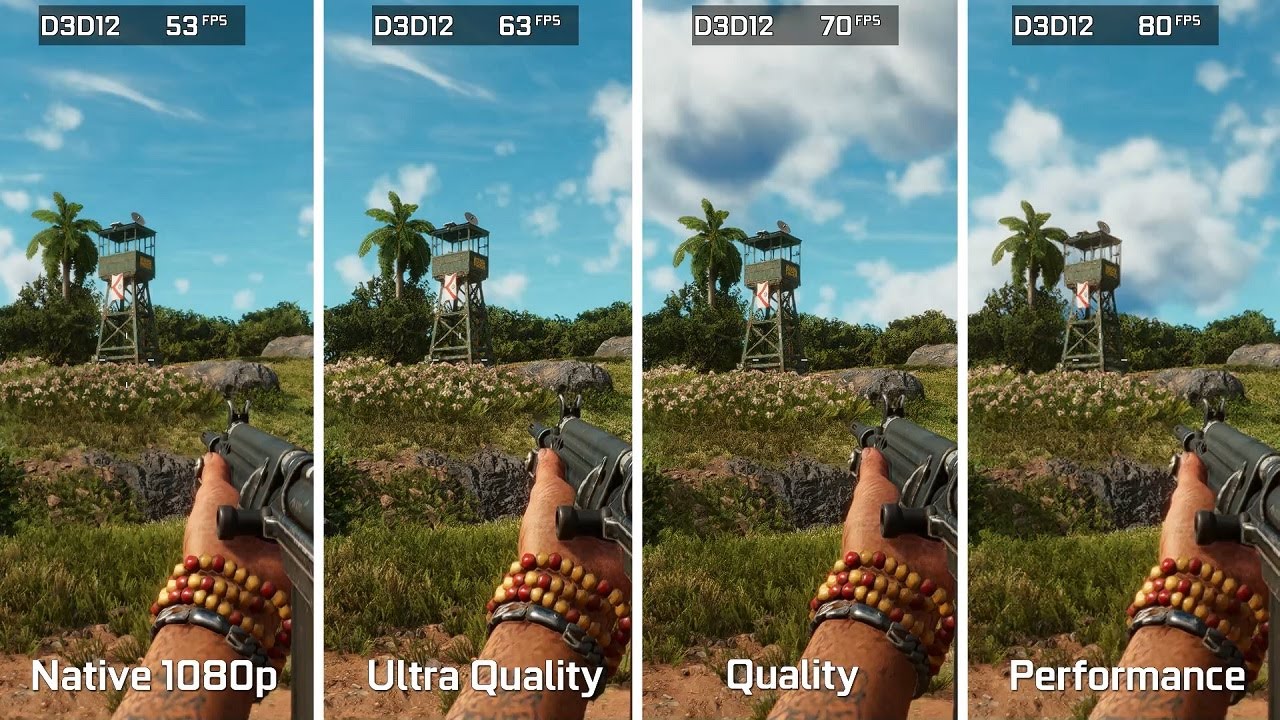
Far Cry 6 - GTX 1060 (3GB) - FidelityFX Super Resolution (FSR) - Benchmark Comparison
My Hardware:
Processor: AMD Ryzen 5 5600X
Graphics Card: GeForce GTX 1060 AERO ITX 3G
RAM: 2x8 GB DDR4 3000 MHz
SSD: 240 GB
HDD: 2x1TB
OS: Windows 10
Mainboard: MSI B450M-A Pro MAX
#FSR #GTX1060
misty gyro
old arch
I'd suggest a decent 24/24.5" 1080p that's 165hz or w/e, then at least you can h...
In that vein, if you were to do a 1080p monitor I'd recommend the MSI Optix G242
old arch
this?
 misty gyro
When it's in stock it's $190
That's the opposite, renders in a higher resolution and downscales to smooth edges
old arch
no biggie. Those g241/242 monitors sure have random availability, but the 241 is $180 at amazon right now. I got the asus VG259QR but it jumped in price recently, was a decent $206. Haven't had a chance to use it yet, 
misty gyro
Yeah the G241 works just as well. I think the bezel is the only difference.
FSR is enabled in-game btw, the game has to support it like DLSS
zealous forge
is 27" 1080 as pixelated as people say it is?
old arch
idk, people are used to 4k phone screens and stuff 🤣 . Perhaps my current ips screen is just pretty good. I don't notice the pixel squares until about 8" away. Low ppi from 1080p on 27" for me probably wouldn't be that bad, and making stuff "stretched" bigger in-game might be a definite plus. Not gonna recommend it though.
misty gyro
zealous forge
is 27" 1080 as pixelated as people say it is?
Depends on how far back from the screen you sit
misty gyro
Gaming or just viewing? Smart features preferred?
Yeah I prefer dumb TVs personally, smart TV keeps crashing on me lol
Yes, I got 1.1 FPS on sling shot
Everything you'd expect from LG OLED https://www.rtings.com/tv/reviews/lg/a1-oled

RTINGS.com
The LG A1 OLED is a new entry-level OLED released in 2021. It delivers nearly identical picture quality to the more expensive OLEDs, like the LG C1 OLED, but it'...
Just watch for burn in of course, auto dimming and shutoff helps
If you want those extra inches https://www.bestbuy.com/site/hisense-55-class-u8g-series-quantum-4k-uled-android-tv/6455173.p?skuId=6455173&ref=NS&loc=101
Those 7 inches 🥵
 lost beacon
Anyone know how to fix an issue with monitors having a slight flickering problem? It's like the brightness is constantly going from 80% to 90% and back rapidly, and almost exclusively occurs when playing games. Usually during a game's startup.
I'm using displayport, and just got a new monitor. I had another monitor before this one that had the same issue (though it broke from a likely unrelated cause), yet it's persisting with my new one. Don't know why it's happening.
I updated my Nvidia drivers, made sure the displayports were plugged in all the way, and also tested this with a few different games. It's also a bit odd, because it occurs more frequently if I move a game window. (Like the launcher for FF14)
Not sure if I'm missing something, or if there's a setting on the monitor itself I need to mess with, or if I need to disable G-sync or what. I hope I didn't damage the displayport at all when trying to plug it in. (It was obnoxiously difficult to plug in, and wasn't even plugged in all the way at first, when I thought it was.)
I do use Geforce Experience on most games I play, mostly for the game filters. I saw online somebody suggesting to disable the overlay, but that didn't fix it.
The monitor I had before was a Gigabyte G34WQC A-SA. My new monitor is an AOC CU34G2X.
Both are 34" 21:9 1440p 144hz monitors.
My computer has an RTX 3060 with Windows 10.
Would really appreciate any help I can get. Bought this monitor because my previous one broke after only a month of having it, and I still don't know how it broke. But this flickering issue started a little bit before it broke, so now it's making me paranoid that this one is gonna somehow break too.
 turbid raven
Hey guys, I’m looking for some advice on buying a monitor maybe around 24-27 inches. It’s going to be mostly for wfh use. I have a 2015 mac that I wanna use it with. Im budget is 300 max, not sure if that’s a good budget. Im still debating on buying a pc down the line so I might use it for gaming later. I’ve been driving myself crazy looking at so many different monitors. Any help would be appreciated! I know nothing about monitors lol
misty gyro
lost beacon
Anyone know how to fix an issue with monitors having a slight flickering problem...
That sounds like dynamic contrast, it's a monitor setting
misty gyro
turbid raven
Hey guys, I’m looking for some advice on buying a monitor maybe around 24-27 inc...
What kind of work? Do you need accurate colors for editing photos or anything like that?
turbid raven
misty gyro
What kind of work? Do you need accurate colors for editing photos or anything li...
I’m going to be working in finance, so nothing special. Just a nice slim looking screen I guess lol.
misty gyro
Ok. What would you think about a 32 inch monitor? It's in your budget
misty gyro
turbid raven
I’m going to be working in finance, so nothing special. Just a nice slim looking...
This will be good for office work as well as gaming. On sale for $300. https://www.bestbuy.com/site/dell-s2721dgf-27-gaming-ips-qhd-freesync-and-g-sync-compatible-monitor-with-hdr-displayport-hdmi-accent-grey/6421624.p?skuId=6421624
turbid raven
misty gyro
This will be good for office work as well as gaming. On sale for $300. https://w...
Thanks for your help, this looks really nice. I’m only going to have 1 monitor for now so 32 inch works for me. Dumb question but would 1 be able to use a ps5 with this monitor or no?
misty gyro
Absolutely
The PS5 should be able to use it up to 1440p 120hz
It also says in the review I'm looking at that it doesn't have issues with Mac like some monitors do
turbid raven
What that’s actually perfect. Thanks for your help! I really appreciate it!
 visual pilot
Do note ps5 might not game well enough for 1440p120hz, but it will run
misty gyro
Yeah it'll set the mode but depends on the game how fast it goes
turbid raven
visual pilot
Do note ps5 might not game well enough for 1440p120hz, but it will run
Im mostly gonna be playing on the tv, but sometimes the wife wants to watch her shows lol, so the monitor would be a options for here and there
lost beacon
misty gyro
That sounds like dynamic contrast, it's a monitor setting
Just checked if that was enabled, but it's not.
lost beacon
misty gyro
That sounds like dynamic contrast, it's a monitor setting
Disabling G-Sync actually seems to have fixed it.
https://www.displayninja.com/what-is-freesync-brightness-flickering/
I don't really understand half of what this is saying, but it seems to be describing my issue?
I'd prefer a more 'explain to me like I'm 12' version though.
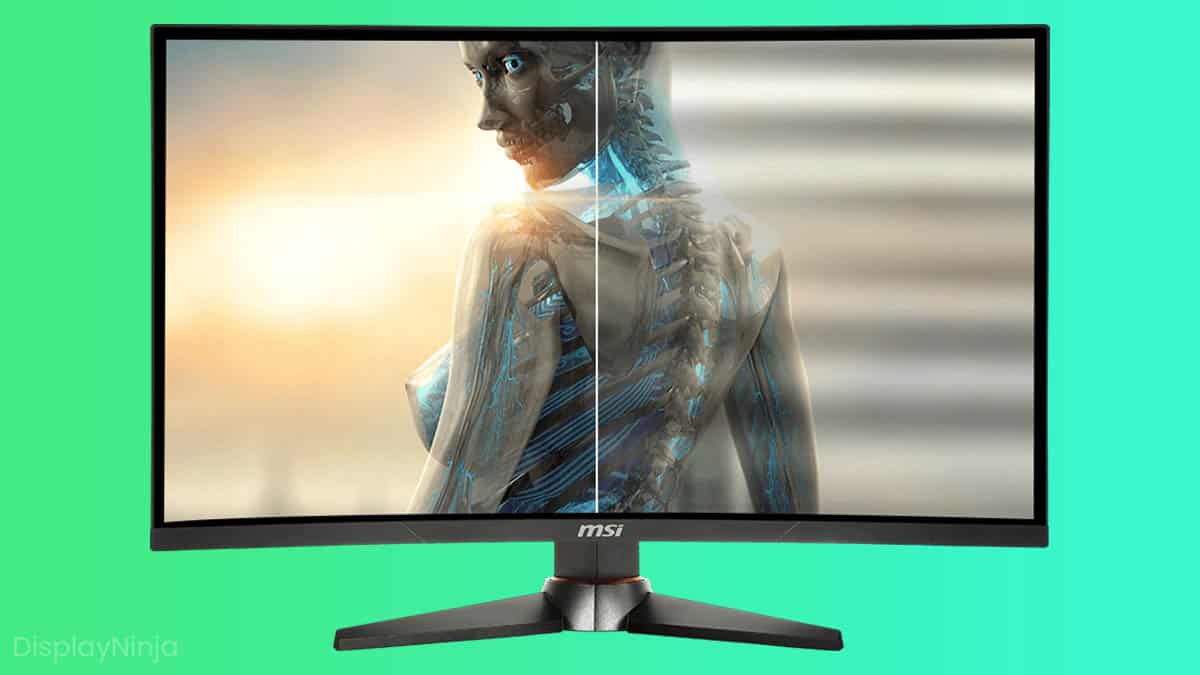
DisplayNinja
On some high refresh rate monitors (mostly VA), FreeSync can sometimes cause brightness flickering with FPS fluctuations. It's possible to reduce or fix it.
 maiden wedge
I'm a computer dumb dumb looking to buy a new monitor. I know the size, resolution and refresh rate that I want. After that what do I need to look for, freesync and gsync?
misty gyro
maiden wedge
I'm a computer dumb dumb looking to buy a new monitor. I know the size, resoluti...
This is a good place to filter out the bad ones https://www.rtings.com/monitor/tools/table
Or tell us what you're looking for and a budget and we'll give recommendations.

RTINGS.com
 wild coralBOT
 Funker#6160 has been warned
Reason: Bad word usage
maiden wedge
misty gyro
This is a good place to filter out the bad ones https://www.rtings.com/monitor/t...
Ok picture this: this happy kid finished his homework and gets on his computer with his friend. They're searching for good items when suddenly he finds a really rare item. This was the best game of his life when suddenly BOOM! his friend drops dead from a headshot. He takes cover as grenades are landing all around him. Having nowhere to run he pops up, takes a couple shots, but his body armor gets decimated and he's bleeding out. He will not survive unless he heals but cannot heal because of the hailfire of bullets coming at him. "I have this really rare item. Please, you can have it if you let me go. I spent hours trying to get supplies and I don't want to lose my hard work!" "Look here you little ***** kid, I have like 10 of those and after I kill you I'm gonna *** the **** out of your mom right in front of your dad. Any last words?" "I-" BAM! I finished him off with my pistol and took all his stuff. What's better for that?
This is what i currently have:
https://www.acer.com/ac/en/US/content/model/UM.HG0AA.001
No budget, but the less I spend the better. I'm looking for something comparable, maybe slightly better to demote that too 2nd monitor

Acer
27" - 16:9 - WQHD - Maximum Resolution 2560 x 1440 - Contrast Ratio 100,000,000:1 - Brightness 350 Nit - Color Black
misty gyro
maiden wedge
This is what i currently have:
https://www.acer.com/ac/en/US/content/model/UM.HG...

Usually around $300, less on sale
maiden wedge
I heard more than 144hz isn't worth it because the human eye can't see that many frames, but I also heard that though this is true it's worth it because it's still smooth. Any thoughts on this?
I'm looking for 27" 2k 144-165hz
visual pilot
maiden wedge
I heard more than 144hz isn't worth it because the human eye can't see that many...
all depends on the person
If possible, best case scenerio is go somewhere you can look at 240hz panels and see for yourself
visual pilot
For gaming, pixel response time can be helpful, low/no overshoot is good
maiden wedge
And I do competitive fps
visual pilot
of course higher refresh rate is nice to have
visual pilot
maiden wedge
Thanks. What else should I look for in a monitor though?
Your main options is prob gonna be M27q:
https://www.bestbuy.com/site/6438287.p
or LG 27GN800-B
https://www.amazon.com/dp/B08LLD2QXJ

Pure, pro-level gaming. Play like a pro with LG's 27" UltraGear Gaming Monitor. Color intensity and purity of an IPS display with QHD (2560 x 1440) resolution and unbelievable 1ms response rates. Featuring custom gaming control, fast 144Hz refresh rates and NVIDIA G-SYNC Compatible with AMD FreeS...
both ~300$
LG panel has a tiny bit better pixel response time but slightly more overshoot
And M27q has a little bit higher refresh rate
maiden wedge
I was looking at best buy monitors, they have a sale that ends today
visual pilot
copied same link twice for a moment :p
do they? doesn't look like a great sale, m27q at 310$ is normal
maiden wedge
Yeah but when you're a computer dumb dumb like me it looks good
So something like this

Best Buy
Shop Dell S2721DGF 27" Gaming IPS QHD FreeSync and G-SYNC compatible monitor with HDR (DisplayPort, HDMI) Accent Grey at Best Buy. Find low everyday prices and buy online for delivery or in-store pick-up. Price Match Guarantee.
Not good?
visual pilot
2721dgf is fine too
maiden wedge
Not that price is everything but this one is more expensive and $150 off
visual pilot
It's like same performance, ignore the advertising for a bit
300$ 2721dgf, 310$ m27q, 297$ 27GN800-B
lemme just put together some numbers for comparing the three
maiden wedge
But higher refresh
visual pilot
Total pixel response time:
6.3ms - 8.1ms - 5.9ms
Overshoot error:
1.9% - 0% - 1.3%
Input lag:
3.7ms - 3.2ms - 4.0ms
Refresh rate:
165hz - 170hz - 144hz
 severe dirge
Any suggestions on a 1080p monitor? I really only need it for browsing the interwebz and watching youtube/hulu so I don't need anything super great I suppose.
misty gyro
Pretty much any cheap 1080p monitor then if it's just a secondary deal
severe dirge
that's what I was thinking, I just wasn't sure if anyone maybe come across a super good deal on a cheap one.
old arch
severe dirge
that's what I was thinking, I just wasn't sure if anyone maybe come across a sup...
I just think of certain ones for $130ish maybe. No ideas this instant though.
maiden wedge
what is a good dual monitor stand for a curved 27 AOC and scepter curved 24 inch
old arch
maiden wedge
what is a good dual monitor stand for a curved 27 AOC and scepter curved 24 inch
search vivo stand on amazon and should give you a few options to start with. they have dual arm stands and also a stand that puts 1 monitor atop the other, which is odd/uncommon but actually neat for using less sideways space on a table.
maiden wedge
how much does ipn vs tn matter?
misty gyro
TN is really old tech and only used by the cheapest stuff
IPS will have better latency and colors for gaming
maiden wedge
doesn't tn have better response time?
old arch
barely, depending on which monitors being compared. not an issue w/ modern ips
old arch
I mean the 240hz 1080p IPS Dell was $220 for a long time & a great panel.
misty gyro
Depends more on the models for that
old arch
eh if we're talking same 144 or 165hz on both monitors, probably not noticeable difference.
maiden wedge
i'm willing to pay more for a better one. looking to spend less than $500 but preferably around $300
misty gyro
1440p or 4k
maiden wedge
looking for 2k 27"
misty gyro
M27Q then
old arch
nooooooooooooooooo edit: 🤣
misty gyro

M27Q is the best in its price bracket

RTINGS.com
The Gigabyte M27Q is an excellent 1440p gaming monitor suitable for a wide variety of uses. It has a large 27 inch screen that provides an immersive gaming exper...
misty gyro
old arch
disregarding $20 more, asus VG27AQ could be a possible 2nd option to keep an eye out for. Prices for all have jumped a bit. M27Q was a nice sub-$280 a while back.
maiden wedge
anything comparable with a slightly lower refresh rate for cheaper?
old arch
oh no doubt the M27Q is dang good, it's been often suggested for months. idc about the .5ms because listed specs like that can be exaggerated, but no big deal. Rtings.com has a good rep
visual pilot
you could do g27q if you really want to save money
misty gyro
Yeah listed latency is usually artificially tested gray-to-gray time
maiden wedge
what's ss ips?
visual pilot
fancy marketing for ips that happens to be fast
maiden wedge
different from regular ips?
visual pilot
Nah, same tech
visual pilot
and better colors and better pixel response time
maiden wedge
yeah sure. thanks for the help!
visual pilot
You're welcome
maiden wedge
wopw it even comes with 3 months free youtube premium!
old arch

 honest violet
okay so recently ive been seriously considering throwing some cash at a more budget 144hz monitor w/ good reviews as nearly everyone ive talked to vouches for it being a needed upgrade from my 60hz
plus ive been hardstuck plat in val and im hoping an upgrade might help me maybe ;-;
but i wanted opinions from some ppl who have more experience than i do
and maybe suggestions on some good picks?
 surreal quarry
honest violet
okay so recently ive been seriously considering throwing some cash at a more bud...
surreal quarry
honest violet
okay so recently ive been seriously considering throwing some cash at a more bud...
Might wanna include ur budget
honest violet
surreal quarry
Might wanna include ur budget
aiming for $400 so not super budget, 1080p 144hz or so
surreal quarry
This so the one I had it was great overall (240 hz <1 ms responds time) decent colors but wait to hear what other think https://www.newegg.com/p/N82E16824012019?Item=N82E16824012019&Source=socialshare&cm_mmc=snc-social-_-sr-_-24-012-019-_-04252022
 quartz sandal
honest violet
aiming for $400 so not super budget, 1080p 144hz or so
quartz sandal
honest violet
aiming for $400 so not super budget, 1080p 144hz or so
for 1080p 144hz.... msi g241/g242, gigabyte g24f ..... 400 will easily get you a 1440p monitor, i would reccomend the gigabyte g27q as its only 260$ atm
visual pilot
Depends on hardware, considering 1070 and val, prob want 1080p240 if you're just doing val
surreal quarry
yeah 1070 prolly cant do 1440p144
quartz sandal
It could for Valorant
I could probably play Valorant at 4k on my 3060 ti and still be cpu bound
Heck possibly 8k
old arch
For 1080p another option was asus VG259QR before it jumped up to $230ish
 obtuse wasp
any suggestions for OLED 4k TVs? Looking at the LG C1 right now and I’m tempted, but want a second opinion.
There’s the Sony A80J that’s a bit more expensive.
Not for gaming, just varied content consumption, probably looking to be closer to 1000$
(For a 48-55” Model)
 dry brook
obtuse wasp
any suggestions for OLED 4k TVs? Looking at the LG C1 right now and I’m tempted,...
dry brook
obtuse wasp
any suggestions for OLED 4k TVs? Looking at the LG C1 right now and I’m tempted,...

TCL's 6-Series combines stunning 4K HDR and mini-LED technology in a bold, brushed metal design for a superior TV experience. Quantum Dot technology and the HDR Pro Pack with Dolby Vision combine for greater brightness and contrast, as well as a full palette of rich colors. TCL’s Contrast Control...
not OLED, but none of the pitfalls, 120Hz screen too in case you want to do gaming
obtuse wasp
Not as highly rated on rtings but it is far cheaper so 🤷♂️
misty gyro
LG C1 is top tier, if you can afford it and aren't worried about burn in go for it
obtuse wasp
misty gyro
LG C1 is top tier, if you can afford it and aren't worried about burn in go for ...
Is burn in much of an issue if I’m only gaming every so often?
And usually different games
misty gyro
It's an issue on most OLEDs, gaming or not. Any time there's an image on the screen for more than 10 minutes.
It just happens that game HUDs stay stationary and become the worst offenders.
obtuse wasp
Yeah okay, thanks.
Oh also, there’s an LED I’m looking at, the x90j, should I go for that just cause it doesn’t have that burn in issue like OLEDs or?
old arch

RTINGS.com
The Sony X90J is an upper mid-range 4k LED TV. It's part of Sony's 2021 BRAVIA lineup, sitting below the Sony X95J, and it has many of the same features as the h...
misty gyro
Interesting reading regarding long term burn in https://www.rtings.com/tv/learn/permanent-image-retention-burn-in-lcd-oled

RTINGS.com
This was a long-term 24/7 burn-in test on 3 TVs (OLED vs VA vs IPS). We aimed to see how their performance changed over time, especially with some static images like network logos, black bars in movies, or video games with a fixed interface.
Long periods of static content will cause burn-in on OLED TVs. The red sub-pixel appears to degrade the fastest, followed by green and blue. The effect is cumulative, as even cycled logos do burn-in (but over a longer period). We investigated this further in our Real Life OLED Burn-in Test.
There are no signs of burn-in on the two LCD TVs (IPS and VA type panels).
obtuse wasp
Good read, appreciate it.
 idle cliff
I want to get a monitor that’s 3840 x 1600 (DisplayPort: 144 Hz, HDMI: 120 Hz) and I have a 3070ti will it be able to get to 144hz or even 120hz on most games
quartz sandal
idle cliff
I want to get a monitor that’s 3840 x 1600 (DisplayPort: 144 Hz, HDMI: 120 Hz) a...
1600p? You mean 3840 by 1440?
idle cliff
quartz sandal
1600p? You mean 3840 by 1440?
Nope apparently it’s 1600
It’s a ultra wide monitor if that changes anything
quartz sandal
idle cliff
Nope apparently it’s 1600
Nope 1440 or 1660 would be the vertical resolution only the 1st number should change unless it's not x:9
misty gyro
@quartz sandal It's a 12:5 ratio
quartz sandal
Ohhg
misty gyro

LG 38WK95C-W 37.5" 3840x1600 60 Hz Monitor (38WK95C-W)
quartz sandal
Odd
If 3440x1440 is okay instead id go

MSI Optix MAG342CQR 34.0" 3440x1440 144 Hz Monitor (Optix MAG342CQR)
misty gyro
Yeah those 12:5 monitors are ridiculously expensive for no apparent reason, except maybe video and photo editing use
quartz sandal
Because a high refresh 3840x1600 144hz ips or vs is 1600$ 💀
 wary wave
didnt gigabyte also release an ultra wide as well recently?
dont know how much it costs though
probably also a lot
quartz sandal
They did it's oos tho
wary wave
oof
idle cliff
It’s says it’s 21:9
quartz sandal
yes?
idle cliff
Is that not normal?
 errant edge
thats a nice looking monitor
quartz sandal
Tis gigabyte make some of the best monitors
wary wave
theyve been doing a good job of affordable good monitors
errant edge
dont they also have the cheapest 4k 144hz monitor?
misty gyro
No, but it's the cheapest worth considering
quartz sandal
Tbf 28" 4k is dumb imo but m32u is good too
old arch
M28U is for ppi nuts.
maiden wedge
Ok I'm really upset
I ordered a new monitor from best buy and

What the *#&% is this?
Can't use my brand new monitor, probably going to have to mail it back...
K so after I packed it back up the right cord magically appears
No wait this is for my wife's laptop nm
misty gyro
maiden wedge
Can't use my brand new monitor, probably going to have to mail it back...
Are you in the US?
 fading wyvern
Can pick up an adapter pretty cheap
maiden wedge
I know. That's not the point. I shouldn't have to go buy something because best buy screwed up
fading wyvern
True, could contact Best Buy or the monitor manufacturer to see if they could send you the correct cable before returning it
maiden wedge
Aren't they going to make me repack the whole thing and send it back?
maiden wedge
I'll find out in the mourning. I'm just really upset
Come home from another trash day at work, clean off my desk, remove my old monitor, unpack this one and then this
fading wyvern
Yeah that sucks. Sorry to hear that 
maiden wedge
Geek squad, more like idiot squad. How dumb can they be to send a European cord?
Trolled
misty gyro
Yeah it's 100% on Best Buy to give you the correct cord. If it's the standard plug on the other end they have dozens in the back they can just give you.
maiden wedge
I have one from my wife's old laptop. If they'll just send me the cord I'll use that in the meantime
misty gyro
That'll work
maiden wedge
Just half the cord
That will work in the brick?
Oh yeah at worst it would be just less power
misty gyro
Cord length doesn't matter
maiden wedge
Not like plugging a u.s. cord into a European socket
I mean using the new brick with an old adapter
Idk the terms, can send pics
misty gyro
The monitor has a brick to plug into? Is that it?
maiden wedge
Yes
maiden wedge
This new cord that came with the monitor
 fading wyvern
Oh that would be fine
maiden wedge
This old one will work fine in it, it's not made for European cords?
 fading wyvern
Just a couple of wires nothing fancy
misty gyro
Copper is copper
maiden wedge
Do you think I should take the time to plug that in or think best buy will make me ship the whole thing back?
fading wyvern
Best Buy won’t make you ship I’d hope.
misty gyro
I seriously doubt they'll make you send it all in for a cord
If they do tell them where they can shove the cord
fading wyvern
Would be absolutely a waste of money
And hey you haven’t even seen if the monitor has defects yet 
maiden wedge
K I'm chancing it and using it
misty gyro
The only difference between US and EU cables besides the plug shape is the voltage passing though them. Other than that they're identical.
And modern power supplies are auto switching between 110/120V and 220/240V modes
fading wyvern
Unless you have some sort of apple designed cable that has like 3 handshake chips in them for no reason and costs 4x the amount 
maiden wedge
I don't mess with crapple products
misty gyro
Apple loves to make everything harder on you unless you go all in on their ecosystem.
If you have to reflash the OS on their new desktop with the M1, you literally have to use another Apple computer to do it.
fading wyvern
How’s the monitor looking? Boot right up? 👀
maiden wedge
Dunno yet. Plugging in
With my luck it won't work at all
k i'm on it and it's working great so far
a little darker but more vibrant than my old one
probably just need to mess with settings
fading wyvern
What did you get out of curiosity?
fading wyvern
Ah very nice choice
maiden wedge
my old one wasn't bad, just felt like the coloring on it could be better and wanted something new. needed a new second monitor too
i was gonna demote the old but i'm gonna trade it with my wife. i'd rather a 24 inch for a second anyways
fading wyvern
Make sure you set I think it’s the font to clear type or something  give me a moment
misty gyro
Yeah M27Q is nice, colors will need tuning
fading wyvern
Colors are suppose to be great out of the box tho
 misty gyro
True but personal preference could be brighter/dimmer or higher/lower contrast
maiden wedge
i like bright. i like competitive fps
fading wyvern
It’ll look great either way lol
misty gyro
It should have a FPS mode in the settings that'll be a little brighter and auto set lower latency mode
maiden wedge
got a month of staycation approved with no plans other than cleaning, gardening and gaming
fading wyvern
Just making sure cuz some people don’t realize, please make sure your monitor is displaying at 175hz in settings, I’ve had some friends who went like a few days
maiden wedge
trust me, i'm a computer caveman, but when it comes to competitive i'll make sure i have the right settings
i've dug through nvidia settings to tweak them right
fading wyvern
Lol thank god. Just double checking for sanity sake
maiden wedge
yeah for a long time i was hurting in gaming cuz i was playing in 1440 with my 1060, which couldn't handle 1440
so i learned about that, but i have a 3080 now
it bugs me that the new monitor is #2 and the old one is #1
even though #2 is the primary monitor it's still #2
misty gyro
You'll have DLSS now too to help boost frames at 1440p
maiden wedge
for some reason dlss in escape from tarkov was making me lag
fading wyvern
I’ve found very few fps games that my 2080ti can’t handle I’m sure the 3080’s has it in the bag
maiden wedge
does dlss involve the monitor? i thought it's a graphics card thing
misty gyro
Only so far as to set the resolution, it's all scaled on the GPU using samples from their supercomputer
fading wyvern
It’s just a gpu thing lowering your resolution then upscaling it to increase frame rate 👀
maiden wedge
yeah it was lagging me out on eft. i thought it was supposed to do the opposite
misty gyro
fading wyvern
I’ve found very few fps games that my 2080ti can’t handle I’m sure the 3080’s ha...
Sure but in competitive games you want your fps to be about double your refresh rate
misty gyro
maiden wedge
yeah it was lagging me out on eft. i thought it was supposed to do the opposite
Probably badly implemented DLSS then, most games there's no noticeable latency
fading wyvern
Since my new cpu upgrade nothing in the competitive realm puts me even close to under double
maiden wedge
yeah they just added it. the graphics in eft are relatively not very good, and this was supposed to help them, but it's not really any better
they're still working on the game. i got faith in them
fading wyvern
The foliage in eft is pretty hard on most stuff
maiden wedge
yeah i get like 100 fps at best in outdoor maps
misty gyro
You can try using DLSS Swapper to update the version of DLSS 👀

GitHub
Contribute to beeradmoore/dlss-swapper development by creating an account on GitHub.
maiden wedge
best buy wants me to return the whole monitor
i threw a fit and they're offering me $25
how much is that cord worth?
visual pilot
Eft also got fsr now if you want to try that
Cord prob isn't really worth anything, check ebay maybe
misty gyro
You can find those cords for 50 cents at the thrift store lol
maiden wedge
awesome. now i got a really good deal on my monitor
severe dirge
Will 21.5" 1080p look funny?
old arch
Nah that's crisp, it'll be like the ppi of 1440p on a 27", give or take.
severe dirge
ohok
Can anyone see the model number or what model this monitor is? I want to make sure I'm getting an ok deal on it.

I'd ask her, but I'm not the one talking to her and my friend doesn't know how to ask things like that
 tulip badger
anyone have reccomendations for a 1440p 27" monitor? im looking for something with next to nothing for ghosting. I currently have a 1080p lg 27GN600-B and it has almost no/ no ghosting
misty gyro
severe dirge
Can anyone see the model number or what model this monitor is? I want to make su...
That's not a high enough quality pic from where I am
misty gyro
tulip badger
anyone have reccomendations for a 1440p 27" monitor? im looking for something wi...
tulip badger
i looked at it and its ghosting is noticeable
severe dirge
yeah, I wasn't sure if someone had some of the CSI: Miami software to enhance the photo ha
tulip badger
tulip badger
i looked at it and its ghosting is noticeable
similar to that of my 32GN650-B i just got
misty gyro
Alright, what budget are we looking in?
tulip badger
300-350
not large
actually, looking at the two, the m27q does look better. I just had a really bad experience with the G32QC
misty gyro
That's a different panel on the curved ones
tulip badger
mhm. its va
old arch
VA often has a tad more ghosting afaik.
tulip badger
yeah ive come to learn that
dont get me wrong, i like the monitor i just got, but the ghosting is killing me
misty gyro
And you get that ghosting in all the overdrive modes?
tulip badger
yes
well
if i go overdrive, it can make it worse at times
and add in forwards ghosting
misty gyro
It's hard to find any that are in your price range with good enough response time to have less ghosting
misty gyro
And once they restock the M27Q will be $310 at best buy, don't buy it at the current $400 on amazon
tulip badger
i dont like best buy purely because their system is all store credits
if you get a refund (ie something doesnt work) it doesnt go back to card
so, let me give another option: 1080p 144+hz low/no ghosting in the $300 price range
what about this monitor: https://www.benq.com/en-us/monitor/gaming/ex2710q/specifications.html
BenQ
View specifications of EX2710Q, BenQ's 27 inch QHD 165Hz Gaming Monitor with FreeSync, HDRi Technology
 ebon shard
What would be the best 165hz monitor? My budget is AUS 350 dollars.
quartz sandal
ebon shard
What would be the best 165hz monitor? My budget is AUS 350 dollars.
Your options would be msi g241 (144hz) gigabyte g24f (170hz), both around 230-260 and if you go a small bit more over budget gigabyte g27q will get you 1440p(144hz) around 390 aud
ebon shard
thx
ebon shard
quartz sandal
Your options would be msi g241 (144hz) gigabyte g24f (170hz), both around 230-26...
quartz sandal
ebon shard
Would this monitor be also good?https://www.amazon.com.au/ViewSonic-VX2718-2KPC-...
Haven't looked into it myself but here's a review of it
https://www.rtings.com/monitor/reviews/viewsonic/vx2758-2kp-mhd

RTINGS.com
The ViewSonic VX2758-2KP-MHD is a good 27 inch, 1440p monitor with great peak brightness and wide viewing angles. It delivers a great gaming experience, with low...
ebon shard
thanks
maiden wedge
This desperately needs a 2nd monitor and succulents

a $200 vertical monitor with a nice display should work well right? any recommendations?
23" 1440p ips display seems good, refresh rate doesn't matter
old arch
maiden wedge
a $200 vertical monitor with a nice display should work well right? any recommen...
Could be done, but a 24" 1080p might line up close and is $160ish (msi g272/g273 I think, maybe g242)
 cerulean mountain
is a 30ft. HDMI cable too long to use on a graphics card? For some reason my computer keeps randomly shutting down after trying it out.
misty gyro
cerulean mountain
is a 30ft. HDMI cable too long to use on a graphics card? For some reason my com...
It's extremely unlikely that a HDMI cable that long will work with a PC, unless it cost $100 minimum and has overbuilt specs to account for voltage loss, etc.
cerulean mountain
its weird, as long as I don't enable HDR it works without crashing but as soon as I enable it, it crashes like 30-45 seconds after.
Not really sure on the cable spec either, its a HDMI high speed cable but has ethernet built into it for some reason.
misty gyro
HDR requires more bandwidth so if you've got a longer cable with a lossy connection it'll drop out
cerulean mountain
I wonder if I could use two 15ft passive cables with an active female-to-female straight connector to boost the signal.
old arch
@cerulean mountain Perhaps. Really 25ft is around the limit for a normal passive cable, and a 50ft fiber optic one I found was $50ish. If 5ft less might work, could glance at these:
https://www.amazon.com/Amazon-Basics-High-Speed-Cable-18Gbps/dp/B075ZWHNJT/ref=psdc_3236443011_t3_B07X1KP66Y?th=1


Amazon Basics High-Speed HDMI Cable (18Gbps, 4K/60Hz) - 25 Feet, Nylon-Braided
maiden wedge
old arch
Could be done, but a 24" 1080p might line up close and is $160ish (msi g272/g273...
thank you thank you
maiden wedge
what do you guys think of this? https://www.reddit.com/r/Monitors/comments/k9gund/m27q_and_its_bgr_subpixel_layout_causes_blurry/
reddit
86 votes and 235 comments so far on Reddit
visual pilot
Cleartype fixes it for most people and most cases
 lament island
whats a good 1440p min 144hz monitor
im using a free 60 or 75 hz rn so it would be a major upgrade
quartz sandal
lament island
im using a free 60 or 75 hz rn so it would be a major upgrade
For canada I'd probably do this
https://ca.pcpartpicker.com/product/qcxRsY/lg-27gn800-b-270-2560x1440-144-hz-monitor-27gn800-b

LG 27GN800-B 27.0" 2560x1440 144 Hz Monitor (27GN800-B)
lament island
would g-sync be recommended
quartz sandal
freesync basically is g sync
 near perch
Does anyone know of any tv entertainment centers with space for a pc?
Or where i could find someone who might know?
ebon shard
I have question which is better flat or curved monitors in general.
quartz sandal
It's preferance
 queen tendon
Is it possible to setup my laptop as a second monitor
 raw ingot
yes, if you use something like parsec
queen tendon
I will be installing the 3.08567758e16 meters program
zealous forge
im so close to pulling the trigger, but before i do, does anyone think that there might be a better option?
quartz sandal
zealous forge
https://www.newegg.com/p/N82E16824012015
G27q is the best 1440p 250$ monitor yeah
tulip badger
Before I pull the trigger on this one, opinions?
misty gyro
Seems like a really nice monitor. It's only HDR400 ( I refer to that as fake HDR) which gets a better picture but isn't as good as the really high end HDR1000 stuff.
tulip badger
Is it better than the m27q?
misty gyro
From what I can see yes
Here's a comparison https://www.rtings.com/monitor/tools/compare/gigabyte-m27q-vs-asus-rog-strix-xg27aq/19668/22186?usage=3623&threshold=0.10

RTINGS.com
The ASUS ROG Strix XG27AQ and the Gigabyte M27Q are both excellent gaming monitors. They have a lot of similar features, including a 170Hz refresh rate, fast response times, and both support VRR to reduce screen tearing. At their max refresh rate, they both have an incredibly low input lag, but the ASUS has significantly more lag at 60Hz than th...
tulip badger
The thing I’m looking at the most in that is the response time. Whichever has better motion blur/less overshoot/less ghosting is the one I’m getting
And the rog one is better
misty gyro
Definitely better response time on the ROG yeah
tulip badger
now I’ve gotta wait on Newegg’s return process
old arch
30% aka $100ish extra VS m27Q 
misty gyro
I'd say it's worth it personally, if the QoL you get from good response times is worth it to you. There's also more features like rotation and swivel.
lament island
cop or no

currently looking for a 1440p monitor under 400 and this looks good
prices in cad btw
 sage trail
queen tendon
raw ingot
yes, if you use something like parsec
sage trail
queen tendon
raw ingot
yes, if you use something like parsec
does parsec make you lose frames or limit your hardware while playing games
also looked it up, and costs a bit of money
i got the windows wireless display working, it will do
zealous forge
https://www.ebay.com/itm/294034054360
I just came across this
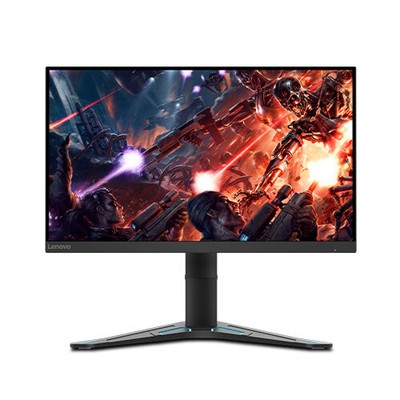
eBay
Product Series G27q. SAVOR SMOOTHER ACTION, SUPERB CLARITY, NEXT-LEVEL REALITY. To drop players into a deeper sense of reality, G27q-20 renders the world on screen in over 1 billion colors, more than the human eye can differentiate between, with its 99% sRGB color space and 10-bit color.
thoughts compared to this
IDk if i should trust the ebay listing to save some money on a similarly specked monitor what do you guys think?
misty gyro
zealous forge
IDk if i should trust the ebay listing to save some money on a similarly specked...
The ebay listing is legit but the Gigabyte monitor is far superior in quality
 errant edge
out of curiosity, what do you lose by cheaping out on a 1440p monitor?
color accuracy, response time?
quartz sandal
errant edge
out of curiosity, what do you lose by cheaping out on a 1440p monitor?
depends but can have ghosting, bad colours gsync/freesync support? a non adjustable stand, viewing angles, reflections/ viewing angles is sun, text clarity
errant edge
quartz sandal
depends but can have ghosting, bad colours gsync/freesync support? a non adjusta...
Sounds like a fun time, omw to buy a $150 1440p 240hz monitor
quartz sandal
errant edge
Sounds like a fun time, omw to buy a $150 1440p 240hz monitor
Look it up on ratings maybe lol
cerulean mountain
As long as it isn't like the ONN brand one I got where it smells hot while its running and the on-board speakers died after 3 days.
errant edge
quartz sandal
Look it up on ratings maybe lol
idt a $150 1440p 240hz monitor exists lol
ill prolly just hold out for an m27q
not like im in a rush
wild coralBOT
 TheTrueBacca#2995 has been warned
Reason: Duplicated text
errant edge
jesus that link
https://www.newegg.com/p/N82E16824012015? g27q is on sale for $250, 240 after $10 rebate
quartz sandal
errant edge
idt a $150 1440p 240hz monitor exists lol
Guaranteed worlds crappiest tn panel
errant edge
lol
cerulean mountain
I got a lg ultragear to replace it cause it was on sale but its HDR400 :(
surreal quarry
errant edge
ill prolly just hold out for an m27q
m27q is great, just be aware that there is noticeable backlight bleed along the edges
errant edge
https://www.amazon.com/KOORUI-Compatible-Computer-Ultra-Thin-Adjustable/dp/B09FNV3P3M?ref=dlx_deals_gd_dcl_tlt_55_b2e380a9_dt_sl15_d3&th=1 wtf is this brand

Specification: Model No: 27E1Q Screen Size: 27 Inch Panel Type:Rapid IPS Display Resolution: 2560x1440p/QHD Refresh Rate: 144Hz Color Gamut: DCI-P3 90% Color Number: 16.7M Brightness: 300cd/㎡ Response Time: 1ms Ports: HDMI/DP Viewing Angle: 178 Power: Less than 45W Wall Mount: VESA 75x75mm Mount ...
quartz sandal
errant edge
https://www.amazon.com/KOORUI-Compatible-Computer-Ultra-Thin-Adjustable/dp/B09FN...
Koorui obviously
Sorry, KOORUI*
errant edge
im assuming knock off brand?
quartz sandal
¯_(ツ)_/¯
 chilly dawn
Anyone use those ultrawide 1080p moniters?
I think that's the term
I would look into 1440p
But 6600
Maybe 1440p medium or high is near i get when I use ultra on 1080p
Dunno if it'll look worse or not
If its on par I would consider it
Because a 1440p ultrawide is probably better then a 1080p ultrawide
Im no expert so any outside opinions are appropriated
old arch
Not outright better except for general pc use, plus more pixels take a better gpu/cpu to push.  idk about ultrawide but normal 1080p to 1440p is a 2.7x pixel increase afaik
chilly dawn
Maybe a 27 inch 1440p could be better for my use case?
I don't edit or anything like that
Facebook marketplace isn't bad
6600 has mixed results for my ultra settings
Most games sit in the 120+ range, but I also just play alot of old games
Some hit over 200, but thats because they're legit early ps4 era
Still look amazing
But old
old arch
1440p could work for ya. If you game a lot I just don't suggest ultrawide to most people. A lot of games would have to be ran windowed mode or something
chilly dawn
 chilly dawn
Not too bad price wise
Most are 120hz or more i checked
What do yall think
27 inch 1440p better then ultrawide?
I can test game preformance for 1440p on my monitor
Obviously won't see the visual difference
Just to see preformance
Ok guys like
Plants vs zombies in ultrawide
misty gyro
That HP X27Q is a pretty good monitor
 misty gyro
Yeah that one. Good deal if it's in good condition.
You can always use FSR and RSR to upscale the image to 1440p while rendering it lower
chilly dawn
Do you think 1440 medium/high would look and preform similarly to to 1080high/ultra?
Or is it a bigger jump think I'm thinking
misty gyro
It depends on the game
But in general 1080p usually uses the CPU more, and going to 1440p uses the GPU a lot more
 misty gyro
It'll look sharper but details might be lower quality
chilly dawn
Ah
I mean games like
Black ops 3
Minecraft
Tf2
A majority of games I play
They'll run fine
misty gyro
And also, like I said you can use FSR and RSR so it renders in 1080p and displays in 1440p
Oh yeah those are mostly CPU titles, even at 1440p. Those will be fine.
chilly dawn
The most demanding games I have is like
Forza horizon 5
Or red dead redemption 2
Probably RDR2
 misty gyro
You can do >60 fps at high on RDR2 yeah

1440p ultra average is above 60 fps too

Forza 4 does 141 fps on ultra lol
chilly dawn
Competitive games are easier to push frames anyway
And tf2
Is tf2
Itll look kinda bad anyway if you use a config
So it sounds like 6600 is fine for 1440p
Issue is, I should probably get a 27 inch to make the most out of it
Right?
misty gyro
Ideally yes. That'll have good pixel density, and if you have to run a game at 1080p it won't look too bad at that size.
 misty gyro
It'll be pretty tight but I think you could make it work. Lots of monitors have smaller stands than that too.
chilly dawn
Yeah
This is some mid tier Samsung
1080p 144hz
Fine enough colours
Highest RDR2 let's me test is...
1440 x 900
chilly dawn
misty gyro
It'll be pretty tight but I think you could make it work. Lots of monitors have ...
Main issue is the speaker size tbh
misty gyro
Nothing a little 3M tape can't fix
chilly dawn
Ultra and high never looked too different to me
Diminishing returns is probably the right word
old arch
Perhaps just tilt those speakers horizontal when new wider monitor arrives.
misty gyro
"BuT tHeN tHe SoUnD iS sIdeWaYs"
Actual thing I've been told 🤦♂️
chilly dawn
The hell is sideways sound
I need to know

everything at high 1080p
So 1440p shouldn't be too much of an issue of if some lesser settings at low
I have NOT tried an OC though
old arch
OC could give 5% more fps at least. Yea 1440p should be fine if you simply lower certain settings a bit VS a 1080p setup. That's only semi modern games. Lots of older stuff probably wouldn't have to lower anything. That's part of why old games are great
 frank hemlock
Hello, I am new to computer building. I'd always wanted to build one and I built one a few weeks ago. It's specs are.. Intel 12700k and 3080TI FE on a MSI Z690 Force.... I was wondering what's a relatively large, maybe 35-45 inch monitor or tv that I could use to mount above my other monitors? Was thinking I could get something with 4k considering my setup. Thanks.
chilly dawn
old arch
OC could give 5% more fps at least. Yea 1440p should be fine if you simply lower...
Most of my steam "most played" is 2017 or earlier
So I should be fine and the old games will look better
chilly dawn
frank hemlock
Hello, I am new to computer building. I'd always wanted to build one and I built...
Like
As a media thing?
Confused by the wording my apologies
frank hemlock
Well, I have smaller monitors for gaming, i was looking for something to watch movies or play games that don't require me to have 1ms response rate like FPS.
chilly dawn
Ah
I assume if its just like
Casual experience?
You can kinda think more in the console aspect
If its just meant for slower games, some movies
Wall mount right?
frank hemlock
Yes, I will be mounting it to the wall.
frank hemlock
is there a make or model that is preferred?
chilly dawn
I don't think so, there probably is a "best 4k tv ever?!?!?!?!"
But most of seem pretty samey
Just read the reviews and all that
TVs have more headroom from what I've seen
Since they don't need top of the like refresh rates or response times
misty gyro
frank hemlock
is there a make or model that is preferred?
You can use this to filter down TVs by features that matter to you https://www.rtings.com/tv/tools/table

RTINGS.com
frank hemlock
misty gyro
You can use this to filter down TVs by features that matter to you https://www.r...
This is awesome, thank you,
chilly dawn
Guh
chilly dawn
Wondering if a 1080p moniter with HDR could be better

Or is HDR not that good
I've heard mixed opinions
misty gyro
chilly dawn
Or is HDR not that good
It depends heavily on the quality of the screen. HDR 400 is kinda "fake HDR" where it doesn't get bright enough to be true HDR but still offers better contrast and color.
HDR 1000 is far superior but far more expensive. Usually you'll find this on OLED screens.
chilly dawn
I've heard the term of fake hdr
If I had a better gpu I'd definitely gun for the 1440p
Ultrawide sounds cool but probably sucks for 1080p
misty gyro
Yeah it's hard to find a good ultrawide 1080p too
chilly dawn
From what I can tell, 24 inches is kinda the sweetspot for 1080p anyway?
misty gyro
Yeah, but if it's wider the vertical screen size will be the same
chilly dawn
I would go with dual monitor, but desk is too small
misty gyro
Wall mount with VESA
Or a desk arm
Looks like ultrawide 1080p is rare and expensive. It costs more than a good 1440p.
misty gyro
This would be the cheapest one worth getting (more than 75Hz lol) https://www.amazon.com/dp/B096HVSTLG

That's around the same price as the gigabyte G27Q, a halfway decent 1440p monitor
misty gyro
Yeah, they're either for streamers/esports (high refresh) or for content creators (video/picture editing)
There's not a market for anything in between at that resolution
chilly dawn
The gpu market will probably be fine in a few years, as the 6600 doesn't seem to be the best card for 1440p
I can wait
misty gyro
We should go back to normal from the chip shortage as a whole in 2024
chilly dawn
And I can't exactly afford to just buy a new gpu just after this one lol
misty gyro
But we're getting back to normal already for GPUs. We'll see how next gen goes, it'll probably be inflated for no reason now that they've seen how much we're willing to pay for one.
chilly dawn
So my Samsung monitor shall stay
chilly dawn
misty gyro
But we're getting back to normal already for GPUs. We'll see how next gen goes, ...
"They were willing to pay $1000, let's do $1200 lol"
misty gyro
We were willing to pay $2300 for the 3090...
That's why the 3080 ti was $1200, they almost made it $1000 but decided to gouge us.
chilly dawn
Can we go back to when the midrange market was competitive
Markets like TVs are super competitive now a days
misty gyro
Hopefully yeah with Intel getting in on things soon
A third competitor should mix things up
chilly dawn
Gonna try RTX on a 6600*
Quake 2 rtx
But yeah
In a few years when its viable
1440p ill jump too
Maybe I'll try to find a very nice 1080p moniter
Whatever that would even be
misty gyro
It's the IPS panel mostly, great response time
chilly dawn
Ah
I forget what mine is
Lemme check
It is nice how cheap 144hz is now
Seems to be nearing the new standard
I would've assumed 120hz would be more popular or cheaper, but I never see it
I wonder if I could ever notice the difference that 240hz could give me
misty gyro
Most people can't
chilly dawn
144hz seems to be the best spot so far
Because how cheap they've become
Like some $200 for a decent monitor
No real point to spend like $150 on a 75hz panel 
Because if you need second non gaming moniter, just get a 60hz lol
Hz seems like diminishing returns
The higher you go the less you would probably notice
Because games that can hit 240fps anyway are usually older ones, or you just have a super beefy gpu
That or, its a dumb argument lol
"You never saw 240hz i can easily tell the difference"
The guy who left it on 60hz for 5 months because he didn't check windows
 marble girder
I’ve had both 144 and 240 and there is a difference but not as great as 60 to 144 but I do want to try the 360hz
chilly dawn
Sounds what the consensus is
The higher the refresh rate most people start to not be able to tell a difference
 elder scaffold
Looking for recommendations on Monitor Arms, preferably with cable wells capable of thicker cables. 3 Monitors Total, SBS configuration.
 crude flower
Anyone know of a good 1440p gaming monitor around the price point of £200-£300?
crude flower
Uk
misty gyro

Gigabyte G27Q 27.0" 2560x1440 144 Hz Monitor (G27Q)
crude flower
Thank you 😃 with built in speakers, nice
misty gyro
Yep. Gigabyte gives lots of goodies for the competitive price points
 polar folio
Dell G2422HS 24 Inch Full HD (1920x1080) Gaming Monitor, 165Hz, IPS, 1ms, AMD FreeSync Premium, NVIDIA G-SYNC Compatible, Height Adjust, DisplayPort, 2x HDMI, 3 Year Warranty https://www.amazon.co.uk/dp/B09RWQ34ZG/ref=cm_sw_r_cp_apan_i_HA9WVH3TEG1KJ8NQ0ZC0
Is this a good monitor
errant edge
polar folio
Dell G2422HS 24 Inch Full HD (1920x1080) Gaming Monitor, 165Hz, IPS, 1ms, AMD Fr...
check out the msi g241
 indigo berry
Yes, it's IPS so you get also nice colors
errant edge
i think thats the model
errant edge
indigo berry
Yes, it's IPS so you get also nice colors
hmm
i sense a typo in the force
indigo berry
polar folio
Dell G2422HS 24 Inch Full HD (1920x1080) Gaming Monitor, 165Hz, IPS, 1ms, AMD Fr...
No
Hahahaha
GET
errant edge
lol
indigo berry
🤣 💀
indigo berry
polar folio
Dell G2422HS 24 Inch Full HD (1920x1080) Gaming Monitor, 165Hz, IPS, 1ms, AMD Fr...
You can also get a cheaper one for 150/160$ 144hz, the difference is almost unnoticeable
errant edge
https://uk.pcpartpicker.com/product/pXMTwP/msi-optix-g241-238-1920x1080-144-hz-monitor-optix-g241 @polar folio

MSI Optix G241 23.8" 1920x1080 144 Hz Monitor (Optix G241)
indigo berry
It looks nice, good specs and nice design
 cerulean jackal
Anyone know a good secondary monitor that is 144hz and 27 inches that isn’t too expensive?
severe dirge
cerulean jackal
Anyone know a good secondary monitor that is 144hz and 27 inches that isn’t too ...
what is your budget?
price for quality the G27Q is good
severe dirge
cerulean jackal
Anyone know a good secondary monitor that is 144hz and 27 inches that isn’t too ...
that's gonna be one of the best deals you find on a good quality monitor.
quartz sandal
errant edge
https://uk.pcpartpicker.com/product/pXMTwP/msi-optix-g241-238-1920x1080-144-hz-m...
@polar folio
Get this
https://uk.pcpartpicker.com/product/LRJgXL/msi-optix-g242-238-1920x1080-144-hz-monitor-optix-g242

MSI Optix G242 23.8" 1920x1080 144 Hz Monitor (Optix G242)
cerulean jackal
severe dirge
what is your budget?
Probably $150 at most
severe dirge
cerulean jackal
Probably $150 at most
I don't really know of any good monitors that are 1440p 27in 144hz that are lower than the one I listed.
would be worth saving up a little longer to get that one.
It's what I have. It's actually darn amazing.
quartz sandal
Yeah for 150$ you'd be getting a meh 1080p 144hz monitor
maiden wedge
Hey, I've been using a pretty mid quality and entry level 1080p 144 hz monitor with a TN panel for the past 2 years, but lately it has been hurting my eyes and giving me headaches (I believe this is related to the quality of the monitor?) and I would like to buy a new monitor that doesn't ruin my eyes. Was therefore wondering what type of monitor spec I should be looking at to accomplish this?
raw ingot
The headache could come from pwm frequency being too low
Some people are sensitive to that
maiden wedge
raw ingot
Some people are sensitive to that
I’m not sure TBH. I really got a budget monitor but the colors are atrocious and working on my PC for extensive hours (10 hours +) doesn't help with my eye problem. Plus I already have a bad eyesight so I was wondering what type of monitor I should be looking at to get a bang for the buck one that is suitable and adequate long sessions on it
maiden wedge
raw ingot
Some people are sensitive to that
Do you know if a monitor having a better panel than TN matter and will make the overall experience more appealing for the eye?
Currently my screen is made of plastic and feels very cheap.
I'd really appreciate it if you or anybody else could recommend me one or two monitors or maybe even brands that I could potentially look at and eventually get
raw ingot
Yeah, if you upgrade to something with IPS it would be easier for your eyes
All I can think from the top of my head is MSI G241/242 right now
It's an IPS 1080P 144hz monitor
maiden wedge
raw ingot
It's an IPS 1080P 144hz monitor
Is there a noticeable difference between TN and IPS? I'm curious since I've never been in front of an IPS monitor before. Also, I'm thinking about downgrading from 144hz to 60 or 75hz, as I don't game much anymore. Would that be a significant shift and is refresh rate important outside of gaming?
Also, are there other specs I should be looking at when purchasing a monitor?
Thanks a lot for the suggestions by the way
And should I go purely by specs when buying or does brand matter as much as other PC-related components?
visual pilot
Brands never matter, look at reviews
maiden wedge
visual pilot
Brands never matter, look at reviews
No reviews = unreliable?
I'm looking at local brands, as well as bigger name brands, which is why I ask.
visual pilot
It's less that, but rtings/hwub reviews give you a lot of good data
Would be suspicious of local brands...?
maiden wedge
I mean, I live in South Korea, and some of the tech brands are well known
visual pilot
Oh yea that's fine
maiden wedge
But I've never really tested them out yet, nor seen them in person
maiden wedge
maiden wedge
I mean, I live in South Korea, and some of the tech brands are well known
BTW, I'm not talking about LG or Samsung but only locally known companies
visual pilot
It's probably rebranded Samsung monitor or smth like that, SK makes a lot of monitors, local brands could still use a decent oem
It's not like the US
maiden wedge
Yeah, is it possible to deduct the quality of a monitor just by looking at specs and reviews (if there are any)?
Or are there other factors that come into play
Also, are VA panels something I shouldn't be considering at all?
BTW, just checked, MSI got "Eye Care" series, looks interesting
But might be overpriced for what it brings to the table.
visual pilot
maiden wedge
Yeah, is it possible to deduct the quality of a monitor just by looking at specs...
Specs don't have to be completely true
As in, manufacturers can fudge numbers to make it seem good
And well, VA is like a middle ground between IPS and TN in terms of picture quality, it has better contrast than both though
maiden wedge
visual pilot
And well, VA is like a middle ground between IPS and TN in terms of picture qual...
Just did a quick search, apparently VA is good for dark environments? What would you use if I use my computer mainly to work/study, and sometimes produce music and just casually watch videos?
I also see that IPS is usually more expensive but I still don't quite get what would suit me better...
Sorry if I'm asking too many questions at once, I'm quite new to all this, hope you understand
visual pilot
VA does tend to do better in darkness due to its high contrast, but in general if you want nice picture quality, I'd just do IPS
Nowadays, IPS isn't that much more expensive anyways, if it's more expensive than VA/IPS offerings of the same specs
maiden wedge
visual pilot
Nowadays, IPS isn't that much more expensive anyways, if it's more expensive tha...
Alright then, I'll go for IPS. For refresh rate, do 60hz and 75hz feel noticeably different?
I'm thinking of downgrading from 144hz as I don't game anymore
visual pilot
Most of the time, no difference since most content you'll see would still be 60hz
But 144hz is nice for games
maiden wedge
visual pilot
But 144hz is nice for games
Thanks man, I appreciate your help
Oh maybe one last thing if you don't mind
A higher response time, such as 4-6 ms is not a problem if you're not gaming right?
Might go for the ViewSonic VA2410-HV IPS, it costs 123 USD where I live
visual pilot
Can be annoying, and manufacturers already kind of lie to advertise lower response times than the monitor could actually achieve
maiden wedge
How can it be annoying? I thought it only affected gaming performance
visual pilot
Pixel response time is how long it takes to switch from one color to another, side effects can be ghosting or overshoot and such, probably not an issue, but it's something to keep in mind if you do experience something like that
It's probably going to be fine, but in a worst case scenario, it can be noticable
maiden wedge
Ok then. Thanks a lot for your help
visual pilot
You're welcome
 glossy haven
Need help, my monitor cant run at 144hz even though i change my dp cable, when I first purchase my monitor it can run 144hz but now it cant i need to downclock it to 120hz. Any Help?
visual pilot
glossy haven
Need help, my monitor cant run at 144hz even though i change my dp cable, when I...
Try custom resolution through nvcp and set it to 144hz
glossy haven
I've already done this, still experiencing it
visual pilot
Drivers perhaps?
glossy haven
Already updated my drivers
visual pilot
Monitor drivers
Also, freesync/g sync off monitor side through osd
Perhaps some random low latency mode monitor side in osd
glossy haven
Still the same :(((
quartz sandal
glossy haven
Need help, my monitor cant run at 144hz even though i change my dp cable, when I...
Try changing ports on the gpu?
glossy haven
At first, my dp cable is doing fine like everything is like silky smooth butter nothing wrong but after few months vertical and horizontal lines starting to show when I run at 144hz but when I downclocked at 120hz its doing fine
quartz sandal
Sounds like a bad cable
raw ingot
that's defo bad cable
chilly dawn
wrong chat
 acoustic turtle
TCL
 frozen lark
TCL or Hisense
acoustic turtle
^^
frozen lark
JVC and sceptre do good cheap ones too from what I've heard
 upper mango
I need help with setting up my dual monitors-
I have setup both and they work but they're super laggy and the new one I have is blurry
I used a display port cable for my acer monitor(new one) and an HDMI for my omen monitor(old one)
Both are set to 144 hz and 1920x1080 resolution
Whenever I set it to "duplicate these displays" instead of "extend these displays" all lag and blurriness goes away.
Anyone know what the problem could be?
misty gyro
What GPU do you have?
What model monitors?
Do you know the HDMI version supported by the cable?
upper mango
GPU-Nvidia Geforce RTX 2070 Super
Model monitors-Omen by HP 25, qg241y s acer
Not quite sure of the HDMi tbh
misty gyro
I know from experience multi monitor on the 2070 can be painful. Let me check some specs, I'll be right back.
misty gyro
upper mango
GPU-Nvidia Geforce RTX 2070 Super
Model monitors-Omen by HP 25, qg241y s acer
Is the Acer the sbmiipx model?
Acer loves to use nonsensical keyboard smashes for their model names.
upper mango
Yes I believe so
Also... it seems to be significantly less laggy after restarting it and tweaking a few settings... the main problem is just that it's still a little blurry, and there's a slight trail on stuff which is incredibly annoying
upper mango
yes I believe so
misty gyro
Ok, I'm getting mixed reports from some people about that HP monitor and the HDMI. It claims to be HDMI 1.4, which is technically good enough for 144hz. However there's also people saying over 120hz on HDMI doesn't work right.
I'd recommend both monitors be plugged into displayport if possible, that would narrow down that
Freesync is another thing to try disabling. Especially over HDMI, that can cause issues, and especially on cheaper monitors.
Also with one monitor supporting freesync and the other not, the monitors won't be refreshing at the same time which is exactly what causes bugs on the 2070 that I had before.
misty gyro
I try to be complete with my research and answers lol
upper mango
Thanks so much, I think I'm gonna buy another display port cable
misty gyro
Should only be a few dollars and you don't need a high end one, just a simple dp 1.2
errant edge
Is this basically a bigger g27q? https://www.newegg.com/p/N82E16824012047?Item=N82E16824012047&Source=socialshare&cm_mmc=snc-social-_-sr-_-24-012-047-_-05112022
visual pilot
errant edge
Is this basically a bigger g27q? https://www.newegg.com/p/N82E16824012047?Item=N...
It's a bigger g27qc, it's va
misty gyro
The VA panel on the curved ones isn't great
Color is fine but contrast is lacking, and whenever you play a video there's noticeable and sharp changes in brightness in scenes even in HDR mode.
errant edge
Thanks
quartz sandal
All non like 800$ 1440p 120hz+ curved are VA
frozen lark
My new old stock monitor came in y'all. (Ignore the tape that's cat proofing)
 cerulean jackal
Anyone know a 27 inch monitor that l can use for both my ps5 and my pc?
visual pilot
Do note I don't think ps5 has 1440p support yet
so you're gonna be stuck with either 27in 1080p panel or 27in 4k panel
misty gyro
cerulean jackal
Anyone know a 27 inch monitor that l can use for both my ps5 and my pc?
What's your budget?
cerulean jackal
misty gyro
What's your budget?
It doesn’t matter
cerulean jackal
visual pilot
Do note I don't think ps5 has 1440p support yet
Yeah it doesn’t. 1080p is fine. My gpu that l have for my pc is a 3050
misty gyro
Ah 1080p, I was about to suggest this lol https://www.bestbuy.com/site/lg-27-ultragear-uhd-nano-ips-1ms-144hz-monitor-with-nvidia-g-sync-compatible-with-amd-freesync-premium-pro-black/6451085.p?skuId=6451085

Best Buy
Shop LG 27” UltraGear UHD Nano IPS 1ms 144Hz Monitor with NVIDIA G-SYNC Compatible with AMD FreeSync Premium Pro Black at Best Buy. Find low everyday prices and buy online for delivery or in-store pick-up. Price Match Guarantee.
misty gyro
cerulean jackal
Yeah it doesn’t. 1080p is fine. My gpu that l have for my pc is a 3050
I think the Optix G272 would be a good choice
cerulean jackal
I don’t think l would pay that much
cerulean jackal
The LG
misty gyro
Ah, yeah well you said no budget soooo lol
misty gyro
Yes
cerulean jackal
Ok
misty gyro
This one is a bit higher quality https://www.amazon.com/gp/product/B08V8VCRZ5?tag=rtings-mn-p-amazon-20&ie=UTF8

Pure, pro-level gaming. Play like a pro with LG's 24" UltraGear Gaming Monitor. Color intensity with Full HD (1920 x 1080) IPS resolution and unbelievable 1ms response rates. Featuring custom gaming control, ultra-fast 144Hz refresh rates and AMD FreeSync Premium to minimize tearing and stutter —...
cerulean jackal
Then one of those two l would get for my main monitor. I also wanted to get a secondary monitor for multitasking, should l just get another one of whatever main monitor l have?
misty gyro
If it's just for discord or youtube and such while gaming, you can use any monitor really
cerulean jackal
I kinda wanted my secondary monitor to be the same as my main monitor, or l would just want it to be the same brand or just for it to look the same
misty gyro
You can go with 2 of the same if you want. It does look nicer.
quartz sandal
errant edge
theres a new g27q on ebay for $200
Who is the seller?
errant edge
quartz sandal
Who is the seller?
"lenovo authorized seller"
unsure if thats lenovo
or what
quartz sandal
errant edge
"lenovo authorized seller"
Ahh that's a lenovo g27q and not gigabyte then
quartz sandal
I mean easy enough mistake if you just check the model
raw ingot
see this is why i now like to say don't get confused with lenovo one
lenovo doing copycat move
chilly dawn
I've decided that 1440p can be a genuine option for me
So now I can start looking into them more
chilly dawn
Is that was you use?
errant edge
Gigabyte G27Q 27.0" 2560x1440 144 Hz Monitor (G27Q)
im currently on 1080p
but im planning on getting either the g27q or m27q
chilly dawn
Some gnarly bleeding

Can't wait for oled monitors tbh
Imagine
1440p
144hz
Oled
Glorious
If oled is capable of lower respond times
People saying the jump from 1080p to 1440p looks amazing
I can't say from experience though
Do yall think its better to go for newer or used monitors
Because 1440p has been around for a while, no?
misty gyro
1440p has been mainstream for a few years now yeah. It's been around a lot longer than that.
And yes 1440p looks amazing compared to 1080p, especially at the same size
misty gyro
chilly dawn
Can't wait for oled monitors tbh
The main issue with OLED is the burn in. It makes for a pretty poor monitor when the screen only lasts for a year with all the static desktop icons getting burned in, and the taskbar would need to auto hide, browser windows need to hide the top where the tabs are, etc
chilly dawn
misty gyro
The main issue with OLED is the burn in. It makes for a pretty poor monitor when...
Yea
I've heard oled burn in isn't too much of an issue anymore
Compared to what it used to be
misty gyro
If you look at standard OLED it's still a huge issue. But there's alternatives like mini OLED and AMOLED that it's not so bad on.
chilly dawn
misty gyro
And yes 1440p looks amazing compared to 1080p, especially at the same size
It would be from 24 inch 1080p to 1440 at 27
I think
misty gyro
Perfect size for 1440p gaming imo
Not so big I have to turn my head when gaming too much, and large enough to show off detail
chilly dawn
32 inch where you have to gaze at different parts of the screen
misty gyro
Yeah. It's a shame there's not really anything between 27 and 32 inch available.
 blissful dragon
still confused on why ps5 doesnt support 1440p huge letdown for me
chilly dawn
Only 4k and 1080?
misty gyro
Blame Sony. They said it would.
blissful dragon
chilly dawn
Only 4k and 1080?
yea
misty gyro
2k technically
chilly dawn
Life ruined
chilly dawn
Tf2 in 1440p
(Game still runs like poo)
I don't wanna hype myself too much for 1440p
Incase I overshoot my estimates
But everyone says it's amazing
Isn't 1080p more cpu bound, and 1440p more gpu bound?
blissful dragon
chilly dawn
Isn't 1080p more cpu bound, and 1440p more gpu bound?
Yea if you have something like a 3080 playing at 1080p that cpu will be the bottle neck
chilly dawn
I doubt its the bottleneck in my build lol
But yeah
1440p is right at the price of
I can afford it but I don't know if I should get it
Trying to find a good used monitor
Kinda sucks looking for em

Found this?
Nvm looked it up
Don't sound too good

Seems good review wise
Should I bite?
Very mixed reviews
 misty gyro
chilly dawn
misty gyro
chilly dawn
This Samsung is alright but definitely cheap. Curved VA panels have bad contrast among other things.
misty gyro
chilly dawn
This Dell is quite a bit better, passable gaming performance and IPS panel. https://www.rtings.com/monitor/reviews/dell/s2721dgf
RTINGS.com
The Dell S2721DGF is a 27 inch, 1440p monitor gaming monitor with a fast refresh rate and great gaming features. The IPS panel delivers wide viewing angles, and ...
 misty gyro
Most cheaper monitors are, you don't get good HDR unless it's at least HDR1000 rated by VESA
HDR400 is ok, but referred to as "fake HDR" for a reason, since it doesn't get bright enough to really be called HDR
chilly dawn
You think the dell is worth it?
Also just realized its bids
when I put it on buy now only
misty gyro
The Dell new goes for $450, if you can get it for $250 including shipping that would be a great option
If the bids go higher than that, just get the Gigabyte M27Q
It's $320 on Amazon and B&H right now
chilly dawn

Local pickup only
Wny is that even a thing on eBay

There's this
Looks kinda cheap
Bit too cheap
AOC CQ27G2 27" Super Curved Frameless Gaming Monitor QHD 2K, 1500R Curved VA, 1ms, 144Hz, FreeSync, Height adjustable, 3-Yr Zero Dead Pixel https://www.amazon.com/dp/B0862YHJ56/ref=cm_sw_r_apan_i_JG5Q9X37B6PD22FF4JYV?_encoding=UTF8&psc=1

27-inch Curved Gaming Monitor FreeSync support ensures a stutter-free and tear-free gaming experience at any frame rate Equipped with a curved 27" VA panel the CQ27G2 displays a detailed Quad HD resolution (2560x1440 pixels) at a screaming 144 Hz refresh rate and 1ms (MPRT) response time. Crazy I...
Found an aoc
Never heard of them before
The reviews are pretty good
misty gyro
I wouldn't say good but not terrible https://www.rtings.com/monitor/reviews/aoc/cq27g2

RTINGS.com
The AOC CQ27G2 is a decent 27 inch, 1440p monitor with a VA panel. It has a simple design, with a wide stand that supports the monitor well and okay ergonomics. ...
It's ok at gaming and bad at... everything else
chilly dawn
I see
errant edge

AOC C24G1A 24-inch Class Curved Gaming Monitor FreeSync Premium support ensures a stutter-free and tear-free gaming experience at any frame rate. Equipped with a curved 23.6 VA panel, the C24G1A displays a super-detailed Full HD resolution (1920x1080 pixels) at a screaming 165Hz refresh rate and ...
was $140 at the time though
chilly dawn
1440p monitors aren't nearly as easy to get a good one than 1080p
errant edge
oh its va, not ips
chilly dawn
Probably because there's so many 1080p monitors
KOORUI 144hz Gaming Monitor, 27 inch IPS QHD 1440p 144hz 1ms G-sync Compatible Computer Monitor, DCI-P3, Ultra-Thin Bezel, Adjustable Stand, HDMI/DP Monitors https://www.amazon.com/dp/B09FNV3P3M/ref=cm_sw_r_apan_i_RMAYM7WXW3CQG5QSEKEP
Specification: Model No: 27E1Q Screen Size: 27 Inch Panel Type:Rapid IPS Display Resolution: 2560x1440p/QHD Refresh Rate: 144Hz Color Gamut: DCI-P3 90% Color Number: 16.7M Brightness: 300cd/㎡ Response Time: 1ms Ports: HDMI/DP Viewing Angle: 178 Power: Less than 45W Wall Mount: VESA 75x75mm Mount ...
Found this
errant edge
the reviews on it seemed terrible when i saw it
wouldnt recommend
brand seems to cheap out as much as possible
chilly dawn
I see
misty gyro
Yeah cheap off brand
chilly dawn
I'm looking at reviews at it just
"Eh"
This market kinda dooki3
I can afford like a $300 ome
But not the best financial decision
If that sounds right
It might be worth just...waiting it out ig
Which is a bummer
Waiting for a sale sucks
errant edge
g27q is on sale
for 240 after $10 rebate
Gigabyte G27Q 27.0" 2560x1440 144 Hz Monitor (G27Q)
chilly dawn
Reviews seem mixed about it
I'll look into it
It's hard to buy a monitor when you can't see it in person lmao
misty gyro
It really is though
Places like Best Buy sometimes have them on display but limited selection
chilly dawn
Like I feel like I'm being really picky here
chilly dawn
misty gyro
It really is though
Mine has no 1440p displays
At all
I've checked
Wasted a whole school lunch break on it
Was fuming lmao
misty gyro
Ouch. I got mine at my local best buy.
chilly dawn
I hell as sure know WALMART won't have it
misty gyro
Yeah no they stock the cheapest garbage they can get away with
chilly dawn
That pavilion i got was more of a surprise lmak
The poopy 500 buck hp pavilion
Atleast like
Other peripherals are cut and dry
You can watch a keyboard review and get a basic idea of how it'll preform
A monitor? Hell no
misty gyro
Yeah that's been a constant issue, lack on consistency and extremely subjective reviews
chilly dawn
To some people 60hz and 144 are the same
Colours are very subject
Not to me but you get the point
errant edge
60 hz and 144 are like night and day
misty gyro
Which is why I like rtings, objective reviews and clear test methodology
chilly dawn
errant edge
60 hz and 144 are like night and day
Some people just don't see it and idk why
My friend says he doesn't see a difference
Which is like
"How"
When I first started 144hz I was thrown off guard of how responsive it was
My aim was messed up and all that
But yeah
With these prices and the fact I can't buy in store
Probably best to wait for a sale
Dumb? Eh probably
misty gyro
Nothing wrong with waiting for sales
chilly dawn
My monitor rn isn't bad
pretty average
1080p, 24 inch
144hz
Everything average of a 200 buck monitor
I just know my gpu can play all my games at 1440p fine
And its just itching for me to buy it
 jagged ivy
misty gyro
jagged ivy
misty gyro
Hope you don't like your privacy because that might just have a hidden webcam and microphone
visual pilot
Unfortunately, it's mainly gimmicks, no real spec to it
Different brands have different "eyecare" options or something of this nature
There has been a little research that might be biased but claims curved monitors can help with eye strain, everything else matters less, refresh rate is nice for mainly gaming, panel type wise, IPS gets your accurate colors, VA gives you better contrast, resolution wise, higher resolution just looks nicer. In reality, it's mainly a question of your budget and looking at the options available for your budget
Sure, I'll need to know your budget and use cases though
wild coralBOT
 (𝖅)#9167 has been warned
Reason: Duplicated text
visual pilot
oop, bot doesn't like it when you have 3 or more links in the same message
quartz sandal
Imo spend 20$ more and get the gigabyte g27q
severe dirge
Are you in the US?
anything under 1000 is meh
but for the price/quality that's gonna be the best deal you find for a budget 27" 1440p monitor
like that's a stellar deal for that monitor.
like 1-2 days
then however long it takes for the shipping company to get to you.
It's #worth however long it takes.