#old-monitors-and-tv
1 messages · Page 32 of 1
 cursive goblet
 silver harbor
Soooo, I hooked up my computer and turned it on for the first time it works, I think, I pushed the power button on my monitor aaaand nothing.... its a refurbished predator
Do I have to hold it down or is it dead?
 visual pilot
@silver harbor literally nothing, or does it say no signal?
if it does literally nothing, it's probably dead...
 latent pewter
@silver harbor disconnect the HDMI from the Monitor and turn it on if its dead you will see a blank screen if its not you will see a msg about no input detected if you see the msg your going to need to either try a different cable or make sure the graphics card is seated properly or try the monitor on something else Laptop etc
 astral mantle
Are there any monitors anyone would recommend that have both high refresh rate (min 144hz) and decent color for under $300?
visual pilot
It's gonna have to be 1080p <300$.
 magic rapids
so I'm looking at this https://www.amazon.com/dp/B07MKT1W65/?coliid=I3BGCI54CSSKK7&colid=14Y2TIU38DEZ2&ref_=lv_ov_lig_dp_it&th=1 Anythoughts?
visual pilot
Well, what will you be using it for?
magic rapids
video editing lightly, games general use, movies, streaming a little bit of everything. Mostly looking for a nice 4k for future game stuff streaming for when I get an upgraded video card (1070 now) in the future
visual pilot
Yea I wouldn't suggest 4k using a 1070 lol, but the thing is, that monitor is 60hz, so not great for gaming
but 4k itself is not great for high frame rates anyways
I'm just confused on how one of these are 150$ more than the other right now
magic rapids
yeah I'm not paying for 144hz Yeah I'm familiar I'm waiting for the 3xxx series nvidia before I upgrade to that will probably run most in 2k or 1080 until those come out. Kinda want to future proof the order for a year or so
magic rapids
yeah I can't really tell too big a difference in all the ones highlighter. And LG's webpage is kinda all over the place in stats
visual pilot
yea amazon isn't helping with how it displays specs xD
magic rapids
so true! I was probably gonna look at newegg anyhow I prefer to buy from them for tech if I can
jsut someone sent me a link to this so hey
magic rapids
amazon has always been bad for tech stats. or any information usually 😛
visual pilot
It's just Newegg doesn't have as good stock and pricing since it's not as big as amazon... Sadly...
magic rapids
can't seem to find a decent priced 4k 144hz was kinda looking for one but tehy're all mucho priceyo
visual pilot
Yea 4k 144hz are expensive af, esp during corona.
4k 60hz are the only real 4k panels 'normal' people can buy
 vast viper
Much more reasonable to use a 4k 60hz and a 1440 144hz beside each other.
visual pilot
Oh yea, @magic rapids are you set on getting 4k monitor now?
magic rapids
mostly I'm in no hurry my brother though... unless I have something to prove it's a good idea to wait are prices gonna come down after all this nonsense was kinda thinking of holding off to see if around july or so there would be some price drops due to flood of supply
visual pilot
Ah alright so you can hold out for a bit, and I assume you want to just future proof 4k general use?
 full moat
@magic rapids please dont get your hopes up for prices to return this year
magic rapids
mostly yeah. I like to build for the future!
@magic rapids please dont get your hopes up for prices to return this year
@full moat wishful thinking for a cheap-o like me mostly lol
full moat
sorry mate
visual pilot
Well, stock and pricing won't be good till a few months after quarantine is lifted, but if you have time to wait and browse right now, it'll give you options.
full moat
"Well, stock and pricing won't be good till a few months after quarantine is lifted," <- wishful thinking imo
magic rapids
cool
full moat
it will take a lot longer for the retailers letting "go" of that sweet sweet markup
visual pilot
I see what you're saying, but at least stock will go back to normal, with suppliers in say Asia producing, to a limited capacity, but still producing products.
magic rapids
so far I think the LG's seem to be the best bang for the buck. but there's a lot I've looked at recently. Kinda wanted a predator cause I've always heard good things
visual pilot
god damn it I forgot to post dem links I was meaning to post

Buy LG 27UK650-W 27" 16:9 4K HDR FreeSync IPS Monitor featuring In-Plane Switching (IPS) Technology, DisplayPort + HDMI Inputs, 3840 x 2160 Resolution, 1000:1 Static Contrast Ratio, 350 cd/m² Brightness, 178°/178° Viewing Angles, 5 ms Response Time, 1.07 Billion Colors, H...
full moat
Predator's are .. nice ...but holy heck they are expensive
magic rapids
yeah
visual pilot
one sec I gotta go find the other good cheap-ish 4k monitor
full moat
and i personally find their design to be fairly gaudy
but that is 100% my personal preference :)
visual pilot
The former has better brightness and a HDR certification
magic rapids
was looking at the 650, I think the only thing I liked about the 850 was hardware calibration stuff... but I can't remember now. That amazon link has the 650 that's where my search began. was def set on 300+ cd/m2
since this room is bright
thanks too, just wondering what other good options there are really
visual pilot
Hmm I jumped to conclusions on the UL
isn't as good as I thought it was
but here is the rtings review on the UK650
https://www.rtings.com/monitor/reviews/lg/27uk650-w

RTINGS.com
The LG 27UK650-W is a very good 27 inch, 4k IPS monitor with a low input lag for gaming and great SDR peak brightness. It has very good color accuracy, wide view...
Rtings can be very useful as they do pretty in depth reviews.
magic rapids
awesome never seen that site, a new one for the list
 copper scarab
https://rtings.com
https://reddit.com/r/monitors
https://blurbusters.com
https://tftcentral.co.uk
Community g-sync compatibility testing results spreadsheet
https://docs.google.com/spreadsheets/d/1YI0RQcymJSY0-LkbjSRGswWpJzVRuK_4zMvphRbh19k/edit#gid=1455257716

RTINGS.com
Find the best products for your needs, based on our reviews, ratings and recommendations.

Blur Busters
Everything Better Than 60Hz — including 120Hz, 144Hz, 240Hz, LightBoost, ULMB, Turbo240, G-SYNC, and more.
TFT Central is your source for all the latest monitor news, reviews, articles and information

Google Docs
guide
DRIVER IS UP
https://us.download.nvidia.com/Windows/417.71/417.71-desktop-win10-64bit-international-whql.exe
G-Sync Pendulum Demo
CRU TOOL TO MODIFY FREESYNC RANGE,CRU Guide (Opti...
copper scarab
copper scarab
https://rtings.com
https://reddit.com/r/monitors
https://blurbusters.com
https...
visual pilot
Oh yea blurbusters are great too
no idea what tft central is
gotta check that out
copper scarab
I might take that one off - it's similar to rtings, targeted toward the pro market
full moat
TFT central, please keep it around Forks
copper scarab
oh, maybe not - looks pretty modern these days
copper scarab
They reviewied like one monitor a month last time I read around there
full moat
aye, not exactly known for their super high pace
copper scarab
I've been a little pin happy lately, should probably ask mike about that hahaha
full moat
its about time the pin sections got some love Forks :)
 grim geyser
!
 violet acorn
Hey, so ive had a 144hz monitor for about a week now and ive been playing my xbox one on it. The xbox one is hooked via hdmi, and the game ive been playing most is overwatch which runs at 60 fps and has no motion blur. The monitor has some mild ghosting when looking arround on overwatch, and ive been looking online for a fix and everyone just says turn on "Overdrive" in the settings, but my monitor doesnt have any of those options. Im wondering if when i get my pc, will the monitor stop ghosting as bad once i get 144hz over displayport???
 deep fern
overdrive often causes ghosting
or artifacts rather
still not good, it's worse than ghosting
hdmi can only go to 120hz also
violet acorn
Well do u think the ghosting will get better going from 60fps to 144fps? Or will it stay roughly the same?
violet acorn
Because right now i have 2 monitors. I have a 60hz tn panel monitor that has relatively low ghosting, but bad colors and screen tearing. And i have a 144hz va panel freesync monitor that has noticable ghosting. Right now i dont have my pc build, so i play my xbox one. The main question i have is, will the va panels ghosting get better once im playing at 144hz on my gaming pc, or will it still look the exact same as playing the 60hz xbox one?
Or i guess will going fron 60hz to 144hz make the ghosting less noticable??? I have never played on a 144hz monitor so i have no idea and cant find any info on it
deep fern
ghosting is more related to the response time of the monitor. 60 to 144 with same response would have about the same ghosting but it is harder to spot with 60 as it is much blurrier.
also it seems va has a different pixel arrangement that can cause some artifacts like seeing almost a shadow under some colors or "objects" most people dont' spot it tho and get used to it
 whole sorrel

violet acorn
So should i play competitively on my 60hz tn panel monitor, or on my 144hz va panel with ghosting???
whole sorrel
are there other rates that the monitor runs at?
violet acorn
I dont believe so
deep fern
i'd say 144 better
violet acorn
Even with the ghosting???
deep fern
also before with overdrive, some monitors there is a response time setting that has something like fast, faster or fastest, or something like that. If you see that put it on the second highest one not that highest
144 is still better than 60
ghosting is better than outright motion blur
violet acorn
No my monitor literally has no settings to change that
deep fern
what monitor is this btw
violet acorn
But do u think id get used to it after a bit and it wouldnt be much of a problem?
violet acorn
Its a sceptre c248b-144rk, and the online manual says it has overdrive but when i contacted the support team they said that might be a mistake on their end because it is nowhere to be found lol
deep fern
one sec
violet acorn
@@deep fern It is a great relief that u think ill get used to the ghosting though and it wont be too much of a hinderence because i was afraid i just wasted 170 usd for no upgrade lol.
@whole sorrel I dont currently have my pc so i cannot check in the OS settings, but i ordered all my parts for my first pc build and it should be coming in a few weeks
whole sorrel
ah ok
deep fern
but on the spec sheet i see it is 3ms gtg response time which is a little bit high, but I'd still say 144hz is better than 60
whole sorrel
I'm curious what that window's options are for a 144Hz display
deep fern
the 3ms could explain what you are seeing
whole sorrel
do you have one iTech?
deep fern
I have 240
violet acorn
Yeah, ill send pics of my monitors settings
whole sorrel
o
violet acorn
deep fern
but to select high refresh on my monitor it has to be pc res not hd https://i.imgur.com/uoSeqIa.png
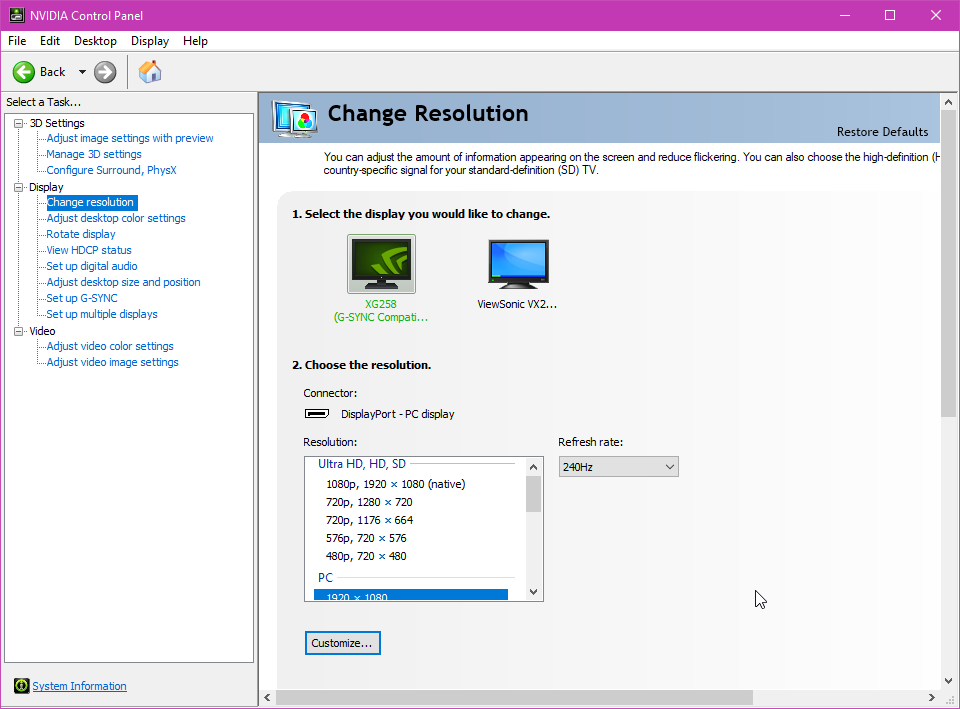 whole sorrel
ree click on the refresh rate box I wanna see the options 
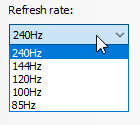 whole sorrel
oo so it does have all the things
deep fern
I don't see overdrive in those settings so that shouldn't be a problem
oo so it does have all the things
@whole sorrel it does
 whole sorrel
xd
deep fern
looks like it is just a matter of gettings used to it
violet acorn
Yeah but i also heard enabling overdrive fixes the ghosting lol, so i wish i had the option just to try it
Let me show u the ghosting compared to my old monitor
deep fern
there is something on some monitors, i know asus calls it elmb or I think i've also hear dulmb that reduces ghosting
does a good job of it too, but I have seen many monitors that you can use elmb/ulmb and freesync/gsync at the same time
you can always check on blurbusters on info about high refresh, ghosting, variable sync, and input lag https://blurbusters.com/
Blur Busters
Everything Better Than 60Hz — including 120Hz, 144Hz, 240Hz, LightBoost, ULMB, Turbo240, G-SYNC, and more.
deep fern
this is console ye?
 sinful bay
Can someone help me pick a monitor
deep fern
whatcha looking for
sinful bay
Not much preference other than 144 refresh rate and sub 200 in cost
deep fern
for pc? nvidia or amd gpu you have?
deep fern
ok
sinful bay
Yep pc
deep fern
I see what I can find
sinful bay
Great thanks
violet acorn
Yeah its the xbox one connected with hdmi on both monitors
But my pc will be connected via displayport when the parts come in
deep fern
You should visibly see a difference between 60 and 144hz, I do not know much about how high refresh works with consoles however
violet acorn
My xbox maxes out at 60hz so i dont think its at a high refresh rate in the pic.
deep fern
@sinful bay out of what I could find right away I found 2 that look interesting
1:
https://www.bhphotovideo.com/c/product/1539791-REG/msi_24_optix_g241_gaming.html/specs
and 2:
https://www.bhphotovideo.com/c/product/1393334-REG/benq_zowie_xl2411p_24_zowie_144hz.html.
The first is a ips and the second is a tn, so the first was has better color accuracy, both has same minimum response of 1ms. I personally like the msi, but might want to look into it more 🙂

Buy MSI Optix G241 23.8" 16:9 144Hz FreeSync IPS eSports Gaming Monitor featuring In-Plane Switching (IPS) Panel, DisplayPort | HDMI Inputs, 1920 x 1080 Full HD Resolution, 1000:1 Static Contrast Ratio, 250 cd/m² Brightness, 1 ms Response Time, 144 Hz Refresh Rate, 16.7 M...

Buy BenQ ZOWIE ZOWIE XL2411P 24" 16:9 LCD e-Sports Monitor featuring 24" Twisted Nematic (TN) Panel, DVI-DL / HDMI / DisplayPort 1.2 Inputs, Full HD 1920 x 1080 Resolution, 12,000,000:1 Dynamic Contrast Ratio, 350 cd/m² Brightness, 1 ms Response Time, -5 to 20° Tilt Angle...
I am seeing that you have to set it in setting, xbox button > system > settings > display & sound > video output. Look for a refresh rate option. This might be only for the xbox one s and x but i am not sure
@violet acorn
violet acorn
Okay i will try it out later, thanks!
deep fern
np
violet acorn
I hope im just able to get used to the ghosting if it doesnt get fixed on my pc so i didnt waste my money lol
deep fern
yeah, I think it shouldn't be too bad
sinful bay
Are they any monitors available now? I kind of need a new one sooner rather than later and the MSI isn’t in stock anywhere yet
Does the TN panel make much of a difference?
violet acorn
Normally tn panels have worse coloring, but faster response times. I think if your mainly competitive gaming, u should go for a tn panel for the faster response time, but if ur photo/video editing the better coloring might come in handy
Also im not an expert, but from the info i read thats the conclusion i came to
It might be best to get input from multiple people on the topic though
sinful bay
Yea I’m just a casual gamer
violet acorn
If your just casual, then u might like an ips or va panel more than the tn for better colors. Id suggest to read up on the differences on the panels to see which you would like more. Personally i play a lot of competitive fps games so i would personally like a tn panel, but they were sold out so i had to get a va panel. The monitor has ghosting which isnt ideal, but the colors look 10x better than my old tn panel lol
 keen kiln
any photographers/photo editors know/suggest any good monitors?
full moat
@keen kiln the simple answer might be to have a look at the pins :)
violet acorn
@deep fern I got good news and bad news lol. First the bad news, i went into my xbox settings and wasnt able to find the refresh rate setting so im unable to change it (i have the OG xbox one). The good news though is that after about a week of emailing the sceptre tech support team trying to get this sorted out, i was told that the monitor is designed to be used at 144hz and that the ghosting thats happening on my xbox shouldnt be as bad as when i get my pc running at 144hz. Also, after playing on the monitor for like a day, i have gotten use to the ghosting so i consider this a good upgrade from my other monitor. The colors are simply amazing compared to my old monitor and im really happy i got it!
deep fern
That good! And bad lol. Yeah I believe it’s only the one s and x that have high refresh
It should be better on pc, might have to manually set the refresh first but I’m glad the colors are a all around upgrade
 winter lance
Best budget 144 hz freesync monitor??
 olive token
@keen kiln any IPS panel
visual pilot
@keen kiln also, budget is needed.
keen kiln
Sorry, I’d say less than $500ish
visual pilot
Resolution preferrance?
And refresh rate preference?
IPS is basically a must for photo editing and other tasks that require precise colors, but some IPS panels are great, and come pre-calibrated, when some others are just not well calibrated.
winter lance
Yes. or 1440
visual pilot
1440p <400 isn't great usually, but I can find you a good 1080p 144hz at ~200$.
winter lance
That will work.
visual pilot
This is a great monitor if you can wait
https://www.bhphotovideo.com/c/product/1539791-REG/msi_24_optix_g241_gaming.html
Buy MSI Optix G241 23.8" 16:9 144Hz FreeSync IPS eSports Gaming Monitor featuring In-Plane Switching (IPS) Panel, DisplayPort | HDMI Inputs, 1920 x 1080 Full HD Resolution, 1000:1 Static Contrast Ratio, 250 cd/m² Brightness, 1 ms Response Time, 144 Hz Refresh Rate, 16.7 M...
winter lance
23.8 includes the outer bezel correct?
deep fern
Very nice
deep fern
I thought the screen size was only the size of the screen
winter lance
Good thing about that msi is that the bezel is pretty thin. By june id like to run dual monitors
When is supposed to be available?
deep fern
But the spec on that do be looking nice
I feel the price on it would go up a little bit within first few week of release
winter lance
It does look very nice. All my buddies run ASUS so it would be nice to be different lol
visual pilot
winter lance
How do you guys feel about Benq
deep fern
I think it’s out of stock other places because it didn’t come out
I’ve never used benq but they look good for competitive gaming
visual pilot
It's actually out of stock
https://www.newegg.com/p/N82E16824475047?Item=N82E16824475047
@winter lance everything depends on the exact model.
deep fern
May or may not be restocked lol
winter lance
What would be a good alternative to the MSI G241
visual pilot
There are no IPS 1080p 144hz monitors <250$ in stock right now
 calm roost
Hey Guys,
Trying to help my moms new setup. she is starting graphic design. She started with a 27Inch 1920x1080 tft panel display. I then got her a 2060S so she could use her new screen a 27 inch 4K IPS panel display. The 4k model is now her main screen. and the 1080 her second one. On display settings the second screen is display with half the height.... obviously. Is there a way to make the second screen being recognized as the same size so she can drag and drop applications like a 1:1 from one to the other?
full moat
no
because its physically different screens and the relation between the screens is based on that
 deep dust
why is it $1200 on newegg wtf
 molten vault
yea I am sad cuz I just got my mag271cqr in december just to be immediately outdated within like 3 months
I could prolly overclock my monitor to 165 hz tho
visual pilot
 half lotus
Looking for a second monitor, is 4K worth it or should I got for 2k (current one is 1080p 24” ASUS rog)
 tight smelt
@half lotus What's your current CPU/GPU? Any plans on upgrading either of those soon?
Also, what kinds of games are you playing?
copper scarab
I have that QZ - works well - but I think there are more attractive options on the market rn - theo has what I think is the updated version
half lotus
@tight smelt I just upgraded gpu put in rtx 2080 cpu is i7-6400k skylake
Currently play mostly ffxiv
tight smelt
@half lotus I guess it boils down to if you prefer details or framerate. 4K will get you a bit better visuals, and the RTX 2080 can definitely drive most games all games at 4K@60fps with maybe a few tweaks down from Ultra settings. But if you like your high framerate, 1440p is really a solid point for the RTX 2080 to get high fps (120+) while still maintaining those Ultra/High settings.
@half lotus If you've never tried a high fps monitor before, I recommend finding one in-stock locally that you can try out. 1440p and 120Hz or higher. If you can't really feel the difference, you can return it within the return window.
half lotus
@tight smelt thanks for the input I think I will try that road
deep dust
@visual pilot i’m going nvidia so i would need gsync and va panels have terrible colors from what i’ve heard
visual pilot
@deep dust First, color on most VA panels are good, and some are just as good as IPS panels. TN Panels have terrible color
Second, most freesync monitors are G-sync compatible.
deep dust
@visual pilot i was looking back on that monitor you gave to me and the reviews seem good but then there’s this one
visual pilot
@deep dust I mean, thats one review out of many, it's also not supposed to have good HDR since it's not even rated for any hdr
Also, this is from the rtings review of the mag271cqr, the precursor to the mag272cqr
@deep dust Mag272cqr is also a monitor that released THIS YEAR so it makes no sense why they need to get rid of this stock lmao
deep dust
so does the new iteration fix that problem?
visual pilot
It's not really an issue
deep dust
alright
 wary plover
Dude I have a 75Hz monitor but it can only go to 75Hz via HDMI
But when I do HDMI it also gives sound to the monitor and won't let me plug my earbuds into my actual PC
So basically; DVI or VGA = 60Hz and sound out of my PC (I want sound out of my PC)
HDMI = 75Hz but sound out of my monitor, making my earbuds droop over my keyboard which is annyoing
Any way to fix this?
deep fern
go to audio devices in settings
it should be an option whether to use monitor audio or not
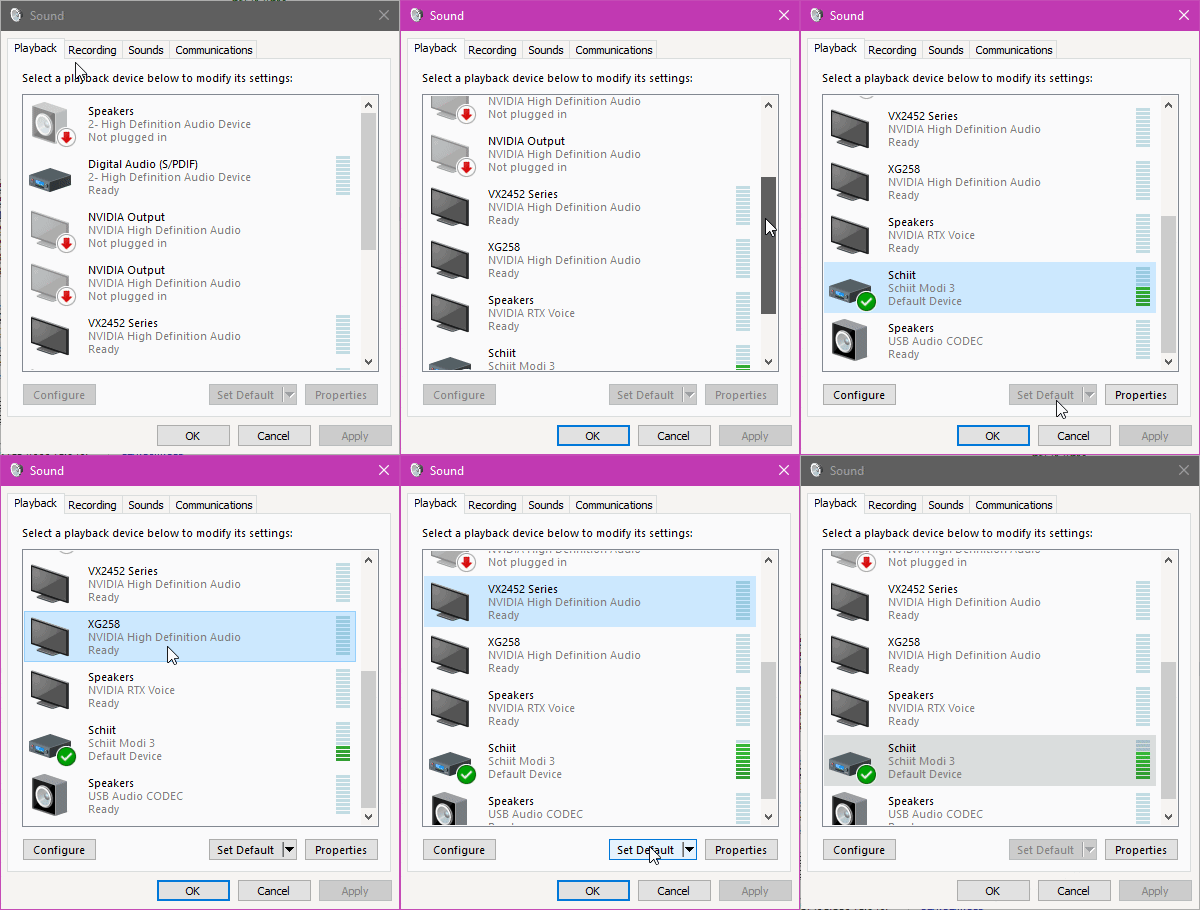 wary plover
Alright I'll try that
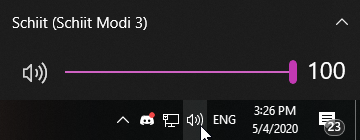 wary plover
I've been trying to change devices frfom the task bar audio thing but it just flickers and won't let me do anything
Although it's working right now via HDMI...
I think
 jaunty knoll
what is a good cheap 1440p monitor?
deep dust
idk if you’ll find a good and cheap 1440p monitor tbh
 somber cloak
I’m thinking of getting the spectre 144hz monitor
Does anyone have it
If so pros and cons please
deep fern
Not sure which one you looking at but someone not too long ago said it seemed like there was a lot of motion blur, high response time, on that one I think it was 3ms GtG
wary plover
https://i.imgur.com/2cV9rcL.gifv
@deep fern How do i get to here?
 solemn sapphire
@wary plover
Open control panel via start menu search. Select sound.
deep fern
right click the sound icon on tray, then click sounds if that is not there then click sound settings and on the right it says sound control panel
visual pilot
also this
wary plover
Okay I'm there, and I have my headphones plugged into my PC, but even the icon showing the headphones keeps flickering
Here let me just take a video of it and send it
deep fern
that's odd
solemn sapphire
Loose connection perhaps?
solemn sapphire
I'd check the internal connection if you are using front panel audio.
deep fern
if the rear io does work then id check the internal connection
wary plover
The rear IO works, i know, but that's too far away from my ears lol
deep fern
ye then check the front io audio connection in the pc
wary plover
I'm pretty sure the internal connection is fine, I've checked it before, but i'll check again
nope didnt work
Internal connection is fine
When I set my headphones to default audio device in the regular windows settings, not control panel, they work just fine.
But then when I restart my PC the default setting I made gets reverted.
Maybe if I can fix it from changing every time i turn off my PC that'll work?
Oh no I can't hear audio out of my monitor now 😰
@deep fern what did i do
wait
you know what nevermind
i just bought a sound bar with a headphone jack i'm gonna connect that to my rear IO and plug my headphones into there
deep fern
ye that would probably work
front io audio is a bit of a mixed bag, sometimes it work and sometimes it no work
latent pewter
Sorry I cant be of assistance i'm using a tv as my monitor I don't know what's best
 muted shell
@sinful bay you can get a MSI Optix MAG241C for around $210, which is pretty good considering it being 1080p, 144hz, and curved
sinful bay
Sweet
latent pewter
works double duty as my gaming console is also hooked up to it
molten vault
@sinful bay im trying to figure out what my friend has that is super good for value
latent pewter
you want 144hz but also low latency
sinful bay
Okie dokie
molten vault
found it
but
newegg is selling it for way higher than it should be
same for amazon
sinful bay
Monitor prices are crazy rn
molten vault
the monitor should cost less than $200 normal
lol yea my monitor that I bought for $360 is now almost $600
latent pewter
with trde wars still in effect some stuff just isnt cheap anymore
latent pewter
prob after all the finger pointing is done with cant last for ever
I jst bought a printer today none of the help guides wure very acurate on pricing
thts been out a while shows 2011 isnt there something newer for less
sinful bay
@latent pewter are there any other ones? Even if I ordered that one now for 210 dollars I wouldn’t get it until June 16
muted shell
yeah, seems like all the good deals are sold out right now
latent pewter
Yikes lol I paid about that fro my 39" tv
aw hile ago
what about a MSI optix 24" 144hz gaming monitor
muted shell
im pretty sure thats the one i recommended
latent pewter
much cheaper
muted shell
oh
latent pewter
think sometimes you can get a better deal just by not limiting yourself to 24"
 kindred herald
I was gonna get my pc parts, but then prices jumped which is biting into my budget seeing as I want a 1440p monitor.
latent pewter
2560 x 1440 kind of an odd size not quite 4k but more than Full HD
 odd echo
its just right
4k gaming makes ur gpu cry
2k gaming just makes your gpu wince a little
whole sorrel
900p gaming for a happy GPU
molten vault
144p for epic gamer moment
latent pewter
lol
 elder fulcrum
is the ViewSonic XG240R 24.0" 1920x1080 144 Hz Monitor good?
im tryning to save money and still be 144hz
 faint mortar
Any recommendations for a budget 1440p 144hz monitor?
 frosty atlas
Lg Ultragear
@faint mortar I don’t know the exact model but LG Ultragears have nice specs for the price. I have a 1080p 144hz one and its great.
faint mortar
Alright thanks I’ll check it out
 lucid flax
Problem is a lot of monitors are out of stock or selling at ridiculous prices
 maiden wedge
so i been trying to find a kind of a monitor tv hybrid, idc if its one or the other, but ideally 1080p 60hz, or 120 is alright, oled or at least local dimming is a must as i play and watch alot of dark horror stuff, and at around 35 inches, color accuracy is also pretty important to me, (not a professional though)
it dosent have to be a bright display either, i usually keep backlights very low
response time is not that important either, its nice but meh
i guess 32 inches is... ok
visual pilot
Mag24c
elder fulcrum
why not the ViewSonic XG240R
 vernal finch
alright thank you
elder fulcrum
its $237 rn
solemn sapphire
Mmmm...
Debating between another Dell S2716DG (60hz, overclockable to 144hz) and a Acer Predator XB271HU Abmiprz (144hz native)
Advice?
Yes, I know now is a bad time to be buying tech
visual pilot
Okay so I forgot about the G241
It's 144hz and IPS at 190$, OOS rn tho.
@solemn sapphire What are the prices you're seeing for those two?
solemn sapphire
$483 for the Predator, $346 for the Dell
There is a repaired tn version of the predictor for about the same as the dell
Is ips really that much better?
I think I will go with the ips predator for $480. Might actually pass my dell display on to my sister's rig and make the two displays the same at some point
visual pilot
Well, I'm just gonna put in the suggestion of the MSI Mag272cqr
at 400$ and VA panel, it's in between.
also 165hz.
solemn sapphire
I'll take a look
 trail moon
I purchased a LG gl283a-b and it's beautiful. Purchased a Asus vg27aq to compare them side by side and while the blacks looked better on the asus the colors looked better on the LG overall. Just my input on 1440p 144hz~ for $370-$430 range. I returned the asus and I'm waiting for the 2nd LG to arrive.
 winged cipher
Does anybody know what could be causing a computer to not send out a signal to the monitor?
visual pilot
There's a ton of possibilities
@winged cipher describe what happens in detail what happened/happens.
winged cipher
When I turn the PC on, the fans sort of wax and wane in terms of speed
visual pilot
Is it a new build or a prebuilt or did you make upgrades?
winged cipher
Just built it today
visual pilot
Wheee here comes the fun troubleshooting part
@winged cipher your motherboard has debug LEDs?
winged cipher
Are those the red lights which activate in the corner?
visual pilot
Take a closer look, there's usually 3 lights, 1 labeled CPU, 1 labeled Ram, 1 labeled VGA (graphics card)
visual pilot
Which ones are glowing? The ones that are glowing are the issues @winged cipher
winged cipher
CPU and RAM, then VGA, then VGA and BOOT, then none
visual pilot
Which means it should've booted correctly... Hmm
@winged cipher so the monitor is connected through HDMI/dp straight from the monitor to the back to the graphics card correct?
winged cipher
There is an HDMI connecting the motherboard port and the monitor
winged cipher
I'm not seeing an HDMI port on the graphics card
visual pilot
?
The back
The back of the case
Had to find some random image but here
This is the io of a more modern graphics card
winged cipher
It recognized that the device changed for the input, but there's still no signal
visual pilot
Shut it down and boot back up?
If any problems still occur after turn it on and off, try a different cable, I shall actually go to sleep now...
winged cipher
I tried restarting it multiple times. I'll try flipping the cable around lol
Nothing. (If you don't see this until you wake up,) Thanks for the graphics card info though. As you can tell, I'm not exactly an expert
maiden wedge
i like how no one even attempted to help me find my crazy specific display xD
full moat
@maiden wedge hm?
 willow hemlock

eBay
Acer 31.5" ED322QR P Widescreen LCD Monitor. Maximum Resolution: (Full HD)1920 x 1080@144 Hz. Screen Size: 31.5". Colors Supported: 16.7 Million. Color: Black. BundleMore : Get more. Very Good: Product functions like new but may have minor signs of use on surfaces.
is this worth?
maiden wedge
@full moat ive been looking for something 35ish inches, 1080p, 60hz (120 is ok) and local dimming is a must, or oled but too expensive, color accuracy preffered, response time isnt very important
a tv Will do fine as well but they are all 4k
or if there is no local dimming it must have the greatest contrast ratio of all time lol ( i like alot of horror )
basically a panel good for horror movies, but also well scaleable to streaming settings, 60 fps and a typical 16:9 res, im not sure how well 1440p scales
maiden wedge
What's the best 165hz 1920x1080 monitor
 timid herald
For $90 bucks, I couldn’t be happier with this Acer monitor as my second display.
whole sorrel
What model @timid herald?
timid herald
SB220Q bi
 wind jacinth
whats the cheapest 144hz 1440p monitor?
 humble stag
is the samsung C27JG56 g sync compatible ?
 maiden oasis
got me a cpl of these today, really enjoying them https://www.newegg.com/p/N82E16824475052
 dense jungle
If im not mistaken, all freesync monitors are g sync compatible if u use a DP port
deep fern
g sync compatible is a certification from nvidia so not every monitor is, but i believe you can turn on g sync even if it's not certified
 ashen panther
Hi. Just got the ASUS VG249Q, is it recommended to max out the monitor's refresh rate capability which is 144hz?
muted shell
Hey, does anybody know a good gsync compatible 1080p 144hz monitor for less than or around $300?
visual pilot
MSI G241 if in stock should be nice
muted shell
Is that one compatible with gsync?
visual pilot
Afaik
timid herald

Micro Center
Get it now! Find over 30,000 products at your local Micro Center, including the Optix MAG241MVC 23.6" Full HD 144Hz HDMI DP FreeSync Curved LED Gaming Monitor
$220, free sync tho
ashen panther
What happens if my frame rate is higher than my refresh rate?
 opaque sedge
Not much, the monitor will always be at the highest refresh rate it can handle. Even if the FPS counter is higher
ashen panther
I maxed out 159 fps on MW while playing, not loading screen nor anything but actually playing. My refresh rate is 144hz. I shouldn't do any adjustments then?
opaque sedge
No you should not have to do much
But if MW has a setting where you can set a maximum FPS, u can set it to 144
I have to go, sorry if I couldn’t help much
ashen panther
All good, thank you @opaque sedge
sinful bay
Anyone know a good monitor under 300
elder fulcrum
good 144hz 1ms cheap monitors?
sinful bay
Yea
maiden oasis
i got two 27" LED MAG272C 165Hz from Micro Center, $239 ea and they have a $30 MIR ea as well
 median mantle
Intender recommends I post this link here for some second opinions on it.
https://www.bhphotovideo.com/c/product/1497345-REG/samsung_lc32jg56qqnxza_32_jg56_wqhd_144hz.html

Buy Samsung JG56 32" 16:9 144 Hz Curved FreeSync VA Gaming Monitor featuring Vertical Alignment (VA) Panel, HDMI | DisplayPort Inputs, 2560 x 1440 QHD Resolution, 3000:1 Static Contrast Ratio, 300 cd/m² Brightness, 178°/178° Viewing Angles, 4 ms Response Time (GtG), 144 H...
I want dual monitors like that.
But I am not sure if I should go with that exact one or not for dual screen.
olive token
lol
4ms is ok
unless your competing in esports.
regular users won't see any different between the two.
plus with 1ms it will be a TN panel.
4ms ips ❤️
timid herald
you aren't competing in esports? 🤔
deep fern
yes
 onyx marsh
Is there a such thing as "my computer has to warm up?" because yesterday I was getting 200+ fps in certain games, now my pc is struggling to get 60
willow hemlock
no, did you do something to your computer that might have messed with your settings?
like maybe capping the frames at 60
onyx marsh
No
Its the same computer, I didnt touch the pc, or any of the settings.
It's fine now, I restarted it
deep fern
Some PCs with HDDs as main os drive may perform differently at times and give the feeling that it has to “warm up”
onyx marsh
Mmm, I have an SSD though.
elder fulcrum
What’s a TN panel
full moat
@elder fulcrum short answer

Today we will be focusing on the differences between IPS, TN, PLS, and VA panels, but we will also be covering CRT for grounding, despite CRT not being an LCD panel type. -
elder fulcrum
Ooo thanks
visual pilot
VA is great for price to perf
elder fulcrum
Yea I was gunna say it looks like VA is a good mid
maiden wedge
I think I have a dead area on my laptop screen
maiden wedge
There's an area where I can't select anything with my mouse
 lunar apex
@olive token yo late response but does ips have good darks in your opinion?
Apparently they have glow when the screen is dark
(Sorry for wrong term )
deep fern
not all ips panels are the same but generally ips has best color out of tn, va and ips. ips does not have perfect blacks if it is a good panel there will only be a slight glow. oled has perfect blacks but some downsides to it and are not really meant as a monitor as of right now
 trail yew
VA is a good middle ground all around
lucid flax
But sadly most of the good monitors that aren't absurdly expensive are OOS
kindred herald
tru
but then when they get in stock they'll probably go up in price like the corsair h100i aio
trail yew
What kind of monitor you looking for @lucid flax
lucid flax
Not looking for a monitor right now, beyond trying to figure out what I want. Most of my parts will probably get bought next month.
 dusty robin
Acer Nitro XF252Q vs ASUS VG259QM thoughts? Buying today after work, need opinions. On one hand the Acer Nitro has a much faster panel and unofficial Gsync support. On the other hand the ASUS has a factory tested 280hz overclock and an impressively fast IPS panel and the better color accuracy that comes with that plus official Gsync support. Both are about the same price.
lunar apex
@proven swift
You available
That monitor is good / bad depending on your situation
What games do you play and what fps do you get ?
There’s no point in spending extra on a 240 hz monitor if you can’t even get that when playing games , also the monitor is a TN panel which I personally don’t like because of viewing angles and bad colors but it’s all about the type of games you play .
@proven swift
dusty robin
I'm competitive and my rig puts out way more than 240.
I might even get the same aftermarket overclock as the ASUS with the Acer if I do it myself but with the ASUS it's guaranteed out of the box, but I'm not sure how much of a difference in input delay and pixel response I will or will not notice. Now reviews say the IPS panel in the ASUS is in fact fast enough for true 240hz however you have to use pretty strong overdrive and deal with some inverse ghosting. On the TN I wouldn't need to worry about this and it even has a built in Low Latency mode that decreases Input Latency even further without introducing any inverse ghosting. I have a TN 144hz now and colors have never bothered me, but I've also never owned an IPS to compare to.
Then there's the Gsync support I already mentioned. The ASUS has official Nvidia certification while the Acer does not, but by checking reviews they all say Gsync works fine.
And my dumbass just realized you weren't talking to me. I'm gonna go sit in the corner now.
dusty robin
9700k 5ghz all core 2070 Super 2200mhz
lunar apex
@dusty robin what games do you play ? And what fps / settings
I’m currently stuck on the 3800k or the 9700k since they are both on sale
And I’m planning on using a 2070 super on them
dusty robin
Usually Fortnite, Apex, Blackout, etc. Competitive settings. Things like view distance, textures, and anti-aliasing all on high and everything else off or low. Off the top of my head I only know for sure that I average between 300-500 fps on Fortnite during an actual match with those settings. I do my stream encoding using New NVENC on the Turing Architecture and see no noticeable change in gaming performance and the quality is great. Raw per core performance and all core overclocking headroom is the only reason I chose the 9700k over an AMD equivalent.
 proven swift
@lunar apex Sorry I went to bed but I was going to build a beefy computer for games like Fortnite, Fps, Rocket League, Cod
Should be able to give the 244 fps
trail yew
Ok so ik that some freesync monitors are backwards compatible with gsync on nvidia gpus but can amd gpus be backwards compatible with gsync?
lunar apex
@trail yew that is honestly a good question
@proven swift oh ok what are you pc specs ?
Or what do you plan on buying
trail yew
Indeed it is
lunar apex
@proven swift yea you could get 200 fps on those games , it also depends on what settings you play
median mantle

maiden wedge
Hey guys, I'm having issues with my Asus monitor. I changed the settings on MW and on my windows settings to reflect the same settings on both sides. When I change direction in a game it the color changes and looks like a rainbow wavy color. Not sure if that explains alot. I would record it and show it to you guys but I can't send pics lol
full moat
check your cables
 mossy fjord
whats a good software for taking screen shots?
deep fern
sharex
mossy fjord
thx
deep fern
np
 analog otter
should i upgrade to 144hz
willow hemlock
how bad would a 32 inch 1080p monitor be
deep fern
bad unless you stand really far away from
I wouldn't go above 24" for 1080p
monitors that is
deep fern
27 is passable if you don't mind seeing the pixels a bit
maiden oasis
if you're not sitting on top of the screens then 27" should be fine
faint mortar
I have a 1080p 55 inch tv as my monitor lol
whole sorrel
Oof
latent pewter
I'm maybe 3 feet or less on a 39"1080P and don't see any pixels
 forest dagger
Wondering if anyone can tell me a good monitor thats 244hz, has g-sync, and is about 25-27 inches. Price is up to 750
 civic gorge
what is g-sync?
visual pilot

NVIDIA
Full HD Gaming Monitor with up to 360Hz refresh rate. G-SYNC technology to eliminate screen tearing and choppy frame rates.
 hollow hound
dang it, and i just bought a monitor too
lucid flax
When I do buy a monitor, I'm not looking for something that extreme/expensive.
deep fern
that 0.5ms on the gigabyte tho
dense jungle
I have a 75hz 1440p and a 1660ti so i get around 70-90 fps on most games with high-ultra setting on 1440p. Is it worth upgrading my display to a 144hz one?
dense jungle
so if want to get a better gpu in the future should it be bundled witha new monitor
visual pilot
I'd say so.
dense jungle
also another question. Is there a big difference between 144hz and 75 hz
i didn't really notice anthing jumping from 60 to 75
visual pilot
Yes
dense jungle
ok thank you
 native prism
Whats the best 27” 144hz+ monitor under 260
native prism
Because....
trail yew
Well 1080p doesn't look that great on a 27in
 brave notch
the dell sdg27 look really good
But they're 300 rn
they're super clean and minimalistic @native prism
brave notch
i lied
the price went up again
I can attest that they're good tho
I have three
maiden oasis
I like my 27" MSI MAG272C 165Hz I got from Microcenter, paid $209 after MIR, and yes they only go 1080 but to me it looks great so
 coral path
HDMI or display port? Im using a AOC C24G1 24" 144hz 1ms and gigabyte 5700xt 8gb oc
olive token
DP.
brave notch
!!!
Wait
its 1440p
do you know that?
and can your computer run 1440p???
@native prism
 analog wyvern
i need a 144hz monitor thats 24.5 inches
thin bezels (i hate thick bezels)
also under $250
analog wyvern
2 4 . 5 i n
analog wyvern
cuz thats the size of my 60hz monitor
visual pilot
god damn it
analog wyvern
might buy it
the red bezel on the bottom tho
eh what can ya do
or should i send the n e w e g g link?
analog wyvern
ok but how bad?
full moat
some monitors have a 5mm bezel on 2 sides, but a 12mm on the others
visual pilot
Thin bezels was mentioned so that was my assumption.
full moat
just saying :)
visual pilot
Just stating my thought process :D
full moat
as for "but how bad": Avoid if possible levels of bad @analog wyvern
aye aye @visual pilot :)
analog wyvern
so ips is better than tn is what im reading?
analog wyvern
im probably gunna end up keeping my second monitor sideways so i think i wont really care much about the 24.5 requirement
deep fern
generally tn has faster refresh and response times, ips has better color
but there are more and more ips panels with high refresh and low response times coming out lately
deep fern
personally I think 1080p at 27" is too low a pixel density, but some people are fine with it
deep fern
msi fan boy 
analog wyvern
to be fair im an acer fan boy
deep fern
ye that msi is very good for the price
visual pilot
Buy MSI Optix G241 23.8" 16:9 144Hz FreeSync IPS eSports Gaming Monitor featuring In-Plane Switching (IPS) Panel, DisplayPort | HDMI Inputs, 1920 x 1080 Full HD Resolution, 1000:1 Static Contrast Ratio, 250 cd/m² Brightness, 1 ms Response Time, 144 Hz Refresh Rate, 16.7 M...
analog wyvern
23.8 inches
deep fern
has good pixel density
analog wyvern
i know that
ill consider it, thnx for the recomendation
oh man for the price thats good
lucid flax
Now the question is if it'll actually be in stock on the date it says it will be
 covert solstice
so I put a vesa mount on my monitor, and now part of the screen is dark. I’m pretty sure it’s from me accidentally over tightening some screws, what should I do?
okay now its just randomly flickering like a strobe light
covert solstice
yeah
full moat
as in, the ones that came with your monitor
full moat
because a "normal" problem is that the screws reach too far
covert solstice
okay so i think it works but itll probably come back ill tell you if it does
full moat
the original stand for it, does it use the vesa mount holes?
covert solstice
yeah
full moat
okay, then please answer this
the vesa mount you have now, the thickness of that (at the holes the screws pass through), is that more or less VS the original stand?
full moat
"its the same" <- thats about the thickness of the material?
covert solstice
yeah
full moat
hm
covert solstice
same thickness and everything
full moat
do yourself a favour, get some spacers
covert solstice
like washers?
covert solstice
i just put some thin metal ones that came with the mount so i think it should be fine
yeah
full moat
hence why i recommend the spacers
covert solstice
but i have no experience with monitors so probably something stupid i did
full moat
shrugs
covert solstice
yea
wary plover
Now it’s a big variety of color
brave notch
Yee
maiden wedge
@charred minnow da
 charred minnow
you speak russian?
 torpid dew
 dusty robin
Just wanted to throw this out there for anyone looking for a high performance competitive gaming monitor at a reasonable price after purchasing a Acer Nitro XF252Q I can say I'm thoroughly impressed. 240hz, 0.3ms response time, no motion blur, no ghosting, no inverse ghosting, amazing response time and no input latency with the built in ultra-low latency mode, official Freesync support, unofficial Gsync support (I can personally confirm works with no issues), very bright, perfect size for 1080p, small but sturdy base with full range adjustment, good colors for a TN, good viewing angles for a TN, built in black equalizer, Backlight Strobing if you prefer over Variable Refresh Rate, just literally everything you need for competitive at only $300.
trail yew
Where did you buy it from?
 quaint mist
Currently I've got an Intel i5 3570k, with a 970 strix Asus GPU, I'm looking to upgrade to an RTX 2070 super and I'm looking for a much better monitor I have an old AOC and I don't even remember the model number, it's 60 hz and it hurts the hell out of my eyes. I also have photo sensitive epilepsy
quaint mist
Can anyone lead me toward monitors that are 144Hz and under $350?
No speakers in the monitor necessary, but they are nice.
wary plover
im not a monitor guy
visual pilot
usually that should be around the 200$ mark
quaint mist
lol nice man
brave notch
wary plover
I'm just looking on Newegg search for "1080p 144hz monitors"
visual pilot
tn is iffy
visual pilot
AOC is fine
brave notch
The one i have is aight
brave notch
if you're going for minimal branding
visual pilot
oof 500$
visual pilot
MSI Mag272cqr is nice
quaint mist
$400 refurb
OOO
$330
Whatcha think?
OH HECK YES "Anti Flicker and less blue light" -- basically the stuff that triggers my photosensitive epilepsy.
 native fable
Does any one know of a good 144hz budget gaming monitor?
visual pilot
MSI G241
native fable
Ok thanks I’ll check it out
 proper elbow
Been using my ASUS VG248QE for years
 fossil carbon
hey so i have a cracked monitor and i recently purchased a new monitor, but im planning on using the cracked one as my 2nd one. any way to crop the desktop size over to the side? thanks
 past salmon
Hey Guys Can someone Recommend me A monitor between 500$-600$
Its should be ips-2K or FHD - 165 Hz Above
solemn sapphire
Acer Predator series. I got a 165 hz qhd ips display with gsynx for $450.
@past salmon
You could probably get 240hz with that budget
ASUS ROG Swift PG248Q 24” Gaming Monitor Full HD 1080p 1ms 180Hz DP HDMI Eye Care G-SYNC eSports https://www.amazon.com/dp/B01M4II4M4/ref=cm_sw_r_other_apa_i_y-HWEb0J7P7TX
deep fern
It is fine budget for 1440p ips high refresh
At that budget there are some good ones gigabyte has I know. I don’t have link cuz I’m in bed rn
 limpid lintel
Any good deals on a 1440p 144 hz or so monitor with 1 ms response. Friends looking but seems like no deals going on. I got a 32 inch lg for $300 that are all marked up to like $470 now
quaint mist
Could someone suggest a monitor that supports G-Sync, costs under $500, can run 4K, and won't look horrible with Ryzen 5 3600 X
Okay costs under $600
The best monitor I can get with this setup and a 2070 or 2060 super which I plan on purchasing
In that price point
Preferably with 144 Hertz or above and anti flicker because I have epilepsy, I've been looking at a lot of the MSI monitors
https://www.newegg.com/p/N82E16824475051 I don't know if this meets the criteria
Or this
 finite niche
i dont know if im allow to post links but this is my computer i built in 2015 long story short i thought it died blew it with a compressor the dust out it was completely brand new now the monitor was the dead one it was 15 years old this is my pc specs PC Specs:
GPU - ASUS STRIX GEFORCE® GTX 980 Ti
Motherboard - Asus Z170 PRO GAMING
CPU - Intel Core i7-6700K 8M Skylake Quad-Core 4.0 GHz LGA 1151
CPU Fan - Cooler Master: Hyper TX3 EVO
Ram Memory - Crucial Ballistix Sport 8GB DDR4-2400 x2 16GB
Main (operating system )SSD - Intel® SSD 540s Series 480GB
Operating System - Windows 10 Pro
Power Supply - Thermaltake SMART 730 W
Mechanical Storage - Western Digital WD Green WD20EARX 2TB
SSD - SanDisk SSD PLUS 2.5" 120GB SATA III Internal Solid State
is this monitor ok for my old 2015 computer https://www.msi.com/Monitor/Optix-G241VC/


i just think going over 75hertz is over board for an old gpu not the new rtx graphics cards
and its at a good price
the 2nd question id like to ask is about amd free sync i dont know what that is but i have a nvidia gpu
 neon otter
@finite niche you're right with no gpu upgrade planed going over 1080 and 75 wouldn't be the best investment
Some freesync monitors are gsync compatible others less so. Freesyc and gsync are variable refresh rate technology. This means the monitor could run at 60hz when it's being served enough frames but if it's too demanding and you have lower frames the monitor could adjust to say 30hz to match the lower frames in an attempt to provide a better visual experience
finite niche
@neon otter so get it right sorry my english isnt to good um im only playing at 1080p and i think the gtx 980 ti strix can only go around the 75 hertz of what the monitor can do so get the monitor right? thank you for answering me so fast by the way
i mean the card gtx 980 ti strix can only pull around 70 fps in modern games like modern warfare and battlefield v in 1080p thats what im thinking but im not 100% sure so get the monitor right since it has 1ms and 75hertz capability?
deep dust
is there an equivalent monitor to the msi mag272cqr but with an ips display
visual pilot
144hz is neat
@deep dust you'll have to go for the 500$ range, and not from MSI then.
Iirc the Gigabyte fi27q
@quaint mist go with the MSI MAG272cqr, the other panel is tn...
@finite niche I'd rather get a 144hz monitor when possible for the future
Like a MSI g241
finite niche
but is a gtx 980 ti strix capable of frames of 144hz
visual pilot
Lemme check again
finite niche
on 1080p gaming
visual pilot
It doesn't need to be, it's a nice to have, I'd say it can do near 100fps
finite niche
ok
visual pilot
It doesn't hurt to have a higher refresh rate than fps
finite niche
ill make a call to my dad i told him a link he bought it but it was recent so we can still cancel it before they
visual pilot
Monitors can last a while
finite niche
send it to my house
visual pilot
Alright lemme go check what 144hz monitors are in stock
visual pilot
Yes
visual pilot
Most freesync monitors are g sync compatible
deep fern
just need to make sure it enabled in nvidia control panel
visual pilot
Ye ye
lucid flax
Would that be a decent monitor for someone who just wants to play WoW or similar? I'm not interested in a lot of the super demanding new titles.
finite niche
hey im back
is it possible to buy a g sync monitor
instead
cuz i looked at
a 20 minute video trying to learn my english isnt to good and basically when u use a nvidia gpu on a free sync u dont get hdr
or just keeep going with the free sync
but with gysnc i dont know if its also compatible with an old gtx 980 ti strix asus
basically i blew a compressor air to make the pc new but still was made in 2015 so thats already 5 years gone by the next 5 years it will be totally unplayable where as the monitor will keep going
actually the monitor will be out of date to but
still decent
since bought in 2020
lucid flax
... I should have bought that monitor when you linked it. It's already out of stock again
neon otter
@finite niche just as an info if a monitor doesn't have full array local dimming hdr is mostly just going to make the game look worse
muted shell
Hey guys do you know if the msi optix monitors are g sync compatible
maiden oasis
they are Freesync, at least my two MAG272C monitors are, which i heard will still work w/ Gsync? other than that idk
actually I just found this:
How do I use G-Sync on a FreeSync monitor?
Open Nvidia Control Panel.
Got to “Display: Set up G-SYNC”
Check “Enable G-SYNC G-SYNC Compatible” and select your preferred options.
Select your monitor.
Check “Enable settings for the selected display model”
Apply settings.
visual pilot
@muted shell I got G-sync running on my MAG241C sooo
@maiden oasis I'm pretty sure you should enable Freesync in the monitor settings
maiden oasis
@visual pilot even if you do enable the monitor's Freesync the card still needs to have the Gsync turned on for it to work, at least from what it looks like both have to be done
maiden oasis
yeah i did not write it, i just shared what i found lol plus maybe they figure Freesync is already active when they wrote it
timid herald
finite niche
quick question im back lol um is it possible to play a game on a new product monitor from msi but at the same time dont turn on vsync gsync or free sync
and just get high frames with tearing
but the reason i ask is because im using a desktop so even though i dont have any type of sync it will still produce a playable game
instead of a laptop thats limited to not a huge heat sink on the cpu
neon otter
sure you can disable any kind of sync if you want to and then you'll just run at whatever hrz the monitor is set to and have any issues you would expect from a miss-matched fps
 nova sable
that is so cool moniyor
 raven pelican
thoughts on the omen 27x
visual pilot
Way too expensive for what it is
Like TN panel at 550$ for 1440p
At 500$ you can easily get IPS panels
And a MAG272CQR is at 400$ with a VA panel, 165hz, 27in, 1440p, 1ms gtg
@raven pelican I don't see a reason to buy it unless it's <300
raven pelican
i want 1440p with high refresh rate
and there’s not many choices
i play a lot of rocket league
visual pilot
@raven pelican 400$ good monitor
https://www.newegg.com/p/N82E16824475051
raven pelican
that’s very close hz with my current one i’m trying to make a step in both directions with hz and visuals
visual pilot
what
covert solstice
@visual pilot 27x is expensive because it was one of the first 1440p 240hz monitors
visual pilot
ohhhhh
@covert solstice I was looking at the omen 27
not the x 27
@raven pelican what gpu you got
covert solstice
yuh omen has a confusing product line
visual pilot
because you're not gonna run 240fps 1440p unless you got like a 2080 ti
@raven pelican TN panel is still inadvisable, 650$ is very damn high price for a monitor, and unless you can somehow utilize that 240hz well, not a good deal at all.
raven pelican
i have a 2080 super
also i play rl with all very low settings
i don’t want graphics for that game i want the hz but i want the 1440p for other games
i get over 800 fps currently on rl
@visual pilot
brave notch
Realistically speaking
 wild coralBOT
 The Rudester#8147 has been warned
Reason: Bad word usage
brave notch
most monitors right now are crap at HDR
visual pilot
I mean
a lot of monitors "support" hdr
and unless it has like hdr400 certification
it wont be good
brave notch
^
raven pelican
my point was about the brightness not hdr in particular
visual pilot
I mean
I'm pretty sure my monitor says it supports hdr
but anyways
TN is just usually the worst color and contrast, that's known.
brave notch
^
Wait what monitor do you have @raven pelican so I can accurately roast cough give you god opinion on it
brave notch
what exactly arre you looking for in a new monitor
Cause I'll be real with you
244hz aint that great
Unless you're a pro fps player or something
I suggest 144 hz
raven pelican
i’m looking for the hz for rl
and then somewhat bette visuals while maintaining good fps in other games
@brave notch
rl is my fps

exhibit a
brave notch
I don't think 244hz will help you that matchon games like rocket league
244 hz is literally for milisecond flick shots on CSGO or games like valorant where you need super fast reaction times
visual pilot
240hz is usually for fps games
brave notch
There's a LTT video on it
visual pilot
eh
brave notch
he did a whole research thing
visual pilot
esports and stuff you go 240hz 1080p most of the time
better looking game you go 1440p 144hz
raven pelican
you’d be suprised the difference fps makes in that game
visual pilot
not as much in non-fps games
I feel little difference in 60hz and 144hz on strategy games
raven pelican
i don’t play strategy games
it’s either fps
or rocket league
sometimes plane games
or flight sims
visual pilot
mhm
raven pelican
So what have we concluded
brave notch
youre chilling
if anything just upgrade to a 1440p monitor
or 4k if you're so inclide
inclined
visual pilot
But I'd rather not suggest that 240hz 1440p monitor
brave notch
brave notch
there was someone here who I recommended this monitor and bought it used and was like wait
and i haven't heard from him since
so I hope he was happy with his purchase lmao
@raven pelican I can vouch for the monitor I sent you
How can I vouch
I have three of them
🙂
visual pilot
lol
brave notch
the minimal branding and how sleek the monitor is, is dope
brave notch
tn
raven pelican
i’ve been using one for like 6 years
brave notch
I mean if you're happy with it then stick to it
visual pilot
Strongly advised against
brave notch
WE're just here to recommend you something
visual pilot
I mean I thought 60hz was good before I got my 144hz xD
raven pelican
then again i’ve never not seen a TN panel
brave notch
At the end of the day, you can always buy the monitor and return it if you don't like it
raven pelican
especially with amazon
you got 30 days for any reason i think
if only i could see what different panels looked like rn
lol
brave notch
just buy something
an test it out
I guarantee you'll like the difference
imo 1440 p and 4k aren't that much diffrence
and 4k gaming is lowkey a niche thing
raven pelican
i’m not doing 4k till you can get high fps on it lol
brave notch
headass
visual pilot
I'll still recommend the MSI MAG272cqr
because no one has wanted them yet lol
no real need for them
esports wise they're pushing for 360hz on 1080p
brave notch
at the end of the day it's our opinion and I suggest just doing what makes you happiest
raven pelican
idk what will make happiest
visual pilot
I try to give whatever I believe is best in your situation while saving money
raven pelican
but i know i was better visuals for some games and better hz for rl
visual pilot
¯_(ツ)_/¯
raven pelican
lol
brave notch
not wasting money on 244 hz monitor
visual pilot
Take a look at mag272cqr tho
raven pelican
send link?
brave notch
he sent it earlier