#old-monitors-and-tv
1 messages · Page 26 of 1
 meager loom
 zealous wigeon
nice
meager loom
It's on my living room, but I will replace the living room one for something more "cheap" (I have two kids and they tend to break stuff)
zealous wigeon
LOL
meager loom
I moved abroad at the start of this year, and got this TV for half the price just because of that small dmg on the coner of the box
The TV was perfect inside, no damage on it
zealous wigeon
yeah all the samsung Q80 and above for 2019 got hdmi 2.1 everthing else has their proprietary 2.0b ports that they said could do 4k at 120hz but actually cant
sounds like a good deal to me
meager loom
I always look for those deals, never found another one like this again 😄
Someone prob messed up, they sell it for 10~20% cheaper with real damage on the TV itself
zealous wigeon
I got my 75" Q6 samsung for my living room for $800 at the local walmart they were getting rid of any tvs over 65" in their inventory. I went to walmart to grab printer ink or something and saw it and asked an employee if that price was right? they said yeah so I bought it LOL
meager loom
Jackpot
zealous wigeon
tied it to the top of my Jeep to bring it home
had to wheel the tv back inside to buy rope after I realized it wouldnt fit 😝
I was like honey there is good news and bad news good news we have a new 75" TV bad news we cant go out to eat anymore this month lol
meager loom
LOL
Me talking to my wife today
Baby, do you know the new kitchen you want so bad?
Yeah, it will have to wait a little bit longer 😄
To be fair, I did a lot of freelance work to get the money for the PC
And I just put a lot of money into the House, well, we bought the house 2 months ago and we renovated the bathroom and toilet, now it's time to treat me a bit
zealous wigeon
lol I could see it
I will say though about that Q6 its not the best tv it looks good but there are times when I can see the leds behind that giant screen like little glowing balls but it was only $800 for 75"
meager loom
I also sold my old rig when we moved here the start of this year 😄
@zealous wigeon Yeh, I would be very happy with this huge tv at this price, even seeing some lights
zealous wigeon
I save all my old rigs and keep them for some reason along with all my old gpus
I keep them going like antique cars. I have an old AMD 965 phenom II overclocked to 4.4ghz that still works without any issues
I had another one that was filled with water in an aquarium but it died and no longer holds water 😦
meager loom
I usually give my old rig away to someone I know that could benefit from it...
But my last Rig was still quite "new" and worth some good money that I would use to re-start my life across the ocean 😄
I moved from Brazil to the Netherlands
meager loom
And I was able to sell the rig for practically the same price I paid for it, I bought it on US, but Brazil is usually 50~90% more expensive, so even after two years, the prices where still very high in Brazil for the same build...
I work in Amsterdam, close to the Anne Frank House
zealous wigeon
nice it was a neat place to visit
meager loom
It is very beautiful the architecture and everything
zealous wigeon
I mostly remember you could only drink in some places and smoke in others and they could never mix LOL
meager loom
Despite what people may think about the Netherlands, we have a lot of rules here and the Dutch's are very bureaucratic
zealous wigeon
I think I was there the summer of 97..
zealous wigeon
I do have a dvi monitor plugged into a pc at my house
and its mostly because of VR and the fact that the 2080ti only has one hdmi port....
 quartz sinew
yeah
zealous wigeon
an displayport to hdmi cord is somehow like $40 and and a displayport to dvi is like $3
plus the 2080ti was kind enough to supply a displayport to dvi adapter with my $1500 card in all of their generosity
quartz sinew
mhm
 hasty hound
cheapest 240hz?
 visual pilot
you prob shouldn't go for cheapest 240hz, bc at that budget might as well get a nice 165hz or 144hz monitor
(instead of some offbrand chinese 240hz monitor)
bc it looks like 250$ for cheapest 240hz monitor
(https://www.newegg.com/p/N82E16824737003)
 terse sparrow
Should I get 1440 p 144hz for 1660 ti
I usually play minecraft
And csgo on med settings
visual pilot
I would suggest not, because it can't run much else at 1440p 144hz
that might be a bit more of a graphics card question tho
afaik like a 2070 super or like 5700xt would be recommended for 1440p 144hz
hasty hound
If I get a 240hz monitor and I play fortnite at 200 FPS, will it cap to 200 FPS automatically?
@ me if your replying
❤️
quartz sinew
@hasty hound what exactly do you mean by that?
zealous wigeon
I mean you are capped at the amount frames your GPU can ouput to the monitor
hasty hound
Ahh ok
zealous wigeon
so if you can only get 200fps on a 240hz monitor you are seeing 200fps
zealous wigeon
yes it definitely will
hasty hound
So if I’m getting 230fps on a 240hz monitor it will show as 230hz right? @zealous wigeon
Ohhhh I understand
Ok
Thanks
zealous wigeon
Hz doesnt really mean anything to you, you see 230fps in that instance
hasty hound
Ok
quartz sinew
^
hasty hound
I understand
zealous wigeon
the amount of frames per second
hasty hound
Lmao
Ok
Would it feel like 240hz even if I’m close to 240fps?
If im on 200 FPS or 215
zealous wigeon
Hz is how many times the monitor can refresh the screen per secon
hasty hound
Oh ok
quartz sinew
If you get within like 10 fps of your monitors refresh rate, you're probably not gonna notice much unless you're a fine tuned viewer
zealous wigeon
most people cant tell the difference between 120fps and 240fps
quartz sinew
I can hardly tell the difference between 50 and 60
zealous wigeon
and gysnc/freesync can smooth out tearing
visual pilot
60hz to 144hz is a huge difference, but above up its a bit less noticible
quartz sinew
yeah
zealous wigeon
I am fine at 120hz doesnt bother me 60hz on the other hand I can tell I'm missing things
quartz sinew
I've never actually seen a resolution above 1080p, nor a refresh above 60hz
zealous wigeon
😭
quartz sinew
I'm living in the shadows 
zealous wigeon
why?
quartz sinew
I've never had a chance
zealous wigeon
I get the refresh rate but everyone should experience 4k
 whole sorrel
480p 😎
quartz sinew
My old phone display (cheap walmart android one) was 480p
You know it's funny, you don't really see how bad a resolution is until you see that resolution on a better resolution display
zealous wigeon
isn't there an electronics store near you with 4k tvs on display at least?
quartz sinew
no
I'm from a small town so our walmart just has cheap 1080p televisions
Not even a monitor that goes past 1080p or 60hz
In the nearby cities (half hour drive) there are some good monitors, but there aren't any floor models
zealous wigeon
What you need to do is google "4k movie theaters near me" and take a road trip some weekend and be amazed
quartz sinew
Can't do that either, i'm in grade school and i can't drive
You'd be amazed how limited i am when it comes to the small things
zealous wigeon
On the plus side you have plenty of time 480p hadnt been invented yet when I was grade school lol
quartz sinew
fair
movie framerates in the 20's were around 24fps
And dear god don't make me start about the resolutions
 dreamy thicket
worth upgrading to a 2k 144hz monitor running an OC'd 1070 or just go for a 1080p 144hz? thanks in advance. currently on a cheap asus 1080p 60hz insert meh face
planning on upgrading gpu next year sometime, along with cpu, and mobo, and.... goes down rabbit hole
 maiden wedge
Honestly, I'd go for the 1440p 144hz
dreamy thicket
that's what i was thinking. gpu can't make the most of it but i really want the better refresh
i don't play incredibly demanding games anyway
visual pilot
1440p 144hz is a nice mid point
dreamy thicket
how do you feel about ultra wides
they're so expensive and the response time is lacking a bit
but they look so damn cool
 silk hawk
Meh, I have one and it makes stuff like playing lesser known titles and streaming difficult
 thick tusk

 livid carbon
lmao
 ebon beacon
i am dead serious using a 32" 720p TV right now because no monitor
next month i'm getting a https://www.amazon.com/Samsung-S34J55W-34-Inch-Ultrawide-LS34J550WQNXZA/dp/B07FBS36W2/ and my 1650 is not gonna like it
but i don't care because i'll have a 5700/XT depending on the funding soon
prob really want to get the XT
for that monitor
it doesn't have g-sync/freesync but it's so big and wide
meager loom
Bold
ebon beacon
i'm always bold
whole sorrel
Apparently not
whole sorrel
:))
maiden wedge
anyone try using a CRT on modern hardware?
like. somehow adapt hdmi to whatever analog input a crt tv requires for the lulz
maiden wedge
turns out crts can run much lower resolutions with no drop in image quality, which means much smoother framerates overall
not great for professional work but pretty good for gaming
that also means they're much more friendly towards budget builds 👀
ebon beacon
enjoy your flickering
also modern GPUs can have DVI ports, which can be converted to VGA
 olive token
degauze button.
ebon beacon
bwommmmmm
 odd echo
i have a 1070 and it has DVI
ebon beacon
1070 is pretty old in all fairness, the question is if it has analogue DVI out
ebon beacon
if it offers that part of DVI, you can convert to VGA
basically it's whether the thing on the end of it is shaped like - or +
odd echo
o
ebon beacon
- is digital only, + is analogue and digital
odd echo
lemme find a picture
ebon beacon
VGA is just RGB fed through a DB15 cable
same with analogue DVI
except a DVI cable
there are almost no analogue DVI devices anymore
except like, projectors
olive token
Anni has smarts.
ebon beacon
which tend to stick around long past being technically innovative
not smart, just good at storing information
don't ask me to do some math or something
ebon beacon
the last time i really engaged in math in school was trig
now i can't even remember wtf trig is
odd echo
its - only 
olive token
Anni, you should see the crap the kids bring home now.
odd echo

ebon beacon
i would be that kind of parent
odd echo
i will tutor her for 2080ti 
olive token
😠
odd echo
😄
ebon beacon
i don't expect to be a parent though, i am already 36 and it has not happened
ebon beacon
i am a deeply irresponsible person with a low income who spends on computer parts
general chat is just 75,000 voices
all at once
olive token
almost 80k
ebon beacon
oh god
ebon beacon
lol
odd echo
78,309 right now
ebon beacon
Linus is good for the community I think because his videos make people curious
olive token
we were sitting pretty with about 20,000 non active users.
ebon beacon
people who aren't necessarily into building PCs and things come in from watching his videos
olive token
then the flood gates opened.
no warning.
just a mass influx of zombies.
then discord broke.
ebon beacon
"check out the newegg discord"
olive token
yeah they didn't even tell us 😦
ebon beacon
yeah i was just coming in actually as the server was breaking, you can thank Linus for that one
olive token
ironically it was a google cloud issue lol
ebon beacon
me: "newegg has a discord?"
odd echo
more like everybody^
olive token
haha yeah
odd echo
nEwEgG hAs A dIsCoRd?¿ 
ebon beacon
i'm getting better at catching myself on the profanity at least, so maybe i won't get moderated out of existence
olive token
nah first is an auto-kick.. think it's like 10 infractions of something
you can come right back.
ebon beacon
oh
odd echo
in that case-
olive token
after that, the second one is a ban.
we all slip up
a lot are accidents
like you can't say 1 8 + or n a k e d
the word filter is super long
olive token
we had a buncha austin power s ex bots join one day
so we added those words to smack em around.
ebon beacon
well i saw this one guy just go OH SORRY and asterisked a word out the second time he typed it
that was beautiful
olive token
lol.
ebon beacon
people thinking asterisking a word out eliminates it
odd echo
 see my PC p@rts (nerds only 🤫🤫) https://www.newegg.com
olive token
hahahahhaa
 faint heron
I have two HDMI monitors and want to connect them to a Desktop. Does anyone make a desktop with two HDMI ports?
olive token
wouldnt that make a mirrored screen?
ebon beacon
probably
you'd need to go into settings and change it to spanned across both monitors
you might be able to get a displayport to HDMI converter for the second one?
or does one of them have displayport?
ebon beacon
btw i'm plugging displayport
ebon beacon
also with a splitter it's definitely gonna just be split
odd echo
if youre not using the ethernet port just get an ethernet to hdmi adapter 😄
ebon beacon
displayport should have taken over for HDMI but hollywood likes HDCP a lot so that won't happen
olive token
wut zack
odd echo
then you can SEE the internet
olive token
zack troll, 
olive token
glhf
ebon beacon
there is something called video over ethernet or something like that
that's what you'd use that adapter for
olive token
neweggplays TechinAround' is today 🙂
 surreal veldt
just plug the cables into the video card unless its a old one
olive token
might not have a video card..
surreal veldt
my tv uses hdmi from pc and my monitor uses dp
onboard video ouch
just use a hdmi splitter
ebon beacon
it will mirror the display
they cannot stretch the display using a splitter
can't get more desktop space
olive token
but honestly we have no idea what setup he has.. he hasn't respond since the question lol.
surreal veldt
yea but u can use a dp to hdmi if u dont care abouit high hz
faint heron
So if I get a splitter I can have two screens that independent to increase my workspace. Basically I don't want to buy new monitors when I have HDMI monitors alreay
faint heron
I need a new desktop but am deciding on what to buy. Looking for something to support my HDMI monitors
olive token
but if you're just relying on the single HDMI port on the mobo itself
so what do you have right now, PC wise.
faint heron
HP Envy that has twoHDMI ports
surreal veldt
when u buy a new pc make sure it has a seperate video card installed and use 1 hdmi to hdmi and 1 dp to hdmi. should give u 2 different screens
 elfin ingot
olive token
elfin ingot
olive token
I have that monitor 😄
 violet robin
solid 1440p 144hz display? https://pcpartpicker.com/product/HbCD4D/viotek-gn27d-270-2560x1440-144hz-monitor-gn27d
ebon beacon
recovered my monitor, it's working again! but no stand because i put it somewhere, possibly the garbage! so i'm punished by buying a new one!
Acer ED273 Adipx
ebon beacon
my situation was the monitor was cycling colors and i didn't know you pushed in the little nubbin in the back to turn the power on and off
whole sorrel
I don't know what happened to it, but if I had to guess, its power supply probably died because the lil LED doesn't even turn on
ebon beacon
so i couldn't cycle the power
whole sorrel
oof
ebon beacon
i thought it just had no power button
and a little joystick for menus
and i swear i've pressed it in before now
whole sorrel
huh
whole sorrel
haha
ebon beacon
i'll keep this monitor for some time since it works
i don't need 1440p that bad
i'm gonna have to ebay for a white/silver version of the stand so it's gonna look awful but since when did i care about any of that
 wild coralBOT
 festive ceo bill gates#6585 has been warned
Reason: Bad word usage
 mossy kindle
ASUS VG27AQ vs LG 27" 27GL850-B guys need to choice immediatly plz help me out quickly which best
 river edge
ASUS
mossy kindle
why bro
visual pilot
Asus is gud brand?
river edge
I checked on RTings
better HDR gaming and overall ratings

RTINGS.com
The ASUS TUF VG27AQ is an impressive 27 inch, 1440p monitor with outstanding gaming performance. Thanks to its IPS panel, the image remains accurate at an angle,...

RTINGS.com
The LG 27GL850 is a great 1440p monitor. It has outstanding motion handling, with one of the fastest response times we've ever measured. This results in exceptio...
mossy kindle
lg has more color gamut btw
actually they have same response time almost not big deal
hmm so confused
river edge
More to consider than response time, look at ALL the categories. ASUS scored better in just about every one
mossy kindle
ye i saw
river edge
You're not really going to notice the color gamut unless you're a photographer and editing phots
 plain kestrel
Well nvm that's another lg monitor the Asus is cheaper
Gigabytes 1440p gaming monitor looks pretty awesome too
mossy kindle
@river edge thanks for website i think i"ll go for asus
river edge
YW
 astral gale
Can I use this cable for HDR600 2K 144Hz?
astral gale

 stable trout
Why did my phone autocorrect big to 🚲
 neat cosmos
But DP is stanard use for VRR tho
zealous wigeon
HDMI 2.1 can do VRR
but I will agree that DP is better than HDMI 2.0 and 2.0b
It took me a very long time to get 4k to play at over 60hz on my display. And its all thanks to hdmi 2.1
visual pilot
Not many cards are HTMI 2.1 tho
zealous wigeon
only for 2080ti 😦 cant believe they only put a 2.0b in the 2080
I heard the supers were supposed to get 2.1 but I cant seem to find confirmation anywhere
visual pilot
That prob means supers dont have it
 sonic sonnet
Hey guys. So, I'm building a DIY solution for a client. I am building a 4k display with a wood frame. The issue I'm having is finding a display, where the bezel does not protrude out from the surface of the screen. This is important, because the wood needs to be as close to the screen as possible for it to look right.
Does anyone have some suggestions on a display that the bezel protruding forward can but dismantled? or perhaps a supplier that can provide the internals for professional 4K displays?
This is what I'm attempting to do. My product will have a larger frame with choice of color or stain.
Mine will cost less than a 1K though haha.
 remote otter
Any suggestions on a 4k, 144hz curved ultra wide monitor with at least 35", preferably around 1000$ or under? It should obviously have a DP plug. Also included speakers would be nice...
I know it’s very specific, but if anyone has good picks, pls answer
zealous wigeon
@sonic sonnet you can dismantle any of them but you will need to either tape the layers together at the edges or squeeze them together with the wooden frame you want to build. This is after all the purpose of the bezel in the first place. You would need to be very careful.
I would just get a samsung with a really thin bezel mine cant be more than a mm or 2 sticking out and route the frame to accommodate the bezel
sonic sonnet
@zealous wigeon Thanks, I will attempt to do this with a cheap 40 inch 4k Samsung. I just fear damaging it but, nothing ventured, nothing gained i suppose. Thank you for the response.
@zealous wigeon I might also try to find a fuzzy, or rubber material that I can fit carefully in between the small gap left between the screen and bezel to reduce the significance of the gap..
 warm token
Is the Asus 27" TUF Gaming VG27AQ any good? I keep hearing about eye strain and headaches and other issues, but it has all the ergonomics I need.
river edge
RTINGS.com
The ASUS TUF VG27AQ is an impressive 27 inch, 1440p monitor with outstanding gaming performance. Thanks to its IPS panel, the image remains accurate at an angle,...
 gray dawn
@ nonk. This is a little higher then your 1000 price range but a friend of mine has this its ridiculous if i sat at a desk i would buy this https://www.youtube.com/watch?v=Vy_7bDh48B4&feature=share
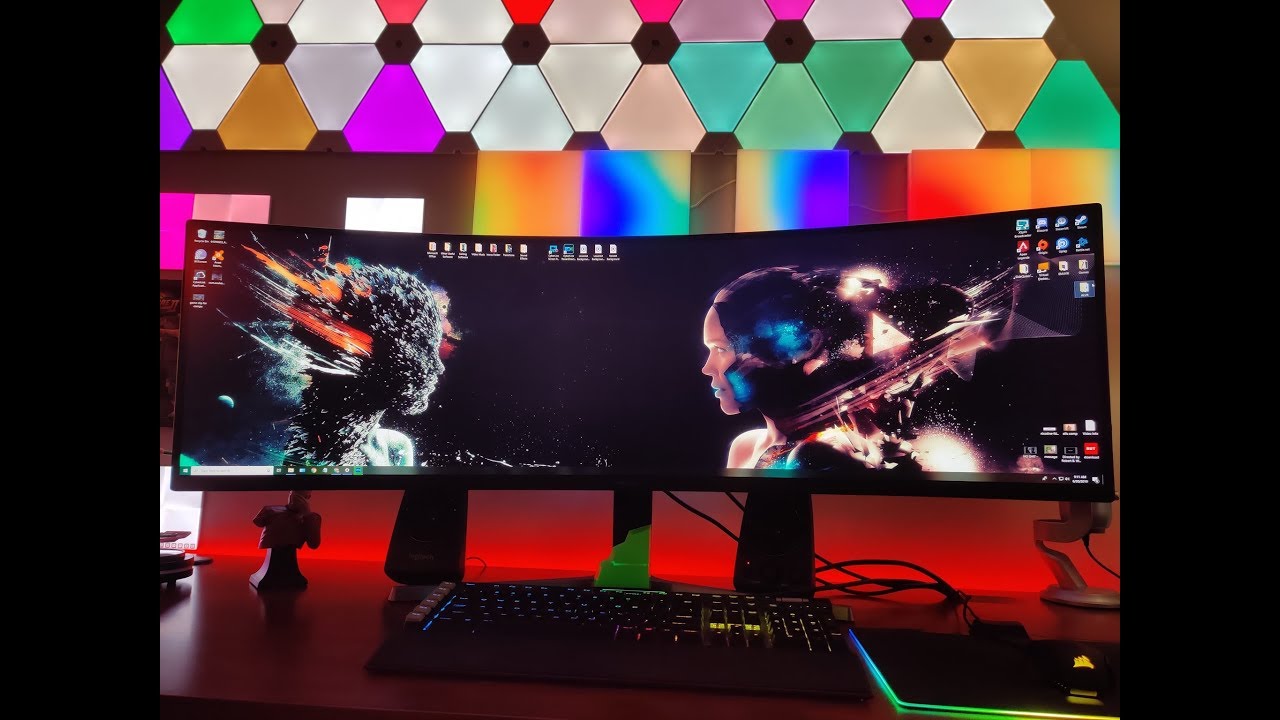
This thing is next level! I thought my Acer 38" 1600P was nice but this thing BLOWS it
out of the water! Very much so worth the heft asking price IMO.
More videos on the way! Stay tuned!
Background track = Mild Soap - Night In The City
 acoustic vector
Someone send me a actual monitor xD I've been using an LED Westinghouse for years :(((
jk but in all seriousness. I want to build a new PC. Should I start with a new monitor?
AMD 6-Core (3 physical 3 logical) Fx-6300 @ 4.6 GHz 1.46v
Gigabyte 3x Windforce Nvidia GeForce GTX 970 @ 1444 mhz Core & @ 7100 MHz memory +12 power/temp limit
1x8GB G.Skill DDR3 @ 1866 MHz 10-11-10-30 tRC40
I get between 50-140 FPS on a 60Hz 6 ms response time TV on 1080p competitive games
and 20-40 FPS non-competitive games like Ghost Recon Breaking point.
I just want to be better at Apex/CS:GO/BO3/R6S
visual pilot
@acoustic vector Imo what you want is a 120hz 1080p 1ms monitor, but tbh I don't know if your pc will drive that well
acoustic vector
@visual pilot I was thinking the same. What if it was G-Sync? I plan to go 2070/2080 for my next build and Ryzen 5 3600 OC or Ryzen 7 3700x OC
I also stream, not sure if that makes a difference cause I stream at 30 FPS
Was also thinking of going 1440p if I go G-Sync
visual pilot
G sync is usually much more expensive so I would suggest not. If you make that upgrade, I suggest a 144hz 1080p monitor
I'm running a rtx 2070 with a 144hz 1080p msi monitor
It can do R6S at 144fps max settings pretty well
@acoustic vector I'm on mobile rn so it's gonna be hard to check, but if you find any good cheap-ish G-sync monitor, @ me and I'll take a look
maiden wedge
@acoustic vector you can run a 2070s fine with a 2700x they are on sale on amazon rn
 native coral
Cheapest monitor possible??
 stable crow
your friend/coworkers old monitor, you might even get it for free
stable crow
i've got an ultrawide cheapo 1080p samsung i'll give you if you're in frontrange Colorado 😂
 full moat
@sonic sonnet search for the model name of your display and de-bezzle, that will most likely give you a guide/talk about what to look out for when taking it apart
maiden wedge
Anyone got a monitor they are selling rn
visual pilot
@plain kestrel I think I actually have that monitor and I got it from newegg at 180
sonic sonnet
@full moat thank you, I will try that keyword specifically. I didn't even know that was a thing.
full moat
@sonic sonnet it got very popular back when eyefinity (basically 3+ monitor setups) became a viable thing to drive from a single card.
turns out that bezels are annoying to deal with in the middle of your FOV :)
ebon beacon
my display lacks much of a bezel but it still has some black areas surrounding the picture
so it's kind of pointless not having a bezel
and then it has an actual bezel on the bottom
it might have to do with using a curved VA panel
 runic stump
is this 1440p ultrawide worth the extra $100? https://www.amazon.com/Viotek-GN34CW-34-Inch-Ultrawide-Professional/dp/B07HZ499J4/ref=sr_1_6?keywords=ultrawide%2Bgaming%2Bmonitor%2B1440p&qid=1576342727&sr=8-6&th=1
compared to this
 covert solstice
the first one is 1440p 100hz, the second is 1080p 200hz
stable crow
1440p is always worth it if your video card can keep up imo
1080p is hella pixelated
1440p is just on the border of where you can tell, technically you should be able to distinguish the pixels if you're sitting closer than 2.6ft to a 1440p monitor
stable crow
rx590 is like a 50-60hz 1440p card, i'm not sure about running it on an ultrawide 1440, it's gonna be like 40-50fps in new games unless you turn down settings to low-medium. depends what you use your computer for
what sort of monitor do you have now?
if you already have a 1080p monitor i guess you can put it to the side and run anything that doesn't run so well on the 1440p on it
runic stump
@stable crow currently i have a really old monitor its called the hq compaq la2006x
im planning on using it for gaming and schoolwork
stable crow
if you play a lot of shooters the 1080p is the way to go
runic stump
i play low demanding games
such as league and cs rocket league etc
not too many shooters @stable crow
stable crow
not really familiar with how those types of games run at 1440p
MOBAs are nice on a bigger monitor though since you can see more
except the minimap ends up further away on a 21:9
runic stump
so what would you recommend? do you think the 1440p monitor is worth the extra hundred @stable crow
stable crow
probably not, unless you plan on upgrading video card in the next couple years, or do a lot of work on the computer
stable crow
yeah, it'll be good to see how you like ultrawides too before you drop too much on one
they are good in specific situations but they really don't do well in others
runic stump
i prefer ultrawides since i can multitask and get that wide viewing angle
stable crow
yeah, lots of multitasking stuff works better on 2 monitors instead though, so for that it's like having 1.5 monitors, which works sometimes but not others
and you'll want software that can split the monitor into 3 columns
runic stump
wdym?
stable crow
width-wise it's as wide as 1.5 monitors, so it's usually most useful to split it into 3 half-monitor sized columns. my favorite is windowgrid http://windowgrid.net/

like say you're doing schoolwork, you might want to have like TV or twitch or your music on the far left, browser in the middle, and word on the right
runic stump
i see what you mean but couldn't i just use the ultrawide as a primary monitor and use my current monitor as a secondary
stable crow
yeah that works too. the extra space is just wasted for some programs that's all
runic stump
i see
stable crow
and some games will just freak out on ultrawides or look wrong, or have black bars on the sides that just waste space, so you end up playing some games in window mode
runic stump
can windowgrid fix that?
stable crow
nah it's just to let you snap windows to whatever part of the monitor you want
runic stump
can you not do that buy opening multiple tabs and resizing them
stable crow
like say, discord on the right 1/3rd and your browser on the left 2/3rds
runic stump
to different parts of the screen
stable crow
yeah you can it's just faster and snaps to lines
stable crow
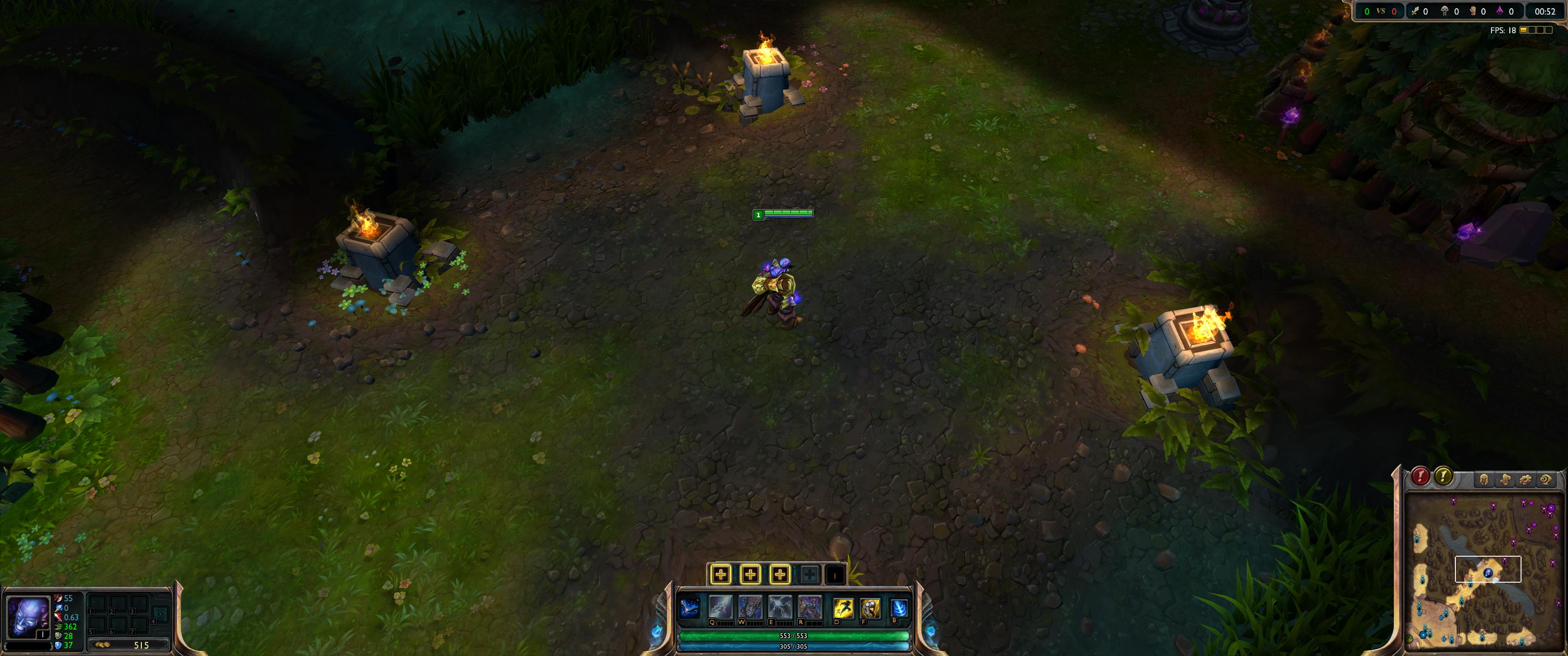
yup, no problem. i'm sure it'll be great for schoolwork and cs and rocket league. LoL might look a little weird though, the minimap is way out of your field of vision http://i.imgur.com/dmz4vbf.jpg it's also great for movies since they're made for ultrawide resolution
 runic stump
i see
 solemn yarrow
they're both the same
ebon beacon
i have an Acer ED273 Abidpx 144Hz 1080p display
27"
i recommend it to just about anyone looking for a high refresh rate monitor
and especially for G-SYNC on the cheap
 languid escarp
Anybody got recommendations for a cheap 1080p ips display? (60 hz is fine, more is great) I would like to spend under $200 for two monitors
 somber cloak
anyone know a good 27'' 60hz or a cheap 120hz or 144hz
ebon beacon
this is only $200 and goes a straight 144Hz
also has freesync and gsync compatible
i am using this monitor at this very moment
it has a good picture and not a lot of distortion when you look at it from different angles
the curved-ness of it is very good
neat cosmos
ew, curved 16:9
ebon beacon
it's fine
it took a short while to get used to how the curve changes your view but now it just looks like a regular monitor
neat cosmos
curved is fine and all, but 16:9 seems like an ew for me
(I do have a curved 21:9)
 tardy parcel
i literally cant tell the difference between my curved and my normal 16:9 monitors
stable crow
i think the curve is secretly to stop you from buying other brands of monitor. i have all MSI monitors now because the curves match
that's why each brand's radius is slightly different
tardy parcel
@stable crow i just have an acer and a dell 60hz as my second
stable crow
both flat?
tardy parcel

eBay
Brightness: 250 Nit. Sharp 1800R curved screens provide more impressive experiences. Say "goodbye" to stuttering and tearing. - Standard Refresh Rate: 144 Hz. Refresh Rate: 144 Hz. Title to software remains with the licensor of the software.
this isnt what i have but its close
stable crow
idk, i do like how my two 27" monitors fit side by side. putting two flat 27" always seemed awkward to me, I have that setup at work
stable crow
yeah
i have mine on a VESA stand so it's just one big curve with a slight break in the middle
tardy parcel
im proud of my seyup rn
ill send a pic gimme a sec
just need my pc to look better
which will be soon because im getting a fully modular and a better case
stable crow
cool, yeah i just moved my computer to a smaller TG case(did have a define R6, giant black box)
stable crow
what kind of case you moving to?
tardy parcel
500i
theyre like 75 rn
that or 510i which is 15 bucks more for a better controller
maiden wedge
Ugh I’m in love with the ryzen fan light but can’t use it
stable crow
seems like a good one for putting it on top of the desk
tardy parcel
its got such good cable management
stable crow
i like the features the NZXTs have
tardy parcel
obviously the management in mine is non existent which is only made worse by the non modular psu
when i was building with my new cpu/ mobo i just said screw it im waiting until i get a better psu, case combo to look good
also i will never buy from asrock again
the software for controlling my lights doesnt work
stable crow
eh, it's not that bad, the case just doesn't have very nice cable passthrus
tardy parcel
exactly
and im gonna pick up an e650 from nzxt soon
which is really nice
better sleeving, modular, etc
stable crow
but yeah the NZXTs have that nice panel over the passthrus
tardy parcel
exactly
and they cover down low
not as claustrophobic as this one
is the extra $20 from the 500 to 500i worth it?
if so, what about to 500i to 510i for $15
stable crow
i'm not sure what the difference is except that the 10s are 2019 models and the 00s are 2018
tardy parcel
yea
the main thing
is the controller for rgb
the 510i has a way faster one, according to some random people on the internet
stable crow
if you can find the old ones in stock that's probably the way to go since they'll be on clearance prices
 analog coral
I need a really really cheap 144hz monitor...
full moat
 lusty moat
covert solstice
lusty moat
covert solstice
if you can catch the dell one on sale, it’s $100
https://www.dell.com/en-us/shop/dell-24-gaming-monitor-s2417dg/apd/210-AIZS/monitors-monitor-accessories this one goes on sale for around $100 semi regularly

Dell
Dell 24 gaming monitor - S2417DG, with its razor-sharp graphics capability and productivity boosting features, delivers an exhilarating gaming experience.
covert solstice
nvm that one is the 1440p model
but a great panel, this is the one that hits $100 on sale https://www.dell.com/en-us/shop/dell-24-gaming-monitor-s2419hgf/apd/210-arbc/monitors-monitor-accessories

Dell
This 24 inch FHD gaming monitor, with its impressive 144hz refresh rate and FreeSync enabled tear-free visuals, gives a smooth gaming experience.
here's all the times its been on sale at r/bapcs https://www.reddit.com/r/buildapcsales/search/?q=S2419HGF&restrict_sr=1&sort=new
A community for links to products that are on sale at various websites. Monitors, cables, processors, video cards, fans, cooling, cases,...
 next swan
Hey guys I’m torn between these monitors, anyone good with the specs of them? And can give me some direction?
solemn yarrow
Samsung
next swan
Any reasons to as why i go with samsung ?
covert solstice
if you're spending that much, i would probably go with an ips monitor, this is the one i have rn its downclocked to 144hz (so it has less ghosting), 1440p, ips, and a great panel https://www.amazon.co.uk/Pixio-Display-FreeSync-Certified-Ultimate/dp/B07WGXXV55
oh i just looked at the last one :v the rog one is 16:9
next swan
I've been torn for a while
acoustic vector
MY girl just helped me order this 🙂 @visual pilot
1 year warranty and supposedly G-Sync capable
 uneven stone
Sorry that wasn't for me I realized
Can anyone reccomened a monitor that is 144Hz and 1ms? I have a budget of up to $250 USD
uneven stone
What type of panel is it @maiden wedge?
solemn yarrow
that one from Dell is TN
uneven stone
Mk
solemn yarrow
nothing wrong with TN anyyways
uneven stone
I was about to ask that
maiden wedge
I have a 1920x1080 with TN and I don’t care about panel style even when on max graphics.
uneven stone
Ty
surreal veldt
@uneven stone i have this one it was 250 AOC its a 144hz 1ms freesync 2k so its 2560 x 1440, gsync also works with it. its 27'' not too bad for a cheap monitor
 hot helm
man that's $300
 dawn karma
Hey guys i have a question
My friend sells his aoc c27g1
Im buying it from him
Is it a good monitor?
visual pilot
should be good if you're getting it for like 160$ or less
dawn karma
In our country a brand new one cost 400 dollars
wild coralBOT
 Spl4sH#0466 has been warned
Reason: Bad word usage
dawn karma
Because taxes and stuff like that
Im getting it for 200 dollars @visual pilot
He used it only for a month
surreal veldt
i have the cq version i think they call it , but mines 1440p 1ms 144hz
works with gsync
not bad for a cheap gaming monitor
visual pilot
@dawn karma that one here is 220 dollar full price no discount, when I looked it up, that model is only free sync, not adaptive sync.
surreal veldt
its a pretty nice monitor for the money
has a nice base doesnt wiggle and feel cheap like some monitors
dawn karma
Or i can add some money and buy the alienware aw2518hf
dawn karma
Im not gonna play 2k @surreal veldt
If i get the alien ware i will probably play 1080p 240hz
I dont play demanding games i play fortnite,overwatch,cs go
Stuff like that
surreal veldt
o ok it definately looks better tho but if u want 1080p thats good too i just stay away from alienware ever since dell bought them out
 sharp ivy
did anyone try alibaba monitor? ihopestar/ipason/etc?
https://www.alibaba.com/trade/search?fsb=y&IndexArea=product_en&CatId=&SearchText=144hz+monitor
144hz Monitor Manufacturers & 144hz Monitor Suppliers Directory - Find a 144hz Monitor Manufacturer and Supplier. Choose Quality 144hz Monitor Manufacturers, Suppliers, Exporters at Alibaba.com.LCD Monitors
 sage trail
theres no guarantee that thats actually a 144hz panel tho
dawn karma
@surreal veldt why? I heard good things about their monitor
sharp ivy
yeah most of their buyer are from dubai base on their review
ebon beacon
https://www.alibaba.com/product-detail/AMD-Free-Sync-24-Inch-Gaming_62003731411.html?spm=a2700.galleryofferlist.0.0.234c4c22xhlvlP&s=p gotta buy 5 units

www.alibaba.com
Amd Free Sync 24 Inch Gaming Monitor 144hz Display Port Hd Curved 1800r , Find Complete Details about Amd Free Sync 24 Inch Gaming Monitor 144hz Display Port Hd Curved 1800r,Curved Monitor,24 Inch Dp Gaming Monitor,Curved Gaming Monitor from LCD Monitors Supplier or Manufactu...
lol
so $725.00
which is a great price
but 5 units
hand them out to all your friends!
sharp ivy
you can order one, just tell the seller that "I need one first so I can the rest for my internet cafe"
surreal veldt
its a cheap chinese monitor. only 250 nit too. notice how they dont say the name they just say amd freesync
stable trout
Yea it’s probably a scam or just a doo doo monitor
 keen mirage
guys i cant get my display port cable to work on my gtx 970 to my alienware aw2518hf 240hz monitor.. any ideas?
river edge
Well, the 970 only has Displayport 1.2 which is capped at 60hz. Sorry for the bad news but that card is kind of a waste for that monitor. HDMI may be better. Maybe try resetting your monitor or checking the input?
keen mirage
wow really? thats crazy then.. i can get 240hz with an hdmi cable. only reason i wanted this DP cable was to enable g sync since nvidia did that thing where u can enable g sync on freesync monitors
ill stick to the hdmi cable then for sure. ty again Bekora
keen mirage
ok
river edge
Is that a 1080p monitor?
keen mirage
yes
river edge
K, stand by
keen mirage
sure thing
i read a lot of posts saying that the gtx 970 has always been very bad at using its display port... i came across posts saying that some tourbleshooting like getting into the uefi and booting a certain way helped but idk about all that stuff. im just tryna game lol
river edge
Looks like it will do 144hz max anyway
keen mirage
with the DP cable?
river edge
still reading
maiden wedge
Depends on the 970 - but should do 240hz just fine
keen mirage
yeah that's the max support on this monitor i believe
river edge
DisplayPort 1.2
Shorthand Resolution Frame
rate Bandwidth
1080p 1920 x 1080 30 Hz 1.58 Gbit/s
60 Hz 3.20 Gbit/s
120 Hz 6.59 Gbit/s
144 Hz 8.00 Gbit/s
240 Hz 14.00 Gbit/s
1440p 2560 x 1440 30 Hz 2.78 Gbit/s
60 Hz 5.63 Gbit/s
75 Hz 7.09 Gbit/s
120 Hz 11.59 Gbit/s
4K 3840 x 2160 30 Hz 6.18 Gbit/s
60 Hz 12.54 Gbit/s
5K 5120 x 2880 30 Hz 10.94 Gbit/s
keen mirage
npnp
keen mirage
ok
river edge
This is how someone else got it to work:
- hook up hdmi and dp
- open nvidia control panel and set DP connection as the primary display
- reboot
- open nvidia control panel and disable hdmi input
- reboot and problem should be solved
maiden wedge
Windows makes it easy. From display options
river edge
I think this has to be done in the nVidia Control Panel though
?
Set UP Multiple Displays
Set DP to Default
Both cables same monitor
keen mirage
i dont even have the option in there
river edge
With both DP and HDMI plugged in?
keen mirage
yes
river edge
Oof, read reports of funky DP ports on the 970s
Try flipping the cable or wiggling it
keen mirage
ok brb
maiden wedge
Does nvcp have an option for that? It takes 5 secs in windows to designate primary display
river edge
It does
keen mirage
LETS GOOO!!!!
maiden wedge
ah, right click
keen mirage
LETS GO DUDE
river edge
wut
river edge
pfffff
keen mirage
i see the two options now
river edge
NICE!
Set DP to default
then unplug HDMI and reboot, see if it sticks
PS, google deserves the award, not me. I just have good google-fu 😉
river edge
Welcome!
keen mirage
im running on DP cables lets go
now time to see if i can reboot
and get g sync
im running on the single cable now. unfortunately i dont see any g sync option maybe my card is too old for that nvidia feature. all gravy though. thanks again Bekora
keen mirage
ok for sure
so my monitor is freesync and i heard recently that the nvidia cards can run g sync through the freesync monitors but like i said maybe the 970 is too old
 maiden wedge
Any DP 1.2a card should be able to handle it, same goes for monitor, only with rare exceptions
keen mirage
hmmm well i just updated my gpu drivers to the latest ones
river edge
“If the above isn’t available, or isn’t working, you may need to go to Manage 3D Settings, click the Global tab, scroll down to Monitor Technology, select G-SYNC Compatible in the drop down, and then click Apply,” Nvidia’s announcement post says.
maiden wedge
I think the hardware module g-sync has it's own tab , but go to monitor - ya, that
river edge
ALso make sure Adaptive Sync is enabled on the monitor itself through the on screen display
It's not an automatic thing from just plugging a cable in
Ah, well, poop
@keen mirage just found this from nVidia
Update: Adaptive Sync is only being enabled on GTX 10-series and RTX 20-series graphics cards as well, with no plans to activate it in older GPUs.
So, looks like you're out of luck. 😦
keen mirage
awww yeah i was lookin and lookin for the enable adaptive sync on the monitor. cant find it.
ay all good tho. today was a win regardless!
ty again dude have a good day and fr i see you here a lot and always helpin, you deserve a title imo
keen mirage
time to game. thanks again and laters
river edge
have fun!
maiden wedge
TIL 900 series can do hardware g-sync, but not adaptive/fre
 covert rover
 leaden forge
Will monitor prices ever go down ?
stable trout
I’m sure they will, but only when some more really high end tech in the field comes out, like 300hz or something
And then around that time I think consumer monitors will start switching to 75 or 120 hz
leaden forge
In 2020 u think ? @stable trout
leaden forge
Alright
full moat
you can easily add a bunch more years to that
look at the rate that the industry has adopted current tech
there is not a good incentive for the industry to leap-frog tech at all
the consumers are going to consume
stable trout
^
full moat
mind, i would LOVE for the industry to leapfrog, but ... yeah :)
think about this, 720p panels are still being produced
stable trout
🤮
720p
Why even bother
Well, on a phone screen, 720p is fine, but a 20+ inch monitor is just stupid
full moat
because there are people that wants rainbow barf builds with overpowered cpu/gpu setups, running on cheap as nails PSU's and they forget/dont know about the (important) monitor.
so they buy whatever is cheapest
visual pilot
420p
stable trout
69p
full moat
the trinitron monitor line would like its weight number back @stable trout
am i ever happy we dont have to cart around CRT monitors anymore
 granite tulip
Lmao
ebon beacon
CRTs are the devil, unless they stay at home and are the PVM/BVM kind
and you play your sega genesis and SNES on them
sage trail
a good crt is amazing
full moat
yes, so is the backpain from moving the buggers around
sage trail
lmao
sage trail
i help out with retrogamecon in Syracuse, NY
we have almost 80 old CRT monitors and TV's of varying sizes
its a workout
full moat
80 crt's thats cute
try a university
and dont forget at the end of the CRT era, people had multiple of them at each desk
matrox cards ftw
sage trail
ya, but we do it on a yearly basis
full moat
yes, and i used to service several universities plus companies :)
sage trail
im sure it was terrible to do all those at once tho
sage trail
ebay mostly, we pull from other dead equipment
full moat
so, slowly declining stock etc?
full moat
yes, now :)
sage trail
yep 😭
i think like 4 or 5 of our old tvs stopped working in transit
like, they were working yesterday
sage trail
yea, no amount of blankets can help sometimes
full moat
aye
i remember one university that had a massive basement complex, one corner of their undergroundwarehouse was just the original boxes for the monitors
a literal mountain of boxes
sage trail
lmao
stable trout
Um
It has one star review
And it looks fake
Like really fake
Well it says it’s direct from Lenovo so idk
uneven stone
Yeah but the review doesn't exist
Any1 else?
Oh that would explain it
I went to Lenovo's website @stable trout
ebon beacon
Lenovo is Shenzhen's Finest, and well it's not very expensive
so you can expect to get what you pay for is what i say
imo what lenovo does well is laptops and phones
some of their phones are great
and some of the laptops
but otherwise i'd stay away
oh i owned this desktop with the potatium processor from them that i stole DDR4 from for another build
 glossy fractal
is 1440p rly worth it
i have a '070 super btw so i can definately run it
2070 super*

 river blade
1440p at 144Hz is the sweet spot atm I’d say
hot helm
how is that monitor only $130
ebon beacon
it's a woot
woots are usually priced absurdly low
one day, one deal
i was on the site really early, when it first came out in like 2003 or 4
deals have been ludicrous for 15 years
 stone rose
slightly punched my monitor, and it went black and not turning on, is it broken?
not really a punch more like hitting it with my palm
full moat
check your cables @stone rose
stone rose
alright then
doesnt seem to be any problems,i've punched it before once and nothing happened
full moat
that is not how statistics work
this might seem a bit silly, but try and pull the power from the monitor, wait a minute or two, and then plug the power back in.
 slate hamlet
What do you mean by this
 amber ingot

Buy LG 24GL600F 24" 16:9 144 Hz FreeSync LCD Gaming Monitor featuring Twisted Nematic (TN) Panel, HDMI | DisplayPort Inputs, 1920 x 1080 Full HD Resolution, 1000:1 Static Contrast Ratio, 300 cd/m² Brightness, 170°/160° Viewing Angles, 1 ms Response Time (GtG), 144 Hz ...
it said that im geting 60hz
slate hamlet
did you go through nvidia control panel and enable 144hz
or are you talking about fps in a game specifically
slate hamlet
does this help
amber ingot
were do I go for the top left one
slate hamlet
device manager
slate hamlet
Just have nvidia bro 
amber ingot
wait I found it
slate hamlet

This is a quick tutorial showing how to set up the refresh rate of your monitor on an AMD system both in the operating system and physical connection. In the video I use a dual link DVI connection but you can also use a Displayport cable if it's supported by your system. The ...
slate hamlet
looks good
amber ingot
thanks for your help 🙂
slate hamlet
well now I know what I'm in for if I ever get a 5700XT
amber ingot
it was easy you just need to go to advance display and click on display adapter propetires for display 1
and boom your there
slate hamlet
all I have is a lowly 60hz 😔
Oh yeah and make sure to get Freesync working cuz that'll be awesome
amber ingot
What’s freesync again?
slate hamlet
it's a software thing to match the refresh rate of your monitor to your gpu's output at any moment
Basically vsync but better
amber ingot
Ah ok
slate hamlet
not sure how to enable it though...
mossy kindle
is it lg right ?
ebon beacon
having nvidia doesn't help any more than AMD
i was scrolled up wow
i gotta start checking that
slate hamlet
Maybe it's just cuz I already know how it works but nvidia control panel is pretty easy for me
 digital vale
In my opinion, G-SYNC is better because I have been using it on an pre-built OMEN HP (bad idea to get a pre-built, ik now)
But, I'm willing to change things up a bit, should I stick with G-SYNC or go for FREESYNC?
Because I love having a faster framerate.
 magic root
Both are basically the same
It's really just a question of whether your using DP or HDMI and Nvidia or AMD
digital vale
gonna use HDMI + Nividia
mossy kindle
btw oled panels best panels by far
covert solstice
🤨
 clear lily
Whats the best 240hz monitor? 24.5 or 27 inches! dm me
quartz sinew
anyone got some good ideas for a good 1440p 144hz for less than 600?
i saw a dell one 34" earlier but i didnt test it for blurring
ebon beacon
just a shot in the dark, i have an acer panel that i really like but haven't seen this one up close
ebon beacon
are you looking for one that is $599?
quartz sinew
i'm looking for one that's like 550
or at least relatively close, i'd only get it on sale much later on
ebon beacon
quartz sinew
oop found the dell one
ebon beacon
ah nice
quartz sinew
now i just gotta research if it blurs
oo its got good reviews
but i don't think its a TN panel, not sure
it uses a VA, thoughts? @ebon beacon
ebon beacon
my current display is a VA panel (only kind you can use curved except a really expensive type of IPS) and i'm super satisfied with it
looks sharp and colorful
quartz sinew
does it blur at all during fast movement?
ebon beacon
keep in mind it is 1080p/144Hz/27inch
and i haven't seen blurring myself
but i haven't been looking for it either
quartz sinew
can you check by chance?
full moat
Keep in mind, it differs from person to person how noticeable blur is.
quartz sinew
true
i just gotta figure this all out because it's 520 USD, 1440p 165hz, 32" curved, and that seems fishy for the price-point
quartz sinew
?
idk i just see monitors that are smaller and similar spec
for way more
granted they might be using expensive IPS panels
ebon beacon
i don't notice any blur, i watched a relatively action heavy thing
full moat
that does not mean that a bigger monitor for less cost is wrong.
quartz sinew
thanks anni
full moat
the market generally adjusts to what the customers are willing to pay
quartz sinew
very true
full moat
sadly one of the reasons why 16:10 monitors are annoying to find
quartz sinew
ah
full moat
the extra vertical space is LOVELY
quartz sinew
i'm sure
full moat
anyway, best of luck with your monitor hunt :)
quartz sinew
thanks mate
maiden wedge
I have that samsung curved monitor that was linked earlier. The stand is huge. The monitor alone is heavy as hell. Mine glitches out hard though when i turn it on for the first time of the day when its cold. It has to warm up before i use it. Like the pixels are all types of frozen. I made it warm up faster by using a white background though. idk if thats what helped it, but the time got shorter for sure. after a while, id prefer it to be flat. The curve isnt noticeable, but personally im starting to not like curved like on my note 10 plus also. Im starting to look into moving on from this monitor into anything with the same specs, or better, and flat. theres some, but eh. i already got this one. LG has one. i think Pixio does too. For me personally, Samsung is kindve still holding onto a "space saving" 32inch 1440p 144hz VA Flat panel and im waiting for that to drop already. Its literally the same monitor, just flat. but that gets me hot, lol. at first the curve was nice, but it got annoying after a while. im mostly looking for a monitor of the same specs, but flat and IPS. Seems like all companies are avoiding it though. Theyve already made panels that are just short of my desire, or WAY above it. i just want a (minimum) 32 inch, 1440p, 144hz, IPS monitor. the current one i have is alright though. Nothing bad about it.
 covert swift
Hi, I'm building myself a "high end" pc, with 2080 ti and the amd ryzen 9 3950x, I'm just looking for tips or recommendations for a monitor that would work with such a pc :) I prefer 24 tum monitors, I mainly play rts games and sometimes csgo/cod, I was thinking of getting a 240hz 1080p monitor, but not sure anymore, anyone that has some tips? :)
magic root
you could pull off 1440p 240hz with that on those games
i cant remember if those exist actually
i would go for a 120hz 4k personally
at that price point
covert swift
Okey 👍 I'll check on it
 clever light
I wouldn't go 4k 120
That's a challenge on a 2080 ti
And 1440p 240 isnt a thing
I'd go 1440p 144hz with a vsync module
Gsync, autocorrect
That would allow for guaranteed 165hz
covert swift
Okey :)
river edge
Looks like a window or box behind the screen shows through sporadically
Hmmm......or not
amber ingot
Idk
river edge
Laptop?
river edge
Hmmm, even stranger. Java and drivers up to date?
river edge
Only while the crafting menu is up?
river edge
Do you have VSync on?
amber ingot
How to check
river edge
MInecraft - Menu-Video settings
river edge
Not on?
amber ingot
Nope
river edge
Try turning it on. It will limit framerate but might get rid of artifacts
Or try limiting the max framerate to something you know you can get
river edge
Of course! Always the creepers. -_-
maiden wedge
Thats not a good monitor...
60hz as well
1080p 144hz monitor for half the price of that
you could also get thte 32 inch verson of that and it'd still be cheaper
 balmy radish
Oh man oh man
I didn’t even realize it was 60hz
Admittedly I’ve been out of the enthusiast scene for a while - since UV reactive round IDE cables.