
#old-monitors-and-tv
1 messages · Page 18 of 1
 thick scaffold
Get this
 queen meteor
Okay so what should I do/go for (for ref, looking for a new monitor, primarily gonna use it for web browsing and wanting expanded windows in Unreal engine 5. Currently have a 27in 1080p144hz VA panel and the details panel in UE5 is literally unusable as a sub-window unlike my 4K TV)
- Get A 1440p Mini-LED 27in and then pair my 1080p screen with it on a dual-VESA arm? https://www.newegg.com/aoc-q27g3xmn-27-qhd-180-hz-144-hz-va-black-red/p/N82E16824160516
- Get this 1440p QD-OLED 27in and do the same pairing with my current monitor? https://www.amazon.com/dp/B0D682HF6R?ie=UTF8&smid=ATVPDKIKX0DER&th=1&linkCode=sl1&tag=sec2002-20
- Get a 4K Mini-LED? this one is 32in and 500$ https://a.co/d/ijOWsfZ and then there's this 27in one from Acer that's also 500$ https://www.bestbuy.com/site/acer-nitro-27-mini-led-uhd-160hz-1ms-freesync-gaming-monitor-with-hdr1000-displayport-hdmi-black/6539416.p?skuId=6539416
- Go full-stop for a 32in 4K QD-OLED? This MSI one is on sale? Is it good? https://www.bestbuy.com/site/msi-mag321upqdoled-32-oled-uhd-165hz-0-03ms-adaptive-sync-gaming-monitor-with-hdr400-displayport-hdmi-usb-c-black/6583875.p?skuId=6583875&utm_source=feed&ref=212&loc=SaleEvent&msclkid=b7e7ff68e3b41890348098282fbcb0c1&gclid=b7e7ff68e3b41890348098282fbcb0c1&gclsrc=3p.ds
 regal lily
Is there a big difference between 1440p and 4k. Im currently looking at a 1440p OLED monitor, I would like a 4k one but they are too expensive, unless they is a great deal.
 misty gyro
If you're gaming, not really, assuming you're at a normal sitting distance. The biggest difference is going to be refresh rate and GPU load. 4K requires a much stronger GPU and even then you probably won't get nearly as many fps as 1440p.
regal lily
Ok so I had a 4k monitor that just broke and I got a full refund for it and im currently gaming on my second 1080p monitor
regal lily
misty gyro
If you're gaming, not really, assuming you're at a normal sitting distance. The ...
I have a 4080 so 4k isnt a problem
is oled something I should comprimise 4k for?
or should i just get an ips 4k pannel in stead of an OLED 1440p one?
misty gyro
Absolutely go OLED over 4k
regal lily
really is it that much better?
misty gyro
The difference is huge
regal lily
ok can you recommend me a good one?
ive seen a few for 500
so like nothing over 550
becuase Im not made of money lol
regal lily
misty gyro
The difference is huge
and im taking the refund money and putting it toward a new one
misty gyro
Corsair XENEON 27QHD240 27.0" 2560 x 1440 240 Hz Monitor vs. MSI MAG 271QPX QD-OLED E2 26.5" 2560 x 1440 240 Hz Monitor vs. AOC Agon PRO AG276QZD2 26.7" 2560 x 1440 240 Hz Monitor
Between the 3 I'd probably go with the MSI because it gets a bit brighter
regal lily
misty gyro
https://pcpartpicker.com/products/compare/P288TW,BR7scf,7LzXsY/
Alr thanks, whats the main difference between QD OLED
and OLED
 visual pilot
misty gyro
Between the 3 I'd probably go with the MSI because it gets a bit brighter
visual pilot
misty gyro
Between the 3 I'd probably go with the MSI because it gets a bit brighter
Do note how the reporting for brightness works differs between the 3 of them, the MSI panel also only does 250 nits SDR like the AOC panel, but specs say 1000nits because it hits 1000nits peak 2%, which the AOC panel also claims to be able to do
regal lily
visual pilot
Do note how the reporting for brightness works differs between the 3 of them, th...
ok
thx
regal lily
visual pilot
Do note how the reporting for brightness works differs between the 3 of them, th...
does the corsair one have this too?
visual pilot
Corsair looks to be even worse, the Corsair panel doesn't have a proper HDR rating, and it doesn't even hit the 250nits SDR, nor the 1000nits HDR it claims
https://www.rtings.com/monitor/reviews/corsair/xeneon-27qhd240

RTINGS.com
The Corsair XENEON 27QHD240 is a 27-inch gaming monitor with a 1440p resolution. Alongside the Corsair XENEON FLEX 45WQHD240, it's one of two OLEDs that Corsair ...
regal lily
visual pilot
Corsair looks to be even worse, the Corsair panel doesn't have a proper HDR rati...
ok thanks i think ill settle for the msi or aoc
visual pilot
regal lily
ok thanks i think ill settle for the msi or aoc
Safest option is probably the MSI panel since it has an rtings review, but the AOC panel should be fine just by specs
https://www.rtings.com/monitor/reviews/msi/mpg-271qrx-qd-oled

RTINGS.com
The MSI MPG 271QRX is a 27-inch 1440p premium gaming monitor with a QD-OLED display. It joins several new QD-OLEDS of this size that are entering the market in 2...
misty gyro
visual pilot
Do note how the reporting for brightness works differs between the 3 of them, th...
Yeah I wasn't basing it on the pcpp specs but a comparison I did earlier https://www.rtings.com/monitor/tools/compare/msi-mpg-271qrx-qd-oled-vs-corsair-xeneon-27qhd240/47131/39531

RTINGS.com
Compare the MSI MPG 271QRX QD-OLED and Corsair XENEON 27QHD240 monitors
visual pilot
Wanted to note it because what the pcpp comparison says is 450nits for the corsair panel, 1000nits for the MSI panel, and 250nits for the AOC panel
visual pilot
btw just noticed it's the QRX that's in the review and it's the QPX that's on sale for $480
regal lily
Is burn in on OLED monitors a problem? Also I know this is a few hours later I was busy.
 small warren
regal lily
Is burn in on OLED monitors a problem? Also I know this is a few hours later I w...
small warren
regal lily
Is burn in on OLED monitors a problem? Also I know this is a few hours later I w...
Is if you run the brightness cranked on the ones that allow you to do so
regal lily
small warren
Is if you run the brightness cranked on the ones that allow you to do so
alr thanks so it shouldnt be a problem thn
small warren
Ya, just take good care of it, let the monitor do it's refresh cycles
And don't leave it constantly on
And avoid that high brightness if it has it
Though QD-OLED doesn't really have the same brightness issue like traditional OLED does
regal lily
ok
thick scaffold
QD-OLED is worse than WOLED for burn in
But if you keep your brightness low, hide the taskbar, refrain from having static images (move a window around so often and have black or alternating wallpaper) you’ll be fine.
small warren
They should be better unless it's specific models that are early stage design
QD-OLED is a design concept meant to eliminate OLED burn-in by adding the quantum dot layer
Or rather, it should be, but many things don't go to plan
thick scaffold
Burn in is not a problem unless you use it for work on full brightness
small warren
That I could reasonably believe for all OLED tbh
Since it's static work and you'd be in front of it for hours
Not letting the screen do refresh cycles and changing the workspace to remove TFT burn
thick scaffold
Basically don’t get oled for work
If you are working, you really don’t need dimming zones and high hertz
regal lily
thick scaffold
Basically don’t get oled for work
but it is worth it for gaming even will all burn in
thick scaffold
regal lily
but it is worth it for gaming even will all burn in
OLED is the best for gaming
regal lily
thick scaffold
OLED is the best for gaming
ok
thick scaffold
High response time, high refresh rate, great colors and contrast
Just don't be gaming for 4+ hours straight without giving a refresh maybe
I bought an oled as soon as I saw the $400 price tag.
regal lily
thick scaffold
I bought an oled as soon as I saw the $400 price tag.
How long have you had it for?
 tribal spire
OLED is such a game changer
visual pilot
the only way gaming has a chance of burn in is if you play mmos all day where the icons stay up at all times
visual pilot
but then the refresh cycles will help with that
tribal spire
Burn in is significantly reduced in newer panels tbh
Like yes it COULD happen
But with content consumption use it's highly unlikely
If you can afford it
Now is the time to go OLED
visual pilot
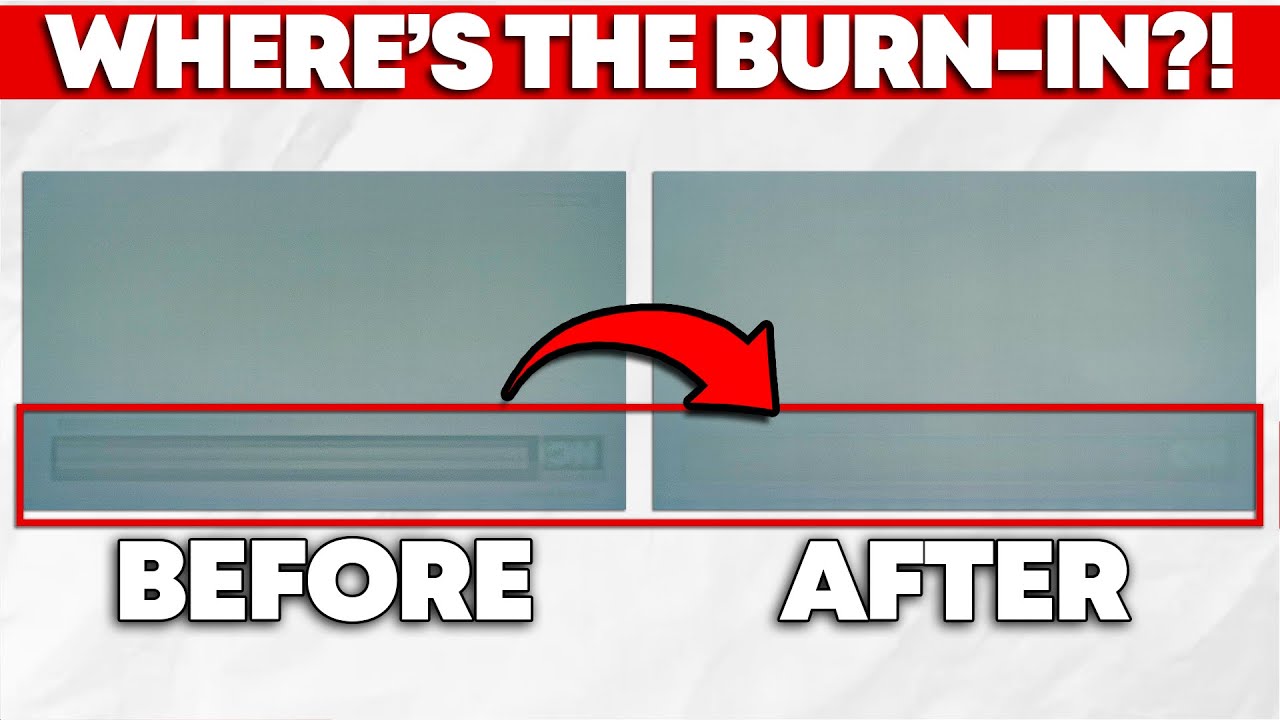
While burn-in is inherent to OLED technology, manufacturers can compensate for it through software designed to improve the useable life of your panel. Fortunately for you, manufacturers implement this well, meaning that permanent burn-in isn't that big of a concern for most folks—unless you're using an ultrawide OLED monitor, that is.
In this ...
visual pilot
Not new, the 1 year old vid still
thick scaffold
regal lily
How long have you had it for?
Just ordered.
regal lily
thick scaffold
Just ordered.
which one? Ive been looking I saw the AOC one was 400 or did you go for the MSI one
thick scaffold
regal lily
which one? Ive been looking I saw the AOC one was 400 or did you go for the MSI ...
AOC
visual pilot
Personally I'll probably grab the MSI one since I'm really tired of having hdmi 2.0, but that might not be worth the extra $80 or so
regal lily
thick scaffold
AOC
Which one would be better? They have like the exact same specs, I believe the oly difference is price.
tribal spire
visual pilot
Not new, the 1 year old vid still
I'm eagerly awaiting the next update.
tribal spire
regal lily
Which one would be better? They have like the exact same specs, I believe the ol...
Between which ones?
regal lily
tribal spire
Between which ones?
hold up let me find them
tribal spire
Sorry I missed like 90% of the convo so I'm trying to catch up
visual pilot
https://pcpartpicker.com/product/7LzXsY/aoc-agon-pro-ag276qzd2-267-2560-x-1440-240-hz-monitor-ag276qzd2
https://pcpartpicker.com/product/BR7scf/msi-mag-271qpx-qd-oled-e2-265-2560-x-1440-240-hz-monitor-mag-271qpx-qd-oled-e2

AOC Agon PRO AG276QZD2 26.7" 2560 x 1440 240 Hz Monitor (AG276QZD2)

MSI MAG 271QPX QD-OLED E2 26.5" 2560 x 1440 240 Hz Monitor (MAG 271QPX QD-OLED E2)
tribal spire
But do note with monitors
Tiny differences in SKU mean massive differences sometimes
Oh those two
visual pilot
both haven't been reviewed by rtings so
tribal spire
Okay so the panel is TECHNICALLY the same
However the AOC variant seems to use panels that are borderline and/or have worse firmware
Buyers mentioned very noticeable VRR flicker
regal lily
ok
tribal spire
So the panel implementation seems to make a difference
visual pilot
Connectivity wise AOC only has hdmi 2.0 and dp 1.4, so you'll never be able to run 1440p240 with 10bit color, which is kinda annoying
MSI gets hdmi 2.1
tribal spire
The MSI is generally regarded to be implemented better
thick scaffold
visual pilot
Connectivity wise AOC only has hdmi 2.0 and dp 1.4, so you'll never be able to r...
so i could do 8bit?
tribal spire
And has user-upgradeable firmware
I'm not sure about the AOC
visual pilot
With Displayport only, you're at the edge of DP1.4 bandwidth doing 8 bit 1440p240
HDMI 2.0 only does like 1440p165 or something
thick scaffold
visual pilot
With Displayport only, you're at the edge of DP1.4 bandwidth doing 8 bit 1440p24...
thats fine by me
visual pilot
lemme check
tribal spire
thick scaffold
i got the aoc
It's still a 1440p 240hz QD-OLED
It's not gonna be a bad screen regardless
thick scaffold
i wouldnt be able to spend $470
i was kinda reaching with the $400
cause i orignally wanted the aoc mini led
tribal spire
It's still gonna look amazing
But you might want to use frame caps to avoid the VRR flicker (cuz it happens when you have big swings in FPS)
tribal spire
@thick scaffold which one did you order after all?
visual pilot
Yea it's still going to be a good panel
thick scaffold
tribal spire
<@451212642648981527> which one did you order after all?
OLED AOC
yall encouraged me
tribal spire
Yeah you're likely gonna be fine
thick scaffold
whats the hdmi 2.0 max?
visual pilot
around 1440p144
tribal spire
I mean
thick scaffold
not even 165?
tribal spire
OLED 144hz >>>>>> any LCD 165
thick scaffold
nah imma do DP 200hz
visual pilot
without compression, 147 max
visual pilot
tribal spire
DSC would get you to 240
don't think hdmi 2.0 supports dsc
tribal spire
HDMI 1.4 does???
visual pilot
but it can do the weird chroma subsampling thing
tribal spire
Maybe not the most modern DSC but it def has SOME kind of DSC available
Either way
It's likely to work
regal lily
so if I were to pick between the 2 the MSI one is better
tribal spire
And let's be honest the same framerate on an OLED looks so much better it doesn't matter anyway
tribal spire
regal lily
so if I were to pick between the 2 the MSI one is better
Let me put it this way
The AOC is like a 9
The MSI is like a 10.5
visual pilot
Only DP 1.4+ and HDMI 2.1+ can use DCS 1.2, can't tell what supports DSC 1.0 at a glance
regal lily
tribal spire
Let me put it this way
The AOC is like a 9
The MSI is like a 10.5
ok thanks
tribal spire
Both are gonna be amazing
The MSI would however likely be "better" in that you'd have less annoyance
There's probably still gonna be some VRR flicker inherent to most OLEDs
But it's probably not gonna be frequently noticable with the MSI
Rtings is using an intentionally very challenging scene with artificially massive FPS swings to highlight the worst-case
But in real usage it's unlikely to show up
@regal lily if you can fit the MSI in your budget then go for it, but the AOC will also look jawdropping
There's no shame in buying "low-end" OLEDs
They're still OLEDs after all, especially if it's QD-OLED
regal lily
tribal spire
<@442380982302146563> if you can fit the MSI in your budget then go for it, but ...
ok thanks
tribal spire
No biggie
thick scaffold
so i should use dp and just limit my fps
regal lily
I purchased the MSI one and its suppose to come next week
Thanks to everyone who helped me
 ebon garnet
visual pilot
https://pcpartpicker.com/product/7LzXsY/aoc-agon-pro-ag276qzd2-267-2560-x-1440-2...
ebon garnet
visual pilot
https://pcpartpicker.com/product/7LzXsY/aoc-agon-pro-ag276qzd2-267-2560-x-1440-2...
I've been looking at this AOC model too, but I was reading about it and saw people saying it does an automatic pixel refresh every 4hours that takes about 5mins? Someone said you can choose to have it skip it, but that doing so voids AOC's warranty. It looks really great for the price and I'm so tempted to jump on it, but I play a lot of long-form content (MMOs etc) multiplayer games where a surprise pixel refresh could be super disruptive not just to myself but to everyone I'm playing with. Am I maybe worrying about this too much, and is it something most OLED monitors do at such frequent intervals? And can you have it manually do pixel refreshes on demand? I've never had an OLED so I'm really unfamiliar with these things
 rocky cypress
oh aoc has an oled monitor
ebon garnet
If it's something I can just trigger myself most of the time then this is a no-brainer purchase for me bc it's rare that I'm playing anything uninterrupted for 4 straight hours, but the idea of my screen just shutting itself off for 5 whole minutes in the middle of an FFXIV savage raid gives me a lot of pause
ebon garnet
rocky cypress
oh aoc has an oled monitor
yeah the only bad things I've read about it are that it has some VRR flicker issues (which I dont use so w/e) and apparently not great out of the box color tuning
visual pilot
ebon garnet
I've been looking at this AOC model too, but I was reading about it and saw peop...
Most do it every couple of hours, it's to help against burn in, the AOC one will give you a warning message every 4 hours, and you get to choose to refresh it at that time or not
rocky cypress
alot of oleds have vrr flicker according to rtings anyways
ebon garnet
it only came out 2 months ago though so there are like zero reviews for it on YT, only a couple of reddit threads I could find of people who purchased it talking about their experience with it
visual pilot
looks like this
 rocky cypress
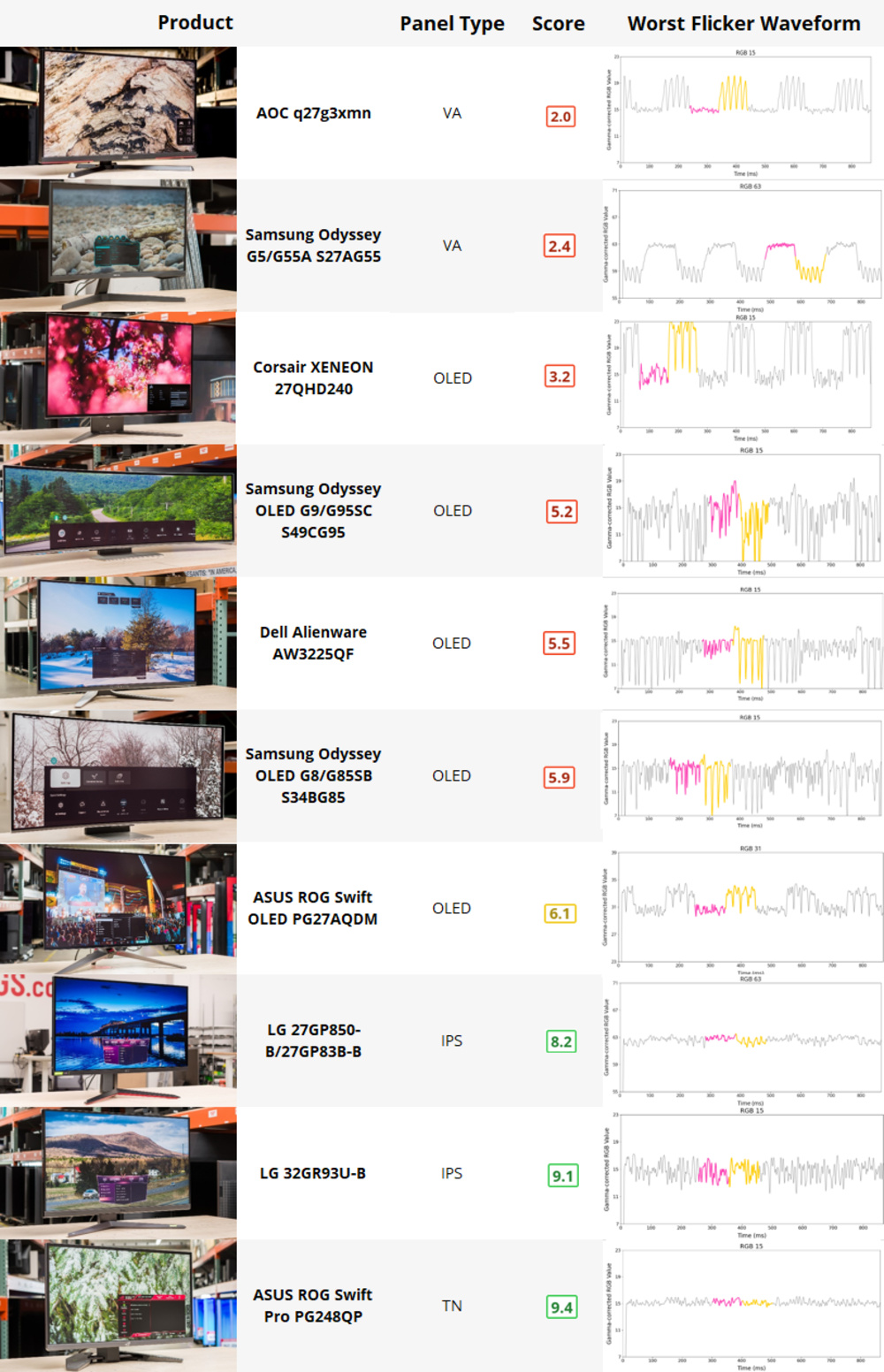
RTINGS.com
OLED flickering while gaming has been a known issue for several years now; any moment when a game experiences an unstable or erratic frame rate, owners of expensive OLEDs see periodic flashes or flicker.
ebon garnet
Oh ok that doesn't sound so bad then
Still curious though, can you trigger it to do the pixel refresh whenever you want? It's really rare that I'm gaming for 4hrs straight, so if I could just manually choose to have it do a refresh when I AFK to bio or get food or w/e to reset the 4hr timer when I'm already busy then I'll probably just buy it
visual pilot
You can manually trigger it too
it'll also do it every 4 hrs if it's in standby by itself
and if it's been on for 16hrs continiously it'll automatically do a refresh that can't be stopped, but with 10 minute advance warning
rocky cypress
wait, so if it's going to keep doing pixel refreshes even if the monitor hasnt been woken and just in standby?
ebon garnet
ok fantastic, that pretty much alleviates any concern I had. Hopefully they'll still be up on that sale tomorrow so I can buy it 🙏
visual pilot
"After every 4 hours of cumulative operation, the screen compensation correction and image residue elimination function
will automatically run when the display is turned off, or has been in standby for 2 hours."
2 hours not 4 but yea
rocky cypress
ahh
visual pilot
after the cumulative operation it'll do it on its own after 2hrs of standby, sounds like it's one time not like repeated every 4 hours of standby
thick scaffold
visual pilot
Most do it every couple of hours, it's to help against burn in, the AOC one will...
And if I don’t I lose my warranty?
Like does it warn me like a few minutes before
Like a mouse would warn me on low battery
Cause overwatch matches can be like 20 minutes I can’t just have my monitor shut off
But I also don’t wanna lose my warranty
visual pilot
it's a very broad "Not following these instructions may void your warranty."
thick scaffold
How long is it?
visual pilot
~10min
ebon garnet
oh tangentially related question sort of, I noticed it's a Glossy, which I've actually never owned before but I'm excited to try. I use a not very bright lamp on the side of my desk to keep some backlighting up at night, will that maybe cause some mild glare? I'm so used to my 3 matte displays that I almost didn't even think to ask
thick scaffold
Also it just comes pre installed on the monitor right?
visual pilot
it's not really enforcable to do it every time
rocky cypress
it's in the firmware
thick scaffold
They can see if I click no?
visual pilot
they'd only invoke it if it's clear burn in is your fault for not running cleaning cycles
rocky cypress
if they log it
visual pilot
It counts how many times it has run the cycle total
visual pilot
they're not going to care if you do it every time
rocky cypress
wouldnt make sense to immediately void warranty if you click no once
visual pilot
its a very simple if it looks like its your fault they will invoke it
thick scaffold
If I just keep my brightness down and I usually just play video games do I need to worry?
How low should my brightness be?
ebon garnet
I don't think you need to worry about toning your brightness down unless you're really abusing it, I could be wrong though. Newer OLEDs are significantly less prone to burn-in that they used to be
visual pilot
not really recommended to do it that way, just run the cycles when it tells you to or near when it tells you to
these aren't that bright in sdr anyways
thick scaffold
10 minutes just seems crazy
visual pilot
welp, I decided to get the MSI one myself, guess I'll report back later how it goes
 regal lily
visual pilot
welp, I decided to get the MSI one myself, guess I'll report back later how it g...
regal lily
visual pilot
welp, I decided to get the MSI one myself, guess I'll report back later how it g...
thats what i went with too
tribal spire
rocky cypress
alot of oleds have vrr flicker according to rtings anyways

VAs flicker worse than oleds lol
Q27G3XMN flickers about as much as thew worst oleds tbf
 prime sun
visual pilot
looks like this
prime sun
visual pilot
looks like this
So what actually is a pixel refresh on an OLED? I thought the issue was just using one colour too much eventually wears out those combination of colours
I dont understand the technology well
visual pilot
Pixel refresh is usually cycles of full brightness on and off repeated in order to not have anything static burnt in
prime sun
I see
rocky cypress
pixel refresh more like burn out
prime sun
So is it like blending in any potential burn out or?
thick scaffold
so we burning out the entire monitor evenly
 errant flax
thick scaffold
Just don't be gaming for 4+ hours straight without giving a refresh maybe
errant flax
thick scaffold
Just don't be gaming for 4+ hours straight without giving a refresh maybe
What do you mean by refresh?
I am saving up 2.5-3k for a GPU and monitor upgrade come Hanukkah (same time as christmas) this year and I am wondering how OLED has come?
I spend about 8 hours a day working on my screen with typical office drone type displays. Boucning between Data Libraries and handling Marketing outreach.
 fossil gust
errant flax
What do you mean by refresh?
fossil gust
errant flax
What do you mean by refresh?
Read above. Every 4 hours of continuous use it prompts you to do a 10 minute cycle to prevent burn in
 errant edge
errant flax
I am saving up 2.5-3k for a GPU and monitor upgrade come Hanukkah (same time as ...
errant edge
errant flax
I am saving up 2.5-3k for a GPU and monitor upgrade come Hanukkah (same time as ...
Oh are you jewish?
Oh lmao your bio
I am too
errant flax
Baruch Hashem.
thick scaffold
errant flax
I am saving up 2.5-3k for a GPU and monitor upgrade come Hanukkah (same time as ...
If you do office work, I'd say dont get oled.
errant flax
fossil gust
Read above. Every 4 hours of continuous use it prompts you to do a 10 minute cyc...
So OLED can be used for work but avoid static screens and allow it to do a refresh cycle every few hours? Does it do the refresh automatically or?
thick scaffold
errant flax
So OLED can be used for work but avoid static screens and allow it to do a refre...
It notifies you to refresh, you can accept or decline.
errant flax
thick scaffold
If you do office work, I'd say dont get oled.
Yeah, I handle data bases and marketing outreach.
thick scaffold
If you decline too much, you may risk getting burn in and losing the burn in warranty.
errant flax
I work and game from the same pc.
fossil gust
Read above, other people just talked about it
thick scaffold
errant flax
Yeah, I handle data bases and marketing outreach.
No gaming?
You got an X3D so i bet you game
errant flax
thick scaffold
No gaming?
Roughly 8hrs a day working and 2 hours of gaming.
errant flax
Mostly Ranked Fortnite and some smaller games like Phasmaphobia/Ghost Watchers on the side. Been looking to pickup some Campaign or Survival games my friends and I can play together.
thick scaffold
Hmm
You down for dual-monitor?
I think maybe just go for a mini-led monitor.
No burn in, still nice visually and high refresh rate.
Can turn off mini-led when working so that it doesn't look weird. \
errant flax
Also I took some tests a while back and my average response time is roughly 150ms going down to around 115ms when adrenaline kicks in. This is a visual to physical reaction time.
thick scaffold
Got tested lol
errant flax
haha yeah, I was curious what my reaction speed is.
My audible to physical reaction time is slightly better but not much.
errant flax
I am saving up realistically USD $2,500 come Hanukkah to pickup some upgrades.
thick scaffold
8 days of presents
errant flax
this is total budget for PSU, GPU, and Monitor.
thick scaffold
Any particular GPU in mind?
errant flax
I might get the PSU and Monitor for cheap and hold out for the 5090 I am hearing some good things for it.
errant flax
thick scaffold
dont cheap on psu
What I mean is getting a good one for cheaper*
thick scaffold
Personally, I wouldn't get a 5090, but if that's your goal I won't argue.
errant flax
I fully agree with not putting a bad PSU with a high end system.
errant flax
thick scaffold
Personally, I wouldn't get a 5090, but if that's your goal I won't argue.
Bit childish of me but yeah that's my goal. I am a long time investor and I have always wanted to get that one fancy card at least once in my life haha.
thick scaffold
a 5080 or a 7900XT is fancy but not that expensive.
I don't see a 5090 being needed for fortnite, phasmaphobia, or most of your intents.
errant flax
thick scaffold
So you wanna do 4K gaming?
That would be preferable depending on refresh. I don't like how choppy the experience is below 144Hz, even 120 I can tell the difference.
errant flax
thick scaffold
I don't see a 5090 being needed for fortnite, phasmaphobia, or most of your inte...
I do CAD and Guitar in my spare time every day.
errant flax
Nah.
thick scaffold
Needa rock those jams at 8K.
errant flax
Just what I do when I am not working or gaming.
My schedule is basically:
- Wake up
- Read up on news
- Work
- Go outside
- Game
- Cad/Guitar
- Sleep
50/40 90 series is definitely overkill for Fortnite haha
thick scaffold
My schedule:
- Wake Up
thick scaffold
errant flax
50/40 90 series is definitely overkill for Fortnite haha
AMD gpus are very good
and usually less for more vram
errant flax
Horrendous in Blender and other programs I use is the problem.
thick scaffold
5090 is gonna be hard to find from a retailer until april or later and is probably gonna be $2000+
Yeah nvidia rocks the rendering / machine learning department
also RTX and DLSS if you use that.
errant flax
I am one of few who actually do when possible haha.
I do admit to having a Nvidia bias as an investor.
thick scaffold
I own a nvidia gpu and a intel cpu, yet i recommend amd gpu and cpu over anything.
But if you use RTX, DLSS, Machine Learning, or Rendering, I say Nvidia is a clear winner.
errant flax
I love AMD's CPUs but for GPUs I am a Nvidia fan boy, always have been.
errant flax
thick scaffold
But if you use RTX, DLSS, Machine Learning, or Rendering, I say Nvidia is a clea...
Every thing except machine learning though I am indeed interested in that topic.
thick scaffold
I used a 1070, 2060, and a 3070 TI.
thick scaffold
errant flax
Every thing except machine learning though I am indeed interested in that topic.
I'd say get a 4080S.
4080 Super is better price and the most anyone will need for gaming.
4070 Super is good too, but if you have $2500 a 4080S fits.,
errant flax
Something I am considering, is buying a solid PSU and monitor come Hanukkah and then keeping $2000 on the side to pickup a 5090 come January. This of course depends on how cheap I can pickup a 4080S or 4090.
Thoughts on this idea?
errant flax
Because I admit if I can get something like a 4090 at say $1,000 dollars that's hard to say no to compared to spending $2,000 on a 5090.
thick scaffold
Otherwise, one of the highest rated and well priced mini-leds.
errant flax
What exactly is Mini-Led?
thick scaffold
errant flax
What exactly is Mini-Led?
Instead of one huge light behind the monitor, you have a bunch of smaller dimming zones to create a more dynamic contrast and brightness.
Looks good for gaming.
Its like the step between OLED and IPS
errant flax
So it's like a improved version of IPS?
thick scaffold
errant flax
So it's like a improved version of IPS?
It's still IPS but looks better.
errant flax
Any cons?
thick scaffold
Might look weird when working with largely single color backgrounds if enabled.
but you can turn it off
cause when you work in like excel you dont need different brightnesses in different spots
but otherwise, nada.
thick scaffold
errant flax
Is OLED still a pain in the arse to maintain or?
Just gotta pixel refresh and not have static images.
But since you do work 8 hours a day, I'd think that pixel refresh would be annoying
errant flax
Does it take a while?
errant flax
Hmm...
thick scaffold
OLED is the best, but usually for gaming.
If you wanted, you could go dual monitor and have a oled main with a nice ips secondary.
errant flax
So Mini-LED if I want hassle free or OLED if I want best colors but put up with a hassle for 100-50 minutes a day.
thick scaffold
errant flax
So Mini-LED if I want hassle free or OLED if I want best colors but put up with ...
Basically.
OLED is better than mini-led.
But with the possiblity of burn in (it has gotten better).
errant flax
I wouldn't be against dual monitor setups, I used to use my Graphics Tablet as a second monitor till it was stolen.
errant edge
just go woled or qd led
errant flax
It was nice not bouncing between screens.
thick scaffold
errant edge
just go woled or qd led
He works with static screens for 8 hours a day
errant edge
ah
fossil gust
thick scaffold
It's still IPS but looks better.
It's VA. But with better pixel response times (and local dimming)
thick scaffold
Mini-led right?
errant flax
Yeah I have become quite the office drone.
thick scaffold
Wouldn't he want g-sync too?
errant edge
g sync and free sync are interchangeable
thick scaffold
no difference?
fossil gust
Gsync is basically depreciated at this point I think
errant edge
with a 2080 ti on my aoc monitor im currently using free sync
thick scaffold
I know free sync can be used with nvidia gpus
i just didnt know if g-sync was better for nvidia
errant flax
That's for screen tearing right?
thick scaffold
https://www.bestbuy.com/site/acer-nitro-27-mini-led-uhd-160hz-1ms-freesync-gaming-monitor-with-hdr1000-displayport-hdmi-black/6539416.p?acampID=0&affgroup="Deals"&cmp=RMX&irclickid=Sohx-7WNGxyKRxUQS1WJgyOFUkCQLm19RS-zwI0&irgwc=1&loc=PCPartPicker&mpid=79301&ref=198&refdomain=pcpartpicker.com&skuId=6539416 wouldnt this be a good monitor for Alpha?
3rd place on rtings.com and mini led ips and hdmi 2.1
errant edge
considering you're buying into a 5090 i wouldn't settle for anything less than oled/woled/qdoled
thick scaffold
the 8 hours of static tho bro
rocky cypress
5090
720p30 monitor
fossil gust
It's healthy to step away from your monitor for 10 measly minutes every few hours
errant edge
and mini led has the same burn in issues?
thick scaffold
errant edge
and mini led has the same burn in issues?
It does?!
errant edge
im so confused rn
what are you even talking about
ill admit im not the most versed in monitors but im very lost atm
errant flax
Realistic Budget is USD $2,500 if I work my ass off I could probably stretch that to USD $3,000 with a month or two of work.
I would purchase the PSU and Monitor during Hanukkah in Alaska then buy the 5090 come release or a month after.
thick scaffold
Mini-led has burn in?
thick scaffold
But OLED has higher rates right?
errant flax
errant edge
any monitor has burn in
Just varying extents right?
errant edge
the issue is the very high brightness of mini led and oled from what i understand
@small warren halp
errant flax
I do office drone work 8 hours a day followed by 2 hours of gaming and 2 hours of either CAD or Guitar on average in a day.
I mostly manage data bases and Marketing outreach.
thick scaffold
@torn sphinx Few other things
Monitor size
Curved?
errant edge
oled comes in 27-34" most of the time, there's some bigger monitors but they're either very expensive or meh
thick scaffold
Samsung 49" says hello
errant edge
like that 40" flat screen oled (not a tv). Who needs that for their pc
by flat screen i mean not curved
not a flat screen tv
thick scaffold
Plasma screen monitor
errant edge
who tf is craning their neck up to look at a 40" monitor
thick scaffold
errant edge
who tf is craning their neck up to look at a 40" monitor
Aren't 40" just ultra-wide?
errant edge
the curved 39"+ oleds are good

Acer Predator CG48 bmiiiipuzx 48.0" 3840 x 2160 138 Hz Monitor (CG48 bmiiiipuzx)
i lied it's 48"
thick scaffold

SAMSUNG 32-Inch Odyssey OLED G8 (G80SD) Series 4K UHD Smart Gaming Monitor, 240Hz 0.03ms, G-Sync Compatible, Glare-Free Display, Gaming Hub, Sleek Metal Design, 3 Year Warranty, LS32DG802SNXZA, 2024
errant flax
thick scaffold
<@404810830623014914> Few other things
> Monitor size
> Curved?
I would like to try a 27" 16:9 or a 34" 21:9 I feel anything over 40" would be to much for me.
errant edge
i wouldn't bother with 4k for anything under 32"
thick scaffold
errant edge
i wouldn't bother with 4k for anything under 32"
Samsung G80SD
errant edge
$700 4k 32" oled https://pcpartpicker.com/product/4HkH99/msi-mag-321up-qd-oled-315-3840-x-2160-165-hz-monitor-mag-321up-qd-oled

MSI MAG 321UP QD-OLED 31.5" 3840 x 2160 165 Hz Monitor (MAG 321UP QD-OLED)
errant flax
My face is usually 3 feet from the screen and for PPI I can notice the pixels on a 1080x1920 24" screen.
errant edge
that's pretty normal
i had the same experience and can't see any pixels on my 1440p 27"
thick scaffold
I played on a 32" 1080p its awful
errant edge
1050p tn was horrid
thick scaffold
i believe 24" 1080p = 32" 1440p
errant edge
roughly
1440p 32" is 92 ppi while 1080p 24" is 91 ppi
so technichally 1080p 24" is worse lmao
errant edge
a surprising amount of people
errant flax
thick scaffold
who uses a 24" monitor bruh
A nomad who was on a tight budget.
thick scaffold
bros using the monitor in his lap
fossil gust
errant edge
i lied it's 48"
Probably meant for console-style gaming in mind; not being used at a desk
errant edge
yeah prob
thick scaffold
Alpha should get a VR headset and have infinite monitors
errant edge
atp id just get an lg c1/c2/c3
thick scaffold
gtg
errant flax
I tried a friend's QHD 27" IPS monitor a while back, while better than my FHD 24" experience I could still tell the pixels. I was unable to notice the pixels on a UHD 27" I haven't tried a UHD 32" though so I can't say to that.
errant flax
errant edge
atp id just get an lg c1/c2/c3
Those are TVs aren't they?
I am admittedly lost. So what was the general consensus?
prime sun
thick scaffold
I played on a 32" 1080p its awful
You say thats awful, up until kid you not 2 years ago i played on a 720p 32" cheap VA panel
thick scaffold
prime sun
You say thats awful, up until kid you not 2 years ago i played on a 720p 32" che...
Why would they even make that
prime sun
thick scaffold
Why would they even make that
It was like an 8 year old Walmart tv lol
thick scaffold
Unless it’s from the 20th century
errant flax
I am lost between going with QD-OLED/WOLED versus Mini-LED.
I know for specs here is what I want:
- Minimum 144Hz, Ideally +200Hz (for some overhead)
- 27 or 34" UHD. I am open to trying a 21:9 ratio screen.
Things to note:
- Total budget is about USD 2,500 realistically. Possibly stretch to $3,000 if I work my butt off for another month or two.
- I plan to purchase the PSU and Monitor come Hanukkah (or Christmas as both occur same time), and then get the 5090 come release or a month after. Open to buying a 4090 if sales are very good.
thick scaffold
8 YEARS OLD IS NOTHIBG
prime sun
thick scaffold
8 YEARS OLD IS NOTHIBG
Might try and find the exact model number
thick scaffold
errant flax
I am lost between going with QD-OLED/WOLED versus Mini-LED.
I know for specs he...
PSU probably around $100-$150 for an A tier
prime sun
It was 100 dollars when we boughr it 💀
thick scaffold
More like $150
errant flax
gotcha.
prime sun
True!
errant flax
Btw for size concerns I have a full size Fractal Torrent.
thick scaffold
5090 = 500W according to Google
And a 7800X3D that’s insane
Gonna probably be a 1000W psu
prime sun
thick scaffold
Gonna probably be a 1000W psu
Minimum
errant flax
thick scaffold
Idk how much the 5090 used
The RTX 4090 if I recall correctly draws a peak of 450W under load unless you MOD it.
with spikes up to 500 watts.
errant flax
5090 Is expected to have a max TDP from rumors of around 450-500W depending on final specs. though granted these cards only draw as needed so I am not worried about power consumption.
thick scaffold
6090 TI super
errant flax
Highest draw I have seen on my 7950x3D is about 200W though it usually draws about 60 watts during office work.
prime sun
thick scaffold
6090 TI super
Ill trade a pencil
thick scaffold
prime sun
Ill trade a pencil
Paper clip
prime sun
Its mechanical
errant flax
Around 120w during gaming.
thick scaffold
prime sun
Its mechanical
How much led?
prime sun
thick scaffold
How much led?
No LED, but its got some lead
thick scaffold
High quality eraser?
prime sun
thick scaffold
High quality eraser?
Smooth as the rocks head
errant edge
5090 at 500w would be fine on an 850
thick scaffold
errant flax
Around 120w during gaming.
7950X3D sorry
Corsair RMe1000W is only like $150 rn
A-tier, ATX 3.0, quiet
prime sun
How does the 7950X3D do compared to the 7800X3D in STALKER 2 since thats def become a new cpu benchmark lol
errant flax
You guys think I can pickup an A-Tier 1,000W PSU and a good Mini-LED or OLED Monitor for about $500 come Holiday Sales?
visual pilot
errant edge
5090 at 500w would be fine on an 850
would not trust nvidia to not spike higher than that tbf
thick scaffold
Get a nice cheap $2 extension cable from AliExpress for a nice Smokey flavor in your pc
$150 Corsair RMe1000W is good?
visual pilot
but best to just wait and see what nvidia does with the 5090
thick scaffold
$110 for the RMx
Idk what’s different, I think the capacitors are just different brands
errant flax
I wouldn't trust anything less than a 1,000W PSU on 4090 system let alone the 5090 with a expected TDP of 500W.
visual pilot
RMe is great, $150 sounds a bit high for it
thick scaffold
visual pilot
RMe is great, $150 sounds a bit high for it
Cheapest out of the three quiet A-tier ATX 3.0 psus
visual pilot
$150 looks to be a normal price rn, it didn't get a good black friday deal or anything like that
thick scaffold
$150 is a small investment for keeping your pc from becoming a news segment
visual pilot
I would wait to buy the PSU until you start buying everything else, since there's no sale right now that makes it that good of a buy to buy it ahead of time
errant flax
I won't be buying any parts to Christmas/hanukkah to take advantage of sales.
I am moving homes in about 2 weeks so Black Friday sales are not viable for me unfortunately.
thick scaffold
Corsair does a 7 year warranty I believe
Black Friday is a joke for most pc parts
Usually you can find similar deals throughout the year
Christmas might have its own sales
Why we talking psus in monitor chat
Mods ban them
errant flax
?
prime sun
Mods ban them
errant edge
mods ban me
rocky cypress
 small warren
errant edge
the issue is the very high brightness of mini led and oled from what i understan...
small warren
errant edge
the issue is the very high brightness of mini led and oled from what i understan...
OLED yes definitively
Mini led....not that I know of? Not to any major degree like OLED does
QLED/Mini led are pretty similar performing
It really depends on the screen though
As ALL screens generate heat, and insufficient dissipation will lead to TFT and eventual permanent burn in
OLED is just more susceptible
rocky cypress
oh yeah miniled shouldnt get burn in, since it's a LCD
small warren
All monitors get burnin
rocky cypress
or at least it's very rare for lcds
small warren
But, in principle yeah, just much less prone
rocky cypress
mainly just image retention
small warren
Yep
A lot of modern screens get very very hot
Be it the way they designed it or the tech itself in use
So you'll find, I think Asus talked about this with one of their oleds?
The big chunky bit on the back of oled screens, it often looks like this big square slapped onto the screen at the back
Most of that is literally copper or alu heatsink
Purely for ventilating heat that could cause burn in
The motherboard on the screen itself, the power supply and everything else that's inside make up a very small chunk of that
rocky cypress
tbh i think you'll probably burn out your backlight from excessive heat before you get much if any burn in on a lcd
iirc that was a problem rtings noticed with very slim flatscreens? backlight dying?
or at least concerning thermals
rocky cypress

 rocky cypress
very totally normal and everyone gets it
 rocky cypress
i have absolutely have gotten a burnt backlight cable before (real not fake)
small warren
It made the tv look weird af
Imagine like
Top half is normal colour
And the bottom half is sepia tone
💀
small warren
Ya and like 10% brightness
I could turn it down so low I could see the stuff on screen but there was no light
rocky cypress
rocky cypress
man you get such normal tech problems, when will you ever get a problem nobody else has ever had frfr
 rocky cypress
even when things arent broken, somebody else is there to break it for you 💔
small warren
Like I'm so good at normal problems they aren't problems
rocky cypress
rip phone 2023-2024
 rocky cypress
did you ever get the phone working again with the providers
i dont think i've seen the update
small warren


It's not my wallet. When SpongeBob and Patrick accidentally free the evil Man Ray, they try to teach him how to be good! From the episode "Mermaid Man and Barnacle Boy III"
►► Subscribe for More: https://at.nick.com/SpongeBobSubscribe
►► Watch More from SpongeBob SquarePants: https://at.nick.com/NewSpongeBobVideos
►► Nickelodeon on YouT...
I'm at the last step but the last program refuses to cooperate
small warren
Nearly there man
small warren
Tbh I know what it needs it just doesn't understand me
I'm thinking about another program
rocky cypress

rocky cypress
rocky cypress
dark
errant edge
small warren
When will I get a broken mouse
Bro I've had three
Hp something or other on clearance from best buy for $20. I found out why it was on clearance two weeks after buying it
Kone pro air scroll wheel failure
Redragon m602 wired was somehow my best mouse, just heavy asf
Now orochi v2 is showing signs of failure
 wanton compass
When trying to find a good monitor what things should I look for? There’s a lot of 1440p 27”/32” monitors out there to choose from
Black Friday/eBay deals are pretty great right now
errant edge
last year we didn't have any decent IPS panels this cheap https://www.ebay.com/itm/285859821248

eBay
With the Halo ring as the base of the stand, the GM27-FQS ARGB features a design that is sleek but also with a flair of style with the included ARGB lighting. Using the MasterPlus+ app, you can fully customize the ARGB lighting built into the Halo stand.
i think the best was nzxt 27q at $135 or so
dell g2724d at $150 is great, it's a really solid monitor
i think m27q tier
wanton compass
Since I’m going from a 1080p 240Hz IPS display, I wonder if I’ll notice the drop in refresh rate
errant flax
wanton compass
Since I’m going from a 1080p 240Hz IPS display, I wonder if I’ll notice the drop...
Depends on your reaction time.
wanton compass
errant flax
Depends on your reaction time.
reaction time?
misty gyro
A very small percentage of people are able to reliably distinguish between any monitor greater than 120Hz
Less than 1% small
You might think you can tell the difference but it's probably placebo effect, unless you are one of those top 1% of gamers
wanton compass
huh
i'm going to try this myself, just setting the refresh rate to 120HZ and then back to 240HZ
misty gyro
LTT tested it already too, I'm sure you know who Shroud is

Lower ms is better (blue number)

Thanks to Nvidia for sponsoring this video!
For more information on how high frames and refresh rate help in competitive gaming visit https://www.nvidia.com/en-us/geforce/news/geforce-gives-you-the-edge-in-battle-royale/
To get the best GeForce graphics card for competitive gaming visit http://www.frameswingames.com
Subscribe to GeForce YouT...
wanton compass
I probably am experiencing a placebo effect
right now just moving the mouse around on desktop & moving tabs around is barely any difference between 120Hz and 240Hz
let alone 144Hz
errant flax
I can notice between 120 and 144, haven't been able to experience higher.
misty gyro
You can eliminate the possibility of placebo effect with a blind test. Have someone else set the refresh rate and don't tell you what they set it to.
errant flax
misty gyro
You can eliminate the possibility of placebo effect with a blind test. Have some...
How I found out was when Halo defaulted my frame rate to 120 and the game kept feeling choppy till I looked at the settings and found out that when I reinstalled it the frame rate was lowered.
misty gyro
That's a game specific issue then. Same test would go for you, do a reaction test a few times to get a feel for it, then have someone else set the refresh rate to a random Hz.
errant flax
misty gyro
That's a game specific issue then. Same test would go for you, do a reaction tes...
I had a blind test at my friend's place on his Laptop where he set it from 60, 120, 144.
Same result.
60 felt horrid, 120 felt playable but not smooth, 144 felt like what I am used to.
rocky cypress
30hz: 33.3ms between each frame
60hz: 16.7ms
144hz: 6.9ms
240hz: 4.17ms
400hz: 2.5ms
difference between:
30 to 60: 16.6ms
60 to 144: 9.8ms
144 to 240: 2.73ms
240 to 400: 1.67ms
wanton compass
errant flax
60 felt horrid, 120 felt playable but not smooth, 144 felt like what I am used t...
I had the same reaction, but with phones
why base model iPhones still ship with 60Hz panels when 90Hz is commonplace elsewhere is beyond me
misty gyro
Phones have a lot more variables involved, like panel type
rocky cypress
if you can notice the a difference between latency of ~3ms to ~1.5ms that is quite impressive
misty gyro
rocky cypress
if you can notice the a difference between latency of ~3ms to ~1.5ms that is qui...
Not just impressive, it would make you one of the top 0.01% of humans
rocky cypress
it's gonna make you immediately better at gaming frfr
misty gyro
I should overclock my 165 to 170 so I can click heads 0.2ms faster
Input latency matters so much more than refresh rate once you go past about 120/144
wanton compass
hmm nice
rocky cypress
and you also need to have good reaction time lmao
most normal people have a reaction time of about 200ms ish from visual stimuli to being able to trigger the muscle to click the mouse button
which then there's the computer's input latency
wanton compass
wonder if wireless latency is also a factor if the mouse is wireless
rocky cypress
honestly, not even the most professional gamers would actually really be able to notice a difference between 240 and 400hz
or maybe even 144 to 240hz
though they may notice a very tiny competitive disadvantage, because really the only benefit is just so that you can get your frames like even just a millisecond faster than the other person... but that only works if you have a fast enough reaction time, and are actually able to aim with that reaction time (i have a fairly fast reaction time, but suck at aiming) and also your system has to have a low enough input latency from the mouse or keyboard to actually being able to send that input to the game for it to matter
all for a teeny tiny competitive edge
one that is practically imperceptible to the human eye
misty gyro
wanton compass
wonder if wireless latency is also a factor if the mouse is wireless
It depends on the type of wireless. Bluetooth is pretty high latency, 2.4GHz is a bit better, and custom dongles are more ideal and can be better than wired in some cases.
misty gyro
Time traveling packets when
 turbid star
rocky cypress
and you also need to have good reaction time lmao
most normal people have a reac...
turbid star
rocky cypress
and you also need to have good reaction time lmao
most normal people have a reac...
Me when playing at 200ms ping
Literally need to think ahead its wild

 fading wyvern
I will say… better hardware helps with reaction time. I went from 170ms to 140ms in human bench after my oled upgrade  (still trash at games tho)
misty gyro
That tracks with what we usually say, that OLED itself is equivalent to several levels of upgrade on other parts thanks to the near instant response time. Especially if you're going from an old VA to OLED, that's a good 30-50ms shaved off just with the monitor.
rocky cypress
Yeah asides from the latency between frames, pixel response times are also a factor
And also the internal latencies that a monitor may have
misty gyro
All that adds up with the full system latency
 misty gyro
That would only be for when you are using the BT2020 color space. Almost nothing uses that.
Even editing 12 bit RAW footage you wouldn't want to use that color space typically
errant flax
What are the best ways to shave down on my computer's system latency?
misty gyro
It depends on what the largest contributors are to the latency
errant flax
misty gyro
It depends on what the largest contributors are to the latency
What is the best way to check? I play a lot of ranked games such as Fortnite and often partake in small tournaments.
I am aware of the dual CCD on my 7950x3D causing latency so I have Fortnite set to use CCD 1 only.
misty gyro
Run hwinfo while you play and watch the presentmon stats near the bottom of the charts. It will give you an idea of how much the CPU and GPU are contributing. If they're both low then the latency will be in other peripherals most likely, like the mouse, keyboard, and monitor.
"CPU wait" in particular you'd want to watch with esports games, that means the CPU isn't doing any work for that much time because it's waiting on other things like the memory or GPU
errant flax
misty gyro
"CPU wait" in particular you'd want to watch with esports games, that means the ...
So CPU wait is the result of bottlenecking then?
For peripherals I am using a EVGA Z15 Keyboard paired with a Razer Basilisk V3 mouse.
misty gyro
errant flax
So CPU wait is the result of bottlenecking then?
When you're doing CPU limited gaming, like most esports would be, yes
M/K are ok, could be better but I doubt it'll make much difference
errant flax
misty gyro
M/K are ok, could be better but I doubt it'll make much difference
What do you mean by "M/K"?
I assume that means Mouse & Keyboard?
misty gyro
Correct
errant flax
My ping to the game servers are typically around 64ms.
My average reaction time is about 150ms from visual to physical reaction. Drops to about 115 if I am in a adrenaline state especially with a monster or two in my system.
Been wondering about system latency because I would like to optimize my performance.
Currently can't. Been on heavy medication for about two weeks now.
Currently I can barely even stand up or eat.
Thank you.
I am visiting the doctor this afternoon to get some antibiotics to help with this.
I have been experiencing:
- Severe nausea
- Violent puking
- Caughing and sneezing blood
- Extreme exhaustion
errant flax
My reaction time is horrible right now but I decided it wouldn't hurt to see how I do despite being sick and bedrocked out of my mind.


What made me wonder about Latency is on occasion when I have been playing Ranked in games like Fortnite at times it feels like Latency might be getting the better of me because I pulled the trigger before the enemy's bullets came out of their gun yet they still hit me first.
I am very fair and recognizing when it comes to if it was my own user error, lack of anticipation or otherwise and those moments just felt off to me.
My typical ping is around 64ms give or take 10.
misty gyro
There wouldn't be a way to isolate that without dedicated hardware anyway
That would be a very unscientific way of doing it
errant flax
Guessing there is nothing I can do about that?
I am on a Ethernet connection, speed averages around 300Mbps download.

For Ethernet cable I am using a Cat8 50ft.
misty gyro
Oh that's actually really bad ping, speedtest should get below 20 unless you're way outside the city. I get 11ms.
I thought you meant the ping counter in game, which accounts for round trip and server lag
errant flax
misty gyro
I thought you meant the ping counter in game, which accounts for round trip and ...
The ping I see in the Gear icon section within Fortnite averages around 64ms.
misty gyro
Oh right you were in mexico I remember now, yeah that'll do it
Since you were leaving mx soon I don't see much point in trying to fix something you might not be able to fix
errant flax
So essentially if someone pulls the trigger right as the server tick refreshes they can shoot before I ever even see the bullet?
misty gyro
Yep
errant flax
Well that definitely matches up with my experience....
misty gyro
Dead before you know it
errant flax
Fortnite runs at 30hz according to google it appears.
misty gyro
Not the Google AI I hope
According that that the Ryzen 5000 series launched in 2023
And then the source it quotes specifically says 2020
errant flax
misty gyro
Not the Google AI I hope
Few separate articles, reddit, and google ai all claim that Fortnite changed from 20hz to 30hz during Patch 3.4
Other than training my ability to anticipate a player's actions, is there anything else I can do to improve? Thought latency might help but it appears I am out of luck there.
errant flax
Hmm I actually happen to be on the lookout for new headphones, mine the earmuffs are falling apart from heavy use over these past 3-4 years.
I have been using the Razer Blackshark V2 Pro.
visual pilot
Might be time to grab like a cloud iii
errant flax
I am very confident in my ability to hear sounds and react to them. Regarding positional audio I think my headphones are decent but I don't know where they place on the spectrum of good to bad positional audio.
visual pilot
I've been told razer headphones' imaging aren't great, best to try some other headphones
The only razer headphone I've actually heard was some $30 set that I couldn't distinguish positioning from
errant flax
I am open to options that don't break the bank haha. Note, I also listen to a lot of music.
visual pilot
It doesn't matter as much for over ear headphones
visual pilot
errant flax
I am open to options that don't break the bank haha. Note, I also listen to a l...
Always fun to invest in audio but also expensive
errant flax
visual pilot
The only razer headphone I've actually heard was some $30 set that I couldn't di...
I wouldn't expect much from any $30 headphones... Let alone a set.
visual pilot
Baseline you should probably grab a cloud iii
errant flax
I use it quite often though my hearing is typically still better for figuring out where someone is.
I like using the Visual Sound Effects to get a general sense for where something is then I use my ears for figuring out specifically where they are.
I haven't had that issue.
In the grand scheme of things how are my Razer Blackshark V2 Pro? They have served me pretty well but as mentioned it's starting to wear out.
R.I.P just died. Was playing a ranked match and got swarmed by 5 people in ranked reload. Diamond III.
errant edge
thick scaffold
Good oled monitor under $500?
MSI MAG 271QPX QD-OLED E2 26.5" 2560 x 1440 240 Hz Monitor (MAG 271QPX QD-OLED E2)
thick scaffold
This is for a friend btw,m
 thorn kayak
thick scaffold
This is for a friend btw,m
thorn kayak
thick scaffold
This is for a friend btw,m
Your friend will be happy with the above mentioned monitor
thick scaffold
errant edge
https://pcpartpicker.com/product/BR7scf/msi-mag-271qpx-qd-oled-e2-265-2560-x-144...
What does this offer over HDMI 2.0 / DP?
misty gyro
It'll do the full 240Hz over both using DSC (display stream compression)
thick scaffold
@errant edge and what’s the good mini led around $200?
errant edge
Acer xv something or other p3

Acer Nitro XV275U P3 27.0" 2560 x 1440 170 Hz Monitor (UM.HXXAA.302)
In the UK there's a new koorui 1440p 240hz mini led thats really nice, but idt it's made it's way to the US yet
I lied
https://www.amazon.com/KOORUI-Monitor-240Hz-Gaming-Mini-LED/dp/B0D9J5KTD6/ref=mp_s_a_1_1_vs_ar?

Mini LED Local Dimming: The KOORUI 27 inch White Gaming Monitor features a Mini-LED VA panel with 384 Local Dimming Zones, which can achieve 550cd/㎡ peak brightness and a higher dynamic range HDR1000 so that the computer screen can restore the deepest blacks and brightest whites. The color is mor...
thick scaffold
I got my OLED yesterday
It’s 100% better
Colors soo bright, blacks soo dark, haven’t even experienced HDR, Gsync, or 240hz yet
Also 1440p 27” is amazing
I can’t see pixels anymore
tribal spire
That's kind of the point lol
thick scaffold
small warren
Can see why I was so persistent about it eh?
Definitely
Almost too much for me to handle
The reds are the most dramatic
I might needa turn down my vibrancy
visual pilot
It makes how IPS is backlit obvious when placed next to IPS lol
thick scaffold
Yeah definitely
rocky cypress
visual pilot
It makes how IPS is backlit obvious when placed next to IPS lol
🧐 you mean next to oled
visual pilot
Oled makes how IPS is backlit obvious when Oled is placed next to IPS
thick scaffold
Oled next to ips make ips obvious when oled is next to ips showing the differences between oled and IPs
small warren
IP addresses make orange lead next to backlit obvious when placed next to internet, yes.

thick scaffold
Back lights are internet when obviously orange next to oled
prime sun
Any good cheap mini led or similar goin on rn?
Pref 1440p 180hz+ lol
I dont have the time to go deal searching 😭
small warren
XV275U P3 if it's still 189.99 on B&H @prime sun
prime sun
Sweet, tysm
 static shuttle
s
thick scaffold
yall think this is a fitting background for an oled?

its animated btw
i thought it would be good since its dark and moving as to prevent burn in
 misty gyro
The return of the screensaver comes as a herald to a new OLED era
thick scaffold
I did notice with OLED that text is a bit wonky
It’s still very good
But there’s just something strange with text
Still better than 1080p 32”
misty gyro
thick scaffold
I did notice with OLED that text is a bit wonky
Search in Windows start for "cleartype" and that control panel item will help with the clarity
thick scaffold
misty gyro
Search in Windows start for "cleartype" and that control panel item will help wi...
Ty
Will it ruin gaming tho?
misty gyro
It shouldn't affect gaming at all, only text
fossil gust
https://www.youtube.com/watch?v=pqLKyyf_bfU
This is interesting; has anyone else seen test like this?
I've always heard that ultrawide has a bigger perf impact than increasing 16:9 resolution does, because you're getting more game/ground and less sky.
But his results are that on average UW was only 17.8% more demanding with a 34.4% pixel increase
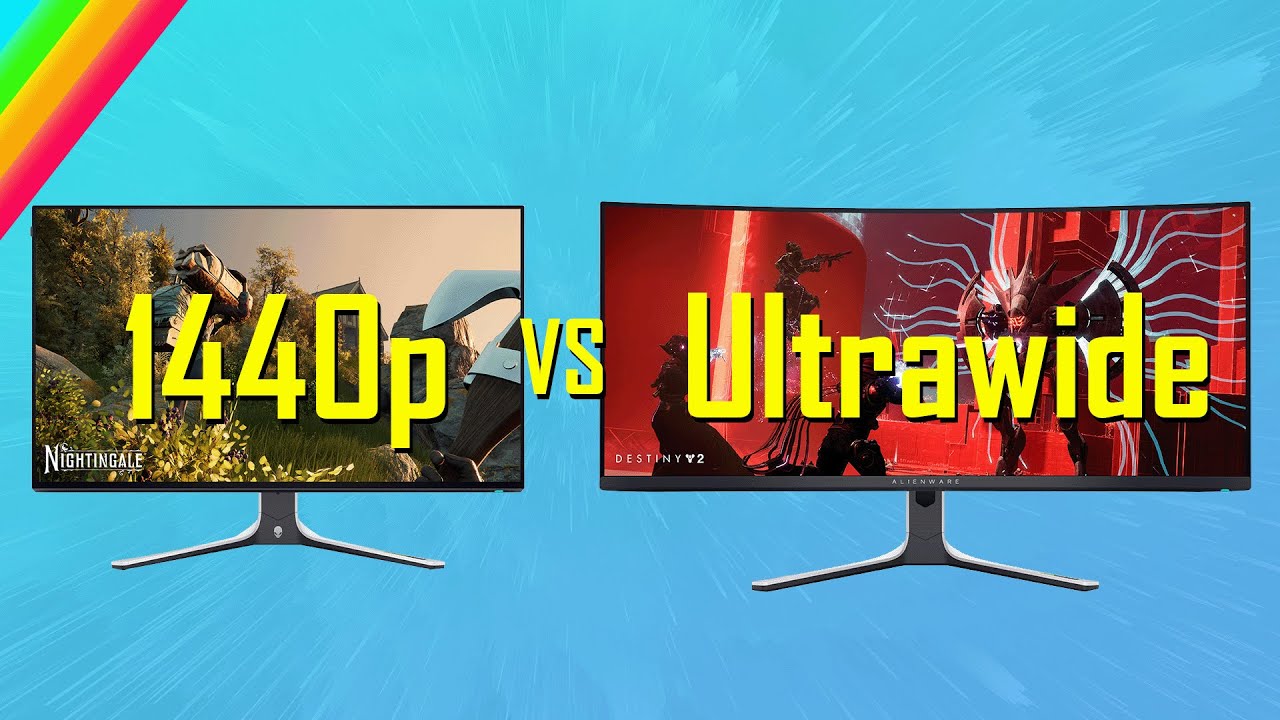
This is a comparison of the performance difference between the 16:9 2560x1440p resolution and the 21:9 3440x1440p resolution across 15 games and 7 GPUs. To see what the real Performance Difference is.
My Patreon:
https://patreon.com/user?u=84200047
Reviewed Cards:
Nvidia GeForce RTX 4070 https://amzn.to/3EisdMd
Nvidia GeForce RTX 4070Ti https...
visual pilot
It's still just running more pixels, going from 1080p to 1440p doesn't drop your performance by half, you lose like 30%
misty gyro
Did they change the FOV or just the resolution
If they kept the FOV the same the game looks stretched and goofy
fossil gust
UW game footage [in the vid] doesn't look stretched to me
misty gyro
Was it captured by the PC or with a camera
fossil gust
pc
misty gyro
That's not representative of how it looks in real life then
fossil gust
his rig seems to have an ultrawide though
so I assume he used that, and did black bars for the 16:9 test
misty gyro
I think that 5800X3D is going to throttle a few of those GPUs at 1440p too
Especially the 4090
The memory is at 3200 so I'm guessing the fclk is at 1600 too, which is another problem
small warren
fossil gust
https://www.youtube.com/watch?v=pqLKyyf_bfU
This is interesting; has anyone else...
I've tested this and you can quite easily do the math on most games
Work out the pixel fill rate, and then distribute that into the resolution, OR
fossil gust
misty gyro
I think that 5800X3D is going to throttle a few of those GPUs at 1440p too
He did highest settings with no upscaling, if that matters.
small warren
Test in both resolutions, work out the ratio of pixels
And the performance should be almost linearly scaled to the pixel count
For example, 4K is 4x1080p screens in a square
3x1080p Ultra wide was quite literally some 133% of my 4K performance
I haven't watched the video but if he used upscaling at all in any capacity then the results won't be represented well
fossil gust
He didn't
small warren
Ah then it's probably a decent test
But most of the time it was directly linear when I tried it
Variations depending on how gpu bound I was
GPUs are just pixel factories mostly at the end of the day
fossil gust
small warren
And the performance should be almost linearly scaled to the pixel count
but 4k isn't 4 times as intensive as 1080p is it?
small warren
In many cases it's actually quite close to that lol
fossil gust

Comparing The RTX 3070 Full HD vs. WQHD vs. 4K in 12 Games / Split-Screen
System:
i9 9900K @ 4,9 Ghz
RTX 3070 ASUS TUF OC
32GB DDR4 3200 Mhz
Crucial NVME M.2 SSD
Asus Prime Z370A
Corsair TX 550M
00:00 AC: Valhalla
01:24 COD: Warzone
02:26 Control
03:19 Cyberpunk 2077
04:12 Forza Horizon 4
05:04 GTA 5
06:29 METRO Exodus
08:06 PUBG
09:37 Red D...
small warren
These days you'll see 1080p representation but not 4K for complete gpu bottlenecking
Or vice versa
There ends up cpu bound in a lot of it for gpus that can't run at full speed at 1080p, or they just don't show 4K cos, well who would play 4K on a 1080 these days right?
fossil gust
fossil gust
https://www.youtube.com/watch?v=NP2JiYkseVU
In this the lowest I'm seeing is 4k being 39% of 1080p. Average is more like 45-50%
nothing close to 25%
small warren
But you will find in a lot of cases the change to a higher res is very reflective, time spy is a pretty good active demonstration of pretty linear scaling
small warren
fossil gust
nothing close to 25%
Again, cpu bound tests weigh a difference
If you're 100% gpu bound at 1080p then going to 100% at 4K isn't common in games
Good example


The scaling is almost directly relative isn't it?
small warren
small warren
Variations depending on ***how*** gpu bound I was
I think I need to edit this for emphasis
Cos if a game scales even 5% from a cpu change then ofc the ratio isn't relative
Think it's important to consider it in this metric though because it makes estimating where a gpu will roughly perform a lot easier to work out
misty gyro
fossil gust
He did highest settings with no upscaling, if that matters.
It's still very possible to be CPU bound even with 1440p ultra on the 4090
Doubly so if it's anything less than a 7800X3D
fossil gust
ok but disregard the 4090 result and the perf decrease going ultrawide is still an average of 19%
vs that 34ish% pixel increase giong to UW
I just find that interesting cause I've always heard UW is relatively more demanding bc of the "more ground and less sky" thing
misty gyro
It's not a true test is my point. It's a relatively realistic one, but when you're doing it for the science you need to eliminate all variables.
fossil gust

I just don't see how cpu is a factor in this test, even if it is in some of the others
misty gyro
You picked cyberpunk to illustrate with, one of the most CPU demanding titles on that list, assuming they're in a city area and not the built in benchmark. Built in benchmarks are flawed by design.
fossil gust
even with ultra RT, no upscaling?
my bad
uhh
tomb raider?
idk the least cpu demanding one
misty gyro
That's almost always going to end up CPU bound, let's see it
fossil gust

Looks like forza has the lowest gaps


wait, that just means resolution increase had the least impact
might just be cause the sides of the screen on racing games don't have a lot going on?
small warren
misty gyro
It's still very possible to be CPU bound even with 1440p ultra on the 4090
All encompassing point I make here
Fal is just better with words when I'm not at least 2 coffees down in a day
fossil gust
ok but just ignore the 4090 results then?
small warren

small warren
fossil gust
ok but just ignore the 4090 results then?
Basically many games these days have a lot of weight in cpu bound scaling now
So taking the measurements when we were very much gpu bound a few years ago makes it way more difficult
But again, consider the gpu as like a pixel factory
If there's 75% more pixels, it'll render 75% slower
But the games themselves these days have cpu scaling even at high resolution
So you could even do this in reverse and measure cpu scaling
So again, the video is probably quite good, but the raw weighting of hardware scaling on each game in a test will make all the difference in the result he gets
If for example one of the tests was say, factorio
Cache and ram scales off that more than anything else, gpu and also cpu aside
SSD's can also play a role, so do windows installs and their bloat
So it's better to compartmentalize the different hardware pieces to recall back the general effect by what they influence
Might sound like I'm a bit wishy washy here but the all likeliness of an ultrawide having lower scaling issues than expected is likely due to the test suite and what degree of bottleneck each game has
But the hardware itself is much more linear and direct
fossil gust
small warren
Might sound like I'm a bit wishy washy here but the all likeliness of an ultrawi...
so like, would the same methodology but with a 7800x3d and 3060 (lower tier card with enough vram it won't choke) be a better test?>
small warren
It would help measure the other side of the spectrum yeah
Like, 14900K, 285K, 13600K, 7800X3D, 7600, 9800x3d etc
It sort of bores deep into the reasoning why reviewers benchmark using suites that exaggerate the bottlenecks
This is a really telling graph

4090 is so cpu bound here it's not even funny
It actually communicates what I'm saying quite well


Guardians is another really telling test
You can see how the game gets more cpu bound the higher tier of card we go
So the 1440p results can't improve vs the UW results that can
fossil gust
small warren
So the 1440p results can't improve vs the UW results that *can*
OOOOHHHHHHH
I get it now lmao
 fossil gust
nah i'm kinda tired too, no worries
small warren
Ya so now you see it, the gpu basically plays the role as a pixel factory
And the cpu enables that as much as possible
As does the other hardware
fossil gust
yeah I understand cpu bottlenecks I just wasn't quite connecting all the dots i think
small warren
So, while he had good intentions, and he's not entirely wrong given again, many games are more cpu demanding now, the raw representation isn't well communicated in his video
When I tested this a long time ago I worked out by playing with things like render resolution scaling I could create a very linear projection of how the gpu performance varies
You can see this sort of thing very well if you play with 8K, 16K render
Provided the bus can handle it cough cough 40 series
But this is a really good learning point, because now you can use the rough reviews that you have been comparing for approximate gpu performance, weigh that up against the approximate cpu difference, and apply that to how it scales to the resolution
Everything sorta, just falls into place quite well
So yeah he ain't wrong, just not completely right either cos the framework obviously wasn't in the vid lol
fossil gust
Guess who just found out they didn't actually have freesync/gsync enabled even though they had it turned on in the monitor settings
I had some small tearing but hard to notice so I figured it was just like a poor implementation or something
Turns out you have to toggle it in the Nvidia app as well
Thanks CS2 for being literally the only game I've played that told me gsync was off
misty gyro
Yeah if the monitor isn't certified by nvidia you have to tell it to enable for all types of monitor first
 autumn lagoon
@prime sun
Thoughts on this monitor?
https://pcpartpicker.com/product/QrZXsY/koorui-gn10-270-2560-x-1440-240-hz-monitor-gn10

KOORUI GN10 27.0" 2560 x 1440 240 Hz Monitor (GN10)
errant edge
autumn lagoon
Versus the other mini-LED's $190?
Hmm
What're you using the pc for?
Are you doing competitive first person shooters a lot?
autumn lagoon
FPS games are one of my favorite genres, yes.
errant edge
Games like call of duty, or more like valorant, ow and esports type deal
And i forgot, what cpu/gpu did you end up going for?
Sorry for all the questions
autumn lagoon
Think more Halo, Helldivers, Space Marine 2. Yes, I'm aware two of those are third person.
Ryzen 7 7700 and RX 7900 XT
Chimera Mk. 3.0 - AMD Ryzen 7 7700, Radeon RX 7900 XT, Phanteks Enthoo Pro ATX Full Tower
I don't really want to go above 1440p, but I'm looking to get at least 180hrz if I can.
errant edge
 autumn lagoon
I actually was looking at that one, but am not quite settled yet.
I found it on Amazon for $300. May go for it, but was mulling over alternatives first.
errant edge
$110 is a big jump thats the only hesitation I have
Oh it has a $30 coupon on amazon, it's $270
https://www.amazon.com/KOORUI-Monitor-240Hz-Gaming-Mini-LED/dp/B0D9J5KTD6/ref=mp_s_a_1_2_vs_ar_sspa?

Mini LED Local Dimming: The KOORUI 27 inch White Gaming Monitor features a Mini-LED VA panel with 384 Local Dimming Zones, which can achieve 550cd/㎡ peak brightness and a higher dynamic range HDR1000 so that the computer screen can restore the deepest blacks and brightest whites. The color is mor...
Still an $80 diff
autumn lagoon
Are there any catches to using those coupons or is it just like a promo code?
errant edge
Just a promo code
autumn lagoon
Would you pull the trigger?
I'm more or less willing to go up to that $300 line I think, and this does look like one of the best in that price range.
I can't find anything with a higher refresh rate in this price range at least.
errant edge
It looks to be one of the best mini led panels, but i can't find anything comparing it to the aoc or acer mini led
autumn lagoon
Does running a 1440p monitor at 1080p look worse than 1080p on a 1080p monitor?
autumn lagoon
I ask because of this:
errant edge
Sometimes downscaling can be a bit funky
autumn lagoon
But it looks like it only gets its max framerate at 1080p.
errant edge
Id sooner suggest this tho
https://pcpartpicker.com/product/7LzXsY/aoc-agon-pro-ag276qzd2-267-2560-x-1440-240-hz-monitor-ag276qzd2
AOC Agon PRO AG276QZD2 26.7" 2560 x 1440 240 Hz Monitor (AG276QZD2)
Oled at 240hz is absolutely smoother than mini led or ips at 240hz
autumn lagoon
Really? Refresh rates across panel types are not equal?
errant edge
It's more than that
autumn lagoon
And what of the burn in problem? How bad is it?
errant edge
Oled is smoother, less/smoother motion blur, faster response time
autumn lagoon
Also as an aside, I can't seem to find a Thermalright Phantom Spirit for under $50. There were listings at $35 when we spoke this morning, but they've all dried up and I'm a little perturbed.
I guess I'm getting a little choice paralysis when it comes to monitor options. The reddit reviewer seemed to indicate he needed to play with the Koorui GN10's settings to get the optimal experience. I don't know if I know enough to even be a color accuracy snob with my monitors though so maybe default settings would look just fine to me.
errant edge
Idk i think they're going to release a new cooler line soon. They recently released the rk120 se, which will be more than fine
Or a peerless assassin 120
Thats the phantom spirit with 1 less heat pipe, slightly older but nearly as good.
Burn in shouldn't be an issue, I'm not the most educated on burn in but if you scroll up we had a conversation about it recently (I'm not sure exactly where and i couldn't find it, so maybe don't waste the time idk)
You can download a color profile online, but I'm not sure there's one customized for the gn10 available anywhere with how new it is
autumn lagoon
The Royal Knight looks identical to the Phantom Spirit. Should they be functionally equivalent?
errant edge
That'll be a thing with any monitor
errant edge
autumn lagoon
The Royal Knight looks identical to the Phantom Spirit. Should they be functiona...
Yeah
7700x is super easy to cool, don't worry
And when it comes to monitor, look at it this way
Any of these monitors is going to be an amazing experience
Mini led with hdr1000 looks fantastic, and most people won't see a difference between 144-240hz
Oled is fantastic, but is still relatively new and expensive. If you want to spend the money for that edge, then you can, but its not going to be dissaponting if you don't
autumn lagoon
errant edge
You can download a color profile online, but I'm not sure there's one customized...
Is that something you just run in windows or on the monitor itself?
I've never heard of that before.
errant edge
It's not mandatory, I don't remember exactly what I did for it
Rtings.com had a colour profile for mine that I downloaded i think?
autumn lagoon
On the one hand, I want to sleep on it, on the other I'm half-worried that any of the monitors we've discussed will be gone or have jumped in price by the time I've decided.
errant edge
The acer has been that price for a while, oleds have been around the $600 mark for a while, were $400 recently on sale, and have been at $500 for maybe a week ish?
autumn lagoon
I'm leaning towards the GN10 or the AOC mini-LED. $270 w/ coupon and $250 respectively.
The GN10 is the higher refreshrate of the two though and that does matter to me.
Is the GN10 that new?
The review is five months old at least
errant edge
I think it just came to the US market recently
And there's just no official reviews on it that I can find
And nothing comparing it to any of the other options
autumn lagoon
Side question: what is backlight bleed? Since I'm running an old LCD I probably have it, but don't recognize it
A lot of the amazon reviews for the GN10 make reference to a 24" monitor and 165 hrz refresh rate which makes me wonder if they're even reviewing the same product.
rocky cypress
autumn lagoon
Side question: what is backlight bleed? Since I'm running an old LCD I probably ...
Backlight bleed is when the edges of your screen look a bit white from the backlight leaking out
you can check if your monitor has backlight bleed by using it in a dark room like at night or with blackout curtains, then make your monitor display a black screen
My monitor has a little bit on the corners

It shows up a bit more on camera than I actually really see with my eyes
And mine is at a level that only a black screen will be able to see these backlight inconsistencies
this is an example of bad backlight bleed

their room isnt fully dark and they still see a significant amount of backlight bleed
actually, mine seems to be considered ips glow rather than bleed, since bleed ususally is bright enough to notice even without a black screen
autumn lagoon
errant edge
I think it just came to the US market recently
I decided to pull the trigger on it. I can't find anything else at 240 hrz for $270. I guess I'll be one of the review datapoints. If I hate it, I'll just return it.
 slim niche
are there any good under 170 usd >120hz 1440 ips monitors?
errant edge
slim niche
are there any good under 170 usd >120hz 1440 ips monitors?
Dell g2724d
$150
 serene fractal
Anyone know if a good moniter that is pretty big for under 200?
errant edge
serene fractal
Anyone know if a good moniter that is pretty big for under 200?
What're you using it for?
Part List
serene fractal
errant edge
What're you using it for?
Just a moniter for a gaming pc lol
slim niche
errant edge
Dell g2724d
would it be worth the upgrade to Acer VG271U M3bmiipx?
thick scaffold
whats the big difference between
AOC Q27G3XMN 1440p 180Hz Mini LED $279

Unleash your potential and win sweet victories with the AOC Q27G3XMN gaming monitor- a sleek battle station with QHD resolution, 180Hz lightning-fast refresh rate and 1ms GtG rapid response time. With Adaptive-Sync, you get low latency, high refresh rates, and incredibly smooth graphics that reac...
thick scaffold
errant edge
It would be for the acer xv275u p3 mini led
oh my god bros literally answering the question before i asked
errant edge
thick scaffold
oh my god bros literally answering the question before i asked
It's actually a diff monitor but I would still say the same thing, the aoc mini led is nice (I own it) but its not worth $90 over the acer mini led
The koorui gn10 mini led 240hz is either $270 or $300 on amazon, but there's no official reviews on it yet
@autumn lagoon just bought one
autumn lagoon
I probably won’t have it in my hands for nearly a week and likely won’t be able to truly test it until late this month if at all due to the delivery times on my new PC parts.
I can share my opinion on it when I’ve spent some time with it though.
thick scaffold
@errant edge If my friend wants a 240hz monitor around $300 is this good? Its $350 https://www.samsung.com/us/computing/monitors/gaming/32-odyssey-g65b-gaming-hub-curved-gaming-monitor-ls32bg652enxgo/

Samsung Electronics America
Discover the latest features and innovations available in the 32 inches Odyssey G65B QHD 240Hz 1ms(GtG) HDR600 Gaming Hub 1000R Curved Gaming Monitor.
its like the highest rated monitor on rtings.com

RTINGS.com
The Samsung Odyssey G6 S32BG65 is a 1440p gaming monitor, part of the 2022 Odyssey gaming lineup. It has a 1000R curved 32-inch screen, built with a VA panel. It...
he might get the 27" one
errant edge
Rtings is much smarter than I am
Gn10 is the only other option, and it's new so I don't know how good it is
misty gyro
With how cheap monitors are getting right now, edge lit at $300 feels icky
thick scaffold
misty gyro
With how cheap monitors are getting right now, edge lit at $300 feels icky
he wants 240hz
and doesnt want oled since burn in
cause he does tons of static stuff
he does have a 4k oled tv for movies and solo video games
but the monitor purely for work and comp
misty gyro
I never said anything about oled, just edge lit being bad. They actually die faster than oleds.
errant edge

Mini LED Local Dimming: The KOORUI 27 inch White Gaming Monitor features a Mini-LED VA panel with 384 Local Dimming Zones, which can achieve 550cd/㎡ peak brightness and a higher dynamic range HDR1000 so that the computer screen can restore the deepest blacks and brightest whites. The color is mor...
But no official reviews like I said
misty gyro
misty gyro
I never said anything about oled, just edge lit being bad. They actually die fas...
I always try to back up my claims https://youtu.be/wiO4b37RsIk?si=7xLG7QQ1mlM2680z

Thin LCD TVs using edge-mounted lighting are inherently prone to significant durability issues and fail faster than other LCD TV designs. The issues manifest in the form of warped reflector sheets, cracked light guide plates, and burnt-out LEDs. These problems occur after prolonged use at maximum brightness, posing a significant risk to their lo...
thick scaffold
errant edge
https://www.amazon.com/KOORUI-Monitor-240Hz-Gaming-Mini-LED/dp/B0D9J5KTD6/ref=mp...
soo worth to try?
but like cmon
the odyssey g6 is one of the top rated
it really cant be that bad
and especially at $300 with a .edu email
misty gyro
It was one of the top rated on the old testing methodology 2 years ago
thick scaffold
misty gyro
It was one of the top rated on the old testing methodology 2 years ago
v2.0

 thick scaffold
so what would you rec otherwise?
misty gyro
I think this would be a better option, even though it's 180Hz since most people can't tell the difference between that and 240. FALD is much nicer than edge lit.
~~https://www.rtings.com/monitor/reviews/samsung/odyssey-neo-g8-s32bg85~~
misty gyro
Whoops wrong link

RTINGS.com
The AOC Q27G3XMN is a 27-inch budget gaming monitor. Competing with the Acer Nitro XV275U P3biipx, it's rather unique for a low-cost monitor as it features Mini ...
misty gyro
Is the cheaper one FALD or edge lit
thick scaffold
but if he were to get 240hz at $300 what would u rec?
fossil gust
mini led or oled at 165-180hz >> ips or va at 240
the exception being an actual esports professional
not "i'm competitive and play ranked" but actually does it as a job
and tbh I wouldn't be surprised if we see pros switching over to high refresh oled soon. the motion clarity is incredible
misty gyro
There's 480Hz oled now too

ASUS eShop USA
26.5-inch QHD (2560 x 1440) WOLED gaming monitor with native 480 Hz refresh rate and 0.03 ms response time
New ASUS OLED Care+ functions, highly efficient custom heatsink, and advanced airflow design reduce the risk of burn-in
ROG-exclusive OLED Anti-Flicker technology helps reduce flicker during refresh-rate fluctuations
New AI As...
fossil gust
I wonder if those super fast TN panels are still preferred over oled for pros
or if it's just a matter of prices dropping enough to get them to switch
misty gyro
I think it's usually more a matter of who's willing to pay them the most money to use their monitors
misty gyro
Yeah most pros use sponsored hardware, with maybe 1 or 2 personal picks
errant flax
How should I adjust my monitors color settings and such?
rocky cypress
errant flax
How should I adjust my monitors color settings and such?
there are some settings on the OSD but ususally you adjust the colour settings in windows
adjusting them by eye is often not accurate though