#old-cooling
1 messages · Page 84 of 1
 sacred wren
 hollow latch
Since they have all the stocks on this one another shop but quite pricy
 shrewd juniper
You'll have to look on shoppeee or something but yeah 3600mhz cl16 if possible
hollow latch
Noted will ask the shop tomorrow. Any other choice if ever they don't have?
hollow latch
shrewd juniper
You'll have to look on shoppeee or something but yeah 3600mhz cl16 if possible
Yes I asked them but they said no stocks
sacred wren
Cheapest 32gb 3600c16 kit I saw was 155$
shrewd juniper
hollow latch
Yes I asked them but they said no stocks
Did you check on shopee?
sacred wren
If you want to spend the extra 40$
shrewd juniper
They're in Philippines bacca
hollow latch
shrewd juniper
Did you check on shopee?
No I'm buying all the parts from the shop haha
hollow latch
sacred wren
Cheapest 32gb 3600c16 kit I saw was 155$
But g skill Trident neo RGB 16x 2 3200 C16 is good also?
shrewd juniper
hollow latch
No I'm buying all the parts from the shop haha
shrewd juniper
hollow latch
But g skill Trident neo RGB 16x 2 3200 C16 is good also?
Depends on the price
hollow latch
shrewd juniper
Why? This looks like decent price
https://shopee.ph/Crucial-Ballistix-RGB-8Gb-16...
Since they are the one building it haha
shrewd juniper
Ohh
hollow latch
I just indicated the parts
Should I just go with this or try to change the cooler to arctic if ever they have and a ram that is C16?
 timid carbon
5600g on a 212 is a bad time
 topaz blaze
@hollow latch Gojo 😳
 timber comet
idk if this is the right channel but, my pc makes a kind of rattling noise, as if something is stuck in a fan, after I give it a light bump it stops for a while but eventually comes back
could it be a cooler fan that does the noise by itself?
checked mulitple times, all the loose cables dont hit the fans
topaz blaze
It could be a slightly loose side panel
 low pumice
Could you try and pin point the noise?
timber comet
one thats behind the MB
topaz blaze
when it rattles again, try holding each side panel one at a time against the rest of the case and see if the noise stops
topaz blaze
dont do that lol
timber comet
particularly the PSU fan, also blew off all the dust
timber comet
I will if the noise comes back
but the fan has been running quietly after I lubed it like, a year or more ago
low pumice
Uh, how'd you lube them?
timber comet
used to good VW bearing lube
hollow latch
shrewd juniper
Ohh
https://pchubpricelist.online/ can see the list here
PCHub Online Price List and System Builder. Web App by F.Gazo, and P.Dizon.
timber comet
low pumice
Uh, how'd you lube them?
opened it
low pumice
Oh ball bearing fans?
timber comet
it didn't have ball bearings
the GPU fan has ball bearings, but I don't want to mess around
they're well over 250€ now
low pumice
Welp, if they were fluid bearing fans, if it worked, it worked
low pumice
hollow latch
https://pchubpricelist.online/ can see the list here
Can't they put on something you buy from shopee?
low pumice
Or just buy it from shopee yourself and put it on yourself?
It should only be like 4 screws for installation, and taking off stock cooler should only be 4 screws
hollow latch
Yes but what model ? Maybe they have since they have a lot of coolers this shop I guess?
low pumice
Freezer 34 duo for nearly same price as 212
hollow latch
3600 gskill trident neo CL16 is really expensive ?
low pumice
Well, neo makes it expensive
3600c16 ballistix or ripjaws should be quite a bit cheaper
hollow latch
249$ for neo 16x2

 low pumice
They're just different colors of the same thing, mainly interested in the duo ones
any of them, whatever color you want really
low pumice
hollow latch
249$ for neo 16x2
my order from a while back

 tepid reef
oh my lol i installed my top fans the wrong way
low pumice
But point is, don't grab neos for 250
low pumice
hollow latch
Ya it's different now it's like twice the orig price by then
its literally 165$ on newegg right now..?
but point is, its overpriced
Go for ballistix or ripjaws 3600c16, it should be quite a bit cheaper
 timber comet
it seems to be the other side of the panel you can take off
its a whole piece
dang you fujitsu
hollow latch
low pumice
Well, its better, but would've liked cheaper
Btw should I just buy the tray type of Ryzen 5 5600g?
Since I wouldn't be using the stock cooler or just get the one with box . Difference of 20$ only
low pumice
sure if you want
 autumn ember
Could anyone help me figure out these Lian li sl 120 fan configuration should be just have a quick question about them
 low pumice
 nova peak
Hey all. Is this enough paste? Too much? Thanks!
nova peak
Hey all. Is this enough paste? Too much? Thanks!
A little more won't hurt, seems a bit on the low side, but you can put the cooler on, take it off, and see how well it spread
nova peak
Thank you!
nova peak
Of course I have to get the kids off the bus before I get to fire it up. Vetroo V5 incoming.
nova peak
It’s in! Dell Inspiron 3670. I know it’s only an i5-8400. Warzone temp max 55c. I’m idling at 29-33. Not bad for a prebuilt.
 low pumice
Neat
nova peak
A small warning though…I had to “modify” the side panel. The top fins of the cooler were a tad too tall. It’s a good thing they were right underneath a grill on the side. I had to snip and pry it open some. Yeah they stick out a little.
 left pulsar
nova peak
A small warning though…I had to “modify” the side panel. The top fins of the coo...
left pulsar
nova peak
A small warning though…I had to “modify” the side panel. The top fins of the coo...
Nice, I cut out the side "grills" on my RC 690 years ago. 
tepid reef
I may have accidentally installed my top fans as intake instead of outtake. I got 3 140mm front Intake, 2 120mm top intake and only 1 120mm rear outtake
should I swap the top to outtake
 knotty sparrow
Ideally yes top would be exhaust
 lucid hawk
guys i have laptop and i need to make it cooler i have stand and temp in the game is 70 or 71 c so do u have any suggestion ?
knotty sparrow
Undervolt using throttlestop
lucid hawk
knotty sparrow
Undervolt using throttlestop
my temp is good or not ? ur mean is that i should overclock ?
knotty sparrow
Temps are ok but lower is better. Undervolt means you're giving the cpu and gpu less voltage, which means less heat. Often your performance increases by giving them less voltage ironically.
Most laptops don't let you overclock, due to the limited power available
lucid hawk
r u kidding me!!!??? performance will increase ?????wow
such interesting
shrewd juniper
Yeah on my 15w CPU performance increased with a 100mv drop
lucid hawk
i have another problem !
my adapter it too hot and it have bad smell
knotty sparrow
I used to leave my AC adapter sitting on an ice pack wrapped in a paper towel
They do get hot
lucid hawk
knotty sparrow
They do get hot
aha so it is normal i can put 2 small fans on adapter
knotty sparrow
That would help
lucid hawk
yes sure
 steel forge
This might be a stupid question, but when I put fans on the top of the case should they pull air out of the case or blow air into it?
shrewd juniper
You want them in exhaust so air out
steel forge
Ok thanks
 sonic gazelle
does anyone else need to install a fan in their window to exhaust all the hot air from their systems?
or am i the only one with a 95F living room

 covert apex
Yes
steel forge
Which one should be the intake? I got my triple AIO exhausting air through the radiator in the front of my case. And one behind my VRM blowing air out the back.
shrewd juniper
covert apex
Yes
Unless it's a h510 
steel forge
Oh no D: I guess thats why my cpu idles at 45c
I got a crappy TD500 from cooler master
covert apex
Is it the mesh one?
steel forge
Ye
covert apex
That case is actually quite good
steel forge
So am I supposed to put the fans on the front of the case instead of behind the radiator?
covert apex
Usually does not matter, the only important thing is that they are intaking
steel forge
Dang it, thats means they backwards. I guess it needed cleaning anyways
covert apex
Some fans have better airflow pushing air rather than pulling air through the radiator
steel forge
I apparently didn't get an AM4 friendly cooler either but it looked cool 😎
I'm confused, the fans have two plugs but if I plug them into the hub do they still need board connections?
knotty sparrow
steel forge
I'm confused, the fans have two plugs but if I plug them into the hub do they st...
What do you mean by 2 plugs? There's a half dozen things that could be
steel forge
One says to rgb hub and the other is a 4 pin fan connection
I bet that means I need a dang splitter
knotty sparrow
Not necessarily
steel forge
Or a fan controller instead of a rgb hub
knotty sparrow
You can just plug it into the board or into a hub
The AIO should have come with a splitter
steel forge
I bought a three pack of fans and it came with only a RGB HUB
I should have read it closer
knotty sparrow
Splitters and hubs are cheap at least
steel forge
Ye and I found out I actually have enough fan headers but they are on the bottom of the mobo for some reason
This might be stupid but I'm going to use breadboard wires to make "extensions" for the fan control wires
steel forge
True xD
Well one good thing is that the wires are color coded
Now I just gotta find a guy on Craigslist to cable manage this mess
would it be ok to mount a controller to the side of a psu?
 steel forge
Wow didn't think adding top fans would decrease temp by 6 degrees
 quick locust
Changing the rad fans on the kraken z63, and I'm pretty sure they are daisy chained. I don't remember if the fans are 3 or 4 pins too. So ima needa check
 magic wave
A splitter cable will work in lieu of daisy chaining, alternatively I think Arctic makes a version of the P14 that supports scalable daisy chaning with a header that you can plug another fan into
I use splitters because--and I'm not actually sure of this--I believe the fan speed tapers off with more fans plugged into each other
On the fence with that to be sure
 undone geyser
what do i use to clean thermal paste?
left pulsar
Isopropyl alcohol (rubbing alcohol). 91 or 99% is good
knotty sparrow
left pulsar
Isopropyl alcohol (rubbing alcohol). 91 or 99% is good
NO not rubbing alcohol.
Yes they're basically the same but rubbing alcohol has added water. Isopropyl is pure.
 idle tiger
Iso can be any percent, often 91 or 70. Though stuff sold as "rubbing alcohol" can be any concentration of either isopropyl or ethyl alcohol
sonic gazelle
steel forge
Rtx 3090 problems?
tesla m40 problems 😂
quick locust
Anyone know why my mobo doesn't recognize my fans
And the fans are set to dc
12v too
 unique lilyBOT
 Shnord#1739 has been warned
Reason: Bad word usage
quick locust
Also the fans 4 pins connected into some kinda corsair fan hub
Are
The fanhub has power
But now I remember there was a 2nd cable there
Don't know where it goes
So not sure if I connected it
Anyone know of that has to do with it?
If
knotty sparrow
Corsair fan hub needs that usb connection iirc
quick locust
Yep just found that out
Without that cable my mobo can't use the pwm
Ans the fans are just powered with the sata
Running 12v
Thz
undone geyser
anyone know if i only need 1 nzxt fan hub with 6rgb fans? three with aio and three individual
 oak star
undone geyser
anyone know if i only need 1 nzxt fan hub with 6rgb fans? three with aio and thr...
oak star
undone geyser
anyone know if i only need 1 nzxt fan hub with 6rgb fans? three with aio and thr...
What aio
Because I have an nzxt hub and it has 4 rgb fan slots but ur aio might be able to like make all the fans combine then be on one cable
But just double check doing ur own research, I think you’ll technically be fine but look it up
shrewd juniper
knotty sparrow
NO not rubbing alcohol.
Yes they're basically the same but rubbing alcohol has a...
Rubbing alcohol is fine, i think mine is like 85% or something
 native mural
Im have a Cooler Master H500 case and put a 360 aio in the top which means the only way to run a rear exhaust fan is going low profile. Is it worth it to have rear exhaust or just keep positive pressure and run as is?
I have no cooling issues. Under stress test my i7 10700kf runs at 80c which includes my gpu, a 3080fe, running a stress test
low pumice
native mural
Im have a Cooler Master H500 case and put a 360 aio in the top which means the o...
The 360 aio's fans will be your exhaust in that situation
native mural
@low pumice thats what i thought but wanted to confirm, thanks!
low pumice
You're welcome
 junior ivy
Would these make good radiator fans?

Antec - In Power We Trust
The infinity mirror matches my theme
shrewd juniper
Haven't seen them before but I'd just recommend arctic p12's
junior ivy
Yeah I know Arctic’s are good but in this case I would put form over function
But only if the function part isn’t bad
shrewd juniper
I've never seen them I'd try YouTube/Google some reviews
 keen ermine
would there be a way to control pwm fans (2x arctic p14 pwm+ 2x arctic p8 pwm) with a usb in the use case of a laptop cooling pad that i plan on making
preferably with speed control
can have a different power supply because i dont think you could get enough voltage from usb
left pulsar
Sure, it's mainly just weaker & doesn't evaporate as quickly, afaik. Pretty sure I've used 70% in the past.
knotty sparrow
undone geyser
is 70% isopropyl okay cleaning thermal paste?
If you use 70% make sure you only get it on the cpu and none of the surrounding components. Don't let it drip. It'll take longer to evaporate.
undone geyser
i couldnt find 99% thats why i only got 70%
qtips or in a towel I will probably use
junior ivy
I used 90% and it worked just fine
shrewd juniper
keen ermine
can have a different power supply because i dont think you could get enough volt...
As far as i know.... No also if you go through with that i hope you find a controller for that, my best guess would be to use a potentiometer, connecting it to usb seems unnecessary and awkward imo also for power supply batteries are probably the easiest, you'll wanna be handy with a soldering iron or have a breadboard you can permanently use for it
undone geyser
yeah i went to my local shop that sells those only 70 % are avaiol
well cant complain too much
idle tiger
Thought these were pretty cool  worth a temporary pin
https://cdn.discordapp.com/attachments/930562916871204894/942838407401472031/Screenshot_20210719-160623.jpg
https://cdn.discordapp.com/attachments/930562916871204894/942838407732797531/Screenshot_20210719-160611.jpg

 idle tiger
Thought these were pretty *cool* <:fingerguns:667665664797966346> worth a tempor...
knotty sparrow
idle tiger
idle tiger
Thought these were pretty *cool* <:fingerguns:667665664797966346> worth a tempor...
knotty sparrow
P14 being #1 isn't much of a surprise, but good to know on the others
shrewd juniper
It's interesting to see the huge drop of the nf a14 on heatsink compared to case
 slow condor
does that graph include all the close competitors?
shrewd juniper
pretty much
keen ermine
so basically get p14?
magic wave
yeah basically
topaz blaze
Hello, I built my PC around 2 years ago and haven't really had the chance to figure out how to adjust my PC fans' speed. Could somebody please help me out with that?
The fans (mainly case fans I believe, but maybe CPU and GPU?) have been making some unbearably loud noise for quite a while, even when simply browsing the Internet or handling non CPU/GPU-heavy tasks
Thanks in advance for any help
shrewd juniper
topaz blaze
The fans (mainly case fans I believe, but maybe CPU and GPU?) have been making s...
The case and cpu fans can be controlled in the bios , the gpu fans you'll have to install msi afterburner in windows
topaz blaze
shrewd juniper
The case and cpu fans can be controlled in the bios , the gpu fans you'll have t...
Got you
I was just looking at the bios rn actually, do you know under which menu the fan related settings would be ?
shrewd juniper
Just have a look around, it depends on your motherboard
But it should be something along the lines "easy fan" or just something with fan in it
topaz blaze
Alright I think I got it
shrewd juniper
No prob
topaz blaze
shrewd juniper
No prob
Oh one last thing, I just checked in my bios and can see that my pc temp is currently 47degrees Celsius and fans are running at 1666rpm, I'd like for my pc to run as quietly as possible, and I'm not gaming on it, what would be the ideal temperature that should be maintained and to what fan speed should I readjust in your opinion?
shrewd juniper
Honestly i just use % 's instead of rpm and you'll just want to mess around with it, also idle temps kinda depend on your ambient room temp as well, if you're idling around the 50c area thats fine just don't let it get above ~90c under full load
topaz blaze
Ok sounds good
Thanks for your help, I'll mess around with ghe settings and see what's good for me
shrewd juniper
Np :>
topaz blaze
shrewd juniper
Np :>
Oh actually I do have one last thing I was curious about if you don't mind me asking
I was only able to modify my fan speed for 4 of my fans 3 "system" fans and the CPU one --> all to "silent" mode
However, I do have 3 other fans in my pc, is there a way I can change their speed too? They don't seem to appear in the mb bios unlike the 4 others I already changed
shrewd juniper
Emm what type are the fans that dont show?
 hard brook
hey is there major difference between 2 cpu fans and 3
shrewd juniper
Uh depends, if you're talking about 240mm(2x120mm fans) aio's vs 360mm(3x120mm fans) aios then yes
hard brook
how do i know that lol
shrewd juniper
But if you're talking about a tower cooler probably diminishing returns
shrewd juniper
hard brook
how do i know that lol
Aio is a liquid cooler, tower cooler is a regular heatsink and fan(s) directly hanging off the cpu
hard brook
all of them are liquid cooler
is it worth to waste 30$ more for extra fan or can go with 2 and call it a day
im planning to buy a aio cooler
shrewd juniper
hard brook
all of them are liquid cooler
So you're talking about 240mm aios and 360mm aios?
And it depends what cpu are you getting?
hard brook
shrewd juniper
And it depends what cpu are you getting?
11th Gen Intel(R) Core(TM) i7-11700 @ 2.50GHz
should i get 240 or 360 aios
shrewd juniper
Unless you already have it I'd go 12th gen instead but eh 240 will do 360 is worth the 30$ imo tho also future proofs your cooler
hard brook
i cant really buy a new cpu
hard brook
shrewd juniper
Unless you already have it I'd go 12th gen instead but eh 240 will do 360 is wor...
so i go with 360 ?
low pumice
Does your case support 360mm top mount rad
 low pumice
No, only 240 top
hard brook
im not good with these stuff
hard brook
low pumice
No, only 240 top
what about front
low pumice
360
hard brook
but theres a problem
in front there's a Glass
do you recomended me to go with front with 360m
low pumice
So at this point prob go with a 240mm aio and top mount
hard brook
or top with 240m
low pumice
Since front is glass
hard brook
Thanks
topaz blaze
shrewd juniper
Emm what type are the fans that dont show?
I’m not too sure actually... I got 3 case fans that came with the case and I bought 3 separate ones to help with airflow when I first built my pc
The ones I bought are the Arctic P12 (might be P14 I'm not 100% sure)
And my case (with 3 front fans) is the Cooler Master MasterBox MB511
shrewd juniper
Hmm okay, the ones that came in the case are they not moving?
If so it might be just a static speed or a button on the case to control
idle tiger
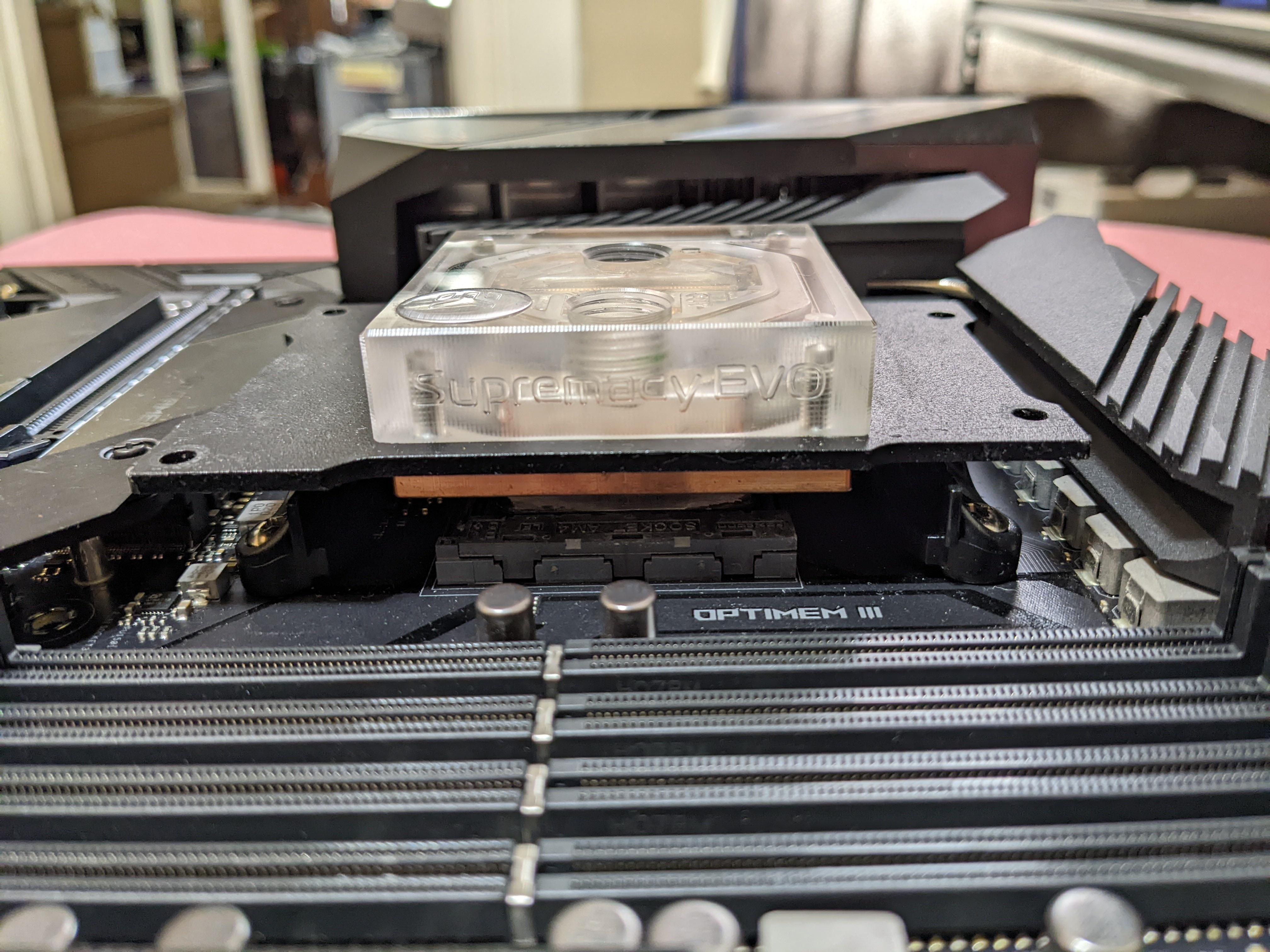
Just realized I don't have any good am4 blocks, but maybe I can drill holes in this TR4 evo.. https://i.imgur.com/aUQQ0ve.jpeg
 magic sparrow
I once had to use an AM3 mount on AM4, rotated like 15 degrees and only used two screws to hold it in.
idle tiger
Haha people would do that for the older ln2 pots without am4 mounting holes.
topaz blaze
shrewd juniper
Hmm okay, the ones that came in the case are they not moving?
Nah they are, just can't figure out how to make them slow down
nova peak
I am loving the Vetroo V5! Installs right into the Dell Prebuilt with just the brackets baby! Lets go!
idle tiger
Doesn't matter. All blocks use g1/4 threads. Math the tubing to the fittings.
 bronze cave
Where do I get 4 pin fan extension cables that aren't sleeved?!! Can't find them anywhere.
 floral rune
I was recommended the Arctic liquid freezer ii 280 a-rgb for the i5-12600k
I can not figure out how to mount it to the motherboard
Which is the MSI pro z690-a
 faint oriole
Any one know of a really thick 360 aio?
knotty sparrow
faint oriole
Any one know of a really thick 360 aio?

Aquatuning USA
The new Alphacool NexXxos radiators, a name that stands for experience and quality has come to bring a fresh breeze to the radiator market.
Every user of a water cooling system needs a radiator and everyone has different requirements...
I'm getting one of the 2x180mm ones for my fractal torrent, monsta is very accurate for them
shrewd juniper
faint oriole
Any one know of a really thick 360 aio?
Thickest aio ik of is the Arctic liquid freezer ii
faint oriole
How thick is that? @shrewd juniper
shrewd juniper
faint oriole
How thick is that? <@!191276897227898880>
The rad is 38mm thick
 minor mural
What is best under load temps for the MSI RTX 3060 Ti VENTUS 2X OCV1? Mine averages 40-60 C
sacred wren
minor mural
What is best under load temps for the MSI RTX 3060 Ti VENTUS 2X OCV1? Mine avera...
There is no "best"
If it's not running hot, it's not running hot
minor mural
I mean Maximum safe temps or something like that. Im just asking because I want to make sure it's doing fine and take care of it so it can live longer.
It's fine to have the GPU fans on 100% all time yeah? Or should I set the fan curve?
sacred wren
minor mural
It's fine to have the GPU fans on 100% all time yeah? Or should I set the fan cu...
Don't do that
Fans will wear out
Either set a curve or leave it on auto
It won't be damaged unless it goes over 90c
The model is one of the only model 3060 ti we say to avoid, so the cooling is pretty meh on it
But as long as you have decent case cooling, auto is fine
minor mural
sacred wren
The model is one of the only model 3060 ti we say to avoid, so the cooling is pr...
Brought a pre built and this came with it so cant complain...
minor mural
sacred wren
It won't be damaged unless it goes over 90c
You sure?
minor mural
sacred wren
Either set a curve or leave it on auto
I'll set up the curve but is there a good curve or pointers to make a good curve?
sacred wren
ive never had to set a curve so i cant help with that
id try to keep it around or under 80c
low pumice
minor mural
I'll set up the curve but is there a good curve or pointers to make a good curve...
The main thing is to see what fan noise you hear at different speeds, the goal is for it to be nearly inaudible before reaching a certain point like 70c or 80c when it'll ramp up to cool it down
Its better to have a smoother curve because you'll notice change in noise more than a slightly louder but constant noise

 winter cloak
Hello I’m new here and need some advice. I’m going to be ordering this motherboard https://www.newegg.com/asus-tuf-gaming-x570-plus/p/N82E16813119197?item=N82E16813119197 and this https://www.newegg.com/amd-ryzen-7-5700g-ryzen-7-5000-g-series/p/N82E16819113682?item=N82E16819113682 and I need help on what cooling fan I should get. I am on a budget and mid-tier is my highest I will go. Thank you for any info and your time.
Just remembered that I’ll need thermal paste
junior ivy
The Ryzen 7 5700g comes with a cooler so if you’re on a budget I would recommend just using that
winter cloak
junior ivy
The Ryzen 7 5700g comes with a cooler so if you’re on a budget I would recommend...
Oh it does? I didn’t see anything on the page about that so cool and nvm this post cause I’m an idiot lol
sacred wren
winter cloak
Hello I’m new here and need some advice. I’m going to be ordering this motherboa...
whats the budget for the pc
and what is the point of the pc
shrewd juniper
minor mural
What is best under load temps for the MSI RTX 3060 Ti VENTUS 2X OCV1? Mine avera...
Do you live in the north pole and or what are you considering as load because that's very cool
shrewd juniper
minor mural
You sure?
It can actually go over 90c fine it will just stop boosting at 83c
shrewd juniper
minor mural
*the problem is I'm deaf but it's not a problem...heh*
Well then you can have a more aggressive curve but you still want a curve so your fans don't ware out faster than they should
shrewd juniper
winter cloak
Hello I’m new here and need some advice. I’m going to be ordering this motherboa...
Get a cheaper motherboard - if you're in the US, msi b550 pro vdh wifi is a good price now and get a 5600g and a thermalright frost spirit 140
minor mural
shrewd juniper
Do you live in the north pole and or what are you considering as load because th...
That's with 100% fans running max.
But as Bacca said it's not good to have fans to run 100%
keen ermine
would it be hard to wire up 2 p14s to a switch with a battery or from a wall socket?
knotty sparrow
keen ermine
would it be hard to wire up 2 p14s to a switch with a battery or from a wall soc...
You could use a 9V battery or a bunch of AA in series. It'll need roughly 3-4V to spin slowly, 12V max.
DC only, not AC from the wall. Unless you like fire.
keen ermine
Ok, how would I wire them together and to the battery
knotty sparrow
It's pretty simple. Combining batteries in series combines their voltage, so all you need to do is connect the batteries together (positive to negative) with something conductive like a wire. Then you connect the negative and positive to the DC pins on the fan.
AA batteries are 1.5V so 8 in a series gets you 12V
There's actual battery pack shells that will hold the batteries for you too
 rose isle
Generic 12v Adapter is also a solution
keen ermine
knotty sparrow
AA batteries are 1.5V so 8 in a series gets you 12V
Could I run 2 9V batteries in series for the same effect?
knotty sparrow
That would get you 18V and burn out the motors
14V is right around the point where they start to smoke
keen ermine
So 2 AAs and a 9v would work?
Or for them in series do they need to be the same voltage
rose isle
why are you making your life difficult? 12v wall adapter, done
keen ermine
How much money is that
keen ermine
I kind of don't want to have another thing plugged into my wall and batteries are cooler
knotty sparrow

Great 8 AA battery holder for your Arduino project! Provides 12V output when used Alkaline batteries, 9.6V when used with rechargeable AA batteries. These AA battery holders feature a standard 9V snap connector. The case is made from ABS plastic with nickel plated springs to hold your AA batterie...
rose isle
but youre talking about combining 9v and AA batteries.
knotty sparrow
Combining different batteries is a bad idea, mixing metals can cause issues and sometimes fire
rose isle
also, how much amps do fans pull? how long will batteries last?
knotty sparrow
P14 are really low wattage actually
rose isle
okidoki then
knotty sparrow
It's too late for math...
Actual numbers are 0.12A, 1.4W at 12V
hard brook
Is there a limit to how many fans i can run into if yes then how do i know
when i handed my pc to local store installing new cpu colling everything works perfect but one of my front fans stopped working
installed 2 new fans for cpu.
1 back
2 top
2 front
knotty sparrow
There's not a limit you can hit. You can connect up to 1 amp worth of fans to a single header. If you have hubs, you can have an unlimited number of fans as long as the power supply can power them.
hard brook
hmm
knotty sparrow
Probably just a loose wire
knotty sparrow
Very
hard brook
can u send me a guide
hard brook
 wah
wah
knotty sparrow
Find the wire for the fan that's not working and give it a light pull, so you can see where it goes.
hard brook
oki ill check that later
knotty sparrow
Once you find that you just push it into place
hard brook
my cpu heat are around 60c while playing heavy games but i can feel the heat in top celling is that normal ?
knotty sparrow
Totally fine
rose isle
how to plug a fan
 hard brook

knotty sparrow
60C is within the ideal range of under 70C.
hard brook
 knotty sparrow
 rose isle
Declassified Systems do the best coolant runs.
 nova peak
Hey all. Is there an AIO liquid cooler size that would work instead of (2) 80mm fans side by side? On the back of my Dell Inspiron 3670 I have (2) 80mm fans as exhaust. I have a Vetroo V5 as my cpu cooler currently. I’m just seeing if something would fit in that side by side 80mm fan location. Maybe (1) 80mm AIO? Would it be enough? Thanks!!!
knotty sparrow
nova peak
Hey all. Is there an AIO liquid cooler size that would work instead of (2) 80mm...
I don't think there's any AIOs that are 160mm but there's a couple radiators for custom loops. I wouldn't use it for anything more than an i3 though.
80x160=12,800
120x120=14,400
Dual 80mm is less area than a 120mm radiator, and those are horrible.
nova peak
I appreciate it! I think the Vetroo V5 will do great for now. It has the i5-8400 idling at 29-30c
nova peak
This is what I found though. Thoughts? They have pumps too. https://modmymods.com/alphacool-nexxxos-xt45-full-copper-dual-80mm-radiator-14212.html

The new Alphacool NexXxos radiators, a name that stands for experience and quality has come to bring a fresh breeze to the radiator market.
Every user of a water cooling system needs a radiator and everyone has different requirements towards th
knotty sparrow
If you have room and mounts for a custom loop, including the reservoir, you can. Just keep in mind what I said, that's less surface area than a 120mm AIO. It'll probably be ok with a 8400 but don't expect more than an air cooler.
nova peak
Understood!
 dry arch
What AIO's do you guys suggest? I currently have a Z73 but the pump died after just 8 mnths
360mm aio btw
low pumice
Freezer ii, galahad, ek-aio are neat picks for performance
 low pumice
I wouldn't grab the elite, elite is expensive for no reason over the org ek-aio in regards to performance
shrewd juniper
dry arch
i'll prolly get either this or the galahad
If you're on/going to 12th gen intel soon avoid the galahad, they have been awful with shipping out the lga 1700 bracket
dry arch
@shrewd juniper I have the 5900x
knotty sparrow
In that case you probably should go with liquid freezer II
The offset cold plate is very nice for ryzen
shrewd juniper
Liquid freezer also have rgb variants
 river canyon
is the liquid freezer II good for the i7 12700k
sacred wren
river canyon
is the liquid freezer II good for the i7 12700k
280mm or 360mm
river canyon
280mm
river canyon
true its not much more
topaz blaze
assuming you're on amazon, sometimes the listings have "used" or "like new" options for a decent bit cheaper, can get pretty good deals that way
ive gotten my 360CLC and rm850x for really good prices that way
 analog minnow
does anyone know of a low profile cooler that would outperform the stock one for 10th gen intel?
low pumice
Nh l12s perhaps
analog minnow
I'll look into that thank you
 errant hawk
How can I tell if my aio isn't working right? My temps are stupid high at idle and I am not sure if its issue with pump or with installation. On the system viewer it says my pump is working running at 2800 rpm. Planning on changing thermal paste to see if that fixes it but it has been less than a year. The aio is a ghallihad 360 cpu is 10900k if you need that.
left pulsar
Whats the temps? Quick/ez check is a remount w/ fresh paste. Also feel the tubing in various spots. Should be able to tell by temp/vibration if pump is working decent.
errant hawk
Hit 100c before I cut it off. Which is way passed what it used to run at used to be like 70 or 80 under load.
left pulsar
Used to? Mounting doesn't just suddenly get bad, but of course bad mount would be 1 thing to give high temps. I'd remount 1st then you'd find out if pump or rad is the issue. Aio punps aren't 100% failproof or immortal
errant hawk
Thinking it is either the paste is bad or pump going out.
Or maybe something to do with fan headers, switched its fan header and its working now. Its the pump as I can feel the heat in the tubes and couldn't previously.
left pulsar
Yeah idk if fan headers just go bad. Perhaps a bios setting for that previous one changed or something. Good to hear though
shrewd juniper
analog minnow
does anyone know of a low profile cooler that would outperform the stock one for...
If it's an i3 or 10/11400 in just gaming and don't mind noise just use the stock one btw
 unreal saffron
Question for yall - my cpu temps are high as heck, I have an h150i LCD 360mm from corsair... I already reapplied thermal paste twice. Might try it again. Currently has thermal grizzly on there... but when I run apex legends I'm hitting low 80s, and im capping my fps to 80. When i dont cap my fps, i get temps that peak in the 90s sometimes.
I just feel like it shouldnt be THAT bad... I dont have a great airflow case, the ROG Helios, but still... i just dont think it should be this bad. Temps for GPU and everything else seem to be fine. only cpu.
I always had problems with my cpu's running hot but never this bad. I am running a 5950x. The case is in the corner of my room. I can see how my thermals would be bad, i just dont think they should be THIS bad.
Im thinking maybe I am tightening the cooler too much or something? But I saw installation guides and they say to tighten till the screws stop and thats what I did
knotty sparrow
unreal saffron
Im thinking maybe I am tightening the cooler too much or something? But I saw in...
Bad mount is possible, but the combination of the H150i being meh, bad airflow, and the 5950X being one of the hardest consumer CPUs to cool ever are probably big factors there too
unreal saffron
yeah definitely
thank yo
you
im gonna try re mounting and tighten the screws a bit less and see if that help
shrewd juniper
Make sure you tighten the screws in a X pattern and don't tighten all the way first try, do some of the way then go around and tighten them
But yeah bad case
Make sure your aio pump is always at 100%
timid carbon
unreal saffron
Question for yall - my cpu temps are high as heck, I have an h150i LCD 360mm fro...
make sure you have taken off the plastic peel off the cold plate of the aio
unreal saffron
Tbh i dont remember doing that
__>
But i dont think there is one?
Never seen a peel-like pie e
Piece*
shrewd juniper
Not always a peel, sometimes there's hard plastic instead
 uneven solstice
Should I go for the Arctic Liquid Freezer II 280 or 360 for the 12700k?
 marsh badge
Go for the 360
uneven solstice
Cool. Thank you.
shrewd juniper
Literally no reason to not go the largest one you can fit especially when they're all within a few dollars of each other
uneven solstice
Makes sense. Well then, will the 420 fit in a 4000D Airflow case?
uneven solstice
Alright, ill stick with the 360 then. Thank you guys.
marsh badge
but 360 should do good with 12700k still
uneven solstice
Even with OC?
uneven solstice
I'm not looking to push it past 4.9
I think that'd be a good oc
I apologize for the large amount of questions, but what is the "washer method"? I've seen it mentioned a few times when talking about cooling.
shrewd juniper
uneven solstice
I apologize for the large amount of questions, but what is the "washer method"? ...
No need to worry about it, only applies if lapping the cpu /waterblock
But yeah 360 liquid freezer is good for the 12700k
uneven solstice
Gotcha ok. I was just reading that some people need to do the washer method with that cooler and the 12700k
Otherwise they get crappy cooling.
shrewd juniper
Nah only if you lapped your cpu/cooler
uneven solstice
Not sure what lapped is.. like sandpaper it?
marsh badge
kinda like that, yes
shrewd juniper
Yeah but don't do bother with it
uneven solstice
Oh I won't be doing anything like that. Sounds like a lot of room for error considering I have no idea why I would be doing that.
knotty sparrow
shrewd juniper
Nah only if you lapped your cpu/cooler
There's also certain coolers that have crappy mounting brackets, but not arctic
 bright ether
arctic pog, one of the best, looks nice, and good prices
 mellow raven
I bought this pre-built a month and a half ago and I am really enjoying it. But the only problem is the stock fan that came with it. As when running games like pubg and gta the cpu gets to 100c and gpu gets to 80c so anyone recommend a fan or something? (Im a noob with computers so go easy on me kekw) https://www.bestbuy.com/site/cyberpowerpc-gamer-xtreme-gaming-desktop-intel-core-i5-11600kf-16gb-memory-nvidia-geforce-rtx-2060-500gb-ssd-black/6479736.p?skuId=6479736

Best Buy
Shop CyberPowerPC Gamer Xtreme Gaming Desktop Intel Core i5-11600KF 16GB Memory NVIDIA GeForce RTX 2060 500GB SSD Black at Best Buy. Find low everyday prices and buy online for delivery or in-store pick-up. Price Match Guarantee.
 viral fjord
@mellow raven will be easier to help you if you can measure the height clearance
 dusky idol
uneven solstice
Makes sense. Well then, will the 420 fit in a 4000D Airflow case?
dusky idol
uneven solstice
Makes sense. Well then, will the 420 fit in a 4000D Airflow case?
No max 360
 dreamy locust
The arctic freezer II 240mm was at 40€ but it got out of stock in like 4 minutes

shrewd juniper
Must have been an error
 dusky bolt
My Ryzen3600 has the stock cooler, but when I open up normal games it boost up to like 90c. So I am thinking of buying a Corsair H100i
shrewd juniper
dusky bolt
My Ryzen3600 has the stock cooler, but when I open up normal games it boost up t...
Are you in the us? H100i is a meh cooler in the first place but aio is not necessary
Also what case
knotty sparrow
mellow raven
I bought this pre-built a month and a half ago and I am really enjoying it. But ...
If the case actually looks like that then you'll need to do more than just change the cpu cooler. Solid front glass like that is one of the worst designs ever for cooling. The 2060 shouldn't be getting anywhere near 80C, the worst model I saw hit 70 and that was a single fan with a crappy heatsink.
shrewd juniper
knotty sparrow
If the case actually looks like that then you'll need to do more than just chang...
Tbf it has some sort of side intake
knotty sparrow
Yeah but curving air is bad, creates a lot of resistance
dusky bolt
shrewd juniper
Also what case
I have Fractal Meshify C and I'm in the US
knotty sparrow
That does a 280mm on top or a 360mm on front
shrewd juniper
dusky bolt
I have Fractal Meshify C and I'm in the US

DEEPCOOL GAMMAXX400 CPU Air Cooler with 4 Heatpipes, 120mm PWM Fan and Blue LED for Intel/AMD CPUs (AM4 Compatible)
All you need tbh
shrewd juniper
knotty sparrow
Yeah but curving air is bad, creates a lot of resistance
Ofc could be pure oven tho
knotty sparrow
Yeah, at least it's not h510 elite
dusky bolt
I wanna go for a more cleaner look too, so would you recommend the https://www.amazon.com/Cooler-Master-RR-212S-20PC-R1-Direct-Contact/dp/B07H22TC1N/ref=psdc_11036281_t3_B00JQ2YDCY

Cooler Master Hyper 212 Black Edition RGB CPU Air Cooler, SF120R RGB Fan, Anodized Gun-Metal Black, Brushed Nickel Fins, 4 Copper Direct Contact Heat Pipes for AMD Ryzen/Intel LGA1151
dusky bolt
Alright thanks
shrewd juniper
At the 50$ price, frost spirit 140
knotty sparrow
212 black is decent but overpriced
Yeah you go up a tier in cooling for what they ask
dusky bolt
shrewd juniper
At the 50$ price, frost spirit 140
Think my ram is to tall
knotty sparrow
What ram?
dusky bolt
Gskill ripgaws 5
shrewd juniper
Should be fine
dusky bolt
I can always return it
knotty sparrow
Ripjaws aren't that tall
dusky bolt
The Frost Spirit Should cool better sense it has way more surface area.
shrewd juniper
Yes
knotty sparrow
Ripjaws V are 42mm, fan height in default position on frost spirit allows about 43mm. You can shift the fan up a bit if needed.
dusky bolt
Alright ill get the Frost Spirit
 civic pecan
Hey guys, I'm building my first pc and I had a question about my aio
I purchased one of corsair's aio's along with a tube of their thermal compound, but I wasnt aware that it had preapplied paste on the coldplate
Is it worth using that, or should I scrub it off and use my own?
 mystic tiger
just use whats already applied on the aio since its already there
more than likely the paste on the aio is the same that you bought so no point in cleaning it just to use the same paste
civic pecan
Alright, sounds good. Thanks
uneven solstice
Quick question on rgb fans. MSI pro z690 a wifi ddr4. How would I go about being able to choosing the color for each individual fan? Do I need a hub of some sort?
knotty sparrow
uneven solstice
Quick question on rgb fans. MSI pro z690 a wifi ddr4. How would I go about being...
The motherboard has rgb headers you'll plug into for the lighting, and you can use the msi center software to control it.
topaz blaze
conversation already passed, but I'd look out for the evga clc's as well as the arctic freezers, mainly because the clc's seem to go on sale for really good prices somewhat often
I got my 240CLC for 60 new I think, and my 360CLC for 74 open box from amazon warehouse
lol yea it's super cheap right now, though it doesnt come with a LGA 1700 adapter like the freezer https://www.amazon.com/EVGA-Liquid-Cooler-Warranty-400-Hy-CL36-V1/dp/B07VKHP9C5
"used - good" option for 71 as well

EVGA Clc 360mm All-in-one RGB LED CPU Liquid Cooler, 3X FX12 120mm PWM Fans, Intel, AMD, 5 Yr Warranty, 400-Hy-CL36-V1
I'd post it in #tech-deals but nobody has interest in what I post so i wont bother
arctic freezer ii 360 is 115 new atm
 heady crown
I have a custom loop liquid cool question as well as a case fan question
Is there glow in the dark fluid and are there any 120mm blacklight fans?
shrewd juniper
topaz blaze
I'd post it in <#500102969702875156> but nobody has interest in what I post so i...
You should tech deals the 360mm one, for 85 that's good
shrewd juniper
 azure plume
Noctua NH-P1 vs NH-D15
azure plume
Noctua NH-P1 vs NH-D15
Not even a question, p1 doesn't even have a fan, nhd15 ez pz but gets smacked around by an arctic liquid freezer 360/420
topaz blaze
You can post it, I'm on fallout 4 rn
shrewd juniper
Alright 👍
shrewd juniper
heady crown
I have a custom loop liquid cool question as well as a case fan question
Probably but you'd need to drain it every few months or so, and idk what you mean by backlight, like just the ring is rgb?
heady crown
Like the UV lights
Just something I've been wondering but can't seem to find anything
shrewd juniper
Definitely no UV fans
heady crown
👍
shrewd juniper
Iirc ek has some glow in the dark ish liquid
shrewd juniper
Can't remember
uneven solstice
I would absolutely love green glow in the dark liquid.
Before I even started looking about how to do custom loops, I knew I wanted green liquid.
 tulip matrix
Yeah ek has UV reactive coolant
Now if I did a loop I would use black tubing with clear coolant
So I don't have to worry about staining of the tubes
azure plume
shrewd juniper
Not even a question, p1 doesn't even have a fan, nhd15 ez pz but gets smacked ar...
But what if you put a fan?
Since I'm making a new custom case and I will have enough space for even a HPTX.
 coarse glacier
regarding chassis fans, how do i plug the case fans into the motherboard without frying?
or with it being able to turn on
do i use sys fan 1, 2, or 6
low pumice
any sys fan header should work for fans
coarse glacier
low pumice
any sys fan header should work for fans
the issue here is that i'm likely using the wrong pin connector
the fans have a three-pin but my psu has a four-pin
left pulsar
The possible issue is if the 3pin might be rgb/argb crap. As for normal 3pin fan onto a 4pin mobo header: (yes any header labeled like sys_fan or cha_fan should be peachy)
 coarse glacier
yeah that was it
the case fans work now
and the front one even has a red led
now it's not too hot
i'd rather have a loud pc than a hot one
left pulsar
3pin fan connector is like 20 yr old tech. Great thing is it's simple and instead of pwm it's just about fan voltage. If you ever wanted to lower the rpm/noise of fans you own, could try something such as :(for fans under 2.5w each and perhaps 1500-2500rpm)
 shrewd juniper
azure plume
But what if you put a fan?
shrewd juniper
azure plume
But what if you put a fan?
Pretty sure d15 still wins
azure plume
Okie dokie. Thank you. Was looking for the best air cooler.
low pumice
azure plume
Okie dokie. Thank you. Was looking for the best air cooler.
best might be grand macho
or cnps20x over d15 by a tiny margin
azure plume
In terms of cooling?
low pumice
ye
azure plume
And it's only $80?!
low pumice
grand macho is a hunky boi
Can beat d15 with just sheer mass of fins
well, its close to d15
sometimes beats by a bit sometimes loses by a bit


for cnps20x

grand macho older so they only get smol chart
azure plume
Frick.
But yeah, maybe that's the best bet. I don't want to go water-cooling or custom loop just yet.
low pumice
cnps20x also good
azure plume
Maybe for my 3rd PC I'll do custom water-cooling.
azure plume
low pumice
cnps20x also good
But it looks ugly.
low pumice
perhaps
 jaunty snow
If I am planning on doing two AIOs, one on GPU, and other on CPU, would it be a good idea to have both of them as exhausts, and have my rear case can act as an intake
knotty sparrow
Just do the gpu as front intake and cpu as top exhaust. The gpu gets hotter so it benefits from fresh air, while during gaming the cpu shouldn't be so heavily loaded and won't mind slightly warmer air.
jaunty snow
Alright thanks
 wide kayak
Theoretically, if I had 6 fans, excluding CPU fan, what is the best? Like 3 intake and 3 output, or 4 intake and 2 output
tulip matrix
That can depend on the case but most generally people prefer positive pressure and other prefer static but I would say 4 intake and 2 output would help depending on the location of the fans
knotty sparrow
Most cases have the 3 front fans that work best as intake, then 2 top and 1 rear for exhaust. You don't want the rear as intake, it'll suck in the hot air from the gpu and psu.
 novel solstice
covert apex
novel solstice
covert apex
yeah
 unique lilyBOT
 bearic#6990 has been warned
Reason: Bad word usage
 lusty sapphire
these are near the top of the case, my cooling has been horrible
im getting 80c in rdr2 on high-medium with a 3070
the 80c leads to a crash similar to this (an old crash i had), but without the bsod, it's just those red lines

just those lines, no bsod, i solved that
topaz blaze
lusty sapphire
fan probably unplugged ,i have the same AIO and it happens to me sometimes lol
lusty sapphire
Alright I’ll take a look at it
river canyon
what are good fans for my o11d air min?
left pulsar
river canyon
what are good fans for my o11d air min?
Arctic P12/P14
left pulsar

shrewd juniper
river canyon
what about rgb fans?
Arctic p12/p14 rgb
river canyon
swaggy
magic sparrow
left pulsar
3pin fan connector is like 20 yr old tech. Great thing is it's simple and instea...
Adapters are only good for a couple OEM mobos where you cant control fan curve or make PWM header run in DC mode. Almost all consumer mobos can run a PWM header in DC mode meaning you can control the fan via software perfectly fine.
topaz blaze
Dang I forgot I had this

Pretty good cooler
I think I got it for like 27 bucks in 2017
Back when I didn't know the difference between a chipset and a socket...
dusky bolt
Thanks whoever recommended me the frost spirit my temps have improved by 100F
left pulsar
Good to hear. Idk, but on various servers I keep suggesting that or the PA 120 to people because at $40ish-50ish they're pretty good value. I also bought the same FS140.
 dense beacon
Hey guys. So what would be the best way to control fans and cooling on Ubuntu linux?
shrewd juniper
your bios- no matter the OS
low pumice
I think the fan control software bleach used also worked with Linux
knotty sparrow
Do you mean this? https://github.com/Rem0o/FanControl.Releases

GitHub
This is the release repository for Fan Control, a highly customizable fan controlling software for Windows. - GitHub - Rem0o/FanControl.Releases: This is the release repository for Fan Control, a h...
shrewd juniper
Maybe he is thinking of openrgb ?
low pumice
knotty sparrow
Do you mean this? https://github.com/Rem0o/FanControl.Releases
Yea think that's it
timid carbon
shrewd juniper
Maybe he is thinking of openrgb ?
That does rgb only nothing else
shrewd juniper
timid carbon
That does rgb only nothing else
Ik but that's the only one i could think of which was why i was confused
dense beacon
ok thx
floral rune
Ok heres my current build. (https://pcpartpicker.com/user/ACTPlays/saved/#view=7X6LsY) I'm looking to cool it better, so recommendations welcome.
sacred wren
floral rune
Ok heres my current build. (https://pcpartpicker.com/user/ACTPlays/saved/#view=7...
you already have all of this?
floral rune
yes
sacred wren
mmm
floral rune
ive had it built for a year
just looking for a cooling upgrade]
and maybe ram because this ram sucks
at least in my case
sacred wren
idve gotten very different parts tbh, but whats done is done. liquid freezer ii 360 would be a good choice
also yeah that ram is WAY too fast
for an amd cpu
id underclock it to 3600c16
or lower timings
sacred wren
now thats odd
knotty sparrow
Are you just changing the frequency or are you also changing voltage and timings?
floral rune
im using the tmp and changing frequency
sacred wren
tmp?
knotty sparrow
XMP?
sacred wren
you should be able to get it to 3600c16 fairly easy looking at reviews
someone got 3800c15
most likely the way youre changing the frequency
knotty sparrow
Ok, here's what you do.
Enable xmp
Apply and reboot
Set frequency to 3600, dram voltage to 1.4v
Go in to change timings, in order, to 16-18-18-18-38
Then apply and reboot again
floral rune
if i enable xmp it wont boot, is that okay?
floral rune
yeah
sacred wren
which doesnt run on even the best of bins of amd cpus (excluding apus)
knotty sparrow
sacred wren
which doesnt run on even the best of bins of amd cpus (excluding apus)
It'll run with a few adjustments, just not 1:1
floral rune
Should I do profile 1 or 2
knotty sparrow
Shouldn't matter, do 1
knotty sparrow
It'll do that a few times, it's training
knotty sparrow
Ok, set the first timing (tcas) to 18 and see if that goes
 floral rune
So 18 18 18 18 38?
knotty sparrow
Yes
floral rune
Posted safe mode again
knotty sparrow
Oh wait you have 4 sticks
floral rune
Yes
knotty sparrow
That's a lot harder to run than 2
floral rune
Dang
knotty sparrow
It's still doable, you just need to bump a few more voltages
Do cpu SoC 1.1v
VDDP 1.0v
VDDG 0.95v
floral rune
 knotty sparrow
Oh asus, why must you change names
knotty sparrow
VDDCR SOC 1.1V
Both VDDG ones should be set to manual, 0.95v
CLDO VDDP 1.0V
knotty sparrow
Yes
The options would be override or offset. Override is a static manual input. Offset takes the number the motherboard chooses and modifies it.
 knotty sparrow
Yes
floral rune
Timings should still be 18 18 18 18 38?
knotty sparrow
Yes, for now. We'll try tighter timings if this works.
knotty sparrow
Ok
18-20-20-20-40
I'm guessing part of the issue is the 2 different sets of 2 sticks have different dies. Mixing dies is really hard on the memory controller. Sometimes impossible.
floral rune
Yeah, maybe, got safe mode again
I used to run it at 3600 xmp, then one day it wouldn't post and turning it to 3400 worked
3400 still works
Having to turn the ram down 1000 freq is just so sad
knotty sparrow
Yeah.
Is there a specific need for 32gb for you? 16gb is enough for most people.
floral rune
Probably not, I do run a decent amount of things though
Mostly gaming
Some productivity
Lots of tabs
knotty sparrow
I've never used more than 12gb personally, that's with a high end game, a bunch of browser tabs, discord voice, and all my background stuff.
floral rune
Yeah I'm currently using 11.2 with all my tabs and no game
Generally try not to have my tabs open while gaming though
Realistically
Using 9.1 after closing some
knotty sparrow
Well you can try running one set of sticks (make sure they're ones that came together)
If that works you can look at getting a set of 2x16gb
floral rune
Using 13.2 playing cyberpunk Max settings
Honestly I might just get a set of 2x16 gb
Got any recommendations
knotty sparrow
Looking now. It'll take a bit of time, most of my go to ones are sold out.
floral rune
oh wild
floral rune
and 3600 is recommended over 3800 on a 5800x?
knotty sparrow
3800 is a lot harder to run, because the infinity fabric has a chance of throwing errors past 3600. Most 5800Xs can do 3800 but it takes a lot of tuning.
floral rune
alright
those timings are similar to the ones i have now
ive been told that the timings on mine arent great
idk how true that is
knotty sparrow
It's not 100% ideal but for the price, it's good
If you want better timings you need to shell out a lot more money or tune it yourself.
floral rune
how much more are we talking about
because i definitely cant tune it as you can tell
left pulsar
3week shipping though? 
 knotty sparrow
Yeah, that's the b-die tax
Ooh there's this one, also b-die https://www.newegg.com/corsair-32gb-288-pin-ddr4-sdram/p/N82E16820236766
floral rune
memory wildin
 sweet tapir
is the lian li UNI FAN AL and SL good fans?
for the Lian Li O11 Dynamic Case
so 9 fans
marsh badge
expensive but decent
sweet tapir
marsh badge
expensive but decent
do you know how good it is compared to other fans
like is there a chart or something?
marsh badge
well it's really only 1-2c apart from good ones
sweet tapir
marsh badge
well it's really only 1-2c apart from good ones
which one the AL or the SL?
marsh badge
both
sweet tapir
marsh badge
both
so thats pretty good then
sweet tapir
marsh badge
both
wait so your saying its like 1-2c apart from noctua fans?
 gloomy hearth
@sweet tapir It all comes down to preference. I run 9 of the SL120s. I set 6 intakes at 840RPM and 3 for the AIO as PWM. Can barely hear them.
river canyon
was deciding between the arctic liquid freeze II and the ek aio, i like the aesthetic of the ek
is there a performance gap there?
in terms of cooling
low pumice
Very small, ek-aio is a good choice still if you like the looks
Assuming normal ek aio not basic
river canyon
thank you
 sullen plaza
hey yall i have a Zotac geforce GTX 1080 8gb 256 BIT Gddr5x here and I'm looking for a compatible cooler for it. i looked on new egg and couldn't find one. even a stock cooler would work. i just have the card with no heat sink or fans
[5:40 PM]
any sugestions?
shrewd juniper
sullen plaza
hey yall i have a Zotac geforce GTX 1080 8gb 256 BIT Gddr5x here and I'm looking...
If there's no heatsink at all your only option would be to custom loop + waterblock it or get one of those aio's for gpu's lemme see if i can find one for you

NZXT
Build the Extraordinary with NZXT. Premium gaming PCs, custom gaming PCs, software, and other PC-related products all for the DIY and PC gaming community.
Think you can add a normal aio/maybe kraken only onto that
marsh badge
afaik only kraken works on it
knotty sparrow
shrewd juniper
If there's no heatsink at all your only option would be to custom loop + waterbl...
I found a heatsink and fans that should work for them on aliexpress
$80
shrewd juniper
Oh nice
 mystic bay
Could anyone help me figure out whats wrong with my cooling aio
shrewd juniper
answered^
tulip matrix
What waterblock company would be a better cost to cooling performance Corsair or EKWB as their blocks are similar or pretty close to cost
This is for the zotac trinity oc 3090
knotty sparrow
tulip matrix
What waterblock company would be a better cost to cooling performance Corsair or...
EKWB, Corsair is 
tulip matrix
Thanks was just wanting a second opinion
magic sparrow
tulip matrix
What waterblock company would be a better cost to cooling performance Corsair or...
Neither, Bykski or Barrow
Maybe Bitspower, but dont think they got much Ampere GPU blocks
knotty sparrow
Yeah EKWB is overpriced but at least it's decent enough. I'd probably get bykski personally.
tulip matrix
Bykski is a little confusing as there isn't a trinity based block anywhere but some have said that the reference blocks work
topaz blaze
idle tiger
knotty sparrow
EKWB, Corsair is <:weggCringe:903404186425782312>
Depends, corsair rads are great because they just use hardwarelabs as the OEM
I don't think the blocks are terrible either, but idk the oem, probably varies with model
 empty thorn
I'm having trouble finding a replacement fan with the correct pin configuration. It has 2 pins but room for a third. I'm not sure if there is a way to post pics on here. I'm 38 and have never used discord before. 😂
low pumice
empty thorn
I'm having trouble finding a replacement fan with the correct pin configuration....
What size is the fan and where does the fan go?
empty thorn
Hello there.. It's a 120mm for the back of the case.
Would it be ok to post a link to a pic here?
low pumice
You can DM a pic, no perms for sending pics or images until lvl 3
keen ermine
Would anyone know what size the fans are in an Acer nitro 5?
shrewd juniper
Probably 80mm ish? But a google would give you a better answer
magic sparrow
Lots of different squirrel cage housing designs for a given fan size tho. It'd probs be best to just buy the fan housing all as one no? Those are still typically pretty cheap. (Assuming you're trying to purchase a replacement)
keen ermine
I'm designing a cooling pad for my laptop
magic sparrow
Your biggest improvement will be be having an mostly mesh cooling pad. It effectively makes it like the laptop is few cm off the ground. I find fans dont add nearly as much improvement
But I'd probably get 80mm - 92mm fans for the cooling pad if you really want to get them fans.
keen ermine
I was going to get larger ones so they created less noise
Was thinking of 2 Arctic p14s
topaz blaze
phase-change laptop cooling pad
knotty sparrow
Hook AC duct directly to intake
keen ermine
I was going to try and create something close to a seal with foam that it rests on so the fan blows only into the laptop's fans
rose isle
keen ermine
Was thinking of 2 Arctic p14s
wouldnt noctual slim fans make a more... practical solution?
keen ermine
money
rose isle
ah, good point
uneven solstice
@rose isle should I still go for the Arctic freezer ii with the 12600k?
Sorry for the ping. I just feel like you might know.
magic sparrow
rose isle
wouldnt noctual slim fans make a more... practical solution?
Noctua 15mm fans are kinda trash tbf. Way, way weaker then good 25mm - 30mm fans.
Given ur trying to force air into a squirlly fan, you're probably going to want as much pressure as possible for best results. Typically this kind of stuff doesn't help much even with high pressure fans so I wouldn't expect weak pressure fans to do anything more then cool the bottom of the laptop chassis.
rose isle
uneven solstice
<@404674655463538688> should I still go for the Arctic freezer ii with the 1260...
AFII uber alles, my friend.
uneven solstice
rose isle
AFII uber alles, my friend.
Oops, I meant to put in that I was thinking about the 360.
Or if the 240 would be a ok for oc
rose isle
you only really need the 360 for the 12900, so the 240 is good for the 12600
 karmic root
anyone know if aio screws are different
i have a 360 aio and wanna do a push/pull with fans on both sides of my radiator because i saw a 6C difference from when i put them against the aio (25C to 19C) on and i9
knotty sparrow
Yes they're different from case fan screws
karmic root
i just have no clue what ones to buy
knotty sparrow
Any water cooling site should have the right ones, in whatever length you need
karmic root
its just an asus aio
knotty sparrow
That depends on how thick the fans and your case are mostly
karmic root
they are just regular noctua ones that come with the rad i just used different fans
the case its super thin
knotty sparrow
Do you know how many mm, or at least the exact model?
knotty sparrow
karmic root
they are just regular noctua ones that come with the rad i just used different f...
What models?
The case may be thin but it's thick enough to matter
You want M3 screws but the exact length will vary
karmic root
its all good i contacted asus support and they are going to send me them
 last umbra
do i5 12th gen need a liquid cool?
 fluid field
last umbra
do i5 12th gen need a liquid cool?
fluid field
last umbra
do i5 12th gen need a liquid cool?
it depends
last umbra
mostly aiming for gaming with 3060ti card
last umbra
🙂 thanks for info
marsh badge
No need for noctua lol
There's something like frost spirit 140 and peerless assassin 120 for less than nh-12u that performs worse
If it's gonna be 12600K, I'd suggest at least 240mm aio, like liquid freezer ii
fluid field
i question why 120mm still exists
shrewd juniper
last umbra
do i5 12th gen need a liquid cool?
Nope, for 12600k a good air cooler, for the others a 30$ cooler is all thats needed
shrewd juniper
fluid field
i question why 120mm still exists
120mms exist so ppl can say its water cooled basicslly even tho just as good as like 30$ cooler
topaz blaze
Hey is there any cheap aio coolers for some old sockets
knotty sparrow
topaz blaze
Hey is there any cheap aio coolers for some old sockets
Most intel sockets have used the same bracket for a long time, and many coolers include as far back as AM2 mounts for AMD.
How old are we talking?
topaz blaze
Socket 775
topaz blaze
Why not I think it would be funny
idle tiger
What chip/board?
tulip matrix
Just put a LF2 on it and do a makeshift mount to ensure u ain't gonna thermal throttle lol
tulip matrix
Iirc a 120mm and a 240 mm arctic liquid freezer II has compatibility with LGA 775 if you just want that comically overkill aio for an Intel Core 2 Duo e8400
sacred wren
20c full load temps
tulip matrix
 2°C idle
topaz blaze
Ye
knotty sparrow
tulip matrix
<:pehe:753619461172494466> 2°C idle
Sure, if your ambient temp is the freezing point of water
tulip matrix
Just put the aio at 100%
knotty sparrow
That's not how that works
The water will never be colder than the ambient temperature
tulip matrix
Then let's build it in the arctic regions
knotty sparrow
There you go. Leave it outside in the snow.
tulip matrix
cost effective
left pulsar
My old rig is a E8400. With a normal 120mm air cooler it peaks around 45c. An aio would be if you're OCing to 5ghz.
tulip matrix
 let's oc the e8400 then
topaz blaze
yes
viral fjord
topaz blaze
yes
now replicate it in your HP case
viral fjord
now replicate what's going in my current case
viral fjord
take mine
topaz blaze
gladly
shrewd juniper
viral fjord
take mine


 weary raft
any suggestions for a good silent aio for cooling a r7 5700x or g?
it does not need any rgb and doesnt need to look good, just purely silent and functional
shrewd juniper
weary raft
any suggestions for a good silent aio for cooling a r7 5700x or g?
it does not n...
No need for aio for either, get frost spirit 140
Like 40$
If you want silence, arctic liquid freezer, biggest your case fits
weary raft
alright
sacred wren
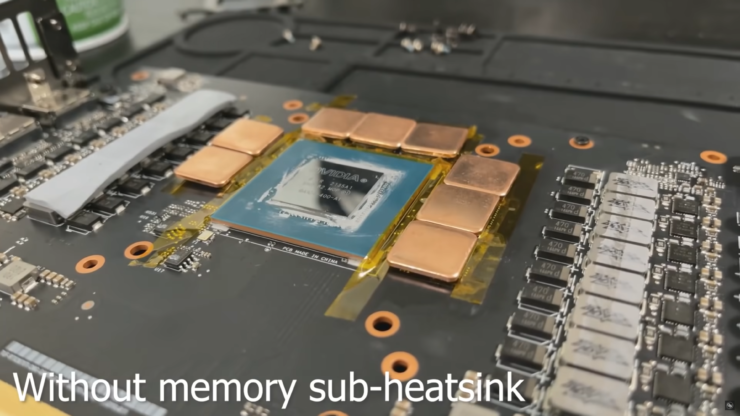
We all know just hot GDDR6X memory chips can get on NVIDIA's GeForce RTX 30 series graphics cards but modders have come up with a solution.
shrewd juniper
weary raft
any suggestions for a good silent aio for cooling a r7 5700x or g?
it does not n...
@knotty sparrow tbf in relation to the emotes, amd's formula for tdp doesn't include power
knotty sparrow
I'm aware, but for all of their 65W processors even just 240mm liquid cooling is overkill. Even with my cheapo ml240l I can ram 1.4v into my 2700 and never get above 65C.
low pumice
do keep in mind newer chips hotter
low pumice
knotty sparrow
I'm aware, but for all of their 65W processors even just 240mm liquid cooling is...
my old 2700 w 1.4v under smallffts would barely be 80c under d15, 3800x at 1.4v under the same d15, immediately past 100c, and 5800x is even hotter so...
shrewd juniper
even the 5600x is hotter than the predecessor r5's
low pumice
yes 1.4v not safe for zen 2, but anyways
knotty sparrow
True, but I think we can reasonably expect 5700X to not have much more heat load than 5600X
low pumice
higher density still though, afaik 8 cores in single ccx again
knotty sparrow
And 1.4v is safe just not for long term
low pumice
Technically 2v might be safe for a run or two, but I usually look more at voltage for dailying
knotty sparrow
The issue with density on the 5800X was them trying to cram the same amount of power into it as the 5900X
More W/core
low pumice
kind of true, grabbing data from anandtech


When you're hitting fewer cores it just tries to boost them higher
so 5900x is drawing relatively similar per-core when 5900x limited to 8 cores
magic sparrow
5800x has more cores per CCD tho
103w split across two CCDs on 5900x while you have 116w on one CCD. Part of package could be split across the CCDs as well, idk how much of package is on IO and CCD dies.
103w split across two CCDs on 5900x
That is unless they made it so it only targeted one CCD, which I doubt is typical behavior when handling an 8C load
low pumice
magic sparrow
> 103w split across two CCDs on 5900x
That is unless they made it so it only tar...
afaik AMD still only does 8 core ccd's, so for 5900x, my theory is that they disable 4 cores on one ccd, and one ccd is still the full 8 cores
But at full load, all core, 5900x pulling around same power as 5800x means less power per core, and therefore less power in general to that single ccd with 8 cores
magic sparrow
Idk about that, just take two 5600 CCDs and you have a 5900.
Either way, just cuz they have a 8+4 CCD layout doesnt mean they cant do a 4+4 core load on the CCDs
low pumice
oh yea def
Just my theory for 5900x in general
hitting 5900x with 8 core load is prob hitting 4+4
but theoretically you might be able to hit it with 8 core load on single ccd
magic sparrow
It sounds unlikely that they'd do what I said about targeting one CCD due to them needing to have an 8+4 layout and having software force it on one CCD, but I guess it is possible. Tho that'd almost never happen in real world unless the software was like "I NeeD mAh cAcHe OPtimIZaTiON" and force single CCD lol.
low pumice
someone manually disabling a ccd makes sense
magic sparrow
Yeah, assuming the 8+4 scenario it could work, could also force affinity too
magic sparrow
Also I did check around and the few places that had it mentioned it was 6+6, which isnt much of a surprise as one would probably want equal core count per CCD for nice cache balancing. But, you could always do a 8+4 5950x for fun.
low pumice
True
idle tiger
magic sparrow
Idk about that, just take two 5600 CCDs and you have a 5900.
Either way, just cu...
Pretty sure it's always 8+4 in a 5900x
nvm, you're right, 6+6
 narrow rapids
any recommendations for a mid-tower pc case, LED fans, maybe a set of 3?
shrewd juniper
Phanteks p400a digital
 verbal gate
Newegg has the LIAN LI LANCOOL 215 W White Steel that comes with 2 200m fan upfront and a 120 nonrgb in back on sale now for$95.
 autumn iris
So @shrewd juniper the fan curve for 100% was set to be in the like 90°C range and yet it was still going to 100% at less than 10°C
shrewd juniper
autumn iris
So <@!191276897227898880> the fan curve for 100% was set to be in the like 90°C ...
uhhh try the bios instead of windows software
autumn iris
Alright
 lime plover
Anyone here with experience combining multiple Corsair iCue controllers?
shrewd juniper
Pro tip don't buy corsair anything rgb
 brisk rain
lime plover
Anyone here with experience combining multiple Corsair iCue controllers?
brisk rain
lime plover
Anyone here with experience combining multiple Corsair iCue controllers?
Yes
Unfortunately yes
Long story short, nightmare
 peak moss
Hi
 weak cobalt
hi
 unique rock
Best air cooler?
shrewd juniper
unique rock
Best air cooler?
Deepcool ak620
unique rock
shrewd juniper
Deepcool ak620
Aight lemme check it thanks
narrow rapids
can anyone answer a coule of q about the coolermaster 120 argb 3in1 wiring?
knotty sparrow
What are the questions?
topaz blaze
would this be good for a 3700x
 marsh badge
just use air cooler tbh
left pulsar
Most $60ish air coolers would match that aio actually. Fuma 2 of Thermalrights Frost Spirt 140 for instance. FS140 is only $50ish, if you wanted to even spend that much.
idle tiger
topaz blaze
would this be good for a 3700x
Get an arctic aio, also, $200 5600x
topaz blaze
the evga 240 and 360clc's also go on sale a lot and can be a pretty good deal
i have 2 🤓
shrewd juniper
topaz blaze
would this be good for a 3700x
For the same price, get a deepcool ak620
uneven solstice
For the AFL II 360.. in bios if I set pwm to 50% at 30°c, does that mean my pump will be running at 50% while at that temp?
shrewd juniper
uneven solstice
For the AFL II 360.. in bios if I set pwm to 50% at 30°c, does that mean my pump...
Pump should always be at 100%
Pretty sure it's just 1 header for lf2 and it only runs at 100% but could be wrong
uneven solstice
Yeah it's only 1 header for the pump and fans.
So if I don't set smart fan control the fans run at what I assume is 100% at 1800rpm.
I can't seem to figure out a good fan curve. Atm I set it to 50% between 0-30°c and 65°c at 100%
shrewd juniper
Okay then i think lf2 pump is always 100% and you just control fans
uneven solstice
And 75% at 50°c
shrewd juniper
That's pretty agreessive
uneven solstice
Idk really what to put it at.
 halcyon gazelle
Looking for decent cooler for 12600k 🤔
uneven solstice
I felt thats better than it running 100% all the time.
uneven solstice
halcyon gazelle
Looking for decent cooler for 12600k 🤔
I'm using ALF II 360 for my 12600k
shrewd juniper
halcyon gazelle
Looking for decent cooler for 12600k 🤔
Deepcool ak620, arctic liquid freezer ii 280/360mm, ek rgb 280/360mm
uneven solstice
Do you have any suggestions for a fan curve that isn't so aggressive? I guess I'm worried about my cpu hitting 70 randomly while I'm not even doing anything.
halcyon gazelle
Isn't 360mm overkill for 12600k ? Lol I do have 360mm on 12900k
I mean 12600k is just i5 lol
uneven solstice
I got it because I plan on getting another cpu down the road.
I just bought something cheap to get me going.
uneven solstice
Yeah.
shrewd juniper
uneven solstice
Do you have any suggestions for a fan curve that isn't so aggressive? I guess I'...
It shouldn't jump to 70 at idle  but just kinda roughly 30% at 30c and 70-80c 100% imo
shrewd juniper
halcyon gazelle
12600k = 11900k
No lol 12600k is better
shrewd juniper
halcyon gazelle
Isn't 360mm overkill for 12600k ? Lol I do have 360mm on 12900k
Not really, 360 is like 5$ more than the 280 usually anyway, and it's a hot boi, doesn't matter it's an i5
uneven solstice
shrewd juniper
It shouldn't jump to 70 at idle <:hmm:885706594564841503> but just kinda roughl...
Yeah idk why it does it. I'll wake up to hwinfo saying that it had jumped up to high 60s. Not connected to internet or anything.
shrewd juniper
halcyon gazelle
But lga 1700 mounting is awful
Nah it's not
uneven solstice
I had no issues with the mounting. Seemed easy enough.
shrewd juniper
uneven solstice
Yeah idk why it does it. I'll wake up to hwinfo saying that it had jumped up to ...
What do you have running on startup?
uneven solstice
shrewd juniper
What do you have running on startup?
Not much. I leave the pc on while I sleep.
I'm a firm believer of keeping pc on most of the time.
Only restarting or turning off if need be.
halcyon gazelle
I bought asus LC360 about 2 months before 12th gen launch and it had included lga1700 braket already 👍 but it was nightmare to install it lol
shrewd juniper
uneven solstice
Not much. I leave the pc on while I sleep.
Mo point really unless you're mining
No*
Especially with an aio
uneven solstice
Idk. Its just how I grew up. In my teenage years I spent every day in a computer repair shop.
shrewd juniper
halcyon gazelle
I bought asus LC360 about 2 months before 12th gen launch and it had included l...
Probably cuz asetek mounting is bad
shrewd juniper
uneven solstice
Idk. Its just how I grew up. In my teenage years I spent every day in a computer...
What lol ?
uneven solstice
Huh?
halcyon gazelle
shrewd juniper
Probably cuz asetek mounting is bad
Lol maybe . I do have gammaxx 400 pro already and I wonder if I can use it with 3th part lga1700 mounting kit 🤔
shrewd juniper
halcyon gazelle
Lol maybe . I do have gammaxx 400 pro already and I wonder if I can use it with ...
Lmao gammaxx 400 is hilariously underpowered for a 12600k
shrewd juniper
uneven solstice
Huh?
Like what's that got to do with turning it off?
uneven solstice
shrewd juniper
Like what's that got to do with turning it off?
That's what they taught me.
To leave pc on.
halcyon gazelle
shrewd juniper
Lmao gammaxx 400 is hilariously underpowered for a 12600k
It was cooling 10700k at least lol idk really I'm so bad at cooling lol I liked k620 so far but it is giant lol
shrewd juniper
uneven solstice
That's what they taught me.
That's bad advice lol, if anything they were putting unnecessary usage on your hdds and fans
halcyon gazelle
I have B660M mobo tho
halcyon gazelle
I see in stock at Amazon
shrewd juniper
Oh it was showing oos earlier -nice
uneven solstice
Hm. Ok. I suppose they didn't care to much considering they owned a shop and could just replace parts whenever needed.
shrewd juniper
It's an insane deal for 60$
halcyon gazelle
65$ 💸