#old-cooling
1 messages · Page 5 of 1
 harsh crow
 strange flume
For the TUF I can use an XOC vBIOS and throw 600W at it if I want now outside of benches and be technically fine but I wouldn't because I could hurt the VRM
harsh crow
So I shouldn't expect it to stay the same temp under load 24/7.
harsh crow
strange flume
For the TUF I can use an XOC vBIOS and throw 600W at it if I want now outside of...
Got it.
strange flume
Meanwhile on that same card on air I could only bench near that
In cold ambient
Yeah this is really the only benefit, and I mean this to be taken seriously as the 3090 Ti's are way overpowered on air cooling
So you may even find it serves only the benefit of a quieter system if you go water in any way
harsh crow
Water has nicer aesthetic so why not + if I run a D5 pump at full speed in a 18c room I should get pretty good temps.
harsh crow
I mean on a custom loop.
But yea I wouldn't need one with the eiswolf.
Which by the way.
The eisbaer CPU AIO. Is it good?
I might get one if so.
strange flume
I don't have LF2 but I would say they would be very close
My EK aio is relatively close to this one
harsh crow
Got it.
strange flume
But I mean this is a case of pump and coldplate being more essential than ever for LGA 1700 screwiness
harsh crow
Lemme check if they have a 420 aio.
Yep.
They do.
Is the Eisbear Aurora Pro better
?
strange flume
You'd be looking for this one specifically

 strange flume
You can use these parts in a real custom loop btw
harsh crow
Scifi and blocky.
harsh crow
strange flume
You can use these parts in a real custom loop btw
Wait rlly?
strange flume
Ya it uses standard fittings lol
 noble quarry
strange flume
The rest are a <:No:557234320398614528>
noble quarry
strange flume
The rest are a <:No:557234320398614528>
excuse me?
harsh crow
Does that mean I can use hard tubing for this?
 strange flume

strange flume
harsh crow
Does that mean I can use hard tubing for this?
Could but I wouldn't
noble quarry
just to say hello xD
harsh crow
strange flume
Could but I wouldn't
?
I know it's harder to maintain
if that's the concern.
strange flume
Ya, not really worth it
If you're going to go that far you may as well just hard tube the lot
Hard tubing is completely an aesthetic benefit
strange flume
Personally I like the functionality of being able to take it apart if something's wrong with soft
Also considering draining and servicing it all every 6 months or so
(yes you need to do this on the alphacool stuff too)
harsh crow
Wait, since the Eisbear uses standard fittings.
strange flume

noble quarry
yeah, read the whole lot of words
strange flume
I will check the riser later
harsh crow
Would I be able to use a transparent tube?
Also, would it be bad if I hooked up a D5 pump to the Eisbear?
noble quarry
would be nice
strange flume
harsh crow
Would I be able to use a transparent tube?
Can if you really want to but you may as well use a different loop kit
strange flume
harsh crow
Also, would it be bad if I hooked up a D5 pump to the Eisbear?
I would say yes because you already have a pump in the eisbaer
harsh crow
Is the pump/block on the Eisbear worse compared to say like a XC8 with a D5?
harsh crow
Hmmmm.
strange flume
At that point I would go with another soft tube kit instead if you really want a D5 in the loop
harsh crow
Would it really cause any harm to have a D5 added to the system? because I'm kinda liking the sound of being able to use an AIO for now and turn it into a custom loop once I am back in China.
strange flume
noble quarry
hopefully the cable is ok
As I said I plugged it in and it worked out of the box so I believe it's fine but I'll bench it to be sure
Hell I'll even send you mine if yours is ass 
I have a few risers, don't need this many
noble quarry
so you collect risers now? xD
harsh crow
Not now but once I am back in China and decide to make my own case, what do you guys think of say a Skull with a Crown shape for a case?
noble quarry
you need to get back to china first
harsh crow
200mm intake at the bottom and 200mm exhaust at the top. With room for 2x480mm radiators on the side?
strange flume
harsh crow
Would it really cause any harm to have a D5 added to the system? because I'm ki...
I just think it's unnecessary
It's like
You've bought the ferrari and now you want a bugatti engine in it
harsh crow
noble quarry
you need to get back to china first
While I am not in China when I have time I can start working on the model is the thing.
strange flume

harsh crow
strange flume
You've bought the ferrari and now you want a bugatti engine in it
Sounds nice.
Lmao.
strange flume
Ya but unnecessary
noble quarry
you have quite the coin to burn
strange flume
Ima leave the jury out on that one
harsh crow
Probably won't do it.
strange flume
I'm not a watercooling weggspert
harsh crow
But I'd like to know.
strange flume
harsh crow
noble quarry
you have quite the coin to burn
 strange flume
I think Hay has already given some suggestions for loops
noble quarry
a lot in fact 😛
strange flume
Imo if you want a D5, then go with a proper soft tube loop
noble quarry
but our friend apex keep changing the scenario every day xD
harsh crow
strange flume
I think Hay has already given some suggestions for loops
I know, been keeping them in mind for a full custom loop.
noble quarry
my advice is to research into water cooling basics instead of brands and things like that
you can check prices and branding when you are ready to buy
harsh crow
I am just thinking until I am back in China the Eisbear might be handy as it's pre-setup for me so I can have a system running now without needing a to do the full loop yet.
noble quarry
because you know... tech prices... they are wild every day
 shrewd juniper
strange flume
You've bought the ferrari and now you want a bugatti engine in it
shrewd juniper
strange flume
You've bought the ferrari and now you want a bugatti engine in it
Yes
strange flume
harsh crow
I am just thinking until I am back in China the Eisbear might be handy as it's p...
Eh I wouldn't do that either
Either do one loop or the other
Don't mesh both
noble quarry
i repeat, stop thinking about brands, go and learn about the basics of water cooling, terms, formulas, kind of loops, types of materials... etc
strange flume
That's a lot of wasted dolla
strange flume
Especially when I've said air cooling is strong as hell
noble quarry
you need to understand very well the custom loop world so the advices the guys give you will be fully understandable to you
strange flume
Oh boy
 noble quarry
much like asking about the best brands or dies for memory oc but knowing nothing about memory oc
strange flume
noble quarry
you need to understand very well the custom loop world so the advices the guys g...
Seriously this. You don't want to throw money around carelessly until you settle for your perfect
noble quarry
nor asking about every term at every line
you should research that yourself, that will give the guys an idea of your level of commitment
harsh crow
Understood.
noble quarry
tldr, forget about brands are prices, worry about that when you are ready to buy
that will be around 9 months when you are back to china
in 9 months many things can change
strange flume
The upside of this is you'll already know everything works before you make the loop which is a big plus
noble quarry
new pumps, new brands, etc, etc
maybe new materials? who knows
9 months is a long time on the tech world
harsh crow
My friend has a laptop and was wondering what laptop cooler you guys would recommend.
strange flume
none
use what's inside it
undervolt/power limit if it runs too hot or take the time to repaste it
if you mean cooling pad, I'm in the camp of a fold out laptop stand
like this
https://amzn.asia/d/gSR9GQT

Laptop Stand for Desk, Aussieable Adjustable Ergonomic Portable Aluminum Laptop Holder, Foldable Computer Stand, 7 Angles, Anti-Slip, Laptop Riser, Compatible with Laptops and Tablets, Silver
noble quarry
yeah way better to undervolt/limit instead of buying those ufo helipads
strange flume
ufo 😂
shrewd juniper
I'd actually recommend a higher stand for ergonomic reasons although you'll want an external keyboard
 woeful crest
Has anyone used the ryujin 360 aio from asus? Was thinking about getting it but also thinking lian li Galahad because i want to put al 120 fans on the rad
 sacred wren
Galahad is better
 uneven solstice
woeful crest
Has anyone used the ryujin 360 aio from asus? Was thinking about getting it but ...
uneven solstice
woeful crest
Has anyone used the ryujin 360 aio from asus? Was thinking about getting it but ...
Galahad is bae.
strange flume
- LS720 enters the chat *
 viscid vapor
I noticed RGB fusion doesn't control the fan speeds, just the LED speeds. There something else that does?
shrewd juniper
viscid vapor
I noticed RGB fusion doesn't control the fan speeds, just the LED speeds. There ...
Yeah gigabyte app center has an add on (on support page for mobo) although i just use the bios
 unique lilyBOT
 Lord-Xanthor#0068 has been warned
Reason: Duplicated text
viscid vapor
I didn't send duplicate message.
Bot, you messed up.
To sum up what mee6 deleted, I want to redirect the fans motor power, from the controller to the motherboards fan pins, so a remote isn't relied upon.
I couldn't do this with an earlier fan version, because the fans I was using, shared a common return, for both RGB and fan motor, and to high a risk of damaging the motherboard should a fan malfunction, as it would bypass the protection of the motherboard. I'm hoping the ones I now use, don't share a return or Im going to be stuck buying RGB I don't care for. The GIM ones I got , perfect effect
Check this out on @Newegg: COOLMOON RGB Case Fans, 3 Pack 120mm Quiet Computer Cooling PC Fans, Music Rhythm 5V ARGB Addressable Motherboard SYNC/RC Controller, Colorful Cooler Speed Adjustable with Fan Control Hub https://www.newegg.com/p/1YF-00XW-00090?Item=9SIAHW7C1Y9869&Source=socialshare&cm_mmc=snc-social-_-sr-_-9SIAHW7C1Y9869-_-09212022
What's so nice about these, they have LEDs built inside the fan base, and also in the fan itself. The color effects is basically unlimited with the right RGB program.
viscid vapor
They doubled in price. I purchased 30 sets of 3, as they didn't have them in 5 or 6 sets, and was $22 at the time.
viscid vapor
When I noticed both fan blade and base had LEDs, a feature at the time Corsair and Thermaltake didn't offer. It was either base, or blade, never both. Anyways, I just opened a broken one. Out of 90 fans, only two were bad, and looked to be a screw issue, but now that I fully opened one up, saw it was a glue problem. Oil used in spindle, leaks out if not sonically sealed correctly (no doctor who jokes lol) oil got on motor housing and disconnects from base, with little room spindle looks like a screw. The electronics inside, at least on the fans in my possession, are pretty heavy duty quality. Glad I got these when I did. Led strip for the core, and motor not bad either. Took broken one apart to trace the connections and PCB. When I build anything that requires electronic components, I get them from Digikey. Have my old middle school teacher to thank for that info. Won first prize years ago making a solar digital scoreboard. Solar panel was on loan as shockingly, those $30 panels on Amazon, we're $25,000 in the late 1980s. Had I used Radio Shack, the cost to build it would have been over $440, a lot to me back then. Science teacher gave me a digikey catalog, and turned the $440 into a $43 project. RadioShack 8 switch dipswitch was $5.89, I needed 8. Digikey sold them at 16 cents each, in 10 lots. Those $20 two pack rechargeable D cells, Digikeys Varta brand was $1.89 each, 5 pack requirement. Used a big track touch pad, for key entry.
 glass otter
What aio would you guys recommend
glass otter
For a i5-12600k
strange flume
EVGA CLC 280 on EVGA's B-stock section at $55 sounds nice
Unless you already have one* in your case rn?
strange flume
On eBay Arctic has a B-stock store for the Liquid Freezer 2
One of those for like, 280mm or 360mm would be really good
It's like $80 or something for a 360mm
glass otter
I’ll look into those thanks 🙂
uneven solstice
Can confirm that the LFII 360 is a tad overkill on the 12600k for the average user. 280 would be great if it's cheaper.
 noble quarry
wth
shrewd juniper
Put the air cooler back on since it's a 6700xt 
noble quarry
a 6700xt? wth
so, he have a custom loop for a 6700xt while his cpu is cooled by a wraith cooler? what a chad
and those tubes seem like they barely made to the fittings
ouch
sacred wren
noble quarry
so, he have a custom loop for a 6700xt while his cpu is cooled by a wraith coole...
It's an 1800x too
We were talking about it in build chat
Listed for 850 cad
noble quarry
ew
sacred wren
850 cad is alright, assuming 16gb and a decent amount of storage
Watch it only have a hard drive
noble quarry
and he should ask for the original heatsink on the 6700xt as well
he can scavenge that cooling loop anyway for some cheap money
the pump and the reservoir could worth something
 neat nova
yea I think the original owner had the previous cooler
but wouldn't the water cooling perform better?
neat nova
um if you don't mind me asking what kind of maintenance
I just don't know anything about this stuff
noble quarry
basically draining the fluid for a new fluid every 4-6 months
like changing the oil in a car
also a lot of cleaning on while doin that
you only justify that if you are into heavy oc or very high end gear... on a 6700xt... no
neat nova
hmm ok
would it be hard to put the original cooling on it?
Or just adding thermal pads and paste and stuff
noble quarry
yeah that, just some screws, and repaste
unless you rip the thermal pads, the one already on the card are ok
you should use a youtube video for that in any case
neat nova
also do you guys think the MSI X370 Gaming PRO Carbon is fine if I just upgrade the cpu to a ryzen 5000
shrewd juniper
sacred wren
Listed for 850 cad
The whole pc?
sacred wren
Maybe with a 5600, iirc only some x370s support 5000 series
sacred wren
shrewd juniper
The whole pc?
Yeah
shrewd juniper
Not terrible
shrewd juniper
sacred wren
Maybe with a 5600, iirc only some x370s support 5000 series
All do now
sacred wren
Ah ok
neat nova
oh ok then I might do that
 jolly dragon
Has anyone seen temp issues with pump-in-radiator style AIOs that are not MSI branded? I have one from Fractal that worked well for several months, then rather suddenly started overheating. I was lucky a local person had a gently used air cooler I could swap in.
viscid vapor
The first two pins on each motherboard fan header is said to be 12v constant. Don't those voltages change when an application for that motherboard or the bios, changes fan speed, or should I be looking for something else?
After I finish this build, Im moving 5 of the 12 RGB fan motor connections, which are 12v, to motherboards fan headers.
noble quarry
get some splitters, i dont think most mobos have that much headers
viscid vapor
The manual that shows every pin voltage for on the Aorus 690, gives zero info on the fan voltages, other to say RGB is constant 12v
 strange flume
Fan voltages are 12V constant unless you have 3 pin fans
 strange flume
Ya
strange flume
viscid vapor
The first two pins on each motherboard fan header is said to be 12v constant. Do...
Why does this worry you btw
I don't think I've ever worried about this lol. Fans are like <0.3A
noble quarry
less
strange flume
<
noble quarry
p12s are 0.1 amps in fact
 noble quarry
maybe the p30 is 0.3
strange flume
Deltas are 1
noble quarry
holly cow
viscid vapor
The RGB fans color control is controlled by the motherboard, but for some reason, GIM controller isn't made to control the fans speed via motherboard, only the remote. My aim was to move the current connections from the RGB controller, to separate fan headers, so the motherboard can control important fans, rather than me having to use a remote.
strange flume
noble quarry
or just dump that controller and get splitters for all your fans
This seems much more productive
viscid vapor
Fans motors only have two connectors. The Hot 12v, and return aka ground
strange flume
And a data or current signal
strange flume
No even then, you need a variable in the signal or the fans will turn like a molex, max or 0 lol
viscid vapor
The fans won't run without the controller. Manufacturer rearranged the connections.
noble quarry
there felix
he is screwed
you should ditch those fans and get some standard fans like the p12s
strange flume
What are these fans btw
viscid vapor
GIM, the ones with LEDs built into both the base and blade.
strange flume
Did someone suggest them using this? Or were they super cheap
strange flume
Really cheap fans even with a lot of LED's dont use adapter connections, they use a standard remote and preprogrammed sequences
noble quarry
much like we battled against the gamemax psu
viscid vapor
Ravel, you talking about me or someone else? I purchased these fans long ago.
Hey, I got the EVGA silly
noble quarry
and we are glad you made the right choice
viscid vapor
You won that battle
noble quarry
👍
still i find it weird that the hub on your fans cant let you control the speed on your fans
viscid vapor
Hub controls the speed via remote.
OMG, I feel stupid!!!
I got 30 surplus hubs!!! I CAN just wire one to the motherboard so the motherboard signal replaces the remote.
strange flume
If you're implying just sense and pwm/current, maybe??? This seems like a lot of effort and with it's own risks
This is also implying these are PWM fans or DC
I just wouldn't do it 
Inwin sirius loops are like $7 a piece
viscid vapor
Another GIM controller, but instead of using the sata line, use a sata to pwm connection, and move the 5 fans to that controller.
First controller for RGB, second for speed control by motherboard.
strange flume
Sata to PWM will just be pure power
In other words you'll try and draw 75W through a PWM header and kaboom it
Lol
viscid vapor
The fan headers go to the sata on controller
strange flume
You should really consider new fans, you bought DDR5, you can afford fans lol
strange flume
viscid vapor
The fan headers go to the sata on controller
I'm aware where it's going
viscid vapor
I don't like the fans RGB display living me to either selecting a blade type or a base type GIM fans do both.
strange flume
Sata has a draw power limit of 75W per connector
So you'll be pushing about 6.3A through a 1A fan header
Maybe not actually this much but unless you want to check with a multimeter how much the controller is drawing then go for it
You won't get any signal from the board either
Since sata is purely power
viscid vapor
No, that's not what I'm doing. Instead of using the 12v from the sata connection, I'm using the 12v from the fan header instead, and carrying the extra signal for speed control. Worse will be the LEDs dim as well, unless I move those lines to a separate controller.
viscid vapor
God I hate when you do that lol
strange flume
That's what I'm trying to tell you
Sata is a pure power connector, there is no signal
viscid vapor
Let me draw a schematic up, it will show what I'm doing. Trying to explain it is digging a hole for me that I'm doing a horrible job explaining
strange flume
If the controller itself doesn't have a separate signal line you can take you won't get this to work
And the LED's won't be dimmer, you'll probably just fry or melt the fan header on the mobo in a more likely circumstance
viscid vapor
Felix, I know it has no signal, but the fan header does. It shouldn't be to difficult to route that signal to the part of the hub that controls speed via the remote.
strange flume
More power to you if you can get that to work but just don't use pwm to sata like that
If you have a controller rated for a 75W connection then use it via the connection intended
viscid vapor
I'm using the wrong terms, which is why I'm explaining it wrong.
Wiring diagram/Schematic does a far better job explaining what Im having difficult time putting into words.
I haven't fried a single thing since 1989. So that should say something lol
strange flume
Fair enough. I only say this cos I am trying to look out anyway
viscid vapor
Two things I messed up in 1989, SCSI that pin 1 was marked incorrectly with no directional block to stop backwards plug in. Similar to IDE. Two lines melted through ribbon cable in seconds. Second goof in 89 was a stupid 9 volt cord, fell out of my dremmel, and landed in an open 1050 disk drive, frying the PCB. Luckily those parts costs me $28, everyone else $150+ back then.
Thanks. Believe me, I appreciate it.
I'm also not starting the fan project until I have all working first. I'm still waiting for my compressor to blow out the ram sockets as I'm getting a C2 error on first turn on, no post.
And yes, swapped ram, tested one at a time. Still C2.
strange flume
Probably not ram then
C2 is a reserved code
If you can update bios I'd try that
reddit not the best source but reddit saying doing a q-flash will fix this sort of error
 viscid vapor
Won't post,meaning can't get into bios, but I think I just discovered something.
strange flume
don't need to get into bios if you have a q-flash slot
viscid vapor
Know that peel off plastic you take off the rgb components after done assembly, it's corner is under 3 of the ram slots. Think I just found the issue.
Be back in a bit.
Quick question, Q-Flash work with NVME USB or have to use a USB thumb drive?
Actually, I'll go read it up. Sorry, you helped enough.
strange flume
Anything that's formatted correctly as a usb device will work really
FAT32 iirc
Yeah fat 32
It goes into a specific slot labeled BIOS
Then you hit the qflash button
Don't touch it until you see it try to post again
The BIOS file needs to be named GIGABYTE.bin
 idle tiger
I'd read the manual, follow the instructions
shrewd juniper
noble quarry
p12s are 0.1 amps in fact
.15 or something iirc still not much
 knotty sparrow
Depends on the model, but they're between 0.11A and 0.14A so you can safely daisy chain 7-9 on a single header
noble quarry

uneven solstice
noble quarry
<:Sip:804415139591749662>

strange flume
Not sure what to think of MX-4 now
Remounted with NT-H1 and lost another 20W
I think I'm just mounting this cooler terribly
 rotund sable
"lost another 20W"?
rotund sable
that's a good thing
strange flume
It's a terrible mounting system, it was previously on there with NT-H2 doing 230W under 90C
That's a good thing? Even if frequency down?
rotund sable
oh well if the frequency is lower than no
strange flume
Yeah gonna try remounting again later
rotund sable
it really could just be a margin of error kind of thing
strange flume
Oh idk, suddenly from 230W to 165W sounds like potato hands to me 
The mounting system is really bad tho, it's got no base screws to slot onto so the backplate is free
Gonna sticky it down this time

uneven solstice
@strange flume be having skill issues eh? <3 did you get it figured out?
shrewd juniper
strange flume
The mounting system is really bad tho, it's got no base screws to slot onto so t...
What cooler?
strange flume
shrewd juniper
What cooler?
Eisbaer LT360
strange flume
uneven solstice
<@101107951401455616> be having skill issues eh? <3 did you get it figured out?
Been at work all day 
uneven solstice
strange flume
Been at work all day <:TeriDerp:683347603274203211>
Oof. Have you been thinking about it all day too?
uneven solstice
Ha
strange flume
It's a great cooler when it works. Has been able to handle more wattage than the EK
Tonight ima try again and not derp it up
shrewd juniper
Smh
strange flume
Smhmh
shrewd juniper
@uneven solstice just felt like fueling your addiction it's whiteee
 rotund sable
how much does it cost though lol
 strange flume
Retried the mounting, back up to 202W sustained load with NT-H2 and better CB score (Yes CB cos it's quick af)
Fixed it now methinks
NT-H2 proving to me again how good it is
uneven solstice
shrewd juniper
<@913267599779971133> just felt like fueling your addiction it's whiteee


 rotund sable
strange flume
* Starts simping disgustingly *
rotund sable
strange flume
* Starts simping disgustingly *
just get an aio
strange flume
But can you look this good with an aio
rotund sable
yes
strange flume
rotund sable

 strange flume
Retried the mounting, back up to 202W sustained load with NT-H2 and better CB sc...
strange flume
strange flume
Retried the mounting, back up to 202W sustained load with NT-H2 and better CB sc...
Slowly curing the paste and watching the package power slowly increase, 202, 203, 205*, 207...
Dunno how much higher it'll go but it's still going
noble quarry
still struggling with the bad mounting?
strange flume
nah I think it's ok now
just was cool to see the wattage and frequency creep up even more with the repaste lol
idle tiger
What chip? Running pbo/co I assume?
Should try a bench like 7zip or ycruncher to gauge performance.
Though, clocks at p95 are a valid metric.
 summer wren
were aloud to ask questions here, right?
 left pulsar
You just did. Now if being allowed to, idk.
summer wren
oh good point lol
im trying to find an lga 1200 mounting bracket for an aio but im having trouble finding one, would anyone know where to look?
knotty sparrow
1200? I don't think that one was all that different from the 115X one, a lot of coolers used a combo bracket.
It's 1700 that uses a totally redone layout.
 final crescent
summer wren
im trying to find an lga 1200 mounting bracket for an aio but im having trouble ...
final crescent
summer wren
im trying to find an lga 1200 mounting bracket for an aio but im having trouble ...
like Fal'Cie said the LGA15xx is typically the same for 1200 chips, usually the notation will show the bracket as "15xx/1200" or something along those lines, at least my AIO's parts/bracket did
idle tiger
It's 115x that uses the same mounting as 1200, 1700 is wider
final crescent
yea sry i was in a rush typing while working, it's def 115x lol
summer wren
alright thanks
strange flume
idle tiger
Though, clocks at p95 are a valid metric.
Ya I was doing that but with OCCT small and watching the average freq. go up slowly lol
And ye 5900X with my old PBO+CO settings
I could try it with P95 too I guess lol


 viscid vapor
Lucky I accidentally purchased an extra Se-214 cooler, because the se-914 failed to mention it doesn't come with an LGA 1700 bracket. Took forever to find one too.
shrewd juniper
viscid vapor
Lucky I accidentally purchased an extra Se-214 cooler, because the se-914 failed...
The 914 isn't very good anyway
viscid vapor
Radiator is definitely much better quality than the 214. 214 is like tin foil.
 shrewd juniper
viscid vapor
Radiator is definitely much better quality than the 214. 214 is like tin foil.
shrewd juniper
viscid vapor
Radiator is definitely much better quality than the 214. 214 is like tin foil.
Iirc the fans are just real slow
viscid vapor
I can swap the fan out. I have Plenty of RGB fans that will fit . The 214 looks strange without the top RGB plate I'm used to.
 viscid vapor
strange flume
What is the 214 being used with
viscid vapor
strange flume
What is the 214 being used with
It's being used with my new Aorus Master Z690 I9. I tend to steer clear of water coolers, the vibrations caused by airport and train station have caused Corsair water coolers to slip their lines in past, and it was just luck the pipes leaked to bottom of case and not hit anything important.
Their so called sealed units weren't as sealed as one can hope.
shrewd juniper
viscid vapor
It's being used with my new Aorus Master Z690 I9. I tend to steer clear of water...
BRO THAT IS AN OVEN
Returm
You're gonna heavily bring down frequency
If you want to air cool a 12900k, deepcool ak620 is your best bet
Although that will still throttle it will be a lot less

 dreamy locust
what are the usual dimensions for an AIO cpu block/waterblock?↓... the dimension i need the most is the height, does it usually go past 50mm?
 noble quarry
depends on the brand
look for something that you like for your build and look for the specs on their manufacturer webpage
no use to give you an "average" because every brand build their own custom design
viscid vapor
shrewd juniper
BRO THAT IS AN OVEN
15 fans, not counting the CPU fan. I also don't overclock my system. Never had any reason to.
shrewd juniper
viscid vapor
15 fans, not counting the CPU fan. I also don't overclock my system. Never had a...
doeesnt matter just not not enough heatsink
left pulsar
5fans & good heatsink > 15fans & poopoo heatsink.
viscid vapor
Have you even seen that se-214 heat sink? It's huge.
Aluminum which bends to easily.
shrewd juniper
viscid vapor
Have you even seen that se-214 heat sink? It's huge.
No it's normal tower cooler size
It's a 20$ cooler after all
viscid vapor
RGB suggestions?
noble quarry
for?
left pulsar
Thermalright Frost Spirit rgb version would be the minimum I'd suggest. AK620 & FC140 (frost commander) are better but idk if they have rgb. AK620 is often only $55ish btw.
noble quarry
no, ak620 have no rgb, but you can swap the fans if needed after all
still i would use an aio for an i9
even a big tower cooler will struggle a bit to cool that beast
left pulsar
For sure. Either way, could start with adjusting down the Power Limit a bit.
shrewd juniper
viscid vapor
RGB suggestions?
Honestly ak620 replaced with arctic p12 rgb's
strange flume
shrewd juniper
BRO THAT IS AN OVEN
Now you see why I was asking 

 viscid vapor
Enermax Liqmax III 240 A-RGB AIO CPU Liquid Cooler - 240mm Radiator, 120mm ARGB PWM Fan, for Intel/AMD, 5 Year Warranty (w/ LGA1700 Bracket) https://a.co/d/cNkA0e7

Liqmax III ARGB, An addressable RGB AIO cooler for Intel and AMD CPU platforms, is designed to sync with ASUS Aura Sync, gigabyte RGB FUSION, MSI Mystic Light Sync, as rock polychrome, and RAZER Chroma to display 16. 8 million colors and dymic lighting effects. The dual chamber design water block...
shrewd juniper
viscid vapor
Enermax Liqmax III 240 A-RGB AIO CPU Liquid Cooler - 240mm Radiator, 120mm ARGB ...
If you where to get an aio, arctic liquid freezer ii (a(rgb)) or ek rgb 360mm for both
noble quarry
Ls720 my man
Listen to me 😀
Hehehe jk, pato's recs are cool
Still the ls720 is a close second
Enermax tho 🤮
More like clogginmax
strange flume
Minimum 360mm water cooler for a 12900K @viscid vapor
I also suggest a thermalright contact frame so it actually contacts well
You have a few good options, EK basic 360mm,, EK AIO D-RGB 360mm, Arctic Liquid Freezer 2 360mm (ARGB or none, don't fan swap it), Deepcool LS720 360mm, Lian Li Galahad 360mm
viscid vapor
GameMax has a decent 360mm one.
strange flume
Please don't
viscid vapor
I'm joking
strange flume
Lol good
The coldplate design and pump are critically improtant on a 12900K, makes the difference between a molten mess and relatively decent, even on a 360 AIO
But the heat density on the chip is so thick that you can't really use anything smaller, you won't get any overclocking performance out of it let alone stock
viscid vapor
They are pricey, yet don't come with an LGA1700 bracket. Just about every one I see says optional.
strange flume
Ya cos LGA1700 is relatively new
But they will update stock with the brackets as time continues on
Some AIO's ship with it now even if it's not described on the box
viscid vapor
Not so sure, especially with series 13 coming out?
strange flume
viscid vapor
Not so sure, especially with series 13 coming out?
Takes time to update products but also you have old stock in some places even now
So even if I say "Yes definitely" no 100% guarantee lol
shrewd juniper
At this stage anything without lga1700 at this stage is not even worth buying anyway
strange flume
They're all compatible btw
shrewd juniper
strange flume
Takes time to update products but also you have old stock in some places even no...
Especially if it's not a popular model
viscid vapor
I just don't want to buy one and have to wait 60 days for a bracket from China.
strange flume
If you buy from a popular place like Newegg the chances are really low
Also the contact frame will take some time to deliver btw but will pay off once you put it in
viscid vapor
Se-914, I'm stuck waiting for the bracket. Wasn't too low a chance lol.
strange flume
I didn't suggest that one tho
Have a look at this one
https://www.ebay.com/itm/354100888026

eBay
PERFORMANCE KING: With a more efficient cold plate, proprietary pump and fans optimized for static pressure, the Liquid Freezer II series clearly sets itself apart from other AiO water coolers. MAINTENANCE-FREE WATER LOOP: The water circuit is sealed and fitted with fiber-reinforced EPDM tubing, preventing evaporation of the coolant = no refilli...
One of the best coolers period and it's $78
Sold by the manufacturer
viscid vapor
Those huge heat sink ones scare me as it is. My son's older system, I7, gen 7, took a fall after small earthquake. The impact tore the socket, CPU, and square size hole right out of the motherboard. Was a complete loss until my wife pointed out I somehow purchased insurance, don't know how they snuck that in, but covered accidental, so got a refurbished MB.
This looks interesting
Check this out on @Newegg: MSI MAG Core Liquid 360R V2 AIO Liquid CPU Cooler, 360mm Radiator, Triple PWM, ARGB Lighting Controlled by Software LGA 1700 Ready / AM5 Compatible https://www.newegg.com/msi-liquid-cooling-system-mag-series/p/N82E16835846027?Item=9SIBAXAJ7N6076&Source=socialshare&cm_mmc=snc-social-_-sr-_-9SIBAXAJ7N6076-_-09272022
shrewd juniper
Bro nothing is worth buying apart from the following
Ek rgb 360mm
Arctic liquid freezer ii 360mm (rgb)
Lian li Galahad (too expensive and poor response to lga 1700 so I don't like recommend anymore)
Deepcool LS720 also decent option
strange flume
strange flume
You have a few good options, EK basic 360mm,, EK AIO D-RGB 360mm, Arctic Liquid ...
Please refer to this
strange flume
strange flume
The coldplate design and pump are critically improtant on a 12900K, makes the di...
Going back to this, is why I suggest nothing else
noble quarry
The bois will give you the best advice
You are trying hard to see other choices who are bad for your i9
I mean if you have the money for an i9 you should have the money for the best functional cooling solution for it as well
strange flume
We aren't even suggesting the over-expensive options either
All the ones I put up are in the low-mid range pricing for 360mm
Heck, while I'm at it, EVGA CLC 360mm
There's another one that's good pricing on B stock
noble quarry
Msi aios are mastercloggers btw
strange flume
Mast-
noble quarry
And c*rsair aios are mediocre at best, full bling no juice
noble quarry
Just before he suggest those
strange flume
Lol true
viscid vapor
It's not the money, at least yet, it's issues over here and the wait between proper mounting brackets. Need to also make sure my case can support a 360mm.
strange flume
Indeed
@shrewd juniper check this
https://www.tomshardware.com/reviews/thermalright-peerless-assassin-120-se/2
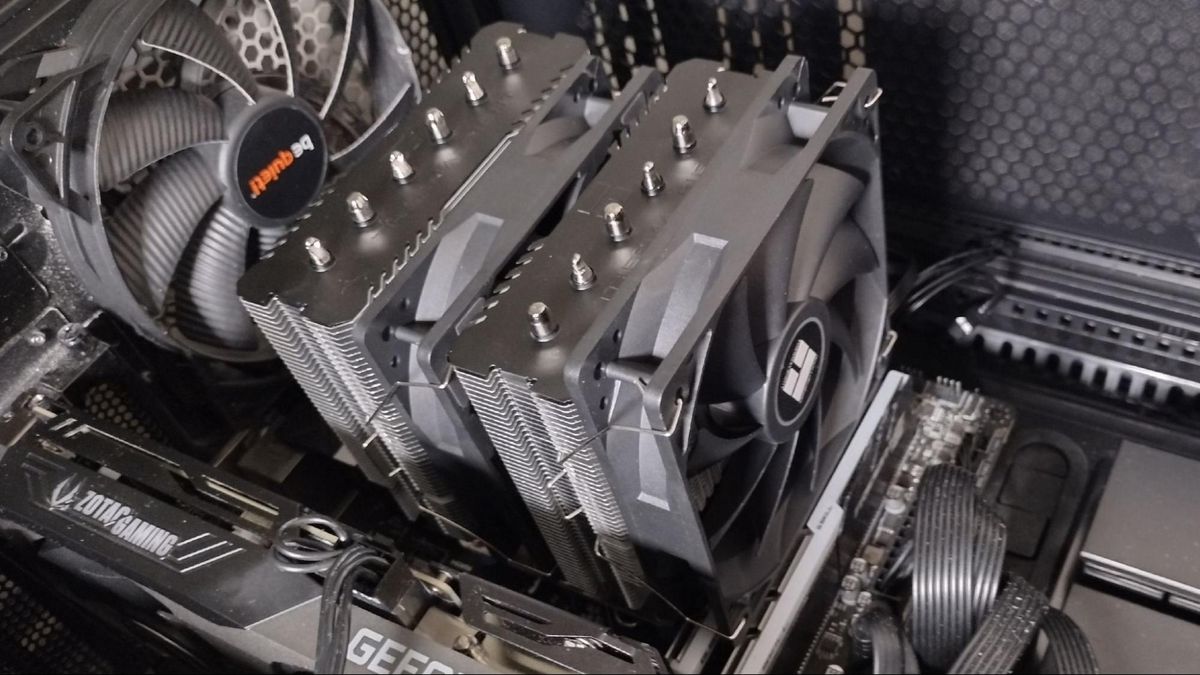
Tom's Hardware
Shockingly cool and quiet, less than $40!
The step down from AK620 is this for $40
viscid vapor
My old high school friend has a similar bulky cooler like that, not sure the CPU. Last winter heater in his apartment stopped working and in NY in January, it gets damned cold. When he went to close his glass door, not sure if it was the heat of the sink that did it, or it expanded slightly, but it hit the glass just a little and door shattered.
Replacement door almost cost of the case.
strange flume
Yeah little heatpipes like that are a bit sketchy against glass lol
Tho nowadays typically it's tempered glass, idk how long ago this glass broke but, even TG isn't immune to it
viscid vapor
I doubt it was tempered. Went to get a similar model 4 years back, saw how thin it was, and sent it right back. I'm talking thin that I was surprised it made it here in one piece
I'd say it's plate glass, like what goes in old wooden windows.
Just a guess.
strange flume
Could be, it's just for viewing anyway, doesn't need to be thick if it keeps costs low
viscid vapor
Thermaltake is rushing me the missing bays btw. When they got word I was being refunded for whole case and being allowed to keep it, they went out of their way to ship me the bays.
noble quarry
viscid vapor
It's not the money, at least yet, it's issues over here and the wait between pro...
check your case's manufacturer site for the spec, probably a 360 will fit as well, most big cases can house one... and about the bracket, sorry to tell you this, but any aio/tower cooler will have this chanceof not bringing the bracket, if they have it then you are luecky, if you dont then you have to request one.... thats something not one of us can vouch
but buying an i9 have the add-in responsability to buy an aio as well
viscid vapor
It's the view 71 TG RGB Thermaltake
noble quarry
well, check it if it fits
should be
the qc passed lf2 aios should have the aio bracket already on them, the ls720 as well because is fairly new.... the ek if i rememeber correctly will give you a free bracket with the purchase as well
noble quarry
in fact the ek360 says lga1700 ready now, no more (lga brackets can be requested to the manufacturer fine print)
the thing is, you need to cope with that, with that chance to request a bracket
if your house have issues with the trains and the airplanes and all those things that make your house vibrate that much, then an air cooler will be as dangerous as an aio, one will like, while the other will break other things while it falls
nothing to do about that, but cooling your i9 with an air cooler is asking your i9 to perform as an i7
strange flume
We've passed the air cooler part
noble quarry
so, buy a 360 for your i9 if you want to use the cpu at its fullest, even if the bracket is included or not
shut up man, im inspired

strange flume
noble quarry

noble quarry

 plucky elm
Im looking to upgrade my R5 5600x to the 5800 3d in the near future but i bought an enermax 360 aio. I am currently looking at either the Ek 280/360 or the Arctic II 280/360. Which Aio is better or more reliable?
strange flume
Arctic LFII B stock on ebay
eBay
PERFORMANCE KING: With a more efficient cold plate, proprietary pump and fans optimized for static pressure, the Liquid Freezer II series clearly sets itself apart from other AiO water coolers. MAINTENANCE-FREE WATER LOOP: The water circuit is sealed and fitted with fiber-reinforced EPDM tubing, preventing evaporation of the coolant = no refilli...

eBay
COOLER THAN OTHER AIO WATER COOLERS: The ARCTIC Liquid Freezer II has a more efficient cool plate, pump and radiator that makes a difference among other AIO water pc fan coolers.
plucky elm
Dang, half the price
strange flume
ya pretty good
plucky elm
Have you bought an open box item before. I am kind of worried it might crap out and my spu goes up in flames
strange flume
it's sold by arctic officially
so it's tested and qc passed to work
it's just their b stock so like
potential dents or scuffs
but still working fine
noble quarry
yeah those arent open box
are b-stock
similar i know
but qc passed as felix said, and sold by artic themselves
plucky elm
I need to replace the enermax 360 i havent been to pleases with it
 marsh badge
b stock is mostly just probably not perfect samples
strange flume
goomax 360
marsh badge
but they pass qc
left pulsar
B-stock is definitely better than open box, returns, "refurbs".  -- Well sometimes an open box is still "new", but yea.
plucky elm
I am just worried it will crap out when i upgrade to the 3d or the 5900X. Do you think im being too cautious
strange flume
if it's tested working then it'll be fine
plucky elm
I was asking about the enermax 360 i currently own
strange flume
more likely you'll upgrade later
noble quarry
strange flume
goomax 360
clogginmax 360
marsh badge
enermax
plucky elm
ok, lmao
strange flume
plucky elm
I was asking about the enermax 360 i currently own
oh the goomax
marsh badge
yeah that thing will fill with goo soon enough
unique lilyBOT
 Aggie-HOZ/ Luovik#6212 has been warned
Reason: Bad word usage
noble quarry

The original Enermax Liqtech I TR4 liquid coolers are plagued with corrosion, gunk/build-up, blockages, and more corrosion.
Sponsor: Buy PowerColor's Red Dragon Radeon™ RX 5700 (https://geni.us/7WSE5 on Amazon)
The original Liqtech I TR4 coolers should probably be formally recalled, but Enermax is trying to fix the issue by sending out revisio...
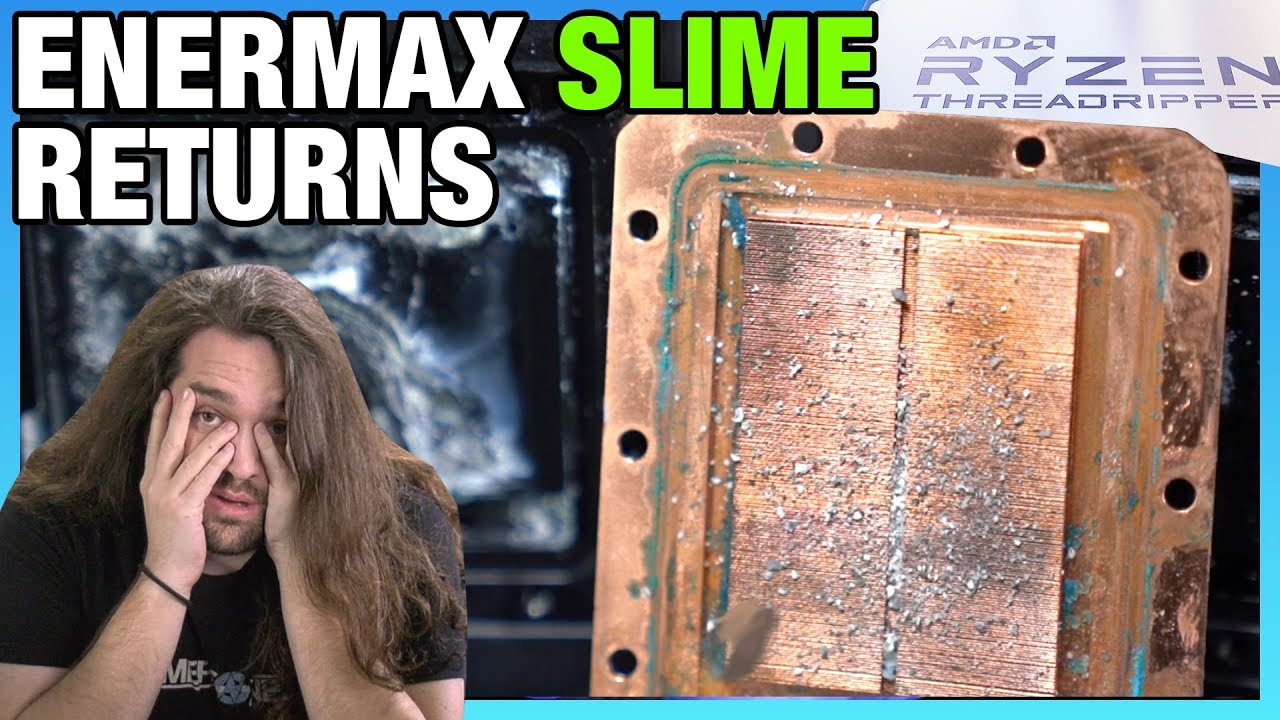
Enermax said it fixed its AMD Threadripper liquid coolers with the Liqtech II. We sent them off for X-Ray spectrometry and more, and it appears Liqtech II is also impacted.
Sponsor: Visit https://BuyRaycon.com/gamersnexus for 15% off your order!
Watch our original failure analysis video of the Enermax Liqtech I closed-loop liquid coolers here: ...
marsh badge
algae be like "this aio is good, let's live in it"
plucky elm
haha lol
plucky elm
yeah, i have had some temp issues and its been maybe 3 months
noble quarry
Maybe clogging
plucky elm
nothing crazy crazy but enought to make me feel uneasy
noble quarry
Same thing with the master clogger ones
marsh badge
some also leak
noble quarry
Made by msi
marsh badge
leak master
 strange flume
mastercloggers, goomax, coarsehair
Eh K
cooler master master master liquid master cooler master maker liquid cooler
A sus
biggest fan techs
and deepcool
 plucky elm
hahaha lmao
 marsh badge
oh no lian li is lying
strange flume
Betacool
marsh badge
alientrash
strange flume
bronzestone
marsh badge
ewvga
strange flume
ICUP (NZXT)
plucky elm
Thanks for the help!!!
strange flume
np
marsh badge
lol this feels so silly
plucky elm
i already bought the new...ish aio lol
plucky elm
It unfortunately wont be make it in before this weekend. i was going to try and inspire a friend that has a projector setup in his house to get a Pc.
I dont want to show off my Pc and something go wrong because of the AIO. That would be a terrible selling point lmao
strange flume
that would be a comically rare and hilarious scenario
jolly dragon
It's funny seeing all the posts about AIOs when my Fractal Design 280mm AIO clogged after 6 months. I swapped in a Scythe Fuma 2 air cooler, it was literally the only thing I could find locally to get running again. Then again, I am running a less demanding CPU (I7-11700F), not overclocking, and my case has fair airflow. I am wary of any CPU upgrades where I would require an AIO now. Fortunately, I be poor, and am gonna have to wait until Intel's 15th Gen or Ryzen 8xxx 😎
strange flume
Can't remember the last time I saw a fractal aio tbh
FUMA 2 *should be a good pairing for an 11700F tho
Since it's backported from 10nm it's supposed to be fairly easy to cool
noble quarry
More like clogtal design
shrewd juniper
strange flume
<@191276897227898880> check this
https://www.tomshardware.com/reviews/thermalrig...
Doesn't se have bad mount on lga1700 or something tho?
And toms doesn't use an actual cpu just simulated load by looks of things
shrewd juniper
noble quarry
And c*rsair aios are mediocre at best, full bling no juice
At least they're no longer aesatek
strange flume
shrewd juniper
Doesn't se have bad mount on lga1700 or something tho?
Can you give me a source cos I can't find that anywhere
Dual tower for high end LGA 1700 anyway is mostly a no but for something like a 12700F this looks like it'd work
noble quarry
excuse me?

 noble quarry

strange flume
AK620 is my bae but spirit SE is $20 cheaper
Now imagine this is good enough to bring the AK620 price down

 shrewd juniper
strange flume
Can you give me a source cos I can't find that anywhere
shrewd juniper
strange flume
Can you give me a source cos I can't find that anywhere
Lemme try find i remember ryan linking before he left
jolly dragon
strange flume
FUMA 2 *should be a good pairing for an 11700F tho
Doesn't hurt I got it lnib for $25. 💰💰💰
strange flume
That's awesome for 25
jolly dragon
Yup. I was lucky, because someone else had also made the offer - and was a no show. Me, I was without my main computer for half a week.
shrewd juniper
strange flume
Can you give me a source cos I can't find that anywhere
Can't find the link but yeah the se has terrible mounting on lga 1700, search pa120 se and you'll see ryan on about it tho, I'll message him see if he has a source
Although possibly first hand can't remember


 strange flume
I mean that's fine
Point is we have a good dual tower for $40
The bar has been lowered yet again
shrewd juniper
@strange flume
 strange flume
hmm
ok so don't suggest for anything high end *air, but a mid-range cooler it's good
ig
shrewd juniper
strange flume
ok so don't suggest for anything high end *air, but a mid-range cooler it's good
Well imo either (for us anyway) you have se 214xt or you go straight to pa120/ak620
strange flume
ye
that's what I'm thinking or gammax
then straight to Arctic b stock
actually

shrewd juniper
Like idk i feel like pa120 atm in kinda middle ground
strange flume
is there a freezer esports for cheap b stock
strange flume
me look

eBay
IDEAL AIRFLOW: The two BioniX P-fans of the Freezer 34 eSports DUO work in push-pull-mode, the resulting increase of airflow ensures that the heat from the CPU is dissipated even faster. IMPROVED HEAT DISSIPATION: Evenly spread direct-touch heat pipes and an optimised heat sink design with 54 cooling fins lead to an ideal heat dissipation for th...

shrewd juniper
shrewd juniper
Like idk i feel like pa120 atm in kinda middle ground
I mean like 12600k no oc /maybe 12700 would probably be the only times i would think about it but with 12700f you have enough budget for 20 extra for the best of the best
shrewd juniper
strange flume
https://www.ebay.com/itm/353886382686
31$ seems meh no?
strange flume
$25
no?
I suppose you have to feel a bit cute might delete later for red tho
but that's $4 more over an SE or Gammax for an extra fan
shrewd juniper
strange flume
$25
Oh shows 31 for me
shrewd juniper
That's probably cuz ebay app detect I'm not in us or something
Yeah
Same with amz for me
shrewd juniper
5$ smh
 shrewd juniper
strange flume
almost 6
shrewd juniper
strange flume
almost 6
25-19.99 =6 
strange flume
25.81-19.99= 5.82 
shrewd juniper
Well you said 25 so
strange flume
ya but then I said actually 
shrewd juniper
Smh my head
 shrewd juniper
 uneven solstice
Hey guys, I have a Corsair 220T RGB Airflow. I am also looking at getting a tower cooler.. My question is.. If I put a fan in every slot with front as intake and top/rear as exhaust.. is that going to mess with the airflow of the tower cooler or vice versa?
sacred wren
Just don't put one directly above towards the front of the heatsink, if that makes sense
Like
In my case there's two slots for fans on the top, I've got one directly behind the heatsink towards the back of the case
But you don't want one on the other slot
uneven solstice
alright cool. That is what I was thinking.
viscid vapor
noble quarry
excuse me?
Is that actually resting on the video card?
left pulsar
No, Noc D15 gets closer even
viscid vapor
I wouldn't trust a fan like that in any of my builds. Looks like a sure way to fry both motherboard and CPU should any metal part touch that video card. Don't even think a top grade mothetherboard with all short protection built in could save it with that type of short.
left pulsar
Gpu backplate solves that possible issue.
noble quarry
viscid vapor
I wouldn't trust a fan like that in any of my builds. Looks like a sure way to f...
wut?
i dont know where to start really....
the frame of the fans and the blades are plastic made
the cooler is far away from the gpu, way far, there is no way for it to touch the card if you mount and secure it well, in fact is more probable to rip or damage the mobo from bending than the cooler physically touch the gpu
and the backplates on the gpus protect the card IF something like that EVER happen, which is very unlikely
top grade or cheap mobo, its all the same btw there is no short protections in a mobo, those are on the psu
anyway that's why research in advance is always good, i researched a lot about measurements, clearance and performance on the ak620 before pulling the trigger
and yeah as chillin said, the nh-d15 is way bigger 😛 and wider (thicc af)
 ember glacier
is it normal for my cpu to be at 96 degrees celsius when playing games
viscid vapor
noble quarry
wut?
On my phone, it looked like the CPU cooler was resting on the EVGA video card. Some fans are actually aluminum. I have two burried from late 1980s. One came from an old smashed up air hockey table, the other, not sure what it was, but a smashed up very old IBM I found in my park when I used to live in NY.
noble quarry
They are not made of metal anymorr
I wonder if yours are of metal? The ones for your case
No fans for this type of work are made of metal, maybe for server rack types..maybe but not for desktop pcs at least
Besides metal fans are more dangerous to the user than to the pc itself, no point of building those fans, therr is no way those would be approved for sale in this market

final crescent
ember glacier
is it normal for my cpu to be at 96 degrees celsius when playing games
what game? what CPU? what cooler?
ember glacier
it got up to 113 💀
80 on games now
got 5600x and 6700xt
cpu at 80
and you at around 60
gpu
noble quarry
well 113 is terrible indeed, but 80 and 60 on games are pretty normal on that gpu and cpu
start worrying at 90+
like that 113 number
shrewd juniper
Or there is a plastic peel on the cooler or the fan wasn't plugged in
ember glacier
marsh badge
you probably forgot thermal paste
no i put thermal paste on
idk what to do
maybe different thermal paste
i’ll get some mx4 from best buy
sacred wren
It's not the thermal paste, it's likely how much you used
Or the way you mounted the cooler, might not be tight enough
@ember glacier
Hell the paste I'm currently using is probably worse than yours
Are you getting 80c while gaming, or is that idle?
If gaming, that's perfectly fine
sacred wren
What cooler, stock?
I would take the cooler off, clean the thermal paste off, put new paste on, and put the cooler back on
Did you redo the paste when you put the 3200g back in, and then again when you put the 5600x back in?
@ember glacier
sacred wren
How much would you say you used?
strange flume
Are you doing small turns at each corner screw when you mount it?
ember glacier
sacred wren
How much would you say you used?
i just did an x pattern
ember glacier
strange flume
Are you doing small turns at each corner screw when you mount it?
i did 5 turns
diagonally
top left bottom right
bottom left top right
ember glacier
maybe i just need more thermal paste?
strange flume
80 is indeed high tho, which paste?
ember glacier
hy510
strange flume
Last 6 months is new enough
ember glacier
oh okay
strange flume
When you take it off, what does the paste look like?
strange flume
Does it look like it's blotchy at all?
ember glacier
as in?
ember glacier
no
ember glacier
no i can’t right now
strange flume
Np
ember glacier
if you could help me go through the process that’d be great
strange flume
I'm at work in 9 hours rip
ember glacier
well shoot
strange flume
But we have others here
strange flume
I feel like maybe the brand of paste could be at fault but also any interface material can really work, even toothpaste
I would expect better than 80C idle
80 seems high for mounting properly, I'm now wondering if maybe the IHS is very uneven
ember glacier
when i can i’ll take out the fan and reapply
but if that doesn’t work then idk
cuz everything is good
strange flume
Something either in the process or the result just seems off about it cos 113 is dangerously high
I mean you definitely screwed it all the way down yeah? Not anymore than a light tightness?
ember glacier
strange flume
I mean you definitely screwed it all the way down yeah? Not anymore than a light...
yeah it stopped
so i did
5 diagonally
tthen 3 diagonally
and they all stopped
as in they were tightened
ember glacier
like bro
94 cpu 53 gpu on fortnite

i took off the fan
reapplied paste and put the fan back on
i just don’t know at this point
noble quarry
ember glacier
i just don’t know at this point
get a better cooler? still 90s is normal on them
ember glacier
nah but i think i did. something
cuz before i took out my 3200g
i got like 44 idle
maybe i should just get a better cooler
any recommendations?
noble quarry
budget?
you can go from the cheap 214xt to a pa120 and finally to an ak620 if you want air
if you want an aio you have the artic liquid freezer 2, ek aios, deepcol ls series
noble quarry
ember glacier
i got like 44 idle
well you were talking on 94 on load, fortnite is not idle pal
ember glacier
noble quarry
well you were talking on 94 on load, fortnite is not idle pal
it’s the same idle
right now around 89
noble quarry
plus the ryzen 3200g is a cooler cpu
noble quarry
ember glacier
right now around 89
yeah thats the normal thermal operation of the 5000x family on pbo
on load
if you are running on the stock cooler well, you need to get used to that
ember glacier
alright
noble quarry
which... leads me to this
if you are using the old 3200g stock cooler then you have your answer to those temps
ember glacier
no it came with stock
right now
i’m using the one that came with the 3200g
to see if it changes
but it’s the same
noble quarry
get a tower cooler pal
se 214xt is like 20 bucks
and its a good one
stock coolers are fine to have them under control AKA not throttling
but still high temps
to cool it down you need an aftermarket cooler
ember glacier
alright
viscid vapor
Im still deciding on the cooler. Either CustomerService saw your comment to me and did a favor and canceled the kit, or just dumb luck. I have to reseat the CPU every year, and tighten screws due to vibrations. Few years back, when the water line slipped, my cat was sleeping on the server, so you can imagine what I thought was taking place, and his look of fear with me running over to hear the sound long after he was gone. I'd rather replace with an air cooler than risk a liquid.
viscid vapor
By the way, normal windows screen and hard drive backup, a lot of heat is actually being generated by the RTX 2060, and very little heat from the air cooler. I'm going to move one of the thermostats near the CPU socket after this backup completes.
sacred wren
ember glacier
alright
214xt is not that much better than stock, it's mostly just quiter. If you want noticeably lower Temps, peerless assassin 120 se is $35
Pato does say there's issues with it but from what I've found it's fine, id ask for his input
ember glacier
sacred wren
214xt is not that much better than stock, it's mostly just quiter. If you want n...
thanks thanks
i’ll order it
and see if it improves the cooling
 sacred pagoda
This is also a good option
https://www.amazon.com/Thermalright-Refined-SE-Technology-AX120/dp/B09LHBFPJ6/

Thermalright Assassin X120 Refined SE CPU Air Cooler, 4 Heat Pipes, TL-C12 PWM Fan, Aluminium Heatsink Cover, AGHP Technology, for AMD AM4/Intel LGA 1150/1151/1155/1156/1200/1700 (AX120 R SE)
Lowered my temps and is also quieter than stock cooler
sacred wren
Basically an rgbless 214xt, maybe a bit better
sacred pagoda
Yeah I think I saw somewhere that it's either a slightly better heatsink or a better fan (minus rgb)
There's an rgb version for $25 I think
 twin ivy
The id cooling fan is really loud lol
Learned the hardway
On a 5600g it would constantly ramp up and down and during load was a like 65-70 degrees
@sacred wren
knotty sparrow
That sounds more like a fan curve problem
Increase the step up time
It'll take longer to ramp up and be less noticeable
twin ivy
This was the 224xt and ive switched coolers since then lol
Cause i relized the 5600g wasnt great
And that cooler would simply die if i used it with a oc 5800x
knotty sparrow
Yeah I wouldn't even try using an air cooler on that lol
AK620 might keep it under control if you enforce power limits
But I like to free my hardware from such shackles
Much to the dismay of my power bill
knotty sparrow
I just got a LFII 420
twin ivy
Nice
knotty sparrow
And fit it on a case not meant for 420mm lol
twin ivy
Seems legit lol
knotty sparrow

The front panel doesn't go on any more obviously and I had to remove the bottom dust filter...
But it fits
twin ivy
I like how small it makes your gpu look lol
twin ivy
knotty sparrow
https://cdn.discordapp.com/attachments/610602203849162772/1023640927480324226/PX...
Doesnt look that bad lol gonna have dust tho
knotty sparrow
twin ivy
I like how small it makes your gpu look lol
ikr never thought one of those would look small
twin ivy
Crazzyy
knotty sparrow
twin ivy
Doesnt look that bad lol gonna have dust tho
I've got an electric duster, I'll hit it every couple weeks and it'll be fine
twin ivy
Yea i try an keep up with my case
My rooms not that dusty so it doesn't rlly matter to much
Also is that aio worth the loss of ascetics lol
knotty sparrow
Personally... yes very
Before and after https://cdn.discordapp.com/attachments/610602203849162772/1023449382407913492/unknown.png

Now I can do more overclocking and benching of my 5800X without it jumping straight to 90
I dropped a whole 20 degrees
sacred wren
knotty sparrow
AK620 *might* keep it under control if you enforce power limits
My friend has a drp4 on his 5800x, it runs at around 70-80c depending on what he's doing
Non oced. I dont think even pbo
 formal bridge
Would it be worth it to go direct die on a 12900k?
left pulsar
Get the special frame kit. Drop around 5c just from that.
shrewd juniper
the one from thermalright or thermalgrizzly (in some regions is actually more available)
knotty sparrow
Direct die on the Ryzen 7000 chips is looking pretty good, can't wait for reviews on the delid/frame kit. I feel like it won't be as useful on the 70003D chips because they'll trim down the IHS to fit the cache.
 magic sparrow
I mean direct die always has some massive gains. Now that AMD is pushing for a 95c constant temp maybe it'll get more popular. Really want easy direct die CPU stuff for everyone
knotty sparrow
It's a shame it's so hard to delid the new AMD chips, thanks to all the SMDs between the legs
final crescent
you watch the DeBauer video? they have a mechanism they're working on for selling to consumers for it
knotty sparrow
Yeah and he already killed a CPU using it
final crescent
yeah RIP 7700x lol
 hushed ivy
Hello, if anyone has a good recommendation for a good cpu cooler for a Ryzen 9 5900x DM me or lmk somehow because I have allot of overheating and crash problems with my current setup
This is one I was recommended
knotty sparrow
hushed ivy
https://www.newegg.ca/p/2YM-008G-00014
Cheaper and better performance https://ca.pcpartpicker.com/product/c4MTwP/arctic-liquid-freezer-ii-240-563-cfm-liquid-cpu-cooler-acfre00046a

ARCTIC Liquid Freezer II 240 56.3 CFM Liquid CPU Cooler (ACFRE00046A)
hushed ivy
thanks man
Do you have any case recommendations that will fit this with an ASUS ROG Crosshair VIII Dark Hero board
new to this if you couldnt tell already
knotty sparrow
You probably don't need a crosshair if you're not doing extreme overclocking
hushed ivy
was lookin at this '
knotty sparrow
That's a good case
hushed ivy
i already bought the board, i upgraded board gpu and cpu and kept everything from my first build
knotty sparrow
I see, well it'll work fine. You can get a bigger liquid cooler if you want to fill out the case a bit, since it's a larger one.
shrewd juniper
420mm
hushed ivy
damn ok