#cases-psu-and-cooling
1 messages · Page 9 of 1
 elfin trout
 bleak holly
What do you guys recommend on amazon.com.mx? Would like to spend as little as possible since I am doing this server on a tight budget.
$190 is my limit for PSU and SSD. Already picked out the SSD leaving $45-55 left for the PSU.
I can up the budget to around $80 if I wait another week but I'd prefer to spend as little as possible.
 fierce pivot
bleak holly
I can up the budget to around $80 if I wait another week but I'd prefer to spend...
fierce pivot
bleak holly
I can up the budget to around $80 if I wait another week but I'd prefer to spend...
Just for a server build?
bleak holly
fierce pivot
Just for a server build?
Yeah.
It's currently running a 10700f and I just purchased a gt210 to get it up and running.
fierce pivot
bleak holly
It's currently running a 10700f and I just purchased a gt210 to get it up and ru...

Las fuentes de alimentación silenciosas CORSAIR CX-M Series con conectores únicos EPS12V ofrecen cableado semimodular, un duradero ventilador con rodamiento de rifle y condensadores japoneses para un funcionamiento fiable y silencioso. 450 Watts NOTIFICARME CUANDO HAYA EN STOCK
bleak holly
Hmmm alright.
 stray trench
what budget psu do yall recommend for a 6750xt?
with 12700f and h100i aio
 sand atlas
Minimum https://www.amazon.com/dp/B08G38N88V
Recommended https://pcpartpicker.com/product/v4L7YJ/thermaltake-toughpower-grand-rgb-650w-80-gold-certified-fully-modular-atx-power-supply-ps-tpg-0650fpcgus-r

The V Gold v2 offers the high-quality user experience you’ve always wanted. Enjoy an 80 Plus Gold efficiency rating, full-modular cabling, semi-fanless operation, a 135mm FDB fan, 16AWG PCIe high-efficiency cables, and a 10 year warranty. Improvements and innovations from the components to the ca...

Thermaltake Toughpower Grand RGB 650 W 80+ Gold Certified Fully Modular ATX Power Supply (PS-TPG-0650FPCGUS-R)
 blissful thistle
B tier 650 for $10 less, the Thermaltake one is A tier
https://pcpartpicker.com/product/jvLypg/super-flower-golden-green-hx-650-w-80-gold-certified-atx-power-supply-sf-650p14xe-hx

Super Flower Golden Green HX 650 W 80+ Gold Certified ATX Power Supply (SF-650P14XE (HX))
 edgy flume
My friends PSU is failing and he needs a new one.
He currently has a 3060 and a R5 3600. What would be a good PSU thats not too expensive?
 serene siren
Prolly a BM2 550w if those are still 50-60$
I'm not brushed up there might be a better one on sale
Like the super flower linked above is good, albeit 650w is a little overkill
blissful thistle
edgy flume
My friends PSU is failing and he needs a new one.
He currently has a 3060 and a...
The hx gold green above
 spare dune
I got the Super Flower Leadex III 850W 80+ Gold and I am pairing it with an i7 13700k and an RTX 3080 12GB. Cooling it with a Corsair H100i. Do you think the 100W extra headroom vs the 750Watt will come in handy?
spare dune
Yeah true
spare dune
I have saw the 3080 12G spike up to 350-380W
sand atlas
That's not the spikes I'm referring to
The ones I refer to about 1ms long and can't be measured in software
It's spiking to 500W for 1ms or less I promise that
Newer drivers have mostly tamed that behavior but it still happens
40 series is also a lot more tame on spikes so hopefully it's an issue of the past
spare dune
Good info thanks
 lofty pewter
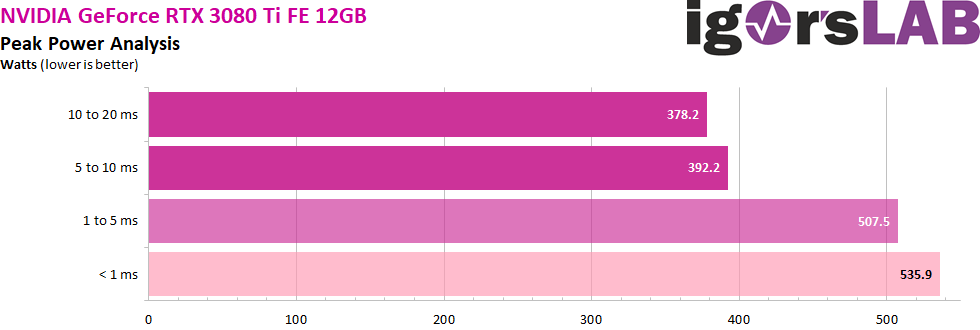
Typically want to focus on 1ms - 10ms transients for comparing against power supply rating.
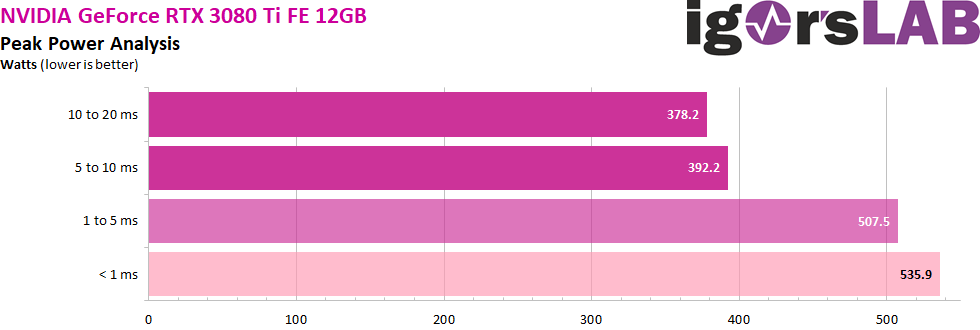
<1ms is basically just worrying about annoying OCP. ~475w is basically the "peak" load from the 3080Ti FE, if comparing against PSU rating.
I doubt the upgrade from 750w to 850w will change anything, unless you flash a 450w/500w PL vBIOS to the card (10 - 20 ms transients will be 450w/500w and 1 - 10 ms transients will be higher).
 hollow leaf
sand atlas
It's spiking to 500W for 1ms or less I promise that
hollow leaf
sand atlas
It's spiking to 500W for 1ms or less I promise that
I wonder what my 450w 3080 12gb spikes to.
sand atlas
600W give or take
hollow leaf
sand atlas
600W give or take
Ah. Well even with my CPU oced, this 1kw is chugging along
 slate creek
sand atlas
600W give or take
slate creek
sand atlas
600W give or take
Damn 3080 12gb spikes to 600w?
My 750w PSU really went brr lmao
serene siren

MSI announced the MAG A850GL PCIE5 ATX 3.0 power supply at Computex 2023, which includes a unique feature that could save people from the 12VHPWR problem.
Buy PCWorld merch: https://crowdmade.com/collections/pcworld
Follow PCWorld for all things PC!
----------------------------------
SUBSCRIBE: https://www.youtube.com/pcworld?sub_confirmation...
lofty pewter
slate creek
Damn 3080 12gb spikes to 600w?
Any 450w Ampere card will hit ~620w 1ms - 5ms transients apart from maybe 3090Ti
 visual fjord
slate creek
Damn 3080 12gb spikes to 600w?
visual fjord
slate creek
Damn 3080 12gb spikes to 600w?
Explains why my 650w PSU randomly trips under load
Until I got a 750w
bleak holly
Is it possible to do a triple custom loop design in the Fractal Torrent?
One loop for CPU, GPU, and Ram.
serene siren
Yes but also wouldn't bother

 carmine oyster
(Also costs more than your whole rig)
bleak holly
Ik.
 scenic lance
205m mesh or Pop Air Mini
serene siren
Pop air mini easily
fierce pivot
consider deepcool ch370 too
 rapid jacinth
13th gen intel and 3060 gpu, any psu suggestions?
sand atlas

Corsair CX650M (2021) 650 W 80+ Bronze Certified Semi-modular ATX Power Supply (CP-9020221-NA)

Cooler Master MasterWatt 750 W 80+ Bronze Certified Semi-modular ATX Power Supply (MPX-7501-AMAAB-US)
Both are tier C, personally I'd do Corsair because cooler master can be a little iffy
bleak holly
Out of curiosity, what PC cases are really spacious and offer lots of customizability with custom water cooling?
sand atlas
O11 variants are really popular for water cooling
bleak holly
The Thermaltake T600 and Haf Evo seem pretty good.
sand atlas
So they have a lot of cool custom stuff like distro plates made specifically for the case
bleak holly
bleak holly
Out of curiosity, what PC cases are really spacious and offer lots of customiza...
More specifically for triple loops.
sand atlas
Yeah I saw that you wanted to do a RAM+SSD loop too lol
Do a 120mm rad on the back and call it overkill
bleak holly
Yep, xD go big or go home is my style when I take risks.
But also I am quite curious what cases you guys recommend.
carmine oyster
Wait dont ssds draw like 10watts lmaoo
carmine oyster
bleak holly
I doubt that would offer any per gains over a 140mm rad.
It wouldn't
bleak holly
It would only offer aesthetic gains.
Which I do value but not that much to justify a 360mm rad for ram.
sand atlas
carmine oyster
Wait dont ssds draw like 10watts lmaoo
Gen 4 ones at 7000 MB/s maybe
carmine oyster
Yeah I wouldn't even bother for the ssd
sand atlas
An 80mm rad would be overkill
carmine oyster
Would prob look goofy
sand atlas
But for the aesthetic I say 120mm
carmine oyster
sand atlas
An 80mm rad would be overkill
Bro u could blow on the thing and cool it lmaoo
sand atlas
Literally
The passive airflow from your GPU is usually enough for the slot that's under it
Even though that's hot air
carmine oyster
Good loll
sand atlas
Anyway, case. I recommend not using one. Open bench.
carmine oyster
Real
sand atlas
Hang it on the wall
bleak holly
sand atlas
Hang it on the wall
I have seen this cat jump 5-6 feet.... And wouldn't fix the issue with my brother.
bleak holly
My brother and I are very tall.
sand atlas
See when I hear "little brother" I think "not 6 feet tall"
bleak holly
I still got a few years and I am already 6.4
sand atlas
If that's the case then there's really nothing you can do to stop him anyway
Case or not
bleak holly
For me best bet would be no open bench.
What cases do you guys recommend for serious and spacious custom loops?
sand atlas
Whatever that tank case was then
sand atlas
lmfao no

You all voted for it, so here it is, the tank build livestream you’ve all been patiently waiting for. Come hang out while we figure out what to stuff inside ...
bleak holly
Is the Haf 700 Evo or Thermaltake T600 good alternatives as well?
Not a big fan of the camo on the tank case.
sand atlas
Paint it smh
There's very few cases you can comfortably fit a triple 360mm water cooling setup in lol
This is one
bleak holly
Just realized I've been saying it wrong. Meant the Thermaltake Tower 900.
Support for 2x560mm rad, 280mm rad in the middle back and I think 280mm rad up top.
sand atlas
Maybe this one http://anidees.com/product/ai-crystal-xl-pro/

Hybrid Panel design for visual effect and high airflow. Face Change: Mesh front panel for high airflow, Tempered glass front panel for best visual effect, both front panels included Supports HPTX .XL-ATX E-ATX (12″x13″EEB), ATX, m-ATX, mini-ITX MB. High end components support. Supports 480/420/360/280/240 mm on top or 360/280/240 mm Radiator in ...
bleak holly
I'd be amazed if that doesn't get choked....
sand atlas
It comes with a mesh front too, both panels

 sand atlas
Yup lol
bleak holly
Albeit tempting I think it comes down to which offers a better triple loop setup aesthetically and performance wise.
sand atlas

480mm on the side, 360mm on the top AND the bottom without interfering with each other
Hell you could do dual 480mm, one on each side panel
bleak holly
For reference the Tower 900 offers:
- 560mm in the rear left and right
- 280mm rear middle
- 140mm bottom
- 2x140mm top (viewing area and rear top)
sand atlas

100mm is NOT a real restriction btw. Even with a 30mm thick fan you're looking at about 60-70mm total with the rad.
sand atlas
Yep those are the only kind that could push the 100mm
bleak holly
How thick are those?
I think I may be able to fit dual 560mm push/pull Monsta rads if they make those in the tower 900.
sand atlas
85mm 💀
Which also begs the question, why bother mentioning the 170mm restriction too, you can do push/pull on a monsta 360mm with T30 fans and still clear it
bleak holly
sand atlas
Which also begs the question, why bother mentioning the 170mm restriction too, y...
..... After doing the math that includes case size, rear middle fan, accounting for fitting clearance, etc, theoretically I can fit rad setups up to 121mm worth of fan and rad on the rear left and right side of the Tower 900.
Do they make 560mm Monsta rads lmao?!
bleak holly
sand atlas
Which also begs the question, why bother mentioning the 170mm restriction too, y...
Maybe for stacking rads?
sand atlas
bleak holly
Do they make 560mm Monsta rads lmao?!

Aquatuning
The new Alphacool NexXxos radiators, a name that stands for experience and quality has come to bring a fresh breeze to the radiator market. Every…
bleak holly
Holy shhhheeeeeatakis they make 560mm Monsta rads lmao
How many watts do you think that thing can cool with a D5 pump and push pull config?
sand atlas
I'm honestly surprised it's that cheap
That's a lot of copper
And yes, it is copper, not aluminum
I hope you don't plan to pick this case up... ever
bleak holly
Agreed.
bleak holly
sand atlas
I hope you don't plan to pick this case up... ever
Ehh I will be fineeeeee. Lmao.
I can pick up 160lbs.
sand atlas
Sure but it's the shifting weight from the liquid that makes you drop it
And bad handholds
bleak holly
True. But yeah I'd make it and never move it till I drain it most likely.
I am honestly tempted to do a water cooling setup once I got everything saved up for a dream build by 8000 series Ryzen chips now.
Dual push pull 560mm monsta rads sound awesome.
Extremely impractical but that's accounted for.
sand atlas
The good news there is that you wouldn't have to wait for a new waterblock mount, since it'll be AM5 still
sand atlas
I think Intel LGA1841 will be the same bracket at least but who knows
bleak holly
And will probably be smart of me to put it on a table with wheels so I can move it around for when I wanna change something.
sand atlas
bleak holly
The only nightmare is gonna be draining this system.
Just plan your drain ports and you're golden
Keep them near the bottom ofc
sand atlas
I think the nightmare will be tubing and wiring it
bleak holly
sand atlas
I think the nightmare will be tubing and wiring it
That's the fun part imo.
I love tinkering with things.
sand atlas
Yeah there's two options for a drain, one you can plug or a quick disconnect that only activates when you screw something on to trigger the valve
I'd personally do the latter so you can have a tube attached to the drain before it starts to drain
bleak holly
Gotcha.
I will also look into those meters you guys mentioned that shuts the system down in the event of a leak or drop in pressure so I don't damage 5 grand worth of tech.
sand atlas
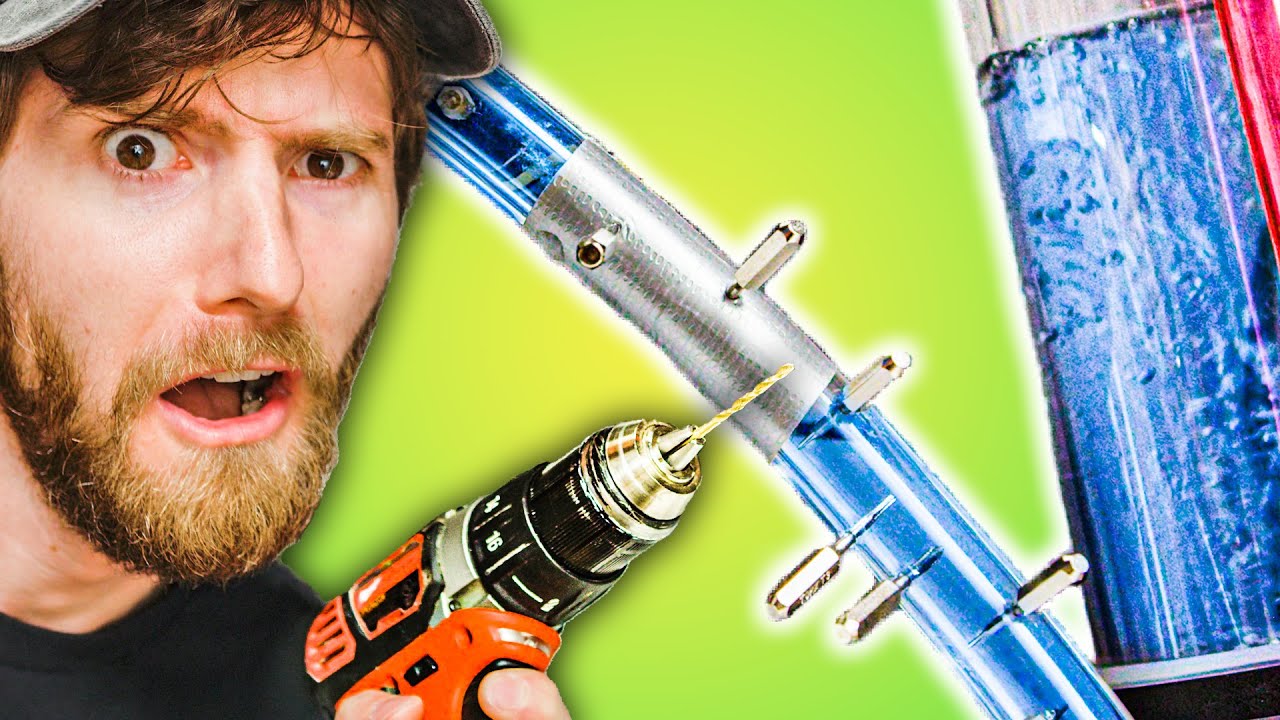
Check out CORSAIR's 7000X RGB case at https://lmg.gg/RFcVG
Learn more about MSI's MPG Z590 GAMING FORCE motherboard at https://geni.us/SofH2r
Buy on Amazon at (PAID LINK) https://geni.us/4kK2I
One of the most common questions that follows "should I water cool my PC" is "will it leak?" Luckily, regardless of whether you're already using a full ...
Leakshield. It's actually insane, you can drill a hole right into the tube and it still doesn't leak.
300 Euros gets a D5 pump, res, and leakshield
And yes it can shut down the system
And it's a leak tester before you fill it
bleak holly
Oh nice.
Also it seems push pull won't be doable without modding the PSU shroud/location in thf tower 900.
So I guess I will just do push config.
sand atlas
Eh push/pull is usually not worth it anyway
bleak holly
Which should still be plenty I'd presume xD.
bleak holly
sand atlas
Eh push/pull is usually not worth it anyway
I did it for the aesthetics in my torrent since rad was exposed but in a area where you won't be see inside I am fine without it.


 bleak holly
Wow
That's fantastic.
Will definitely be using that then.
I see that the tower 900 has 2 areas designed for D5 pumps, is there a way to mount a D5 pump to a fan bracket?
So I can do a triple loop.
sand atlas
Yep
bleak holly
Great
sand atlas

Aquatuning
Bracket for mounting a ULTITUBE D5 expansion tank on a fan attachment for 120 mm fans
Scope of delivery: A steel bracket, painted black Fastening…
bleak holly
Double checked the math. So with a Monsta Rad if I leave 40mm of space between the rad and the rear 280mm exhaust I will have enough space on the Monsta Rad to install fans up to 36mm in depth.
sand atlas
30mm fans like the T30 or the Noctua one cannot be beat for pressure
sand atlas
I don't think so
bleak holly
My plan for the 560mm rads is to have them suck in air from the outside and push into the middle where I will have 2x140mm fans on the middle rear working as a exhaust and a 140mm top exhaust.
That seems good?
sand atlas
Should be fine
bleak holly
Is there a 140mm version of the T30s?
sand atlas
No but there is the Antec T3 https://www.newegg.com/p/1YF-001F-00268
I'm not seeing any 140x30mm fans with rgb though
 urban tulip
bleak holly
Is there a 140mm version of the T30s?
urban tulip
bleak holly
Is there a 140mm version of the T30s?
its on their roadmap but not released yet
sand atlas
Maybe it'll be out when you're ready to build then
bleak holly
That'd be nice.
I am gonna be saving up 5k for a dream build in about 8-12 months when 8000 series is out. Man I am looking forward to this.
bleak holly
Gotcha.
Probably gonna go with a 16 core model though since I am hitting the limits of 8 cores.
bleak holly
Yep.
sand atlas
8950X3D then if they do the same uneven cores as 7950X3D, where half the cores are 3D cache and the rest are high clock standard ones
bleak holly
And will probably dip my fingers in other 3D software in the future as well.
Gosh I think something is wrong with me. I haven't touched anything with RGB so far for this whole build!
Except for the ram.
sand atlas
Must have heard the lies that RGB does not in fact increase FPS
bleak holly
Of course they're lies. RGB obviously increases fps.

This man be soaking in fps.
Honestly an epic case though.
fierce pivot
sand atlas
Must have heard the lies that RGB does not in fact increase FPS
Who is spreading these lies
fierce pivot
@timid basin has rme 2023 been tested? I'd assume it's similar to the 2022 model but don't see it seperate in the list
 timid basin
fierce pivot
timid basin
fierce pivot
Cool ty
scenic lance
what would be the best budget power supply that scores atleast a B on the psu tierlist?
fierce pivot
depends on country and wattage requirements
scenic lance

Phanteks Eclipse G300A (1 Fan) ATX Mid Tower Case (PH-EC300GA_DBK01)
Thoughts on this case?
It seems cheap and has the box look I've been looking for with cases like the 4000D Airflow and CH370
blissful thistle
It's good
Imo one of the nicest looking cases at that price
I love how clean it looks
fierce pivot
scenic lance
Ordered it
Just don't forget to add a few fans, if you don't have any lying around the thermalright c12c i believe is the name have rgb and come for like a 3 pack for 12$ or something like that
scenic lance
fierce pivot
Just don't forget to add a few fans, if you don't have any lying around the ther...
Already have six 120mm fans I was gonna use
One sec
fierce pivot
That'll do nicely so
scenic lance
fierce pivot
That'll do nicely so
 fierce pivot
Perfect
scenic lance
https://a.co/d/dXoEtWX good? trying to keep it cheap but whatever
need a new PSU after mine died
elfin trout
Better to grab this for 5$ more
https://www.newegg.com/super-flower-leadex-iii-argb-sf-650f14rg-650w/p/1HU-024C-00003
elfin trout
Uh
The one on Amazon is 80$+10$ shipping
Leadex iii is a better PSU and higher wattage too
fierce pivot
Is gx2 on Amazon that would do?
elfin trout
Leadex iii 650w for 85$ after discount is a better idea
scenic lance
got prime doe
fierce pivot
Yeah but gx2 is like 65 i think, although the leadex would be better
elfin trout
Gf1 argb 650w is 90$ on Amazon
scenic lance
tryna keep everything as cheap but good as possible
elfin trout
Gx2 is prob fine then
elfin trout
scenic lance
got prime doe
Wasn't shipped by Amazon
scenic lance
elfin trout
Wasn't shipped by Amazon
:(
scenic lance
elfin trout
Gx2 is prob fine then
tt gx2?
fierce pivot
ye
scenic lance
might just be the smart series being awful I guess?
that's a weird series now to me
fierce pivot
scenic lance
might just be the smart series being awful I guess?
Yeah
A lot of brands have great and crap psus
Tt, evga, seasonic just to mention a few
scenic lance
I just don't trust tt with the PSU I just had die while red hot
I'll just use the gx2 then
the case I have is the same brand so it fits either way
scenic lance
does anyone know a good itx case that comes with a sfx psu
 mild roost
There's NR200P Max
Comes with a 850w psu
Expensive but that's what you're looking for
You're better off buying an sfx psu and an itx case though
Don't gotta pay $433 for NR200P Max
scenic lance
yep
 storm pecan
The max is the only way to get top rad support without modding tho
fierce pivot
Ssupd superiority 
 brave niche
Looking to get a new full tower, doesn't need to have glass on it, just needs to have good airflow. Would be using a Asus Prime B560m-a mobo, with arctic PWM PST's, an EVGA 3080ti FTW Ultra. Also, will need to look at getting a new AIO CLC , is there any that might work for a I9-10900f similar to the 280mm AIO, but with 3 fans to fit the new case?
case budget is up to $200 CAD
maybe a bit higher than 200, but is something like this good? https://www.amazon.ca/Phanteks-Enthoo-PH-ES620PC_BK01-Full-Tower/dp/B0894H2JZ4/ref=sr_1_9?crid=1IMR2TSDRGT7A&keywords=computer+case+full+tower&qid=1685911578&sprefix=computer+case+full+towe%2Caps%2C192&sr=8-9&ufe=app_do%3Aamzn1.fos.424c94b5-0341-4740-b8bc-18d5718171b2

Phanteks (PH-ES620PC_BK01) Enthoo Pro 2 Full Tower – High-Performance Fabric mesh, Closed Window, Dual System/PSU Support, Massive Storage, Black
Could also look at going with a fan-based cpu cooler, and picking up extra Arctic PWM PST's
whoever responds, please @ me so I see your response ❤️
fierce pivot
brave niche
maybe a bit higher than 200, but is something like this good? https://www.amazon...
The 280mm should fit most cases, something like a 4000d airflow will fit 280mm on top, if you wanted bigger I'd get the p500a/g500a whichever is cheaper
brave niche
If I wanted to swap to a 360mm AIO to fit the case, is something like the Arctic Liquid Freezer II a good replacement?
or does it not provide enough cooling for a I9-10900f?
@fierce pivot
fierce pivot
brave niche
If I wanted to swap to a 360mm AIO to fit the case, is something like the Arctic...
Yeah but honestly no need
10900f should run at decent temps with a 280mmm aio anyway
brave niche
Good arctic case fans were the P12 PWM PST CO's?
fierce pivot
brave niche
Good arctic case fans were the P12 PWM PST CO's?
Don't need the co's just the regular p12 pwm pst 5 pack will do unless the CO's are cheaper then sure get them
brave niche
What does CO indicate? Better bearings?
brave niche
ahh
fierce pivot
Maybe diff bearing
brave niche
Do you know how many of the fans I could safely connect to my mobo? iirc, it has 2x 4-pin CPU and 2x 4-pin sys fan
because with PWM PST's iirc you can daisy chain their power supply?
sand atlas
Total radiator area on a 280mm is nearly as much as a 360mm anyway.
140x280=39,200
120x360=43,200
sand atlas
brave niche
Do you know how many of the fans I could safely connect to my mobo? iirc, it has...
It depends on the exact model of fan and motherboard. Some of the Arctic P12 fans are 0.11A, some are 0.14A. Typically you'll want the total amperage to be less than 1A, some motherboards can handle 2A.
So assuming the best case scenario, 0.11A fans and a 2A header, you can safely chain 18 fans
brave niche
@sand atlas you might know, would there be any issues using an asus prime B560m-a in a Phanteks (PH-ES620PC_BK01) Enthoo Pro 2 Full Tower? Pangoly is saying that I'd need a mobo USB header adapter to use some of the USB ports on the front of the IO panel, but I'm not quite sure that that means
sand atlas
That means there's a front USB C probably, but no header on the motherboard for the USB C. It doesn't matter unless you really wanted to use that port for, say, charging your phone or a VR headset.
brave niche
oh, u right, looking at the image that's exactly what it is (I think xD)
sand atlas
If you planned on using the USB C port then it's worth spending another $10 on a motherboard that has that header already, instead of spending $15-20 on an adapter later.
brave niche
already have the mobo xd
im just looking at changing the case, my pc runs dangerously hot due to poor airflow and space, and I want the room to add/remove things in the future
but with changing the case, I need to look at more fans and stuff to fit the case, ahah
sand atlas
You don't need to completely fill out the case. In some cases it's actually better to leave certain fan slots vacant or even blocked off.
brave niche
brave niche
dangerously hot as in like 80-90c
gpu temps*
the cpu temp is fine, usually
sand atlas
Intel runs up to 100C, and Nvidia runs up to 95C safely
sand atlas
So not dangerous but not ideal
 sand atlas
Yeah that's less than ideal lol
brave niche
in order to fit it in the case, I have no screw in the top left of my bottom fan
its whack
sand atlas
That's fine, I only have 6 screws holding my 420mm cooler together
That's to hold the fans to the rad AND the rad to the case
brave niche
Is there anything else I'd have to consider pc wise when upgrading to a new case? I've got fans on order and the case itself
@sand atlas
sand atlas
Not really. Motherboards are pretty standard when it comes to the basics, it's just extra features like the USB C that you have to worry about.
 tired sparrow
I just got ordered a 3070 ti but realized I should probably order a new psu as well... is there any yall recommend?
sand atlas
What PSU do you have right now?
tired sparrow
I have a gold corsair tx550M
sand atlas
Ok. What CPU then?
If it's a relatively low power model like a Ryzen 5600 or i5 12400 then you're fine as you are
tired sparrow
5600X lmao I should've probably sent that too
sand atlas
Yeah you're perfectly fine with that PSU then.
tired sparrow
oh bet
sand atlas
It's an A tier unit so it can handle a good bit of stress
Not that I expect it to be loaded more than 450W very often
tired sparrow
Ill probably upgrade cpu eventually since I dont wanna the bottleneck but Ill deal with that headache then
ty for ur help
sand atlas
The CPU shouldn't bottleneck unless you're playing at 1080p low
lofty pewter
sand atlas
Total radiator area on a 280mm is nearly as much as a 360mm anyway.
140x280=39,2...
Even closer when accounting for circles and hubs.
2 * pi * ((135 / 2)^2 - (45 / 2)^2) = 25,447
3 * pi * ((115 / 2)^2 - (40 / 2)^2) = 27,391
sand atlas
Yeah I didn't feel like calculating that lol
lofty pewter
Took those measurements off cheap fans tho. Pricier fans prolly have larger fan blades and smaller hubs.
stray trench
Can this bad boy handle a 6700xt + 12700f?


Asked yall like two months ago and someone told me it can but I should check out its model
fierce pivot
brave niche
Do you know how many of the fans I could safely connect to my mobo? iirc, it has...
A lot more for p12s, I've run 5 off 1 header easily
fierce pivot
stray trench
Can this bad boy handle a 6700xt + 12700f?
I think that one's okay, hard to tell on the tier list there's one in c tier one in e tier, i think it's the c one
fierce pivot
serene siren
You can run 8 or 9 p12's off 1 header
More if a 2a yeah i just only had 5
 tulip granite
stray trench
Can this bad boy handle a 6700xt + 12700f?
tulip granite
stray trench
Can this bad boy handle a 6700xt + 12700f?
Tf is “85 plus”
mild roost
Some stupid claims 
sand atlas
fierce pivot
I think that one's okay, hard to tell on the tier list there's one in c tier one...
I've never seen a C tier unit claim "85 plus" though
It has no real 80+ rating so I'd automatically assume E or F tier
fierce pivot
sand atlas
I've never seen a C tier unit claim "85 plus" though
yeah its weird but that specific one is c tier and the others are e
sand atlas
It's at best speculative C. It's also 220V only and appears to be group regulated?
Yeah based on that label they're just straight up lying about a lot of things. "20A" on the 5V rail but it's only capable of 140W combined on both 5V and 3.3V?
30A on two 12V rails but it can only do a combined 540W?
fierce pivot
Yeah it's definitely not optimal
sand atlas
stray trench
or a PK650D
Either of those is ok. They're both C tier.
And a lot less sketchy than the other one
stray trench

 sick viper
man i want a case that works like an osbourne portable computer
keep thinking a pelican case build wont work the way i want it
sick viper
Found a company that makes luggable pc cases but they dont give you the price
fierce pivot
That's economics for you, low demand = price high
sick viper
Unfortunate
Doing the pelican build
Wish I knew more about air flow
Physics of routing air through a computer
I dont want to make an expensive single-use pizza oven
fierce pivot
sick viper
Physics of routing air through a computer
i think if you can get solidworks you can do airflow simulations
sick viper
True
I could represent the parts as cubes
Unless I can find manufacturer CAD models
 chilly cave


 mild roost
4000d
fierce pivot
lian li 216, better stock fans and has nice ratiator mounting options
and easy to build in, you can take off the top bit while building in it, pretty cool tbh
 scenic lance
Obviously Phanteks is better
scenic lance
fierce pivot
p400a at 10$ more than g360a is pointless
There was a rebate on it awhile back making it like $80 I think
Cheaper than I thought

Non-digital one though
fierce pivot
same price as g300a tho basically
and that has no rebate
and a rgb fan exhaust, stick a 3 pack of 12$ c12c's in there and youre golden
scenic lance
fierce pivot
same price as g300a tho basically
Speaking of
 fierce pivot
Noice
scenic lance
fierce pivot
Noice
Tempted to open it an install case fans for the first time
And just look at it
fierce pivot
scenic lance
Tempted to open it an install case fans for the first time
Prep for the arm workout it requires
scenic lance
Is it really that bad?
fierce pivot
scenic lance
Is it really that bad?
Depends how bad your screwdriver
scenic lance
LMAO
carmine oyster
scenic lance
Is it really that bad?
Just use a drill and set the clutch to the lowest setting
Go slow
urban tulip
And please if you decide to do that make sure your drill has a mechanical clutch 😂
Electronic clutches are complete junk
carmine oyster
urban tulip
Electronic clutches are complete junk
They have those!?!?!?
Oh wait doesn't it just limit the motors power or sum 💀
lofty pewter
Theoretically you can have a proper dynamic between current and voltage for speed/torque ratio, but I imagine most just change voltage for changing speed.
urban tulip
carmine oyster
They have those!?!?!?
Thats what like half of the 18v drills use
carmine oyster
urban tulip
Thats what like half of the 18v drills use
Idk I have a ridgid from like 2018
My impact drifver has something similar
but it fr just cuts the voltage in half
 last sleet
So how do I open the glass side of NZXT H7 Flow?
scenic lance
last sleet
So how do I open the glass side of NZXT H7 Flow?
Thumb screws
slate creek
I forgot, do the HX750 and RMx1000 use the same cables?
sand atlas
Yes those both use type 4, but not the RMx Shift. That uses the new type 5.
slate creek
Thanks, just asking because I forgot where I put my RMx’s cables
sand atlas
Might be good to bookmark this 😉
https://www.corsair.com/us/en/s/psu-cable-compatibility
It's the HXi that uses type 3
scenic lance
Jesus
Disappointing
Was tryna figure up how to make up for the lack of RGB on my CPU cooler
fierce pivot
Yeah they're stupid expensive because well rgb
fierce pivot
scenic lance
Was tryna figure up how to make up for the lack of RGB on my CPU cooler
What cpu cooler are you getting/got?
scenic lance
fierce pivot
What cpu cooler are you getting/got?
Non-RGB Phantom Spirit
I'm starting to think if I wanna get a figurine for my build or not
fierce pivot
Have you bought it yet?
scenic lance
Mhm
fierce pivot
I mean you could return it for the rgb version which is now cheaper too
Or you could buy rgb fans
But returning would be cheaper
scenic lance
I think it's a little too late to return it TBH
Unless I could send it straight back to Thermalright
fierce pivot
scenic lance
I think it's a little too late to return it TBH
Over 30 days since arrival?
scenic lance
fierce pivot
Over 30 days since arrival?
Oh yeah, it's definately been longer than that
fierce pivot
scenic lance
Oh yeah, it's definately been longer than that
i mean you can make it the rgb version for 16$ depending on if you want white/black
https://pcpartpicker.com/product/XYPQzy/thermalright-tl-c12c-s-6617-cfm-120-mm-fans-3-pack-tl-c12cw-s-x3-d6
https://pcpartpicker.com/product/vq6p99/thermalright-tl-c12c-s-6617-cfm-120-mm-fans-3-pack-tl-c12c-s-x3-d6
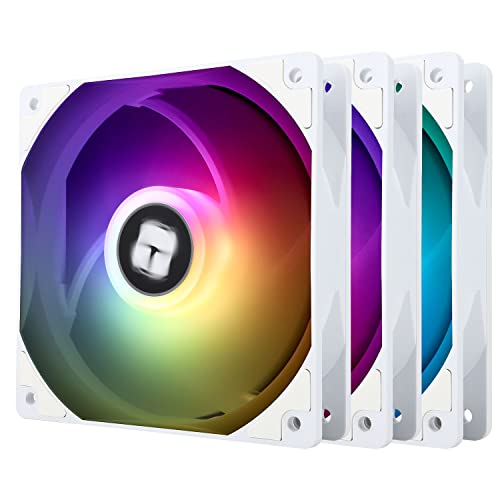
Thermalright TL-C12C-S 66.17 CFM 120 mm Fans 3-Pack (TL-C12CW-S X3 D6)

Thermalright TL-C12C-S 66.17 CFM 120 mm Fans 3-Pack (TL-C12C-S X3 D6)
scenic lance
fierce pivot
i mean you can make it the rgb version for 16$ depending on if you want white/bl...
Is that the fan it uses?
fierce pivot
yup
scenic lance
LMAO
fierce pivot
so its a good option
fierce pivot
lol
scenic lance
Ight thanks Pato
fierce pivot
np
scenic lance
alright PSU is cycling with my motherboard first thing
actually gonna move to a more general area
brave niche
Case came in, now to wait for my fans that r supposed to be here tmrw
 brave niche
@sand atlas any clue on how I can tell which side is ground on a chassis panel header? Is the ground the side w the arrow?
sand atlas
On the switches yeah it's pointless
brave niche
Kk
serene siren
Wym polarised
 viscid patrol
i guess if you have an LED that activates when depressed?
 viscid patrol
lmao
urban tulip
viscid patrol
i guess if you have an LED that activates when depressed?
My LEDs never turn on when I bully them and call them names but that's just my experience
viscid patrol
Lmao
bleak holly
Doing a budget build for a friend. What case do you guys recommend sub $100?

Montech X3 Mesh ATX Mid Tower Case (X3 Mesh Black)
considering this case at the moment.
bleak holly
does the Deepcool Matrexx 40 come preinstalled with fans?
fierce pivot
bleak holly
https://pcpartpicker.com/product/HRH7YJ/montech-x3-mesh-atx-mid-tower-case-x3-me...
depends how much they wanna spend on it/whole budget tbh
fierce pivot
x3 is a good option though
 coarse sable
Next c750 is good?
mild roost
yes, but i wouldn't get it since it's not at a good price
instead i'd get fsp hydro g pro
fierce pivot
Price depends on your country*
tulip granite
yo @bleak holly how the hell do I close this damn glass side panel on the torrent
like it doesnt fit...
got it
do I always have to take the top part off to put the side back on?
viscid patrol
No
You might have the glass 90 degrees wrong
Turn it 90 degrees and see if it fits
The case is a rectangle and not a square
Actually I forget how the torrent is for the side panel
Is it hinged or is it some like
Thumb screws
Oh it's clipped
tulip granite
yeah its clipped, I got it so next time I open it ill try again
 chrome agate
So my computer won't start i tried paper clip test for psu and it is functioning. Tried bridging start prongs on motherboard and no success. Any suggestions about what to do next?
bleak holly
tulip granite
yo <@217356391675985921> how the hell do I close this damn glass side panel on t...
There's a clip on the bottom for the glass to slide into.
No need to open the top.
viscid patrol
chrome agate
So my computer won't start i tried paper clip test for psu and it is functioning...
any power at all seen on the mobo? indicator/debug leds, fans spinning? psu fan spinning?
bleak holly
viscid patrol
Is it hinged or is it some like
Magents and clips.
You slide the glass along the rail on the bottom till it clips in there then press it up top until the magnets lock in.
It's really simple and easy to open/close the panel once you get used to it.
chrome agate
@viscid patrol i got the case fan to work but nothing else no lights that i can see
Part List - Intel Core i5-10600K, GeForce RTX 3060 12GB, Deepcool CL500 ATX Mid Tower
tulip granite
ok thx apex
viscid patrol
chrome agate
<@297812853174566913> i got the case fan to work but nothing else no lights that...
Hmm no debug leds on?
In the top right corner?
blissful thistle
chrome agate
<@297812853174566913> i got the case fan to work but nothing else no lights that...
Secure connections, make sure rams slotted in, could try one ram stick
Make sure power button cord is plugged in correctly
And psu is on (I've done that before)
chrome agate
Yep no lights all stuff plugged trying just cpu and 1 stick ram now
viscid patrol
im a bit exhausted so you can help them with the troubleshooting lmao
oh they went to build chat, i didn't even realize that this wasn't build chat 💀
brave niche
First time actually doing cable mgt. not too bad imo 🙂


Any suggestions to clean it up more? Im thinking next time I open it up for hardware changes, strap the pcie and psu cables together so they lay flat?
brave niche
chrome agate
<@297812853174566913> i got the case fan to work but nothing else no lights that...
usb plugs working? If not, maybe a mobo or cpu issue? I fried my mobo and cpu a year or two ago, and I fund out cause there wasn't any usb plugs working whatsoever
serene siren
brave niche
Any suggestions to clean it up more? Im thinking next time I open it up for hard...
Fix the sag on that gpu. That sag is mega - ampere high-end has a tendency to lose vram modules if the sag is left unchecked
Get an anti sag bracket/stand/lego/random perfect length thing and stick it on the outer right corner
brave niche
Btw there is an antisag bracket but its supposed to be on the back of the case xd
Idk why its there cause its useless asf
carmine oyster
brave niche
First time actually doing cable mgt. not too bad imo 🙂
This build confuses me so much lmaoo
brave niche
@serene siren is it ok to use wood?
brave niche
carmine oyster
This build confuses me so much lmaoo
How so? Like component choice ya mean?
carmine oyster
The case is massive lmaoo
brave niche
Xd
brave niche
I had a small case and was always Po’ed working on it
mild roost
It's the phanteks enthoo pro isn't it
brave niche
Yes
carmine oyster
Oooo fair enough lol
mild roost
That dual mobo case
brave niche
I cant believe they put a plastic front on a $200 case
Wtf
And literally everything else is metal
Like
mild roost
probably spent all the money on everything else 
brave niche
 serene siren
brave niche
<@101107951401455616> is it ok to use wood?
serene siren
brave niche
<@101107951401455616> is it ok to use wood?
Anything solid
If the shroud gets hot, preferably not flammable
Lego is OP for this kind of thing
brave niche
I have a crapload of lego just dont wanna dig it out xd
Also wood catches fire around 250-300°c iirc so if it catches fire im fked anyways lol
 serene siren
brave niche
Also wood catches fire around 250-300°c iirc so if it catches fire im fked anywa...
serene siren
brave niche
Also wood catches fire around 250-300°c iirc so if it catches fire im fked anywa...
Oath, I'm just pedantic is all
Lmao
 barren oriole
brave niche
Any suggestions to clean it up more? Im thinking next time I open it up for hard...
barren oriole
brave niche
Any suggestions to clean it up more? Im thinking next time I open it up for hard...
a biggerboard, it will never look good from the front side with your fan cables going 3 feet to the board lol
brave niche
barren oriole
a biggerboard, it will never look good from the front side with your fan cables ...
I mean, yeah ig, but idc how it looks lmao
I got rid of my rgb and glass side panel in my old case for a full metal side panel with this case
brave niche
barren oriole
fair but why cable manage
cause if stuff breaks, then I can actually figure out tf is going on xD
brave niche
tbf if I had the money to get one of those super decked out nice RGB color matched desktops and monitors n stuff I'd probs go that route
but I don't
barren oriole

480$ or something like that total rig cost
i need rgb aio fans and ram
but
later
brave niche
i'd go with a higher end rgb aio, my aio rn is nice but not rgb
also I keep it in my bedroom since I don't have my own place yet so the light is annoying at night
actually wait
we got the same aio'
xD
barren oriole
brave niche
i'd go with a higher end rgb aio, my aio rn is nice but not rgb
this CLC 280 is actually pretty good, it keeps my 11700K relatively tame unless its at its absolute max wattage of a calm cool 400w
barren oriole
brave niche
we got the same aio'
yeah, i have it swapped with P14s
brave niche
I don't oc anything on my pc cause I can't afford to be dmging stuff lmao
so my 10900f is fine with it
brave niche
barren oriole
yeah, i have it swapped with P14s
I use P12 Arctic's
barren oriole
its basically impossible for me to really hurt this cpu 💀 basically designed to take voltage
ah, i have a CLC280, you must have the 240
brave niche
oh yeh xD
lmao
I kinda wanted to upgrade to larger fans when I was getting my new ones but CBA
barren oriole
fair
serene siren
Not really
Efficiency isn't a measure of quality either
You might save a handful of dollars with constant use over the years but in turn you spend many more
sick viper
Mostly reducing what would show on an electric bill
serene siren
Like, instead of that gold 850w for 110, you pick a titanium 850w for 250
I'd speculate you wouldn't even make half of that back
sick viper
Yeah that is about punching the Numbers
serene siren
The gold platinum titanium system isn't really that reliable either. Some companies use hand picked units for better results whereas in reality they barely make bronze efficiency
The system is being replaced slowly for cybernetics certification
Afaik
I'd argue once you get a good gold unit you'd be well enough off. Most iirc are well over 90% efficient nowadays
 tacit wren
If you google "psu name cybenetics", you can find the official 80+ certification test results https://www.cybenetics.com/d/cybenetics_VxJ_eu.pdf
fierce pivot
sick viper
A lifetime of about 5-8 years
youll actually pay more in the power supply markup and also titanium units are usually like 1000w+ and whats actually worse for efficiency over gold/plat/titanium is having a power supply thats overspecced
because where most inefficiencies' are are during idle-low wattages
tacit wren
Looks good

oh, actually that's a crossload test
kinda, I wish they split that into two graphs
serene siren
Can still kinda interpret it
Basically the pc will live most of it's life in that black to blue region
tacit wren
tl;dr the blue+black region is huge and probably covers what you care about
fierce pivot
and the gf1 is just a nice unit in terms of voltage delivery etc and good price atm too
serene siren
serene siren
<@280880543757762563> ^^^^
The psu we suggested in the list^^^
tacit wren
1600 t2 master race - doesn't even need the fan until 600w

I've seen some units with an annoying fan curve where if you game at ~400w on an ~850w unit, the fan will ramp up and down audibly.
I just disable the eco switch on any unit I have, no reason to use it most of the time imo
fierce pivot
I've never heard my psu fan either
serene siren
My 1650W I hear it
When I turn the pc off that is
I believe that's it discharging
But my 1000W has an eco switch
I flip it and nothing happens

Nothing I can notice anyway
Maybe it does something
tacit wren
serene siren
I flip it and nothing happens
Eco on should mean the fan stays at 0 rpm until it's needed
serene siren
Ya
Oh yeah I kinda get that
But I still hear nothing

Never had it out of a case to check what it's doing unless I was paperclip testing it
tacit wren
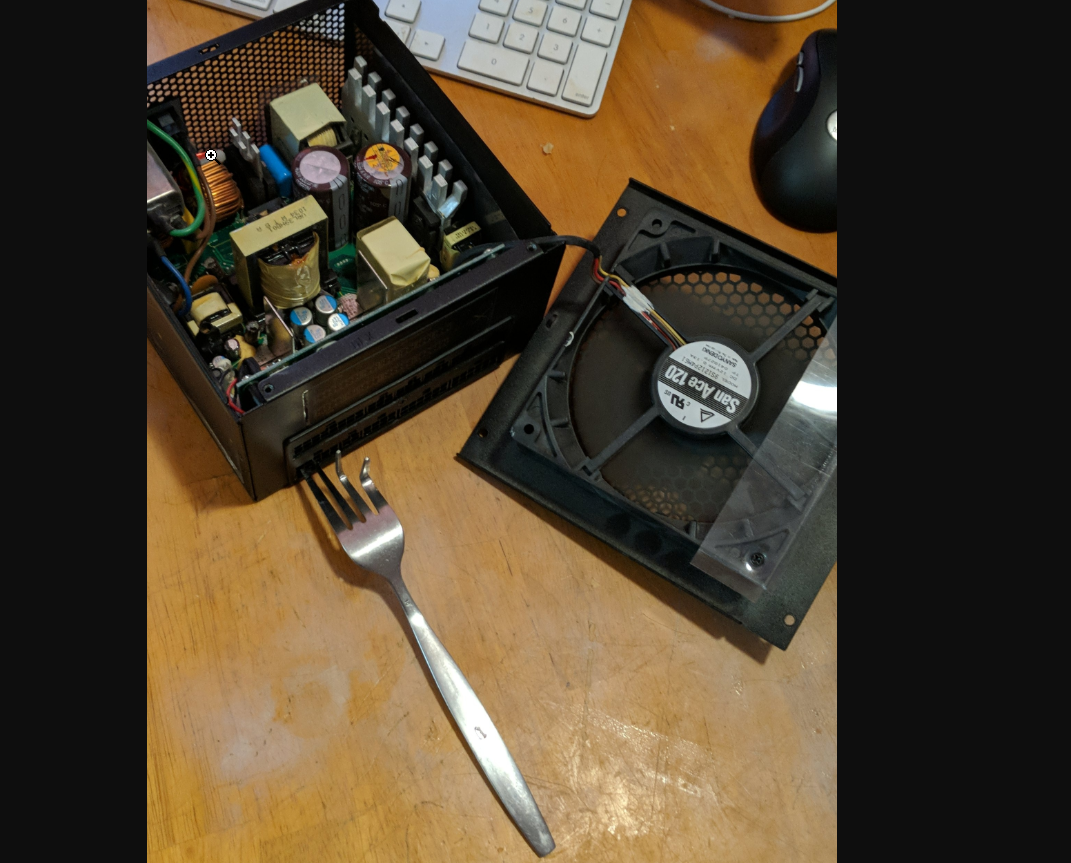
I had this seasonic x series gold 750 from 2010 that would spin up/down aggressively while I was gaming, eco was on by default with no switch, fan bearing seemed to wear prematurely. https://i.imgur.com/hdbV9rT.png
 tacit wren
Broke the fan on accident, and now it powers my water pump
tacit wren
It's just shorting green to black
serene siren
Didn't mama tell you not to stick forks into outlets sir
tacit wren
Later replaced it with some china fan, but it uses a proprietary cable, useless once you lose the hub. https://i.imgur.com/S2SxFp1.mp4
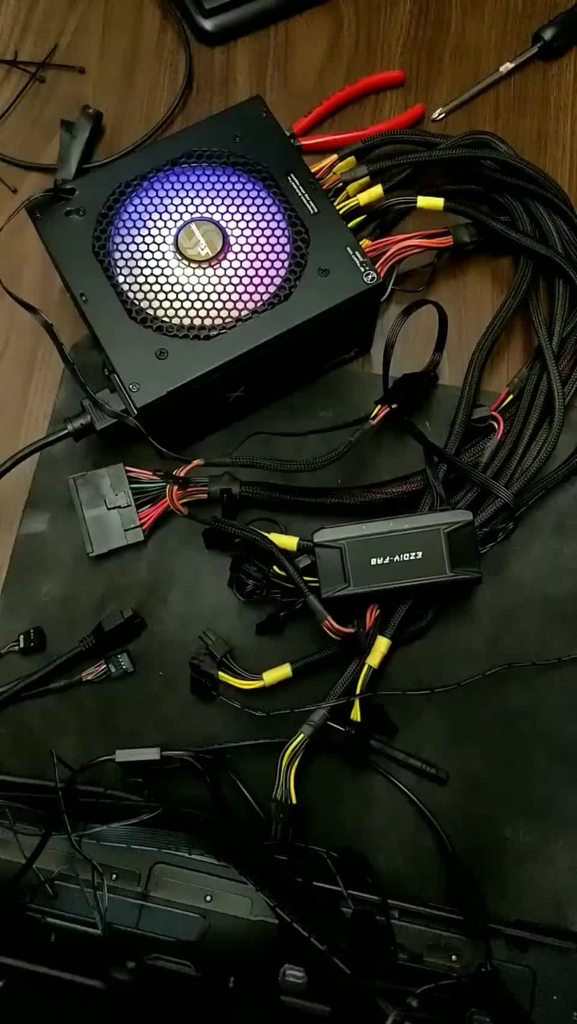
Thus, it's now living as a d5+rad fan psu.
tacit wren
Hasn't died after 13 years, no complaints
sand atlas
serene siren
Whether I turn mine on or off I still hear nothing
Same, RMx FTW
slate creek
Never heard my PSU fan at all, RMx is great
carmine oyster
slate creek
Never heard my PSU fan at all, RMx is great
Im to the point where idek if mine works LMAO
Ive never heard it come on
carmine oyster
(I'm now realizing I should prob check this)
blissful thistle
I was rmx gang but that's now in my partners pc, I've a gt 850 now
650 in my partners pc
sick viper
Anywhere I can look for I/O panels?
sand atlas
You'd have to buy an identical motherboard to get a compatible IO plate. Or ask the manufacturer if they'll send you one. They usually won't.
Unless that's not what you mean?
sick viper
I guess not
More like a power button and all
What is usually on the front or top of a computer case
Would be cool to just make my own, especially since it would probably be best if I put something that shut the computer off it the case were to accidentally shut.
sick viper
Thinking about the fact it is a pelican case
sand atlas
Right right that was you
sick viper
Or better yet only letting the power button be turned on and off if the case is open
Probably should look at someone else’s build
Or better yet look at the inspiration for this like the Osborne-I
sand atlas

MEIRIYFA Chassis Switch Host Metal Button LED Switch. Suitable for DIY Computer Switch and Restart Button . This is a perfect choice if you are in need of a rugged push button! Metal Button Technical Parameters: Material: Aluminum Alloy Nickel Plating Length: Approx. 60cm / 23.6in Button LED Ligh...
You can thread a hole and screw that in and it'll be water tight
sick viper
Everything is going on the inside
sand atlas
It would be easy to put where you want
sick viper
I suppose
sand atlas

MZHOU USB2.0 + 3.0 Metal Front, 5.25 inch 19Pin Front Panel Adapter, 4 USB 3.0 Port hubs and (1HD Audio Port / 1TPY-C Port / 1 Microphone Input)
sick viper
I will worry about the vents when I put everything in the cad software
sand atlas
sand atlas
https://www.amazon.com/MZHOU-USB2-0-Adapter-1TPY-C-Microphone/dp/B08F1XC83D/ref=...
You don't have to use their metal chassis, it comes off and you can screw down the board where you want
sick viper
You know what I probably wouldnt try to close it while it is active
but someone else would.

The dream

T-SIDAKE 5.25 Inch PC Multifunctional Dashboard Media Front Panel Audio, with SATA e-SATA Dual USB 3.0 6 Port USB 2.0 Five-in-ONE Card Reader (SD / MMC / CF / MS / TF / M2)
What am I even looking at
Who even Uses compactflash these days
That DC port seems like a solution looking for a problem
Could have a cool use idk
sand atlas
Man I haven't seen a CF card since college, when I took Cisco networking
mild roost
CF cards still exist and available to buy
But they're exceedingly expensive
More expensive than sd cards
sick viper
If I needed obsolete ports I would use some adapters
sand atlas
Ofc, you can buy memory stick too even though Sony was the only one to ever use it back in the PSP days
sick viper
I have a maze of adapters I use to connect my laptop to an old PVM
sand atlas
Poor Sony tried so hard to make memory stick a thing but it was just a worse micro SD
sick viper
BNC is a really cool connector
I love it
They seem sturdy
I do like the selection of ports though
But really the DC seems strange
sand atlas
It is odd that they'd have the external molex output. There's not many use cases that would need that.
sick viper

Front LCD Panel,5-Fans Speed Controller CPU Temperature Sensor Computer Cooling Drive Bay Front LCD Panel,AUTO/Manual Manual Mode Automatic Mode Switch https://a.co/d/1zK0F1w

Features: 1. AUTO /MANUAL manual mode automatic mode switch. 2. Big LCD screen to display the temperature, fan speed, alarm temperature, hard disk state, to constantly know the the working condition. 3. Smart adjust the computer temperature though controlling the wind speed of 5 groups of fans. 4...
Oooooo
I like random LCDs honestly
Physical means of control
Volume and such
I dont think computer cases these days do this
Having many buttons
sand atlas
It's fallen out of fashion lately
sick viper
I am very much function over form personally
The pelican case will not be modified except for points where glue will be used for mounting brackets
sick viper
looks like that phantex 850W PSU is out of stock
i will just keep my eye out when i have my next paycheck
blissful thistle
sick viper
looks like that phantex 850W PSU is out of stock
Gf1 850
serene siren
sick viper
looks like that phantex 850W PSU is out of stock
GF1 thermaltake
sick viper

shall i use one of these to put inside the pelican case?
it is a platform to put the mobo on and i think to provide support to the GPU

ATX PC Open Frame ATX Test Bench Motherboard Overclock Computer Case DIY Mod Base Chassis for ATX Mothboard, 4mm Transparent Acrylic Frame PC Test Bench for Testing, Overclocking or Gaming
or use an inexpensive open frame to at least hold everything together
i think i will worry about it until all the other parts get to me
sick viper
found someone else's build

Due to the need to travel, I built a portable gaming rig in a Pelican Case so I can continue to do my dailies in Genshin Impact.
Thank you so much for watching the first video of the OBAKA channel. I hope to continue making content of me, making and doing weird anime related things.
#PCbuilding #GenshinImpact #Weeb #anime #otaku
Music: (Non...
ignore weeb

a common issue is the screw put through the case which would be sad for pelican
sand atlas
sick viper
ignore weeb
Well if you insist. I guess I'll be ignored.
sand atlas
sick viper
a common issue is the screw put through the case which would be sad for pelican
If you do use a frame like that you can always glue it down
sick viper
Perhaps a system of latches and have foam under
Contacted the company to see if there is anyone there who could suggest what NOT to do.
hollow leaf
@serene siren How low of a PSU can I get away with using for a 12100 and 580 8gb combo that will never be used for games?
serene siren
Good 550w would do
But it's a shame cos no decent psu sales rn
I say that even with the thought of one day "oh maybe I might try this game" might happen
hollow leaf
serene siren
I say that even with the thought of one day "oh maybe I might try this game" mig...
It's only going to be hooked up to my bed TV so I can watch movies and whatnot before bed. It will have no other use.
serene siren
I could say lower like a 450W but the floor really starts at 550 these days
So I mean, may as well
hollow leaf
could I get away with using this?
 serene siren
Yes
I believe even the older TX's are good
That's a very old one tho
Like, 2016 or something like that?
hollow leaf
 mild roost
The label color
hollow leaf
I guess I'll just suck it up and grab that apevia again since that's like the cheapest psu
sick viper
What would probably be most vulnerable to getting bumped around while transporting a desktop?
Outside of HDD
trying to think of how to protect the internals from getting bumped around.
Say I transported the computer in a pelican case by bike


There is this thing but a lot of wasted space and overkill I think
but kinda shockproof
I mean if I really needed to transport I probably could have foam fit for the inside when I need it
Laptops are more tightly packed
sand atlas
sick viper
What would probably be most vulnerable to getting bumped around while transporti...
The GPU would put a lot of strain on the PCIe slot.
You can use a pack of instapak to reduce the chance of damage.
HDDs should be protected from vibration
sick viper
So yeah I will use a cable to extend that
The case itself is small enough to be a carry-on
sick viper
I am thinking elastomer spacers when possible
Something silicone would help to pad boards
Need to make it universal though
scenic lance
Older PC, No signs of life when power supply is in case.
I recently purchased a 2nd hand Corsair VS550 in hopes of bringing this older pc (Zoostorm tempest) back to life.
The power supply worked on the initial test of only being plugged into the mobo, and powered up fine, but when i put it into the case, and plugged everything in it was just dead.
I again removed the power supply and tested the MOBO connector, powers up fine, then i connected the other cables (with power supply outside of case) and it is again not booting.
I tried removing different cables incase one was dead, but no matter which i removed, it only powered up when the MOBO was in on its own.
Ive tried everything obvious like power cables.
Any ideas?
sand atlas
scenic lance
Older PC, No signs of life when power supply is in case.
I recently purchased a...
You're plugging the 4+4 pin connector in for the CPU power right? I've seen people use the 6+2 and that causes a short, so it refuses to turn on.
 oak cliff
Would a potentially dead PSU still allow the PC to turn on for like a split second before turning off again? I am having some issues tonight and I cant figure out the problem
I was playing GTA 5, randomly everything just turned off but the lights on my pc were still on, so I held the power button to turn the PC off just incase. Afterwards, when trying to turn the pc back on, it would turn on for a split second and then turn off and it started turning back on, on its own until I switched off the power supply. I left it for a while, came back and now it turns on?
serene siren
Short
oak cliff
How would I find the short, I suppose a good way is with a multimeter
sand atlas
Since it was working before I'd clean out the PC, and while you're at it unplug and replug all the cables just in case one came loose and caused that short.
Another potential cause is the OCP or OPP were triggered but that's less likely unless it's a very low power unit, since GTA doesn't exactly take a lot of power to run.
oak cliff
Alright thanks for the advice, I will give that a try tomorrow morning when I get the chance
scenic lance
sand atlas
You're plugging the 4+4 pin connector in for the CPU power right? I've seen peop...
I'm using 4+4 as a single 4
scenic lance
Update: Power supply failing to start if anything other than MOBO is plugged in. If just mobo is in, it powers up. If anything else is in (I tested every single one) it won't even show any signs of life.
 flat island
 mild roost
it isn't but it's ok enough for the parts
i suggest replacing it whenever possible but it's fine
scenic lance
hello guys
let’s say I ordered a pc (shipped and sold by Newegg) but I live outside america worth a different outlet type
will it with a American plug or a plug that my country uses?
blissful thistle
American plug afaik
scenic lance
dam
blissful thistle
Unless it's from a different country newegg site
blissful thistle
Oh should be your countries plug then
scenic lance
for example if a German person in Germany ordered off Newegg and put it the location in Germany
scenic lance
blissful thistle
Oh should be your countries plug then
alrighty thanks
 ember marsh
whats a good case to buy?
thinking i should get a new case for better air flow and more space so that when i buy my new gpu in due time i can just pop the front off and then remove and replace easily
sand atlas
Torrent is great*
*if you're doing a custom loop or air cooling, not aio
tulip granite
me doing 420mm aio
tulip granite
sand atlas
LFII mounted on the outside of the gd case
i actually got the lf II 420 to fit without any cutting. If u put in the 140 adaptors it fits, besides the top screws
sand atlas
Yeah I did too. I just flipped the mount so it goes on the outside.
ember marsh
I have an aio
tulip granite
sand atlas
Yeah I did too. I just flipped the mount so it goes on the outside.
why? does it help with temps much?
ember marsh
I just need more space with ease of access into the case. Not grinding screws in and out constantly to try and pop my case back together
And possibly some pre-built fans
sand atlas
Well if you don't want to spend a fortune on an enormous case like the torrent there's always the G360A
tulip granite
it comes with fans
ember marsh
Where exactly do the fans go? Cause I want my aio radiator to be top mounted
sand atlas
There's no top mount on the torrent at all
ember marsh
And can the torrent come in white? Cause my aio is white lol
sand atlas
Yes it comes in white, and rgb and non flavors
And tinted glass, dark tint, or solid metal side
tulip granite
rgb fans*
ember marsh
I'll look into it. Is it good for ease of access and easy to put things in and out of the case?
sand atlas
tulip granite
the case comes with rgb regardless
Don't have to plug it in if you don't want though
I didn't
tulip granite
only pain is if u have the 140mm front adapter in, u need to remove it to take out the bottom fans
ember marsh
Cause I'm sure @sand atlas remembers me annoying the crap out of everyone about my radiator not fitting in my case lol
tulip granite
sand atlas
Don't have to plug it in if you don't want though
can it be controlled with software or a button?
tulip granite
so like mystic light?
sand atlas
Yeah
tulip granite
nice
ember marsh
My hope is to keep my aio and motherboard attached and just easily move into the first
sand atlas
Or openrgb if you don't want to deal with first party
tulip granite
sand atlas
Or openrgb if you don't want to deal with first party
but then plug iinto the mobo and not the fan hub right? Or does the fan hub get connected to the mobo?
sand atlas
The fan hub is for the fans, the rgb plugs into the motherboard
tulip granite
👍
sand atlas
The fan hub can connect to the motherboard to control those too
tulip granite
but i assume the fan hub connects to the motherboard regardless for pwm right?
tulip granite
whats the amps of one connector again?
ember marsh
Would that be fine with the torrent if it's connected for a top mount? Or would I actually have to remove my aio and put it back on with new thermal paste for a proper front mount
tulip granite
i got some other fans
sand atlas
1A unless otherwise stated in the manual
tulip granite
sand atlas
1A unless otherwise stated in the manual
if I connect 3 fans to the hub, and the hub is connect to a single sys_fan, then I cant control the pwm of each fan individually right? I would have to set the same voltage to each fan right?
or width not sure how pwm works
sand atlas
Correct, the fans on the hub would all run the same % speed
tulip granite
hmm, then I might do my rear fan seperate
sand atlas
You can always take the front 180mm fans and run those off a motherboard header, and do the rest on the hub
Or whatever combination
tulip granite
sand atlas
You can always take the front 180mm fans and run those off a motherboard header,...
I took the 180s out to fit the rad. The bottom fits a 180 and 140 haha
sand atlas
I guess that's the reason for me to mount the rad outside lol, I fit both 180s on the bottom
sand atlas
Push
ember marsh
Well what's a case that I can do a top mount but has the same kind of features as the fractal torrent
sand atlas
Hang on I got pics from hwbot
tulip granite
isnt pull better because it gets less dust
sand atlas
The P500A digital gets really good reviews, it's also a large case with lots of bells and whistles
sand atlas
tulip granite
isnt pull better because it gets less dust
If it fit sure
ember marsh
See idk if I trust phanteks cause I have one. And you don't know how horrid it was to put the case together with all the stuff in it
Not the p500a. I think it's the g360a
 tulip granite
any front panel?
sand atlas
G360A is a fair bit smaller. Maybe consider the 5000D airflow then.
sand atlas
tulip granite
any front panel?
lol no
sand atlas
lmao electric duster
ember marsh
sand atlas
G360A is a fair bit smaller. Maybe consider the 5000D airflow then.
It's in fact too small for a 360mm aio.
Unless you want to pull your hair out before squeezing your case together to screw in anything then the g360a is your case
sand atlas
ember marsh
It's in fact too small for a 360mm aio.
The 5000D? No way it's too small for that, it's a big case
ember marsh
No the g360a is
sand atlas
Ohh yeah like I said, fair bit smaller
I'd usually do a 280mm max in that

Corsair 5000D AIRFLOW ATX Mid Tower Case (CC-9011210-WW)
sand atlas
Only 2
ember marsh
Ah ok so would the 3 fan aio along with the 3 fan gpu be good? Or would I need something a little better?
Cause I plan on upgrading my gpu to a 40 series soon
sand atlas
You can take the fans out of your current case to fill in some spots too
ember marsh
True but they're all white so I'd need a white case lol
Unless I'm tryna do a black and white case
sand atlas
Well you're in luck lol https://pcpartpicker.com/product/JWn8TW/corsair-5000d-airflow-atx-mid-tower-case-cc-9011211-ww

Corsair 5000D AIRFLOW ATX Mid Tower Case (CC-9011211-WW)
There's a rgb model that comes with more fans too https://pcpartpicker.com/product/kLkH99/corsair-icue-5000d-rgb-airflow-atx-mid-tower-case-cc-9011243-ww

Corsair iCUE 5000D RGB AIRFLOW ATX Mid Tower Case (CC-9011243-WW)
ember marsh
Which I see they do have a white case
I'd assume this is bigger and can. Fit my aio and bigger gou when it comes to upgrading from a 30 series to a 40 series
ember marsh
I'd probly have to do the rgb one if it comes with the fans. Just as long as it allows a top mount for a 360mm aio


 ember marsh
Thats nice
serene siren
Why we lookin at corsair reeee
ember marsh
And I saw the picture of the fan space on the back of the case too. Thay allows me to get the 3 from the front of my old case and slap em in the back if I have space for the fans to actually function. If not I'd need more connections
sand atlas
There's a hub included for the fans
serene siren
G360A fits top mount, that's it's whole marketing schtick
sand atlas
Yeah they have that, apparently it's a tight fit and hard to work with
serene siren
Yes it was always like that
ember marsh
I could show you the damage to the case
It was a pain in my side putting it together
serene siren
Which aio did you try to fit
ember marsh
360 mm
ember marsh
There we go
sand atlas
Delete everything after "?"
That's a good way to shorten
Fun fact, discord won't even let you click a link that's too long
"This link may be malformed and dangerous"
ember marsh
Yeah I was gonna say somt worry it's not gonna steal your info lmao
ember marsh
Trust me I literally asked everywhere about every part of my pc before I even bought it.
Like watched YouTube and even Google everything I could find about every part I have
ember marsh
I figured
serene siren
Well if you got damage, you could email phanteks about it
They just straight advertise 360mm in general
I was going to get one myself soon for a build, so I could have a look at that
ember marsh
The 5000d seems like it's gonna be so much better. And as long as I don't have to unmount my aio and just move it in with no complications I'm chillin
serene siren
Yeah if you want as well
The p400a digital is on sale rn
It's 5000d size without the 5000d price
You'd have to check if it does top mount tho cos p series normally has 240mm up top
ember marsh
Eh price isn't my big issue. Honestly I just need airflow and Space for upgrades if I want it
serene siren
P400a afaik is like an eatx case lmao
sand atlas
serene siren
They just straight advertise 360mm in general
Just like the torrent advertises 420mm but IT FREAKING DOESN'T FIT except one specific AIO
ember marsh
From the video I'm watching and the picture falcie sent it seems to allow a top mount
sand atlas
I suggested P500A already too
ember marsh
I mean my phanteks experience was kinda ruined seeing as the first case I bought was a pain. But the aio was the issue and my inexperience wasn't great
serene siren
Oh what about fractal pop xl

Fractal Design Pop XL Air ATX Full Tower Case (FD-C-POR1X-01)
ember marsh
If it's like the 5000d I'm all for it but I'm gonna be very cautious on what I buy
serene siren
Cheaper than 5000d, comes with more fans, MASSIVE
Ye for sure man
Do your research
I appreciate being alerted about the g360a tbh
We don't get much feedback here besides our own market research
ember marsh
Thats not bad either. It looks massive lol
serene siren
I can definitely see what happened and I'm sorry if we recommended that combo before
Ls720+g360a was on our lists for a long time, so I'd believe it
serene siren
ember marsh
Thats not bad either. It looks massive lol
It's huge e-atx
Full tower
And the most compatibility for the cheapest price
Pop air is very nice if you like simple lines
ember marsh
So it'll allow for lots of upgrading.
ember marsh
I'd assume the cases aren't brand specific for motherboards or anything
sand atlas
Torrent is bigger 
serene siren
ember marsh
I'd assume the cases aren't brand specific for motherboards or anything
Ya atx is the standard
Made to ensure wide compatibility
You could also look at maybe something a bit more unique
Jonsbo d41 mesh
It has some gpu length limits but it has a huge compatibility footprint for such a compact case
Full atx compatibility
And 360 aio on top
Ap201 is very similar but matx size
ember marsh
I mean for rn it's a work in progress. It'll probly be a set combo for a 40 series a gpu bracket to hold it up so theres no slack and what not
serene siren
Ah, which 40 series?
ember marsh
Will just need to find the right time to order a gou that's on sals
ember marsh
serene siren
Ah, which 40 series?
Doesn't matter to me. Proper pricing which is kind of current gen
ember marsh
Cause I don't really wanna have to upgrade again
serene siren
7900xt and xtx over almost all of them tbh
ember marsh
Like technically my rigg rn is fairly new
sand atlas
Nothing touches the 4090 yet but that price 
serene siren
I mean
ember marsh
Yeah I needa save before I spend lots of money but ik it'll be worth it. It'll probly bottleneck my 5800x3d lmao