#cpus-mobo-and-memory
1 messages · Page 257 of 1
 cursive epoch
 rigid sluice
why would that make a difference?
 grizzled bloom
Very old.
Modern tests are better at stressing the hardware using more modern instructions
cursive epoch
^
rigid sluice
wellll idk what TM5 is so
grizzled bloom
Besides if it's stability you're looking for you want to let memtest run for at least 10 passes
cursive epoch
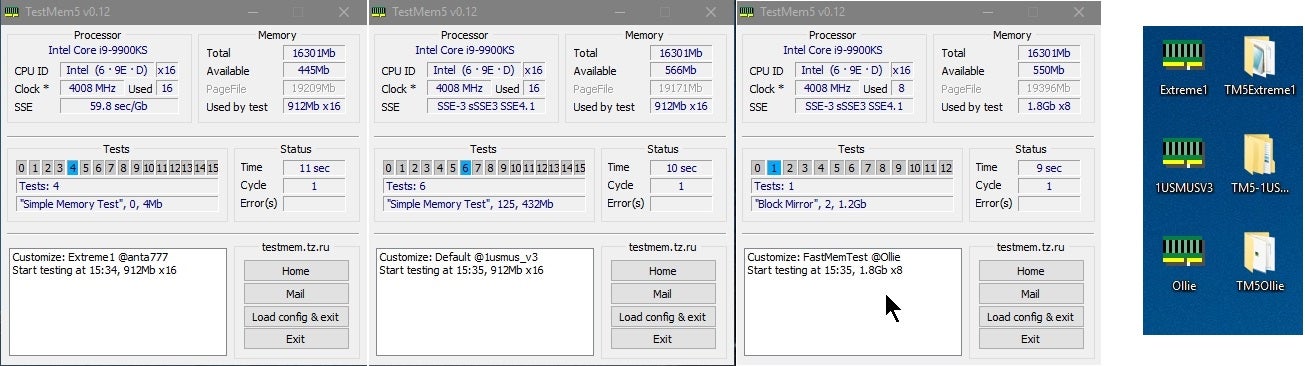
Overclock.net
Hello everybody
I am just making a very light tutorial with a collection of custom config files and a DOWNLOAD LINK for TM5 v0.12
anta777 absolut config Official Intel DDR4 24/7 Memory Stability Thread
None of the work is mine but it seems like a pretty good and fast testing app
 hollow thorn
Could also blame windows and go through the typical sfc & dism
 devout mothBOT
 Big and Round and Rolled Around#9214 has been warned
Reason: Duplicated text
rigid sluice
oml
im on linux but all i can confirm is it it is hardware related as linux logs the activity of everything
and if i go in the logs
its just this pause in the logs complete pause no errors or anything
Regular system activity
5 minute pause
Standard Boot Proccess
so whatever it is
it isnt the OS because it would had been logged
I mean it locks up where i gotta kill power to the machine
grizzled bloom
The audio repeating would be a buffer repeating whatever was last in it at the time of the crash, so I can see why you would think memory
But that could also be CPU or motherboard related
rigid sluice
how would i go about diagnosing that
hollow thorn
stress test might do it
rigid sluice
so just violate my CPUs?
hollow thorn
lmao I guess that's one way to put it
rigid sluice
Ok let me install BOINC real quick ill give er a stressy all right
aight gentlemen whats on the menu tonight?
a bit of climate simulations?
maybe some particle simulations for the LHC?
eeeeeeeeeee

i hope this is satisfactory for you gentlemen
grizzled bloom
Stress tests should run for at least 6 hours, many problems don't show up right away
rigid sluice
so let it go for 6 hours or until a crash or BOINC starts complaining about Computation errors?
ah yes the sound of a big server going brrr
eh just to make the memory freak out too
for double violating power
hollow thorn
That, is what you call fun
rigid sluice
ill do a massive blender render at the same time

DEATH

so if it crashes anytime soon
]how do i go about further diagnosis?
grizzled bloom
You've got a dual socket setup going right? Or quad?
rigid sluice
quad
grizzled bloom
Hmm yeah it would be hard to figure out which cpu is the culprit. You can do tests that run on targeted cpu cores and stress the CPUs individually.
rigid sluice
well its surivivng
i find it wierd how i have had these kind of issues before
the issues never come up no matter how hard i stress the system
and then they come up whule im watching a youtube video or checking my emails
 naive pendant
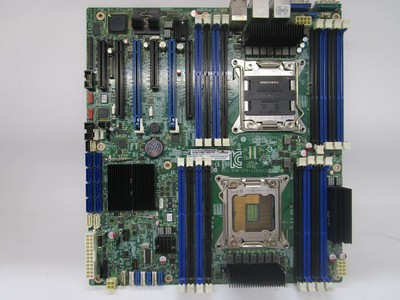
https://www.ebay.com/itm/154934672520? Id post this in tech deals but im not 100% sure it's as simple to set up as any regular consumer board
eBay
POWER TESTED LOADED TO BIOS. NO FURTHER TESTING WAS DONE. SEE PICTURES FOR DETAILS. I/O SHIELD INCLUDED. NO CPU NO RAM. SEE PICTURES.
90 bucks is a really good deal if it is that simple though
naive pendant
listing states lga2011
rigid sluice
Yesss butttt
 rigid sluice
I mean I would say do further research because v2 support is actually really iffy on V1 boards
Going from personal experience it may say v2 but that might be complete BS
basically
The jump from v1 to v2 actually required a few hardware additions
naive pendant
Well I could try searching up documentation to see if there are supporting bios' for those CPUs. It doesnt say anywhere if it's a first gen 2011 board or if it came out when ivybridge was already around
rigid sluice
So a completely different mobo revision
naive pendant
rigid sluice
The jump from v1 to v2 actually required a few hardware additions
like what?
rigid sluice
That I can't answer all I know is it's enough to warrent a entirely new revision
naive pendant
I hadn't heard of major hardware changes being necessary for boards to support those ivybridge xeons
Pretty sure it was just firmware stuff
rigid sluice
I had a supermicro before where yea even supermicro themselves said it would take v2 with a BIOS update
naive pendant
All the X79 boards I had that were manufactured during sandybridge only needed a bios update to support ivy
rigid sluice
Nah turns out they actually made a v1.1 of the board that they only made for like a month and then killed production but because the production was so short
Supermicro never released any documentation
naive pendant
I am slightly tempted to try out that dual socket board though lol, seems like a good deal. ill have to get it some other time though 😔
rigid sluice
So instead they just merged the docs for v1.0 and v1.1
And never told anyone
So reading the docs you would see that the v1.0 would support v2 xeons
Nope you actually needed the v1.1
Even if you updated the BIOS fully on V1.0
naive pendant
Im pretty sure support for ivy xeons was mainly a bios thing
naive pendant
I could message the seller and ask if those boards were used with v2 xeons
devout mothBOT
Big and Round and Rolled Around#9214 has been warned
Reason: Bad word usage
grizzled bloom
I've got a dual socket board, but it came with a 1650... which only supports one cpu
naive pendant
rigid sluice
Or Google the mobo model and v2 support and go on forums
quick reference guide including specifications, features, pricing, compatibility, design documentation, ordering codes, spec codes and more.
rigid sluice
And you get a bunch of random forums of people whining or complaining about v2 CPUs not working in the board
Stay away from it
naive pendant
yea that board might actually be a really good deal
i'd totally buy it if i didnt already have an extreme9
bummer that the extreme9 doesnt have onboard sas though like that one... or a second socket for that matter lol
im gonna post it in tech deals
rigid sluice
I would just use a PCIE H710 raid controller
naive pendant
Yea im gonna get an hba
rigid sluice
Not the most cutting edge thing but it handles things nicely
rigid sluice
I actually my PCIE H710 512mb to handle 8 drives
One of which I boot from
The other 7 are a RAID 6
 rigid sluice
I use a 15.7k rpm hard drive to boot
Hold on you have a wierd opinion on SSDs that dosent involve praising them like a god?
Turns to camera
"Hey I like this guy"
naive pendant
rigid sluice
I use a 15.7k rpm hard drive to boot
cheetah drive?
grizzled bloom
naive pendant
sas drives are cooler than ssds tbh
SAS SSDs tho
naive pendant
I had a 2U server with sas drives but I ended up selling it off, though I still have 1 or 2 spare drives. They're only 10k 146GB though so im not gonna use them in the system im putting together, probably
grizzled bloom
You can fit more SSDs in a chassis
rigid sluice
Ok your getting on my friends list just for having a opinion that goes against SSDs
naive pendant
lol
naive pendant
i boot off an nvme ssd
cursive epoch
nor do i have the funds
rigid sluice
I had a NVME
naive pendant
you can get pretty cheap sas drives
rigid sluice
I still went to 15.7k
rigid sluice
Pretty snappy since I'm on linux and don't got a million system spyware processes hitting my hard drive
 rigid sluice
Good thing I'm on a quad socket so windows 10 won't work!
naive pendant
Was probably gonna get this one https://www.ebay.com/itm/324914658545?

eBay
Sub-Category HBA. Interface SATA 6Gb/s / SAS 12Gb/s. RAID Level Raid 0 1 5. Form Factor Plug-in Card. Category HP. Manufacturer HP. Part Number 779134-001. The listed prices do not apply.
rigid sluice
I only have experience with a

eBay
Cables: No RAID cables (SAS OR SATA) Included. RAID levels Supported: 0,1, 5, 6, 10, 50, 60. Non-Volatile Cache: Yes. Form Factor: PCI-e x8 / Standard Profile Bracket /Low profile bracket. We keep our promises that we will provide you with the best solution within 24 hours.
So I can't say much
Works great tho
naive pendant
I like how the h240 there is SAS3, SAS2 would probably work just fine in my case but yea
there's also this that i might get if i end up having extra money when i finally put together that system lol

only thing i need rn is a case, hba, and drives
Got a really sick deal on ecc ddr3 a couple weeks ago so im set there
cursive epoch
so many ports
but i'd love to have those two lmao
manual fan control is just fun
naive pendant
facts
 unkempt blaze
what is 4 long beeps?
i check on google but there is no clue for how to fix it
the computer worked before
some pages says its about the CMOS but i dont know how to restart it if the computer if it doesn't turn on
 vernal cosmos
unkempt blaze
what is 4 long beeps?
vernal cosmos
unkempt blaze
what is 4 long beeps?
what board
vernal cosmos
unkempt blaze
some pages says its about the CMOS but i dont know how to restart it if the comp...
cmos is a small batter on the board
unkempt blaze
vernal cosmos
what board
gigabyte ga-h110m-s2h
unkempt blaze
vernal cosmos
cmos is a small batter on the board
ah that Circle small battery?
vernal cosmos
do all 4 beeps last the same?
unkempt blaze
yes
vernal cosmos
ok yeah unplug pc from power outlet
unkempt blaze
i did it before
vernal cosmos
when its unplugged, press the power on button a few times
remove the circular silver battery
wait 5 mins
unkempt blaze
ok
unkempt blaze
do i need to restore the bios settings if it works?
vernal cosmos
yes
unkempt blaze
but why?
vernal cosmos
because the cmos battery keeps bios profile loaded
take it out and it resets
thats what fixes issues
the bios resetting
i mean that board isnt gonna have many things you need to change in the bios anyway
unkempt blaze
ok this it annoying but i think there is no other choice
unkempt blaze
vernal cosmos
i mean that board isnt gonna have many things you need to change in the bios any...
it has some
ok removed the battery
now i wait
vernal cosmos
did u unplug pc from the wall
unkempt blaze
yes of course
but the button is on
but i did what you say
so i think its fine
ok
lets see
5 beeps?
and the computer turns on and off
just like before
5 long beeps
maybe the CMOS battery died?
this is even possible?
cursive epoch
cmos batt dying doesn't cause a system to not boot
it only resets bios and time
cause it's used to save that stuff
not to power the mobo
unkempt blaze
yes you right
but still i dont know what it 5 long beeps
i see on google on forum there is a guy with the same motherboard with the same issue
unkempt blaze
so he is dead?
unkempt blaze
cursive epoch
5 beeps is cpu problem
this is really strange
this could happen because of overheating?
cursive epoch
uh, no
a modern cpu keeps itself from heating up too much by slowing itself down, then shut the system down if throttling doesn't work
i suspect it could be the mobo that's the dead one
 burnt spear
it wouldnt turn on at all if it was pins, right foxy?
unkempt blaze
i need to check it but i dont have a multimeter there is other way to check it?
cursive epoch
yeah
uh, well there's no other way tbh
apart from getting another cpu and test it
unkempt blaze
cursive epoch
apart from getting another cpu and test it
multimeter can't check that?
cursive epoch
well, not really
burnt spear
what mobo is it?
cursive epoch
gigabyte h110m-s2h
burnt spear
cpu to test would be cheap asf, no?
cursive epoch
yeah, something like a celeron would do
unkempt blaze
burnt spear
cpu to test would be cheap asf, no?
i think used one would be cheap
unkempt blaze
but i cant be sure if it actually wirking
unkempt blaze
cursive epoch
celeron g3900 should be pretty cheap
not going for that
it really slow
burnt spear
unkempt blaze
not going for that
it would just be to test the motherboard to see if its working
cursive epoch
^
unkempt blaze
burnt spear
it would just be to test the motherboard to see if its working
uh
i get it
burnt spear
if its possible, i would save for a new cpu and mobo together
unkempt blaze
burnt spear
if its possible, i would save for a new cpu and mobo together
i have in that i5 6400
unkempt blaze
it was decent whan i used it
burnt spear
then yeah id test mobo, 6400 isnt that old
cursive epoch
pentium is cheaper hm
vernal cosmos
burnt spear
it wouldnt turn on at all if it was pins, right foxy?
depends on which pins
there are some that are quite useless
and some that only kill maybe a few io ports
unkempt blaze
cursive epoch
pentium is cheaper hm
it can be on this motherboard?
cursive epoch
yes
unkempt blaze
im confused with celeron and pentium gens
ok nice
i need to see
if it worth my time
or just buy a new pc
im actually using now my laptop
burnt spear
what gpu do you have?
and what psu/storage?
might be able to keep those
and possibly case, but unless it's decent id spend the extra for a new one
unkempt blaze
its work surprisingly well with all my old setup because its a equivalent to the pc i got before
but much newer
burnt spear
unkempt blaze
nothing is worth keeping
alr
unkempt blaze
lol
burnt spear
what would your budget be for a new build?
700 could get you a budget 6600 build iirc
unkempt blaze
burnt spear
what would your budget be for a new build?
i think i would wait for the new gpu and cpu
this setup is actually not bad for now
burnt spear
kk, just so you can see what you can do heres an example https://pcpartpicker.com/list/nwm4Mb
PC Builder - Intel Core i3-12100F, Radeon RX 6600, Thermaltake Versa H18 MicroATX Mini Tower
40 series should be out in september
and im expecting 14th gen around november
cursive epoch
13th*
cursive epoch
typo lol
unkempt blaze
uh also i have to mention it was lenovo prebuild
burnt spear
ah
cursive epoch
lenovo, hm
unkempt blaze
i got for free so i dont really care
unkempt blaze
lol
cursive epoch
wait lenovo prebuilt that fits atx mobo
that's not bad
but definitely not worth keeping lol
unkempt blaze
cursive epoch
wait lenovo prebuilt that fits atx mobo
this is an matx motherboard
burnt spear
p360a is a good choice, but $80-90 is a bit expensive for a budget build
mx330-g and h18 are good alternatives
unkempt blaze
burnt spear
mx330-g and h18 are good alternatives
you talking about motherboards?
burnt spear
cases
unkempt blaze
UH
cursive epoch
cougar is the brand of mx330-g model
burnt spear
specifically g air is good, but oos rn
unkempt blaze
I thought about antec they have a really good cases
burnt spear
i would never buy based off of brand
unkempt blaze
lol
cursive epoch
antec makes some fine cases really
they do have models with mesh front
and some fans
burnt spear
even lian li has some bad cases
unkempt blaze
and also make the most cheap cases i think
burnt spear
what case were you looking at
burnt spear
pls no
unkempt blaze
why not?
burnt spear
not for the price
it looks decent enough, but isnt worth $120
not when these exist https://pcpartpicker.com/product/QdXYcf/phanteks-eclipse-p400a-digital-atx-mid-tower-case-ph-ec400atg_dbk
https://pcpartpicker.com/product/ZJcRsY/phanteks-eclipse-p360a-atx-mid-tower-case-ph-ec360atg_dbk
https://pcpartpicker.com/product/vDhmP6/cooler-master-masterbox-mb311l-argb-microatx-mid-tower-case-mcb-b311l-kgnn-s02
cursive epoch
120 for nx800 is oof
burnt spear
as long as that front doesnt have glass behind the mesh, thatd be stupid
looks like thick mesh or theres something behind the mesh at the front, gonna just assume its thick since glass behind it would make no sense
cursive epoch
nx410 looks like h510 flow but actually at a good price
unkempt blaze
cursive epoch
nx410 looks like h510 flow but actually at a good price
yes
 latent osprey
are asrock mobos bad
vernal cosmos
only intel ones
latent osprey
damn


 vast meadow
vernal cosmos
only intel ones
vast meadow
vernal cosmos
only intel ones
The low end amds are too
vernal cosmos
vast meadow
The low end amds are too
yeah i said but most are bad or bad for the price
oh wait
i forgor to say most
vast meadow
latent osprey
PC Builder
 next skiff
I have a Intel i7 6700k cpu and it is stuck at 800mhz when the stock is set to 4000mhz why? It hits 100% just opening Google
And under load it doesn’t change
grizzled bloom
Have you done any overclocking on it?
next skiff
I haven’t
grizzled bloom
A chip that old is probably on an old motherboard. When's the last time you replaced the cmos battery?
next skiff
I haven’t replaced it ever I have had my pc since July 2020 my motherboard is a msi x370 titanium
Sorry z170a
grizzled bloom
Yeah that board probably needs a new cmos battery.
Download hwinfo and see if the battery has a voltage sensor. It should be 3.3V but spec goes as low as 3V
next skiff
Where do I find that number
next skiff
I’m not seeing vbat
grizzled bloom
You probably don't have the sensor then. Do you have a multimeter?
next skiff
Yes
grizzled bloom
Ok perfect. There's a round battery about the size of a quarter on the board. Sometimes it's hiding under your GPU. Pop that out and see what the voltage is.
next skiff
Ok perfect sorry but I have to do it tomorrow I’m look for 3.3 correct
grizzled bloom
Yes. If it's below 3V it needs to be replaced, 3.3V is full power.
next skiff
Ok
grizzled bloom
That battery is in charge of storing your bios settings and real time clock info. If it's dead, then it can lose settings and cause clock issues.
naive pendant
very broad question but what are the differences in chipset model numbers for their respective CPU socket types (LGA 1200/AM4)
vernal cosmos
naive pendant
very broad question but what are the differences in chipset model numbers for th...
number of pcie lanes and ram speed limits
hollow thorn
On Intel, only z series boards will let you OC
naive pendant
hollow thorn
On Intel, only z series boards will let you OC
oh really?
hmmm
So what sort of consistency should we see between motherboards correlating to the respective chipset numbers?
and that said what are some other notable differences besides pcie lanes and ram speed limits?
hollow thorn
naive pendant
and that said what are some other notable differences besides pcie lanes and ram...
more useful to go by a case by case basis
naive pendant
mmm ok
hollow thorn
like if you compare x570 and b550 boards in general, it'll sound like x570 is better, but there's plenty of b550 boards I'd buy before some x570 boards
naive pendant
oh yeah
hollow thorn
There's wacky stuff like B460 limits ram freq, B560 doesn't
naive pendant
i remember seeing benchmarks where "inferior" chipsets beat out superior ones
hollow thorn
A good b550 board will slam a crappy x570 board
and there are a good few crappy x570 boards
naive pendant
there're just so many factors which make or break a motherboard so I'm kinda looking for a checklist at to what people look for in a mobo
hollow thorn
It's much easier to just go by a case by case basis
The checklist will just be way too long
naive pendant
mmm
it also makes it easier for me to learn what each component of a motherboard does
rather than just relying on benchmarks
burnt spear
naive pendant
there're just so many factors which make or break a motherboard so I'm kinda loo...
what are you using the pcfor
hollow thorn
VRMs do power delivery, basically everything else is io
burnt spear
how many ssds will you have, how many pcie lanes
what cpu will you be running
for most users, unless you want to run a crap ton of m.2 ssds, b550 is the better choice
again model matters too
naive pendant
burnt spear
what are you using the pcfor
Mostly overclocking (as a hobby) but I play games, render photos aswell
hollow thorn
Like sound chips tend to just suck, so dongle beats any onboard sound chip, so that's one factor you don't need to care about, the LAN chip doesn't tend to matter, 1gb will be more than enough for most people, etc
burnt spear
but x570s generally have worse vrms at the same price point
hollow thorn
Overclocking gets you into a different market
burnt spear
mm
naive pendant
yeah Ive heard
hollow thorn
like unify-x boards
burnt spear
if you're an extreme overclocker like forks and want to go for world records, there's super expensive mobos that are great for ocing
like a $400 x570 (dark hero maybe?)
hollow thorn
although was it fitz that said b550 unify x had issues? forgot
unify-x tends to be nice for ram oc and cpu oc
naive pendant
burnt spear
if you're an extreme overclocker like forks and want to go for world records, th...
nah not extreme world records lol
burnt spear
oh wait
naive pendant
I just do it as a hobby
burnt spear
do you already have anything for the build?
hollow thorn
I think EVGA made a x570 dark, no?
burnt spear
and if not, whats the budget?
naive pendant
burnt spear
do you already have anything for the build?
not the mobo or cpu as of yet
burnt spear
12600k/12700k/12900k makes more sense lol
hollow thorn
mmm
burnt spear
hollow thorn
I think EVGA made a x570 dark, no?
i think so?
hollow thorn
They did
naive pendant
atm i just have a 6900XT sitting at home ad i do more research into cpus and mobos
naive pendant
yeah I've heard
hollow thorn
I mean, going with a 12600k and a MSI z690-a is going to be fun and relatively cheap
naive pendant
hollow thorn
I mean, going with a 12600k and a MSI z690-a is going to be fun and relatively c...
yep ive received that recommendation hahaha
burnt spear
though 5950x and 12900k are very similar, and price tends to vary
since z690s are expensive
hollow thorn
naive pendant
yep ive received that recommendation hahaha
basically look at the first 5min of this video for reasons
https://youtu.be/ys6D2528yUs

My Patreon: https://www.patreon.com/buildzoid
Teespring: https://teespring.com/stores/actually-hardcore-overclocking
The Twitch:https://www.twitch.tv/buildzoid
The Facebook: https://www.facebook.com/actuallyhardcoreoverclocking
#Z690 #motherboard #intel
burnt spear
id personally do 12600k or 12700k on an msi z690-a
hollow thorn
buildzoid is fun
naive pendant
$350 AUD for a 5900X
burnt spear
well honestly id do 12700f and b660 personally, since idc for cpu ocing
burnt spear
naive pendant
$350 AUD for a 5900X
ah, didnt know you were in australia
thats a good price
naive pendant
yeah great price
burnt spear
5800x3d also an option, though stock prolly isnt good in aussie land
naive pendant
but mobos are on the pricy side here
hollow thorn
mm
burnt spear
also cant oc 5800x3d
naive pendant
but again i dont exactly know what im looking at besides benchmark results on a mobo
burnt spear
i wonder how 12900ks oced compares to 5800x3d? never seen anything on that
naive pendant
burnt spear
5800x3d also an option, though stock prolly isnt good in aussie land
that thing is almost 2x more expensive than a 5900X
burnt spear
naive pendant
that thing is almost 2x more expensive than a 5900X
jesus
hollow thorn
simple good b550 board
https://www.centrecom.com.au/msi-mag-b550-tomahawk-am4-atx-motherboard
naive pendant
hollow thorn
basically look at the first 5min of this video for reasons
https://youtu.be/ys6D...
might check it out tmr as ppl are sleepin atm and no earphones
hollow thorn
naive pendant
but again i dont exactly know what im looking at besides benchmark results on a ...
2 main things really
VRMs, and IO
VRMs are what you're going to find benchmarks on
hwub/techspot usually have you covered for that
IO, it's just how many ports you want
naive pendant
actually can you summerise it real quick?
hollow thorn
and then there's featureset stuff, bios flashback, debug LEDs, sometimes post code display
Oh and wifi if you need it
VRMs delivers the power to the CPU
The better the VRMs, the more power it can provide, the 'cleaner' the power, and the cooler it runs
naive pendant
aswell as pumping out cleaner energ
hollow thorn
Asus could have a board with 8 nice stages and have it beat out board with 16 virtual stages
naive pendant
hollow thorn
Sometimes you could go by how many stages, but often doesn't help
really?
is it bc some boards have a multiplier?
hollow thorn
No
hollow thorn
naive pendant
is it bc some boards have a multiplier?
8 Physical stages, not twinned or doubled, can beat 8 Physical stages twinned/doubled
There's just more nuances that's annoying
for lga1200 you might find this useful
https://docs.google.com/spreadsheets/d/1yPS3hj_K7EPT4RBWCyjdKNP56pnwDz-IgBc0975-FUg/edit#gid=0

Google Docs
400-series
2020-09-05,LGA1200 VRM list by /u/qhfreddy,Thanks to asdkj1740 @OCN for compiling many sources in this thread: https://www.overclock.net/forum/6-intel-mot...
There's also a very old am4 list but that doesn't even have b550 boards
naive pendant
hollow thorn
8 Physical stages, not twinned or doubled, can beat 8 Physical stages twinned/do...
yeah doublers
hollow thorn
Twinned and doubled function about the same, like you could see with b550 aorus elite v1 and b550 aorus elite v2
bz rambled about it for 40 minutes if you have a lot of free time
https://youtu.be/FHJlzBQcyqM

My Patreon: https://www.patreon.com/buildzoid
Teespring: https://teespring.com/stores/actually-hardcore-overclocking
The Twitch:https://www.twitch.tv/buildzoid
The Facebook: https://www.facebook.com/actuallyhardcoreoverclocking
#B550 #Gigabyte #VRM
naive pendant
hollow thorn
bz rambled about it for 40 minutes if you have a *lot* of free time
https://yout...
40mins is not much for a hobby lol
hollow thorn
buildzoid videos can pile up quickly
naive pendant
ahhh
fair enough
also on a more unrelated note
I'm really just asking for speculation at this point but do you think there will be alot of software issues with the launching of the AM5 socket?
hollow thorn
Software issues? I doubt it
hollow thorn
DDR5 only will be annoying, but software issues aren't that common
naive pendant
ohhh
i thought we were still talking in the context of compatability
anyways thanks for the sources
hollow thorn
You're welcome
hollow thorn
naive pendant
i thought we were still talking in the context of compatability
Ye, in the context of ddr5 ram being annoying and am5 having no support for ddr4 and only ddr5 when lga1700 has support for both
naive pendant
hollow thorn
Ye, in the context of ddr5 ram being annoying and am5 having no support for ddr4...
fair point
this was smth I had an issue with bc buying one new shiny thing is already expensive enough
AM5 forces you to buy 3 brand new components so its a bit pricey hahaha
 jade zephyr
does anyone know when ryzen 5 6000 coming out?
or is it out and am i not finding it
is is gonna be released by the end of the year? i’m assuming no…
 limber dragon
 vast meadow
jade zephyr
does anyone know when ryzen 5 6000 coming out?
vast meadow
jade zephyr
does anyone know when ryzen 5 6000 coming out?
Most likely sept/oct
But it will be actually ryzen 7000, ryzen 6000 is just the laptop cpus
burnt spear
Kinda like 4000 and 5000
jade zephyr
vast meadow
Most likely sept/oct
hm. i’m building my first pc and my friend who’s helping said i should wait. but i’m trying to by by july. thanks!
vast meadow
jade zephyr
hm. i’m building my first pc and my friend who’s helping said i should wait. but...
Then go intel 12th gen
jade zephyr
i have a 5600x in my list rn
burnt spear
jade zephyr
hm. i’m building my first pc and my friend who’s helping said i should wait. but...
What's the total budget?
burnt spear
PC Builder - Intel Core i3-12100F, Radeon RX 6600, Cougar MX330-X ATX Mid Tower
vast meadow
burnt spear
https://pcpartpicker.com/list/78NkJM
PC Builder - Intel Core i3-12100F, Radeon RX 6600, Cougar MX330-X ATX Mid Tower
Might as well grab the cheaper ram
burnt spear
vast meadow
https://pcpartpicker.com/list/XLZ4Mb
Check build chat
vast meadow
Ahh
 eternal helm
vast meadow
https://pcpartpicker.com/list/XLZ4Mb
eternal helm
vast meadow
https://pcpartpicker.com/list/XLZ4Mb
would go h610 to save money too if this list was used
vast meadow
Then you'd want 3200c22 ram tho:/
burnt spear
Isn't 2933c19 better than 3200c22?
grizzled bloom
If you only look at cas latency yes
vast meadow
Depends on timings i suppose
eternal helm
vast meadow
Then you'd want 3200c22 ram tho:/
Wdym?
burnt spear
b610 has locked ram oc
eternal helm
Why run jedec on a board that supports xmp?
grizzled bloom
eternal helm
Why run jedec on a board that supports xmp?
B610 doesn't do xmp
eternal helm
Most of them say they do
grizzled bloom
Officially the chipset doesn't allow for it
grizzled bloom
eternal helm
Most of them say they do
They can technically do xmp but only up to 3200
burnt spear
wait what
 grizzled bloom
It's stupid how Intel is still trying to do artificial market segmentation even when they just just lost a ton of the market
The manufacturers have proven all Intel needs to do is flip a switch to enable it
eternal helm
Mhmm
You still can't technically "overclock" above a CPUs officially supported memory, but 12100f supports 3200 officially so it'd be fine
grizzled bloom
Just like you can't officially overclock on a non Z board but people do anyway
eternal helm
Or officially "overclock" a locked chip like a 12400f
Ppl will still find alternatives, like the high end z690 board with a 12400f
Bclk or whatever it was
grizzled bloom
Yep base clock. And those high end B660 and Z690 boards with external clock generators can push bclk 140. Technically a 40% overclock.
grizzled bloom
Yeah it really feels like they didn't take AMD seriously, even after they got left in the dust. 12th gen is really only winning by a few percent and in price/performance.
eternal helm
In some places tho, it's barely tied
Like a 5600x and 12400(f)
And amd came out with zen 3 like a year before ADL came out
burnt spear
i have a feeling intel will step it up with either 13th or 14th gen
otherwise there will be no competition for 7000
eternal helm
I'm scared for the value of zen 4 but who knows, maybe ddr5 will go down
Amd really can't afford to do their super premium pricing for products like an 8 core CPU this time around imo
grizzled bloom
Still waiting for 8000c40
eternal helm
Ye
grizzled bloom
The market split will be interesting to see. I hear 700 boards will only be DDR5 too, mostly rumor.
eternal helm
Yeah
I heard zen 4 will have D4 imc but it's all up to the boards
And there's like no boards we know of that'll support zen 4 and d4
 long geyser
eternal helm
It's like manufacturers big "screw you" to intel
long geyser
eternal helm
It's like manufacturers big "screw you" to intel
No, it's just by lowering the gear of the IMC
iirc they did that for 11th gen too or smth
eternal helm
Do all h610 support xmp? It's looking like that from what I can see
Even hvs looks to
And it's like the worst
long geyser
The limit is a IMC speed limit, not a memory limit
eternal helm
Yeah
long geyser
lower the ratio of mem to IMC and you can easily get 3200MT/s mem
eternal helm
Mhmm
long geyser
That should be how all vendors are doing it, they arent pulling a fast one on Intel
afaik at least
grizzled bloom
Interesting. 3200 c14 in gear 2 is still way better than jedec.
vast meadow
eternal helm
Wdym?
Didn't realise it could do 3200 xmp
 finite elm
burnt spear
not b610
finite elm
burnt spear
not b610
That would be weird cause the H510 I used does
 buoyant temple
Has anyone ever had the issue of a motherboard cycling through the error lights. It starts off with the cpu light on, then vga, then boot and then turns off
vast meadow
Try check all your connections on your power supply, reseat your ram and gpu and if that fails reseat your cpu
buoyant temple
I tried a different power supply same issue, tried 4 different kits of ram, the original kit was non functional, and replaced it with a working one and got this error sequence, and tried a different cpu and same issue
I’m thinking the motherboard was bricked by the previous owner
Just need a second opinion
vast meadow
buoyant temple
I tried a different power supply same issue, tried 4 different kits of ram, the ...
Have you tried reseating your cpu and gpu?
buoyant temple
Yes
vast meadow
What cpu and motherboard is it?
vast meadow
Possibly just jank motherboard ye
buoyant temple
Yeuppp damn…
 rapid mortar
What would be the best option to upgrade my 3600x to, r5 5600x or r7 5800x? I know I can save 100 bucks on the 5600x but would spending the extra 100 be worth it for the 5800x? I hate decisions lol.
grizzled bloom
5700X
rapid mortar
I just need clarification lol
grizzled bloom
You get the extra 2c/4t with 5700X and it games almost as good as the 5800X
 cerulean wadi
Lol. Well I'll say that in most games the 6core is plenty, unless you're streaming a lot and such.

 mighty jackal
I have a 12700KF that is refusing to boot 14 times out of 16 attempts (ish). It boot twice and ran fine (at separate times) but when I restarted my system, no boot. Mother board said first not video out detected then said no boot drive even after those two successful boots. Is it the CPU? Everything else seems to work fine, mobo was already replaced, RAM works in another system, and GPU works in another system
grizzled bloom
Try updating bios with flashback
 rocky bridge
I got new ram, all the same, put it into my motherboard and it failed to boot, so I tried a few different things like rearranging the order of the sticks and nothing worked, then I tried going back to my old ram and it lets me into the bios but it can't reach windows. I've reset the CMOS, done a bios update and I still don't have any idea why it won't work
vast meadow
What slots are you putting the ram in?
vernal cosmos
vast meadow
What slots are you putting the ram in?
the ram ones im guessing
burnt spear
vernal cosmos
the ram ones im guessing
nah, nvme slot
cursive epoch
dimm.2 
cerulean wadi
so-dimm*. "Sodimm, you are" - Yoda. 
vernal cosmos
burnt spear
nah, nvme slot
nvme is protocol not connector reeeeeeeeeeeeeeeeeeeee
rocky bridge
vast meadow
What slots are you putting the ram in?
Originally just a2 and b2 but I got 4 sticks last night so I had all slots occupied, I troubleshooted some more and I can get to the windows recognizes that there is a problem screen, with options so my plan is to get a fresh install of windows, but I can't do that untill later. And this is with the 2 original ram sticks in a2 b2
vernal cosmos
rocky bridge
Originally just a2 and b2 but I got 4 sticks last night so I had all slots occup...
link for all sticks u have
mighty jackal
It didn’t boot before when I first assembled it. Even replaced the motherboard after the first few attempts. The second mobo was the same model. The RAM is new and in the correct slots. The mobo has indicator lights and the RAM light does not indicate a RAM issue. I used two different sets of Ram
grizzled bloom
I used two different sets of Ram
That's usually a problem if the memory dies don't like each other. You can get Hynix to like another Hynix enough to run at the slower of the rated speeds but throwing a Samsung die in the mix... It just won't even post sometimes.
rocky bridge
vernal cosmos
link for all sticks u have

Each and every Ripjaws V DDR4 memory kit is tested with G.SKILL's rigorous validation process on all major performance motherboard brands to ensure the best-in-class reliability and compatibility across the widest selection of motherboards.
I've already checked the part numbers, they match, both hynix
rapid mortar
Ok got a 5600x. With the msi mag x570 tomahawk wifi. Installed the cpu updated bios (version 1.8) and when I go to restart my computer to enter bios. Both of my screens don't do anything. Keyboard and mouse light up, pc is on and lights up but won't do anything until I shut the pc down and turn it back on. Then it like skips bios screen cause it doesn't appear. And goes to home screen. I've been trying to fix this so I can get into bios. Pls any help lol
grizzled bloom
rapid mortar
Ok got a 5600x. With the msi mag x570 tomahawk wifi. Installed the cpu updated b...
Sounds like fast boot, you can get to bios manually by holding shift when you click restart, then wait for it to bring up the advanced start menu. Go to troubleshooting, advanced, restart to uefi.
rapid mortar
Okay will try that. Thanks
grizzled bloom
rocky bridge
I've already checked the part numbers, they match, both hynix
The same part number could have 6 different possible dies.
Are you talking about the 042 code?
rapid mortar
Ok so restart to uefi just restarted and has my monitors saying no signal connected still.
I've cleared cmos already aswell.
rocky bridge
grizzled bloom
The same part number could have 6 different possible dies.
Are you talking about...
Yes
grizzled bloom
rapid mortar
Ok so restart to uefi just restarted and has my monitors saying no signal connec...
Take out the video cable and put it back in while it's on the no signal waiting in bios
rapid mortar
Nothing still
Main reason for bios is to xmp my ram. That's it. I know msi center has dram timings and stuff I can change just don't know if that will work? Plus I don't know timings to save the life of me.
grizzled bloom
Are you using hdmi or dp cables?
rapid mortar
Hdmi for 1 and the other is dp
grizzled bloom
Hmm, the hdmi one should work
rapid mortar
Before this 5600x I could see bios screen
With the 3600x
So I do see the timings for xmp in msi center so maybe I can manually do it to oc the ram?
grizzled bloom
You could try, it might not be stable
rapid mortar
I just don't know what's going on why it just says no signal on my monitors when I restart the pc. And then when I shut it down and try again it'll boot straight to desktop. Confusing. Welcome to pc I guess lmao
Just weird even the uefi restart doesn't work. I'm going to look on msi website to see if they have any utilities or something I can see to maybe fix something
rocky bridge
 grizzled bloom
Ok, they're definitely the same then. It's more likely that your CPU IMC doesn't like having 4 sticks. It's quite a bit harder for it to run. You can try to help it out by increasing your voltages.
vsoc 1.1V
VDDP 1.0V
Both VDDG 1.05V
rocky bridge
Ok, but like even with the old sticks in rn under default settings, I can't get past Asus bios, I even did an update to the most current version, so my thought is now that I need to repair windows?
grizzled bloom
That's possible, but we'll get to it

 rapid mortar
Ok so I do see. When I reboot the pc and spam the delete key nothing pops up and monitors say no signal. But If I just reboot and do nothing it loads to desktop?
grizzled bloom
rocky bridge
CLDO VDDP to 1.0V
And try enabling XMP while you're there
rapid mortar
Yeah msi center didn't work for some reason on the ram. But yeah I'm super confused on what to do.
And I don't think it's bios either. Because it did it as soon as I installed that 5600x and booted.
rapid mortar
What I'm assuming is that, my monitors can't load bios fast enough now. Like it's there but not displaying. Not sure how to fix this unless I just put my old cpu in and flashback bios and not upgrade lmao. Idk
rocky bridge
grizzled bloom
CLDO VDDP to 1.0V
And try enabling XMP while you're there
Here we go

No dice
I should mention, none of the motherboard LEDs are lighting up which would indicate that there is no problem, theoretically
It does seem to be booting up quicker though(not fast boot, I disabled that)
rapid mortar
I FIXED IT LMAO
rocky bridge
rapid mortar
I FIXED IT LMAO
What did you do? Maybe it will help me
rapid mortar
So yeah, I'm dumb. But I had to swap my hdmi and display port around on my monitors. -_- what happened first was I swapped them awhile ago because my main monitor was flickering and i never went into bios after that so didn't know that was the issue. So I decided to flip the cords and it worked for me
rocky bridge
Oof, that will not fix my problem
rapid mortar
Ah
 quick gate
ryzen 5 3600 vs 5600g which is better and by how much
grizzled bloom
Performance-wise they're about equal, but the 5600g has a gpu built in
5600 with no letter is better
quick gate
alr so if i already have a pretty good separate gpu there’s no point in getting a 5600g yeah?
grizzled bloom
Not much point yeah. It's good for troubleshooting though.
quick gate
alr thanks
 delicate iris
Can a DOCP profile cause kernel power failures when not actively using the PC? For some reason, if I don't use the mouse and keyboard or leave a program running for about 4-5 minutes, my computer just restarts endlessly until it gets a DRAM fault (orange QLED) on the motherboard.
 signal kite
is the only drawback to getting a smaller mobo less ram and pce slots?
grizzled bloom
delicate iris
Can a DOCP profile cause kernel power failures when not actively using the PC? F...
It can in certain circumstances, like if the profile is too aggressive for the dies on the memory or the IMC and causes the system to hard crash. It wouldn't be able to write out a blue screen error log in that case.
grizzled bloom
signal kite
is the only drawback to getting a smaller mobo less ram and pce slots?
These days, basically yes. It just has less of things and they're roughly the same quality.
delicate iris
I think I might have found the issue while perusing the event viewer. like a split second before the crash it shows it loaded npsvctrig.svc and just takes a dump. Apparently it resets my peripherals too for a little since i have 2208 errors for my USB ports over the last month.
grizzled bloom
Are you on AMD by chance?
delicate iris
yep
grizzled bloom
Update your bios, the USB instability is a known issue that has been mostly resolved by bios
delicate iris
i gotta remind myself to never use Armoury Crate to check for BIOS updates. Thought I was up to date, but im 12 versions behind D:
grizzled bloom
Yup sounds like Asus to me
delicate iris
Are chipset drivers important? I'm a bit behind on those as well. I used the crate to install it but its still the original version I started with.
rocky bridge
Alright, so some updates, I figured out that one of the sticks of ram(1 of the 4) was bad by process of elimination using the Mobo lights on my Asus Mobo. I got to a screen that was trying to repair one of my drives, something I hadn't seen yet but it was something, but I still cannot get into windows. I have a buddy prepping a fresh install for me so I can plug in a flash drive and essentially install windows again on my other drive ig? Any other recommendations before I proceed?
 obtuse mountain
@burnt spear the saga continues. i just have the 2 sticks of 16gb ram in and i shut down on friday, went on a trip, came back for work, and just got home. booted PC to have it take forever like it did with the 4 sticks in. 4tb (E:\ ) is nonresponsive
burnt spear
obtuse mountain
<@654444344274845698> the saga continues. i just have the 2 sticks of 16gb ram i...
Sounds like your E drive is the issue then
Unplug it and see what happens
obtuse mountain
Its brand new tho been fine the last 3-4 months with no issues
burnt spear
obtuse mountain
Its brand new tho been fine the last 3-4 months with no issues
The error is that the drive is having issues
Unplug it, see what happens
Could just be the sata cable and you could try swapping two drives satas after checking if unplugging it works
cerulean wadi
Brand new or been used for 3-4 months? Can't be both :Bruh:
rocky bridge
I believe my issue is my power supply is too weak, I have a 3900x and an rx590 but only a 650 watt powersupply, might I be right?
hollow thorn
The likelyhood is basically 0
hollow thorn
rocky bridge
I believe my issue is my power supply is too weak, I have a 3900x and an rx590 b...
you'd be drawing like 400w max
well, literal max would be like 500w, but practically, you'd be drawing like 400w max
hollow thorn
3900x p95 is like 200w, rx590 furmark is like ~200w
hollow thorn
rocky bridge
Well then I'm back to square 1 I have no idea what's wrong
what's the issue though
cerulean wadi
rocky bridge
Alright, so some updates, I figured out that one of the sticks of ram(1 of the 4...
Mr2222
hollow thorn
Yes, but what exactly
rocky bridge
I can't get past bios into windows
hollow thorn
New build?
hollow thorn
Boots with single stick?
rocky bridge
Yes
But only into bios
When I exit it does the windows circle, the. Everything blacks out, and the windows circle reappears with nothing else and eventually I'm left with a blank screen
Even when I revert back to the old ram, it just refuses to work
hollow thorn
Other than blaming windows, check boot options?
rocky bridge
What do you mean?
hollow thorn
actually if windows circle shows up it's prob fine, meant legacy vs uefi boot
 hollow thorn
reinstall/windows repair thingy
rocky bridge
Onto the z drive windows will go!

 misty obsidian
I'm in bed right now thinking about my ddr4 ram that fails to run at xmp speed and I went to look at the bios releases for my motherboard.

Gigabyte finally released a fix for my ram lol
Now I can't sleep, thinking about that shiny new bios
Gigabyte z690 elite ax motherboard is really bad at memory Oc so far
Running bios f7
rocky bridge
I think I may have erased my z drive, but at least it appears that it might work
I think all my old files were corrupted when I put in my new ram, nothing else seems to make sense as to the issues I'm having
naive pendant
What's the chipset needed on a motherboard to overclock a 6th gen CPU?
cursive epoch
z170
vast meadow
Although i wouldn't bother buying 6th gen even on budget
 stoic radish
It's so beautiful

 dawn dirge
just put my new cpu (the cpu is supported on my mobo) into my mobo from what happened to my old cpu and my computer turns on but doesnt post. the fans are spinning (and the ones on the gpu) the lights are working, but the keyboard and mouse arent (the monitor works and all the psu cables are plugged in fully). anyone know what i should do to troubleshoot?
grizzled bloom
What CPU and what motherboard? Just because it's compatible with the socket doesn't mean the BIOS is updated to support it
dawn dirge
ryzen 3rd gen on b550
3600
i had a 3300x before in it
and it worked fine
3300x got busted
grizzled bloom
Yeah that should work. How exactly did the old one die?
dawn dirge
my brother broke a pin on it
the pin was responsible for holding the cpu in the socket
grizzled bloom
Oof.
Have you cleared the cmos?
dawn dirge
and when u put the cpu in it rocks in the socket
dawn dirge
grizzled bloom
Oof.
Have you cleared the cmos?
have not how do i do that
grizzled bloom
There's a flat round battery a little bigger than a quarter on the board, usually near the GPU slot area
dawn dirge
ok
grizzled bloom
Unplug the PC, take that battery out, hold the power button 10 seconds
grizzled bloom
Then wait 5 minutes, put it back in, plug in and turn on
grizzled bloom
If you want, it's not necessary usually
dawn dirge
i just found out that i bought a 3600 and was shipped a ryzen 5 pro 4650g...
grizzled bloom
Ah, well that might need a bios update. But still clear the cmos. It's good to do every time you change major hardware.
dawn dirge
i just did
grizzled bloom
What model motherboard exactly?
grizzled bloom
You'll need at least bios version 0236 for that CPU to work
When is the last time you updated? And if you haven't, when did you buy it?
dawn dirge
havent updated it but i got it october 9th 2021
grizzled bloom
I just double checked and 0236 is the first version available for the board 🙃
dawn dirge
so it should work is what ur saying
grizzled bloom
It should work yes
grizzled bloom
It's still not doing anything when you boot it?
dawn dirge
only lights and fans spin no post but ik the monitor works and the display cables work
the keyboard doesnt turn on tho
i was just using the monitor for my laptop so how could it just break within 24 hours
grizzled bloom
Try plugging the monitor into the motherboard instead of the GPU
grizzled bloom
And you don't have a debug LED on the board either... Hmm
You can try taking out all but one stick of memory next
dawn dirge
ok
grizzled bloom
And then try a different slot if that doesn't work
dawn dirge
ok
grizzled bloom
Sometimes a cpu will have a dead memory channel
stoic radish
Well
Tested motherboard on bench, worked fine
Installed in case, sudden dead DIMM
Tested on box again, dead DIMM
So somehow between me taking it off the box to putting it in the case, a the B2 DIMM slot died
dawn dirge
it was the ram
grizzled bloom
Don't filter dodge pls
burnt spear
Parkour
grizzled bloom
So is it the stick or the slot that's not working is the next thing to figure out
stoic radish
For who? I know the stick works
grizzled bloom
Aquatic
stoic radish
Ah
I even tried my old DIMMS and same issue
If the DIMM channel on the CPU went kaput, would the CPU light be on or the DRAM light
dawn dirge
grizzled bloom
So is it the stick or the slot that's not working is the next thing to figure ou...
i needed to reseat it
grizzled bloom
stoic radish
So somehow between me taking it off the box to putting it in the case, a the B2 ...
In your case something might have damaged the rear of the pcb or shorted a couple exposed contacts
grizzled bloom
dawn dirge
i needed to reseat it
Ah cool, that's the best case scenario tbh.
stoic radish
I've still submitted RMA
dawn dirge
grizzled bloom
Ah cool, that's the best case scenario tbh.
ty for your help. it was much appreciated
 drowsy nymph


 grizzled bloom
No the best match is obviously an Intel GPU with an Nvidia CPU
cerulean wadi
Nvidia CPU when. 
grizzled bloom
cerulean wadi
Nvidia CPU when. <:kekleo:971095797062074378>
Tegra
It's for smartphones lol
cerulean wadi
Desktop cpu when*. 
vernal cosmos
cerulean wadi
Desktop cpu when*. <:4890_RicardoSmile:654870013131489334>
grace
grizzled bloom
When they get that ARM deal finally
We haven't heard the last of that
They just need more time to put money in the right pockets...
 frosty depot
How do I go about finding out how many LED lights are supported by my jrainbow header?
grizzled bloom
The exact number will vary, some take more power than others. Just like fans.
It might give you an estimate in your manual though
frosty depot
Alright. I'll check when I get home then. I don't remember seeing anything about it though when looking through it a couple days ago. Is it like amperage I'm looking for?
grizzled bloom
That's a start
frosty depot
Alright. I remember seeing that, just can't remember what it is.. if I plug more lights than it's able to supply power then they just won't turn on?
I only have 3 jrainbow headers, so I was thinking I might need to daisy chain a couple fan controllers together.
grizzled bloom
I've seen one header do 4-6 fans before, if it's not enough power the one on the end usually flickers on and off
frosty depot
Oof. Ok. I'm currently able to use 5 fans on one header.. so I'm hoping 6 will be fine on 1.
latent osprey
sry if I’m interrupting something
but
so right now I’m looking into buying a motherboard off of kijiji (local Canadian eBay). The guy bought the mobo new but never used it cuz he was waiting for GPU prices to drop, now he has a full time job and can’t find time to use it so he’s selling all the parts unused for like half off. Here’s the question; He has a warranty for 3 years from Newegg, would I still be able to use the warranty if I bought it or would he be the only one to be able to use it?
burnt spear
latent osprey
so right now I’m looking into buying a motherboard off of kijiji (local Canadian...
Are you making a full new build?
burnt spear
What are you upgrading from and what's the budget?
And what parts do you need?
I'm assuming cpu mobo and maybe ram?
burnt spear
I would go 12400/f over 5600x
latent osprey
he just told me he can do 125cad for it
burnt spear
Its slightly better perf and tends to be cheaper
What's your budget for the cpu and mobo together
latent osprey
I’ve seen a lot of people say that the 5600x performs the same
latent osprey
but regardless they perform similarly and I save a lot on motherboard
burnt spear
What's the budget for both
burnt spear
Ok one second
latent osprey
this deal would make total cost be only 350/400
I just need to know if I could use the warranty then I’m set
first build so not 100% confident
burnt spear
PC Builder - Intel Core i5-12400F
If you go amd get a 5600
It's like 2% worse than the 5600x and cheaper
latent osprey
k cool
I could make total cost 375 tax included for a better mobo and similar ish cpu
it’d be Asus tuf b550plus and 5600
unless I use a 5600g which is on sale rn for less than the 5600 (is it the same performance?)
this would be the cost of everything new off Newegg
latent osprey
burnt spear
https://ca.pcpartpicker.com/list/Bmsjj2

I just needa know if I can still use a warranty if I buy it off someone
vast meadow
Don't go ryzen 5000 unless you're upgrading from an earlier gen ryzen
latent osprey
upgrading from intel 7600k
vast meadow
Motherboard and 5600? How
latent osprey
latent osprey
so right now I’m looking into buying a motherboard off of kijiji (local Canadian...
.
Wait lemme just paste lmao
so right now I’m looking into buying a motherboard off of kijiji (local Canadian eBay). The guy bought the mobo new but never used it cuz he was waiting for GPU prices to drop, now he has a full time job and can’t find time to use it so he’s selling all the parts unused for like half off. Here’s the question; He has a warranty for 3 years from Newegg, would I still be able to use the warranty if I bought it or would he be the only one to be able to use it?
so it’s basically brand new
vast meadow
What motherboard and how much are they selling it for
latent osprey
just need to know if warranty works 🥲
b550 plus Asus tuf
exact same one
for 125 cad
vast meadow
You'd have manufacturer warranty
latent osprey
it’s a steal imo
vast meadow
It's okay
latent osprey
ye that’s what I was thinking as well
vast meadow
latent osprey
for 125 cad
It's only a 150$ cad board so it's not really worth the difference especially on a dying platform
latent osprey
it’s 200 new on Newegg🥲
also wym dying platform
btw im just tryna run valorant
if that changes anything
most demanding game id be playing is sea of thieves💀
vast meadow
latent osprey
it’s 200 new on Newegg🥲
Yeah but it's not worth that much
latent osprey
mhm
vast meadow
latent osprey
also wym dying platform
Ryzen 5000 is the last cpu for that generation of board so it's a dead platform - no upgradability
latent osprey
I wasn’t planning on really upgrading
vast meadow
Still it adds value when selling it down the road
https://ca.pcpartpicker.com/list/QYPsHz
PC Builder - Intel Core i5-12400F
You should do this
latent osprey
thing is I alrd asked 140 off of the 150 price he had and he offered me 125
so asking for 115 would be really pushing it
but ig I could just make the 10$ off of one work shift
student wage go crazy🙏🙏
vast meadow
They were insane asking 150 for that board when it's 2nd hand
latent osprey
never used and no tax so I’m guessing it balances out
he probably just checked the price where he bought it and discounted it off that
so final verdict would it be worth buying?
vast meadow
Sure
 finite shuttle
So I found a ryzen 5 1600 that I got years back
is it better to sell it
or to build a secondary/side pc
burnt spear
finite shuttle
or to build a secondary/side pc
If its for your brother, go for it
Doesn't sound like he needs anything stronger
finite shuttle
he doesn't want it lol
finite shuttle
so why is it like 150~200 again
burnt spear
It isn't
I wouldnt pay more than $50 for one
Considering $100 gets you a 12100f that destroys it
 burnt spear
Buying a discontinued product from retailer isn't smart
The prices go up when it's discontinued
Look at ebay sold listings
And you'll have an idea of what they go for
finite shuttle
still like $200+
burnt spear
Sold listings
finite shuttle
am I looking at the right stuff
finite shuttle
so what is it good for now
burnt spear
...$80?
finite shuttle
uh I meant the cpu
finite shuttle
Yes
burnt spear
What any other cpu can be used for?
finite shuttle
I guess...?
finite shuttle
If I want to stream, would it be oaky to build a streaming comp?
burnt spear
Probably
finite shuttle
with the 1030?
finite shuttle
how about 16xx stuff
burnt spear
Should be fine
finite shuttle
I mean this will be a future project
burnt spear
Or 1060 6gb
finite shuttle
after my main comp is done
burnt spear
Woulda been a good idea for a nvidia gpu instead of an amd one if you were streaming though :p
Though a 6700xt streaming might still beat a 3060 streaming
finite shuttle
so main pc will be 6700xt
and second pc for stream will be 1060
but then
no one gonna watch me anyways
burnt spear
Or something like that
 burnt juniper
i have the Hynix 4GB 1Rx8 PC3L-12800S-11-13-B4 RAM can i add another one to make it 8 gb ram on my computer?
 polar moth
So since I upgraded my GPU to 3070ti from 3060ti. My cpu is facing a slight bottleneck -
i5-10400
32gb 3000mhz ram
3070ti
I'm looking at i7-11700k for a cpu upgrade. My motherboard is Gigabyte B560 DS3H AC y1
Any suggestions? I'll keep my i5-10400 for some awhile that I can save up some money
grizzled bloom
polar moth
So since I upgraded my GPU to 3070ti from 3060ti. My cpu is facing a slight bott...
There's not much point getting a K processor, since you can't overclock it anyway. Just get regular 11700
grizzled bloom
Yeah true
burnt spear
thou tbh i wouldnt really upgrade from a 10400 to the same socket
not unless youre selling the 10400 for less than $75 loss
even thats way pushing it
polar moth
Ok thanks and why would you not upgrade the 10400?
burnt spear
polar moth
Only wanted to upgrade where there is no bottleneck between my 3070ti
10400 and 3070 ti is really fine
its impossible to not have a bottle neck
but there wont be a noticable difference between 10400 and 11700 in most games
 rare orbit
yeah 10400 is actually a nice little CPU, my buddy rolled with one for a while next to a 3090 and his LG CX
CPU time around 5-10 ms, it kept up well..

 rare orbit
it's a better CPU when you remove power limits, though cooling
burnt spear
polar moth
I have a Hyper 212 evo on it, under load it's 32-40 C
what are you using to view that temps
because that isnt accurate
polar moth
MSI afterburner and Remote System Server Temps
polar moth
It's an remote server application for a old android phone to display stats in your PC case
burnt spear
that sounds extremely wrong
no cpu is gaming under load on a heatsink at 40c
youd need a 420mm aio on a 10100 to get that
polar moth
okok yeah
burnt spear
i said to have a cpu running at 40c while gaming youd have to have a super overkill aio for a super underkill cpu
polar moth
I might be misinforming my temps, I can re-confirm this by playing a game or a cpu stress test
burnt spear
i would use hwinfo64
polar moth
What game or a test?
burnt spear
anything heavy, cinebench r23 works
polar moth
cinebench r23 it is
Mutli core or single core? this test is all new to me
also should I turn off secondary monitor if it affects testing?
polar moth
Close all applications?
polar moth
pass 1 and cpu is peaking at 40c
burnt spear
very weird
polar moth
if you don't believe me...

also hwinfo seems to be correct, while my case phone is lagging to display a correct temp.
oh I see.. it was pulling a max watt of 12 watts
or is that normal?
grizzled bloom
Uh, no
polar moth
Well what is going on with my CPU then?
grizzled bloom
12 W is lower than most use on idle
polar moth
 polar moth
grizzled bloom
12 W is lower than most use on idle
polar moth
grizzled bloom
12 W is lower than most use on idle
Yikes.
grizzled bloom
Are you sure you were looking at max and not min?