
#cpus-mobo-and-memory
1 messages · Page 256 of 1
 scenic solar
Guess what...
😐 🤨 😎

YeeEeAHHH
There was only one thing that I didn't check before thinking it was broken... The power brick... It was the problem
I got a 19v (instead of 19.5) 4.3A
And it works fine
Aaand... I don't even know how it works

Bruh it is from 2019, and was thrown away 2 years later... 😐
And now it's mine
The OS only uses 1.1GB off the disk 
 main pulsar
yea is a thin client
scenic solar
Maybe it is a bit older than I thought XD
 main pulsar
thin clients are p cool, but you need a server to use them
although if you dont wanna pay ms licensing costs, they should be able to connect to a linux server
scenic solar
main pulsar
thin clients are p cool, but you need a server to use them
I want to try modding it somehow
Adding an nvme/sata ssd
And downloading win10
Or maybe win7
It's a bit powerful
4core 2GHz
main pulsar
depends on the chip
scenic solar
It has got so many thing that I don't even know what they are, mostly network tools
scenic solar
main pulsar
depends on the chip
AMD GX420Gl
main pulsar
doubt it
i dont think windows would work
or maybe you could pull off something like windows xp
due to limited instruction sets
scenic solar
I was able to make Win7 run smoothly on another client (2core and 1.4ghz)
main pulsar
yeah win xp useless
scenic solar
I have an official copy of win XP on dvd
Which is pretty rare since you can't find it online anymore
Also a win8 official copy 🤢
 cerulean wadi
Yea people don't bother to sell a 20 yr old OS, imagine that.  - plus XP was sort of around when cpus started going 64bit. That was part of the big deal about Vista, but of course Win7 was a super polished version of vista. My E8400 pc still running on Win7 right now
scenic solar
Literally, the dvd has never been opened since 2002
main pulsar
nice shelf decor
scenic solar
And I opened it 20years later
scenic solar
main pulsar
nice shelf decor
Yeah, the dvd has also a cool holographic pattern
Xd, can't photograph holographic patterns

 midnight pollen
need to control that lighting
 naive pendant
@glad socket i have a qustion if an item listed by a 3rd party seller is legit or scammy? can u help?
 vast meadow
naive pendant
<@507238750124769282> i have a qustion if an item listed by a 3rd party seller i...
vast meadow
naive pendant
<@507238750124769282> i have a qustion if an item listed by a 3rd party seller i...
They don't respond to tags, you can dm them or paste the link and ask here
 grizzled bloom
scenic solar
There was only one thing that I didn't check before thinking it was broken... Th...
grizzled bloom
scenic solar
There was only one thing that I didn't check before thinking it was broken... Th...
Figured it was that yeah
scenic solar
At least now I have 2 working clients
I still have to check the firs because I baked it at 250C with a heat gun
grizzled bloom
naive pendant
<@507238750124769282> i have a qustion if an item listed by a 3rd party seller i...
We're pretty good about picking out scams if you post the link here
scenic solar
scenic solar
I still have to check the firs because I baked it at 250C with a heat gun
Or I'm just gonna take the ram and SSD out of it and upgrade the other one
vast meadow
naive pendant
https://www.newegg.com/amd-epyc-7252-socket-sp3/p/N82E16819113597?Item=9SIAFVFHK...
It's probably fine, pretty stupid to get an 8 core epyc
naive pendant
dont need more cores i need the pcie lanes
naive pendant
i will be running a 3090, 2 sn850 2 tb nvme drives and a 24 port hba raid card
yes but threadripper isnt running at 120 watt tdp
vast meadow
naive pendant
i will be running a 3090, 2 sn850 2 tb nvme drives and a 24 port hba raid card
And?
naive pendant
thats alll
vast meadow
Yeah am saying and as in why would you need epyc for all those pcie lanes
naive pendant
i would hapily use my r5 3600 if it can handle it
because zen3 is only 24 lanes
might or might not be enough
vast meadow
How many lanes does the raid card need?
naive pendant
8
then 8 for gpu and 4 per nvme
so 8 +8 +4+4 is 24
and that wont iclude chipset etc
so u see why i worry
vast meadow
No
vast meadow
naive pendant
and that wont iclude chipset etc
Wdym by this?
naive pendant
chipset usually needs 4 lanes i believe
vast meadow
Chipset gives lanes not takes them away
 hollow thorn
Chipset takes 4 lanes from CPU, gives it back & more
 vast meadow
The first 16 lanes + first nvme is (4 lanes) is directly cpu, the rest chipset adds
vast meadow
X570 will give more than enough
naive pendant
would be so much chheaper
was looking at thishttps://www.amazon.com/ASUS-Pro-WS-Workstation-Motherboard/dp/B07SYWKXJV/?encoding=UTF8&pd_rd_w=Y6NZf&pf_rd_p=5fe95cd4-8512-42fa-bf21-63d83b898785&pf_rd_r=TWXM28BKRRT4TDAE4Y4Q&pd_rd_r=0b24254a-18f8-4400-bcda-0d071e853de0&pd_rd_wg=2sq5y&ref=pd_gw_ci_mcx_mr_hp_atf_m

Designed for the ultimate workstation performance, The ASUS Pro ws x570-ace features 3 PCIe 4. 0 x 16, DDR4 ECC memory support, dual Gigabit LAN, Ultra fast storage with 64bps dual M. 2, U. 2, Plus yo to 10Gbps back-panel USB 3. 2 Gen 1 with Type-A and Type-C ports and an ultra-efficient VRM head...
hollow thorn
I don't even remember what makes that board so expensive
it's not the board with thunderbolt
it's just expensive
vast meadow
naive pendant
was looking at thishttps://www.amazon.com/ASUS-Pro-WS-Workstation-Motherboard/dp...

Gigabyte X570 AORUS ELITE WIFI ATX AM4 Motherboard (X570 AORUS ELITE WIFI)
vast meadow
 that's a fantastic motherboard
hollow thorn
could go tomahawk
naive pendant
maybe
hollow thorn
there's no nice price to perf x570 boards tbh
naive pendant
i have a B450 on hand that i will be replacing
hollow thorn
tomahawk at 220$ isn't bad but still expensive
vast meadow
I'd proabbe go
https://pcpartpicker.com/product/QVn8TW/asrock-x570-steel-legend-wifi-ax-atx-am4-motherboard-x570-steel-legend-wifi-ax

ASRock X570 Steel Legend WiFi ax ATX AM4 Motherboard (X570 Steel Legend WiFi ax)
naive pendant
im ok with 300-350
vast meadow
That's disgusting for a x570
naive pendant
steel legend is nice but i prefer tai chi
naive pendant
i have an x370 tai chi with 1700 on it but need more power
vast meadow
Made for extreme oc
naive pendant
ya but its also very stable
vast meadow
Can also go extreme4
https://pcpartpicker.com/product/tJxbt6/asrock-x570-extreme4-atx-am4-motherboard-x570-extreme4

ASRock X570 Extreme4 ATX AM4 Motherboard (X570 Extreme4)
hollow thorn
vast meadow
I'd proabbe go
https://pcpartpicker.com/product/QVn8TW/asrock-x570-steel-legend...
doesn't look like board does 8/8 anyways
vast meadow
naive pendant
ya but its also very stable
Just as stable as the other ones
hollow thorn
just x16/x4
vast meadow
Oh yeah
hollow thorn
extreme4 too
naive pendant
the workstation board is x8 x8 x8
if that can run like that and populate the 2 nvmes at x4 x4
id be golden
and i dont need thunderbolt
vast meadow
I guess check the asus tuf plus and msi tomahawk then
vast meadow
naive pendant
if that can run like that and populate the 2 nvmes at x4 x4
Any board can do the nvmes just fine
hollow thorn
naive pendant
the workstation board is x8 x8 x8
This does 8/8
https://www.amazon.com/dp/B07SW925DQ

Powered by AMD Ryzen 2 and 3 AM4 processors, the Asus Prime x570-pro delivers customizable performance. 5-Way Optimization provides intelligent auto-tuning and dynamic fan calibration, while on-board dual M. 2 support and USB 3. 2 Gen 2 deliver maximum transfer speeds. Outshine the competition an...
bunch of gigabyte boards do too
X570 unify also does 8/8/4
vast meadow
I'd imagine the tuf does as well then?

Asus TUF GAMING X570-PLUS (WI-FI) ATX AM4 Motherboard (TUF GAMING X570-PLUS (WI-FI))
hollow thorn
doesn't look like it
hollow thorn
only 16/4
hollow thorn
the 'pro' moniker is probably what does it
vast meadow
hollow thorn
the 'pro' moniker is probably what does it
What about the tuf pro then lol
hollow thorn
only 16/4 lmao
time to link the one high end x570 board I like the look of lel
https://www.amazon.com/MSI-X570-Unify-Motherboard-Bluetooth/dp/B07ZG6YG1K/

Unify your power and join the dark side. Win games and set records with 12+2+1 IR digital power, all-metal extended heatsink, triple Lightning M. 2 with shield frozr, audio Boost HD, game boost and 2. 5G gaming LAN Plus Wi-Fi 6 solution
turns out tomahawk only 16/4 too
guess it costs more to split the lanes
vast meadow
hollow thorn
only 16/4 lmao
Very Asus moment
hollow thorn
mm
 subtle wadi
whats a good cheap 2x16 gb ram
 burnt spear
didnt i make a whole parts list for you
burnt spear

Silicon Power GAMING 32 GB (2 x 16 GB) DDR4-3200 CL16 Memory (SP032GXLZU320BDAJ7)
more to ram than just amount
 worldly rain
subtle wadi
is 104 a good price for 32 gb of ram?
worldly rain
subtle wadi
is 104 a good price for 32 gb of ram?
whats the specs and brand?
burnt spear
speed and timings matter too
worldly rain
is it USD?
naive pendant
this is on its way to mehttps://www.newegg.com/amd-epyc-7252-socket-sp3/p/N82E16819113597?Item=9SIAFVFHK25471
 hoary echo
is it unusual for my laptop to be at 80C when i have 30+ open tabs on chrome?
hollow thorn
normal laptop things
 cursive epoch
^
scenic solar
Which is worth more:
i5 12400, 12500 or 12600
?
grizzled bloom
What do you mean? Which is the best value?
scenic solar
Yes
grizzled bloom
12500 is a 12600 with a cold, 12400 has similar gaming performance to both (about 7% less than 12600 for 25% less cost)
Out of the 3 I'd just go 12400
scenic solar
Why should the MSRP be for the 12400?
It's almost the same as the 5600x but cheaper
grizzled bloom
Current price is $175 yeah, msrp is closer to $200
$175 12400 vs a $230 12600 that's only 7% better? No brainer to me
Unless you need every frame, in which case you jump to the K
vast meadow
12600 non k is just not worth it imo
scenic solar
vast meadow
And 12600k has 4 e cores that the others don't have btw
Yeah but 12600k is really expensive
vast meadow
It's like ~100 more than the 12400 yeah
grizzled bloom
$260 for the KF but you do get 4 e-cores
vast meadow
Imo those 4 e cores are gonna help it age a bit better
grizzled bloom
Or just go 12400 now and upgrade to 13600k later?
You've got an upgrade path after all
13th gen looking spicy
vast meadow
That's also an option, feel like not many want to do a 1 gen upgrade
grizzled bloom
That's why you go up a tier in the process
Going from a 1060 to a 2070 for me got double fps in some games
scenic solar
what's the difference between i5 12400F and non F? Only iGPU?
Nothing else?
vast meadow
scenic solar
what's the difference between i5 12400F and non F? Only iGPU?
Nothing else?
Just the igpu
 vast slate
What does one do with memory once you’ve upgraded?
Cause now I have 16gb I don’t know what to do with
vast meadow
vast slate
Cause now I have 16gb I don’t know what to do with
Sell/pass down to family member/different pc in your house
 scenic fjord
Will appreciate any help I can get, so I’m trying to update bios for new ryzen 5000, so I formatted a usb with latest version for mobo in fat32, restarted pc and hit delete, clicked into m-flash, stuck bios usb in bios port on mobo, pc restarted and now only get a no signal on monitor but all peripherals are on. What should I do now?
 devout needle
is it smart to swap out a current 3600x and upgrade to a 5600x?
prices are pretty much identical
worldly rain
that depends what you have for a gpu...
devout needle
3060ti, my bad should've clarified
cerulean wadi
5600x is a bit of an upgrade, but probably not. Put the $160+ to a farther out purchase, or something you actually need more. 1440p?
devout needle
1080p
worldly rain
you.ll gain like 10 fps with a 3060ti and a 5600x
and as low as 5...
not really worth the upgrade for gaming
grizzled bloom
scenic fjord
Will appreciate any help I can get, so I’m trying to update bios for new ryzen 5...
What motherboard and what is the old and new CPU?
worldly rain
@scenic fjord what he said ^
scenic fjord
Msi mpg b550 gaming plus, ryzen 7 3700x -> ryzen 9 5900x
@grizzled bloom @worldly rain
scenic fjord
No I tried using the flash method when you go into bios @worldly rain
Or are you telling me to?
worldly rain
well sounds like you might have to now
scenic fjord
Ok
worldly rain
just make sure you use a smaller usb like 6 gig
my tomahawk wouldn't work with anything bigger
scenic fjord
The flash drive I have is 16 gb but I have a 2gb, will that be enough for bios?
cerulean wadi
Bios file is like 20MB tops. 👍
scenic fjord
Should I unplug my computer before I do anything else?
cerulean wadi
If you're doing the normal in-bios upgrade, no just plug in flash drive & reboot then go to bios
Oh yeah the flashback deal. I think you'd powerdown but leave pc plugged in. Not totally familiar w/ "flashback"
scenic fjord
Do I have to unplug or remove any parts or components?
cerulean wadi
Shouldn't, & flashback afaik is the thing that you can even do w/ no cpu installed because that's what it's for.
vast meadow
devout needle
is it smart to swap out a current 3600x and upgrade to a 5600x?
Personally I'd go 5700x instead
scenic fjord
ok not sure if it did the update to new bios but pc is back up and running again so that already makes me feel 100x better😮💨
will go to bios now to see if it updated
devout needle
vast meadow
Personally I'd go 5700x instead
yea I asked for the comparison between both of those specific cpus because the 5600x is on sale right now. So I just wanted to know if it was worth to switch over
scenic fjord
so bios didn't update
can someone give the steps i need to do to do this correctly to see where i messed up?
worldly rain
go into bios, Mflash, usb, click new bios. and wait
thats all...
with Flashback, its button till usb flashes wait till it boots
scenic fjord
OK so the same thing happened where I click on M flash and it restarts and then just goes to black screen with no signal
worldly rain
does it take you to flash mode?
vast meadow
devout needle
yea I asked for the comparison between both of those specific cpus because the 5...
Imo it's usually not worth upgrading to next gen unless you're upgrading a tier as well e.g r5 3600(x) ->5700x
scenic fjord
It goes into flash mode, I assume, but no output display is available
worldly rain
it should go to flash mode and you should get a gui to select new bios
once you select enter flash mode, takes a few seconds like 20... then the gui shows up
scenic fjord
Ye when I got to this part before I left it like this since 9 am but when I came back home it still was the same situation
Will try flashback method
worldly rain
try flashback and let me know
scenic fjord
Do I just power pc on like reg then hit button or when pc is off?
worldly rain
when pc is off
cerulean wadi
devout needle
yea I asked for the comparison between both of those specific cpus because the 5...
$160ish? Eh idk, I'd almost not recommend the change but perhaps could sell old cpu to make up some of the difference.
scenic fjord
Ok
grizzled bloom
scenic fjord
Do I just power pc on like reg then hit button or when pc is off?

From your manual
cerulean wadi
Rtfm
grizzled bloom
This is one of those models that requires the bios file be renamed to something specific, and requires a specific port for the USB
scenic fjord
Ok
grizzled bloom
Your flash bios port is the one right next to the button, closest to the board
scenic fjord
OK computer turned on after I press flash button
grizzled bloom
Ok, check the bios and see if it updated
worldly rain
nailed it
 oak apex
yo i9 is better than ryzen 9 right
grizzled bloom
Which ones exactly? There's dozens of i9 processors and about a dozen R9 ones
cerulean wadi
3000 vs 3200? Not exactly, but 3200 (cL16) is the general "standard" choice for ram.
grizzled bloom
3000c16 is sad memory
 dull shuttle
wdym
worldly rain
3200 is like the minimum stardard
dull shuttle
wait cl15
worldly rain
cl16
dull shuttle
the 3000 is cl15 and the 3200 is cl16 but no rgb
grizzled bloom
I can probably find a used kit for cheaper and better than new if you're looking that low budget
Memory has lifetime warranty, it doesn't really die
grizzled bloom
And you're putting that on the 9600k?
dull shuttle
12600k
grizzled bloom
3200 c16 is barely passable up to the 12400
dull shuttle
what should i get
vast meadow
To be fair, 3600cl16 is 1.5x the price of 3200c16
grizzled bloom
What do you need 32gb for?
dull shuttle
nothing just want it
 steel bluff
Chrome users 😭😭
worldly rain
all them tabs!!!!
vast meadow
grizzled bloom
What do you need 32gb for?
32gb is really becoming the standard for something like a 12600k level cpu
grizzled bloom
Only because that's the smallest ddr5 will do in 2 sticks
worldly rain
16 gigs is fine for normal use and gaming
worldly rain
you running a RX570?
worldly rain
thats beauty
worldly rain
got your money worth
dull shuttle
yes it was 80 dollars
worldly rain
defiantly
I was gonna say, get 16 gig 3600 C16 and put money towards gpu
but if your happy with the 570
dull shuttle
not right now
 devout mothBOT
 Darth Vader#5487 has been warned
Reason: Duplicated text
devout mothBOT
Darth Vader#5487 has been warned
Reason: Duplicated text
Darth Vader#5487 has been kicked
Reason: Too many infractions
dull shuttle
bruh i was trying to send link to ram
worldly rain
didn't like that
worldly rain
im gonna say the CL16 3600 and CL18 4000 will be so similar
at the point get the cheaper
dull shuttle
can you send a link to one you think is good
worldly rain
unless your good at ram tuning, the 4000 would down clock and tighten the timings and be faster
 vernal cosmos
dull shuttle
well its a ddr4 4000 cl18
vernal cosmos
dull shuttle
well its a ddr4 4000 cl18
what cpu u got?
 dull shuttle
liek 94 toatal
grizzled bloom
dull shuttle
becasue io was trying to give link to ram
Gotta trim those links, and only do maybe 2 links per post. Bot is sensitive.
vast meadow
grizzled bloom
Only because that's the smallest ddr5 will do in 2 sticks
Nah i mean for ddr4 too, 16gb is becoming the minimum
Ddr4 or 5 doesn't matter
dull shuttle
i found a ddr4 3600 cl16 for 75
vast meadow
16gb? I thought you where going 32?
dull shuttle
yeah but they said that if you were only gaming 16 is fine
dull shuttle
but i would have lower spec memory
vast meadow
You only neeeeed 16 but with a mid-high end chip like the 12600k I'd go 32gb, and tbh 3200c16 is fine not a huge difference from something like 3600cl6 at xmp, yes there's a difference but manual ram oc is wayyyy more beneficial than xmp
dull shuttle
there is 2 that i can choose from with 32gb ddr4 3000 cl15 and ddr4 3200 cl16
and the 3000 has rgb
worldly rain
just my opinion by the time you need 32 gigs, your probably going to need DDR5 anyway
unless you take up like 8k video editing LoL
dull shuttle
i also only play 1080p if that helps
worldly rain
Vengance LPX would be my cheap go to
dull shuttle
could you link it?
vast meadow
worldly rain
Vengance LPX would be my cheap go to
Ewwww
vast meadow
dull shuttle
there is 2 that i can choose from with 32gb ddr4 3000 cl15 and ddr4 3200 cl16
Grab some silicon power 3200c16 for 105
dull shuttle
I only got 94
I think I’m going to get some cl15. 3000
And it’s 32 go
Gb
And rub
Rgb
 frigid willow
do you need ram immediately?
dull shuttle
Not really just one of my 8gb of 16 broke and I want to get more
Cl15 3000 is cl16 3200
devout needle
vast meadow
Imo it's usually not worth upgrading to next gen unless you're upgrading a tier ...
yea true, ty ty
 obtuse mountain
Yo why is my ram arriving inside wet packaging?
grizzled bloom
That'll be the shipping company
obtuse mountain
The outer packing was fine but inside is full it condensation
grizzled bloom
It probably got wet some time during shipping and it dried the outside before it got to you
naive pendant
speaking of ram, i had to accept an ebay return because the ram i sold someone was "defective" 🤡
i swear, if it actually works im gonna be 
scenic solar
What the heck is
Via Eden X2 u4200 CPU? 
Who made this CPU? What brand?
grizzled bloom
naive pendant
i swear, if it actually works im gonna be <a:pepe_boxing:786196695167533096>
Charge restock fee if it's a false defective claim. I keep that in my terms when I'm selling, right under the shipping info.
grizzled bloom
scenic solar
What the heck is
Via Eden X2 u4200 CPU? <:kekw:741678350791081994> <:kekw:74167...
Via made it of course https://www.viatech.com/en/silicon/processors/eden-x2/

VIA Eden® X2 processors combine VIA’s signature Eden® fanless design principles in an optimized dual-core architecture, allowing embedded developers to harness the benefits of fanless design, without compromising on performance or features. Designed from the ground up for fanless implementation, VIA Eden® X2 processors leverage 40nm manufacturin...
obtuse mountain
Alright heres a question. I just installed the 64gb kit and it took forever for windows to boot. All 64gb are registered and running at rated speed but my 4tb hdd is now not recognized. What the hell is happening
Ive been building and upgrading PCs for years and have never had this issue. The HDD in question is a WD blue 4tb thats less than 2 months old.
vast meadow
obtuse mountain
Alright heres a question. I just installed the 64gb kit and it took forever for ...
Probably just loosened the sata/sata power cable
obtuse mountain
I checked and reseated both hdds connectors and can see it in device manager but can't access it at all. Running dism and scannow to see if something currupted
obtuse mountain
The 4tb has 100% activity in TM but has no response read or write. This is so confusing
scenic solar
100% usage is never good on HDDs
vernal cosmos
obtuse mountain
The 4tb has 100% activity in TM but has no response read or write. This is so co...
Task manager is often incorrect
 frigid sail
update with the 4400mhz ram. It turns out that the mobo was the issue. i got the mobo replaced because the mobo completely died and 4400mhz is working great on my new one
burnt spear
frigid sail
update with the 4400mhz ram. It turns out that the mobo was the issue. i got the...
i would recommend downclockint to 3800 with as low timings as you can
4400 is way too fast for most if not all ryzen chips
frigid sail
i believe so
frigid sail
he accidentally bought memory for amd rather than intel
burnt spear
3600c16 is still great for intel
frigid sail
yea but atleast he’s gonna benefit from 4400mhz
burnt spear
mm
frigid sail
he bought the trident z neos
 frosty depot
frigid sail
yea but atleast he’s gonna benefit from 4400mhz
frosty depot
frigid sail
yea but atleast he’s gonna benefit from 4400mhz
12th gen?
frigid sail
10th
cursive epoch
even 10th gen is gonna benefit from it
obtuse mountain
I just upgraded from AEGIS 2x8gb running 3200 to ripjaws v 4x16gb at 3200. Same timings, same voltage, both xmp 2.0 but everything is running slower. Like boot time went from seconds to almost 10min
On a ryzen 5 3600x @ 4.0 boost
obtuse mountain
Multiple. I didn't get a good seat on the first attempt
burnt spear
odd
only thing i can think of is the imc sucks on your board or cpu, but idt thatd cause a 10min boot time
obtuse mountain
Once it booted finally it was really slow and my 2mo 4tb wd blue stopped being recognized
Is the b450 not capable of 64gb of ram as advertised or could that be a bios issue?
vast meadow
frigid sail
he accidentally bought memory for amd rather than intel
That's not a thing, just branding
obtuse mountain
Ok my E drive is showing up again with just 32gb installed in B channel. Think either my bios had a major change or my A channel slots are bogus
grizzled bloom
64GB on a B450 using 4 sticks is going to be rough at best. You'll need to do some tweaking on voltage and stuff for sure.
obtuse mountain
Everything i read on both manufacturers websites coincided with each other. My b450 supports 64 and the kit is a 64 kit. I didnt see anything stating that it was limited to a single channel or anything like that
cerulean wadi
64GB of any sort is harder on the imc, lnown fact. Sadly a lot of stuff incl most b450 would often need tweaking as Fal said to get going good
obtuse mountain
And over loading the imc would cause longer than norm boot times and SATA devices to drop dead?
obtuse mountain
If i upgrade mobo to x570 would i then be able to use all 4 for a full 64?
grizzled bloom
It's more a function of the IMC, which is on the processor
You should be able to adjust voltages and resistances to get it to work
obtuse mountain
Ok so i should have looked at the memory capability of my ryzen 5 3600x first
grizzled bloom
It's a matter of luck really, sometimes you get a good IMC and sometimes you get one that needs some (or a lot of) tweaking
devout mothBOT
 puddlejumper6999#9339 has been warned
Reason: Bad word usage
obtuse mountain
😒
grizzled bloom
We can help you with the overclock and everything, lots of us are good at it.
You can start by changing vSOC to 1.1v
I'd help more but I'm about to be busy the rest of the day
burnt spear
obtuse mountain
Ok so i should have looked at the memory capability of my ryzen 5 3600x first
Well, what do you use your pc for?
64gb tends to be overkill
Especially with a 3600x
obtuse mountain
Pretty much everything browsing viewing streaming gaming 3D modeling whatever I need it for and playing 2042 do I noticed that I was maxing out my Ram and it was causing stuttering and crashing issues
burnt spear
How much did you have before?
Bf2042 should not max out 32
Even with other stuff open
 mild jackal
The main benefit of x570 is that 4.0 link to the chipset.
Though, a 2nd gen x570 like the dark hero or any b550 will have a much improved memory layout
I would go for 32GB crucial kits if you need 64GB
2x32 sticks are usually at a huge price premium
But hey - quad rank b-die can be decent 

Just no sweaty 3800c14 etc
obtuse mountain
I was at 8 GB by 2 aegis 3200 and I came to the four sticks of 16 at 3200
burnt spear
obtuse mountain
I was at 8 GB by 2 aegis 3200 and I came to the four sticks of 16 at 3200
Yeah...
Take two of the sticks out
You'll be more than fine
I've got 32gb, I haven't even hit 24 with cold war, OBS, discord, chrome and task manager open
Can sell the other two sticks or smthn
See if a friend needs them maybe
obtuse mountain
I got multiple PCS so I'll just stick them in something else for now
 hard leaf
yeah 64gb is way too much stress for the memory controller, 32 is more than enough unless you are doing some crazy 4k video editing
obtuse mountain
It just sucks that under all of the information that I could gather that I could do this upgrade and it not work and I mean my main monitor is a 21 by 9 for 3440 X 1440 with a secondary at 1920 x 1080
mild jackal
64GB is easy enough on the imc if you have anything crucial, ideally two 32GB sticks of dual rank rev.b
mild jackal
It's the memory between the cpu and the ram
 errant grail
lower the better?
mild jackal
?
errant grail
ah i see got it ty
mild jackal
Somewhat related - https://gist.github.com/jboner/2841832

Gist
Latency Numbers Every Programmer Should Know. GitHub Gist: instantly share code, notes, and snippets.
Very interesting
errant grail
tyty'
naive pendant
https://www.ebay.com/itm/303172580214 this is sorta interesting

eBay
Find many great new & used options and get the best deals for Supermicro X9DRH-7F Dual Socket XEON LGA2011 Extended ATX Server Motherboard at the best online prices at eBay! Free shipping for many products!
 dim cloak
 scenic solar
R5 2400G + GTX 1060 6GB + 16GB RAM 2400MHz (up to 3200)
Bottlenecks? probably the ram @2400mhz is bad
vast meadow
scenic solar
R5 2400G + GTX 1060 6GB + 16GB RAM 2400MHz (up to 3200)
Bottlenecks? probably th...
Ram and cpu
scenic solar
vast meadow
Ram and cpu
Good CPU that doesn't bottleneck? 2600? x?
Also the ram is 1*16gb I think also 1Rx16 and Cl22
I should get better one right?
vast meadow
scenic solar
Also the ram is 1*16gb I think also 1Rx16 and Cl22
Oh god yeah get new ram asap
You want 2x8gb
vast meadow
Ehh I'd look for a used ryzen 5 3600, they're going for around 100€
scenic solar
Instead of usual 80€
vast meadow
scenic solar
I just got the bad ram because it was 57€
But that's the price of a 2x8gb kit of 3200c16 💀
scenic solar
Not in Italy (used one)
Here we still have 70-80€ RAM
Cheapest used R5 3600 is 150€
Bruh
No good
But found a 2600x for 100€ (can get it to 90€)
Oh I didn't specify this thing: the case is (homemade) itx and it becomes an oven with 3 gen ryzen
So R5 2600x should be fine (with arctic freezer 34 eSports duo it stays at max. 52°C when under load)
vast meadow
Okay, 10€ more than what you paid, but that's worth it for the dual channel alone, let alone the speed
https://it.pcpartpicker.com/products/memory/#select_none
Choose Memory
vast meadow
scenic solar
Oh I didn't specify this thing: the case is (homemade) itx and it becomes an ove...
The 3600 isn't any hotter than 2600x tbh
scenic solar
Yes it is I had 2600x and when I swapped to the 3600 it became an oven
Maybe it's because I've got 3600x
It is a bit hotter (around +8°C)
https://youtu.be/vQQMdWHKLmA
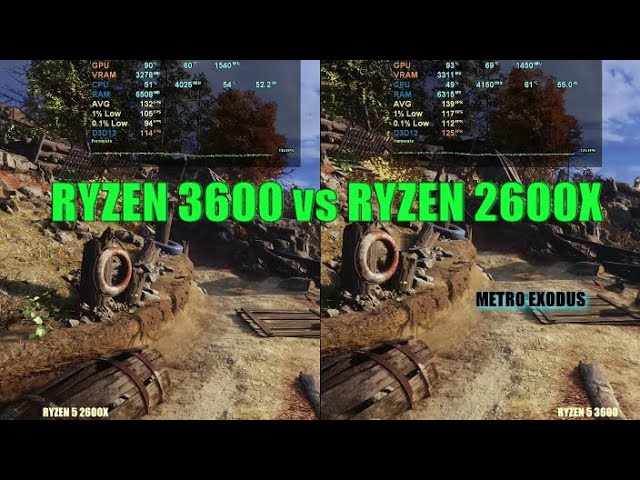
Ryzen 5 2600x vs 3600 - CPU performance test , 1080p gaming
Hardware details
AMD 19.10.1 driver is used , room temp - 29 deg , 1920 x 1080 resolution
CPU 1 - AMD R5 3600 @ 4150mhz all core turbo speed (six cores)
CPU 1 - AMD R5 2600X @ 4.225/4.2503ghz stock all core turbo speed (six cores)
CPU Cooler - Corsair H100i V2 240m...
Maybe depends on the cooler
vast meadow
Not a major difference
Keep an eye on these
https://www.ebay.ie/itm/144539062629
https://www.ebay.ie/itm/325178408824
https://www.ebay.ie/itm/374053818638
@scenic solar
scenic solar
Mmh
Ok, the first one it's probably not good because it has 50€ shipping for me
vast meadow
scenic solar
Mmh
Ok, the first one it's probably not good because it has 50€ shipping for me
Yeah same but if the bid stays below €60 then it works out the same
scenic solar
Yep
scenic solar
Can you find me 16gb ram (good ones) for cheap? Possibly not an auction so I can buy it now
vast meadow
scenic solar
Can you find me 16gb ram (good ones) for cheap? Possibly not an auction so I can...
I already sent a new kit a few messages above but i can have a look on ebay
scenic solar
Ok
I've got also a random question for you, what happens if you put CPU multiplier at 1x? That's 100mhz... Will it boot into bios?
vast meadow
I don't see any decent price picks :/
vast meadow
scenic solar
I've got also a random question for you, what happens if you put CPU multiplier ...
Do you mean bus speed? I'm not sure what you mean
scenic solar
vast meadow
Keep an eye on these
<https://www.ebay.ie/itm/144539062629>
<https://www.ebay.ie...
Should I make a bid last moment? Like the last 10 minutes?
vast meadow
I'd do last minute personally
scenic solar
I've never bought on eBay but I know how auction work. is there a particular price (compared to the highest offer/bid) you have to put?
Like if the highest bid is 95.63 can i put 95.64?
vast meadow
Usually the minimum bid is current bid +€1 but it will tell you if you press the bid button
Sometimes it's €5
scenic solar
Oh ok, 5 is acceptable
scenic solar
You said there isn't a big difference in temperature between 2600x and 3600x
What I noticed (when I upgraded my main PC build) is that the 2600x ran at 52-54°C with CPU fan at 80/90% speed. but with the new build, the 3600x runs at 69-70°C with fan at 100% speed
That's a big difference
Both stock speeds
grizzled bloom
scenic solar
You said there isn't a big difference in temperature between 2600x and 3600x
Wha...
Did you get new paste? You probably need to remount
scenic solar
The temps are completely fine for my CPU (I also checked a video where the 3600x + arctic freezer 34 eSports duo got to 74°C)
I can't find a benchmark for 2600x and arctic freezer 34 eSports duo
I remember putting all the 0.8g tube of paste on the 2600x
Maybe that affected a bit?
grizzled bloom
Yeah a 65W CPU shouldn't be getting that hot still
scenic solar
I don't think it is exactly 65w
grizzled bloom
It probably uses more yes, AMD doesn't actually use power in their TDP calculation
scenic solar
I checked reviews for the cooler, found a few people saying under load the 2600x stays at 51°C (almost the same as mine in the old build)
Found a review of temperatures with 3600 OC (4.2GHz), it runs at 71°C, this makes me think the 69°C on my 3600x are good and the difference between 2000 and 3000 are big @vast meadow
18-20°C differences
@grizzled bloom what do you think about 3600 + 1060/6gb?
Is it better going for 2600/x + 1060/6gb?
Considering hight temperatures too inside the itx case
grizzled bloom
There's a rather large jump in performance going from Zen+ to Zen 2
That said, My 1060 was pretty happy with my 2700
The memory controller on Zen 2 is a lot better also, and PBO is usable instead of needing to do manual OC
vast meadow
scenic solar
Found a review of temperatures with 3600 OC (4.2GHz), it runs at 71°C, this make...
It shouldn't be that large of a jump and even if it was 3600 is a good bit better, sounds like a bad mount/bad paste pattern causing that
Also when you say 4.2ghz where they manually ocing?
Or is that the normal boost i honestly can't remember
scenic solar
Thats the max boost for 3600 but I don't know how it was overclocked, they didn't specify much in the review
I think 70C is fine because all reviews with that cooler report about the same temperatures going from 70 to almost 74 on 3600/X/XT
I've always benchmarked with cinebench, now I'll try prime 95
Let's see how the temperatures look like

Mmmh
@vast meadow do you know if prime 95 also shows the temperatures or do I have to open hwinfo?
vast meadow
Hwinfo
 vast meadow
Btw small fft is what you want to use for worst case scenario
But it's basically just artificial
scenic solar
scenic solar
@grizzled bloom @vast meadow bad? Which temperature do I have to look at?
vast meadow
scenic solar
<@396513761550270464> <@191276897227898880> bad? Which temperature do I have to ...
I'd drop down the core temps then just see whichever is hottest
Although the overall core temp is good enough
scenic solar
So should that be good? 🤨
I also saw a video Arctic freezer 34 eSports duo+ 3600x, max temp in prime95 was 74
Maybe it is not that bad
My fans are LL120 Corsair
Case x465 corsair
Maybe there is bad airflow even if the case is enormous
And MB is MSI b550 gaming plus
Maybe VRM gets high temps
@vast meadow each core temperature

CPU touched 78C
vast meadow
That's fine
scenic solar
With arctic freezer 34 eSports duo
How can that be fine?
I just looked at a video of my Corsair case, looks like to be a mid-high range case
Mostly mid range
Not for noise, the fans are noisy af
vast meadow
Oh the duo?
scenic solar
What do you mean?
If the fans on the cooler are noisy?
Not too much, 90% speed are pretty silent, 100% speed try get noisy
But the preinstalled LL120 on the case are really noisy at max speed
vast meadow
I thought you meant the esports 34 non duo like one of the single tower coolers
scenic solar

eSports (1fan)
eSports duo (2fans)
Difference 2-3°C on 3600
I remember this from a video I watched before buying it
scenic solar
scenic solar
This is after 15minutes @vast meadow
Also I'll never get these temps on a normal full load, for example when loading Minecraft the CPU gets to 100% usage but only 69C
(And its just a few seconds, not 15 minutes)
.
In idle with like 10% CPU fan speed I get 35C which I really like because it's also really silent
Still not sure if 78C is a lot or is it normal
Guess what... 65w? No, 102w at full load
And its stock, no OC
cerulean wadi
Playing some games today and mine was : (wait that's not the 11gen btw, 🤣 --2 computers is great
 scenic solar
10.9w? 🤨
What's going on @vast meadow... HWinfo says CPU running at 4.4GHz (that should be the OC speed) but I never overclocked
Is there any sort of boost?
Like with many Ryzen CPUs
(Example 3.8GHz → actual 4.0GHz)
My 3600x got to 1.47v under load
vast meadow
scenic solar
.
In idle with like 10% CPU fan speed I get 35C which I really like because it's...
78c is normal enough but not for a 34 esports duo that's pretty odd
It can run 4.4ghz if they have pbo on
scenic solar
I've never touched anything, always been stock but under load it runs at 4.2/.3 GHz (rarely 4.4) even if it should be running at 3.8 base
scenic solar
vast meadow
78c is normal enough but not for a 34 esports duo that's pretty odd
Yeah, but it's 78C the hottest core, just a few seconds...
The rest is ~75
Apparently the "CPU temperature" shows the hottest core, which is core 5 (6)
Not an average temp of all cores...
@vast meadow minute 7:35

The Arctic Freezer 34 eSports Duo is a capable cooler for the Ryzen 5 3600, but how much better does it do compared to my old cooler, the Deepcool Gammaxx 400? In this video I unbox, install, and review the Arctic Freezer 34 eSports Duo!
(Affiliate links)
Arctic Freezer 34 eSports Duo: https://amzn.to/3kqAscL
Deepcool Gammaxx 400: https://amzn....
Sorry if I've tagged you many times
scenic solar
scenic solar
https://youtu.be/By925crnqEc
<@191276897227898880> minute 7:35
3600 @ max. 78C under load
Maybe the temperature is not that bad for the 34 eSports duo
cerulean wadi
Yea not unexpected temp for that normal single tower.
scenic solar
It's a pretty small boi 

Of course I can't do much about the temperature, I can only change it but I don't need to it also matches my build so I don't want to

Yeah, what I would expect 9526 is the "normal score" usually
Checked online
cerulean wadi
Funny how decent the 7700k still seems. 2/3 of a 6core cpu and around 2/3 of your score.
scenic solar
Yeah it was one of the best selling CPUs back in time
scenic solar
scenic solar
In cinebench it stood under 71C
Acceptable
Let's see in the middle of the summer how it goes
Like last summer when I had 2600x + stock cooler and I was worried about 73C so I changed it to the arctic freezer
obtuse mountain
@scenic solar I've been running a hyper 212 plus since I bought my fx6300 new. When I upgraded to am4 with the ryzen 3 3200g I used stock cooler till the new bracket kit came. Stock cooler idled at 65 and TT under load with kryonaught
With a hyper 212 plus and kryo my temps maxed at 65-70. If you are worried about thermals check them out. Very cheap cooler and performs crazy good. They do have small form factor coolers but I exclusively build in mid tower and full tower so I don't know personally how good they will work
Currently running the 212 on a ryzen 5 3600x @ 3440x1440 60-75 with no greater temps than 70 on battlefield
hollow thorn
Pbo though
scenic solar
That's not a really good cooler, it's also not worth downgrading from the 34 duo, also 70C with less than 100% usage (battlefield uses average 80% CPU) on 3600x isn't really good, with 80% usage I get maybe 60C not more
hollow thorn
P95 smallfft would tell you the hottest it gets but if it's on stock, it's just going to throttle
scenic solar
Max temp (as said before) on my 3600x with arctic 34 duo was 78.4C
obtuse mountain
I'm talking under 100% tho like pushing all it can
scenic solar
@hollow thorn do you know if motherboard VRM high temps affect CPU temp? Only few, a lot??
scenic solar
obtuse mountain
I'm talking under 100% tho like pushing all it can
100% in game is different than 100% in prime95
obtuse mountain
Running game, playing music, streaming all at the same time. Pretty heavy workload
scenic solar
In my case temperature are these ones:
CPU 100% loading MC: 70C
CPU 100% running P95: 78C
scenic solar
obtuse mountain
Running game, playing music, streaming all at the same time. Pretty heavy worklo...
Still won't be the same as p95
obtuse mountain
Ive only ever got p95 to get thermals up to 67 after letting it run for an hour
hollow thorn
scenic solar
<@278694081440251905> do you know if motherboard VRM high temps affect CPU temp?...
high vrm temps will just make it throttle more
scenic solar
🤨 mmmh
scenic solar
hollow thorn
high vrm temps will just make it throttle more
I mean, will you get higher temps?
hollow thorn
obtuse mountain
Ive only ever got p95 to get thermals up to 67 after letting it run for an hour
smallfft? And you'll have to watch clocks, it's probably throttling under p95 smallfft
hollow thorn
scenic solar
I mean, will you get higher temps?
When the VRM throttles, it'll give less power to the CPU, and therefore run cooler because, well, less power
scenic solar
Oh okkkK
obtuse mountain
Stayed at max boost and only hit 35% usage.
frigid willow
if you are completely stock with no OC or anything why are you even worrying about p95?
obtuse mountain
I wasn't stock. I had the fx6300 OCd to 4.25 ram at 3400 and gtx 750ti OCd
frigid willow
yea its not really in reference to yours
hollow thorn
frigid willow
if you are completely stock with no OC or anything why are you even worrying abo...
The point wasn't what was being ran, the point was whether or not 212 was good lel
frigid willow
right but he was talking about high temps running p95 on a completely stock chip. My point is I wouldn't even be running it for temps because it is pretty unrealistic.
hollow thorn
p95 is completely unnecessary for normal stock usage but the point was about the cooler so...
¯_(ツ)_/¯
frigid willow
yes, I wouldn't be basing a mid air coolers capabilities off p95 and stock chip is all :p
also, it is a more expensive nice case but isn't greatest air flow
hollow thorn
frigid willow
yes, I wouldn't be basing a mid air coolers capabilities off p95 and stock chip ...
the point was to say it's not great by throwing a hard load at it..?
vast meadow
scenic solar
Yeah, but it's 78C the hottest core, just a few seconds...
The rest is ~75
That's fine, can't watch videos rn tho
frosty depot
Lowest temp I've seen my cpu idle lol
 grizzled bloom
Must be pretty low ambient 🥶
frosty depot
yeah my room is 20c atm
 frosty depot
idk lol
my thermostat says 68f
oh wait
I'm reading it wrong. I read the 3 as an 8. it's 63f in here atm
block numbers and bad eyesight don't mix
so 17c in my room
vast meadow
That's still sub ambient wtf
 rapid mortar
Who knew a r7 5800x with a 1070 ti can out perform my r5 3600x with a 1080 ti 😅. Time for a new cpu I guess
grizzled bloom
Yeah you've got a core at 13C, that shouldn't be possible without something chilling it
frosty depot
my LFII 360?
vast meadow
rapid mortar
Who knew a r7 5800x with a 1070 ti can out perform my r5 3600x with a 1080 ti 😅...
Depends on what games, most games would be better with 1080 ti tho
frosty depot
I even have ff14 up on my main screen
grizzled bloom
You sure you don't have a cup of ice water sitting on the rad? Lol
frosty depot
lol I'm sure
rapid mortar
vast meadow
Depends on what games, most games would be better with 1080 ti tho
Borderlands 3 benchmark the 1070 ti got 130 and I got 94 on mine. Same settings and all
vast meadow
Could be ram difference/something
rapid mortar
For sure
For some reason I can't get past 3200mhz on my ram. Not to advanced with timings and stuff along with amds infinity stuff. Like it will boot the pc just show no display or anything at 3600mhz. Don't know if it can do that or not.
grizzled bloom
Ryzen is pretty sensitive to memory, too slow and you lose performance, too fast and it desyncs losing even more performance
mild jackal
What ic are the sticks
frosty depot
grizzled bloom
You sure you don't have a cup of ice water sitting on the rad? Lol
rad is front mounted. so idk how that'd work out. My only thought is that the cold air coupled with the airflow going through the rad at such a cold temp is making the metal on the rad really cool so in turns makes the coolant really cool?
grizzled bloom
That still shouldn't make it cooler than the air passing through it
Maybe the AC is on and blowing over it? Or a fan nearby blowing cooler air in than the rest of the house has?
frosty depot
idk.. my phone cooler cools my phone down to reallly cold with just ambient 30c going through it.
so in my 80f room my phone is really cold to the touch
mild jackal
Pretty sure that's just a sensor error
frosty depot
mild jackal
Pretty sure that's just a sensor error
hm. I think you are right. there are 2 cpu package values and one is reading higher than the other
mild jackal
It just guesses the offset
 bleak wyvern
my friends motherboard has pooped out on him and he cant find a good one what would be a good amd motherboard for less than 200
he keeps looking at b450s but from my understanding those arnt what he wants for gaming
mild jackal
They are and you can find a decent one for 70 eBay
burnt spear
bleak wyvern
my friends motherboard has pooped out on him and he cant find a good one what wo...
What cpu?
bleak wyvern
He preferably wants a r7 5800x
burnt spear
bleak wyvern
He preferably wants a r7 5800x
Wait
He hasn't bought the cpu yet?
If not, 12700f and msi b660
And if he wants to oc, 12600k
On a z690
bleak wyvern
Less than 200?
burnt spear
bleak wyvern
Less than 200?
what parts does he currently own
and what parts is he trying to buy
bleak wyvern
He needs new ram motherboard and processor
bleak wyvern
He just left to eat all I know is 200 max on motherboard
burnt spear
PC Builder - Intel Core i7-12700F
burnt spear
np
vast meadow
bleak wyvern
I sure he will be fine with that
Make sure they're not using the stock cooler tho btw, do they have a cooler already?
bleak wyvern
No but I will make sure to tell him not to use stock
vast meadow
I'd recommend deepcool ak620 or arctic liquid freezer ii 280mm or 360mm if they want an aio in particular
burnt spear
vast meadow
Make sure they're not using the stock cooler tho btw, do they have a cooler alre...
forgot that part lol
vast meadow
burnt spear
forgot that part lol
 burnt spear
lmao
hoary echo
unhhhhhh

making a fractal in google slides is pain
there is like 40k+ shapes in the one slide
grizzled bloom
Fractals in general are painful on the pc
 reef schooner
Will Kingston RMA accept my request if my defective product doesn't have its original packaging?
vast meadow
reef schooner
Will Kingston RMA accept my request if my defective product doesn't have its ori...
They should as long as it's still under warranty
reef schooner
vast meadow
They should as long as it's still under warranty
thanks
vast meadow
Np
frosty depot
looking at this used 12900k for $450 is gonna make me go broke if I don't stop and think lol
vast meadow
frosty depot
looking at this used 12900k for $450 is gonna make me go broke if I don't stop a...
Shtopp it's not a massive amount better than 12600k for your use case + just think about 13th gen 
frosty depot
vast meadow
Shtopp it's not a massive amount better than 12600k for your use case + just thi...
Oh, what would I do without you?
😛
thank you for bringing me back to reality.
in all actuality it would only cost me $200
since I'd just give the 12600k to my ex for the cost I got it.,
vast meadow
Lol
frosty depot
buttttt
13th gen
😛
then I can just use the 12600k to build me some cheapish pc and maybe sell it
cursive epoch
sounds like a way to go broke
oh wait, yeah 13th gen
nvm then, that's not a bad idea
frosty depot
so.. when my room is warm.. it seems my cpu sensors are working normal.. but when my room is cold like it is now, my cpu sesnors are reading below ambient..
this is 2nd day in a row now
idk if I should be concerned about it or not
is the only reason I'm bringint it up
scenic solar
@vast meadow remember the 3 link (eBay) for R5 3600 you sent me, I kept checking the price, one of them is gone, (sold for 133+7€)
The other two are 89+10€ & 81+50€, still respectively 4 and 6 days left, probably the price is going to rise, I should try going on an Italian site for used things, finding one for 120€ (one of the lowest prices) and get that (not auctions).
Or I'll go for the 2600x which is also cooler
 latent osprey
do u guys think the aorus b660m pro ax is a good mobo to pair with a 12400
on sale for 460cad bundle rn
burnt spear
latent osprey
do u guys think the aorus b660m pro ax is a good mobo to pair with a 12400
PC Builder - Intel Core i5-12400F
also are you making a whole new build?
if so, whats your total budget?
latent osprey
nah upgrading
burnt spear
ah kk
latent osprey
i have a 1080ti rn
burnt spear
oh nice card
latent osprey
so im basically building off that
latent osprey
ye gonna sell a the cpu n mobo i have rn to upgrade
psu, case (was gonna go 4000d) and cooler
burnt spear
kk
latent osprey
pre sure thats it
burnt spear
one sec
burnt spear
the mobo i linked is enough for even a 12700f
latent osprey
bet
burnt spear
https://ca.pcpartpicker.com/list/zn4bLs this looks decent, let me double check on the psu though
PC Builder - Intel Core i5-12400F, Cooler Master MasterBox MB311L ARGB MicroATX Mid Tower
latent osprey
sure
burnt spear
@hollow thorn sorry for the ping, antec names confuse me. That psu is the A tier one on the list, right?
burnt spear
latent osprey
sure
also, what ram do you currently have?
burnt spear
dw about it
latent osprey
its some old lpx
hollow thorn
ye
latent osprey
red too 
burnt spear
hollow thorn
ye
https://www.amazon.ca/dp/B016BWEQYG?tag=pcp0f-20&linkCode=ogi&th=1&psc=1 this has to be a miss listing, right?

Vengeance LPX memory is designed for high-performance overclocking. The heat spreader is made of pure aluminum for faster heat dissipation, and the eight-layer PCB helps manage heat and provides superior overclocking headroom. Each IC is individually screened for performance potential. The DDR4 f...
hollow thorn
weird seller but it is 2400c16
burnt spear
mm
hollow thorn
could try if you want
latent osprey
50$ for 32g is crazy 💀
burnt spear
alright here you go https://ca.pcpartpicker.com/list/k3GCd9
PC Builder - Intel Core i5-12400F, Cooler Master MasterBox MB311L ARGB MicroATX Mid Tower
ima keep searching on case as well though
my go tos all sold out/overpriced
latent osprey
nah i have an a tier ssd laying around
m.2
and a 500g sata stole from my brother so im set
burnt spear
call the cops, theyre a thief
cerulean wadi
"Borrowed"
 finite shuttle
is amd better or intel for cpu atm for its price/performance?
burnt spear
finite shuttle
is amd better or intel for cpu atm for its price/performance?
currently 12th gen is
 wind karma
Do I snag a Ryzen 5825U laptop (16gb, 1080p120hz) for $630 now or wait for Ryzen 6000 stuff to release and see what happens?
I don't need it urgently so im leaning towards waiting
vast meadow
wind karma
Do I snag a Ryzen 5825U laptop (16gb, 1080p120hz) for $630 now or wait for Ryzen...
Ryzen 6000 laptops are out, thing is i haven't seen a non gaming laptop one
wind karma
Yeah I already have a desktop so looking for a non gaming laptop
Sounds like some laptops are releasing soon with the 6800U
vast meadow
Would be nice, they have amazing battery life
vernal cosmos
vast meadow
Would be nice, they have amazing battery life
u have amazing battery life 😳
burnt spear
Is pato an android confirmed?
vast meadow
burnt spear
Is pato an android confirmed?
 burnt spear
Objection, overtheresay
 cyan raft
You asked the question
vernal cosmos
burnt spear
Is pato an android confirmed?
no hes a remote controlled attack duck

^ @vast meadow irl
burnt spear
:0
vast meadow
True dat
errant grail
11900k worth it(400cad)
vast meadow
Get a 12600k /12700(f)(kf)(k) for same/ less and better
errant grail
with 12th gen rn in my store the motherboard still too expensive
cursive epoch
wind karma
Do I snag a Ryzen 5825U laptop (16gb, 1080p120hz) for $630 now or wait for Ryzen...
6000U stuff is limited to expensive stuff, so..
You have no choice lol
It's AMD's market segmentation
Cheaper, budget options gets zen 2 refresh with non rdna
cerulean wadi
errant grail
with 12th gen rn in my store the motherboard still too expensive
You of all people (if name correct) should know that an 11900 is basically an OC'd 11700, & that doesn't mean much. Would get more of an upgrade from 12gen even if you had to buy a new mobo for it, but then you'd sell off 11gen setup to offset cost anyways. 
vast meadow
Looks like am5 is set to release in September
https://www.digitimes.com/news/a20220504PD214/5nm-ic-manufacturing-amd-tsmc.html
 proper forge
Interesting. I wonder if that'll make the prices of used 3000 series Ryzen CPUs finally drop a bunch
vast meadow
You'd wanna hope 5000 series goes down more imo, pretty big jump
proper forge
True but my msi x370 pro carbon doesn't support 5000 series last i knew. So I'm trying to save for a ryzen 9 3900x if my board supports it though a bios update or a 3950x if i get really lucky
vast meadow
proper forge
True but my msi x370 pro carbon doesn't support 5000 series last i knew. So I'm ...
Why not a 3700x? Also it should have a beta bios with 5000 support although idk if i would
proper forge
vast meadow
Why not a 3700x? Also it should have a beta bios with 5000 support although idk ...
I have a 2700 but want more cores
burnt spear
proper forge
I have a 2700 but want more cores
More cores does not equal more performance
cursive epoch
im sure the mobo supports 5000 now
burnt spear
3600 beats a 3995wx in gaming
proper forge
True but i do a lot of VM work
proper forge
cursive epoch
im sure the mobo supports 5000 now
Last bios i saw last week was in November for windows 11 support
cursive epoch
that's rip then
proper forge
Meh. Could be worse
 ruby basin
https://pcpartpicker.com/list/bVL89r can someone tell me whats wrong? what are those potential issues?
PC Builder - Intel Core i7-12700K
grizzled bloom
You can ignore the bios warning and the cooler note just means if the cooler doesn't come with the bracket for 12th gen Intel, you'll need to contact them to get it.
The bigger issue that it's not telling you about is the hyper 212 is not nearly a good enough cooler for the 12700k. It's barely enough for a 12400.
ruby basin
oh damn, then what cooler do ya suggest?
grizzled bloom
Arctic liquid freezer II 280mm if you're going to overclock at all, 240mm will do if you're not
burnt spear
grizzled bloom
Arctic liquid freezer II 280mm if you're going to overclock at all, 240mm will d...
Ak620 enough if not ocing, and if not ocing I'd get 12700f
@ruby basin
 cosmic matrix
hey, I am wondering if anyone has had stability issues with the 5900x?
grizzled bloom
cosmic matrix
hey, I am wondering if anyone has had stability issues with the 5900x?
What kind of issues exactly?
cosmic matrix
games crash randomly
It is honestly pretty weird, they just close suddenly. Not just one game, all my games, but no other programs
grizzled bloom
What are your temps when gaming?
What GPU and power supply do you have?
ruby basin
grizzled bloom
Arctic liquid freezer II 280mm if you're going to overclock at all, 240mm will d...
grizzled bloom
That'll be fine for gaming probably
 rocky bridge
I'm having trouble getting my ram speed to 3200, just got 2 more sticks of the same ram, but after I put it in it does this weird thing where it powers off 3 times before booting. Any ideas of how to fix?
ruby basin
grizzled bloom
That'll be fine for gaming probably
alright thx mate 👍
grizzled bloom
rocky bridge
I'm having trouble getting my ram speed to 3200, just got 2 more sticks of the s...
Does it boot if you don't turn on xmp?
rocky bridge
yes
grizzled bloom
Download thaiphoon burner and screenshot the spd data
rocky bridge
I'm trying to update bios currently
grizzled bloom
You probably got different dies that aren't compatible, even though it might be the same model kit

 grizzled bloom
Yep, one is hynix and the other is Samsung. They won't play nice together.
rocky bridge
so what should i do?
grizzled bloom
Return the kit you bought, and either buy another kit with the same die as you had originally (can be hard to give but g.skill tells you on the stickers) or sell your original kit and buy a set of 2x16gb or 4x8gb.
Technically only memory that's packaged together is guaranteed to work together.
rocky bridge
ok, thanks for the help
rocky bridge
Is there a place where I can buy hynix or Samsung or am I stuck with luck of the draw?
grizzled bloom
rocky bridge
Is there a place where I can buy hynix or Samsung or am I stuck with luck of the...
What you want is sticks with the same last 5 digits on the 042/043 code as the ones you have
rocky bridge
Ok
grizzled bloom
Looking on eBay a lot of the time people put pics of the stickers
rocky bridge
Ok thanks
cosmic matrix
grizzled bloom
What are your temps when gaming?
What GPU and power supply do you have?
sorry about that. My psu is a 650w 80+bronze and the GPU is a 1070. The temps are in the 60-70s so totally fine.
No overclocking on any components, I tried but it was even more unstable and got me in a bootloop until I reset it in bios.
grizzled bloom
Which PSU exactly? Model number matters.
cosmic matrix
How so?
grizzled bloom
If you try to push too much power through it, it doesn't shut off. It just explodes.
cosmic matrix
ah, not great
cosmic matrix
yeah, I shouldn't be pulling more than like 500w
grizzled bloom
Yeah, was thinking DDU next
cosmic matrix
tbh not sure what ddu is
grizzled bloom

GitHub
Contribute to NeweggTechie/Graphics-cards development by creating an account on GitHub.
cosmic matrix
oh, it is a GPU problem? It showed up once I upgraded the cpu to the 5900x
cursive epoch
well, it doesn't hurt to try this first
cosmic matrix
fair enough
grizzled bloom
This is the easiest thing to test for at this point in time
cosmic matrix
cool, thanks
ruby basin
MSI PRO B660M-A WIFI DDR5 LGA 1700 says that I need LGA1700 mounting bracket, whats that?
cursive epoch
What cooler are you using?
ruby basin
Corsair Hydro Series H100x
burnt spear
ruby basin
Corsair Hydro Series H100x
have you already bought it?
if not, please dont
corsair makes meh aios at best
 devout mothBOT
 Путин#1584 has been warned
Reason: Duplicated text
cursive epoch
No
RGB is single color only
ARGB allows you to config the lights freely
Like have multiple colors at once
But they're the same coolers
ruby basin
yea nobody cares, thanks
ruby basin
ruby basin
this ?https://www.newegg.com/p/13C-000P-000R0?Description=ARCTIC%20Liquid%20Free...
so i dont need the bracket thingie with this right?
ruby basin
are there any other options than this?
burnt spear
burnt spear
https://pcpartpicker.com/product/HZvdnQ/arctic-liquid-freezer-ii-280-a-rgb-689-c...
.
ruby basin
yea other than this one
ruby basin
i7 12700f
mid tower nzxt 510 or smth
burnt spear
ak620 would be enough
wait
have you alreayd bought the h510?
if not please dont
terrible case
and if you have, try to return it
ruby basin
im not sure if its 510 it was 5-6 years ago bruh
burnt spear
:p
ruby basin
wait ill check if its important
burnt spear
 burnt spear
ruby basin
wait ill check if its important
burnt spear
ruby basin
wait ill check if its important
the h510 is a heater of a case, it has like two spots for fans and no mesh on the front
if you do have it, i would highly recommend replacing it
 dull flint

ruby basin
damn its h440 💀💀💀
burnt spear
Yeah, time for a new case
I have to go fn, if someone else doesn't help you by the time im back I'll see what I can do
ruby basin
burnt spear
Yeah, time for a new case
problem is 💸💸💸
ruby basin
burnt spear
I have to go fn, if someone else doesn't help you by the time im back I'll see w...
yea np man thanks

 ruby basin
can the iCUE H100i Pro 240mm do the job with an i7 12700f? 🥺🥺
burnt spear
ruby basin
can the iCUE H100i Pro 240mm do the job with an i7 12700f? 🥺🥺
I would get a liquid freezer ii, or an ak620
burnt spear
ruby basin
problem is 💸💸💸
Problem is the case is a furnace, and doesn't have room for an aio
Case change and an ak620 not much more than a decent aio
PC Builder - Cooler Master MasterBox MB311L ARGB MicroATX Mid Tower
ruby basin
hmm, ill consider that. thank you 🙏
just to make sure, i dont need a 1700 bracket for both of the ak620 and the h100i yeah?
vast meadow
Ak620 def comes with one
Check the listing for h100i although at this point it should
ruby basin
vast meadow
Check the listing for h100i although at this point it should
checked but i got confused
dunno why it cant be clear or maybe im blind
vast meadow
It will say compatible with lga 1200/1700/am4 etc
ruby basin
"Compatible with the new Intel LGA1700 with purchase of CW-8960091 spare part"
vast meadow
That means it could come with lga1700 bracket but probably doesn't
You can buy the bracket tho
ruby basin
i see, great
burnt spear
outta curiosity, do you guys think theyll up the core count with the 13100 and 13400?
i imagine so
grizzled bloom
Doubt it personally
cerulean wadi
Pcore same but added ecores on certain cpus I've heard.
grizzled bloom
Maybe if they do like a 13200 they'll do e-cores. I've also heard that most 13th gen chips will have e-cores.
cerulean wadi
Yea & there's a couple w/ only Ecores. 
vast meadow
burnt spear
outta curiosity, do you guys think theyll up the core count with the 13100 and 1...
Hoping for at least 4+2e on 13100 and 6+4e on 13400
burnt spear
vast meadow
Hoping for at least 4+2e on 13100 and 6+4e on 13400
if 13400 is, im getting one and a b660
burnt spear
i highkey want to change my case as well
ive got a coolermaster n400
its decent enough but the hdd bay gets in the way
grizzled bloom
vast meadow
Hoping for at least 4+2e on 13100 and 6+4e on 13400
If they're keeping the same layout as 12th gen for e-cores then it'll be multiples of 4, since 4 fit in the same space as a regular core.
burnt spear
kinda also want to replace my psu with something thatll handle 40 series, but maybe ill hold off on case and psu
grizzled bloom
Maybe they could do 3p+4e
burnt spear
grizzled bloom
Maybe they could do 3p+4e
for an i3 thatd make sense
vast meadow
Yeah but for 13100 they wouldn't need 4 to work, in theory they could do 1 e core
grizzled bloom
10 threads on an i3 would be crazy of course
burnt spear
burnt spear
kinda also want to replace my psu with something thatll handle 40 series, but ma...
ill prolly wait on a sale for a 1000w psu like the rmx or g6/g2
vast meadow
But afaik intel makes 1 design of each gen, maybe 2 and then the rest are downbins so it's not like they couldn't do a +2 or +6 core layout
cerulean wadi
grizzled bloom
Maybe they could do 3p+4e
They won't. Odd number of cores
grizzled bloom
cerulean wadi
They won't. Odd number of cores <:Pepe_KEK:830213485089652757>
But all they'd be doing is removing one of the normal cores off the 12100 and replacing it with e-cores, Intel themselves talked about making it more modular like that
cerulean wadi
grizzled bloom
But all they'd be doing is removing one of the normal cores off the 12100 and re...
Oh that's neat*. Worse than 4p cores but definitely way better than just 2. Seems like 13gen might not have any Pcore-only cpus. That'll be an extra push to put people on Win11.
grizzled bloom
I'll bet the pentium and Celeron will still be p-cores
burnt spear
8 e core cpu when
grizzled bloom
What a joke that new Celeron is too. Dual core CPU in 2022 🤡
cerulean wadi
The G7400 pentium or w/e is dang good though for being 2 cores. Celerons always were pitiful
grizzled bloom
The Celeron G6900  is a dual core with no hyper threading though, it struggles to run word and a browser at the same time lol
cerulean wadi
Those 2 threads are the sad big problem. 
grizzled bloom
Yeah, that and it costs half as much as the 12100 for less than 1/4 the performance
 rigid sluice
aight fellas im having some kinda severe hardware issues
I need some urgant assistance
Im having software issues that i mentally associate with bad memory
memory tests come back totally fine
i need some assistance here
im gonna loose my midn
grizzled bloom
What kind of software issues?
rigid sluice
freeze and loop the last 2 seconds of audio if audio was playing at the time indefinitly till power is lost
Ie if a video last said "Taco" just que me having to listen to "taco taco taco taco taco taco..."
i have seen systems with memory errors do this
but once again

No errors period
so i am completely lost on what this issue is
cursive epoch
hm