#cpus-mobo-and-memory
1 messages · Page 251 of 1
 hollow thorn
 vast meadow
nahh that would be cheaper than 3600cl16
hollow thorn
Brb
hollow thorn
vast meadow
nahh that would be cheaper than 3600cl16
Yea that link a while ago was showing as 2x16
vast meadow
hollow thorn
Yea that link a while ago was showing as 2x16
yeah bug on pcpp
hollow thorn
Mmm
vast meadow

Crucial Ballistix 3200 MHz DDR4 DRAM Desktop Gaming Memory Kit 32GB (16GBx2) CL16 BL2K16G32C16U4W (WHITE)
cheapest 3200 kit that will do 3600
hollow thorn
Actual 2x16 b die, I think
https://www.newegg.com/g-skill-32gb-288-pin-ddr4-sdram/p/N82E16820374166
vast meadow
hollow thorn
Actual 2x16 b die, I think
https://www.newegg.com/g-skill-32gb-288-pin-ddr4-sdra...
not with those timings :/
 hollow thorn
Yea no
I should try to spend more time looking at things instead of just trusting pcpp when I'm on mobile
 spiral fulcrum
vast meadow
https://pcpartpicker.com/mr/amazon/FHpmP6
spiral fulcrum
vast meadow
https://pcpartpicker.com/mr/amazon/FHpmP6
I also thought of that but are there any more which I dont know about
 mild jackal
I should make a "current b-die sales" pin for 2x8, 2x16
vast meadow
spiral fulcrum
I also thought of that but are there any more which I dont know about
what do you mean?
mild jackal
There was an insane deal on $95 4000c16 sticks not long ago
But they're only $100 now
vast meadow
still good deal
mild jackal
Also if anyone else wants to make the post and keep it updated lmk, am lazy
mild jackal
spiral fulcrum
oloy?
mild jackal
I like how 3dmark is only $5 extra with all kinds of newegg items
spiral fulcrum
I've heard of that once but not sure about it
mild jackal
Yeah - oloy is the OEM for galax/hof stuff, they have one of the best PCBs
 mild jackal
I can ask around more about that particular kit if you're seriously considering it
vast meadow
theres a team kit for 30$ less, same bin
mild jackal
But you'd run something like this on 2x16

(for your 3800x)
I would look into upgrading to the 5800x3d in a month or so
mild jackal
vast meadow
theres a team kit for 30$ less, same bin
link
vast meadow
mild jackal
link
spiral fulcrum
mild jackal
I would look into upgrading to the 5800x3d in a month or so
I'm planning on upgrading to a ddr5 platform when I upgrade my cpu is fine rn
mild jackal
yeah those are great too - I don't think they're binned as high as the oloys or have the same high end pcb, but if you're on a budget, really can't go wrong with those teams
Alder lake + ddr5 is in a good spot right now, you can get a really strong 2x16 kit for $350
spiral fulcrum
mild jackal
yeah those are great too - I don't think they're binned as high as the oloys or ...
I'm ok with the price but I dont know about giving that much to a ddr4 ram
mild jackal
If you're not planning on going 5800x3d - I wouldn't upgrade your ram tbh
mild jackal
Either go alder lake/ddr5 now, or b-die not then 5800x3d soon
vast meadow
or save money and go 3200 ballistix for like 120 if on a budget
mild jackal
Yeah, that $98 2x16 kit was killer
vast meadow
its 120 now but still ntb for cheap oc kit
mild jackal
As long as the user is fine with a bit of manual oc
Just run something like 3800 16 18 18 38 1.45v
maybe lower vtt a bit
vast meadow
mild jackal
Nice, add some prices though
vast meadow
i was just doing that yeah lol
mild jackal
I'd also split it into a budget and high end, put "deal hotness" ratings as well
Like that 2x8 is maybe a 7/10
vast meadow
ahh okay sure lemme figure out how to format this
mild jackal
I'm sure will fill it out more as time goes on
vast meadow
mild jackal
I'm sure will fill it out more as time goes on
you think 8.5 or 9/10 ? the team?
vast meadow
nbd?
mild jackal
I would format it like
B-die deals
$105, 2x8 GB, 7/10 deal
https://www.newegg.com/p/N82E16820821427
Micron deals
vast meadow
okay
because i was thinking if there were like 2x8gb heading and 2x16gb heading so it would be like
2x8gb
deal x
deal y
2x16gb
deal x
deal y
vast meadow
mild jackal
If you trim the links it could make your style of formatting look nice
done, what ya think of the micron ones?
mild jackal
eh, I find it hard to recommend $88 kits of micron for 2x8 here
Overclockers who want it for their niche already know how to shop - so sub $100 b-die 2x8 kits will be the choice for most.
But ~$120 ish micron 2x16 kits are something we should help users find
mild jackal
Good - but I also kinda feel like spending $60 more for b-die on what might be a $2k build is the play
Rev.e can certainly be a deal - but not too often ime
It could also be single rank rev.b - better tbh
vast meadow
Yeah , would be nice for a budget ish build that they wanna oc the ram on tho 
Imma link it but say not great deal wise
Also ehh 7/10 for 2x16 3200 ballistix?
mild jackal
One day when I get the motivation - maybe I'll do some stock vs tuned b-die vs rev.e
vast meadow
I will help with rev e if needed, granted you'd kinda need an 11400 or 3600 - although I'm hoping to go 13600k
I'm sure you'd have one of those
mild jackal
Might as well turn this into a "ram recommendation pin" here's my high end ddr5 pick https://www.amazon.com/dp/B09N5M5PH3
There's a bug on that page - you get the 6000 if you select 5600, and the 5600 if you select 6000
vast meadow
mild jackal
There's a bug on that page - you get the 6000 if you select 5600, and the 5600 i...
ohh fun, what would you say it is deal wise, havent really kept up with d5 pricing
mild jackal
hard to say - it's a very high tier kit though, will do 6800+ 30 40 40
The 5600 bin would only do 6200/6400 on the two sticks I got
7/10 I guess.
vast meadow
okay cool, ive cleaned it up a bit as well, cutting out www. keeps on one line in pins which is nicer
mild jackal
nice, also add 2x16 to the ddr5 link
vast meadow
oh yah
mild jackal
Debating if we should replace the teams with https://www.newegg.com/oloy-32gb-288-pin-ddr4-sdram/p/N82E16820821441 or just add these in as a mid-range b-die pick
But yeah, those kingstons are better than even this $579 gskill kit lol https://www.newegg.com/g-skill-32gb-288-pin-ddr5-sdram/p/N82E16820374358?quicklink=true
vast meadow
mild jackal
Debating if we should replace the teams with https://www.newegg.com/oloy-32gb-28...
purely for the PCB and maybe better binning ? can always add both
mild jackal
Yeah
mild jackal
nah, have to buy some dumb warranty for that - but 3dmark is $5 bundled with any of those
7/10
I mean, it's about normal market price - but having it in a deals post helps people who don't know how to shop for ram
 cerulean wadi
Yeah also once in a while 3dmark is on sale from steam for $5 or $6.
 errant grail
any reason why my ram rgb just turned dim? when others arent? is it just cause of the heat?( its fix now)
 dense frost
what RAM?
errant grail
trident neo
just turned dim out of nowhere
but it’s all good now
since i just swap both
vast meadow
Probably just rgb being finicky -the usual
If it happens again maybe contact g skill for replacements(or partial refund which would be better imo)
errant grail
i thought pc would be just heating up a lil bit high since ive been playing demanding games recently
i dont have the box for it
not sure if they would even accept
vast meadow
errant grail
i thought pc would be just heating up a lil bit high since ive been playing dema...
Led's are super power efficient and will only pull like 5w max between the 2 sticks I'd say
errant grail
i got a 4x8 ram
just saying like maybe the whole pc are overheating
so maybe that’s the cause
vast meadow
Nah
dense frost
RGB is finicky, facts of life
 frosty depot
What should I go with for LED lighting in my case? Don't really need any rgb fans.
I feel like that'd be cheaper anyways yeah?
dense frost
a number of manufacturers have LED strips for mounting isinde cases
Corsair even has little rgb plates, like nonleafs for insde cases
my advice though is: before buying anything do a little conceptualising
I baught corsair LLs, and now realise that theyre completely wrong for my build
frosty depot
Yeah tbh I haven't decided on p400a or 4000d yet. That front usb-c on the 4000d is definitely a thought provoker for me.
dense frost
I prefer the look of the phanteks case, but if front USB C is a functional requirement, it beats aesthetics
 vernal cosmos
frosty depot
What should I go with for LED lighting in my case? Don't really need any rgb fan...
vernal cosmos
frosty depot
What should I go with for LED lighting in my case? Don't really need any rgb fan...
coolermaster prismatic fans
frosty depot
I'm honestly just thinking about when I use my VR headset. Which may be never once I have the pc lol
 frosty depot
Got a pic?
vernal cosmos

 frosty depot
What's it looks like all green?
dense frost
vernal cosmos
coolermaster prismatic fans
hey now, what you doing there champ?
vernal cosmos
30 individual addressible rgb leds
vernal cosmos
dense frost
hey now, what you doing there champ?
Recruiting to cool fan gang
dense frost
frosty depot
Nope. Not on board with that train.
this is a good reaction
vernal cosmos
frosty depot
What's it looks like all green?
lemme take pic
dense frost
vernal cosmos
Recruiting to cool fan gang
you know what, this answer was so freakin good. I cant even be angry. carry on 🤣
frosty depot
dense frost
I prefer the look of the phanteks case, but if front USB C is a functional requi...
I am most likely going to go with the phanteks.

 frosty depot
Oo pretty
vernal cosmos
dont get these fans
frosty depot
Not gonna
frosty depot
I know lol
vernal cosmos
I only have em because I got em dummy cheap
dense frost
good choice. consumers are actually spoiled for cases in that category. 4000d, P400A, td500 mesh, lancool ii mesh, cl500, meshify c
frosty depot
Nice
vernal cosmos
i had ordered cheaper ones
frosty depot
dense frost
good choice. consumers are actually spoiled for cases in that category. 4000d, P...
I'm not even sure I need an airflow case? I'll be using a 6900xt and 12700k with arctic freezer 360
vernal cosmos
and like the good boi i is i conveniently forgor to tell em before return window expired
dense frost
frosty depot
I'm not even sure I need an airflow case? I'll be using a 6900xt and 12700k with...
everyone needs an airflow case
its just fact
frosty depot
vernal cosmos
and like the good boi i is i conveniently forgor to tell em before return window...
They wouldn't have made you send them back
vernal cosmos
oh?
frosty depot
They would have just told you. Oops, our bad, keep them
They most likely would have even resent your order with the right fans.
 burnt spear
And what are they going to do if you don't ship them back lol
frosty depot
burnt spear
And what are they going to do if you don't ship them back lol
Well.
If you initiate a resend, they may have you send them back.
If they do you have a window to return them or they charge you for the 2nd set they send you.
Had that happen with my scale for making juice.
vernal cosmos
ive had different experiences
frosty depot
Got a dud. They sent me a new one and gave me a return shipping label. I forgot to ship it back so they charged me for the 2nd one too.
frosty depot
Picked it up?
vernal cosmos
might work differently in india vs us
dense frost
vernal cosmos
might work differently in india vs us
it would, different consumer protection laws
vast meadow
frosty depot
What should I go with for LED lighting in my case? Don't really need any rgb fan...
Arctic p12 rgbs, rgm ram(anyone but corsair)
vast meadow
vernal cosmos
Recruiting to cool fan gang
Sounds like promoting a cult to me 
vernal cosmos
vast meadow
Sounds like promoting a cult to me <:BanHammer:584108094041096192>
Would you like to join?
vast meadow
dense frost
good choice. consumers are actually spoiled for cases in that category. 4000d, P...
The lancool 215 is a nice price now too
frosty depot
vast meadow
Arctic p12 rgbs, rgm ram(anyone but corsair)
I was thinking of strips tbh.
vast meadow
frosty depot
They most likely would have even resent your order with the right fans.
Nah probs would have said oop you can keep those ones or send back and we will send you right ones
 vast meadow
frosty depot
I was thinking of strips tbh.
vast meadow
frosty depot
I was thinking of strips tbh.
Strips are definitely not as easy or clean tbh
vernal cosmos
frosty depot
I was thinking of strips tbh.
i wouldnt mind some chimken strips
me hungy
vernal cosmos
vast meadow
Strips are definitely not as easy or clean tbh
he will make them take a shower daily
so they clean
dw
dense frost
vast meadow
Strips are definitely not as easy or clean tbh
please explain?
frosty depot
vast meadow
The lancool 215 is a nice price now too
How is that one compared to the p400a and 4000d in terms of temps?
dense frost
215 is basically top of the list because it comes with 2 200mm fans
also, they are ARGB 200mm fans
vast meadow
dense frost
please explain?
Not as many rgb strips also afaik not really any that are pc controlled, just rgb strips have always seemed too much of an effort for me
vast meadow
dense frost
215 is basically top of the list because it comes with 2 200mm fans
Can it mount 360 rads tho?
frosty depot

Lian Li LANCOOL II MESH C RGB-X USB Type-C Included Mid-Tower Black - LAN2MRX.50
This listing shows 3 120mm fans
vernal cosmos
Yeah strips are a nice addon to argb fans but icky alone
dense frost
thats a lancool ii mesh
frosty depot
Oh
dense frost
lancool 215 is a spinoff

Equiped with two 200mm ARGB fan and one 120 fan at the rear. The mesh panel in the front creates a great airflow without bring the dust in. Include top and bottom honeycomb filtered vents, wide fan/radiator combination support, and multiple cable management solutions for the DIY users to fit their configuration.
vast meadow
frosty depot
https://www.amazon.com/Lian-Li-LANCOOL-MESH-RGB-X/dp/B09MLYYT7S/ref=asc_df_B09ML...
Different case
dense frost
I have the one you linked and love the heck out of it
vast meadow
So you can use 200mm fans +360 rad?
 dense frost
yes
vast meadow
That's cool
dense frost
hah! I see what you did there
vast meadow
Lol didn't even mean too
 vast meadow
dense frost
215 also has rgb logo
vast meadow
dense frost
215 also has rgb logo
You had me at rgb
frosty depot
So a tight fit then
vast meadow
If it fits it fits
frosty depot
Yeah
Man makes me wanna go for that case. Specially with the whole 2 200mm fans in front of the rad
vast meadow
Push pull doesn't do much but still nice
dense frost
if youre going with a 360aio, I might consider the CM td500mesh, because you can mount the rad in the roof
dense frost
I didnt not know, thanks. yeah, 215 ftw then
frosty depot
Jeeze, the rgb version is like $100 more than non rgb
vast meadow
dense frost
I didnt not know, thanks. yeah, 215 ftw then
Yeah it's also the same price as the corsair 5000d(non airflow) + buy a airflow panel for like 10$ or run no panel
vast meadow
frosty depot
Jeeze, the rgb version is like $100 more than non rgb
Huh?
frosty depot
Og the lancool 215
 dense frost
also, dont forget the accessories that Lian Li offers for the Lancool series

like, RGB strip
frosty depot
Haha I see.
Uhm. Well ill forgo the rgb strips for now.
I'm gonna have to grab 2 or 3 fans for the case for exhaust.
At least 2 for exhaust i would believe. And maybe 1 intake for the bottom airflow.
dense frost
I would get 140s for the top exhaust
frosty depot
So. A 120 for the rear. 2 140 for the top?
dense frost
yeah
frosty depot
Should I worry about bottom?
dense frost
nah
frosty depot
Will that be to much exhaust though?
dense frost
I maxed out the fans on my lancool ii, and honestly the 2 bottom fans are only for aesthetics
dense frost
frosty depot
Will that be to much exhaust though?
with 2 200mm intakes? I dont think so
 cursive epoch
there's never too much exhaust
frosty depot
Ok.
cursive epoch
unless the case is badly designed
frosty depot
I guess the question i have now is, will the gpu fit with the rad in there.
cursive epoch
like one where hot air gets stuck in the case lmao despite there being lots of fans in the case
vast meadow
dense frost
also, dont forget the accessories that Lian Li offers for the Lancool series
 cursive epoch
cause it's badly designed
vast meadow
Not vert mount reeee
dense frost
looking at the pic above, seems theres plenty of space for a tripple fan gpu and rad
vast meadow
frosty depot
I'm gonna have to grab 2 or 3 fans for the case for exhaust.
Arctic p12 rgb, cheap and will match aio
frosty depot
I feel like vert mount is bad because it being so close to the case so it couldn't get good airflow
vast meadow
vast meadow
Arctic p12 rgb, cheap and will match aio
Or p14
dense frost
not on the lancool
the lancool vertical gpu is well designed and leaves plenty of space
Pato knows this
he is just being a funny duddy
vast meadow
It does leave more room than usual yes but it uses all your pcie brackets
frosty depot
Oh
frosty depot
Idk that I need any other pcie brackets atm
Cant really think of anything I'd need. I'm sure mb audio will be good enough. It already has wifi as well.
vast meadow
Yeah just a factor to consider
dense frost
 frosty depot
Those 2 bottom fans don't help keep your gpu cooler?
Also, side mount actually looks pretty cool in that.
frosty depot
vast meadow
Or p14

ARCTIC P14 (5 Pack) - 140 mm Case Fan, Value Pack, Pressure-optimised, Very quiet motor, Computer, Fan Speed: 1700 RPM - Black
I'm not getting the rgb aio
Just the regular one
vast meadow
dense frost
Twinsies on the gpu, be careful gigglebyte uses pritt stick for the capacitors instead of solder
vast meadow
frosty depot
I'm not getting the rgb aio
Ahh i thought you wanted rgb lol
vernal cosmos
vast meadow
Twinsies on the gpu, be careful gigglebyte uses pritt stick for the capacitors i...

vast meadow
frosty depot
These ones?
https://www.amazon.com/ARCTIC-P14-Value-Pack-Pressure-optimised/dp...
That's the ones, idk of you could fit a 140 back exhaust, also you'd only be able to use 3/5 or 2/5 if only 120mm back exhaust (most common)
frosty depot
vast meadow
Ahh i thought you wanted rgb lol
Nah, no rgb fans unless they already come with the case. I was only looking into rgb strips.
frosty depot
vast meadow
That's the ones, idk of you could fit a 140 back exhaust, also you'd only be abl...
Yeah only 120mm in back and 2 on bottom. I was just making sure they were the right ones. I will just buy 2 and then get a 120mm rear
vast meadow
dense frost
HAHAHAH
I'm dead serious
 dense frost
I know dude, I talked to you about it 🤣
vernal cosmos
^ can confirm
vast meadow
Oh yea lol
vernal cosmos
pato did u take it to the shop yet?
vast meadow
frosty depot
Yeah only 120mm in back and 2 on bottom. I was just making sure they were the ri...
Ohh i forgot you could do 2 bottom, honestly I'd probs grab a p12 5 pack and put everywhere probs cheaper than 3x p12 + 2x p14
vast meadow
vernal cosmos
pato did u take it to the shop yet?
I do today/tomorrow
Probs tomorrow cuz 9-5 work yano
frosty depot
vast meadow
Ohh i forgot you could do 2 bottom, honestly I'd probs grab a p12 5 pack and put...
Ok so...
Exhaust: 1 rear, 2 top
Intake: 2 bottom?
cursive epoch
gigabyte moment
dense frost
frosty depot
Ok so...
Exhaust: 1 rear, 2 top
Intake: 2 bottom?
yes
vast meadow
frosty depot
Ok so...
Exhaust: 1 rear, 2 top
Intake: 2 bottom?
I mean if you wanted to do 2 bottom, very unnecessary
frosty depot
I mean, if I have 2 extra fans.. why not right?
If it doesn't harm it either way that is.
dense frost
yeah, wont harm for sure
vernal cosmos
vast meadow
I do today/tomorrow
lazy smh
vernal cosmos
vast meadow
Probs tomorrow cuz 9-5 work yano
can relate
frosty depot
Sweet.
vernal cosmos
cursive epoch
gigabyte moment
giggle bite
frosty depot
So whats the difference between pst and non pst on the fans?
vast meadow
vernal cosmos
lazy smh
It takes while to get there okay and if i went at 5ish I'd be going right into rush hour traffic on way home ..…. 
frosty depot
There are a lot of p12 fans on pcpartpicker. Idk which one to choose for the 5 pack
vast meadow
frosty depot
So whats the difference between pst and non pst on the fans?
Pst is arctics daisy chain terminology
I'd go p12 pst
vernal cosmos
vast meadow
It takes while to get there okay and if i went at 5ish I'd be going right into r...
go anyway
vast meadow
Makes life easier cable wise
vernal cosmos
nerd
vast meadow
vernal cosmos
go anyway
Man I'd be hours in traffic, vs like 1 hour there and back tomorrow
vernal cosmos
fair enough
frosty depot
Ok. I won't be able to control each individual fan with daisy chain? Will have to control the whole chain as one right?
vernal cosmos
yeh
you can control which ones to daisy chain together tho
3 exausts on one
and intakes on other
dense frost
yes. controlling each fan individually is really just giving yourself a headache you dont need. control them by groups: top and rear exhaust as one, front intake as one, bottom intake as one
AIO fans on CPU fan
frosty depot
Ok awesome
Welp since we kinda took over cpu-mobo-memory with case and fan talk... I'm gonna bring it back to what the channel is for.
I'm looking at this memory
For this build
vernal cosmos
tbh I have all my fans running the same fan curve in bios lol
i dont bother controlling speed in bindows
frosty depot
I thought someone suggested something different a week or so ago. I thought I changed it to that suggestion but it seems I did not.
dense frost
what is your cpu?
frosty depot
12700KF
I think so far I've gotten this build dialed down to good stuff for the 2.6k mark
With all yalls help of course.
dense frost
ooh, then the memory you linked is really good
frosty depot
Ok. Maybe that is what was suggested then. I just don't remember. So many parts have been flown through my brain the last couple weeks its getting hard for me to remember what is what lol
burnt spear
Isn't 4000c18 beaten by 3600c16
dense frost
is it?
burnt spear
From what I know
frosty depot
I think it was explained to me that with the 12700kf the 4k is better
That the alder lake series loves high frequency ram.
burnt spear
Timings still matter
 frosty depot
When you say slightly.. do you mean like not enough to really matter?
dense frost

TechSpot
A close look at memory scaling performance with Intel Core 12th-gen CPUs, to help you choose the best DDR4 and DDR5 memory kits for Alder Lake.
vast meadow
frosty depot
Ok. I won't be able to control each individual fan with daisy chain? Will have t...
Yeah, actually easier, if you wanted, do the intakes on one header, exhaust on the other so that there's slightly more intake than exhaust and could stop a bit of dust build up, but same speed is fine
vast meadow
frosty depot
For this build
https://pcpartpicker.com/list/kjvcY9
Do you want to oc the memory?
vast meadow
dense frost
ooh, then the memory you linked is really good
It's meh, 18 22 22 40
frosty depot
vast meadow
Yeah, actually easier, if you wanted, do the intakes on one header, exhaust on t...
Alright, I will probably ask about fan curves once I have it all in front of me.
burnt spear
frosty depot
When you say slightly.. do you mean like not enough to really matter?
4000c18 is only worth it to get over 3600c16 if it's cheaper
frosty depot
vast meadow
Do you want to oc the memory?
I will probably get into that yes.
As well as the cpu and gpu
vast meadow
frosty depot
I will probably get into that yes.
Then I'd go with this kit https://www.amazon.com/dp/B083TSLDF2

Crucial Ballistix 3200 MHz DDR4 DRAM Desktop Gaming Memory Kit 32GB (16GBx2) CL16 BL2K16G32C16U4B (Black)
frosty depot
I took a look at the pinned sections to see how to do all that. Seems pretty straightforward. As long as I don't go ham on it.
vast meadow
Even if you don't want to get into it straight away, you can do a lazy 3600cl16 oc within a few minutes an 1 stress test
frosty depot
What would I be able to oc it to if I really got into it?
vast meadow
frosty depot
What would I be able to oc it to if I really got into it?
Well here is my 2x8gb kit of that, and I'm limited to 1.5v on my board as well as memory controller and infinity fabric limited,

It will post at 4800mhz on my bro's 11400 pc - also limited to 1.5v vdimm
frosty depot
Hm ok.
Will I need to get any 🐏 cooler or whatever?
So I could potentially get it to 4k with better timings than that 4k kit?
vast meadow
frosty depot
Will I need to get any 🐏 cooler or whatever?
Nope, rev e/b is very heat resistant
frosty depot
Ok.
vast meadow
frosty depot
So I could potentially get it to 4k with better timings than that 4k kit?
Well probably you'd want 3800/3900/4000 gear 1, gear down mode off - will depend on cpu's memory controller
But yeah should be able to get 4000cl16
frosty depot
Alright. I'll give it a shot.
I mean, if I can push it higher and it be stable then I will.
I wonder if ill be able to hit that 5ghz on the 12700k with the Arctic aio
And have good temps.
vast meadow
frosty depot
I wonder if ill be able to hit that 5ghz on the 12700k with the Arctic aio
That's the stock freq that it boosts up to so, yes
frosty depot
Oh ok. I thought that was an overclock that people were doing.
mild jackal
frosty depot
For this build
https://pcpartpicker.com/list/kjvcY9
IME, the LF360 is really mediocre for an 8 core 12th gen
I think its coldplate/fin arrangement just isn't ideal for these chips. I was seeing 92c core max on <250w cpu power 12900k P cores only
I did a lot of testing on that same board/cooler, it's a great z690/ddr4 board for only $230
Your chip's imc may very well wall at something like 3733 flat 14's gear 1, both of mine did.
Aim for something like this - but with actually tuned tertiaries, I never screenshotted the full tune for some reason
https://i.imgur.com/TV18NPL.png
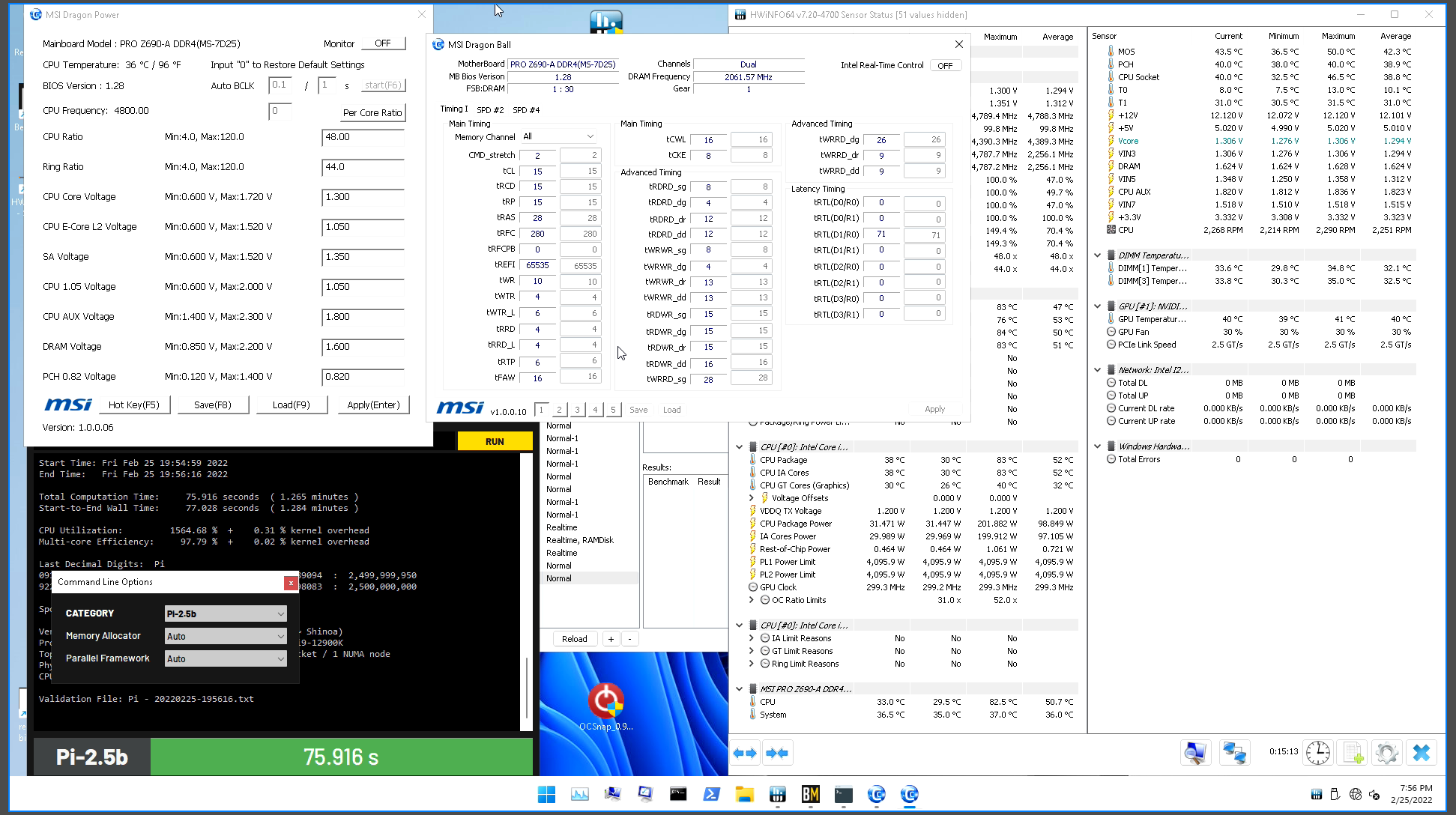
mainly, aim for 6/4, 6/4 rdrd and wrwr sg/dg
 sonic patrol
Whats the diffrence between a asus prime b660m-a d4, a b660m-k d4 and a b660-plus d4? and which one fits the best the 12600k?
mild jackal
Form factor, features
vast meadow
first 2 are micro atx, not sure about the k but the a is just an micro atx version of the plus
what best fits depends on your country/pricing
burnt spear
really? i thought vrms were slughtly different
mild jackal
Shouldn't matter much for a 12600k on air
sonic patrol
vast meadow
what best fits depends on your country/pricing
the first one is $152, 2nd is $130 and the 3rd one is $189
vast meadow
it does have slightly worse vrms yeah
vast meadow
sonic patrol
the first one is $152, 2nd is $130 and the 3rd one is $189
thats pretty meh pricing? what country?
burnt spear
poland
sonic patrol
yup
vast meadow
ohh right
if you can link me the site i can see if there are better ones?
or do you want the white from prime?
sonic patrol
uhh sure, theyre diffrent sites but they dont matter mostly
sonic patrol
vast meadow
or do you want the white from prime?
white one?
sonic patrol
yea
sonic patrol
vast meadow
You want a white one?
would prefer honestly black, since the case will be black
sonic patrol
komputronik.pl
euro.com.pl
x-com.pl
allegro.pl (its an ebay, wouldnt honestly recommend)
ffs they didnt link
sonic patrol
vast meadow
Link the sites and i can see if there's better ones for cheaper/same price
I could send you the links to the ones I found
vast meadow
It's okay 1 sec
vast meadow
sonic patrol
komputronik.pl
euro.com.pl
x-com.pl
allegro.pl (its an ebay, wouldnt honestly re...

Płyta główna ASrock B660M Pro RS DDR4 w RTV EURO AGD. Gniazdo procesora: socket - 1700, Chipset: Intel® B660, Standard: micro ATX, Pamięć RAM: 4 x DDR4, maks. 128 GB... Zobacz w RTV EURO AGD!
I couldn't check x-com because it wasn't translating
sonic patrol
pro it will be
sonic patrol
vast meadow
I couldn't check x-com because it wasn't translating
x-com doesnt translate, couldve helped u but it costs more than its worth it so its fine
I found the same ASrock, just on x-com
cheaper, idk how but it is
vast meadow
Oh dam
sonic patrol
yea
vast meadow
If you want to link the motherboard lga 1700 page for x-com i can see if anything else is on there
sonic patrol
$5 diffrence 💀
vast meadow
Oh well it adds up
sonic patrol
oh yea it does, either you drive to the store of a x-com or you gotta pay $20 shipping
idk why but that just sounds broke
vast meadow
Lol rip
sonic patrol
Ill keep the two links, will make my mind up in a few days
thanks for the help Pato
vast meadow
Np
burnt spear
vast meadow
https://m.euro.com.pl/plyty-glowne/asrock-p-yta-g-wna-asrock-b660m-pro-rs.bhtml
and thats fine for a 12600k?
mild jackal
Should be ok
burnt spear
ty
vast meadow
burnt spear
and thats fine for a 12600k?
Yeah, you looking at boards for yourself or just curious?
burnt spear
im helping gamer in dms
ima be saving mining profits for a 13th gen cpu, most likely 13600k
ill look at mobos then
if amd ends up supporting ddr4 for am5, itll be a tossup
vast meadow
burnt spear
if amd ends up supporting ddr4 for am5, itll be a tossup
It wont
Ddr5 imc only
burnt spear
mmm
ill have to buy an aio tho as well
or might just settle for an expensive heatsink
i dont feel like messing with an aio as of now lol
my friend runs his 5800x on a dark rock 4 pro
 grizzled bloom
My personal rule is simple: NEVER buy the first gen on a new socket, especially a new platform
frosty depot
mild jackal
IME, the LF360 is really mediocre for an 8 core 12th gen
Is there a different aio that you might suggest for around the same price point??
mild jackal
grizzled bloom
My personal rule is simple: NEVER buy the first gen on a new socket, especially ...
Lol why? No sense making a blanket rule like that. Model over brand is very much the same sentiment.
Alder lake is a really solid choice if building new right now
grizzled bloom
That's just my personal rule based on past observations
Alder lake is an outlier, an exception if you will
Mostly because it still supports DDR4
mild jackal
Ddr5 is great for daily imo, it's just that some boards are terrible for high end ram oc
You can daily 6800c30 on a unify x, 32GB
grizzled bloom
DDR5 itself is fine, but the motherboards... I've seen plenty of cases where they fail to run jedec with 4 sticks, or can't do xmp with 2
mild jackal
Lol yikes, yeah, have to research more than usual
Those Kingstons in the pin are solid
Gskill xmp ratings are sus
grizzled bloom
One thing I look forward to doing in ~3-4 years when I move to DDR5 is custom XMP profiles
 serene moth
i have a question will my pc be okay with it running 3600 ram vs 3200
i have a i5 12600k and my mob is asus prime h670-plus d4
vast meadow
Ye
serene moth
okay cool i was just wondering because i wanna switch from my 2400 to 3600 but just wanted to be sure it would be fine
 lunar holly
Is there a wifi motherboard that you guys will reccomend for a 3080 ti and a i9 12900k? Im trying to build a pc but dont know exactly what motherboard to get.
vast meadow
lunar holly
Is there a wifi motherboard that you guys will reccomend for a 3080 ti and a i9 ...
Depends on country but assuming you're in the US I'd go z690 tomahawk wifi
frosty depot
vast meadow
Depends on country but assuming you're in the US I'd go z690 tomahawk wifi
Is that better than the z690a pro wifi?
lunar holly
vast meadow
Depends on country but assuming you're in the US I'd go z690 tomahawk wifi
Yeh I live in the U.S. I really appreciate the advice.
cerulean wadi
mild jackal
Ddr5 is great for daily imo, it's just that some boards are terrible for high en...
Great until people see ddr5 is almost 2x the cost of decent ddr4 still. Only problem with 13gen is maybe ddr5 only
mild jackal
13th gen is so far away, there's likely to be budget ddr5 by then. The $350 kingston ddr5 kit is comparable "top tier" to the 4400c17 gskill $320 ddr5 kit
cerulean wadi
Right. ah, make that 3x price of decent ddr4. 🤣  Will be fun to see ddr5 prices plummet in the next year or so .
burnt spear
grizzled bloom
Alder lake is an outlier, an exception if you will
well we'll have to wait for 13th gen to really say that
if 13th gen is immensely better, youd be right'
mild jackal
cerulean wadi
Right. ah, make that 3x price of decent ddr4. 🤣 <:FedoraTip:885531005535002684>...
That's a high end kit though, and I'd say "decent' ddr4 is like $190 for 32GB
I guess you could call the $98 2x16 micron kit on sale a few weeks ago decent
cerulean wadi
yep exactly, and it's still $113ish so pretty good, but I'm also usually a bit "frugal" and go after bang for buck. (except the 1080 perhaps). 👍
vast meadow
frosty depot
Is that better than the z690a pro wifi?
Yeah, mainly in the heatsinks on the vrms
vast meadow
cerulean wadi
Great until people see ddr5 is almost 2x the cost of decent ddr4 still. Only pr...
It has to support ddr4, even if the z790 boards are being pushed to be ddr5, you can just get z690 with flashback
vast meadow
burnt spear
well we'll have to wait for 13th gen to really say that
Well no because 12th gen isn't a buggy mess so alder lakes is indeed an outlier
burnt spear
vast meadow
Well no because 12th gen isn't a buggy mess so alder lakes is indeed an outlier
What I meant was, if 13th gen is immensely better
vast meadow
burnt spear
What I meant was, if 13th gen is immensely better
That wouldn't not make 12th gen an outlier tho it would just make 13th gen a big improvement
burnt spear
Yeah ig
 finite elm
grizzled bloom
My personal rule is simple: NEVER buy the first gen on a new socket, especially ...
finite elm
grizzled bloom
My personal rule is simple: NEVER buy the first gen on a new socket, especially ...
Nah, getting that 7950x when it launches with slow DDR5
burnt spear
finite elm
Nah, getting that 7950x when it launches with slow DDR5
im still waiting for ddr5 prices to drop, then ill decide if i get ddr5 or not
but as is with a good ddr4 kit ill prolly just get 13th gen
finite elm
burnt spear
but as is with a good ddr4 kit ill prolly just get 13th gen
The question is will 13th gen support DDR4? They are removing DDR4 support from the 700 Mobos. So could they also restrict it to the DDR5 600 mobos? 😛
I think anyway
burnt spear
finite elm
The question is will 13th gen support DDR4? They are removing DDR4 support from ...
pato seems to think so
but well cross that bridge when we get there ig lol
finite elm
I don't expect either of them to be too consumer friendly these days.
We'll buy anything so they'll milk us for sure
burnt spear
prolly
not like ill be losing a ton anyways, was only 90$ for this ram so its not a lot of money lost
could sell it for probably around the same, since its crucial
?
finite elm
Do you have 32GB's or 16?
finite elm
Ah okay. I thought you had 16
burnt spear
nah upgraded from a random hp 3600c18 kit
think the timings were 18-22-22-22-42 or smthn like that
terrible
finite elm
I mean, better than the other OEM ram they use
finite elm
2666mhz was pretty common during 2nd gen and early 3rd gen Ryzen prebuilts.
Its why I won't suggest IbuyPower cause they cut too many corners.
 dull flint
Welp. I'm at the point of insanity. Replaced everything systematically at this point (down to even the cables) and my system still showing E0. Ram or no Ram.
The last time I had a boot was the day after the post linked when I RMA'd the CPU and they found it was actually broken, displaying technicolor screens in their test benches at the store I bought it from, gave me back a 12900K with the same numbers and codes on the IHS but a new intel box seal so it should've been brand new. That one lasted 4 hours and 3 boots.
Any ideas? I'm at a loss. I've now tried 3 mobos and they all have the same behaviour, a whole new set of RAM, on my second 12900K, tried two different power supplies, VGA disconnected so it was never a factor (Owned it for over a year and worked fine until now) all new cables. Only the water loop and SSD's/HDD's are unchanged and nothing in it has been broken/problematic. Cooling is fine, fans are fine, they're all turning.
I'd be stunned if it was the CPU again, but also they had the same batch number so maybe it's a bad batch?

NB: this isn't related to Newegg, I don't live in the US, this isn't using any of their parts
I just need help 
hollow thorn
dull flint
Welp. I'm at the point of insanity. Replaced everything systematically at this p...
Doesn't need to be related to Newegg anyways, might as well take a bit more effort and try to do a clean-ish slate to test, grab one of the new PSUs, grab the new CPU, build outside of case, grab a new unused drive if possible, and try to boot that, maybe try a different surge protector or wall outlet if possible
dull flint
I will definitely try that. Got so many spare parts I can make a test bench up with only the CPU and RAM sticks carried over and see what happens
I will legit cry if it works this has been a painful month
hollow thorn
I hope you figure out the problem soon
 vale yarrow
My pc struggles to stream Valorant on discord to my friends, usually on 90-100% usage when I do so, with discord bugging out as well. Is this likely a cpu issue? I have a 1650 super and an i3 10100
If it was my cpu, would it be worth replacing with an i5 11400f? (I can get one for 179.99 cad rn)
vast meadow
11400 would be a nice upgrade yes
vale yarrow
vast meadow
11400 would be a nice upgrade yes
Do you think it would fix my issue though?
I’d assume it is my cpu since it’s multitasking that I struggle with
And the 4 cores I have isn’t doing too well with that
But I worry it could also be my gpu
Which I cannot afford to replace atm
mild jackal
The 1650 super has the full NVENC capabilities of 2000 and 3000 series cards, discord should be using that for hardware acceleration, right?
That said, I could see the 10100 being the overall bottleneck
vast meadow
mild jackal
The 1650 super has the full NVENC capabilities of 2000 and 3000 series cards, di...
afaik it doesnt use nvenc
mild jackal
Should be pretty easy to test - stream some gaems, watch cpu load
vale yarrow
mild jackal
Should be pretty easy to test - stream some gaems, watch cpu load
Yeah I’ll give that a go
burnt spear
vale yarrow
But I worry it could also be my gpu
What ram you got while we're asking?
Well more so how much
vast meadow
well how much/how many stick and speed are all important
burnt spear
vast meadow
well how much/how many stick and speed are all important
For this I'm more so concerned with how much
8gb could be causing the issue
Ofc they're important
vast meadow
dual channel is a big factor tho
 woeful rampart
is having x2 8gb and x2 16gb bad in any way?
same RAM just different sizes
if it is bad ill just get another 2 8gb and settle for having 32gb total
mild jackal
woeful rampart
is having x2 8gb and x2 16gb bad in any way?
Not really. What cpu/board/sticks?
woeful rampart
Crucial Ballistix 3200 MHz DDR4 2x 8GB current on a B550 gaming edge wifi and ryzen 5 3600
mild jackal
Yeah, just find some other crucial kit, no issues
cerulean wadi
woeful rampart
Crucial Ballistix 3200 MHz DDR4 2x 8GB current on a B550 gaming edge wifi and ry...
If the 2x16 set is $113 still you could get that & sell your current set
vast meadow
@mild jackal this is b die right? https://www.newegg.com/oloy-16gb-288-pin-ddr4-sdram/p/N82E16820821410
 mild jackal
idk, maybe?
vast meadow
hmm
vale yarrow
burnt spear
What ram you got while we're asking?
16 gb
burnt spear
most likely cpu then yeah
vale yarrow
on 3600 mhz too
vast meadow
2 sticks I hope?
vale yarrow
lmao yes
burnt spear
vast meadow
2 sticks I hope?
can 10100 handle 3600?
im guessig yeah since its 10th gen
but ive never seen an i3 on 3600 lol
not sure if the imc on it is worse or smthn idk
vast meadow
burnt spear
can 10100 handle 3600?
Yup
frosty depot
I just want to make sure, but is this B die and ocable to 4000mhz?
hollow thorn
ballistix isn't b die, its rev e, and it can prob do 4000c16
frosty depot
hollow thorn
ballistix isn't b die, its rev e, and it can prob do 4000c16
What is difference between B die and rev e? The ram won't have to many issues with heating up to much at a 4k clock?
I apologize for questions that may seem like common knowledge.
hollow thorn
very different die, b die is temperature sensitive, rev e less so
vast meadow
frosty depot
I just want to make sure, but is this B die and ocable to 4000mhz?
https://pcpa...
Rev e or rev b, should clock up to 4000mhz yes although depending on your cpu's memory controller 3800/3900 might be the better option
frosty depot
Ok. I'll be using the 12700kf so I'm not sure what that'll mean in terms of getting to 4k.
frosty depot
hollow thorn
very different die, b die is temperature sensitive, rev e less so
Ah ok. Thank you.
vast meadow
frosty depot
Ok. I'll be using the 12700kf so I'm not sure what that'll mean in terms of gett...
Silicon lottery
frosty depot
Ah ok
finite elm
vast meadow
afaik it doesnt use nvenc
It does
frosty depot
Should I buy the ram now at this price? Do you project that it'll raise in price or go out of stock any time soon?
vast meadow
I haven't seen my nvenc be active in discord
vast meadow
frosty depot
Should I buy the ram now at this price? Do you project that it'll raise in price...
Might do yeah, it's kinda on sale now
frosty depot
vast meadow
Might do yeah, it's kinda on sale now
Alright did so. Thank you guys for the help.
 limber dragon
vast meadow
<@!546791995830566912> this is b die right? https://www.newegg.com/oloy-16gb-288...
limber dragon
vast meadow
<@!546791995830566912> this is b die right? https://www.newegg.com/oloy-16gb-288...
could be bdie, but crucial also makes a 4000 18-19-19 of revb
finite elm
vast meadow
I haven't seen my nvenc be active in discord
If you click "voice connected", then "debug", you should see a debug screen. On the side, click "Outbound" under "RTC Debug: Stream" - and in that, there will be "Encoder" which will have what we're using. -Discord staff.
But it should definitely use Nvenc. Will use it when a viewer connects. So if you streamed just in a random voice chat that might be why.
 long geyser
Doesnt it use NVENC tho? I know it doesnt use it well cuz core/VRAM utilization is still insane for an NVENC encode
 drowsy nymph
Thanks for the links
finite elm
long geyser
Doesnt it use NVENC tho? I know it doesnt use it well cuz core/VRAM utilization ...
Yes discord uses NVENC
frosty depot
Will the 12700k iGPU be good enough to use discord and browse the web? No gaming. Maybe a bit of youtube?
dense frost
yes, thats what its really good for
frosty depot
Ok cool. That means I can get everything I need right now to get a pc going except a dedicated gpu. Gotta wait for my taxes for that.
dense frost
yeah. you might be able to do some light gaming too. low settings at 720p
vernal cosmos
dense frost
yeah. you might be able to do some light gaming too. low settings at 720p
low 1080p
30fps or so in many games
is what 11500 igpu gives me
dense frost
vernal cosmos
30fps or so in many games
30fps? what is this? gaming for PS1? 60fps or gtfo!
frosty depot
Am I going to have issues using a 1kw psu without a dedicated gpu?
dense frost
frosty depot
Am I going to have issues using a 1kw psu without a dedicated gpu?
what? no? why would that ? what?
frosty depot
Like will it be to much? Or will I be fine for a month or two?
vernal cosmos
dense frost
30fps? what is this? gaming for PS1? 60fps or gtfo!
Oh ur right im sorry
vernal cosmos
frosty depot
Like will it be to much? Or will I be fine for a month or two?
too much isnt a thing
rather go overkill than underkill
frosty depot
Ok. I guess I thought it was for some reaaon.
dense frost
vernal cosmos
rather go overkill than underkill
love this. make it a pinned post or something.
vernal cosmos
nope components pull only what they need
frosty depot
Like, to much over was a bad thing I suppose I thought.
Alright cool
I think I might go with the 12600k instead. Seem like its marginally less perf while being a good bit cheaper.
dense frost
whats your use case? gaming?
dense frost
12600k is very decent then
frosty depot
Should last me a good amount of years gaming?
dense frost
yup
frosty depot
Sweet.
vast meadow
limber dragon
could be bdie, but crucial also makes a 4000 18-19-19 of revb
Thought that was 1.35v bin tho :/
vast meadow
finite elm
But it should definitely use Nvenc. Will use it when a viewer connects. So if yo...
Ahhh that might be it
drowsy nymph
frosty depot
Will the 12700k iGPU be good enough to use discord and browse the web? No gaming...
If it's the UHD 770 it might even be good enough to play some games until you can get a real one.
UHD 770 is actually a really powerful igpu considering it's an igpu.
At 1080P anyway.
hollow thorn
burnt spear
im so confused on what he was trying to do
Prob heard from someone trolling that you should clean your pins
 naive pendant
 grizzled bloom
burnt spear
im so confused on what he was trying to do
grizzled bloom
burnt spear
im so confused on what he was trying to do
You'll note that you only see the bottom of the CPU so it could literally be an AM4 Athlon that cost $20 and he's doing it for internet points
burnt spear
grizzled bloom
You'll note that you only see the bottom of the CPU so it could literally be an ...
yeah i know
i thought about that when i first saw it
hollow thorn
@gritty meadow Ian no longer working for Anandtech :(
https://youtu.be/dtG9I3mZlJo

Welcome to my future.
[0:00] I left AnandTech
[0:20] AnandTech: 2011-2015
[1:40] Purch: 2015-2017
[2:30] Future: 2017-2022
[4:20] Journalists to Businesses
[6:05] LTT ?!
[6:30] Media vs Analyst
[7:45] Name and Reveal
[10:23] Peel back the curtain
[12:30] The future of TTP
[16:23] Cat Tax
Welcome to the TechTechPotato (c) Dr. Ian Cutress
Rambli...
vast meadow
hollow thorn
<@131369265608654848> Ian no longer working for Anandtech :(
https://youtu.be/dt...
yeah this was announced a bit ago
:(
wait is he working for LTT?
hollow thorn
vast meadow
yeah this was announced a bit ago
Ye but this is extra info for what he's doing now, he starting new company for now
vast meadow
ohh cool
i was thinking he might have been going to LTT labs because linus said they got someone really big confirmed
hollow thorn
It was a rumor he started I think
vast meadow
lol ian the troll
serene moth
So I originally bought the h670 for my 12600k not thinking and I can’t OC it now unless I’m wrong? But what’s a good step from that? Still staying at the like 250$
vast meadow
serene moth
So I originally bought the h670 for my 12600k not thinking and I can’t OC it now...
no, h670 cannot overclock, but do remember cpu overclocking these days isnt always worth the money, any z690 board will let you overclock though - would only swap if you can return your current board and are going to OC
serene moth
I figured. And I don’t think I can return it. Not too concerned it was kind of a gift thing so I got lucky so I’ll just sell it for cheap then use it to get me a z690. Thanks. I don’t think I need to OC I just want to know I have the option of I ever decide to.
burnt spear
serene moth
I figured. And I don’t think I can return it. Not too concerned it was kind of a...
why not wait till you decide to oc to buy a new mobo
itll be cheaper then too
grizzled bloom
You can still do bclk and ram overclocking on H670
vast meadow
grizzled bloom
You can still do bclk and ram overclocking on H670
bclk is only some board with external clock gens
grizzled bloom
You can still do it without, it's just you'll probably top out around 103 instead of 120+
 serene topaz
Anyone else with Corsair Ram have an issue with ice not making the ram follow instructions? They are all supposed to be off but this stick decided to be purple today
 serene moth
grizzled bloom
You can still do bclk and ram overclocking on H670
serene moth
grizzled bloom
You can still do bclk and ram overclocking on H670
Yeah I’ll wait till they get cheaper I runs fine for now. And I have some new ram coming in for xmp OC I’m pretty excited about
dull flint
dull flint
I will definitely try that. Got so many spare parts I can make a test bench up w...
Update on my situation. I built a whole separate system and tried the cpu, mobo and RAM as the only introduced factors, and I still had E0 errors.
I've RMA'd the CPU and RAM together. Told them it's one of those two. (To reiterate I've had the same error on three mobos now)
Hopefully they come back to me quickly and tell me it's all sorted out
 burnt hazel
is there any difference between a ram kit 8x2 and buying same ram 8gb twice which is not listed under kit category
dense frost
there shouldnt be
but you should try and avoid such situations and buy kits of 2 when possible
vast meadow
There shouldn't be but there can
cursive epoch
Buying kits is best bet for compatibility
Besides buying individual sticks costs more than a kit anyway
grizzled bloom
Buying in kits is the only way to guarantee the sticks work together but modern processors care less about matching
vernal cosmos
or getting ballistix sticks
 normal breach
hi guys, I need some help, i have a ryzen 5 5600g and ram 16 gb ddr4 3200, I will buy a motherboard and have 175 usd , so i ask for you to give me some options for a good motherboard
normal breach
thanks
 final rampart
I'm helping to build my niece a super budget build (looking to keep it under $500). Picked up the i3-10105 today for $100. Does anyone here have experience with H510m motherboards? I'm trying to figure out if it's worth saving the $30 or if I should go for a B560
burnt spear
final rampart
I'm helping to build my niece a super budget build (looking to keep it under $50...
I'll try to make a build list, one moment
How much did the 10105 cost?
burnt spear
What's the build going to be used for?
final rampart
My current bare bones budget is:
Case: $50
CPU cooler: $16
Mobo: $120
RAM: $35
PSU: $30
SSD: $35
final rampart
burnt spear
What's the build going to be used for?
The goal is for her to play Minecraft with us
burnt spear
Well, here's what I got. If you can return that cpu you could throw in a used 1030 which would be worlds better https://pcpartpicker.com/list/6rJcY9
Even if you don't you could still prolly fit it in
final rampart
My secondary goal is to have a PSU that can handle a 3050 or future equivalent so she could upgrade it someday, so if I have some wiggle room in the budget (this doesn't include monitor) I'd rather put it towards a nicer PSU
But I appreciate it!
burnt spear
The psu in there is fine for even a 3060 ti
final rampart
Yep, you're right, I misread that
burnt spear
Still, the list there is what I'd do for your budget if you're set on keeping the cpu, and maybe in a year or two you could get a 16 series or smthn in there
final rampart
I appreciate it, this way if she upgrades the GPU she doesn't have to replace anything, just add it
And my wife plays on a Ryzen 5 3500U laptop with adequate performance, and the 10105 is substantially more powerful, so I'm not super worried about that
burnt spear
ehh, the igpu on the 3500u is a good bit better iirc. 10105 should handle mc at decent render, vanilla, but if modding itll have some trouble
final rampart
Oh, no mods, we're on a vanilla realm
burnt spear
should be fine then yeah
 dim cloak
I can confirm that a 10105 can run igpu Minecraft on vanilla and a very few mods
burnt spear
dim cloak
I can confirm that a 10105 can run igpu Minecraft on vanilla and a very few mods
yep, my partners pc with a 3400g dies in a lot of modpacks tho
dim cloak
Oof my friend with the 10105 and 8gb of ram runs mc with like 4 mods on the private Java server
burnt spear
yeye, light stuff like that is fine
i mean a lot of the popular packs
crazy craft, even lite, tekkit lite, a few other big ones
dim cloak
Actually he was capable of handling the Cave factory mod pack shockingly
burnt spear
i used to have trouble in sky factory on a 1030 and 3470 lol, but that was the cpu
dim cloak
Which I may or may not have have killed the wither with a diamond knife for the giggles
And I stole my buddy's trinket which he was working so hard for and I just come up and start poking the wither and stole it 
vast meadow
@final rampart https://pcpartpicker.com/list/MvKzY9
burnt spear
vast meadow
<@!389944389184782337> https://pcpartpicker.com/list/MvKzY9
why not just the cxm, and isnt the 750 the same price?
or rmx 650
vast meadow
burnt spear
why not just the cxm, and isnt the 750 the same price?
Not anymore, rmx is just as good but more and requires rebate, cxm isn't as good
final rampart
vast meadow
<@!389944389184782337> https://pcpartpicker.com/list/MvKzY9
That's roughly what I'm planning, but my goal was to camp for sales over the next month or so and try to save some more money on the PSU and mobo in particular
Which is why I asked about the H510m mobo in the first place
It's like $30 less than the B560 mobos I've seen, and I'm trying to figure out if it's worth the savings


 arctic jewel
whats good affordable cpu
burnt spear
arctic jewel
whats good affordable cpu
depends on your budget for the whole pc
also if youre using igpu or dgpu
and what the pcs being used for
final rampart
I've been happy with my 10600k, it kept me going with lighter games until I was able to find a GPU
And I got it on sale, so that helped
burnt spear
how much and when?
final rampart
burnt spear
how much and when?
Last June, I don't remember exactly, and Newegg is only showing me the total discount on the order not the discount on each part individually, but the order discount was $50 so it can't have been more than that
It was probably $150ish
burnt spear
nice
final rampart
Yeah
And now I'm running a 2080 with it
I wasn't planning on going that high, but I came across one in stock so I grabbed it rather than waiting or paying scalper prices
burnt spear
its a fine combo
final rampart
Oh I like it, I just wish I didn't have to pay so much for it lol
vast meadow
final rampart
That's roughly what I'm planning, but my goal was to camp for sales over the nex...
You can, that ones just better overall, has wifi/BT
vast meadow
arctic jewel
whats good affordable cpu
Depends what you call affordable
 stone magnet
whats a good budget motherboard for 12400f?
vast meadow
Country?
stone magnet
america
vast meadow
Asus b660 (micro atx) prime last time i checked
burnt spear
@vast meadow rmx 650 is 65
vast meadow
burnt spear
<@!191276897227898880> rmx 650 is 65
Showed more for me maybe i had rebate filter off
burnt spear
ahh
 snow tartan
hey guys, the USB C port on my mobo doesnt seem to be working. i plug something in it but no power is coming thru... any idea? MSI B550 gaming plus
grizzled bloom
Do you have the drivers installed?
snow tartan
i checked on device manager and everything seems ok
clicked on update drivers and says its up to date
grizzled bloom
That just means A driver is installed
grizzled bloom
Yeah. I'd link the driver you need but the msi site doesn't want to work on my phone.
snow tartan
do you know the name of it at least so i know what to look for?
grizzled bloom
You'll know it when you see it, probably has usb in the name
I have no idea why the msi site just loads to a white screen for me, it's worked before
snow tartan
PIDE/SATA Drivers
Chipset Driver
On board VGA
and Audio
all i see on MSI
or the BIOS driver
grizzled bloom
Gotta be the chipset driver then
You could also try updating bios and disabling fTPM
 bleak wyvern
I have a b550 aorus elite is there a cpu I can get that could run a 3090 that is at 8core or 12 core?
 half lava
bleak wyvern
I have a b550 aorus elite is there a cpu I can get that could run a 3090 that is...
half lava
bleak wyvern
I have a b550 aorus elite is there a cpu I can get that could run a 3090 that is...
5800x, 5900x, 5800x3d(launch April 20)
bleak wyvern
Understood thank you
grizzled bloom
5800X3D is, quoting AMD, "the world's fastest gaming cpu"
dim cloak
My 12700K laughing in the background currently
grizzled bloom
We'll see how long it's laughing. AMD has been tighter on leaks than intel, but those that have come out show up to 30-50% improvement in fps when cpu limited.
Makes me very excited for AM5 later this year.
dim cloak
my limit currently in most games is the gpu
grizzled bloom
That's usually how it is honestly. Especially at higher resolution. Which is why at 1440p with a 6900XT there's only a few % difference between most modern chips.
And then you have those insane esports players doing 720p
 wise hare
Not sure where else to put this; last November I got an Aorus Elite AX DDR4 and a Core i7 12700K, from January onwards I've had intermittent problems with my mouse not responding until I unplug and plug it back in, or Windows would BSOD when I plugged an external drive in. Also have had to reinstall windows twice in the same timeframe. When it fully craters it either won't boot windows at all or it'll make it to the login screen and freeze for a few minutes before BSOD. BIOS is also really sluggish during those times, cursor stutters and skips, selections take a few seconds. I'm kinda at a loss. Tried different ram and just using integrated graphics without the GPU, BIOS updated, no changes.
half lava
wise hare
Not sure where else to put this; last November I got an Aorus Elite AX DDR4 and ...
Windows 10 or 11?
wise hare
Windows 10. I've had windows on a MBR partitioned Kingston SSD for a number of years. I've been wanting to migrate it to my PCIe 4 M.2 but I can't get the installer or bios to recognize the damn thing as a bootable drive. That's a whole different problem I'm currently facing.
half lava
wise hare
Windows 10. I've had windows on a MBR partitioned Kingston SSD for a number of y...
Possible the Kingston ssd is failing. Your priority needs to be on using the m.2 drive for windows at this point
wise hare
That's what I'm thinking. I want to use a GPT partition anyway so I can upgrade to Windows 11 when I want. Well, time to figure out why I can't do anything with that M.2.. Only shows up under Intel Rapid Storage in the bios, but not under listed NVMe or PCIe devices. Definitely isn't bootable.
half lava
Turn intel rapid storage off in bios and go from there
wise hare
I'll give it a go tomorrow after work, thanks for the advice~
half lava
wise hare
I'll give it a go tomorrow after work, thanks for the advice~
https://www.asus.com/us/support/FAQ/1044458/ I don’t know the exact issue you’re having but maybe this helps
Official Support | ASUS USA
cerulean wadi
 naive pendant
who needs a 5800X3D when you can just overclock a 5800X
grizzled bloom
You'd need to overclock the cache, which is a pain in the butt
cerulean wadi
X3D also has way more cache, that's part of the hype.
grizzled bloom
And part of the problem... They're having huge issues with yields because it's all shaved down so much
vast meadow
grizzled bloom
We'll see how long it's laughing. AMD has been tighter on leaks than intel, but ...
B...but no improvements in csgo :(
hollow thorn
This is interesting, although I don't understand any of it
https://arstechnica.com/science/2022/03/microsoft-announces-progress-on-a-completely-new-type-of-qubit/

Ars Technica
Topological qubits don't exist yet, but the company is convinced they'll scale.
vast meadow
im to tired to try understand that
 rocky iron
Bro my cpu keeps going to 100% usage when it's not even doing anything
vast meadow
Gotta be something using it, check task manager
rocky iron
i fixed it i think
No like seriously
I only had a game open, and not even like a hard to run game, and it was taking up 60 percent usage, which brought my overall to 100
rocky iron
I7-10700F
yeah i got rid of the bloatware
i think
it was from msi dragon center
i uninstalled like almost everything from there except the mystic light
just to keep my rgb
burnt spear
do you happen to use wallpaper engine
 tepid iris
Hi guys just upgraded to a z690 from a 390 now my NVMe isn't booting. It shows in boot but not in hard drives
grizzled bloom
tepid iris
Hi guys just upgraded to a z690 from a 390 now my NVMe isn't booting. It shows i...
Did you reinstall windows when migrating? If not I strongly recommend that
vale yarrow
Is an 11400F at 209.00 CAD a good deal? Worth upgrading from an I3 10100?
long geyser
Havent bothered to really look at Intel, but apparently 10400F can come close to 11400F with unlocked PL. Afaik lots of B560/H570 have that option. 10400F is $175 CAD
10100 should be able to get $100+ CAD on third market
So upgrade cost shouldnt be too much after inclusion of selling old CPU
Tho, proper research should be done for looking at unlimited PL 10400F, stock 11400F, and unlimited PL 11400F
vast meadow
10400 and 11400 are very similar in perf
burnt spear
@naive pendant theres a xeon 2830v2 on marketplace for $35
for $100 you can get the mobo, ram, heatsink and cpu together
naive pendant
burnt spear
<@456226577798135808> theres a xeon 2830v2 on marketplace for $35
gimme link 👀
do you mean 2630v2?
burnt spear
See posts, photos and more on Facebook.
naive pendant
that cpu goes for like 6 bucks by itself on ebay, but i wonder about the board and ram
burnt spear
Looks like it says 2830
naive pendant
im pretty sure 28xx series isnt a thing
ah bummer, its just from a prebuilt workstation type thing
😔
burnt spear

Intel
Intel® Xeon® Processor E7-2830 (24M Cache, 2.13 GHz, 6.40 GT/s Intel® QPI) quick reference with specifications, features, and technologies.
Ahh
naive pendant
e7's have different looking heatspreaders, so the one in the listing is a 2630v2
burnt spear
This is what I'm looking at

 humble wasp
i have 2*8gp 2666mhz i want to buy 2 more
cuz some time when i open multiple things it crash cuz of the ram spacer
space
it is ddr4 is ok to put ddr5 with them ?
any advicr
advice)
frosty depot
humble wasp
it is ddr4 is ok to put ddr5 with them ?
You can't use ddr5 on a ddr4 motherboard.
frosty depot
Hm. I'm not to knowledgeable. Based from what I've seen in this server, I feel like replacing the ram you have now with 2x16 would be a better option.
vernal cosmos
humble wasp
it is ddr4 is ok to put ddr5 with them ?
not possible
vernal cosmos
humble wasp
so i go with dual ddr4 same what i have already
what u got rn?
exact sticks
also
humble wasp
2*8gp 2666mhz
vernal cosmos
what motherboard and cpu
humble wasp
i5 10400F
humble wasp
when i asked here they told me it is ok
vernal cosmos
what country u live in so i can link a local kit
vernal cosmos
humble wasp
when i asked here they told me it is ok
its ok till its not
humble wasp
bahrain
humble wasp
yes
vernal cosmos
oh cool
humble wasp
why?
vernal cosmos
Because pricing changes from country to country
humble wasp
aah ok
vernal cosmos
a good deal in the us or where i live could be a ripoff in ur country
humble wasp
ok i see
humble wasp
where i can sell
i am thinking to change the mb so i can buy higher speed ram
what do u think
vernal cosmos
tbh i woudlnt
i mean u can if u wanna upgrade cpu as well down the line
but doesnt make sense otherwise
upgrading board for that socket makes not much sense to me either
humble wasp
ok
humble wasp
humble wasp
where i can sell
?
burnt spear
Ram speed won't make a huge perf difference for you
vernal cosmos
since the 11700 and 11900 are kinda ehh
so yeah
save up for 12/13th gen
that ram kit will be compatible with both
humble wasp
ok
vernal cosmos
humble wasp
where i can sell
i dunno
ull have to find that
idk ur countries second hand market
vernal cosmos
np

 vast meadow
 scenic solar
Prices finally dropped 🙂
scenic solar
Prices finally dropped 🙂
yes because 3rd party
cerulean wadi
vale yarrow
Is an 11400F at 209.00 CAD a good deal? Worth upgrading from an I3 10100?
Idk if you were answered, but the main thing is you're gaining 2 cores. Cpu tasks and "1% lows" in games will be a decent improvement. Could also sell current stuff & put that $200 cad towards 12gen. If going for 11400, also think about 10400 (often cheaper & basically the same 6 cores)
 hidden cobalt
Looking at making a list for a guy for his first PC. Guy is looking for gaming and probably some light video editing. Trying to get him a deal on a CPU from the MicroCenter first customer promo they are running. Should I go with the:
5600x for ~$200
5800x for ~$260
12700k for ~$310
I know they are all solid in this day and age. Just looking for the best bang for the buck for the guy.
cerulean wadi
Mostly gaming, 5600x or 12600k or even 12400. Mobo is where you can waste or save money.
hidden cobalt
Yeah that is my thought. 12600k is not part of the deal MC is running sadly. Limited to 5600x, 5800x, 12700k or 12900k. Know for certain he doesn't need the i9
https://www.microcenter.com/site/content/specialoffercpu.aspx

Micro Center
New Customer Exclusive! Sign up to get your coupon via text. Limit one coupon per person. One time use in-store only coupon. While supplies last.
might just go with the 5600x for him since 5xxx chips seem to be in freefall right now. Might be a super cheap upgrade to a 5900 or 5950 in a few years for him
cerulean wadi
Yea, or light video editing and such might make that 5800x the smart buy, but $60 on 200 is quite a bit perhaps. Good thing about the amd stuff is not "needing" Win11 like the 12gen Intels w/ Ecores. 👍
hidden cobalt
👍 oh yeah didn't even think of that. I don't think a $60 jump will break his budget and may be worth it still. Either one is a good deal for him in the end.
vast meadow
hidden cobalt
Looking at making a list for a guy for his first PC. Guy is looking for gaming a...
If they don't already have an am4 board there is no point going amd atm, 12600k and 12700(k) are great
To be fair the 200$ 5600x is decent but 12400 would probably be cheaper if available at micro center
Unless you can only buy at micro center, I'd just get a 12600k from somewhere else for 270$
drowsy nymph
@vast meadow ProVantage actually called me to confirm I actually bought a kit of their RAM.
They said something about fraud or something
So they wanted to actually speak with me.
Now that's good service.
vast meadow
drowsy nymph
<@191276897227898880> ProVantage actually called me to confirm I actually bought...
Lol 
 agile jolt

Gigabyte B450M DS3H WiFi (AM4//AMD/B450/mATX/SATA 6GB/s/USB 3.1/HDMI/Wifi/DDR4/Motherboard)
what do yall think about this MB?
it looks alright for my budget
vast meadow
agile jolt
https://www.amazon.com/Gigabyte-B450M-DS3H-WiFi-Motherboard/dp/B08B7ZX8Q2/ref=sr...
Bad for 80$
agile jolt
Ah
vast meadow
Alright for like 60 or something
agile jolt
But bad for 80
https://www.amazon.com/MSI-ProSeries-Micro-ATX-Motherboard-PRO-M2/dp/B07XH4SK17?ref_=ast_sto_dp&th=1

MSI ProSeries AMD Ryzen 1st and 2ND Gen AM4 M.2 USB 3 DDR4 D-Sub DVI HDMI micro-ATX Motherboard (B450M PRO-M2 Max) (B450MPM2MAX)
found this for the same price
Just realized no wifi
vast meadow
agile jolt
Just realized no wifi
You need wifi ?
vast meadow
This is the cheapest decent one with wifi
But lie 10$ more and you can get a better board
 burnt harness
Motherboards are absolutely confusing. B, H, Z, revisions, lol. Thank you YouTube, google, and you all on here!
Im so excited for my first gaming computer purchase! I went used on Mercari.
Nzxt i510 case
Intel Core i7 9700k CPU @ 3.60ghz
32 GB 3200C16 DDR4
WD 512GB nvme
Corsair RM650X Power supply
Asus Rog Strix z390 e gaming
agile jolt
burnt harness
Nzxt i510 case
Intel Core i7 9700k CPU @ 3.60ghz
32 GB 3200C16 DDR4
WD 512GB nvm...
Hope it goes swell
I sell on theee
There
Never bought tho
burnt harness
I have bought too much stuff. I get the “Mercari again” look from my wife. This time I sold some stuff also to help offset.
agile jolt
I'm selling to make my current build
Starting off well

This is about half the cost tbf
burnt harness
Wow nice!
naive pendant

 naive pendant
welp reflashing the chips didnt work, board is still not posting
and for some reason asprogrammer cant write anything to either one of them anymore, the progress bar doesnt move
and also for some reason whenever i read the chips literally all of it is ff even though i had written bios's onto them
its like they just died
im 99% sure i got the right ch341a, the one that doesnt need the volt mod
and asprogrammer keeps saying the chips are "protected", and it doesnt let me unprotect the chips, progress bar just doesnt do anything
naive pendant


 peak gate
I have no idea let me check
peak gate
vast meadow
What phones?
She says iPhone 12 Pro max
She was looking at lenovo tablets
Not necessarily phones tho
She wanted to know which cpu is better in the tablets
vast meadow
peak gate
She says iPhone 12 Pro max
Well want tablets then
peak gate
vast meadow
Well want tablets then
Lenovo 11
vast meadow
peak gate
Lenovo 11
Looks good
peak gate
Alright
 steel bluff
I was wondering if someone could help me understand my device manager. I have an Evga z370 FTW Board and it comes w/ a wifi adapter/bluetooth but it doesnt show in device manager. I think it has something todo with my device manager showing that PCI Data, PCI memory Controller and SM Bus Controller without drivers and I have no idea how to fix it.
 ruby basin
what does that mean?
"The motherboard M.2 slot #1 requires an Intel Rocket Lake-based CPU. When an Intel Rocket Lake-based CPU is not used, the M.2 slot is disabled."
mobo: b560plus
cpu: i710700f
ssd: adata xpg sx8200 pro
dim cloak
In other words the first m.2 slot is disabled as you do not have a 11th gen Intel CPU
So go one down from there and use the 2nd m.2 slot for the ssd
ruby basin
and it doesnt affect its performance?
dim cloak
The first m.2 is for Gen 4 drives and in reality there isn't too much a real world benefit to gen 4 quite yet but using the second m.2 won't hinder the drives performance since it's gen 3
ruby basin
sorry but i dont understand this gen 3 and 4 thing, what is this?
 ruby basin
dim cloak
The first m.2 is for Gen 4 drives and in reality there isn't too much a real wor...
ruby basin
dim cloak
The first m.2 is for Gen 4 drives and in reality there isn't too much a real wor...
- there isnt another m.2 slot so ....?
dim cloak
What model is your board exactly
ruby basin
dim cloak
What model is your board exactly
dim cloak
There is 2 more m.2 slots on that board you can use
That model has 3 m.2 and the first is not going to work the the other 2 below it will
ruby basin
oh really? nice, thanks!
dim cloak
Well the third m.2 is for a 2230 only but you still have the second one available
ruby basin
the second one is 2280 right?
dim cloak
Yes
ruby basin
great, thank you 🤝
dim cloak
No problem
finite elm
@shy wyvern https://www.youtube.com/watch?v=AYA83X9NwQQ&ab_channel=ETAPRIME Get one of these, take it out of the small case and put it in the gamecube.
This an early test unit, I’ve been told that these are about 3 months out but with chip supply it may be longer. I’ll have more videos when it get closer to public release
New Ryzen 6000 mini PCs are coming soon and in this video, we had the chance to test out an upcoming Mini PC powered an AMD Ryzrn 9 6900HS with the all-new RDNA2 based 680M i...
 shy wyvern
finite elm
shy wyvern
finite elm
Then install Steam OS to give it that console feel
 midnight pollen
finite elm
midnight pollen
finite elm
Holy
long geyser
Ah yes, 680M is very fast ||/s||
https://www.nvidia.com/en-us/geforce/gaming-laptops/geforce-gtx-680m/
Names are fun
burnt spear
Yeah you'd think they'd use a more unique naming scheme
 wheat star
Someone teach me how to download RAM lol
hollow thorn
You can't just download normal ram
 upper aspen
wheat star
Someone teach me how to download RAM lol
upper aspen
wheat star
Someone teach me how to download RAM lol
DownloadMoreRAM.com - CloudRAM 2.0
It’s pretty easy just follow the steps
wheat star
Thanks
limber dragon
hollow thorn
You can't just download normal ram
but you can expand page filing 
mild jackal
@vast meadow damn, price went up https://www.newegg.com/oloy-32gb-288-pin-ddr4-sdram/p/N82E16820821441
frosty depot
Just got my RAM today and boy does it look cooler in person than in the pic.
vast meadow
mild jackal
<@!191276897227898880> damn, price went up https://www.newegg.com/oloy-32gb-288-...
Rip
naive pendant
wheat star
Someone teach me how to download RAM lol
 wheat star
Lmao
 coral swift
anyone know a good budget motherboard with bluetooth?
dim cloak
What cpu do you have what country as well
coral swift
lemme send you the link rq
coral swift
dim cloak
What cpu do you have what country as well
i have a build rn im looking for affordability and well running mc for work and gaming
vast meadow
coral swift
https://pcpartpicker.com/list/CNmk6r
 frail frigate

 umbral flint
is this a good motherboard? https://www.amazon.com/Z690-PG-Velocita-LGA1700-Motherboard/dp/B09JM86C21/ref=sr_1_1_mod_primary_new?keywords=ASRock+Z690+PG+Velocita&qid=1647827532&sbo=RZvfv%2F%2FHxDF%2BO5021pAnSA%3D%3D&sr=8-1

ASROCK Z690 PG Velocita Socket LGA1700/ Intel Z690/ DDR5/ SATA3&USB3.2/ M.2/ WiFi/ATX Motherboard
 smoky widget
Ya, but DDR5 is had to get and expensive