#cpus-mobo-and-memory
1 messages · Page 243 of 1
 naive pendant
 cerulean wadi
If so, try it for sure
naive pendant
Feck it I’m thinking try it, and if it doesn’t work it doesn’t work
My old 4th gen could hit 4.6 on all cores no problems lmfao
Well I say “could”
It still can and will be
cerulean wadi
Ya have the wrong mobo for a K series. 
naive pendant
I figured
Oh well
I’ll upgrade in the future:
I got an M-ATX by mistake
I wanna go for a full ATX cos my case can take it and more IO yes pls
cerulean wadi
I always get a Z series even if I've used a non-K cpu lol.
naive pendant
You see this isn’t even something I knew about until today
I thought it was ”mmmmmm CPU in mobo yes” and that’s all there was to it
cerulean wadi
Many don't. Often times a z270 or w/e would be much more expensive.
naive pendant
Oh manufacturers why must you hurt us in this way
cerulean wadi
15 year old thing. They say lack of research isn't their problem. 
naive pendant
Hey I did research but it’s not something gigabyte exactly put on their website lmfao
“Don’t buy this board cos you can’t overclock even though we allow overclocking on the bios settings”
I’ve already been shafted by a company today
Bought a DDR4 4GB RAM stick and it was DOA
The cashier in the shop looked me in the feckin eyes and said “All our products are tested and function before they hit the shelf, ma’am”
Put it in my PC, no boot. Took it out, booted up, put it back in, no boot. Not even a POST.
I swear imma sue them for emotional distress
I’d just added a GTX 1070 to the PC at the same time and almost had heart failure when it didn’t boot up
Life flashed before my eyes
It was quite boring tbh
Need to go out more often
cerulean wadi
naive pendant
Hey I did research but it’s not something gigabyte exactly put on their website ...
True, it's in fine print somewhere lol. I did the opposite 2 times though. P45 & this z77 w/ a non K cpu. Idc, decent mobo is important since it holds everything
 warm bolt
Alright question again about my pc running like trash.
So like right now my game is running like it is being throttled but only using like 15% cpu and 50% memory or so.


Kept jumping back up but that is what the first few cores show is that they are being utilized but then these cores are just like idle. So it must be because of the scheduler right?
As for what I am running is really not too much that should be too intensive for a 12 core cpu. 12700k. Like Call of duty: Cold war is open in the background and 3 tabs of edge but not much.
But even when my game isn't running it is like being throttled sometimes.
 dawn vine
Would the Ryzen 5 3600 be the best cpu to get for $200? I know it was when it first came out but I don't know much about latest Intel stuff in comparison. Intell has so many CPUs it breaks my brain 🙃
 vast meadow
dawn vine
Would the Ryzen 5 3600 be the best cpu to get for $200? I know it was when it fi...
vast meadow
dawn vine
Would the Ryzen 5 3600 be the best cpu to get for $200? I know it was when it fi...
Noo, i5 10400/11400 would be with a b560 motherboard, if you wait another week or 2 tho, i5 12400 is out you just need to wait until b660/h670 boards come out, then 12400 with b660/h670 will be the best
dawn vine
vast meadow
Noo, i5 10400/11400 would be with a b560 motherboard, if you wait another week o...
Cool cool! It's no rush, I have my own computer but I'm looking into a good budget build for a friend who currently uses a laptop for everything.
vast meadow
dawn vine
Cool cool! It's no rush, I have my own computer but I'm looking into a good budg...
Yeah I'd definitely go i5 12400 +b660/h670 + 3600mhz cl16 ram
dawn vine
vast meadow
Yeah I'd definitely go i5 12400 +b660/h670 + 3600mhz cl16 ram
Beautiful, thank you!
vast meadow
Np
warm bolt
Alright I made a reddit post with benchmarks and imgurs attached if anyone has any idea how to fix this issue here is the link: https://www.reddit.com/r/buildapc/comments/rxrssj/12700k_not_running_as_expected/
 main pulsar
windows 10?
warm bolt
Yeah
main pulsar
theres your issue
warm bolt
W10 Pro
main pulsar
you need to use win 11
or
wait a year or so for ms to update the win 10 thread scheduler
warm bolt
Wow..
warm bolt
Honestly yeah I don't know much but it seems like a scheduler/ecore issue so I might just do that.
main pulsar
also why would you run UBM
warm bolt
I honestly only really need the 8 cores most of the time anyway for pretty much all I do.
main pulsar
also why would you run it with a game running in the background?
warm bolt
That's what the guy in the comments linked me to run a benchmark.
Because it's having most of the issue with the game running.
main pulsar
well ignore him
warm bolt
It's only using like 2-4 cores at 100% with the game running while several cores are idle.
main pulsar
thats normal for like, almost every game in existence
very few games are properly multithreaded
warm bolt
So my pc will always just run like doo doo with a game? Because I am pretty sure other peoples pcs run a lot better than mine does with game.
main pulsar
no you need to stop the game fron running on your E cores
warm bolt
Think it's the scheduler. Cause it's really bad.
main pulsar
like i said
warm bolt
Yeah
warm bolt
I mean I could upgrade to W11 if possible soon but it's not giving me the option even though it says my parts are compatible.
main pulsar
just make sure you know what the issue is beforehand
warm bolt
Tru
Would W11 upgrade give me pro since I have W10 pro?
I mean I would assume so but don't want to lose it.
 grizzled bloom
Yes, it won't downgrade your license
warm bolt
Disabled the ecores and it might have helped a bit but my pc is still running pretty slow. My HWMonitor honestly doesn't really even look any different.
cerulean wadi
Cinebench & cpu test of 3dmark would show us better than a random game.
 velvet terrace
does anyone know where to get ddr5 memory for under 400?
vast meadow
velvet terrace
does anyone know where to get ddr5 memory for under 400?
Get good ddr4 instead
 dense frost
velvet terrace
does anyone know where to get ddr5 memory for under 400?
dense frost
velvet terrace
does anyone know where to get ddr5 memory for under 400?
yes, you can get it in 2025
 golden pike
@vast meadow hey old friend pato :^)
Im back again
I was wondering
Is it normally possible to be able to run ram over the speeds they are labelled?
Rmr i am running under the advertised amount and still overclocking
But i decided to order different ram
Bc idk if you remember but i said that my ram was 2 kits of 64
I didnt know you shouldnt do that
And my boot times have gotten super super slow
For a very fast computer the boot and shutdown times are ridiculous
So i decided i will go 3600mhz 16CAS like you recommended, in a 4x32gb kit.
Im wondering if you think itd be possible to OC that mhz, and if you think that will improve my boot times? Thats what a friend of mine told me
And my boot was sorta slow on my old rig too
Which was two sets of 32 lol
But now its even slower
So i think my friend is right
My bootdrive is a brand new samsung pro
2 tb
So def not that causing my boot slowness
Ping me when you see this if you can , youre a legend
vast meadow
golden pike
Is it normally possible to be able to run ram over the speeds they are labelled?
If you loosen the other timings too you can
vast meadow
golden pike
But i decided to order different ram
Why?
golden pike
slow boot times
D:
and slow shut downs
its weird
then I startedf looking at trident z royals and fell in love so i pulled the trigger
Trident Z Royal DR4-3600 MHz CL16-22-22-42 1.45 V 128 GB (4 x 32 GB)
golden pike
"Could be the memory controller overloading issue I told you about earlier. Since I believe you told me you did buy two separate 32gb kits to get 128gbs of ram, instead of a single kit of 4 ?
512bit is twice that of 256bits your cpus memory controller is able to handle"
thats wat my friend said
 vernal cosmos
Am i a dumdum or is his friend consumed many mushrooms
vast meadow
golden pike
"Could be the memory controller overloading issue I told you about earlier. Sinc...
Sincerely they're talking a load of crap
That made no sense
golden pike
idk what any of it means
but i liked the trident z royals and learned more about latency and wanted less latency like you said is better ANNNNNND well my cpu is hitting like 80-85 when it shouldnt be
bc overclocking most likely
but i might repaste
vast meadow
Honestly your problem is probably fast boot being enabled
vernal cosmos
Or startup apps
golden pike
I have used stock corsair paste before and didnt work well for me
repasted and did well
so i might do that again
grizzled bloom
Royals are cool if you like the look, but that's all you're paying for. Everything else about them is average for their spec.
vast meadow
golden pike
but i liked the trident z royals and learned more about latency and wanted less ...
On ryzen frequency at 3733 and cl18 which you had, 3600cl16 will probably be a downgrade because of the infinity fabric
golden pike
and yes, startup apps
vast meadow
5950x iirc
golden pike
5950x and h150i
golden pike
vast meadow
On ryzen frequency at 3733 and cl18 which you had, 3600cl16 will probably be a d...
itS a doWngrAde?
vernal cosmos
Get an arctic freezer 360mm
vast meadow
Probably more of a sidegrade
vernal cosmos
vast meadow
On ryzen frequency at 3733 and cl18 which you had, 3600cl16 will probably be a d...
Nah
vast meadow
Corsair make meh aios
vernal cosmos
3600c16 better
vast meadow
vernal cosmos
3600c16 better
Not when both at 22 22 42?
golden pike
yes thats what u said before pato, is it different bc im running 128?
vernal cosmos
vast meadow
Not when both at 22 22 42?
Even then im pretty sure
 sturdy spear
I unplugged my computer and cleaned it with an air can.
Put everything back and now my speakers don't work in the back audio slot
they however work in the front audio slot and I even plugged them into my phone and they work
Is the back audio port on my motherboard fried?
grizzled bloom
More memory is harder on the memory controller and can limit the max speed/latency you can run
vast meadow
vernal cosmos
Even then im pretty sure
Ehhh fclk downgrades tho
vernal cosmos
vast meadow
Ehhh fclk downgrades tho
Very slightly... The cas latency bump up is much more significant here
grizzled bloom
It's not that huge for fclk. And if it's even slightly unstable with corrected errors, it can be better lower.
golden pike
yall reckon i should cancel my order then?
keep in mind my current ram is 2 sets of 32gb
x2
like
128
vast meadow
I would personally especially since you probs cant return your old ram
golden pike
can
vernal cosmos
1st question that arises is do u need 128gb ram
golden pike
yes
grizzled bloom
Latency is still #1 over fclk.
vast meadow
I suppose but still not worth the money to change
grizzled bloom
3200c14 is still better than 3600c18 by a wide margin
vast meadow
Unless they can return ram
vernal cosmos
3600c16 is about as good as 3800c18 iirc
grizzled bloom
True. If it can be returned swapping is fine but not really worth the 5% improvement or w/e to buy a lower latency set.
grizzled bloom
Manual oc or pbo?
golden pike
manual
more like Pato-ual

its so pretty thoughhh!
@vast meadow but do u not think having 1 kit of 4 sticks will help?
grizzled bloom
I'm sure pato warned you that manual oc isn't as good as pbo for anything that uses less than half your threads
vast meadow
Uhh not really i just helped with the ram stability 😅
golden pike
well only adjusting vsoc
vast meadow
grizzled bloom
I'm sure pato warned you that manual oc isn't as good as pbo for anything that u...
Tbf they're using the full cpu
vast meadow
golden pike
well only adjusting vsoc
That was just to get your ram stable
vast meadow
golden pike
<@!191276897227898880> but do u not think having 1 kit of 4 sticks will help?
Ehh only advantage to that is not having to run a memtest
grizzled bloom
If the full cpu is being used, then you can drop a lot of heat by just lowering 100mhz and dropping voltage until it isn't stable.
Easy 5-10 degree savings
golden pike
hmm
interestingh
not sure is i should cancel my order then
but i am confused
cuz i rmr pato saying it was a no brainer
3600 16
vs like
i think it was 3800 18?
i asked about that i think
haha
vernal cosmos
Cancel the order and buy an arctic freezer 360mm if at all u want something to help
grizzled bloom
Memory really shouldn't be affecting boot unless it destabilized, and that's the main issue right?
vast meadow
They ran tm5 extreme anta so and it was fine
golden pike
imma try turning that off
vast meadow
golden pike
do u know where fast boot is in asus
It's a Windows settings iirc
golden pike
oh snap
grizzled bloom
So then it really comes down to if you like the look of the royals enough to pay extra and return your current kit
Performance difference will be minimal between 3733c17 and 3600c16
golden pike
and having 2 kits of 2x32 vs 4x32 wouldnt make a difference?
vast meadow
Not aslong as both are stable
vernal cosmos
Die mixing can cause issues even if stable tbf but ur probably fine
grizzled bloom
If they're the same die, then mixed kit that's stable is perfectly fine.
golden pike
man i trust yall way more the other guy i was getting info from made it seem like it was some huge issue
and ive done it
so many times
in many many peoples computers
so what your saying makes way more sense
i turned off fast startup in windows
ill try now
grizzled bloom
And yes, you can end up with 2 different dies even if you buy 2 identical sets.
I'm assuming @vast meadow checked your dies as one of the first steps for stabilizing
vast meadow
Tbh i can't remember
grizzled bloom
You're usually pretty good about stuff like that so I'll give you the benefit of the doubt
vast meadow
Thanks lol
In fairness i wasn't fully online
More just helping in between stuff
So could have missed it
golden pike

Shutdown time^

Startup time^
From pressing power to the windows sign in screen
vernal cosmos
oh wow thats really a lot
golden pike
Thats like 🤢
vernal cosmos
ok open task manager
golden pike
 vernal cosmos
show me the number top right
golden pike
im aware these will make it longer
vernal cosmos
that says bios time
golden pike
I do
2 of them
but they been in before this rig
and it was always slow ish but its like doubled
vernal cosmos
ok can you press the windows key + R at the same time and type in diskmgmt.msc and hit enter?
vast meadow
What ssd you got btw?
vast meadow
980 pro?
vernal cosmos
no ssd explains a 50 second boot time
golden pike
I have ssd
vernal cosmos
yeah
vernal cosmos
vernal cosmos
ok can you press the windows key + R at the same time and type in diskmgmt.msc a...
do dis
vast meadow
vernal cosmos
no ssd explains a 50 second boot time
You mean not all ssd?
golden pike
 vast meadow
Ohh
golden pike
lol
vast meadow
You're saying it would lol yeah
vernal cosmos
golden pike
check and make sure that the drive with windows is ur ssd here
also what motherboard you got?
golden pike
Asus ROG Crosshair VIII Extreme
golden pike
vernal cosmos
check and make sure that the drive with windows is ur ssd here
im positive it is
vernal cosmos
golden pike
Asus ROG Crosshair VIII Extreme
ok you know how to do a bios update?
golden pike
how do u want me to check it sir ?
yes i can bios update
lemme see if there's one available
vernal cosmos
golden pike
how do u want me to check it sir ?
select the c: in the list u showed
thatll take u to boot drive

right click there
on ur drive
properties
on the popup it opens you should see ur drive name here

make sure its a samsung drive
golden pike

yee
i am so appreciate of yall helping me n stuff btw
at the same time though i build pc's all the time
im just not super into random parts of it
vernal cosmos
golden pike
ok cool that rules that out
 devout mothBOT
 Tozo#5678 has been warned
Reason: Bad word usage
vernal cosmos
ive just seen windows be dumb and install itself onto random drives in the system if u arent careful
golden pike
interesting
never heard of that
gonna check for a bios update
been meaning to do that
vernal cosmos
you really have to make sure you select the proper drive
since it doesnt tell you proper names
so its a common mistake
vernal cosmos
yeah
 burnt spear
is there any point to updating bios if no issues are present?
vernal cosmos
yeah
 burnt spear
alr ill have to check for an update then, havent checked since i set my ram to xmp like 8 months ago
grizzled bloom
golden pike
what is Bios RENAMER lol
If you're using the flashback feature it's going to look for a specific file name. That changes the file name.
golden pike
actually genius
wow
Alrighty going to go ahead and do this
Also
I got the new ram from prime
Free returns
So imma wait till it comes in
Compare times with everything
Test both sets
And whichever is better to me imma keep that one
:)
Im a sucker for good looks too
vernal cosmos
makes sense
golden pike
Lol
vernal cosmos
i too am prone to buying stuff because look nice
golden pike
Like this whole build is an aesthetic build haha im already so far deep into it ;-;
My last one was nice too though!
The extreme has a lil display that shows temps and stuff
Its so sweet
Also tells you exactly whats wrong if you cant boot
Really love this board so far
golden pike
The engineers not being stupid as hell and putting ports behind the gpu
But what else?
Oof i keep forgetting i cant curse im sorry lol
vast meadow
golden pike
The engineers not being stupid as hell and putting ports behind the gpu
Huh?
golden pike
I was replying to rawr's question
vernal cosmos
ASUS COUGHING UP A LITTLE TINY AMOUNT OF MONEY TO CALL IT XMP AND NOT DOCP ON A FREAKING 700$ MOTHERBOARD.
Thats what would make it better
golden pike
Lmfaoo
Its definitely still docp
They a bunch of weirdos
Just brought me do the normal failed to post screen but just said press f1 to recover bios or somethin weird
Fun fun fun
Windows here we go
vast meadow
golden pike
I was replying to rawr's question
No i mean why and how would they do that
golden pike
Straight up right behind my gpu
Its a big gpu but still
The header is mounted 0 degrees
So its like impossible to use
cerulean wadi
vast meadow
Honestly your problem is probably fast boot being enabled
Lately I was staring at the Win 10 spinning white dots for a good 20+ seconds but its fixed when I reset bios settings 😅. Either it was fast boot or some ram setting was set incorrectly. Back to seeing desktop in under 15 seconds
vernal cosmos
ok new plan
golden pike
Bios time: 30.1 > 29.2
vernal cosmos
press windows key and type in power plan
vast meadow
That's a lot better shutdown anyway
vernal cosmos
click choose power plan
click choose what the buttons do on the left side
click change settings that are currently unavailable
and make sure fast startup is off
vernal cosmos
its off then?
vernal cosmos
Oh thats not fast boot
golden pike
Oh
vernal cosmos
fast boot is a bios setting
golden pike
Ah okay
Back to@bios
Gotta do my ram stuff again
But i found fast boot and turned it off
okay
everything tuned and pc on
lets see
Same exact as previous
Its like
The monitor doesnt even turn on till 20 seconds in
grizzled bloom
Sometimes bios will only show through hdmi and not dp
golden pike
ahhh okay
devout mothBOT
 Doeva#0635 has been warned
Reason: Bad word usage
Doeva#0635 has been kicked
Reason: Too many infractions
 scenic solar
Best CPUs to combine with GTX1070?
Since I need a new CPU I wanted to know what's the best CPU whit a decent price
Is R5 3600 good? 3600x/xt?
Consider bottlenecks
vast meadow
grizzled bloom
Sometimes bios will only show through hdmi and not dp
Really? You think it would on a 700$ mobo lmao, I've always used DP and never had an issue unless i had the monitor turned off and then try to turn on when in bios
vast meadow
scenic solar
Best CPUs to combine with GTX1070?
Since I need a new CPU I wanted to know what'...
2600x is fine for a 1070, unless you get a really good deal on a 3600(x/xt) all within margin of error for used, less than like $/€150 only upgrade worth making is 5600x really due to the price
grizzled bloom
vast meadow
Really? You think it would on a 700$ mobo lmao, I've always used DP and never ha...
It's more about the video card than the mobo. Some of them need a vbios update to fix that, others have no fix.
scenic solar
vast meadow
2600x is fine for a 1070, unless you get a really good deal on a 3600(x/xt) all ...
I found 3600/3600x for 130-150€
vast meadow
grizzled bloom
It's more about the video card than the mobo. Some of them need a vbios update t...
Interesting that's odd, I'd assume they have a good gpu anyway lol ¯_(ツ)_/¯ considering the rest of their rig
vast meadow
scenic solar
I found 3600/3600x for 130-150€
That's ntb, personally I'd save up for a 5600x especially with the prices dropping soon due to 12th gen release
grizzled bloom
"Good" is irrelevant here. If it's a model affected by the bug, there's no real way around it.
It's popped up more in 30 series cards lately
vast meadow
I suppose lol
scenic solar
vast meadow
That's ntb, personally I'd save up for a 5600x especially with the prices droppi...
Not really... R5 5600x is still 290€+ used
vast meadow
scenic solar
Not really... R5 5600x is still 290€+ used
Soon
grizzled bloom
Once 12400 and B660 hit the shelves, 5600X should go down
Next gen amd should have more details announced around then too
scenic solar
I thought it was an expensive upgrade because I thought I had to sell the arctic freezer 34 eSports duo since 5600x is really hot but actually is not that bad
Btw I will wait
grizzled bloom
Yeah 5600X is a 65W processor, heat isn't an issue
vast meadow
5600x would be fine with a freezer 34
scenic solar
I will still buy the 3600/X and then later upgrade it
scenic solar
vast meadow
5600x would be fine with a freezer 34
62°c under load, I watched a benchmark
vast meadow
grizzled bloom
Yeah 5600X is a 65W processor, heat isn't an issue
Well too hot for stock cooler but yeah a 25$ cooler will do
scenic solar
I thought worse
vast meadow
scenic solar
62°c under load, I watched a benchmark
That's pretty chilly for a ryzen 5000
scenic solar
vast meadow
Well too hot for stock cooler but yeah a 25$ cooler will do
A friend of mine has the 5600x with stock cooler and It goes up to 87°c
vast meadow
scenic solar
I will still buy the 3600/X and then later upgrade it
Not worth doing imo, either go straight to 5600x or go to 3600(x) which won't last as long imo you'd be better off buying a 14400 or 8600x or whatever the new competitor is at that point
scenic solar
But I sold my old CPU and I need a new one...
Are you sure 5600x won't bottleneck with the 1070
?
grizzled bloom
5600X won't bottleneck any modern gpu
vast meadow
Ohh well then
Also if anything the 1070 would be the one bottlenecking
And don't worry about bottlenecks really
scenic solar
(I'm not upgrading my 1070 until prices go down)
grizzled bloom
You could do a 5600X + 3090 ti and unless you're playing at 1080p low the gpu will be pegged
cerulean wadi
Slight difference between bottleneck and simply getting 5fps less average VS another cpu 👍
vast meadow
scenic solar
Are you sure 5600x won't bottleneck with the 1070
The way bottlenecks work is if a 3600 for example isn't going to bottleneck then a better cpu then the 3600, like the 5600x definitely won't bottleneck
scenic solar
Ooh okk
Let's wait for these prices to go down
Maybe I will get also a better GPU
Maybe a 2080
maybe
cerulean wadi
Same 😅
grizzled bloom
3070 ti isn't too hard to get (comparably)
scenic solar
1600€ 
grizzled bloom
That's scalper price though
scenic solar
Yeeeah
grizzled bloom
Retail is closer to 1000
vast meadow
grizzled bloom
3070 ti isn't too hard to get (comparably)
Tbf mainland EU has stock just all/ most is in stock just bad prices
scenic solar
Base price should be 500? Right?
vast meadow
Yeah 3070(ti) should be pretty easy to get for 1k
vast meadow
scenic solar
Base price should be 500? Right?
Well that's founders edition it should be more like €550 if the shortage wasn't a thing
grizzled bloom
500 euros? No that's more like an average 3060
If you're lucky you can get a founders edition but they're very high demand
scenic solar
I like how GPU shortage influenced every other components on the market
vast meadow
Uhh not really
 hollow thorn
ddr5 is special
cerulean wadi
grizzled bloom
500 euros? No that's more like an average 3060
This statement just shouldn't be a thing
hollow thorn
And it was a silicon shortage to begin with anyways
grizzled bloom
SSDs are still going down, cpu market isn't affected much, mobos are the same (except Z690)
scenic solar
Yes but it looks like many sellers started selling products at higher prices after GPU shortage
hollow thorn
Does it really though
grizzled bloom
Depends where you look and when
scenic solar
Now I have to go
Goodnight
(For me)
hollow thorn
night
vast meadow
scenic solar
Yes but it looks like many sellers started selling products at higher prices aft...
As a fellow EU person i can say that's wrong
 grizzled bloom
Check you mounted the cooler right. It's probably either the bracket is on wrong or one side isn't tightened properly.
 limpid gulch
grizzled bloom
Check you mounted the cooler right. It's probably either the bracket is on wrong...
limpid gulch
grizzled bloom
Check you mounted the cooler right. It's probably either the bracket is on wrong...
hi so I just checked and I realized there's a bracket on the other side of the motherboard and I can't take off motherboards
I'm getting a friend to help me with it
 restive minnow
Is this where I might be able to ask for some help? I'm really stuck
vast meadow
!ask
devout mothBOT
 restive minnow
I'm at my wits end. Here's the full deal:
Intel 12900K w/ NZXT Kraken Z53 AIO
Gigabyte Aorus Master Z690 mobo w/ 32GB Corsair DDR5 @4200#7532
EVGA 750W PSU in a Corsair 7000D case
NVIDIA GeForce 3800 Ti
I built this system. It wouldn't boot. The AIO comes on for a split second, but that's it. No fan spin, nothing. I press the power button on the board, no reaction.
- I replaced the motherboard with an MSI Z690 Carbon WiFi. No fan spin, and now the AIO doesn't even come on for a moment.
- I replaced the PSU with a Corsair RM750X PSU
- I replaced the motherboard with another Gigabyte Aorus Master Z690. I replace the 12900KH with a 12900K. I pull all the cables and recable everything
- I swapped the mid-sized case for this behemoth Corsair 7000D case in case it was a grounding issue
- I swapped the 3080 Ti for a 3080 for testing.
Now the AIO comes on for a split second, all the fans spin for a split second, but again...nothing. I cannot get this system to boot. I'll attach pictures


 vast meadow
restive minnow
I'm at my wits end. Here's the full deal:
Intel 12900K w/ NZXT Kraken Z53 AIO
...
vast meadow
restive minnow
I'm at my wits end. Here's the full deal:
Intel 12900K w/ NZXT Kraken Z53 AIO
...
Well for one, you don't want to skimp out on the power supply like that, getting 750w on a buid that should be running 850w absolute min, really 1000w but that shouldn't stop you turning on, have you tried just 1 ram stick in each slot? Same with the other ram stick if that one doesn't eork?
Could also be faulty aio
restive minnow
Yep, I've tried with a single ram stick. Swapping the PSU wouldn't be that hard. I'll gladly stuff a 1000W in there if it fixes this issue
vast meadow
restive minnow
Yep, I've tried with a single ram stick. Swapping the PSU wouldn't be that hard...
That won't stop it from turning on that's just a separate problem
restive minnow
I sincerely hope it's not the RAM given how hard it was to get DDR5
I mean, I think I've swapped everything else
vast meadow
Not the aio
restive minnow
I guess that's true too. I'd think it'd still post even without the AIO though, right?
throw me an error in the LED
vast meadow
Well if it's bad fan/pump and connected to cpu header on mobo probs not
restive minnow
Hmm. Any way to test that? Maybe disconnect the CPU pump lead?
(I don't have anything going to the CPU lead -- it's going to the CPU pump. Could that be it?)
I've been at this too long. Getting crosseyed
vast meadow
restive minnow
(I don't have anything going to the CPU lead -- it's going to the CPU pump. Cou...
If you don't have anything on the cpu_fan header that might cause it ye
restive minnow
I'll give it a shot
no dice. Tried the CPU_fan header, tried disconnected entirely. Same.
I just don't know why the LED readout isn't giving me anything to go on
it makes it very hard to t/s
Gonna run to best buy and pick up a 1000W psu
brb
hollow thorn
Clear cmos between ram testing?
 exotic zealot
how much ram speed is too much
cerulean wadi
You when accidentally go back in time, then your flux capacitor fries itself.
 cursive epoch
it depends on your mobo or cpu
but there's no too high ram speed
it just depends on the support or imc's ability to handle it
grizzled bloom
Even on ryzen, if you go fast enough you can run infinity fabric desync and overcome the latency penalty
That's somewhere around 4800-5200 depending on other factors iirc
 celest anchor
grizzled bloom
That's somewhere around 4800-5200 depending on other factors iirc
celest anchor
grizzled bloom
That's somewhere around 4800-5200 depending on other factors iirc
Usually quite a bit lower on the dual ccd chips
Those can see gains at like 4400
 mild jackal
I saw gains with 32c TR at 4200+ vs 3800
Since uclk will run 1:2 dram with desync, you can run a lot of timings tighter than normal
celest anchor
mild jackal
I saw gains with 32c TR at 4200+ vs 3800
Yeah TR is so inefficient that even 200mt/s over synced can be a positive
mild jackal
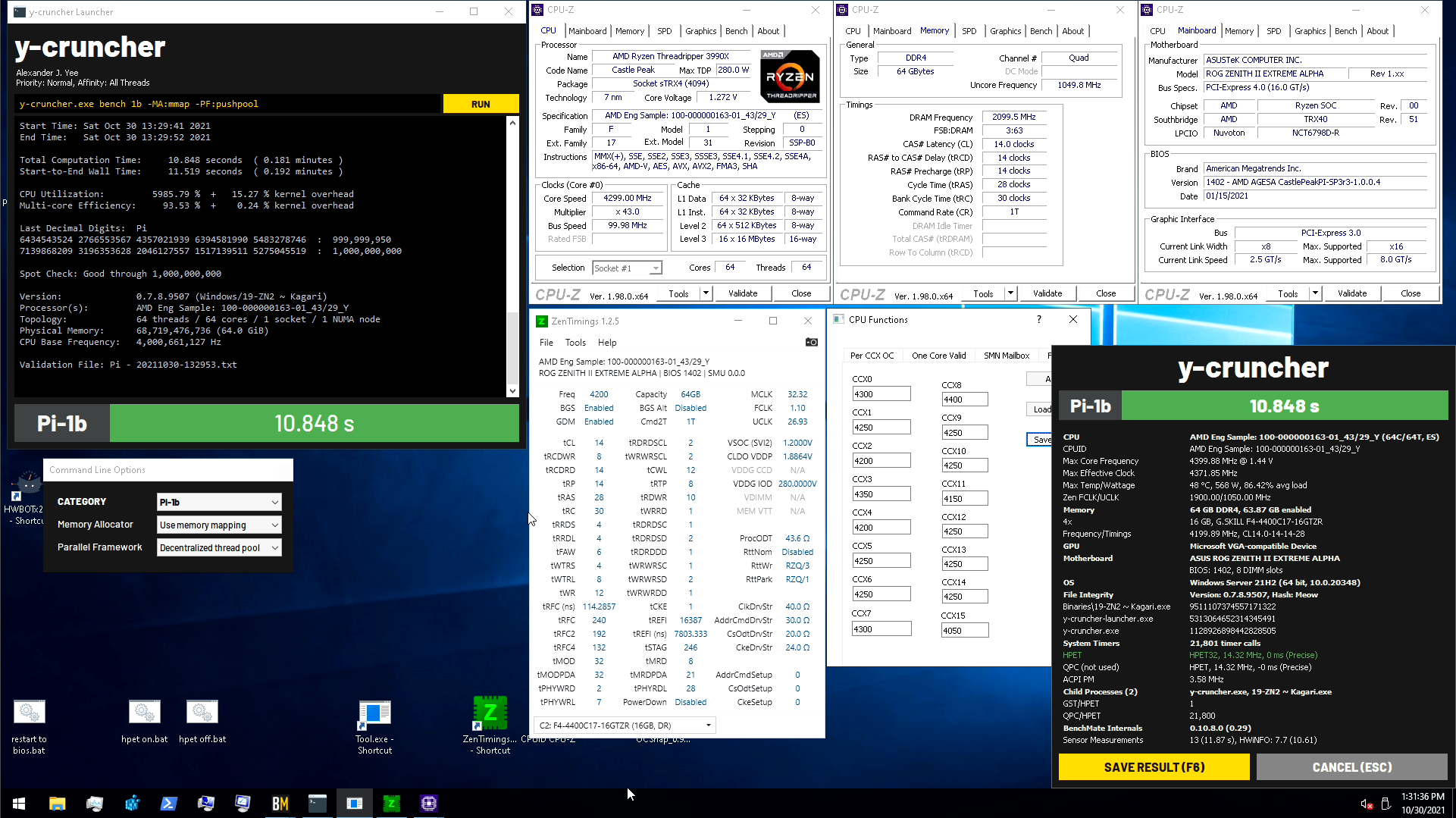
4467 4x8 beat out 4x16 4200 on the 32c for ycruncher, haven't tried 4x8 on the 64, but knocked off some time with per core oc earlier today https://i.imgur.com/Kgw7Vsw.png
 golden pike
To the generous guys helping me earlier with my boot times, i decided to turn off things I wasnt using like wifi and bluetooth controllers. helped only slighlty
however
I started looking at my Mobo's oled display
and i notice it gets stuck on codes
cpu code 58
vga code 84
so im going to look into those
grizzled bloom
Probably just initialization codes. Unless it's staying on them for more than 5 seconds or so it's not an issue.
golden pike
i think it may be more than 5 but i will look into it
the 31 second "last bios time" just doesnt seem right
im gonna try unplugging my ext harddrive and see if that makes any difference
grizzled bloom
58 is reset usb bus and 84 is initialize gpu output
golden pike
interesting
i was just looking at the same thing
I dont think id be able to change anything about that
grizzled bloom
It's possible updating your gpu vbios could help it initialize faster. You could also try booting with just keyboard and mouse plugged into usb.
I know my pc takes longer to boot when I have my headset plugged in
But it's just going from 15 to 30 seconds so a minor inconvenience at worst
golden pike
ill try disconnecting stuff, that could totally be an issue
devout mothBOT
 Joeyツ#7760 has been warned
Reason: Bad word usage
Joeyツ#7760 has been kicked
Reason: Too many infractions
 finite elm
I dunno what i'm looking at
cerulean wadi
finite elm
I dunno what i'm looking at
Almost single digit CL for a change.
burnt spear
apparently the 6800 series and the 6900 series have the same igpu
not sure as to the rest
cerulean wadi
riddle me this. I'm trying to figure out if I can get my E8400 Win7 rig to win10. I know drivers might be an issue so an "upgrade" instead of fresh install is the only attempt.
 burnt spear
according to some benches the 6700g igpu beats 1050 ti
whatever igpu it has
i dont feel like putting the time into looking into it atm4
vast meadow
burnt spear
according to some benches the 6700g igpu beats 1050 ti
That name doesn't sound right?
6700h?
vast meadow
cerulean wadi
riddle me this. I'm trying to figure out if I can get my E8400 Win7 rig to win10...
Why would you bother
cerulean wadi
security? still a decent spare pc for web browsing or youtube. I'm not the one using it any more, but if it gets a virus or w/e, oh well. No I wouldn't buy that 9650.
cursive epoch
6700u more like
burnt spear
that ^^
grizzled bloom
burnt spear
whatever igpu it has
It's rdna2 based now instead of vega
burnt spear
grizzled bloom
It's rdna2 based now instead of vega
I know
I just don't know if they all have 680m or what
I've been following leaks since I first found they'd be apus lol
cursive epoch
Likely
finite elm
I thought they only revealed the mobile ones? So U and H, or have they given more info about the am5 Apu's later on?
vast meadow
finite elm
I thought they only revealed the mobile ones? So U and H, or have they given mor...
Yeah they did just do mobile, only released am5 socket confirmed and release date
cursive epoch
^
burnt spear
I wonder if am5 will have apus or if they'll wait till gen after that
vast meadow
burnt spear
I wonder if am5 will have apus or if they'll wait till gen after that
Well am5 will at least be 2 gens, they didn't promise anything but should at least have 1 set of apus
finite elm
vast meadow
Well am5 will at least be 2 gens, they didn't promise anything but should at lea...
eventually
burnt spear
vast meadow
Well am5 will at least be 2 gens, they didn't promise anything but should at lea...
That's what i meant, sorry. My brain is not working today
I meant 7000 series, i figured they'd have have an apu in one of them
 wispy estuary

10th Gen Intel Core i7-10700F desktop processor without processor graphics. Features Intel Turbo Boost Max Technology 3.0. Built for the everyday desktop user; this processor delivers amazing performance for everything from enthusiast gaming and creation to productivity. Discrete graphics require...
I'm wondering if I should get this cpu, idk what's the difference from the other ones
Some are 330+
hollow thorn
wispy estuary
https://www.amazon.com/Intel-i7-10700F-Desktop-Processor-Graphics/dp/B086MN2XYL/...
Right now, I would reccomend something more like 12600k and maybe 12400 depending on benches, just performance wise, take a look at a review from GN or other reputable reviewer like tpu and anandtech and such
 young cedar
@wispy estuary wait until b660 are released and if they’re a good price go with the 12400 or 12600
That’s if b660 isn’t heavily overpriced and actually has stock
From a quick look, some b660 are gonna be £130 so idk what in us but that’s a good price here lol
cerulean wadi
10400 setup could be had pretty cheap, but now the 12400 or similar is the new go-to suggestion. If it wasn't such a pain, I'd instantly resell my 11gen stuff when i get it & go 12gen 😅
 wheat salmon
tfw you use every single plug on your motherboard
grizzled bloom
Ooh that would be satisfying
wheat salmon
(i have 4 sata drives and 2x M.2) all usb headers filled, all rgb headers filled, all fan headers filled
only 2 slots for ram
grizzled bloom
PCI-e too or just all the headers used?
wheat salmon
itx so yes
grizzled bloom
Very nice. No waste.
wheat salmon
mhm
i am glad it worked out so well xD
i had to custom add a usb 3.2 gen 2 port onto the front to use up the header but worth it, might make a custom side panel for it later
i had an idea for making a cutout on the sidepanel so I can use M.2 Enclosures (that plug into usb-c) like old school console memory cartridges
grizzled bloom
That's why I like cases that still have an external 5.25" bay. You can convert it into whatever you need. Extra drives, usb ports, esata, audio or rgb control...
wheat salmon
mhm thats what im using rn
but i wanna downsize and custom the side of the case to use it like a retro cartridge
then i could store roms on it or something
cerulean wadi
grizzled bloom
That's why I like cases that still have an external 5.25" bay. You can convert i...
I thought of having a disc drive in the bottom hidden by psu shield & a slot cut out of the side panel for it. 🤘
 oak prawn
Can someone put a build together that costs 600$?
oak prawn
No
oak prawn
No
wheat salmon
if you wait until the end of the month I could upgrade the cpu to a 12400F and the motherboard to a B660 but they are not available for sale yet. (would be the same cost but 2 gen newer cpu)
https://pcpartpicker.com/list/wrPgTJ $596 @oak prawn
what gpu do you have? that might change the psu
oak prawn
Can you do a ryzen build?
wheat salmon
sure. For low/mid end intel is the better deal though
oak prawn
Ok thanks
cursive epoch
ryzen build is gonna be more expensive
cause there's no r5 that's as cheap as 12400f
and 5600g will perform worse anyway
wheat salmon
cursive epoch
cause there's no r5 that's as cheap as 12400f
sadly the B660 motherboards arent available for sale yet
thats why i said wait until end of the month
oak prawn
Oh
wheat salmon
rn i gave a build with a 10400 and B550
cursive epoch
that case is meh tbh
cursive epoch
would do something like p400a
wheat salmon
cheapest AMD build i can make is $700 if I give a 5600X & A520 motherboard https://pcpartpicker.com/list/rJqBgt
but i would recommend waiting until the 12400F and B660 motherboards are purchasable, it will be worth the wait
wheat salmon
only way to drop the price to $700 
WAIT
pcpartpicker just isnt updated
is there anyway to add-in parts from url?
https://pcpartpicker.com/list/pYqBgt @cursive epoch @oak prawn need to select a case still, but the 12400F and the B660 motherboards can be purchased now
cursive epoch
you can edit the existing list
wheat salmon
fair, i had to login to force-add the motheboard
burnt spear
wheat salmon
if you wait until the end of the month I could upgrade the cpu to a 12400F and t...
3200c16 better
wheat salmon
burnt spear
3200c16 better
both have the same latency right?
how do you edit an existing list?
everytime i try to adjust it changes the link
cursive epoch
yeah the link changes automatically
wheat salmon
https://pcpartpicker.com/list/RKLwt8 @burnt spear here ya go, its teh same latency as the other way thou
vast meadow
wheat salmon
cheapest AMD build i can make is $700 if I give a 5600X & A520 motherboard https...
For the love of god don't put a 5600x on an a320
vast meadow
wheat salmon
only way to drop the price to $700 <:ROFLEgg:598228722545590344>
No it really ain't
vast meadow
wheat salmon
cheapest AMD build i can make is $700 if I give a 5600X & A520 motherboard https...
vast meadow
wheat salmon
https://pcpartpicker.com/list/RKLwt8 <@!654444344274845698> here ya go, its teh ...
Ram overpriced, get some 3600cl16
finite elm
vast meadow
For the love of god don't put a 5600x on an a320
Someone put a 5950x on a a320 and hit 5ghz
vast meadow
finite elm
Someone put a 5950x on a a320 and hit 5ghz
On one core maybe
vast meadow
Lol
 viral marlin
Question: I was looking at this mobo https://www.newegg.com/p/N82E16813157908?Item=N82E16813157908&quicklink=truefor an i7 6700 but supported cpus are 9th and 8th gen, I was wondering if there is a chance it would still work anyway for that cpu seeing that it is 6th gen?
grizzled bloom
viral marlin
Question: I was looking at this mobo https://www.newegg.com/p/N82E16813157908?It...
No, intel changes the physical socket so incompatible processors don't fit. Sometimes they change it for no reason too lol.
viral marlin
Ok thank you
finite elm

Notebookcheck
The Samsung Exynos 2200 with AMD RDNA 2-powered GPU has been labeled as “the worst flagship processor” by a popular tech tipster. The vaunted RDNA 2 GPU part apparently fell behind all of its main rivals in tests while the CPU component also failed miserably. The Exynos 2200 was seemingly tested in a Samsung Galaxy S22 smartphone.
Oof
main pulsar
gpu 2 power hungry?
or just actually not that powerful lol
oh just leaks
¯_(ツ)_/¯
 finite elm
Lol
cerulean wadi
Anyone used aida lately? I wish the "built-in" comparisons were better. Still waiting on certain parts because Prime shipping apparently is 2 weeks instead of 2 days.
 vast meadow
Only thing i use aida for is mem latency bench
cerulean wadi
Anyone want to post their latency whenever? 4x8GB of normal KHX1866 so I'm not gonna try too much just yet on this daily driver. No doubt 1866C10 is tame.
 cursive epoch

Support us on Patreon: https://www.patreon.com/hardwareunboxed
Join us on Floatplane: https://www.floatplane.com/channel/HardwareUnboxed
Buy relevant products from Amazon, Newegg and others below:
Intel Core i9-12900K: https://geni.us/xEZFptS
Intel Core i9-12900KF: https://geni.us/hCMbu
Intel Core i7-12700K: https://geni.us/8KvA
Intel Core i7-1...
12400 lookin good
around 5600x perf in games
except f1 2021 cause that game favors the 5600x
dense frost
Ryzen 5000 CPUs need price slashes
cursive epoch
it's faster than 5600x in rendering but who cares
cpu rendering is not faster than gpu
burnt spear
The 12100 is supposed to beat the 10400 in gaming
Which would be nice
Finally a new cpu for low budgets, just need a reasonably priced b660 to go with it
vast meadow
burnt spear
The 12100 is supposed to beat the 10400 in gaming
That's on a clean bench tho, i feel once it's cluttered with other stuff it will probs be closer imo
burnt spear
True
Was thinking about that earlier, would be nice if they made an i3 with 4 performance cores and 2 ecores, but I doubt they will
Because then less people would buy the i5s
Well, the 6 core ones
vast meadow
Yeah would be nice
 regal lichen
Hey guys does anyone what the differences between the Asus ROG Strix Z690-F and E model? Here's my build, i still haven't decided if i want to stick with the Prime-A or go for the ROG strix mobo, last missing piece to my build Thanks! (I'm from Canada btw) https://ca.pcpartpicker.com/list/dYbVdD
vast meadow
regal lichen
Hey guys does anyone what the differences between the Asus ROG Strix Z690-F and ...
regal lichen
vast meadow
I'd get this actually
https://ca.pcpartpicker.com/product/JJRYcf/gigabyte-z690-a...
Oh sorry forgot to mention because im trying to stick with Asus because of the stupid LGA 1700 bracket, still Lian Li AIO hasn't responded
and it directs me to order from Aliexpress for it which will take 1 month or more....
vast meadow
regal lichen
Oh sorry forgot to mention because im trying to stick with Asus because of the s...
Just as a temporary thing i assume because they aren't great
Then just get the prime A yeah
cursive epoch
by now lian li should have lga 1700 brackets in their stuff
regal lichen
vast meadow
Just as a temporary thing i assume because they aren't great
yep no update since like December... only way is through Aliexpress right now... https://lian-li.com/lga1700-mounting-kit-announcement/ actually since November lol

2021.11.05 Edit: Temporary out of stock, ETA on November 25th, 2021. × Dismiss alert LGA1700 Mounting Kit AnnouncementExisting owners of the GALAHAD AIO seeking to upgrade to the new Intel LGA 1700 can request the mounting kit through the official LIAN LI Aliexpress store hereThe bracket is $0.01 USD (minimum required order), and the only […]
vast meadow
That sucks
cursive epoch
oh
vast meadow
cursive epoch
by now lian li should have lga 1700 brackets in their stuff
Should but dont lol
regal lichen
vast meadow
Should but dont lol
vast meadow
regal lichen
yep no update since like December... only way is through Aliexpress right now......
I would order it tho if you haven't tho, the asus adapters will work but are meh
regal lichen
still says will be abvailable late November.. no updates
vast meadow
regal lichen
https://www.newegg.ca/lian-li-liquid-cooling-system/p/2YM-002Y-00002?Description...
Oh finally does now tho lol
regal lichen
But to my original question, whats the difference between the F and E model? I think i still want to stick to Asus might be quickest way for me at this rate.
vast meadow
regal lichen
But to my original question, whats the difference between the F and E model? I t...
Both are completely overpriced, not worth paying that much, prime a will be enough
regal lichen
vast meadow
Both are completely overpriced, not worth paying that much, prime a will be enou...
well if money isnt the issue, why would one pay for the ROG strix over Prime A?
vast meadow
regal lichen
well if money isnt the issue, why would one pay for the ROG strix over Prime A?
Pretty sure there's slightly better vrms but the prime a already has plenty, asus also charge extra for the rog branding as well as some extra overclocking features iirc
regal lichen
vast meadow
Pretty sure there's slightly better vrms but the prime a already has plenty, asu...
Strix tax like they say!!! lol ok thank you Prime A it is
vast meadow
Yup
 grizzled nacelle
Hey, kind of an aside type question. Where can you find anti-static bags for shipping?
burnt spear
Can prolly find them on amazon
I've never had to buy any but they're prolly on amazon
vast meadow
You selling an old gpu or something?
grizzled nacelle
I am trying to return a MoBo
vast meadow
Ahh, you can just ship it in the cardboard box if you through out the bag
devout mothBOT
 1cculus#4645 has been warned
Reason: Bad word usage
grizzled nacelle
devout moth
Oh, sorry about that.
grizzled nacelle
vast meadow
Ahh, you can just ship it in the cardboard box if you through out the bag
Seems unkind considering it may be resold to someone else?
vast meadow
grizzled nacelle
Seems unkind considering it may be resold to someone else?
That's fair
But static isn't really an issue
And cardboard aint conductive so
grizzled nacelle
vast meadow
But static isn't really an issue
Dust, the anti-static is because bags are static-prone I imagine, but the bag is to protect against dust and other contaminants, no?
vast meadow
grizzled nacelle
Dust, the anti-static is because bags are static-prone I imagine, but the bag is...
I mean the box will be closed, only thing you need to worry about stuff getting in is the socket which has a protective cover
grizzled nacelle
vast meadow
I mean the box will be closed, only thing you need to worry about stuff getting ...
You're correct. Once I got it packaged up I realized how preposterous worrying about dust is. It is fully enclosed with a solid cardboard enclosure, in a box, inside another box, inside a shipping box that is taped shut.
burnt spear
sadge
remembrandt laptops are supposed to start being available in february
was hoping to order one by the end of january
 livid sparrow
Don't forget to take pics of the mobo before shipping in case it gets damaged during shipping so you don't get flagged for misrepresenting dead or damaged products
 fiery kernel
mfw integrated graphics are valued at 45 cents
 wheat salmon
might as well keep them xD
vast meadow
Yeah tbh when/if i go intel I'm willing to pay like 30€ or so over f price for the igpu
Can be useful for troubleshooting
 dim cloak
An igpu can be useful as well in case of a gpu issue that requires it to be put out for service or just want to do something and not use the gpu at that moment for what ever reason
 stark bobcat
dim cloak
An igpu can be useful as well in case of a gpu issue that requires it to be put ...
stark bobcat
dim cloak
An igpu can be useful as well in case of a gpu issue that requires it to be put ...
Using a igpu seems like torture better to lock ourselves out from it
 hoary echo
would my fps increase if i got another 8gb ram (10300h rtx3060 no mux switch)?
stark bobcat
hoary echo
would my fps increase if i got another 8gb ram (10300h rtx3060 no mux switch)?
Not much if gpu bottlenecked
vast meadow
hoary echo
would my fps increase if i got another 8gb ram (10300h rtx3060 no mux switch)?
If you're running 8gb ram, yes
cursive epoch
why would 3060 bottleneck a 10300h?

but add more ram regardless
8 gigs is bad for gaming these days
hoary echo
stark bobcat
Not much if gpu bottlenecked
im not gpu bottlenecked, im cpu bottlenecked rn
hoary echo
cursive epoch
but add more ram regardless
k is there any speeds/timings i should go for (i am on a budget of about $140 aud)
hoary echo
how do i find those timings
cursive epoch
well it's in cpu-z
cursive epoch
it does display ram specs too, ya
 vast meadow
cursive epoch
just match your existing stick in speed and latency
vast meadow
cursive epoch
just match your existing stick in speed and latency
Or more frequency if cheaper
cursive epoch
and it should slow down to match the stick
hoary echo
in task manager it says this
 cursive epoch
ah so it's 3000
vast meadow
hoary echo
Probably supposed to be 2933 instead of 2926
cursive epoch
^
vast meadow
Get 2933 or anything more, whatever is cheaper
cursive epoch
ye

Tom's Hardware
Could be a worthwhile choice, depending on local pricing
oof
more cache so yeah
vast meadow
12490f how many skews they neeerd
cursive epoch
it's the i9 core cut down
vast meadow
Ahhh cache yeah, 12400 cache cutdown
stark bobcat
cursive epoch
https://www.tomshardware.com/news/core-i5-12490f-outpaces-core-i5-12400f-15-perc...
Worthy upgrade over a 10400f?
vast meadow
cursive epoch
it's the i9 core cut down
Afaik they've always been cutdown i9's
vast meadow
stark bobcat
Worthy upgrade over a 10400f?
Depends on if you're cpu or gpu limited
I'd personally wait 13th gen tho
cursive epoch
12th gen needs new mobo
vast meadow
cursive epoch
and is chinese exclusive
NOOOOO
stark bobcat
vast meadow
Depends on if you're cpu or gpu limited
It's a 980ti soo you judge
cursive epoch
cause diff socket
vast meadow
stark bobcat
It's a 980ti soo you judge
Depends what you play
vast meadow
cursive epoch
eh it's about 200 bucks anyway
12400f is 190
cursive epoch
the extra cache made price go up
stark bobcat
vast meadow
Depends what you play
Graphics heavy games like metro exodus and cyberpunk 2077
vast meadow
stark bobcat
Graphics heavy games like metro exodus and cyberpunk 2077
You just answered your own question lol
vast meadow
Yes
hoary echo
would this suffice?

Corsair Vengeance 16GB (2x8GB), (3200MHz) DDR4 SODIMM, 22-22-22-53, 1.2v, Dual Channel Kit, For 11th Generation Intel CPU at Scorptec.com.au, the online Gaming PC, server computer and technology experts. Fast delivery to Australia.
stark bobcat
cursive epoch
that's the thing with 12490f
Good cpu coolers from Deepcool is dirt cheap
vast meadow
That's true
cursive epoch
hoary echo
https://www.scorptec.com.au/product/memory/sodimm/93005-cmsx16gx4m2a3200c22?gcli...
that should do
vast meadow
hoary echo
https://www.scorptec.com.au/product/memory/sodimm/93005-cmsx16gx4m2a3200c22?gcli...
If you already have 8gb just get another 8gb stick
hoary echo
thanks!!
cursive epoch
but doing like what pato told saves you cash
hoary echo
would it make much of a perf difference?
vast meadow
hoary echo
would it make much of a perf difference?
No
hoary echo
hmmm
the only ones i can find are kits or ddr3 rip
or 32gb single stick

Crucial 8GB (1x8GB), PC4-25600 (3200MHz) DDR4 SODIMM, CL22, 1.2v, Single Stick at Scorptec.com.au, the online Gaming PC, server computer and technology experts. Fast delivery to Australia.
stark bobcat
hoary echo
or 32gb single stick
After 16gb it's diminishing results in games
cursive epoch
that stick should do
hoary echo
thanks, i will probably get that soon
vast meadow
hoary echo
https://www.scorptec.com.au/product/memory/sodimm/81989-ct8g4sfs832a?gclid=Cj0KC...
why are you only looking at this site?
hoary echo
idk thats the only one i could find
stark bobcat
vast meadow
why are you only looking at this site?
Maybe that's his local online store
vast meadow
I'll have a look for ya see if i can find cheaper
hoary echo
cheers
vast meadow
You cant use Amazon?
hoary echo
yeah :/
hoary echo
ah oh well
its only 50 bucks
now i just need a monitor because my laptop doesnt have a mux switch
 dire tree
hoary echo
https://www.scorptec.com.au/product/memory/sodimm/81989-ct8g4sfs832a?gclid=Cj0KC...
dire tree
hoary echo
https://www.scorptec.com.au/product/memory/sodimm/81989-ct8g4sfs832a?gclid=Cj0KC...
CL22
😭
hoary echo
could be worse
vast meadow
dire tree
CL22
laptops run jedec ram, 3200cl22 is the jedec
cursive epoch
^
hoary echo
also how do i undervolt an h series cpu
because 84 degrees is not exactly nice to have on my legs
dire tree
hoary echo
is there any other way to reduce temps?
Undervolt gpu
hoary echo
would that kill my warranty
vast meadow
hoary echo
would that kill my warranty
Depends on laptop, but it shouldn't
hoary echo
oh
cursive epoch
you have to adjust the curve
hoary echo
unfortunate
cursive epoch
which takes a lot of tuning
hoary echo
could i adjust fan curves?
vast meadow
cursive epoch
but uving gpu is a pain
Not too bad
hoary echo
or would that be hard
vast meadow
hoary echo
could i adjust fan curves?
Only gpu afaik
cursive epoch
laptops can't do that
unless it's made with software or bios to do so
as in controlling the fans ofc
vast meadow
Your laptop fans? Oh nice
burnt spear
vast meadow
Your laptop fans? Oh nice
Afaik a good few laptops past 16 series can adjust fans
A lot of lenovo laptops specifically I believe
 dull flicker
Anybody use a b450 mobo with the Ryzen 5600g? Did you have any trouble with it?
dire tree
dull flicker
Anybody use a b450 mobo with the Ryzen 5600g? Did you have any trouble with it?
Depends on the bios
 tropic prism
looking to upgrade my memory from 16gb 3200MHz to 32gb 3600MHz. is Neo Forza a brand worth considering or should i just pay a little extra and get either g.skill or crucial? and will a memory upgrade even actually improve anything significantly enough to warrant? particularly on the editing and multi-tasking/recording side of things
for reference, i use my PC for gaming, video capture/podcasting, and also do the video editing for said podcasting/video recordings.
CPU: Ryzen 5 5600x Mobo: asus prime x570-p GPU: AORUS GeForce RTX 3070 MASTER 8G
vast meadow
tropic prism
looking to upgrade my memory from 16gb 3200MHz to 32gb 3600MHz. is Neo Forza ...
 the thing that matters more is latencies , 3600cl18 at xmp would be a sidegrade, get 3600cl16 go onto pc part picker and sort low to high, 3600 cl16 ballistix is worth a bit more as you can overclock the snot out of them as well as having slightly better timings than other kits usually, avoid corsair tho
I'd get this kit if you're in the us
tropic prism
vast meadow
<:modelbrand:743668525922648165> the thing that matters more is latencies , 3600...
thank you for your input. currently i have the crucial ballistics 16gb (2x8gb) 3200MHz CL16 https://pcpartpicker.com/product/BxTzK8/crucial-ballistix-16-gb-2-x-8-gb-ddr4-3200-memory-bl2k8g32c16u4b
vast meadow
nice kit of ram, currently have that and mine is oc'd to 3600cl14 so far
tropic prism
vast meadow
nice kit of ram, currently have that and mine is oc'd to 3600cl14 so far
so do you think upgrading to 32gb 3600MHz would be worth it?
vast meadow
tropic prism
so do you think upgrading to 32gb 3600MHz would be worth it?
it depends, do you use almost all of your 16gb?
tropic prism
i'd have to check next time i'm editing/exporting i guess lol
burnt spear
dull flicker
Anybody use a b450 mobo with the Ryzen 5600g? Did you have any trouble with it?
As long as the bios work it'll be fine
For most b450s anyways
dull flicker
👍🏼
 static meadow
Hello I'm new to pc gaming and got a laptop with a Intel i7 - 11800H CPU however it seems to quickly reach 90C+ when gaming. Is this normal?
tropic prism
vast meadow
it depends, do you use almost all of your 16gb?
so i just re-exported my most recent video (about 20 minutes long with lots of cuts/edits in it) Task manager show me using only 10-15% CPU, 40-45% Memory, and 40-60% GPU. idk if theres even anything i could upgrade that would make a significant difference.
and thats without overclocking anything
static meadow
vernal cosmos
yes
So they normally run that hot? Bad to game for longer periods of time at those temperatures?
vernal cosmos
static meadow
So they normally run that hot? Bad to game for longer periods of time at those ...
laptop cpus are fine there
vernal cosmos
tropic prism
so i just re-exported my most recent video (about 20 minutes long with lots of c...
cuts and edits dont matter as much as effects and number and resolution of recordings btw
static meadow
vernal cosmos
laptop cpus are fine there
Thanks thats a relief to know
tropic prism
vernal cosmos
cuts and edits dont matter as much as effects and number and resolution of recor...
good to know, thanks.
i rendered at 1080p. no special effects aside from some simple fades
we basically screen cap from discord using OBS streamlabs. then apply intro video and audio tracks. nothing fancy. that way we aren't trying to piece together multiple video feeds
vast meadow
tropic prism
so i just re-exported my most recent video (about 20 minutes long with lots of c...
Sounds like you don't need more ram to me
tropic prism
vast meadow
Sounds like you don't need more ram to me
not sure if i should be happy or sad lol
vast meadow
Why lol?
tropic prism
cuz i want to buy pc parts to justify giving my nephew my old parts
vast meadow
tropic prism
cuz i want to buy pc parts to justify giving my nephew my old parts
I mean maybe try a run with more effects rather than cuts?
hoary echo
static meadow
Thanks thats a relief to know
My laptop is like a frying pan
It actually heats up faster than my hotplate
grizzled nacelle
tropic prism
cuz i want to buy pc parts to justify giving my nephew my old parts
You sound like me.
 vague salmon
I'm trying to find the right RAM for a Dell Inspiron i7706 (2 x 8GB DDR4 3200mhz), preferably Crucial, GSkill Ripjaws, or Kingston.
scenic solar
Should I buy a Ryzen 5 3600 with bent pins? It's 60€ and if I'm able to repair it it would have saved me 100€ for a working new one
I ask people that had experience repairing AMD processor's pins
scenic solar
I already repaired pentium4 pins but I think they are much more "soft"
livid sparrow
As Foxy said, if they aren't too bent they shouldn't be too hard to fix, get a credit card or something with a firm straight-edge you can use to drag down the rows, maybe a pair of tweezer and a magnifying glass and you be good to go.
 hazy peak
My abs gladiator does not have tpm 2.0? How to add it?
vast meadow
You just need to enable it in bios
finite elm
yes
hazy peak
finite elm
yes
Thanks
cursive epoch

am5 stuff
so the cpu's resistors really are gonna be on top? yikes
that's higher risk than intel's solution of putting resistors below the cpu
vast meadow
Never realised sodimm was so small lol
 vernal cosmos
vast meadow
Never realised sodimm was so small lol
vernal cosmos
vast meadow
Never realised sodimm was so small lol
smh pato so dimm
jk sorry had to


 limber dragon
scenic solar
Should I buy a Ryzen 5 3600 with bent pins? It's 60€ and if I'm able to repair i...
limber dragon
scenic solar
Should I buy a Ryzen 5 3600 with bent pins? It's 60€ and if I'm able to repair i...
Imo I'd avoid it because:
Someone kills cpu
Bends pins so they sell it as "parts" because of bent pins, with no returns
devout mothBOT
 Yasof#6850 has been warned
Reason: Bad word usage
Yasof#6850 has been kicked
Reason: Too many infractions
cerulean wadi
vast meadow
Never realised sodimm was so small lol
Laptop memory since like forever: "am i a joke to you"
scenic solar
limber dragon
Imo I'd avoid it because:
>Someone kills cpu
>Bends pins so they sell it as "par...
Yeah, it also had about 80 bent pins
vast meadow
Hell no
devout mothBOT
 TheBagguette#6969 has been warned
Reason: Bad word usage
TheBagguette#6969 has been kicked
Reason: Too many infractions
 wet wadi
LSS, My refurbed replacement mobo from ASUS died on my 6th gen build. Now I'm playing catch up on with the current tech and avoid poor decisions on my new build. Any general pointers for an ASUS 32+ram, power to performance ratio minded, 6+SATA,quiet build? I'm just sifting and surfing through what fits my criteria and checks my boxes, while the supply chain and parts market keeps shifting on me. 😫
vast meadow
wet wadi
LSS, My refurbed replacement mobo from ASUS died on my 6th gen build. Now I'm pl...
Country? budget? just cpu motherboard and ram you're looking for? For what use case?
wet wadi
US 1500 , any case suggestions as well. tx
perhaps a quiest case that hols 5+ 3.5 internal bays
vast meadow
wet wadi
US 1500 , any case suggestions as well. tx
For what use?
wet wadi
asus 1070 ti turbo
vast meadow
Not too bad, wouldn't spend more than like 600$ ish for cpu mobo ram, 100$ for case i guess but keep rest for gpu later on
wet wadi
my target was $600 for cpu mobo and the best 64 or 32 ram deal .
wet wadi
But all 3 for $600 would be do-able if it is win 11 compatible
devout mothBOT
 sʜᴀʀᴋ#1466 has been warned
Reason: Bad word usage
sʜᴀʀᴋ#1466 has been kicked
Reason: Too many infractions
wet wadi
I'd settle for 32. But would like the virtulization option down the road.
so $600 as a baseline for the cpu mobo ram combo.
vast meadow
Virtualization for what?
wet wadi
virtual machines. virtual pc's that exist in memory only.
vast meadow
wet wadi
so $600 as a baseline for the cpu mobo ram combo.
Well depends what you're looking for I'd do this personally for your budget
https://pcpartpicker.com/list/xm2nmk
vast meadow
wet wadi
virtual machines. virtual pc's that exist in memory only.
Yeah but for what?
wet wadi
There are several advantages to being able to run a VM . it is meant to run as a virtual computer that can mimic other types of computers.
vast meadow
Ik what a vm can do I'm just wondering why you'd use it as it's not very useful to most
wet wadi
Thanks for the suggestion. that isn't an Asus build. MSI and Gskill were my second choices.
vast meadow
wet wadi
Thanks for the suggestion. that isn't an Asus build. MSI and Gskill were my seco...
wet wadi
if the PCB and capacitors are quality is another starting point.
vast meadow
Yes, z690 a pro has great vrms
devout mothBOT
 Rocky<3#5715 has been warned
Reason: Bad word usage
Rocky<3#5715 has been kicked
Reason: Too many infractions
wet wadi
vrms? so that means it's more stable?
vast meadow
wet wadi
vrms? so that means it's more stable?
Vrms =power delivery
wet wadi
okay been reading up on the parts list. any suggestions on a PSU?
vast meadow
wet wadi
okay been reading up on the parts list. any suggestions on a PSU?
What you got atm?
wet wadi
I'm looking at your build suggestion. there was no PSU listed
vast meadow
wet wadi
I'm looking at your build suggestion. there was no PSU listed
Yeah but what power supply do you have in your current pc? Could probs reuse unless tou wanna repurpose
wet wadi
I might reuse OR repurpose my EVGA 750 G3. But I'll look at anything that caliber
vast meadow
wet wadi
I might reuse OR repurpose my EVGA 750 G3. But I'll look at anything that calibe...
Good power supply I'd reuse
 normal haven
Hi
finite elm
Do you have a microcenter near you?
finite elm
Oh okay
normal haven
How long does the reserve motherboard and gpu last
finite elm
On newegg?
normal haven
Yes
finite elm
if you won it in shuffle you have 2 hours to buy it
normal haven
I might go to Philadelphia tomorrow if it doesn't snow heavily near me so I can probably go to a micro center
Oh ok
finite elm
@vast meadow https://pcpartpicker.com/list/c6wZBc
Thoughts on this? sucks to put a 11400f in a Z590, but if they can get to Microcenter tomorrow they can swap this out for a 10700k or 11600k right?
vast meadow
finite elm
<@!191276897227898880> https://pcpartpicker.com/list/c6wZBc
Thoughts on this? s...
What's the purpose?
Also what gpu?
finite elm
They are getting a 3060 and that mobo and wanted a cheap build. probably just gaming 😂
vast meadow
Okay 1 sec
vast meadow
Yeah
vast meadow
finite elm
<@!191276897227898880> https://pcpartpicker.com/list/c6wZBc
Thoughts on this? s...
Are they gonna mem oc? If not no point in getting ballistix if it's not the cheapest