#cpus-mobo-and-memory
1 messages · Page 238 of 1
 finite elm
I have a Halo reach 360. But it's not big enough imo
 shy wyvern
I just have my series s
finite elm
I like the space the Halo 3 one would offer for cooling
I like the series S for backwards compatibility.
shy wyvern
Oh I like the series s for the emulation and a gamepass machine
I didn't want a series s though
finite elm
Saw an article about it being a glorified Xbox 360. And ya know what? I'm fine with that
finite elm
shy wyvern
Oh I like the series s for the emulation and a gamepass machine
Yesss retro arch is great
shy wyvern
I was going to get a 3070
but gpus impossible to find
I saved all my moneys
gave up
bought a series s
then I saved up all my moneys
gave up
bought a new mobo + ram + cpu
now I saving up all my moneys
finite elm
I spent too much on tech. Need to stop tbh. But its funnnn
 vernal cosmos
He gives great pc build advice and lists and knows what hes talkin about lol
 limber dragon
vernal cosmos
He gives great pc build advice and lists and knows what hes talkin about lol
limber dragon
vernal cosmos
He gives great pc build advice and lists and knows what hes talkin about lol
Until he doesn't know what he's talking about, in this case telling Tulip to change vsoc on an intel system
 vast meadow
Chill i made 1 mistake lol
vernal cosmos
limber dragon
Until he doesn't know what he's talking about, in this case telling Tulip to cha...
He made one mistake by calling an intel value by its amd counterpart. Its not a big deal. Hes human. He makes mistakes too.
Compare that to how many people he has helped
And how many times hes earned peoples trust by helping em
Techies dont have to know everything
Not right to say he shouldnt have techie or even imply it when u take those numbers into consideration
limber dragon
And you guys keep bringing it up and pinging me about it 
limber dragon
You and like 3 other people, if you had read the chat
vernal cosmos
That should be enough reasons for you
If u want more tho, i can ask a few other people who pato has helped out tremendously to add their points
limber dragon
If you want to keep bringing it up, knock yourself out
vernal cosmos
Ill take it u know why pato earned techie now then?
limber dragon
@shy wyvern https://media.discordapp.net/attachments/902660521889759263/914068067254960138/unknown.png may or may not help, but 4100mts with 1.25vccsa

 limber dragon
What ranges have you tried for vddq?
shy wyvern
I'm at 1.45v
For vddq
I didn't touch sa
1.25 sa 1.45 vddq gave ram error
Single error memtest
For 4266
4000 stable at stock sa 1.45 vddq
What should I try raising or messing with next?
Ram set to 1.45v btw
Also @limber dragon do you know what's safe range for vddq voltage?
limber dragon
Up to 1.4-1.45 should be fine
Possibly higher, but Im not certain and don't want to have you run dangerous voltage
shy wyvern
What's the highest safe voltages for SA?
Should I also try pushing dram to 1.5?
I pushed dram to 1.47
40 seconds so far no errors, huh
Is it safe to push dram to 1.5?
Because 1.47 seems to have 4266 stable
Well wait for test to finish though
vast meadow
depends what die theyre using for dram voltages tbh
shy wyvern
1.45v is the xmp profile
They're a hynix die but idk which one
Welp 1.48 dram 1.25 da 1.45vddq and still not 4266
I think I should just stick for 4000 mhz :/
I'm getting 1 error per run for dram
Wait really? 4200 isn't erroring out but 4266 is...
2 minutes into memtest5 so far

How is 66mhz making that much of a difference?
vast meadow
it be like that sometimes
shy wyvern
Still no errors lol
4266 was erroring like crazy wtf
66mhz legit caused ram to be silly


I'll run the test twice but it may just work at 4200. 4200 is high enough. I don't need 4400
NO I GOT AN ERROR ON THIRD CYCLE
What do I mess with now to get it stable
It's so close
vast meadow
shy wyvern
btw youre gonna wanna change profile to extreme anta when you get something stable on this, this is fine for quick check but extreme anta should fine faster
vast meadow
also extreme anta should take 3ish hours for you for a full run
shy wyvern
I'm at 1.25 sa 1.45 vddq 1.48 dram
vast meadow
ehhh im not too sure on the voltage safety for the hynix dies, also dont know which hynix die you have
shy wyvern
Whatever these serial numbers are

Seller said they were hynix dies
What Reddit says they're b dies
Is there a list somewhere?
Or is there a program that will tell me what die?
vernal cosmos
shy wyvern
Whatever these serial numbers are
can you take a more clear pic of the label?
the label on the heat spreader
vast meadow
vernal cosmos
the label on the heat spreader
pvs416Q440C9k
shy wyvern
That's an earlier file
They're in my rig now
Since I can't get above 4000 stable
And the default timings are 19-19-19-39
Should I just push lower timings?
I'mma try 17-17-17-34
vernal cosmos
thats b die
shy wyvern
Ah okay
I can't get it to run 4400 xmp for the life of me
1.45 vddq 1.25 sa 1.48 dram is what I tried
shy wyvern
Is it worth trying that?
vast meadow
vernal cosmos
thats b die
is it i couldnt find that kit anywhere lol
shy wyvern
17-17-17-34 on 4000 seems like it's doing alright in the basic memtest5
I got this ram for $25 a stick
So I'm trying to make the most of it lol
What's better, cl17 4000 or 4400 cl19?
vernal cosmos
vast meadow
is it i couldnt find that kit anywhere lol
https://youtu.be/jQ7HB4ouLTU?t=2523
Timestamped for convenience

DDR4 memory list: https://docs.google.com/document/d/1y29lfTkhA-YHUBp4ZRbKu6i7QslhJ3I2SMYIsGYe4Qs/edit?usp=sharing
Patreon: https://www.patreon.com/buildzoid
Teespring: https://teespring.com/stores/actually-hardcore-overclocking
The Twitch:https://www.twitch.tv/buildzoid
The Facebook: https://www.facebook.com/actuallyhardcoreoverclocking
vernal cosmos
shy wyvern
What's better, cl17 4000 or 4400 cl19?
4000c17
vast meadow
youll have to test yourself but probs 4400 c19 depeends on sub timings tho
vast meadow
vernal cosmos
https://youtu.be/jQ7HB4ouLTU?t=2523
Timestamped for convenience
ahh i just checked the list in the description instead
shy wyvern
If I can't get 4400 to work
I'mma try for cl17 4000
Seems like a decent alternative
vernal cosmos
vast meadow
ahh i just checked the list in the description instead
list lists em too
shy wyvern
A lot of people on Ryzen 5000 have gotten 4000 cl17 to work. If my memory controller can't handle the 4400 I think that may be a good second option
shy wyvern
Do they behave that different?
vernal cosmos
yes
shy wyvern
I haven't done amd since my phenom Ii x6 1055t tbh
vernal cosmos
massive difference
shy wyvern
17-17-17-34 @1.45 volts basic memtest5
 vast meadow
vernal cosmos
list lists em too
vast meadow
vernal cosmos
list lists em too
you sure i only saw a 4000cl17 kit from patriot on that list?
wait nvm
i checked 2x16 not 4x8
smoooth brain
vernal cosmos
vast meadow
wait nvm
maybe fitz is right 
shy wyvern
A steal
vernal cosmos
jk
vast meadow
vernal cosmos
maybe fitz is right <:weggNyehe:903404415648665611>
shup
shy wyvern
Thank you all for my first push into memory nonsense
My last kit was 3000 cl16 lol
Oops accidentally did 17-17-17-34 4400 and it didn't even boot lol
Booted under 4400 for the first time
LOL NO WHERE CLOSE
 shy wyvern
1.5 stock timings
I'm just trying to get the kit to do the xmp profile
19-19-19-39 are stock timings
Gear 2
Vddq @1.45 sa @1.25
I just want my ram to work with xmp lol
vernal cosmos
try 4000c16 16 16 16 34 @1.5v vdimm
shy wyvern
Alright
That few hour test thing was stable at 4000 19-19-19-39 btw so I know for sure that's the bare minimum we can push
I been doing 30x1.33 is that better than 40x1.00?
I figured they're about equal but I wanna ask
This with dram 1.5, vddq 1.45 and sa 1.25?

I'm into windows, that's good start
Test is running now
@vernal cosmos should I tune this even more? 4000mhz 16-16-16-34 passed basic memtest5
 vast meadow
Do extreme anta first
vast meadow
Yep
shy wyvern
I did it with the 4000 cl19-19-19-39 as per your suggestion too
It showed that was stable
Didn't realize it took so long LOL
shy wyvern
I'm running basic memtest5 once more to make sure before I do anta
Because if I get any errors I'm not going to bother doing anta
vast meadow
Anta would probs catch those errors faster but okay
shy wyvern
Ah
Alright here we go again

Gonna open my window. 12600k at 100% load for a few hours is really really good at heating my room
 umbral finch
ram isnt clocked at its max usually but does it come clocked correct on laptops or do i have to clock it from bios
shy wyvern
Depends on the laptop
Like my laptop has no option for xmp but will run sticks natively up to 3200mhz
vast meadow
umbral finch
ram isnt clocked at its max usually but does it come clocked correct on laptops ...
laptop ram runs jedec, most laptops dont let you oc, some msi ones do to my knowledge but most dont
shy wyvern
Some laptops have xmp options though. Very rare
The only one I've seen do that was this one that used full size ddr3L dimms
umbral finch
people say its not oc-ing , i mean ram that have names like 4600mh usually are 1444mh or smthn unless u change it from bios
shy wyvern
2133/2400 is standard ddr4 speed
Most laptops will not run ram at this speed, but rather the highest they support
vernal cosmos
umbral finch
people say its not oc-ing , i mean ram that have names like 4600mh usually are ...
JDEC standard
vast meadow
umbral finch
people say its not oc-ing , i mean ram that have names like 4600mh usually are ...
mhz? also no any laptop that could theoritally run 4600mhz it would only run 2133mhz min
vernal cosmos
shy wyvern
Most laptops will not run ram at this speed, but rather the highest they support
Its more to do with the fact that you cant cool ram in a laptop since no space tbh
vast meadow
umbral finch
people say its not oc-ing , i mean ram that have names like 4600mh usually are ...
also most dont let you change in bios
umbral finch
ok
shy wyvern
vernal cosmos
Its more to do with the fact that you cant cool ram in a laptop since no space t...
Ah that actually makes sense
Fun fact I run ddr4 2400 in my gaming laptop LOL
It came with 1 stick of 3200 8gb and I swapped it out with my 2400 2x8gb kit from my old laptop
I don't ever game on it tbh, 10750h GTX 1650. Don't think memory speed matters that much for that thing
20 minutes in and no errors. In going to bed now. Good night everyone. Will update everyone on 16-16-16-34 4000 stability in morning
vast meadow
night, good luck
vast meadow
congrats
 cursive epoch

Guru3D.com
Recently Intel released Alder Lake-based processor, the Core i9 12900K, and the platform is poised for the future with its incredibly fast performance paired with DDR5 memory, however works with DDR4 ... Performance - Gaming RTX 3090 - 1920x1080 (Full HD)
another proof to ddr5 being utter useless crap
atm that is
the latency is big yikes
 naive pendant
CL100 moment
 pale fox
AMD Ryzen 5 5600G is it a good cpu?
vast meadow
pale fox
AMD Ryzen 5 5600G is it a good cpu?
fine cpu, good integrated graphics tho
pale fox
How about ryzen 5 5600X?
 livid sparrow
A good cpu, but Intel matches/beats its performance for cheaper with 11th gen, specifically the 11600k
pale fox
livid sparrow
A good cpu, but Intel matches/beats its performance for cheaper with 11th gen, s...
Is it good for gaming?
livid sparrow
Both are, yes
pale fox
So is it better to get the 5600x than the 5600g?
 burnt spear
livid sparrow
A good cpu, but Intel matches/beats its performance for cheaper with 11th gen, s...
burnt spear
livid sparrow
A good cpu, but Intel matches/beats its performance for cheaper with 11th gen, s...
Not counting mobo
livid sparrow
Unless you need an igpu, it is better to get the 5600x
burnt spear
B550 cheaper than b560
vast meadow
pale fox
So is it better to get the 5600x than the 5600g?
well do you have a gpu?
burnt spear
Pato you're the one who told me that :p
pale fox
vast meadow
well do you have a gpu?
I had a 3600 but I got a replacement but I just got given the refund due to not in stock
vast meadow
pale fox
I had a 3600 but I got a replacement but I just got given the refund due to not ...
so you have a gpu? then get a 5600x ye
pale fox
vast meadow
so you have a gpu? then get a 5600x ye
GTX 1650 good enough?
vast meadow
pale fox
GTX 1650 good enough?
as long as you have some display out ye
pale fox
Ah kk
burnt spear
Wouldn't be my first choice to run with a 5600x but you can always upgrade later
pale fox
burnt spear
Wouldn't be my first choice to run with a 5600x but you can always upgrade later
What do u have?
burnt spear
Wdym
pale fox
Cpu
burnt spear
Look at my name
pale fox
Ryzen 5 3600?
burnt spear
Yes
vast meadow
burnt spear
Wouldn't be my first choice to run with a 5600x but you can always upgrade later
? they literally will be getting it for like 50-100$ or whatever currency they use then, already have mobo etc and got refund for defective 3600
vernal cosmos
livid sparrow
A good cpu, but Intel matches/beats its performance for cheaper with 11th gen, s...
Wot
livid sparrow
? The 11600k is cheaper and beats or matches the 5600x. This isn't controversial
vernal cosmos
:)
vast meadow
livid sparrow
A good cpu, but Intel matches/beats its performance for cheaper with 11th gen, s...
11600k price to perf is 💩 cuz you need a z590 to take advantage of it
need to include whole platform cost
livid sparrow
What? Since when did you need a z590 to optimally use the 11600k? I know I don't invest as much time in studying Intel, but I thought they got rid of most of the differences with their Z and B 500 series boards
Oh, I see, I forgot they still don't allow overclocking CPU with the b560 boards
vast meadow
livid sparrow
Oh, I see, I forgot they still don't allow overclocking CPU with the b560 boards
ye not really much point buying a cpu to overclock and put it on a board that will either throttle it or cost as much as a z590 which will let you oc
livid sparrow
I mean, the only way you really start loosing the price advantage is if you are planning on doing something with an mATX board, ATX B550 boards start at about $115 right now while Z590 starts at $135. There is about a $50 dollar difference between the 5600x and 11600k right now, so if you stick to one of the cheaper ATX Z590 boards you'll still save money
vast meadow
livid sparrow
I mean, the only way you really start loosing the price advantage is if you are ...
nothing wrong with matx, b550 aorus pro is still 100$ so great option
vast meadow
livid sparrow
I mean, the only way you really start loosing the price advantage is if you are ...
those are crappy asrock z590s tho kinda want to skip to gigabyte ud or msi a pro or something
vast meadow
livid sparrow
I mean, the only way you really start loosing the price advantage is if you are ...
if you wanna go intel/save money at the i5 level grab the 11400 instead and a b560 for like 100$
livid sparrow
vast meadow
those are crappy asrock z590s tho kinda want to skip to gigabyte ud or msi a pro...
The MSI A-Pro is 135
Or 129 if you buy Newegg and do rebates
 warm bolt
Yo @grizzled bloom
Changed my mind again. Is GIGABYTE Z690 Gaming X a good ddr4 board for 12700k?
https://www.amazon.com/GIGABYTE-Z690-Gaming-DDR4-Motherboard/dp/B09J5TC4F8/ref=sr_1_1?keywords=GIGABYTE+Z690+Gaming+X&qid=1638029533&s=pc&sr=1-1
This except $230 through amazon.

Intel LGA 1700 Socket: Supports 12th Gen Intel Core Series Processors DDR4 Compatible: Dual Channel Non-ECC Unbuffered DDR4 Sturdy Power Design: 16+1+2 Twin Hybrid Digital VRM Design with 60A DrMOS Comprehensive Thermal Design: Fully Covered Thermal Design and High Coverage MOSFET Heatsinks, Enla...
vast meadow
Personally the step up of boards worth considering are z690 a pro, then gigabyte aorus pro
vast meadow
warm bolt
aorus pro ddr5 board
They both have ddr4 equivalents same name just d4 or ddr4 after name
warm bolt
vast meadow
They both have ddr4 equivalents same name just d4 or ddr4 after name
the z690a pro is basically the same just better wifi?
vast meadow
warm bolt
the z690a pro is basically the same just better wifi?
There's a WiFi and non wifi variant, they seem to have dropped the gaming x price but can't remember what the vrms are like on it, probs decent tbf tho, a pro is 210$ atm after a 10$ rebate tho
warm bolt
vast meadow
There's a WiFi and non wifi variant, they seem to have dropped the gaming x pric...
Yeah and then if I get that. What memory? I wanted to get really fast memory since I was going to take a fall on ddr5 prices anyway was thinking this. https://www.newegg.com/g-skill-32gb-288-pin-ddr4-sdram/p/N82E16820374290?Description=ddr4&cm_re=ddr4-_-20-374-290-_-Product
vast meadow
warm bolt
Yeah and then if I get that. What memory? I wanted to get really fast memory sin...
Wow that looks like a really nice kit for xmp intel yeah, 1.55v is a tad high so you'll needa make sure that you have good airflow over your ram
warm bolt
Would you do the 4600 or 4800? I can't imagine that is doing much to justify $40 but idk.
Like how many frames would that really affect? Maybe 1? So like margin of error anyway?
vast meadow
warm bolt
Or maybe this for $40 cheaper https://www.newegg.com/g-skill-32gb-288-pin-ddr4-s...
This looks decent too, I'd probs go with this instead tho
https://pcpartpicker.com/product/66NxFT/oloy-blade-rgb-32-gb-2-x-16-gb-ddr4-3600-cl16-memory-nd4u1636163brade I'd grab this personally, it's a definite b die kit, so if you don't mind tweaking a tad, you can get higher if you want or run 3800 tight timings so you can keep gear 1, the usually pretty much same as fast gear 2 ram
warm bolt
I mean that's the same price and in white my build is black. Is it that you can keep the case latency down while getting faster speeds with that or?
Otherwise I think I might cop the 4600
vast meadow
warm bolt
I mean that's the same price and in white my build is black. Is it that you can ...
I don't see them being anything but b die anyway tbh so sure
warm bolt
What does b die mean?
vast meadow
warm bolt
What does b die mean?
B die is the overclocking focused ram die, a die is the ram chips on the pcb of the ram
vernal cosmos
vast meadow
B die is the overclocking focused ram die, a die is the ram chips on the pcb of ...
I got confused at a die is the ram chips on the pcb
Like for wayyy too long
vast meadow
vernal cosmos
I got confused at a die is the ram chips on the pcb
As in like A die instead a die lmao
warm bolt
vast meadow
B die is the overclocking focused ram die, a die is the ram chips on the pcb of ...
@vast meadow how do I refuse a delivery...?
It won't let me cancel my ddr5 mobo even though it said it wouldn't ship until the 29th and I just ordered the ddr4 board.
 hollow thorn
warm bolt
<@!191276897227898880> how do I refuse a delivery...?
hollow thorn
warm bolt
<@!191276897227898880> how do I refuse a delivery...?
You should be able to cancel it from the shipping company side
vast meadow
vernal cosmos
I legit thought u were talking about samsung a die
Lol bit confusing
warm bolt
hollow thorn
You should be able to cancel it from the shipping company side
I talked to support he said he was going to put in a recall request.
hollow thorn
Nice
 shy wyvern
@vernal cosmos @vast meadow I got a single error 5.5 hours into the test. Test just finished. That bad?
vernal cosmos
shy wyvern
<@!499525349109923844> <@!191276897227898880> I got a single error 5.5 hours int...
Yes
shy wyvern
welp
vernal cosmos
Try 1.53v
shy wyvern
we tried
is it safe to push the ram that much?
also I won't have time for another test for a few days
vernal cosmos
You can run b die at 1.8v daily
shy wyvern
I gotta have some workloads running overnight tonight
vernal cosmos
You need a fan on ur ram tho
1.55 max i would go without ram fan if u have good case airflow
shy wyvern
oh that'd be stupid easy to do
I'd just turn my top exhausts into intakes
they're like a few inches from the ram
also is there no other way to test the overclocks then a full overnight test?
seems like a slow process to wait 7 hours to validate timings each time XD
especially if I need to compile things over night
vernal cosmos
shy wyvern
also is there no other way to test the overclocks then a full overnight test?
Not if you want stability
warm bolt
I already ordered but how long do you think it would take them to restock this?
https://www.newegg.com/g-skill-16gb-288-pin-ddr4-sdram/p/N82E16820374039
Cause if not long I would prefer to cancel rn and get this.
vast meadow
warm bolt
I already ordered but how long do you think it would take them to restock this?
...
Not sure, they're overpriced tho only 16gb for almost 200$:/
warm bolt
vast meadow
Not sure, they're overpriced tho only 16gb for almost 200$:/
What about this?
CL16
vast meadow
warm bolt
https://www.newegg.com/g-skill-16gb-288-pin-ddr4-sdram/p/N82E16820374037?Item=N8...
That's better, still not great tho
 vast meadow
I assume you want RGB ram?
vast meadow
warm bolt
Well that's 32gb first of all and honestly haven't seen tests for those speeds
vast meadow
warm bolt
Yes
Shame, you can get some 4400c19 patriot for 110 or some flarex 3200c14 for 100$
So are you looking for 16gb or 32gb tho
shy wyvern
vernal cosmos
Not if you want stability
wanna know something scary?
vernal cosmos
shy wyvern
wanna know something scary?
Sure why not
warm bolt
vast meadow
Shame, you can get some 4400c19 patriot for 110 or some flarex 3200c14 for 100$
I just went with the $169 cl16 one i sent and cancelled my other order. Being kind of impulsive now bc i need to be done with looking for parts. It’s distracting me from school.
 toxic tulip
how much is the performance difference between i5 11400f and I5 11600k ?
finite elm
not much iirc. biggest difference is the 11600k is unlocked and it has a better igpu than the 11400, (the 11400f has the igpu disabled so thats a meh point)
toxic tulip
so it's not worth it
finite elm
I mean, depends on what you're putting it in tbh.
I had a Z590 mobo from a bundle, so I wanted to get a K cpu just cause. went with the 11600k over the 11700k. but maybe I should have gotten the 11700k tbh.
but if you're on a budget the 11400f is definitely good.
toxic tulip
id buy the i7 11700f if it's at 300$ again
but the 11400f should do for competitive shooters
finite elm
do you live near a microcenter?
toxic tulip
nope
finite elm
11700k at MC is 270$ right now  would be nice
toxic tulip
i'm not from the us
finite elm
whats the price distance between the 11600k and 10400f for you?
toxic tulip
40$
finite elm
ye go 11400f
toxic tulip
finite elm
for me, the 11600k is cheaper.
toxic tulip
what
finite elm
200$ at MC, while the 11400f isn't instock. so the 11400f at newegg is 210$
so a drive to MC and I can get it same day for 10$ less. I guess if you factor in gas its not cheaper though
toxic tulip
so my build without the gpu is
Corsair Vengeance LPX Black 16GB DDR4 3200MHz CL16 Dual Channel Kit
PSU Seasonic S12III-650, 80+ Bronze, 650W
AQIRYS Wezen Black ARGB Case
MOBO ASRock B560 Pro4
Core i5 11400f
Cooler CPU ID-Cooling Frostflow 240
shy wyvern
vernal cosmos
Sure why not
I ran unstable overclock for 3 years
and didn't even know it lol
vernal cosmos
Bad
vast meadow
toxic tulip
Corsair Vengeance LPX Black 16GB DDR4 3200MHz CL16 Dual Channel Kit
Any cheaper ram?
vast meadow
toxic tulip
PSU Seasonic S12III-650, 80+ Bronze, 650W
Any other psus in your budget
hollow thorn
s12iii p bad
 native halo
so... i got my build i've been working on for months all up and ready minus the DDR5 ram.... foolish me didnt get around to preordering the crucial ram when it was available...
anyone have any guesses when DDR5 will actually be available?
hollow thorn
No one has enough info atm
native halo
shame. im a bit terrified it will be like getting my 3080 - one year on a wait list...
almost at the point of buying a second MB and DDR4 ram just to use it..
burnt spear
vast meadow
? they literally will be getting it for like 50-100$ or whatever currency they u...
I was saying a 1650 wouldn't be my first choice to run with a 5600x, because the cpu is significantly more than enough. I didn't say it's bad or not to get it
vast meadow
burnt spear
I was saying a 1650 wouldn't be my first choice to run with a 5600x, because the...
They already have it tho
toxic tulip
vast meadow
Any cheaper ram?
nope
toxic tulip
vast meadow
Any other psus in your budget
what psu would you recommend ?
vast meadow
toxic tulip
what psu would you recommend ?
Something from c or b tier in this list https://cultists.network/140/psu-tier-list/

PSU Tier List will help you to choose the best PSU out of hundreds of models on the market.
vast meadow
toxic tulip
nope
That's fine then
toxic tulip
vast meadow
That's fine then
those are the cheapest 2x 8gb kit i could find
vast meadow
toxic tulip
those are the cheapest 2x 8gb kit i could find
Yeah that's fine then, just corsair overpriced in some countries, if it's the cheapest it's a good price lol
toxic tulip
also what's wrong with the psu i picked?
vast meadow
toxic tulip
also what's wrong with the psu i picked?
its a psu you heavily want to avoid
bad protections etc
toxic tulip
what about Corsair CV550, 80+ Bronze, 550W?
vast meadow
thats definitely better, not great but fine for your 750 ti
toxic tulip
if i were to get a new gpu like a 1650 would i need a more powerful psu?
vast meadow
Nah
burnt spear
vast meadow
They already have it tho
I knkw
Doesn't change what I said, as I said I didn't say it was bad or not to get the cpu.
 rigid condor
never got one lol i have a laptop with a 1050 in it
 vital moss
Is the MSI MAG B550 Tomahawk compatible with the Ryzen 5 2400g?
vital moss
Planning to buy the Tomahawk :/
 main pulsar
why would you get 2400g
vital moss
lol
main pulsar
you can get a crappy board to run that chip
unless you looking to also upgrade it in the future
vital moss
Yeah i know
but i might upgrade
uea
yea*
But I went on pcpart picker and it says its not compatible but its not entirely accurate
since the cpu says its only a AM4 Chipset
and the mobo is
soo i dunno
vital moss
wym?
main pulsar
short version
not all boards support all AM4 chips
and not all bios revisions for each board support every chip
vital moss
ahh
i see
well, im trying to find a good mobo that is compatible with that cpu
since my current mobo has been causing me too many issues
vital moss
ROG Strix b450f gaming
main pulsar
and whats the bios revision
vital moss
unsure
main pulsar
give it a bios update for now
well
first what are the issues you are having with the board
main pulsar
so first board ded, then RMA, then new board, and one of the dimm slots doesnt work?
vital moss
Yes
main pulsar
and you did this for both dimms
vital moss
ye
vital moss
i kinda am just done with this model
vital moss
two but i plan on getting more
main pulsar
plan on getting more when you also upgrade cpu?
main pulsar
which dimm slots are dead. just one, or two
vital moss
4
main pulsar
lmfao wait
main pulsar
none of the dimm slots work??
vital moss
lmao
main pulsar
oh haha
vital moss
yeah
main pulsar
so you should still be able to run dual channel in slots 1 and 3 for now
and i assume thats what you are doing now
vital moss
Ahem
main pulsar
imo
main pulsar
get the board, cpu and ram upgrade all at the same time
main pulsar

vital moss
yah
Only issue
with that
is that my spending has been a little restricted after a lot of spending
 vital moss
No
those two im usin
4th to the right is dead
but still i dont want that issue being there
main pulsar
use 1 and 3 for now
main pulsar
i dont think you want your choice of mobo to be determined on support for BOTH the 2400g and whatever chip you decide to get in the future, correct?
vital moss
well i found some cpu's im interested in that are AMD and AM4
main pulsar
especially with new amd cpus around the corner
 main pulsar
that could potentially be supported on certain B550 boards
main pulsar
around the corner as in Q1 2022
vital moss
o damn
yah i mean id love to buy a new cpu
just in terms of doing this whole thing altogether
main pulsar
so it wouldnt be for a while
vital moss
kinda difficult
main pulsar
but if you are already planning to upgrade to a new amd cpu, may as well wait till then
vital moss
im trying to take advantage of the current deals going on
main pulsar
those deals are nothing new
there is always a motherboard somewhere thats a good deal
 junior geode
Can I have the old bios version and the new bios version both saved on the same flash drive or would I have to get another one
 vital moss
mad confused
main pulsar
idk what that means
vital moss
me neither 😆
main pulsar
uhhh, motherboard only has room for one bios version
main pulsar
its based on the OG zen architecture
junior geode
I worded that wrong my bad
vital moss
What is that
main pulsar
so no, single core perf is like pre intel skylake perf
vital moss
what
 junior geode
So I Need to update for the new cpu, can I have the new bios version saved on the flash drive and also have the old version on the same flash drive or would there be a problem if there was 2 different bios versions on one flash drive
vital moss
hes saying can it still store both but u can use one i think
main pulsar
why would you need the old bios rom on the flash drive
junior geode
Yea what he said
main pulsar
if you are using bios backflash or q-flash or something similar, marking the rom file to use requires you to rename it to something specific i believe
so you can have rom.bin or whatever
then the other old bios rom named as something else
junior geode
If something goes wrong i only have one pc so wouldn’t I be screwed if I couldn’t use the new cpu
Idk I haven’t done this before I’m still trying to figure it out lol
main pulsar
junior geode
If something goes wrong i only have one pc so wouldn’t I be screwed if I couldn’...
depends on the motherboard, and the method you use to update the bios
junior geode
B450m pro 4 with the instant flash it offers
main pulsar
so you have a functional system, and you are looking to upgrade the cpu
easiest way to do it would be through the bios
so you dont have to mess with any of that
put latest bios rom on flash drive, access the bios menu, and update the bios directly
then swap the cpus
if it doesnt work for some reason, then yeah, you could use bios backflash, in which case you could have a bios rom of the previous version set up
but i doubt you would have a problem updating the bios in the first place
vital moss
Im gonna get the MSI MAG B550 Tomahawk and the Ryzen 5 3600
main pulsar
3600 is a good chip
but 5600x is readily available for 300
so it depends on where you are sourcing your 3600, and for what price
 oblique haven
I’d recommend the 5800X over the 5600X. It’s basically the same price right now (about $330), and $150 is a lot to spend on a board for a 3600.
burnt spear
oblique haven
I’d recommend the 5800X over the 5600X. It’s basically the same price right now ...
5800x also hotter
And you need to spend more on a better cooler
5600x won't thermal throttle in a decent case with an se-224xt. 5800x basically needs a 240-280mm
oblique haven
Does it need that much? I know it’s hot, but a 240mm seems like massive overkill for a chip that uses about 125W.
hollow thorn
It's hotspots
125w over a big monolithic die is easier to cool than 125w in a single small ccx
oblique haven
That makes a ton of sense to me. Gonna look it up.
hollow thorn
ccx being core complex, for example, this was a failed 5600x delid attempt by someone where they accidentally cracked the die open

 steady eagle
Hi, wich M.2 is compatible for L340-15IWL?
hollow thorn
which is actually where we got some nice die shots like
 hollow thorn
steady eagle
Hi, wich M.2 is compatible for L340-15IWL?
hollow thorn
steady eagle
Hi, wich M.2 is compatible for L340-15IWL?
Looks like any M.2 NVMe drives will do
I would assume the slot is key b+m since it has support for nvme drives and sata drives
So key m drives or key b+m drives will work
steady eagle
ok thanks and the maximum ram is 16gb really?
hollow thorn
@oblique haven and for reference, this is what the die of a 11900k looks like, so it could make more sense why the 5800x can get hotter even though it draws the same amount of power
 hollow thorn
steady eagle
ok thanks and the maximum ram is 16gb really?
hollow thorn
steady eagle
ok thanks and the maximum ram is 16gb really?
16gb max in a single slot
hollow thorn
Do you have the celeron or pentium model or
steady eagle
you think that M.2 is ok for my model
hollow thorn
That should work fine
steady eagle
ok thanks
oblique haven
hollow thorn
<@!359325595118600192> and for reference, this is what the die of a 11900k looks...
The 11900K draws way more power, though.
Also, looked up some reviews and it looks like most of the $50-75 class of air coolers are also good for the 5800X?
hollow thorn
oblique haven
The 11900K draws *way more* power, though.
Also, looked up some reviews and it ...
This is a 11400, they use the same die basically

anyways
hollow thorn
oblique haven
The 11900K draws *way more* power, though.
Also, looked up some reviews and it ...
There's a difference between usable and good imo, good air cooler will do fine, but don't expect much pbo overhead
hollow thorn
PBO is kinda your best option...?
There's nothing wrong with PBO, at worse, it's a bit of free performance at the cost of heat
oblique haven
Yep, that
cursive epoch
manual oc is worse than pbo imo
oblique haven
What I meant is that last I checked Zen had very little OC headroom in any case
hollow thorn
No one really does testing this way for good reason since this kinda testing doesn't work well, but for reference on 5800x temps

Afaik that's over ambient, and TPU prob tests around 20c, and they noted
 oblique haven
Pretty sure that’s not over ambient, because I’ve seen a whole ton of 90+ C results in their tests
hollow thorn
...?
oblique haven
Which wouldn’t be logical if the tests were over ambient because it’d imply a real temperature of 110+ C which is way into throttle territory
Still, 78 C with an NH-U14S is a yikes
hollow thorn
Tends to be 95c for throttling but well
this kind of testing doesn't work well because of that throttling bit
but well
Reviewers cannot replicate what performance you get at home anyways
oblique haven
Yep
pale fox
U know the power cable that links up to the power buttion
If that doesn't work what should I do?
vast meadow
pale fox
If that doesn't work what should I do?
Make sure it's on the right pins, check your motherboards manual and it will show you the proper pin layout
pale fox
Yup I just fixed it
vast meadow
pale fox
Yup I just fixed it
Working now?
pale fox
vast meadow
Working now?
Yes.... but it just resets every time I turn on in the loading screen
Prob I got the wrong cable for psw
vast meadow
pale fox
Yes.... but it just resets every time I turn on in the loading screen
Nah you probably connected the reset switch to power
vast meadow
pale fox
Should I just take it out?
What do you mean just take it out?
vast meadow
The reset switch?
pale fox
Yeah
vernal cosmos
Pato the connections were done well
vast meadow
No only power is needed
vernal cosmos
Mike walked him through front panel
pale fox
Ah ok
vast meadow
vernal cosmos
Pato the connections were done well
Oh they were done right hmm
vernal cosmos
Bad cmos battery?
vast meadow
@pale fox can you send a pic of your f_panel
vernal cosmos
Im sussy of the cmos battery
pale fox
Alright but u are going to hate the cables
vast meadow
That's fine
 pale fox
 pale fox
vernal cosmos
Why did you
pale fox
vernal cosmos
Why did you
I got it in a special ting
vernal cosmos
pale fox
I got it in a special ting
A little plastic piece thats labelled and stuff?
pale fox
B550 arous elite ax v2
pale fox

 pale fox
Reset sw
pale fox
Should I put it in res?
vernal cosmos
Take all the cables out
pale fox
Kk
pale fox
Done
vast meadow
vernal cosmos
You have the pwr sw plugged into reset header
Told ya😋
vernal cosmos
vast meadow
Told ya😋
Bro mike had told him the correct order
Hes messed em up sometime later
pale fox
vernal cosmos
Bro mike had told him the correct order
At the time I didn't have that special plastic ting on
vast meadow
vernal cosmos
Bro mike had told him the correct order
doesnt mean they were put in perfectly
vast meadow
pale fox
At the time I didn't have that special plastic ting on
You don't need it same difference
pale fox
Oh ok
vast meadow
Just makes it a bit easier to put in
pale fox
Ok I've put the cables in
vernal cosmos
No please
Tell us what you put and where

Are they like that
And is the polarity observed?
- on the header goes to + on the wire
@pale fox
pale fox
Yeah its like that
Another problem
Nvm
Yeah I got a problem
I think its the same problem
vast meadow
vernal cosmos
Dark mode manual ?!?
vernal cosmos
vast meadow
Dark mode manual ?!?

Dark mode for every website. Take care of your eyes, use dark theme for night and daily browsing.
vast meadow
Ahh
vernal cosmos
10/10 extention
pale fox
I found the solution to my pc problem @vernal cosmos @vast meadow
I just simply forgot to install my cpu cooler
My cpu was just overheating
vast meadow
 vast meadow
My exact reaction
pale fox
It's bc my cpu delivered the same day
vast meadow
What
 cyan raft
…how
pale fox
Don't even ask
Legit Every time I start it, it would turn off
It would turn on for a bit then turn off
I touched the cpu and I was shouting in Latvian 😂 and jumping Every where
But thank you @vast meadow @vernal cosmos for helping me out, sorry for wasting us time as well
vast meadow
No prob
vernal cosmos
Np
 cyan kite
So I currently have DDR4 2x16 2666 260 in my dell inspiron 5641 work laptop and wanted to upgrade to G.SKILL Ripjaws Series 32GB 260-Pin DDR4 SO-DIMM DDR4 3200 (PC4 25600) Laptop Memory Model F4-3200C22S-32GRS. Would my computer be able to hand it since I have 2666 and just restrict the speed?
cyan kite
Knew in my desktop build it does I heard laptops run a little different just wanted a second opinion thank you
vast meadow
cyan kite
So I currently have DDR4 2x16 2666 260 in my dell inspiron 5641 work laptop and ...
It will but not worth your money unless you're upgrading capacity
Because laptop ram runs at jedec only
cyan kite
@vast meadow it is cheaper to buy the 3200 by like 50$ with the cyber Monday deals
I’m going from 2 8gb to 2 16gb
vast meadow
cyan kite
<@!191276897227898880> it is cheaper to buy the 3200 by like 50$ with the cyber ...
Yeah that's fine, that's what i said, just making sure you weren't going from 16 to 16 or something
If you're upgrading capacity yeah go for 3200
cyan kite
vast meadow
Yeah that's fine, that's what i said, just making sure you weren't going from 16...
No thank you for answering I didn’t read it all the way
vast meadow
Np lol
naive pendant
I just upgraded my motherboard and I have some really strange things happening with the new one
(ASRock b550 and Ryzen 3600)
All the fan headers work, but neither bios nor Aida 64 can get tachometer readings on a couple of them.
Also I randomly get A6 codes but everything continues to work
And also also at default settings during cinebench r23 my CPU hit 70°c
Which is a bit higher than it was on my old board
Which made me think maybe i reseated the cooler poorly
So I reseated it again and it's doing the same thing, same temp, so because I am who I am I used Ryzen master to do a quick overclock and see what happened.
Apparently it runs cooler at 4.4ghz (topped out at 60°) than it does at stock frequency, which is new
And also it's barely pulling 60w, which on the old board even stock it would pull 80w for the full duration of the test.
And also it can't seem to display read or write speeds for my nvme, but they show up for my other drives just fine
Oh and another thing, I decided to undervolt the CPU and it's running 4.2ghz at like, what I would have said were impossibly low voltages for my old board. So far I've gotten it down to 1.16875v (at least according to Ryzen master which I know isnt the preferred method)
cursive epoch
 bleak wyvern
will this https://www.newegg.com/oloy-64gb-288-pin-ddr4-sdram/p/N82E16820821434?...
bleak wyvern
will this https://www.newegg.com/oloy-64gb-288-pin-ddr4-sdram/p/N82E16820821434?...
Why do you need 64 gigs of ram? I would suggest 32 unless your use case warrants it
And 4000 is hard to run on ryzen btw
bleak wyvern
just game while doing various other things no streaming
bleak wyvern
so like all the 3600 i see everywhere
finite elm
bleak wyvern
i have 32 now and cant run all them
What games do you play? it sounds like you have a memory leak or whatever its called
bleak wyvern
the biggest is siege because i have a 2 gb graphics card thats why im building my own pc so i can run more games
 bleak wyvern
i already have the motherboard but nothing else yet
limber dragon
 smoky widget
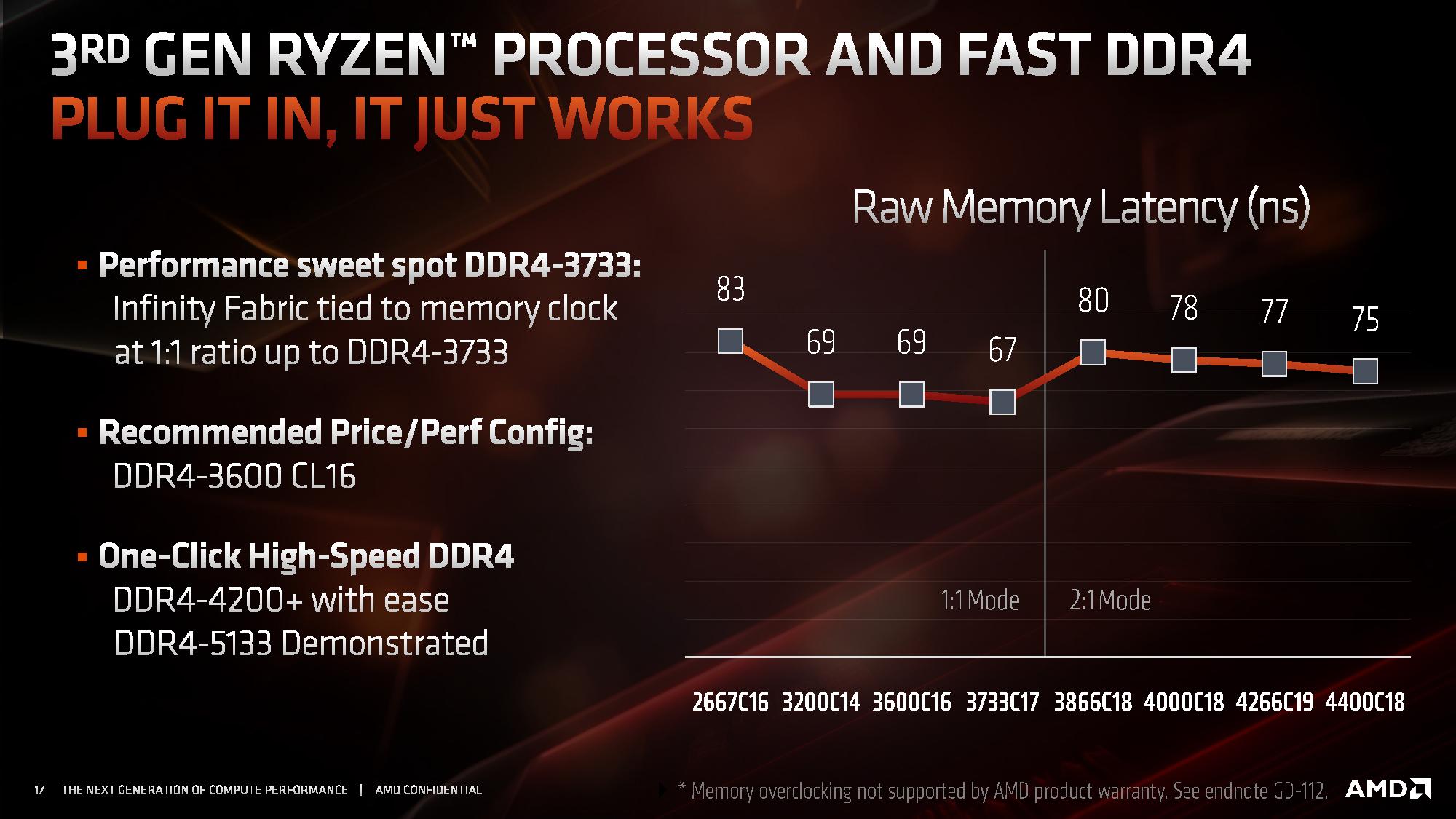
AMD ryzen runs 1:1 ratio up to 3733mhz So 3600 be good
smoky widget
AMD ryzen runs 1:1 ratio up to 3733mhz So 3600 be good
Or ya know, until it runs it faster than 3733
3800 is the norm, with a few doing ~4000
 dreamy vortex
Hey guys I replaced my old 8 GB of ram on my pc with a fresh new 16 gigs, when I replaced it I've tried multiple times my my monitor is black and always says no signal. Any idea on how to fix this? Ik im putting the ram in the ram in the right spots and I'm pressing hard enough to a point where I hear the clicks. My computer is also on it's just that the monitor is displaying a black screen. I even tried to put back my old ram and it still ain't working
If anyone can help it'll be greatly appreciated
 bitter oak
I'm getting CPU throttled on a very specific task that I need to do. How do I figure out what kind of CPU will fit my needs?
smoky widget
Caleb can you give more information. Please
what CPU you have Atm, and programs or usage you mostly do
livid sparrow
@smoky widget He is trying to run 30-40 Chromium Containers and has a 3700x
I dunno exactly what a Chromium Container is or how much they need resource wise so I said maybe a 5900x
livid sparrow
bitter oak
I'm getting CPU throttled on a very specific task that I need to do. How do I fi...
Wait a minute, by Chromium Containers, do you mean tabs? The only containers I know of in relation to a browser is that Firefox extension that allows tabs to be designated to their own separate pseudo-account
bitter oak
livid sparrow
Wait a minute, by Chromium Containers, do you mean tabs? The only containers I k...
it's essentially the fire fox feature you describe, but I running 30-40 different profiles of chromium and additional extensions are operating within them. I'm using incognition to accomplish this.
livid sparrow
Oh, then you might just be fine with a 5800x, it has something like a 12-20% performance increase compared to the 3700x depending on task
bitter oak
livid sparrow
Oh, then you might just be fine with a 5800x, it has something like a 12-20% per...
yeah but how do I know that 12-20% will get me above the bottleneck threshold?
all I know is that I hit 100%, I don't think there's a way to tell how much over that task is?
vast meadow
naive pendant
(ASRock b550 and Ryzen 3600)
All the fan headers work, but neither bios nor Aida...
Some of this can just be down to board to board variance and how the bios defaults are
Not quite sure what you mean by the read/write speeds tho, do you mean in task manager or something?
Also if you're previous mobo wasn't b550/x570 did you reinstall windows?
 foggy forge
can we run latest amd processor and gpu in Colorful CVN B550M GAMING FROZEN V14 Motherboard OC Support AMD Ryzen in full load without bottlenecking
vast meadow
foggy forge
can we run latest amd processor and gpu in Colorful CVN B550M GAMING FROZEN V14 ...
I wouldn't buy that motherboard tbh it's meh, so no, what cpu do you want to pair it with and what country?
naive pendant
@vast meadow I can't get aida64 to show read or write on the sensor panel, which doesn't matter at all but you know.
Alsoi figured out that when I tried to reinstall windows, for some reason it gave me some weird version of windows 10 pro that I can't activate for some reason, so now I'm starting to think that's what the issue is, or at least part of it
It was pretty worrying to see chassis fan 3 say n/a in bios when I have a water pump on it, but after running a few stress tests it's obvious that it's running, I just don't know what speed
vast meadow
naive pendant
<@191276897227898880> I can't get aida64 to show read or write on the sensor pan...
If you do a new reinstall sometimes it picks up the key from before
naive pendant
Would you guys say the asrock z590 pro4 mobo is a good choice for a i7-10700f?
vast meadow
naive pendant
Would you guys say the asrock z590 pro4 mobo is a good choice for a i7-10700f?
No, what country you in?
vast meadow
burnt spear
Probably better vrms
vast meadow
naive pendant
<@191276897227898880>
Asrock z490 and z590 boards are just mediocre and better vrms etc
 vast meadow
naive pendant
Whats a vrm?<:xidroke:773602946466316328>
vast meadow
naive pendant
Whats a vrm?<:xidroke:773602946466316328>
Power delivery
naive pendant
Oh, so if I were to get the board you'd mention, would I be able to oc my memory as well?
vast meadow
Ye
naive pendant
Current mobo came from a prebuilt I ripped for the gpu and took the cpu too and only lets me up to 2933
Oh sweet. You know how long it will stay on sale for?
vast meadow
naive pendant
Current mobo came from a prebuilt I ripped for the gpu and took the cpu too and ...
No idea probs a while tho as its 139 with 10$ rebate
naive pendant
You think it would stay for 2 weeks? I get paid biweekly
vast meadow
naive pendant
You think it would stay for 2 weeks? I get paid biweekly
Yeah probs
naive pendant
Is there a way to reinstall windows without losing all my data, or should I just back everything up?
vast meadow
naive pendant
Is there a way to reinstall windows without losing all my data, or should I just...
There's reinstall but keep my files but i don't think it would work with getting rid of changing chipsets
 grizzled bloom
PC reset does indeed clear the registry and fix issues with changing chipset
naive pendant
Ok cool. Thanks guys
vast meadow
grizzled bloom
PC reset does indeed clear the registry and fix issues with changing chipset
With keeping files?
 sudden cave
i9-12900K, ASUS Prime Z690-A mboard, and DDR4 memory...will DDR4 memory work until new DDR5 memory is available. Or better to buy Z690 board that definitely supports DDR4 and forget about DDR5 for now?
Haven't bought anything yet...just planning.
vast meadow
sudden cave
i9-12900K, ASUS Prime Z690-A mboard, and DDR4 memory...will DDR4 memory work unt...
Buy a mobo that with ddr4 and get some 3600cl16 ram or something, ddr5 is basically non existent
sudden cave
Noticed that.
Trying to find out from ASUS if DDR4 is backwards compatible with their new Z690 chipset boards. Then hurry up and wait a year or whenever the DDR5 is available, then just upgrade the memory.
Some of the Z690 chipset ASUS boards are DDR4 and some are DDR5...
vast meadow
sudden cave
Trying to find out from ASUS if DDR4 is backwards compatible with their new Z690...
you would need to buy a whole new board, i wouldnt worry tho, not much perf increase with ddr5 so far
naive pendant
P sure ddr4 and ddr5 are keyed differently
dreamy vortex
Hey guys I replaced my old 8 GB of ram on my pc with a fresh new 16 gigs, when I replaced it I've tried multiple times my my monitor is black and always says no signal. Any idea on how to fix this? Ik im putting the ram in the ram in the right spots and I'm pressing hard enough to a point where I hear the clicks. My computer is also on it's just that the monitor is displaying a black screen. I even tried to put back my old ram and it still ain't working
vast meadow
naive pendant
P sure ddr4 and ddr5 are keyed differently
they are
vast meadow
dreamy vortex
Hey guys I replaced my old 8 GB of ram on my pc with a fresh new 16 gigs, when I...
try clear cmos
dreamy vortex
Alright I'll search up a tutorial vid for it, thx for the help I'll let u know if it works
 cerulean wadi
vast meadow
If you do a new reinstall sometimes it picks up the key from before
cerulean wadi
vast meadow
If you do a new reinstall sometimes it picks up the key from before
Quick os question. Gonna freah install win10 on a spare ssd. Would using my current win7 key on it mess w/ my main setup, or should I use a new cd key? I purchased a spare.
vast meadow
cerulean wadi
Quick os question. Gonna freah install win10 on a spare ssd. Would using my curr...
are you using the spare ssd as your new boot drive?
cerulean wadi
I mean I was aiming to just keep this as a clone/backup. Switch em if the ssd or Win10 had issues.
vast meadow
then yeah go ahead and use your win 7 key on it
cerulean wadi
Last msg edited. Sorry if I'm confusing. Another way is I'm sort of trying to dual boot, idk if I really need to use a 2nd cd key in this case.
vast meadow
cerulean wadi
Last msg edited. Sorry if I'm confusing. Another way is I'm sort of trying to du...
Nah you can leave win 10 unactivated, but why bother dual booting an unsupported os and windows 10 unless you really need something that only works on win 7
cerulean wadi
I've had 7 up til now & indeed it's workedwell. Plenty of oldee games.
--True. I'd activate 10, just wondering doing so would mess w/ Win7 at all. If it's questionable I'll use a new key. This is actually just temporary to try Win10 & not yet format the old OS hdd w/ tons on it.
vast meadow
cerulean wadi
I've had 7 up til now & indeed it's workedwell. Plenty of oldee games.
--True. I...
honestly because of no security patches you should have already moved, but just leave windows 10 unactivated for the time being as win 10 is fine unactivated, win 7 can cause issues iirc
cerulean wadi
I know huh 😅. Ok, Try it, move data to extra spare hdd, then I'll activate Win10 & wipe the Win7 hdd. 👍 Thnx Pato
dreamy vortex
@vast meadow I reset the CMOS, I'm in bios rn anything I need to do there?
vast meadow
dreamy vortex
<@191276897227898880> I reset the CMOS, I'm in bios rn anything I need to do the...
Enable xmp then save and exit
dreamy vortex
@vast meadow Alright it's working now, thanks for the help I really appreciate it. Ur da goat
vast meadow
No problems
 junior mason
Hey guys I need you’re help me and my dad who had experience in IT we have a problem we have a 5600g and a b450 (gigabite) aorus elite v1 and it won’t boot the thing is we had in mind for my sister an a320 paring whit the 5600g but that isn’t supported yet when we put it back it didn’t turn on (a320 is my old buildt whit 1600 af and 1050 ti I wanted to upgrade the motherboard and give the a320 to my sister) sorry for the long story we don’t know what to do and hope u guys could help that’s
hollow thorn
junior mason
Hey guys I need you’re help me and my dad who had experience in IT we have a pro...
bios update on the b450 board?
since it likely won't be support with the bios installed out of box
junior mason
Wel not update didn’t try but it booted 1 time than never before
Whit the 5600g and the 1600
hollow thorn
wait you have a 1600?
hollow thorn
Use the 1600 on the b450 board first and update the bios
clear cmos if it won't boot
junior mason
Wel it didn’t boot whit the 1600 in it
hollow thorn
Just saying 5600g probably wouldn't boot right away, so focus efforts on getting the 1600 to boot with the b450
and to do that, clear cmos
hollow thorn
remove any extra ram sticks except one, remove anything unnecessary, including extra usb devices, then clear cmos again, battery method, not jumper method.
Going to assume the board doesn't have flashback
 oak prawn
What’s a good case for
vast meadow
For?
oak prawn
B550
vast meadow
Budget country etc?
vast meadow
P400a digital, 4000d airflow, p500a digital, mx330 g air, p360a, fractal torrent, lian li o11 air mini, lancool mesh ii
 elder viper
determine cpu/mobo compatability here?
hollow thorn
What do you want to check?
elder viper
Asrock Taichi X370 and new Ryzen 5700G?
pcparts picker says it will work but theyve been wrong before
hollow thorn
I don't believe it's compatible
elder viper
And the cpu is too much money to get wrong 🙂
hollow thorn
ASRock doesn't list a bios update for updating to agesa 1.2.0 and doesn't list support on the support page for the x370 taichi
junior mason
Get a 400 series board I recommend
hollow thorn
You'll probably want a b550 board
 normal breach
Hi what abot ryzen 5 5600g and msi mag b550m mortar comptbility?
elder viper
any suggestions then to upgrade my existing 1700X cpu?
hollow thorn
If you want to buy a new board that is
hollow thorn
normal breach
Hi what abot ryzen 5 5600g and msi mag b550m mortar comptbility?
Should work, has flashback in case you need to update bios
elder viper
can't buy new mobo, memory, and cpu all at the same time
hollow thorn
Unfortunately, x370 taichi only has support up to 3000xt chips after a bios update
And all the zen 2 chips are pretty badly priced atm
elder viper
so stick with what I have? Was hoping to get a big performance boost for small money. 🙂
hollow thorn
If you have a GPU already, the best option is for a new board and a 5600x, but that's expensive
Precious gen AMD chips are not priced well atm
hollow thorn
And AMD practically abandoned the 200$ price point for CPUs
elder viper
noticed that
hollow thorn
Well, that helps with stopping random people spamming, so it may be a necessary evil
elder viper
I'd give the $300 asking for the 5700G if it would work
What's to stop discord from spamming??? or selling our info?
hollow thorn
Discord shouldn't do anything with your phone number tbh, and discord should be GDPR compliant so you can request to take off all of your data at any point
elder viper
Tried to get Newegg to answer this q but Noooo, they would not even try. Sent me here, so you guys can blame them. 🙂
hollow thorn
Well, Newegg does outsource support on the website iirc
elder viper
figures
so I'm sol for now?
I mean, the 1700x is not bad, but I need a little more oomph in that system now.
normal breach
only the ryzen with the g in the name had integrated graphics right?
hollow thorn
normal breach
only the ryzen with the g in the name had integrated graphics right?
Yea
normal breach
if i want then one of the others, should i buy a graphic card?
hollow thorn
elder viper
so I'm sol for now?
Well, depends on what you do, if you need multi-core performance, 3700x is 330$, a pretty bad deal considering 5800x exists, but that's the only currently possible upgrade option for you right now
elder viper
Thanks, 1111. Was afraid of that but I sorely needed to be sure before I sent Newegg that much money.
hollow thorn
You're welcome, if you want to know performance, there are good reviews out there for a variety of tasks
shy wyvern
hollow thorn
Well, depends on what you do, if you need multi-core performance, 3700x is 330$,...
Imo people should go for a 5600x for most use cases over the 3700x
hollow thorn
shy wyvern
Imo people should go for a 5600x for most use cases over the 3700x
Yes, but their mobo doesn't support zen 3
shy wyvern
oh
that's a shame
5600x despite being 6 cores is like 8-10% below the 3700x in multicore
cause it's that much of a leap in single
hollow thorn
depending on task
shy wyvern
Yeah that's fair
hollow thorn
If they just wanted to host a bunch of vms, allocating 1 core/vm, 8 vms is worthwhile over 6 vms :p
hollow thorn
mm
shy wyvern
12600k is just that much more absurd though
If the thing wasn't a space heater
I had to move my tower because my feet were getting a little to warm from this thing
hollow thorn
lol
shy wyvern
legit this thing pulls as much as my 8600k at 1.425 volts for 5.3ghz at stock boost settings
which is absolutely absurd
I was feeding that 6 core 170-200 watts for heavy overclocking
and this stupid cpu pulls the same amount at stock lol
oblique haven
Thought the 12600K only pulled about 150. Is that wrong?
hollow thorn
oblique haven
Thought the 12600K only pulled about 150. Is that wrong?
TPU review

basically 220w max stock, 320w max OCed
oblique haven
That’s for the whole system though
That said, I’m surprised to see it drawing more than the 10900K in this test. That just doesn’t make any sense to me, at all.
hollow thorn
I mean, rest of system won't draw much more, and you can see it compared with other chips
naive pendant
I think I'm gonna have to just back everything up and reinstall windows
Somehow my windows 10 home became an unactivated copy of windows 10 pro education edition. Idk what in the world happened, but yeah. Trying to do the refresh install thing tries to refresh windows 10 pro ed. Again, no clue how that even made it's way into my system. Really very strange
hollow thorn
oh fun
naive pendant
It won't even let me reinstall windows 10 home. It keeps telling me it's incompatible with my current version of windows
livid sparrow
I guess you could say you need to educate yourself on this problem and the potential solutions 
naive pendant
I would love to except that Google can't even seem to help me
seriously what am i even supposed to do about it at this point
 hollow thorn
@naive pendant could just completely reinstall windows?
As in, get windows creation media onto a USB stick, put away anything you don't want to lose, and just nuke the install and install windows again
 hollow thorn
that's why you gotta nuke the previous install
like dban
leave no traces
and then install
naive pendant
Ok my bad, I misunderstood your directions. Now I'm trying to copy a fresh install to my secondary HDD. That seems to be working. Hoping I can get it working, boot to that, then uninstall this plagueware that ASRock seems to have magically inserted into my nvme.
In case this doesn't work, what is dban?
hollow thorn
Erase hard drives, desktops, laptops or servers free with a Darik's Boot and Nuke (DBAN) download. Try it now.
It's a nuke for your hdd
nuke any traces of anything left on that drive
no more bad pieces of windows
naive pendant
Oh ok.
I'm assuming since this software exists, it isn't enough to just format the drive?
hollow thorn
Well, format is good enough for 99% of uses, dban is just for when you hate any data left on the drive
naive pendant
Gotcha
Probably my best option anyway since apparently things are just going wrong for dumb reasons. Have you ever heard of this happening before? Like I've heard of hardware changes corrupting your os but I've never heard of it becoming a different version altogether, that's weird right?
hollow thorn
weird but you know what, windows is weird
naive pendant
It let me install windows on and boot into the secondary, at least. So if nothing else I can fix my install.
Now let's see what I can actually save from the primary
Is there any way I can avoid this in the future? Like, it really screwed me here. It wouldn't let me install any version of windows except for the broken one that somehow made it's way into my drive, and it wouldn't even let me refresh that without "connecting to my business network" or something along those lines, which obviously I couldnt do since the network in question doesn't exist.
hollow thorn
Well, windows being windows and weird is often inexplicable
naive pendant
It also still uses my background image on the initial login screen, despite it being an unactivated copy of windows

naive pendant
Yep. Bricked my windows install
 dense frost
hollow thorn
TPU review
dense frost
hollow thorn
TPU review
anyone else think its funny that Alderlake has "efficiency" cores, but pulls more power than a stadium lighting system? 😆
cerulean wadi
dense frost
anyone else think its funny that Alderlake has "efficiency" cores, but pulls mor...
hah, yep. I'd rather have an advanced 8-core version of a 10600/11600, and also dodge the extra dependency on software or needing Win11. Of course, just giving a few things like pcie 5 on 1 slot wasn't quite enough.
 quick robin
Hi would these 2 parts work together MSI MPG Z690 CARBON WIFI DDR5 LGA 1700 Intel Z690 SATA 6Gb/s ATX Intel Motherboard and the ram is https://www.newegg.com/corsair-32gb-288-pin-ddr4-sdram/p/N82E16820236697?Item=N82E16820236697
vast meadow
quick robin
Hi would these 2 parts work together MSI MPG Z690 CARBON WIFI DDR5 LGA 1700 Inte...
no, that is a ddr5 motherboard with ddr4 ram, what cpu is this for?
vast meadow
quick robin
Where can i buy ddr5 ram it's like sold out everywhere
yeah, best bet is to just get fast ddr4 anyway, not a massive difference from what we have seen so far
do you want rgb?
vast meadow
ah welp
then you can either try and get ddr5 or return and get some ddr4 like this https://pcpartpicker.com/product/66NxFT/oloy-blade-rgb-32-gb-2-x-16-gb-ddr4-3600-cl16-memory-nd4u1636163brade
quick robin
Thank you going to think about this.
vast meadow
Np
 waxen panther
Is Ryzen really good for the price compared to intel?
vast meadow

dense frost
👆
 paper coral
dense frost
paper coral
dense frost
certainly doesnt cost an arm and a leg like the others
 subtle crow
waxen panther
Is Ryzen really good for the price compared to intel?
subtle crow
waxen panther
Is Ryzen really good for the price compared to intel?
It’s model specific, but Intel’s alder lake has better value then the ryzen 5000 series based on performance to price
12th gen
subtle crow
While the ryzen 5000 series has better value then 10th and 11th gen intel, mostly
 grim schooner
anybody good with a Ram question?
vernal cosmos
!ask
 devout mothBOT


 dense frost
subtle crow
While the ryzen 5000 series has better value then 10th and 11th gen intel, mostl...
dense frost
subtle crow
While the ryzen 5000 series has better value then 10th and 11th gen intel, mostl...
12600 is really good. 12700/5800... prices are fluctuating, so some places the intel is better, other the 5800 is.
grim schooner
lol , okay - i have matched / but mis-matched ram on my Gigabyte Aorus B550 Pro AC motherboard - no issues to report, but just asking to make sure i have G.Skill F4-3200C16-8GTZR 2x8GB and G.Skill F4-3200C16-8GTZRX(For AMD) 2x8GB - i should be okay right?
vernal cosmos
grim schooner
lol , okay - i have matched / but mis-matched ram on my Gigabyte Aorus B550 Pro ...
Depends
Could be fine
But also couldn't
Gskill changes dies
Run thaiaphoon burner
dense frost
grim schooner
lol , okay - i have matched / but mis-matched ram on my Gigabyte Aorus B550 Pro ...
are you able to run in dual channel and turn XMP on?
grim schooner
i've set the xmp in the uefi to the rated 3200 - zero issues so far
vernal cosmos
dense frost
are you able to run in dual channel and turn XMP on?
That doesn't say anything really tbh
grim schooner
yes dual channel is also set
vernal cosmos
Timings are the same so xmp will be available
dense frost
vernal cosmos
That doesn't say anything really tbh
I mean, if the system is runnign stable...
vernal cosmos
Die still may not match
grim schooner
will cpuz tell me the dies?
vernal cosmos
dense frost
I mean, if the system is runnign stable...
Stable can mean "stable" till you wake up to windows being currupted to the point that windows doesn't even boot anymore
Ram is no joke
vernal cosmos
grim schooner
will cpuz tell me the dies?
Thaiaphoon burner
dense frost
vernal cosmos
Stable can mean "stable" till you wake up to windows being currupted to the poin...
ill be honest, I wasnt aware this could happen with mismmatched dies
grim schooner
dm or in here
grim schooner
k lol
hollow thorn
grim schooner
lol , okay - i have matched / but mis-matched ram on my Gigabyte Aorus B550 Pro ...
Most certain way to check G.skill stick dies is to look at the sticker btw
the 042 code
grim schooner
nice i'll take a look
hollow thorn
Example:
Example: 04213X8810B
The first bolded character is the density. 4 for 4Gb, 8 for 8Gb and S for 16Gb.
The second bolded number is the manufacturer. 1 for Samsung, 2 for Hynix, 3 for Micron, 4 for PSC (powerchip), 5 for Nanya, and 9 for JHICC.
The last character is the revision.
This is the code for Samsung 8Gb B-die.
junior mason
Hey peaple what motherboard do u recommend for a 1600 af atleast 400 series?
vernal cosmos
hollow thorn
Most certain way to check G.skill stick dies is to look at the sticker btw
Yeah hes dmed me sticker pics imma take a look after dinner
vernal cosmos
junior mason
Hey peaple what motherboard do u recommend for a 1600 af atleast 400 series?
Ryzen 5 1600?
junior mason
Yes
hollow thorn
sad
junior mason
Why it ain’t that bad?
It can play the games that I want
But idk what mobo to add it now since last one failed
grim schooner
my son had ryzen 5 1600 on an AB350 Pro4 - and then moved it into a ASUS B450 Gaming-F for a bit before upgrading to a newer CPU