#cpus-mobo-and-memory
1 messages · Page 204 of 1
 pale fox
 deep salmon
again, kept a look out almost everyday for 6 months xD
deep salmon
pale fox
yeah, it dont work for me
wa?? that's ascii codes. It's international haha
weird af
 vast meadow
deep salmon
again, kept a look out almost everyday for 6 months xD
vast meadow
deep salmon
again, kept a look out almost everyday for 6 months xD
lol
vast meadow
deep salmon
again, kept a look out almost everyday for 6 months xD
i mean i finally got a 3060 but for 720€
3070*
deep salmon
reallyyy needed the PC man. Soft eng needs a CPU and my games need a GPU xD
deep salmon
vast meadow
i mean i finally got a 3060 but for 720€
ouff....kinda stings but convert to GBP, it's half of what people are selling them for rn
and I know in Cyprus they go for x1.5 that IIRC
vast meadow
deep salmon
ouff....kinda stings but convert to GBP, it's half of what people are selling th...
yeah i saw so many in currys uk but after the import tax from brexit i would have been paying almost scalper prices
pale fox
Brexit means Brexit
deep salmon
I tried to checkout in the page @pale fox sent and entered asdf@gmail.com as an email just to continue and it says it
it's already registered xDDDD
deep salmon
pale fox
Brexit means Brexit
T_T
deep salmon
vast meadow
yeah i saw so many in currys uk but after the import tax from brexit i would hav...
honestly...currys is the worst for PC parts. Full on advantage
pale fox
yes
deep salmon
That's why I built my pc FULL 2nd hand
pale fox
but for monitors its not bad
deep salmon
only thing I bought new is my PSU cause I don't wanna blow up 😄
vast meadow
deep salmon
honestly...currys is the worst for PC parts. Full on advantage
well all i got in ireland lol
deep salmon
pale fox
but for monitors its not bad
fairs, I got a sick deal on my main one 1080p yes...but 144Hz 27 inch Dell one. MSRP 220 pounds got it for 100 from this sweet lady who bought it for her son but he said he had a better one so he threw this one away
it literally has 3 years warranty left on it
deep salmon
noiceee
the smoothnesss 0
*0*
forgot I had to escape the stars...markdown and whatnot
pale fox
lol
pale fox
its calm
deep salmon
athlon 3000G, 1x8GB ?MHz RAM
pale fox
ye
deep salmon
and no GPU currently?
deep salmon
well yh, vega graphics wil only take you so far
pale fox
deep salmon
well yh, vega graphics wil only take you so far
Won't a gpu boost it?
deep salmon
A lot xD
pale fox
xD
deep salmon
you need a gpu to play games
cause rn ur CPU is rendering both the scenes and handling the logic
oh god, you know we fcked when CEX is kinda scalping
pale fox
Lol
deep salmon
but you might wanna have a look there
pale fox
yeah
deep salmon
GTX 1650 for £165.00.....yeesh
pale fox
I can't really expect much from cex
 pale fox
isn't that overpriced?
deep salmon
well that's easy to figure out
you legit just measure it..ur case I mean
l, w, h of GPUs is public information
pale fox
lemme search up how long I have to measure
It can fit in my pc
Also thanks for the help @deep salmon,@stiff kraken and @vast meadow
pale fox
thanks!
 neon void
I got a r5 1600 so I am assuming 3200mhz
 grizzled bloom
Yeah 3600 is too much to ask from the 1000 and 2000 series
vast meadow
neon void
I got a r5 1600 so I am assuming 3200mhz
3200 then
neon void
Alright.
neon void
grizzled bloom
Yeah 3600 is too much to ask from the 1000 and 2000 series
I plan to get a 5600x soon / in the future would 3600mhz work?
 elfin warren
Yeah, just wait to do ram until the 5600x then
neon void
Also I want to know what I should upgrade next, I have a r5 1600, phantom d rx570 8gb, 550w, 16gb ram 2666mhz (I think),
neon void
elfin warren
Yeah, just wait to do ram until the 5600x then
Alright.
neon void
neon void
Also I want to know what I should upgrade next, I have a r5 1600, phantom d rx57...
obviously the ram but besides that what should I upgrade in order?
 limber dragon
ram -> psu -> gpu (imo)
neon void
limber dragon
ram -> psu -> gpu (imo)
Yeah that was my original plan I wasn't sure about the cpu / gpu tho bc ppl have said mixed things about what to upgrade first when it comes to those two
I think I'd be lucky to get my hands on a gpu (1080-3080)+ let alone for a close to "fair" price
limber dragon
yeah, gpus right now are so messed up that you should stick with the 570 until the prices are back to normal
neon void
limber dragon
yeah, gpus right now are so messed up that you should stick with the 570 until t...
yea
vast meadow
What mobo do you have btw?
neon void
strix b450f-II I believe
neon void
alr
neon void
vast meadow
You'll just need to update bios
Wait,
vast meadow
Also what cooler do you have?
neon void
In order to update bios I do what, and what will it reset, just my bios settings?
vast meadow
If stock I'd get a new one
neon void
I was going to get an aio in the future but I have the hyper evo 212
it gets fine temps for my cpu but idk how it would do with the 5600x
vast meadow
neon void
In order to update bios I do what, and what will it reset, just my bios settings...
Just resets bios settings but you just download it put on usb, boot to bios do update thats it
neon void
oh
elfin warren
neon void
it gets fine temps for my cpu but idk how it would do with the 5600x
Not well
neon void
elfin warren
Not well
thats what I assumed
vast meadow
Aio overkill imo but 212 evo is pretty bad
neon void
elfin warren
Vetroo V5 do the job
You recommended me an id-cooling cpu cooler awhile ago would that be better than the vetroo>
?
neon void
Buy ID-COOLING SE-914-XT ARGB Cooler 131mm Height AM4 CPU Cooler Addressable RGB Light (5V 3-PIN Connector) on Fan and Top-Cover 4 Heatpipes CPU Air Cooler 92mm PWM Fan, Intel/AMD: CPU Cooling Fans - Amazon.com ✓ FREE DELIVERY possible on eligible purchases
it wasn't this but it was close to this
elfin warren
SSE 224XT
neon void
ID-COOLING SE-224-XT RGB CPU Cooler AM4 CPU Cooler 12V 4PIN RGB Cooler 4 Heatpipes CPU Air Cooler 120mm PWM Fan, Intel/AMD
isn't this too?
vast meadow
Or gammaxx 400 if trying to save money
neon void
This one atleast*
elfin warren
Ah, yeah it is
neon void
Buy ID-COOLING SE-224-XT-ARGB-V2 CPU Cooler AM4 Addressable RGB CPU Cooler 5V 3PIN RGB Cooler 4 Heatpipes CPU Air Cooler 120mm PWM Fan, Intel/AMD: CPU Cooling Fans - Amazon.com ✓ FREE DELIVERY possible on eligible purchases
elfin warren
Not sure on the price tho
neon void
about the same-ish
elfin warren
Ehhhh, for $40 go Vetroo
neon void
Ok
vast meadow
elfin warren
Not sure on the price tho
Gammaxx red is like 23$
40$›
Check newegg mb
 glad pebble
This is an odd question, but is there a graphics card equivalent of Intel® UHD Graphics 620?
Im trying to see if a laptop could run human fall flat
 hollow thorn
glad pebble
This is an odd question, but is there a graphics card equivalent of Intel® UHD G...
hollow thorn
glad pebble
This is an odd question, but is there a graphics card equivalent of Intel® UHD G...
smth close to GTX260 maybe, and also, the mininum spec for human fall flat, HD 7770, is quite a bit better than uhd620
https://www.videocardbenchmark.net/compare/GeForce-GTX-260-vs-Intel-UHD-Graphics-620-vs-Radeon-HD-7770/17vs3805vs322
limber dragon
then igpus also need to take in ram performance, because that's igpu "vram"
glad pebble
hollow thorn
smth close to GTX260 maybe, and also, the mininum spec for human fall flat, HD 7...
so would you venture to say it wouldnt be able to handle it?
hollow thorn
I say it wouldn't
 naive pendant
anyone got recommendations in a b560 board that's more or less white?
ive been eyeing the b560a strix but like
jeez it's expensive
and out of stock
 split copper
I'm looking at h510s
wish they were lower price but I just want something that will work with a 10100 if I upgrade
 keen steppe
Can anyone recommend a couple boards for a 5600x that has wifi and bluetooth?
vast meadow
keen steppe
Can anyone recommend a couple boards for a 5600x that has wifi and bluetooth?
Msi pro vdh wifi
B550
 quartz zinc
do i have to reinstall windows if i upgrade my motherboard
vast meadow
You don't have to but you should
You can get a lot of slowdowns or errors if you don't
 dense frost
keen steppe
Can anyone recommend a couple boards for a 5600x that has wifi and bluetooth?
dense frost
keen steppe
Can anyone recommend a couple boards for a 5600x that has wifi and bluetooth?
X570 Tomahawk
keen steppe
I was going to consider the tomahawk til I realized it's closer to 300 bucks nowadays
elfin warren
5600x doesn't need x570, B550 more than sufficient
dense frost
elfin warren
5600x doesn't need x570, B550 more than sufficient
yeah, but I just cant stand the fact that with a B550 you only get one PICE 4 M.2 slot.
elfin warren
Gen 4 drives are not needed for 95% of people
no difference in load times between those and gen 3
dense frost
I know. but it still feels like a crutch
elfin warren
SO unless you're moving huge files all over the place it's a waste of money
dense frost
like, why hobble yourself
elfin warren
Like, why blow money on useless stuff
dense frost
for future stuff?
elfin warren
Get more ram with that money that's useful
Or a better GPU
or better PSU
Or monitor or something
keen steppe
For reference I'm just helping my brother build a pc he says he wants comparable or better than xbox/ps5 and "will last a few years"
vast meadow
dense frost
yeah, but I just cant stand the fact that with a B550 you only get one PICE 4 M....
Most of the gen 4 ssds are beaten by good gen 3 drives without nearly as much heat btw
vast meadow
keen steppe
For reference I'm just helping my brother build a pc he says he wants comparable...
Just make sure you get a decent cooler, stock wont let the cpu boost properly
keen steppe
Of course
vast meadow
What cooler you thinking?
keen steppe
Not entirely sure yet. If the hyper 212 is as terrible to install on AM4 as it was on 1150 I'd avoid that lol. Maybe one of the be quiet ones
vast meadow
Those or gammaxx 400 if on budget and scythe fuma 2 if you want a chonky cooler
keen steppe
I'd probably feel safer giving him an air cooled system for his first build
split copper
aios aren't much more complicated
elfin warren
They are more expensive tho
keen steppe
I know but still. One less mechanical thing to worry about failing
 ocean talon
anyone know why pc apps crashes when i use 3600mhz speed of ram
i just set it to 3200 and now its fine
vast meadow
ocean talon
anyone know why pc apps crashes when i use 3600mhz speed of ram
Are you changing the voltages and timing or just doing speed 3600
And what ram
ocean talon
vast meadow
Are you changing the voltages and timing or just doing speed 3600
no im just changing the speed in the bios
Corsair Vengeance LPX 16GB C18 1.35V this ram
vast meadow
ocean talon
no im just changing the speed in the bios
Don't do that
Choose an xmp profile
Is it supposed to be 3600cl18?
ocean talon
tbh idk but i assume it is
vast meadow
If so just enable xmp(extreme memory profile) or docp if you have an asus motherboard
Don't just set the speed in bios
ocean talon
ok ill do that rn
opening chrome and valo into practice range and hasnt crashed so far like before
ocean talon
vast meadow
If so just enable xmp(extreme memory profile) or docp if you have an asus mother...
thanks
vast meadow
Your welcome
hollow thorn
dense frost
for future stuff?
Pcie 4.0 drives are kinda sad when they're only good at seq and just average at rnd
hollow thorn
elfin warren
Gen 4 drives are not needed for 95% of people
Imo, not useful at all for 99.9% of people
 sudden coral

 vernal cosmos
can still arrive by today lmao
dense frost
hollow thorn
Pcie 4.0 drives are kinda sad when they're only good at seq and just average at ...
Thanks for the info. I honestly didn't know this
 prisma hill
Hi, I have this motherboard (m5a99x evo r2.0, asus). I have rn 2 4gb sticks of ddr3 800mghz. So my question is, does upgrading ram speed make a big difference for game performance? Also I want to upgrade ram bc i keep running out, for example editing a video or even being on a discord call while having a few google tabs open makes me run out of ram. So what kind of ram is compatible, what speed is good? Thanks in advance, and if you reply pls @ me bc i won't see it otherwise.
split copper
is it ddr3 800 or 1600?
glad pebble
In video games RAM speed/amount (from what I have found) does not impact that much. HOWEVER I do video/photo editing/rendering and the difference is massive. I went from 2x8 GB 2666 MHZ to 4x16 (64gb) 3000mhz and rendering photos/videos takes significantly less time. Haven’t really seen a change in video game performance.
With that being said, ddr3 at 1600 mhz is slow for today’s standards, so if you upgraded that, you would see a difference. The maximum RAM speed for that motherboard is ddr3 1866MHz (also depends on CPU), so an upgrade from your current 1600mhz to 1866mhz would make a difference.
You mentioned 800mhz, is this the stock frequency? RAM speed is usually doubled, so for example if an app tells you the speed is 800mhz, double it to get your speed.
Also if you haven’t already, head into your bios and enable XMP profiling. This increases RAM speeds beyond stock frequencies.
Heres a good vid on the difference between the two https://youtu.be/xL1BEvk8UGA ( @prisma hill )
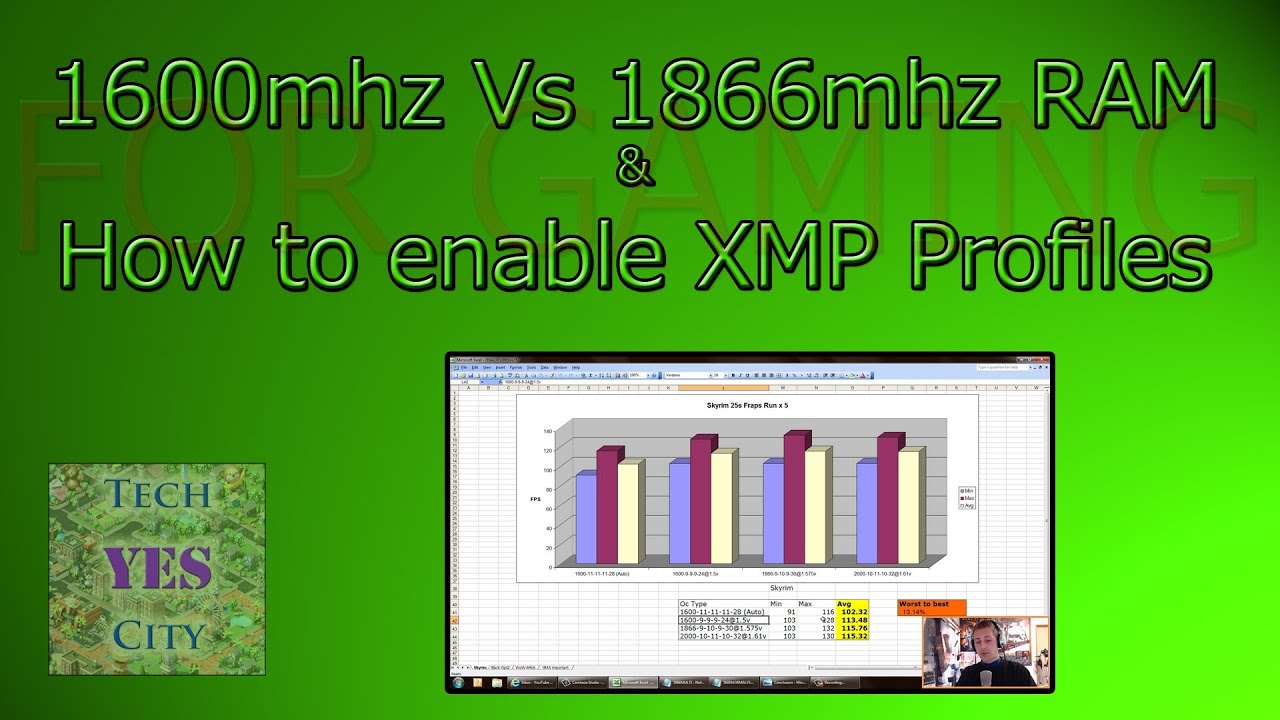
Skyrim - 1080p @ Ultra (16csaa / 8msaa)
Black Ops 2 - 1080p @ Ultra (4x msaa)
WoW 64 MoP - 1080p @ Ultra (16csaa / 2x msaa).
Hey guys this is the precursor to my beginners guide to overclocking your ram. Basically I was doing a lot of testing and the big thing to take out of it was that you shouldn't be using the auto settings in BIOS as they ...
elfin warren
I mean it def matters on amd and intel. Up to 10% performance difference in games, depending on some factors. 2666 vs 3200 on 10400 is the difference between slower than or faster than Ryzen 3600.
quartz zinc
can i use acetone to remove thermal paste
 silk ice
Yes but i wouldn't recommend it since it can be really bad for plastic. if at all possible you want to use isopropyl alcohol since if you get it anywhere it will jsut evaporate
 polar igloo
Use 91% isopropyl or something higher is what ive heard
grizzled bloom
Chances are if it's corrosive you don't want it anywhere near your PC
 abstract badger
Hey have a Lenovo 20205looking to upgrade memory. Any suggestions on models?
silk ice
I'd recommend checking out crucial's memory finder if you're just trying to figure out what's compatible
abstract badger
found it using that tool. Cheers for the Ref.
silk ice
Yea no problem it's super nice for figuring out ram and drive expansion quickly for prebuilts and laptops
 cyan raft
How’s the 5600x vs 3700x?
silk ice
cyan raft
How’s the 5600x vs 3700x?
depends what you're doing for just gaming the 5600x strongly outclasses the 3700x for other multithreaded applications I would believe the 2 extra cores on the 3700x are a greater benefit over the per core performance
 bitter oyster
hey Ive had my Asus Rog Strix ryzen 5900hx with rtx 3060 for a week and i see that my CPU temps while playing games ranges from 89C- 96C as soon as i turn the game on. any suggestions?
silk ice
bitter oyster
hey Ive had my Asus Rog Strix ryzen 5900hx with rtx 3060 for a week and i see th...
what cooler are you using?
vast meadow
cyan raft
How’s the 5600x vs 3700x?
a downgrade in multi core performance for better single core but not worth the downgrade in multi for 300 the increase in single aint worth 300 and loosing multi core imo
vast meadow
bitter oyster
hey Ive had my Asus Rog Strix ryzen 5900hx with rtx 3060 for a week and i see th...
on your laptop?
vast meadow
silk ice
what cooler are you using?
hx is laptop chip afaik
silk ice
vast meadow
hx is laptop chip afaik
oh that makes way more sense I just assumed it was a typo tbh
vast meadow
silk ice
oh that makes way more sense I just assumed it was a typo tbh
possible but especially because they said asus rog strix in front
Jimmy try putting your laptop on a hard surface, ie not on your duvet or something, put it on a table
if the temps are still that high
try a laptop stand, this will require a external mouse and keyboard but it lets air get underneath the laptop
silk ice
that and laptop thermals are just awful in general
vast meadow
yeah
silk ice
my laptop now is always super hot with an i7-8850H and a P1000, but provided its propped up with additional fans beneath it not much I can do
grizzled bloom
Can remove bottom cover and add speed holes where the cooler sucks in air
You'll get more dust but better airflow
silk ice
Yea I've also considered undervolting my laptop but don't really know what I'm doing so have avoided it
grizzled bloom
Most laptops don't let you do that anyway
silk ice
I read online other people had done it with their Lenovo P1's but I also haven't messed with it too much
bitter oyster
vast meadow
on your laptop?
yea its a laptop
bitter oyster
silk ice
what cooler are you using?
dont know its whatever came witht the laptop
silk ice
bitter oyster
dont know its whatever came witht the laptop
that was from when i thought it was a desktop my b
cyan raft
Whatever happened to ECC ram? I haven’t heard talk of it for a while now
bitter oyster
vast meadow
if the temps are still that high
yea i use external mouse and lift the back for max air flow
silk ice
cyan raft
Whatever happened to ECC ram? I haven’t heard talk of it for a while now
in a drastic oversimplification intel segmented into only their xeon processors which kinda took it out of the consumer market, its being talked about again because some degree of error correction is being built into ddr5
bitter oyster
silk ice
that was from when i thought it was a desktop my b
ok
 white plinth
what temp should my cpu be running at if i just installed it?
silk ice
white plinth
what temp should my cpu be running at if i just installed it?
dpends the cpu and cooler, what temperature are you getting?
white plinth
in the bios is said 90C
silk ice
what cpu and what cooler?
cyan raft
Not too sure but I think that’s a bit high
silk ice
so I have heard about the 5800x running hot but not that hot, is the aio plugged into the right header and did you use thermal paste?
white plinth
yes. its plugged into where i had it before and its cooler master masterliquid ml240r
phantom gaming
vast meadow
bitter oyster
yea i use external mouse and lift the back for max air flow
Yeah there's nothing you can really do then, i mean the only thing you could do would be but on balanced power plan if it's on high performance I'd guess
vast meadow
white plinth
in the bios is said 90C
Remount it
white plinth
its on norm,al performanve
silk ice
white plinth
yes. its plugged into where i had it before and its cooler master masterliquid ...
did you put fresh thermal paste on it when you put it in?
white plinth
yes fresh thermal paste
vast meadow
white plinth
yes. its plugged into where i had it before and its cooler master masterliquid ...
Ohh that's not a great cooler but you shouldn't be getting 90c there's an error there remount or apply more thermal paste I'd say
cyan raft
Can you hear the pump running?
bitter oyster
thank you yea that's what I'm figuring I've been trying to find a answer for a few days now
cyan raft
What thermal paste are you using?
white plinth
insignia
is there a gui thing for my cooler master any one kniw?
Ok. So I restarted and now it's sitting at 80
In bios
Wait no its climbing back up
white plinth
Yes.
elfin warren
And it's not showing RPM in the BIOS?
white plinth
No it says n/a
elfin warren
If it's not showing RPM in the BIOS, check to be sure you have all the pins lined up properly
white plinth
Imma take it back apart and look at it
elfin warren
If the pins are proper, then the AIO is defective
white plinth
Anyone have like a video how to install this thing?
Cuz apparantly the one I had was wrong
elfin warren
You peeled the plastic off the pump right?
white plinth
Yes
elfin warren
Ok, seen it happen before
white plinth
Tyzeb 7 1700x
Ryzen
Mobo us asus b450 rog strix
Update version 430q
4301
I did the update you told me to do
elfin warren
AH, I remember you now 🙂
white plinth
Everything is plugged in correctly
elfin warren
Ok, you DO have an AIO pump header in the center of the board. I'd double check that connection for sure. How many wires are on the AIO pump wire? 2, 3, 4? If only 2 wires, you won't have RPM feedback anyway.
Also check to be sure the latches are seated correctly on the AM4 mount. They like to be finicky and make sure the thumb screws are tight.
white plinth
Put more thermal past on?
elfin warren
That's not the issue with temps that high
 devout mothBOT
 HannandGrenade#6801 has been warned
Reason: Bad word usage
elfin warren
The wire that you're plugging into the AIO Pump header. How many individual wires are on the plug that goes into the motherboard?
white plinth
Ya im trying to see which one gets plugged in there now
I'm guessing the other one comming from the pump

 elfin warren
Yes
One of those comes directly from the part on the CPU
That one goes to the AIO_PUMP header
The one from the Fans goes to the CPU_FAN header
white plinth
Okay so the two from the fans also go on the mobo?
Non3 of them go to thus control panel thing in the back?
elfin warren
Two from the fans?
white plinth
Yes
elfin warren
Fans should go to a splitter cable
With a single cable end
There are two ends from the fan but one is RGB
The other is power
Find the one that looks like your picture
Connect it to CPU_FAN header up by the ram slots on the top of the board
elfin warren
THe other two cables are aRGB cables
white plinth
And the cables are marked right?
white plinth
Okay I've just unplugged it all cuz whew it was a mess
elfin warren
XD


 elfin warren
SO those two in your hands look like power? They should go to a splitter cable that goes from 2 connections to 1 and then to the CPU_FAN header
elfin warren
part N
 white plinth
Thise from the fans
elfin warren
mmhmmm
white plinth

 white plinth
Purple is power
elfin warren
SO the two POWER wires should go to CPU_FAN and CPU_OPT right next to each other
white plinth
?
elfin warren
Please read text above your pic
white plinth
Oh thanks
white plinth
And then the rgbs go to the things in the back for led?
elfin warren
Yes. Then the things in the back go to the motherboard for LED control
white plinth

For the power
And

So that thing in the back isn't necessary for use then
Thats dumb
white plinth
Yeah its the one coming from the pump
elfin warren
That's the power for the pump
elfin warren
Yeah and only two wires I see
So no way to tell if the pump is working in the BIOS or not
Need 3 wires for that :/
white plinth
Dang
white plinth
I'll just know from the temp then
elfin warren
Ya
white plinth
I found the splitters you were talking about
Didn't need them I don't think tho
Cus I just put the power next to eachother like you said
elfin warren
ya!
white plinth
Sorry I'm slow
My 4 month old just screaming at me
And my girl making fun of me
Lol
Thanks for the help
elfin warren
You're welcome!
Understood on the interruptions, we all have lives and things to do
elfin warren
:/
white plinth
Immediately went to 90
elfin warren
Pull the cooler pump off and send a pic, let's look at the thermal paste pattern and mounting pressure
Wait a sec
Before you do that
put your hand on the pump
is it buzzing?
white plinth
 elfin warren
Fans are at 2K RPM, that's good
white plinth
Yes it's buzzing
elfin warren
That means the pump is most likely stuck
It shouldn't be buzzing or vibrating really, I just touched mine for comparison
white plinth
I feel it slightly
I'll pull it off
I will say the aio pump on the mobo is 4 pins but the one comming from the pump is 3
white plinth
 elfin warren
Ya, jus tmake sure it aligns with the tab on the fan header
 plush timber
Question: my computer seems to shut off randomly. Had happened a few times now. I was just playing cod and it turned off. Turn it back on and nothing happens. But the dram light stays lit on the mobo. If I wait a bit the computer will come back on just like before. I don't know. Meh.
vast meadow
plush timber
Question: my computer seems to shut off randomly. Had happened a few times now. ...
Reseat the ram, what ram? What cpu?
white plinth
@elfin warren
So
53 degrees now
It was either that the pump was not seated correctly orrrrrrrrrr
I plugged the pump into a cpu fan and not the aio
Cuuz they was next to eachother
Ya I can see the rpms now
Thanks yall
plush timber
vast meadow
Reseat the ram, what ram? What cpu?
Asus x570 mobo. Gskill ram. Ryzen 5 3600 . I did reseat them. Like a few weeks ago when it did this last? Could the ram itself be faulty maybe?
white plinth
@elfin warren now hopefully my cpu won't hold back other stuff. Especially since I basically destroyed that last cpu cuz all this was wrong
vast meadow
plush timber
Asus x570 mobo. Gskill ram. Ryzen 5 3600 . I did reseat them. Like a few weeks a...
Maybe but what speed is the ram rated for ? And where you using docp(xmp) or just setting the speed manually in bios
plush timber
vast meadow
Maybe but what speed is the ram rated for ? And where you using docp(xmp) or jus...
Well I used the profile in bios for the faster speed. I think the mobo defaults to 3200 and the ram is 3600? I need to double check the spec
vast meadow
Double check that
plush timber
Check this out on @Newegg: G.SKILL Ripjaws V Series 32GB (2 x 16GB) 288-Pin DDR4 SDRAM DDR4 3600 (PC4 28800) Intel XMP 2.0 Desktop Memory Model F4-3600C16D-32GVKC https://www.newegg.com/g-skill-32gb-288-pin-ddr4-sdram/p/N82E16820232907?Item=N82E16820232907&Source=socialshare&cm_mmc=snc-social-_-sr-_-20-232-907-_-05202021
vast meadow
The ram will default to 2133 or 2666 but we'll see
plush timber
This is the ram
vast meadow
You were using docp profile?
plush timber
Yeah
vast meadow
Do you have it in the right slots?
plush timber
Yeah. I mean I've been using it like this for almost a year
vast meadow
From cpu going right, empty, ram, empty, ram
plush timber
Yep
plush timber
Could the vibration of the stock fan for the ryzen be shaking it loose?
How would I check if it's running it properly or not
vast meadow
You could be unlucky and your cpu might not be able to do 3600
plush timber
Poop. Ryzen 5 3600
Check this out on @Newegg: AMD RYZEN 5 3600 6-Core 3.6 GHz (4.2 GHz Max Boost) Socket AM4 65W 100-100000031BOX Desktop Processor https://www.newegg.com/amd-ryzen-5-3600/p/N82E16819113569?Item=N82E16819113569&Source=socialshare&cm_mmc=snc-social-_-sr-_-19-113-569-_-05202021
vast meadow
plush timber
How would I check if it's running it properly or not
I mean like it's crashing weird
I mean it's unlikely but it's a possibility
plush timber
Crap it says ddr4 3200
vast meadow
Mine supports 3600 but idk
plush timber
It says in the new egg details memory type
vast meadow
Not always accurate a lot of 3600s will support 3600mhz but it's not always a possibility you got unlucky
silk ice
vast meadow
Mine supports 3600 but idk
I mean then there's patriot with 3600mhz that they advertise as ryzen compatible and then say "oh well ryzen has issues with 3600mhz"
vast meadow
silk ice
I mean then there's patriot with 3600mhz that they advertise as ryzen compatible...
Don't think gskill is like that the they usually use samsung b die so
plush timber
Dook. So will it default to 3200 then? The mobo profile is 3600. So I figured no issue. This was all compiled by people in the channel to make the build too
vast meadow
Do you have 2 docp profiles?
plush timber
I'll check
silk ice
vast meadow
Don't think gskill is like that the they usually use samsung b die so
🙄yea I made a poor choice in November when ballistix was out of stock at black friday and patriot sold 2x16gb of 3600mhz cl18 memory for $100 and didn't find out until like a month ago the memory wouldn't post at those speeds
vast meadow
plush timber
Dook. So will it default to 3200 then? The mobo profile is 3600. So I figured no...
Your motherboard will default to 2133 or 2666 if no docp profile is selected
vast meadow
silk ice
🙄yea I made a poor choice in November when ballistix was out of stock at black ...
Unlucky
silk ice
vast meadow
Unlucky
Yea I've been yelling at their support team and they keep blaming it on amd
plush timber
In the my computer details it says 3600 so everything is fine with it but the cpu is only utilizing 3200?
silk ice
I'm about to do that I was out of town so I gave it a rest for a few days but yea I'm just going to tell them that. But I get the impression it's just their crappy ic's because no other brand says "ryzen struggles with 16gb dimms at 3600+MHz" I'm just pissed at them because I'm like well then why do you list them as Amd compatible if you know they don't work.
vast meadow
Yeah :/
plush timber
 white plinth
So now I'm getting post failures apparently?
silk ice
My other concern is I'll RMA them, the new kit still won't work and I'll have just been without a pc for a few weeks while rma'ing it. Granted this time I can keep the packaging in better shape if I get a new kit and if it doesn't work I'll just try to resell it to someone with an Intel system and buy ballistix
vast meadow
plush timber
Do you have a 2nd docp profile?
plush timber
Not that I see
vast meadow
Damm
plush timber
Profile 1 and disabled
vast meadow
silk ice
My other concern is I'll RMA them, the new kit still won't work and I'll have ju...
Try reseat ram if that doesn't work clear cmos @white plinth
plush timber
Is there a way to find out what triggered the shut off before?
vast meadow
plush timber
Is there a way to find out what triggered the shut off before?
Download whocrashed
silk ice
vast meadow
Try reseat ram if that doesn't work clear cmos <@236937612189761537>
Oh I've done all of that they had me manually tune it and everything they decided the fact that it would post at 3600cl22 that was acceptable and only because of amd not the ic's.
plush timber
OK goofling it
vast meadow
silk ice
Oh I've done all of that they had me manually tune it and everything they decide...
Was talking to the other guy lol
Woops wrong reply
silk ice
vast meadow
Was talking to the other guy lol
Hit reply to me that's why I replied to you lol
Yea
plush timber
Where's the cmos clear option lol
vast meadow
silk ice
Hit reply to me that's why I replied to you lol
Yeah dis does that sometimes
silk ice
vast meadow
Yeah dis does that sometimes
You're good lol
vast meadow
plush timber
Where's the cmos clear option lol
Dw wasn't talking to you with that either
plush timber
Lol
vast meadow
plush timber
Where's the cmos clear option lol
Just go into windows and download whocrashed
plush timber
Yeah resplendence dot Com
silk ice
vast meadow
Dw wasn't talking to you with that either
There's so many of us he just can't keep up😂 granted I'm not really asking for advice as much as I'm complaining about Patriot
plush timber
Ffs could this all be because the cpu or ram overheated? I only have a stock fan setup. Maybe I should consider an aio or more case fans. Will need to research that junk now. Already emailed gskill too... I mean warranty claim maybe
vast meadow
Nah stock is fine unless you mounted it janky
It doesn't give full performance but it wouldn't crash
@plush timber what does whocrashed say
plush timber
Bug check description: This indicates that an expected clock interrupt on a secondary processor, in a multi-processor system, was not received within the allocated interval. This can be caused by non-responding hardware or by a overheated CPU (thermal issue).
The crash took place in a file system driver. Since there is no other responsible driver detected, this could be pointing to a malfunctioning drive or corrupted disk. It's suggested that you run CHKDSK.
typing chkdsk in command gives me that i dont have sufficient privileges lol
vast meadow
plush timber
Bug check description: This indicates that an expected clock interrupt on a seco...
plush timber
copy that
vast meadow
If that doesn't detect anything make sure your driver's are up to date
plush timber
yeah i'll check device manager
SSD is clean. checkign hd
ty for your help
will work on it and see what happens
plush timber
thanks. have a good night!
hollow thorn
could also run through sfc and dism stuff
plush timber
hollow thorn
could also run through sfc and dism stuff
what is that?
hollow thorn
General fix for random windows problems
From an admin command prompt or powershell, run:
sfc /scannow
If that doesn't work, try:
dism /online /cleanup-image /checkhealth
dism /online /cleanup-image /scanhealth
dism /online /cleanup-image /restorehealthThen, try running sfc again.
Repeat as necessary
plush timber
i will ty. i don tthink i have admin for some reason. in command it said at least. i'll see. ty
 jade coral
can my 1600 af handle 3600 mhz ram
 worn trellis
yo anyone knows the difference between the crosshair 8 hero and crosshair 8 dark hero?
split copper
yw
vast meadow
worn trellis
yo anyone knows the difference between the crosshair 8 hero and crosshair 8 dark...
Both are extreme overclocking boards, if you're not sure of the differencesz chances are they're not for you and you should get a motherboard a good bit cheaper
cyan raft
Only difference I think is visual, Don’t get the crosshair VIII, this is coming from an owner of the Crosshair VIII. It’s completely overkill for anything other than extreme over clocking
naive pendant
Is the Core i5-10600K paired with a 1660 or 3060 good?
cyan raft
Yeah that’s fine
naive pendant
How much Watt should I get if I pair it with a 3060?
dense frost
naive pendant
How much Watt should I get if I pair it with a 3060?
650w
naive pendant
Thx
naive pendant
dense frost
650w
Is the Corsair CXM 650 W 80+ Bronze Certified Semi-modular ATX Power Supply a good choice?
dense frost
I think so. Corsair generally make good PSUs
naive pendant
Alr
vast meadow
naive pendant
Is the Core i5-10600K paired with a 1660 or 3060 good?
Only on a z490 or z590 board if not get an i5 10400 or 11400 on a b560
vast meadow
naive pendant
Is the Corsair CXM 650 W 80+ Bronze Certified Semi-modular ATX Power Supply a go...
Cxm is okay but not great
dense frost
vast meadow
Only on a z490 or z590 board if not get an i5 10400 or 11400 on a b560
did you see HU B560 video?
vast meadow
Yeah
dense frost
scary
dense frost
how I understood it is that even without OC the mobos were throttling the chips
vast meadow
Yeah well it's intels spec vs over intels spec so
vast meadow
vast meadow
Cxm is okay but not great
I would recommend phanteks amp, msi mpg or revolution df if you can afford a high quality one in your budget
 high tapir
so my friend's haveing trouble getting this to show up in task manager

basically he had 2x4
one was soldered one wasn't
so he took out the non-soldered one
its a laptop btw
high tapir
high tapir
so my friend's haveing trouble getting this to show up in task manager
and replaced it with this
and it wont show up
i think its an ideapad s340
silk ice
do you have the second half of the model maybe on a sticker on the bottom like s340-"something else"
Also have you attempted reseating the memory?
silk ice
Hey so since ripjaws are on sale I figured I'd ask is $188 for 2x16GB of 3600cl16 ballistix worth it over $165 on sale for 2x16GB of 3600CL18 Ripjaws. Since it's looking like I might just bight the bullet and sell this patriot kit to my buddy who's building an intel pc.
keen steppe
Is this the best bet right now for 16gb 3600mhz?
https://www.newegg.com/g-skill-16gb-288-pin-ddr4-sdram/p/N82E16820232882?Item=N82E16820232882&Source=socialshare&cm_mmc=snc-social-_-sr-_-20-232-882-_-05212021
elfin warren
Ya
silk ice
if you want cl16 instead of 18 for $10 more is crucial but idk if that's worth it since that was pretty much my question above lol
keen steppe
Its getting paired with a 5600x
elfin warren
3600 C16 then
silk ice
elfin warren
It's worth for AMD IMO
So you'd say for 2x16gb kits $188 of 3600cl16 is worth it over $165 for cl18 too then or just at the $10 difference?
elfin warren
Both ways
silk ice
aight just wanted to double check lol
keen steppe
Looks like the 16gb crucial is same price amazon and microcenter so at least I can just get it when i go there
 echo dome
Any recommandations for 560M board? It’s for my i5-11400f
vast meadow
echo dome
Any recommandations for 560M board? It’s for my i5-11400f
Asus tuf if you want WiFi but i think it's the cheapest b560 matx anyway so probs tuf wifi
echo dome
vast meadow
Asus tuf if you want WiFi but i think it's the cheapest b560 matx anyway so prob...
Bet, it’s sad that there are no cheap whites 😦
silk ice
did nzxt do a b560 mobo?
silk ice
Actually I say that I think those were atx anyways
echo dome
No
vast meadow
Afaik there's no white matx
Mb asus prime matx if there is but not really white
Also after hw unboxed vid idk if the prime off the top of my head has as good vrms and limits etc as tuf
And wifi no harm to have it can be handy for troubleshooting/if you wanna use bt headphones
silk ice
there's some of asrock's boards with b560m steel legend and pro4/ac have white heatsinks at least that said I don't know anything about the quality of the boards
vernal cosmos
silk ice
did nzxt do a b560 mobo?
iirc asus makes nzxt boards
vast meadow
vernal cosmos
iirc asus makes nzxt boards
Asrock makes the b550, there's no b560 nzxt board
Before that they used espc or something
vernal cosmos
vast meadow
Asrock makes the b550, there's no b560 nzxt board
ah right asrock does
my bad
vernal cosmos
vast meadow
Although it's fine cuz asrock only dispises intel
also people who need to access the bios regularly
asrock positively tortures those guys
vast meadow
Why lol?
vernal cosmos
worst bios
vast meadow
My bros hdv b560 is fine
silk ice
for bios? or in general
vernal cosmos
bios
silk ice
Ah ok I was about to say board wise I really like my msi b550 gaming edge wifi but I can see the argument on the bios being bad lol
vast meadow
Msi make nice boards
grizzled bloom
Asrock bios tends to be unintuitive and has lots of small problems
silk ice
Yea Msi's just seemed to have a really weird layout and it was a pain finding the settings I needed
grizzled bloom
Higher end asrock boards are fine generally
vast meadow
grizzled bloom
Higher end asrock boards are fine generally
That's why then, i watched der baurs n7 b550 board oc which is probs why
grizzled bloom
Yeah the cheap ones are cheap for a reason
vast meadow
I still didn't have any problems working around my bros hdv bios but ¯_(ツ)_/¯
cyan raft
I honestly prefer the Asus bios to the gigabyte
 tawdry pebble
Good ryzen cpu under 400?
 sleek crag
tawdry pebble
Good ryzen cpu under 400?
sleek crag
tawdry pebble
Good ryzen cpu under 400?
- best buy price matched in store. was cheaper than buying it anywhere online, or at microcenter
tawdry pebble
Oh bruh
hollow thorn
uh
tawdry pebble
Pato i mean
hollow thorn
what
hollow thorn
tawdry pebble
Good ryzen cpu under 400?
why ryzen?
tawdry pebble
sleek crag
3700. best buy price matched in store. was cheaper than buying it anywhere onlin...
Yeah that's a good choice
sleek crag
after tax i think it was $304
vast meadow
No
hollow thorn
rip
vast meadow
Don't
hollow thorn
I don't agree either
vast meadow
Neither does mr1111 or vintage
sleek crag
for what
sleek crag
i stopped looking at intel lol so idk
tawdry pebble
Ik
hollow thorn
random bench for example, look where 11400 sits vs 3700x
 tawdry pebble
But no offense i want to ask multiple people
sleek crag
does that chip have pcie 4 yet?
vast meadow
tawdry pebble
But no offense i want to ask multiple people
Youuuuuu diddddddd
grizzled bloom
Intel is better price /performance in the midrange now, and both are dead platforms so no upgrade worries
hollow thorn
pretty sure 11400 stock being low is because it's stock and PL kinda sucks
sleek crag
like mobos w pcie 4 nvme support?
vast meadow
sleek crag
does that chip have pcie 4 yet?
Pcie 4.0 doesn't matter but yes
hollow thorn
mhm
vast meadow
Ehhh
sleek crag
helps a LOT
hollow thorn
what do you use it for
vast meadow
sleek crag
helps a LOT
P31 beats the samsung 980
vast meadow
And p31 is gen 3
vast meadow
Ohh well
hollow thorn
but I mean
grizzled bloom
Unless you're constantly pegging a gen 4 nvme drive gen 4 isn't worth it
hollow thorn
depending on what you're doing with it
sleek crag
vast meadow
P31 beats the samsung 980
p31? il check it out
sleek crag
hollow thorn
depending on what you're doing with it
100%
hollow thorn
p31 beats 980 pro in rnd
vast meadow
sleek crag
p31? il check it out
Yeah it's by sk hynix
silk ice
yea a lot of the gen 4 drives are essentially gen 3 with burst performance lol
hollow thorn
sleek crag
100%
I was about to add optane might makes more sense for battering things with read/write afaik
sleek crag
silk ice
yea a lot of the gen 4 drives are essentially gen 3 with burst performance lol
the random 4K r/w is a huge factor for my workflow
hollow thorn
p31 might help there
sleek crag
il check it out
hollow thorn
but it's not that much better
grizzled bloom
P31 100%
elfin warren
Ya
hollow thorn
qd1 it's slightly better than like rocket 4 plus and sn850 for rnd read
elfin warren
P31 Gold out does quite a fe gen 4 drives
hollow thorn
but for seq pcie 4.0 drives win
if you just need to get 90tb of data from one place to another
but that's also where optane might come in
sleek crag
true
i used to use a raid 5. rly fast
now one tiny nvme replaces a huge raid 5 system
vernal cosmos
sleek crag
i used to use a raid 5. rly fast
raid 10 better
sleek crag
its so extremely worth it lol
tawdry pebble
Ok but i Just dont get how everyone sais amd is better and somehow that's not true
sleek crag
raid 10 vs raid 5 depends on workflow and ideal hardware setup etc
raid 5 was superior in speed for me
tawdry pebble
@vast meadow
vast meadow
tawdry pebble
<@191276897227898880>
Yes
hollow thorn
I mean, raid 5 should just be better for more drives afaik
sleek crag
why is this so cheap?!? https://www.amazon.com/dp/B08DKB5LWY?tag=pcworld02-20&ascsubtag=US-001-3611375-000-000000-web-20&geniuslink=true whats going on here
vernal cosmos
raid 10 has the speed of raid 0 while having raid 1 parity iirc
tawdry pebble
tawdry pebble
Ok but i Just dont get how everyone sais amd is better and somehow that's not tr...
?
vast meadow
tawdry pebble
Ok but i Just dont get how everyone sais amd is better and somehow that's not tr...
On the high end it is, 450€ and above
vernal cosmos
hollow thorn
I mean, raid 5 should just be better for more drives afaik
yee
grizzled bloom
tawdry pebble
Ok but i Just dont get how everyone sais amd is better and somehow that's not tr...
From a purely performance point of view, AMD wins. Intel can get nearly the same scores at $100 less.
sleek crag
this is interesting
vast meadow
tawdry pebble
?
Only on the high end, under 450€ intel wins
vast meadow
grizzled bloom
From a purely performance point of view, AMD wins. Intel can get nearly the same...
Not under 400€ they looking at buying the 3700x instead
hollow thorn
oh yea forgot sn550 also great at rnd write, but yeye

980 pro is a bit better for qd1 random read

optane just chillin
vernal cosmos
hollow thorn
oh yea forgot sn550 also great at rnd write, but yeye
wait lol what
sleek crag
hollow thorn
oh yea forgot sn550 also great at rnd write, but yeye
the WD is very interesting
the other one
new one
hollow thorn
sn550 is
vast meadow
vernal cosmos
wait lol what
Better than 750 most of time
hollow thorn
unless you're talking about sn850?
vernal cosmos
vast meadow
Better than 750 most of time
yee
hollow thorn
sleek crag
the WD is very interesting
sn850 is the PCIe 4.0 drive
sn550 is the cheapo PCIe 3.0 drive
sleek crag
yes
hollow thorn
lemme grab quick data on sn850
silk ice
also out of curiosity how is optane like over twice the speed of p31 in a lot of things if the p31 saturates pcie gen 3x4?
sleek crag
silk ice
also out of curiosity how is optane like over twice the speed of p31 in a lot of...
isnt optane sitting in pcie 16x?
hollow thorn
this does average sustained random read so this chart is different from the other one, but ye

p31 is still chillin
tawdry pebble
And why is everyone suddenky talking about ssds?
hollow thorn
There's also no matter how much you saturate the bandwidth, rnd performance can still differ
sleek crag
wait guys i have a real smooth brain question
silk ice
sleek crag
isnt optane sitting in pcie 16x?
Totally forgot that there was a pcie x16 version I was thinking like little m.2's lol
sleek crag
hvnt thought about this
vast meadow
tawdry pebble
And why is everyone suddenky talking about ssds?
Cuz someone asked idk
hollow thorn
there's also latency that comes into play and such
 elfin warren
RAID 0 is a great way to lose data
grizzled bloom
sleek crag
what about 4x or 6x regular sata SSDs in raid 0
No
elfin warren
XD
sleek crag
sure but thats fine
silk ice
elfin warren
RAID 0 is a great way to lose data
What you mean you don't want to risk losing literally everything over a single drive failure
sleek crag
because it doesnt matter
its all temp and working files
everything is already backed up in real time
hollow thorn
well, it's an interesting thought
@sleek crag my guess is that the latency would be it's downfall
since they're separate drives
silk ice
Yea it's raid 0 for 0 redundancy is how I remember lol
sleek crag
i should find a test to see random 4k r/w with a few SSDs
elfin warren
Exactly, it's fine if it's used properly
sleek crag
in raid 0
tawdry pebble
hollow thorn
random bench for example, look where 11400 sits vs 3700x
W8 i can buy the 5600
hollow thorn
5600x is fine
grizzled bloom
If you're getting into raid then just raid the m.2 drives
sleek crag
true that would be ideal
grizzled bloom
M.2 is about the same price as sata now lol
sleek crag
i have probably 6x 1tb sata sdd doing nothing rn tho
and a hardware raid card
lsi card
vast meadow
tawdry pebble
W8 i can buy the 5600
Bad value the 11400 is so close and literally 120 less
And always available
5600x has supply issues not always in stock
vast meadow
vast meadow
Bad value the 11400 is so close and literally 120 less
If you just remove the power limits/depending on the mobo it will do for you
grizzled bloom
Yeah you only lose a few % in gaming between the 5600X and the 11400
sleek crag

Best Buy
Shop AMD Ryzen 5 5600X 4th Gen 6-core, 12-threads Unlocked Desktop Processor With Wraith Stealth Cooler at Best Buy. Find low everyday prices and buy online for delivery or in-store pick-up. Price Match Guarantee.
silk ice
Yea I went 5600x because I bought a mobo back in november lol
vast meadow
sleek crag
https://www.bestbuy.com/site/amd-ryzen-5-5600x-4th-gen-6-core-12-threads-unlocke...
They live in Netherlands
sleek crag
AH
vast meadow
Also 5600x terrible value
sleek crag
vast meadow
Also 5600x terrible value
agreed
grizzled bloom
5800X also terrible value
silk ice
the value in 5600x is only if you already own a compatible motherboard
vast meadow
grizzled bloom
5800X also terrible value
Yeah but at least it's a bit better
grizzled bloom
Not for $100 only getting +2 cores
sleek crag
silk ice
the value in 5600x is only if you already own a compatible motherboard
idk id rather buy a 3600 or 3700 used or new and wait for a 5800 to be available. could be wrong tho but i do like the 5800 benchmarks from a few months ago for workstation work
grizzled bloom
grizzled bloom
Not for $100 only getting +2 cores
Oh it's $150 now even
vast meadow
sleek crag
idk id rather buy a 3600 or 3700 used or new and wait for a 5800 to be available...
Nah 11400 slaps those sideways
vast meadow
grizzled bloom
Oh it's $150 now even
Yeah i suppose, and 5900x only 100 more
sleek crag
vast meadow
Nah 11400 slaps those sideways
can you link me to a test or benchmark
echo dome
sleek crag
can you link me to a test or benchmark
There is something called google
sleek crag
echo dome
There is something called google
if hes citing a workstation benchmark then id rather not look around for something hes citing specifically
i go by Puget systems benchmarks
grizzled bloom
sleek crag
idk id rather buy a 3600 or 3700 used or new and wait for a 5800 to be available...
If you need the cores for work you want a 5900X
sleek crag
they are the most accurate for my work
echo dome
That’s not my point
vast meadow
hollow thorn
random bench for example, look where 11400 sits vs 3700x
Ahem @sleek crag
echo dome
My point is that you can search it yourself but nvm..
sleek crag
grizzled bloom
If you need the cores for work you want a 5900X
5900x has terrible value
il check it out again
grizzled bloom
Better value than 5800X
elfin warren
ya
sleek crag
agreed
elfin warren
Less cost per core
vast meadow
sleek crag
5900x has terrible value
5900x has good value
grizzled bloom
You get 12 cores
vast meadow
You cant even get 12 cores on intel so
vast meadow
sleek crag
vs 5800 yeah but not vs 3700
5800 slaps 3700 sideways did you not see the graph lol
grizzled bloom
No other desktop chip comes close to 5900X /5950X
echo dome
Ryzen 7 1700 or Ryzen 5 2600
sleek crag
its so hard to find a 5800x tho man
vast meadow
echo dome
Ryzen 7 1700 or Ryzen 5 2600
No
sleek crag
where??
vast meadow
Unless used under extreme budget
echo dome
vast meadow
No
It’s a question
vast meadow
vast meadow
Ahem <@496562703821832192>
@sleek crag
silk ice
5800x at least in the US is constantly in stock and often goes on sale
vast meadow
echo dome
It’s a question
2600 but unless you're getting them for 50 or less not worth i5 10400 would kick their asses
sleek crag
then i gave up looking too early
il check again thanks. i thought they were still impossible to get
echo dome
vast meadow
2600 but unless you're getting them for 50 or less not worth i5 10400 would kick...
I am just trying to ask what’s better but thanks xd
vast meadow
5800x stock is fine now
grizzled bloom
Nah cpu stock is starting to stabilize
silk ice
I mean idk what stock looks like elsewhere but but in US it's widely available
vast meadow
echo dome
I am just trying to ask what’s better but thanks xd
Okay but you shouldn't buy either just an fyi
sleek crag
ffs thanks guys i gave up looking
vast meadow
For what?
echo dome
vast meadow
Okay but you shouldn't buy either just an fyi
I know but it’s for a little project and we need to find some good compatible cpu’s
elfin warren
sleek crag
ffs thanks guys i gave up looking
Amazon.com: AMD Ryzen 7 5800X 8-core, 16-Thread Unlocked Desktop Processor: Computers & Accessories
$418 RN now lol
silk ice
the secret is never give up looking I just randomly looked at the 5600x for some random reason back in like early February and it was just randomly in stock lol.
vast meadow
silk ice
the secret is never give up looking I just randomly looked at the 5600x for some...
Same goes for my 3070 just got lucky checking one day during class
grizzled bloom
Just like the shuffle. Only way to get it is persistence.
silk ice
I think the funniest thing with the 5600x was I bought it and then popped over to pcmr discord and was like "hey idk if y'all know but 5600x is just in stock" and I got all sorts of "Yea it has been blah blah blah" and then like a week later it went back to being scarce lol
elfin warren
I think dood dipped to buy a CPU XD
sleek crag
Summary: While Intel’s per-core performance improvements do have noticeable impacts when compared to the 10th Gen, they still lag behind the Ryzen CPUs with the same core count or price. Only one Intel CPU managed to outperform an equal Ryzen CPU, but only in one specific test. Otherwise, AMD outperformed Intel across the board, often at a lower price point.
Unreal Engine is an application that will leverage as many CPU cores as you throw at it. As such, Intel only offers up to 8 cores, while Ryzen also has 12 and 16 core options that significantly outperform anything Intel has. The Z590 platform also has improvements over the Z490, such as PCIe Gen4, but again, those improvements are putting them on par with what AMD has been offering for a while.

Puget Systems
Intel's new 11th Gen Core processors are here, with significant improvements including an advertised 19% improvement in IPC (instructions per clock), but with a drop in total core count on the high end. This makes it hard to estimate how each model will perform in the real world without application and workflow specific benchmarking and testing.
silk ice
I mean you have amd motherboards already I would argue that's value enough to stay amd though unless you plan on getting new motherboards
vast meadow
11700k/11900k trash price perf not a bad cpu but trash because you still gotta pay the money for the dam thing
vast meadow
silk ice
I mean you have amd motherboards already I would argue that's value enough to st...
Ehh how so?
sleek crag
Summary: For CPU based rendering, the number of cores is the primary concern. Intel’s decision to cut two cores from the i9 11900K really hurt it with this generation. It barely manages to match the performance of the much less expensive AMD Ryzen 9 5800X. Only slightly more expensive than the 11900k is the 5900X which boasts 40% faster rendering performance.
The lower tier 11700K and 11600k do show significant performance improvements over the last generation but are just playing catchup with the similar offering from AMD. Then there is the upgrade path. If you did want to buy a workstation now, with the intent of upgrading the CPU later to improve rendering performance, Intel’s top offering barely matches the middle of the pack from AMD. When it comes to CPU rendering, AMD is the only clear choice.
grizzled bloom
11700k earned its "waste of sand" award, and 11900k is the child that should never have existed
silk ice
vast meadow
Ehh how so?
I mean I would figure since he already owns an x570 board and a b450 that it's more money to buy new motherboards then are saved by opting for intel
vast meadow
Ohh i thought you meant theo the guy from Netherlands or just in general amd boards are better lol
elfin warren
sleek crag
Summary: For CPU based rendering, the number of cores is the primary concern. In...
Despite that, Intel still beats the 5800x at Cinebench R23
 vast meadow
elfin warren
Despite that, Intel still beats the 5800x at Cinebench R23
vast meadow
elfin warren
Despite that, Intel still beats the 5800x at Cinebench R23
But for price of 11900k that's 5900x price
elfin warren
Yeah just realized that lol
sleek crag
which intel, at which price point, and in which mobo supporting pcie 4 nvme?
silk ice
vast meadow
Ohh i thought you meant theo the guy from Netherlands or just in general amd boa...
oh no lol, I was just saying in his case lol. Like my 5600x was better value for me because I already owned a b550 board before the 11th gen launch lol
hollow thorn
basically
vast meadow
elfin warren
Yeah just realized that lol
Not exactly fair comparison lol
hollow thorn
no decent intel chips support pcie 4.0 afaik @sleek crag
vast meadow
silk ice
oh no lol, I was just saying in his case lol. Like my 5600x was better value for...
Yeah lol
sleek crag
hollow thorn
no decent intel chips support pcie 4.0 afaik <@!496562703821832192>
exactly
grizzled bloom
11900k loses to the 10900k in several workloads lol
elfin warren
wat
vast meadow
elfin warren
I thought 11900k was cheaper
Nah it's dummy expensive for 8c
sleek crag
honestly this is the only source i really trust for workstation benchmarks
sleek crag
** Also, while not covered in this testing, the new motherboard chipset, Z590, also offers some nice features, such as PCIe Gen4. This puts Intel on par with what AMD’s Ryzen line has been offering. We will have a specific Z490 vs Z590 article up later once we have some time with the new motherboards. **
silk ice
I would just say stick with amd since you already have an x570 board any savings from opting for intel are lost buying a new motherboard unless you already plan to buy a new motherboard
sleek crag
im staying with AMD for a long time.
silk ice
I think things got very off track looking at the general case and not what you already owned lol
sleek crag
i honestly want to switch to amd gpu asap when theyre finally solid. but for workstation they are not optimized and not reliable
silk ice
idk if there are any sub $100 but might be wrong There might be a b450 board but I wouldn't recommend a super low end mobo
vast meadow
tawdry pebble
What is the coolest rgb am4 mobo under 100
Don't spend less than 100 on a mobo, don't buy a 5600x and get the 11400 and b560 instead
vast meadow
silk ice
~~idk if there are any sub $100 but might be wrong~~ There might be a b450 board...
Ehh and probs no flashback lol
silk ice
vast meadow
Ehh and probs no flashback lol
I mean if you're using an old enough cpu it doesn't matter
vast meadow
silk ice
I mean if you're using an old enough cpu it doesn't matter
But they're getting 5600x over 11400 because "they can spend more"
elfin warren
5600x with B450?
silk ice
I didn't see what cpu they said
vast meadow
elfin warren
5600x with B450?
Nah i recommend them for 11400 and b560 but they wanted ryzen and are now looking for a too cheap mobo 🤦
vast meadow
silk ice
I didn't see what cpu they said
I was talking to them earlier
silk ice
ah ok that makes way more sense
tawdry pebble
vast meadow
Don't spend less than 100 on a mobo, don't buy a 5600x and get the 11400 and b56...
But that graph said it was better
vast meadow
🤦♂️
tawdry pebble
silk ice
~~idk if there are any sub $100 but might be wrong~~ There might be a b450 board...
B450 steel legend for 80
vast meadow
No
silk ice
tawdry pebble
B450 steel legend for 80
But don't do that
vast meadow
You NEED a motherboard with bios flashback anyways but bad choice imo
What cooler would you even use if you cant afford a decent motherboard
silk ice
Without bios flashback you can't use that board without getting an older cpu to update the bios
vast meadow
And if you plan on using a stock cooler on a 5600x don't
It will perform worse than an i5 11400 with a 30$ one
tawdry pebble
vast meadow
What cooler would you even use if you cant afford a decent motherboard
I can
Just dont know enough
vast meadow
100$ is not a decent money for a mobo
vast meadow
180 for a cooler wtf you smoking
tawdry pebble
For mobo
vast meadow
Depends on the model
tawdry pebble
60 or so for cooling
vast meadow
tawdry pebble
I wont use a 30 one
I meant a 30$ cooler
tawdry pebble
vast meadow
Depends on the model
Atx
tawdry pebble
Oh
vast meadow
Mobos start at 100
vernal cosmos
ATX is a form factor
tawdry pebble
Ok
vernal cosmos
Its a size
silk ice
180 for a mobo MSI b550 tomahawk is a pretty nice board I'm unsure if it's a decent value but it's a solid board if you're dead set on amd
vernal cosmos
Wait I come prepared
vast meadow
Nice name btw
vernal cosmos

Google Docs
AM4 MB Comparison @2017-2021 raisonjohn b.
AM4-socket MOTHERBOARD COMPARISON,SUBJECTIVE TIERS:,HOW TO SORT/FILTER MOTHERBOARDS YOU ONLY NEED TO COMPARE:
| Step 1: Select entire Row 11 by clicking "11" at left side of your screen.
| Step 2: Click the Filter Icon at the above toolbar, just beside ...
There
vernal cosmos
vast meadow
Nice name btw
Thanks
Look for the cheapest b550 rated with II on that list
I wouldve but itsa pain on mobile
Also brain no workey
vast meadow
Would just be easier to go intel but okay ;-;
vernal cosmos
???
tawdry pebble
The reason i want amd is bc the mobo will be more futureproof
vast meadow
NO IT WON'T
tawdry pebble
And 1152 mobos are expensive
vernal cosmos
tawdry pebble
The reason i want amd is bc the mobo will be more futureproof
Ryzen 5000 series is the last cpu any current amd mobo will support
vast meadow
I already told you
vast meadow
tawdry pebble
And 1152 mobos are expensive
You mean 1200
vernal cosmos
Socket change for next gen
AM4 -> AM5
Both intel and amd current gen motherboards will not be compatible with any new cpus launched from this point on
silk ice
tawdry pebble
The reason i want amd is bc the mobo will be more futureproof
Yea ryzen 5000 are the last cpu's that will use am4
 woven epoch
How long until the Lunar Lake Cpu releases ?
vast meadow
Most likely September/october
woven epoch
I can't wait for them to release, that 5nm is going to be something for sure!
elfin warren
Alder Lake is slated for September October. Lunar Lake is 2023-2024
Intel's next-gen Lunar Lake CPUs have received their first and initial support in Linux patches which confirm their existence.
vast meadow
elfin warren
Alder Lake is slated for September October. Lunar Lake is 2023-2024
Ohh i don't keep up with the nick names lol just assumed they were talking bout 12th gen
elfin warren
Yeah it's kewl
vast meadow
They thinking far ahead
I'm surprised they even revealed the naming for 2 gens ahead

 main pulsar
i dunno why they keep doing lakes, theres prolly some reason behind it
vast meadow
Gottta be but it's way more confusing than 11th gen 12th gen etc
Idk mb it's a marketing thing or an inside joke ¯_(ツ)_/¯
silk ice
I mean that said amd does the same think with Vermeer and Mateese or however it's spelled you just only ever hear them by series or zen 1, 2, or 3 and such
woven epoch
main pulsar
i dunno why they keep doing lakes, theres prolly some reason behind it
Probably the first one started from someone's last name
woven epoch
vast meadow
They thinking far ahead
I was thinking, How much of an Upgrade would it be if I went from Ryzen 5 3600 to a Lunar Lake Cpu, and when you said this September/October I went what!!1
vast meadow
Well usually people just ask bout next gen and the lake naming is hardly used
grizzled bloom
They should start naming after craters because that's where their market share went
plush timber
Lol
silk ice
grizzled bloom
They should start naming after craters because that's where their market share w...
Last ditch effort III
 scenic iris
is there a specific ddr3 ram i should get? or is all ddr 3 the same size
scenic iris
is all desktop ram the same size for ddr3?
split copper
yes
scenic iris
aight any recommendations that are low budget? I just need more than my current 4gb to play MC
scenic iris
lemme check
split copper
use CPU-Z or HWiNFO to find the specifics
scenic iris
it says 1333 mhz, DIMM form factor
split copper
gonna need specifics to know what to get
 scenic iris
ok
split copper

fosshub.com
Free, in-depth hardware and real-time system monitor and analyzing program for Microsoft Windows OS.
installer or portable, either is fine
scenic iris
aight
the installer is about to run
I can't provide a screenshot from my computer cus its on a computer without discord so ill take a pic with my phone
Bruh I cant
I'll PM you
 scenic iris
yeah it has 2 spare

 scenic iris
is there a way to overclock it or is that a bad idea