#cpus-mobo-and-memory
1 messages · Page 130 of 1
 willow wagon
 gritty meadow
technically i would agree. but i dont know if the numbers agree
 magic cedar
Mmm
willow wagon
Between a 3600 and 3700 I would take a 3600. But it’s not night and day better
But while I say that, unless my case has much better cooling than I thought it would, my 3700x only runs at 60c or so. I think it was a bit overkill for what I do
 hushed canopy
Man my rig runs at 90F
willow wagon
My 2070 super is at 54 and my 3700x is from 55-62
 hollow thorn
Yes
magic cedar
Mm maybe ill go for the 5600x then
magic cedar
Or maybe go all out and get the 5800x
willow wagon
The 5800 is too much for what I’d want. Idk how I feel about it being $125 more than the 3700x
magic cedar
Mmm
willow wagon
But like others have said and I agree, I’d watch reviews and look at back you want and what you’d use and go off of that
 naive pendant
So intel or amd for my gaming build?
naive pendant
Well I want to game and the 10700k fits nicely in my budget right now
Ofc we don't know anything but is amd going to straight up be better for gaming all around?
naive pendant
Well.. looks like I need to restart my build from scratch
Starting from mobo bc I have no clue which to get
willow wagon
Depends on what features you want. B550 has enough pcie4 if you aren’t going to fun multiple pcie4 drives. If you want multiple then go with x570
 winged parcel
Should i go for the 3700x or do i go for the 5600x?
naive pendant
What do you mean by multiple pci4 drives like a gpu and an ssd?
winged parcel
I'm leaning towards the 3700x for the two extra cores
willow wagon
What do you mean by multiple pci4 drives like a gpu and an ssd?
@naive pendant no just multiple ssds. Although you can have 2 gpus using pcie4 on x570
 warped scroll
PCIe 4.0 is far from needed in the average consumer desktop market
naive pendant
I'll probably have 2 nvme ssds so I guess I will be looking at x570
willow wagon
Will they be pcie4 drives?
naive pendant
Then again, if I stick with intel, I have the upgrade path to rocket lake in the future ..
Without changing my mobo
winged parcel
but if you ever upgrade to a graphics card that needs 4.0 it will be lacking
naive pendant
Will they be pcie4 drives?
@willow wagon
No I guess m2 nvmes are not pci?
willow wagon
They can be. Most aren’t though and the pcie4 drives are normally double the price
winged parcel
but what major advancements is intel going to make that they haven't in the past 10 years
naive pendant
Bit faster gaming speeds
Which looks like what amd is doing as far as games go
All things to think about :/
winged parcel
but should i go for the 3700x or 5600x?
naive pendant
We don't know :(
Not until reviews
naive pendant
Does the stock amd ryzen 3700x cooler come with the LED's?
 burnt notch
Same. It’s pretty expensive to me though lmao
burnt notch
I was planning to do that anyways so atleast I should get a deal
 tacit hemlock
Ya
 azure sage
Msi b550 good board?
burnt notch
Which board
 azure sage
Yes?
hollow thorn
Giving us a brand and a chipset isn't enough to form an opinion
Be more specific
Give us the model
 lethal glacier
So... as you know and has announced their new cpus. Is the price worth it to go from a 7 3700x to 7 5800x? Maybe I’m looking at it wrong or something but advertised max frequency for 3700x is 4.4 5800x is 4.7.
 full flame
It'd be best to wait for reviews to see what the performance looks like. They claimed a good increase in instructions per clock so the listed base and boost clock increases may not tell the whole story
hollow thorn
in instructions per clock*
full flame
Yeah I was paraphrasing, thank you
hollow thorn
:)
 scarlet estuary
I just bought a new computer and it came with half the ram it was suppose to, but replacing it seems like it will be more of a pain than just shelling out money and buying moe ram and installing it myself. Can anyone help me find the correct type to get?
 dusky pagoda
say budget
hollow thorn
@scarlet estuary hey, can you give me the exact config you bought, and what amount you're looking for?
scarlet estuary
Skytech Archangel - Ryzen 5 3600, GeForce GTX 1660, 500 GB SSD, 16 GB DDR4, RGB Fans, Windows 10 Home, 802.11AC Wi-Fi - Gaming Desktop (ST-Arch3.0-0054-NE) came with only 8 ram for some reason, id like at least 16
hollow thorn
Also, you might have some luck contacting the manufacturer for some in-store credit or something.
Just a side note, prebuilt ram usually tend to be pretty bad, so I'm gonna go and link you a good 2x8gb kit.
scarlet estuary
sweet, thats what i was hopeing for
To install it I would just remove the one it came with and insert the two I end up buying correct?
 latent garnet
Hey guys is it good to have a 4x8gb=12gb ram combo or a 8x8gb=16gb ram
latent garnet
I have 4 gb ram on my pc but I am thinking of buying 8gb and making it 12 but idk if it is stable
Or should I buy 2 8gb ram and make it 16
hollow thorn
I'm gonna say 8+8 just because ram tend to like having 2 of the same sticks.
4+8gb works but kinda weird capacity too
latent garnet
Gotcha
hollow thorn
@scarlet estuary need anything else?
scarlet estuary
yes, if you dont mind mone sec while i type it out
What would your recommendation be for future proofing be? is 16 ram good enough for a few years sown the line or should i bite the bullet and get more now? its not that i cant afford it, but im not sure if it is worth it
latent garnet
Dang 2 8gb is on a whole nother price range lmao
hollow thorn
16gb is good enough for a while
And afterall, you should be able to get more later on as needed, as it's slated to continue, we're not gonna need more than 16gb at 1080p with reasonable settings for a good while. @scarlet estuary
Your motherboard has 4 dimm slots, correct?
scarlet estuary
Correct
sorry about the delay, accidently turned my computer off checking
well I guess Ill go ahead and get the one you recommended, thankyou for all of your help
hollow thorn
That's alright
You're welcome.
@scarlet estuary I was about to say, if you have 4 slots, buy 2x8 now, and add 2x8 if you need it later
scarlet estuary
Ill keep that in mind, thankyou again
hollow thorn
:)
latent garnet
Oof but 16gb is a little over board don’t you think?
If I get 4gb then it will be 8gb of ram which could cover most games I think
hollow thorn
eh, nice to have 16gb
latent garnet
Hm then what is it?
hollow thorn
games just die when they don't have enough ram
latent garnet
I thought upgrading ram would make FPS higher
hollow thorn
Ram quantity is a "Dies if not enough", and "performs as usual with too much" thing
gritty meadow
@latent garnet rule of thumb, dont have less ram than the consoles
hollow thorn
That is also true, consoles are usually minimum specs newer games go off of.
latent garnet
So the thing I should upgrade is graphics cards
hollow thorn
GPU is the major factor in FPS, and CPU is fairly important too.
azure sage
MSI MPG B550 Gaming Plus Gaming Motherboard (AMD AM4, DDR4, PCIe 4.0, SATA 6Gb/s, M.2, USB 3.2 Gen 2, HDMI/DP, ATX) https://www.amazon.com/dp/B089CRF5XV/ref=cm_sw_r_u_apa_fab_lg6FFbN7YN6DF
This mobo good?
 grave crest
@latent garnet I can confirm i literally upgraded to 64gb ram and I barely see a frame jump ( like maybe +10) in like forza horizon 4 and gta 5 with settings cranked
Aslong as the ram you get has good timings and is speedy mhz is good
 devout mothBOT
 Zac Dividend Investor#4740 has been warned
Reason: Duplicated text
azure sage
@hollow thorn already bought it ;)
hollow thorn
it works
 vagrant edge
do you think the ASUS ROG Crosshair VII Hero will work with the Ryzen 9 5900x
latent garnet
I know but I’m trying to know what’s the problem in my pc
If it is the cpu, gpu (if it has any), processor, ram or if it’s everything
But I already bought the 2 gb ram sticks
Wishing good luck
 stone python
3900x worth it for $380?
Says it’s brand new and sealed with the sticker on it, anyway someone can fake that or remove sticker without damaging it and put it back on?
dusky pagoda
the whole cpu is probaly fake
naive pendant
Can somone suggest me a good mobo for the 5900x?
Budget is around 200-300
Have been looking at z490 and 10700k for all this time so am lost when it comes to AM4
gritty meadow
look at b550 and x570 boards @naive pendant
see what kind of of IO the models have
and choose a model that has the features (IO-wise) that you want
naive pendant
Ok so it's mostly about just features? None of them should necessarily be better or worse for the 5900x?
Bc in that case I'll just watch some gamers nexus roundups
And what reason would I want x570 over b550? If any
gritty meadow
main difference for consumers is extra pci-e (gen 4.0) lanes for EXTRA add-in cards
keep in mind, generally, there is no need for anything beyond what b550 offers
gritty meadow
imo, yes
naive pendant
https://m.youtube.com/watch?v=cGtgGw7roUY&t=571s#menu
Jay here recommends the x570 tho

B550 is here and it's the first motherboard to launch at a time when AM4 is starting to become end of life with regards to the 5 year support promised back in 2016. So should you get a B550 or an X570? Let's talk about it.
Browse Micro Center’s work and learn from home produ...
When they're the same price..
 main pulsar
for most people, both chipsets can be treated as identical, look for the features you need in a board.
 neat estuary
Ahhhhh.. The Intel Peasants are here for AMD advice. 😄
hollow thorn
lol
 midnight pollen
INTEL BEST FOR GAMING
naive pendant
Lol the amd fanboys losing their "muh best value" bc everything but the 5900x is overpriced
Anyway it's looking like the x570 tomahawk for me so far
Seems good all around
naive pendant
About the motherboard?
gritty meadow
about most of this
and unless i misremember that video from mr-let-me-totally-not-make-drama-face AKA jayztwocents
his focus is "weird" in that one
naive pendant
Yeah he can wear on you a bit
Plus he's a bit dramatic at times
gritty meadow
if by "at times" you mean all the time? yes
naive pendant
Not the only sensationalist youtuber
It pays I guess
gritty meadow
point being. IF you look at actual use case for a given mainboard
naive pendant
But I like the tomahawk bc buildzoid and hardware unboxed do. Nicely within my price range so hopefully will handle a 5900x nicely if I get one
gritty meadow
what matters is NOT the vrm
its NOT the chipset
its the ports on the back and on the mainboard (for front panel connectors) that actually matter
naive pendant
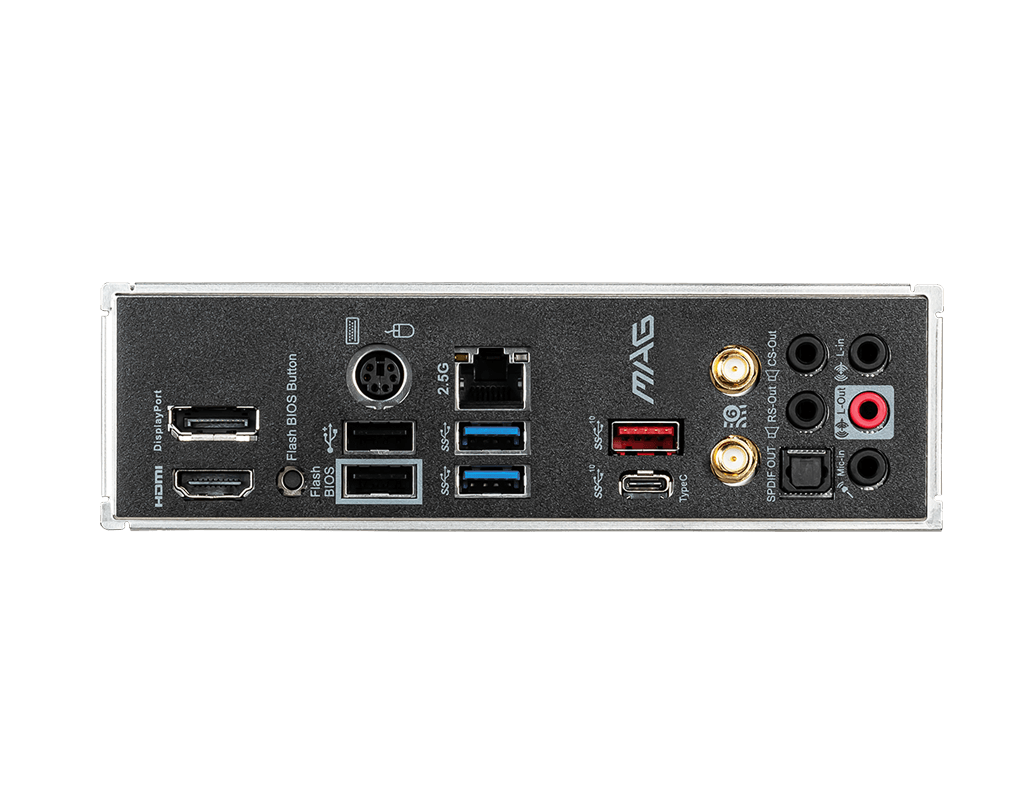
Yeah. The ports on the back are to my liking and I picked it over some of the older ones buildzoid recommended bc it actually has a usb type c
And I like the looks as stupid as that sounds
MSI has a nice black aesthetic
gritty meadow
keep in mind, the "look" of a given part is 100% your choice/problem
naive pendant
Yup. I like minimalist stuff
gritty meadow
as long as you are okay with paying about 80-ish usd for that choice of looks
because you are not getting anything else worthwhile from that board
naive pendant
Well what would you recommend
gritty meadow
do you actually need the wifi?
naive pendant
I'd like it yes
gritty meadow
fair
and the usb c you mentioned, do you require that on the back IO or are you talking about the header ON the mainboard?
hollow thorn
:D
gritty meadow
but, i personally dont like the IO on the backside on the VDH
naive pendant
Same
gritty meadow
hence the Mortar recommendation first
naive pendant
I kinda prefer the io on the tomahawk to both tho
hollow thorn
It's not horrible, it ain't great
gritty meadow
also, non-1200 chip <- mr1111
gritty meadow
well, it would have been too good if it had that
mortar is also 2.5g lan
etc etc
naive pendant
Unfortunately my store doesn't have the wifi mortar in stock rn
gritty meadow
mortar is a nice board
naive pendant
1200 what
gritty meadow

we are talking about the soundhip, its a internal/long-running debate @naive pendant
hollow thorn
I'm guessing pricing is high since I don't really see it most of the time
gritty meadow
170-ish
hollow thorn
yea 170$ rn
naive pendant
Thanks for the input
gritty meadow
IF you want/need the 2.5g LAN, the extra 35 imo is not a high price to pay @hollow thorn
hollow thorn
That's true, but most 'average consumers' don't afaik
gritty meadow
hence why i started that sentence with "IF" :)
hollow thorn
Yea I understand where you're coming from.
naive pendant
I also don't really like micro atx
I want a big boi board
hollow thorn
side note, there's a pg4 wifi....?
hollow thorn
damn, every time I'm like pg4+adapter is good
turns out there's an actual pg4 wifi board
gonna check, prob has alc1200 too
naive pendant
I'm not bothered by the price of the tomahawk anyway
Reviews say good value
gritty meadow
its such a shame they dont bring the 1200 ports out either
hollow thorn
?
gritty meadow
no optical and missing 2 minijacks

that is from the Mortar
@naive pendant re: atx: fair enough, again, as long as you are willing to pay and as long as you understand that you are paying for something that you wont get any benefit from
and keep in mind, i am NOT talking about looks
because as mentioned, that is 100% your choice/problem :)
naive pendant
Aaaand don't forget the vrm
By the way so all of these motherboards will run a 5900x just as well right?
I'll keep the mortar in mind as a backup and thanks again for the help
gritty meadow
vrm is overrated @naive pendant
what buildzoid looks at is boards the satisfy HIS requirements for "good"
naive pendant
Also HU
gritty meadow
his use case is NOT remotely consumer
HU flips through their "stances" as others change underwear
naive pendant
Lol
naive pendant
What's the "m" on the b550
naive pendant
Ned you're gonna love to hear that I looked it up and the b550m mortar has very good vrm
In case you were worried about that
gritty meadow
i am never worried about that
because its not something you need to worry about
a manufacturer does not build a board to implode while it is used in normal use
naive pendant
It was a joke sorry
I can sense your eyes rolling when I use the word so I did a funny
hollow thorn
@naive pendant do remember, Buildzoid is a guy focused solely on OC, his ratings would be 90% on OC potential
naive pendant
Right
hollow thorn
5% on actually working, and 5% on IO basically
naive pendant
I'd like the option to OC tho
hollow thorn
it really shouldn't be 90% of what you're looking for in a board
imo, a 20% thing at most
naive pendant
Well I like the io on it and the looks
And as far as it working uhhh I think it does
hollow thorn
(Just saying buildzoid reviews doesn't match up with 90% of consumers)
naive pendant
Ok
 olive ether
intel or amd
simple question
i need a simple answer
for gaming, streaming, and productivity btw
naive pendant
It looks like amd will be the answer with the new cpus coming out in November but you'll have to wait for them to come out and see reviews to be sure
 silver drift
can someone tell me a motherboard that is good for a RGB build that wont kill my bank thx
warped scroll
@olive ether depends on budget
@silver drift whats ur budget for a motherboard and for what CPU?
hollow thorn
@olive ether if you saw AMD 5th gen, AMD's likely gonna win
naive pendant
Is it true the 2.5 gb ethernet on msi boards is bad?
hollow thorn
@naive pendant ???
It's just non-intel 2.5ge is not as good as Intel 2.5ge
None of them are bad afaik
naive pendant
Why is it not as good
I've just seen people complaining about it.. would it matter if I don't have 2gb/s internet speed anywya
Like that there's drops and stuff
main pulsar
your router probably isnt even gigabit
 gritty meadow
@naive pendant its something you dont (at the current juncture) have to worry about :)
naive pendant
Yes sir
gritty meadow
again, you are more than welcome to ask about it :)
and we can talk about it
its just not something that really matters for you (as i understand your requirements at least) :)
naive pendant
Which is most people's requirements just gaming and stuff
I like "fast" but that's ofc relative
gritty meadow
aye
magic cedar
Better to get b550 with wifi 6 or x570 with wifi 5? X570 is cheaper
silver drift
i have a i3 9100f and want a rog or asus board and around 250
hollow thorn
@silver drift do you already have the CPU?
silver drift
yea
hollow thorn
why rog or asus?
silver drift
i know but i dont want to have like 1 usb port
hollow thorn
You gotta know, the difference between a 150$ and a 250$ motherboard is VERY VERY SMALL
if they're both decent boards
Z390 plus wifi is a pretty good board
at 160$
when you have the "1 usb port" motherboards is at the 60$ range
silver drift
hollow thorn
at around 150$ or above, you can get some really nice motherboards.
Also, I don't even know if Asus has icue integration
 normal raptor
Hi there, Thanks in advance!! anyone can recommend a good Motherboard for ryzen 9 3900x CPU
AM4 socket
hollow thorn
@normal raptor in general, an Asus X570-plus wifi is good for a lot of things, but you can also step down for a bit cheaper motherboard depending on your circumstances.
 charred venture
.
 lean hatch
Question for MSI motherboard compatibility: Crucial DDR4 --> (Newegg) BL2K16G36C16U4B vs (MSI compatibility page) BL16G36C16U4B.M16FE1 , Are these the same SKUs ? Because the MSI website doesn't list any Crucial sticks as being compatible otherwise
 jovial flare
probably should just get a memory pair that is says that it is compatible on the website
but, im not quite sure, but im pretty sure if u got a memory that ur cpu supports, and a memory frequency ur mobo supports, u should be fine
 green stirrup
Wel at 200 bucks that’s kinda difficult, u can get an optiplex with a 3rd gen i5 and 8gb ddr3 for around 50-70 depending and get a gtx 1650 1650s or 1050ti for around 140-175 and that’s the best I can say for 1080, you could also throw a rx 570 in for about 100 bucks but that would fit in a full size optiplex only and require a molex to pcie adapter
@neat estuary
neat estuary
I was kinda thinking like a 3200g and no gpu. I dont plan on playing any triple A games. Only like World of Tanks Blitz etc
full flame
I think it'd be quite difficult to put together a full pc with a 3200g at $200 unless you find some killer deals
Or already have some parts I suppose
warped scroll
just do optiplex + gpu
guys
my B450M steel legend is having a seizure

idk how to fix it
can i get some help
neat estuary
Download the RGB virus\
warped scroll
i already have polychrome sync
 fresh river
If my CPU supports a max of 3200mhz memory (the R5 5600X) and I have 3600MHZ of ram what will happen
my mobo supports 3600mhz
warped scroll
5600X only supports 3200MHz?
fresh river
yep
main pulsar
interesting
i mean, its the same as Zen 2
i wonder what the IF is gonna look like on this next gen
fresh river
my question is though would it run at 3600mhz or 3200mhz
main pulsar
if you just toss it in and don't do anything? probably 2133.
just depends on how memory training takes place, but thats on a per board basis
fresh river
how did you get 2133 if its advertised at 3600mhz
fresh river
Gotcha so the fact that it isnt supported wont matter?
or will it jsut say with the "overclock" a max of 3200
main pulsar
basically, its just letting you know that on the cpu side of things, they are guaranteeing memory support up to 3200
so if you are overclocking memory, AMD is saying that every one of their cpus will handle that speed
whether the board or the memory modules themselves handle it is a different story
fresh river
board for sure will, but tyyy
stone python
You guys think a open box 3900x for $340 is worth?
silver drift
who is @proud widget ?
 proud pier
 mellow heart
@stone python yes
 proud widget
 ?
?
hollow thorn
Yes
warped scroll
CT16G4DFD824A
Is the model number for some ram
And I can’t figure out if it’s ECC or not
Can anyone help me
warped scroll
Sweet. Thanks
latent garnet
alright so I have come to the conclusion that with 16gb of ram you can run any game very smoothly without any good specs obviously you will need normal descent specs but will it look smooth and gorgeous that is another question
 naive pendant
Hey guys
Does anyone know how can I see the maximum speed of the LAN port on my motherboard?
gritty meadow
@naive pendant which model is your mainboard?
naive pendant
@naive pendant which model is your mainboard?
@gritty meadow Gigabyte H81S2 PV first gen
I checked on gigabyte's website and it says 1000 Mbits
gritty meadow
by first gen, you mean rev1 right?
gritty meadow
ok, and yes, indeed, that is a 1000mbit lan port
howerver, for you to get 1000
you both need a cable and a LAN that supports it
naive pendant
I'm using CAT 6 from my router to my PC
gritty meadow
what is the router capable of?
naive pendant
what is the router capable of?
@gritty meadow 300
gritty meadow
try and imagine the following
your house has a internet connection going in
this is how many mbit?
naive pendant
50
But when downloading games and stuff,
It maxes out at 100 when I see it in task manager
And also when transferring stuff locally, it also maxes out at 100
gritty meadow
the following is not me being mad, i am just trying to avoid confusion
but the numbers you are using, NEED a definition behind them
is the 50 in mbit? or mbyte?
same for the 100?
naive pendant
My internet speed: 50 Mbit
The cable that provides internet: I don't know as it's not written on the cable
My router's capability: 300 Mbit
LAN that connects router to PC: CAT 6
LAN port on my PC: 1000 Mbit
gritty meadow
okay
on to the next part
"It maxes out at 100 when I see it in task manager" <- which definition fits on this one?
gritty meadow
correct
"And also when transferring stuff locally, it also maxes out at 100" <- is this one taken from task manager or from file explorer?
naive pendant
Task manager
gritty meadow
okay
next part then
When you say local transfers, do you mean from one machine to another?
(both of which are connected to the same router?)
naive pendant
Yes from my laptop or another PC to my main PC
gritty meadow
that sounds a LOT like the physical ports on the router are only 100mbit
do you have a model name for the Router?
gritty meadow
you are very welcome, and sorry for all the questions. Just had to make certain that there wasnt any confusion.
https://www.tp-link.com/au/service-provider/wireless-routers/tl-wr841n/#specifications <- here @naive pendant
Wireless N speeds up to 300 Mbps are ideal for video streaming, online gaming, VoIP, web browsing, and multi-tasking.
naive pendant
Okay thanks a lot
gritty meadow
you are very welcome :)
naive pendant
Just one more question
gritty meadow
ask away :)
naive pendant
Will connecting my PC to a gigabit switch which is connected to the router make any difference?
gritty meadow
the connection chain should be like this: Internet connection comes into the house -> router -> hub/switch -> all the machines you want
this will raise the LOCAL machine to machine speed
does that answer it?
naive pendant
Yes it does
But there's still the problem of maxing out at 100 Mbit when downloading games
And for that I'm looking to buy a gigabit router
gritty meadow
yes, but something is "weird" there
because IF you are paying for a 50mbit connection from the ISP
you should NOT be getting 100+
naive pendant
I get 50 Mbit on Speedtest
But just now I was downloading from Epic Games
And I could see that it was maxing out at 100 Mbit
gritty meadow
you live in an apartment complex or something?
gritty meadow
hm
consider the 100 you are getting to be "lucky" and go about your day
is my recommendation
because again, you should NOT be getting that
gritty meadow
potentially yes
the reason i answer like that is this: What you are seeing is NOT normal, so normal predictions are not really valid.
naive pendant
Because one of my friends has a spare gigabit router lying around, so I'm thinking I should try it once
gritty meadow
aye, no hurt in doing that :)
gritty meadow
you are very welcome
naive pendant
Off topic, but do you do this for a living or is it a hobby?
gritty meadow
this is my "when i am not actually working, but i want to relax" hobby
and yes, i work in the "field"
gritty meadow
you are very welcome, and best of luck with the router rest :)
naive pendant
I'll be sure to get back to you if I do try it out
gritty meadow
that would be appreciated :)
naive pendant
Because you might be interested in this because of the 'weirdness' of my case... 😂
gritty meadow
indeed :)
naive pendant
gritty meadow
no no
nothing to be worried about
the side effect is the "more than expected" speed that you are seeing
gritty meadow
i only ever use speedtest myself (if i go outside the LAN for tests)
naive pendant
Oh okk
the side effect is the "more than expected" speed that you are seeing
@gritty meadow Have you ever seen something like this though?
gritty meadow
aye aye
its used in just about all large scale WAN/LAN setups
think of it like this
a ISP pays for the amount of data it has to get from servers that they dont own
so, IF they can cache/store the latest Fortnite patch on THEIR servers
and server it from there to all their customers?
MAJOR savings on data for them
naive pendant
Wait so they pay for QUANTITY of data and not SPEED?
naive pendant
Then how is giving unlimited QUANTITY of data profitable to them?
gritty meadow
because people overestimate how much data they actually use
there are millions of people that dont remotely use the data they pay for
naive pendant
Oh yeah I get it
Because I use almost 1 TB per month (my phone alone uses almost 125 GB per month)
gritty meadow
also, do note, where i live, here in europe, there has never been data caps
well, not after broadband became a thing that is
meaning, for the last 20+ years, there has not been data caps
naive pendant
Here in India there's 2 prices per month for the same speed: one with a data cap and one without a data cap
After your data runs out in the limited ones, it drops to something negligible like 1 or 2 Mbit
Actually, data caps are useful for the people who don't use much
I have a smart TV and also a YouTube channel, so there's a lot of data heavy stuff that I do...
gritty meadow
aye aye, not saying data caps cannot be usefull
BUT if the caps are paired with silly high price? (like most of the US has) ...... yeah
naive pendant
And btw, people still use non smart TVs here in India (actually, the majority uses non smart TVs)
gritty meadow
aye
gritty meadow
aye = yes/okay/nod-of-head
and europe is split like what you describe, but with many many many more options
naive pendant
aye = yes/okay/nod-of-head
@gritty meadow Oh so like aye aye sir?
gritty meadow
kinda :)
gritty meadow
likewise, and do keep me posted please :)
gritty meadow
its understandable, because it "seems" like it should just work
naive pendant
Yeah exactly
I pulled my PC's LAN cable to look at which one it was
And it turns out it was CAT 6
I did a couple of fixes I found online, but none of them worked...
gritty meadow
aye, because you cannot fix missing hardware :)
 toxic skiff
Is it better to have more sticks at a lower capacity, or fewer sticks at higher?
1 stick of 32G Vs. 4 sticks of 8G
hollow thorn
@toxic skiff You'll want to have 2 sticks of the highest capacity possible basically
2 sticks for dual channel
and only using 2 slots out of (usually) 4 means upgradability down the line
2x16 is usually a good spot
toxic skiff
Thanks
G.SKILL Ripjaws V 32GB (2 x 16GB) 3600MHz (F4-3600C19D-32GVRB)
@hollow thorn so that would be preferable to 4 Sticks of 8?
hollow thorn
get cl16
but that's preferable for upgradability sake.
performance should be about the same between 4x8 and 2x16
hollow thorn
Smaller cas latency is faster effective latency
toxic skiff
Oh ok
hollow thorn
Side note, grab this kit if you can @toxic skiff
https://www.newegg.com/ballistix-32gb-288-pin-ddr4-sdram/p/N82E16820164174
Micron E die tend to be a good bit better than DJR
It ain't no B die, but it's good
naive pendant
Is 16gb enough for a ryzen gaming build?
 sand cobalt
yes
 burnt salmon
16gb is pretty much standard, for ryzen you should be looking more at ram speed though, so 16gb 3200mhz cl16 minimum, 3600mhz ideally
 mild jackal
$150 isn't great for that
A better bin of that kit was on sale for $100 earlier this year, the 3000 cl15 kit
Both of those are rev.e
 static perch
Anyone recommend a budget atx or e-atx board?
 copper solar
for which cpu
 tacit hemlock
Did you enable xmp?
 late marlin
So i want to upgrade to a ryzen cpu, a motherboard, and ddr4 ram. Whats a good one? I want an 8 core ryzen
 knotty oar
I did turn on xmp
 pure wolf
3700x for the $$$
 hollow basin
my aorus mobo can't seem to get my ram to stay at the right frequency either
it worked once, but then I checked today and it was wrong again
knotty oar
Why is the default not 3200mhz as but that????,
I changed the xmp to 3200 and tried switching it from auto to 3200mhz and still??!?!?!?
hollow thorn
@knotty oar I don't use cam or speccy, but a thing you should know is that ddr4 ram (Double-Data-Rate), are advertised at their MT/s speed, not their true frequency.
For example, a 3600MT/s kit is actually running at 1800mhz, but is advertised as "3600mhz".
static perch
@copper solar ryzen
copper solar
@copper solar ryzen
@static perch which one
static perch
Ryzen 5 3600x
warped scroll
B550 PRO4 @static perch
static perch
Ok thanks
 rugged sierra
i am trying to make a 1500 dollar core i5 96000k build and i plan to OC but i need a good budget mobo that can over clock alot
 tidal elm
Hey guys I'm a newbie and I'd like to mount my first pc. Does the following parts are compatible?
Cooler master mwe 550 80+
XPG z1 3200 udimm
Ryzen 3600x
Cooler master 300l mini tower case
Gigabyte rtx 2060 OC
XPG sx8200 pro
Asus prime b550M-A wi fi
I know is a budget pc but that's the most I can spend.
 naive parcel
@tidal elm check pcpartpicker.com
hollow thorn
@rugged sierra why do you want a CPU that's a generation behind for a new build?
hollow thorn
Bruh
Cheaper doesn't mean better
@rugged sierra 9600k is 6c6t, for perspective the new consoles have 8c16t. You don't want to have hardware far behind console tech :p
At least the 10600k is 6c12t
gritty meadow
@naive pendant 3600x = 6core.
3700x = 8 core
 worn night
@static perch you could also score an Asus TUF X570 Plus for a good price think 150-160 rn and it'd work with the new cpus
gritty meadow
that depends on your workload @naive pendant
hollow thorn
@naive pendant you need to do more research than just "does it do better" :p
naive pendant
If you care only about gaming then just look at some game benchmark videos showing both the processors
It will be controlled for the same graphics card and other specs so you can decide if it's a big difference for yourself
Or just wait a few weeks for the 5000 series ryzens
 deep vigil
https://www.asrock.com/mb/intel/z390 phantom gaming 4s/index.asp how are these vrms
deep vigil
no
knotty oar
Intel Is overpriced and slower.
hollow thorn
Hard to check
deep vigil
But is it worth getting a new board
hollow thorn
The only specifics I see is 3x2 cpu stages
deep vigil
digi 8 phase
knotty oar
Yo, why are OEM'S thermal pastes complete garbage?
hollow thorn
Because cheap
Think about it, 3$ a bucket, or 5$ a tube, which sounds better for OEMs?
deep vigil
but since I do have that phantom I should just stick with it
hollow thorn
Sure
 twilit sable
@polar moth
worn night
@hollow thorn since you're well versed in the AMD cpus can I ask you a build question about the connectors for the stock cooler on the 3700x?
hollow thorn
Oh fun on the Prism?
I don't remember where the usb thing goes
sorry
fan cables goes to cpu_fan, that's self-explanatory
tacit hemlock
Pretty sure it just goes into the usb 2.0 port on your mobo
 scarlet flicker
okay
worn night
@hollow thorn yes that's exactly what I'm talking about the cpu_fan one is self explanatory I was just curious which slot would be for the rgb software customizing it
hollow thorn
yea as justegg says it should be usb header on the motherboard
once you have it, look at the manual
worn night
Yeah got the Mobo today just been coming thru the charts in the book for that
Haven't looked at the instructions for the cpu before
Specifically the cooler I mean
Just a usb header and the cpu_fan connections would be sweet
hollow thorn
what budget
what needs
there is no best end-all componet
wifi or no
what budget
@naive pendant the determining factor is budget
also, 5800x and 5600x will become things in just a month or so
what about for both
..?
5600x gonna be 300$
..
more research time
exactly
please don't go for the 'r7 must be better than r5' mindset
More research time
 viral junco
what cpu and mobo u guys reccomend i have a 5k usd budget
hollow thorn
To start off, 5600x and that generation presents us with a ~20% IPC gain, which would place it at the same level as the current Intel 10600k.
viral junco
should i get amd's new cpus
hollow thorn
@viral junco just go #building-and-recc-chat for a full build
viral junco
when the come out
they*
@viral junco just go #building-and-recc-chat for a full build
@hollow thorn k
hollow thorn
20% ipc gain for single core performance
this is the comparison given for 3900xt vs 5900x
IPC and frequency go hand in hand
I'd much rather get 20% higher ipc and just drop 200mhz
remember, IPC stands for instructions per clock
so 20% IPC gain means 20% oomph per clock
so multiply the 5600x freq by 1.2 to get an estimate of how they would compare for single core perf.
tacit hemlock
"oomph per clock" lol
hollow thorn
@tacit hemlock easiest way to say it lel
 hollow thorn
just saying ipc multiplied by clock is kinda messy and not completely accurate but that's the easiest way to talk about it
320$ for both
okay
@naive pendant also are you looking for a full build or do you already have parts
because it could be much easier to get the full budget and build the full list
can I see the list?
can I see the list?
warped scroll
do you guys know of any good looking white and black ATX B450s thast are at least under $95?
mellow heart
warped scroll
ATX please
 neon sigil
naive pendant
neon sigil
naive pendant
did you....actually take a picture with your phone of a website and upload it
hollow thorn
nice
 zinc spindle
Anyone know if the x570 aorus xtreme from newegg is the rev.1.1?
naive pendant
What's a good low profile ram? I think gskill won't fit in an h710 with a top mounted aio
grave crest
@naive pendant gskill ripjaws V non rgb
I have a tight ass space and that fits for me
naive pendant
Hmm ok
42mm I hope that fits with a 280mm aio on top
grave crest
Can't rlly think of anything slimmer
Besides maybe Corsair vengeance
@naive pendant actually yea vengeance is slimmer
naive pendant
Yeah unfortunately my store doesn't have 3600mhz version of that and since I'm going amd
grave crest
@naive pendant I mean, amazon has a load of it
naive pendant
I'm having all my stuff built by one place for me tho
grave crest
Yeah then ripjaws will be ur next best bet
Most other ram besides vengeance and ripjaws is tall asf
naive pendant
I guess I see why everyone recommends ripjaws here
 marsh iron
.png)
 hollow thorn
@naive pendant crucial ballistix
naive pendant
Those are sold out for me :(
Wish I didn't have to get 3600
grave crest
Damn i forgot crucial oopsie
Also u WANT 3600 no matter what cpu u have
More speed is better
naive pendant
Well I heard intel just doesn't need it so much
I'll just hope that the ripjaws fit
hollow thorn
ripjaws are 44mm iirc
naive pendant
Nah it's 42
hollow thorn
¯\_(ツ)_/¯
naive pendant
Oh wait hmm
Yeah website says 42
i dont know how to decide if i should get 10400f coz is so cheap but suffer from 2666 or 3600 which i think out of the box 10400f games a bit better but have 3200 ram speed
magic cedar
10400f?? Why intel
hollow thorn
@naive pendant GN did testing with 10400f with 2666mhz ram vs 3300x/3600 with 3200mhz
neat estuary
Everyone ready for those Prime day deals???? I sure how computer components are included
naive pendant
@hollow thorn yeah i watched the vid and couple others but im still leaning towards intel
i watch tyc do a quick benchmark of some games
and it does the same if not a little better
hollow thorn
GN does really good testing.
naive pendant
and im not that keen on trying overclocking
yeah
but i dont really need to overclock
gn vid was a little hard to understand
stone python
3900x on a b350 board, what y’all think?
stone python
gigabyte ab350 gaming 3
 idle wadi
this doesnt seem healthy
update: pretty sure the mobo just doesnt have sensors there, because graphing it is literally a steady line
burnt notch
Is the gigabyte x570 AORUS elite good?
naive pendant
Do you guys think the 5900x will have decent thermals or be really hot like the 10900k? Like as a reference does the 3900x generally a hot cpu? Wondering if an AIO is really needed
 split copper
Only 2009 AMD stock cooler
azure sage
Opinions on 3700x?
mellow heart
Wait for 5600x
 jade hamlet
My cpu, which is an intel i7-10510u laptop cpu, has a max boost of 4.9 ghz
in light productivity/gaming will it ever hit that speed
hollow thorn
@jade hamlet it's a laptop, keep that in mind
heat has to be dissipated somehow
with such high boost speeds
it's about how cool the laptop is
And also keep in mind max boost isn't reached very frequently at all, it's the highest it CAN boost to, but usually only in light loads on 1 core
split copper
Desktop: I like to keep cool, 70 degrees is good
Laptop: 105 take it or leave it
hollow thorn
@split copper yes it's running at <1ghz, yes max temp is 100c
split copper

naive pendant
Actually when I got a closer look MY GPU and my motherboard
Were flashing. My motherboard blue and GPU white as its only color
hollow thorn
is there anything written next to the light?
naive pendant
No I shut it off immediately
hollow thorn
uhhhhhh
naive pendant
Because I thought I hit something
hollow thorn
nothing should start flashing from that
naive pendant
And my GPU is only flashing
Nows probably the time to send it in because I had other issues with the motherboard
Basically to explain I got up from my bed and then it started to happen I thought my bed must of hit it (as my bed slides) and was like ok no problem
Left to grab a drink came back (I drank it downstairs) and then hopped on my bed a little hard but it didn't really do much to the PC
I'm starting to think I murdered my Motherboard
It's on now
It's doing it's normal LED light before I turn it on
naive pendant
It's doing it repeatedly, it'll be fine then goes back
I have reason to believe it's my PSU and it also believe this guy who was talking to me dipped
naive pendant
It's on the side where you plug in your USB and ethernet cord stuff
I tried looking at the debug but I'm waiting for it to happen again
Because there potentially could be a code that I missed
Legitimately I believe it's the PSU because only the power and reset on the motherboard flashes
hollow thorn
check the manual
naive pendant
I am
Looking through the manual and it's not saying much, it's a pre used PSU
A video on reddit shows the same thing that I'm having but I'm looking around for more information
It worked perfectly fine before
Besides the RAM but that's it
 bronze summit
Idk which one to get
Gigabyte I had before it wasn’t that good...rog is okay I have it rn and msi I haven’t used before
mellow heart
Why not try asrock
mellow heart
Out of all those boards I’d go with the aorta master
gritty meadow
considering you flutter around like a drunk bumblebee from choice to choice. That is not a surprise.
mellow heart
Aorus*
bronze summit
Okay
hollow thorn
@bronze summit what about MSI x570 unify >:)
mellow heart
Msi got caught scalping so I wouldn’t trust them
mellow heart
True true it’s just a little bit of skepticism
hollow thorn
Says nothing about the product smh
mellow heart
That’s fine man
gritty meadow
and i would actively tell people that you are not to be trusted. Every time you say something.
So, i would suggest that we DONT use that kind of logic
:)
hollow thorn
@bronze summit anyways what do you want from the bios..?
 normal jewel
how do I know if an X570/B550 motherboard I'm planning on getting needs a bios update before I buy it for a zen 3?
hollow thorn
Right now, they all seem like they need one
They're just releasing the new beta bios for Zen 3 now
normal jewel
do I need a zen 2 CPU to flash the bios?
hollow thorn
Wait and see, a good amount of motherboards have bios flashback button now, which lets you update bios with a usb drive without a cpu
I'd just wait for launch and see what people say about the chips
normal jewel
ok
bronze summit
im going with this
bronze summit
im using it rn and it works
hollow thorn
Docp is really annoying, can you confirm?
gritty meadow
@hollow thorn remember who you are talking about details with.
hollow thorn
Right
bronze summit
Docp.....idk what this is
hollow thorn
@gritty meadow but the "Asus bios bad" report came from a guy who broke a case
I don't know how
But they broke a case
gritty meadow
users can break anything
hollow thorn
I know...
gritty meadow
and it is NEVER their fault
hollow thorn
It's quite sad
bronze summit
gritty meadow
never mind the goat stuffed in the case together with the giraffe
hollow thorn
Yea
hollow thorn
I think me finding my dm history with them will helpm
He ended up with 3 m.2 drives
After me telling him not to OC ram, OCing ram twice.
bronze summit
i wont over clock ram then just buy 3600
hollow thorn
But also the only guy I know that has experience with Asus x570
He ended up returning it for a msi gaming plus or whatever
bronze summit

again mr1111 i like the design of the board
like this board
this board looks good
no 10G or big stuff on it
worn night
wait why do you need all those additional features on your mobo?
fresh river
will the 5600x need a bios update combined with a B550
 safe geode
not sure if this type of ram is b die or not anyone know? not listed on b die finder and is unable to tell from part number
hollow thorn
heyo
@safe geode it's very unlikely to be b die
is there a reason you're looking for b die?
safe geode
i wanna actually try ocing ram and i heard that it was a good die to oc ram with
i also plan on getting a ryzen processor ig and heard that was what i should go with i think
hollow thorn
Well, I can link you a pretty good kit for OCing if you want?
hollow thorn
Okay, to start off, this is if you REALLY want to invest into ram OC
Dark pros are known to be one of the best binned b die (Excluding crazy kits)
https://www.amazon.com/dp/B075HQDYDN
 hard robin
If my Cpu_Fan socket isnt working anymore, does it mean my motherboard needs to be replaced or could it be my PSU?
hollow thorn
Your cpu_fan header on the motherboard..?
hard robin
yeah
safe geode
alright ill consider that and other ram sticks as well and see sales for black friday thanks for the help
hollow thorn
@safe geode and this is going to be a better overall bet
https://www.newegg.com/ballistix-16gb-288-pin-ddr4-sdram/p/N82E16820164173
This is Micron E die, which is also pretty good for OCing, it ain't no B die, but it allows for headroom without spending a bunch of cash
safe geode
alright ill probably go with the ballistix and just wait for a sale
hard robin
@hollow thorn Yes the cpu_fan header
hollow thorn
I assume you tested it with multiple different fans?
hard robin
No but I tested the fan on a different header and the fan is working
gritty meadow
that is a very unlikely thing to happen. but it does happen
nothing to worry about as such
just move the fan over and carry on
hard robin
You mean replace the fan??
gritty meadow
no, just move the connector
hollow thorn
(aka. Avoid the CPU_Fan header)
It's usually not worth RMAing the motherboard for a single fan header not working
gritty meadow
also, do note. the CPU_fan header can be setup to ONLY tell the fan to move if the cpu is above X temp
hard robin
Yeah, Im using the cha_fan1 but the problem is now my PC is randomly rebooting when playing games... So im thinking , is the MB faulty or am I having PSU issues?
gritty meadow
it could be a bunch of things
hard robin
Any advice on how to troubleshoot this? Im feeling a little helpless 😦
hollow thorn
windows events thingy
and you can do stress testing on each part for the rebooting thing
normal jewel
is the
r9 5900x
asus x570 pro prime
G.Skill TridenZ 2x16GB 4000mhz
NZXT Kraken X73
seagate firecuda 520
a good build?
grave crest
@dark flame keep in mine u gotta redo a lot since motherboard change
Thats why I'm stuck with my 9900k
 dark flame
yeah nvm, it was just on a whim but nah it’s probably not worth it. I’ll wait til AMDs new cpu
if I need it then
Doesn’t the 9900k limit 2666mhz ram tho?
hollow thorn
@normal jewel #building-and-recc-chat
normal jewel
ok
dark flame
The Intel website says the max supported ram speed for the I9 9900K is DDR4-2666, but I’m not really sure
grave crest
@dark flame oh nah im running my 9900k with 64gb of 3600mhz
dark flame
I’m running 3200mhz but was just confused by that 
grave crest
Yea u can run up to 4200 on most z390 boards
I checked b4 i got my ram
@dark flame so u can go kinda crazy for now if wanted
dusky pagoda
hi
dusky pagoda
yes
dusky pagoda
yea
 stray vortex
alright lemme go digging
stray vortex
can do, though I am a bit curious, why not MSI?