#cpus-mobo-and-memory
1 messages · Page 101 of 1
 oak sand
Yeah sorry
 warm path
Base clock speed
oak sand
Thats what I meant
warm path
Ok
oak sand
But not many people buy a top of the line(at the time) 4770K and expect the stock cooler to do fine
warm path
No wonder stock coolers are insufficient on k CPUs
Oh
Ok
Well
After market coolers do find right?
 hollow thorn
AMD stock coolers can be pretty nice, intel stock is trash
hollow thorn
idk about previous generations but all ryzen ones are great
warm path
Yeah
 gritty meadow
the short answer @warm path is this: its complicated.
warm path
Ok
warm path
Wouldn’t my Pc throttle to protect from overheating?
@gritty meadow Is CPU throttling quit enough to protect from overheating?
Quick*
gritty meadow
in your system, i would not trust it
 long geyser
Actual CPU throttling (when CPU goes below base clock, not boost) happens when the CPU is already quite hot
Leaving it at said temps would damage it
gritty meadow
as we have talked about before @warm path, only thing you can do is wait
 vestal fog
Would a intel core i7 8700 and an asus turbo 1080ti work good together?
 tacit hemlock
I would say so
 empty flame
https://www.msi.com/Motherboard/B450-GAMING-PLUS/Overview what is the highest graphics card this MoBo can have

B450 GAMING PLUS gaming motherboard support AMD® RYZEN™ Desktop Processors for socket AM4 and up to DDR4-3466+(OC) Memory; DDR4 Boost gives your DDR4 memory a performance boost; Mystic Light and Mystic Light Sync supports 7 colors / 7 effects in one click
 winter rock
it has a steel reinforcement on the pcie slot so it appears relatively new and it supports up to 3rd gen Ryzen cpu so id probably say it has no 'highest' limit to what gaming graphics card it may use
 muted roost
There is no “highest” limit. Any card will fit into it. It’s just a matter of your budget and how good your cpu is as to not bottleneck your gpu
 quaint current
yeah you could slap a quatro rtx 8000 or rtx titan in there if you wanted
 ocean delta
I have a question
I did not put on a anti static wrist band when I was test installing my motherboard to my new case and I realized afterhand that static charge can harm or break a motherboard, so im worried that I might have damaged it but I don't have the parts here to put it up to check
hollow thorn
I believe it most likely would be fine, unless you start having issues with it while using it.
ocean delta
Okay thank you for telling me that cause I'm just overworried man I just bought it
 cerulean nova
I replaced my cpu on carpet and with no wrist band without thinking about it and it was fine, now I'm not saying I recommend doing that but just saying it will probably be fine
 crude path
i personally never use an anti static wrist band. it is good practice to touch something metal before you start working but it should be fine.
I've also built a computer on carpet before i knew that was a bad thing to do dragocor 
cerulean nova
Ya I built mine on carpet but I had a band
crude path
I didnt lol. I was young and figured carpet is soft and gentle enough to lay the parts on. found out about a year later how bad that is lol
cerulean nova
Lol
 midnight pollen
it is only problem when you get static discharge on the parts, has a possibility of frying something
hollow thorn
I kinda just flash a new bios
 mild jackal
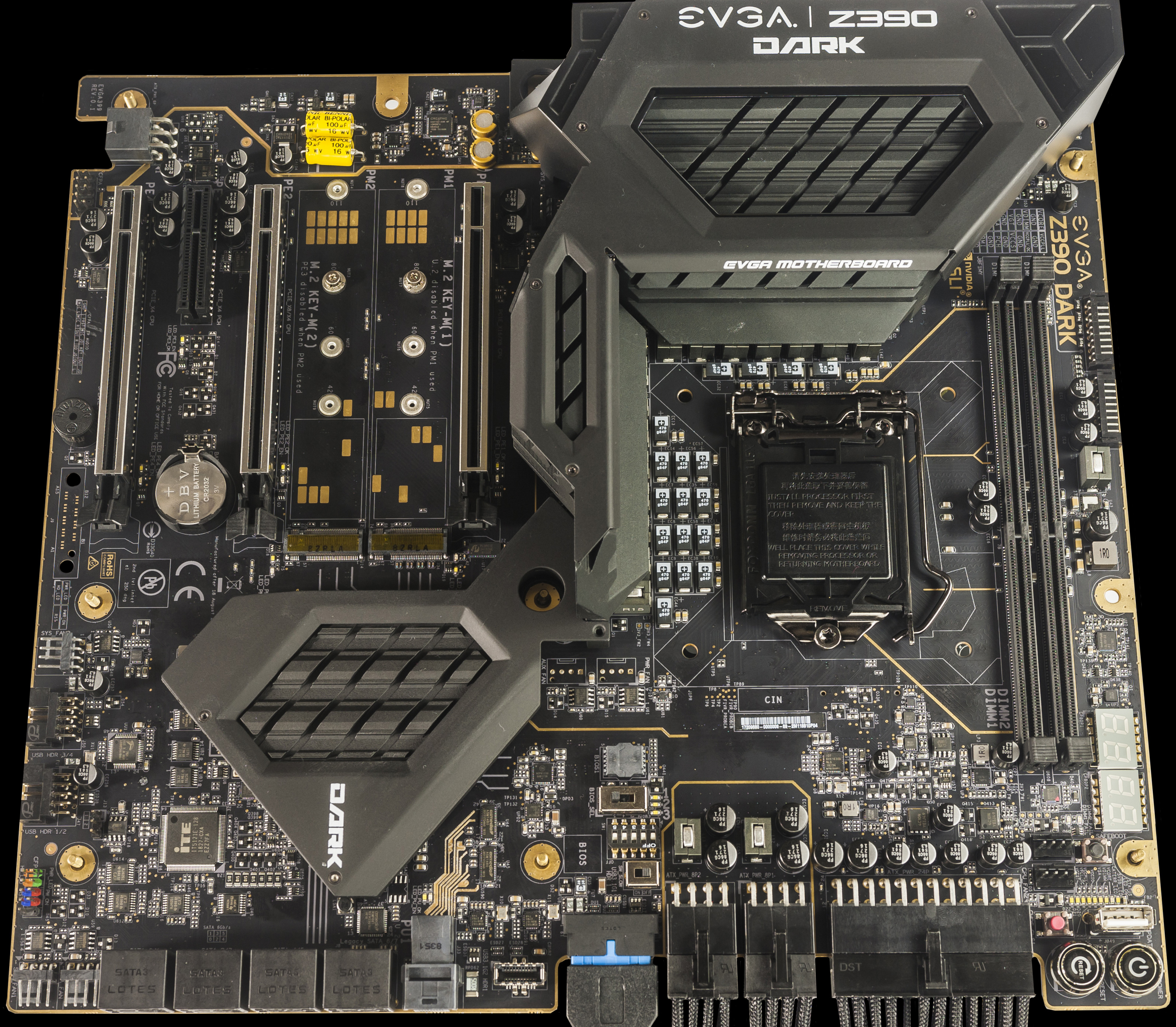
I like boards with overclocking profiles for that reason. Better yet, physical bios switch + dual/triple bios.
Bonus points for a socketed 2nd/3rd bios eeprom.
hollow thorn
I've actually never seen any with physical 2nd or 3rd bios :p
huh
@mild jackal where is that exactly on the board? looks like a hard to reach spot lol
 hollow thorn
oh nevermind
mild jackal
The two soldered chips are just above the socket
tacit hemlock
Love that horizontal 24 pin
 lyric barn
I have a HP z800 workstation with USB 2.0 and SATA 2. I would like to upgrade to USB 3.0 and SATA 3 with a PCIe adapter card if possible. Does anyone know if this is possible and if newegg might have the necessary card?
gritty meadow
@lyric barn there might be a combo card, but i doubt it. There will single function AiC's that do what you want
lyric barn
Would you have a part number or model number
gritty meadow
not yet, i am just looking up the manual for the z800
been a while since i last had one at the workshop
lyric barn
Thanks Naed
 split copper
it looks like an ATX computer, so it should have enough PCIe slots for two additional cards
gritty meadow
its a bit of wonky board @split copper
@lyric barn you have 2 pci-e slots free right?
split copper
HP's website makes me want to cry lol
lyric barn
Yes. I have 2x8(4), 2x16, x8(4) slots available
gritty meadow
@split copper https://support.hp.com/sk-en/document/c01709726
its a bit more exotic than what normally comes by here @split copper :)
@lyric barn does it have to be newegg.com?
lyric barn
No
split copper
I can't seem to find the actual manual
there's lots of different installation manuals for different devices though
split copper
oh my goodness finally xd
gritty meadow
the board itself is the same thou:)
@lyric barn you want a usb solution that also has front panel connectors for a 5.25 bay?
lyric barn
yes
gritty meadow
https://www.amazon.com/QNINE-Include-Superspeed-Express-Supply/dp/B07XXSS8XV <- i have used this one before
lyric barn
would i need a card for SATA 3 also
gritty meadow
aye
hence why i asked about the 2 free slots earlier :)
before i link a sata card.
i have to ask you: why?
lyric barn
would the link you provided be for both cards
gritty meadow
what do you think you will gain from having sata6.0 ports?
the above link is just for the USB card.
split copper
most SATA SSDs sit at around 550MB/s or thereabouts for read/write speeds, which is above the 3Gbps of SATA2
split copper
okay xd
lyric barn
Well I've always heard if you don't know ask somebody. Thank you guys for all of your help. Guess maybe SATA 3 wouldn't be that much of any increase . I'm just a novice trying to learn.
gritty meadow
@lyric barn please know/hear the following as a positive thing.
there are no stupid questions, only silly answers
i am asking you the things i am, because i want to try and make certain you actually solve/get what it is you are looking for
gritty meadow
@warm path and what did i tell you would happen?
gritty meadow
or as we have talked about in passing, pickup a newer used machine
warm path
Yea
I would maybe prefer building new pc
Need the experience plus
I can pick stuff to use
warm path
@gritty meadow Look what I found https://www.userbenchmark.com/System/Dell-Inspiron-20-Model-3048/16374
 hollow thorn
userbench :p
tacit hemlock
 Uh oh userbenchmark
split copper
 warm path
Wdym
split copper
@potent bear
tacit hemlock
Motor will explain it lmao
warm path
Ok
warm path
@gritty meadow is User bench useful
gritty meadow
i dont personally find it to be super usefull
split copper
there is one potential use I can find, the memory latency ladder
 naive pendant
Whats better than an i5 and will be an upgrade that won't be a waste of money
 pastel monolith
an i7 or a amd 3600, 3700x and a few others
split copper
what specific i5?
naive pendant
I wanna switch to amd but will the cpu match my mobo because i have an alienware mobo
pastel monolith
r5 3600 = $175 + AMD motherboard (m-atx tuf pro) = $95 = around $260
where as a i7 will be over $300
around $230ish for a i5 9600k
USA prices and dollars
gritty meadow
board is about 95 for the m-atx tuf pro
pastel monolith
@naive pendant what GPU does it currently have?
split copper
I hate finding out that the Intel CPU option is often the same as the AMD CPU and motherboard combined
pastel monolith
yeah...
split copper
the exception being the i3-8100 or 9100 at around 120-125 USD compared to the Ryzen 3 3200G at 95 USD
it's not a huge price difference in that situation
but it's still in favor of AMD
pastel monolith
9400f isnt too bad either price/performance wise
split copper
yeah, it looks pretty good, but 2600 or 1600AF tho
 potent bear
It’s always this channel that people have UB links
split copper
haha
does the memory latency latter actually serve to indicate anything useful @potent bear ?
in UB of course :p
potent bear
Not sure
I only call it controversial because they slapped the “bias against AMD” button and everybody was about to throw some hands at UB
Fricc bias’ism
split copper
yeah
 rocky flame
Does anyone have the x570 Taichi and use the WiFi Antenna? I am having issues with my WiFi (either it’s the antenna or I’m getting throttled like half the day). Just wondering what the issue could be.
 tidal spade
RIP Newegg's RMA process.... My cpu was damaged, I RMA, but declined because it was damaged. 
gritty meadow
@tidal spade have a chat with @glad socket
tidal spade
I already spoke with a supervisor. I am SOL, even the AMD warranty has the same wording.
tidal spade
no worries, just frustrating... I figure I might as well try and fix it or take it to a jeweler to fix.
gritty meadow
what did you do?
 main pulsar
not all of the pins on the bottom of a cpu are necessary, or even used for anything. Look up a cpu pinout and see if the bent or broken ones are even important
tidal spade
I did nothing out of the ordinary.. This is like the 10th pc I've built. I put in the CPU to board and it posted, but only half the memory.
I looked up that it might be a bent pin or broken pin, but opted to just RMA the CPU.
tidal spade
Apparently there was physical damage, but I didn't see any when I installed or sent it back. aww well.
Yeah, my board has lights for the DIMMS that are active and only either A or B would reconginze with a signle stick.
Both sticks worked, but only one could be installed for the post.
main pulsar
how many dimm slots on your board?
tidal spade
4 slots, two channels adimm and bdimms.
main pulsar
and you tested one dimm in every slot?
as in, you tested the slots themselves, right?
tidal spade
I test both sticks in Dimm A as was told, and both worked, but then I tried in Dimm B and still worked solo.
But if I put in Dimm A and in Dimm B it would not post... Just light up.
main pulsar
what is dimm A
tidal spade
on my board it one the second one closest to the CPU..
I think it's just the name the Motherboard manufacter used to describe the difference between the dual channel memory slots.
main pulsar
the slots are hardwired to the CPU, if you tested one dimm in each slot, and it was detected, then both memory channels on cpu die are working
tidal spade
Yeah it only fails with two memory sticks installed.
main pulsar
thats not a cpu problem, thats a configuration problem
tidal spade
They said there was physical damage to the CPU and Bent Pins..
main pulsar
who said
main pulsar
when you sent it back, did you see any bent pins?
main pulsar
do you see bent pins now, or do you not have it back
tidal spade
It is currently being shipped back to me.
main pulsar
ok, when you get it back, look at the pins, check and see which ones are bent. try to bend them back. if they break off, check and see if that pin is necessary for the cpu to function.
if its not used, your clear
if its a ground pin, it might still work
tidal spade
Yeah, one step at a time... Hopefully it is fixable... Just annoying. I have been with Newegg for years and firs time I had this happen.
main pulsar
did you check the socket for debris?
tidal spade
I didn't do a deep inspection, but I didn't notice anything. I made sure the triangle was lined up, and it dropped into place. I didn't use any force, and the latch secured without an issue.
tacit hemlock
Did anyone see that new ltt vid with the 4000 series ryzen laptop
tacit hemlock
Ik it looks awesome.
long geyser
and it's on a flippin basic laptop
comparitive to any 9980hk I think the CPU was (I dont remember mobile Intel SKUs)
about $1000 less then laptops with the "same" CPU perf and same GPU perf or probs $1500+ less then whatever that laptop was but with a 2060, giving actually more or less the same perf (tho, much louder and heavier)
long geyser
b450m TUF Pro Gaming (not plus gaming)
 prisma spoke
 weak hamlet
How to Repair Error Code 0xc0000221. Startup Repair Couldn't Repair Your PC. in Windows 10. Windows 8 BSOD Error 0xc0000221 Solution.
Works on Laptops, PCs and Tablets made by Samsung, Lenovo, Toshiba, Asus, Acer, HP, Dell, Alienware.
 vagrant mist
How well will an ASUS 450-F pair with a Ryzen 5 3600 and a 2070?
 charred stone
hi guys I am still on an i7 4770k. It still works perfectly but I was wondering. If I want to play more recent games like let's say Modern Warfare, should I upgrade then or does it still hold up quite well?
long geyser
@vagrant mist Not bad, tho said board is usually overpriced
 worn mountain
@vagrant mist check your local BestBuy's and see if they have the crosshair 7. I picked one up for 118 as they are clearing out stock.
The site still has it listed as full price but in store it is much cheaper
naive pendant
Need a motherboard and cpu combo ddr4 preferred, for under 120
hollow thorn
Um what
tacit hemlock
Lol
naive pendant
do the smaller fan models on ryzen processors have a copper, circle heatsink?
hollow thorn
what
tacit hemlock

 sharp blaze
I think he means do they have a copper slug in the center of the cooler where it makes contact with the cpu. The entire bottom of the wraith prism is copper, I know the first gen wraith spire coolers had a copper slug, the wraith stealth like what comes with the 2600 non x that I have is all aluminum.
the 2600x comes with he spire with the copper slug
 mossy plaza
Hi everyone, I’m currently using a Gigabyte GA-Z77X-UD3H motherboard with an i5 3570k processor and I’m kinda hitting a brick wall in upgrades. I’m doing mostly VR and 4K gaming on my GeForce 1060 but need to upgrade the mobo and CPU. Any good recommendations for something middle of the road on a budget? Looking to spend under $500 if possible on the mobo, cpu and memory. I don’t know if it’s likely though. I don’t know if my current memory may be transferable - 32 GB DDR3 PC3 12800?
midnight pollen
te ram no, current ram is ddr4
midnight pollen

hollow thorn
I like some msi features
but
@long geyser want to say your thing?
idrk the details on lower end msi x570 boards
long geyser
cheap x570 MSI usually has the same feature sets as other x570 but worse VRMs, to the point of overheating from a 3700x on PBO or PB2; dont remember which
going for say a b450 with basically same features minus gen4 in that gets you a nice cheap CPU cooler or smth, quieter then stock
hollow thorn
I assume it's the x570 a pro
thats the lowest tiered msi x570 board on the tier list
long geyser
One of the MSI cheap x570 has an Intel LAN chip, which last I checked was the cheapest x570 with an Intel LAN chip (better driver support). About the only reason to go cheap x570 MSI afaik
Dont remember which board it was tho
other then MSI
long geyser
probs, but too lazy to check rn. Am so dead, couldnt sleep cuz school work
hollow thorn
Did you stay up all night...
long geyser
yeah
currently 11:53am
and still not done this work
programming is fun sometimes
hollow thorn
you forgot a semicolon 200 lines up
long geyser
if only the errors were just that simple
hollow thorn
Error: null pointer exception
there are 2 possibilities, either you're making the array point at some ungodly number thats outside the range for int, or it's negative
both makes no sense
long geyser
I use c++, which arrays go by size_t rather then int, size_t goes higher
unsigned int
maybe with an int with a higher storage bit then usual as well (say int32/int64), dont remember now
hollow thorn
Well, the point is, errors are confusing
I dont even remember the max for int
its like 32mil or something
long geyser
yeah, basically
mossy plaza
Thanks for the recommendation! So definitely on the X570 or the B450?
prisma spoke
Is thermaltake UX100 a good cooler for ryzen 1600 af?
tacit hemlock
Probably won't be better than the stock cooler
If you want rgb just buy a wraith prism
hollow thorn
stealth doesn't spire does
tacit hemlock
Not all spires tho right?
Also it isn't full rgb I thought it was just a red strip around it
 warm path
@gritty meadow Found some answers:
gritty meadow
@warm path you have voided yourself from getting help.
naive pendant
is 32gb of ram ever needed?
 urban ferry
@naive pendant for general use such as gaming, web browsing, word processing, no
32gbs of ram is useful for more intense things like for example, video editing, 3d modeling, etc/
blender, a animation and 3d modeling software, took up a LOT of my 32gbs of ram
 slate seal
It looks better (assuming your using 4x8)
urban ferry
Half Life Alyx is also memory hungry, but 16gb is fine
if i were you, i would get 2x8 (assuming ur board has 4 slots for ram)
that way later you can upgrade
and have 32
slate seal
Should I be updating my bios often
tacit hemlock
Why would you?
slate seal
Idk
gritty meadow
@slate seal your BIOS is NOT something you update "just for fun"
if it is NOT broken, do not try to fix it.
slate seal
Ok
naive pendant
@urban ferry thank you for your input
urban ferry
sure thing
naive pendant
also @urban ferry is a 2060 super and ryzen 7 2700x well suited for heavy video editing? in your opinion...
naive pendant
thank you!
urban ferry
ye
 pulsar flame
I have 16gb of ram that has a stock speed of 2400mhz but an xmp profile boosts it to 3000. I want to expand to 32gb of ram. Should I buy the same exact ram or another brand of ram with a speed of 3000mhz.
hollow thorn
You should do same exact ram
pulsar flame
ok thanks
 devout mothBOT
 KanyeVeest#9307 has been warned
Reason: Bad word usage
devout mothBOT
KanyeVeest#9307 has been warned
Reason: Bad word usage
KanyeVeest#9307 has been kicked
Reason: Too many infractions
hollow thorn
oooof
hollow thorn
like moi
quaint current
L
tacit hemlock
F
hollow thorn
T
 dark delta
Does anyone know if the ASRock B450 Steel Legend Mobo support Ryzen 3000 CPUs out of the box, without updating the BIOS?
tacit hemlock
Most likely yes.
Where are you buying it from
If your buying from Amazon its basically a guarantee
If your buying from a third party seller it could vary
midnight pollen
if you are buying new probably, although I cannot guarantee. You'd probably have to contact whoever is selling to ensure that it is
naive pendant
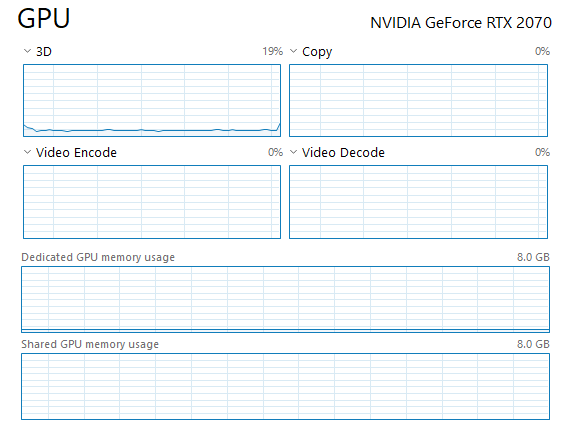
So, I'm playing borderlands 2, tracking my ram, CPU, and GPU usage. My GPU usage is at 0% anyone know why?
midnight pollen
task manager doesn't always show the right usage, it might come up under 3D usage in task manager or if you have an overlayhttps://i.imgur.com/LIgNyDP.png
 full flame
If it's something with an iGPU maybe you're looking at the wrong gpu?
naive pendant
I only have 1 @full flame
dark delta
@tacit hemlock I am buying it from Newegg. Thsnks for the reply
I bought it from Newegg @midnight pollen
Does anyone know how many aRGB fans you can daisy chain on an aRGB (3-pin) header on your motherboard? I have an ASRock B450 Mobo with an aRGB header
 neon prairie
So I have a question about AMD processors. I am thinking about buying a Ryzen 5 1600 12mn but i have a little more money in my budget and I was wondering if I should upgrade that now rather than later
split copper
What kind of stuff do you like to do?
neon prairie
gaming mostly
though I have already been suggested the ryzen 5 3600 as a solid upgrade point lol
split copper
The 1600 is perfect for quite a while without upgrade
You can sink the extra budget into a higher power GPU
neon prairie
i have already bought what i think is a decent gpu
split copper
From what my brain has inhaled, so long as your tasks are more GPU intensive than CPU, you can get away with just the 1600
O fair nuff
neon prairie
yeah. radeon 570 i believe
split copper
Anything else in your computer that could use an upgrade?
split copper
I suppose you could choose a more powerful CPU
I would personally go for a better SSD, or faster RAM maybe
neon prairie
Gotcha okay
Well I forgot that I needed to get a keyboard so I don't think I can upgrade anything just yet
split copper
Ah
 boreal wedge
I have the Asus x570 tuf plus, and for the cpu power it’s a 8pin and a 4 pin connector. I need to confirm that I have to have both the 8 pin and 4 pin power cable plugged in for it to be fully functional without problems correct?
long geyser
All AM4 CPUs stock can run off a 4 pin by itself. That supplies 150w and the 3950x takes 145w peak on stock. 8 pin supplies 300w or so. So yeah. Single 8 pin is fine.
rocky flame
2x32 or 4x16 Ram at 3600 MHz?
hollow thorn
whatevers cheaper I believe would be better
rocky flame
I heard 4x16 was harder to overclock and the MHz speeds were much lower than 2x32... that’s why I asked.
hollow thorn
Hmm who to ping
@mild jackal Would 2 sticks in that situation better utilize dual channel, and would a server board with quad channel memory better utilize 4 sticks of ram?
mild jackal
The thing is - the use case for >16GB of ram benefits very little from any OC shenanigans.
What board/cpu?
rocky flame
So I am building a “dream” pc (dreaming is all that will happen, lol) on pc part picker. So far, I have the 3950x cpu with the x570 MSI Godlike mobo.
Right now, I have 2x16 3000mhz. Tbh, I would just do 2x16 3600 MHz, but if money wasn’t a barrier, then why not just go for the 64gb, right?
mild jackal
"dream pc" - go with 4x16 3600 cl 14 or something
rocky flame
What does the cl 14 stand for?
hollow thorn
Cas latency 14
and then that means like 14-14-14-34
and each number has weird names
like tRC is one of them
and it stands for timing something cycle
quaint current
basically the lower the better
mild jackal
idk if the godlike - or if any of the MSI lineup is wires for 2 dim or 4 dimm configs (daisy chain vs t topology) - but the entire asus and Gigabyte Aorus linup is set up to favor 2 dimms
The thing is- the drawbacks to a daisy chain setup don't really apply to x570 since nobody really daily's ram (far) above 3600MHz.
hollow thorn
Forks, is there any commercial 16gb 3600 cl14 ram?
mild jackal
Yep. It's basically high-bin- b-die that's got a default XMP set voltage of 1.4v or so.
mild jackal
oh- ya, misread, I wouldn't be surprised if that only came in 8GB
hollow thorn
ah, sad.
mild jackal
TL;DR - you can just buy 3200 cl14 or another "high bin" b-die and just set the voltage to 1.4-1.5v manually and hit the same clocks
@naive pendant heh
hollow thorn
heh
tho is there any b die 16gb modules at all? I'm not too familiar with this stuff... brb
mild jackal
Ya, there are definitely some 3200 cl14 dual rank 16 Gb modules
hollow thorn
oh yep
 toxic ridge
guys should i get the aorus 240m aio or nhd15?
money isnt a problem, and im just worried about temps and noise
oh wrong tab my bad
i moved to cooling btw
tacit hemlock
Why would you get a aorus aio lol
weak hamlet
why wouldn't you?
slate seal
I didn't even know it existed
midnight pollen
aorus has aio?
rocky flame
So when people say “bottleneck”, what do they mean? I know what the word means, but in tech terms, how does the bottleneck affect my computer. I have a 3900x and 1080 GPU and I was told to expect bottleneck.
tacit hemlock
It basically means that any of your components could not be fully utilized because another component is holding it back
I dont really see how your system could bottleneck tho
 rich sphinx
Could anybody recommend an AMD motherboard that supports HDMI 2.0? I found one, but I'm having an issue with the specs. On Newegg, it says this motherboard supports HDMI 2.0, but on another site, it says HDMI 1.4: https://www.newegg.com/asrock-x570-phantom-gaming-4/p/N82E16813157884?Item=N82E16813157884
weak hamlet
what other site
rich sphinx
rich sphinx
Will do
On the ASRock site, it does in fact specify HDMI 2.0. Idk why Micro Center doesn't have that listed
rich sphinx
This is my first time ever building a PC, so I'm not exactly an expert when it comes to technical stuff
It came out July of last year according to Newegg, so it is relatively recent
weak hamlet
oh nice! welcome to pcmr! 😄
feel free to come back if you have questions or need help putting it together
plenty of nerds here 
🤓
rich sphinx
Final Specs:
Motherboard - ASRock X570 Phantom Gaming 4
Processor - AMD Ryzen 9 3900x 3.8GHz 12-Core
RAM - Corsair 32GB (16GB x 2) 3200 MHz
GPU - MSI Super Ventus GeForce RTX 2080 Super 8GB GDDR6
Storage - WD 1TB SSD
Power Supply - Corsair RMx Series 850W (Modular)
Case - Fractal Design Meshify C White
Case Fans - Corsair AF Series AF120 Blue LED (3 Pack)
weak hamlet
I would suggest a little higher mhz in the ram
rich sphinx
One person I talked to said that upgrading to 3600 MHz would barely make a difference
weak hamlet
3600mhz is idea for ryzen, especially the 3000 series
rich sphinx
Man, Micro Center sucks lol
weak hamlet
ryzen craves high mhz
I mean your 3200 will work dont get me wrong
are you doing video edits? or gaming?
weak hamlet
streaming too?
3900X is pretty OP for just gaming
lol
but you won't need to upgrade, probably ever
rich sphinx
That's the idea lol
rich sphinx
I've never had the ability to play games with great visuals, so this will be a nice change of pace
tacit hemlock
Probably don't need a 850w psu either
rich sphinx
Yeah, but I figured it's better to be safe than sorry. Also, if I ever upgrade, then I'm set
tacit hemlock
Ok but I mean you'll never have to upgrade with a 650w either
rich sphinx
The plan is to be able to play games in 4K at 60 FPS, hence my search for HDMI 2.0
weak hamlet
nice
tacit hemlock
Thats basically a guarantee with that setup
rich sphinx
I'm so excited
tacit hemlock
You should be 😉
rich sphinx
Also, with the 3600 MHz, would it work if the motherboard was 3600 OC?
weak hamlet
yes
rich sphinx
Perfect. I have a lot of items to return lol
 mild birch
memory frequency isnt everything
people need to get into the habit of mentioning timings as well
 delicate bolt
frequency can affect performance on ryzen 3rd gen tho
mild birch
and so can Timings.....
your point?
I'm just saying 3600 mhz ram isnt automatically faster than smth like 3000mhz
because frequency is only part of the equation
midnight pollen
we do mention timings a lot here
mild birch
lots of people dont
main pulsar
for lots of ppl, timings arent super important
mild birch
what does that even mean.....
rephrase that as "for a lot of people they dont know what effect timings have"
main pulsar
it means, considering people will pay 60k for the new imac that comes with the crappiest ddr4, it must not matter to everyone
main pulsar
i talk about timings to people, but they arent super important
mild birch
JEDEC spec is 2400
main pulsar
is it?
mild birch
2400 16-16-16
main pulsar
i thought 2133
huh
anyway, specifically for ryzen 3rd gen, and for ppl who dont wanna oc the crap out of their components, 3600 is just a safe bet
it does more for the cpu than tighter timings
especially when the difference in games is only like 4fps average
mild birch
depends really on the application
some applications benefit more from tight timings
some benefit from faster frequency
depends how many files you need to access
and their size
mild jackal
Three are different JDEC standards, ddr4 ranges from 1600 to 3200
mild jackal
mhz
main pulsar
ok ok
mild jackal
I mean - MT/s
main pulsar
oh LOL
mild jackal
I'd say the "general" standard if you want to pick one is 2133, but w/e
Newer stuff seems to be 2400
mild jackal
It's not the mobo's choice - it's on the SPD eeprom on the stick.
mild birch
oh
did not actually know that
actually on that topic
Im bout to download SPDTool
flashing these 3 kits I got a few weeks ago
mild jackal
Never tried it, I'd probably go with a hardware spi flasher, ch341a or something.
mild birch
hmmm
got the idea from alatron, I'll just ask him
but I'll just try one on a burner stick
2gb green PCB from a prebuilt
rich sphinx
@weak hamlet I just picked up the 3600 MHz
weak hamlet
nice!
 dusk jay
Hi so I just got a new PC and the g.skill RGB is driving me crazy, I can’t even tell you what it’s doing cause I don’t know what it’s doing but the g.skill program won’t do anything and the Asus aura program Is being weird
hollow thorn
@dusk jay In my experience, msi mystic light works with both my motherboard and ram
dusk jay
what kinda ram u got? @hollow thorn
hollow thorn
trident z neo
dusk jay
me 2
hollow thorn
synced up, though it limits my color options, it is synced.
dusk jay
it worked thanks so much @hollow thorn
hollow thorn
you're welcome
dusk jay
gotta wait for the aura website not to be broken
hollow thorn
lol
long geyser
It got big due to having a b die SKU, which basically no one bought
Now the most popular one is just the "good CL/freq but meh everything else"
midnight pollen
wow that software is very flashy
hollow thorn
@mild birch Got it on sale, and ripjaw v were out for 3600 cl16
tacit hemlock
If only aura sync was flashy... smh asus
 lavish otter
hey gang, I am trying to purchase the correct spec for DDR4 RAM for a ASROCK x570 phathom 4 motherboard with ryzen 3600x CPU. I need 32gig of Ram(2x16gb, went to the ASROCK website and check the RAM spec super confusing.. can anyone help??
rich sphinx
@lavish otter What in particular are you confused about?
tacit hemlock
Well on their website it says that board supports up to 4000mhz ram. So any ddr4 ram underneath that in speed will work. I would personally recommend this kit for your specific need https://pcpartpicker.com/product/zcH8TW/gskill-ripjaws-v-32-gb-2-x-16-gb-ddr4-3600-memory-f4-3600c16d-32gvkc
weak hamlet
QVL will show you what will work for sure.
tacit hemlock
Oh sry lol I was getting that link I didn't see you answer him
rich sphinx
@lavish otter I literally purchased the exact same motherboard and RAM that were linked in this chat. I'm trying to post a screenshot which shows that the Phantom 4 is compatible with the RAM @tacit hemlock linked, but it won't let me for some reason
 ionic hamlet
Is it just me, or does it seem like the Ryzen 3600 is perpetually 175 USD? I wonder when they'll make the price drop official
vagrant mist
maybe if it stopped being a great choice for a midrange cpu?
tacit hemlock
I feel like the subtlety make more money buy saying its 200 but you can have it for 175 than just saying this is a 175 dollar cpu. Its more enticing the first way
vagrant mist
yeah sounds right
ionic hamlet
I mean, it's a good CPU for somebody who is maybe looking to build a new system but doesn't want to spend a fortune
 cerulean forge
alright boys here we go again!
will i notice a difference in performance in gaming vs a 3900x vs a 3800x?
cerulean forge
so should i get a 3900x over a 3800x?
hollow thorn
depends on your budget
hollow thorn
I mean... Might as well?
hollow thorn
It gets you more precessing power too if you want to do video editing down the line or something
cerulean forge
i don't really plan on video editing but i mean
will the performance difference be like
thicc
hollow thorn
not too thicc
its a tiny bit actually
@cerulean forge like if you JUST want a good price-to-performace, go with a 3700x or 3600.
3800x is just a tiny bit better than 3700x, and 3900x just a tiny bit better in gaming than the 3800x
cerulean forge
yeah i was thinking about the 3700 or the 3800
but i don't wanna waste my bread
🥖
hollow thorn
then go with 3700x
cerulean forge
alright thanks for the advice guy!
oh and @hollow thorn i'm going from a 2600 too
hollow thorn
Fair.
cerulean forge
yeah, i can't wait so i can actually utilize my pcie 4.0 ssd
i changed my mind i'm gonna wait for ryzen 4000 desktop
so the 3000 will be cheaper
tacit hemlock
I mean if you can wait then sure
cerulean forge
yeah
vestal fog
Is water cooling necessary for an 8700?
quaint current
No
hollow thorn
no
quaint current
air coolers work well even on 9900k/3950x, unless overclocking flagship mainstream cpus like the two I listed I’d stick to air cooling
vestal fog
Ok thanks.
 pallid jacinth
so i am going to build my first computer and i was wondering if it is compatible my cpu is a ryzen 5 3600 my motherboard is a msi b450 tomahawk max my graphics card is the rtx 2060
i also have an ssd and a hard drive
i think it is compatiable but i am worried
hollow thorn
Can you put it in a https://pcpartpicker.com/list/ ?
pallid jacinth
at the top it says it is not compatible but when i google it, it says it works and i see people use that mobo and cpu on youtube
hollow thorn
What about a case and power supply?
pallid jacinth
i already have them
hollow thorn
Also, I would not recommend that SSD since it doesn't have dram.
pallid jacinth
my powersupply is 650 watts
and okay i will get a different one what would you reccomend
hollow thorn
Also, that 2060 is quite expensive for a 2060, get a evga 2060ko if possible
I would recommend a silicon power a80 512gb
since you would save money from switching the RTX 2060
pallid jacinth
is there a big performance gap between the 2060ko and the msi one
pallid jacinth
but the boost and core clock are different
hollow thorn
Some cards are slightly factory OCed
But the GPU under the cooler is nearly the exact same
hollow thorn
Yes, but there's also a suggestion I would make, while that board works, the Asus b450 tuf pro is a slightly better board.
hollow thorn
Yea
hollow thorn
One sec

Google Docs
Master List
Brand,Model,Interface,Form Factor,Capacities,Controller,Configuration,DRAM,HMB,NAND Brand,NAND Type,2D/3D NAND,Layers,R/W (Up to, in MB/s),Categories,Notes (*),Product Page,Product Page 2,Amazon Affiliate Link,Amazon Price (Coming Soon)
ADATA,S40G,x4 PCIe 3.0/NVMe...
pallid jacinth
what does dram do
hollow thorn
It's like a cache for the ssd, it helps the ssd to maintain speeds during file transfers and other uses, and helps a lot with the lifespan of the ssd
hollow thorn
Better sound chip
pallid jacinth
what is a sound chip
hollow thorn
it does sound things :p
pallid jacinth
how much more is it
nevermind i found it
so is it better now
because i just got the money for my build so i was thinking about ordering it tonight
gritty meadow
@pallid jacinth IF you have headphones that use 3.5mm (minijacks) a decent sound chip can definitely benefit you
gritty meadow
What case is it all going in?
pallid jacinth
i got one that has 4 rgb fans in it its a rosewill case
gritty meadow
as in, you already own it?
pallid jacinth
yea
pallid jacinth
the Mr1111 told me to get it
gritty meadow
as in, you could save a bit perhaps get a ssd that you wont be annoyed about shortly
hollow thorn
The GPU seems good to me.
pallid jacinth
what is wrong with the ssd
pallid jacinth
what does that mean
gritty meadow
what do you think the SSD does ?
pallid jacinth
it hold things like games
gritty meadow
how big are the games you play?
pallid jacinth
i am switching over from console so i dont really have any games
gritty meadow
what games do you think you might be playing?
pallid jacinth
like shooting games
pallid jacinth
rainbow six seige rarely fortnite umm maybe some cod
i only play fort when i am really bored and my friend begs me to play
hollow thorn
siege is like 80
gritty meadow
Siege is about .. 80+?
hollow thorn
(and of course space to keep downloads, and extra space for later)
gritty meadow
and congrats, you dont have space for anything else on the SSD
120-ish SSD's are workable
this is true
are they enjoyable to actually use?
no
gritty meadow
256 is much more reasonable :)
pallid jacinth
yea 🙂
gritty meadow
some of the cost of that, could be handled by going for the 2060 that is 310 usd
because the actual difference between that and the one you have on your list is practially zero
pallid jacinth
so which one should i get
gritty meadow
pallid jacinth
ok ill get that one
gritty meadow
now, something else to think about
you could go with a slightly smaller mainboard
same feature set as the one you have now, just a bit smaller
pallid jacinth
ok
gritty meadow
pallid jacinth
will it look weird in my case
pallid jacinth
would the mobo standoff be in the right spot for that
gritty meadow
i mention it, because from a functionality POV, there is no difference for you
the standoffs will fit
you can always go "smaller" in a case
pallid jacinth
ok
gritty meadow
its the going "bigger" that is a physical problem :)
pallid jacinth
yea
gritty meadow
and the main motivator for those two changes (GPU and mainboard) is to give you the budget to go with a bigger SSD, without raising your actual budget
if that makes sense?
pallid jacinth
yes that makes sense
gritty meadow
ultimately, it is ofc up to you
pallid jacinth
yea thanks for the tips
gritty meadow
also @hollow thorn nice work on helping @pallid jacinth :)
you are very welcome :)
hollow thorn
Thanks.
 grim mica
performance wise
i7 8700 vs r5 3600, which one is stronger
 craggy light
Hi, I have a problem, I bought a motherboard and a processor from the site, but when installing it, there is no energy access for me, with confirmation of installation. Is the problem from the motherboard or the processor?
craggy light
Ruzen 3600x and motherboard b450-f
grim mica
update bios yet?
 rough citrus
hey
my head is in confliced
conflicted about a update from 1700x to 3700x on x370 but few people said that if i use 3700x on x370 then my x370's VRM would have hard time to handle that much, and it will be very hot.
i guess i have to upgrade to x570 for best compatibly with 3700x then?
muted roost
A b450 board can handle a 3700x just fine
craggy light
Come on, never work, no power
grim mica
@rough citrus you can just try
rough citrus
i have been seeing reviews on google. there are lots of reviews about comparing them on x370 to x570
long geyser
If that mobo cant handle a 3700x then it also cant handle a 1700x. Which unless you have a crumby board then that'd be hard to believe that the high end mobo (x370) of the time couldnt handle the high end CPUs of their time
 last hemlock
Msi b450 max board with 3800x? will this work out of box i keep sseeing things say it will but unssure what to do
tacit hemlock
If your refering to the tomahawk max then yes it would work out of box @last hemlock
 lean crow
I have a Asus H87M-E motherboard. GPU: GTX 1650 and CPU: i5 4430. I want to upgrade my cpu but I don't know what cpu to get that is cheap and good
gritty meadow

ASUS USA
ASUS H87M-E motherboards feature the Intel® H87 chipset, packed with advanced technologies and great capabilities, including 5X PROTECTION, new UEFI BIOS, and Fan Xpert 2 for all-round durability and community-appreciated user experiences
that is the CPU support list for the board
lean crow
I know the support list i just want a good and cheap cpu
gritty meadow
then study the list
find the fastest part, see what the price is like in your local second hand market
because none of these CPU's are still being made
they are all EOL
as a reference, yours is 4 cores at 3ghz, no HT
max is 4 cores at 4ghz, with HT
last hemlock
Which B450 Max board would be best reccommended for a 3800x?
if anyone has input on that?
im thinking the tomahawk b450 max but wondering if any of the others would be a better option?
last hemlock
I am just wondering cause all ive heard is the max boards are bios updated outta box for it i dont wanna get ssomething that isnt updated already but this asus board is already updated for it?
mossy plaza
I just updated my mobo and cpu to an MSI x570 with a Ryzen 5 3600. When trying to boot, my SSD won’t. It ends up going into repair mode for win 10, but even that is just a black screen with cursor. Should I be installing win 10 fresh or clone my drive? Not sure the easiest way here
hollow thorn
Prob fresh
last hemlock
@hollow thorn so the asus board will suppport the 3800x out of box?
 last hemlock
is there anywhere thats cheaper?
last hemlock
so that one has aall the same stuff just smaller and workss just as well? lol
hollow thorn
Yea
last hemlock
so u would reccomend going with the micro
😄
ive never gone that route before but im willing to give it a shot
@hollow thorn what ram would you suggest
last hemlock
the board supports 3600? i didnt think i saw thaat it did
hollow thorn
the speeds depend on the cpu, not the board
last hemlock
ahh so 3600 is fine then
hollow thorn
For example, if you go look at the MSI b450 gaming pro carbon ac, it prob doesn't say it supports 3600, while I'm running 3600mhz fine with my 3800x
hollow thorn
no no
look for the cl16 kit
this is the right one
https://www.newegg.com/g-skill-16gb-288-pin-ddr4-sdram/p/N82E16820232880
last hemlock
okay
cases dont really matter do they? lol i also hate that pc part picker keeps saying there could be compatibility issues lol
and psu probs only a 650?
@hollow thorn
hollow thorn
Case does matter for airflow
psu you just need to make sure it's a good pssu
Linus Tech Tips
PSU Tier List 4.0 rev. 12.3 welcome to the brand new PSU Tier List! Created and maintained by @Princess Luna, @DatTestBench, @Stefan Payne, @GreatMasterAden, @Juular, @Elisis and @LukeSavenije Last Update: 09-04-2020 Tiering of various units is opinion based off reputable sour...
A or better
hollow thorn
ehm
Doesn't look like it has good airflow...
GN doesn't have a thing on it either
last hemlock
hmmmm im not trying to spend a ton on a case but i want something decent too
last hemlock
whats expensive?
hollow thorn
Actually
meshify c is relatively mid range
Expensive would be like cm h500m
Fractal design meshify c is a good case tho
hollow thorn
Go for like amp
forgot the other good cheap one
This is also good
https://www.newegg.com/enermax-80-plus-erf650awt-650w/p/1HU-0042-000P8
hollow thorn
no
last hemlock
oi
lol
is it possible to find anything a little cheaper then 110 lol
i doubt it but just curious
hollow thorn
Yes
you can
Amp is usually 110$ lol
the one I linked is 110$ lol
as you can see the D.F is up there
last hemlock
is the stock cooler for the 3800x good enough
weak hamlet
if you don't plan to OC it yeah
last hemlock
does the asus motherboard have aa v12 rbg header lol @hollow thorn
hollow thorn
I believe so
pallid jacinth
thanks for helping me yesterday i ordered my parts last night
 pearl crow
Asrock b450 k4 on sale for $90, should I get it? Thinking about either r7 2700 or r5 3600
 finite elm
So the pinned message with the motherboards, shows that the ASRock phantom gaming 4 mobo supports 4066+, 3466, 3200, and so on. But the website for ASRock also shows other ram speeds not listed there. Why is that? 🤔
finite elm
Ah
split copper
Are there any good options for an FM2+ board that aren't expensive?
I have an A8-7600 that I want to build around someday
It's possible the Lenovo board I have works with it with a reset or something, but I don't have thermal paste to set it up with, and the PSU it came with might be iffy
mild birch
@hollow thorn the rev D.F. is arguably the best value'd high end PSU I've seen in SOOOOO long
so yeah do agree
as for whether or not you need it: no
even a CX or PP11 would do
if you can afford it D.F., but realistically PSUs shouldnt be a particularily large purchase item
long geyser
I mean, Whisper was a bit better for that like 3 weeks it was in stock
before human malware
then that got oofed
mild birch
Whisper has been in stock for several months now. maybe not anymore
its just that PCPP is stupid
if you look for it manually you could find it back when people thought it was out of stock
long geyser
I did check outside of pcpp not long after it said it was out of stock and most options other then 850w or smth was out of stock
but havent done a manual check in a while
mild birch
well its obv not in stock rn
 thorny frigate
Will an am2+ cpu work in an am2 mobo?
pearl crow
@split copper hit me up, I've got three tested and working fm2+ boards
split copper
👀
split copper
I might be interested
I need to focus on upgrading my working computers first tho
Especially my brother's computer with an 8MB cache 5400 rpm hard drive 😔
split copper
https://www.newegg.com/jingsha-m-atx-a88matx/p/2MG-003B-00001?&quicklink=true wait does this thing have arrangement for an Intel cooler
muted roost
@thorny frigate yea but you’ll be limited to am2 specifications so it’s not ideal
 mild hazel
I’m putting together a build and have a R3700x and asrock x570 taichi mobo. Was looking at the trident neo 16 kit but there are 3 different ones. What’s the difference. Any other memory with RGB you recommend?
muted roost
Look at the speeds and cas latency
Also the normal trident z is pretty much the same for much cheaper
hollow thorn
@mild hazel Try to go for the 3600mhz cl16 kits.
Also, when I bought my neo kit, it was cheaper than normal trident z rgb...
For example, right now, they're the exact same price @muted roost
mild hazel
Ok! I’m not in a rush so I’ll put both in a cart and see if the drop in price. Thank you.
tacit hemlock
Is there something that makes neo better than the normal kit?
slate seal
Looks better 👍
hollow thorn
@tacit hemlock Theres no difference basically
tacit hemlock
Ok thought so
tacit hemlock
I have neo so I was wondering if I got something better
 dry burrow
what's a good mobo that's gonna work out of the box with a ryzen 5 3600 available on newegg? was looking at the b450 tomahawk max, but it is out of stock
same general price range
hollow thorn
Asus tuf b450 pro
 midnight chasm
yes
gritty meadow
@dry burrow always look up the manufacturers info
always
they are the ones you are going to blame if things dont work out as you want anyway
because the seller can always legally clame that it was a misprint on their page
 daring patio
Anyone, a good ryzen 7 2700x mobo?
dry burrow
@gritty meadow thanks for the advice so according to this page i should be good;
https://www.msi.com/Motherboard/B450-A-PRO-MAX

Best AMD AM4 B450 ATX motherboard, Turbo M.2, USB 3.2 Gen 2, Core Boost, MSI PRO
gritty meadow
aye, if you check the cpu support listing, you will find that the 7B86vM0.zip bios version is needed for support of the 3600 cpu, and if you look at the bios download list, you will see that version as being the launch version. So yes, you should be fine :)
delicate bolt
so i've got an ASUS Prime b450M-A
would i be alright if i were to buy 2 more 8 gig sticks of ram to have 32 8x4
or should i just get a 2x16 kit
i know the exact RAM to get anyway
delicate bolt
aight
 dusty roost
I've got a question if someone is willing to help. It might be a long shot but I'm curious. So I currently have a AM3 Motherboard with a AMD FX-8350 Eight-Core in it. I would like to upgrade but I think I'm going to have to upgrade my motherboard and everything in it besides my video card. Is there a way around this? or at least a cheaper alternative so I dont have to buy an almost entirely new set up?
pearl crow
@dusty roost unfortunately not, if you want a significant upgrade, you'd be looking at about $300 for an upgrade to a new platform (probably am4)
r5 3600 + b450 motherboard + ddr4 ram will fit under about $325
r5 1600af + b450 motherboard +ddr4 will fit under about $225
 solar topaz
I've got a question if anyone can help. I tried upgrading my bios to my mobo but it shut off in the middle of it and now it won't turn back on no matter what I do. It's an Asus Prime x470-pro. Supposed to be crashfree bios but i have the original bios on the USB but it's not getting any power to the usb. It was before the bios update crashed. Tried putting the dvd in but that didn't auto restart the bios either. Taking the CMOS battery out doesn't work anymore either. Is this MOBO a brick now?
muted roost
If you don’t see a message on screen saying it’s in recovery mode you’ll want to contact Asus
solar topaz
Thank you I did, hopefully I can send it in with this COVID-19.
 dawn basalt
Will Ryzen 4000 be the last processor compatible with the am4 Socket?
tacit hemlock
Yes
 humble dome
hey guys, im looking to buy a new motherboard that is x570. im not that educated when it comes to motherboards. does anyone know a good x570 one that i can pair with my ryzen 2600, rtx 2060, and 16gb ddr4 3600mhz ram? in the range of around $150-ish
long geyser
x570... but only 2600 and 2060? but why
humble dome
like i said im not educated
i just wanted something good
do you have any good recommendations for a motherboard that i could get, though? doesnt have to be x570 if i shouldn't get one
long geyser
best to make a list on https://pcpartpicker.com/
Make sure to list what you have and havent purchased yet
It becomes easy to recommend what to do and where to go
humble dome
will this recommend me a motherboard based on my pc parts?
 azure trail
can someone help a homie oc
long geyser
@humble dome a bit. But mostly helps with saying where you should put the budget into. An example would be a $95 mobo and $55 SSD as you have $150-ish to spend
@azure trail #overclocking would probably help more
azure trail
I just noticed we have that channel
humble dome
ah gotcha
 small urchin
 stiff kraken
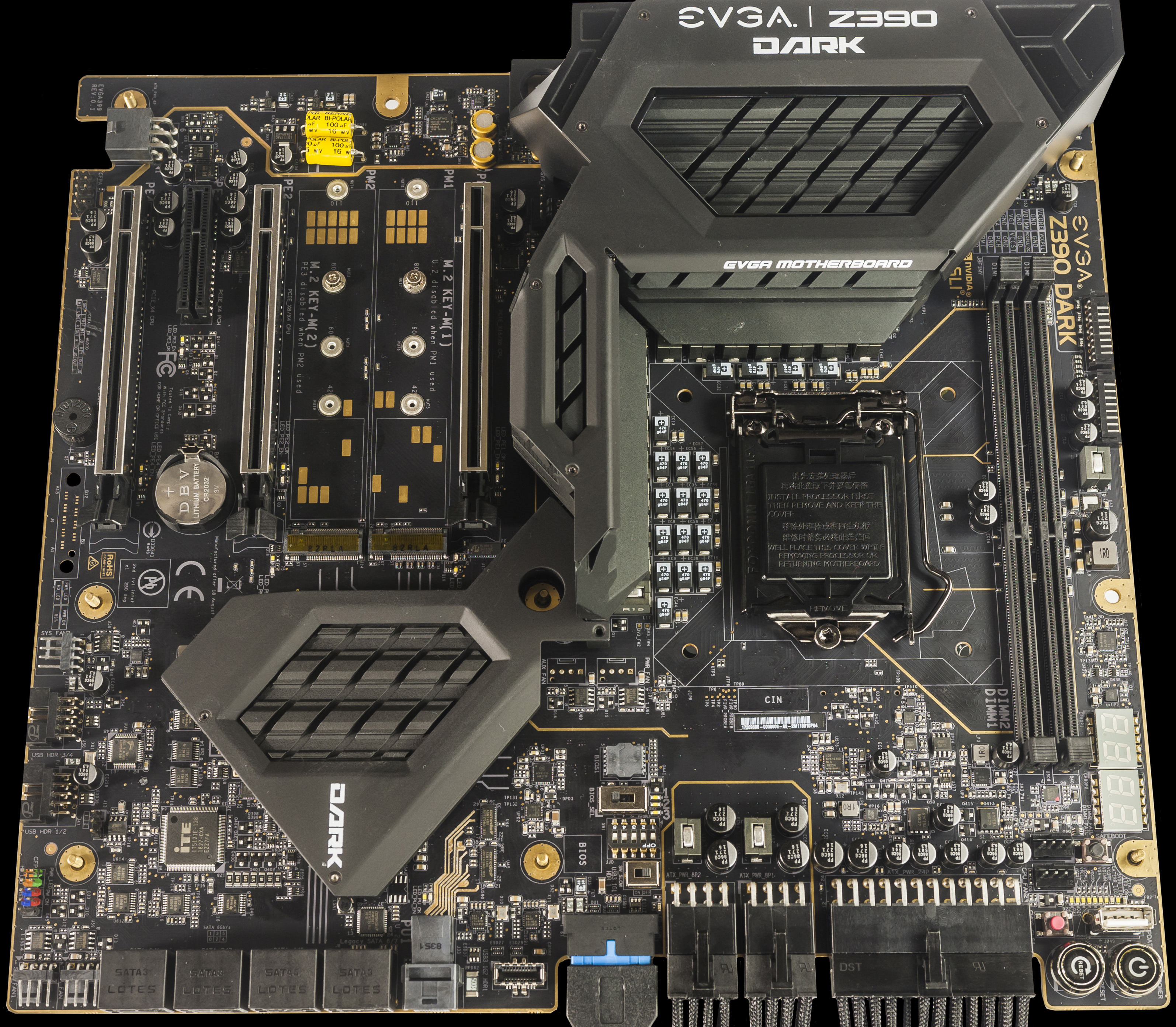
hey guys, anyone know why there are question marks in the part number provided by thaiphoon burner 
trying to figure out exactly what kind of ram i have
hollow thorn
hwinfo might work
 hollow basin
@dusty roost I'm planning on maybe doing the same as you. looking to be around 350ish right now. and thats with keeping my old ass video card and hoping my power supply is good enough
no links from newegg here eh?
cerulean nova
@hollow basin you want to upgrade your cpu?
hollow basin
yeah man
cerulean nova
what do you have currently?
hollow basin
yeah, it's still running some stuff pretty well
I even had a motherboard go bad a couple years ago and for whatever reason the one I replaced it with doesn't let me OC it very much
split copper
Oof
Bro's is equipped with a Biostar TA790GX A3+
It's great, but no USB or SATA 3
stiff kraken
@hollow basin what is your current gpu?
hollow basin
r9 270x 4gb
stiff kraken
if your gpu is really old it might be worth going for r5 1600af + b450 tomahawk max mobo + used rx 580 8gb for ~$290 total
then when ryzen 4000 comes out you can upgrade
if you don't want to upgrade cpu you can just go r5 3600 + some lower end X570 imo but you're gonna be severely bottlenecking your new cpu
hollow basin
oh ok. yeah I was gonna do that 2nd one
stiff kraken
i would personally go first path since you'll have a nice upgrade path from cheap but good cpu to higher end later
rx 580 is still a very competent 1080p gaming card
and since total is like $290 if you end up needing new psu it's fine
stiff kraken
but yeah you can definitely go r5 3600 + X570 then save up money to upgrade gpu/psu later
upcoming rtx 3000 launch will probably drop prices of older cards
might be able to pick up something like a 1070ti very cheap after 3000 launch
or a 2060 to get some of the newer features
going r5 1600af + rx 580 would be a larger immediate upgrade for gaming
hollow basin
how long will I want to keep that rx580 around for though
stiff kraken
if your target is 1080p 60fps it'll last a while
hollow basin
I'm kinda at a point where I don't currently play much, since battlefield V sucks
I went to try COD when it was free last week and it told me that my CPU was too old to even run it
stiff kraken
if you don't do much gaming right now then probably just go for the better cpu and wait until you start gaming again to upgrade gpu
yeah your cpu might not support some newer instruction sets that are necessary for the game
hollow basin
I'd like to try Hell let Loose but I doubt it would run very well
stiff kraken
probably just go for r5 3600 + a lower end X570 board, i don't know a whole lot about X570 boards but i'm sure others here can help with that
hollow basin
k