#cpus-mobo-and-memory
1 messages · Page 100 of 1
 hollow thorn
 tulip eagle
Is it true that a Ryzen7 3700x build doesn't do any display without a graphics card?
 split copper
It's not an issue for debugging if you have a spare card lying around
But maybe it is and I'm not aware that it is😳
 mild birch
@tulip eagle yes....
tulip eagle
Ok .. Ty all
 meager scarab
Part list:
Gigabyte b450 aorus elite
2x8 gskill f4 3200c16d 16gvgb
2600x
1660 ti
Hi guys, a friend of mine is having issues with a computer I built for him (and put together at his place) . Upon building it for him originally, I could never enable the ram's xmp profile to its 3200mhz setting without getting a blue screen before even getting to the user log in screen (on Windows). Spent several hours trying to fix this where I updated motherboard chipset, messed around in ryzen master and other things, but in the end I called it a day and left the ram at 2133. He was complaining about stuttering and occasional short freezes while gaming, which I assumed would be caused by the low ram speed. So after more messing about over TeamViewer, the ram finally runs (by some miracle) with xmp enabled, sort of. I ran prime 95 on default ryzen master game mode and bios settings (xmp on) with immediate errors when running both ram sticks, but no errors when running with only 1 stick (only tested 1 stick in isolation as it took him 10 minutes to put the ram back in after I asked him to reseat it and we were running out of time lol). Additionally, Apex legends refused to stay open for more than 20 seconds with both ram sticks in at 3200mhz. I told him to run the system with the 1 known working ram stick at 3200 and stability was fine, as expected, while I gather more information, which brings me here. The system runs fine, as mentioned, but Apex and other games still have the same lag issue with minor noticeable differences. (1 ram stick, 3200mhz) After all this, I can only assume that the 1 ram stick is faulty (I can test it in isolation in the following days), but the lagging issue still persists...
GPU drivers are updated to latest, so I don't know what the lag can be caused by, any ideas?
Also am I correct to assume that ram stick is faulty?
 long geyser
Most likely Windows being annoying. For example most recent patch causing stuttering. Also just set RAM to 2933/3000, not like it can only be 2133/3200 without in-between
 weak hamlet
@meager scarab how did you have the ram installed? 2/4 slot?
meager scarab
Slots 1 & 3 for dual channel
*the slots labeled 1 & 3 on mobo
I was also having some weird power issues, screen would freeze and not recover during post and in bios
When running both sticks
meager scarab
Shieet, I don't remember, I'll have to check with my friend
I feel like it was an evga cxm
Wait no, cxm is corsair
hollow thorn
Hm
meager scarab
It's a 550 cxm
weak hamlet
try slot 2/4
meager scarab
Ok
weak hamlet
For optimum performance, when enabling
Dual Channel mode with two memory modules, we recommend that you install them in the DDR4_1
and DDR4_2 sockets.
meager scarab
Ok yeah sorry, they were installed in 1&2
I guess when I said 1 & 3 labeled on mobo it wasn't true
meager scarab
I remember that they're installed like O l O l
 clear walrus
hey i was just wondering what peoples opinions were on an upgrade for my cpu. Right now i am running an i5-7500 with a 2060 super. I want to upgrade to a ryzen cpu and i was just wondering what would be the best option for my graphics card
 oak sand
Keep the gpu, id invest in a better cpu and mobo unless you have a large budget @clear walrus
clear walrus
i was thinking about upgrading just the cpu maybe to a 3600 or a 2700x
 gritty meadow
@clear walrus you will need a new mainboard IF you upgrade to any AMD cpu.
that is how it works
clear walrus
yeah i was thinking a 3600 with a msi tomahawk max
gritty meadow
please dont pay for a overpriced board like that @clear walrus
clear walrus
what is a good board then
gritty meadow
@clear walrus if you have a look in the #building-and-recc-chat, and scroll up a bit from "now", you will see a talk about that :)
i could repeat myself, but it is easier to just point you there for my posts on it
hollow thorn
Naed, what is, in your opinion, the best b450 board with WiFi?
gritty meadow
eh, without looking, carbon something something iirc
(now, i will go find it, give me a sec)
gritty meadow
aye
hollow thorn
ah, I have that one
clear walrus
ok cool thanks @gritty meadow
hollow thorn
Asking because I have some friends looking into PC building, and connecting by Ethernet would be annoying if possible at all for them
gritty meadow
@clear walrus you are very welcome, and please remember that there are no stupid questions, only silly answers :)
@hollow thorn dont only limit yourself to b450
gritty meadow
470 chipset is viable
hollow thorn
Any cheap&good x470 wifi boards?
I got mine at 120
if theres <150 x470, that'd be nice
gritty meadow
https://pcpartpicker.com/product/t797YJ/msi-b450-gaming-pro-carbon-ac-atx-am4-motherboard-b450-gaming-pro-carbon-ac <- look at the price history on it
@hollow thorn microcenter?
gritty meadow
okay, just keep in mind, current pricing etc :)
https://pcpartpicker.com/product/nQc48d/asrock-x470-master-sliac-atx-am4-motherboard-x470-master-sliac <- here is the board that made me mention the 470 chipset
keep in mind, it skimps on other things
but, depending on requirements etc etc
hollow thorn
Ah I see thank you very much
gritty meadow
you are very welcome
also, keep in mind, you are getting fairly close to the 570 chipset boards too
hollow thorn
Isn't x570 wifi boards really expensive tho?
hollow thorn
Yea...
hollow thorn
30 still a lot
gritty meadow
remember, b450 with wifi starts at 85 usd
hollow thorn
What
gritty meadow
so the carbon is NOT cheap
gritty meadow
no, with WIFI, the cheapest board is 85
hollow thorn
??
gritty meadow
hollow thorn
Um lol
gritty meadow
click the link i posted above
hollow thorn
I did lol
hollow thorn
Ye
gritty meadow
give me a sec, let me test on my phone
it works, kinda on mine
let me try another link
gritty meadow
@hollow thorn did i ever say there was anything wrong with it?
gritty meadow
you originally asked " what is the best b450 with wifi" :)
gritty meadow
i know, just giving context for the carbon choice :)
hollow thorn
Anyways, what is a good well-rounded b450 board with wifi?
gritty meadow
depending on requirements, any board
hollow thorn
Good sound chip, okay VRMs, the rest doesn't quite matter.
gritty meadow
welcome to the carbon :)
hollow thorn
Well, still in planning phase, so I'd say that could actually be the best choice, if I get the budget as expected.
gritty meadow
keep in mind. the sound chip ONLY matters if they are using mini-jack based gear
if they have usb based stuff? it doesnt matter one single bit
hollow thorn
really?
gritty meadow
yes
hollow thorn
Well then sound chip doesn't matter xD
I think I'm gonna go with either ASRock b450m/ac or carbon based off the final budget I get
gritty meadow
question: you ever noticed how you can select your USB based gear as an actual device in the sound settings in windows?
gritty meadow
fair :)
hollow thorn
I never knew that
gritty meadow
the reason i ask is this:
they show up as actual devices, because they have their own soundchip integrated
it is how they can "just" work
(also a fair reason for why they all sound fairly horrible imo)
hollow thorn
Well, thats how the "Plug-and-play" mindset works, don't know how anything works until you look into it, and find the many nuances within
gritty meadow
indeed
hollow thorn
tbh I don't want to spoil myself too much with good sound, don't want that to become a hobby of sorts and 'waste' much on that
gritty meadow
and to be fair, it doesnt matter if you (or anyone else) dont understand how the software works as such.
as long as it works, you dont have to care :)
hollow thorn
I look into PCs, and next thing I know, I'm prob gonna be spending hundreds a year on it
gritty meadow
nah, a solid machine will last for years
hollow thorn
I do like figuring things out tho, the more I know, the more options I get on solving problems
gritty meadow
just learn to NOT listen to the hype trains
hollow thorn
Right now I'm just spending to fix up my initial mistakes in my pc building
Like a cheapo keyboard
But as much as I want to get a new nicer case, I'm trying to restrict myself from doing it
But in the end, the more mistakes I make, the more mistakes I can identify and stop others from commiting.
gritty meadow
correct and fair :)
hollow thorn
:)
tulip eagle
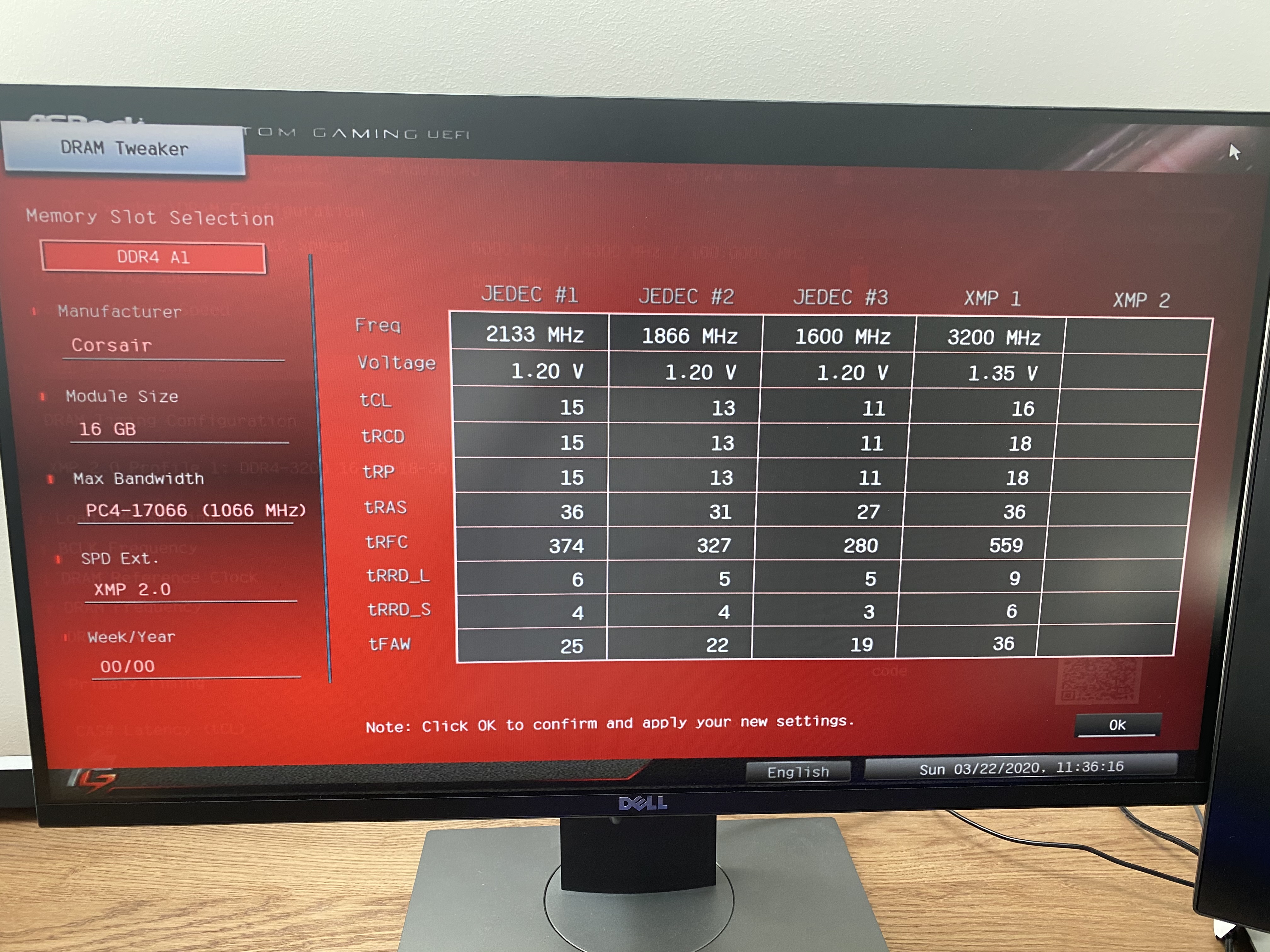
Gskill trident Z RGB 3600MHz (18-22-22-42) vs Corsair Vengeance RGB 3200MHz (16-18-18-36).
How much is the difference?
 urban ferry
i have that vengeance rgb stuff
i think its good
not saying that the 3600mhz is worse, its probably better, but in my experience, 3200mhz at that timing is good
 cerulean nova
i think there is like a 5 fps difference, assuming you are going amd
 proud pulsar
I have a trident Z neo 3600mhz (18-22-22-42) but I changed the timings to a 16-19-18-36
 tacit hemlock
If you have a ryzen 3000 series I would get the 3600mhz
oak sand
But crap timings
@tulip eagle ik rgb is nice, but get G Skill Ripjaws V 3600 16-19-19-39
tacit hemlock
Thats definitely the best bang for buck ram rn imo
long geyser
Eh, b-die isn't that much more but you do need to know how to change timings/freq as XMP wise it's bad
 clear seal
What does "AMD OPTIMIZED" mean on ram?
I'm getting vengeance rgb 2x8gb 3600mhz ram. There's 2 different rams and the "AMD OPTIMIZED" ram is about an extra $15. Is it worth it?
weak hamlet
means... marketing.
 quaint current
^
oak sand
There might also be a difference in timings, @clear seal they wouldnt add 15$ just for that(at least I hope not)
 mighty sleet
I know im a little late but check the Cas latency
split copper
AMD likes its ram speedy
proud pulsar
I have my ram running at 3600mhz at 16-18-19-36 timing
so I tried messing with my pubg settings. it's no longer bottlenecking
thanks for trying to help me
 timid maple
 midnight pollen
rog are usually higher end boards
long geyser
ROG is usually overpriced
quaint current
^ rog tax
midnight pollen


 north cedar
ASROCK B360M-ITX/AC 802.11AC WIFI USB 3.1 SATA3 M.2
this is the mobo I have, along with i5 and 8gb ram. Can someone tell me best ram/cpu I should get?
north cedar
yes looking for new, price not too sure but flexible, and gaming
want to run new cod better
second monitor lags a ton and the cod seems like its capping my cpu out
cerulean nova
do you have a ballpark on the budget? and do you have a certain color you want the ram to be? @north cedar
north cedar
dont mind ram color, and what's usually a good range? 600?
 loud adder
Can anyone help, I upgraded my cpu and now it won’t boot into windows. I just see this. And then it turns itself off after awhile
cerulean nova
@north cedar 600 max for just cpu/ram id go with a 9900k but idk if your mobo can handle it id have to research it
or your cooler
wait is that USD?
 dawn bough
what is a good cheap 16gb ram?
cerulean nova
north cedar
USD, and i have 600 watt
cerulean nova
well then id go with a 9900k or 9700k depending if the performance increase is worth it to you
but i have to go for a bit so i can answer questions in like an hour maybe
 smoky belfry
Hey can anyone help me
my pc only turns on for like 10 seconds and immediately turns off
hollow thorn
We're you trying to overclock or anything
hollow thorn
Check your wiring, make sure everything is plugged in well
hollow thorn
So what exactly happens following you pressing the power button?
smoky belfry
Turns on,displays rog symbol and says that i need to do a recovery bios or something then shuts off before i could do anything
hollow thorn
Does your board support bios flashback? If it does, try that and see
smoky belfry
What the hell is a bios flashback
hollow thorn
It's a feature on some boards, many MSI ones. Anyways, you've tried spamming bios button while it boots correct?
(whatever button opens bios, del, f2, whatever)
smoky belfry
i did and it never goes into bios
Unless i wait for the american megatrends logo and press f1 to go into bios
hollow thorn
You haven't changed any components from when it was working correct?
hollow thorn
Wierd
Only thing I can think of rn is bios somehow corrupted or something, but that shouldn't be it.
smoky belfry
Hmmm
hollow thorn
Maybe forks or naed will stumble in here and help ya, but I don't have enough experience to know, sorry.
smoky belfry
Aight thanks, one last thing to mention, every single fan including the aio pump ramps up to max during startup
Like ive never heard my pump going that loud
But thats it
 fossil bridge
do they slow down after
midnight pollen
so you had windows set up and working before?
dawn bough
how many fan headers do the tomahawk max have?
mighty sleet
i have one but i dont remember hold on
dawn bough
@mighty sleet how many?
gritty meadow

@hollow thorn you are more than welcome to throw a @ when you see stuff like that
@smoky belfry you found a solution?
hollow thorn
Alright
dawn bough
@gritty meadow what is thing for the fans? sorry i don't know
gritty meadow
click the link, look in the detail tab
look under "internal connectors"
@dawn bough
dawn bough
"4 x 4-pin system fan connectors" does this mean it has 4?
gritty meadow
read the 2 lines before that too :)
dawn bough
"1 x 4-pin CPU fan connector
1 x 4-pin water-pump-fan connector
4 x 4-pin system fan connectors"
basically 6?
gritty meadow
basically 6 is indeed right
dawn bough
ok ty
gritty meadow
you are very welcome @dawn bough
 stiff grove
Hello. I have a msi motherboard that i am attempting to use. It is fm2/fm2+ with ddr3 ram. I am attempting to get it running with as few needed purchases as possible, initially. I know i absolutely have buy a processor, but i am hoping i can get by with ram i have, ddr3 1866 mhz. Are there any fm2/fm2+ cpus that are compatible? Yes, i know it will not run at full potential, if at all.
gritty meadow
@stiff grove you need to look up the specific model of mainboard on the MSI site, so you can see what the specific board supports.
and you need to figure out what bios version your specific board has
stiff grove
What about the clock speeds between the cpu and the ram? That is the info i want.
 glad turret
^
stiff grove
I know there is a relationship between the two, i just do not fully understand the rule about which speeds are compatible and which are not.
gritty meadow
that has nothing to do with the question of "compatible or not"
find the mainboard model number, and we can help you from there
until you do that, there is nothing we can do
(well, we can guess, but considering how many fm2/fm2+ boards MSI made back in the day, there is no way that i am doing that)
fossil bridge
he left the server lmao
fossil bridge
^
split copper
I can imagine Naed using the calmest, most inoffensive tone of voice
gritty meadow
we cannot read the mind of people asking for help
if they are not willing to provide the info they have ... nothing we can do about it
glad turret
Yeah but I think (and I know it's probably no one's fault in particular and idk how often it happens because I just lurk most of the time)
Sometimes, maybe we make people feel stupid
Because we know computers
And they don't
And I'
gritty meadow
i get what you are saying
glad turret
And I'm not saying I know everything, you know?
gritty meadow
and that topic is an interesting one
because the reverse is also true
as in, there are things that they (person on the other side of the question) know, that we know nothing about
glad turret
Yeah, for sure
gritty meadow
and, i know for myself, i have no problem saying "i dont know X"
there, imo, is not shame/negative in doing that
i prefer asking people that actually know. (when i have something i dont know)
because they will be able to give me a fuller/more-complete understanding of the answer
but, personally, i think the problem/challenge with that (saying "i dont know X, how do i do X?") is that society at large doesnt "like" that kind of admission of "weakness", does that make sense @glad turret ?
smoky belfry
@gritty meadow it is working now
Its not related to the fans at all
The cpu was overheating but it kept giving me an ff q code
I had to remove and put back the aio block on the cpu
Turns out it was the thermal paste as it was dried out
Remember kids, always make sure that your thermal is not dry
gritty meadow
@smoky belfry how long ago did you install the AIO?
gritty meadow
ah, fair enough
smoky belfry
Its working now though
gritty meadow
aye aye, good to hear, just wanted to check if you had gotten it working or not :)
smoky belfry
alright, well ima go play some games :)
gritty meadow
enjoy :)
glad turret
Yeah, @gritty meadow, it's a pride thing
gritty meadow
hm, to some extent i would agree
it is a "messy" conversation to have
because it can easily be understood/seen as if you are critiquing the other person/people you are talking with
 flint portal
^^
are there good price-to-performance X570 ITX boards
if not, ill probably get a tomahawk MAX
long geyser
tomahawk sucks. Bad sound chip, network chip, less M2 slots, less PCIe 16x slots, lack of WiFi, less rear USB ports, etc compared to boards at the same price
flint portal
what would you recommend? @long geyser
(I chose it cuz of the VRMs, memory speed, and all the TechTubers recommend it)
long geyser
@flint portal b450 Asus TUF Pro (mATX is $95 USD usually and ATX is ~$120. Also dont confuse it with TUF Plus, Plus sucks) or b450 Gigabyte Aorus Pro WiFi
flint portal
ok thx
quaint current
why would you get a itx board if u could get a atx like the tomahawk? itx usually costs more for less/worse features
tacit hemlock
If you want it to be ryzen 3000 compatible then just look at hei's last message
 obsidian lagoon
So eiter aorus pro or the asus tuf pro
tacit hemlock
Pretty much
 naive pendant
tomahawk max
quaint current
did u not just see why not to get one
tacit hemlock
Lol
mild birch
@long geyser cool and all but 32mb bios chip
gritty meadow
which doesnt matter one single bit
long geyser
cool, now I get a BIOS with nice looking GUI? Does that compare to actually better hardware?
gritty meadow
want to make a friendly wager @long geyser ?
long geyser
Mobos still supports all CPUs, may have to switch BIOS back and forth to get a certain one tho. But I mean, if you're getting a 200GE/1200 why get semi expensive mobo?
@gritty meadow maybe?
gritty meadow
my suggestion is this:
I believe that the "masses" of pc builders will start yelling and screaming about bios chip sizes as the next "important" thing
you know, just like they did about vrm's
while ignoring the actual cases where it matters
long geyser
idk, I think they might do it as a decently heavy recommendation but not as bad as VRMs I'd think
gritty meadow
okay
gritty meadow
anything specific you think they are going to push instead of vrm?
my guess/bet is (as mentioned above) bios chip size
long geyser
maybe PCIe 4.0 when more GPUs/NVMe use it?
gritty meadow
bah, that means there is an actual need for it @long geyser
hollow thorn
only thing the bios chip on the tomahawk has over anything else is that it can support the nicer looking older msi bios
instead of the more bare bones bios on the 16mb chips
gritty meadow
i am specifically looking for bets on things that make no logical sense
just like vrm and bios chip size
long geyser
I mean the 3.0 8x cap has just been hit with 2080Ti
gritty meadow
yes, so in 2-3 generations, we might even hit it on more mainstream parts
long geyser
but I mean, 16x GPU and 4x NVMe
mild birch
yo
noobs
You generally want 2x8 kits (dual channel) or 4x8 kits (quad channel)
this will (often) lead to you getting Single rank memory, which although slower clock for clock, tends to clock better than dual or higher rank memory
Running on 1DPC mode (meaning 1 dimm per channel) will generally ensure highest clock speeds and best overclocking performance
Dont get tricked by fast ram. This ram is often Rev E, which is great, however do not buy it beleiving you are ensured Samsung B die
Samsung B die times very well. You can often tell if a kit is B die based off its speed and timings.
B die tends to reach quite low CL, tRP and tRP (x,y,z), and these values tend to be quite close
Ex. A 3200 14-14-14 is likely B die, whereas a 3600 16-18-18 is probably CJR, DJR or Rev E
I have a RAM server
help me give some suggestionsd
this is mostly to do with high level ram OC such as Rev E overclocking and B die Overclocking
VRMs for Zen rarely matter
@gritty meadow things that dont matter....Bios reset button
its not hard to jump 2 pins lol
also I rarely notice people dicussing bios chip sizes lol
 grim mica
Rams in my country is strange
there's virtually no kit with 3000mhz comes without rgb
whereas there are tons of corsair lpx and gskill kit with 3200 or 3600 with no rgb on sale on newegg or amazon
 idle ridge
hello everyone. Is there anyone in here that can help me with a bios issue or mother board upgrade? SSD not showing up and failed to find any BIOS updates for old mother board
naive pendant
Does anyone know if the P370EM motherboard is compatible with pcie nvme ssds?
gritty meadow
@naive pendant from what i can see, it looks like a "M" key slot on the board, BUT, it looks like it is using a 2240 model
so, in theory, yes. IF you can find one that is 2240
however, i would STRONGLY suggest that you look in the manual for the laptop you have. Because that is a OEM board, and both CLEVO and Sager have been known to do fairly weird custom stuff
(Clevo and Sager being the ones i can see use that board)
naive pendant
@gritty meadow I'm want to use a Samsung 979 Evo plus
I have it in my old laptop, and my dad just got a new one and is giving me his old one
gritty meadow
@naive pendant whatever drive you want to use, you need to look in the manual
and the 970 evo is normally a 2280 drive.
tacit hemlock
Are the next generation of ryzen chips going to have the same socket as the 3000 series?
tacit hemlock
Ok Ik we don't know specifics but theoretically a b450 board with a bios flash could support the next gen then?
gritty meadow
yes
gritty meadow
if nothing else, you will have the 3900x or the 3950x to upgrade to
tacit hemlock
Ya for sure
Gonna need a better cooler for one of those tho 😂
My current r5 3600 is hitting low 70s with the stock cooler under load
Is this normal?
gritty meadow
aye
 stiff kraken
so for some reason my cpu is running at really high voltage with just PBO
the cpu is only at like 30% usage right now
is that normal
i've heard people say something like 1.25V is the safe limit
midnight pollen
I would never go past 1.4 on intel, although I think amd's voltage limits are higher
I think 1.35-1.575 is a good voltage for ryzen
only near 1.4 if you are ocing to something near 4ghz
stiff kraken
it's running at 4.35ghz all core right now
just pbo
i'm not even pushing it just taking online lecture lol
 sharp blaze
if pbo goes that high, its not a big deal. if you set a fixed voltage that high your cpu wont last.
naive pendant
ive looked all over, can someone confirm if https://www.amazon.com/gp/product/B07HMGYTVW/ref=ox_sc_saved_title_7?smid=AVCN3MVCVULPH&psc=1 MB will run an i7 9700k (later overclocked) out of box without having to flash BIOS, both will be brand new via 2020
 mild jackal
Maybe - have you considered getting a z390 board? I bet there's something comparable in features and price.
naive pendant
i have not, i mainly just want a decent MB with 4 usb display ports and gig network card
ill look into that tho
mild jackal
z390 has built-in usb 3.1 gen 2 if that's something you're after.
mild jackal
That should work fine.
naive pendant
yeah pcpartpicker says its viable now no warning about BIOS, thanks
 blissful dragon
this thing is beastly
 main pulsar
i love the angled 24 pin
midnight pollen
😮 I didn;t even notice that
tacit hemlock
Looks clean
 marsh tendon
Is cl16 worth $15 over cl18? Both are 3600mhz
 muted roost
3600 cl18 is crap
long geyser
Unless you tune timings
 tulip talon
Can someone help with me with a decision I’m making?
Should I get Corsair vengeance pro or g skill trident z
Please @ me
 slow eagle
guys, im at a crossroads. im building a system for my gf, and want it to be ryzen based seeing as it seems to be the best value. But i cant decide if i should go with a R5 1600 (AF skew, on 12 nm process, basically a 2600) or should i jump to the R5 2600 instead? its about a $35 difference with the 1600 AF being cheaper
tulip talon
Do the 1600 af
It’s performing on par to the 2600 and has faster nanometer to 12 instead of 14
And the plus is that it’s cheaper
@slow eagle
tacit hemlock
1600 af for sure if your trying to save money. Same performance but cheaper
 brazen cradle
Hello
brazen cradle
Anyone know the best motherboard for a ryzen 5 3600 ?
hollow thorn
Best for what price?
Best overall would prob be smth like a X570 Crosshair VIII Hero or X570 Crosshair VIII Formula
Budget board would be like a B450 tuf pro gaming
gritty meadow
TUF B450M-PRO GAMING <- that variant or the non-M one @tulip talon
not the other model they make
Asus TUF B450-PLUS GAMING <- that one and the M variant are NOT good
 pearl crow
or
basically new asus prime b450 plus for $95 or refurb msi b450 tomahawk (not max) for about $15 cheaper
 delicate bolt
so i've got a b450 mobo, 2070 super, and a 3700x with 3000mhz RAM
can anyone tell me what kind of performance i'm losing compared to, say, 3200 and 3600mhz?
long geyser
depends on the program. If gaming, then it depends on the specific game
Also timings matter
Could be worth OCing IF clock, usually
 umbral valve
how bad is the tomahawk max sound card
it’s proven to be worse than my laptop so far but
oak sand
Super budget? Its 115$ I wouldnt call that budget....
tacit hemlock
True
oak sand
It does have good vrms
tacit hemlock
But... thats about it
 paper gull
do i need to do somthing to make my ram run in dual chanel or just have 2 sticks of ram in the slots 2 and 4 on the motherboard ?
cerulean nova
make sure you enable XMP
paper gull
what is that
 crude path
xmp will just get you to what your sticker speed is.
paper gull
the only thing i did is make my ram run fron 2440 (or somthing like that ) to 3000mhz because the box said that was the speed of the ram
crude path
your mobo should auto go into dual channel
paper gull
oh then i did that
crude path
well there is a feature you should enable called XMP or something else
its not XMP on my mobo lol
what mobo do you have
paper gull
i have the asrock b450m steel legend
crude path
okay yeah idk what it is on that lemme see if i can find it
ok so it should be called xmp in yours. but if your speed is at sticker speed id just leave it
the dual channel thing should happen automatically
crude path
np
 bright turret
https://pcpartpicker.com/product/XHprxr/patriot-viper-rgb-16gb-2-x-8gb-ddr4-3200-memory-pvr416g320c6k this good for amd 2700x chipset?
fossil bridge
more than likely
quaint current
its pretty expensive, uses (id assume low binned) b die
 coral canyon
Good deal or naw? Save it for the next build or just wait?
 pastel monolith
wait
coral canyon
Til when good sir?
gritty meadow
when you actually have a use for it
coral canyon
👌
 stoic oriole
I currently have a ryzen 5 3600 in a b450 tomahawk mobo, if I happened to find a deal on a ryzen 7 3700 for about half price, would it be worth the upgrade? UserBenchmark doesn't really show any effective difference until you start loading all cores at once and most of my tasks are 6-8 threads at most
tacit hemlock
If most of your tasks are 6-8 threads then I wouldnt bother
mild jackal
I'd save the cash or put it into another component. SSD, cooling, speakers, etc.
tacit hemlock
Never can have too much cooling 😎
split copper
Ahh...finally enough cooling.
 gleaming storm
Windtunnel? 🙂
tacit hemlock
Needs rgb now... smh disappointed
fossil bridge
3/10 no rgb
tacit hemlock
Also kinda loud 2/10
midnight pollen
hey don't post pics of my pc without permission
naive pendant
which would be better for the price, ryzen 5 3600 or intel 7-9th gen?
 copper solar
@naive pendant what will you be using it for
midnight pollen
generally amd is better value, but intel still has slightly better performance for gaming
 warm path
Who knows about the Intel i7-4790K?
tacit hemlock
I'm sure many people do in the channel. Ask your question first and people will be more likely to get back to you 👍
warm path
Does the Intel i7-4790K work with an All in One PC?
Yes, the chipset, motherboard, and socket is compatible
gritty meadow
@warm path depends on the specific model of All-in-one. There might be restrictions in cooling capacity or other silly things like that. It all depends on the nitty gritty of it.
warm path
ok
Thx
So can the same heat sink and cooling of my current cpu work with it?
Its a Pentium cooling
gritty meadow
have you tried a google search and looked if anyone has done the swap you are thinking about?
gritty meadow
in general, the pentiums (from that time era) were not exactly running all that hot. so, the cooling might be undersized for the 4790k
warm path
oh ok
gritty meadow
do you know the exact cpu model you have now?
gritty meadow
Intel® product specifications, features and compatibility quick reference guide and code name decoder. Compare products including processors, desktop boards, server products and networking products.
that is the difference between the two cpus you are asking about
just on the surface of things.
warm path
ok
gritty meadow
there is more than double the heat output from the 4790k
warm path
What stats to be specific?
gritty meadow
TDP
gritty meadow
all-in-ones are not exactly known for having a lot of extra headroom in regards to cooling
they are generally made for a fairly specific set of cpu's
gritty meadow
because, from the manufacturers POV, why pay for a cooling solution that you are not going to use?
warm path
or I can use the TDP as reference?
gritty meadow
(you = manufacturer)
warm path
ok
gritty meadow
for those old cpus
yes, it is fairly accurate
re: list of compatible cpus: you can just type them into the "search specfications" box at the upper right of that page
and as you find each one, just click "add to compare"
warm path
ok
gritty meadow
that page is the official site for all things related to intel cpus
warm path
Can the cooling handle at least double compacity?
gritty meadow
no idea
your best bet is figuring out what the fastest CPU model the all-in-one was sold with
and after you have that figured out
see if you can find a picture of the cooling solution from the model that has THAT specific cpu
gritty meadow
you are very welcome :) best of luck :)
warm path
maybe my best bet is Core i7-4770T
although 45 TDP
think my cooling can handle
nvm
Found the Intel® Core ™ i7-4785T
gritty meadow
the T chips are indeed an option.
warm path
they run cool
gritty meadow
that they do
warm path
like at TPD of 35W
gritty meadow
aye
gritty meadow
as i said earlier. you will have to figure out what the cooling capacity of the current cooler actually is
warm path
well ok
gritty meadow
IF you want to go above the current TDP that is.
warm path
ok
naive pendant
@copper solar mostly gaming like borderlands and Ark Survival, maybe Black Desert Online Remastered
no streaming
 warm path
Who knows a good website or place to buy CPUs cuz I don’t see some on Newegg
mild jackal
mild jackal
That chip was released 6 years ago, it will be difficult to find new for a reasonable price.
hollow thorn
Why exactly do you need that exact chip?
warm path
Cuz of good clock speed at lower voltage
My cooler can’t handle that i7-4790K
My pc is all in one
So I would prefer the i7-4790T chip
Cuz I don’t want to fry my pc
Plus it has good clock speed
hollow thorn
you could undervolt and underclock the 4790k to achieve the same thing
warm path
Well
hollow thorn
but anyways
warm path
Even booting to bios
hollow thorn
what cooler is it
hollow thorn
why not upgrade your cooler?
hollow thorn
like... prebuilt?
hollow thorn
I don't see how you can't change the cooler, and can change the cpu
warm path
The i7-4790K will fry my pc
I can remove the heat sink
It’ll be difficult to find cooler
mild jackal
What chip are you using now?
hollow thorn
lga1150
hollow thorn
I just think you should move to an aftermarket solution which can support a better chip, and cool your cpu better.
hollow thorn
huh
warm path
Like I said
hollow thorn
didn't realize that
hollow thorn
yea... It's all discontinued chips that aren't on Newegg... You might have to be at the mercy of ebay or amazon for an old chip
gritty meadow
@warm path what you are seeing now is why i mentioned you needing to actually find one for sale, that actually works earlier
also, you have talked about a list of maximum supported CPU's
where did you find a list? @warm path
gritty meadow
because if it is "just" based on the chipset, then i would personally not trust it
gritty meadow
yeah ... no.
that list is only valid for gigabyte boards, with that specific chipset and gigabytes bios
gritty meadow
they dont care one iota about for example what a asus h81 mainboard supports
and unless you know that the mainboard is a gigabyte board?
warm path
Oh I see
gritty meadow
https://www.cpuid.com/softwares/cpu-z.html <- download the zip from the "classic versions" coloumn, unzip to a folder, and run the exe

CPU-Z is a freeware that gathers information on some of the main devices of your system :
			Processor name and number, codename, process, package, cache levels.
			Mainboard and chipset.
			Memory type, size, timings, and module specifications (SPD).
			Real time mea...
see if that tool wants to tell you what mainboard you actually have
gritty meadow
model
gritty meadow
who is the manufacturer on it?
warm path
Dell
gritty meadow
hm, 2sec
warm path
Ok
gritty meadow
thats an entirely custom mainboard
warm path
Oh ok
gritty meadow
Lowest price on Dell Inspiron 20" Aio Motherboard HD5K4 Model: 0HD5K4 CN-0HD5K4 13048-1.
gritty meadow
 warm path
Ok
warm path
Ok
gritty meadow
which really doesnt tell us anything actually usefull
warm path
So no i7 support?
gritty meadow
nope
gritty meadow
save money, build a new machine
warm path
Hm
Barely have experience
Just know how to upgrade ram
Just planing on upgrading cpu
gritty meadow
you are very unlikely to find the parts
warm path
To expand life
gritty meadow
because we dont have the info for knowing what will actually work.
gritty meadow
there is no guarantee that anything beyond 1 specific model will work
and we dont know which i3 that potentially is
warm path
Oh ok
gritty meadow
and i just took a look at how many i3 cpus got released in that generation
there are 18
and as for your overclocking question in the other channel.
that is not going to work either
warm path
Oh man
gritty meadow
but, let me just touch briefly on the whole "building your own" debate
IF you are willing to invest some time in it, it is fairly simple to do.
so dont let that dissuade you
warm path
Oh man
warm path
How far can the i7-4790K be underclocked/undervolted
midnight pollen
why are you interested in undervolting?
gritty meadow
@warm path it is not going to work in the socket
it is not about the TDP
it is about the actual support
warm path
Ah
Ok
@midnight pollen just heard it has heat problems
Don’t wanting it frying chicken c
Pc*
gritty meadow
i know you really want an upgrade to what you currently have. but imo, the only realistic way you will get that, is IF you somehow can get the actual list of supported 4000 series i3 cpus on that custom dell mainboard in your All-in-one
there is one other way.
(which imo is NOT realistic)
get the full list of the 18 i3's that were released for the 4000 series.
and start from one end.
warm path
Ok
gritty meadow
by the time you are about 4-5 cpus into that list, you will most likely have spent the same amount of money that a secondhand full machine will cost you.
gritty meadow
you are very welcome @warm path
 chrome marlin
is anyone familiar with the memory Razer is using in their Blade 15" Advanced model?
pastel monolith
its 2666 ddr4 sodimm
no solder you should be able to upgrade both
of course I am assuming 2019 model
chrome marlin
does it come with 1 stick @ 16GB or 2 @ 8?
naive pendant
today my screens randomly went black. I noticed that my graphics cards lights and fans were no longer working as well. but my graphics card works fine in my old pc. any ideas if i could fix this? My pcu still works fine (everything else turns on)
any help? lol
pastel monolith
@chrome marlin I believe 2 but you would want to verify that
chrome marlin
@pastel monolith Thanks! I assume it doesn't really matter since I would probably rather buy a matched pair......if that is even still a relevant concern
pastel monolith
it is since you would want to increase the speed and they need to match for dual channel
 cerulean void
Hey guys, I am really struggling with my Dual RAM settings (especially regarding the frequency set-up). Anybody willing to have a look ? https://www.reddit.com/r/buildapc/comments/fn0dkp/ddr43200_does_not_allow_me/
Thanks in Advance !
weak hamlet
have you tried just 1 stick
 verbal crown
Why is memory (RAM) so expensive right now?
Supposedly no one is buying computer components right now. So what's causing the steady increase in price?
crude path
no people are buying pc parts like crazy right now
but also isnt there like a ram shortage or something? or is that only vram?
cerulean void
@weak hamlet - good idea, no I haven't. will come back after testig
@verbal crown - Supply chain difficulties due to Covid-19 further increase the problem. Some retailers already experience the first shortages in supply
crude path
roemus when you select xmp, what voltage does it set the ram to
cerulean void
@crude path It sets it to 1.35v
crude path
when you go to try the one stick, can you also take a picture of all the settings in the xmp profile?
crude path
your timings should be set to 16 20 20 38
according to your pcpp list at least
what timing is shown on your actual ram?
it might be on a label on the ram stick, if not it should be on the packaging
cerulean void
@crude path That is news to me, let me dive into that and test all the things mentioned !
Thanks, and see you soon 🙂
crude path
ok good luck 🙂
warm path
Does anyone know how hot the K series Intel CPU run?
gritty meadow
depends on the specific model
pastel monolith
there are a lot of k series intel chips
warm path
Ah
gritty meadow
@warm path the intel ARK site i linked you to yesterday has numbers on it for that
gritty meadow
kinda, yes-ish
pastel monolith
not neccesarilly
gritty meadow
it depends on the cooler that is used
pastel monolith
at stock i guess yes with same cooler
pastel monolith
since one comes OC-ed
gritty meadow
basher / you have many questions being asked at the same time
gritty meadow
we have to make certain you understand each part of them, because the answer to one relies on the answer to the other
warm path
Oh I see
gritty meadow
have you got the ability to join a voice chat channel here?
warm path
No
gritty meadow
because i can easily talk your ears off about this
warm path
I am good
pastel monolith
I personally would go with a 9900k and hope for the best over getting a 9900ks
unless the price was really close or something
pastel monolith
odds are you can OC it the same unless the silicon lottery hates you
pastel monolith
LTTs 9900ks they tested couldnt OC as high as the 9900k they had
cerulean nova
Isnt the ks just supposed to be better silicon?
warm path
Lol
gritty meadow
its silicon lottery
warm path
I would say so
gritty meadow
Dragocor "supposed" is the keyword
pastel monolith
see you would think the ks would be better silicon but thats not the whole story
warm path
Hm
gritty meadow
lets not get into the leakage statistics etc
warm path
Ok
gritty meadow
for now, lets just say "silicon lottery"
pastel monolith
basically if it passes the oc test at factory for 5.0 it can become a ks but that doesnt mean its any better than its k bound brothers
warm path
Ye
gritty meadow
IF you can cool it
pastel monolith
very true
gritty meadow
it is a very miserable experience if you cant
gritty meadow
https://www.anandtech.com/show/13544/why-intel-processors-draw-more-power-than-expected-tdp-turbo <- start here @warm path


 pastel monolith
it really would be better silicon if came at 5.0ghz on all cores with no increased voltage lol
gritty meadow
that is only true is limited context Nil
lets say you have a part that was never intended to go to 5ghz
then the parts that can, with extra voltage, go there. are the good (lucky) silicon
pastel monolith
yeah still wouldnt make it better
pastel monolith
mine runs at a scary voltage 🤫
warm path
Only at base clock
gritty meadow
that is because you are applying a different context for the evaluation @pastel monolith
if the end goal for one evaluation is: must be able to get to 5ghz
and the other evaluation has: must be able to get to 5ghz at X low voltage
then it is not the same comparison anymore
pastel monolith
yeah my end evaluation would be trying to reach as high as it could which while doing it at a lower voltage is desirable isnt really the same thing as being able to go higher
gritty meadow
aye
weak hamlet
@cerulean void how'd it go?
gritty meadow
its a nice mess to talk about too :)
gritty meadow
right, sure!!
weak hamlet
Can I call you Nard from now on 😛
gritty meadow
you could do that Boxies
pastel monolith
my biggest issue right now is that my newest custom loop is worse at cooling than the aio I replaced 😭
I think I have an issue with the pump...
weak hamlet
I still wanna seee 😦
gritty meadow
you are really living up to the "lurker in a box" title that you have
gritty meadow
nice "rampant" squid look
pastel monolith
part of the problem might be that i made the tubes so long
but it made everything easier and I want to switch to hard tubing
at a later date
tacit hemlock
I think that uniform tubing is nice looking and all but it would also look pretty cool if someone made like an itx build in an atx case but used all the extra space to make like a pattern outta the lengthy tubing
pastel monolith
like wrap it around the case like cthulhus trying to get out lol
@weak hamlet better look now because I'm not posting it again until I get the hard tubing in lol
tacit hemlock
Or like make a custom track for it and secure it to the extra space in the case and then make any kind of pattern you want. You could also accent it with leds and cover them with like plastic so they look likes stars or something idk I'm just rambling now
pastel monolith
I know that case makes my board look like an itx but its just a huge case lol
gritty meadow
Nil, this is from many years ago, but there was a server case that had all the tubing at the edges
so, if you imagine all your struts having tubing along them
pastel monolith
that would be cool
gritty meadow
back then, tubing was just black
and no coloured liquid
but yeah, i hope you get the point :)
weak hamlet
old school pic
gritty meadow
aye
pastel monolith
thats some diy old skool cooling
weak hamlet
yeah it is lol
gritty meadow
that looks like pci-x66 slots
pastel monolith
dual socket cpus i believe
gritty meadow
aye
pastel monolith
like mid to late 90's if I had to guess
gritty meadow
could be early 00's fairly easily
we had a bunch of dual socket stuff at that time [edit: had]
pastel monolith
yeah I had a buddy that had one I never did 😦
gritty meadow
:)
mild jackal
Ya, something similar to AMD's quad fx platform, but earlier.
gritty meadow
aye
warm path
Who knows a Pc that has 4 CPUs
pastel monolith
lots of server boards
gritty meadow
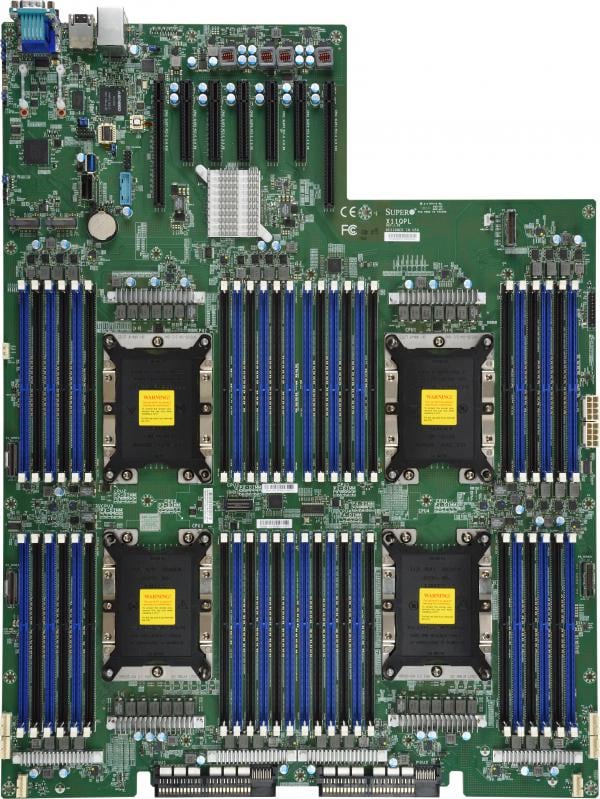
 midnight pollen
jeez that is crazy
quaint current
yeah
midnight pollen
that is an absolute monster
gritty meadow
correct basher
warm path
Damn
112 Cores
Imagine having 112 Cores
In your PC
Also
Who knows a good Clock Speed 4th gen Intel chip
Just emailed my manufacturer @gritty meadow
So no worries
Who knows one?
gritty meadow
they are going to tell you a variation on the following: please look into getting something that is from this decade
gritty meadow
yes, they are leftover random pieces
warm path
True
So know any good clock speed ones on sell?
So I can look for it on list manufacturer gives me
Just in case they give list
So any to recommend?
Just in case I get list
gritty meadow
recommendations are invalid until you have the list of supported models
gritty meadow
why should i list all the i3's from the 4th gen?
because all of them would be an upgrade
except, only a few (most likely) will be supported by your board
warm path
Oh ok
gritty meadow
https://www.techarp.com/computer/desktop-cpu-comparison-guide/11/ <- have a look there

There are so many desktop CPU models that it has become quite impossible to keep up with the different models or even remember their specifications! Therefore, we decided to compile this guide to prov
the picture on that page
about 75% of the way down
what you are asking for starts with the Core i3-4130
warm path
@gritty meadow
I heard that Intel uses same stock cooler on same socket pc
Am I seeing those right? Or Am I wrong?
oak sand
K has none
warm path
I7-4790K comes with cooler
And I heard it same cooler as other LGA1150 Socket cpu
That intel makes
oak sand
Probably, its the same socket so why would it be different