#cpus-mobo-and-memory
1 messages · Page 96 of 1
 gritty meadow
 tacit hemlock
Let's say I wanted to get a little into the visuals :p
gritty meadow
85 vs 130 usd
tacit hemlock
I can make that difference
tacit hemlock
What about wifi?
tacit hemlock
Ok
gritty meadow
so add another 25-35 for a add-in card
tacit hemlock
Ya that's tuff
gritty meadow
but i would like to remind you of the following
i asked you: what is the budget for the cpu+mainboard
you answered 350-400
i fit cpu+main+ssd in that
so, please keep your own words in mind :)
gritty meadow
a "pretty" light in the case is not going to make a game run smoother
and if it is just the pretty lights you want, then i recommend that you buy a lava lamp
:)
tacit hemlock
The problem with that mobo you sent me is I have 6 fans plus a cpu cooler so, which I failed to mention in the beginning so that's on me and not your fault.
gritty meadow
you have a fan hub right now
tacit hemlock
It's a switch that came with the case that they all run into so I need to open the case to change the lights
tacit hemlock
One of the upgrades I wanted was to be able to control all the fans with software
gritty meadow
you would have to talk with someone else then, i know close to nothing about rgb fans.
tacit hemlock
Rather than physically going in there and pressing a switch
Just a convience thing
gritty meadow
aye
tacit hemlock
Ok that's no problem you've already helped me tremendously
gritty meadow
however, doing it by software does not require you have 6 fan headers
tacit hemlock
Ya but It does require me to plug them into the mobo which i cannot now do
gritty meadow
it would be done by a fan hub like you have now, just one that can be controlled by software
tacit hemlock
Ya
gritty meadow
no, you go through a hub
that hub, via a single connection to the mainboard, enables you to control the fan colours
tacit hemlock
The hub does not connect into my board it all goes directly into the psu. The rgb switch is separate from the mainboard
gritty meadow
yes, for what you have "now"
tacit hemlock
That's also why I cant change the fan soeeds
gritty meadow
i am talking ahead :)
gritty meadow
and the part i dont know anything about, is what exact model of fan hub you SHOULD buy
tacit hemlock
Ok
gritty meadow
because i dont have much of an interest in that area myself :)
but, that part is a simple addition
tacit hemlock
One last thing. Would you say theres a sizable performance difference between a m.2 and a sata ssd that I have
gritty meadow
https://crystalmark.info/redirect.php?product=CrystalDiskInfo <- could you grab this

Free download page for Project CrystalDiskInfo's CrystalDiskInfo8_4_0.zip.CrystalDisklnfo is disk utility that supports some types of USB connections, Intel RAID, and NVMe. If anything abnorma...
just the standard version
that can tell you what the model name is
tacit hemlock
Ah sry I'm not at my pc rn I'm on mobile
gritty meadow
chance of you noticing the difference is slim
tacit hemlock
Ok thought so
Well I thank you for all your help. I'm going to get some sleep and finish my pursuits tomorrow. I appreciate you spending time on my little learning session. :P
gritty meadow
best of luck :)
tacit hemlock
Thx
gritty meadow
as for the fan hub question, ask in #cases-psu-and-cooling tomorrow(or whenever)
gritty meadow
nope, early early morning here in europe :)
 golden owl
Guys I have a doubt
Which one is the best for gaming at 1080p ultra preset
Ryzen 5 3600 vs Ryzen 7 2700x vs i5 9600k
 floral jetty
3600 beats 2700x
 fleet inlet
FPS wise 9600K, 3600, 2700X
fleet inlet
9600K beats 3600 no ?
fleet inlet
yep
 fleet inlet
So before buying remembers cores, threads (Ryzen got more) @golden owl
but for pure gaming 9600K wins in single thread as Kuzu said
golden owl
Okay
floral jetty
(I'd still go newer ryzen, like bro cmon)
fleet inlet
yeah 3600 is great for the price
floral jetty
also the 9600k costs $43 more for that 3% gain
golden owl
But if I use ryzen 7 2700x then I also need a high end graphics like rtx 2080 ryt??
floral jetty
you don't need it
golden owl
Otherwise if one has high end and the other has low end
fleet inlet
it shouldn't bottleneck
golden owl
Bottleneck Means??
floral jetty
as far as games go they're pretty good at mostly relying on the gpu's performance
fleet inlet
to pair with a RTX 2080 I would get a 3600 though
floral jetty
That would probably be fine
fleet inlet
With a RTX 2080 i would pair it with a 3600 instead of 2700X, yes.
golden owl
Okay
floral jetty
if you get a 2080 go 3700x
floral jetty
but older
golden owl
And 0.1 GHz extra
floral jetty
ghz =/= performance
fleet inlet
it's older gen
floral jetty
new amd has a smaller lithography, and updates to the architecture
golden owl
Hmm okay
But in many benchmarks I saw that the i5 9600k beated both of the ryzen processor
Even in fps
Though it got only 6 cores and threads
fleet inlet
If you care about FPS a lot 9600K is good choice
Also, OC potential, 'K' processor
But for extra Thread count = Ryzen
fleet inlet
sorry gtg
golden owl
Ok
Anyone
Any help for i5 9600 vs 3600
Which one is good for 4k
Which one is good for fps
Which one is good for video editing
floral jetty
if you're doing editing you'll want a ryzen hands down
and fyi literally anything will support 4k, doesn't mean it will run it well
gritty meadow
@golden owl the questions you have can all be answered with "it depends"
 long geyser
@floral jetty @fleet inlet 9600k is a worse gaming CPU due to worse lows when compared to the 3600
 gritty meadow
new amd has a smaller lithography, and updates to the architecture @floral jetty <- a simpler way of explaining this (which generally makes people not ask questions they have no actual need for the answers on), is this: 3rd gen ryzen has higher IPC than the previous gens.
 shrewd jacinth
Building my first build so looking to go big (have built a new pcs before) was gonna go for a 2070 super and a 3800x but just found a 3900x in brissy for 600 seems like a hell of a deal
All in aud
Brissy is about 1 and a half hours away from me
👍
 safe gale
Hi guys, I'm looking for the best laptop refurbished/used mainly for web surfing and bookkeeping, maybe light gaming, for around $200 or less. I'm thinking Lenovo but when it comes to mobile processor I'm not sure what is good or bad. Can anyone please recommend good cpu's (Intel and AMD) that I should be looking for in a laptop for the purposes I mentioned?
 cerulean nova
@shrewd jacinth what are you using the pc for?
 tropic nimbus
i might go with the 9600k with a 2070
cerulean nova
I would go for the 3600
long geyser
9600k has no real pros, not even in gaming. The 3600 has better lows compared to the 9600k
Also that 2070 better be $400
unless it's a 2070S, which is $500
cerulean nova
^
 naive pendant
and there's some crazy ryzen discount at microcenter rn too. 3600 for 150$, 3600x for 180$
shrewd jacinth
@cerulean nova Gaming with a side of videoediting/ streaming But the deal seems like a no brainer 3800x is 550 and the 3900 was 600 (second hand unopened)
ik when you go to the 3900 you start to lose some of that gaming performance but it would be alright aye
 crude path
dont forget at micro center you get an additional 30 bucks off cpu if you buy a mobo too
shrewd jacinth
Im in australia
crude path
oof
i dont think you need to go that high tho but i wouldnt buy second hand on something like that cause no return policy
gritty meadow
@shrewd jacinth for that price (that you talked about) the 3900 makes sense
shrewd jacinth
@crude path idk how it works over there but ita unopened comes with warranty and receipt
@gritty meadow thats what i thought
crude path
from a store?
shrewd jacinth
No
crude path
from a person like off fb or craigslist or something?
crude path
but see thats sketch cause, why wouldnt they just return it to get full money back then
shrewd jacinth
You cant in au once its been 30 days
gritty meadow
different consumer laws @crude path
shrewd jacinth
Or even if the seal is slightly damaged
shrewd jacinth
Same thing with my ram wanted to return it hasent been 30 days but the seal was slightly open (like if someone opened it and put it back in) and they where like nope
shrewd jacinth

Gumtree
Ryzen 9 3900X for sale Ive managed to get myself a 3950X so do not need this one now Rather than return it I thought Id make someones day and let this go for ..., 1240117757
@crude path ^
crude path
yeah i saw. idk im skeptic about second hand high cost parts lol but if you trust it, go for it.
gritty meadow
limited amount of space they can run away in :)
gritty meadow
aye, i know, and i am sorry for that one, but it was a wee bit too tempting
shrewd jacinth
Nah mate got a chuckle out of it
You could also just drive 24 hours out west and you wouldnt be found also
(From the east coast)
 vocal flax
I got a question, is there any way for me use argb fans when I only have a 12V rgb on my mobo. I have a b360-h gaming with coolermaster 120R ARgb fans\
shrewd jacinth
Not that im aware of @vocal flax But you can just buy a controler like the commanderpro
naive pendant
@vocal flax just buy aorus
 hoary cedar
An i5-9600k is compatible w/ any z390 mobo out of the box, correct?
naive pendant
@hoary cedar yah
hoary cedar
okay sweet
naive pendant
@hoary cedar btw aorus have the best overclocking potential
naive pendant
for its price
gritty meadow
no
hoary cedar
Don't need much oc potential.
Just going to go with a cheap z390, as the budget is tight.
gritty meadow
how many of your parts have you purchased already @hoary cedar ?
 flint portal
is a 3600 a good upgrade over a 4th gen i5
 ionic pewter
yes, that would be a huge improvement
 dusty hollow
Ryzen 5 2600 current cpu, is there a huge difference between that vs the 3000 series
 quaint current
I’d hold of until ryzen 4000, 2600 is still a good cpu
 hollow basalt
Just setup a mobile streaming rig R5 3600, 32gb 3200 ram, and a 2060 super for the nvenc encoding. It will be for streaming and onsite quick video edits. Pics to come.
 delicate bolt
nice
naive pendant
you guys know any nice white x570s?
naive pendant
oof
was gonna make a full white build
are you able to buy heatsinks for x570s or nah
because a full cover white one would be fine
 main pulsar
nah
however
if you look hard enough, you might be able to find a completely white msi b450 board
main pulsar
so?
naive pendant
b450s need overclocking to support that
main pulsar
so does, literally every board in existence
any clock speed that isnt JEDEC spec of 2133mhz is an overclock
so
the term O.C. on motherboard product pages indicate the seppd at which the board is not guarenteed to run
so if b450 supports 2933mhz, but 3000mhz is an "overclock"
it means that they guarentee the board will run 2933mhz modules
naive pendant
what are some other color schemes then
main pulsar
but it might not work with 3000
naive pendant
because alot of the parts im getting are going to need painting if i do white
main pulsar
well, i should say, they dont guarantee 3000mhz to work
like what?
the only thing that i can think of that isnt white are the hdds
which are hidden
back to the oc thing, the motherboard isnt the limiting factor for ram overclocking, its the ram itself.
long geyser
@naive pendant no, the IMC (integrated memory controller) is on the CPU, not mobo
so on Zen+ b450 is rated for 3200, but Zen2 b450 is rated for 3466/3600 depending on board
main pulsar
buuuut, almost every board in existence will get those modules up to 3600 anyway
regardless
naive pendant
bet i finna just buy a ddr4 am4 board made in 1985 then
main pulsar
lmao
long geyser
glhf
main pulsar
look, whats your budget, i will piece together an all white build
sounds like a fun challenge
main pulsar
omggggg
thats enough for an epic white build, i kno just the parts gimme an hour
what sites do you wanna buy components from?
naive pendant
amazon and newegg
i already chose a cpu and graphics card tho
graphics cards are EZ to paint
main pulsar
which ones
naive pendant
like 3070/ti and 4700x
naive pendant
well 3070 ain't out yet bro
main pulsar
those parts arent out yet
naive pendant
yeah
main pulsar
if you want a successful build, ask us the day you plan to purchase
naive pendant
once both 4700x and 3070/ti are out
naive pendant
i just want help with all the other parts
main pulsar
in particular?
naive pendant
doing 1440p144hz and possibly 240hz once its affordable
main pulsar
well, we cant help you with the other parts, when we have no experience with parts that arent out yet
naive pendant
i mean like mobos
main pulsar
once again, i have no idea
naive pendant
only things im buying that aren't out yet are the cpu and graphics card
everything else im buying current gen
main pulsar
x670 could be half the price of x570
long geyser
prices change over time in general
naive pendant
at that point i just OC it
this is what i came up with
just most parts turned white
main pulsar
so its best to wait for the parts to release, and for reviews to be out.
naive pendant
oh remove the p400s
main pulsar
and that list will be mostly outdated in a month
and even more so when ryzen 4000 launches
this is the nature of the pc building market
naive pendant
oof well thanks for your time
long geyser
dont get TN panels with that budget
long geyser
If i were to buy now it'd kinda be this
https://pcpartpicker.com/list/MxdjNq
 dusky flicker
Funny thing is that the 2080 ti is almost 1/3 of the price
safe gale
Hi guys, I just bought a Dell latitude 3350 and I don't know a lot about laptops. Does anyone know if the cpu is upgradeable? It has an i3 6006U. I want something with more power if possible
safe gale
Ok thanks @main pulsar
I picked it up for only $100 on LetGo app from a neighbor. It's like brand new condition. Not even a scratch on it. Ni signs of use wear and tear. He said he got it for school and rarely used it.
Ram upgradable to 16 gb 2400mhz ddr4. Has M.2 slot and sata ssd slot
fleet inlet
Any vague estimation dates for Ryzen 4xxx ?
naive pendant
nope but the new one is in 2 days at $3990 USD
@fleet inlet
i dont want to think about a 4000 series
fleet inlet
What costs 4K USD ?
naive pendant
the amd ryzen threadripper 3990x
fleet inlet
64C128T
naive pendant
about to post screen shots
fleet inlet
Who would need that ?
fleet inlet
This ThreadRipper release won’t affect Ryzen 3rd gen prices though
naive pendant
2.9 base speed per core(64 cores), wtf
fleet inlet
64 cores though
fleet inlet
Haha, threadripper things you know.
I wonder who would really use this CPU at its fullest
Like NASA rigs
naive pendant
NASA, NSA, FBI, CIA
government pretty much
put still, when your CPU is 9/10s the price of your computer....
also, the amount of cooling you'll need
and the minimum RAM too, I bet it doesn't have a max, but a minimum RAM
naive pendant
honestly 3990x and little brothers more intended for big movie production with after effects {my job} 3d rendering and CAD work @fleet inlet @naive pendant
quaint current
But it beats any of intel single mobo configs, at less than a quarter of the price
naive pendant
price really don't matter in segment since it's pocket change compared to software cost @quaint current
quaint current
but I mean if your a studio buying 20 of them, would you rather spend 400k and get less performance or 80k and better performance
naive pendant
i agree with you its price is not really looked in studio markets its how much faster one product is compared to other
plus most firms have IT admins who take care of seeing which product is next investment for studio
 oak sand
Hey is the G.Skill Ripjaws V 3600 good for a ryzen 5 3600?
 hollow thorn
Yes
long geyser
The CL16 one, yes
oak sand
Yeah
main pulsar
Newegg shipping is like 3.99, right?
main pulsar
Oof
oak sand
Not for me☹
hollow thorn
The shoprunner thingy
dusty hollow
This is the current mobo I have should I upgrade it?
Have had it around 3 years
I got it cause I was on a budget but I was wondering should I get a new one for future support
hollow thorn
dont switch yet
dusty hollow
Okay
 spiral glen
hollow thorn
spiral glen
hollow thorn
@spiral glen you can run more with splitters.
dusty hollow
@hollow thorn is there a reason why I shouldnt switch
hollow thorn
@dusty hollow I don't believe it's worth changing Mobo because AMD is only going to support socket AM4 for 1 more year, and they're moving to socket AM5 or smth after 4th gen ryzen
Well support is going to be there they're not going to drop their later CPUs on AM4
dusty hollow
thanks!
 dusk oracle
Good chance AM4+
cause of their record of always adding + at the end of their sockets
dusk oracle
and even for Zen3 there would be no point to upgrade to anything else
Box is the Gigabyte master so
 weak hamlet
I have that board.
lots of people got bad reviews on it for being DOA
but honestly, I haven't had a single issue with mine.
 fair vessel
Gigabyte has good hardware but crappy software
There's a pinned doc in this channel, see if that helps
oak sand
Same
 sturdy lion
RGB does give quite a performance boost... much better then stickers at a lower power consumption
lol
crude path
woops wrong chat
 ionic fable
i have a auros m and it only has two spots to plug in fans so was thinking about upgrading or changing it so i can have more fan slots in my tower
hollow thorn
@dusk oracle I'm just saying am5 bc a bunch of companies are going against their usual naming schemes, including AMD. Like how its Zen, Zen+, Zen2, Zen3.
dusk oracle
Well companies would also make more money if they were to make a board that is AM4/AM4+ just like what they did with FM2 and AM3
gritty meadow
@hollow thorn that naming scheme that you mention is like that because of the internal progression
hollow thorn
Naed, but Zen+ was just a refinement of Zen, like how Zen 3 is just refinement of Zen 2
 misty belfry
the next Zen2+ or Zen3 is going to be on AM4, then AM5 comes next
right?
i've heard Zen2+ is going to be a thing for the next CPU rollout
and it probably will run the same hardware as zen2
long geyser
It'll be Zen3, but afaik think about it as Zen2+
quaint current
im pretty sure they just wonked zen+ and are gonna just use 3,4,5,6,etc
 blissful dragon

Visit https://www.squarespace.com/LTT and use offer code LTT for 10% off
Thanks to Thermal Grizzly for sponsoring today's episode! Buy Thermal Grizzly Conductonaut on Amazon (PAID LINK) at https://lmg.gg/conductonaut
Pulled a Linus and dropped your CPU? Got a couple busted ...
 granite river
you can buy pins on ebay and slap it XD
 magic valley
I've done that.
But i dropped it in my motherboard.
And bent the motherboard pins...
dusty hollow
when ever my pc boots all my fans rev up is that normal?
crude path
do they go back down?
i believe all fans will run at max during initial start up. happens on my pc and its not an issue
crude path
yeah its fine lol.
 wet bone
 wide bone
I know the r5 3600 is a better chip, but is the 2600 still good? I want to build a pc in the next few months because I’m tired of the slow laptop life. Like my laptop has a r3 2200U and anything will be an upgrade coming from that
 urban ferry
2600 is a fantastic processor
 spring terrace
the 2600 and 1600af are both great
just avoid the first gen ryzens
the 1600af is zen+ , its just a recycled 2600
it is a bit cheaper
long geyser
first gen is fine tho. Zen+ barely brought any perf boost, just a better IMC
and better PB
 scenic kayak
Are MSI MoBo’s trustworthy, I’ve heard some aren’t, and I don’t want to spend 150 on a bad MoBo
scenic kayak
I’m looking at the B450
 verbal crown
ah
scenic kayak
The pro carbon ac
But I don’t think I need the WiFi chip though, and that’s the main reason for getting it imo.
Would it be worth it to downgrade to the tomahawk/ a different brand?
verbal crown
Have you considered the MSI B450 Tomahawk?
scenic kayak
Very briefly
scenic kayak
The ryzen 7 2700x, I’m trying to do some engineering work/ gaming
verbal crown
technically both boards would work great with the 2700x
scenic kayak
Technically?
verbal crown
the Tomahawk just offers better cooling on the VRM's so kinda is more future-proofing in case you ever wanted to OC or upgrade CPU in the future
but if you aren't going to OC (and on a 2700X it's really not worth it), then either boards would work out nicely
I know because I have a 2700X myself
scenic kayak
So are MSI boards trustworthy?
verbal crown
yeah, every brand makes good and bad ones
MSI's b450 are well designed in my opinion
MSI's X570s are awful
some are
scenic kayak
Is there any easy way to tell which are good and which are bad?
verbal crown
hate to say it but you kinda do have to just watch some videos of benchmarks being performed
hang on a sec...
hollow thorn
there is a sheet
for telling how good a mobo is
Linus Tech Tips
Credit to:@VegetableStu @GoldenLag @LukeSavenije The following list is based on facts, ranked on power delivery and known problems. The list will include boards that support CPU overclocking available at retail from different brands. Currently only AMD boards are done because...
hollow thorn
(image you cant see much)
quaint current
i just have it somewhere on my desktop
verbal crown
I really like that VRM spreadsheet
hollow thorn
Yea I dont have mine on-hand
quaint current
just be too lazy to move it like me :v
verbal crown
@scenic kayak Honestly just based on that, as long as you dont get the Pro M2, you should be fine
A while back the YT channel Hardware Unboxed did a top 5 B450 MoBo's I think you might like it
 violet wolf
should I keep r7 2700 or go for r5 3600 ? need some advices pls
gritty meadow
do you currently own a 2700?
violet wolf
yes
gritty meadow
are you currently limited by what it can do?
violet wolf
hard to say, does r5 3600 give better performance ?
oak sand
First consumer 64 core cpu
main pulsar
Tbh, drop one of these in a HPC server
I mean, it probably destroys an epic server chip
oak sand
This would be the best at running minecraft
main pulsar
Just with less pcie lanes
main pulsar
I think Minecraft uses like 4 threads now
main pulsar
Yeah, I typed epyc, but autocorrect
oak sand
Ah
Amd already had no competition
With intels chips being twice the price for less performance F
main pulsar
Intel will be back soon
gritty meadow
yes/no
oak sand
All depends on the workload
main pulsar
I guarantee their process after their failing 10nm will be designed with chiplets and high core counts in mind
Thats almost guaranteed
main pulsar
What's oof about that?
gritty meadow
88 instead of 128 <- since when?
main pulsar
It was an amazing chip
gritty meadow
3990x is a 64 lane chip
main pulsar
Especially for amd
oak sand
Pcie lanes
gritty meadow
yes, and as i said, its a 64 lane cpu
main pulsar
I dont even see where it says pcie lanes
oak sand
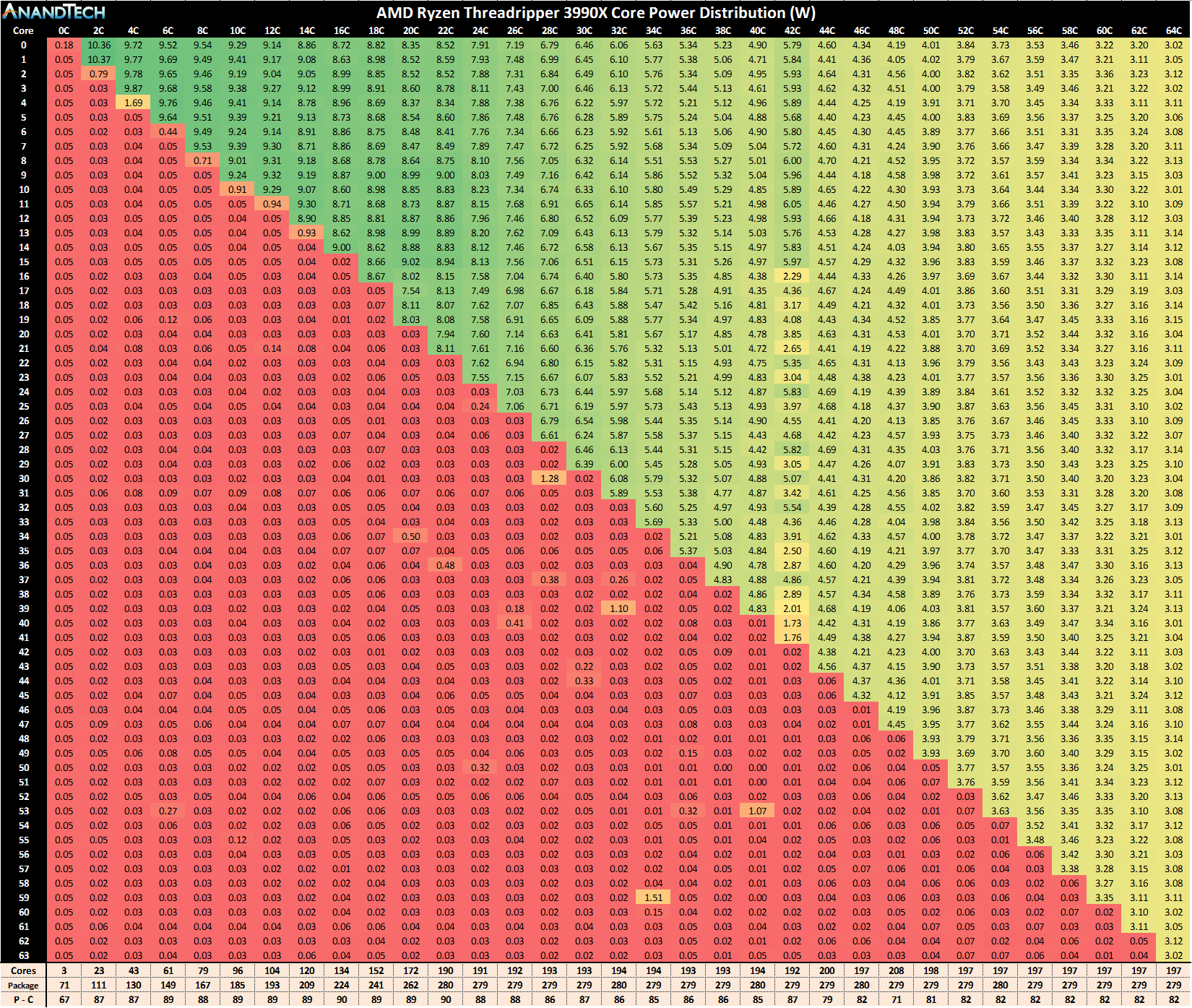
"AMD Ryzen™ Threadripper™ 3990X Processor ... An unprecedented 88 total PCIe ® 4.0 lanes to meet large GPU and NVMe needs."
gritty meadow
something if off there
oak sand
Sorry
gritty meadow
it is "supposed" to be a doubling of the 70x
main pulsar
That might be including the ones that come with the chipset
gritty meadow
hm
main pulsar
Idk
gritty meadow
aye, they have to be
main pulsar
If the sTRX40 has 32 lanes, and the bus between the CPU and chipset uses 8 lanes, that gives 88 lanes
gritty meadow
where is that slide from?
oak sand
LTT
oak sand
They got early access
main pulsar
I mean, those specs are kinda obvious for the most part
oak sand
Only 4 memort channels compared to the epycs 8
gritty meadow
and that fits what i said about double IO
gritty meadow
that is just like the 7002 (tdp that is)
oak sand
7742?
gritty meadow
sorry, the 7H12 model that is
gritty meadow
7742 is 230 or something like that
 oak sand
Wow
gritty meadow
power use per core
oak sand
So many cores
oak sand
If you think about the per core power draw is quite low
gritty meadow
no, not quite low
granite river
cute
oak sand
Compared to 6 cores with 95w tdp
gritty meadow
stupidly low
oak sand
The most it takes is like, 5
 gritty meadow
"losing" 400mhz but running at less than half power/core ? THAT is fun
granite river
quaint current
oak sand
Intel is sad
quaint current
bruh this thing
oak sand
For real
oak sand
Yes but less than half cores
granite river
yup
granite river
xD
oak sand
I dont think it does tbh
gritty meadow
hm, what OS are LTT using?
quaint current
win10
oak sand
Windows
gritty meadow
yes, which version, because pro tops out at 64 cores
it starts splitting stuff at that end of things
quaint current
gotta wait for tech jesus’s to see all the data :/
oak sand
@quaint current lol yeah
quaint current
idk I think he mentioned something about it but I just skimmed it
oak sand
Probably enterprise or something
granite river
xD
oak sand
Thats gonna be fun
Im such a nerd
They are running og crysis off just the cpu
And its at like 40 fps
main pulsar
Lmaooooo
oak sand
I saw someone on the pcp forums
No budget
Deep learning and workstation pc
Custom watercooling
gritty meadow
there are blocks for everything.
main pulsar
I'm gonna be honest, I wish I had a workload that justified this cpu
gritty meadow
it it just a question of asking a vendor to make it.
gritty meadow
if there truly is "no budget" the tooling price would not matter
gritty meadow
that is still pocket change
gritty meadow
gah, no comment.
oak sand
I dont know much about stuff this good
Or custom cooling
And it makes me sad because seeing this build done would be so beautiful
The waterblock for the 3970X is as much as my mobo
oak sand
Wht is that sorry idk
gritty meadow
server racks
gritty meadow
take your hardware, stuff it in a 3U /4U chassis, throw enough fans in there that you can make a windtunnel jealous
place said rack with machine in a different room
be happy
gritty meadow
no, they want reddit points
gritty meadow
performance first
oak sand
But its valid, in a professional workspace you cant have rainbow barf
gritty meadow
you can, but the other servers wont care
oak sand
Lol true
 subtle fox


 harsh hawk
jesus
 hallow star
Would you rather have 64gb but with 3600 or 32gb with 4266 ?
 atomic sandal
Cas latency?
price points?
I have a technical question for anyone who can answer this... I have a Gigabyte X470 gaming 7 and looking to rock 2 HDDS,2NVMEs,1SSD.. How will this saturate my bandwidths?
Also, if I choose to go 3700x upgrade will i be able to take advantage of all of the pcie lanes running it with gen3?
Currently holding a 2700x to update bioses and wondering if it will be worth going 3700x+
atomic sandal
$629 is wayyyy to high
you could buy two of these kits 3600 cas 16 and use the 64 for a better price
Also, there really isn't an advantage going over 3600mhz even with Ryzen from what I understand
hallow star
32 GB is the same cas
atomic sandal
Price?
32GB wins in that ballpark but most motherboards will not come close to supporting 4266
you might want to checkout your manual
hallow star
479
atomic sandal
There are better deals out there or are you set on these two kits?
these g.skill memory is hard to beat
hallow star
G skill in general? I was more looking for rgb black kinds , I typically go with corsair because they are my favorite brand which is why these prices are high
Which I did find a lot cheaper too. Probably go the g skill route
atomic sandal
2 more kits same speed and should be way cheaper on you, fit closer to your color schemes
hallow star
G.SKILL TridentZ RGB Series 64GB (4 x 16GB) 288-Pin DDR4 SDRAM DDR4 3600 (PC4 28800) Desktop Memory Model F4-3600C16Q-64GTZRC https://www.newegg.com/product/N82E16820232915?m_ver=1
All the above are way cheaper
atomic sandal
That is a good option
hallow star
Which is nice
atomic sandal
Plus you get the 64GB
hallow star
I was looking at the corsair dominator before wonder why the prices are doubled
Is there anything special for the dominator series?
atomic sandal
They're highly known in the PC world is all and people like to flex with them.. Nothing special
Majority of the time they will not even benefit your Argb connection to manufacturer motherboards as they are controlled via their own softwares
Supply and demand thing I guess.. beats me
hallow star
Gotcha
atomic sandal
Meh.. maybe a little bit better at overclocking(Benefit of the doubt)
I have a technical question for anyone who can answer this... I have a Gigabyte X470 gaming 7 and looking to rock 2 HDDS,2NVMEs,1SSD.. How will this saturate my bandwidths?
Also, if I choose to go 3700x upgrade will i be able to take advantage of all of the pcie lanes running it with gen3?
Currently holding a 2700x to update bioses and wondering if it will be worth going 3700x+
Thoughts?
main pulsar
eh, the 2700x is good enough
you wont see a big enough difference to justify paying 350 to get a 3700x
as for storage, your hdds and ssd will use sata ports
and your nvme will use either 2 or 4 lanes each
atomic sandal
So does it drop my GPU connection to gen2?
main pulsar
so your gpu and one nvme closest to the socket will use 16+4 lanes
the second nvme will use the 4 off of the chipset
atomic sandal
ahh, thank you! Appreciate it!
main pulsar
but, all your devices will still run at 3.0 speeds
naive pendant
Which mobo is better
Gigabyte b450m ds3h
Or the msi b450m pro-vdh max
Can someone help me with my problem with my Ram I’m having
What is it
@naive pendant
So When I try to put my ram sticks into dual channel it won’t boot but when I put them side by side it boots what should I do
Which mobo is better
Gigabyte b450m ds3h
Or the msi b450m pro-vdh max
 buoyant relic
Does anyone know what motherboard supports the 3600 that has up to date bios?
main pulsar
The motherboard listing will tell you
Most more expensive b450 and x470 boards will have the updated bios
Like in the $110+ range
main pulsar
That's why I said the motherboard listing will tell you
gritty meadow
as a new bios gets written, it will be flashed on any product from that point on
motherboard listing doesnt tell you about the age of the stock
main pulsar
Usually it's a selling point for a board, so retailers will advertise it as such
gritty meadow
hence why i strongly encourage people to email the shop and ask
yes, when you get to X amount of money for a product, it becomes a selling point, but that does not exclude the ones that are below that in price from being just as capable
long geyser
Also depends on IMC from CPU
gritty meadow
@long geyser the context escapes me, elaborate.
long geyser
@gritty meadow I was thinking about RAM, not CPU. But was talking about Integrated memory Controller
which seems like CPU is being talked about
gritty meadow
cpu support, which has nothing to do with imc
oh well, as long as it made sense for you when you posted it :)
gritty meadow
hey, as long as you are having fun :)
long geyser
Yep. Totally, fun
gritty meadow
see, there you go, you are having so much fun that the fun cant even stand right
long geyser
Yes. Im sure that's the case. I like your positivity
long geyser
yeah
 unkempt dome
so i have the amd wraith cooler on my ryzen 5 2600 (besides the point, just context), and i was thinking of adding another 8-16gb of ram. only problem is, when i look at my motherboard, it seems as tho if i was the get another pair of g.skill ram sticks, it wouldnt fit
the cpu cooler seems to be too close to the closest ram slot and im curious why
main pulsar
idk, try putting one of you current ram sticks where you want to install one
do a test fit
gritty meadow
@unkempt dome that would be very weird if the stock cooler blocks the ram slots
unkempt dome
it doesn't block it, but i feel like if i put a ram stick there it'd be touching the cooler
gritty meadow
unless you have a very big heatsink on the ram, it shouldnt
even if there is 0.5 mm between, it will be fine
 fervent lagoon
I've used Wraith Prism in ITX build. There's just big enough of an gap to fit ram well
misty belfry
i'm wanting to use a wraith spire, i've been using a hyper T2 but it doesn't cool the VRMs
naive pendant
i'm probably gonna buy the z390 maximus 11 gene
naive pendant
Cheap motherboard?
cerulean nova
For what cpu?
cerulean nova
I would get the b450m pro4 if it's a budget build
Assuming you live in the US, it's one of the cheapest b450s that is actually decent
But is you are getting like a 3700x I'd get the tomahawk max
naive pendant
B07R7Q3JZH
gritty meadow
@naive pendant BX80684I39100F <- this was the number i was looking for :)
and yes, that one is the Box variant
so it should have a cooler included
and depending on your noise tolerance, you dont absolutely need a new cooler
naive pendant
Ordered 👌🏻
 frank falcon
friend is going for a new CPU. Hes thinking about the newest gen AMD vs the i9 9900k. Which one would you say he should get?
 devout mothBOT
 ALEX#9965 has been warned
Reason: Bad word usage
gritty meadow
@frank falcon gaming?
gritty meadow
then amd is the logical choice [edit: then]
cerulean nova
yes @naive pendant
naive pendant
Okay, thank you!
 umbral valve
is a 2600x + tomahawk max + 16gb ram for 250 usd good?
oak sand
Why is the max better?
The aorus pro wifi has a good souncard, and wifi
"Vrms" wont really massively benefit a 2600x
umbral valve
but gigabyte bios sucks right
is the sound card better than the tomahawk max
i mean it’s rgb too
what about the heatsink
 warm berry
Didn’t gigabyte massively overhaul their bios or is that just for the new boards
umbral valve
wait no max was $15 more
gritty meadow
yes, the soundchip is better on the aorus, but the b450 aorus pro wifi is not 80usd (unless that is an instore price for microcenter)
gritty meadow
just to make certain, we are talking about "Gigabyte B450 AORUS PRO WIFI" right?
gritty meadow
exact model names matter for this, hence why i ask.
oak sand
The tomahawk max is pretty much for the 3000 series, or thats its main selling point
gritty meadow
tomahawk max has a horrendous soundchip, this is fact
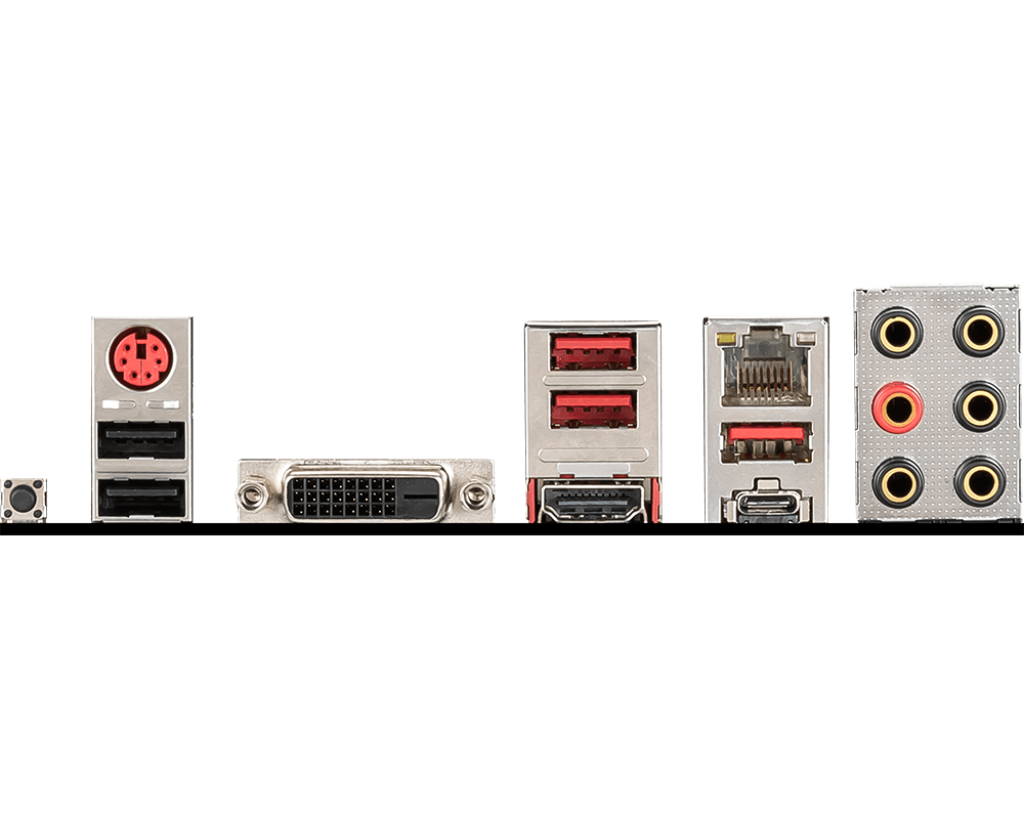
the one thing the max has, which the aorus doesnt, is a ps/2 port


 gritty meadow
it is a feature that matters for some
umbral valve
does microcenters deal end today
what’s a ps/2 port
doesn’t the max have a usb c too
i’ll ask my parents and if they really wanna save the $15
 split copper
PS/2 is great cause then you don't have to populate USB ports
umbral valve
people say the soundchip is good enough for an average headset
split copper
Serial port for keyboard/mouse
gritty meadow
people also think that gamer headsets are good for music
split copper
Oof
gritty meadow
but i have to ask, this machine is that for their use only?
umbral valve
?
umbral valve
oh for me
they said i get ethernet and they use the wifi
cause it’s fiber optic or whatever
umbral valve
1080p 120-144hz
oak sand
U got a list?
umbral valve
yea
how much of a difference is the gaming max and tomahawk max
is that not a good deal
long geyser
both Tomahawks arent good unless you want to OC or get a 3900x. If not for the VRMs that board would be overpriced for what it is. So unless you plan to goto a 3900x or smth the Tomahawk is a bad deal
umbral valve
wdym both tomahawks @long geyser
and then if they’re bad which ones good for a 2600x
idk what’s so bad about it
@long geyser i asked between gaming max and tomahawk max lol
long geyser
For example, sound chip
Gaming max, Tomahawk max, etc
not that great on them
same with non max
umbral valve
but the sound chip won’t matter that much with mid tier headphones or apple earbuds
is that the only thing bad
soundchip?
long geyser
M2 slots, RGB headers, 16x PCIe lanes, WiFi, USB 3.0 slots are somethings you lose by going tomahawk
vs say Gigabyte Aorus Pro WiFi for $110
umbral valve
it’s $80 if microcenter still has deals
tomahawk has usb a and c tho
i only need one m.2
i mean rgb headers probably not
don’t know about pcie
long geyser
both have 1x 3.1 type a/c. tomahawk has two 3.0 type a and two 2.0 type a. Aorus has four 3.0 type a
umbral valve
lemme see if microcenter still doing the sale
long geyser
If it's $80, then that's good. But at the standard $110 - $115 the tomahawk is only good for VRMs
as in mildly OCed 3900x
crude path
if you have micro center near by, go there. they price match and usually are beating out amazon and newegg. plus if you need to buy a mobo and cpu, you get 30$ off for doing that too
umbral valve
tomahawk max is 94.99
aorus pro wifi is 79.99
microcenter price matches but they have the lowest deals
do u know when the deals end @crude path
crude path
i do not but theyve been going a while.
they dont always have the best deals, but usually do.
naive pendant
microcenter keeps alot their deals going on for long time
umbral valve
do u think that i should save the $15
crude path
and price match is a plus.
umbral valve
if it does end like a day after u think they’d still do sale policy
crude path
are you getting a cpu too?
umbral valve
i’ve gotten one but i bet they’d let me get the $20 off if i show the i bought one from microcenter
crude path
id go with hei's recomendation he pretty much knows what hes talking about.
i dont think they do that deal retroactively.
hei knows more than me lol.
umbral valve
i mean i could order now and then do a pickup and then like a trade in
naive pendant
on deal its has be when purchase both
umbral valve
i just thought tomahawk max was a good choice
crude path
i mean i doubt you will have any trouble with the tomahawk max if everything is stock but if you want to OC then you gotta worry about other things
umbral valve
i’m probably not gonna oc anything
crude path
iunno if you're set on it, get it.
if you're worried about it, get the other one.
mobo doesnt actually matter that much imo if everything remains stock
i buy my boards based on how many pcie, and what other features it has. so like my current has 6 pcie slots, 2 m.2, etc etc.
umbral valve
i’m worried cause a lot of people say the aorus pro is probably better
does gigabyte bios suck
crude path
ive never used gigabyte bios
i currently have the asus x470 somethin or other and its pretty nice.
umbral valve
i’ve heard it does i just don’t know
crude path
it was 110 at micro center.
umbral valve
what does pcie x16 mean too
crude path
its like the gpu size pcie slot
usually mobos will have 2-3 pcie x16 slots
mine has 3 of those and 3 of the x4
its just the size of the slot
long geyser
Gigabyte BIOS isnt horrible. Their organization isnt the best so people say it sucks
but they still have all the features one should need
umbral valve
what are vrms
long geyser
AsRock tho has both a bad organization and misses some features apparent;y
umbral valve
everyone always mentions them
long geyser
voltage regulator modules
umbral valve
what they do
long geyser
basically, power delivery to component x (CPU, GPU, memory, etc)
umbral valve
why are they useless unless it’s a mild oc 3900x
long geyser
It's mostly that most boards in the Tomahawk price range cant do a mild 3900x OC because their VRMs and/or VRM cooling isnt good enough. So the VRMs will overheat
or get to uncomfortable temps
umbral valve
so then vrms are useless for a 2600x
crude path
but if he doesnt want to OC he should be fine right?
long geyser
of course you still need them
but you dont need to worry about them when buying a mobo with a 2600x
umbral valve
i knew i should’ve got the pro wifi
long geyser
but, if you do plan to upgrade in the future, 3 years or so when 3900x is (probably) cheap
umbral valve
i just saw the tomahawk and knew it was good
crude path
oh did you already buy the tomahawk?
crude path
yeah it will
long geyser
tomahawk has a good reputation because of the BIOS flashback and ease of upgrading BIOS, plus being a cheap board to handle a 3900x
tbh no real reason to go back. It isnt horrible
naive pendant
^
umbral valve
i could save $15 if they allow it
long geyser
If you dont need the extra stuff I said about the Aorus, kinda just an annoying hassle to deal with
naive pendant
i would listen to hei he knows what talking about
crude path
lol i said that earlier
umbral valve
so i should or shouldn’t go back
long geyser
@naive pendant wow, you have regular and rookie role
you must be special
There isnt a huge need to go back. Tomahawk is still good enough for many. But if you want the extra stuff that I mentioned then it could be worth it. I'd say on average biggest point most people would like would be the WiFi
umbral valve
my parents said i shouldn’t get wifi cause the fiber optic is for them and i get ethernet
what’s a bios flash back
sorry for all the questions
long geyser
you can update the BIOS without a CPU
umbral valve
oh
long geyser
so get a b450 that doesnt support 3x00 series, but then get a 3x00 CPU. You are kinda going through a hassle to get a CPU that can work with the mobo
umbral valve
oh
long geyser
That isnt as big of an issue now as most b450 is updated out of the box anyways
long geyser
It has two, Aorus has three
nothing much as most people wont use two, or three
but something to consider
umbral valve
microcenter has a rma and doa policy right
i’m assuming yes
ok since i have all three things should i install them on the motherboard or wait and do it all at once
long geyser
three? CPU, mobo, what else?
umbral valve
ram
long geyser
yeah, test it asap
umbral valve
i think i got them for a good deal
how do i test it without anything else tho
i could go test it at my friend‘s lol
long geyser
if you ever get a DOA it gets annoying if you push off the testing
As for that you'd probably want another computer as you need a GPU/PSU for proper testing. But with just a PSU you can make sure that there arent and post code errors (doesnt really help with actual posting tho)
umbral valve
i’ll probably get my other parts before the 30day return policy ends
also can i but any type a in 2.0 or 3.0
last question lol
just looks like there’s 5 usb a
long geyser
you can, but if you say plug a 3.0 USB stick into a 2.0 port, it'll run at 2.0 speeds
umbral valve
ohh
the numbers are speed related
ok
thanks
love you
oh wait one more but it’s kinda psu related
psu+motherboard
long geyser
glad to know I am loved
umbral valve
the corsair cx says it doesn’t have like the extra 4 pin connector for an extra like 12v
ok nvm i refreshes and it went away wtf
love you love you love you
long geyser
So basically that is to do with the mobo having a 8+4 pin for CPU power deliver for "cleaner power" or whatever. Basically a lie. The 8 pin EPS connector (CPU connector) supplies 300w of power by ATX spec (technically could go over that, but not recommended). No AM4 CPU takes that much power
So a single 8 pin will always be enough unless like LN2 OCing or smth of sorts
umbral valve
oh ok
so basically since you told me the tomahawk wasn’t a terrible choice compared to the aorus pro wifi then i feel good
long geyser
yeah
 south wind
is there any 2x 8 gb sticks clocked at 3200 for a good price