#cpus-mobo-and-memory
1 messages · Page 89 of 1
 ruby hare
is asus tuf x570 wifi plus good and is it going to go back on sale
 misty belfry
nobody here can confirm or deny what will or will not go on sale
it is probably a good board, let me look into it
 lunar jungle
Best thing to do to get notified of sales is to sign up for the Newegg emails
misty belfry
I would say the board looks good to me, and they're promoting the power delivery as well as some other good stuff , since i am not intimately familiar with it i can only say that if i was looking for a high end X570 board i would probably give that one some serious thought
 long geyser
I havent done too much research on TUF but I have heard it to be really good for a cheap x570. One of the best for being the cheaper x570. Tho I'm pretty sure prices changed a bit and it's decently more expensive than the Asus Prime P while still being close to same quality. You can always go for a simple PCIe wifi add in board as with a non WiFi mobo, if that makes things cheaper.
 elfin warren
I have the tuf wifi
Fantastic vrm and options. Go for it!
Has features and parts of a $300 for $200 or less
misty belfry
the wi-fi included on these motherboards is really good though
re: using a cheap addin card
the board i'
i've chosen has the same thing
very fast, and with bluetooth featured
intel chipset
 hollow thorn
Would integrated wifi on a board take up PCIE lanes?
hollow thorn
Oh thats interesting
elfin warren
Of course, this depends on the motherboard but I find it's more the case than not
hollow thorn
So my B450 board w integrated wifi doesnt give enough lanes for a x16 GPU and a NVME ssd?
elfin warren
What board?
hollow thorn
Msi b450 gaming pro carbon ac
 gritty meadow
it does
hollow thorn
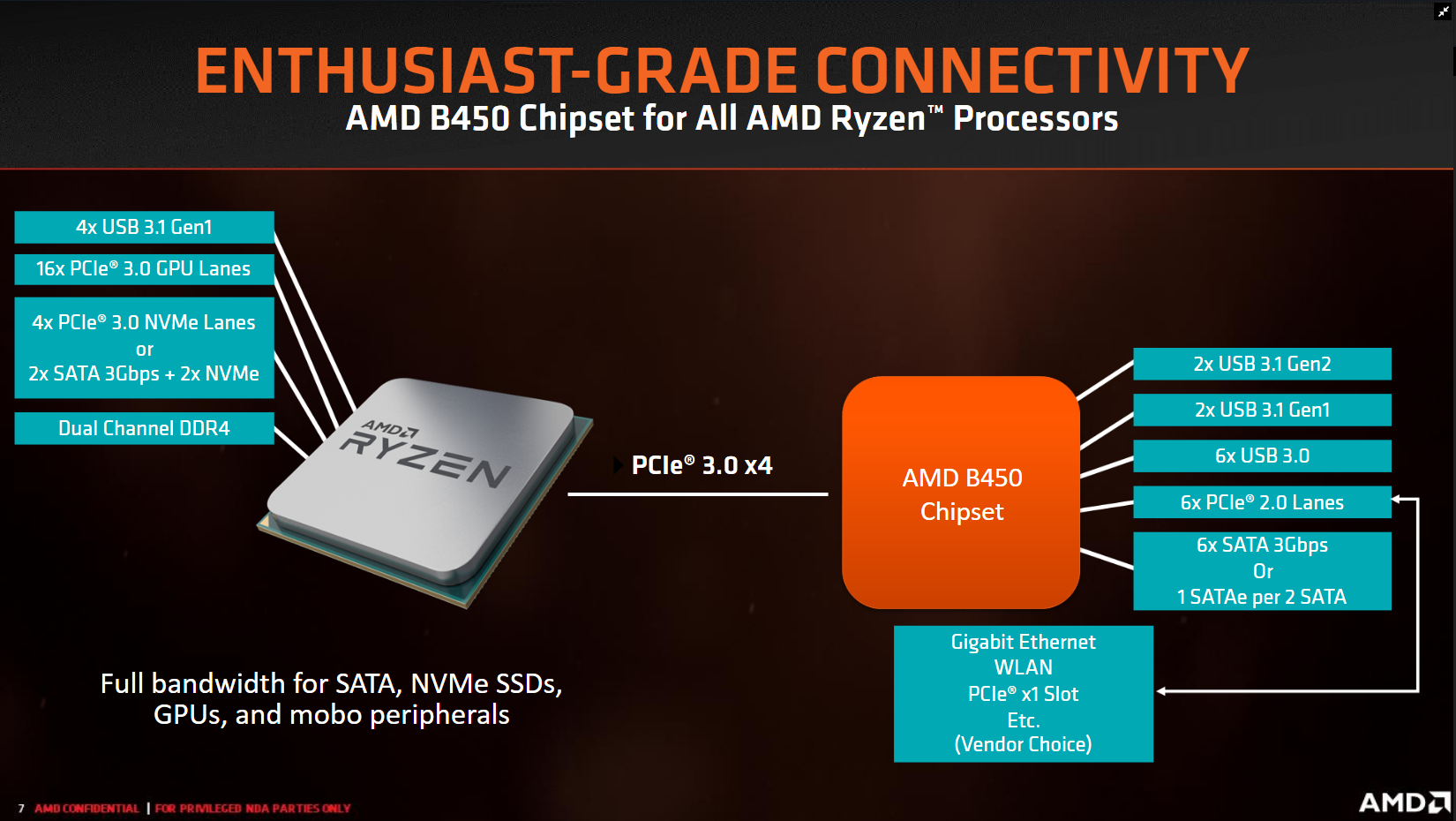
If I remember right ryzen 3rd gen has 24 lanes, 4 for chipset. 16 for GPU, and 4 for NVME
elfin warren
I don't see WiFi listed there?
long geyser
on board WiFi probably take from chipset lanes
gritty meadow
no probably about it it @long geyser
long geyser
wouldnt be surprised if it took from ethernet, only can run one at a time (wifi or ethernet)
gritty meadow
they do (take it from chipset)
elfin warren
Well, it's in the picture but not listed in the Specifications
hollow thorn
Brb
gritty meadow
it is nothing to worry about
 hollow thorn
Ok thanks
elfin warren
Even if it was GPU PCI-E lanes, there is almost no difference in FPS between x8 and x16
We're talking 1-3 FPS
gritty meadow
and that in select titles
elfin warren
Only reason I got on the PCI-E 4.0 bus was for NVME
GPU
s have a long way to go before they actually need it
gritty meadow
and we dont currently have consumer retail pci-e 4.0 ssd controllers
e13 is pci-e 3.0
if memory serves, it wont be until the E18 controller ships that phison will have 4.0 native controllers
 sharp blaze
There are reports just this week that running the 4gb 5500xt on a pcie 3.0 slot limits performance because it cant write data across the bus fast enough from the system ram to the card. the 5500xt is physically limited to x8. Its apparently not an issue on 8gb cards.
elfin warren
That almost doesn't make sense
sharp blaze
some cards were losing up to 12% performance on a 3.0 bus
elfin warren
Link?
sharp blaze

Support us on Patreon: https://www.patreon.com/hardwareunboxed
Merch: http://crowdmade.com/hardwareunboxed
Radeon RX 5500 XT - https://amzn.to/2YIbVGL
Radeon RX 5700 - https://amzn.to/2FYq5v5
Radeon RX 590 - https://amzn.to/2qP0KvS
Radeon RX 580 - https://amzn.to/2OqZPjx
Rad...

Neowin
While the bandwidth provided by PCIe 3.0 is found to be sufficient for most GPUs with sufficient VRAM, the 4GB Radeon RX 5500 XT is found to be struggling possibly due to its PCIe x8 limitation.
the 4gb card has to write move more data across the bus. The 8gb cards seem to have almost no difference between gen 3 and gen 4.
sharp blaze
a x8 gen 3 bus has half the bandwidth of a x8 gen 4. I personally think it was somewhat intentional by amd to try and prove that gen 4 is worth investing in.
they haven't said anything about it that I have seen though
elfin warren
Yeah but
4 GB graphics cards are going the way of the dodo bird
Bad way to prove a point
sharp blaze
for midrange they are still viable, but not for long. this is the last gen that I think less than 6gb will be usable for anything other than esports.
elfin warren
Exactly. Even midrange cards are 6GB now. 4 GB is more towards the lower end of current card hardware
 rich compass
Has anyone had experience with OLOy memory? Their stuff is super cheap (32GB 3600 for $105) but they're so new that not a lot of reviews are out.
sharp blaze
I have seen a few people with that ram, no major issues from what I have seen.
Still too early to make any longevity claims
elfin warren
I think i've heard of one person not being able to use the XMP rated speeds?
That said, should be able to return it for a new set
sharp blaze
I know one guy on another discord that was able to get some of that 3600 ram up to 4000
but thats really the only person I have seen trying to push it.
it had hynix cjr chips
most cjr will get up to around 3733 without needing some serious tweaking or voltage
elfin warren
Well, there's really only a few ram chip manufacturers
So unless it's running some off brand chips, it all should be fairly reliable
sharp blaze
there are different bins of chips. Low binned b die will usually max around 3200
good b die is godlike
elfin warren
Yeah my Gskill has crap chips on it but it was cheap
sharp blaze
I have some b die and it will go up to 3600 fairly easily, but the timings even at 3000 wont go under 16-16-16
lost the lottery on that one
elfin warren
Yeah I did some research and teh Samsung B die chips for my speed and CL16 were stupid expensive
sharp blaze
my cjr I have only tested up to 3600, but I have it on a 2700x which the imc on my cpu wont go over 3400.
elfin warren
So I went more budget
sharp blaze
I have several kits of ram and this hynix cjr seems to be the most compatible ram i have tried besides b die
elfin warren
Ya know, I've never had issues with compatibility
Everything just works but I do a lot of research before hand also
sharp blaze
I have no trouble with getting it to boot on either of my amd systems. My 2600 is super picky and has no issues with this or b die
the 2600 does not like my hynix a die, or samsung e die. I have some micron ram as well, but is 2400 ram and only goes up to 3000
I have not tried the micron m die that seems to be so great at overclocking yet
elfin warren
Yeah, I haven't delved that deep into it
I know enough to not break stuff and that's about it.
rich compass
Also re:GRAM, people have mostly stopped optimizing for it. Having 4k or 8k textures regardless of hardware requirements is more marketable than "We spent 3 months optimizing texture budgeting."
Except on consoles, where you have to hit your targets on standard hardware.
 naive pendant
Guys is 4000 mhz and cl18 good or bad?
elfin warren
For what?
naive pendant
For Ryzen 7 3700x and intel i9 9920x
elfin warren
For Ryzen that's overkill
 lusty warren
For memory?
elfin warren
3600 CL16
naive pendant
Quad channel gives like 10-20 depending the game more fps
lusty warren
Quad channel is on most motherboards with 8+ dimm slots
naive pendant
Due to benchmarks
@lusty warren yes and I see only x299 and x399 motherboards having that
lusty warren
On the Intel side pretty much
lusty warren
Ah my bad
 devout mothBOT
 Dochst#2240 has been warned
Reason: Bad word usage
lusty warren
Some Intel chipsets have that as well
elfin warren
That's because threadripper is basically two processors on one chip
lusty warren
^
naive pendant
What did I say?
elfin warren
Or rather, two collections of chiplets on the same chip
lusty warren
Idk it's pretty strict
naive pendant
What bad word did I say?
misty belfry
whatever you said when it blocked you
elfin warren
Probably a mistype
naive pendant
Well sorry
elfin warren
It's OK, the MEE6 bot got you
misty belfry
i got busted many times (10) when i came here and i finally figured my way around it, figured out what not to say
elfin warren
Just don't use any questionable non-PG words
lusty warren
LGA2066 mobos and a few others often have quad channel
naive pendant
Therefor I wonder
Cause I wanna go quad channel
And i9 9920x with quad channel will that perform better than Ryzen 7 3700x dual channel?
lusty warren
Remind me the 9920x clock speed?
elfin warren
Depends on the workload
Generally the AMD is faster, and only slightly, in multicore loads
Where the Intel is faster in Single core loads
naive pendant
9920x Is either 3.5 or 3.6
elfin warren
3.5 Skylake
lusty warren
So AMD has the better clock and IPC
naive pendant
@elfin warren but x series on intel is mostly for editing and content creating
lusty warren
True
naive pendant
Yeah AMD has higher clock
devout mothBOT
Dochst#2240 has been warned
Reason: Bad word usage
elfin warren
Honestly, those two processors are neck and neck, so IMO, whichever mobo/CPU combo you can get cheaper is best
naive pendant
Threadripper in my country is too expensive
lusty warren
So Intel then ¯_(ツ)_/¯
naive pendant
I guess so
Like listen here
A threadripper 3960x is 16000 nok
Meaning around 1500$
lusty warren
Dang
naive pendant
An intel i9 9920x is 500$
lusty warren

elfin warren
Well, you said above 3700x
So if that is cheaper, go that route. They are $300 here
elfin warren
Don't need quad channel
lusty warren
True, but is it worth an extra 200$?
naive pendant
And in games it gave you 20 more avarege fps
lusty warren
That's up to you
naive pendant
But yeah it’s worth or not
elfin warren
I'd like to see those benchmarks. Make sure you're comparing apples to apples
elfin warren
Thanks!
naive pendant

Battlefield V, Assassin's Creed Odyssey 2x8GB vs. 4x4GB RAM performance comparison.
● RAM: G.Skill Trident Z RGB DDR4 16GB (2x8) 3000MHz CL16
● RAM: Corsair Dominator Platinum DDR4 16GB (4x4) 3000MHz CL16
● GPU: MSI GeForce GTX 1080 Ti GAMING X 11G
● CPU: Intel Core i...
He used an MSI x99a which is an lga 2066
With i7 6800k
elfin warren
Yeah, that's a 6800K though, not an AMD
 shadow seal
with faster ram and modern cpu's I dont think dual vs quad is worth it in gaming
elfin warren
^^^^^^^^^^^^^
elfin warren
That's fine to fill the slots
naive pendant
I know thaton an 8 dimm motherboard I cannot fill 8
shadow seal
Just slap 32 gigs in a dual channel atx board and call it good
naive pendant
CAuse I’m no millionsre
shadow seal
unless your doing productivity
naive pendant
@shadow seal yeah but see that’s it I want all of the slots filled
Looks mych cleaner
I can buy the Aorus RAM with those 2 false ram sticks that are there for nothing
shadow seal
just get 4x 8 gig sticks than
naive pendant
But that wouldn’t be compatible with my ROG motherboard and Gpu
Yeah
I’ll see
Thanks guys
shadow seal
thats within margin of error
elfin warren
Yes, it is indeed
lusty warren
But GTAV isn't exactly ram heavy
elfin warren
Not exactly but it's a popular game
PUBG is actually faster in single channel
The other thing too is that newer Intel and AMD don't use quad channel until you get into the server grade stuff. X299/x399
 regal dagger
- Intel Pentium IV Processor 2) 2 GB RAM 3) 200 MB Available hard disk space 4) Microsoft Windows 10.8 or Better 5) Supported Browsers: Chrome, Explore, Edge, and FireFox 6) Adobe Flash Player 10 or higher 7) Adobe Acrobat Reader 8) NVIDIA Graphics Card. These 6 items I would like to have for a laptop computer. I want to download cnc simulation software and I want to have plenty of "Power" for this kind of laptop. I want to what is the right one to buy from NewEgg. Thank you so much and I appreciate all your efforts.
elfin warren
Budget?
regal dagger
I am embarrassed to tell you I don't know how much it cost... but I guess i'm willing to up to $600...
elfin warren
Oh, that's super easy to do
Those are very old hardware specs and almost any laptop can run that program
gritty meadow
technically it is not dual vs quad "channel", it is dual vs quad "banks"
for the consumer grade stuff
and as you said @elfin warren quad (channel) and beyond doesnt happen until you get to workstation/server (edit: added channel)
regal dagger
I like ASUS, ACER and Lenovo... is there a model I can buy from these brands
 young thunder
Is this being plugged into mb this way ok? I didn’t notice until now
gritty meadow
@young thunder the connector is shaped so that you should not be able to "not" plug it correctly.
naive pendant
@elfin warren @lusty warren @shadow seal i7 8700k on quad channel? How?
elfin warren
@regal dagger something like this would be more than what you need to run your program
Not quad channel, 4 slots filled
shadow seal
it doesnt exist
young thunder
So it should be fine? @gritty meadow
naive pendant
So confusing when they say that quad channel is 4 sticks attached
shadow seal
its not
gritty meadow
@young thunder lets grab it via pm, easier for clarity
elfin warren
Server grade processors run quad channel. Consumer grade does not
naive pendant
But quad channel is somehing different
shadow seal
quad channel is only on super high end chips and boards
young thunder
Ok
naive pendant
X299 and X399 can
shadow seal
Quad channel refers to how the memory interfaces in the chip
regal dagger
Im sorry to say I don't know what I am looking at. I use a computer everyday to operate SolidWorks CAD Software. All I want is you guys to do is provide me link to the newegg website and advise what laptop to buy. Does that makes sense?
elfin warren
@regal dagger something like this would be more than what you need to run your program
https://www.newegg.com/silver-w-yellow-edges-asus-vivobook-s-s530fa-db51-yl-mainstream/p/N82E16834235139?Item=N82E16834235139&Description=asus laptop&cm_re=asus_laptop-_-34-235-139-_-Product
Plus it would be good for other things also
Day to day computing, home use, etc
gritty meadow
solidworks is heavy as all hell (depending on what you do in it)
gritty meadow
yes, solidworks can run on p4, that is true.
however the more ram and cpu you can throw at it, the better
elfin warren
IO know, the more the merrier
but a relatively small budget to work with
This is $500 also
All Acer, Asus, Lenovo and 400-600 range
gritty meadow
it is very small budget for solidworks.
shadow seal
@naive pendant thats because those are considered High end desktop enthusiast consumer boards. Those will be the cheapest platforms you can get quad on
specifically designed for productivity alone
naive pendant
There’s like one for 250$ from MSI
shadow seal
the cpu's alone are 600+
naive pendant
Yeah
shadow seal
AMD's TR40 boards your looking at like...atleast 1100 dollars for a cpu and mobo
regal dagger
I like the acer model the best it has the NVIDIA GeForce MX250 component. I might as well show you the link of the software I would like to try to download. https://web.immerse2learn.com/web/product/haas-3-axis-mill-and-lathe/

Where is the $250 model from MSI from?
shadow seal
2 different convos robbie. sorry
regal dagger
Well then thank you all for helping me... I really appreciate it very much. I think I am going to buy ACER model after holidays... I hope you all have christmas 😃
gritty meadow
@regal dagger if you are getting into CNC work, have a look at the mach software by ArtSoft
regal dagger
Wow Im impressed,.. I have never seen this one before,, this is what worries me.. Im afraid I might not get a Laptop powerful enough...
ok then... Im going close out here.. have a nice evening...
elfin warren
The Acer I listed is about as good as it gets on your budget
It will run your CAD software just fine
regal dagger
Thanks...
 cobalt pike
What happens if I have 16 gigs (2x8) of 3200mhz, but then add 16 gigs (again, 2x8) of 3600mhz to my motherboard?
lusty warren
All run at 3200
rich compass
When I do get my weirdly cheap RAM from a very new company, what programs or benchmarks should I use to check its quality?
elfin warren
Memtest86
 fading sedge
is this the right channel to get help with a laptop? no one is answering in the general chat
 dusk oracle
@fading sedge a lot of people are also sleeping as well
lunar jungle
Wow! What are you using all that ram for?
 clear carbon
4k editing, streaming, vms, a ton of things. I been building pcs for so long that I do a lot
I'm doing a threadripper 24 core build. I always go enthusiasts build for myself every 5 years
clear carbon
This is the right one, last link was wrong
rich compass
PrintScreen
 weak hamlet
winkey+shift+s
 remote swift
or windows+printscreen
weak hamlet
yeah but shift+s you can pick what you want, not the entire screen
lunar jungle
Shift+s is like using the old snipping tool. It’s great!
lunar jungle
I know but keyboard shortcut is faster lol
rich compass
So... The 2 things I ordered yesterday arrived today... I kinda feel bad. I didn't need them for christmas. They should include a "no need to rush" option for non urgent orders.
But I'll have a report on OLOy pretty soon!
 fathom tulip
What's the best overall CPU for video editing, streaming and gaming
Ryzen only
Around $170-180
 lunar karma
Ryzen 5 3600 i guess
 mystic tulip
@fathom tulip i would say ryzen 7 2700 or sth or wait till a new line- up of ryzen so the 3rd gen prices would drop
dusk oracle
That a non X?
not really
The only way i would suggest someone for getting the X models if they do not overclock at all
other than that if you plan on overclocking stick with the non X
naive pendant
all ryzen cpus overclock...
rich compass
I was able to get a Ryzen 7 2700X for $130 at Microcenter a little while back. If there's one near you, they might have post-christmas sales to watch for.
But I think the 5 3600 was recommended for streaming.
naive pendant
It is, but you need to get some fast ram as well
rich compass
There are good deals on high speed RAM right now. GEIL, G-skill, OLOy, and Adata (I think) have dropped prices on some models.
naive pendant
indeed
misty belfry
i'm getting the 2600X
it comes with the wraith spire which is the stealth basically
salty i have to buy a hyper T2
get RAM clearance
also better cooling, has a 130W TDP
dusk oracle
Spire cools better than the Stealth
misty belfry
still it can block RAM clearance on some ITX boards (know from experience)
dusk oracle
Also T2 you wouldn't see that much of a difference in the cooling
misty belfry
certainly less RAM blockage
it's not the cooler itself, it's the part where the fan's plastic casing sticks out
dusk oracle
You would be better off with a Hyper 212 instead of the T2
misty belfry
again, RAM clearance
the T2 is smol, and requires little space on the board
i've used a 212 as well, both of them at the same time at one point
212 is a great cooler i'm just concerned about RAM clearance
naive pendant
I wouldn't pay more than $20 for a hyper 212 - great cooler, a tad better than the wraith prism, but get it on sale if you value value.
elfin warren
I have one. It's literally just a couple C better than the prism
I wasn't impressed.
 clear geyser
Is the intel i7 still good at of right now?
 simple ore
Which i7
clear geyser
Hold on I have to go into my pc settings and pet my cat and eat a sandwich
simple ore
LOL
simple ore
now pardon my stupidity but what tf is of
clear geyser
can you ping one of the techie guys/girls?
 dense cedar
are you asking if you need to upgrade?
clear geyser
im asking is it still high profourmance today? or did it downgrade.
simple ore
4770k is whats in my wifes computer and it works just fine for 1440p gaming
clear geyser
i want 1080p gaming tbh.
simple ore
yep thats what she has get something new the ryzen 1600 got a refresh and is 85 dollars
dense cedar
yeah you might want to upgrade
clear geyser
i do?
simple ore
do it lol
dense cedar
I would
it's a little old
Maybe like a 2600
or 2700
idk
what's ur budget
for parts
cause you would need to upgrade platform I think
simple ore
what socket is the 3770? is it lga 1151?
clear geyser
my wallet cries but im saving up for a 1k budget or 500$
clear geyser
gtx 960 and ik its very old and im saving up to upgrade that too.
simple ore
1080 i think you might be okay ive no experience with that card
clear geyser
the gtx 960 is okay for gaming tbh
dense cedar
ya
clear geyser
60 fps in minecraft
simple ore
ughhhhh how many chunks?
clear geyser
30
dense cedar
ah
simple ore
offf
clear geyser
i have additional fps mods in it but the raw fps is 20
simple ore
you can find a rx 570 for like 80 on ebay if you have the patience to wait and bid
simple ore
buy used hardware yes! always i should have 😦
clear geyser
hmm is salvaging a pc from a rich persons garbage liable?
simple ore
yes
 elfin warren
I7-3770 is getting really long in the tooth. Time to start upgrading bit by bit
simple ore
i like the tag btw @dense cedar
clear geyser
i like to salvage from tech dumps with city permit to build my current pc.
 unique flower
Does anyone know about HP Proliant DL380 Gen6's?
 flint coyote
Yeah
That’s old
Real old
@elfin warren I’ve been rocking the i5 3570k for like 6 years now.
elfin warren
Time for a new one. I had an I5 4670K up until this year OC'd to 4.1 ghz
Now I have a 3700x and BOOOYEEEEE is it fast.
flint coyote
I’m looking at the 3700x, x570 mobo, 32gb ddr4 3600
Actually I just pulled the trigger
Lol
flint coyote
No
elfin warren
Helluva upgrade
flint coyote
Virtualization
elfin warren
Oh yeah
flint coyote
I work in IT
elfin warren
Makes sense
flint coyote
So, instead of having another server running for labs I can just toss up a VM
elfin warren
not many people do that so....unusual to see that use for ram
flint coyote
Or for sandboxing as well
elfin warren
I have Windows 10 pro but have never used the VM
elfin warren
Yup. I want to get another 16 gigs of ram and some NVME drives. Still living in the sad SATA SSD world.
flint coyote
So you think I’ll like my purchase?
elfin warren
Um, very much so
flint coyote
I’m excited
elfin warren
You should be. It's an amazing jump
flint coyote
The previous versions of intel offerings have been garbage and not worth the price
AMD really did it well
Glad to be a local Austinite as well.
elfin warren
They did. I was here for the 64 dual core revolution
And I'm here when they're back on top again
 grizzled holly
i just flew back in time for a few seconds..
elfin warren
I had one of those Barton CPU's
grizzled holly
Would you guys say this is a good upgrade? From this: https://pcpartpicker.com/list/4nXVFG to this: https://pcpartpicker.com/list/PnsZQq
dense cedar
yes
grizzled holly
What's another good case that's around that price and follows the color scheme? (black and white)
elfin warren
Try and find something with a more open front, otherwise it looks good
flint coyote
Antec is my goto - but most people don’t like it. Lol
grizzled holly
https://www.amazon.com/dp/B07HY196Y8 based it around that
I'm gonna be putting that on top of my GPU backplate
misty belfry
Antec used to be like the kings of cases
flint coyote
Also, I’d throw out the AIO cooler, case, psu, ssd, and put more money in gpu
But that’s just me
I’d prefer to have an ugly case
grizzled holly
I'm planning on overclocking my CPU
misty belfry
SSD is important
grizzled holly
And the SSD would make it a lot faster
flint coyote
I’ll give him an ssd
dense cedar
Meshify c time
flint coyote
On the way
grizzled holly
I'm gonna be using this PC for heavy streaming, some rendering, editing, recording and gaming.
Anyways, so what's a good case around that budget following the color scheme? (black and white)
grizzled holly
(80 top)
elfin warren
K
grizzled holly
🤢 🤮
grizzled holly
LUL
flint coyote
Sorry not enough RGBs for you whipper snappers
grizzled holly
flint coyote
I get it
grizzled holly
How about that?
flint coyote
Back in my day UV reactive round IDE cables were a huge fad
Same with acid washed jeans
dense cedar
Lol
flint coyote
I got boomed
grizzled holly
https://www.amazon.com/dp/B079JV8ZB9 but is that a good case?
flint coyote
Yeah that’s a sick case
misty belfry
https://www.amazon.com/Antec-NX600-Mid-Tower-Gaming/dp/B000I5JHB0 this is the great classic from the P4/Athlon 64 FX era
flint coyote
Tempered glass to boot.
elfin warren
I had the Antec 900
flint coyote
Omg yes!!!
misty belfry
i never could afford one of those
flint coyote
Same
elfin warren
yeah the Carbide is better than the H510
grizzled holly
Which is a better case (not looks wise) https://www.bhphotovideo.com/c/product/1508509-REG or https://www.amazon.com/dp/B079JV8ZB9

Buy be quiet! Pure Base 500 Mid-Tower Case (Window, White) featuring ATX, M-ATX, & Mini-ITX Support, Steel Frame & Tempered Glass Side Panel, 2 x 3.5" Drive Bays, 5 x 2.5" Drive Bays, 7 x Expansion Slots, 2 x USB Type-A, Audio In/Out, 2 x 140mm Pure Wings 2 Fans Included, Sup...
misty belfry
flint coyote
I’d go Corsair
misty belfry
i'd say the be quiet case looks a lot better to me
elfin warren
Tails
misty belfry
in terms of build quality
elfin warren
LOL
grizzled holly
sorry boomer ( @flint coyote )
flint coyote
Go with the antec 900
grizzled holly
OK BOOMER
misty belfry
what is a boomer now even
elfin warren
Anyone older than the person saying BOOMER
misty belfry
like "anyone over 20" ?
elfin warren
I'm not 50
grizzled holly
shhhh
flint coyote
I’m 32
dense cedar
lol
grizzled holly
ok millennial
misty belfry
i'm 36
grizzled holly
ok millennials
flint coyote
Lol
dense cedar

flint coyote
Nah I’m just appreciating all of this.
misty belfry
Xennial in my case, which means I'm culturally from the gen x period but i'm not old enough
flint coyote
Well, I do live in a gated community on the golf course
misty belfry
also i have used "ok boomer" against truly old people before
grizzled holly
oK bOoMeR @flint coyote
misty belfry
ok zoomer
flint coyote
Bought it back when I got out of high school working for .50 cent per hour.
grizzled holly
@misty belfry @flint coyote
misty belfry
this is about how it works
misty belfry
no boomer here
grizzled holly
https://www.youtube.com/watch?v=EXwuhMEVqbw that's @flint coyote right now

Thanks for watching. Feel free to check out more of my videos!
flint coyote
No
flint coyote
I’m Mexican foo
misty belfry
Mexican people don't look like white people with tans
grizzled holly
stop man
dense cedar

grizzled holly
i'm trying to base it down as easy as possible
flint coyote
@grizzled holly https://youtu.be/O_zx7jPLmyk

Add me on Twitter at http://www.twitter.com/mikesgolfshop ! Mike's Golf Shop Fall 2013 - We Buy Golf Clubs! And be sure to check out the website at http://www.mikesgolfshop.com ! Listen to the hottest new country artist 4165 16th Avenue South https://www.youtube.com/watch?v=...
flint coyote
Yes. Yes you doo.
 split copper
hAADdy yAAL
grizzled holly
I'M MIKE
split copper
this heS mIKE
flint coyote
I can’t stop laughing
grizzled holly

Be sure to check out our new Minecraft server!
https://www.youtube.com/watch?v=0kp_SJfwvkw
Three years in the making-- Final Heaven is a role playing server that is unlike anything you have seen before. - EXPAND DESCRIPTION -
FEATURES:
- Unique RP...
misty belfry
WE BUY GOLF
grizzled holly

Get in the boat sponge bob.
2nd Channel: https://www.youtube.com/channel/UCCfnQiO6moeAg5OQSHV1v3Q
Discord: https://discord.gg/DSF9GJP
Twitter: https://twitter.com/_pamtri_
Instagram: https://www.instagram.com/__pamtri__/
nightmares upon nightmares..
 dense cedar

flint coyote
What In the name of papa john schnatter
grizzled holly
lmao i bet you boomers and boomers
dense cedar
bet i'm younger than you
misty belfry
that is a current picture of Krayyon
dense cedar
14
flint coyote
Nice, both of my kids are December babies.
grizzled holly
HAH, IM 13
dense cedar
frick
flint coyote
split copper
oh
flint coyote
Current picture of my babies
naive pendant
which is recommended, 32g or 16g of ram? mainly for gaming
elfin warren
16
naive pendant
is 32 just "overkill"/not needed?
elfin warren
Yes
naive pendant
ok, thank you, ill prob jus get 16 and upgrade later haha
split copper
I have 12 😔
elfin warren
RIght now I'm using 6
split copper
naive pendant
how about like 3000,3200,3400 etc?
elfin warren
what processor?
naive pendant
i9-9900k
elfin warren
3200-3600
elfin warren
Welcome
misty belfry
Merry Xmas, mountain time
grizzled holly
yos
naive pendant
Hey does anyone know how to enable integrated graphics on a gigabyte a320m s2h will using dedicated
I got another monitor but I don't have a spare hdmi cable and using the VGA port on my motherboard gives no output
 meager scarab
First does ur cpu have integrated graphics
Second, I believe the integrated graphics option must be enabled from your bios
You can look up a video on how to do so for your motherboard or have a look through bios settings yourself
 hard badge
I have a slight problem, my I bought 2x16 GB 2666 MHz Ram, and it is only running at 2133 Mhz. I have an OEM Computer and the BIOS isn't able to enable XMP or do anything to the ram.
 grim grove
hard badge
grim grove
hard badge
I freaking new that somebody would tell me that.
naive pendant
@meager scarab I got it thanks and merry xmas
Selected integrated to start with it
And then it uses the gpu for games in windows
rich compass
@hard badge How much access does your BIOS allow you? You might be able to manually overclock your RAM.
naive pendant
I have a single 8GB RAM stick in my laptop. Is it okay for me to buy a 4GB RAM stick as long as both are DDR4?
elfin warren
And the same speed with the same timings
naive pendant
Yeah, ok. Thanks! I think it's the same brand as well.
naive pendant
Yeah, on Crucial.com they have a list of compatible upgrades for my exact laptop
naive pendant
Oh. On the website where I'm buying the ram it says it's X16 while it says X8 on Crucial.com. Does that matter?
elfin warren
Not sure what the X represents for ram? Have a link?
naive pendant

Crucial
Buy Crucial 4GB DDR4-2400 SODIMM Legion Y520-15IKBA for CT10919096 Legion Y520-15IKBA. FREE US delivery, 100% Compatibility Guaranteed.
elfin warren
I don't see the X16 or X8 there?
naive pendant
The point where it says x8 Based. On the site where I'm going to buy the RAM it says it has an x16
You have to go further down on the site
elfin warren
I scrolled to the reviews
naive pendant
naive pendant
That's where I'm buying. It's on a Norwegian site since shipping from the US is too expensive
elfin warren
Yup, no issue
naive pendant
Cool, thanks!
elfin warren
Welcome!
naive pendant
will 3200 ram be good for a 3600x?? or is it better to just get the 3600 ram
because i don’t think the store i’m going to has 3600 so i’d have to wait extra for 3600
clear geyser
I actually wish someone would give me their ram that they don't use, but dreams be dreams.
fathom tulip
Is the 7 2700x a good pair for the 2080
 main pulsar
yep
rich compass
Alright, I'm struggling a bit with my OLOy memory. It keeps defaulting itself back to 2133MHz, it looks like the XMP default isn't stable.
simple ore
enable xmp and then reduce the multiplier
rich compass
What will the multiplier be labled in the BIOS?
rich compass
Asrock B450m pro4
simple ore
What CPU and what's the ram rated for?
I can't get 3200 stable on my mobo so I'm running at 3033
3066*
rich compass
Ryzen 7 2700x, RAM is rated for 3600MHz.
rich compass
Alright. When I reduce the multiplier, will I need to tweak any timings?
naive pendant

Google Docs
Zen+ CPU Overclock
User,CPU,Production Week,Cooler,Motherboard,3.9 GHz,3.95 GHz,4.0 GHz,4.05 GHz,4.1 GHz,4.15 GHz,4.2 GHz,4.25 GHz,4.275GHz,4.3 GHz,4.35 GHz,BCLK,BIOS Ver,Stability Test,CPU-Z Validation
TheGreatOBO,R5 2600,AMD Wraith Stealth, ,1.190 V,1.300 V,OCCT (Linpack a...
simple ore
I didn't I left it alone. It runs just fine
 narrow mortar
Any reason not to buy the 3950x over the 3900x besides price? It's in stock locally here.
naive pendant
Not really. Just ensure the mobo/cooler are up to the task.
 astral cobalt
Hey, so I have a 2200g and am planning on getting a 1650 super, im thinking of geting a B450 D3SH, any suggestions or telling me off from buying it
 restive wedge
@narrow mortar Probably an extra 6-12 months usefulness depending on how useful cores are over clock speed in 5+ years, and definitely a huge edge in terms of "Slap a modern GPU in and itll be a good enough gaming rig" down in the future
narrow mortar
@restive wedge 👍thank ya. Gonna go snag it on Saturday!
rich compass
@simple ore I'm not seeing a multiplier option. Is there another name for it?
 cerulean forge
Is a Ryzen 5 2600 better than a i3 4170
restive wedge
Yes, its not even close competition.
cerulean forge
I have a Ryzen 9 3900 or something like that is it better still?
restive wedge
What are you talking about?
rich compass
Check out some benchmark comparisons. I think Ryzen 9s are top of their class right now.
misty belfry
@astral cobalt I would suggest putting the BIOS updates on that motherboard and getting a Ryzen 3 CPU instead of the GPU and then getting the GPU at a later time
astral cobalt
@misty belfry I'm sorry what do you mean by putting the bios updates in the motherboard
misty belfry
i mean installing BIOS updates
astral cobalt
Oh
misty belfry
every motherboard has a different way of doing it
you'd need to put your current CPU in the motherboard
then do the updates
astral cobalt
I currently have a ryzen 3, did I make a typo?
misty belfry
then put the new Ryzen 3000 series CPU in there
you have a 2000 series
sorry i wasn't clear
astral cobalt
Yes and?
misty belfry
i was mistaken in my phrasing
misty belfry
because they are better CPUs
misty belfry
a 3600 would improve things enough that in the future you could get a new GPU and it wouldn't be bottlenecked
we know you have a CPU
astral cobalt
Oh
misty belfry
i am saying that the CPU is insufficient and you should get something else before you buy a 2060 Super (or actually an RX 5700 XT)
5700 XT will actually save a bit of money
misty belfry
don't you want a card that's just as good for less money
astral cobalt
1650 super is 160 iirc
misty belfry
nevermind, keep the same CPU/motherboard, just get the GPU
astral cobalt
Alright
misty belfry
your motherboard will suit you weil for the CPU you have
astral cobalt
Well the gpu will be in a bit
misty belfry
as long as that CPU works
misty belfry
yes
astral cobalt
Oh okay
misty belfry
you require 16GB because you want to play games
astral cobalt
I have 16gb
misty belfry
ah good
astral cobalt
I returned a b450m-hdv from ASRock because I thought it was the problem
But I guess the ram could also be an issue
misty belfry
does your computer work now?
astral cobalt
It didn't boot, I'm waiting for the D3SH to arrive
simple ore
@rich compass I have no idea. It would be with memory management. Where all your timings and such are.
 untold flax
Hello. I need a question about compatible ram. Asus can not give me a definitve answer and i know ram is hard to return from what ive heard. They say that i can go up to 32gb 2666 but thats all i get. Nothing about timing or pins. can someone shed some insight/
?
restive wedge
As for pins, if its DDR3 ram itll fit on a mobo that supports DDR3 only. If its DDR4 ram, itll fit a DDR4 mobo only. I believe 2666 is specifically only DDR4? ITs been so long I dont remember if 2400 was the real cutoff for DDR3 or not.
CAS latency/timings etc have nothing to do with motherboard compatibility
untold flax
Thanks @restive wedge
untold flax
I’m running ddr4. Just want to make sure the 16gb I’m buying is going to be right. Asus said it should but I hate should. I like to work in definite.
simple ore
Ddr4 compatible Mobo should contain it. What kit are you getting and with what Mobo?
untold flax
Idk the mobo info. It’s from a prebuilt asus gl10dh. And I was going to get a 16gb kit off amazon or Newegg. Something like this.
 muted roost
simple ore
muted roost
simple ore
Yeah just any 2666 kit should do it justice. If you can afford it try for a higher frequency kit.
Unless that is what's supported.
 celest kelp
simple ore
celest kelp
simple ore
My 2070s is at like 7200
elfin warren
Yes.
devout mothBOT
 Silas#8248 has been warned
Reason: Bad word usage
 weary hemlock
Ah ... lol
Whenever I see/hear somebody say “let’s goo!!” I think of busta rhymes ad lib on Chris browns look at me now song...
 blazing notch
So i got a ryzen 2700x for the holidays was wondering if i should just turn it back in and pay a little extra for the ryzen 5 3600
naive pendant
is corsair vengeance typically good
 tropic wren
what kind @naive pendant
naive pendant
ddr4 3600
tropic wren
Latency?
 fleet inlet
I heard CL16 and > is better
tropic wren
Go read thru the convo we just had in #building-and-recc-chat, but its not terrible
fleet inlet
But it’s still nice I think
restive wedge
@celest kelp @elfin warren Did both of you just read the graphics card clock speed and think it was ram?
fathom tulip
Anyone know a decent Mobo with mystic light or aurau sync or whatever that has a 3 pin 5 v header?
fathom tulip
For AMD
naive pendant
Ayo I'm helping a friend buy a laptop and we found a good deal one with ryzen 3 but it only comes with 4gb ram so I recommended he also buy an upgraded stick. Is a faster ram module worth it?
restive wedge
Depends on what he needs to use it for. There are some low spec ryzen 3s which could bottleneck it as much as that ram.
Kind of hard to comment on without knowing all the exact specs
naive pendant
He plans to use it for: "Office/studyint, netflix, maybe TFT"
Memory: https://www.amazon.com/dp/B071KNKBQ1?tag=price17016-20&ascsubtag=wtbs_5e04e434f140b1d955428218&th=1 (found using the crucial site for compatibility)
Faster memory: https://www.amazon.com/dp/B07Q3HNC79?tag=price17016-20&ascsubtag=wtbs_5e04e434f140b1d955428218&th=1
restive wedge
Im assuming its using 4gb right now?
naive pendant
yes
restive wedge
I mean, it wont relaly benefit from speed, but itd probably be noticable to have 8gb over 4 if he has multiple even light applications open like chrome, word and other office programs etc. Id imagine he'd see a bottleneck there using only 4.
If you're sure the CPU wont bottleneck and its much cheaper to get that + the ram than a new laptop with better specs then go for that.
naive pendant
I see thank you!
 shy wyvern
My computer uses 2.8 at idle with nothing open. I would definitely push for 8gb
 tawny harness
@blazing notch with more cores and more threads on the 2700x, you should keep what you have. The 2700x retails for more anyway around $300. The only advantage of the 3 series of ryzen is the new features such as pcie gen 4 (which in the case of storage is extremely expensive)
 crystal zephyr
What's a good mobo to pair with the 3600x for future OC and upgradability
If you reply please @ me so I see the notification
naive pendant
Saw some people asking in general -
If you don't know what memory to get for a zen2 build - 3600c16 kits of 2 dimms is a good place to start looking.
https://www.newegg.com/p/pl?N=100007611 601349177 601203950 600528730 600052012&Order=PRICE
crystal zephyr
Awesome thanks
naive pendant
x570 aorus elite, pro, ultra - all great. Asus TUF x570, prime-p have been popular as well.
crystal zephyr
I've heard less than kind things about the x570 chipset
tropic wren
Its not bad just alot of the features non power users might never need like PCIe 4.0(unless you want to use nvme ssds requiring 4.0)Id reccomend it because it will help ylu in the future upgrading and allow more bandwidth. As far as recommendations if your going budget like 150 to 200 the aours elite w/ no wifi and asus prime p are pretty good options for x570. The tuff to, its pretty bare bones though.
As far as over 250$ youd have to ask someone else
simple ore
@restive wedge they did indeed 🙈
restive wedge
@crystal zephyr I went with the Asus X570-Plus TUF. I cant compare it to the rest, but I saw it was the best for me after looking into it.
Imagine how cheap an old 3950x will be in 5 years, slapping it on an X570 and OCing it. Then stick a GPU on it because its likely there will be PCI 4 utilising GPUs by then and e-z
simple ore
I feel like PC parts are about to skyrocket in price. I mean what advancements can be made honestly?
restive wedge
Mines still on preorder. Went ahead with the entire rest of the system and waiting
tropic wren
Lol, im waiting on my 2070 s its not even in stock till jan 4
restive wedge
GPU/CPU prices still have a ways to go down, intel and nvidia's price gouging isn't back down to reasonable margin yet.
Im not sure what a better brand for ram. Crucial Ballistix or Viper Steel. Both are the only 3600mhz CL16 I can find within a reasonable price. The one I bought before is out of stock. No cheap ram is in stock anywhere in the UK
tropic wren
I feel like its because of the same reason intel could gouge us for so long, there really very little gpu competition
restive wedge
Ryzen 3rd gen = AMD now has the money to compete with GPUs too.
tropic wren
Honeslty the next few years i feel are going to be very interesting.
restive wedge
Almost thought newegg might be cheaper than any other site for a change. After that shipping cost, not even close
Anyone had much experience with patriot viper steel series ram?
gritty meadow
re: price gouging: the market adjusts according to demand.
restive wedge
^ You cannot just negate lack of competition being a factor in pricing.
gritty meadow
we have had options at all price points. since basically the start of the personal computing era started
it might not be the performance that YOU want at the price YOU want.
but that does not mean that it is gouging
tropic wren
We will have to agree to disagree
gritty meadow
if you want to complain about a lack of competition, i would recommend that you start trying to teach people how to read :)
because there are a LOT of people that buy what they are told is "fast". without any critical thought applied.
restive wedge
^ I've seen people banned for insulting people to a lesser degree than that.
gritty meadow
how is that an insult?
tropic wren
I never complained once bud, i just said that it is clear pricing is clearly effected by competion. Otherwise intel wouldnt have launched the 10980xe at half the price of it predecessor
gritty meadow
hm, so because i used the general "you", you assumed i was talking about you directly?
tropic wren
well you followed up my stamemt with a paragraph, my apologies
gritty meadow
re: price affected by competition: ofc it is. I never claimed it was free of effect from it.
it was a general statement @tropic wren , it was not aimed at you directly.
 slow ledge
I have a question, what motherboard is compatible with Intel core i5 2400 and AMD radeon rx 550
 floral jetty
Lga 1155 motherboards
slow ledge
ok
thanks
🙏
@floral jetty would a Intel Xeon 3.6GHz fit in the LGA 1155?
And which is better the Xeon or the i5?
 jovial kernel
you can check all of it on google..
jovial kernel
i think its the opposite but ill try and help you
slow ledge
ok
restive wedge
I don't know if any xeons fit in a 1155. I know theres some for 1156 though
slow ledge
ok then a i5 would be better
restive wedge
As in, I dont think*
slow ledge
k
restive wedge
I mean, its not a case of which is better, its what will actually work
And if you have a 1155, you dont really have a choice.
jovial kernel
ey they don't
slow ledge
no i dont have any of the parts yet
this is my first build
im still searching
thanks tho
jovial kernel
get me your budget i might be able to help u
slow ledge
uhh like $200 - $250
restive wedge
For a whole PC build?
jovial kernel
oh thats tough
slow ledge
yea ikr
restive wedge
You're pretty screwed if thats your budget.
slow ledge
well i dont have a choice over my budget
restive wedge
Not even the cheapest Ryzen APUs could help you out there new I dont think.
Your best bet would be to buy an old used server PC that has a high (for its old age) core count Xeon cpu or something and slapping in a $100-150 GPU
slow ledge
well i'm settling for the i5 and radeon rx 550 and 8g of ram
and it's still not over $140
from where i found it
i found a radeon rx 550 for $69.99
restive wedge
Where are you possibly finding a new i5 for that price
restive wedge
The i5-660?
slow ledge
no 2400
restive wedge
So you're going for used then
restive wedge
No guarantee of lifespan. And that's already had 8 years of it.
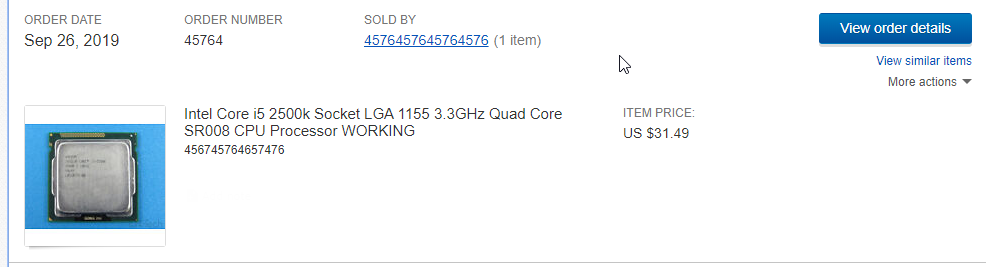
naive pendant
How budget? $30? 2500k
slow ledge
for just the cpu?
yea u could say $30
@naive pendant where did u find a 2500k for 30 bucks
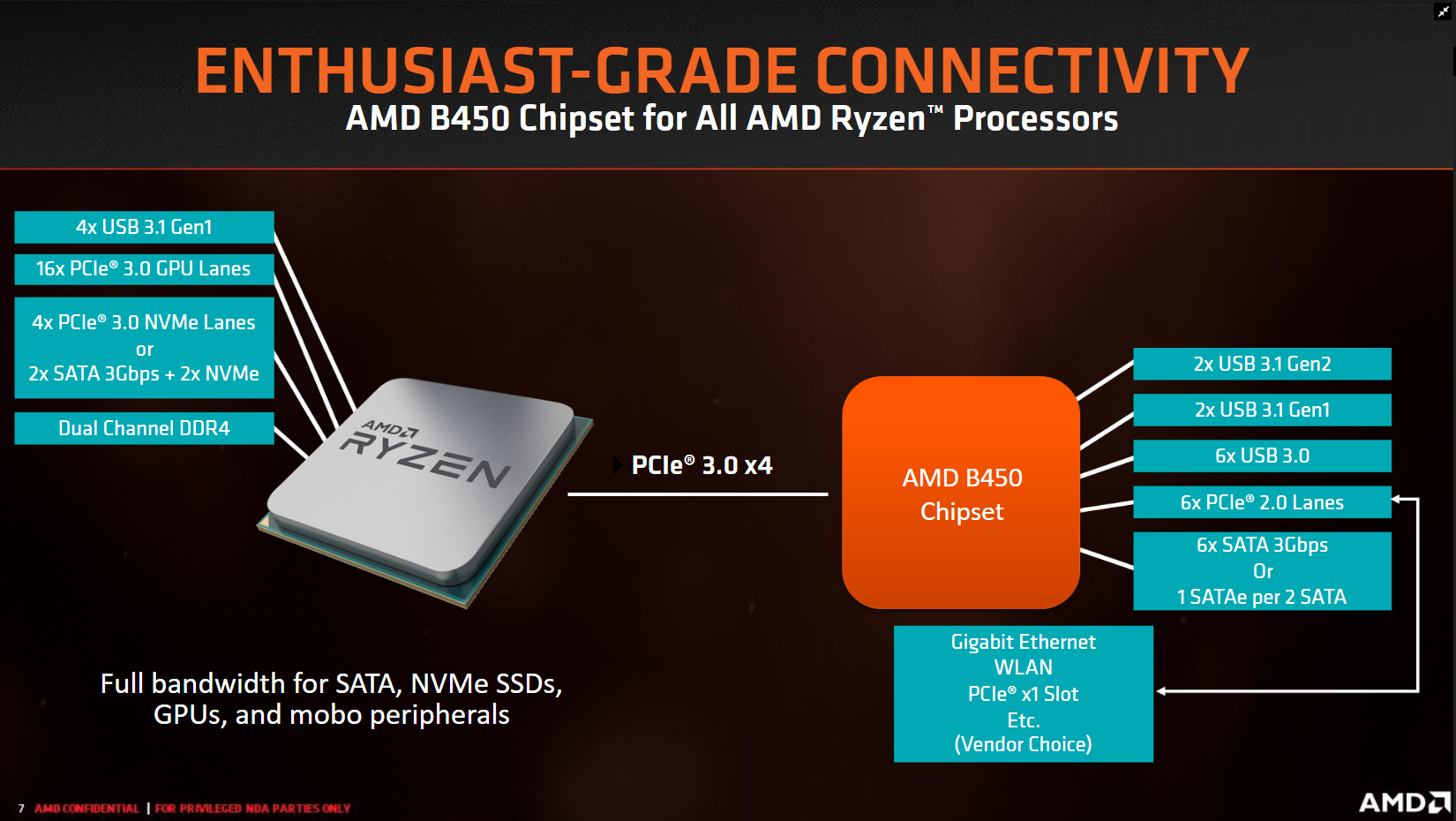
naive pendant
 naive pendant

eBay
B+ : Mostly looks clean but you may notice visible scratches or minor wear on certain area(spot) fyi:(Most of computer components like CPU, RAM or motherboard belong to this grade). No exception. B : Moderate scratches, worn off or tiny dings can be found.
slow ledge
ok thanks
simple ore
price jumped to 46 😦
slow ledge
yea
simple ore
could get an old xeon processor

eBay
Xeon CPU/Processors. Core 2 CPU/Processors. Dual Core CPU/Processors. Point of Sale. Tested for Full Functions, R2/Ready for Reuse. Generic Picture Used. Bare CPU/Processor only. Apple & Mac.
thats the last one too
if you want i have a parts list for a 350 budget you could actually make it closer to 300 if you find a deal on ebay for a cheaper 570 just message me and ill send you all the links.
gritty meadow
@slow ledge keep in mind, the popular oc cpus from yesteryear are quite likely to have been hammered to kingdom come. So dont expect to be able to get anything but stock from them.
slow ledge
yea
gritty meadow
also, have you thought about the need for a case?
gritty meadow
as in, IF you dont need a case, you can do a bit more "weird" stuff
slow ledge
me and my friend are figuring it out
simple ore

eBay
For Best results look up CPU/RAM compatibility before ordering. We do not support export outside the United States. No exceptions.
that one includes ram just swap the cpu for the xeon
slow ledge
ok
gritty meadow
by weird, i mean: There are office machines that get sold for fairly cheap. the normal downside is the case they come in (generally slimline, meaning you cannot fit a normal height GPU).
you would be sidestepping that IF you didnt need a case
naive pendant
I've run into that problem often - if the mobo itsel fits - you can sometimes drill out/ cut off the hdd cages.
simple ore
ive done it as well rip
naive pendant
But to shoehorn an atx, eatx etc into a dell optiplex mini-tower - you have to cut a slot into the side panel with an angle grinder or osmething
Probably
simple ore

upcyclecomputerwerks
Key: ED= elitedesk PD= prodesk Processor: Choose your model and processor from the drag down menu. Ram: 8 gb Storage: 500 gb HDD Graphics: Integrated OS: Windows 10 Pro Additional: USB 3.0 Includes: Power Cord
gritty meadow
as in, buy something cheap because it is seen as "not fitting"
naive pendant
I mean, I have less ghetto builds too ..
Haha ya- the mobo box is always a classic case
simple ore
put a 1650lp in it and bam cheap pc
gritty meadow
and then just stripping the case
naive pendant
I use the external back panel of a 7010 for a SWATX mobo mount now - coun't fit it inside lol.
Didn't want to drill holes in any of my 4u's
 daring edge
Can anyone give me a tip for how to figure out what my problem is? I have a Ryzen 7 3700X on an MSI mpg gaming plus x570 board and I keep getting a CPU error light.
My CPU did show up with box open but none of the pins were bent
elfin warren
8 pin power plugged in?
daring edge
Yes. But there is also a CPU2 next to it that looks like it would take a 4 pin and I don’t know if I need that too?
elfin warren
Don't need that, 8 pin only is fine
daring edge
Ok then yeah it’s plugged in. The rest of my system lights up and comes alive I just can’t get it to post and I get the LED reading a CPU error. Is there a chance I got a shotty CPU?
elfin warren
If it was an open box and the light is on, that's a very good chance. I'm checking a couple things also
No boot or display, just the CPU LED?
What happens if you turn it on and just wait a bit?
Also, try clearing the CMOS with the battery or the jumper.
daring edge
No boot i let it sit for like 5 min and even tried using the hdmi on the mother board and I still got nothing. Yeah just the LED. I have no idea how to do that
elfin warren
There is a button cell battery on the motherboard
First, unplug the power supply from the wall
Then, remove the button cell battery and leave it out for a couple minutes
Reinstall it, then try to boot again
battery is directly below PCI-E 1 slot
daring edge
Oh yeah I know what your talking about I will try that again when I get the chance. I already went ahead and did a return on the cpu with amazon to see if I would get one that isn’t open when it arrives and see if that would solve my problem.
elfin warren
That's probably the issue since it was an open box
daring edge
This info I’m going to keep in mind just in case it doesn’t work when I get the new CPU.
Thanks so much for the help @elfin warren! Mind if I add you in case I have problems later if it doesn’t work? This is my first build and I have no one that I know who can help me with this stuff.
elfin warren
Ya, or just ask again in here
daring edge
For sure will do! Thanks fam!
elfin warren
Welcome!
gritty meadow
@daring edge try and do a re-seating of the cpu IF the previous advice doesnt work.
might be that your cooler is putting un-even pressure on it
daring edge
Cool! Will do! I kind noticed that it tried to seat early, just before I had it all the way over the socket so I did wonder about it. But when I took it back out I didn’t notice any pins bent. Oh that’s true! This cooler clamps really weird. When I get my next CPU I will be careful to watch that.
gritty meadow
example: if your cooler has 4 mounting screws, tighten them in a diagonal pattern and only a tiny bit on each screw at a time
(yes, this might seem overly cautious, but there is fairly wide gulf of difference in experience between people. so better safe than sorry)
 slow valley
I am willing to buy a motherboard https://www.newegg.com/asus-rog-strix-x470-f-gaming/p/N82E16813119099?Item=N82E16813119099 with the ryzen 7 3700x
I am wondering if the motherboard bios is updated to work with ryzen 3700x
naive pendant
Edit , nvm, won't be able to say for sure unless it's labeled with x.xx bios . Regardless - are you open to input on MB choice for a new 3700x build?. https://i.redd.it/58am663beh931.png
 misty belfry
it's cool my board can handle a 3900X at stock without any issues
when they hit $300 i'll grab one
naive pendant
The $150 2700's on prime day gave me the same idea haha.
naive pendant
What's your current setup?
misty belfry
current setup is just a haswell off the shelf HP with a GTX 1650
in about a week i buy new parts
and everything goes in the define nano S
and i already have a place for the current system
naive pendant
Could make a great router or NAS /server.
misty belfry
yeah, i feel like giving it to someone however
naive pendant
Even better
misty belfry
old hardware i always just give away to mostly family and sometimes friends