#cpus-mobo-and-memory
1 messages · Page 56 of 1
 meager elbow
igpu is quite useful for troubleshooting even if you arent' using it as your main gpu
 dull flint
Not if it's otherwise dead stock
If it's a working cpu but igpu was the only buggered part then it's a downbin
But the great thing about ryzen is the i/o die is separated from the core so they can just stick that in something else
meager elbow
dull flint
Not if it's otherwise dead stock
true
dull flint
But intel on monolithic dies has a strong case for F skus
An F sku is a downbin, it's otherwise perfect working order
meager elbow
meanwhile the mining only gpus of that year 

 grizzled bloom
dull flint
The what the what
grizzled bloom
dull flint
The what the what
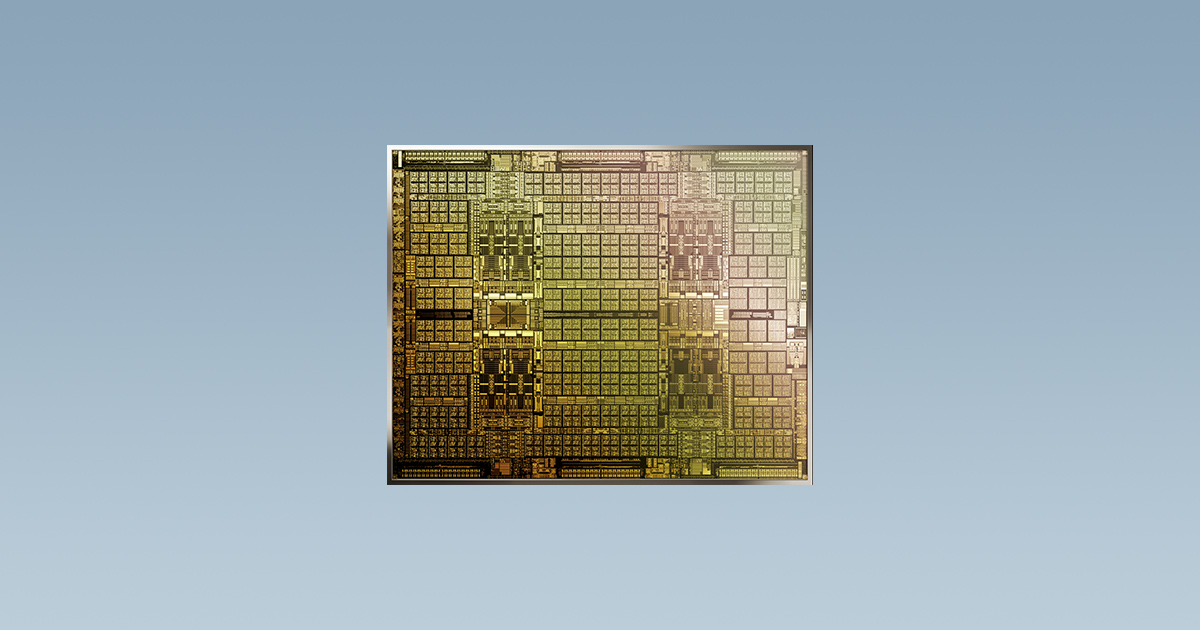
Mining optimized, no display outputs. Totally useless now since the only practical use for them is as a physx processor, but very few games use physx properly.
https://www.nvidia.com/en-us/cmp/
NVIDIA
The best GPU for mining that gives cryptocurrency pros maximum performance. Only through NVIDIA Partners.
 hearty juniper
ready for ai pc? what does that mean?

 distant gulch
✨marketing✨
If something that shouldnt be talking about ai is talking about its wonderful ai features cough logitech then that means i should pick something else

 distant gulch
dull flint
I REPRESSED THIS
distant gulch
dull flint
I REPRESSED THIS
I envy your ability to repress this stuff 
meager elbow
just stop thinking
dull flint
Had a bit of a play with the new microcode for intel
The behaviour is definitely different
Old undervolt concepts are out the window
They've absolutely stopped pumping wild current through their chips. The performance per volt is dramatically different now
Old tunes that used to work for me no longer do, not without unlimited iccmax as far as I can tell
Not that I'm game at all to try. I'd like my cpu to stay preserved
Lol
 drowsy nymph
Why do I feel like more memory is slower
Am I trippin
Like two 32gb sticks vs two 16gb sticks
meager elbow
drowsy nymph
Why do I feel like more memory is slower
because it is
more load on the memory controller
 meager elbow
afaik for ddr5, the current max was like 2 24gb sticks without any loss of performance
drowsy nymph
I found some laptop sticks
5200mhz
cl38-38-38
That's not half bad
For laptop
G.Skill of course for lifetime warrenty
 limber dragon
meager elbow
more load on the memory controller
limber dragon
meager elbow
more load on the memory controller
Lots of "it depends" there, you cant just jump to conclusions
grizzled bloom
All else being equal, 2x32GB is more load than anything lower. You might need to run more SoC voltage to get the same speed, depending on how much you're pushing it.
Main part of the problem is it's very likely dual rank at that size
limber dragon
Or just 16gbit
hearty juniper
if ill upgrade my cpu from 9700k to 9800x3d, will the workload (fps generation) will be more on the cpu, which will cause less heating and noise from the gpu, due to less demand on the gpu?
grizzled bloom
hearty juniper
if ill upgrade my cpu from 9700k to 9800x3d, will the workload (fps generation) ...
The opposite. With a stronger CPU, the GPU isn't idling as long waiting to be sent data so the GPU has more active time, meaning more power draw and heat.
hearty juniper
grizzled bloom
The opposite. With a stronger CPU, the GPU isn't idling as long waiting to be se...
by alot?
grizzled bloom
It depends on many factors, but there is a limit to how much the GPU can do and therefore a limit to how hot it will get
dull flint
Dunno why the net is wilding over supposed 9800X3D multi thread speeds
5.2GHz I'm pretty sure is what the last gen can theoretically do
Ah it's efficiency gains
So if it holds then the educated guess from a little while ago makes sense
But even then that might be a little shakey as the efficiency gains are nebulous
Maybe they worked out a better package design for the vcache? Less thermally retensive design?

Ohhhh no
It's a supposedly higher TDP of 105W
That's gonna be the main factor
So it will be a little faster
 tender sleet
dull flint
It's a supposedly higher TDP of 105W
tender sleet
dull flint
It's a supposedly higher TDP of 105W
I've seen some people say it'll also be no slower in production workloads than the 9700X
dull flint
That's like saying the 5800x3d won't be slower than the 5800x in production
Ofc I know that
Lol
What I'm referring to is higher achieved clock from the enhanced TDP so it can sustain higher overall clocks in games
tender sleet
my point is that the pitch is that it's a 9700X in ever way, but a 7800X3D in games
Allegedly
that there will be no downside like with the 7800X3D
hearty juniper
I'm thinking about purchasing a am5 mobo for 7800x3d or 9800x3d which one should I get? and why this one and not something cheaper/more expensive?
dull flint

No one has your answer to a CPU we have no real numbers published for
And on that note, arguably speaking the 13600KF represents way better value vs. a 7800X3D
Within like 10% of it for $200 vs. like 500+
I don't recommend a 7800X3D right now unless it goes for it's old prices
Like Walmart
If you want to know what the 9800X3D could look like, the announcement could happen within a week and then we'll all have a much better idea of it at that point
Also additionally
At that point the motherboard sales could be wildly different
So investing prior mightn't be the wisest if you're camping for the next-gen X3D
hearty juniper
Alright, ty
tender sleet
dull flint
And on that note, arguably speaking the 13600KF represents way better value vs. ...
how about the 13700K?
or the 14700K (they cost pretty much the same here)
dull flint
Same reasoning provided you need the multicore and 0x12B spells the end for intel's issues (It has so far)
 cerulean wadi
 ok, good time for me to test out 14600KF + 3080 Ti
 dull flint
cerulean wadi
<:Pog:817480746255122492> ok, good time for me to test out 14600KF + 3080 Ti
dull flint
cerulean wadi
<:Pog:817480746255122492> ok, good time for me to test out 14600KF + 3080 Ti
GDI
My board still doesn't have it
REEEEE
MSI WAT U DOIN
cerulean wadi
Taking their time w/ some mobos. This is the Z790 tomahawk. Oh neat, my b660m got the update even earlier, but not like I'm putting this 14th gen into that mobo.


 cerulean fjord
Is Asus ROG Strix X670E-A Gaming WiFi a one that been blowing up x3d cpus?
limber dragon
none of them has since agesa updates
dull flint
And with any mention of such a type of board, you should ask us about what board to buy if you're looking to buy into AM5
Cos any strix is not worth it
Not unless it's worth like $100 in a specific Micro center bundle from a month ago
 grizzled bloom
Doubtful it'll use all of that but rumor has it overclocking will be more unlocked as well
dull flint
@grizzled bloom I can't test this, can u
Turn off your non vcache ccd
Check ur power draw on the vcache chip
My 7950X3D is still in RMA
grizzled bloom
It'll be a simulated 7600X3D then, but with slightly higher power draw because of the beefed up infinity fabric
grizzled bloom
dull flint
Check ur power draw on the vcache chip
With what program?
grizzled bloom
Ok I'll do a couple different ones.
P95 smallfft+avx512.
-Before: 114W peak @63C
-After: 64W peak @59C
R23 multi.
-Before: 111W @77C
-After: 65W @76C
@dull flint
dull flint
grizzled bloom
<@101107951401455616>
Thanks
Also damn lol
Was wondering if they allowed the higher ppt on 6 core config lol
cerulean fjord
dull flint
And with any mention of such a type of board, you should ask us about what board...
found a used build with 7950x3d, that motherboard and some other expensive stuff like 64gigs for $900, just got a lil suspicious
grizzled bloom
Most likely this is the 9800X3D

The rest of the 9000 series is getting a $30-50 discount for the holidays too
dull flint
Damn
 dusty cipher
Hopefully over 7% uplift
That is fortunately or some might say unfortunately all it takes to have good day one reviews this time
grizzled bloom
That will depend mostly on the final clock speed number. I've seen samples at 5.2GHz but I suspect it can do 5.4 with the efficiency improvements of Zen 5
limber dragon
didnt they announce they were releasing 9000x3d right after intel launches their cpus?
limber dragon
grizzled bloom
That will depend mostly on the final clock speed number. I've seen samples at 5....
there's a "leak" of 5.6 after 101 bclk
 dull flint
Wtf 5.6
How are we sure it's 9800x3d tho
Not doubting you just hard to tell from the pic
grizzled bloom
Overclocking is supposedly unlocked too so I'd consider every leak, even the accurate ones, invalid unless they state specifically that it's stock
dull flint
I'm not doubting or believing anything don't worry
Just considering the numbers
5.5 stock would be a big jump if true
grizzled bloom
10% from clock speed increase alone would be massive yeah
 burnt spear
if clock speed is faster is the cpus cache faster to access?
dull flint
I mean given how fast the L3 is, probably won't be world changing
The higher tdp speaks to a good increase tho if true
If this is what they needed to do to get that gaming uplift then so be it
dusty cipher
The 16% ipc uplift should better translate to gaming performance aswell
dull flint
What 16%
dusty cipher
16% ipc uplift of zen5
dull flint
Zen 5's uplift wasn't anything that benefits consumers
dusty cipher
So higher clocks along with higher ipc
dull flint
You had compiler based and avx512 uplifts, not sse or avx/2
Zen 5 is like , 2% better than zen 4 in most game scenarios
Cos the ipc gains were not in the areas that influence games
What you'll see as an uplift will be independent of zen 5's changes
Whether that comes in the form of slightly better efficiency, much higher clock or tdp, or maybe even so much as a revamped imc
Mayhaps a new microcode specifically for zen 5 x3d itself (such as the hinted gigabyte announcement)
dusty cipher
True that
5090 should be a absolute monster
With the ways cpus are going afraid it will be terribly limited all the time
dull flint
5090 will be a true 4K card
4090 can kinda bounce around between good 4k, 1440p and even for some 1080p
5090 could potentially be so limited that it won't be tapped until really extreme 1440p or high 4k settings
dusty cipher
Yeah
The upcoming cod black ops 6 I was hoping I could play on a 5090 to take advantage of monitor
Sad that they release next year
dull flint
With the way cod's engine is anyway an xtx might have the edge until then
grizzled bloom
dusty cipher
35% ugh
Marketing be like:
35% better!
in multi threaded applications utilizing the AVX-512 instruction set when limited to 74W specifically
I'm personally expecting a total of about 10% gain over the 7800X3D in gaming. 8% clock speed and 0-4% IPC.
burnt spear
10% is realistic, im hoping for 15
grizzled bloom
TDP doesn't mean jack
dull flint
It does if it holds clock better
grizzled bloom
My +200 PBO 7900X3D doesn't even use the full TDP
dull flint
Ya but it does mean better package temps
Remember ryzen boost algo targets temp first
grizzled bloom
That's another thing they changed
dull flint
I am fairly sure that they would be pretty insane in the head if this wasn't at least 7% better
grizzled bloom
7% should be the low bar for this, worst case
dull flint
The late news suggests that the bad reception of zen 5 was well received at amd
So yeah, I am thinking there's something there
I am praying it's not fake hype
Like the whole "Zen 5 is better after these win 11 updates"
Pssh
Made zen 4 even better than that 💀
grizzled bloom
so is zen 3 and 4 but shhhhh
dull flint

grizzled bloom
iirc 5800X3D got more gains than all of 9000
grizzled bloom
I won't but for unrelated reasons
dull flint
Hey it's not the first of a socket
I'm considering in late of my dead 7950x3d is all
Lol

Anyway
grizzled bloom
That is generally my rule as well. Don't buy the first model on a new platform.
I only made an exception this time due to an emergency situation with my 5800X dying suddenly. (thanks MSI)
That rule applies to cars as well
dull flint
Nuclear 5800x tho tbh lol
grizzled bloom
grizzled bloom
That's another thing they changed
I try to bring receipts for my claims so here's this from Puget. 7950X hits the tjmax, 9950X is much more tame. Same goes for the 7700X vs 9700X.

That would suggest that the algorithm doesn't try to slam it against the tjmax any more
dull flint
Or rather slam it for power
So to the point where it may just reach another boost rule first rather than tjmax
Not saying you're wrong but throw hot vcache on that and the algorithm might start looking familiar again lol
Only time will tell there
 dull flint

 vast meadow
9800x3d confirmed on 7th nov -amd annoucned the event date
grizzled bloom
vast meadow
9800x3d confirmed on 7th nov -amd annoucned the event date
They were pretty coy about it though, just saying "AMD Ryzen X3D" and not specifying which one
grizzled bloom
grizzled bloom
Most likely this is the 9800X3D
We had a whole convo about this already
vast meadow
ahhh i didnt look up that far
dusty cipher
grizzled bloom
Saw somewhere unlike previously 9800x3d first
Then later 9900x3d and 9950x3d
burnt spear
What
grizzled bloom
Gotta make sure Intel can't take that gaming crown
Even though by their own admission they won't
grizzled bloom
Early listings are close to $500 but they've been wrong before
Not by much though
 polar moth
Hi chat, have a new motherboard arriving today.
And I plan to just swap over the same nvme SSDs in same slots and install the current cpu cooling screws to the new mobo.
The question is will I run into software problems such as Win 11 license not activated and other bits?
limber dragon
yup
polar moth
so just win 11 activation
limber dragon
you'll have to reactivate windows on the new mothebroard, possibly drivers, and possibly bitlocker dectryption
polar moth
i plan to just log in and see if itll carry over or maybe rip off the key off my current mobo
no bitlocker encryption here
what is that used for?
limber dragon
if you have the license digitally linked to your account, it should reactivate, or go through the troubleshooter saying you changed hardware recently
limber dragon
polar moth
chipset drivers? gotcha.
chipset, wifi, possibly storage/usb
polar moth
so pretty much win 11 reinstall
limber dragon
go in expecting similar scenario to a reinstall
polar moth
hm
to just save me of headache
its better if i do win11 new install instead booting up into same windows on new mobo?
polar moth
limber dragon
go in expecting similar scenario to a reinstall
ahh ill just go for the reinstall. thanks
limber dragon
safest bet is to reinstall and do all drivers from scratch, since you might run into driver conflicts from the old mobo's drivers
 wind karma
Apparently AliExpress has sub-$150 5700x3d chips
I'm a bit tempted but at the same time my 5600x is doing fine paired with a 3060ti at 1440p and I don't really see myself upgrading the gpu for a few more years.
 dense perch
am i cooked
 grizzled bloom
Well that ain't good
dense perch

grizzled bloom
What's the context here? Is that at stock (jedec) speed or xmp or overclocked?
dense perch
i don't speak fluent tech but i upped the speed thru bios to 3600 (it's rated speed)
grizzled bloom
Did you enable xmp? (may also be called A-XMP, AMP, or DOCP)
Normally for you to get the rated speed and timings you need to enable that
It changes lots of things
grizzled bloom
Yep it should work better this time
dense perch
grizzled bloom
Yep it should work better this time
could this be the cause to why i got the frequent bsod?
grizzled bloom
Extremely likely
dense perch
alright, much appreciated ill let it run the tests and update when done 
i am indeed cooked
 grizzled bloom
That's after enabling DOCP and save and quit from BIOS?
dense perch
yeah
grizzled bloom
Yikes. Ok what memory kit do you have? If this is corsair I will find this hilarious.
dense perch
4x16 Trident Z Neo CL16 3600
grizzled bloom
Ah now we're getting somewhere
Was this from a full kit of 4 or did you put two kits of 2 together
dense perch
2 separate kits
grizzled bloom
Mixing memory is the problem then
Take out the memory and snag a pic of the labels for me and I can tell you how bad it is
All 4
dense perch
gotchu, I've had them since 2021 no issues like this before but haven't tested them until now

 grizzled bloom
Ok the good news is they're the same IC so there's hope
The bad news is they were never intended to run together at that speed so you might need to increase your voltage on your IMC
There's a possibility that you might need to reduce the speed a bit to get them to be happy but I'm not ready to call that yet
dense perch
what do you suggest?
grizzled bloom
1.20 V SOC
0.95 V VDDP
0.95 V VDDG CCD
1.05 V VDDG IOD
They'll all be in the main overclocking menu, typically near the bottom with all the other voltages
dense perch
all good?
 grizzled bloom
yep
dense perch
and do we now run test?
dense perch
👍
dense perch
 dense perch
I'll take any help I can get
dense perch
I'm not in a hurry, take all the time you need
grizzled bloom
The issue is it's 2 different kits of 2x 16GB CJR
So dual rank dual channel fully populated
dull flint
Yeah what I would do
grizzled bloom
Voltages seem to have helped, maybe resistances would finish the job
dull flint
In bios, change vdd to 1.4 max
Dram voltage
It scales to 1.45 but I wouldn't try that
1.4 then try 3466 frequency
FCLK == MCLK
Then do FCLK either auto or 1733
64gb is difficult to run, much less on not very good kits
So I would try stepping down a kick or two, see if that improves things
Then
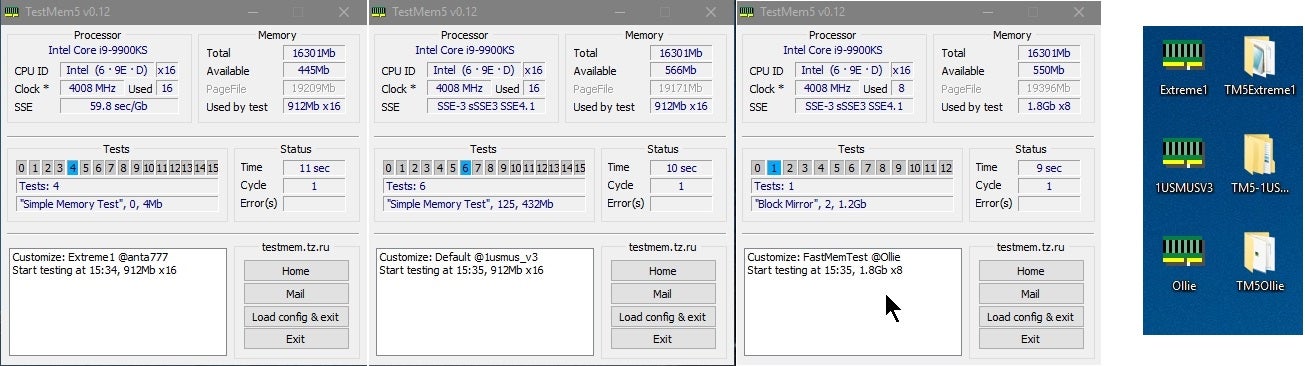
Overclock.net
I want you to download the config files from here
Load config in tm5 to "Anta777 extreme"
Or "Anta777 absolut"
Let that run for the full test
Since it's 64gb, stop on error as the full test will take forever
If it errors, change the frequency and fclk down 1 click together
3600 @ 64GB is honestly very difficult
I couldn't even get that to work on binned B die so really, consider lower expectations
CJR can scale with frequency quite well, but there's a number of factors in play that I'd say would hold that down
The big ones however being fclk sync and 64gb
The goal is to pass one of the anta777 tests without erroring
Not one cycle but the whole test
dense perch
can't change dram voltage to 1.4, reverts to 1.35
dull flint
What motherboard is this
dense perch
Asus x570
dull flint
X570...?
dense perch
dark hero
grizzled bloom
Set it to advanced mode
dull flint
Is there an option like "Dram high voltage mode" in bios
grizzled bloom
Or set it from the AMD overclocking menu
dull flint
If there is set that to enabled
1.4 is not max daily safe for 8gbit cjr
I padded an extra 0.05v to it
So you should be fine
dense perch
it's in advanced mode, lemme send a pic perhaps I missed something
dense perch
dull flint
Is there an option like "Dram high voltage mode" in bios
could not find this
dull flint
Interesting so they didn't just port it over
I was thinking pmic limit again @grizzled bloom
Lol
dense perch
 grizzled bloom
dull flint
I was thinking pmic limit again <@396513761550270464>
grizzled bloom
dull flint
I was thinking pmic limit again <@396513761550270464>
Except it's DDR4. And not Corsair.
dull flint
Ik
I became curious
Lol
Aza can you try pressing the + & - keys when hovering over the dram voltage
Does it go up and down
dense perch
yup
dull flint
Up how far
dense perch
 dull flint
Ok but it allows 1.4 yeah
dense perch
Freq set to 3466, fclk 1733
dull flint
Ok set the other settings, load up anta777 extreme or absolut config, let it run
Yup
Give it a whirl then
If error, scale down one click both fclk and freq until stable
Realistically you should already be much more stable
dull flint
If you make it to the end excellent, I'd maybe consider scaling vsoc back down at that point and retesting
Cos 1.2 is arguably "safe" but vsoc safe limits on am4 were very ambiguous
I'd try and creep it down to 1.1 if possible
I could also recommend ycruncher vt3 stress testing, very very useful
grizzled bloom
Yeah I said 1.2 just as a worst case scenario voltage
dull flint
Ye
I'm not rejecting the advice, just, it's a known limit but I've met cases below it
Even my own 5900x experienced a little bit of degradation on 1.15
💀
My timings have loosened twice since I bought it
1.2 is the consensus safe tho
dense perch
dull flint
Load config in tm5 to "Anta777 extreme"
cant seem to load configs, should i be getting a text confirmation?
dull flint
Yes
It'll show many more tests and the box on the bottom left will say "@ anta777" etc.
dense perch
 dense perch
there were two "extreme" cfgs
dull flint
That's a good one
No worries
As soon as you catch it erroring follow the advice and test again
Otherwise we've worked it out 
dense perch
👍
dense perch
test has been running 1 hour+ with no errors so far. should i just let it continue?
dull flint
dense perch
test has been running 1 hour+ with no errors so far. should i just let it contin...
Until it says finished with no errors
grizzled bloom
I don't even need to watch the reviews, the thumbnails speak volumes
 dusty cipher
Only for those who want more efficiency and absolutely refuse to buy Amd
grizzled bloom
Were the earlier reports accurate about there being several cases where the 285k is worse than the 14900k? That's my only question
dusty cipher
grizzled bloom
Were the earlier reports accurate about there being several cases where the 285k...
Looks like it
 rugged solar
Whats a good amazon prebuilt for around 1200 USD? (Or any good brands to search for)
distant gulch
Good prebuilt is hard to answer since good prebuilts typically are used from people who took care of their systems price wise
Otherwise youre paying a healthy fee
dull flint
A laptop is my common answer tbh
distant gulch
^
burnt spear
This with a ram upgrade
https://www.ebay.com/itm/155722339131?

eBay
Find many great new & used options and get the best deals for Lenovo Legion T7 Tower Desktop PC i7-13700KF NVIDIA GeForce RTX 4070 Ti 16GB at the best online prices at eBay! Free shipping for many products!
distant gulch
There was that 4070 laptop i saw the other day going for about 900
distant gulch
burnt spear
This with a ram upgrade
https://www.ebay.com/itm/155722339131?
Or this
burnt spear

eBay
NVIDIA GeForce RTX 4070 SUPER.
Bit cheaper, easier upgradability but worse gpu and slightly worse cpu
Amazon warehouse might have some decent deals
 burnt spear

Skytech Chronos Gaming PC Desktop – AMD Ryzen 5 5600X 3.7 GHz, RTX 3070, 1TB NVME SSD, 16G DDR4 3200, 650W Gold PSU, AC Wi-Fi, Windows 10 Home 64-bit
Sorry for super long link amazon warehouse links don't always work shortened
There's also 12600k/3070 with 32gb ddr5 and a pretty decent psu at $715
dull flint
dense perch
yeah i came back to many errors
Dial fclk and dram frequency down 1 click each, retest
dense perch
dull flint
Dial fclk and dram frequency down 1 click each, retest
thx
dull flint
dense perch
thx <:4Love:1294402885748002929>
Same thing happens, do the same thing again, retest
Keep going until you get stable numbers
Or if it starts feeling long, go all the way to 3200mhz/1600mhz
Not a massive difference tbh
dull flint
All good
We're playing more or less to a bit of trial and error, but skipping lots of the complications
If we start dipping below 3200 I'll start getting suspicious
dense perch
@dull flint 3400/1700 doesn't boot anymore
dense perch
dull flint
Let's go way down for a minute
alr, got it to desktop
would getting a 4x16 kit from corsair fix the issues I'm having with the current two kits of 2x16?
i don't mind spending the money and was thinking about it before
dull flint
I wouldn't do that
I would keep testing
If you can't run 3000/1500 then I would try one of the two kits (the serial numbers will be chronological) If at that point you're stable then probably 1 stick is a bad egg
grizzled bloom
Corsair DDR4 is the worst also. Often they can't run their XMP speed.
dense perch
alright
grizzled bloom
I'm guessing by now the OS is damaged as well so that might explain a boot failure
dull flint
Possible
dense perch
3000/1500
 dull flint
I get the feeling a stick is degrading in real time tbh
Leading to this situation
Try 2x16 next, only one of the two kits
dense perch
Which speed?
dense perch
same voltages?
dull flint
Yep
We shouldn't need to do any special adjustments at 3000/1500, it should just work
dense perch
👍
dull flint
If this were behaving normal, 3000/1500 would've been stable
So yeah, I suspect something's up now
dense perch
iirc, there was one stick that was causing errors through my initial testing
just got an error
January kit
dull flint
On 2x16?
dense perch
yup
dull flint
Warranty claim it
Dead stick in the kit
Try the other kit
Make sure you're using one kit and not one of both
grizzled bloom
G.skill does lifetime warranty and they're good about honoring it
dull flint
Yep
grizzled bloom
I've seen people successfully warranty DDR3 recently
dense perch
running tests on September kit rn
dull flint
Wait
dense perch
Yeah?
grizzled bloom
8825C
dense perch
no, they all end in 8825C
grizzled bloom
That was the first thing I checked
grizzled bloom
dense perch
.
dense perch


 hollow thorn
dense perch
<a:omgBruh:1280296150947069993>
hollow thorn
dense perch
<a:omgBruh:1280296150947069993>
Test 10 is supposed to be most likely one of the main 5 timings, what are the primary timings set to?
tcl/trcdrd/trcdwr/trp/tras
 hollow thorn
Looks fair enough, try 16-20-20-20-40, shouldn't be necessary but a bit looser might help
dense perch
should i try these timings with 3600/1800 or continue with 3000/1500?
hollow thorn
Continue with 3000/1500
It seemed like edge of stability
Btw what's vsoc set to rn?
Something to try later is lowering it to 1.15v since there can be some negative scaling above 1.15v

 grizzled bloom
Did you try the other kit of memory yet since you thought one of them was bad
50/50 you took out the good kit basically
dense perch
Yeah the bad kit was January
current kit im testing is the September kit
it failed within minutes of testing, September kit fails after some 4 ish hours
 karmic perch
Disappointing of Arrow lake.
grizzled bloom
I agree. I feel like GN is right and this launch was rushed, judging by the differences between the different versions of Windows, and the Insider update that launched today touting improved Arrow Lake performance.
dense perch
hollow thorn
Continue with 3000/1500
 dense perch
what do i even do now
grizzled bloom
One stick at a time maybe?
If one stick out of each kit works you'd have one full kit at least lol
dense perch
If I was to do a warranty claim for one stick I'd have to send the full kit in. Should I RMA both kits?
grizzled bloom
One more change to make before that. Well, two.
VDDSOC 1.125v
DRAM 1.36v
hollow thorn
the 042 code was cjr right? Can bump it up to 1.4v for testing
grizzled bloom
No kit should need that much for 3000 16-20-20
hollow thorn
true
grizzled bloom
You know I wonder if Asus has "enhancements" enabled by default
I've seen trouble with that before
dense perch
grizzled bloom
One more change to make before that. Well, two.
VDDSOC 1.125v
DRAM 1.36v
Alright, should I return them if this last configuration attempt doesn't work?
grizzled bloom
Yes
dense perch
👍
Will make the changes shortly
dense perch
 dense perch
3 year warranty expired in July
grizzled bloom
You can always try the nuclear option. Clear CMOS and leave it at jedec, and if it's still not stable something is wrong with the motherboard or the CPU,
dense perch
grizzled bloom
You can always try the nuclear option. Clear CMOS and leave it at jedec, and if ...
stable meaning? no errors?
grizzled bloom
Correct
dull flint
Something's definitely up
If it works at jedec you could either continue using it as is or go for a new cpu like a 5700x3d
Sell the 5900x as "please read"
dense perch
are you saying there's a possibility ram isn't the problem?
dull flint
Since both ram kits errored, yes
And the dark hero is a particularly exceptional AM4 motherboard
What would really confirm that is one more test but ram slots 1 & 3 (A1 B1)
dense perch
dull flint
What would really confirm that is one more test but ram slots 1 & 3 (A1 B1)
any changes to be made other than swapping slots?
dense perch
👍
hollow thorn
if you want to suspect CPU ram channels you can try one stick at a time but that's a lot of work and will take a while
dense perch
dull flint
About it tbh

 dull flint
dense perch
<a:plink:1068520696856195232>
dull flint
dense perch
<a:plink:1068520696856195232>
Yeah. I'm certain the IMC is cooked now
You could test channels but honestly single channel 5900x @ 32gb would be cringe
The only other thing I could think of is if you have Asus Multicore enhancement on or PBO with some custom settings
If those are off (or on normal settings) then yeah, the CPU is buggered
dense perch
dull flint
Yeah. I'm certain the IMC is cooked now
can you explain this in clueless language
dull flint
The memory handling part of the cpu is cooked
Unless you have really crazy pbo settings on or some huge undervolt, that's the cpu ram controller saying it's had enough lol
dense perch
the only setting i ever changed in bios was the ram speed to 3600
dull flint
Ok
Did you ever turn Asus multicore enhancement off
Or left it on auto
If you never touched it, auto
dense perch
havent touched it ^^
dull flint
Ok
One last time into bios
Lucky last test
You can swap the ram to slots 2 and 4
Then in the advanced tab
Like, first setting in the same menu you've been playing on
It'll have an "Asus multicore enhancement" setting
Or something similar like
"A.I overclock"
Disable it - enforce all limits
If it's not there, we're finished testing
dull flint
New cpu unfortunately if this last part doesn't resolve it
dense perch
dull flint
Because we tried maxing the vsoc, tried autoing as well to let the board try
I would suggest 5700x3d or 5950x, depending on your needs
Find a used one off ebay or fbmp
dense perch
broke atm 
dull flint
Ah man
dense perch
so is the faulty ram actually faulty or was this caused by the cpu?
dull flint
Welp, not much else I can think of except run the ram at jedec
In this case it's the cpu from what I can tell
Running jedec = running 2133/1066
If it's degraded however, continuing to use it could very well make it worse, as the damage would have already punched through the tantalum nitride layer
So continual use even at really slow ram speed might still have issues
Left unchecked you basically work with a poisoned windows
It'll slowly degrade
Think of it like a leak in a ship you can't reach
The ship will sail, you can still use it, but you have to keep the water out
The sad thing is it's the part out of warranty
The good thing though, the bits that look like they're genuinely good still are
So the ram is fine, board is fine
dense perch
so my pc is suiciding if left untreated
i guess i'll try to find a new cpu somewhere somehow
dull flint
Good luck soldier
dense perch

dull flint
At the very least, it's not really bad yet
You'll have a bit of time
For now run the ram 2133/1066
Put the other ram voltages to auto
And dram voltage to 1.35
grizzled bloom
I wonder if the fclk would like running at 2133 so it's running 2:1 fclk:mclk
Highly unlikely but a fun thought
dense perch
dull flint
I would suggest 5700x3d or 5950x, depending on your needs
would a 5800x also do?
idk why im asking this tbh
grizzled bloom
Only if it's cheaper than a 5700X
dull flint
^
dull flint
dull flint
I would suggest 5700x3d or 5950x, depending on your needs
If you were to ask me, in for a penny in for a pound, I'd go for either of these personally
dense perch
5800x - $190
5700x3d - $250
i want to get a 5950x but then i'll need to wait a bit longer
grizzled bloom
Only aim for the 5950X if you're doing something that needs the extra cores, like Blender
The 5700X3D is the best gaming CPU on the socket
Besides the 5800X3D that is
dense perch
👍
i'll go for the 5700x3d then
grizzled bloom
Yeah that thing is still holding it's own against the likes of the 7600X and 14600K
 vagrant mist
And intels new flagships too
 copper solar
who got a arrow lake also? 
dusty cipher
Don't want to downgrade from my 7900x3d
copper solar

dusty cipher
Ig having the option to have 10x nvme drives is nice
But too many caveats otherwise
On Am5 currently can't even have 5 drives without cutting into gpu lanes
Really hope the I/O is more looked after with Am6
tender sleet
AM6 is either like a decade out or it's coming in like 2 years lmao
grizzled bloom
You can definitely have 10 drives on AM5 without compromise, all you need is a board with bifurcation
Well, I guess sharing bandwidth is a compromise, but not anything that will matter
 limpid warren
copper solar
who got a arrow lake also? <:hmm:412729439302975513>
limpid warren
copper solar
who got a arrow lake also? <:hmm:412729439302975513>
Damn maybe I do want to get on arrow lake... Just need like a government grant of like $4k or something... How do I make YouTube or twitch give me easy money? Lol
 dusty cipher
That's lower then the 9ghz that was achieved with 14900k
Oh I see the achievement here Is with memory frequency
vast meadow
Also you can't really compare frequency of cpu's across architectures or as a level of performance anyway
copper solar
limpid warren
Damn maybe I do want to get on arrow lake... Just need like a government grant o...
Sell feet pics
limpid warren
dusty cipher
Oh I see the achievement here Is with memory frequency
lol Gear 8 when
limpid warren
copper solar
Sell feet pics
I'd be surprised if there were more than 3 people globally interested in buying those... so ig I gotta sell them for like $1335 each
cerulean wadi
1337*
dense perch
dull flint
Good luck soldier
couldn't get a hold of cpu at the moment, if ram is the issue, could i just buy a set of 2x16 3200 and check if the issue goes?
dense perch
@grizzled bloom thoughts? ^
 sudden creek
Hello,
Poking my head back into Tech again after a while.
How is everyone and what's the latest news on chips nowadays?
grizzled bloom
dense perch
<@396513761550270464> thoughts? ^
You can try, and returning the kit should be easy if it does turn out to be the memory controller.
dense perch
yeah i sent a mail to them regarding the rma, picking up new memory in the morning
it got accepted but im gonna try to return both kits
grizzled bloom
sudden creek
How is everyone and what's the latest news on chips nowadays?
TL:DR
Arrow Lake sucks for gaming.
9800X3D launches Nov 7, and the 7800X3D is being scalped.
 loud crater
guys my screen turned green then it faded to black
sound is still kinda on
there's sound but it's not updating
what should i do?
power button doesn't work
holding it for a while turns off pc
grizzled bloom
loud crater
holding it for a while turns off pc
Does it turn on again?
loud crater
grizzled bloom
Does it turn on again?
yes
grizzled bloom
It sounds like there was a critical error in the CPU, hopefully it was a fluke
loud crater
sfc /scannow opens a transparent window that disappears after like .4 seconds
it may be a fluke
but there are a lot of other problems so it may not be
im gonna try a fresh windows install sometime this week
sudden creek
grizzled bloom
TL:DR
Arrow Lake sucks for gaming.
9800X3D launches Nov 7, and the 7800X3D is be...
What does TL:DR mean?
sudden creek
Understood. Thanks for the tip. How good are the 9000 series x3D chips expected to be?
grizzled bloom
sudden creek
Understood. Thanks for the tip. How good are the 9000 series x3D chips expecte...
That's a matter of some debate, but I've seen several sources claiming 8-10% over previous X3D.
meager elbow
grizzled bloom
Basically that's the short version of a very long topic
in summary,
dusty cipher
grizzled bloom
TL:DR
Arrow Lake sucks for gaming.
9800X3D launches Nov 7, and the 7800X3D is be...
Rather stock is just dwindling worldwide
Should disappear by the time 9800x3d comes
On official sites like newegg
dusty cipher
grizzled bloom
That's a matter of some debate, but I've seen several sources claiming 8-10% ove...
Which is a success
grizzled bloom
Better than the rest of Zen 5%
dense perch
@grizzled bloom sry for ping but i got new ram, should i just do TM5 testing to see if its working or what can i do to be assured its not some other component that is malfunctioning?
sudden creek
Any news on the GPU market? I heard there was a issue with Nvidia's Blackwell Architecture that's been fixed.
grizzled bloom
Consumer market? Nothing recently. We expect the 5090 and 5080 by February. AMD isn't interested in high end any more, no solid info on timing/specs.
@sudden creek
sudden creek
grizzled bloom
Consumer market? Nothing recently. We expect the 5090 and 5080 by February. AMD ...
Gotcha.
Thanks for the tip.
So what have you and the others been up to lately?
grizzled bloom
The usual. Helping with builds, busting myths.
sudden creek
I see. Any weird myths as of late?
grizzled bloom
sudden creek
I see. Any weird myths as of late?
Most of the same. People come in thinking their $350 Corsair cooler is the best thing ever and then they rage quit when we show $35 air coolers beating it.
Now this is interesting. Popping in CUDIMMs actually makes a significant difference. Weird how it would make any difference at all since all it's doing different is redriving the clock signal. It's still bad but not as bad.
https://youtu.be/Wchwh-quceA?si=kooPNoDFYnOoDq6H
It's pretty much expected that Intel users should use CU-DIMM with Arrow Lake processors... but how much does it really matter?
Sponsored Links
You can make your upcoming GPU upgrade cheaper by selling your old one directly to Jawa! Get started here today - https://jawa.link/J2COct24
○ Get your JayzTwoCents Merch Here! - https://www.jayztwocen...
Oh and Jay hints that he's been testing the 9800X3D and it's about to blow the charts away
Supposedly they flipped the architecture so the cache is underneath the core complex, which would be interesting because that'll reduce the operating temp that was the major issue from the beginning keeping it from running as high clocks.
sudden creek
grizzled bloom
Now this is interesting. Popping in CUDIMMs actually makes a significant differe...
What are CUDIMMS? I have heard about them but I am not sure what the difference is.
sudden creek
grizzled bloom
Supposedly they flipped the architecture so the cache is underneath the core com...
Wait, are you implying what I think you are saying?
grizzled bloom
sudden creek
Wait, are you implying what I think you are saying?
That you can overclock the 9800X3D? Maybe.
sudden creek
I wonder if there is going to be a 9850x3D and if there is whether or not it's going to be a hybrid chip like mine.
sudden creek
grizzled bloom
That you can overclock the 9800X3D? Maybe.
Yeah.
grizzled bloom
sudden creek
What are CUDIMMS? I have heard about them but I am not sure what the difference...
They have an extra circuit so the clock signal is closer to the rest of the chips. Supposedly it helps at extremely high speeds like 8400.
sudden creek
So the idea is essentially that they are shortening the distance that the signal needs to travel which would improve stability?
I wonder, where do you and the others get information on like the layout of a chip. I'd love to see how these things are laid out.
grizzled bloom
sudden creek
So the idea is essentially that they are shortening the distance that the signal...
Simply put, yes. It should especially help when overclocking.
grizzled bloom
sudden creek
I wonder, where do you and the others get information on like the layout of a ch...
It varies
sudden creek
Mind if I ask your main sources?
Also on a different topic, my desktop's interior is starting getting dusty and I would like to clean it out.
I noticed if I use compressed air on a spot for to long it feels like condensation or moister builds up, so what should I use to clean out my fans and inside of my pc.
grizzled bloom
sudden creek
Also on a different topic, my desktop's interior is starting getting dusty and I...
The cans of compressed air do create moisture by essentially pulling it out of the air. As long as it's not powered on, the moisture won't do any damage. You can even flip the can over and use the straight compressed liquid to get tough spots.
sudden creek
grizzled bloom
The cans of compressed air do create moisture by essentially pulling it out of t...
So unplug my PC and make sure the power supply switch is turned off.
grizzled bloom
Not in the sense you're probably thinking of
The power supply cable to the wall has 3 prongs, 1 or 2 are used for power depending on your region while the third is the ground. The ground is used to dissipate static or other rogue electricity, like what you get when you spin a fan (it becomes a generator).
Most power supplies connect the main switch only to the power pins and the ground is directly connected to the case of the power supply so it's always working.
sudden creek
grizzled bloom
Most power supplies connect the main switch only to the power pins and the groun...
Gotcha. So in summary it's safer to use the compressed air in my pc with my PSU switched off and the power cable still plugged in?
grizzled bloom
Yes. That way if you have badly designed fan motors you have less risk of blowing up your motherboard.
(If you hold the fan still while blowing on it that risk is effectively zero)
sudden creek
Not sure if it makes a difference but I have my PSU plugged into a power strip that is hooked up to the wall.
And regarding the moisture, when it shows up how long should I wait till I turn my pc back on? I don't want to risk frying it.
grizzled bloom
It evaporates in a few minutes, or you can hit it with a blowdryer and it'll be almost instant
sudden creek
I don't have a blow dryer so I guess I will just wait 20-30 minutes to be safe lmao.
dusty cipher

Featuring new 2nd generation AMD 3D V-Cache technology, the Ryzen 7 9800X3D processor will be available starting November 7th, 2024.
Learn More: https://www.amd.com/en/products/processors/desktops/ryzen/9000-series/amd-ryzen-7-9800x3d.html
Subscribe: https://bit.ly/Subscribe_to_AMD
Like us on Facebook: https://bit.ly/AMD_on_Facebook
Follow us...
grizzled bloom
AMD claims 8% improvement over 7800X3D, and I can totally believe that based on things we know already.

 dull flint
Had an interesting thought
If they fixed the x3d heat issue, then next gen could be x3d native??
hollow thorn
dull flint
If they fixed the x3d heat issue, then next gen could be x3d native??
It would have to be if they stack logic on top of cache, unless they're going to use dummy cache of some sort
grizzled bloom
hollow thorn
It would have to be if they stack logic on top of cache, unless they're going to...
That's exactly what they did. The 3D cache is now between the substrate and the core complex die, so the IHS is now in direct contact with the hottest part of the chip. This was made possible by the smaller die size of 9000 series, which results in less "structural" silicon needed.
9000X3D overclocking has been confirmed.
hollow thorn
grizzled bloom
That's exactly what they did. The 3D cache is now between the substrate and the ...
I thought it was just a rumor, they confirmed it?
grizzled bloom
Yes, AMD themselves have confirmed it with GN and J2C
hollow thorn
huh
grizzled bloom
I think Jay mentioned doing an XOC stream launch day
dull flint
"XOC"
Lol
Isn't Zen 5 like one of the worst to bench sub-ambient? 
Short stream incoming
grizzled bloom
I guess we'll find out

 cerulean fjord
the new asus prime motherboards finally don’t suck. what a time to be alive
grizzled bloom
Which ones? X870 or Z890?
cerulean fjord
who gafs about intel honestly
they just keep screwing up
feels like their only purpose is to cap ryzen prices
grizzled bloom
Their issue is it takes about 5 years to make any meaningful design improvements (standard in this industry)
They were blindsided by AMD 5000, and decided a total redesign was in order so they've tried a couple different designs now, which have failed but at least they're trying something new.
cerulean fjord
yep
grizzled bloom
I don't think Elon is the right one to buy Intel lmao
He'd probably rename it to Xi
cerulean fjord
lmao I meant someone to improve them like he did
cuz twitter been the same forever before he took over
burnt spear
Twitter has been doing horrible since he took over wdym
vagrant mist
Something about it being a platform where you can find the truth
Probably
Something something not controlled by the government and you can post anything
grizzled bloom
I thought that was supposed to be Truth Social
vagrant mist
No that's X
Where all the woke 🅱️ eople go
At least that's how I've heard it being pitched
You can only find the truth about world events through Twitter according to them
And then they spiraled into conspiracy theories lol
So uh, take that for what you will
I'll stay off Twitter though thanks internet person
grizzled bloom
I like seeing the tests where people open a private browser window and create a new account, then only click the first posts shown, and go back to the home screen, and see how long it takes to promote insane theories.
Best I've seen was 3
vagrant mist
If they have a VPN
grizzled bloom
It took 3 posts to promote flat earth
vagrant mist
Split it by country
I wonder how quickly it can be when I'm in like
Latvia or something idk
distant gulch
Im already locked into what i have so this is just hypothetical lol, but is the 7700x a better value pick over the 7600x for video editing?
grizzled bloom
distant gulch
Im already locked into what i have so this is just hypothetical lol, but is the ...
Depends on the program and if it's able to utilize the extra threads
dense perch
What is a good replacement for 64gb cl16 3600mhz gskill trident memory?
is there another brand thats equal?
grizzled bloom
Wow the 9800X3D is really good. Insanely good in most games, and matching the 12900K in a lot of production benches. No more Zen 5% jokes for this one. https://youtu.be/BcYixjMMHFk?si=j9L8V1GhJCePQhTk

See MSI GeForce RTX 4070 SUPER 12G GAMING SLIM WUKONG Graphics Card: https://msi.gm/RTXWukongEdition
See MSI GeFoce RTX 40 Series Graphics Cards: https://msi.gm/GeForceSLIMSeries
#MSI #RTXOn #GeForce
Support us on Patreon: https://www.patreon.com/hardwareunboxed
YT Membership: https://www.youtube.com/channel/UCI8iQa1hv7oV_Z8D35vVuSg/join
Buy r...


Plus 2-4% with PBO +200
burnt spear
grizzled bloom
Damn
So about a 15% difference, that's pretty decent considering intels regressions lol
grizzled bloom
Yeah the 285K comparison showed Intel losing by 35% lol
burnt spear
Lmao
grizzled bloom
Kinda reminds me of Bulldozer days but reversed
burnt spear
grizzled bloom
The fact that it's below the 7700x
grizzled bloom
dense perch
is there another brand thats equal?
G.skill has the best warranty on memory, when they say lifetime they mean it. As far as general build quality, just about any major brand except Corsair will do fine.
dense perch
grizzled bloom
G.skill has the best warranty on memory, when they say lifetime they mean it. As...
i sent my memory for rma but i think the shipping company stole my package again
grizzled bloom
Oof
grizzled bloom

eBay
Find many great new & used options and get the best deals for TeamGroup Elite Plus 64GB (32GBx2) DDR4 RAM 3200MHz (TPRD432G3200HC22BK) at the best online prices at eBay! Free shipping for many products!
grizzled bloom
Ooh Roman got it to 5.6GHz all core overclocked with a standard water loop + direct die https://youtu.be/E-dvUE3wAiQ?si=wzCHbUF3h4IYatux

Check out the awesome Hetzner Server Auction:
https://htznr.li/der8auer/1002_en
Find all the Thermal Grizzly Mycro Direct Die Pro Block here:
https://www.thermal-grizzly.com/en/amd-mycro-direct-die-pro/s-tg-my-dd-p-amd
Music / Cr...
 formal bolt
Is it worth it to upgrade to AM5 (Any) from a 5800x3d?
grizzled bloom
formal bolt
Is it worth it to upgrade to AM5 (Any) from a 5800x3d?
That depends on you. Is it still getting the fps you want at the resolution you want?
If you're at 1440p+ it's probably fine
burnt spear
^ also what gpu and resolution
 hollow jolt
Hello, I dont know if this is the right place but ever since I installed an antivirus ( eset ) my pc feels a bit laggy should I just remove it? before I could pull two twitch stream on the same time and it would run perfectly well
grizzled bloom
hollow jolt
Hello, I dont know if this is the right place but ever since I installed an anti...
Most antivirus programs are not worth installing these days. Windows Defender, included and on by default on every Windows installation, is good enough for the vast majority of users as long as you're online.
grizzled bloom
hollow jolt
ok I delete it
ESET in particular is basically just as good as Defender anyway so there's no point in 2 companies getting all of your data https://www.av-test.org/en/antivirus/home-windows/

The current tests of antivirus software for Windows 10 from August 2024 of AV-TEST, the leading international and independent service provider for antivirus software and malware.
burnt spear
windows defender is better than you'd think
norton, mcafee, avast come to mind for horrible ones
hollow jolt
grizzled bloom
ESET in particular is basically just as good as Defender anyway so there's no po...
I guess I liked the clear data feature that eset has for google chrome that clear history / cookies and that does it auto
grizzled bloom
burnt spear
norton, mcafee, avast come to mind for horrible ones
Does Kaspersky still exist? I thought they deleted themselves and installed some other random AV without warning the user. That would be the worst of the worst in that case lol.
hollow jolt
yeah but isn't allow in USA
grizzled bloom
Russian company and all that yeah
hollow jolt
Anyways I removed it via revo hopefully this fix my lagging issue
grizzled bloom
hollow jolt
I guess I liked the clear data feature that eset has for google chrome that clea...
CCleaner does that too, among other things like temp file clearing. Just don't bother with the registry cleaner part and you can disable it from running at startup in settings so it's not giving popups.
formal bolt
grizzled bloom
If you're at 1440p+ it's probably fine
Im at 1080p 😭
formal bolt
burnt spear
^ also what gpu and resolution
6650xt and i plan to upgrade GPU before i do anything with CPU
burnt spear
what do you use the pc for? do you mainly play competitive esports?
formal bolt
FN, Apex, cs2
grizzled bloom
I wouldn't really bother upgrading the CPU if I were in your shoes unless you need the extra fps for some reason
formal bolt
240
formal bolt
yeahh those are too expensive 😭
alr ty
Also when i do upgrade GPU what should i go for?
grizzled bloom
Maybe a 4070 super or 7900 XT
You'd be able to bump up your quality settings without losing speed that way
formal bolt
Alright ill prolly go withn the 7900 XT, ty 🙏
burnt spear
after that I'd go to a 1440p oled
grizzled bloom
Yes a monitor upgrade is worth more than a GPU upgrade when you're at that level
No motion blur, excellent response times
formal bolt
holyyy those are expensive
burnt spear
They've been on a steady decline
We've seen as low as $430ish i think?
I'm expecting then to drop around there again w black Friday
grizzled bloom
"Worth more than a GPU upgrade" also means "costs as much as a GPU" 🙃
 olive totem
BUY OUR NEW INDUCTOR DICE SET: https://store.gamersnexus.net/products/inductor-full-tabletop-mtg-dnd-premium-dice-set-7-piece-dice-wooden-box-token-card
BUY OUR NEW SNOWFLAKE DICE SET: https://store.gamersnexus.net/products/snowflake-full-tabletop-mtg-dnd-premium-dice-set-7-piece-dice-wooden-box-cat-card
This AMD Ryzen 7 9800X3D review tests the...
i dont believe it
amd finally didnt miss an opportunity
@dull flint mr smart pc man what do u think of 9800x3d
do u think intel is in trouble
olive totem
grizzled bloom
They've been in trouble for a while now
did they ever fix that oxidizing problem whatever it even was
i never understood the full scope of that issue
grizzled bloom
(the 5800X3D beating the 285K in so many games is just hilarious)
grizzled bloom
olive totem
did they ever fix that oxidizing problem whatever it even was
They claim it is. The oxidation was only one factor contributing to the rapid degradation, and excessive voltage and power draw was the largest factors. Intel has patched the CPUs so they no longer request voltage above 1.6V and reduced the power limits.
copper solar
Guys please 
grizzled bloom
Hi theo
 mild jackal
grizzled bloom
The new gen dug them deeper
mild jackal
grizzled bloom
The new gen dug them deeper
Wait til you see the next one 
grizzled bloom
The next AMD or Intel?
 prime echo
LMAO, NewEgg Canada has the wrong Model # for the 9800X3D listed on their site. lol
NewEgg Canada - 100-100001084WOF
AMD Model # - 100-1000001084WOF
They short a 0
Seems like this mistake was made on both the US Newegg and NewEgg Canada. RiP
grizzled bloom
The zeros are very self conscious and don't appreciate being called short
prime echo

It looks like PC part picker has already integrated the other Model number, and now shows up on the site. Yay.
 lyric turret
 graceful elm
Hello my favorite techy people. My mobo just died so I want to upgrade to am5. Just need a MB for now then will get ddr5 ram and the new 9800x3d later. Here's the build I'd be upgrading. What mb do you all suggest I get? Would need to be one that supports am4 and ddr4 as I dont have the new CPU yet. If they don't support ddr4 and only ddr5 I'm fine with getting new ram as well. https://pcpartpicker.com/list/Ws8dTY
Part List - AMD Ryzen 7 5800X, GeForce RTX 4070 Ti, Fractal Design Meshify C ATX Mid Tower
burnt spear
graceful elm
Hello my favorite techy people. My mobo just died so I want to upgrade to am5. J...
You need to do all at the same time
You can't use an am4 cpu or ddr4 with an am5 mobo
And you can't use ddr5 or an am5 cpu on an am4 motherboard
graceful elm
Damn
graceful elm
Man I'm screwed
burnt spear
graceful elm
Man I'm screwed
You can get a cheap am4 mobo for now
Or go to a 7500f/7600/x
graceful elm
Yeah sounds like my only option
Since the 9800x3d is out of stock and the 7800x3d price is crap
distant gulch
For half a second i didnt read price and just "is crap"
Was fixing to lose my mind
burnt spear
graceful elm
Since the 9800x3d is out of stock and the 7800x3d price is crap
7500f is $133 off aliexpress
And its unavailable in the US, so you can likely sell it for $120+ when you move on
Otherwise ig
https://pcpartpicker.com/product/nZTzK8/msi-a520m-a-pro-micro-atx-am4-motherboard-a520m-a-pro

MSI A520M-A PRO Micro ATX AM4 Motherboard (A520M-A PRO)

MSI B550M PRO-VDH WIFI Micro ATX AM4 Motherboard (B550M PRO-VDH WIFI)
graceful elm
Thank you
burnt spear
graceful elm
Thank you
Just to clarify the 7500f is an official amd cpu, just not on the US market
Its well reviewed and trustworthy, like 20-25% worse than the 7800x3d
distant gulch
The gpu i use used to not be on the US market, and now its one of the best value cards at its price range
graceful elm
Gotcha gotcha
graceful elm
burnt spear
Just to clarify the 7500f is an official amd cpu, just not on the US market
What mb and ram would you recommend for the 7500f and the 9800x3d in the future? (As in one I can use for both) I have 2 m.2s already. Also would like at least 32 gbs of ram. Any suggestions would be much appreciated
graceful elm
burnt spear
Just to clarify the 7500f is an official amd cpu, just not on the US market
Does this one look trustworthy? Never shopped on AliExpress before. https://www.aliexpress.us/item/3256806675516523.html?spm=a2g0n.productlist.0.0.429971e58bGshg&browser_id=53d52349f8d141419898db446e6a3583&aff_platform=msite&m_page_id=ohwtgccauqkwyyua1930942327918789b6ad1e4af2&gclid=&pdp_npi=4%40dis!USD!289.26!114.49!!!2073.58!820.72!%402101c71a17310272048524588ed21a!12000038545974003!sea!US!0!ABX&isseo=y&algo_pvid=67660e09-ddf7-402a-89d2-a0b1e0b9763f
distant gulch
graceful elm
Does this one look trustworthy? Never shopped on AliExpress before. https://www....
Id check the reviews and make sure they line up with the product
graceful elm
They look pretty good
burnt spear
graceful elm
What mb and ram would you recommend for the 7500f and the 9800x3d in the future?...
B650m pro rs wifi, eagle ax, or riptide
graceful elm
Just ordered the cpu
distant gulch
Hope its good
graceful elm
Me too
https://pcpartpicker.com/product/H9CZxr/teamgroup-t-create-expert-32-gb-2-x-16-gb-ddr5-6000-cl30-memory-ctced532g6000hc30dc01 this some heat?

TEAMGROUP T-Create Expert 32 GB (2 x 16 GB) DDR5-6000 CL30 Memory (CTCED532G6000HC30DC01)
grizzled bloom
Good kit, might be Samsung memory dies so it's a toss up how well it overclocks
distant gulch
How much does overclocking ram even help
grizzled bloom
It mostly affects 1% lows (aka stutter)
It can feel a lot smoother, to a point
And with memory you should keep overclocking in mind since newer CPUs will support higher frequencies, if you plan to keep the kit for more than a couple years
graceful elm
Mmmm
graceful elm
grizzled bloom
It mostly affects 1% lows (aka stutter)
You got some good MB recommendations for that ram (maybe different ram if you recommend any) and the 7500f and 9800x3d? (One that works with both since I'll be upgrading to 9800x3d later) You've always picked out some good stuff for me before.
grizzled bloom
Do you need wifi or anything extra like that? USB C ports?
distant gulch
grizzled bloom
It mostly affects 1% lows (aka stutter)
Any notable difference with the 0.1% lows either?
distant gulch
I was messing (im sleep deprived and can't convey sarcasm rn apparently lol) but yee i remember hearing overclocking ram kinda went more downhill with modern cpus, i shouldve clarified a bit with that
Because i know it used to actually impact general frame rates noticably more
grizzled bloom
You might be thinking of X3D CPUs because memory makes little difference on those
distant gulch
I might be
grizzled bloom
The extra L3 cache hides memory latency issues pretty well
distant gulch
Idk if its worth shortening the rams lifespan for some better 1%s, i already have a good average on most games
grizzled bloom
graceful elm
You got some good MB recommendations for that ram (maybe different ram if you re...
The Pro RS has been a solid budget choice. It would just need a BIOS update for the 9800X3D. https://pcpartpicker.com/products/compare/qcbRsY,FcbRsY
ASRock B650M Pro RS WiFi Micro ATX AM5 Motherboard vs. ASRock B650M Pro RS Micro ATX AM5 Motherboard
Same board, just $15 more for wifi
graceful elm
What is m key and e key?
distant gulch
Most ive touched is some undervolting since im trying to stretch out my stuff until it breaks lol
grizzled bloom
distant gulch
Idk if its worth shortening the rams lifespan for some better 1%s, i already hav...
It doesn't measurably impact the lifespan
distant gulch
graceful elm
What is m key and e key?
M.2 SSDs I believe?
grizzled bloom
graceful elm
What is m key and e key?
 distant gulch
And im guessing sata or whatever
distant gulch
grizzled bloom
It doesn't measurably impact the lifespan
Good to know
graceful elm
Wifi, Bluetooth, at minimum 2 m.2 slots preferably 4 if possible. A single USB type c would be nice.
grizzled bloom
Most brands for RAM also include a lifetime warranty too
graceful elm
Sorry didn't respond fast I'm working currently
distant gulch
grizzled bloom
Most brands for RAM also include a lifetime warranty too
Knowing myself i probably threw it away
grizzled bloom
The wifi model of the pro rs would work then. 3x M.2, one back C port, and a header for the front C port
distant gulch
Its pretty normal really
grizzled bloom
It's a micro with big board energy
graceful elm
That's a good one
distant gulch
Im rocking a mini itx
I paid more for it than i wouldve a bigger board just to shove it in a micro atx case 😭
grizzled bloom
graceful elm
Weird getting a micro atx but if it works it works
If you prefer full ATX https://pcpartpicker.com/product/CvcgXL/gigabyte-b650-eagle-ax-atx-am5-motherboard-b650-eagle-ax

Gigabyte B650 EAGLE AX ATX AM5 Motherboard (B650 EAGLE AX)
distant gulch
Just make sure it's compatible with the case you get
graceful elm
Have a fractal meshify c

Got a dude selling this near me for 275
Might have to cop
grizzled bloom
Ooh I had that case. Good stuff, even if it's a little old.
 graceful elm
Got a dude selling this near me for 275
graceful elm
graceful elm
Got a dude selling this near me for 275
@grizzled bloom this a fire deal?
grizzled bloom
Good enough to be suspicious
grizzled bloom
Or just rob you, but yeah
dusty cipher
275 for both board and cpu is worth a shot
grizzled bloom
Might be broken pins or somthing
distant gulch
Or make you play checkers
distant gulch
grizzled bloom
Might be broken pins or somthing
Prob would be good to check
But yeah for that price
Sketchy
If you wanted to you could ask for pics of each
grizzled bloom
Used 7800X3Ds are $390+ on ebay currently
distant gulch
Wait i just realized he said both not just
Yeah he gon mug you
I thought it meant only the cpu 😭
graceful elm
Yeah Ong
distant gulch
If you were to id unironically bring a portable testing rig
7800x3d has igpu right?
grizzled bloom
Yep
All you'd need to do a quick POST test is memory and a power supply, plus a monitor of some kind
distant gulch
Don't need an ssd?
grizzled bloom
Not to get the mobo brand image on screen to confirm it passes
distant gulch
Fair enough
distant gulch
Bring a magnifying glass or something too lol
graceful elm
I don't have one but definitely a good idea
distant gulch
Definitely much easier to see broken pins that way
Shoot if you have a good phone camera just zoom in
If you can save that kinda money id definitely recommend it
But be careful
grizzled bloom
Don't bring cash
distant gulch
^^
grizzled bloom
If they say cash only then immediately skip
distant gulch
Just use paypal tbh
Or similar
I know they have some transaction protections on stuff
grizzled bloom
If you use the goods and services option yes
It adds extra fees but it's worth it
graceful elm
Hope no one else snipes it
hollow jolt
hey again
I still get lagg issue and its not even chrome im using sometimes clicks are delay and sometimes when I switch music it lag
hearty juniper

Wccftech
AMD's next-gen 3D V-Cache flagship, the Ryzen 9 9950X3D, has been tested in the Factoria benchmark, showcasing strong uplifts over 7950X3D.
18% faster than the 9800x3d
So is this the best CPU for gaming?
grizzled bloom
hearty juniper
18% faster than the 9800x3d
That's going to be in synthetic benchmarks like cinebench, which can take advantage of the second CCD being clocked higher without vcache
In other words, no, it won't be the best at gaming. It'll be within a couple % of the 9800X3D at least, and will be a good option for those that both game and work on their PC.
graceful elm
grizzled bloom
Don't bring cash
They stole my car
 vast granite
Hey quick question, microcenter has some bundles with the intell 14900k and some with the 9800x3d
from benchmarks i can quickly see the intel cpu beats the amd one but its also from last year so not sure which would be the better choice
meager elbow
vast granite
from benchmarks i can quickly see the intel cpu beats the amd one but its also f...
The 9800x3d
burnt spear
vast granite
from benchmarks i can quickly see the intel cpu beats the amd one but its also f...
If you're gaming the 9800x3d is like 20-35% better
The 7600x3d or 7800x3d bundles are better value
sudden creek
My friend lives in Canada,
Can someone help me make him a build?
- $2,000 CAD budget
- Uses: CAD, Unreal Engine 5, Fortnite, The Final
burnt spear
sudden creek
My friend lives in Canada,
Can someone help me make him a build?
- $2,000 CAD ...
Wifi or ethernet
And any aesthetic preference?
First is over budget, second is well under, gotta make sacrifices somewhere to bring it into budget.
https://ca.pcpartpicker.com/list/vq9bt3
Part List - AMD Ryzen 7 7700, GeForce RTX 4070 Ti SUPER, Montech AIR 100 ARGB MicroATX Mid Tower
Part List - AMD Ryzen 5 7600, GeForce RTX 4070 SUPER, Deepcool CC560 V2 ATX Mid Tower
For a pure performance type of thing
https://ca.pcpartpicker.com/list/j3B2FZ
Part List - AMD Ryzen 7 7700, GeForce RTX 4070 Ti SUPER, Cougar MX330-X ATX Mid Tower
sudden creek
burnt spear
First is over budget, second is well under, gotta make sacrifices somewhere to b...
Thank you.
He says he would like to have 3 nvme slots for the motherboard and also for ram he will need 64GB down the line.
burnt spear
These fit the bill