#cpus-mobo-and-memory
1 messages · Page 42 of 1
 pulsar vapor
 grizzled bloom
As long as it's not near a heat source it's fine
pulsar vapor
Ill see if it heats
grizzled bloom
Max temp rating for cat6e is 60C, ideally you won't get it near that
grizzled bloom
We're glad to help save people from misinformation. And there is a lot of it.
pulsar vapor
Before this chat I was going to spend 2 times more on mobo. Idk why
grizzled bloom
Because that's what you've been subconciously trained to do
"Bigger number better"
grizzled bloom
Yeah it is a weird one this year with the 800 model beating out the 950 with double the cores and higher clocks
pulsar vapor
7 days ago I was on my way to pay around 700 for 1700 mobo
But guys were too slow to give me the price tag, so I learned
Now they can't 😈
grizzled bloom
Lucky you, now you get to spend that money where it matters
pulsar vapor
Also, I missed what shouldn't i buy from gigabyte?
 grizzled bloom
The best part is they were forcing people to buy the power supply along their 3080 and 3090 GPUs during the shortage, which are of course the 2 most likely GPUs to kill it.
pulsar vapor
😂☠️
pulsar vapor
1 review says no argb plug on mobo. Is there a way to control fan colors?
grizzled bloom
pulsar vapor
1 review says no argb plug on mobo. Is there a way to control fan colors?
You can always swap to this if your case doesn't come with a controller https://ca.pcpartpicker.com/product/xZfxFT/asrock-a620m-pro-rs-micro-atx-am5-motherboard-a620m-pro-rs

ASRock A620M Pro RS Micro ATX AM5 Motherboard (A620M Pro RS)
pulsar vapor
Phanteks nv5
grizzled bloom
That comes with a controller for sure
pulsar vapor
Awesome, also 300 people added 7800 to cart on newegg
Such a convenient app, cart shows subtotal after tax. Nice. I need to touch grass. Gn Fal'Cie
🙂

 long geyser
Also adding to this, CAN prices stayed like 25% lower then US during the recent GPU shortage when US had "deal" with "tariffs"
CAN has a pretty terrible used market, but pretty okay new market
 sudden creek
So I am doing some more reserch and I read some mentions on Process Lasso. Will that allow me to tell the 7950x3D to use either use CCD 1 or 2 depending on the software that's being run?
long geyser
PL is just a nicer way of setting CPU thread affinity automatically. Can already manually do that with Task Manager and automatically with scripts, but it's far more tedious apart from specific scenarios (ex: if one only needs to set CPU thread affinity for a process that runs on startup then a simple script is probably preferred over another program that wont automatically stop running).
sudden creek
long geyser
PL is just a nicer way of setting CPU thread affinity automatically. Can already...
So short and skinny answer is that there is already a way to tell apps to use which cores via taskmanager and or scripts but PL makes it a lot easier to do? Do I understand correctly?
What exactly is CPU thread affinity?
long geyser
sudden creek
So short and skinny answer is that there is already a way to tell apps to use wh...
Yes.
CPU thread affinity, usually called core affinity (I kinda dislike it cuz precision wise you can pin stuff to threads), basically just means setting a process to use a specific CPU thread
 dull flint
sudden creek
So I am doing some more reserch and I read some mentions on Process Lasso. Will...
dull flint
sudden creek
So I am doing some more reserch and I read some mentions on Process Lasso. Will...
game bar does a good enough job
owns and is typing from said cpu
long geyser
GB has thread affinity now?
dull flint
amd's 7950x3d scheduling is built into game bar
sudden creek
dull flint
game bar does a good enough job
Oh okay. Does it know what cores and such to use for things like Blender, and Adobe apps like AE and Premier?
those are my only real concerns.
dull flint
sudden creek
Oh okay. Does it know what cores and such to use for things like Blender, and A...
single thread perf
you'd want a 7950x
or 13th/14th gen and quicksync
quicksync is a bit of a winner here
sudden creek
I haven't tried quicksync yet, what does it do exactly? Couldn't find any solid answers.
long geyser
Quicksync (QSV), is intels video encoder/decoder. Like Nvidia Nvenc or AMD AMF
Adobe has good QSV integration
sudden creek
dull flint
>owns and is typing from said cpu
What has your experience been like? I've been hearing mixed answers.
dull flint
I don't think I've corrupted windows even once because of it
ECC error correction
think of it like cache on an ssd
catches an error and fixes it
sudden creek
Ahh okay.
dull flint
not perfect but the large cache definitely helps
sudden creek
AMD is tempting for the 3 year long support, but would going 14th be a smarter choice? Gaming wise both cpus are more then plenty for me, doing the upgrade more for work purposes.
dull flint
14th just isn't worth it at all unless you go i7
sudden creek
13th/14th are about $10-15 difference where I am.
dull flint
if you were to ask me, for the things you intend to do, cpu choice won't matter much
like there are wins and losses but you are talking blind results, things you wouldn't pick up on
sudden creek
Why is that? Adobe is my heavier workload atm.
dull flint
because GPU is a much bigger factor
you can run adobe on toaster cpu's
it's not so much a requirement to be good, just improvement
meanwhile ram capacities, gpu encode strength
that stuff matters
sudden creek
I see. So CPU wise just go with whichever's cheaper come Blackfriday (when I plan to buy) and look into upgrading my gpu?
dull flint
You've been considering this stuff for a while now, I'd suggest used threadripper or epyc at this point just for the excessive leverage
long geyser
dull flint
meanwhile ram capacities, gpu encode strength
GPU encode strength matters as much as CPU tbf. But that shouldnt be lumped in with GPU VRAM capacities causing issues.
sudden creek
dull flint
You've been considering this stuff for a while now, I'd suggest used threadrippe...
Wish it was a solid option where I am..... used market is horrible.
dull flint
just using an extreme example to illustrate the necessity over combing the details is less needed lol
long geyser
Also for Blender, you rendering or modeling?
sudden creek
True.
sudden creek
long geyser
Also for Blender, you rendering or modeling?
Both.
long geyser
Aight, Nvidia is pretty damn high preference then
dull flint
sudden creek
Wish it was a solid option where I am..... used market is horrible.
You're too close to the USA for that not to be an option tbh
sudden creek
Agreed but unfortunately it's how it is.
dull flint
considering you're looking at the higher end on consumer, used lower end hedt would do better
sudden creek
What's hedt again?
dull flint
like a 3970X or 3975WX TR would straight out win against a 7950x or 13900k iirc in multicore render
high end desktop
you'd also get the pcie lane upgradeability
sudden creek
Oh, okay.
dull flint
and massive ram capacity
sudden creek
Yeah those are rediculously expensive where I am for some dumb reason.
dull flint
that's just two examples
sudden creek
I get what you mean though.
dull flint
you look for old epyc, good ones can sell by the truckload at decent prices
ebay articles hogging them off at write off prices tray by tray
the big thing is you get the pcie lane improvement, so you can use multi-gpu for encode or multitask
or huge storage, or massive ram
things that add up in this department
long geyser
I mean it depends on how much work is done in Adobe vs Blender
sudden creek
Will keep an eye out.
If I don't go with something like TR I think AM5 is tempting, I lose out on quicksync for Adobe but having that longer term support is nice. Is the difference between 7950x3d and 7950x in Blender/Adobe AE & Premier noticable?
Currently it's more Adobe then blender but all goes as planned it'll switch in the future.
long geyser
Adobe is pretty tame for GPU stuff no? Even RAM wise most projects wont exceed what can be done on consumer D5 no?
dull flint
sudden creek
Will keep an eye out.
If I don't go with something like TR I think AM5 is tempt...
I would say no, but I would also say 7950x3d is kinda meh
sudden creek
long geyser
Adobe is pretty tame for GPU stuff no? Even RAM wise most projects wont exceed w...
.... 32gb doesn't cut it for me anymore.
dull flint
long geyser
Adobe is pretty tame for GPU stuff no? Even RAM wise most projects wont exceed w...
Can't say myself personally
sudden creek
Looking into 64gb since I don't quite need beyond that yet.
long geyser
sudden creek
.... 32gb doesn't cut it for me anymore.
Well 32gb is generally the recommended bare minimum for D5 cuz bank groups
dull flint
32 can still be plenty, it just depends on the degree of work
but like, if you are considering 64 or beyond then you are bordering on hedt being just plain better
like w790
TRX40
etc etc
dull flint
if you're just, playing around with basic 1080p, 4k projects, even with blender I would stick to a modern i5 imo
and at most a 4080
used 3090
long geyser
dull flint
but like, if you are considering 64 or beyond then you are bordering on hedt bei...
Depends on budget, 128gb isnt absurdly terrible for D5 systems to achieve afaik
You in CAN, Apex?
dull flint
long geyser
Depends on budget, 128gb isnt absurdly terrible for D5 systems to achieve afaik
if you like sub 4800 ye
lol
192gb and 96gb is easier to work with
D5 platforms LOVE H24M
but 16 gbit is a struggle
long geyser
Not super familiar with D5 stuff, but point being that 96gb/192gb then isnt super hard to achieve for D5 systems
sudden creek
96GB I think would be the sweet spot to last me a good bit if price is right.
lemme take a look.
dull flint
by the sounds of it 64 probably would be fine too
because 24gbit sticks aren't cheap yet like 16gbit is
dull flint
at this point I would pick a lane and commit 😂
you won't notice these differences blind
in standard hobbyist situations
sudden creek
Yeah I think I will just go with AM5, longer support and it's cheaper.
long geyser
Look at what kind of operations you'll be doing in the Adobe programs and if they utilize QSV. QSV would make Intel an easy winner for Adobe tasks.
long geyser
Generally by more then 3.14159265359% (aka, actually noticable difference)
sudden creek
so 3%?
long geyser
More, I was making a joke that it usually isnt an aburdly small difference
sudden creek
Ahh okay.
long geyser
Not always
Also not all tasks use QSV. So thus worth looking into what does and by how much
sudden creek
Gotcha.
Will take a look into that, and then I think price will be the deciding factor come Blackfriday.
Hoping to get this done within $1000 all goes well.
grizzled bloom
NVenc is only slightly better than QuickSync in Premiere Pro for encode/decode
sudden creek
NVenc is Nvidia's gpu's encoder/decoder right?
long geyser
grizzled bloom
NVenc is only slightly better than QuickSync in Premiere Pro for encode/decode
Does Adobe actually have good usage of Nvenc for all their random operations tho? That's usually why QSV has been recommended for so long, cuz it's the most integrated.
Im going by potentially outdated info cuz I dont really look into Adobe, so dont get updated on their stuff
sudden creek
I gotta hop off now, thank you all for your help!
grizzled bloom
long geyser
Im going by potentially outdated info cuz I dont really look into Adobe, so dont...
The only info available seems to be a few years old from what I can tell too, but you can still see it does depend on what codec you're using still.

It seems if you're doing a lot of GPU heavy effects that's the time that quicksync shines, probably because of what you said where more effects are supported.
long geyser
Then there is also stuff like AE, idk what non-QSV support is like.
@sudden creek Also become a Davinci Resolve shill. Join the movement to abolish Adobe software ||/s||
 long geyser
Technically I do cuz I moved from Adobe to Black Magic but I dont need integration from different programs and barely do video editing
 midnight pollen
see that doesn't count. how else am I gonna edit my videos with linked illustrator vector arts and audio edits

long geyser
Just do everything inside DR
sudden creek
long geyser
Then there is also stuff like AE, idk what non-QSV support is like.
<@2173563916...
I tried.... Didn't work out that well good starting place though.
sudden creek
Is the 13900KS binned better then the 14900K? Just curious cause I say a 13900KS for less then a 14900K (also less then 13900K) and same price as 7950x3D.
grizzled bloom
The P cores are binned but that's about it. It could still be a trash sample.
sudden creek
grizzled bloom
The P cores are binned but that's about it. It could still be a trash sample.
So the 13900KS is binned better overall?
grizzled bloom
Only the P cores are binned
grizzled bloom
The E cores on the KS are the same spec as the K and KF, so they're not binned either, and I've seen some KS chips with awful memory controllers that can barely do 6800.
sudden creek
glad I asked then.
dull flint
Imc is pot luck
Not sure on the e core comment though
Mine do 4.7 which is better than normal
dull flint
But it might be me
dull flint
 split copper
I'm in
split copper
I'm in
Fried maniacs tonight
split copper

dull flint

sudden creek
👀
 limber dragon
I mean, its not a question of what is better, its already been looked at https://www.igorslab.de/en/r-batches-13900kss-and-imc-regressions-intel-core-14th-gen-binning-results-from-almost-600-cpus/

igor´sLAB
Another CPU generation, another binning session along with an article for you all! We also had the pleasure of opening up almost 600 silicon loot boxes for the launch of Intel'
 limber dragon
skullbringer ftw *
grizzled bloom
Now I can stop saying "allegedly" better IMC on 14th gen
dull flint
imc is the same
limber dragon
"What do we see here now? Exactly, nothing."
grizzled bloom
"Beyond 8000 MT/s"
Now we know Intel was just blowing smoke
dull flint
the mobos were the real winners in that statement and it's still barely even true
looking at u gigabyte X
👀
 ocean cradle
Does anyone have any recommendations for Laptop ram? I have a gaming laptop with 16 GB of ram and I'm wanting to upgrade it to 32 GB
If it helps, this is the laptop I'm wanting to upgrade

 burnt spear
Is it 1x16 or 2x8
ocean cradle
Uhhhh
burnt spear
And what speed (can check in task manager)
ocean cradle
2x8GB, at 3200MHz
I've heard something about the laptop not being able to go over 32GB of Ram
burnt spear

TEAMGROUP Elite DDR4 32GB Kit (2 x 16GB) 3200MHz PC4-25600 CL22 Unbuffered Non-ECC 1.2V SODIMM 260-Pin Laptop Notebook PC Computer Memory Module Ram Upgrade - TED432G3200C22DC-S01
ocean cradle
Will this be good for gaming?
burnt spear
Yes
 copper solar


 amber canopy
whats wrong with it
dull flint
mid
 scenic solar
Local deals are amazing
i5 7400 for 10 euros
scenic solar
Also got so much more but the best deals I got were
- the i5
- aoc fhd 60hz for 25€
- good PSU for 8€
- Microsoft surface 6 pro for 180
 summer marsh
does any1 know why i cant have 1gb network speed? i have a cat6 cable
it says speed: 100.0 Mbps
scenic solar
Maybe your router/device can't do more than that
midnight pollen
could be an issue with link negotiation, or either the computer, switch, router only supports "fast" ethernet aka 100mbps
grizzled bloom
Many cheap routers will claim "1Gb" but then they only have that on the WAN port
scenic solar
Like one of my routers claims 2.5gig, and then it's written that 2.5 refers to the sum of the max for each ethernet port, so each port is 0.5gbps. that just doesn't make sense in any way lol
scenic solar
Are there any significant improvements in changing the i5 6500 to a 7400 in my optiplex 3050 sff?
long geyser
New QSV version that supports Widevine DRM in all the random streaming services like Netflix (needed for 4k resolution on Netflix).
Otherwise, not really afaik.
scenic solar
Don't need that as it's just the home server running the nas and MC server. Intel website also says the 7th gen "supports" up to 2400mts ram, mine currently runs 2133 with the 6th gen but I guess it's a motherboard compatibility issue, since the old 8gig stick ran at 2400 or 2667 don't remember exactly
So it's probably unnecessary to change the CPU...?
sudden creek
scenic solar
So it's probably unnecessary to change the CPU...?
Most likely.
grizzled bloom
scenic solar
So it's probably unnecessary to change the CPU...?
Isn't 7th Gen also when they started adding the minimum tpm version needed for Windows 11? If you don't care about that I don't blame you but 10 has 2 more years of life.
dull flint
grizzled bloom
Isn't 7th Gen also when they started adding the minimum tpm version needed for W...
Yes but not all
Why do I know this?
My 7th gen laptop was one of a handful not to be win11 compatible
7th gen they add vpro tech which is the underlying requisite (aside from tpm and secure boot)
scenic solar
grizzled bloom
Isn't 7th Gen also when they started adding the minimum tpm version needed for W...
Nah, Windows 10 all the way
Also the server is configured so that it works flawlessly with 10, not sure about 11
sudden creek
When you click on XMP it should give a option for a profile example 6000-14-15-9-34
 tawdry moat
Well I can't upload to show you guys
I need a permission I think
Cause I woul show you
 cerulean wadi
Yes at least try click the big button make sure it's highlighted white or something, then save and exit. Can easily check later if it's enabled
 vocal nacelle
i5 12450H or AMD ryzen 5 7535HS ?
 cursive epoch
vocal nacelle
i5 12450H or AMD ryzen 5 7535HS ?
cursive epoch
vocal nacelle
i5 12450H or AMD ryzen 5 7535HS ?
what's your budget for a lappy, choosing from cpu alone is bad
but ryzen is way better in efficiency
here's a good deal for example
assuming your budget is below 1000
or even below 800
scenic solar
(CMK32GX5M2B5600C40)
(CMK32GX5M2B5600Z40)
What's the difference between these ram sticks? Other than the last letter on the model
cursive epoch
different dies
scenic solar
Based on the last letter? C and Z
cursive epoch
ye
scenic solar
And is there one that may be better?
dull flint
scenic solar
(CMK32GX5M2B5600C40)
(CMK32GX5M2B5600Z40)
What's the difference between these ra...
Pmic unlock
Iirc
If you don't overclock it means nothing to you
I believe the Z is better?
Should be same group of chips
5600 c40 could be really anything
Would suggest something C32 instead, costs little to nothing extra normally if you find one
But is significantly better as ram
cursive epoch
hmm
scenic solar
I'm looking for 32gig either 5600 or 6000 as they're cheapest during the sales, couldn't find <C36
dull flint
That's painful
Uh
Can you see what 5600 C46 kits they have
Or at worst, 6000 C48
If you get lucky and roll hynix, you could pick almost any xmp up to 7200 for intel/6400 for amd and it should run without issue
Should
No promises
5600 C46 from teamgroup tends to be really good hynix
On the other hand 5600 c46 micron/crucial, avoid
Lol
scenic solar
No way I just found the difference
It's ... Not really "hardware" related
It's the colour of the ram sticks, one is gray an the other is black, can barely tell the difference from the pics
scenic solar
now I'm looking for a am5 mobo, recommendations on cheaper ones that usually go for €150? no particular requirements, other than wifi + bt
is the asus a620m plus wifi a good choice for €160?
 vast meadow
scenic solar
is the asus a620m plus wifi a good choice for €160?
vast meadow
scenic solar
is the asus a620m plus wifi a good choice for €160?
Honestly yeah in italy the tuf a620 wifi looks like the best choice for wanting wifi
scenic solar
Okk thanks
 spice sluice
would this be a good ram for 5600X/B550 combo?
Mushkin Enhanced Redline Stiletto 32GB (2 x 16GB) 288-Pin PC RAM DDR4 3600 (PC4 28800) Desktop Memory Model MRF4U360GKKP16GX2
amber canopy
mushkin 
grizzled bloom
spice sluice
would this be a good ram for 5600X/B550 combo?
3600 c16 is right at that sweet spot for price/performance. Mushkin isn't the most reputable brand but it could be worse. Like Corsair.
spice sluice
what is a reputable brand these days?
i have a 16 gig ballistix kit but i can't match it as it's not available anymore
grizzled bloom
G.skill is always good. They really stand by that lifetime warranty, I've seen people successfully RMA DDR3 recently with no questions asked. It died when overclocking.
spice sluice
yeah, that sounds pretty damn good

 patent shard
dull flint
top unless sata, then bottom
patent shard
dull flint
top unless sata, then bottom
ur not supposed to peel off the sticker right? i left it on
 patent shard
i didn’t peel
i peeled it a lil and then was like “wait, i don’t think this is correct” so i asked here
LOL
patent shard
dull flint
nonononono
do u see the top left “peel” it’s fine right?
i put it back down
dull flint
2 things
peeling, voids warranty
a
and b
it's made as a heat spreader
it helps the ssd
it's a graphene sticker
a super thin heatsink so to speak
leave it on
patent shard
 patent shard
dull flint
peeling, voids warranty
patent shard
dull flint
peeling, voids warranty
how about the stickers on the ram
patent shard
ok ok got it
 naive pendant
Any tips/advice for the best RAM for my PC; 12600k + 4070 combo. Looking to spend from $50-$80, I don't mind if it's a little below $100.
I'm looking for a 32g kit.
naive pendant
dull flint
stop peeling stickers
Definitely peel those stickers. So you can stick them to yourself.
Get a warranty on yourself.
dull flint
naive pendant
Any tips/advice for the best RAM for my PC; 12600k + 4070 combo. Looking to spen...
teamgroup vulcan 5600 c32 2x16gb
it's I think 79.99 on newegg/amazon
burnt spear
naive pendant
Any tips/advice for the best RAM for my PC; 12600k + 4070 combo. Looking to spen...
Do you have a mobo already?
patent shard
am i stupid… i can’t find the correct cable for my PSU to the top left of my mobo
dull flint
it has 8 pins
splits into 4
4 and 4
HUGE clip
that side goes into the top left of the mobo
other side into the psu
 dull flint
yes
if it says cpu
that's the one
the cpu side goes into the motherboard
the psu side into the psu
patent shard
 patent shard
dull flint
that's a cpu plug
patent shard
dull flint
that's a cpu plug
yep, so these two go on the top left of the mobo
patent shard


this seems like the GPU cable for 4080?
for the SATA cables, do i need to plug all of them in or only plug it in if i use them
vast meadow
patent shard
for the SATA cables, do i need to plug all of them in or only plug it in if i us...
Only if you need to use it
vast meadow
patent shard
this seems like the GPU cable for 4080?
That's a 12vhpwr cable yeah which is used by the 30 series FE (kinda) and 40 series Nvidia cards
 dim cloak
how low of am4 CPU could I go before I start bottlenecking a Rx 7800XT
dull flint
5600
dim cloak
Thx
dull flint
I mean, anything's a bottleneck if you're goofy enough
but generally speaking
I'd say 5600-ish
5600X-ish
dim cloak
well I've done a 9400f on a 3090 could be worse
And the build would mainly be for portable gaming machine cause I'll be putting it in a revolt 3
dull flint
9400f and 3090 you would've been absolutely bottlenecking 
if a tuned 12100F struggles to do it there's no way a 9400f would
💀
dim cloak
It was bad for vr mainly
Other games I was on 1080p
https://pcpartpicker.com/list/PYpPKX this is what I had in mind for the system I was building and I have storage set aside and ready for it
Part List - AMD Ryzen 5 5600, Radeon RX 7800 XT, HYTE REVOLT 3 Mini ITX Tower w/700 W Power Supply
was trying to keep under $1k
dull flint
yeah that looks fine
recommend this specific 7800xt

Sapphire PULSE Radeon RX 7800 XT 16 GB Video Card (11330-02-20G)
same price
just sapphire is a bit nicer to work with
maybe can fit a 7600
I'll look
I mean this, wouldn't be too bad of an upgrade
Part List - AMD Ryzen 5 7600, Radeon RX 7800 XT, HYTE REVOLT 3 Mini ITX Tower w/700 W Power Supply
but yeah it would be over 1K
the other list with the sapphire is good too
dim cloak
I'll look into it cause me and my partner might do some traveling and that case is really nice for that and building this could help since it's just a gaming pc
 stiff dew
I need a CPU upgrade and I know I'm running on a dead platform AM4 but I need just a little more juice. should I go for the 5900X3D or the 5600X3D?
I have a 5800X
burnt spear
stiff dew
I need a CPU upgrade and I know I'm running on a dead platform AM4 but I need ju...
5800x3d is the only upgrade, but honestly a platform upgrade wouldn't be much more
7600 for $170, b650 hdv for $90, 32gb ddr5 around $65-80 all on tik tok shop. 5800x3d new is $290, sell your mobo and ram and platform upgtafe overall costs less
But if you won't do that, you'd want 5800x3d.
(It also ends up cheaper without tiktok shop btw)
stiff dew
burnt spear
7600 for $170, b650 hdv for $90, 32gb ddr5 around $65-80 all on tik tok shop. 58...
I never shop on tiktok and didn't even know they had one
nor have I ever opened a link from tiktok or used the app
burnt spear
Anything I would recommend on tiktok would be sold by newegg
But I understand wanting to avoid it
This would be what I'd do
https://pcpartpicker.com/list/ZgTfmD
Part List - AMD Ryzen 5 7600
$105 more than a 5800x3d, mobo should sell for $40-130 potentially more depending on model, ram 16gb $20-30 32gb 35-50, possibly more depending on the kit
amber canopy
someone give me ddr3
long geyser
I can give you three DDR1 to get one DDR3
amber canopy

 fast scaffold
ram with AMD expo still capable of XMP profiles? I have an intel cpu. 
fast scaffold
Forsure
 grizzled bloom
cursive epoch
expo is just amd's name to xmp
grizzled bloom
cursive epoch
expo is just amd's name to xmp
Sort of but not quite. Expo does have different timings intended for use on Ryzen 7000. Most sticks have both types of profile these days anyway.
grizzled bloom
patent shard
good Ram stick / brand?
Is there a reason you need 64GB? Because having that much does hurt performance unless you're actually using all of it.
patent shard
grizzled bloom
Is there a reason you need 64GB? Because having that much does hurt performance ...
hmm ok, i’ll just go with 32 then
grizzled bloom
48GB (2x24gb) would be the most you can get without sacrificing performance
And if you get those 24gb sticks you're guaranteed to get good overclocking too
 cyan raft
grizzled bloom
Sort of but not quite. Expo does have different timings intended for use on Ryze...
cyan raft
grizzled bloom
Sort of but not quite. Expo does have different timings intended for use on Ryze...
Fun fact: some intel mobos will switch the term XMP to EXPO in their bios if you’re using expo ram
fast scaffold
how we feel about his ram?
https://pcpartpicker.com/list/ my other stuff or refrence
cursive epoch
yes good
 oak matrix
Can the 5600x with a stock cooler handle 1440 alright? Looking to upgrade GPU in order to go 1440, want to make sure I’m not bottlenecking on the cpu end
grizzled bloom
Yes, when increasing resolution the load shifts a lot more towards the GPU so if it's good enough at 1080p then the CPU is good enough at 1440p
 magic oxide
I9-13900K/F vs I9-14900K vs I9-13900KS
Finally getting around to buying parts and saw a 14th gen
It'll be paired with a 4090 and 64gb ddr5
Just wondering if the 14900K is worth
burnt spear
magic oxide
Just wondering if the 14900K is worth
If you're gaming, any of the three aren't.
7800x3d beat all of them, 13600k comes within 3% of the 13900k and 5-7% of the 13900ks and 14900ks
Unless you're heavily tuning or doing tasks that require multicore, don't get an i9.
Also 14900k is the exact same thing as 13900k with a light oc.
magic oxide
burnt spear
If you're gaming, any of the three aren't.
Heavy rendering, running server, 3d modeling, editing, work, data processing and gaming ofc. Everything
magic oxide
burnt spear
Also 14900k is the exact same thing as 13900k with a light oc.
Oh lmao
cursive epoch
13900k would be your answer then
dull flint
magic oxide
I9-13900K/F vs I9-14900K vs I9-13900KS
Finally getting around to buying parts an...
they're all the same, get a 13600k instead, cheaper and can drag race all 3 if you know how to use it well
dull flint
magic oxide
Heavy rendering, running server, 3d modeling, editing, work, data processing and...
ah saw this straight after
If power means something to you, 7950X
genuine long term advantage there, also runs on cheaper hardware
Part List - AMD Ryzen 9 7950X
Part List - Intel Core i9-13900KF
slightly cheaper overall but you'd be drawing a lot less power to achieve the same multithread performance
magic oxide
dull flint
If power means something to you, 7950X
Would but many of the "creative" type programs I will be using perform better with Intel and their quicksync
dull flint
yeah I won't deny it
Intel can be easily favoured in this situation
either way both those lists are totally usable
consider up to 96gb on intel, or 192gb on AMD
for compatibility reasons
magic oxide
Gotcha
magic oxide
cursive epoch
13900k would be your answer then
Wait would the 13900K still be preferable over the KS since they are the bin rejects essentially?
dull flint
magic oxide
Wait would the 13900K still be preferable over the KS since they are the bin rej...
no
not for the price
cursive epoch
just get the k
magic oxide
Haha ok
dull flint
Sorry I read K and KS as KS and K
magic oxide
Oh damn 13900k is 550 rn, 30 cheaper than 14th gen
cursive epoch
thank god you're not that guy who says 14900k is better choice for top of the line pc
because it's 1% faster
magic oxide
cursive epoch
because it's 1% faster <:kekw:741678350791081994>
1% FASTER ?!?!  nah now I gotta get a 14900k yepyep /j
cyan raft
magic oxide
Oh damn 13900k is 550 rn, 30 cheaper than 14th gen
Do you have a microcenter by you? 14900k is on sale for $550
If a 13900k and 14900k are same price might it as well get the 14900k imo
Wait nvm, 13900k is $500 at microcenter
 wind field
Ddr4 2x16 recommendations please
wind field
grizzled bloom
For which CPU
Ryzen 7 5800x and around 80 and under
grizzled bloom
Do you want to overclock it or are you just going to use XMP
I'd probably do this, there's a similar kit from mushkin for $72 but g.skill is a better brand generally, much better support.
https://pcpartpicker.com/product/zcH8TW/gskill-ripjaws-v-32-gb-2-x-16-gb-ddr4-3600-memory-f4-3600c16d-32gvkc

G.Skill Ripjaws V 32 GB (2 x 16 GB) DDR4-3600 CL16 Memory (F4-3600C16D-32GVKC)
It should overclock nicely too if you wanted, but even at XMP it's right in that sweet spot of price/performance for ryzen.
fast scaffold
anything wrong with this brand/for a 12700k

TEAMGROUP T-CREATE EXPERT Overclocking 10L DDR5 32GB Kit (2 x 16GB) 6400MHz (PC5-51200) CL32 Desktop Memory Module Ram Black - CTCED532G6400HC32ADC01
long geyser
cursive epoch
thank god you're not that guy who says 14900k is better choice for top of the li...
14900 is 7% higher then 13900, and Intel is five letters so we know there is a 50% increase to the other percentage. So 14900 is 10.8% faster then 13900.
grizzled bloom
fast scaffold
anything wrong with this brand/for a 12700k
Should be fine assuming you're on B660 or higher and not H610
fast scaffold
grizzled bloom
Should be fine assuming you're on B660 or higher and not H610
dont know much about motherboards. Z690
grizzled bloom
Perfect
fast scaffold
fosho
magic oxide
cyan raft
Do you have a microcenter by you? 14900k is on sale for $550
I completely forgot I had one near me. Imma check all the parts now thanks
burnt spear
magic oxide
I completely forgot I had one near me. Imma check all the parts now thanks
Could you link the parts lisy?
Also microcenter should have a 13900k bundle iirc, ran mobo and cpu
magic oxide
Part List - Intel Core i9-13900K, GeForce RTX 4090, Thermaltake Core P6 ATX Mid Tower
magic oxide
burnt spear
Also microcenter should have a 13900k bundle iirc, ran mobo and cpu
That's for the 14900k it looks like
burnt spear
And you said you've a reason for the diff size ssds?
grizzled bloom
magic oxide
That's for the 14900k it looks like
But it's also a really, really good deal compared to that list. You get a 14900K, a Z790, and memory for the same price as the 13900K and motherboard alone in your list. https://www.microcenter.com/product/5006603/intel-i9-14900k,-msi-z790-mag-tomahawk-wifi,-gskill-32gb-ddr5-6000-kit,-computer-build-bundle
burnt spear
If you want rgb https://pcpartpicker.com/product/hRQcCJ/gskill-trident-z5-neo-rgb-64-gb-2-x-32-gb-ddr5-6000-cl30-memory-f5-6000j3040g32gx2-tz5nr
https://pcpartpicker.com/product/xJV2FT/oloy-blade-rgb-64-gb-2-x-32-gb-ddr5-6400-cl32-memory-nd5u3264320irkde

G.Skill Trident Z5 Neo RGB 64 GB (2 x 32 GB) DDR5-6000 CL30 Memory (F5-6000J3040G32GX2-TZ5NR)

OLOy Blade RGB 64 GB (2 x 32 GB) DDR5-6400 CL32 Memory (ND5U3264320IRKDE)
grizzled bloom
Plus you probably don't need 64GB of memory, having that much can hurt your performance instead of helping
burnt spear
grizzled bloom
But it's also a really, really good deal compared to that list. You get a 14900K...
Can sell the ram and get a 64gb kit
burnt spear
grizzled bloom
Plus you probably don't need 64GB of memory, having that much can hurt your perf...
They'll use the 64gb
grizzled bloom
One of the rare times it would actually be used?
burnt spear
magic oxide
Heavy rendering, running server, 3d modeling, editing, work, data processing and...
Yeah seems they'd use it, but obviously I don't know exactly the workloads or softwares they're using
So possibly not
They do seem like they've done their research though
grizzled bloom
If it's a large database server then the memory might be justified but anything else probably not, unless they're doing a combination of those things at the same time
grizzled bloom
They'll often substitute parts if you go in and ask
Usually it's the memory that sold out and they'll put a comparable kit for the same deal
burnt spear
Or possibly mobo, basically I think they just have you pay the difference if the part you're subbing in is more than the one in the bundle originally
Could prolly just do the first one too and switch it for a 64gb kit the same way
Forgot that they do that
magic oxide
burnt spear
Could prolly just do the first one too and switch it for a 64gb kit the same way
What do you mean do the first one?
wind field
I'm getting 32gb for my computer just for modded minecraft
I'm going to use my old pc as a server for it maybe
grizzled bloom
Honestly games in general are now starting to want you to have 32GB at higher settings, even if they don't use it all they will reserve whatever they can. I kept crashing in Control until I got 32GB, even increasing the page file didn't fix it.
wind field
My old pc might get 64gb of ddr4 and a ryzen 7 5800x
grizzled bloom
A 5800X will struggle a bit with that much memory
You'll probably be limited to 3200
 wind field
Yea
magic oxide
grizzled bloom
They'll often substitute parts if you go in and ask
None of the parts are sold out. If that just say the bundle is not available anymore which parts should I go with. Still the 14900k or 13900k still ok. And mobo
grizzled bloom
Even without the bundle you should be able to find the parts cheaper there, or better parts for the same price
magic oxide
Gotcha thanks
Yep no subs for that one
I'll prob get same mobo and cheaper better ram there
magic oxide
grizzled bloom
Even without the bundle you should be able to find the parts cheaper there, or b...
13 series still right?
grizzled bloom
If it's cheaper than 14th
magic oxide
Yeah still 50 cheaper
grizzled bloom
I'd go for non-F processor too based on your requirements, so you can take advantage of quicksync
magic oxide
Yeah Im gonna do 19-13900K
cyan raft
grizzled bloom
They'll often substitute parts if you go in and ask
They most likely won’t unless the manager of the place is in a particularly good mood, the discount is only applied by the system if all 3 specific items are checked out at the same time
It’s worth a shot but not likely
magic oxide
https://pcpartpicker.com/products/motherboard/#c=162&c0=1x10000-1x2500,1x10000,1x5000,2x2500,1x2500-1x1000,1x2500&V=10000,9000&h=2,8&Q=1,2&sort=price&page=1&K=2,13&E=3,7&X=0,34711
Just realized the previous board didn't have a USB c 2x2 slot.
Which should I go with?
Choose A Motherboard
grizzled bloom
Do you really need the full 20Gbps over USB C? Is your case even capable of that on the front port?
magic oxide
grizzled bloom
Do you really need the full 20Gbps over USB C? Is your case even capable of that...
Case page doesn't specify.
Offloading footage from external ssd would be nice and or connecting a NAS in the future
magic oxide
grizzled bloom
How fast is the external SSD

Samsung Electronics America
"sustained read and write speeds of up to 2,000MB/s"
grizzled bloom
Sustained speeds rated at 2000MBps, so realistically you can expect maybe 1700. It'll barely be using above the 10Gbps.
magic oxide
Guess I'll just use a dongle for usbc. Even pcvr would probably cap out at 5gbps
sudden creek
Does the Z790 Tuf board have the ability to flash bios without installing a CPU like others boards?
 runic dagger
ok i have what... feels like a little bit of a potentially dumb question... which RAM is better to go for, theyre both AMD Expo kits i feel like the obvious answer is the 6400Mhz but the 6000 has better timings... is it enough to consider?
6000Mhz 30-36-36-96
vs
6400Mhz 32-39-39-102
same price
i know some timings are like.. tied to the speed because theyre counts of cycles arent they?
grizzled bloom
sudden creek
Does the Z790 Tuf board have the ability to flash bios without installing a CPU ...
Tuf plus or pro? DDR4 or DDR5?
grizzled bloom
runic dagger
ok i have what... feels like a little bit of a potentially dumb question... whic...
6000 is the safe option that any 7000 series chip should be able to run with minimal effort.
6400 may require some manual tuning of voltages, and may not work at all depending on your luck.
runic dagger
grizzled bloom
6000 is the safe option that any 7000 series chip should be able to run with min...
so essentially.. 6000 should be plug n play, 6400 may take some work and may just be problematic
grizzled bloom
Yes
runic dagger
and considering im looking to get a 7600x not like.. a 7900x or anything.. i dont know if i should or shouldnt assume this but i imagine its more likely to get it to work with a better CPU
grizzled bloom
You'd think that would be the case but it's not
grizzled bloom
The memory controller is totally random how well the silicon lottery it gets
runic dagger
sorry i should stop assuming things when i get an idea lol
oh really
wow
ok.... 6000 it is
someone anon surprise sent me a mobo that i got yesterday so im looking at hopefully building by christmas! 🙂
grizzled bloom
Oh that's nice
sudden creek
grizzled bloom
Tuf plus or pro? DDR4 or DDR5?
Plus, D5.
runic dagger
 grizzled bloom
sudden creek
Plus, D5.
grizzled bloom
sudden creek
Plus, D5.
Then no, it does not have the flashback button
sudden creek
Ahh okay, glad I asked. I am holding out for Cyber Monday since no deals on the parts I want.
sudden creek
runic dagger
'I'm groooot.....'
runic dagger
sudden creek
'I'm *groooot.....*'
I am Groot! 
magic oxide
magic oxide
https://pcpartpicker.com/list/fw99t7
Is current board still best option?
(Ram is not set yet)
Choose A Motherboard
 amber canopy
runic dagger
amber canopy
runic dagger
AM5 gang 💪
 grand elk
what is considered a "safe" cpu temp
grizzled bloom
Depends on the CPU. AMD ones vary from 85C to 95C, Intel up to 105C
grand elk
Well after a few weeks of issues with motherboards, and after repurchasing another and then having to send it back I finally have my i7 14700k running.
But its running extremely hot, even hotter than before. It's not throttling like it did before but it got up to 100C
I bought MX-6 thermal paste and used that contact plate
grizzled bloom
That's pretty standard since most motherboards will set the power limit to effectively unlimited out of the box and you can expect that CPU in particular to hit 300W under load.
burnt spear
grand elk
Well after a few weeks of issues with motherboards, and after repurchasing anoth...
Finally, congrats. And yeah, limit the voltage in bios. My z690 did the same to my 13600k
grand elk
have several browers open right now but no games at all
 burnt spear
Fal you remember what voltage to set it to?
I want to say 1.325 but I'm not certain
That's at 53c
100c peak temp
grand elk
yes yes
burnt spear
Check voltage while it's hitting those Temps
 grand elk
no, no games just multiple browers/tabs open
grizzled bloom
See what the voltage is when it's under a load
Because you're basically idling at 1.4v which is probably an indicator that it's too high
grand elk
do i need to change voltage?
 grizzled bloom
Yeah that's way too high on voltage on a moderate load
grand elk
Any suggestions?
grizzled bloom
A negative offset should help. You might even get more performance out of it because you have not only more thermal headroom but more power headroom.
I'm not very familiar with intel overclocking so I can't help much on specifics, but I can tell you what to look for
grizzled bloom
Not from what I can see in that screenshot
You can use Intel's XTU utility though
Intel
The Intel® Extreme Tuning Utility (Intel® XTU) is used to overclock, monitor, and stress a system. This application is supported with unlocked processors (K- and X-series) only. Refer to “This download is valid for the product(s) listed below” section for supported processors list. WARNING: Make sure your processor is supported before download...
grand elk
 grand elk
 grizzled bloom
Yep
Then apply and run a load test
If it's stable then you can lower voltage more
grand elk
benchmark ?
grizzled bloom
That would work
Personally I'd prefer to be running prime95 so it loads all the cores, and then test a single core load using something like cinebench r23
I'm a bit extra though, I like perfect stability

 grizzled bloom
Ok, take it a tick down on the voltage and test again
grand elk
.30? or .35?
grizzled bloom
Whatever the next tick down is
Sorry, my board is a lot more precise so I'm not sure what yours would do
grand elk
 grizzled bloom
Score went up too
Rinse and repeat until it crashes, then bump it back up 2 ticks for stability
grand elk
it crashes as pc? or as the program
grizzled bloom
Probably just the test, it'll throw an error
If you go too low it can blue screen windows
grand elk
 grizzled bloom
If you lose more than about 150 points in one go then that's the lowest point you should go
Less than 100 points is margin of error
 mild jackal
XTU scales to both single and multi-core, if you want to pump the score, clock one core up high for the first part of the test
grizzled bloom
We're more about temp control right now
mild jackal
No PBO on team blue? shame https://i.imgur.com/v7lgL96.png
 grizzled bloom
Well you can kinda think of the default setting as having PBO on for Intel, considering the manufacturers pump the power and voltage out of the box
mild jackal
Pretty much
grizzled bloom
Which is interesting when you think about it, comparing Intel with "enhancements" on vs AMD at stock and AMD still wins a lot of the time
grand elk
 grizzled bloom
Looking good so far
grand elk
 mild jackal
What cooler/paste/fans?
grizzled bloom
MX6 I know for sure
grand elk
deepcool lt720
grizzled bloom
And a contact frame
mild jackal
Fancy
grand elk
 grand elk
keep going?


 latent canopy
Wondering, is there a mobo that supports both AM5 and DDR4 memory?
grand elk
Still seems high
 scenic solar
latent canopy
Wondering, is there a mobo that supports both AM5 and DDR4 memory?
scenic solar
latent canopy
Wondering, is there a mobo that supports both AM5 and DDR4 memory?
nope
no need for overclocking, just gaming in general
grand elk
idling temps now
 magic oxide
https://pcpartpicker.com/products/motherboard/#c=162&c0=1x10000-1x2500,1x10000,1...
magic oxide
magic oxide
https://pcpartpicker.com/products/motherboard/#c=162&c0=1x10000-1x2500,1x10000,1...
Or is the 10-20 dollar difference worth the change?
vast meadow
magic oxide
Or is the 10-20 dollar difference worth the change?
What's your current board choice? Also what will the pc be used for?
The one marked current board is a private list
 timid stream
Heya, I have 3200 mhz rams 2x8 but it shows 2133mhz in taskbar, i have checked bio and its set to 3200 what should I do? a friend told me that if you make it to 3200 you are overclocking your pc and let it be as it is rightnow , any help?
grizzled bloom
grand elk
-0.095 crashed the program and my game
I'd probably keep it at -0.08v then. That should really help the temps. 85C is much, much better.
grand elk
Yeah I was on a little bit already. They are much better today. Still high at some points but it’s probably just because of what the game is doing
magic oxide
vast meadow
What's your current board choice? Also what will the pc be used for?
Heavy rendering, running server, 3d modeling, editing, work, data processing and gaming ofc. Everything
https://pcpartpicker.com/list/Qfh7pB
Part List - Intel Core i9-13900K, GeForce RTX 4090, Thermaltake Core P6 ATX Mid Tower
 carmine seal
I purchased an Asrock Z790 PG Lightning Intel LGA1700 (14th,13th,12th Gen) ATX Motherboard and the Intel i7-14700KF https://www.newegg.com/p/N82E16813162084 A BIOS update allows the MB to support 14th Gen CPUs. Should I expect the board to boot so that I can update the BIOS, or will I need a 12th or 13th Gen processor installed to update the BIOS in order to use the i7-14700KF?
burnt spear
carmine seal
I purchased an Asrock Z790 PG Lightning Intel LGA1700 (14th,13th,12th Gen) ATX M...
Bios flash button
Pc does not boot if the cpu is not supported by existing bios
 lyric turret
this mobo is so nice but not paying the price for it

 lyric turret
Bro what
amber canopy
lyric turret
Bro what
what do you mean what
burnt spear
amber canopy
Plot twist, those are all ram slots and no pcie slots
grizzled bloom
Is it just the camera angle or are all those x16 slots wired for x8
What a waste of space
grizzled bloom
Hmm ok it's the camera angle then
magic oxide
amber canopy
x79 is the best choice ofc
Wot
amber canopy
(dont follow my advice)
grizzled bloom
Don't mind him he shills old workstation hardware
 grizzled bloom
Relevant if your total budget for a PC is $100
amber canopy
magic oxide
Which board should I go for though? They all seem very similar but don't know if there are any prejudices on some or something to look for
grizzled bloom
There's not really any particularly bad Z790 boards as long as you get a known brand
Just get the cheapest with the features you want
magic oxide
grizzled bloom
Just get the cheapest with the features you want
Gotcha
Or would it be better to get network separate and get a board with an extra supported pcie slot?
Instead of getting the board with everything already
grizzled bloom
Like a separate wifi card? It's usually cheaper to get it integrated into the motherboard and standalone cards aren't noticeably better
magic oxide
grizzled bloom
Like a separate wifi card? It's usually cheaper to get it integrated into the mo...
Yeah, ah OK yeah I'll prob just get the cheapest one from the list I sent before then
patent shard
not sure if it’s normal behavior
when i first assembled the pc, after plugging in the PSU and switch on the switch, the motherboard RGB lights up without me pressing power On for the PC. so the PC is off but PSU made the motherboard have RGB lights
after turning the pc off, motherboard RGB light also off. The next time i unplugged PSU, to do some troubleshoot, and then plug in the PSU again, the motherboard RGB doesn’t turn on by itself. Until i press Power on for the entire PC, then the RGB glows with other pc components
but everything works, just the mobo doesn’t have the rgb like it did initially
grizzled bloom
patent shard
not sure if it’s normal behavior
when i first assembled the pc, after plugging ...
That's a pretty normal bios quirk
Nothing to worry about, RGB is notoriously weird
vast meadow
magic oxide
```Heavy rendering, running server, 3d modeling, editing, work, data processing ...
Apart from not looking as fancy this one is what I'd use
https://pcpartpicker.com/product/mYnypg/gigabyte-z790-gaming-x-ax-atx-lga1700-motherboard-z790-gaming-x-ax
And for ram I'd change it as well dominators are rip offs tbh

Gigabyte Z790 GAMING X AX ATX LGA1700 Motherboard (Z790 GAMING X AX)
vast meadow
magic oxide
```Heavy rendering, running server, 3d modeling, editing, work, data processing ...
Id also get one of these kits since you could use the ram and faster
https://pcpartpicker.com/product/jn26Mp/gskill-ripjaws-s5-96-gb-2-x-48-gb-ddr5-6400-cl32-memory-f5-6400j3239f48gx2-rs5k
https://pcpartpicker.com/product/VdxxFT/gskill-trident-z5-rgb-96-gb-2-x-48-gb-ddr5-6400-cl32-memory-f5-6400j3239f48gx2-tz5rw

G.Skill Ripjaws S5 96 GB (2 x 48 GB) DDR5-6400 CL32 Memory (F5-6400J3239F48GX2-RS5K)

G.Skill Trident Z5 RGB 96 GB (2 x 48 GB) DDR5-6400 CL32 Memory (F5-6400J3239F48GX2-TZ5RW)
 tribal viper
Tossed up between https://www.newegg.com/asrock-b650e-pg-riptide-wifi/p/N82E16813162079 and https://www.newegg.com/msi-pro-x670-p-wifi/p/N82E16813144551, price diff is like $20 so not an issue. Wondering if the Realtek 897 audio is actually noticabelly worse then the 4080 on the MSI. Also, my current MOBO turns off SATA ports when my M.2 is installed, that a thing on these boards?
grand elk
Went to test the benchmark again for the current undervoltage and my pc shut off and this came up

Got pc booted back up and it has reset the voltage offset

Save to set it to where it was at and run the benchmark?
grizzled bloom
grand elk
Save to set it to where it was at and run the benchmark?
Try -0.07v since -0.08 might not have been totally stable
grand elk
this is what it was set at

when i tried to lower it to -0.085 and run the benchmark, my pc crashed
grizzled bloom
I remember saying to do -0.08 because the benchmark crashed at -0.095
grand elk
-0.08 just crashed the program and my game, everything else on pc is still running
grand elk
and i should be running benchmark while under load or not under load?


 grand elk
 grizzled bloom
Yeah that's about what you'd expect with that CPU on almost any cooler. Even some 360mm AIOs will struggle at full load, it's pushing 300W.
grand elk
But that is only 48% cpu utilization, playing the newest call of duty at 1080p and the lowest graphic settings possible. Is the thermal throttling save? Should I consider better cooling?
grand elk
Benchmark from intel extreme utility
burnt spear
What is it hitting while gaming?
grand elk
burnt spear
What is it hitting while gaming?
That screenshot above showing 92C
burnt spear
I'd look into a contact frame, should be like $10-15
grand elk
I have one
patent shard
how do u know if ur iGPU supports 4K displays or not?
grand elk
I believe so but I will double check here in a bit
burnt spear
Aside from that all I could think is mount/paste
grand elk
Maybe not tight enough? I used mx6 and the thermal paste job is way better than previously
grizzled bloom
patent shard
how do u know if ur iGPU supports 4K displays or not?
If you have Intel, look up your processor on their specs page.
Every iGPU since at least the 6000 series has supported up to 4k, and all Ryzen ones have.
Keep in mind if you do have an older laptop or something, it's counting total resolution so you'd have to add the internal display resolution to the external.
Oh and I guess I should specify, that's 4k over DP, not HDMI in some cases
patent shard
can someone tell me why the SoC/Uncore OC voltage is in red number? i didn’t change this number, all i did was use EXPO profile on my ram so it runs at 6400 MHz advertised speed

 dull flint
1.3 is the highest advertised safe number for AMD spec to run vSOC
If that's what the expo profile/motherboard asked for to run it then it is what it is
Though that's pretty high. I don't even run 1.25 on my 64gb kit at the same speed
patent shard
dull flint
Though that's pretty high. I don't even run 1.25 on my 64gb kit at the same spee...
what do u recommend me to do? set MHz lower or just keep it
burnt spear
Google and reddit are telling me it's more than fine but id wait for more input than that
Also what kit is this? I don't think any manufacturer would set a dangerous expo
patent shard
burnt spear
Also what kit is this? I don't think any manufacturer would set a dangerous expo
burnt spear
Unless I'm looking at the wrong thing, the specs say a 1.4v expo
Unless that's dram voltage and not the soc, I dont know which voltage it means there
patent shard
welp… if anything, it wouldn’t break the computer right?
grizzled bloom
patent shard
welp… if anything, it wouldn’t break the computer right?
You can just manually set the SoC lower, chances are it's just the motherboard being aggressive with the auto voltage. Usually you don't need more than about 1.2v.
patent shard
if i set it lower, do i need to also lower the ram speed
grizzled bloom
It might not break the computer immediately if the voltage is too high, but it can degrade faster so it loses potential performance over time
grizzled bloom
patent shard
if i set it lower, do i need to also lower the ram speed
No
dull flint
patent shard
what do u recommend me to do? set MHz lower or just keep it
It's within spec. So you can keep it as it is
If they've designed it that way, then run with it
Reports of dying chips from excessive vSOC is old news now
A lot of people have been running 1.3 for a while without issues
dull flint
And that's not to say this is a total guarantee? But in the event it becomes a *widespread issue again, you can almost bet AMD will stick their nose out for warranties on it
No way they'd want to screw up twice on the vSOC, it already cost Asus a serious ding to their rep from the last scandal
@patent shard but if you can't get it out of your head, come back here another time and we can work on running a lower vSOC
magic oxide
Is the tomahawk worth rn? 218/203 rn newegg backorder
Part List - Intel Core i9-13900K, GeForce RTX 4090, Thermaltake Core P6 ATX Mid Tower
For this list
(Diff mobo)
patent shard
dull flint
<@261693301583773698> but if you can't get it out of your head, come back here a...
i’ll just stick to the 6400 speed
cerulean wadi
7000+ can be done not that hard on 13th gen in a 700 series mobo, it's just 6400ish is much more likely of course.
patent shard
so uh, the power LED just keeps flashing after i put my pc to sleep. is there a way to disable the flashing? and for the ram it just keeps light up, i don’t mind it but will it hurt the ram over time?
cerulean wadi
Idk the name but in bios is a setting "called" ErP, that's what you need to change probably.
 zinc aurora
Whats a good motherboard and ram to pair with a 7800x3d
dull flint
A620m pro rs and 2x16gb of vulcan 5600 cl32
Always cheap
Probably better options rn? I'm too busy to look
cyan raft
B650 Pro RS is barely any more than the A620 last time I checked
grizzled bloom
Same price even when I last checked for the wifi models
dull flint
It's also not often on sale at 125 and instead 140/150
zinc aurora
Well it looks like the asrock mb is out of stock
Im thinking maybe with msi or gigabyte
With msi the gaming plus or the tomohawk but i cant tell the difference and both are priced around the same
dull flint
Just the cheapest decent you can get
B650m pro rs is also an option
A620m gigabyte gaming x
Msi pro b650m-a wifi
All 3 of these should be at or sub 150
All can handle a 7950x
 formal bolt
Are used mobos reliable
Needing one for a cheapie 2nd pc
and dont really wanna spend 100+ for one
 placid wren
formal bolt
Are used mobos reliable
placid wren
formal bolt
Are used mobos reliable
You get what you pay for. I understand you need it to be cheap but you can't go to the used market thinking/Hoping for a reliable product. Go to a seller and ask a bunch of questions. if they answer them you have a better chance of that product being reliable but that is still no garantee
 nimble olive
Does anyone know how to change the boot priority on a b450f
scenic solar
What x64 (not Arm) CPU has the lowest tdp?
I see intel Atoms have very low tdps, some of just 2w, but I was wondering if there was a even lower one, let's say maybe 1w...?
Actually, not just the lowest tdp, because I've found a few sub 2w Atoms that are from a decade ago but they're very limited, single core and barely hit a full gigahertz.
So different question, which one/ones have the best power efficiency while also not exceeding 2/4w? For example the x5 z8350 is popular amongst some smaller low power client PCs and it's also really good for that 2 watts it can pull
burnt spear
 dusk valve
is a i7 13700k and a rx 6700 a good combo
dusk valve
is a i7 13700k and a rx 6700 a good combo
Do you already own either?
dusk valve
burnt spear
Do you already own either?
i have the 6700 and saw this deal and i wanted to get it but i was worried about bottlenecking
but someone told me this 7700x would be better for the 6700
burnt spear
Any other bundles of 7000 series or 13th gen around the price?
Possibly 13600k or 7600, or a 7000 series x3d chip
burnt spear
That's better than both of them
dusk valve
burnt spear
That's better than both of them
will i have a bottleneck?
cause i thought the 7800x3d was really powerful
burnt spear
I mean 100% with all 3
A 5600 is fine with a 3080/6800xt for 1440p
But if you're going to upgrade cpu, why not get that much better of a cpu and have more room to upgrade your gpu
But the $80 saved for the 7700x bundle is also fine
dusk valve
the only reason i was looking at these bundles though was bc i have a 3600 with 2400 mhz ram and wanted something faster
and i had just bought a 6700 and did not want to upgrade again
burnt spear
Upgrading ram you'd be fine with a 6700
I ran a 3600 with 3060 ti at 1080p, and the 3060 ti was more often the bottleneck than the cpu
At least in the games where it mattered. Not counting games like csgo and valorant where you're getting 200 fps no matter what
https://pcpartpicker.com/product/mWGhP6/neo-forza-faye-32-gb-2-x-16-gb-ddr4-3600-cl18-memory-nmud416e82-3601dg20
https://pcpartpicker.com/product/B8QcCJ/silicon-power-gaming-32-gb-2-x-16-gb-ddr4-3200-cl16-memory-sp032gxlzu320bdaj7

Neo Forza FAYE 32 GB (2 x 16 GB) DDR4-3600 CL18 Memory (NMUD416E82-3601DG20)

Silicon Power GAMING 32 GB (2 x 16 GB) DDR4-3200 CL16 Memory (SP032GXLZU320BDAJ7)
 hollow vale
Hello i’m looking for a fast ddr4 32gb kit for a 13700k Motherboard is a gigabyte ud z690
cursive epoch
hollow vale
Hello i’m looking for a fast ddr4 32gb kit for a 13700k Motherboard is a gigaby...
are the parts bought recently?
hollow vale
cursive epoch
are the parts bought recently?
No, not recently.
cursive epoch
ok, then gimme a sec
cursive epoch
hollow vale
No, not recently.
Neo Forza FAYE 32 GB (2 x 16 GB) DDR4-3600 CL18 Memory (NMUD416E82-3601DG20)
hollow vale
Thanks @cursive epoch 👍
dull flint
hollow vale
Thanks <@214044000556941312> 👍
You mean tanks surely
cursive epoch
pft
magic oxide
https://www.microcenter.com/product/5006604/intel-i9-14900k,-msi-z790-mag-tomahawk-wifi,-gskill-64gb-ddr5-5600-kit,-computer-build-bundle
The deal is available again and in stock, do I return the 13900k I bought for $500?
magic oxide
cursive epoch
wait what's the price?
It's 800 usd
magic oxide
Just for the ram?
magic oxide
cursive epoch
if you really need that
https://pcpartpicker.com/list/RZVDkJ
This was current list
Part List - Intel Core i9-13900K, GeForce RTX 4090, Thermaltake Core P6 ATX Mid Tower
cursive epoch
weeell
i mean, it costs the same either way
double ram, or not deal with returning stuff and cope with what you have
magic oxide
cursive epoch
i mean, it costs the same either way
Costs the same?
magic oxide
You think those ram sticks would be OK for the rest of the build?
magic oxide
https://www.microcenter.com/product/5006603/intel-i9-14900k,-msi-z790-mag-tomahawk-wifi,-gskill-32gb-ddr5-6000-kit,-computer-build-bundle
Nvm just saw this steal, basically $100 off the total cpu and mobo would cost and free ram. With those savings I can get some better ram and just sell the sticks that come with it for a few bucks or sum
Actually yeah no matter how I look at it it's a steal since I basically upgrade my cpu for same price and get a $200 mobo with some free ram
burnt spear
magic oxide
Actually yeah no matter how I look at it it's a steal since I basically upgrade ...
whatre you doing with the pc btw?
if multi core/workstation use 100% go for that
if not there's a 7800x3d bundle for i think 480
magic oxide
burnt spear
whatre you doing with the pc btw?
Heavy rendering, running server, 3d modeling, editing, work, data processing and gaming ofc. Everything
burnt spear
ah alr yeah 100% then
magic oxide
Yeah already put in return order for cpu and placed new order, since I need a mobo anyways its a win either way
Also helps my undecisive self finally pick a mobo
burnt spear
mobo doesn't matter too too much, almost any z790 is fine with any lga 1700 cpu
but that one does have some nice bonuses over some of the cheaper models
honestly unless you plan to ram or cpu oc, a b760 is fine with a 14900k, as long as it has decent vrms
iirc the b660m-a wifi, which consistently was $130 or so before 13th gen came out was fine with a 12900ks
 olive drift
Is it fine to put a ryzen 9 5900x cpu into a a320m or upgrade it
grizzled bloom
olive drift
Is it fine to put a ryzen 9 5900x cpu into a a320m or upgrade it
Depends on what A320 board exactly, and what you'll be doing with it
naive pendant
Need advice!
Best motherboard and memory for an i5 12600k + 4070 in a Thermaltake Core V71 case? Looking for a mobo that's around $180-$220, (don't have my PSU yet).
Also looking for a good set of memory that's $90-$120? I'll be getting a 32 GB set.
grizzled bloom
naive pendant
Need advice!
Best motherboard and memory for an i5 12600k + 4070 in a Thermalta...
Do you plan to overclock anything
naive pendant
does using quad channel ram have any benifits or cons vs dual channel?
if im gonna be totally honest i literally just might use quad channel for the rgb, same speed same capacity of 32gb but i just like the way quad channel looks.
i know its not needed and might be more expensive but thats okay
naive pendant
grizzled bloom
Do you plan to overclock anything
Most likely, maybe not as soon as I set my pc up & start running it.
grizzled bloom
naive pendant
does using quad channel ram have any benifits or cons vs dual channel?
Does your CPU actually support quad channel? Or is it just 4 memory slots? True quad channel has definite advantages but it's usually only on workstation and server processors.
naive pendant
grizzled bloom
Does your CPU actually support quad channel? Or is it just 4 memory slots? True ...
uhh i can give you the cpu name, i have no idea
there are 4 memory slots
grizzled bloom
Most 4 slot boards are only dual channel with a daisy chain to make 4 slots
cursive epoch
that's dual channel only
naive pendant
okay, thanks
Ik the z690 mobo series supports 12th gen Intel but does the z790 support the 13th and even 14th gen?
ill just use dual, not a big deal
thank you for the help
I'm also looking for a mobo that allows me to upgrade my CPU in the future.
cursive epoch
z690 takes 14th gen too with bios update
and it doesn't matter lol
14th gen is just a refresh of 13th gen
15th gen will change socket anyway
and that gen is supposedly good
grizzled bloom
naive pendant
Need advice!
Best motherboard and memory for an i5 12600k + 4070 in a Thermalta...
Sorry about the delay, had to get home.
https://pcpartpicker.com/list/zjQhFs
Part List
If you don't like the style on that motherboard there's this https://pcpartpicker.com/product/xXxRsY/gigabyte-z790-ud-ax-atx-lga1700-motherboard-z790-ud-ax

Gigabyte Z790 UD AX ATX LGA1700 Motherboard (Z790 UD AX)
That's gone as low as $170 recently too
Most of november even
naive pendant
grizzled bloom
Sorry about the delay, had to get home.
https://pcpartpicker.com/list/zjQhFs
Not bad looking.
I also just found this, anyone own this or know if it's any good for the price?
 grizzled bloom
It's an ok board but you don't get anything special for the extra money
dull flint
meh af
basically anything past the $130 b760m pg riptide is just...meh
until you get to like
z790i edge
z690i unify
z790 kp/apex
classified
then nothing else really noteworthy
grizzled bloom
They do want overclocking support so no B boards
naive pendant
2-3 people recommended me this one. Any good?
 dull flint
even the $89 b660m pro rs is decent
dull flint
grizzled bloom
They do want overclocking support so no B boards
pg riptide is bclk oc
dull flint
naive pendant
2-3 people recommended me this one. Any good?
it's fine
that one I'd be ok with recc'ing for anything up to like 12900k/13600k/14600k
grizzled bloom
NO that's DDR4
naive pendant
grizzled bloom
Sorry about the delay, had to get home.
https://pcpartpicker.com/list/zjQhFs
Wait, that's the same board that you gave in the link, yes?
grizzled bloom
No, I gave the ddr5 version
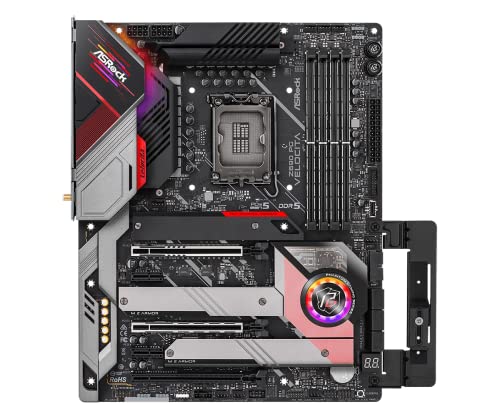
ASRock Z690 PG Velocita ATX LGA1700 Motherboard (Z690 PG Velocita)
grizzled bloom
That would work if you're ok with going the roundabout way of overclocking using bclk
dull flint
You'd get most of the experience without going into the excessive nitty gritty yes
also tcreate god sticks
naive pendant
grizzled bloom
https://pcpartpicker.com/product/rKGbt6/asrock-z690-pg-velocita-atx-lga1700-moth...
This good for the 13th and 14th gen cpus if I decide to upgrade?
grizzled bloom
Though I don't recommend the 14th gen at all, since it's just a mildly overclocked 13th gen
naive pendant
Oh server is not lv 3 yet
grizzled bloom
Yeah we lost that a few days ago
naive pendant
grizzled bloom
Though I don't recommend the 14th gen at all, since it's just a mildly overclock...
Alr.
Is ddr5 ram any good? Is it as hyped up as all these companies are making it look?
Didn't it just come out not too long ago?
dull flint
ddr5 is worth the $30-$40 difference in performance
though in our current gen overspending for a mobo is completely superfluous
grizzled bloom
Intel is kind enough to offer boards with both DDR4 and DDR5 options, so we can directly see the impact the RAM has on performance. Using DDR5 on anything at the 12600k or higher gets you 10-15% more fps.
dull flint
ram too, top shelf sticks come from t-create for 80
naive pendant
grizzled bloom
Intel is kind enough to offer boards with both DDR4 and DDR5 options, so we can ...
Coolios
Either of you have or had a 12600k + 4070 build?
grizzled bloom
My build is last gen, still new and good enough that I don't need to upgrade for a while. If you're curious it's in my bio.
dull flint
naive pendant
Either of you have or had a 12600k + 4070 build?
I've not specifically had these, but have experience with 40 series and 12th gen
naive pendant
grizzled bloom
My build is last gen, still new and good enough that I don't need to upgrade for...
Nice build. Love that case.
grizzled bloom
I had to modify it to fit the cooler. It may say it fits 420mm, I didn't anticipate that it meant specific ones.
naive pendant
dull flint
I've not specifically had these, but have experience with 40 series and 12th gen
Which one, ima guess you either have the 4070ti or 4080.
cyan raft
4090
naive pendant
Hello, I'm looking for support with a possible fried motherboard.
My pc is an old zoostorm prebuilt purchased from Curry's PC world in 2017, though most of the parts were released in 2014.
I have done some upgrading, added a gpu, switched to dual channel ram, switched to a power supply less likely to nuke itself, and I am still doing some tweaking before I give it to my friend to replace his i3 3rd gen ig pc.
However, recently the pc basically died, it was after swapping power supply.
The symptoms are that nothing powers, even fans/lights, unless only the motherboard main power is plugged in and nothing else, no cpu, no gpu, no sata plugged in, and the fans begin to spin and light up, but nothing boots. I have tried it with both power supplies and got the same result.
I believe the motherboard is fried, or just coincidentally reached the end of its life while I was switching power supply.
Motherboard is asus a68hm-plus
cursive epoch
The psu is probably faulty
cursive epoch
naive pendant
Hello, I'm looking for support with a possible fried motherboard.
My pc is an o...
Sorry for slow reply, what model and brand is the psu you bought?
naive pendant
cursive epoch
Sorry for slow reply, what model and brand is the psu you bought?
I'm pretty sure it's a vs550
naive pendant
cursive epoch
The psu is probably faulty
It was in perfect working condition when I bought it off the guy, and both psu do the same thing
cursive epoch
Corsair vs series is honestly junk lol
Try booting with just one stick of ram
For better understanding of the situation, can you list the rest of the parts for me?
limber dragon
naive pendant
Hello, I'm looking for support with a possible fried motherboard.
My pc is an o...
So clarification, its completely no signs of life until only the 24 pin is plugged in?
scenic solar
B550 gaming plus wtf is this

 grizzled bloom
I usually see that with a bad zip or the slightly wrong model, like if you have the non Wi-Fi and try to download the one for the Wi-Fi version
I've also seen cases where if you're upgrading a very old version you need a "stepping stone" version in between
scenic solar
Current version was released 3 months ago, this one came out a few days ago
naive pendant
limber dragon
So clarification, its completely no signs of life until only the 24 pin is plugg...
Yes
Precisely
scenic solar
But they are for b550 gaming plus, no other model has this name
grizzled bloom
Re-download and re-extract then
scenic solar
Ok, it also just set everything to default after exiting flash mode
Wth
I'll try a cmps reset to get everything "clean" and try again also
Idk if that will help
grizzled bloom
naive pendant
Yes
That sounds like a short to 12V, which can either be a bad PSU cable, incorrectly placed cable, or something else touching that shouldn't be
naive pendant
grizzled bloom
That sounds like a short to 12V, which can either be a bad PSU cable, incorrectl...
I'll have a look
grizzled bloom
For example if you accidentally put the PCIe cable in the EPS connector spot it will simply refuse to power on for safety
scenic solar
Do I just turn off the pc and press the button on the back to CMOS reset?
scenic solar
Jk, I thought I had the CMOS reset button instead
naive pendant
grizzled bloom
For example if you accidentally put the PCIe cable in the EPS connector spot it ...
But I tried every combo, so if one thing was misplaced or a cable was faulty I would've found it.. so there's likely 2 things touching that shouldn't be?
It has to be the motherboard or power supply touching something it shouldn't because I tested everything
Hm
grizzled bloom
Considering the VS is F tier and known to spontaneously die due to lack of protections it's possible that something went poof
F as in Fire hazard
naive pendant
Like it fried something?
scenic solar
I'm going crazy with this pc, I try to solve a problem and another one appears
Why?? That's absolutely frustrating
Now I have to figure out if the PSU or MB is faulty
grizzled bloom
If you did have a cable in the wrong place then it's possible that due to the lack of protections it killed either the motherboard or the GPU
The only thing to do is to start swapping parts
naive pendant
grizzled bloom
If you did have a cable in the wrong place then it's possible that due to the la...
Motherboard
I tried without gpu
So I was right then
The motherboard is likely fried
For safety, should I test it with my phanteks psu?
grizzled bloom
Possibly, again the only way to know is to swap parts. I'd start with the power supply.
naive pendant
I already tried the psu so next is the motherboard
scenic solar
So here are some problems with my pc:
Dimms often lights up like this (either only one stick or a part of it)
Standby works properly only if it wants to
Screen sometimes does not turn back on immediately either at startup or when waking from sleep
Can't update bios
...

At this point I'm thinking the motherboard should also have some sort of problem (together with the PSU)
grizzled bloom
RGB is a PITA especially on memory.
You can add/remove sleep states in bios until you find the bad one.
Flashback might help update.
scenic solar
I did not have this problem before the PSU/pc started acting strangely when in sleep mode or I have never noticed it before but that's unlikely
Something going on for sure
It's now working
Bios upd
I hope this solves something
limber dragon
naive pendant
It has to be the motherboard or power supply touching something it shouldn't bec...
there arent any modular cables that you're trying to reuse right?