#cpus-mobo-and-memory
1 messages · Page 33 of 1
 deep seal
 grizzled bloom
Chances are you won't notice because it'll still be running better than it was before
 cursive epoch
ya
deep seal
Mean I mostly play rimworld and sterllis
cursive epoch
i honestly didn't notice upgrading to 12 on my old laptop that i had
deep seal
Not the biggest ram eaters but can use it
cursive epoch
i ran 4 and 8 gigs sticks
still decent improvement over running just one stick
or 8gb but with two 4gb
 dull flint
You really won't notice it cos this is jedec in question
grizzled bloom
Put enough mods into stellaris and that one can make your cpu hate itself
cursive epoch
feel free to use 24 if your wallet doesn't allow for 16gb stick lol
it's perfectly okay on laptops
deep seal
Oh mods for sterrlis are cake compared to rimworld
cursive epoch
better to have more ram than too little ram
grizzled bloom
I have a star trek total conversion mod that breaks the normal map size limit and civ limit. My 5800X hangs if I zoom out mid game, not even end game lol.
deep seal
You see the "new" star trek gane
grizzled bloom
The one that's basically the stellaris mod I use, yes
deep seal
Ye
grizzled bloom
They supplied the engine for the game but apparently it's mostly made from scratch. Could be better in some ways for that reason, but that remains to be seen.
Now we need the mod for that star trek game that turns it back into stellaris
deep seal
Star wars
deep seal
Convert star trek to star wars
grizzled bloom
You've never done a total conversion mod before have you felix
It's insane the things you can do with some games
grizzled bloom

Some of these mods exceed the size of the original game exponentially
I can't even remember the name of the game that I cut my teeth on with modding. It was some space game with fleet command and I took two different conversion mods, one for star wars and one for star trek, and managed to mash them together into a ST v SW mod. I wish I could play that again.
dull flint
Fascinating, I have actually tried three of those
Cry of fear, stanley parable (original) and there was one other
Day z that's it
grizzled bloom
G mod is probably the most well known on that list
dull flint
Oh yeah, or rather doom
 mild jackal
grizzled bloom
I can't even remember the name of the game that I cut my teeth on with modding. ...
mild jackal
grizzled bloom
I can't even remember the name of the game that I cut my teeth on with modding. ...
Homeworld? Sins of a solar empire? I want to play through them again, especially since they're so cheap on GoG and no annoying DRM
grizzled bloom
It might have been homeworld
Yeahhh this was the mod too https://www.youtube.com/watch?v=wc5r39-4EiU

VIDEO CREDIT GOES TO 'THE VALIANT': https://www.youtube.com/watch?v=SMZYAz7rHUU
Homeworld is a real-time strategy video game developed by Relic Entertainment and published by Sierra Studios on September 28, 1999, for Microsoft Windows. Set in space, the science fiction game follows the Kushan exiles of the planet Kharak after their home planet ...
Hard to believe this was a late 90s game, graphics could easily pass for a 2006 game
mild jackal
I remember sins bogging down when we'd play multiplayer over hamachi in 2009. The core 2 duo couldn't handle all the ships. Wonder what it'd be like now
grizzled bloom
Want to put that powerful CPU to the test and find out? https://pcem-emulator.co.uk/
VMs don't work so well with these things
That'll simulate a bare metal PC


 naive pendant

Gigabyte Z790 UD AX ATX LGA1700 Motherboard (Z790 UD AX)
So I was looking for a Z690/Z790 board with wifi and I'm trying to stay at $200 or below and this was one of the boards I was reccomended
Probably gonna toss a 13600K/12700K on the board if that helps
I'm just curious if there's any cheaper ones worth considering
grizzled bloom
 amber canopy
That looks more melted than snapped off wtf
grizzled bloom
naive pendant
I'm just curious if there's any cheaper ones worth considering
I'm guessing you want full atx and not micro? There's several cheaper mATX ones
These 2 are also worth considering https://pcpartpicker.com/products/compare/JJRYcf,MDGbt6/
Gigabyte Z690 AORUS ELITE AX ATX LGA1700 Motherboard vs. ASRock Z790 PG LIGHTNING ATX LGA1700 Motherboard
naive pendant
grizzled bloom
I'm guessing you want full atx and not micro? There's several cheaper mATX ones
Would be nice, not a need though
Just need a wifi card, yes?

ASRock Z690 PG Riptide ATX LGA1700 Motherboard (Z690 PG Riptide)
For this one
grizzled bloom
Yeah
This one has wifi already https://pcpartpicker.com/product/JJRYcf/gigabyte-z690-aorus-elite-ax-atx-lga1700-motherboard-z690-aorus-elite-ax

Gigabyte Z690 AORUS ELITE AX ATX LGA1700 Motherboard (Z690 AORUS ELITE AX)
Gigabyte boards don't overclock memory as well but if you're not planning on going above 7000 that's not an issue at all
naive pendant
grizzled bloom
Gigabyte boards don't overclock memory as well but if you're not planning on goi...
Oh?
I mean I planned to memory tune a bit
But not overclock crazy
Just basic stuff
I was eyeing that board but was told it's not as good as it's DDR4 counterpart
grizzled bloom
Probably because of the memory thing
naive pendant
grizzled bloom
Yeah
This one has wifi already https://pcpartpicker.com/product/JJRYcf/gigabyte-...
Which rev is the one shown in the PCPP image?
Because Amazon and Newegg show a different one
"rev. 1.4"
grizzled bloom
The pcpp page doesn't change, the other listings do
naive pendant
grizzled bloom
The pcpp page doesn't change, the other listings do

This is what's shown on PCPP

This is what's shown on Amazon and Newegg
Was just curious, not like it matters anyways
Well this seems to be the cheapest Z690 with wifi and DRR5 so might as well grab it if it doesn't have any major defects
amber canopy
extra long ram

 royal elk
Ew
amber canopy
i cant wait for EVGA's last mobo
 grizzled bloom
That is the most cursed thing I've seen in a long time
dull flint
In some ways this isn't even maddening though

I love the priority of 9 pcie over 1 m.2 though
Don't need any of that for oc
amber canopy

 grizzled bloom
What exactly is happening to those USB headers
dull flint
They're multiplying like the pcie
amber canopy
3 of the 4 dimm slots work (duh) thats the only issue
amber canopy
the one in the photos lol
dull flint
A1 a2 b1 b2
amber canopy
 amber canopy
nah now im not gonna tell you
dull flint
Alr it's a2
amber canopy

dull flint
Man that sadge
grizzled bloom
I'm so confused, I don't even know what's real anymore. Only 2 of these have the correct pinning.
 mild jackal
Did ground get board with mspaint again
dull flint
You say this like biostar ever made sense
Even if that existed it probably would only run up to 5.5ghz like the real ones do

No m.2 cos you gotta bclk higher to get beyond 5.5ghz cos biostar can't write a bios
amber canopy
 royal elk
hmm
dull flint
Wow
amber canopy
6x86
dull flint
516
 dawn dirge
anyone know if the ryzen 5 5600x3d is good value
 cyan raft
amber canopy
cyan raft
amber canopy
FINALLLYYYYY SOMEONE ELSE WITH ONE
 autumn frigate
Is the 7950 x3d better than the 13900k?
cursive epoch
dawn dirge
anyone know if the ryzen 5 5600x3d is good value
no unless you're upgrading from 3600 or something like that
if new build 7600 is simply better
 burnt spear
dawn dirge
anyone know if the ryzen 5 5600x3d is good value
burnt spear
dawn dirge
anyone know if the ryzen 5 5600x3d is good value
Not for $230
If you get that $330 mobo, ram and cpu combo it's decent
dawn dirge
cursive epoch
no unless you're upgrading from 3600 or something like that
i was thinking of upgrade from my 3600 lol
grizzled bloom
Then it's pretty good to keep your current system alive a bit longer
 signal berry
Can someone tell me if this cpu is worth buying for $315 currently?
Check this out on @vague haven:Intel Core i7-12700K - Core i7 12th Gen Alder Lake 12-Core (8P+4E) 3.6 GHz LGA 1700 125W Intel UHD Graphics 770 Desktop Processor - BX8071512700K https://www.newegg.com/intel-core-i7-12700k-core-i7-12th-gen/p/N82E16819118343?Item=N82E16819118343&Source=socialshare&cm_mmc=snc-social-_-sr-_-19-118-343-_-07082023
I should add it’s been over 10 years since I’ve bought/built a PC so I’m just looking for peoples opinions on it. Just gaming, not doing anything too crazy.
grizzled bloom
signal berry
Can someone tell me if this cpu is worth buying for $315 currently?
Check this...
Do you need the integrated GPU?
The KF model is cheaper, comes out to $220 after coupon.
 sudden creek
Any news on Ryzen 8000 series or Intel 14th gen?
 hard leaf
come back next year
grizzled bloom
sudden creek
Any news on Ryzen 8000 series or Intel 14th gen?
14th gen desktop is a refresh of 13th gen, so it'll offer 5-10% more performance over previous gen and use the same socket. Expected launch late Q4, November/December.
Ryzen 8000 is expected to get about 25% more performance over previous gen. Expected launch Q1.
hard leaf
yup, come back next year
cursive epoch
and 8000 will still not have 3d cache across the board
amd's roadmap suggested this
grizzled bloom
That 25% should put the performance at or above the 7000X3D series at least
grizzled bloom
Easily. AMD hits the gas, Intel's engine choked
grizzled bloom
MTL had potential, but who could have guessed that their chiplets tiles would have problems?! /s
cursive epoch
lmao
well even rn i still give people am5 builds
so 8000 being this speedy will help
grizzled bloom
inb4 14100 is the same as the 12100 +300MHz
cursive epoch
I guess 7000X3D chips are like, best for gaming right now™
Cuz even 8000 non 3D will beat it if perf estimates are true
grizzled bloom
7800X3D wrecks the 13700k for the same price. OC can't close the gap enough.
grizzled bloom
13900KS comes closer at least thanks to the factory OC, but still falls flat
(And uses more than double the power in the process)
cursive epoch
The thing with 7800X3D is it's also already cheaper than the i9
And you can pair cheap boards with em
ez meta
No pbo yes but not like 7800X3D will oc any further anyway
It's funny how you could have 3 m.2 nvme ssd slots out of $129 A620 matx board
With wifi to boot
grizzled bloom
Oh yeah once 8000 puts OC into the mix, 7000X3D will be left in the dust
cursive epoch
I would personally head for B650 if possible since it's only like $150 lol
grizzled bloom
cursive epoch
It's funny how you could have 3 m.2 nvme ssd slots out of $129 A620 matx board
24 CPU lanes be like
cursive epoch
Cause pbo
But other than that, A620 is fine
These chips never need a lot of vrm
They run pretty efficient in contrast to Intel
royal elk
(300w 12700k)
cursive epoch
Efficient but pretty dense, so still requires cooling
royal elk
yuh
hard leaf
also 14th gen will not be a thing xD intel is changing its whoole naming scheme 😛
grizzled bloom
No that's 14th gen mobile
hard leaf
only 13th gen, 13th gen refresh and who knows what thing next
you know, the tile thing
grizzled bloom
"Starting from meteor lake" they're changing the naming, desktop 14th is RPL-S.
sudden creek
Gotcha thanks for letting me know.
 karmic perch
Will the 14th Intel use more power than the 13th?
 grizzled bloom
It's mostly just an overclock on 13th gen so in theory yes, but they could improve efficiency also
 dusk valve
can someone reccomend me a cpu upgrade
i have a r5 3600 rn and wanted to find something less outdated
amber canopy
Well do you actually need an upgrade or do you just want to because it's "old"?
not saying you cant upgrade if you just want to, but its good to know which is which lol
burnt spear
dusk valve
i have a r5 3600 rn and wanted to find something less outdated
what motherboard do you have
also gpu
dusk valve
burnt spear
what motherboard do you have
aorus b450 pro wifi with a rx 6700
dusk valve
amber canopy
Well do you actually need an upgrade or do you just want to because it's "old"?
i was on youtube and saw that gpus that were worse than mine were getting paired with higher tier cpus and thought that it would be good to upgrade since i just got this 6700
burnt spear
3600 is fine with the 6700
mild jackal
burnt spear
3600 is fine with the 6700
Can't really say that without more info on use case
5800x3d used off ebay/hwswap would be my recommendation - if you need the performance, especially if you're considering a gpu upgrade soon.
Or at all, without building new.
burnt spear
in general gaming, 3600 is fine with the 6700. I'm not saying not to upgrade, out of the two if playing at 1080p I would upgrade cpu first
dusk valve
mild jackal
5800x3d used off ebay/hwswap would be my recommendation - if you need the perfor...
yeah my whole thought on upgrading my cpu was because i just got this 6700 (prev using a rx 580) and thought that i would need to accomodate my cpu along with it
and i didnt want to spend much money but didnt know if i would get enough performace from the 3600
hence why i bought a 6700 on sale instead of buying something better
grizzled bloom
If you're near a microcenter there's the new 5600X3D for $230, performs nearly as well as the 5800X3D
 tranquil wolf
how's the ASRock Z790 PG RIPTIDE?
grizzled bloom
Pretty decent. Good features, good VRM. No complaints I've heard.
 scenic solar
Which one of these motherboard would be best for 5600x or 5600g?:
-msi b550m pro vhd wifi (mAtx): €110
-gbyte b550 gaming X V2 (atx): €112
-gbyte b550m aorus elite (mAtx): €108
-msi b550a pro (atx): €118
burnt spear
scenic solar
Which one of these motherboard would be best for 5600x or 5600g?:
-msi b550m pro...
either cpu is fine on basically any b450, b550, x470, x570 or a520
though why is it between those two? is 5600 not an option?
out of those 4 my choice with my pro vdh wifi though, if you need wifi
if not aorus elite
scenic solar
burnt spear
though why is it between those two? is 5600 not an option?
It's same price as 5600x so it would not make sense to get the non X version
scenic solar
burnt spear
out of those 4 my choice with my pro vdh wifi though, if you need wifi
I also thought about the WiFi one because it would be better than getting a 30€ separate ocie card
Then I guess that one
Danke
scenic solar
burnt spear
either cpu is fine on basically any b450, b550, x470, x570 or a520
B450... Idk I could check but it'd require a bios upd and my friend probably would break stuff doing it
burnt spear
nah pro vdh wifi is a good choice
scenic solar
No b450 at good prices so I guess b550 wifi
scenic solar
burnt spear
nah pro vdh wifi is a good choice
Do you recommend any reliable PSUs that are usually cheap on Amazon
650w
Or about that
 vast meadow
And do you need wifi?

MSI B550M PRO-VDH WIFI Micro ATX AM4 Motherboard (B550M PRO-VDH WIFI)
burnt spear
this is the cheapest A tier I see https://it.pcpartpicker.com/product/n34BD3/enermax-revolution-df-650-w-80-gold-certified-fully-modular-atx-power-supply-erf650awt
scenic solar
vast meadow
If so
https://it.pcpartpicker.com/product/PDsnTW/msi-b550m-pro-vdh-wifi-micro-at...
That's the one Ive already chosen
vast meadow
Yeah could have gotten cheaper if no wifi needed but yeah
scenic solar
Thanks for the PSUs recommendations, I'll see which one has the best price
vast meadow
What gpu will you be using?
burnt spear
scenic solar
Thanks for the PSUs recommendations, I'll see which one has the best price
are you in italy?
i just assumed so bc pato used italian pcp
scenic solar
Idk, my friend still has to decide but I think he'll get something like a 6700xt or similar (maybe lower) because it's a good value card
vast meadow
Mwe 650w if it's in stock on amazon for that price is the one I'd get
scenic solar
Most cooler master mwe's are lower on the list
vast meadow
All mwes are b tier
vast meadow
Oh i see
 burnt spear
it's a different moedl than just the mwe white v2
it's worse
and imo not worth getting, it's low pri C tier
scenic solar
Ok but what does actually change?
There's a Corsair CV650 for 75 but that's 20 more
burnt spear
cv is also C tier
worse protections, last less time, less overhead (A tiers can do a good bit over their wattage depending on model)
same with some B tiers like evga GT
scenic solar
Could you help me look up pcpp it and find me a good ~650w PSU not over 80€
? :]
But does it really matter if it's c tier for a 6700xt or something else like 6600/ 6650xt, 2070, 3060...etc
burnt spear
6700xt I'd try for B but c is ok
burnt spear
scenic solar
But does it really matter if it's c tier for a 6700xt or something else like 660...
italy?
scenic solar
Yeah
I still haven't moved
burnt spear
this is B tier for 80, non mod though https://it.pcpartpicker.com/product/Dn8bt6/asus-tuf-gaming-650-w-80-bronze-certified-atx-power-supply-tuf-gaming-650b

Asus TUF Gaming 650B 650 W 80+ Bronze Certified ATX Power Supply (TUF-GAMING-650B)
this is on the higher end of C tier units https://it.pcpartpicker.com/product/LWYQzy/adata-xpg-pylon-650-w-80-bronze-certified-atx-power-supply-pylon650b-bkcus

ADATA XPG PYLON 650 W 80+ Bronze Certified ATX Power Supply (PYLON650B-BKCUS)
also non mod
this is B tier, would be fine for 6700xt

Cooler Master MWE Bronze V2 550 W 80+ Bronze Certified ATX Power Supply (MPE-5501-ACAAB-US)
scenic solar
I guess this one, doesn't matter if it's modular..., I was about to check this one on amazon but battery dies
Died
 icy horizon
apologies if this is not the right channel to be asking this question, but I need a little help.
I'm trying to fix a computer and it wouldn't even turn on at all, and when the CPU was replaced, it'd turn on. The only thing is that the light on the CMOS area for the DRAM is red now, so I had the RAM replaced to no avail. At random, it'll switch back to the red CPU light on the cmos, but for the most part it stays red on the DRAM and won't post.
using a b450 and upgraded 2600 to 5600x, thought it could be a BIOs issue but I can't even open that
already checked:
- replaced CMOS battery
- checked if CPU was slotted in properly
- checked if cooler was secured tightly enough
- checked if wiring wasn't loose or anything
amber canopy
did you update your board's bios? it probably isnt compatible with zen3 with its current version
icy horizon
amber canopy
did you update your board's bios? it probably isnt compatible with zen3 with its...
the monitor only says NO SIGNAL, I assumed the same thing with the bios being incompatible but can't get into it
amber canopy
do you still have the 2600
icy horizon
yes, but the rig wouldn't even turn on with that in
grizzled bloom
icy horizon
yes, but the rig wouldn't even turn on with that in
Put the 2600 back in, clear cmos so it boots, update bios, then switch to the new CPU.
?cmos
 silk jungleBOT
How to clear CMOS (works for AMD and Intel)
https://www.intel.com/content/www/us/en/support/articles/000025368/processors.html
Intel
Defines CMOS technology and how to clear CMOS using the jumper or battery methods.
grizzled bloom
Some B450 boards have flashback which would allow you to bypass all of this entirely. What model do you have?
icy horizon
grizzled bloom
Some B450 boards have flashback which would allow you to bypass all of this enti...
Aorus B450 Pro Wifi
also I'm unable to use the 2600 to do that because the rig won't even turn on with that in which was why the new one was bought in the first place
grizzled bloom
Try with one stick of ram in
icy horizon
tried that, it still continued to turn on but refuse to post with the CPU and DRAM cmos lights switching
 glass shell
Hi there! Im having an interesting issue. I recently upgraded my components on my setup and switched from Intel to AMD. The parts I replaced were the Motherboard CPU and RAM and it will not post after powering on. Prior to the start of the issue it was able to post and boot windows but it would take close to over a minute to boot. Once it started not posting I started to diag it by removing the ram and trying one stick at a time per slot and i removed the storage to see if I could get a post. At one point I put everything back in and I got it to randomly post and boot and I attempted to download a BIOS update once I thought I got it I went to reset the PC to enter the flash settings and it wouldnt post. I held the qflash button down as well to see if it was that. I also removed the cmos battery from the MB and it didnt fix the issue. My current system is a AMD Ryzen 5 7600x with 4 sticks of 16gb of Corsair Vemgence DDR5 on an Gigabyte Aorus Elite AX MB
grizzled bloom
glass shell
Hi there! Im having an interesting issue. I recently upgraded my components on m...
The initial problem you had was related to having 4 sticks of memory. The new AMD chips don't like that, at least not any faster than about 5200 max. You can always try with 1 or 2 sticks and see if you can boot.
It sounds like a bad flash when you went to update. If you're sure you got the correct bios for your exact motherboard (you didn't say if it was B650, X670, etc) then you can use the Q-flash to fix it.
 mild jackal
4x16 m/a-die should run 6000 c32 or better pretty easily out of the box
I'd imagine samsung micron would too, but don't have first hand experience with those
grizzled bloom
If it was a better board for memory yeah but the QVL doesn't even have any 4 sticks above 4800 lol
Gigabyte isn't great for that in general on the new gen I've heard
glass shell
grizzled bloom
The initial problem you had was related to having 4 sticks of memory. The new AM...
Out of curiosity i was reading tha manual and it had only 2 options for ram 2 and 4 sticks is it possible for it to not post if it had only ine stick of ram?
 willow void
what is bottlenecking? Like i have a 6800xt that a friend told me was good and now im looking into cpu's and I read the ryzen 7 5800X3D is a good one for it but the Ryzen 9 5900X is the exact same price as the ryzen 7... and i read the ryzen 9 would bottle neck my 6800xt
dull flint
What resolution are you gaming at
willow void
1080, i might also buy a new monitor if there is a good one for sale
dull flint
Yeah you'll have some bottleneckung
Even 5800x3d depending on the game
6800xt is a 1440p card really
willow void
oh
dull flint
Don't consider it death that it happens
Think of it like...
You use the gpu but not all of it
Some of it remains unused
So it's like buying the better gpu and only using the lower level gpu worth out of it
willow void
oh ok... so my gpu would not perform as well if i bought the ryzen 9 or will my gpu perform fine, just not be bale to keep up with the ryzen 9
dull flint
Close
willow void
cuz they r the same price, so as long as there are no drawbacks ill probs get the ryaen 9
dull flint
So close
It's the other way around
The CPU can't keep up with the gpu
So it holds the gpu back
On the other hand if you went to 1440p both would perform about as good as you could possibly get
5800x3d kinda works for 1080p tho, if you play comp I'd understand that
willow void
ok i was planning on buying a 240 hz monitor so it was probably gonna be 1080p so ill get the 5800x3d in that case
thanks for the help
dull flint
All good
burnt spear
willow void
ok i was planning on buying a 240 hz monitor so it was probably gonna be 1080p s...
Unless you play very competitively, 1440p 144hz-170hz would be a better idea
Or that $300 1440p 240hz monitor on sale on best buy right now, but I doubt 6800xt would take advantage of the higher refresh rate
willow void
ok ill look into that too, thanks
and maybe ill just look into a 170hz monitor in that case, I doubt there is a big diff between 144hz and 240hz anyways, I was just gonna play a lil on it and see if it actually does make a difference and if it did i was gonna keep it.
dull flint
Yes an no
The difference is subtle
But at the same time, the type of panel tech they use can be just as dramatically better or even more so if you pick a good one
 desert moss
glad i waited just snagged a 7800x3d with starfield and 6% cash back on credit card thanks prime day
now just need to find a good white MB with 3 m.2 and good ram
cursive epoch
desert moss
now just need to find a good white MB with 3 m.2 and good ram
B650M Pro RS Wifi for $125, T-Force Vulcan 32 gigs 5600c32 kit for around $80
Can find the parts on pcpartpicker for ease of access
desert moss

MPG B650 EDGE WIFI employs silver white color scheme to show off different personality and identity. Besides being stylish, it is also powerful. The MPG series brings out fashionable products by showing extremely unique styles and expressing a conceited attitude towards the challenge of the gamin...
this is what i was look at but kind of high i think
i reall do like MSI boards tho
cursive epoch
that's pretty expensive
the asrock pro rs has fairly similar looks
not atx but it's white
dull flint
Just not worth it investing more than 125$ in an AM5 mobo at all rn
There's a white and a black option, both 125, both well and truly good enough for all of zen 4
And normies won't need the atx form factor for extra pcie anyway
desert moss
i'm coming from a msi meg ACE going to sell it might make some money back on cpu md and ram
Part List - AMD Ryzen 9 3900X, Radeon RX 7900 XTX, Lian Li O11 Dynamic EVO ATX Mid Tower
current build
not sure if a small form factor board would look ok in case with suck a huge video card
burnt spear
Matx isn't exactly sff
I had an mitx board in a full sized atx case and it looked fine
grizzled bloom
It's not like you can see the bottom of the motherboard very well anyway with a thick gpu
amber canopy

eBay
Find many great new & used options and get the best deals for Samsung 64GB(4 x 16GB) M378A2K43EB1-CWE PC4-3200AA DDR4 Desktop Memory RAM - C26 at the best online prices at eBay! Free shipping for many products!

grizzled bloom
Isn't that C die tho
 grizzled bloom
E die is worse not better lol
amber canopy
Allegedly
mild jackal
afaik e-die is like b-die but worse.
amber canopy
S4E, yea
S8E is generally bad but I wanna look into these newer revisions of the IC
Probably wouldn't actually buy it though 
amber canopy
 amber canopy
i need some 2Rx8 M378B1G73EB0-YK0 in my life rn
@stiff kraken you still have some mystery IC 8GB ddr3 dimms right
 stiff kraken
negative
stiff kraken
never had any mystery ddr3
amber canopy
o
stiff kraken
you helped me figure out what my mystery ddr3 was
amber canopy


 stiff kraken
amber canopy
i think this IC is a good contender for fastest 4Gb IC on ddr3 afaik
stiff kraken
amber canopy
i think this IC is a good contender for fastest 4Gb IC on ddr3 afaik
what are the results?
stiff kraken
gl, keep me updated
 chilly narwhal
Ask if you recommend me to update with an Intel 13.generation or AMD Rizen 7000 processor or I have to wait for the new processor, since Windows 12 will not be compatible, I think, with current generation processors?
burnt spear
??
cursive epoch
windows 12 isn't even gonna be here anytime soon
chilly narwhal
yeah is my cuestion wich i have to build for the future
grizzled bloom
Windows 12 will definitely be compatible with the current gen, there's no way they'll just obsolete 2 year old hardware like that
It was shocking enough when they obsoleted 5 year old hardware with 11
(even though 10 still works until 2025)
cursive epoch
TPM 2.0 won't be replaced by anything soon
So I wouldn't worry about 12
And cpus since like 2018 has a security feature that win 11 wants but is actually optional
grizzled bloom
chilly narwhal
yeah is my cuestion wich i have to build for the future
If you're building preparing for the future then Ryzen 7000 is the way to go. We expect at least another 3-4 generations on the platform so there's a good upgrade path.
cursive epoch
I used windows 11 on old 4th gen laptop
And still run it as it now belongs to my brother lol
Updates works perfectly fine
grizzled bloom
I put 11 on a X79 system because I hate myself
I just wanted to see how bad it is lol
cursive epoch
MS is always loose with their demands
You can always just patch your way thru the obstacles put in place
grizzled bloom
There's always been ways to bypass whatever M$ is pushing as the latest, greatest thing
cursive epoch
ya lol
Because expectedly, the stuff is usually fundamentally similar
Or even carried over from older os
or just reskin with extra features
I wouldn't be surprised if 12 is just 10 with changes
grizzled bloom
Friendly reminder: https://www.theverge.com/2015/5/7/8568473/windows-10-last-version-of-windows

The Verge
The Verge is about technology and how it makes us feel. Founded in 2011, we offer our audience everything from breaking news to reviews to award-winning features and investigations, on our site, in video, and in podcasts.
Conveniently they have fired the person that said that
chilly narwhal
the processor gets very hot in the ryzen 7000 so with an ubdate of the new bios it will be solved, or I have to configure it in the bios.
grizzled bloom
It's hot by design
grizzled bloom
The way the logic works, it boosts and boosts until it hits the max or hits the thermal limit
cursive epoch
they will still run like 80c or above under load because that's their nature
grizzled bloom
89-95C depending on the chip
cursive epoch
and idles of 50-60c is normal
chilly narwhal
not is nothing abaout the cooler
cursive epoch
yes, and that's the design of the cpus
they're intended to work as fast as possible
without hitting thermal limit
or their limit of capabilities
chilly narwhal
I want to build a new one, and I have decided on a 7000 processor, and a DDR5 motherboard
 tidal hound
chilly narwhal
I want to build a new one, and I have decided on a 7000 processor, and a DDR5 mo...
tidal hound
chilly narwhal
I want to build a new one, and I have decided on a 7000 processor, and a DDR5 mo...
based
chilly narwhal
And my question is if the bios update will regulate the temperature of the processor or do I have to lower the temperature in the bio.
tidal hound
just got a 7700
tidal hound
chilly narwhal
And my question is if the bios update will regulate the temperature of the proce...
i am also curious
grizzled bloom
The bios will keep it at a safe temperature. The issue with them burning up is solved with an update.
tidal hound
a currently available update? or one thats been announced?
grizzled bloom
Yes a current update
tidal hound
swag
chilly narwhal
ok,so i have not worries
chilly narwhal
grizzled bloom
The bios will keep it at a safe temperature. The issue with them burning up is s...
So I don't have to worry about going to the bios to lower the temperature. Simple with the new ubdate of the bios it is solved.
grizzled bloom
Right. Once you update, you don't need to worry.
chilly narwhal
cursive epoch
Them burning up isn't because of the heat
But it's bios control allowing voltage to run too high
Causing violent damage
So yeah, run latest bios
cursive epoch
Yes
chilly narwhal
Today I have decided for Ryzen 7000 and a DDR5 motherboard.I was not encouraged by the cpu temperature, but today I know that everything is fine.
Thanks guys-
chilly narwhal
grizzled bloom
Friendly reminder: https://www.theverge.com/2015/5/7/8568473/windows-10-last-ver...
👍
tidal hound
7700 and 7700 x are same price do i go for x and run a little hotter?
burnt spear
No
tidal hound
i trust you for your epic pfp
stiff kraken
tidal hound
7700 and 7700 x are same price do i go for x and run a little hotter?
assuming you plan to buy your own cooler, yes
only benefit 7700 has is the stock cooler but why would you use a stock cooler on a 7700
royal elk
Stock cooler best cooler
stiff kraken
if you truly care about the temperatures so much you can simply power limit the 7700x and have the same temps but better turbo ratios
no reason to buy 7700 over 7700x if they're the same price
 stiff kraken
pog $5
 amber lantern
my 7700x ramps up to 85 degrees on boot is this am problem? i’m worried about longevity of the product if this continues. during gaming temps are good.
 steady rain
My 7600x keeps overheating but my friend with the exact same setup isn’t.. I’m thinking it’s wallpaper engine but could that cause such a issue?
amber canopy
@stiff kraken what's the fastest 2x8GB DDR3 you've ever run? What was it and settings?
Just curious
burnt spear
amber lantern
my 7700x ramps up to 85 degrees on boot is this am problem? i’m worried about lo...
85c or f
If 85c, but Temps are OK during gaming, I doubt it's actually hitting 85c
 hollow thorn
steady rain
My 7600x keeps overheating but my friend with the exact same setup isn’t.. I’m t...
hollow thorn
steady rain
My 7600x keeps overheating but my friend with the exact same setup isn’t.. I’m t...
Remount and repaste?
grizzled bloom
amber lantern
my 7700x ramps up to 85 degrees on boot is this am problem? i’m worried about lo...
I'd be more worried if it wasn't getting hot.
It's designed to run at 95C 24/7 for the duration of the warranty. Don't worry.
stiff kraken
amber canopy
<@122901618369757184> what's the fastest 2x8GB DDR3 you've ever run? What was it...
I can't get you the results until I'm home from vacation but from memory it was like 2800 11-14-14-14 with 41ish ns latency
amber canopy
hm alright
amber lantern
burnt spear
If 85c, but Temps are OK during gaming, I doubt it's actually hitting 85c
yah c yeah i feel aorund the area and it cools down right away and its saying that through nzxt cam
but yeah i wont worry ab it
stiff kraken
amber canopy
hm alright
if you can do sub 40 with 16gb that would be hype
I wasn't on a bench os so maybe I could have gotten sub 40 with one but idk
just a regular debloated daily os
amber canopy
stiff kraken
if you can do sub 40 with 16gb that would be hype
Dunno we'll see. The edie could be good but it's more experimentation than anything.
stiff kraken
I have faith
the best ddr3 kit I've owned was literally a dumpster pull lmao
my friend saw a dude bringing a pc to the dumpster and asked if he could have it and if it still worked
so the dude just handed it to him instead of the dumpster
that's where I got the 4790k, z97, and 16gb bfr
all still working
amber canopy
stiff kraken
the best ddr3 kit I've owned was literally a dumpster pull lmao
And I'm using basically an experimental IC in terms of OC
Next I'll go for BH0-YK0 and xmp dimms of such
 dapper oriole
i meant ssd
motherboard is
ASRock steel legend b550m
atx
and also which is better samsung 980 500gb or crucial p3 500gb
grizzled bloom
The B550m right? That has 2 M.2 sots, the top one is gen 4x4 and the bottom one is gen 3x2 (half speed gen 3)
dapper oriole
ohhh
grizzled bloom
And the top one will only work with gen 4 with certain 3000 to 5000 series processors
dapper oriole
dapper oriole
and also which is better samsung 980 500gb or crucial p3 500gb
both are on sale now for $27
which should i get
grizzled bloom
P3 definitely
dapper oriole
p3 has 3500mb/s for $24
or should i get the 5000mb/s for 26.99
oh nvm the 5000mb/s is gen 4
vast meadow
dapper oriole
oh nvm the 5000mb/s is gen 4
assuming youre in the US get this https://pcpartpicker.com/product/hwXJ7P/msi-spatium-m450-500-gb-m2-2280-pcie-40-x4-nvme-solid-state-drive-sm450n500

MSI SPATIUM M450 500 GB M.2-2280 PCIe 4.0 X4 NVME Solid State Drive (SM450N500)
grizzled bloom
Since your gen 3 slot is only x2 it'll be limited to 2000 MB/s anyway
dapper oriole
oh okay thanks
so crucial it is
for ssd crucial is better than Samsung right
the brand?
grizzled bloom
vast meadow
assuming youre in the US get this https://pcpartpicker.com/product/hwXJ7P/msi-sp...
Just get this one
It will run in gen 3 mode
$20 so it's the best priced 500GB drive right now
vast meadow
np
 brave fiber
does the gigabyte h610m s2h v2 have built in wifi
 cerulean wadi
Not unless a version had "AC" or AX in the name. These letters refer to "wifi 5" or wifi 6.
vast meadow
brave fiber
forgot the name
yes but if you havent bought it yet theres usually just better choices, what country, for what cpu? what have you bought and whats your budget for the cpu/mobo/ram? or whole pc if its a new pc anyway?
 scenic iris
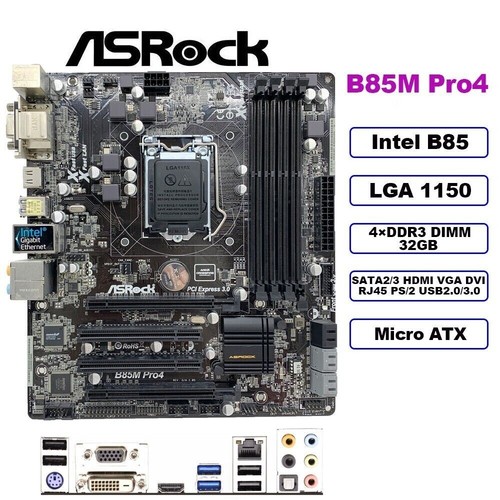
eBay
Find many great new & used options and get the best deals for ASRock B85M PRO Motherboard M-ATX Intel B85 LGA1150 DDR3 32GB SATA3 HDMI DVI+I/O at the best online prices at eBay! Free shipping for many products!
Is this a solid buy? I already have a CPU and RAM and graphics card
grizzled bloom
scenic iris
Is this a solid buy? I already have a CPU and RAM and graphics card
That thing has no heatsinks and only a total of 4 power stages. It's probably going to overheat with anything more than an i3
scenic iris
What is a heat sink
Sorry but I don't really know much and I'm trying to learn but there's so much
grizzled bloom
In this context I'm referring to a VRM heatsink, which would be a chunk of metal sitting on top of the area where those little squares near the CPU are.
They help remove heat from something, hopefully in a way that makes it easier to dissipate
scenic iris
Would I be able to put my own metal there?
I have an i5 4570 and 4x4gb ram at 1600mhz
I'm also putting a GTX 960 4gb in there if that matters
autumn frigate
scenic iris
Would I be able to put my own metal there?
No
U could short the board if u do it wrong
Well u can but there are risk
scenic iris
Yeah, I might have to because I'm broke as hell and it's one of the cheapest I could find with 4 slots for ram
autumn frigate
Don’t do it
Buying the heat sinks and thermal pads would make it cost the same as a more expensive board
scenic iris
How big of an issue is it that it doesn't have heat sinks, the most I'll be running is rust with low settings
autumn frigate
Honestly it’s not an issue at all
Unless your running prine95 or a stress test for hrs
scenic iris
Alright, thank you guys
Semi related question, in a colder room you can overclock things harder because theyll cool down better right?
autumn frigate
Yea, btw u can like put a fan blowing towards the vrms if they are getting hot
I wouldn’t overclock on that board tho
cursive epoch
A stock 4570 is fine on such a board perhaps
scenic iris
I live in Cali so during the winter it gets below freezing in my room so I might overclock my gpu during winter
autumn frigate
Well those parts shouldn’t produce that much heat
U should be fine overclocking year around
Mainly the gpu
cursive epoch
You can oc the gpu yeah
scenic iris
Yeah but I can't overclock during the summer when my room is 95 at minimum LOL
cursive epoch
It won't be board vrm dependent
autumn frigate
Btw the card is somewhat old so u might have to replace the paste in it if u notice temps r somewhat high
scenic iris
👍
I got it second hand from a buddy a couple months ago for 50 bucks because he got a 3080 and didn't need the 960 anymore
cursive epoch
50 bucks for it is ok I guess
You could maybe get better at that price but it takes some effort
Actually you can
There's lots of rx 570s on ebay
But welp, 970 will still be okay. 570 is a lot faster though
scenic iris

eBay
Find many great new & used options and get the best deals for ASUS Intel Q87M-E LGA1150 Desktop Motherboard at the best online prices at eBay! Free shipping for many products!
Would this be a better option?
scenic iris
So the ASRock is a better motherboard?
scenic iris
Yeah idk why
 hybrid grove
How important is ram speed for a dedicated streaming/recording pc
vast meadow
A dedicated streaming pc is a waste of money unless you're making bigggg money off it, even then with av1 encoding it's not worth it anymore either way
hybrid grove
I already have a few spare pcs laying around so I figured I'd take some load off my main pc.
Doesn't answer my question though lol
burnt spear
hybrid grove
How important is ram speed for a dedicated streaming/recording pc
ram speed mostly affects cpu performance
but beyond a certain speed will negatively affect performance
on 13th gen, ddr4 can hurt performance as much as 15% in some scenarios
on 5800x3d, 3200mhz vs 3600mhz there's almost no difference
dull flint
hybrid grove
How important is ram speed for a dedicated streaming/recording pc
Basically pointless to worry about
hybrid grove
Just for a dedicated pc for streaming to twitch and recording gameplay. Like would I notice any difference let's say 2666 vs 3200?
Pc has a R5 2600 and a 1660 super
hybrid grove
I have this asrock deskmeet x300 and for whatever reason it won't post past 2666mhz. Tried different cpus and ram sticks and always the same issue. So wanted to make sure if it would still be alright . Appreciate the feedback
hybrid grove
I have tried it with the ryzen 2600 a 5500 and a 3600. All kits were 3200mhz cl 16. Gskill ripjaws, tforce Vulcan, and oloy warhawk
dull flint
What mobo is it
burnt spear
b350 x370 or a320 by chance?
hybrid grove
It's a x300

Supports AMD AM4 Socket Ryzen™ 2000, 3000, 4000 G-Series, 5000 and 5000 G-Series Desktop Processors, up to 65WSupports MAX Height ≦ 54mm CPU CoolerSupports 4 x DDR4-3200MHz DIMMs, up to 128GB1 x PCIe 3.0 x16Graphics Output Options:DisplayPort, HDMI & D-Sub2 x SATA3, 1 x Ultra M.2 (PCIe Gen3 x4)1 x USB 3.2 Gen1 Type-C Port4 x USB 3.2 Gen1 Type-A ...
It's a barebones mini pc from asrock
dull flint
Wow it even states 3200 ddr4
Hmm not too sure then what's wrong if xmp isn't enabling
Does it take a long time to post?
hybrid grove
It's possible I may have a faulty board. It will work fine with one stick at 3200. Forgot to mention that
hybrid grove
I should have gotten the 12th gen version instead of AMD 💀
dull flint

hybrid grove
It's a cool little PC but it gets hot AF
dull flint
How much ram exactly are you trying to use
hybrid grove
2 x 8gb
dull flint
Kekw
Yeah that won't be cpu or ram related
I'd definitely be sus of board
It's a funny itx but long boi to so regular itx am4 might fit
Maybe even am5/lga1700 cos itx is always expensive
hybrid grove
I would just lose the front usb if I replaced board
dull flint
Oh i didn't notice that
Yeah you would
💀
Dang
Imagine a motherboard with 4 ram slots but struggles with 2
hybrid grove
Lol
dull flint
Rma maybe?
hybrid grove
Yeah ill check my warranty should still be covered.
dull flint
16gb should honestly run on a toaster
I'd just say you're having trouble running 2 sticks and spare a lot of the context beyond what's necessary
2x8gb should run on any ryzen 3000 or 5000 (i imagine 2000 too but I got no experience there
hybrid grove
It is a neat device though. They need to add better ventilation if they do a newer model. You can fit a dual fan gpu in there up to 200mm. Or a 120mm fan if you are using apu. But the gpu blocks most of the airflow
My experience with the ryzen 2600s have never been great
vast meadow
hybrid grove
I already have a few spare pcs laying around so I figured I'd take some load off...
youd be way better selling your parts and getting a better gpu, if you really wanted it to look pretty, one with av1 encoding
hybrid grove
I do have an arc a380 I could use instead of the 1660 super
vast meadow
thatd be better
hybrid grove
Does pcie 3.0 affect the arc in encoding or just gaming
Also have to check if the R5 2600 supports resizeable bar
dull flint
I don't think it affects either? Iirc
Arc would encode way better than a 1660S
And AV1 too, ez choice
grizzled bloom
It depends, usually
dull flint
It can probably be switched on with like, some github mod if it exists
hybrid grove
It did when I was using the R5 5500 and a 6600xt. Might depend on the CPU if its available
grizzled bloom
Yeah if it uses a capsule bios you can mod it pretty easily to add it in
dull flint
A380 bae
I still want to try arc
Just to say I tried it
No benefits in me having it tho kek
grizzled bloom
The issue is my plex server is on a HP proprietary X79 board and I tried to add rebar but it didn't work
hybrid grove
It was an impulse buy for me 😂
I'll swap out the 1660 for the arc to see if 2600 supports rebar. I put the 5500 in a family members pc so I don't have it anymore.
burnt spear
dull flint
2x8gb should run on any ryzen 3000 or 5000 (i imagine 2000 too but I got no expe...
2000 was kinda a toss up if you could run 3000mhz, but more often than not you could
my friends 3400g, which is zen 2, couldn't run 3000mhz
and apus typically have a better imc than their non apu counterparts
hybrid grove
I don't mind running it at 2666 as long as it's not a noticable performance drop over 3200mhz for the purpose im using it for
burnt spear
it's a good bit loss in cpu performance
hybrid grove
Would it matter much if im using the arc to encode ?
grizzled bloom
My 2700 was able to run 3200 with zero effort
Never tried to run it faster since it was c-die
hybrid grove
So I have rebar and above 4g decoding enabled but it says it's not enabled when I get into windows
grizzled bloom
What GPU do you have in right now
hybrid grove
Arc A380
Checked in gpu z everything is a yes except it being enabled in the bios. Which it is
grizzled bloom
Do you have above 4G decoding on too
hybrid grove


And I get the message that it's supported but not enabled from intels arc control
grizzled bloom
Intel
Describes issue in which Resizable BAR is reported as not enabled or supported even when it is properly enabled in BIOS.
@hybrid groveIntel has a workaround on that page, basically says to disable svm and rebar, reboot, and enable rebar.
hybrid grove
Tried that a few times now and still no luck.
grizzled bloom
You disabled secure virtual machine too? Dang
hybrid grove
Yeah could just be a MB issue at this point.
grizzled bloom
If you're on the latest bios you can try the previous version maybe
hybrid grove
Although I did get rebar to work when I had the 5500. So maybe cpu issue too
grizzled bloom
Weird because it's supposed to be a platform feature that's been around for YEARS. Like before Ryzen existed.
hybrid grove
I may just say f it on this mini pc and throw everything into the b450 ds3h I have and get a matx case
😂
I'm going to give it a rest for now. But I'll try switching to the previous bios version when I get some more time and see if that works.
Appreciate you taking the time and for all the help
 alpine quest
can anyone help me on why my cpu is reaching 100 degrees just by playing roblox
even when i left the game it still stays at 99-100 degress
and im only using around 10% of my cpu
grizzled bloom
alpine quest
can anyone help me on why my cpu is reaching 100 degrees just by playing roblox
What CPU and cooler? Is this a new build or a new problem?
alpine quest
grizzled bloom
What CPU and cooler? Is this a new build or a new problem?
its a new problem
i have a core i7-11700k
grizzled bloom
Air or liquid cooling
alpine quest
and a msi mag coreliquid 240r
grizzled bloom
Does it have rgb
alpine quest
yes
alpine quest
wait klemme check
grizzled bloom
DP503?
You could probably tell by looking https://pcpartpicker.com/products/compare/ZMC48d,sqjBD3,s2pzK8/
Antec NX410 ATX Mid Tower Case vs. Antec DP503 ATX Mid Tower Case vs. Antec NX320 ATX Mid Tower Case
alpine quest
its not any of the ones on the wewbsite
it has like a front door thingy on the top of the front that you can open
grizzled bloom
Does that go to a 5.25" drive bay for a DVD drive?
grizzled bloom
Ok good that has plenty of space
I'd go for this, then you don't have to worry about failures like this https://pcpartpicker.com/product/hYxRsY/thermalright-peerless-assassin-120-se-6617-cfm-cpu-cooler-pa120-se-d3

Thermalright Peerless Assassin 120 SE 66.17 CFM CPU Cooler (PA120 SE-D3)
Cheaper than any liquid cooler too, and will perform just fine
alpine quest
ty
grizzled bloom
alpine quest
ty
Almost forgot, this one is RGB too and a little better performance for only a couple bucks more https://pcpartpicker.com/product/MzMMnQ/thermalright-phantom-spirit-120-se-argb-6617-cfm-cpu-cooler-ps120se-argb

Thermalright Phantom Spirit 120 SE ARGB 66.17 CFM CPU Cooler (PS120SE ARGB)
 old vigil
Hi, I need some help, I dont know much about pc, I have a i5-8600 CPU, and I want to upgrade since I cant play new games (online) like forza 5, cod, etc. my cpu goes to a 100. I was thinking i7, but im lost with cores and threads
also im a casual gamer, and I dont use my pc for work, just fun.
(also buying motherboard with cpu)
naive pendant
@old vigil what country are you buying in?
old vigil
Mexico/USA
naive pendant
what is your budget?
old vigil
im thinking 300-450 for the cpu
and motherboard not sure, whatever fits the cpu and looks pretty
I have the NZXT H510 case
naive pendant
something like this would be a big upgrade
https://pcpartpicker.com/list/6ZtcZw
but if you're willing to spend up to $450 on the CPU, then you could do a 7800X3D and get even more performance plus two extra cores
Part List - AMD Ryzen 5 7600X
Part List - AMD Ryzen 7 7800X3D
intel 13th gen is also an option, but imo having the AM5 platform is super handy for future upgrades. being able to slot in a Zen 6 3D chip in a couple of years when your CPU starts to feel its age is a pretty good selling point
tidal hound
Not sure if it’s an issue with the cable or the board but the main power connector won’t fully seat? I’ve given it way more effort than I feel should ever be used and it won’t go in further than this, neither piece is damaged in any way though?

Sorry pic is a little blurry
old vigil
naive pendant
intel 13th gen is also an option, but imo having the AM5 platform is super handy...
ty for the help
 slim perch
Is it normal that even in bios your mobo and cpu temp is around 47-50?
burnt spear
depends, but it's not not normal

 upper aspen
cursive epoch
and isn't 6000 hard to run on am5?
upper aspen
cursive epoch
and isn't 6000 hard to run on am5?
i can run 6000 on my 7800x3d,its the sweet spot, somthing something one to one with infinity fabric
cursive epoch
slim perch
That's completely fine
burnt spear
yeah 6000 is normal on am5
cursive epoch
Hm ok
burnt spear
6400 is where it's hard to run
cursive epoch
I remember wrong then
cursive epoch
yes for am5
slim perch
cursive epoch
That's completely fine
Not hot ? When I'm gaming its around 60
burnt spear
i mean, yes? but no?
cursive epoch
That's also pretty good temps
upper aspen
thats fine
cursive epoch
tidal hound
Not sure if it’s an issue with the cable or the board but the main power connect...
That isn't fully seated
Make sure you're pushing down straight
Don't wiggle
tidal hound
I’ll try again on my lunch break im on the clock rn tho, after a while I thought a small amount of wiggle might help
cursive epoch
It could ya, but pushing it down straight is better
cursive epoch
Glue it on
 ashen pulsar
the prongs would have helped but they were so flimsy
I bent them back once and they broke
cursive epoch
Ay nothing some glue can't solve
Or tape on that matter
Just be careful to not get it on anywhere else you don't want
ashen pulsar
it isnt perfect but I got it to secure
one corner keeps lifting though
I will use a 3d printer at a makerspace then
 devout heart
Guys is it possible to disable a graphics card when it’s plugged in already? I want to do a before and after graphics test with my IGPU
devout heart
Thx
 frosty depot
tidal hound
Not sure if it’s an issue with the cable or the board but the main power connect...
frosty depot
tidal hound
Not sure if it’s an issue with the cable or the board but the main power connect...
Pull it all the way out. Align it back up and press slowly but firmly. Sometimes they take a bit of effort. More than you'd think should be required.
grizzled bloom
 frosty depot
tidal hound
Not sure if it’s an issue with the cable or the board but the main power connect...
frosty depot
tidal hound
Not sure if it’s an issue with the cable or the board but the main power connect...
Is your 24pin two separate pieces? They may not be aligned all the way.
frosty depot
grizzled bloom
https://tenor.com/view/michael-scott-the-office-thats-what-she-said-gif-4084628
I love you lol
tidal hound
Yeah it got it to seat okay, it was two pieces and it just took a bit more effort
dapper oriole
need help
@hollow thorn
@covert turtle
@limber dragon
so i cleaned my pc now i put it back together it turns on like the fans but my monitor is displaying black and when i unplugged the dp it says no signal but when i plug it back again it goes back black
@cursive epoch
@grizzled bloom
someone help me im dying 😭
grizzled bloom
Power drain it
dapper oriole
how
grizzled bloom
Unplug, hold the power button for 30 seconds, wait 10 minutes, repeat
cursive epoch
Or 30 ya
grizzled bloom
10 seconds minimum, 30 to be safe imo
I'm going to guess that one of the fans reverse flowed some power back into a cap when it was being cleaned
Draining it like this will help if so
cursive epoch
Anyway an asus armoury crate alternative is now a thing
Finally lmao
Only works for laptops tho
Mostly focused on tuf and rog
cursive epoch
Working perfect on my tuf so far
You could try I guess, fan profiles seems to be read from the bios
And is actually doing that as far as I've read
I can still use rgb with all its effects
cursive epoch
That shouldn't be a problem
grizzled bloom
That would only be a problem if it was so low quality it was causing a short or something
Free fans aren't even that bad usually
dapper oriole
how many times should i repeat the process?
cursive epoch
Just once
dapper oriole
okay
grizzled bloom
Start with once but if it doesn't work do it twice
dapper oriole
i bought a 3 pack fan for 3.86usd lol
cyan raft
cursive epoch
Anyway an asus armoury crate alternative is now a thing
Yeah it’s been a thing for a bit now
dapper oriole
i used the molar cable to connect it
cursive epoch
Pretty nice to get rid of asus stuff lol
Except myasus, I wanna keep it for warranty reasons
Armoury crate forces my laptop to ignore sleep settings on windows
cyan raft
GHelper 10/10
dapper oriole
do you guys recommend the cooler master ml360l v2 for a aio?
grizzled bloom
No
cyan raft
Wait that’s the zip, not the link to it
cursive epoch
My 2023 tuf works right away and flawlessly with the app
No install needed too
Just unzip into a folder and run
grizzled bloom
The fans on that CM cooler die in a year or two, the pump is loud and also prone to failure
cursive epoch
Also they have a tendency to leak
dapper oriole
what's a good 360aio that has a white version
grizzled bloom
LS720
dapper oriole
for my ryzen 7 5800x
cursive epoch
LS/LT 720
dapper oriole
grizzled bloom
LS720
from deepcool?
cursive epoch
yeah
grizzled bloom
Lian Li Galahad is good too
dapper oriole
how about case fans for the o11 dynamic
cursive epoch
rgb?
dapper oriole
cooler master sickleflow or deepcool cf120?
cyan raft
Really? I’ve been seeing a lot of Galahad failures
cursive epoch
none of those
cyan raft
Also on GN’s product failure list that ain’t resolved
cursive epoch
get TL-C12 something
dapper oriole
dapper oriole
cooler master sickleflow or deepcool cf120?
i mean fc120
cursive epoch
From thermalright
dapper oriole
cursive epoch
get TL-C12 something
what brand
grizzled bloom
cyan raft
Really? I’ve been seeing a lot of Galahad failures
Is that so? I hadn't noticed that
 grizzled bloom
dapper oriole
what brand
grizzled bloom
dapper oriole
what brand

Thermalright TL-C12CW-S X3 CPU Fan 120mm White ARGB Case Cooler , 4pin PWM Silent Computer Cooling Fan with S-FDB Bearing Included, up to 1550RPM(3 Quantities)
dapper oriole
damn so cheap
grizzled bloom
For how cheap they are they're actually pretty decent
grizzled bloom
Yep
dapper oriole
for $60 i get 16gb 3600mhz
dapper oriole
ddr4
cursive epoch
$60 for that is high
grizzled bloom
$70 double capacity https://pcpartpicker.com/product/ZRpmP6/team-t-force-delta-rgb-32-gb-2-x-16-gb-ddr4-3600-cl18-memory-tf4d432g3600hc18jdc01

TEAMGROUP T-Force Delta RGB 32 GB (2 x 16 GB) DDR4-3600 CL18 Memory (TF4D432G3600HC18JDC01)
dapper oriole
i mean $56.99
dapper oriole
grizzled bloom
$70 double capacity https://pcpartpicker.com/product/ZRpmP6/team-t-force-delta-r...
why is it so cheap
dapper oriole
oh
grizzled bloom
DDR5 offers higher capacities for cheaper so they had to drop DDR4 like a stone to match
dapper oriole
so like i have 1085usd rn
i already have a case and an ssd
the lian li o11 dynamic and for the ssd samsung 980 pro w heatsink
dapper oriole
dapper oriole
so like i have 1085usd rn
what white components should i get
dapper oriole
no like i need a cpu
mobo
gpu
psu
rams
fans
cooler
the store quoted this
ryzen 5 5600x ₱8,250
Asrock b550m steel legend ₱7,950
gigabyte rtx 4060ti aero oc ₱28,950
team t force delta 2x8gb 3600mhz white ₱3,150
seasonic ssr-750x(white) ₱6,750
deepcool ag400 (white) ₱1,750
Triple Z tech
coolermaster sickleflow white 3×120mm fans ₱2,250
is it good for like 1085usd?
cyan raft
Conversion = no bueno
dapper oriole
currency is in Philippines pesos
dapper oriole
cyan raft
Conversion = no bueno
lol
cursive epoch
decent considering it's philippines
grizzled bloom
I've seen worse for that price but I have no context on the local market
cyan raft
Foxy you’re in the Philippines right?
cyan raft
Ahh
dapper oriole
is it good tho?
dapper oriole
in the Philippines same price
grizzled bloom
cursive epoch
3060ti costs more than 4060ti for some odd reason in philippines
And I'm guessing AMD is either nonexistent or overpriced too?
dapper oriole
we have a pc builder website
cursive epoch
ssr-750x is focus gold
dapper oriole

Bermor Techzone an online tech and computer store base in the Philippines. Shop lowest deals for computer desktop, laptop, monitor, TV, mobile gadgets, printer, video card, memory, Intel or AMD processor, motherboard, PC Case, iphone or android smartphone and more electronic products. Nationwide shipping via Cash on Delivery or payments via Visa...
here
cursive epoch
grizzled bloom
And I'm guessing AMD is either nonexistent or overpriced too?
yeah lol
dapper oriole
grizzled bloom
And I'm guessing AMD is either nonexistent or overpriced too?
they exist
dapper oriole
$60 difference
oh wait no depends on the brand
AMD PC build step by step PC parts picker base in the Philippines pricing and availability of computer parts and accessories. Build your own PC with wide array of options.
try our pc builder limit is ₱59,000
without storage and case
grizzled bloom
Cheaper than the 4060 ti while performing better and has more memory. 6750 XT ftw. https://bermorzone.com.ph/shop/video-cards/amd-video-cards/gigabyte-gaming-oc-rx-6750-xt-12gb-gddr6-video-card-gv-r675xtgaming-oc-12gd/

Lowest Price and Best Deals Computer Desktop, Laptop and Mobile Gadgets. Nationwide Shipping via Cash on Delivery, Installment, Credit Card, Gcash, Paymaya, Grab, ShopeePay and Bank Transfer. Brand New Products Only Computer Shop. Office and Gaming PC Parts Available. Add to Cart with Free Shipping Vouchers and Discount Coupon Codes. Your Best C...
cursive epoch
nice
grizzled bloom
That's the way to go unless you absolutely have to have ray tracing
grizzled bloom
dapper oriole
what
S word
dapper oriole
things here are expensive lol like the 980pro 1tb with heatsink cost ₱15,000 while on amazon cost ₱4,000
dapper oriole
grizzled bloom
S word
oh sorry lol
grizzled bloom
And yes the 980 pro is expensive. Samsung has just been overpriced for middling performance lately.
dapper oriole
Bermor Techzone an online tech and computer store base in the Philippines. Shop lowest deals for computer desktop, laptop, monitor, TV, mobile gadgets, printer, video card, memory, Intel or AMD processor, motherboard, PC Case, iphone or android smartphone and more electronic products. Nationwide shipping via Cash on Delivery or payments via Visa...
try this
dapper oriole
oh
dapper oriole
yeah good idea
grizzled bloom
If you're just gaming this drive will have nearly identical performance to a 980 pro for 1/3 what you paid https://bermorzone.com.ph/shop/storage-devices/solid-state-drives/teamgroup-mp33-256gb-512gb-nvme-m-2-internal-solid-state-drive/

Lowest Price and Best Deals Computer Desktop, Laptop and Mobile Gadgets. Nationwide Shipping via Cash on Delivery, Installment, Credit Card, Gcash, Paymaya, Grab, ShopeePay and Bank Transfer. Brand New Products Only Computer Shop. Office and Gaming PC Parts Available. Add to Cart with Free Shipping Vouchers and Discount Coupon Codes. Your Best C...
dapper oriole
ill try the pc now if it works
dapper oriole
grizzled bloom
If you're just gaming this drive will have nearly identical performance to a 980...
already bought it 😂
dapper oriole
grizzled bloom
2TB ₱5,495.00
yeah but i bought from amazon ₱4000 1tb with heatsink
so i saved 1/3
grizzled bloom
₱2,695.00 for 1TB
And heatsinks are usually unnecessary, and when they are required the motherboard one works best
Anyway it's 6:30 AM here, I'll leave you in Foxy's capable hands
dapper oriole
oh
okay
pc still not working lol
idk
my keyboard usually lights up when i turn the pc on
now not lighting
but my mic mute light lighting
monitor still displaying black
@cursive epoch
do i power drain again?
dapper oriole
how do i do it
cursive epoch
It's a coin batt
dapper oriole
uhmm
cursive epoch
Sorry, lemme show you how in a sec

Support us on Patreon - https://www.patreon.com/eTeknix
Sometimes you may find you'll need to reset bios/CMOS, so this video will show you the different ways of doing it even if you have an older motherboard or a newer one. Traditionally the way to reset bios/CMOS was to adjust the included jumper along the CMOS pins on the motherboard.
If you...
dapper oriole
 cursive epoch
sure
dapper oriole
main is dp and other one is hdmi
idk why my keyboard not lighting up but my mic does
tried switching the slot
still not lighting
the monitor stays black but when i unplugged it it says no connection
or should i try removing the fan i installed @cursive epoch ?
cursive epoch
Maybe
dapper oriole
I'll do it
cursive epoch
Anything can be a problem at this point
dapper oriole
still not working @cursive epoch
cursive epoch
Try removing ram and clean the golden contact pads with an eraser