
#cpus-mobo-and-memory
1 messages · Page 30 of 1
 upper aspen
 cursive epoch
On average it's better
Nah, it's to do with agesa
Not board quality related
So you don't have to get expensive boards
Just B650 is pretty decent
Watch for vsoc and you're safe really
upper aspen
x670 godlike time?
cursive epoch
Almost all am5 boards are pretty overbuilt
An average B650 could take 7950x3d at full tilt and more
 sudden creek
upper aspen
x670 godlike time?
sudden creek
upper aspen
x670 godlike time?
Way overkill. Only buy for the flash or extreme OC.
upper aspen
sudden creek
Way overkill. Only buy for the flash or extreme OC.
well im planning on getting a 7800x3d (best gaming CPU) so no OC right?
 royal elk
upper aspen
but wut if i do
royal elk
upper aspen
but wut if i do
Well then you'd be pretty stupid
If we're being serious
Lmao
 grizzled bloom
upper aspen
well im planning on getting a 7800x3d (best gaming CPU) so no OC right?
grizzled bloom
upper aspen
well im planning on getting a 7800x3d (best gaming CPU) so no OC right?
Not in the traditional sense but you can get a ~5% overclock using bclk on a board with an external clock gen, but it's not worth that
sudden creek
grizzled bloom
Not in the traditional sense but you can get a ~5% overclock using bclk on a boa...
BCLK oc on AM5 can be done externally without screwing up SSDs?
grizzled bloom
If you have an external clock gen to isolate the CPU/memory from the rest of the system
They are NOT cheap
upper aspen
grizzled bloom
Not in the traditional sense but you can get a ~5% overclock using bclk on a boa...
what boards have these
or is it something seperate
sudden creek
....... Okay I gotta ask.
Are you asking because your curious or asking because you actually want to spend like 5-6x more money just for a mere 5% boost in perf IF EVEN 5%.
upper aspen
im just curius. Im capping my graduation PC build at around 5k
7800x3d, 4090, and the large oled fro asus
dont worry I am not buying a hof
sudden creek
Unless your serious about overclocking I'd just step away from boards like the G0dlike and such. Any B650 will work or if you want the extra features without paying a 4x premium just go with a reasonable X670.
Like a Tomahawk-Aorus Master range.
upper aspen
kk cool
sudden creek
And to be clear, when I mean serious overclocking I mean the type that requires LN2 and or weeks of patience tuning every thing.
I've spent around a month and a half tuning my system and I would not consider myself a "serious overclocker".
upper aspen
Im just like weee slider ++++++ no crash pls thx babes
sudden creek
That made no sense to me....
upper aspen
sudden creek
That made no sense to me....
WEEEE slide the mhz slider higher and hope it doest crash
sudden creek
Okay yeah no. Absolutely not recommending G0dlike then.
grizzled bloom
upper aspen
what boards have these
Cheapest one I know of is the MEG X670E ACE which is $700
sudden creek
Just get a B650 or if you really want the extra pasazz + couple extra features get a X670 but nothing over $500. Aorus Master is where I'd recommend capping out at.
Anything beyond that is for Serious Overclocking IMO.
grizzled bloom
Oh wait the B650E Taichi has a clock gen too, $370
sudden creek
grizzled bloom
Oh wait the B650E Taichi has a clock gen too, $370
Seriously?
grizzled bloom
It's an E-ATX mobo so you need the proper case for it
sudden creek
Fractal Torrent power go vroom.
grizzled bloom
Actually the torrent would be a bad option
upper aspen
im prob gonna get a meshify
grizzled bloom
The board would hang over the rubber grommets where the cables come out
An O11D variant would be good since the cables come out at a 90 degree angle
 ionic beacon
@grizzled bloom hey hey, just an update for ya. I took out old cmos battery replaced with new. Bios of board was way out of date. Updating drivers and such preparing for new bios install. I cannot find any thumb drives, gotta order or guy buy 1 to do the bios update.
I guess the thumb drives got lost or trashed in my move a few months ago
 rigid oracle
sudden creek
Just get a B650 or if you really want the extra pasazz + couple extra features g...
rigid oracle
sudden creek
Just get a B650 or if you really want the extra pasazz + couple extra features g...
I went Aorus Master, very pleased. Expo works smoothly which I'm guessing Mr.Woof will be using
cursive epoch
Aorus master isn't very cheap tbh
sudden creek
cursive epoch
Aorus master isn't very cheap tbh
I know. Paying the extra $ for the looks but also because I like to overclock a lot so not being board limited would be nice.
sudden creek
rigid oracle
I went Aorus Master, very pleased. Expo works smoothly which I'm guessing Mr.Woo...
Oh nice. Tbh I don't really care about expo since I am gonna manually tune everything.
sudden creek
Just did some research and it seems Minecraft is still mostly single threaded so having a higher boost clock/higher single thread perf would be more beneficial then more cores.
Apparently in 1.14 is when they started making the game less single threaded but still can only use about 3 cores at most with most of the load being put on one core.
 long geyser
sudden creek
Just did some research and it seems Minecraft is still mostly single threaded so...
long geyser
sudden creek
Just did some research and it seems Minecraft is still mostly single threaded so...
Use fabric perf mods, it helps a lot.
sudden creek
long geyser
Use fabric perf mods, it helps a lot.
Looking for use in a server.
Also I use Forge.
So I just looked it up and the 5950x vs 10900K have very similar single-thread performance making the 10900k a better buy for me.
10900K vs 5950x, vs 11900K;
- 11900K 1st place
- 5950x 2nd place (by a few points)
- 10900k 3rd
This is based off CPU agent.
Damn 13900K's single thread perf is insane.
long geyser
sudden creek
Looking for use in a server.
Perf mod list: https://github.com/TheUsefulLists/UsefulMods
JVM Flag Optimization (mainly GC optimization): https://github.com/brucethemoose/Minecraft-Performance-Flags-Benchmarks
sudden creek
long geyser
Perf mod list: <https://github.com/TheUsefulLists/UsefulMods>
JVM Flag Optimizat...
Does JVM Flag Optimization work with Magma?
long geyser
sudden creek
Does JVM Flag Optimization work with Magma?
Yes
sudden creek
Aight will check that out more in detail later.
grizzled bloom
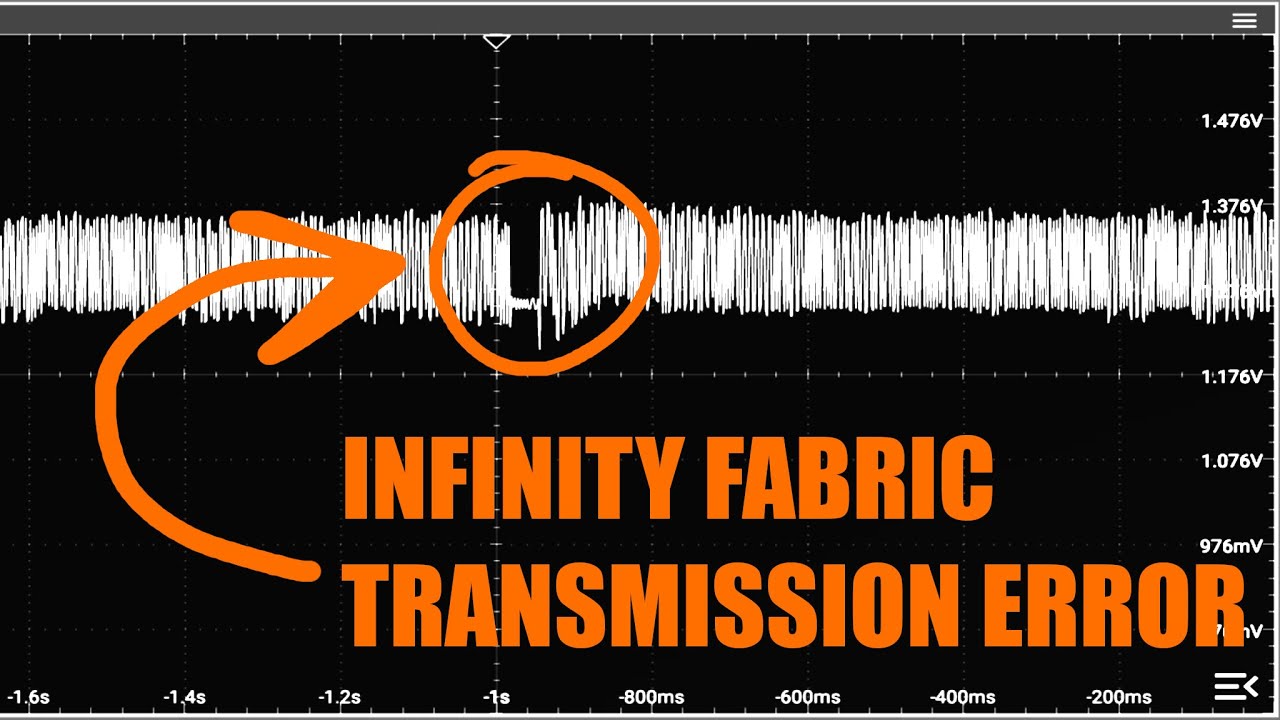
This is cool, BZ was able to get a visual of basically a WHEA error
https://youtu.be/Ft7ss7EXr4s
My Patreon: https://www.patreon.com/buildzoid
Teespring: https://teespring.com/stores/actually-hardcore-overclocking
Bandcamp: https://machineforscreams.bandcamp.com/music
Twitch: https://www.twitch.tv/buildzoid
Twitter: https://twitter.com/Buildzoid1
Facebook: https://www.facebook.com/actuallyhardcoreoverclocking
#overclocking #ryzen #AMD
sudden creek
What is considered a good price for a used 11900KF?
grizzled bloom
The 11900k loses to the 10900k, it only has an advantage with memory speed
sudden creek
Was poking around Ebay and came across a guy that's offering his 11900KF at $260 or best offer.
sudden creek
grizzled bloom
The 11900k loses to the 10900k, it only has an advantage with memory speed
What about single thread perf?
grizzled bloom
 sudden creek
Was looking into MC earlier and found out it's still vastly single-threaded with the exception of running some of the lighter stuff on 1-2 other cores causing it to only be able to utilize at most around 2-3 cores.
grizzled bloom
Every single major channel called the 11900k the worst CPU Intel has released in the last decade
It's an 11700k with a mild overclock
And even that was bad
The ryzen 5600 beats the 11900k in minecraft
sudden creek
seriously?
grizzled bloom
 sudden creek
Gotcha will keep my eye out for the 10900k then.
sudden creek
grizzled bloom
What about single thread perf?
grizzled bloom
That's gaming loads
sudden creek
Because the server is being used to run mostly mc servers, that's my main concern.
grizzled bloom
Games are mostly single threaded
grizzled bloom
Very few do
And even those that do, don't use all of those 6 cores. They'll have 1 or 2 main threads, usually 1, and the rest is for audio and stuff.
sudden creek
Oh so like MC.
grizzled bloom
Yes. MC isn't special in any way.
sudden creek
Thought MC was infamous for how heavily single threaded it is.
grizzled bloom
No more than a multiplayer shooter would be
sudden creek
Any issues with running a 10900K on a B460M Asus Tuf?
sudden creek
That is the unfortunate thing indeed.
sudden creek
grizzled bloom
You wouldn't be able to use XMP or overclock memory
I am pretty sure I was able to use XMP?
Just couldn't oc, or anything else.
grizzled bloom
It'll cap out at 3000
grizzled bloom
Most B460 can't handle the power of a 10900k so it might throttle unless it's a good board
grizzled bloom
You'd see the VRM temp hit 110C and then the clocks would drop hard
B460 was before they started doing overkill VRM like they do now
grizzled bloom
Depends on which board
grizzled bloom
sudden creek
Any issues with running a 10900K on a B460M Asus Tuf?
There's 3 boards matching this name
Pro, plus, wifi 6?
sudden creek
grizzled bloom
There's 3 boards matching this name
Asus Tuf B460M AC Plus
it has wifi.
grizzled bloom
6 power stages
Let me see if I can find out the amperage on them
60A at best
40A at worst
That's technically enough but it'll get very toasty. It would run past the most efficient point where heat isn't an issue.
sudden creek
hmmmm
grizzled bloom
Yeah full load the 10900k can hit 300W
Which if you did get the 40A power stages means it would shut down from overpower state
sudden creek
ooof. Though I doubt I'd see the 10900K at full load anytime soon.
 storm mica
Does anyone here have any experience with DDR5 Tforce ram sticks not working but the rgb on them working?
grizzled bloom
Try reseating them, and make sure they're in slots 2 and 4 counting from the CPU
storm mica
I have already tried that
grizzled bloom
Cleared CMOS?
storm mica
The one in B2 was being recognized but A2 was not I swapped them and then A2 was showing up but not B2 I tried them in A1 and B1 but it wouldn’t post in those positions
I have not tried clearing cmos yet still learning this motherboard I just got this system running a few days ago
grizzled bloom
?cmos
 silk jungleBOT
How to clear CMOS (works for AMD and Intel)
https://www.intel.com/content/www/us/en/support/articles/000025368/processors.html

Intel
Defines CMOS technology and how to clear CMOS using the jumper or battery methods.
grizzled bloom
If that still doesn't work, try just the stick that isn't showing up. It could be a bad stick.
storm mica
I think this board has a clear cmos button I’ll have to see but I’ll try that
storm mica
Ok it does have a button to clear it do I press it while it’s on or off?
grizzled bloom
Off, while it's plugged in still
storm mica
Ok got it thanks
rigid oracle
Common thing on the AM5/DDR5 builds.. Everytime you flash your BIOS you'll need to repeat that especially if you're using EXPO.
 lyric turret
My brother has the AsRock 450m/AC mobo and I’m wondering if I need to update the BIOS on it, the version he has rn is 10.0.19045 Build 19045
 warped scroll
lyric turret
My brother has the AsRock 450m/AC mobo and I’m wondering if I need to update the...
warped scroll
lyric turret
My brother has the AsRock 450m/AC mobo and I’m wondering if I need to update the...
no need to update bios if the current version is working fine. You can also always find the newest version on ASRock's website
Also, I never really ask for help, but I have a customer build in the shop right now. It's a Ryzen 7950X on an Asus X670E-Plus Wifi (also tried on a Gigabyte B650 Aorus Pro X) with Corsair vengeance RGB DDR5 memory. I keep getting no display and the DRAM led on the motherboard lights up. Tried different mobos obviously and tried switching around all 4 sticks of ram and tried with only one or two sticks installed with no luck. Clearing CMOS right now but are there any more things I could try to find out what's happening?
grizzled bloom
warped scroll
Also, I never really ask for help, but I have a customer build in the shop right...
Check for bent pins on the motherboard
warped scroll
grizzled bloom
Check for bent pins on the motherboard
Pins are a-ok
grizzled bloom
Try again after re-seating the cooler, sometimes uneven pressure will make memory drop out
warped scroll
Ok. I’ve tried it without the cooler too, does that affect anything
grizzled bloom
It would overheat pretty fast, which would kind of affect things lol
 hollow thorn
Could be the recent Asus thing
grizzled bloom
warped scroll
Ok. I’ve tried it without the cooler too, does that affect anything
Inspect the bottom of the CPU. Look for any bulges or discoloration. There's an issue going around where Ryzen 7000 chips are literally exploding and catching fire.
warped scroll
yes i know of that but I tested on the gigabyte board first and same thing happend
hollow thorn
If nothing else, you'll prob be able to get Asus warranty to cover it with just the info so far
warped scroll
i actually think theres some discoloration on the bottom, hold pls
grizzled bloom
Right if the CPU is dead then it'll be dead on multiple boards
 grizzled bloom
If the CPU isn't working in multiple motherboards then I'd call it dead
And it would be time to RMA to AMD
(And possibly asus, check with another cpu on the asus board if possible)
warped scroll
I think I agree. I didn't think the CPU would be dead especially because it doesn't have pins on it like the old ones so harder to break
i don't have any other CPU to test unfortunately. If i had other parts to test this would be a breeze
grizzled bloom
Maybe contact asus once AMD approves the RMA and see if they'll swap the board without question. They did say they're prioritizing the issue and offering free premium level service.
 honest rivet
Any techs in here have question
 burnt spear
honest rivet
Any techs in here have question
burnt spear
honest rivet
Any techs in here have question
Ask away
storm mica
Well I cleared cmos tried with just the 1 stick and I’m getting nothing from it so I think that stick went bad how unfortunate
 elder bough
any techs in here i have a problem
grizzled bloom
Describe the problem
elder bough
Have had pc running smoothly for 3 years with 16gb ram no problem. Most games i played would crash in like 5-10 minutes of me playing. I’ve been searching for a fix all over the internet but none were helpful.
Then, just a few days ago i came up with the brilliant idea to update my MOBO bios (b450m d3sh) which i never did ever since building my pc (2020). Now my games don’t crash but my pc is only detecting 8gb of ram making some games unplayable.
Somehow, updating my bios made only 8gb of ram useable and detectable.
I don’t know how to fix
grizzled bloom
Clear your cmos and try switching the slots the sticks are in. Make sure they're fully seated in slots 2 and 4 counting from the CPU.
?cmos
silk jungleBOT
How to clear CMOS (works for AMD and Intel)
https://www.intel.com/content/www/us/en/support/articles/000025368/processors.html
Intel
Defines CMOS technology and how to clear CMOS using the jumper or battery methods.
grizzled bloom
It's possible that one stick was slightly loose or just bad from the start, and the newer bios was able to recognize that
elder bough
Ok. Will get back to you. Thanks
sudden creek
Is 50c max good for VRM MOSFETs after running 3 rounds of r23?
 limber dragon
depends on a lot of things really: cpu, mobo, power draw of r23, if there's a heatsink on them or not
sudden creek
limber dragon
depends on a lot of things really: cpu, mobo, power draw of r23, if there's a he...
5700G, B550M DS3H, 90W, most of the vrms don't have a heatsink.


 split copper
Rip
limber dragon
that's fine then
royal elk
Yeah, 5700g isn't gonna pull much
limber dragon
the top vrms on it are for soc, and given you have a dgpu, the igpu isnt going to be using much
royal elk
Unless you're me making it do 140w 🗿
split copper
Vroom
royal elk
Yeah I tortured that 5700g
I wonder how it's doing now
Off to a better home I assume
sudden creek
royal elk
Unless you're me making it do 140w 🗿
I have the PTT limit set to 300 though the cpu only draws about 90 tops.
sudden creek
limber dragon
the top vrms on it are for soc, and given you have a dgpu, the igpu isnt going t...
iGPU is disabled for better ram tunes.
What kind of heatsinks would work on DDR4?
 dull flint
Any heatsink that can cover the memory chips really
There are a few options out there
You have ripjaws on yours tho, those are good *enough, I wouldn't change them
sudden creek
dull flint
You have ripjaws on yours tho, those are good *enough, I wouldn't change them
I keep hearing such mixed things. Some people call it amongst the worst heatsinks and others say it's pretty good....
Which do I believe....
sudden creek
S8D are my current sticks and I am considering getting some S8B for oc fun.
sudden creek
dull flint
How insane are you going to go with ram OC
Would you call me insane for pushing 1.6v through S8D?
dull flint
Mmm...not really with a fan
dull flint
With a fan over them you're probably fine
sudden creek
sudden creek
180mm fan blowing directly onto em.
sudden creek
Oh. Mhmm haven't tried that though I ran a few rounds of TM5 and the ram was only slightly above room temp.
Touched the ram and felt pretty cool.
dull flint
You're likely fine then
limber dragon
https://cdn.discordapp.com/attachments/1090329261426081822/1107721512246591586/20230410_230527.jpg this is what Felix means by directly on them
 sudden creek
The fan is blowing air down the sides of the ram with some pretty decent pressure based off of what I could feel.
sudden creek
limber dragon
https://cdn.discordapp.com/attachments/1090329261426081822/1107721512246591586/2...
what is this monstrocity.
 sudden creek
limber dragon
you may not like this, but this is what peak performance looks like <:LeoKek:798...
sudden creek
limber dragon
you may not like this, but this is what peak performance looks like <:LeoKek:798...
LTT $100,000 pc xD.
I understand what's going on.
Was just shocked by the amount of stuff going on.
limber dragon
13900k, z790 apex, 4090 suprimx, 8200c36 (or 38, I dont remember) with custom bartx heatsinks
dull flint
Artistic example of a visual aid
 sudden creek
limber dragon
13900k, z790 apex, 4090 suprimx, 8200c36 (or 38, I dont remember) with custom ba...
sudden creek
limber dragon
13900k, z790 apex, 4090 suprimx, 8200c36 (or 38, I dont remember) with custom ba...
You got 8200c36 stable?
dull flint
This isn't about my drawing ok 
sudden creek
dull flint
Artistic example of a visual aid
I know what you mean. I suppose I could look into a overhead fan.
limber dragon
its 36 or 38, I dont remember which, I know its not 40 and not 34, and yes 8200
sudden creek
Though if I do that I ma need a fan hub.
dull flint
36 or 38 either way 8200 is quite good
sudden creek
Agreed.
limber dragon
without fan, I'll crash after a half hour of bf2042
and next paycheck is going towards the 24gbit goodgood
royal elk
dull flint
Artistic example of a visual aid
This is beautiful
dull flint
royal elk
This is beautiful
Should we hang it on the fridge in the Louvre?
royal elk
Yes we shall
dull flint
Van Gogh would be proud||ly cringing||
sudden creek

MODDIY
Buy Heatpipe Aluminium Buckle Fin Tech RAM Heatsink for $18.00 with Free Shipping Worldwide (In Stock)
this is cool
https://www.ebay.com/itm/193622896089?chn=ps&mkevt=1&mkcid=28&srsltid=AR57-fCmdXrEnwXIvfrdLhW6l96gny7bPjqvXD0vE0cNa7OOWD_INxkLbG0
lmao this is hillarious looking

eBay
Find many great new & used options and get the best deals for PC Ram memory passive/heatpipe coole/ heatsink :Thermaltake - V1R , CL-R0028 at the best online prices at eBay! Free shipping for many products!
 amber canopy
At that price I'd rather just buy EK Monarchs
2 are like 33 or 36 iirc
Those are cool though. Better for ambient compared to Monarchs I'd imagine
sudden creek
amber canopy
At that price I'd rather just buy EK Monarchs
which ones?

eBay
Find many great new & used options and get the best deals for Thermalright HR-07 Duo High-End class Ram heatsinks for extreme gamers!Lot of 4! at the best online prices at eBay! Free shipping for many products!
just found these.... Cool looking but super expensive.
4 heatsinks is $140 total.
amber canopy
sudden creek
which ones?
EK Monarch ram heatsinks
sudden creek

eBay
Find many great new & used options and get the best deals for EKWB EK-RAM Monarch Module, Black, 2-pack at the best online prices at eBay! Free shipping for many products!
these?
dull flint
Mhm
amber canopy
They're cheaper on performancepcs
limber dragon
sudden creek
You got 8200c36 stable?
subs are mainly auto, too lazy to tune them
 sudden creek
Seems a 7950x is about 30% faster than the 5950x paired with a 4090.
I wonder how big that gap will be once 8950x is out.
grizzled bloom
Another 15% over the 7950X
sudden creek
So roughly 60% faster compared to a 5950x?
grizzled bloom
Based on IPC alone at least
That's not how math works
Take an easy number, like 100, and make it represent the 5950X
Then 130 would be the 7950X
15% more than 130 is 149.5
sudden creek
But if the 7950x is faster than the 5950x wouldn't the % be higher when comparing 8950x to 5950x?
grizzled bloom
It is higher
sudden creek
Not what I mean.
grizzled bloom
49.5% is more than 30%
sudden creek
15% over the 7950x is a higher % gain due to IPC gains being larger compared the to the 7950x over 5950x ipc % gain.
grizzled bloom
I have no idea what you're trying to say
sudden creek
In anycase 50% gain is still a big jump.
grizzled bloom
Yes 50% in 2 gens is massive
sudden creek
Do we know when 8000 series is expected to release?
sudden creek
I wonder if it's gonna be another big jump.
Like 40% faster compared to 4090 or something.
grizzled bloom
The issue I have is that it's not so much that the jump was big, they just slammed as much power into their normal die as they could
Watt for Watt it's not that impressive
More like 20%
sudden creek
Oh, I thought they also had large ipc gains.
grizzled bloom
No a lot of the gains are from 3GHz clock speeds lol
royal elk
Now?
sudden creek
royal elk
Now?
where!
royal elk
OH GPU LMAO
grizzled bloom
Yea lol
sudden creek
Yeah xD. CPU we already got.
grizzled bloom
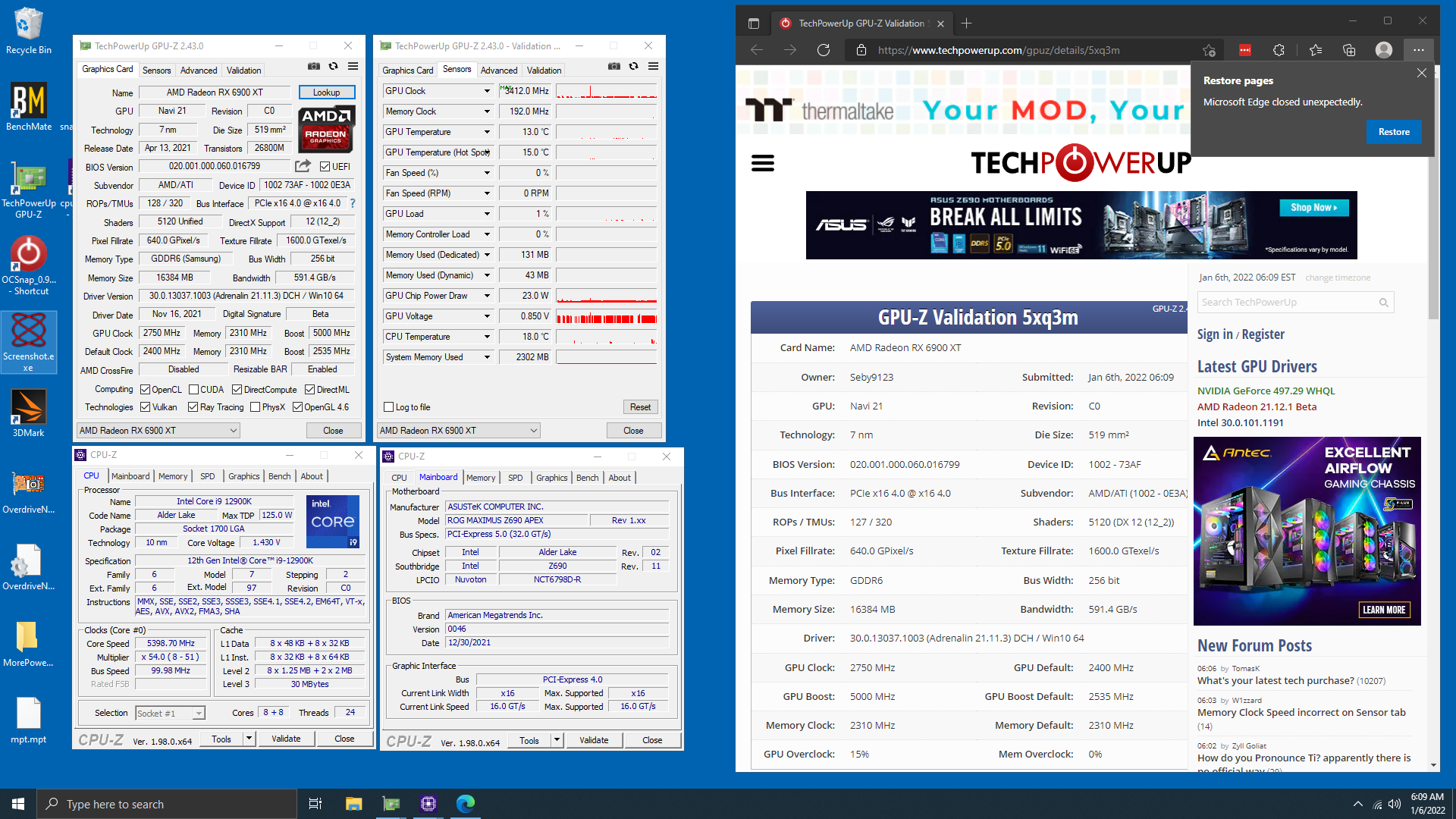
3412 appears to be the best GPU frequency so far. Held by none other than wegg's own Seby. https://hwbot.org/submission/4897098_seby9123_gpu_reference_frequency_radeon_rx_6900_xt_3412_mhz
HWBOT
The Radeon RX 6900 XTscores getScoreFormatted in the GPU Reference Frequency benchmark. Seby9123ranks #1 worldwide and #1 in the hardware class. Find out more at HWBOT.
royal elk
Sebys the goat fr
sudden creek
Just found a 5950x for $250 if he can ship to MX I may be buying a 5950x in a week.
grizzled bloom
grizzled bloom
3412 appears to be the best GPU frequency so far. Held by none other than wegg's...
I did find this on the 3dmark charts though https://www.3dmark.com/fs/28758926

3DMark.com
Intel Core i9-13900K Processor, NVIDIA GeForce RTX 4090 x 1, 32768 MB, 64-bit Windows 11}
100k graphics score, 3540MHz 💀
His CPU was probably getting clock stretching though, that's way too high
So he lost to others at lower clocks
royal elk
sudden creek
Just found a 5950x for $250 if he can ship to MX I may be buying a 5950x in a we...
Damn only 50 more than I paid for my 5900x
sudden creek
royal elk
Damn only 50 more than I paid for my 5900x
Yeah, it's super tempting.
dull flint
Idk about running a 5950x on a ds3h tho...
sudden creek
I got a 180mm fan blowing down on them with a setting that ramps the fan up like crazy if the vrms start getting warm.
 tranquil wolf
roommate is looking to replace an Asus Prime Z690 P D4, not looking to spend $300 but anyone have any suggestions?
he does some minor CPU OC also
tranquil wolf
thanks i will have him check them out
 safe barn
bro i want yo help a bit
cursive epoch
that's a very old message from someone who isn't around anymore, they wouldn't reply
but what do you need help with?
elder bough
grizzled bloom
It's possible that one stick was slightly loose or just bad from the start, and ...
So I got it to work by switching the ram sticks
Putting the stick that was in slot 2 to 4 and switching slot 4 to 2 and firmly pressed it down and it worked. Thanks
 pure cloud
grizzled bloom
3412 appears to be the best GPU frequency so far. Held by none other than wegg's...
pure cloud
grizzled bloom
3412 appears to be the best GPU frequency so far. Held by none other than wegg's...
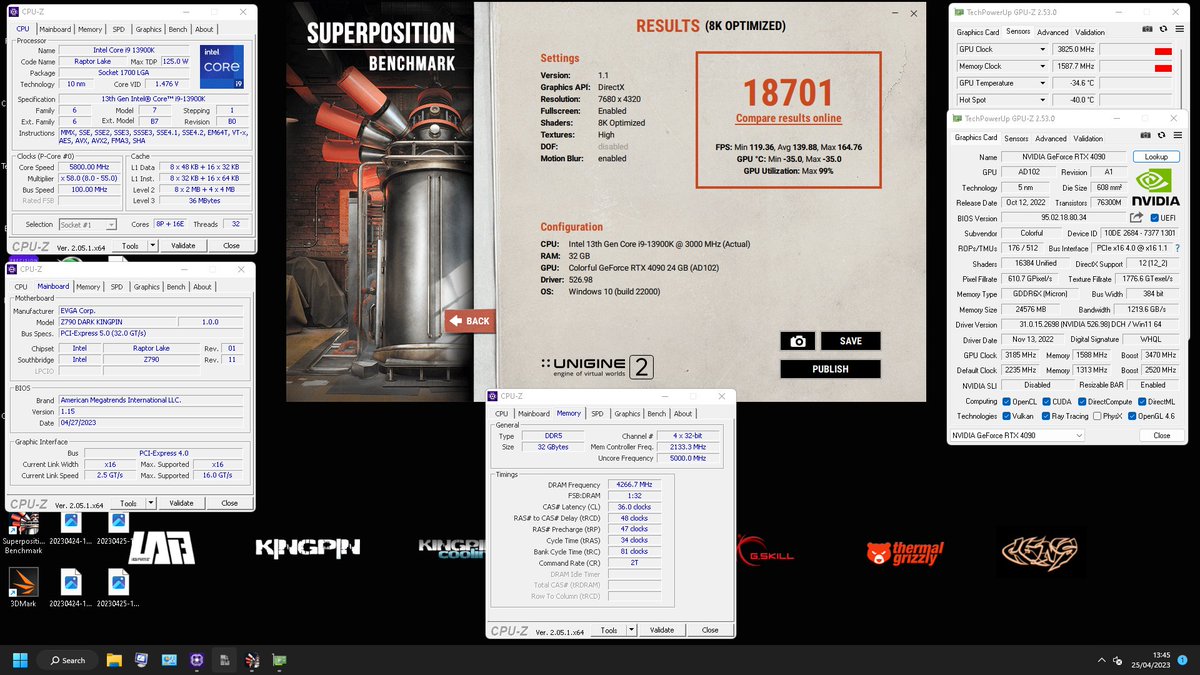
cens got 3825mhz a couple weeks ago: https://twitter.com/CENSXOC/status/1655961624660922368

First to break the 3800MHz barrier in 3D🔥
Colorful Geforce 𝟒𝟎𝟗𝟎 𝐢𝐆𝐚𝐦𝐞 𝐋𝐀𝐁 #1
🥇Unigine Superposition 8K - 18701
3825 | 1588 MHz
@iGameColorful @NVIDIAGeForce @GeForce_JacobF @VideoCardz @3DCenter_org
 Twitter
·
Twitter
·

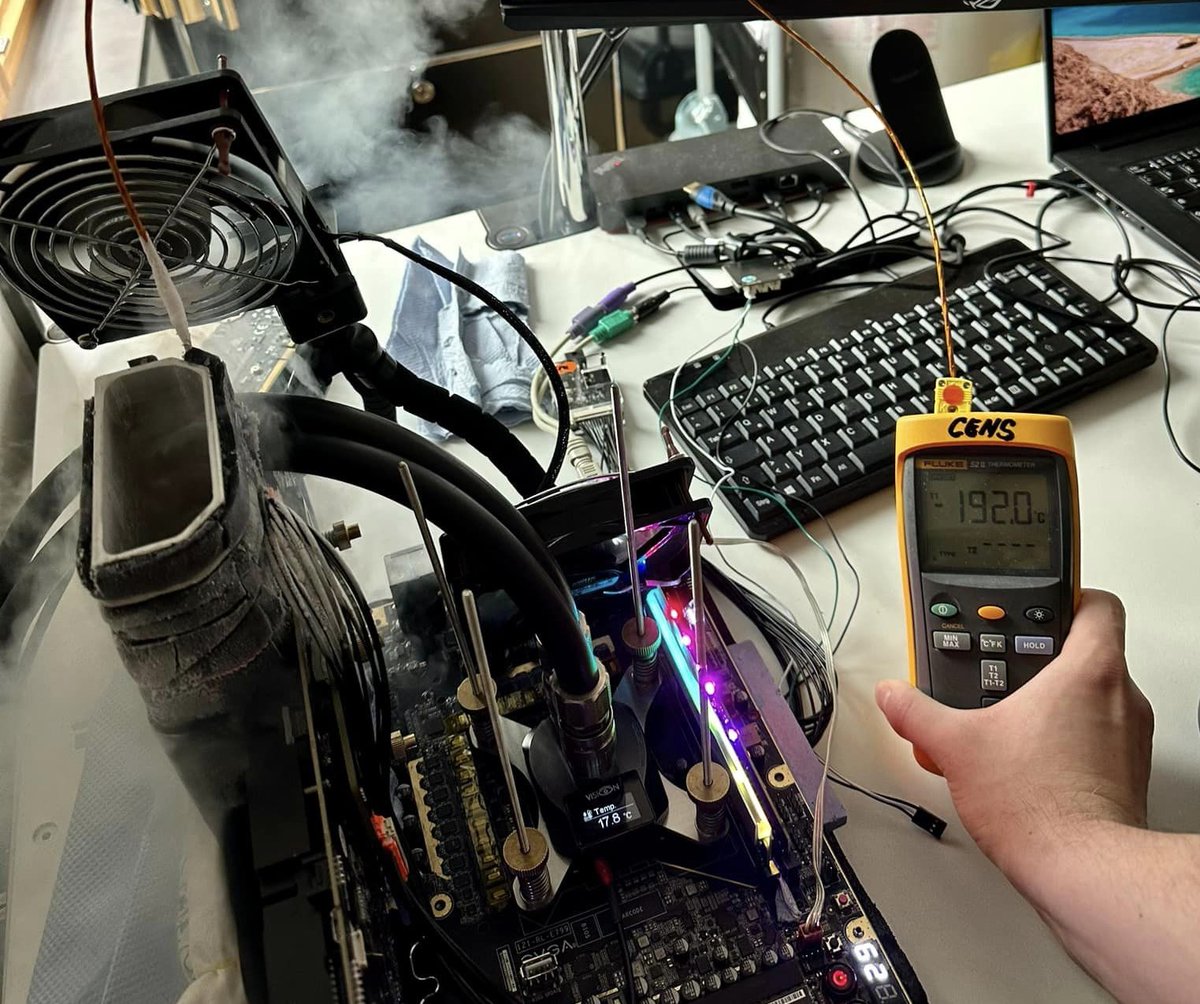

hwbot dropped gpu reference frequency as a bench awhile back (so, it's still there, but i don't think you can sub it anymore), so there aren't going to be higher scores coming in
seby's was probably around the last submissions before they got rid of it
grizzled bloom
Ah I see
 oak sand
Is 3d vcache useful in emulation? I have a friend who wants to start emulating on PC and has a budget perfect to fit in a 5800X3D, but I'm not certain how useful it can be
oak sand
I figured. Don't see how it would be even with my limited understanding
 late atlas
Hey all, I apologize if this isnt the right chat, I'm looking to buy a new build and wondering if going the AM5 chipset Mobo with DDR5 is the way to go for futureproofing? Want this build to last awhile, heard that DDR5 is slower latency wise? I will be using this computer for 3D/Gaming. Any help would be appreciated 🙂
burnt spear
late atlas
Hey all, I apologize if this isnt the right chat, I'm looking to buy a new build...
Depends on budget
late atlas
@burnt spear Budget out of the question, AM5 the way to go? I'm curious what will last me longer and it may be a dumb question but idk
 reef iris
Anyone have any input between an X570 Crosshair VIII (any variant) and an X570S Carbon Max if they were around the same price?
My system runs fine, I just want a new board and am gonna throw this b450 in a small project
 strange anvil
Okay I’m building another Gaming PC to take off to college with me. I’ve got a spare 2070 Super and I’m probably doing the Ryzen 5 5600. What budget mobo should I do
dull flint
strange anvil
Okay I’m building another Gaming PC to take off to college with me. I’ve got a s...
Tuf gaming a520m wifi
Can handle a 5950X so it's actually a goated $99 board lmao
strange anvil
I want an ATX Mobo
I’m gonna be building inside an O-11 most likely so I want to take up as much space as possible
whats funny is that this PC will be worse than my main but I’m building it like my dream PC 💀
bc three years ago I basically only paid for half of my system and my parents the other half
Now it’s all mine
So I can get whatever I want but I wanna stay in the $800 range since I already have a 2070 Super
dull flint
The a520m is basically the only motherboard I'd bother with on am4
dull flint
That would work tho lol
Wait if you're off to college, why o11
Those things are huge

strange anvil
true I was also looking at a plain black corsair but I would just do a black and white build with that
honestly would be better since it’s cheaper
dull flint
Just move your current build into like an o11 mini/mini air and use the a520m
If you want a board change
Tho I'd consider AM5 since you already have a perfectly capable am4
(as much as it mightn't be appreciated)
Air mini has itx, matx and atx configs that change the case to fit the board
Or do something much smaller like a D41/D40 Jonsbo
D30 even
strange anvil
rn I have nzxt h510 elite case
So yeah that would honestly work
my 4070 barely fits inside of it
 chilly narwhal
I want to make a good choice tell me if I'm right------------https://www.newegg.com/intel-core-i5-13600k-core-i5-13th-gen/p/N82E16819118416?Item=N82E16819118416
Intel Core i5-13600K - Core i5 13th Gen Raptor Lake 14-Core (6P+8E) 3.5 GHz LGA 1700 125W Intel UHD Graphics 770 Desktop Processor - BX8071513600K
Options: i5-13600K
ASUS ROG STRIX Z790-H Gaming (WiFi 6E) LGA 1700(Intel12th&13th Gen) ATX gaming motherboard(DDR5 up to 7800 MT/s, PCIe 5.0 x16 SafeSlot with Q-Release, 4xPCIe 4.0 M.2 slots,USB 3.2 Gen 2x2 Type-C)
CPU Socket Type: LGA 1700
I want to make a good choice tell me if I'm right
?
 vast meadow
chilly narwhal
https://www.newegg.com/p/N82E16813119635?Item=N82E16813119635
vast meadow
chilly narwhal
https://www.newegg.com/p/N82E16813119635?Item=N82E16813119635
Honestly a terrible choice, it's overpriced by like 100$ all you're paying for is the strix name
chilly narwhal
bt the processor is good
vast meadow
Ye
chilly narwhal
ok
dull flint
I can't remember what the cheapest ddr5 mobo is one second
vast meadow
I'd grab this instead personally
https://pcpartpicker.com/product/k7mmP6/msi-pro-z790-p-wifi-atx-lga1700-motherboard-pro-z790-p-wifi

MSI PRO Z790-P WIFI ATX LGA1700 Motherboard (PRO Z790-P WIFI)
dull flint

ASRock B760M PG Riptide Micro ATX LGA1700 Motherboard (B760M PG Riptide)
dull flint
vast meadow
I'd grab this instead personally
https://pcpartpicker.com/product/k7mmP6/msi-pro...
Oos
Otherwise yes for 150 that would be great
vast meadow
dull flint
Oos
No i mean the 200$ price
dull flint
Tuf z690 180 doe
vast meadow
@dull flint the tuf has no bios flash
dull flint
You're joking
Tell me you're joking
Wtf
Why Asus
Even Asrock has it for cheaper
chilly narwhal
ok
dull flint

chilly narwhal
im used asus for a long time
dull flint
chilly narwhal
ok
Don't get the tuf z690
chilly narwhal
ok
dull flint
They don't have a basic feature that should be expected at this point, so it won't work
The asrock b760m pg riptide or if you plan to overclock get the msi z790-p
chilly narwhal
https://c1.neweggimages.com/ProductImageCompressAll300/13-119-635-02.png that wy i like this mobo
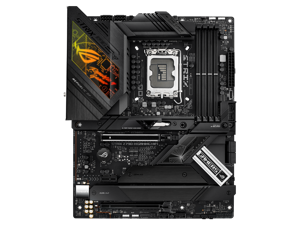 dull flint
$300 mobos aren't worth it
chilly narwhal
or a good z690
dull flint
That mobo is basically a rebadged $150 board marked up 2x for aesthetics
dull flint
chilly narwhal
or a good z690
MSI PRO Z790-P WIFI ATX LGA1700 Motherboard (PRO Z790-P WIFI)
Better built board overall
It may look more barebones but that's cos where it counts it's better
chilly narwhal
ok Thanks for your time, I'll keep it in mind, but if it's good, I like it.
vast meadow
dull flint
Why Asus
Cuz asus dumb
chilly narwhal
I have to update the BIOS before everything
vast meadow
Nope not on the z790
chilly narwhal
k
chilly narwhal
so nop the z790
dull flint
Yeah that's a nope for z790
 sudden creek
Is there a way I can dedicated a few of my cores to run a server in the background on my pc?
royal elk
Well yes and no
sudden creek
royal elk
Well yes and no
?
royal elk
You can make software use only certain cores but I dont you can prevent windows from using them
sudden creek
royal elk
You can make software use only certain cores but I dont you can prevent windows ...
So if I run a game it will also use the cores allocated to the server?
chilly narwhal
ok,thanks.
royal elk
sudden creek
So if I run a game it will also use the cores allocated to the server?
As far as I know yes
Unless there's another way
sudden creek
Ahh I see.
Can I run a MC server as a background process?
That's my main question.
also would this require an extra SSD?
vast meadow
dull flint
Hope the price is decent. Have fun <:hmmThumbU:861295846808354816>
It's two hunnid
 cyan raft
dull flint
Even Asrock has it for cheaper
cyan raft
dull flint
Even Asrock has it for cheaper
Asrock Taichi Z790 doesn’t have it I’m pretty sure 
dull flint
Z790 doesn't need it
But pretty much every asrock z690 does have it
Gigachad asrock
cyan raft
Oh right forgot this isn’t like AM4
vast meadow
dull flint
But pretty much every asrock z690 does have it
Every lga1700 board from gigabyte has it, even chadder
dull flint
vast meadow
Every lga1700 board from gigabyte has it, even chadder
I'll chad u in a minute
vast meadow
dull flint
I'll chad u in a minute
Bet
 karmic perch
Is intel next gen CPU still using LGA 1700??
grizzled bloom
Rumors say yes
cursive epoch
We don't know yet
cursive epoch
Knowing Intel even if it's a refresh new socket is possible
grizzled bloom
 cursive epoch
If not then we're good for one more gen
grizzled bloom
Lots of salt to take with that grain
cursive epoch
lol
grizzled bloom
cursive epoch
Knowing Intel even if it's a refresh new socket is possible
Possible yes. I feel like this was a last minute rushed decision after MTL didn't go how they planned so they'll probably do the minimum effort on RPL to focus most of their resources on MTL.
cursive epoch
yep
sudden creek
Out of curiosity is AMD's 7950x3D overclockable?
vast meadow
Pretty sure they allow it now but wouldn't do that til the x3d chips dying rolls over
sudden creek
I see, I see. I am most likely gonna wait out till 8000 series. Currently just trying to put together my dream build and see how much I'd need to save up for it so when 8000 series and rtx 5090 is out I will be ready.
vast meadow
sudden creek
I see, I see. I am most likely gonna wait out till 8000 series. Currently just...
Hate to break it to you but you're usually better off getting like a 1.5kish build now and upgrade in 2-3 years and spend roughly the same and end up with not as good perf at first, then getting better and spending a lot less
 clever mango
My friend is having boot loop problems because of secure boot. He tried clearing cmos. Any ideas?
 past rain
Does a 9900k n kf have no difference in processing power besides 1 having graphics on it
Or is the k stronger then the kf
grizzled bloom
sudden creek
Out of curiosity is AMD's 7950x3D overclockable?
Only using PBO and CO. Main voltage and core multiplier are still locked. (Mostly)
cursive epoch
past rain
Does a 9900k n kf have no difference in processing power besides 1 having graphi...
KF simply means igpu disabled, so there's no difference in perf at all
Are you buying a 9900K now? If so I would advise against it honestly. There's many current cpus that beats it by a mile
dull flint
12400 beats it 💀
past rain
Well there's a person selling a kf for 200
dull flint
Yeah 200 is not worth it for that
past rain
N im. Not trying to switch MB
dull flint
The board matters tho
cursive epoch
^
dull flint
Ah it's ok then, it can handle it
cursive epoch
That's pretty high end board then
dull flint
I still would go something newer tho
past rain
Oh yea its that bad of a waste lol
dull flint
You'll prolly be way better off selling the board and cpu then getting a 12400. You can reuse the coolers from older LGA
Net money wise you'd be saving yourself more
9900K's resell for absurd prices
past rain
I'm trying to rock a dual pc setup but I kinda don't want to trash my 1st pc build
dull flint
9900K just isn't worth it tho
past rain
Well facebook has a gurl selling her 9900kf for 200
dull flint
It's worth maybe 150
past rain
I should offer 150 then
dull flint
The i9 tax makes it much worse
grizzled bloom
dull flint
9900K just isn't worth it tho
Especially not when the 12400 kills it in every way
cursive epoch
Even for $150 it's mediocre deal
dull flint
Yeah, 150 is generous
past rain
Bcuz more cores n an all the performance
dull flint
Nope
cursive epoch
Then you will be limited anyway
grizzled bloom
But those cores are slower
past rain
Bcuz all the newer stuff are 10 cores n up
dull flint
9900K is the most over inflated cpu from intel for 2nd hand
cursive epoch
12400 has 6 cores but it roasts 9900k's 8 cores
grizzled bloom
Cores aren't everything
dull flint
12400 beats it in literally everything
past rain
Well this 1st build that I would be putting the i9 9900kf would be my streaming pc n the 2nd would be my up to date extravagant build
cursive epoch
Streaming could use gpu instead of cpu
dull flint
Yeah man, but just a little bit extra work and you can save maybe 100$
grizzled bloom
Plus the 12400 would allow another upgrade later, 9900k is dead end platform
dull flint
dull flint
Yeah man, but just a little bit extra work and you can save maybe 100$
That's what we're trying to encourage
cursive epoch
Keep your money, and simply go on ahead and build another rig
dull flint
grizzled bloom
Plus the 12400 would allow another upgrade later, 9900k is dead end platform
And this too. Any half decent board will run the latest i9
past rain
But if I built a 2nd rig wouldn't my 1st build be completely worthless
past rain
Since it has a i5 n 1060 🤮🤮🤮
cursive epoch
Yeah well, 9900k pc with 1060 wouldn't be anymore useful though
past rain
Wat about a i9 3080 combo
No or that's jus a absurd not worth it combo my stuff is jus to out dated
dull flint
past rain
But if I built a 2nd rig wouldn't my 1st build be completely worthless
It's not a second rig, it's upgrading this one
Remove the z370, put b660 in
cursive epoch
9900K will bottleneck 3080 hard
grizzled bloom
You can always reuse or sell the 9600k setup
cursive epoch
It's a 8400, but still worth something
grizzled bloom
I like using old stuff for a Plex server
past rain
I doubt I would be able to sell it
dull flint
You would
grizzled bloom
You'd be surprised
past rain
My stuff to old
dull flint
And you'd get a decent offering
grizzled bloom
People still buy first gen Intel
cursive epoch
Board+ram+cpu combos still has some decent value in em
Then you get 12400F with B660 and some cheap DDR4 kit and boom
grizzled bloom
cursive epoch
Then you get 12400F with B660 and some cheap DDR4 kit and boom
Or ddr5 since it's cheap and would upgrade better
past rain
So wat if I combined a 2080 ti from New egg
cursive epoch
What's the price on that 2080ti
grizzled bloom
If it's anything over $300 it's not worth
past rain
Lil over 500
grizzled bloom
Yeah the new 7600 can almost match that for $270
past rain
Refurbished
past rain
My rig I only use for streaming n small small beginner after effects editing
cursive epoch
Part List - Intel Core i5-12400F
$244 for new board and cpu
You could use existing ram
And your current cooler too
dull flint
past rain
Lil over 500
Jesus no
grizzled bloom
Even the stock cooler on the 12400 is fine
past rain
Lol oh yea
dull flint
500 gets you a 6800XT which destroys a 2080ti
past rain
So how bout I jus keep my 1st rig as is n build a new rig
cursive epoch
If you want even lower, Ryzen 5 5600 is possible Although it's kinda dead end platform
dull flint
cursive epoch
Instead of wasting $200 on 9900K
Not only that but you get money back on selling the old board and cpu, so the difference is actually cheaper for the 12400f
dull flint
cursive epoch
If you want even lower, Ryzen 5 5600 is possible Although it's kinda dead end p...
Would still be faster tho
cursive epoch
ye ofc, but the fastest cpu for gamering on am4 is 5800x3d
dull flint
cursive epoch
Do you really need a second pc though?
It * can * help. Tho dedicated encoders make it very hard to justify these days
past rain
Well im jus tryna have a rgb light show in my room lol
past rain
I have alot of stuff connected to my 1st rig
grizzled bloom
Second PC for running your stream can be useful if the gaming rig crashes. That way your stream keeps going.
cursive epoch
If you really insist on a second rig, we won't stop you
Just please don't get 9900k
dull flint
Also encoding on extremes is a big enough justification
Like 4K streaming is second pc territory
past rain
Well my 2nd rig would be my high performance gaming rig
But the 1st rig is my streaming rig that I'm trying not to get rid of
dull flint
Definitely man, go all in on the other rig, but make the savings here on your first one by following the 12400f plan
cursive epoch
You can leave the 1060 on old rig to do the encoding
dull flint
You can spend more on the high end rig as a result
past rain
Ok
dull flint
Heck
Use the savings on the 12400f change to also sell the 1060 and get a 7600
Then you can have a dedicated av1 machine
Or even a380 arc
grizzled bloom
cursive epoch
You can leave the 1060 on old rig to do the encoding
1060 is the lowest model to have the newer encoder too iirc
dull flint
Av1 changes the streaming game my man
Super clear video on low bitrate
Genuine upgrade
past rain
I'm in el paso Texas I doubt I would be able to get anything from here if I was to sell it
cursive epoch
You definitely could
dull flint
r/HardwareSwap would tell you otherwise
cyan raft
If I can sell parts for decent money in Troy, NY. You’ll be fine
cursive epoch
The internet exists for a reason lel
Everyone can see stuff you post
Especially in something dedicated to buying/selling like HWS subreddit
past rain
I gotta go get reddit
cursive epoch
Board+cpu could honestly get you like $200+ lol
You got a high end board, people will want it even for a not good price
$200 isn't too hard of a sell board alone
past rain
Ok ill try n sell it in a month wen I get back from a move
dull flint

past rain
I'll try n sell it all separate
dull flint
Yeah that'll probably be the play
past rain
MB
CPU
GPU
but ill keep my case ram n sell my storage
So that hardware swap place is a good place to get buyers
dull flint
Ye it is
You can prolly keep the storage too tbh, it's very cheap to get something really good these days
dull flint
They're probably just fine for normal stuff or cold storage
Then you can grab a 2TB P41 solidigm for $75 and just be stacked
1tb like $40
Ez gains
past rain
Yea I have to go look again its 500gb hhd n ssd
But I have to get that nvme 1 heard it's super fast
cursive epoch
Both drives I and Felix mentioned are lots faster than your current storage
cursive epoch
yap
past rain
Ok 👍🏽
Ty
I know it gets redundant answering my questions but thanks for not tearing me a new 1
dull flint
It's all good
dull flint
past rain
I know it gets redundant answering my questions but thanks for not tearing me a ...
Pc community do be like that
But we cool here
I've seen enough that it takes a lot to truly surprise me these days
long geyser
grizzled bloom
1060 is the lowest model to have the newer encoder too iirc
1050 - TitanXP/Volta/1630/1650 are NVENC Encode v6, 1650 (yeah Nvidia is weird with bunch of baseline 1650 cards) - 3090Ti are NVENC Encode v7.
 zealous notch
grizzled bloom
zealous notch
grizzled bloom
Sure, just make sure they have a picture of the pins and you can see none are bent
 mild jackal
grizzled bloom
1060 is the lowest model to have the newer encoder too iirc
mild jackal
grizzled bloom
1060 is the lowest model to have the newer encoder too iirc
1050 ti I thought. 1050 is similar, but half the size? I forget
grizzled bloom
Could be. Maybe I was thinking the 1060 was the lowest worth considering.
long geyser
@mild jackal @grizzled bloom baseline 1050 https://developer.nvidia.com/video-encode-and-decode-gpu-support-matrix-new
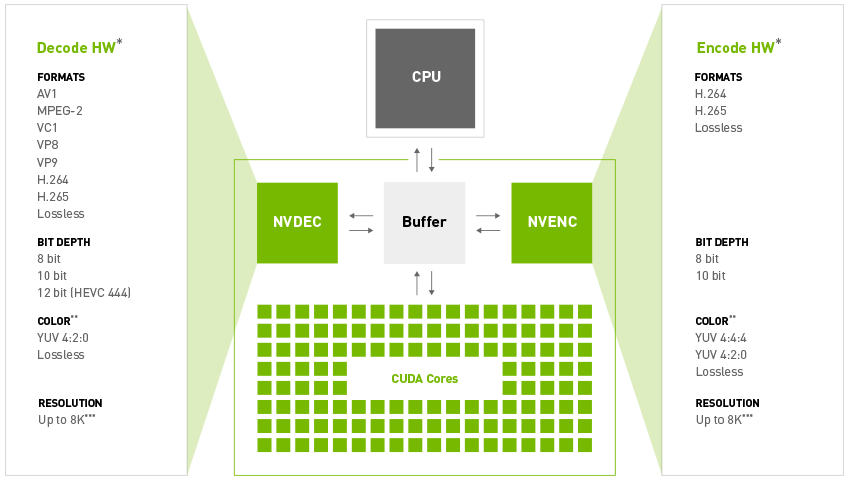
NVIDIA Developer
Find the related video encoding and decoding support for all NVIDIA GPU products.
 fleet cypress
This computer build is getting more and more expensive just to diagnose my issue -_-
 frosty depot
fleet cypress
This computer build is getting more and more expensive just to diagnose my issue...
frosty depot
fleet cypress
This computer build is getting more and more expensive just to diagnose my issue...
How is it getting expensive?
fleet cypress
Having to buy new components because the original build wasn't working as is. I had a cpu overheating error that popped up after my computer hard crashed on a game it really shouldn't have. I know for a fact that my computer is more than capable of running said game, yet this has been happening for a little while now as I have been doing my best to diagnose the issue. Everything in my new pc is new except for the graphics card, and psu. Graphics card is an rtx 2060 and the psu is a 750w.
frosty depot
fleet cypress
Having to buy new components because the original build wasn't working as is. I ...
Did you ever repaste the CPU and remount the cooler?
What CPU/cooler do you have?
fleet cypress
I did, I was using the stock amd cooler for the ryzen 5 5600x. I went and got a water cooler because of this overheating in the first place (Yes, I did reseat my cpu cooler and re thermal pasted it before I bought the water cooler) It seemed like the water cooler wasn't working either, so after doing some more testing I thought maybe it's either the mobo, cpu, gpu, or power supply.
Hindsights 20/20 though lol. I bought a new cpu to test to see if my orignally was faulty, but when I took my water brick off, I noticed that stand off's for the cooler looked a little weird. I found out that I didn't screw them in all the same way. after fixing that I was able to better seat the water block to the motherboard. I think at this point my cooler wasn't mounted right because after re testing my game ,which crashed every 30 mins on que, it hasn't crashed yet. I'm going to keep testing more games, but I think that fixed it. I'm surprised I didn't notice this sooner XD.
dull flint
@fleet cypress you can check cpu temperatures using HWINFO64
 sudden plume
I need help trying to figure out on what cpu can fit my motherboard
grizzled bloom
What motherboard do you have?
sudden plume
Msi Mag z590 tomahawk wifi
cursive epoch
You can fit 10-11th gen Intel cpus
grizzled bloom
Yep. That model should be good with any CPU from those generations, even the i9.
 naive pendant
For the MSI MAG x670e, can I have two DDR5 32 Gb 5200 ram sticks and two DDR5 32 Gb 6600 ram sticks? Is there going to be issues with the two different speeds?
cursive epoch
Yes
grizzled bloom
naive pendant
For the MSI MAG x670e, can I have two DDR5 32 Gb 5200 ram sticks and two DDR5 32...
There can be potential issues with the mixed speeds, depending on what memory chips each set uses. Besides that possible problem, running 128GB on AM5 has been tricky at best. You'd have the best chances of it running if you buy a 2x64GB set, and sell the 2x32GB.
dull flint
naive pendant
For the MSI MAG x670e, can I have two DDR5 32 Gb 5200 ram sticks and two DDR5 32...
Two things.
- Yes. There will be issues with mixing.
- 128gb barely runs on AM5 let alone any ddr5 platform. You'll be stuck struggling to even hit 4800
96gb seems to be the most feasible to run for ddr5 rn
If not just stick to 2x32
Or go ddr4 and higher capacity
grizzled bloom
Last I heard the 24Gb modules didn't get along with AMD very well. That may be fixed in the latest agesa but idk.
dull flint
Ah, see I'm not too sure tbh
I know 24gbit is loved by intel rn
Not to mention it's probably not AMD's focus due to the cpu popcorn that dropped at the same time 💀
grizzled bloom
Yeah they run great on 13th gen
dull flint
But yeah high capacity and ddr5 just don't mix rn
naive pendant
Gotcha
dull flint
You get a few exceptions but it just makes more sense for ddr4 if you want 128gb+
grizzled bloom
It's only just recently that 4 sticks of DDR5 on Intel runs at all, too
naive pendant
So then should I stick with the 5200 2x32 or the 6600 2x32
dull flint
One of the other yeah
You won't get 6600 running on am5 but you'll get 6000-6400 working
It'll def be a better kit by far
grizzled bloom
If you really need more memory then you don't want a consumer platform anyway
dull flint
6600 2x32 is hynix A
Guaranteed bin
Meanwhile 5200 is a lottery
Unless you pick certain kits
6000 would be a pretty surefire bet even if you dial down the 6600 kit to run at 6000
naive pendant
Gotcha, so then I’ll stick with the 2x32 6600 and return the 5200
grizzled bloom
If you have a legitimate need for 128GB of memory, like for a server or a high end workstation, then the AMD Storm Peak 7000 series Threadrippers come later this year
naive pendant
Don’t have that much need
Just bought 5200 not realizing that 6600 would have been the better buy. So I have both ordered and need to return one. I was more so checking which was better and if they were both compatible with the 7950x3d then I wouldn’t return one.
dull flint
@naive pendant do you have the two kits
naive pendant
Ordered, yes
dull flint
Ah ordered
Yeah you can return the 5200 kit then
Unless you can clearly tell when it turns up that it's a good kit of hynix like with G.Skill or Corsair then yeah return it
grizzled bloom
You'll probably need to dial in your own memory settings on the 6600 kit, it's uncommon that 6600 works on AM5
dull flint
Yup definitely will
6600 is like golden lottery, and that's on 32gb
Just dialling it back to 6000 would work tho
naive pendant
Wdym by golden lottery, and how would I dial it back?
dull flint
Just an extra 20 seconds in the bios to override it
So when you turn on the xmp, you should be able to manually override the frequency to turn it down to 6000 from 6600 as a separate option
So it runs basically the same
Golden lottery as in like, very few am5 cpus run 6600
Most run 6000
Few go 6200
Much fewer 6400
And a beautiful one does 6600
grizzled bloom
There's potentially a second XMP profile as well that does 6000, it's relatively common on good kits
dull flint
This is in normal circumstances btw
naive pendant
Is there a way to check if the cpu can do 6600
dull flint
Uh
If it works it works
If it doesn't it doesn't
💀
You can test a 6600 tune but I'd rather play it safe and turn it down to 6000
Realistically 6600 shouldn't work at all
grizzled bloom
Not that there will be any real difference between 6000 and 6600 on a 7950X3D anyway
dull flint
6000 is more likely to work very easily
grizzled bloom
Especially when gaming
dull flint
I'd stay with 6000 then
naive pendant
So should I return the 6600 and replace it with 6000?
dull flint
If you do a bit of reading you can do 6000 with buildzoid easy timings and it should just straight up work and run faster
Nah
Just manually change the frequency to 6000
Unless you can find a 6000 kit with a huge discount instead and a good xmp I wouldn't bother
/expo
naive pendant
What is xmp
dull flint
You know how a ram kit says, 6600, 6000 etc
Those are xmp's
They go beyond the basic speeds of the ram spec
naive pendant
Gotcha gotcha
 main pulsar
naive pendant
What is xmp
main pulsar
naive pendant
What is xmp
eXtreme Memory Profile
naive pendant
Well, thank you all for helping me with this!!
cyan raft
Good luck with a 6600 64Gb XMP, I’ve been struggling my ass off to get something similar to work
 rigid sail
Hey guys. I have a ROG Strix X470-F Gaming motherboard running a Ryzen 9 5950x cpu and am looking for a CPU fan that is good and also a deal. I also am looking for decent memory so a 64gb kit 2 x 32gb sticks.. Any help would be greatly appreciated.
dull flint
rigid sail
Hey guys. I have a ROG Strix X470-F Gaming motherboard running a Ryzen 9 5950x c...
Thermalright peerless assassin 120 se or phantom spirit 120
Even the regular peerless assassin
They're all sub $50 and good enough
rigid sail
Ahh that looks good.. Should I go a little higher end? Or is this just right?
Im just upgrading my Ryzen 7 2700 to the 9 5950x..
dull flint
Probably fine on just that for a 5950x
Unless you plan to do full on cranked PBO
Then a 360/280 aio might help
Like the $92 EK 280 rgb aio
rigid sail
Im trying to keep my case and I think the AIO's arent going to work
dull flint
But it's not really gaining much if anything
Yeah well, aio's of significant size are the next step up
Thermalright dual towers are pretty good
rigid sail
So out of the 2 you mentioned which is the best of them?
dull flint
The cheapest of the 3
Thermalright peerless assassin 120/peerless assassin 120 SE/phantom spirit 120
They're all sub $50
Best price would be $35 if you find it
rigid sail
LOL 🙂
So I currently have 2 x 16gb G.Gkill F4-4200C16-16gvk, should I just buy 2 more of these same chips or should I get like upgrade to 3600's and get 4 16s of those? I know it is best to hget it all together in a kit.. Im trying to order tonight 🙂 BTW< I appreciate your help
dull flint
Hmm
Well 4x16 definitely won't run that fast
You'll be looking at probably 3800 at most
If lucky
And 3800 tends to be a hole so extra lucky
I think it depends on price tbh
You're not really gonna get the speeds that justify any high end kit with 64gb
rigid sail
Should I just stick with 32?
I was thinking upgrading to 64 might help me with some editing I do
 wild cape
Does someone know of a good video that compares zen 4 and 13th gen
grizzled bloom
What kind of comparison are you looking for specifically? High end, low end, gaming, production?
grizzled bloom
EZ answer is 7800X3D
Best gaming chip that exists right now, unless you only play CS:GO
wild cape
I'm looking at star citizen
Is that the best bang for the buck at that level? And what about the blow8ng up the chip and socket
grizzled bloom
It's not just the best bang for buck, it's the best period
7800X3D beats the 7950X, 7950X3D, and the 13900k
And the issue has been mitigated with new bios versions
wild cape
"Mitigated" So it's not totally fixed...
grizzled bloom
Mitigated as in a fix has been issued but some lingering problems exist like bios versions being listed as beta and unsupported, and a few specific boards have been seen to still push vSoC too high. Mostly Gigabyte boards.
wild cape
So don't go for gigabyte
grizzled bloom
Yeah, Asrock, Asus, and MSI have fixed it. Asus was the one saying they wouldn't support the beta bios but they fixed their wording on that recently. I haven't had anyone coming here with dead CPUs recently, and we did get a few before.
Gigabyte may have issued another update since I got my info, it's been a few weeks
 wild cape
Ok and one more thing how hard would it be to change over my 2×2tb raid 0 configuration?
grizzled bloom
Hardware or software raid?
wild cape
Umm it was https://www.asus.com/support/FAQ/1045089/
Official Support | ASUS Global
I'm assuming software
grizzled bloom
If it's in bios then it's hardware
grizzled bloom
In which case you need a X chipset motherboard, the B and A ones don't have hardware raid
wild cape
grizzled bloom
B650 does not have raid
Once you do have a compatible motherboard it's a simple matter to configure and import the array
wild cape
This is what I have rn https://rog.asus.com/us/motherboards/rog-strix/rog-strix-b550-f-gaming-wifi-ii-model/
ASUS ROG STRIX B550-F GAMING WIFI II AMD Ryzen AM4 ATX motherboard (PCIe® 4.0, 14 power stages, WiFi 6E, Intel® 2.5 Gb Ethernet, dual M.2, ASUS OptiMem II, Two-Way AI Noise Cancelation, USB 3.2 Gen 2 and Aura Sync)
grizzled bloom
Hmm asus may have just said F the rules and put raid in anyway
wild cape
And all I had to do was change a few thing in the bios and download drivers and install them in a specific order like that how to I posted before
grizzled bloom
Ah I see what they changed now, B650 does support raid but only level 0 or 1 and not 10
So your raid 0 array will work fine
wild cape
https://www.asus.com/us/motherboards-components/motherboards/tuf-gaming/tuf-gaming-b650-plus-wifi/
I like this board

ASUS USA
ASUS TUF Gaming motherboards distill essential elements of the latest Intel® platform and combine them with game-ready features and proven durability. Engineered with military-grade components, an upgraded power solution and a comprehensive set of cooling options, each ASUS TUF Gaming motherboard delivers rock-solid performance with unwavering g...
So what would have to change to do that.
grizzled bloom
It's the same method as you did before, just enable raid in bios and when you reboot enter the raidxpert menu
wild cape
So I won't have to reinstall the drivers
grizzled bloom
Once there you can point it to the drives in the array and it should figure it out automatically
And yeah if your drivers are installed already you're good there
wild cape
Ok so I don't have to select the specific drives in order
grizzled bloom
I really do recommend a clean install going from B550 to B650 though, there's weird issues like poor frame rate and low usage that are known to happen
wild cape
Dam I just reinstalled
grizzled bloom
wild cape
Ok so I don't have to select the specific drives in order
That was more of a requirement on older arrays, modern ones have tags that the motherboard can read to figure out the order
wild cape
So I shoudnt be worried
grizzled bloom
Nope it'll be fine
wild cape
Ok, thanks for your help!
 shy wyvern
Will z790 motherboards support 24GB ddr5 dimms?
I was thinking a 2 x 24 6400 cl32 kit
shy wyvern
I was thinking of going up to 2x24 on a z790P MSI board
grizzled bloom
I've seen them binned up to 8000, should work nicely
grizzled bloom
Yeah, nothing says you can't push it higher yourself anyway
 graceful terrace
How big of a difference is there with 18 cas latency compared to 16?
dull flint
Depending on the scenario, absolutely nothing to barely anything
graceful terrace
Awesome, thanks!
royal elk
dull flint
Depending on the scenario, absolutely nothing to barely anything
But but but my ram oc
 empty phoenix


 sudden creek
YES, FINALLY! The Trident Royal lineup has been confirmed for DDR5!!!
I love the look of those ram sticks.


 sudden creek
Ehh to each their own. Royals I do admit look ugly in most PCs.
To make Royals look good like the silver ones for example you'd need a metallic silver with gray or black colored setup.
grizzled bloom
Latest leaks on Intel 14th/15th gen: Meteor Lake desktop is canceled. 14th gen will be Raptor Lake refresh on the current LGA1700, 15th gen will be Arrow Lake on the new LGA1851 socket. Arrow Lake is supposedly able to beat Raptor Lake in multicore by 50%+, comparing 6+8 core models of both gens at the same power draw. 15th gen Arrow Lake is still on target for late 2024.
If that 50%+ number is true that's incredible, AMD will be hard pressed to match that.
royal elk
grizzled bloom
Latest leaks on Intel 14th/15th gen: Meteor Lake desktop is canceled. 14th gen w...
Yeah that would be insane lol
50%
cyan raft
let’s gooo lga1700 ain’t dead yet
shy wyvern
New memory and board are here
I really don't want to have to reset windows and redownload 8.6 TB of games
grizzled bloom
cyan raft
let’s gooo lga1700 ain’t dead yet
Yeah but sadly it's only a refresh. Higher clocks but basically everything else is the same.
shy wyvern
I might just not reinstall windows
Hopefully it'll be fine just reinstalling the chipset drivers
grizzled bloom
If you were upgrading from AMD to Intel or vice versa, or from AM4 to AM5, then a reinstall is highly recommended. Besides those cases, you can usually get away with not reinstalling.
shy wyvern
It's z690 to z790 and ddr4 to ddr5
grizzled bloom
Probably fine
But you know where to start troubleshooting if you get issues like unexpectedly low performance
shy wyvern
Also I love windows so much
Lan and wireless didn't work because no drivers and it wouldn't let me sign in on new hardware without internet
So I hooked my phone up with USB tethering
shy wyvern
79°C average on p95 decent for a 13700K?
shy wyvern
Yeah
Funny to me that I need one of the best AIOs on the market with kyronaut to hit that temp
Silly power hungry CPUs
Lowered voltage to 1.27 and increased clocks to 5.5P and 4.3E. average of 81
Think that's where I'm going to leave it
amber canopy
these are some gnarly heatspreaders
 rigid sail
Hey guys I just got a Thermalright Phantom Spirit 120 SE ARGB but it doesnt fit because my memory is a bit high. Does anyone have any recommendations on one that wouldn't be as wide to cool my machine? I have a Ryzen 9 5950X. Any help would be greatly apricated.
vast meadow
rigid sail
Hey guys I just got a Thermalright Phantom Spirit 120 SE ARGB but it doesnt fit ...
you can just move the fan up a smidge
 drifting sonnet
amber canopy
these are some gnarly heatspreaders
drifting sonnet
amber canopy
these are some gnarly heatspreaders
Lmao, I miss the Ryzen stickers ram kits had
naive pendant
Hey all, I’ve got a Tomahawk x670e and 7950x3d with two cpu power 8 pin slots. Do I need to connect both of these up?
limber dragon
no
 shrewd yoke
Is Ryzen or Intel the move rn
dull flint
The best sale is of either
grizzled bloom
The "best" option is entirely subjective at this point. Intel offers great midrange options right now, and AMD has great higher end options. AMD has a platform that's expected to last longer, but Intel has at least one more year. (if rumors are to be believed)
shrewd yoke
Think ima go with a 7800x3d
Finally getting rid of itx so I have the thermal capacity to get a more demanding cpu
dull flint
Ironic cos the 7800x3d can run on the amd stock cooler just fine lol
88W power limit moment
shrewd yoke
I did not know that lmao
I haven’t looked into it much but considering it’s the successor to the 5800x3d ima assume it’s good
dull flint
It's quite good yeah, just make sure the bios is up to date and monitor for any unusual behaviour
See pins if you're interested
dull flint
Avoid asus prime in particular
Asrock seems to be the go to choice rn
And asrock is on the cheaper side despite being just good overall
dull flint
Msi has the pro b650
shrewd yoke
I needa decide on case before I order motherboard tho, dunno if ima do matx or atx
dull flint
Asrock got tired of being 2nd choice lol
shrewd yoke
You got any experience with their bios?
vast meadow
shrewd yoke
You got any experience with their bios?
Asrock bios is nice
Also chadrock
https://youtu.be/blYU1M53Yh4

Thanks to ASRock for sponsoring this video! Check them out at: https://lmg.gg/ASRock
Alex visits ASRock's booth at Computex. They have everything from motherboards to mini PCs. Find out what he thinks about it all in this video.
Want us to unbox something? Make a suggestion at https://lmg.gg/7s34e
► GET MERCH: https://lttstore.com
► LTX 2023 ...
 misty lotus
3600 finally working, it's a pain in the arse 
 grizzled bloom
At 64GB, yeah it would be a pain
Now bring down tRFC
It should do 150ns unless you're really unlucky, probably less
 glass plover
Any reason to upgrade a 3600x? Paired with a 3070 ti
grizzled bloom
Probably not. Especially if you do 1440p.
glass plover
Ye I just do 1440p
grizzled bloom
That puts most of the load on the GPU then so a CPU upgrade won't do much, if anything
vast meadow
glass plover
Any reason to upgrade a 3600x? Paired with a 3070 ti
if you did multicore loads or did esports mainly then yeah but at this stage just wait for the new ones in september
sudden creek

Intel
Intel’s Ben Sell explains how the company developed and proved the world's first backside power solution, taking a major step forward in chipmaking.
This is interesting.
Backside Power Delivery for CPUs.
grizzled bloom
The question is, can this keep x86 alive long enough for quantum computing to get mainstream? Because we're rapidly approaching the theoretical limit of the atom.
burnt spear
glass plover
Any reason to upgrade a 3600x? Paired with a 3070 ti
I had a 3600 paired with my 3060 ti at 1440p and 3600 was def more than enough. 3070 ti is some 10-15% better than the 3060 ti iirc, so def will be fine
glass plover
Ty
vast meadow
It's fine but bad price + Asus being scummy in general especially with their mark up i wouldn't recommend supporting them
hollow thorn
Would take the wait if it means a better mobo for cheaper
limber dragon
ime gigabyte tends to be the most reliable in terms of not having issues when running at stock
amber canopy
Proof?
shrewd yoke
Gigabyte option has coil wine apparently
sudden creek
limber dragon
ime gigabyte tends to be the most reliable in terms of not having issues when ru...
My B550M DS3H works pretty well out of the box so I vouch for that.
Worked better then my B460M Tuf
grizzled bloom
amber canopy
Proof?


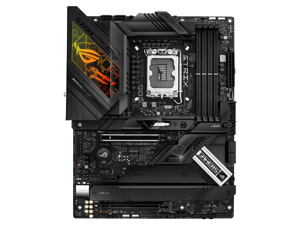
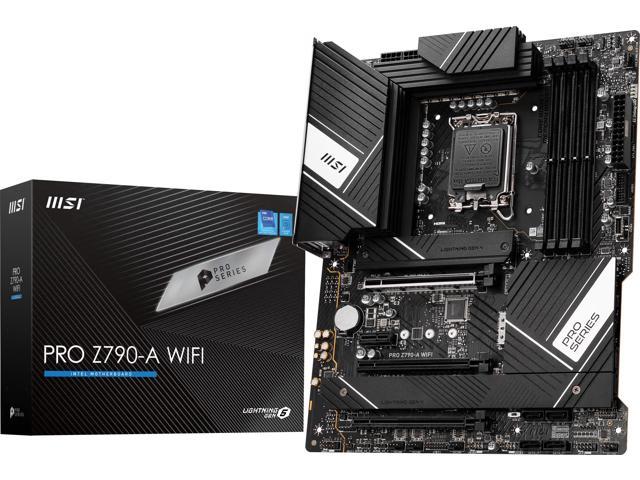 amber canopy
apparently
dull flint
shrewd yoke
Is Asus tuf fine for b650 chipset ?
Asrock queen 
 vagrant mist
glass plover
Any reason to upgrade a 3600x? Paired with a 3070 ti
vagrant mist
glass plover
Any reason to upgrade a 3600x? Paired with a 3070 ti
Been said before already, but no reason
Unless you're running intense rts games, in which case the gpu wouldn't really matter
dull flint
Wow. No defense for this.
https://www.reddit.com/r/pcmasterrace/comments/1419ni0/shout_out_to_msi_centre_automatically_changing_my/

reddit
7,185 votes and 312 comments so far on Reddit
If that's on the cards now that's really sad and a huge turn off
grizzled bloom
That happens when you just check all the boxes when you're updating and don't read what it's doing
You also get Norton that way
sudden creek
How does a 13600KF perform in games compared to a 5950x?
grizzled bloom
 grizzled bloom
Yeah that's about spot on lol
dull flint
Lol
sudden creek
dull flint
Better
On DDR4 specifically.
grizzled bloom
sudden creek
On DDR4 specifically.
That's also highlighted on the chart
sudden creek
So give or take 20fps I see.
grizzled bloom
27 on average yeah
sudden creek
Debating on a 5950x or 13600K + B660M DS3H D4.
Cost is about the same give or take a 20 bucks
grizzled bloom
Neither imo
sudden creek
My VRMs are chilly tho.
grizzled bloom
The 13600k uses 315W at stock settings tho
dull flint
Can draw more
sudden creek
......
grizzled bloom
Yeah that's at stock, most boards will auto to higher
cursive epoch
Can be tuned tho but ye
sudden creek
Yeah I think 5950x is much more reasonable then if I do it. Especially since it will also help a lot more for blender by up to 30% faster then 13600K.
grizzled bloom
OOOF I just double checked and the B660M DS3H only has 6 CPU phases, no way that's handling a 13600k without extra cooling on the VRM
sudden creek
5950x on DS3H should work fine so long as I make sure the VRMs never exceed 80c right?
dull flint
Exceed 110 and if you can manage that sure
You'd want downdraft cooling for sure
Have my doubts it works but I've been proven wrong
grizzled bloom
5 CPU phases on that one 💀
sudden creek
With my current setup I am keeping VRMs sub 50c after multiple rounds of r23.
dull flint
Ya definitely not doing pbo
sudden creek
I can keep it sub 35 with a more aggressive fan curve.
sudden creek
sudden creek
With my current setup I am keeping VRMs sub 50c after multiple rounds of r23.
90 watts from my 5700G.
dull flint
sudden creek
I can keep it sub 35 with a more aggressive fan curve.
Ya but that's a 5700G or whatever
sudden creek
90-95 watts sustained. Isn't the 5950x 115w?
grizzled bloom
The 5950X will be doing 220W at full load
sudden creek
Gotcha.
sudden creek
Hmmm.
dull flint
Not in an uncontrolled environment
sudden creek
Is that a challenge?
dull flint
You can try but gpu heat will likely make that hard
grizzled bloom
Honestly, run the 5950X with a power limit and you won't lose any performance that's noticeable
That thing loves undervolting too
sudden creek
Gotcha.
dull flint
Or just wait until you upgrade the whole lot cos this is a bit silly
sudden creek
Will probably do that but now I am also tempted to try PBO just to win what felt like a challenge.
sudden creek
dull flint
Or just wait until you upgrade the whole lot cos this is a bit silly
Saving up for a big upgrade in the future.
This is just a lil something to hold me over in the mean time if I decide to do it.
dull flint
5950x is a big upgrade lol
sudden creek
I mean big upgrade as in Dream PC, 6K budget type upgrade.