#cpus-mobo-and-memory
1 messages · Page 28 of 1
 dull flint
 amber canopy
"tuned" is a really loose term.

 grizzled bloom
Yeah? It needs to be to cover the broad array of things it refers to
amber canopy
but yea i see what you mean. for example there's a reason why nobody uses H4B or H4M for actual benching w/ ddr3
but i think making sweeping statements like this is inaccurate or misleading
or at least the wording could be better
¯_(ツ)_/¯
grizzled bloom
Maybe the wording if anything
dull flint
If you ask me like 99% of pc terminology and discussion could be worded better lolol
amber canopy
dull flint
If you ask me like 99% of pc terminology and discussion could be worded better l...
DDRIII
grizzled bloom
I think he was more referring to how you can take a single kit of memory, tune the primaries and get X better performance, then tune the sec/tert timings and get Y performance, and Y>X
 vast meadow
amber canopy
but i think making sweeping statements like this is inaccurate or misleading
vast meadow
amber canopy
but i think making sweeping statements like this is inaccurate or misleading
It was a reply hence in reference to the cl/primary timings
 eternal turtle
hatred
 amber canopy
eft is so ass
eternal turtle
amber canopy
eft is so ass
eot?
amber canopy
you need new reading glasses bro
eternal turtle
💀
 frosty depot
I think I may see what I can do with 4000c18 vs my c16.
Might do it on my vaca in a few weeks
 long geyser
amber canopy
you need new reading glasses bro
long geyser
amber canopy
you need new reading glasses bro
What you mean? Clearly says EscapeOrfmTarkov.exe
 hollow thorn
Clearly says EscalateFoamTrain.png
grizzled bloom
Ryzen 7000 chips are in danger of killing themselves. It's not just the X3D, and it's not just Asus, as was previously thought.
https://youtu.be/arDqhxM8Wog
This is why I don't buy the first model on a new platform.

Support me on Patreon:
https://www.patreon.com/der8auer
Music / Credits:
Outro:
Dylan Sitts feat. HDBeenDope - For The Record (Dylan Sitts Remix)
Paid content in this video:
- /
Samples used in this video:
- /
--------------...
Gamers Nexus has a sample of a failed chip on the way to the failure analysis lab
amber canopy


 mild jackal
that's most likely manual voltage set. Or maybe some jank bios buggy mobo
grizzled bloom
Users have reported making no changes in bios except to enable expo
Roman tries to replicate the issue in the vid using extreme voltage and fails also
Multiple board vendors are now affected, so if anything it would be a bad agesa
mild jackal
Yeah - 1.0.0.5 + older bios version = you can set manual vcore/ratio, kinda
grizzled bloom
What worries me is how extreme the heat must have been in order to create the kind of damage these users show. Something failed internally on the board or cpu, and it failed hard.
For the full story we're going to have to see what GN and the fail lab say but it's fun to speculate
long geyser
My assumption is that CPU dies and after CPU death it requests full current/voltage until it bakes mobo enough to shut it off. Close to what Roman said pretty much.
grizzled bloom
I saw one user report nearly being burned by their AIO when they went to remove it after getting 00 post code
So the heat is definitely there
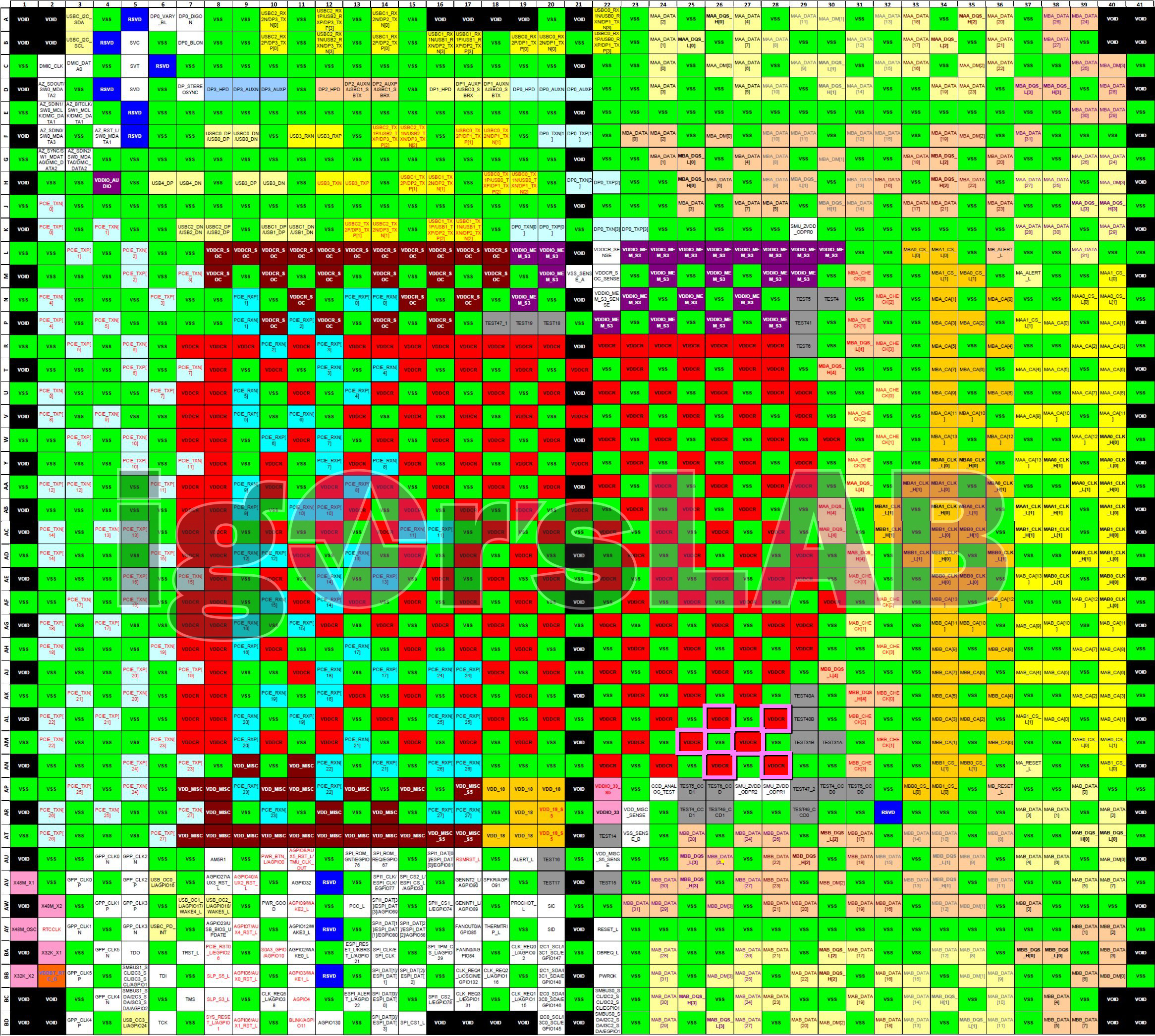
No one seems to have a pinout of the AM5 socket yet so we can't tell where the burn started
long geyser
grizzled bloom
No one seems to have a pinout of the AM5 socket yet so we can't tell where the b...
One shown in Roman's video, but cant find it on a site.

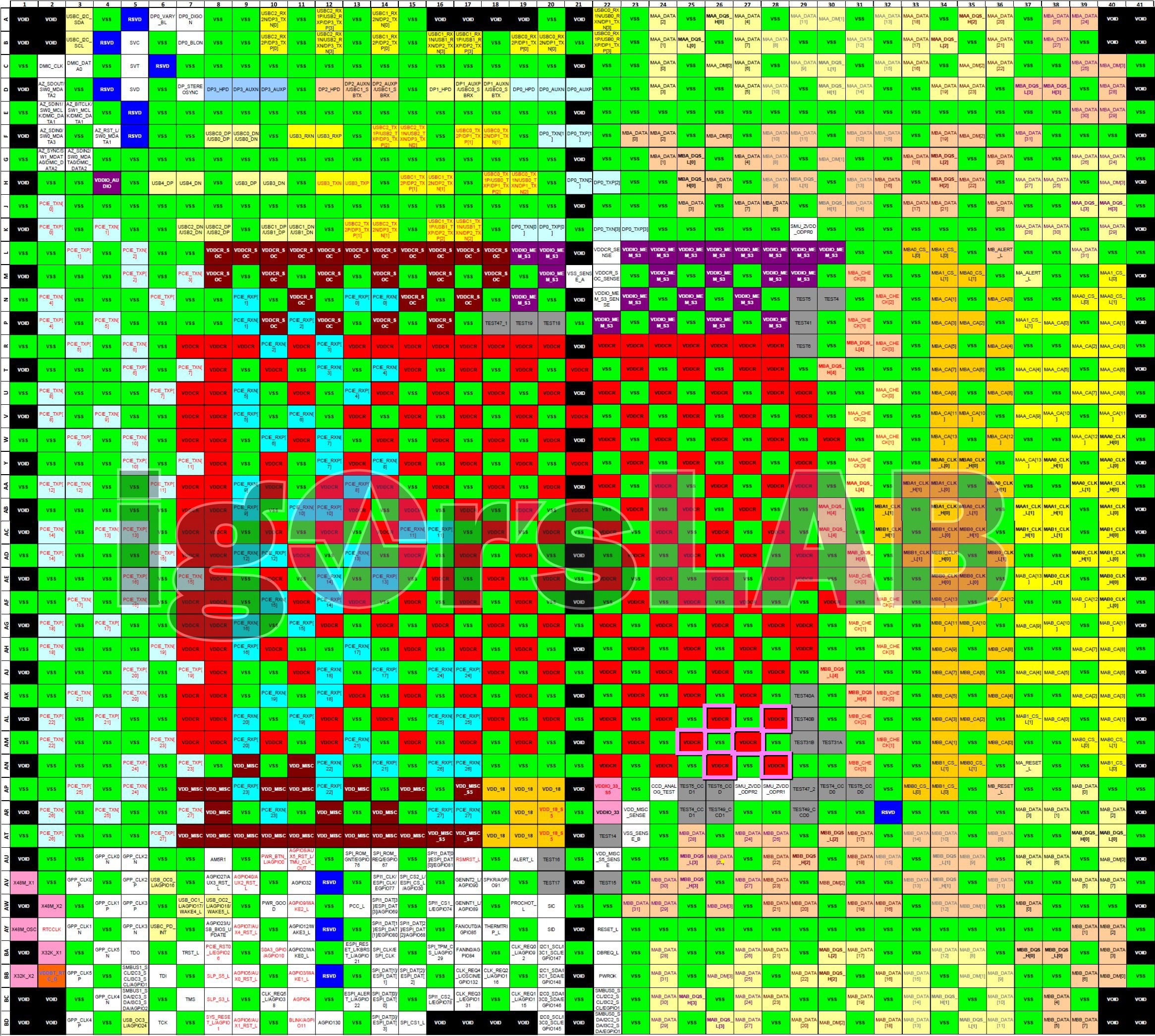 grizzled bloom
Ah nice Igor was able to ID the pins in question too
All of them are the core voltage, interesting
That was just today he put that together too, no wonder I couldn't find it
grizzled bloom
And there's the ramble https://youtu.be/DP-PqRduunw
My Patreon: https://www.patreon.com/buildzoid
Teespring: https://teespring.com/stores/actually-hardcore-overclocking
Bandcamp: https://machineforscreams.bandcamp.com/music
Twitch: https://www.twitch.tv/buildzoid
Twitter: https://twitter.com/Buildzoid1
Facebook: https://www.facebook.com/actuallyhardcoreoverclocking
#ryzen #amd
long geyser
Tried a bunch of search terms for am5 socket pinout targeting igor's site and couldnt find it lol. Had to look up all am5 news that was moderately recent (or also look at Igor's site and sort by most recent, but I didnt do that).
grizzled bloom
Hmm BZ thinks it could be a cascading short circuit. The first short damages the substrate, causing more shorts.
 grizzled bloom
That seems unlikely since the pins involved are the core voltage, not SoC
I'm leaning more towards how BZ sees it. A bad agesa update makes the CPU call for WAY too much voltage, one person reported 2.6V, which is enough to immediately kill that part of the CPU and melt it, which bridges other parts of the CPU creating more shorts and heat, until the motherboard OPP kicks in around 300A or so.
grizzled bloom
grizzled bloom
That seems unlikely since the pins involved are the core voltage, not SoC
Looking at the pin diagram the VDDCR_SOC pins are on the opposite side of the chip (but not the exact opposite so it's not like it was upside down)
grizzled bloom
No kidding, it's the uncertainty that's the most scary part
dull flint
Luckily the system isn't done yet, still fixing things up with it
So there's more time for eggheads to think

grizzled bloom
It'll take some time for the failure lab to get back to GN, they haven't even gotten the CPU yet, so it'll probably be more than a week on that
They'll have their own analysis first ofc in the meantime
 grizzled bloom
Maybe if you do static voltage and it's not asking firmware what the voltage should be you'll be ok
dull flint
Yeah no, not on X3D
On another note, nice to see this isn't asus specific
Was genuinely considering swapping the gene
grizzled bloom
There was early speculation on that because of a firmware update they pulled from the site but yeah it's more than just asus now
dull flint
Possible coincidence
grizzled bloom
Totally
dull flint
But I like Roman's theory, especially since they implemented monitoring
Considering we are public spectators to this, I wouldn't be surprised if there were even a couple of examples like this that never showed up on the web before that vendors may have already known about*
And this can also just be super overblown, we have what, 5 cpu's shown up so far?
Out of maybe hundreds of thousands?
Idk I'm also rationalising this for myself but at the same time that uncertainty is just uncomfortable
grizzled bloom
Oh yeah no doubt it's a small sample size of failures so far, that we know of.
We still can't rule out a factory defect at this point too
 limber dragon
dull flint
Or just excessive vsoc
limber dragon
dull flint
Or just excessive vsoc
noreng's was seeing 1.45 vsoc in bios with xmp soooooooooo yeah
grizzled bloom
And Roman tested vsoc at 1.5v so 🤷♂️
Can't really rule that out still but it didn't kill it
limber dragon
noreng was testing for stability shortly after getting it, and it went 💩
but also most likely other stuff going on too
grizzled bloom
Oh yeah no doubt, could be another symptom of the same root
dull flint
Idk after listening to BZ an agesa bug sounds a bit more likely lol
Cpu's cropping up all at once, all sku's affected, similar type of substrate failures
Could still be vsoc but idk, I'm thinking about the bios now
 stark violet

@Buildzoid1 Someone is claiming that their 7800X3D got 2V and survived long enough to make it to Windows:
https://t.co/u2jqAGtwWg
 Twitter
·
dull flint
Twitter
·
dull flint
@grizzled bloom https://www.tomshardware.com/news/amd-ryzen-7000-burning-out-root-cause-identified-expo-and-soc-voltages-to-blame

Tom's Hardware
Impacts all motherboard makers and all Ryzen 7000 chips.


I have always been sus of the high SoC tbf but people kept using it so never really questioned it
So not 'official' yet, but the cause is > high soc > protections burn up > SoC temp go crazy > CPU 00
@oak sand @real heron @sudden creek @bronze onyx and idk anyone else on/considering going on AM5 you might want to have a read of this
 oak sand
dull flint
<@330030025799761921> <@250438417148542976> <@217356391675985921> <@483348312414...
oak sand
dull flint
<@330030025799761921> <@250438417148542976> <@217356391675985921> <@483348312414...
Yikes. What are they even gonna do to fix it?
And will the people who’s chips died get replacements?
dull flint
oak sand
Yikes. What are they even gonna do to fix it?
Most likely (if not already) bios updates to patch the issue out
dull flint
oak sand
And will the people who’s chips died get replacements?
Yes, boards as well. Just don't tell them you used XMP/EXPO
oak sand
I manually tuned my ram but it is insane that XMP was running at like 1.4V
oak sand
dull flint
Most likely (if not already) bios updates to patch the issue out
I check my MOBO bios every few days and I noticed they deleted all but the last 2
Funny tbh
dull flint
oak sand
I manually tuned my ram but it is insane that XMP was running at like 1.4V
XMP dram voltage and vSOC are two very different voltages. XMP dram voltage at 1.4 is fine, vSOC is apparently not
dull flint
oak sand
I check my MOBO bios every few days and I noticed they deleted all but the last ...
Ya it's happened with a few vendors. Likely all the old BIOS are scrapped
 real heron
So is the fix out yet
dull flint
Update your bioses @bronze onyx @real heron
 bronze onyx
I’ll show what I mean when I get home
dull flint
Don't take out your cpu to check it
Just update bios
And wait for an official statement from AMD
real heron
how do I update bios do I do it through msi center
dull flint
Msi has tutorial videos iirc
vast meadow
I would highly recommend with a usb stick and doing it in the bios/with flashback
 sudden creek
Please help, I just installed this new kit of ram and removed the old one then XMP however my system keeps blue screening.
R7-5700G + B550M DS3H.
 long geyser
dull flint
<@396513761550270464> https://www.tomshardware.com/news/amd-ryzen-7000-burning-o...
long geyser
dull flint
<@396513761550270464> https://www.tomshardware.com/news/amd-ryzen-7000-burning-o...
Idk what their sources are, but IMO it kinda just sounds like this vid is their source with partners just adding onto the speculation. I dont think there is any concrete proof yet.

Buildzoid also made a decent point, SOC doesnt really have enough power to melt a CPU. That said he did miss a point that he sorta touched on, SOC voltage spikes hard enough to break insulation layer and causes short circuit with main voltage rail to melt CPU (iirc only touched on main rail spiking voltage, not this scenario that I gave, which is also only a theorectical scenario).
dull flint
long geyser
Idk what their sources are, but IMO it kinda just sounds like this vid is their ...
of course. Nothing is concrete, though I got caught up on Noreng's 7800X3D experience today about this
His board auto'd 1.5 vSOC for his ram profile
He ran a stress test for a while with it, came back a short while later, chip and board dead. post code 00
same result
it's not concrete no, but I think there's definitely a link here, either to the AGESA bug or the expected behaviour was not within some safe spec not yet known
All the board vendors are yeeting their old bios updates for new ones and people are reporting forced lower vSOC with them as a result
It could be a coincidence, but I'm kinda not leaning that way rn
oak sand
“Etc”
 dull flint

 grizzled bloom
Sounds like AMD is ready to pass the blame to me
limber dragon
Inb4 "xmp is overclocking and voids warranty"
 dull flint
I just want an answer before my watercooling parts arrive 😭
oak sand
Good luck 😭
Do we have a number on how many people were actually affected?
Or like, a ballpark of some sort
dull flint
No idea
 formal bolt
https://www.youtube.com/watch?v=ss-wft1iVjA is this video sufficient for undervolting a 5800x3d?

Hi! I'm Chris.
I make PC, windows and gaming optimization guides.
This is my optimization YouTube.
Undervolt Guide
https://github.com/PrimeO7/How-to-undervolt-AMD-RYZEN-5800X3D-Guide-with-PBO2-Tuner/blob/main/README.md
Undervolt Software
https://github.com/PrimeO7/How-to-undervolt-AMD-RYZEN-5800X3D-Guide-with-PBO2-Tuner/blob/main/README.md
M...
eternal turtle
dull flint
He ran a stress test for a while with it, came back a short while later, chip an...
roman did the same thing and his chip didnt die after several hours
pretty sure, anyways
dull flint
Roman did cinebench lol
eternal turtle
r23 is a pretty good stress test, especially for avx2/wattage
dull flint
Noreng did like VST or something
eternal turtle
it doesnt stress stability, however it pushes a lot of watts and heat
dull flint
No but like cinebench is near zero stress on imc
eternal turtle
yeah thats true
idk, amd not implmenting otp on their imc is the dumbest move ever
lol
dull flint
Oh yeah on Zen 3 it would've just degraded
This is a higher tier level of screwery
Also, there are reports coming out of no xmp and it still happens
eternal turtle
relying on companies to have good auto voltages and lowering memory compatibility because of it is stupid, implement proper protections
eternal turtle
idk, its stupid amd has been this lazy with implmenting temp prot
dull flint
Indeed
eternal turtle
that straight up should not happen
 dull flint
Good old 14nm
eternal turtle
i dont want to move off rkl until higher core counts become more mainstream
dull flint
++++++++++
eternal turtle
ecores are cool but give me 12 or 16 big ones
dull flint
Bruv just go 7950x
 eternal turtle
my 11700k was ultra cheap so
it does good enough, im gpu bottlenecked in tarkov which is my metric
11700K+ram tune like doubled my fps in tarkov 💀
dull flint
My laptop is cpu bottlenecked in my main game 
eternal turtle
tarkov is big on ram and cache
people see 30% increases going from 5800x to x3d on like 3070s
eternal turtle
yeah
unfortunately tarkov is pretty shottily optimised so
hopefully it gets bettert
good in some areas bad in others
i dont like that it commonly goes over 16gb ram
sudden creek
I've heard there are issues happening with the 7000s chips from AMD? what's happening?
 cursive epoch
It's probably the current agesa being glitchy
sudden creek
What's Agesa?
sudden creek
Oh. I was planning on going 7950x non 3D, is there any issues with that as well?
eternal turtle
sudden creek
Oh. I was planning on going 7950x non 3D, is there any issues with that as well...
its really unkown right nowm just avoid am5
cursive epoch
But to be safe I'd avoid am5
Unless you wanna risk throwing money and hardware in the trash
sudden creek
gotcha, hopefully the issue is figured out in the next 4 months or so. Saving up to do my big upgrade once I am back in China in a few months.
eternal turtle
i'd just hold out until intel 14th/ryzen 8(or 9K)
sudden creek
When is Ryzen 8/intel 14th expected to come out?
eternal turtle
maybe octover? mid-late 2023
sudden creek
Mhmm, interesting. This is for Intel or AMD?
eternal turtle
am5 came out in late sept 2022, raptor lake came out on the 20th of oct
eternal turtle
sudden creek
Any news on the 14900K or 8950X lately?
nah
sudden creek
i heard Intel signed a patent on some L4 cache called I think "adamantine".
eternal turtle

Tom's Hardware
Intel's Adamantine L4 cache tile will rival AMD's 3D V-Cache tile.
ayes
dull flint
cursive epoch
And only affects 3d models
Affects all models. All boards. I can confirm this except biostar (I wouldn't be friends with a biostar user)
eternal turtle
"Large on-package caches, which will allow novel usages."
dull flint
It's not just x3d
dull flint
Yup
eternal turtle
eternal turtle
"Large on-package caches, which will allow **novel** usages."
i doubt that it will be similar to x3d in this way
 eternal turtle
Intel is planning X3D equiv, I do not think this is their equiv
dull flint
5 has cpu pimples 😆
cursive epoch
right
sudden creek
cursive epoch
AM4 has usb dropout
What's USB Dropout?
cursive epoch
it has hit puberty
eternal turtle
Intel's X3D equiv uses poles to power the cache, not this
cursive epoch
usb dropout is as the name suggests
some people has am4 rigs dropping usb connection
requiring a full system restart to solve the issue
sudden creek
....... So that's what was happening to me.
dull flint
I don't think there's ever been an am4 system that hasn't experienced it
cursive epoch
ya
sudden creek
It isn't happening anymore but when I first got the rig started it was driving me nuts.
Because every 2 seconds I'd hear a beep.
dull flint
It's just of varying degrees of bad to fine
cursive epoch
Long lasting socket my butt
I sure hope it gets fixed somehow
Cause if it's never fixed, well rip cpu sales
sudden creek
AM5 I'm assuming?
cursive epoch
Long lasting socket that's riddled with issues isn't so good now is it
eternal turtle
it works and well
sudden creek
Because one of my concerns with going Intel is that when I upgrade I want to be able to reuse the cpu to upgrade my server.
eternal turtle
worst case just turn off ecores lol
but theyre very good at being cores
they work well, especially since they have very high core count
cursive epoch
It's no concern
eternal turtle
dedicate 4 ecores to a vm, you get 4VMs out of just ecores on a 13900k, along with 4 more out of P cores
cursive epoch
Even if unsupported, it will treat the cores as normal cores
But you can allocate cores, yeah
Make it use certain core number
sudden creek
cursive epoch
Even if unsupported, it will treat the cores as normal cores
Oh really? I thought it disabled the E cores.
cursive epoch
Nah lol
sudden creek
Oh perfect.
sudden creek
Mhmm, if that's the case the 13900K or if there is gonna be one 14900K seems much more tempting.
vast meadow
14th gen leaks aren't super promising atm anyway
 marsh walrus
howdy yall any body have a old pb-804486sx bord im reblding a pacard bell for retro gaming
im also looking for a atari mega st
 hollow knot
is r7 2700x that much better than r5 5600 non x besides the cores?
hollow thorn
hollow knot
is r7 2700x that much better than r5 5600 non x besides the cores?
5600 outperforms 2700x in both single core and multi core
long geyser
A reminder that cores/freq dont really mean much when comparing extragenerationally
 burnt spear
hollow knot
is r7 2700x that much better than r5 5600 non x besides the cores?
burnt spear
hollow knot
is r7 2700x that much better than r5 5600 non x besides the cores?
The 2700x loses to the 3600 for gaming, let alone the 5600
The 3600 matches the 2700x in multi core, maybe loses by a tiny bit
hollow knot
hollow thorn
5600 outperforms 2700x in both single core and multi core
thanks. i was looking at the ultra pc specs for red fall
grizzled bloom
There's a story to this and I can't wait to hear it
 grizzled bloom
Staked over a spit
vast meadow
grizzled bloom
There's a story to this and I can't wait to hear it
Sounds like a classic assussy moment
Idk how but people think of them as a gold standard but lately they've just been mainly laughable
 shy wyvern
My 13700K can only pull 280 watts before thermal throttling with a liquid freezer ii 360mm
I figured I'd be able to pull more tbh
It is kind of funny to see my CPU melt down from p95s heat/power torture test
vast meadow
Do you have a contact frame?
 naive pendant
from 5th gen, is it better a r7 5800x or a r7 5700x, or better said, is it worth for spending more 70$ for the 5800x
vast meadow
naive pendant
from 5th gen, is it better a r7 5800x or a r7 5700x, or better said, is it worth...
Nope they're within margin of each other and the 5700x runs a lot cooler
burnt spear
Pretty sure 5700x with pbo beats 5800x w/o
shy wyvern
vast meadow
Do you have a contact frame?
Yes I do
And I've had it since I've owned this chip so there was no pre contact frame warping
vast meadow
Interesting
shy wyvern
Maybe my mount is a bit off who knows
Because someone told me their 13900K pulling 380 watts overclocked under stress test is at 92°C with the same cooler
Which doesn't seem right to me idek
I'm only at 1.315V too
grizzled bloom
burnt spear
Pretty sure 5700x with pbo beats 5800x w/o
Sure... if you crank the power limit too. Then it's basically the same as a mildly overclocked 5800X.
oak sand
Any way to possibly update BIOS without a USB stick? Lost mine for now and on Ryzen 7000 so wanna update ASAP to make sure nothing happens
Can likely get a USB stick in the next few days if its unwise to do so
grizzled bloom
 oak sand
Ill take that as a suggestion to just get a USB drive 😂
 eternal helm
if you have a ch341a that works too but im assuming if you dont have a usb drive you wont have one of those
oak sand
ill be honest i got no clue what that is so ill assume i do not have it
dull flint

We have been able to reproduce a catastrophic failure resulting in the motherboard self-immolating while we were running external current logging, thermography, and direct VSOC leads to a DMM. The issue involves incompetence on many levels. Video script being finalized now.
Likes
1546
Retweets
124
Twitter
·

(yoink Brutus 💀)
cursive epoch
it's gonna be one hell of a fun fest
dull flint
Sounding like it actually was vsoc now, and the bios updates were no mere coincidence
cursive epoch
so it is fixed quickly
just gotta spread awareness to am5 users
the time updating bios is important on an already working system
dull flint
dull flint
So not 'official' yet, but the cause is > high soc > protections burn up > SoC t...
Throwback
SoC having free reign was for a long time a bit sus to me lol
dull flint
But considering the timing of it may be vsoc related but maybe not of a manual set value
Like say, agesa bug, randomly pumps 2.4v
- shrug *
They've reproduced it tho which is amazing, can't wait to see what this actually is
sudden creek
cursive epoch
crisis averted
AM5 is safe now?
sudden creek
gotcha, so what was causing the issue? No voltage limit on something?
vast meadow
It was something to do with expo allowing voltage to go up or something
dull flint
It is supposedly everything to do with vSOC at this point but they haven't disclosed what exactly is happening yet
grizzled bloom
All we know is SoC is involved in some way. Whether that's the cause or a symptom, remains to be seen.
 limber dragon
and how much of that will be ranting about X, instead of just a "disable xmp for the time being, its messed up with ### bios"
grizzled bloom
From their earlier posts it sounds like they found a lot more than just soc problems
 haughty mango
I am using ASROCK B450 Steel Legend with Ryzen 7 2700X
My Bios versions is far behind than the latest version
Current 3.40
Latest - 4.60
Is Updating Bios to latest version safe ?
grizzled bloom
It says that it's "not recommended" for Pinnacle Ridge CPUs but it is perfectly safe to do so
haughty mango
I wont need to install the in between versions correct, direclty the latest version is fine
or will have to install in order the inbetween released versions as well
grizzled bloom
Looks like going from 3.40 to 4.60 is fine
haughty mango
Ohh okay Thanks for the help
 fluid vigil
yo can somebody help me
in my bios it says my cpu is clocked at 2.9 gHz but it's running on task manager at 4.59 gHz
i have an msi bios, i don't want to overclock, how can i fix this?
Image
it also just sits at 4.59 ghz
it doesn't change
grizzled bloom
Task manager is not reliable for that
fluid vigil
oh oke
so you think it is running at the right frequency its just task manager being dumb?
grizzled bloom
BIOS is technically correct, 2.9GHz is the base clock, and it's boosting to 4.6GHz
grizzled bloom
Nope it's designed to do that
haughty mango
grizzled bloom
Looks like going from 3.40 to 4.60 is fine
Thank you, Latest version updated and system also booted without any issues.
Thanks again
grizzled bloom
Happy to help
Make sure you enable XMP since it cleared your settings when it updated btw
haughty mango
Yes will do thanks 😄
 cyan raft
grizzled bloom
Vote!
cyan raft
grizzled bloom
Vote!
Does this affect all AM5 chips or just X3d?
grizzled bloom
We still don't know for sure but there's been reports of non-3D
grizzled bloom
We don't know that yet either
dull flint

GRAB THE LIMITED GN15 ANNIVERSARY FOIL SHIRT! https://store.gamersnexus.net/products/limited-edition-foil-gn15-tshirt-design | Grab one of the brand new, LIMITED EDITION FOIL 'GN15' shirts to help out while getting something commemorative for 15 years of GamersNexus in return! This research piece took us a straight week of nonstop work to comple...
Here we go boys
Buckle up
 grizzled bloom
"Rapid unexpected disassembly" 
dull flint
dull flint
I have always been sus of the high SoC tbf but people kept using it so never rea...
This aged well
dull flint
UPDATE AUGUST 28TH, FINAL: New and current bios versions have not shown any new major and unusual developments. Please stick to 1.0.0.7B or newer or 1.0.0.6 but no older. 1.0.0.7A or 1.0.0.7 do not count as the same bios.
[UPDATE JULY 14TH: There has been no recent major news regarding current bios status. 1.0.0.9 is supposedly becoming available sometime in Q3. Please endeavour to maintain your current bios at 1.0.0.6 or newer (preferably 1.0.0.6, see below) at this time until the results of 1.0.0.9 are seen and public.]
[UPDATE MAY 10TH: EARLY SIGNS OF 1.0.0.7 BIOS SHOW SIGNS OF TEMPERATURE RUNAWAY ON THE CPU, DO NOT RUN THIS BIOS. STICK TO 1.0.0.6. This is unfortunately a terrible failure on AMD's part and should be either tested with extreme caution or better avoided and kept on with 1.0.0.6 which introduces a vSOC cap to avoid the catastrophic failure. 1.0.0.9 has promised fixes for the problems of 1.0.0.7, but don't expect anything at this stage.]
[UPDATE: AMD is continuing to roll out more updates for BIOS as the situation keeps evolving. 1.0.0.7 releases May 6th, it adds further protections using PROCHOT. Strongly encouraged for everyone to update to it when it releases]
[EDIT: Original message timestamped 30th April 2023]
So the take away for now from the failure analysis is the latest bios updates from all vendors should/will put a bottle cap on the problems that could be possible causing this overcurrent issue. It is not a true fix of the platform, however. The analysis is still ongoing.
For all AM5 users, update your motherboard bios immediately. This affects all AM5 CPUs.
NOTE: For gigabyte users, currently there exists a bug that ignores auto or reset vSOC attempts, and may run high vSOC anyway based on what was ever manually set. For gigabyte users, I'd recommend a manual set vSOC of 1.25V, 1.3V max. The setting will appear in numerous places in the "Advanced section" (Found using hotkey F7 in the UEFI/BIOS) and will be listed as "VCORE SOC". It may also take on another name, the keyword is "SOC".
Should after doing this, you find your system is now crashing a lot, or you are getting a lot of blue screens of death (BSOD), consider also changing your XMP/EXPO frequency down some 400 or 800 MHz/MT·s using "System memory multiplier" found in the Advanced Section (F7) in the UEFI/BIOS. This setting is normally found near the XMP/EXPO setting.
For all concerns over damage, AMD is honoring warranties on replacing damaged CPUs at this time with this issue regardless of XMP/EXPO, not all motherboard makers however are confirmed.
TL/DR: AM5 users update your BIOS immediately to the current release AGESA 1.0.0.6. Gigabyte motherboard users, make sure your SOC voltage is under 1.3-ish at max.
EDIT: See below for additional details
https://cdn.discordapp.com/attachments/861332432925098015/1102224421294444615/20230430_162608.jpg

@grizzled bloom could I get a pin so we can refer to this
sudden creek
Is the I9-10980XE compatible with LGA1200? Just curious.
grizzled bloom
dull flint
UPDATE AUGUST 28TH, FINAL: New and current bios versions have not shown any new ...
dull flint
Cheers 👍
sudden creek
I forgot, the boost clocks from AMD are they all core boost or like only 1 or 2 cores are guaranteed to hit 5.7Ghz?
dull flint
They'll all try to blip as high as what's on the box
But also note advertised clocks are not the same as effective clocks
You can get other factors like throttling or clock stretching weighing in under load scenarios
sudden creek
What are effective clocks?
dull flint
Ok
Consider the normal core clock reading as "this is what it is at this time"
While effective clock is "this is as fast as it's going on average"
Both Intel and AMD have different degrees of this
sudden creek
So effective clocks is the average sustained boost clock?
sudden creek
So kinda like how my 5700G can hit 4.87ghz but on average it's sitting around 4.65?
dull flint
The cores will try to stretch as high as possible but what they're actually managing will come out as effective
dull flint
sudden creek
So kinda like how my 5700G can hit 4.87ghz but on average it's sitting around 4....
It's a bit easier to explain the process if you look for the effective core clock section of hwinfo64
sudden creek
Will check that out tomorrow when I am at the PC for sure.
dull flint
So like, you hit an all core cinebench load
Your cpu reads 4.85 on all cores
But effective is 4.65
Cos it's slightly throttling
Just an example
sudden creek
Think I follow.
How common is it to get an effective all core boost of 5.7Ghz with the 7950x?
dull flint
Uhhh
Given what I know? Probably not that easy
I've barely seen enough AM5 to say for sure what it'll actually do
sudden creek
Oh wait I just realized... Isn't Vsoc the voltage needed to help manually oc a CPU?
dull flint
....yes? If I had to say it's more related to the ram and imc/fabric than cpu
sudden creek
Which was the voltage that usually needs to be upped for higher boost or static PCs on CPU the ?
dull flint
Vcore
But I wouldn't static OC, pbo is normally better
Only specific scenarios like more stable clocks
Albeit lower/higher
sudden creek
Trying to figure out if the bandages used as a temp-fix for AM5 would compromise Overclocking of the CPU and ram.
dull flint
Intel does this clock stretching stuff too btw, just much less obvious
dull flint
sudden creek
Trying to figure out if the bandages used as a temp-fix for AM5 would compromise...
It will
But more importantly
It was never there to begin with
Cos it becomes less an issue of compromise and more preventing total failure
sudden creek
Fair.
dull flint
Realistically? Core clocks don't really do a lot in the scheme of things for AMD CPUs
But your ram tunes will likely be a bit scuffed yeah
sudden creek
Trying to decide if I should switch back to Intel when I uograde due to this AM5 crisis.
dull flint
See how the mobo vendors sort themselves out
sudden creek
Guess I gotta wait for that video and like you said see how the vendors sort out the issue.
dull flint
Unlike any of the other recent drama this is an unlikely scenario and quite concrete
iGPU fries, dies due to excessive ocp over vsoc rail
igpu is not the fault tho at this stage**
More like a, just happens to be there victim
sudden creek
Alright.
Well hopefully this can be fixed without serious compromise cause that price dip down to $500 on amazon.com.mxnis tempting.
grizzled bloom
Maybe we'll get even more of a discount following this big scandal
dull flint
Asus cheap when 
long geyser
Really wonder how Mobo vendors will act. No high hopes for GB given their PSU support history.

 copper solar
dull flint
copper solar
dull flint
 split copper
Theo go to your room
copper solar

sudden creek
what would happen if I put a 5950x or 5900x on my B550M DS3H v1.4?
grizzled bloom
Best case? Nothing. It just works.
Worst case? Thermal throttling on the VRM.
sudden creek
How likely is the ladder?
grizzled bloom
Depends on several factors, mostly your airflow around the VRM. You can always put mini heatsinks on any exposed components, they're cheap enough.
sudden creek
I think Airflow is covered considering 3x140mm fans on the bottom and 6x120mm Push/Pull fans on the front.
grizzled bloom
Neither of those are near the VRM though
Do you at least have a back fan, preferably a top rear fan?
sudden creek
No, though I can order another P14.
Besides airflow, what are other factors to consider? what got me wondering is cause on Amazon there's a 5900x for $280 so it got me quite curious.
mild jackal
If you're just using the chip for gaming, probably a non-issue
You could always run a negative CO voltage and negative offset if needed
vast meadow
sudden creek
How likely is the ladder?
Btw it's latter 🪜
sudden creek
mild jackal
If you're just using the chip for gaming, probably a non-issue
Blender, World Painter, Davinci Resolve.
mild jackal
fan on vrm + co it is
split copper
vast meadow
~~Btw it's latter~~ 🪜
I love ladders
grizzled bloom
I'm suddenly reminded of The Santa Clause. "Dad, what's a rose sucheck ladder?"
oak sand
dull flint
UPDATE AUGUST 28TH, FINAL: New and current bios versions have not shown any new ...
Funny enough I had my SOC at 1.25 before this whole fiasco
Thanks for the rundown, haven't watched the GN video yet but its looks interesting!
grizzled bloom
1.25v is probably more than you need still tbh
Unless you're plain unlucky
1.15v is usually enough to run at 6000
 oak sand
grizzled bloom
1.25v is probably more than you need still tbh
oak sand
grizzled bloom
1.25v is probably more than you need still tbh
Is SOC only for speed? I have some tightish timings which is why I put it so high
grizzled bloom
Primarily yes. It's for infinity fabric mostly.
frosty depot
grizzled bloom
I'm suddenly reminded of The Santa Clause. "Dad, what's a rose sucheck ladder?"
I hate that I'm asking this.. but uh.. what is a rose sucheck ladder?
grizzled bloom
Have you heard the classic poem "'Twas the Night Before Christmas"
When out on the lawn there arose such a clatter,
I sprang from the bed to see what was the matter.
 lunar totem
Alright so I'm trying to run a home Minecraft server for my friends (around 8 people) when we go off to college, and I'm wondering what kind of CPU would be ideal without breaking the bank as I'm a very broke high school senior. I'm thinking just a normal CPU like an i5-10400 will be fine, but would like a second input. Any info about RAM amount would be welcome as well, but I think the 16 GB I already have would be fine.
sudden creek
lunar totem
Alright so I'm trying to run a home Minecraft server for my friends (around 8 pe...
Budget:
Modded or Vanilla:
If modded, roughly how many:
Do you plan to host one or two servers:
burnt spear
12100 would do the job if you want a new cpu, otherwise 10400 used would probably be cheap
If a modded server 32gb might not be a bad idea with how cheap it is, but 16gb should get it done
sudden creek
Honestly if your going vanilla, 8gb will be fine.
lunar totem
sudden creek
Budget:
Modded or Vanilla:
If modded, roughly how many:
Do you plan to host one ...
Mainly vanilla, but we travel pretty far from each other so I'm worried about the different areas being loaded at once. We've talked about doing something like the create mod, which I don't think is too heavy right?
burnt spear
True, but ddr4 is so cheap I'd just go 16 or 32
sudden creek
burnt spear
True, but ddr4 is so cheap I'd just go 16 or 32
Fair.
sudden creek
lunar totem
Mainly vanilla, but we travel pretty far from each other so I'm worried about th...
If your going modded I'd recommend spending the extra like $20 difference for 32gb and not sweat about mods again.
lunar totem
alright, thanks for the advice guys
burnt spear
lunar totem
alright, thanks for the advice guys
We could make you a parts list if you'd like
lunar totem
I made a list originally for a gift for one of said friends for college, but I think I can just reuse the list and change it up a bit. but thanks
burnt spear
How much is it?
lunar totem
only like $880
sudden creek
If your going modded I recommend a CPU like the 12500.
Modded is gonna send a CPU to hell. Especially with mods like Create, Melanism, and other tech mods once you go large scale with those machines.
burnt spear
That's super expensive for a server pc
lunar totem
sudden creek
Modded is gonna send a CPU to hell. Especially with mods like Create, Melanism,...
I'll take a look at the 12th gen
burnt spear
I gotta take a few min, but I'll make you a list soon
sudden creek
Just being honest with him. I've run a lot of vanilla and modded servers before.
lunar totem
burnt spear
That's super expensive for a server pc
it's originally a regular pc for a friend, so it's still got a graphics card and more so pointed towards gaming not hosting. I haven't switched any of it yet
sudden creek
If your in the US I just took a look and the I5-12500 and I5-13500 are essentially the same price. Like $5 difference for an extra 6 E cores and some higher clocks on the P cores.
lunar totem
I am in the US
 royal elk
2650v2🗿
sudden creek
If you decide to go the vanilla route then honestly even a simple 4 core CPU clocked around 4ghz will be plenty.
burnt spear
lunar totem
it's originally a regular pc for a friend, so it's still got a graphics card and...
Part List - Intel Core i5-13400, Deepcool MATREXX 40 MicroATX Mini Tower
Most I'd spend for it
Just will need a wifi card if you're not using ethernet
royal elk
Isn't minecraft single threaded
sudden creek
It's only for modded do I recommend I5-13400 and up.
burnt spear
Yeah, 12100 with the same build would do fine for a vanilla server
Could go for a cheaper mobo
royal elk
I tend to do that alot, repeat something I heard then make myself look like an idiot 🗿
sudden creek
Gotta love how mods can break any PC down lmao.
burnt spear
royal elk
I tend to do that alot, repeat something I heard then make myself look like an i...
Lol you're good
sudden creek
royal elk
I tend to do that alot, repeat something I heard then make myself look like an i...
Your fine, we all make that mistake sometimes.
royal elk
Lol
burnt spear
sudden creek
Gotta love how mods can break any PC down lmao.
I remember crazy craft lagging with a 13600k and 3060 ti
Not consistently ofc
At certain times
sudden creek
burnt spear
I remember crazy craft lagging with a 13600k and 3060 ti
Oh lmao true.
burnt spear
Alright I gotta be driving now I'm out for like 10-15min
lunar totem
sudden creek
If you decide to go the vanilla route then honestly even a simple 4 core CPU clo...
my buddy's got my old i5-7400 until he gets a cpu and mobo for himself. 4 core 3.5 GHz
sudden creek
I remember how before adding like normal mods first thing we see with the 4090 release is "Breaking the 4090 in Minecraft with shaders".
sudden creek
That and some texture packs and poof we're down to 2fps.
royal elk
Luckily its running on brutus's icelake xeon lol
lunar totem
thanks for the help guys
sudden creek
lunar totem
my buddy's got my old i5-7400 until he gets a cpu and mobo for himself. 4 core 3...
If your playing vanilla that's fine.
I would advise against going modded with that though.
sudden creek
lunar totem
thanks for the help guys
If any of you have a decent PC, there's always the option of using the Essential Mod. I recommend checking it out. Not as good as a fully dedicated server but it's a okayish alternative to building a whole server.
Basically makes it so your friends can join your single player world turning it into a multiplayer experience.
royal elk
Oh yea esential worked good for me
That's with a 5900x tho
But ik people who've used it on an 11600 and 9600k
lunar totem
sudden creek
If any of you have a decent PC, there's always the option of using the Essential...
my plan was to just run a server off my own pc until I can get other parts.
CPU: i5-10600k
RAM: 16 GB 3000 MHz
GPU: 1660 Super
Ethernet: fast, idrk the exact speed but somewhere around 800-900 Mbps
Storage: 1 TB M.2 SSD, and two 1 TB hard drives to use, as well as a 500 GB SATA SSD to convert into the storage for it
sudden creek
lunar totem
my plan was to just run a server off my own pc until I can get other parts.
CPU:...
Give the Essential Mod a try until you get a dedicated server.
lunar totem
alright. I also conveniently watched a video yesterday that gave me the idea. I used something called Ngrok, which, as it was explained in the video, acts as a bridge between my pc and the internet without having to port forward, or put my ip at risk
burnt spear
lunar totem
alright. I also conveniently watched a video yesterday that gave me the idea. I...
I'd either do the 13400 list i made earlier or this https://pcpartpicker.com/list/KTYNKp
Part List - Intel Core i3-13100, Deepcool MATREXX 40 MicroATX Mini Tower
lunar totem
thanks so much for the lists and advice
naive pendant
ayyy sooo
since I'm upgrading to the am5
is it better for me to buy b650 or x670
?
grizzled bloom
B650 since the vast majority of people don't need the extra PCIe lanes
sudden creek
Out of curiosity, would the LT720 AIO work on a delidded 7950x or 13900K?
sudden creek
dull flint
With modding
What do you mean by with modding?
sudden creek
sudden creek
Out of curiosity, would the LT720 AIO work on a delidded 7950x or 13900K?
Wondering cause I saw something say that delidding the 7950x can reduce temps by as much as 25c.
dull flint
Shorter screws or standoffs help reach the cpu that no longer has an ihs on it
Coolers are designed to apply distributed pressure one way or another and design their coolers as such to meet a certain z height
If you remove the IHS with a delid
Well, the z height changes
And some coolers won't go to the new lower height
EK AIO is an example, the standoffs have thick capacitive thumbscrews that protrude a long way up from the mobo, so it will only screw down so far
sudden creek
I see.
grizzled bloom
Another trick is putting washers between the backplate and the board so the Z height is lower
Lapping gets nearly as good results as a delid does on 7000 anyway, and it's much less risky
sudden creek
grizzled bloom
Lapping gets nearly as good results as a delid does on 7000 anyway, and it's muc...
That's surprising.
cyan raft
If I buy a 13900k, would lapping it be a good idea?
And are contact frames still necessary with Z790s?
grizzled bloom
Not unless you get bad temps with a good cooler because of the shape of one or the other
Contact frames still help, it's the ILM that's the problem after all
sudden creek
cyan raft
I’m probably going to get a deepcool LT720
👍 I have that cooler, looks and does great.
grizzled bloom
Oh yeah that's one of the best choices for LGA1700
sudden creek
grizzled bloom
Oh yeah that's one of the best choices for LGA1700
Falcie, any idea why I can't seem to find the 13900KS anywhere?
split copper
Have you looked under your bed
cyan raft
sudden creek
Falcie, any idea why I can't seem to find the 13900KS anywhere?
Micro center has them in stock
At least the ones by me do
 split copper
grizzled bloom
sudden creek
Falcie, any idea why I can't seem to find the 13900KS anywhere?
2 reasons:
People with disposable income that are willing to pay more for basically nothing buying them all
They can only bin so many 13900K chips
sudden creek
ahh I see
grizzled bloom
Result: Demand > Supply
sudden creek
If I don't go 7950x I was planning on going for the 13900KS (I know, real performance gains aren't much) though the KS chips have the best OC potential afaik.
grizzled bloom
Technically yes compared to a 13900K because they're taking all the good chips for the KS, but not really compared to a 13900KF. They don't bin the 13900KF.
sudden creek
no iGPU on the kf which makes it a no go for me as I like to reuse whatever cpu I get as a server in the future when upgrading.
grizzled bloom
Were you one of the people that was doing workstation stuff in addition to gaming? It's hard to keep track these days
sudden creek
grizzled bloom
Were you one of the people that was doing workstation stuff in addition to gamin...
yeah.
More workstation then gaming lately though.
grizzled bloom
Gotcha. Yeah that's a valid reason to go high end.
sudden creek
Any updates on the issue with AM5?
grizzled bloom
AMD sent a beta agesa code to board partners that addresses the issue, should be updates launching soon with it. This is in addition to the updates that restrict soc voltage.
sudden creek
Gotcha, Does this solve the problem or is it just a bandage?
grizzled bloom
The soc voltage was the bandage, this should be a permanent fix. It's technically beta still because they didn't have time to do the proper set of testing yet, they needed it out asap.
sudden creek
I see.
I wonder, do you think a 13900K can render faster then my current 3070 in Blender?
grizzled bloom
Probably not but it depends
GPUs are just better at rendering in general
It's kinda their thing
sudden creek
true. Twas curious since it's a mid-end gpu.
naive pendant
Question for the masses, I am looking to upgrade my system. I currently have a 5800X and EVGA 3080 TI XC3 with 32 GB of DDR4 3600 CL16. I am a flight simmer and MSFS is heavily CPU bound. I don't want and I don't really think I need at XX900K, so I was thinking either the 13600K, or the 12700K and keep the memory and 3080 TI. Does anyone have any useful opinion on this?
oak sand
Budget?
naive pendant
They are currently at the same price +/- $1.00
But I am looking at spending about 500 with the mobo
cursive epoch
i would just plop 5800x3d in and call it a day
then you will have 13th gen matching gaming perf
oak sand
That's what I was gonna suggest
naive pendant
I have a friend with an 5800X3D and otherwise the same system and he is having the same issues I am, which is stuttering on the ground in the sim, so I was thinking maybe I could try the enemy, I mean Intel, for once
oak sand
What graphics settings are you using and @ what resolution?
cursive epoch
microcenter has bundles
naive pendant
cursive epoch
if you have the money, it's worth seeing 7800x3d
Thats the issue, updating to the 7800X3D will cost much more than I can spend rn
cursive epoch
idk if there's any 7800x3d bundles available on microcenter
naive pendant
I live in Oregon, there is no MicroCenter here
cursive epoch
aw
well then intel time
asrock pro rs z690 is only like 150-160
ram you can keep depending on how good it is
you will have to update bios, but it's okay
easily doable with a usb drive formatted in fat32
the board has flashback
naive pendant
cursive epoch
Okay that won't need to be changed
Board+cpu and you're good
13700K is a sweet spot
But 13600K is nearly as good
Up to you really, can't go wrong with either for games
If you wanna feel more assured, the extra p cores on the i7 will assure you
naive pendant
It's not that I don't think that the 13700K will do what I want, it's just a little bit out of budget
naive pendant
Plus, MSFS needs higher clock speeds and less threads
oak sand
https://pcpartpicker.com/list/XRNQxs
just the links if needed 😄
Part List - Intel Core i5-13600K
oak sand
If you dont need integrated graphics, the KF is like 20 bucks cheaper
naive pendant
Bet
naive pendant
H100I Elite
cursive epoch
if not ask or buy some for it
yeah ask corsair for that
they will give you some free if you don't have the required brackets
naive pendant
cool thanks
sudden creek
Are all VRMs on motherboards the same size? If so, what size heatsink should one put on VRMs?
dull flint
it depends
typically you see like, a moderate chunk of copper or metal bigger than the vrms by a significant volume
you're talking about up to like a few watts per stage
a chunk of metal is good enough for passive cooling at least in* most instances
grizzled bloom
sudden creek
Are all VRMs on motherboards the same size? If so, what size heatsink should on...
These would be fine with a little airflow tbh, size isn't everything. https://www.amazon.com/Easycargo-Heatsink-conductive-Regulators-8-8mmx8-8mmx5mm/dp/B079FQ22LK

Easycargo 20pcs Small Mini Heatsink Kit + Thermal Conductive Adhesive Tape, Mini Cooler Aluminum Heat Sink for Cooling VRM GPU Stepper Driver MOSFET VRam Regulators (8.8mmx8.8mmx5mm)
cyan raft
Do we have any idea when 14th gen intel will be releasing?
naive pendant
what's a good white motherboard b650
or better a good b650 mbd that is also good for a white build
dull flint
white?
hm
@naive pendant this for usa

ASRock A620M Pro RS WiFi Micro ATX AM5 Motherboard (A620M Pro RS WiFi)
but depends if you need more io
it can run a 7950x really well so it runs anything
naive pendant
dull flint
white?
Yeah, I'm making my next build white
dull flint
vrms only go up to some 80-ish degrees which is way under what they're rated to run at
naive pendant
dull flint
https://pcpartpicker.com/product/kvWJ7P/asrock-a620m-pro-rs-wifi-micro-atx-am5-m...
Does it have atx version?
I forgot to add that 
dull flint
next decent white mobo is over 200
you could pick a white matx
case
or do a vertical mount

that'll hide the rest of the mobo
cos this is the next good white option
https://pcpartpicker.com/product/zFzhP6/asrock-b650-pro-rs-atx-am5-motherboard-b650-pro-rs

ASRock B650 PRO RS ATX AM5 Motherboard (B650 PRO RS)
dull flint
then edge at 260 which is way too much
dull flint
naive pendant
I'm buying the 11o dynamic
which one
dull flint
sure
naive pendant
dull flint
sure
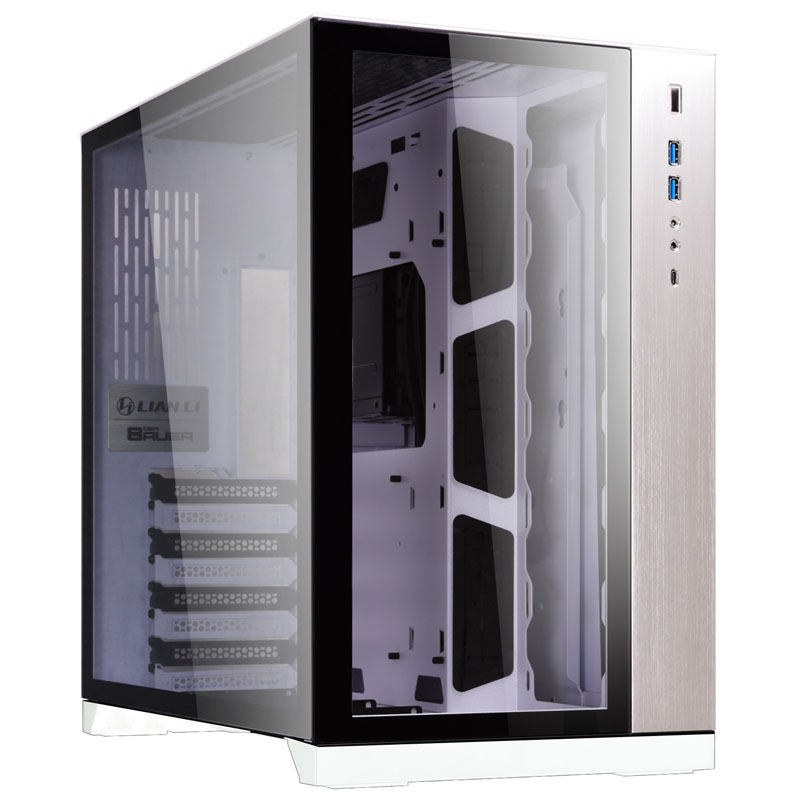
Encomende Caixa E-ATX Lian Li PC-O11DW Dynamic Branco Vidro Temperado online agora e beneficie de envio rápido. Globaldata - We upgrade your life.
dull flint
ah yeah
naive pendant
Sorry for the wait, I was buying my transportation pass
dull flint
suggestion
o11 mini/air mini
it fits matx but also does basically everything the full o11 can for cheaper
it also fits atx
naive pendant
Oh then bet
dull flint
you can change the layout so matx fits the mini perfectly
dull flint
naive pendant
That was atx
air mini fits an atx psu
it also comes with 3 fans
best value o11
110 usd
dull flint
d14 or d15
naive pendant
D14 iirc
naive pendant
It's just for now lmao
Since I wanted to change the case 1st and then I'd buy the rest of the pc
dull flint
so it says here
naive pendant
It's more of an upgrade than a new build, but since I'm changing mbd, cpu, RAM and case yeah
naive pendant

dull flint
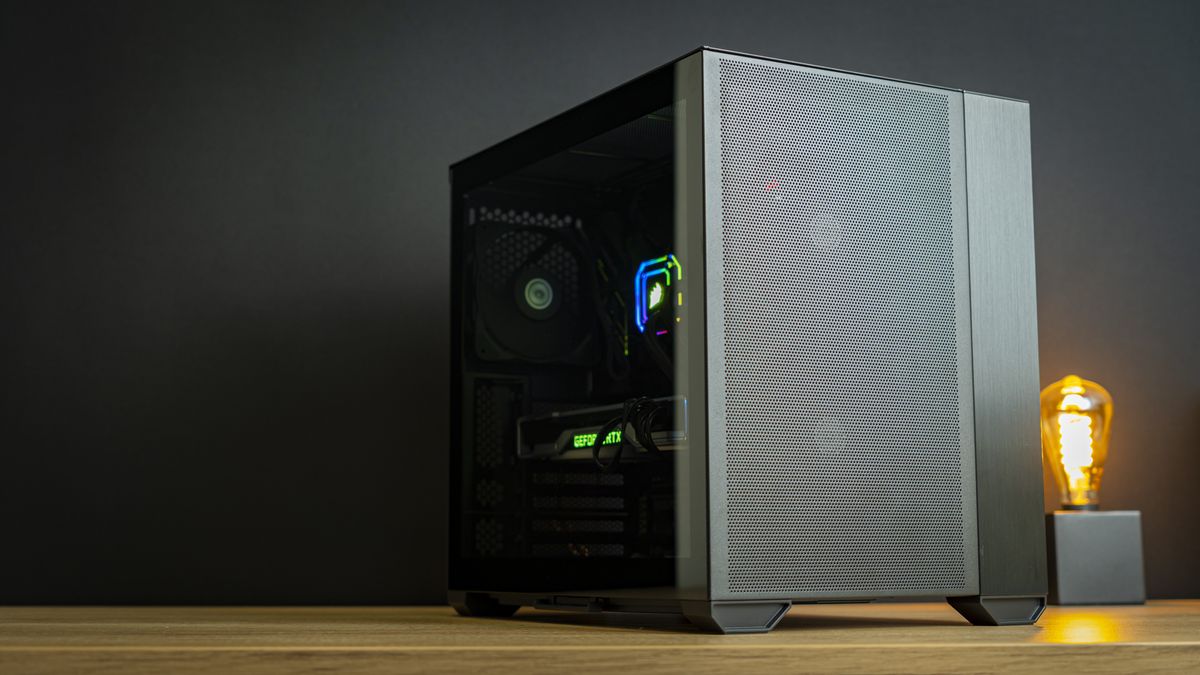
Tom's Hardware
Do you also like the mesh look more than glass?
you're in bud

OOP
grab this and the a620m pro rs
swap it to the 5 slot config
then you can use it as mATX
naive pendant
Hmmm, I was seeing
dull flint
ya you can
ml240l v2 fits
<confirmed
you can put it on the side so it doesn't interrupt the GPU air
dull flint
air mini has good cable space
naive pendant
I'm the one that doesn't have that skill
dull flint
I would maybe recommend a $2 pack of zip ties
naive pendant
You can give me the best case, and I'll screw it up
This is how my current pc looks like and I was in the cable management for 3h
 dull flint
I mean it doesn't need to be perfect
naive pendant
I mean, this new build will be on top of the desk
So it does need to be okay at least
dull flint
I often find myself redoing my cables a good 2 or 3 times
until I really like it
unless I really know a build through and through I won't nail it
dull flint
Mine looked like a rats nest for a good 2 years
dull flint
I am honestly impressed with that A620M
it's as good as like a B550 of last gen
we knew this was coming though
naive pendant
That's y I bought the x570 when I build this pc
dull flint
AMD went super overkill on AM5 across the board for the spec
naive pendant
I hope this mfs don't decide to change the chipset again
I'm changing mbd for longevity
dull flint
like, 9/10 boards across the range have VRM's on par with like intel Z boards
naive pendant
Big bro, Idk what vrm is
dull flint
basically the stuff that feeds power to everything on the motherboard including the cpu
sudden creek
Would copper heatsinks work much better than aluminium ones for Vram MOSFETs?
copper solar
copper more conductive, no?
sudden creek
Yes, though since it's being connected via thermal tape I am not sure if it'd make much of a difference.
dull flint
I mean, it might soak a little more heat but it probably won't do a lot for static heatsinks
regarding the alu vs copper I mean
actually I'm not too sure

it's more conductive at least
sudden creek
Hmm alright.
amber canopy
Nah if you want the best material for a passive heatsink, go with copper over aluminum. Not like it'll cost much more since it'll just be for some mosfets
Speaking of, are you sure you actually need to do this? lol
sudden creek
Nah more of a why not then needed thing lmao. Still questioning if I am even gonna do it.
formal bolt
https://www.youtube.com/watch?v=ss-wft1iVjA&t=313s is this a good guide for undervolting the 5800X3D?
Hi! I'm Chris.
I make PC, windows and gaming optimization guides.
This is my optimization YouTube.
Undervolt Guide
https://github.com/PrimeO7/How-to-undervolt-AMD-RYZEN-5800X3D-Guide-with-PBO2-Tuner/blob/main/README.md
Undervolt Software
https://github.com/PrimeO7/How-to-undervolt-AMD-RYZEN-5800X3D-Guide-with-PBO2-Tuner/blob/main/README.md
M...
dull flint
the cost proposition might make it completely pointless tho on a low end board
cyan raft
Bruhhhh the Z790 TUF doesn’t come with a debug code display
Welp looks like this upgrade is going to get a good bit more expensive I think
grizzled bloom
Most Z790 boards don't, they've been getting cut out and only found on the super expensive OC boards now
You can always add in your own post code display
cyan raft
Bruh, why did they get rid of them?
grizzled bloom
Artificial market segmentation
Those things really only cost them like 50 cents, they're just making it into a premium feature
cyan raft
How would I go about adding in my own?
grizzled bloom
There's PCIe cards you can add in
cyan raft
I thought those really weren’t supported anymore?
Also buying an open box mobo should be fine right?
grizzled bloom
cyan raft
I thought those really weren’t supported anymore?
tl460s plus works but it's hard to find cheap
grizzled bloom
cyan raft
Also buying an open box mobo should be fine right?
I generally avoid that because you never know when it'll be missing the socket cover, leaving it open to damage in shipping. You also might just get one with bent pins.
cyan raft
I’d be buying from MC so shipping isn’t a problem
Do you know the difference between the Asus X670E-F and E-E?
Rn I’m comparing options for either 7950X and 13900k
grizzled bloom
If you're buying open box in store at MC then you can inspect the pins before you buy
The -E
Has improved power delivery a non factor 18+2 vs 16+2 110A vs 90A
More internal copper in the PCB
More PCIe Gen 5 M.2 SSD support with an additional massive M.2 heatsink 3 vs 2
Debug LEDs
Dual PCIe x16 safe slots - 2 x PCIe 5.0 x16 slots (supports x16 or x8/x4 modes)
PCIe rise cable switch - Alteration Mode Switch
Higher performing heatsink specifically designed for next gen PCIe Gen 5 SSDs
More USB ports 13 and 9 vs 12 and 7
3 internal USB 2.0 headers
Onboard start button
The vast majority of these features don't matter to most people, even most overclockers
cyan raft
I think imma just go Intel just because cheaper and better mobos
 fickle tide
What is a good cpu under 200
cyan raft
Someone please talk me out of an open box Asus Z790 Maximus Hero for like $475
eternal turtle
buy maximuuuus hewo
grizzled bloom
Weren't you just about to skip AMD because you wanted a cheaper motherboard
This is not cheaper
sudden creek
grizzled bloom
Weren't you just about to skip AMD because you wanted a cheaper motherboard
Z790 Hero at $475 though.
grizzled bloom
Even I couldn't justify getting that, I simply won't use the extras
sudden creek
xD fair. I doubt many people will use all the features.
cyan raft
grizzled bloom
Weren't you just about to skip AMD because you wanted a cheaper motherboard
Similar AMD board with similar features is at minimum $600
That’s what I meant by cheaper motherboard
royal elk
cyan raft
Similar AMD board with similar features is at minimum $600
Why do you need a 400/600 dollar motherboard anyway?
For use just get a hub
Or pcie usb card
cyan raft
royal elk
Why do you need a 400/600 dollar motherboard anyway?
Because imma try to get a discount because of bundling at MC and if I’m getting a 13900k might as well spent a bit extra on a mobo
royal elk
The logic isn't logical
cyan raft
Also, USB PCie ugly 
burnt spear
I've the 280 on my 13600k
Keeps it under 80c during multi core tasks, and around 55c or lower for gaming
grizzled bloom
cyan raft
How is the EVGA CLC 360 for a 13900k?
Good enough but loud. You'll probably want to change the fans. Arctic P12s are always a good option.
Also a $250 motherboard will have the same performance as a $500 motherboard
burnt spear
^
cyan raft
grizzled bloom
Also a $250 motherboard will have the same performance as a $500 motherboard
I know it’s the same
Just mostly want it for the extra quality of life features and I’ve mostly always used higher ends mobos in my life so might as well keep the streak going
Which is a stupid reason but I have the money so why not
grizzled bloom
Well if getting a higher end motherboard doesn't mean compromising other parts since you've got money to burn that's fine I guess
cyan raft
I’m just upgrading CPU/ram and mobo
I have all my other components already so i ain’t really compromising
dull flint
Taichi cool, but ASRock Intel poopy
cyan raft
How meh is 5600CL40?
dull flint
Is this that 48gb kit @cyan raft
cyan raft
dull flint
Is this that 48gb kit <@480883524203839508>
96Gb yeah
dull flint
It's good
Cos it's only hynix
For 96gb
Hmm
Look up
Z690/z790 classified
EVGA
If one of those is cheap enough
cyan raft
They don’t have them at MC
dull flint
Sadge
cyan raft
Take a look at Yonkers MC, could you see if there’s anything interesting for me?
dull flint
The z690-p ironically looks a bit bare but msi uses 105A stages so it should run a 13900K no problem lmao
I would also lean towards MSI tbh, memory support is pretty decent
Or an Asus Z790 if you wanted to OC it fairly high
(bar strix-i)
cyan raft
I think at that point I’ll just stick with the Z790 TUF
dull flint
If it's sub 250 yeah?
cyan raft
It comes with the bundle
 grizzled bloom
What, you don't like having BIOS inject an Armoury Crate installer into every Windows install, even offline ones?
dull flint

cursive epoch
lmao
cyan raft
Mmmm that Maximus hero has an integrated mem test in the bios
grizzled bloom
So does Windows
Doesn't mean it's any good
cyan raft
Fair enough
dull flint
Hero just straight up isn't worth it imo
cyan raft
But it’s pretty
dull flint
If you're gonna spend maximus money get an apex
The apex is the one that actually puts in work
dull flint
The z690 apex is black but they're discontinued so used only
grizzled bloom
(or old stock, which won't be at MC)
cyan raft
Also Apex only supports 64Gb
grizzled bloom
It'll do more 100%
dull flint
It's the equal best lga1700 board
Next to z790 kp
The white one that is
But the z690 *should still do quite well
Be shocked if it didn't tbh considering how easily adapted to the 24gbit ram kits have been in general
grizzled bloom
As long as it's dual stick and not quad stick it'll do just about whatever you want it to
dull flint
Not like a month or two after they first came out and already 8200 xmp kits for 48gb
dull flint
cyan raft
Out of curiosity what makes the Apex so much better than the Hero?
Memory overclocking and compatibility like nothing else
Not worth spending on a $700 board if there's no functional advantage and i/o doesn't count when there's always cheaper options in that department

 sudden creek
Is there a way I can setup 24/7 minecraft server on my pc and still be able to play on said server/do other things?
 midnight pollen
you can setup the server as a background process but it will still take up resources ofc
sudden creek
midnight pollen
you can setup the server as a background process but it will still take up resou...
Oh I can?
 simple cloak
Can anyone confirm that they have successfully used a ASRock W790 WS motherboard (LGA4677)?
I've tried two different ASRock W790 WS with two different Xeon W5-2455X CPUs and it just refuse to boot. I've troubleshooted for days and am out of options.
 modern pelican
I've been trouble shooting a azrock 690, basically the usb ports keep corrupting, when they corrupt I have to remote in and update the driver. once I do that if I restart they stay working but if I shut down they corrupt again. Reinstalled Windows and update bios so at this point my guess was bad mobo but has anyone else had something else cause this?
grizzled bloom
modern pelican
I've been trouble shooting a azrock 690, basically the usb ports keep corrupting...
Maybe a drive going bad, or memory. Either can do weird things and corrupt stuff.
oak sand
hm....gigabyte took down the latest bios from 4/26. now its only one from 3/23
i guess both are problem bios 😭
 delicate iris
could a dying mobo be the cause of wrong cpu performance statistics? For some reason, everytime I play a game it shows my CPU utilization at 0 % for some reason and around 40-50C and also reports the wrong AIO fan speed (shows default speed despite them running at max speed, or at least it sounds max speed, can barely hear though my headphones its so loud.)
grizzled bloom
Yeah there could be bad sensors causing that, or maybe it just needs a fresh install of Windows or the chipset drivers.
modern pelican
@delicate irisid start with drivers or even look at power settings, turning on high performance fixes so many issues like that
grizzled bloom
A new leak for Intel claims 14th gen desktop is going to be a refresh of Raptor Lake instead of Meteor Lake, and it'll be on LGA1700 too. Meteor Lake and LGA1841 are pushed back to 15th gen.
We'd previously heard that Intel was having a lot of trouble with their new chiplet tile architecture so this move makes a lot of sense. Give it time for them to fix to avoid launching a bad product.
So this new Raptor Lake refresh is focusing on clock speeds and efficiency. We could see 6.2 GHz, maybe 6.5 on a KS, while being 10-20% more power efficient.
Time will tell if this is enough to compete with, but it'll be rough one way or another.
sudden creek
Does the B550M DS3H v1.4 support 1GB/s Ethernet?
grizzled bloom
MB or Mb
Because 500MB/s is insane
And if wanting that speed is insane lock me up
delicate iris
Does anyone know if motherboard manufacturers put the BIOS revision on a sticker or something on the motherboard or should I just go ahead and flash button it anyway.
 main pulsar
delicate iris
Does anyone know if motherboard manufacturers put the BIOS revision on a sticker...
main pulsar
delicate iris
Does anyone know if motherboard manufacturers put the BIOS revision on a sticker...
usually its a sticker right on the chip
small chip, small sticker
somewhere around the bottom third of the board, generally, if the manufacturer is nice enough to do so in the first place
delicate iris
True it is a cheap MSI board, looking around there now.
main pulsar
which board, i can tell u where to look
sudden creek
grizzled bloom
MB or Mb
Because 500MB/s is insane
i believe 500MB/s.
vast meadow
sudden creek
i believe 500MB/s.
companies quote in mbps/gbps btw (megabits/gigabits) so 500MB/s (megabytes) would be 4gbps
hollow thorn
Which would also mean the usual 1gbps or 2.5gbps Ethernet ports won't be enough
main pulsar
if ur paying for 4Gbps, you can afford a 10Gbps nic
delicate iris
@main pulsar it's a MAG Z690 EDGE WIFI DDR4
delicate iris
Oops its MPG not MAG
main pulsar

if its not that one then its hiding
i mean honestly just flashback the bios to the latest anyway
doesnt hurt
delicate iris
Yeah, will do, couldn't find it under the heatsink, there is a barcode on top the SATA port but it doesn't make any sense.
Thanks for the help
delicate iris
Will it hurt to put an unsupported 13th gen cpu into it before flashing it or does it not really matter?
main pulsar
dont put the cpu in
i mean, if its already in there with the cooler on top, then i think it shouldnt matter
the whole operation runs off 5vsb, so ps_on is never triggered
delicate iris
Gotcha, thanks
sudden creek
hollow thorn
Which would also mean the usual 1gbps or 2.5gbps Ethernet ports won't be enough
oh so it's 500mb/s then.
grizzled bloom
If there was something smaller than a bit I bet Comcast would be using that for no reason other than "big number better"
royal elk
Yea we actually have 500000kilobit Internet
grizzled bloom
That works
And they'd make the Kb VERY small
grizzled bloom
Yeah that sounds about right lol
royal elk
And thats her phone lol
For her business I understand but even there she isn't hooked up to ethernet?
grizzled bloom
Well if you stick a wire in it you can download at a speed exceeding an average HDD
royal elk
It doesn't add up cause she has a nas for all her wedding photos
That her employees use😭
(She does photography)
grizzled bloom
Is it a residential or a business line though? Because business lines there's always deals for the faster speeds so they can upsell more
royal elk
I think it's business
grizzled bloom
If it is that would make sense because they charge like $200 a month for the basic package and they'll give a faster speed for like $10 more
royal elk
I'm talking about the office now sorry lol
They're all on m1 macs at her office and I'm so jealous😭
grizzled bloom
That also makes sense because Apple loves to market to pros, and there's a couple exclusive programs
M1 go brrrrr
royal elk
Frfr
grizzled bloom
Which is it Xfinity?
 royal elk
grizzled bloom
Which is it Xfinity?
royal elk
grizzled bloom
Which is it Xfinity?
No clue pretty sure it's also Verizon
That and optimum is all you can rlly get in that area
And optimum sucks
grizzled bloom
No I mean Xfinity doing false advertising
royal elk
Ohhh
delicate iris
Are USB 3.2 GEN 2 headers on a motherboard backwards compatible with USB 3.1 GEN 2?
Have to replace the front IO in my case and was thinking about getting a 5.25 bay front IO replacement.
EZDIY-FAB 5.25in 10Gbps USB 3.1 Gen2 Hub and Type-C Port,Front Panel USB Hub with QC 3.0 Quick Charging https://a.co/d/a1J1vLP

EZDIY-FAB 5.25in 10Gbps USB 3.1 Gen2 Hub and Type-C Port,Front Panel USB Hub with QC 3.0 Quick Charging
grizzled bloom
Yes USB 3.0 is fully forward and backwards compatible, it'll just run at the speed of the slowest speed of the devices involved
delicate iris
Cool, thank you
grizzled bloom
You might need an adapter for a USB C but it would work
delicate iris
Does the hdd activity light jumper need to be plugged in or can I just just skip that part of front io replacement?
grizzled bloom
You can skip it
sudden creek
out of curiosity, is there a way to paint a motherboard's pcb?
grizzled bloom
Sure you just use a non-conductive paint
And protect important parts like the socket ofc
sudden creek
ahh okay. Was wondering cause I've got this idea for a design to add some Stripes going down my pc case and the motherboard to have a stripe matching the case.
grizzled bloom
Looks like LTT did it years ago https://youtu.be/4STGMUEBvR4

We apologize for the audio issue
Can you mod your motherboard with only a few rolls of painter's tape and a can of spraypaint?
Crunchyroll link: Head over to http://crunchyroll.com/linus to start your 30-day free trial today!
Pricing & discussion: http://linustechtips.com/main/topic/291276-painting-a-motherboard-diy-project-asus-rampage-v-e...
sudden creek
Ahh I see.
 autumn frigate
Is amd ever going to make their own e and p cores like intel?