#cpus-mobo-and-memory
1 messages · Page 20 of 1
 brazen forge
 hollow thorn
VRMs might not be good enough to run the chip at reasonable speeds
 vast meadow
also unless you get it for close to nothingits not really worth buying
 warm dune
I don’t even know how or why my cpu was like this the other day
 vast meadow
warm dune
I don’t even know how or why my cpu was like this the other day
vast meadow
warm dune
I don’t even know how or why my cpu was like this the other day
the up time?
warm dune
No the speed
vast meadow
oh eh try restart pc just a error
task manager is pretty unreliable for speed n stuff
warm dune
Yea I restarted it and it fixed itself, but that’s crazy how it was saying 25ghz
 amber canopy
25ghz 
 amber canopy
 grizzled bloom
https://tenor.com/view/dodge-charger-cars-racing-driving-ride-gif-17969019
grizzled bloom
https://tenor.com/view/dodge-charger-cars-racing-driving-ride-gif-17969019

 hard leaf
warm dune
I don’t even know how or why my cpu was like this the other day
hard leaf
warm dune
I don’t even know how or why my cpu was like this the other day
82c on the gpu.... ouch
 frosty depot
hard leaf
82c on the gpu.... ouch
frosty depot
hard leaf
82c on the gpu.... ouch

If I forget to turn my case fans up it adds another 5-7c depending.
warm dune
hard leaf
82c on the gpu.... ouch
I’m on a laptop so yea it’s gonna be high
 bronze summit
frosty depot
bronze summit
frosty depot
Why is it green
warm dune
vast meadow
task manager is pretty unreliable for speed n stuff
Also what would you recommend for me to get to display everything correctly instead of using task manager
warm dune
If I touch my laptop for long enough I could burn my hand
bronze summit
Well yea that's like sticking your hand in the oven while it's on
frosty depot
bronze summit
Why is it green
Because I changed it to that color so at a glance I could see what my temps are.
bronze summit
frosty depot
Because I changed it to that color so at a glance I could see what my temps are.
But how
frosty depot
bronze summit
But how
Right click which one you want to change > Customize Values > Font Box > Click the color box > pick color
You can also Bold or Italic the font.
frosty depot
lol
 fickle oyster
Guys can I ask for help in here?
 devout mothBOT
 fickle oyster


This is basically it. Was switching out ram and never done that before, first time since putting in the original ram and noticed it said 2133mhz and 3600mhz and am confused about what’s the actual speeding it’s running at and how to change it to 3600 if it is in fact running at 2133
fickle oyster
What does that mean? Docp?
 cursive epoch
DOCP/XMP are ram overclock profiles
It exists to make sure the ram you get is running at advertised speed
fickle oyster
Oh so it will default to 2133 for the motherboard and to run the advertised speed I basically over clock it by selecting that profile?
Oof. Still shows 2133mhz
 cursive epoch
fickle oyster
Oof. Still shows 2133mhz
cursive epoch
fickle oyster
Oof. Still shows 2133mhz
You have to apply and save it
Exit and save changes
fickle oyster
Into OS? Like just normal boot up? I assume I would check task manager then
fickle oyster
Cpu-z. I think I’ve heard of that program. Okay I’ll boot in and see what it says. If it says 3600 then I just disregard what it says in the bios info?
cursive epoch
Ya
Or if it says something like 1800
Then it's working fine
CPU-Z usually reports half the speed because of double data rate
fickle oyster
Do I download zip or the setup file?
 dull flint
fickle oyster
Oof. Still shows 2133mhz
dull flint
fickle oyster
Oof. Still shows 2133mhz
What you've done is correct here. The asus uefi bios will display the SPD of the dimms (the default speed, which is 2133) but you've selected the XMP profile under D.O.C.P
Which is 3603
(3600)
SPD is basically what the chips run straight out of the factory prior to any binning for XMP
(not the whole truth but the basic idea)
So yeah boot up CPU-Z and if it says 1800MHz under the memory tab then it worked and you're good
fickle oyster
I think we’re good then. Says 3600 here though I wonder why it says 27gb available? I’m assuming the rest of the 32gb is cached or something and put aside
 dull flint
Yeah you're good
fickle oyster
Thanks a ton boys and girls. I really appreciate the help you’ve given
dull flint
It'll say 27GB available as the rest is dedicated to windows/background tasks
fickle oyster
Looking good I think
 dull flint
Yup you good fam
fickle oyster
thanks again to all who helped, i really appreciate it. ❤️
 cerulean wadi
Yep, a usual thing. 4GB cached and:
 vast meadow
warm dune
Also what would you recommend for me to get to display everything correctly inst...
vast meadow
warm dune
Also what would you recommend for me to get to display everything correctly inst...
Hwinfo64
brazen forge
What motherboard would be recommended for an intel i9 11900KF thats not extremely expensive?
 burnt spear
brazen forge
What motherboard would be recommended for an intel i9 11900KF thats not extremel...
burnt spear
brazen forge
What motherboard would be recommended for an intel i9 11900KF thats not extremel...
do you already have the cpu?
brazen forge
burnt spear
do you already have the cpu?
Not yet. Its coming around start of January. I looked it up and it said my motherboard was compatible with it but when I asked on here to make sure someone said something about it theoretically being compatible but not recommended cause of something called VRM. I have the Gigabyte B560 motherboard currently
burnt spear
brazen forge
Not yet. Its coming around start of January. I looked it up and it said my mothe...
can you cancel the order?
brazen forge
the cpu order?
burnt spear
yes
brazen forge
yeah but why
burnt spear
13600kf all around beats it
burnt spear
no
the 13600kf beats it in multi core and single core performance
Part List - Intel Core i5-13600KF
brazen forge
So it would be better for gaming?
brazen forge
Ill look into it. But is my current motherboard compatible with the i9 though?
Its been at $200 before?
burnt spear
what exact model
burnt spear
brazen forge
Its been at $200 before?
no
but it isnt worth more than it
because other cpus outperform it for cheaper
brazen forge
burnt spear
could even get a 12600kf, that beats it too
burnt spear
brazen forge
https://www.amazon.com/gp/product/B08X6KQSZ1/ref=ox_sc_act_title_1?smid=A2Y5U0XP...
exact model of mobo
 stone magnet
Should I get an i5 12400f or ryzen 5 5600x. Paired with rx 6600
brazen forge
Gigabyte B560
burnt spear
stone magnet
Should I get an i5 12400f or ryzen 5 5600x. Paired with rx 6600
5600 non x
stone magnet
Ok
burnt spear
brazen forge
https://www.amazon.com/gp/product/B08X6KQSZ1/ref=ox_sc_act_title_1?smid=A2Y5U0XP...
https://pcpartpicker.com/list/P2V74s this costs less than just the cpu
Part List - Intel Core i5-12600KF
and beats it in single core and multi core performance
brazen forge
How do i find the model of the motherboard?
brazen forge
oh ok
 brazen forge
I cant put picture
burnt spear
dm me it
brazen forge
sent it
brazen forge
oh
burnt spear
I wouldnt put an 11900kf on it
brazen forge
So i should get a new motherboard?
brazen forge
ok ill do one of them. thanks
vast meadow
If you already have the board and can't return it, i guess check your VRM temps in a stress test and see if they're getting too hot, if not eh it woll be fine
Can always try slapping a small fan on the vrms too
amber canopy
A bit of airflow can do wonders 
brazen forge
burnt spear
i would get one of the two lists i linked
K I didnt order it yet but im gonna get the i5 13600KF with that motherboard. I put all my other current parts of my old PC in a builder and there doesnt seem any major issues. Thanks
fickle oyster
cerulean wadi
Yep, a usual thing. 4GB cached and:
Ah I see. Thanks my friend. Appreciate the help
 glass zenith
I got a simple a320m-k just for a budget upgrade, but with the actual CPU pricing i can get a 5600G instead a 3600, it's compatible? I know in the CPU compatible List say it is, but still double checking
dull flint
Go 5600
vast meadow
You'd be better off getting a 5600 non g if it works, be just an fyi first gen boards have a harder time with ryzen 5000
glass zenith
I mean the G it's an upgrade from the actual setup, a low-end gpu R9 270? something like that
vast meadow
You don't have a graphics card?
dull flint
I would do 5600 and use the 270 tbh
If you're low end gaming then stick to that for a little while longer until you can get an RX 6600
grizzled bloom
R9 270 is roughly twice as powerful as the Vega iGPU in 5600g
cerulean wadi
Speaking of cpus, check out the old "3770" getting maxed out updating Steam games. On a positive note, my 300 to 400 Mbps internet upgrade is definitely confirmed. Extra 60ish Mbps is a common thing at these speeds. 
 grizzled bloom
3770 could never conceive of such download speeds and is struggling to comprehend this new reality
cerulean wadi
Sure was much lower cpu % even at 300Mbps. 3ish days of much rain so if not w/ UPS tomorrow then I'll finally test the 12400T build. Just realized i7-3770 & gtx 660 are both from 2012. What a thought.
cursive epoch
that's a mood with my laptop's cpu
i upgraded its wifi card and it can now download faster than the cpu can
finally maxed out my 400-500 mbps wifi
amber canopy
I had an old HP Envy Phoenix with a 120mm AIO and 3770k in it, I wish i never sold it
unique system
cerulean wadi
Nice! Yea I'm sure glad I replaced my old AC1750 netgear a while back though. Always a bottleneck somewhere, but cool to lessen certain ones. Interesting thing will be tuning cpu to see how close (performance) I can get to a 12400. Good thing most games don't use every core, but we'll see. Oh I did find a few 12400T TS results. If stock, seems close to 11400 actually. still massive ipc upgrade from 3rd gen. Last pic is sort of for LuLz.


Yea 12400T on TimeSpy is like an 11400, but whoever cares check out the 800ish MHz difference. (I sure won't mind the lower temp & wattage, will help trying to do a 3080 on 650w, lol --- big UV of course) --another edit: the (new) 12400T was a decent $139. Unlike F sku, it does have IGPU.
 grizzled bloom
IPC 
grizzled bloom
cope harder
amber canopy
grizzled bloom
cope harder

 light iron
Hello! Please does anyone know how to update the bios of this motherboard? I have read in forums that it is not possible GIGABYTE B460M DS3H AC-Y1 LGA 1200
hard leaf
yes, it is possible
not qflash tho, you will need a 10th gen cpu already
oh, seems like it cant run an 11th gen anyway
not even with a bios update
 sudden creek
Is it possible to use 6600mhz ram on a z690 MSI Edge?
It's rated for 6400mhz but i'm not sure if there is a way I could OC it to use 6600mhz.
dull flint
With a little effort you probably could
Z690 4 dimmers it's not surprising to see like, 6400 at most
Depends on your IMC ofc
sudden creek
IMC?
cerulean wadi
Internal memory controller. Ram itself isn't the only limit. This early ddr5 stuff is why I don't mind doing ballistix for now. 
dull flint
The speed of the ram is limited by one of 3 things, the ram chips themselves (IC's) the motherboard/motherboard topology and the cpu imc
Maybe sometimes 2 of 3
sudden creek
Onto my next question then.
6600cl34-40-40-105 Samsung B-die vs 6000cl36-38-38-76 Hynix M-Die which is better for Intel system?
dull flint
6600cl34 is not b die
It's hynix A
6000 cl36 38 38 can be hynix m but depends on the kit
Both hynix m and A should run fine on z690 edge
M is probably better as the board will be the limit
sudden creek
Wouldn't it be slower though?
Wondering because both kits are same price (within a couple dollars difference).
dull flint
I mean, if xmp only, maybe slower?
The differences would be unnoticeable in a blind test
 cedar kindle
How important is it that the RAM I buy is on my motherboards QVL list?
cursive epoch
Next to none
QVL list is just kits that the board manufacturer has tested on
Any ram will work as long as it's not defective
cedar kindle
That’s what I figured, I’ve never really heard it mentioned before until I started deep diving into the 3rd and 4th page motherboard and RAM reviews lol
 brisk lion
For some reason ny cpu stays at around 97 degrees, the pc doesnt shut off or anything and i replaced the thermal paste and idk what to do about it
It also doesnt shut off under load
It does go lower
Okay its fixed
 dry ferry
Hi. I’m trying to decide between Intel 12th and 13th gen. How important is the “Intel Threat Detection Technology”! Very curious about why 12 has it but not 13.
cursive epoch
It's nothing to really worry about
Also if possible I would just go 13th gen due to performance increases
13600K is faster than 12700K
cerulean wadi
In games it even beats 12900K (although that's obvious given that's mainly just a few extra Ecores). Selling 12400T tomorrow. $29 loss is ok. $110 I can put back towards 12600K/12700(K). Also listed b660 mobo so maybe I can switch up to Z690. Funny to think I'm skipping ahead 5 or 6 chipsets.
light iron
hard leaf
yes, it is possible
How could I do it? because of QFlash I can't
hard leaf
hard leaf
not qflash tho, you will need a 10th gen cpu already
this
 limber dragon
Gentle reminder to always mount your cooler properly
 bronze summit
limber dragon
Gentle reminder to always mount your cooler properly
bronze summit
limber dragon
Gentle reminder to always mount your cooler properly
bruh
what happened
limber dragon
Came in with cpu debug light and its a post code 00
Granted the cpu also fell right out, so it may have been that it was never mounted properly
Ya it was just never mounted in properly, its posting with a gravity mount
amber canopy
💀
bronze summit
limber dragon
Ya it was just never mounted in properly, its posting with a gravity mount
Omg
 cinder marsh
I just upgraded my ram and now one of the sticks aren't recognized
I have 16x2 gb ram installed
@ 3200mhz
It says this

What did I muck up this time around
cerulean wadi
Shutdown & reseat em, slot 2 and 4 is preferred. Also enable xmp in the bios so you the 3200 speed.
cinder marsh
Slot 2 and slot 4 was already done, haven't done xmp
ah second stick was installed incorrectly
cerulean wadi
also if you ever see gold contacts, ram/gpu isn't in enough.
 cinder marsh
tyty
Now I need help with one more thing, regarding xmp
I see something called DRAM voltage, at base it's 1.200v and the highest number it lets me type is 1.34v
Should I be touching that at all
cerulean wadi
xmp will generally set that (Vdimm/ram volts) to 1.35v so shouldn't need to touch it. "1.34" might be fine too though, if you did need to actually input it.
cinder marsh
Is this all correct?
 cerulean wadi
unless to the right is some enable/disable button, yep. I'm thinkin save and exit then should be good. Can download cpu-z to really check cpu/ram info. https://www.cpuid.com/downloads/cpu-z/cpu-z_2.03-en.zip (although task manager should end up saying 3200 correctly).
cinder marsh
tysm
cerulean wadi
quick example, ignore that it's ddr3. cpuz reads the MHz speed. 3200 is MT/s (megatransfers/second) so will say 1600MHz on cpu-z. TM is just a lil "dumb" in this way
 cinder marsh
i see
I think I did something terribly wrong
My PC is stuck in a phase where the case fans are on max throttle with no stop, and the computer itself is not coming on
cerulean wadi
restart or hold power button for 4+ seconds until it turns off. Might have to clear cmos. xmp or something might've been funky.
,cmos --edit: hang on, used to another server w/ extra bot commands.
 cinder marsh
cerulean wadi
restart or hold power button for 4+ seconds until it turns off. Might have to cl...
cinder marsh
cerulean wadi
restart or hold power button for 4+ seconds until it turns off. Might have to cl...
Should I feel resistance when trying to remove it
I don't want to break anything
cerulean wadi
There is sort of a clip in 1 spot
 fossil escarp
hi
can someone help me
im new to pc world
and i wanna update my bios
for motherboard
light iron
hard leaf
this
I don't understand friend, I already have the tenth generation cpu. i3 1015f, but I can't update the bios.
 hollow knot
fossil escarp
for motherboard
hollow knot
fossil escarp
for motherboard
do have a flash drive? also go to mb manufacturer website and look for bios driver for that mb model also why do you need to update bios. im the guy if bios could load up os dont bother updating.
 supple wasp
can someone help me my pc turns on but it won’t display and the green boot led on my motherboard is on as well as the vga one. i unplugged my pc earlier to move it to a different spot and now it just won’t display someone help
 upper aspen
supple wasp
can someone help me my pc turns on but it won’t display and the green boot led o...
upper aspen
supple wasp
can someone help me my pc turns on but it won’t display and the green boot led o...
Have u tried reseating the gpu
Or unplug repair the display cable
upper aspen
Try taking the gpu out and putting it back in
Also unplug the power cables to the gpu and reply’s those in
upper aspen
supple wasp
i’m lost
And just to confirm, the HDMI/Display cable is plugged into the GPU and not the motherboard right?
supple wasp
upper aspen
And just to confirm, the HDMI/Display cable is plugged into the GPU and not the ...
yes
upper aspen
Check your motherboard manual what does a green lights mean
supple wasp
upper aspen
Check your motherboard manual what does a green lights mean
where would i find that
upper aspen
supple wasp
where would i find that
it should have came with the mobo, if u dont have u can find one online. Google "X motherboard manual" where X is ur motherboard
supple wasp
so where do i go now

 supple wasp
okay
 supple wasp
alright man thanks
upper aspen
i gotta go so ill leave u with this: Green boot https://linustechtips.com/topic/875953-green-boot-led-failed-post/
White VGA:https://www.reddit.com/r/buildapc/comments/cxvxh5/solid_white_vga_light_on_motherboard_flashing/
https://thewiredshopper.com/vga-light-on-motherboard/
Linus Tech Tips
So I just built my PC and tried to start it up. No display to my monitor. Noticed that there was a green LED next to Boot, thought that meant it had booted. Turns out I was wrong and this greeny yellowy light means that the motherboard has failed to boot. I have been searching all over for a poss...
reddit
41 votes and 44 comments so far on Reddit
The motherboard is the heart of a computer. It is where all collaborating components of the device are connected and controlled. This circuit board has CPU sockets, expansion cards, panel ports, and disk drives bridged
 marble knot
buying sketchy lga 1155 boards a good idea?
grizzled bloom
Sketchy how? They won't look as nice as modern boards
marble knot
grizzled bloom
Sketchy how? They won't look as nice as modern boards
i mean non name brand
like random no name ones
not asus or gigabyte or asrock
vast meadow
Like?
Possibly just a brand you've never heard of before like colourful, biostar etc
vast meadow
Not nearly as well known tho
marble knot
vast meadow
Possibly just a brand you've never heard of before like colourful, biostar etc
no brand

Specification: Motherboard chip: Integrated sound card / network card Main chipset: for Intel B75 series Audio chip: integrated 6-channel audio chip NIC chip: integrated RTL8105E Processor specifications: CPU socket: LGA 1155 CPU type: i3 i5 and i7 series Memory specifications: Memory type: DDR3 ...
like none
vast meadow
Seems to be by yunir
grizzled bloom
They covered up the brand with the green paper wtf
vast meadow
Amazon specs all say Yunir
marble knot
worth it tho?
vast meadow
Also it's shipping from china so ehh
You have a lga1155 cpu lying around or something?
marble knot
vast meadow
You have a lga1155 cpu lying around or something?
ye
wanna put it in a cabinet
need a small lga 1155 board
vast meadow
Personally I'd prefer buying a used one off ebay and not have one shipping from china that looks sus
marble knot
vast meadow
Personally I'd prefer buying a used one off ebay and not have one shipping from ...
so liek a asus board?
grizzled bloom
The seller seems pretty standard for China, long shipping times to be expected and lost shipments but when things arrive they're ok
vast meadow
Well a board that's not being shipped from china
marble knot
grizzled bloom
The seller seems pretty standard for China, long shipping times to be expected a...
so gt a good used asus board?
oh
vast meadow
marble knot
so gt a good used asus board?
Asus, msi, gigabyte, asrock, biostar, evga, nzxt, supermicro literally just any known brand would be a good idea
grizzled bloom
This might be ok https://www.ebay.ca/itm/115658397877

eBay
Find many great new & used options and get the best deals for Intel DH61DLB3 Motherboard H61 LGA1155 DDR3 Mini-ITX G14066-207 Board Only at the best online prices at eBay! Free shipping for many products!
Ships from US
marble knot
grizzled bloom
This might be ok https://www.ebay.ca/itm/115658397877
forgot to mention, need gpu. sorry for not mentioning that
1155 boards
vast meadow
Sorry typo
Same thing tho
https://www.ebay.ca/sch/i.html?_nkw=lga+1155+motherboard&_sop=15&LH_PrefLoc=3&LH_ItemCondition=3000|2500|1500|1000
Find great deals on eBay for lga 1155 motherboard. Shop with confidence.
marble knot

Desktop Computer Motherboard, LGA 1155 Motherboard USB3.0 SATA Mainboard for Intel B75
marble knot

Specification: Item Type: Computer Motherboard Motherboard Type: M-ATX Motherboard Chip: Integrated sound card/network card main chipset for Intel h61 series, audio chip integrated 6-channel audio chip, network card chip integrated RTL 8111H Processor Specifications: CPU socket LGA 1155, CPU...
amber canopy
Dont buy those bootleg chinese boards
They cost about as much as mainstream boards and are way worse
marble knot
amber canopy
They cost about as much as mainstream boards and are way worse
cant get a mainstream new for cheap
amber canopy
Where are you
marble knot
or even used
marble knot
amber canopy
Where are you
ontario
amber canopy
No local deals even?
marble knot
nope
amber canopy
what have you checked
marble knot
fb and kijiji
amber canopy
nothing on ebay?
amber canopy
What chip are you pairing with it
marble knot
i5 3470
grizzled bloom
marble knot
and shipped from china
That was Amazon, I suggested one that shipped from US
amber canopy
Alright, Ill search around a bit and let you know if I find something.
marble knot
grizzled bloom
That was Amazon, I suggested one that shipped from US
there was no pcie 16x slot
grizzled bloom
amber canopy
Alright, Ill search around a bit and let you know if I find something.
He wanted ITX also
amber canopy
Oh yea, with older boards and hardware in general like LGA1155, dont search big retail sites like amazon or newegg, you'll only find chinese garbage or super overpriced stuff
marble knot
the way the arm is facing
m atx will also work
but atx is 12 inches so 1 inch to long
and i cant rotate the other way cuz of io
marble knot
amber canopy
Oh yea, with older boards and hardware in general like LGA1155, dont search big ...
i have seen that yeah
marble knot
@amber canopy found a cheap chinese one for 20$ on fb
the person responded
so ill get that then
amber canopy
which one
i mean, if its cheap enough, then sure, but hopefully its not too unreliable of a board
marble knot
amber canopy
i mean, if its cheap enough, then sure, but hopefully its not too unreliable of ...
the orange one
amber canopy
I mean, since it's so cheap it's your choice if you want to risk it
Im not familiar with that board and Im not sure I'd be able to find useful information on it without a bunch of effort lol
cerulean wadi
Nostalgia alert. Micron D9GKX chips. Easily hit 1200+. 4x1GB & stock was 1066 cL 5-5-5-15.
 amber canopy
micron 🤮
amber canopy
cerulean wadi
Nostalgia alert. Micron D9GKX chips. Easily hit 1200+. 4x1GB & stock was 1066 cL...
 cerulean wadi
That's vomit color for sure. 2000cL7 is solid though. 
amber canopy
how is that vomit color 😠
cerulean wadi
Idk, but interesting reply when it's not even the same generation. Various micron D9___ stuff was top dawg for ddr2. W/ the flat timings and all, I also sort of think of it almost like a Sammy Bdie bother in law if that makes since. 
amber canopy
cerulean wadi
Idk, but interesting reply when it's not even the same generation. Various micro...
yes ddr3 bettar
flat timings arent really special either
cerulean wadi
Cool starry bra. No random ping, thnx.
amber canopy
 @cerulean wadi
dull flint
amber canopy
how is that vomit color 😠
Ok, chicken soup colour
 grizzled bloom
Fun fact:
What we consider to be artificial flavor for banana is actually closer to how they tasted before we genetically modified them so they could survive extinction from disease. The type of banana that was threatened by disease survived but we still use the more resistant bananas primarily.
So the bananas we know today are technically the artificial flavored ones

 scenic solar
P8 connectors (the ones with 10 pins) are for your CPU, I think the motherboard cable splits into two parts and you have to connect one to the 8 pin under P8
hard leaf
cables are usually labeled as well, you should use that as guidance as well
vast meadow
 willow valve
which one does the cpu cable go in ?
willow valve
which one does the cpu cable go in ?
Check the manual
vast meadow
https://wccftech.com/intel-core-i5-13500-cpu-benchmarked-faster-than-the-i5-12600k-at-a-lower-price/

Wccftech
Benchmarks of Intel Core i5-13500 CPU continue to leak as the chip is available for purchase at various retail outlets around the globe.
14 core 13500 
vast meadow
Still very nice
cursive epoch
ya, still pretty good
bronze summit
vast meadow
14 core 13500 <:Pog:968899046800498808>
My 13600k is 14 core 
dull flint
vast meadow
14 core 13500 <:Pog:968899046800498808>
L2 brrrr
cerulean wadi
Even that single core is pretty good. Gotta stay under $220 for me, but this might be my eventual pick instead of 12600K. 13400 should be even better wattage/gaming efficiency, but I wonder of price.
fickle oyster
Hey guys how’s it going? Happy new year! I’ve got another question that I posted to Reddit but have so far gotten no reply after like 2 weeks. Any help is greatly appreciated
 cursive epoch
fickle oyster
Hey guys how’s it going? Happy new year! I’ve got another question that I posted...
cursive epoch
fickle oyster
Hey guys how’s it going? Happy new year! I’ve got another question that I posted...
Where did you plug hdmi cable into?
Back of motherboard or gpu?
fickle oyster
To gpu. My cousin has been using this pc for like a year or so now. This problem recently popped up
This is the video I recorded
cursive epoch
hm
well since the pc is pretty much caked with dust
i'd open it up and clean everything up
fickle oyster
fickle oyster
Another thing to note is he’s tried other hdmi cables and TVs/monitors but still no video output despite everything turning on
cursive epoch
maybe pcie slot might've gotten dirty, it's possible
fickle oyster
cursive epoch
maybe pcie slot might've gotten dirty, it's possible
That’s a good place to start. I’ll tell him to try it out
To thoroughly clean j use isopropyl alcohol and some Cotten swabs right?
fickle oyster
Thank you a bunch. I’ll keep that in mind
vast meadow
fickle oyster
To thoroughly clean j use isopropyl alcohol and some Cotten swabs right?
Just a dry paper towel /canned air is fine tbh
I would try reseating the graphics card and ram and making sure the cables are properly connected to the graphics card
vast meadow
B760 boards are out
burnt spear
Pog
burnt spear
vast meadow
https://www.newegg.com/intel-core-i5-13400f-core-i5-13th-gen/p/N82E16819118431
Do you know how the 13400f and 13500 compare to the 13600k?
vast meadow
13100 has no e cores
burnt spear
With 13400f at $210 rn I'm not really regretting 13600k for $300
vast meadow
burnt spear
Do you know how the 13400f and 13500 compare to the 13600k?
I'm not sure haven't checked the clocks and cache yet bur it looks like they'll be close
Mhm
Free intel screwdriver tho
burnt spear
Damn, where's my intel screwdriver
 vast meadow
I mean out the box, 13600k compared to 13400 gets an extra 500mhz on p cores, 600mhz e cores, 4mb more l3 cache (for the extra e cores) an extra 10.5mb of l2 cache and allowed to draw more power
Although 13500 looking compelling
vast meadow
Yeah biggest difference is the l2 cache ngl
 burnt spear
If I had waited till now, I'd go 13500
But that would mean having waited a year to buy a new cpu lol
Almost anyways
vast meadow
like 3 months but ye
also way less l2 cache on 13500 so

one interesting thing is the non k'd only officially support 4800mhz but 13600k officially supports up to 5600mhz, also 13500 igpu has an extra 50mhz and same number of exec units for some reason
 lyric turret
I had a i7-12700K before I got the KF is there anything I should
Do after i installed the KF
hard leaf
no
both are identical
just the kf does not have an internal gpu
wait? which kf did you get?
lyric turret
I7-12700KF
hard leaf
yeah, both are the same
lyric turret
Oh alright ty!
lyric turret
hard leaf
yeah, both are the same
can i unistall this? i dont got any nvidia in my computer
 hard leaf
yes
lyric turret
what is it?
hard leaf
some apps to run with nvidia chips
if you dont have an nvidia gpu then they are useless
 edgy quartz
I was referred to this discord server after asking a Newegg representative a question about an order I had can someone help me?
burnt spear
edgy quartz
I was referred to this discord server after asking a Newegg representative a que...
Depends on what the question is
Still find it funny that newegg customer service is so useless they use a discord server where none of us get paid as their proper support
 minor bolt
I have this motherboard and need to buy some ram for it.
https://www.newegg.com/p/N82E16813145371?Description=gigabyte h610m s2h ddr4&cm_re=gigabyte_h610m s2h ddr4-_-13-145-371-_-Product
Would this work?
https://www.newegg.com/corsair-32gb-288-pin-ddr4-sdram/p/N82E16820236541?Description=CMK32GX4M2E3200C16&cm_re=CMK32GX4M2E3200C16-_-20-236-541-_-Product
vast meadow
minor bolt
I have this motherboard and need to buy some ram for it.
https://www.newegg.com/...
itll work but its pretty pricey this would be a better choice https://pcpartpicker.com/product/B8QcCJ/silicon-power-gaming-32-gb-2-x-16-gb-ddr4-3200-cl16-memory-sp032gxlzu320bdaj7

Silicon Power GAMING 32 GB (2 x 16 GB) DDR4-3200 CL16 Memory (SP032GXLZU320BDAJ7)
minor bolt
Thanks for the suggestion!
vast meadow
no problem
bronze summit
I think I applied a little to much
 grizzled bloom
Only a little, that's not too bad

 toxic void
amber canopy
<:modelbrand:743668525922648165>
toxic void
amber canopy
<:modelbrand:743668525922648165>
Are Muchkin Redline
bronze summit
grizzled bloom
Only a little, that's not too bad
Most was on aio with this new pressure mount when I took it off
 crimson coyote
anybody have ideas on how to fix this? or is it something fixable? https://media.discordapp.net/attachments/779398856176959490/1059986178813722775/1681.png
im sure part of it has to do with background processes running but tbh i dont care to try the benchmark without them running because they arent things im ever going to close during normal use
and im pretty confident that theres no way only 11% background usage is putting me into 3rd percentile, there has to be more to it right?
vast meadow
toxic void
Are Muchkin Redline
To be honest with you just get the cheapest kit of the capacity you want at the speed you want actual models of ram hardly matters
grizzled bloom
toxic void
Are Muchkin Redline
The exact model number is what we need to say if it's good, since every brand makes good and bad kits
grizzled bloom
crimson coyote
anybody have ideas on how to fix this? or is it something fixable? https://media...
!ubm
devout mothBOT
`UserBenchmark is NOT a reliable source of information and has been blanket banned in many hardware communities such as r/hardware and r/intel for what started as an anti-AMD bias but has spiraled into delusion.
In fact, they tried so hard to skew results in favor of Intel's midrange that they even cannibalized Intel's own high end. For example, according to UserBenchmark, the i3-9350K is rated higher than the i9-10980XE.
For a similarly convenient quick-and-dirty hardware comparison website, we recommend using PassMark instead of UserBenchmark.
PassMark CPU comparison: https://www.cpubenchmark.net/singleCompare.php
PassMark GPU comparison: https://www.videocardbenchmark.net/singleCompare.php
Want to know more?: https://youtu.be/RQSBj2LKkWg`
grizzled bloom
Also 11% background task usage is absolutely enough to skew your results really badly
toxic void
grizzled bloom
The exact model number is what we need to say if it's good, since every brand ma...
MRF4U320EJJP16GX2
 mild jackal
Actually - you can tell the cpu is probably thermal throttling from that ubm run
toxic void
This is the exact model looks very solid are new released btw
mild jackal
single core is fine, multi is not
UBM really is useful as a diagnostic tool, but in the future, link the result vs posting a screenshot
@crimson coyote
toxic void
vast meadow
To be honest with you just get the cheapest kit of the capacity you want at the ...
I think the same, i read the chipset is only created by a small group of brands. Changes are in the chell
grizzled bloom
toxic void
MRF4U320EJJP16GX2
Seems ok but I don't think that's b-die, maybe rev.e or something. What CPU are you putting this with and are you planning to overclock it?
mild jackal
Check temps with coretemp/occt/hwinfo to confirm, then repaste/figure it out from there
toxic void
grizzled bloom
Seems ok but I don't think that's b-die, maybe rev.e or something. What CPU are ...
I has a R5 5600
grizzled bloom
You'd be good with a 3600 c18 kit then if you're not overclocking
3200 too low for Ryzen
mild jackal
I'd guess cjr/ajr/mjr, 3200 14 18 18 is a weird bin
grizzled bloom
Def weird
crimson coyote
ok i could definitely believe pasting might be the problem so ill try that ty
mild jackal

crimson coyote
also i had heard about ubm being unreliable but im not really doing anything serious with it besides checking out my own hardware so i didnt think it would be a problem
mild jackal
I think it's a fantastic tool when used correctly. Most people don't.
You should see close to these numbers, though this is at 5.1 all core

actually nvm, I think they changed the points scale
I recommend using OCCT instead
grizzled bloom
toxic void
I has a R5 5600
One of these if you're not overclocking. They'll get about 98% of the fps a top tier kit would at xmp. https://pcpartpicker.com/products/compare/nvjNnQ,KV4BD3,PJ6qqs,snvdnQ/
G.Skill Ripjaws V 32 GB (2 x 16 GB) DDR4-3600 CL18 Memory vs. OLOy MD4U1636181CHKDA 32 GB (2 x 16 GB) DDR4-3600 CL18 Memory vs. TEAMGROUP T-Force Vulcan Z 32 GB (2 x 16 GB) DDR4-3600 CL18 Memory vs. GeIL Orion AMD Edition 32 GB (2 x 16 GB) DDR4-3600 CL18 Memory
crimson coyote
mine was stable above 5 but i figured it was just increasing the temps unnecessarily since i was probably gpu bound before regardless
toxic void
grizzled bloom
One of these if you're not overclocking. They'll get about 98% of the fps a top ...
Thank you bro. I appreciate that
mild jackal
If you want rgb for $10 more https://www.newegg.com/oloy-32gb-288-pin-ddr4-sdram/p/N82E16820821371
vast meadow
toxic void
I think the same, i read the chipset is only created by a small group of brands....
Correct, ram dies (chips) are only made my samsung, micron (crucial), sk hynix and a few smaller brands that are v rare like nanya
toxic void
vast meadow
Correct, ram dies (chips) are only made my samsung, micron (crucial), sk hynix a...
Yees
mild jackal
b-die 
 amber canopy
❤️ 
 cerulean wadi
Of course not counting value, hehe. Is that chart mainly for 1-2 dimm usage? I figure 4dimms might be a much different result for certain dies.
grizzled bloom
That's more up to the memory controller iirc
mild jackal
cerulean wadi
Of course not counting value, hehe. Is that chart mainly for 1-2 dimm usage? I f...
Kinda, m8e, m16b are very light on the controller vs b-die
You'll probably still get better performance on b-die
mild jackal
Supposedly those are binned better, could always flash them down to 64 bit
amber canopy
supposedly binned better? i havent heard of that
mild jackal
Sparky bought a ton of ecc d-die for that reason
cerulean wadi
Ah yea. I was mainly looking how M16E for some reason is C tier. Oh right, among other perks B-die does do the extra low trfc and such.
mild jackal
idk how that turned out
amber canopy
ill ask him about that, sounds itneresting
mild jackal
cerulean wadi
Ah yea. I was mainly looking how M16E for some reason is C tier. Oh right, among...
yeah, 16gbit rev.e is not good. 16 b is basically e but better and more dense afaik
amber canopy
Ive been conidering getting into 2gbit ddie since my gdie simply does not work well on the r4be
real shame honestly
quad channel 2900C8 with subtimings as tight as gdie's can go would be pretty sweet
grizzled bloom
cerulean wadi
Ah yea. I was mainly looking how M16E for some reason is C tier. Oh right, among...
140ns tRFC or less is pretty standard
cerulean wadi
vs some non b-die I mean. Forks, perhaps someone was mixed up on M16E being 16gbit or 8gbit for that Tier rating, because mine is 8gbit.
amber canopy
mild jackal
Sparky bought a ton of ecc d-die for that reason
you still have a ton of ECC ddie right? i might be willing to buy some off you in bulk assuming youd sell them
mild jackal
I think it's all single rank
amber canopy
oh
crimson coyote
maybe unrelated to my last question, any idea what this is or how to fix it? https://streamable.com/m3vjuw

you would think its a fan but its definitely not, i stopped every fan in the pc individually. sounds like its coming from the area between bottom of cpu cooler and top of gpu or near that
ill probably try unplugging and replugging everything on my mobo tmrw to see if something is slightly loose maybe
 eternal helm
Most likely coil whine from a capacitor. Not really much fix for it I would reccomend, some cases having it really work in a stress test for a bit can solve it, altho not too common that it works (in my experience)
I have cool whine too, it is what it is. Can't hear it with headphones atleast lol
crimson coyote
capacitor on the motherboard?
eternal helm
Sometimes also capping your frame rate will help with it, just cap it above what the monitor is rated for
dull flint
Most likely the gpu coil whine
eternal helm
crimson coyote
capacitor on the motherboard?
On GPU most likely
It's quite common with gaming PC sadly
dull flint
All gpu's have coil whine just in varying degrees
If you try a game or something you might hear that sound change
Provided the fans aren't overly loud
eternal helm
Which is where frame cap helps sometimes
My experience is that when in loading screens esp, coil whine is the worst
Because you're getting like thousands of fps lol
crimson coyote
ok yeah the sound changed pitch earlier and it was in a loading screen
eternal helm
Yeah that's something a frame rate cap I'll fix for it being louder in loading screen
dull flint
That's 100% coil whine then
eternal helm
Nividia control panel should have the options for it
Would reccomend capping it a bit above what monitor refresh rate is
sudden creek
I look forward to my 13900K arriving. 😭 my 10700f is struggling to keep up with the stuff I am creating on World Painter.
bronze summit
what i like about DDR5 is 1 it can get hotter and 2 a wattage readout
 amber canopy
g.skill has the best ram change my mind
dull flint
amber canopy
g.skill has the best ram change my mind
V color OP pls nerf
amber canopy
amber canopy
I bought some adata dimms
@dull flint https://www.ebay.com/itm/255908747205

eBay
Find many great new & used options and get the best deals for ADATA XPG 16GB Kit (4 x 4GB) AX3U2400W4G11-DMV DDR3-2400 Memory, 4 Sticks at the best online prices at eBay! Free shipping for many products!
single rank mfr
dull flint
You said best ram not the yuck
amber canopy
what lol
dull flint
amber canopy
<@101107951401455616> https://www.ebay.com/itm/255908747205
What the yuck man
amber canopy
?????????/
dull flint

dull flint
Yes but then you posted ddr3 and that lost all weight

I uh...lost like, 3 kits of adata ddr5 to a bad psu??

Like dead dead
55 post code fried
toxic void
Guys im planning to stay en 32gb of rams, ok, then is better 4x8gb or 2x16. For performance
cursive epoch
2x16 is always better
since it puts less load on imc
that is unless the cpu and board supports quad channel ram
otherwise just do two dimm
 rain badger
and besides
most consumer grade hardware doesn't support quad channel anyways
so there's not really a point of getting 4x8
dull flint
2x16 is also nice if you decide to switch to itx at some point
willow valve
Hello, I have a b450 board, is it possible to update the bios to 5000 series with a 2000 series cpu installed in it?
hollow thorn
As long as your board has a bios that supports it, you can.
willow valve
hollow thorn
As long as your board has a bios that supports it, you can.
you mean has been updated in the past or as long as it supports 5000 series cpus
cerulean wadi
Uh both. It's possible a bios for 5000 series might not have support for the 2000 series, so might be a situation of updating to new bios then immediately swapping cpu. ( w/Pc off, obviously). Depends on the mobo. Glance over the bios page of your mobo support site.
toxic void
I see my MOBO is Dual Channel, so is better run for 2x16GB for better performance. Dual channel tu run complete speeds of both sticks
grizzled bloom
No, 2 sticks really is best for dual channel boards
toxic void
Ahh ok ok jajaja
mild jackal
jajaja
amber canopy
(laughs in spanish)

 surreal ivy
I am looking to upgrade a pre-built PC i got through amazon. I have the specs, but am otherwise inept on what would be the best options for me. Anyone able to give me some recommendations?
upper aspen
surreal ivy
I am looking to upgrade a pre-built PC i got through amazon. I have the specs, b...
ask away
surreal ivy
https://www.amazon.com/dp/B0845LJMZW/ref=cm_sw_r_apa_i_R95PSQHXS6AQNP0D62E9_0#productDetails
That's the one I have, I upped the RAM already to 16, trying to figure out what the most bang for my buck would be on the next component
upper aspen
ohh boy
upper aspen
surreal ivy
I am looking to upgrade a pre-built PC i got through amazon. I have the specs, b...
how much did u pay and when did u buy it
surreal ivy
~500 and this would be.... 2021 thanksgiving-christmas time...
upper aspen
mmmmm
thats actually not terrable for the time
its a very old system
I think u need a new everything, there isnt really a single part to upgrade
surreal ivy
copy that. new comp and turn this one into a learning pc for myself.
might as well start fresh at that point
upper aspen
yeah
surreal ivy
appreciate it
upper aspen
u need a new CPU, and bc its so old its really worth getting a newer gen one, which means u need a newer motherboard which wont be compatable with yee old ddr3 ram. Also the gpu could use an upgrade
@surreal ivy
surreal ivy
thanks again!
grizzled bloom
Hello beauties https://youtu.be/0yJZjegRDpA
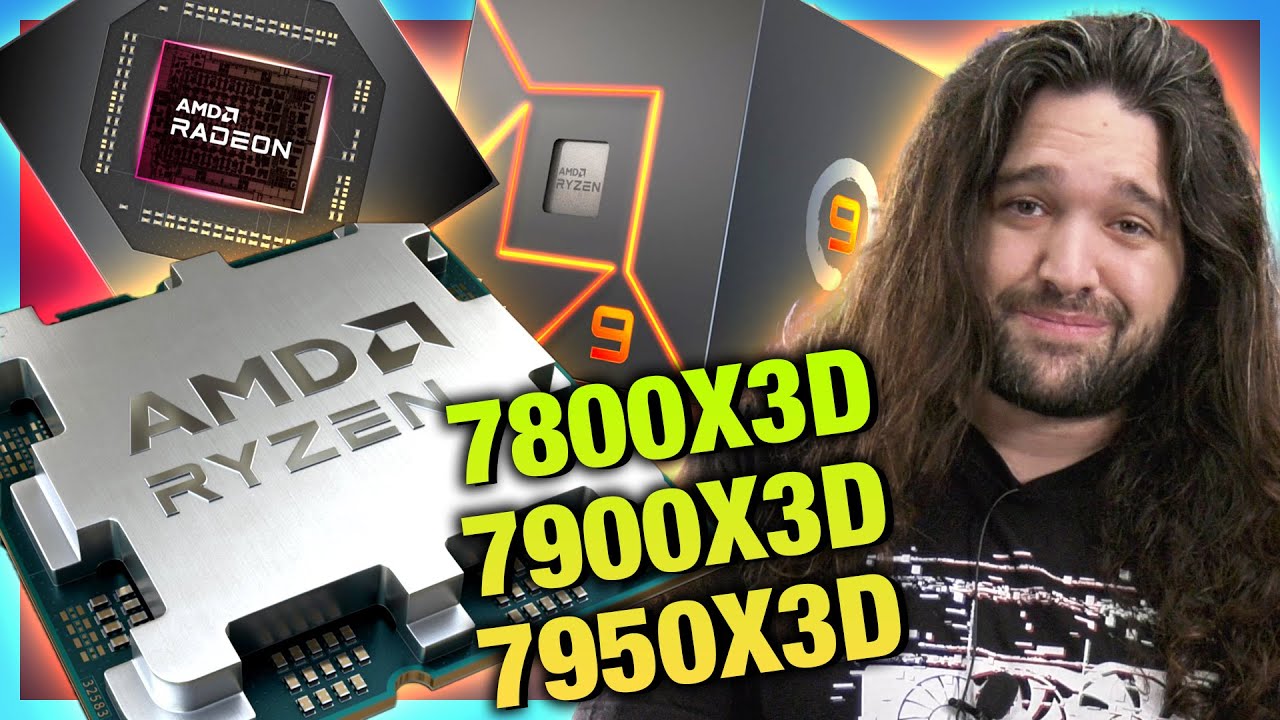
Sponsor: Get 10% off Squarespace purchases (https://geni.us/BqEpf)
AMD announced its new 3D V-Cache CPUs at CES 2023, including the AMD R9 7950X3D, R9 7900X3D, and R7 7800X3D. We talk about the specs and release date for this -- February of 2023 -- but there's no price yet. AMD's presentation will also not reveal a price, as we understand it. Th...
eternal helm
as if the current lineup didnt already cost too much...
mild jackal
grizzled bloom
These CPUs have more than twice the memory of my first PC

eBay
Find many great new & used options and get the best deals for NEW AMD EPYC Milan-X 7773X 64 Core 2.2 GHz 768MB L3 100-000000504 CPU Processor at the best online prices at eBay! Free shipping for many products!
grizzled bloom
Yeah but that's HEDT
mild jackal
lol but the cache!
grizzled bloom
Yeah but it's shared among 64 cores
amber canopy
grizzled bloom
Yeah but it's shared among 64 cores
yea but the cache
grizzled bloom
Granted yes that's still 12MB per core vs 9MB per core on 7950X3D
But 7900X3D having 140MB gets it close to 12 per core
eternal helm
lots of cash for cache tho
eternal helm
that thing is gonna shred val lol
mild jackal
grizzled bloom
Yeah but it's shared among 64 cores
Kinda, each ccd still gets a big block of cache
cursive epoch
intel probs gonna get slapped in the face in gaming
grizzled bloom
It's gonna shred everything except synthetics
eternal helm
grizzled bloom
It's gonna shred everything except synthetics
i think i know a specific entity that will take full advantage of this downfall
grizzled bloom
cursive epoch
wonder what 14th gen brings
chiplets tiles
cursive epoch
i know that, but perf tho, i wonder about that
grizzled bloom
They're having trouble with the design though, it's not looking good
cursive epoch
sad
grizzled bloom
Like 6p 8e i9 bad
cursive epoch
anyway on mobile emd
end*
intel seems to have expanded their HX naming down to even i5 lmao
13450HX to be put into dell g15
grizzled bloom
What no 13g53hx
grizzled bloom
I'm surprised at their lack of number soup
grizzled bloom
For laptops E cores make a lot of sense
cursive epoch
better than amd's 7000 series naming at least
im sure zen 3 will still be sold in next gen laptops
grizzled bloom
What you don't want a 7900X+7900XT system?
eternal helm
grizzled bloom
For laptops E cores make a lot of sense
except when they still dont help it in battery life at all
cursive epoch
i meant mobile 7k
where the name is just meaningless
it's not zen 4 only but rather 1-4
grizzled bloom
Oh where they have the different gens coded into the name?
cursive epoch
yes
grizzled bloom
Like 7720 or w/e that's a zen+
eternal helm

💲Find the best gaming laptop deals at my site https://gaminglaptop.deals
Sponsored message: The latest GIGABYTE AERO and AORUS laptops are powered by up to the GeForce RTX 3080 Ti graphics card, learn more: https://www.aorus.com/en-au/laptops/gaming #GeForceRTX #TheUltimatePlay
#CreateWithAERO to win an AERO 16 laptop: https://bit.ly/3bAcKMi
I...
cursive epoch
misleading as hell
eternal helm
what do you think the cause of this was?
because its a major major difference
nearly 2x
cursive epoch
i swear to god if zen 2 gets slapped into gaming laptops im gonna be mad
mild jackal
grizzled bloom
Like 7720 or w/e that's a zen+
tbh I think the epyc naming convention makes a lot of sense
As does most amd consumer
eternal helm
like sure 12700h is a tiny bit faster than a 6800h but damn
grizzled bloom
cursive epoch
i swear to god if zen 2 gets slapped into gaming laptops im gonna be mad
It is
eternal helm
youd think ecores would do something here
cursive epoch
Tom's Hardware
"Each digit means something," AMD says.

the juicy chart on how to decode
grizzled bloom
Yeah, each digit means another F U to average consumers
cursive epoch
exactly what they're doing
i love amd for efficiency but um
okay, fine
i guess i can just research and take my time
google is just seconds away
problem is most buyers won't bother googling the cpu
grizzled bloom
Imagine someone buying a 7910E expecting top tier performance
cursive epoch
and end up with outdated cpu on brand new laptop
which probably costs them a lot too
cursive epoch
grizzled bloom
Imagine someone buying a 7910E expecting top tier performance
only to get zen 1's trash efficiency and perf 
grizzled bloom
And only a 9W chip at that
cursive epoch
slower than haswell
grizzled bloom
Because by now we're trained that E and X mean extreme
 grizzled bloom
Interesting claims

Even if it's 15-20% better on average that'll still make it top dog
dull flint
I expected this
cursive epoch
i guess i'll just keep an eye on the third number for ANY 7k mobile ryzen
and the last letter
which is easy enough
none matters
eternal helm
Atleast apple has their crap together
dull flint
And yes, this could be enough to beat tuned 13th if they average that high
eternal helm
Buy a MBA
cursive epoch
i don't have mac kinda money
eternal helm
xD
cursive epoch
im just trying to collect money for 4050 laptop
grizzled bloom
Yeah that's probably cherry picked, which is why I'd expect 15-20
eternal helm
dull flint
And yes, this could be enough to beat tuned 13th if they average that high
Ubm is gonna have a field day with these x3d, due to the lower productivity than gaming thing
dull flint
eternal helm
Ubm is gonna have a field day with these x3d, due to the lower productivity than...
And yet 7950x3d will have multicore parity
eternal helm
"these chips don't perform well in synthetic tests for how much they cost"
I bet that'll be on there
cursive epoch
grizzled bloom
Nah they won't even talk about performance and compare cost to 12th gen
eternal helm
Hmm
grizzled bloom
dull flint
I bet our first leak will be ubm
Nah cpu-z
cursive epoch
first leaks is usually cpu-z or geekbench
dull flint
Last zen 4 early leak was ubm and ubm went mad
cursive epoch
mad trashing on it?
dull flint
Yes ofc
cursive epoch
LMAO
grizzled bloom
They were trashing it just from rumors, not even leaks
Surprised the new chips aren't on there already
dull flint
cursive epoch
LMAO
 cursive epoch
lolol
grizzled bloom
Yep I still love that their "review" is just them pitching a fit
cursive epoch
CPUPro, more like IntelShill
cursive epoch
intel never paid em a dime
yet they shill them so hard
that intel reddit has to ban em
dull flint
15-20% I could believe them leading even overclocked intel
Ram speed won't really mean jack
If I switched I'd direct die it tho

I don't really wanna switch either
grizzled bloom
Wouldn't have to shave too much off the IHS because thicker package
dull flint
Nah just direct die
Vcache is hot af
Forget normal speeds at 95c
I'd put that baby on ddie and watch it barely peak 90
grizzled bloom
I'd never risk a delid personally
grizzled bloom
I know the new TG tool is supposed to be almost foolproof but still
dull flint
Sure, I could shave the ihs but bleh
grizzled bloom
dull flint
20-30C difference
Right, with the Uber thick IHS
dull flint
Anyway bbl
grizzled bloom
Omfg the "free gift" with the new 13th gen chips is a pen
It says Intel on it though so totally worth the quoted $10 
cursive epoch
lmao
 cerulean wadi
For $65ish cheaper than 12600K & decent mobo, I keep thinking of 12400 + bclk oc mobo. (Link is a 2nd sort of example) https://www.overclock.net/threads/overclocked-intel-core-i5-12400-vs-the-new-raptor-lake-i5-13600k-review.1802000

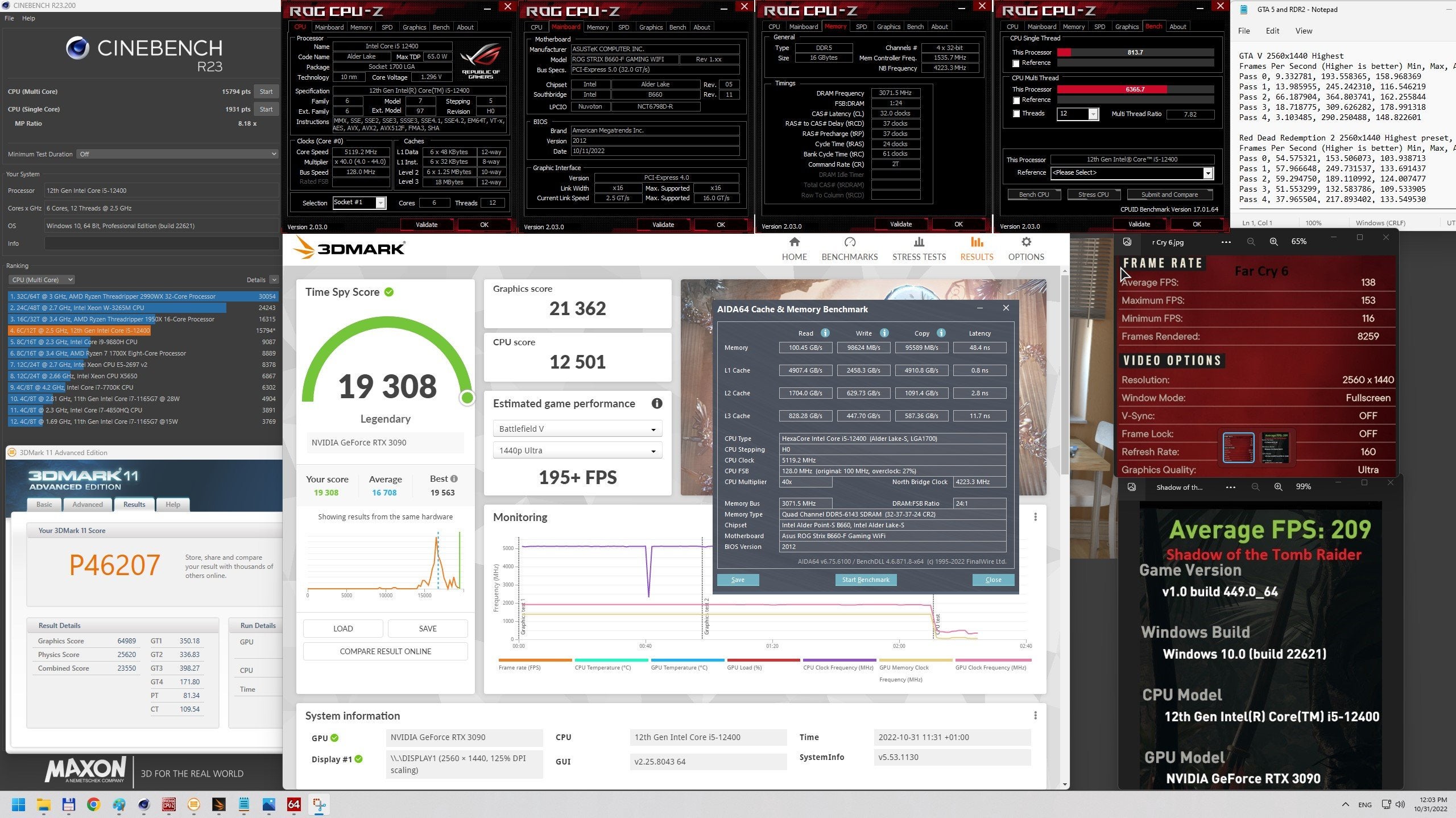
Overclock.net
We have seen many tests, but none which would point out the real power benefit of the new Raptor Lake (13th gen.) against the previous generation Alder Lake (12th gen.). And those reviewers do tests on factory defaults mostly, while the chip able to do more with tweaks. Here I will show you...
dull flint
Bclk oc is good but those boards afaik haven't been historically cheap
Find one used tho? You might get lucky
cerulean wadi
Indeed. $200 new isn't all that bad. I'll end up paying that much on a Z anyways. Gotta see what 3770+3080 can do 1st, lol. Can't wait.
https://pcpartpicker.com/product/QdpzK8/msi-mag-b660m-mortar-max-wifi-ddr4-micro-atx-lga1700-motherboard-mag-b660m-mortar-max-wifi-ddr4

MSI MAG B660M MORTAR MAX WIFI DDR4 Micro ATX LGA1700 Motherboard (MAG B660M MORTAR MAX WIFI DDR4)
burnt spear
cerulean wadi
Indeed. $200 new isn't all that bad. I'll end up paying that much on a Z anyways...
Forget which it is, but $155 asrock z690 with bios flash
cerulean wadi
Yep, $350 for 12400 oc setup, $400+ on 12700k/13600k setup (no MC). Only thing is mATX isn't my main pick. Actually I kinda regret reselling my 12400T & b660 proart. $99 sale on that mobo was gooood.
vast meadow
matx is honestly fine its not ideal if you want to add a wifi card or something but most boards can fit that in the bottom slot even with a 3x slot gpu
cerulean wadi
Ah partly for an extra 1 or 2 m.2 slots, although I'm not Warpig. Mortax max is overall a good mobo. Gotta do some 3770+3080 benches.
vast meadow
Yeah you def should have kept the 100$ b660 pro art but sure what can ya do
cerulean wadi
Didn't mention I sold for a decent 155, so overall a lil profit at least. Indeed wish I bought a few & kept 1. It's ok.
 cold helm
Hello Peeps, I just have a question regarding Ram. If i get 2x DDR4-3600 CL19-20-20-40 1.35V 32GB (2x16GB) total 64 GB. Do you know if these support 2x Dual Channel?
cold helm
im using teh asus z690 D4 mobo and 13th gen 17 13700KF
i know the RAM is compatible with the mobo, but was wondering if it would support 2x dual channel or would it be single channel across.
amber canopy
Yes that would work in dual channel if you have four DIMMs in total.
cold helm
ok awesome. Thanks!
also if cpuz shows 2 x 64bit with 64 Gigabytes does that mean its already running in Dual channel?
amber canopy
You can check to see what Channel Interleaving mode you're running here in CPU-z

So ideally with your PC it should say "Dual" there
amber canopy
you can just DM it to me
amber canopy
 formal bolt
Should i get the 5800x or spend the extra 40 bux for the 5800X3D
dull flint
Definitely 40 extra is worth doing
But you'll need more than a $60 cooler for x3d
Easily
dull flint
formal bolt
or should i get the 5900X for basicly the same price
R u gaming or editing
formal bolt
gaming
dull flint
X3D
formal bolt
alr
dull flint
X3D trades blows with 13th gen while 5900X is more like a tuned 10th/11th gen competitor
Not even that
Stock 10th/11th
formal bolt
ic
grizzled bloom
Funny enough the 5900X tends to have lower fps lows than the 5800X because of the dual CCD
Meaning more stuttering
 cerulean wadi
Gonna take that to 2400ish or nah?
grizzled bloom
It's rated for 2400, he'll probably try to get it to something crazy like 2800
amber canopy
Goal is around 4000
but that's for the future, I dont have a RAM pot so i cant put them under LN2
i could probably jerry rig something to put them under dice but eh
grizzled bloom
Ah LN2, yeah I was going off ambient lol
amber canopy
Plus i need to learn to properly OC mfr
amber canopy
the 4 other dimms arrive tomorrow lol
cerulean wadi
Awesome, because there was another set I thought you weren't even gonna do 2400. 3000+ on ddr3 is wild.
amber canopy
cerulean wadi
Awesome, because there was another set I thought you weren't even gonna do 2400....
what do you mean by the first sentence?
dull flint
amber canopy
Plus i need to learn to properly OC mfr
MFR has the worst abbreviation
cerulean wadi
Best*. Far, no seriously there was a kit you posted earlier today or last night & mentioned maybe doing more like 2000c7 or something.
grizzled bloom
Or the best depending on who you ask
 amber canopy
cerulean wadi
Best*. Far, no seriously there was a kit you posted earlier today or last night ...
amber canopy
cerulean wadi
Best*. Far, no seriously there was a kit you posted earlier today or last night ...
huh? i dont remember saying something like that, or maybe my brain really isnt working
my brain kinda feels like it isnt working
maybe i should eat food 👁️ 👄 👁️
dull flint
You should you MFR (ddr3)
 amber canopy
cerulean wadi
Best*. Far, no seriously there was a kit you posted earlier today or last night ...
amber canopy
cerulean wadi
Best*. Far, no seriously there was a kit you posted earlier today or last night ...
eBay
Find many great new & used options and get the best deals for ADATA XPG 16GB Kit (4 x 4GB) AX3U2400W4G11-DMV DDR3-2400 Memory, 4 Sticks at the best online prices at eBay! Free shipping for many products!
These are the 4 dimms that haventr arrived
they're the exact same as the two that i just posted
cerulean wadi
Nah found the msg, but it was just me misunderstood when I read "not that fast". (Wrongly referring to doing under 2400).
 amber canopy
oh okay
cerulean wadi
4800 ddr4 wasn't common though.
amber canopy
dull flint
"not that fast" is expected
no thats not why i said that
grizzled bloom
dull flint
"not that fast" is expected
 dull flint

amber canopy
2400 isnt fast for MFR because of the super loose timings it has to run
i was just speaking in general
I have dimms that can do 2400C7,C8 and other tight timings which is good
thats what i use for benching
dull flint
I love that you're a little defensive about it 
amber canopy
no im just saying you're wrong DTUSTUPID
dull flint
AHSTUPIPIPID
cerulean wadi
Now that's what I'm talking about. Most of my past oc was ddr2 like taking my kingston from 1066 to 1300ish w/ the stock 5-5-5-15 timing & barely above stock voltage. I liked when everything started w/ flat timings, no reason though.
amber canopy
jedec lol
amber canopy
thankfully most ddr3 is pretty well documented now
can know what you're gonna get before you buy it
amber canopy
dont buy jedec bin kits 
dull flint
People are even mapping the naked jedec stick kits out now for like, 4800's
Well
That's awkward
amber canopy
they're probably binning rejects even if it's a good IC
dull flint
Rejects sure, but for D5 that limit is a long way above the board or imc
amber canopy
unless it's some OEM stuff that the company didnt care about
amber canopy
micron has always been mid
dull flint
May as well just not even try with those
Any hynix and you have a good longevity planned for ddr5 as far as the outlook is
When the sticks wall in the 5 digit MT/s
amber canopy
ddr3-4400 👁️ 👄 👁️
cerulean wadi
Unlike ddr5, at least w/ ddr4 & 3 the ram itself is most of the limit. oh snap (for a while)
amber canopy
well yea ddr5 is still super new
dull flint
If we ever had more of Intel's optimisation with ddr4 for another gen or two
amber canopy
eh, ddr5 is better tech anyway
dull flint
We may have seen 4800+ gear 1
Yeah but like
Ddr4 still fast
Irrelevant beyond a point but still strong parity esp. tuned
cerulean wadi
What about z490, was that what could do pretty high gear 1?
dull flint
I mean at reasonable ambient tbf
Z490/Z590 on 10th was a bit nuts
Gigglebit go brrr
11th too but that was gear 2
amber canopy
@dull flint g3258 ftw
grizzled bloom
amber canopy
ddr3-4400 👁️ 👄 👁️
Near world record there, Splave topped out at 4410. Record is 4620.
amber canopy
I'm aware lol
 dense heart
I did a bios update and now have no display on either monitor, white vga light is on
vast meadow
what motherboard and cpu do you have?
dense heart
Have a z390-a and i5 9600k
vast meadow
thats odd does your motherboard have bios flashback?
dense heart
Not sure
vast meadow
is is msi z390-a pro or asus prime z390-a?
dense heart
Asus
vast meadow
this one ye?

 vast meadow
doesnt look like it has flashback
 vital goblet
the upper right has the 4 POST LEDs right?
dense heart
Yeah it shows the others before it just leaves that one on
vital goblet
and you don’t have a KF chip?
dense heart
The i5?
vital goblet
Yes
dense heart
Let me check
vital goblet
If it’s not a KF SKU, try pulling your GPU and using the iGPU
dense heart
 dense heart
vital goblet
If it’s not a KF SKU, try pulling your GPU and using the iGPU
dense heart
vital goblet
If it’s not a KF SKU, try pulling your GPU and using the iGPU
I tried that already
vital goblet
Have you tried with no USB devices?
vital goblet
unplug all USB devices
vital goblet
F I guess
dense heart
Is there not anything i can do?
 silk jungleBOT
How to clear CMOS (works for AMD and Intel)
https://www.intel.com/content/www/us/en/support/articles/000025368/processors.html

Intel
Defines CMOS technology and how to clear CMOS using the jumper or battery methods.
dense heart
So remove battery wait a few minutes and put it back in?
dull flint
Ye
dense heart
Ok
amber canopy
@dull flint guess what
dull flint
More ram turned up?
 dull flint
GET PREDICTED AGAIN
amber canopy
dull flint
More ram turned up?
You know my every move
dull flint
amber canopy
The writing on the PCB looks familiar, and iirc, it's a really good PCB
I'd have to double check tho
So now I have.... 14 single rank mfr sticks in total
dull flint
Why do you have so many mfr's in ur house
amber canopy
I'll get to binning them soon, and actually soon this time since I have the motivation now
amber canopy
dull flint
Why do you have so many mfr's in ur house
🗿🗿🗿🗿🗿🗿🗿🗿
dull flint
Ah binning
amber canopy
dull flint
Ah binning
Yea, ddr3 wr frequency will be unattainable for me for probably a long while, but I think I have a shot at having the fastest memory on X79. Current record is 2002MHz
Glad to be messing with MFR too, ugh, I'm so tired of gdie and psc
dense heart
Now that I’ve done that do i just put the gpu and everything back in now?
dull flint
Ye
dull flint
amber canopy
I have other adata dimms of the same bin that are MFR so I figured these would be as well
dense heart
It worked

Now how do i overclock my memory again lol
Only done it once when i built this 2 years ago
 amber canopy
Whyd they put BFR on a nice PCB instead of MFR bro. @dull flint
dense heart
dense heart
Should I install it or just hit cancel?
cerulean wadi
We don't need extra crap to "help install" drivers, lol.
dense heart
figured lol
as for my memory
i booted up and only thing open is discord and it's at 33%
i have 16gb

 cerulean wadi
5/15 = what? Yep, 33% (For example) don't need 32GB unless you routinely hit 15+. Plenty of people still have 16GB.
dense heart
5/15?
cerulean wadi
Slash = divided*, was just an easier fraction.
vast meadow
That's normal especially with a lot of startup items
 vast meadow
What the hell is the 2nd one
dense heart
it's a thing that tracks what you do online and pays you
vast meadow
I would immediately uninstall that and change all my passwords
And get new credit cards if you used them to pay
Possibly reinstall windows imo
That sounds awful
dense heart
it doesn't track that stuff
only looks at websites you visit and just things you do online doesn't look at any personal information
vast meadow
Sureeeeee
dense heart
lol just look it up
dull flint
Nielsenonline?
dense heart
yea?
dull flint
 vast meadow
When things are paying you for that, you are the product, they may say they only take what they say but criminals often say they didn't do their crimes 
dense heart
if you think about it this way our data is already getting taken by multiple websites on a daily basis so why not get a little reward for it lol
vast meadow
Because they don't have access to every file on your pc
vast meadow
This program will have access to anything you have unencrypted on your pc
dense heart
I've had it for a while and nothing has happened

 eternal helm
dense heart
I've had it for a while and nothing has happened
eternal helm
dense heart
I've had it for a while and nothing has happened
Well yeah that you know of
But then again, how much of your info has Google sold?
Answer: nobody knows except them
 long geyser
Right (legal/non-harmful) data in the wrong hands can still get you punished. Few cases of Google overreacting to certain issues and banning Google accounts/phones (generally if said user is on a Pixel phone). Then due to poor CS and company policies nothing can be recovered.
Even if you have nothing to hide, you still have things to hide as you are still at risk.
cerulean wadi
Remember that ddr3 talk? Came across these decent numbers 11 yrs ago.  -- Edit, had to look up that Corsair SSD, $460ish for 240GB.
  🤣 2012 to around 2018 sure has massive changes for ssds

 grizzled bloom
"Unreleased" 