#graphics-cards
1 messages · Page 78 of 1
 odd siren
 solid glacier
nah it’s a faulty board 💯 I don’t wanna drive 4 hours for soemthing I already know
odd siren
Oh don't drive 4 hours wth
Go somewhere closer if you want to try diagnosis
Return it via amazon parcel
You can instead drive 15 minutes for both
4 hours is not worth the logistics
solid glacier
What’s a Amazon parcel lol what
solid glacier
odd siren
Go somewhere closer if you want to try diagnosis
I can always rma on the board to
Whcih I might do instead
odd siren
When you return items with amazon, you can list the reasons in the return, then amazon sends a return request to the seller, which is then approved by the seller (micro center)
The upshot of this is the label is both paid and able to be dropped off in a crap load of places
solid glacier
Oo
odd siren
So you won't need to drive 4 hours, you can drive 10 minutes up the road to a drop off point contracted to amazon
Or the post office
Much easier right?
For your pc diagnosis, if you're 100% sure it's faulty, sure, send it, but if not, any old pc shop with a guy who knows how to at the least solder, will be able to work out something like this for a 50 or 40
solid glacier
Just checked closest Microcenter is 2 hours 50mins
odd siren
yeah not worth it
Return via amazon
You bought it there, they'll let you return it there
odd siren
odd siren
For your pc diagnosis, if you're 100% sure it's faulty, sure, send it, but if no...
I would really just say to the person "If you can get it to work, great, if not, I'll take it back and warranty it. Don't open any of the parts up."
Don't give them an option to try repair anything that's worth more than necessary
Like disassembly of a gpu for instance is a no no
Just an attempt to get it to work with a parts shuffle might work
Again, only if you're not 100% sure it's buggered
solid glacier
I think it’s the mobo I tried So much stuff lol. Like none of the ram slots work, I tried 1 stick in every single slot and it didn’t work

Sold by microcenter
So in the return discription what do I put?
odd siren
Ya but you can return
"not working"
Lol
I would do one more test if you'll humour me
Try this
Unplug everything
Like, absolutely everything from the board
Even cpu pump or cpu fan
Only the power supply to it
Only leave that in, try turning it on
If it doesn't move off the cpu light, it's a dead cpu
solid glacier
So the pc turns on, all the fans work rgb works I just don’t get any display
odd siren
But what's the ez debug light stay stuck on
solid glacier
This is the light I get
 odd siren
Cpu dram vga or boot
solid glacier
Dram
odd siren
Dram so not cpu
solid glacier
Correcto
odd siren
Is the ram in the bundle?
solid glacier
No
odd siren
Try swap ram first
If you tried all ram combos, refuses to work with the sticks, try that
If a new kit of the same variety still fails, return the bundle
Just to check btw this isn't like, 128gb of ddr5 is it
solid glacier
Nah 32 ddr5
odd siren
Yeah so it should work
Try swap ram first to a new set
Start with the easy leg, it's passing the cpu post test
solid glacier
Silicon Power Value Gaming DDR5 32GB (2x16GB) 6000MT/s (PC5-48000) 288-pin CL30 1.35V UDIMM Desktop RAM Computer Memory w/Heatsink SP032GXLWU60AFDEAE
That’s my ram
solid glacier
The closest store to me is Walmart or best buy so if I were to buy ram I would go there but what set do I buy to test
 ivory herald
We gonna do any troubleshooting?
odd siren
I am pretty sus of the ram first because all slots on a board not posting is not the board
solid glacier
ivory herald
We gonna do any troubleshooting?
Iv
Done it all
odd siren
Done already
solid glacier
 odd siren
Nope
Cl32 or less unless you return it
This is important as buying into anything that isn't hynix has a genuine performance hit
It's a couple % but you make it count
Couple % is halfway the distance from 7950x3d to 7900x3d, for example
solid glacier
I don’t got alot of ram options at Best Buy lol
odd siren
If you're ok with returning then literally any ddr5 stick will work
solid glacier
Yea I’m gonna return it
odd siren
Then any tbh
solid glacier
If a new set of ram works then I’m definitely gonna return the set I got lol and get my money back
odd siren
8gb bargain bin ass ddr5 will do
solid glacier
Oh I was just gonna buy replacement ram that’s good as the set I have incase it is that ram that’s bad I don’t gatta go rebuy another ram kit
solid glacier
So if it says c36 that won’t work
solid glacier
I’m prolly going to have to order it online then
odd siren
Should be easy enough to pick
Brand really means little to nothing
Could be klevv, maybe neo forza, v color
Goodsmile
Any brand goes as long as the ram is as advertised cl32 or less
solid glacier
Closest they got
 odd siren
Man that's like $50 over online lol
Idk how corsair manages to be so poor with prices
They even kneecap the ram so you can't use the full performance range out of them
They're like the only brand that does this
solid glacier
All this for it not to be ram lol with my luck that will end up
Happening
“I bought the processor with the motherboard, I received it in my country, I assembled my PC with specialists, it turns out that there was a fault and ruling out all the faults and all the components, the motherboard turned out to be bad, it turns on but it gets stuck in VRAM, it says that but everything is fine and suddenly it starts up again and it gets stuck in VGA, I lost my money
It also starts, starts and hangs and marks vram or marga vga, that motherboard arrived bad.”
A lot of reviews are like this on Amazon about the bundle
My same issue gf
Gg
odd siren
Which motherboard is this
solid glacier
Gigabyte x670 auroura elite ax
solid glacier
Yea a lot of posts under that one says dram light
odd siren
Well you could try if you want to
The irony being you could do all that and it turns out the ram was always the problem instead lol
The ram is just easier to knock off the list first
solid glacier
Yea I’ll start with the ram
odd siren
Less work if it turns out to prove true
If the ram don't work then ye def return the bundle
I wouldn't hesitate
solid glacier
What confuses me every ram slot on the mobo not working
odd siren
Ye which is why I believe it's either the ram kit or the cpu i/o is cooked
Odds of two sticks are impressively low
So your call on that one
It's not impossible tho
If the memory controller is cooked then it's not going to read anything in the slots let alone posting
You could even chuck the ram sticks in your brother's pc (yes I remember where that pc went) and try them there
If he's close enough
I'm betting it's either of those tho
solid glacier
odd siren
You could even chuck the ram sticks in your brother's pc (yes I remember where t...
He’s using ddr4 build I think lol
I don’t think his mobo wil recognize the ram sticks
odd siren
Did he not take your 7800x3d pc
solid glacier
Nah sold that
solid glacier
He changed his mind so I sold it
odd siren
Option 3
Lol
Take it somewhere with a ddr5 pc on show and ask to test the ram kit
Lol
solid glacier
I do have an old pc here but it has b450 m mobo
Which I don’t think csn handle ddr5
solid glacier
I’ll buy that 219$ ram set tommrow (since it’s the only ram set they got that’s under cl32) get it in my pc and if it works I’ll return it, then return the ram kit that doesn’t work and once I get the money back for that I’ll rebuy ram
odd siren
That works
Don't sit on that vengeance kit tho
Lol
Very cringe price
The equivalent kit from any other brand starts at like 160
solid glacier
Yea I’m not I’m gonna return it lol after taxes it be like 230$ I’m good on that
odd siren
Haha
Anyway, walmart may even have a ddr5 pc on show you could ask them to let you test the ram kit on
Easy enough to do, turn it off, swap the existing ram out, new ones in, if you reach bios, it wasn't the ram to begin with
Swap store ones back, enable xmp
Pay the clark a fiver lol
Make it look shady 💀
At that point tho it'll definitively be a defective cpu
I/O die baked or dead imc
One way or another all 4 slots and both ram sticks not making it past post is sus
odd siren
odd siren
Anyway, walmart may even have a ddr5 pc on show you could ask them to let you te...
Talking about your current silicon power set btw
solid glacier
odd siren
One way or another all 4 slots and both ram sticks not making it past post is su...
Fr
solid glacier
odd siren
Anyway, walmart may even have a ddr5 pc on show you could ask them to let you te...
Wait will any ddr5 ram work to test?
I can buy like 100$ kit and test it in my system if it works then it’s my old ram and then just return that and the new ram and buy new ram kit on amOzn
odd siren
Ok, any ram will work to test your pc provided you return it
Just don't keep that ram
It can be bargain bin, walmart sponsored
Onlyfans 8gb whatever
Ddr5
solid glacier
💀😭
odd siren
If it works it works
OR
If they let you try your silicon power kit on another pc in store
and THAT works
You won't even need to buy a kit
solid glacier
I doubt they will but honestly I’ll try it lol
odd siren
Ya
solid glacier
Most PCs in best buy are models only though
odd siren
You could slip them a tenner for pc repair assistance
I mean, I don't live in us
I have 0 clue what goes on in a walmart lol
For all I know it's full of monster trucks and eagles carrying auto rifles
Any old nearby pc shop on the way to walmart may even let you test
 livid idol
odd siren
For all I know it's full of monster trucks and eagles carrying auto rifles
livid idol
odd siren
For all I know it's full of monster trucks and eagles carrying auto rifles
You're not far off
They do sell both there
solid glacier
odd siren
You could slip them a tenner for pc repair assistance
One thing I didn’t check is if the ram is compatible with the board or not on the website
odd siren
solid glacier
One thing I didn’t check is if the ram is compatible with the board or not on th...
I can guarantee you, you wasted no time or brain power not checking it
DDR5 is so simple in terms of what works and what doesn't
You don't have 30 thousand manus trying to compete for the same ram config
livid idol
There's so many kits that it's impossible to test all of them for compatibility
livid idol
Exactly, there's only so many memory dies and they all work on every platform
odd siren
Behaviour is repeatable and not subject to some insane range of performance capacity
DDR4 had a lot of this, same dies anywhere from 2666 all the way up to 5333
solid glacier
Anywyas I’m gonna sleep, and hopefully fix the problem tommrow lol
odd siren
np
solid glacier
Thx for the advice
I still got a bad feeling it’s my mobo lol
Just by the reviews
odd siren
All good
My money is on it being anything but the board given the absurdity of no sticks or slots working lol
solid glacier
odd siren
My money is on it being anything but the board given the absurdity of no sticks ...
Bet you a nickel it’s the board
livid idol
solid glacier
Bet you a nickel it’s the board
One of these nickels? https://www.jmbullion.com/coin-info/nickels/v-nickels/1912-v-nickel/
odd siren
If I win 1 nickel
odd siren
Who said anything about bed god damn

This might be an even better bet than you expected @solid glacier
☠️
 solid glacier
odd siren
If I lose then you get a fox dude
solid glacier
odd siren
If I lose then you get a fox dude
Deal
I hope it isn’t cpu 😭
Maybe it’s both
odd siren
I hope you believe in me @vital oriole
He's really hoping for the motherboard so he wants to win
 vital oriole
lmao
 odd siren
Reddit making reddit suggestions
Both of them don't know what they're talking about sorry
Silicon power, like g.skill, resells hynix ram
Think of it this way
Imagine your ram as an rtx 4070
G.skill is an asus strix
Silicon power is a zotac
Same chip, same card, same performance
solid glacier
Okay so has to be ddr5
odd siren
Ya
Don't ask reddit or random servers for advice on this
It's not some qvl nonsense or buying backwater brand issue
You either have a really unlucky 2 sticks or dead ram, or a dead cpu imc
Motherboard wouldn't be a factor unless somehow half the socket had broken solder (wouldn't turn on in this scenario anyway)
Ddr5 has like, 6 possible types of chips it can use
4 of which are quite old in the ddr5 cycle
And are really all 4 available options for 16gb sticks
All very thoroughly tested on AM5
So booting should be zero issue
It's either 6 or 7 types
You have the 16gbit picks
Hynix M, A, Samsung B, Micron A
Then the 24gbit picks
Hynix M, Samsung (?), Micron F(?)
Hynix wins in both categories
I think it's called micron F, it sucks either way
The samsung one I know exists but never seen it, no idea what the die allocation alpha character is
solid glacier
I still gatta try onboard graphics but I’ll do that when I get home
 keen nacelle
We've suggested that sp ram to hundreds if not thousands of people atp
It's definitely fine on am5
solid glacier
keen nacelle
We've suggested that sp ram to hundreds if not thousands of people atp
What mobo should I get if it is the mobo
Only thing about a mobo return is what happens if you don’t have every single part lol- like the screw packets
It came with like 10 screw packets but there all loose in one box
odd siren
solid glacier
It came with like 10 screw packets but there all loose in one box
As long as all the pieces are there, you should be fine
Doesn't need sorting
I'm sure GB would love you doing something they hired a department for
💀
odd siren
keen nacelle
We've suggested that sp ram to hundreds if not thousands of people atp
Between just us on this server alone at that
I see it recommended a lot in general
It either ends up being something like that which is a nice value pick, or a patriot 7200+ kit or TG 5600 kit for people who like offering OC potential , or it's something like a g.skill or corsair kit for people who think buying off brand notoriety means the exact same dram stick from hynix or whatever somehow becomes magically better
And ofc it doesn't, if anything makes it worse; corsair has been found to lock the pmic on their sticks, kneecapping the performance in exchange for less warranty claims
solid glacier
odd siren
Between just us on this server alone at that
Is it worth trying on board graphics or no?
livid idol
The GPU doesn't initialize until after the memory so it probably won't do anything, but it won't hurt to try
solid glacier
alright ill try that
im also brining the pc to bestbuy and see if they can figure out the issue lol maybe i got something plugged in wrong? who knows if its a fried mobo atleast i can get that answer
they will also let me try my ram in a pc to make suer if its my ram or not
so my quesiton is do i visit bestbuy and trust their geeksquad or go to microcenter on tuesday which is a 3 hour drive and see if that helps
livid idol
Geek Squad is not allowed to work with the hardware
If they diagnose a hardware issue, they have to send it to "central HQ" or whatever they call it
solid glacier
is that in the store? or do they ship it out
livid idol
It is loaded onto a truck and shipped to the HQ
solid glacier
livid idol
It is loaded onto a truck and shipped to the HQ
so bestbuy said they do work with teh hardware
livid idol
Then either their policy changed or they misunderstood the intent of the question
solid glacier
livid idol
Then either their policy changed or they misunderstood the intent of the questio...
hate to be that guy but i just my mobo compatibility ram and my ram i got isnt listed
solid glacier
@odd siren Yo can u send me a mobo i should get from bestbuy thats in stock i mass well get a new mobo to try
with the old ram
solid glacier
livid idol
It is loaded onto a truck and shipped to the HQ
Hey fal what if the ram is trying to run to fast for the mobo its self? so waht if i try 1 stick in a2 and let it sit there for a few mins?
keen nacelle
livid idol
Then either their policy changed or they misunderstood the intent of the questio...
They def do
Unfortunately having worked at best buy I can confirm
That being said, no way in hell am I paying my own money to have a brand new product looked at
solid glacier
Just tried 1 stick at a time again no luck
Gonna try CMOs and then doing it again
Going to buy ram rn though
solid glacier
keen nacelle
They def do
Any ram works?
keen nacelle
Any ddr5 works sure
 solid glacier
New ram is in
But guess what
Omfg
It’s working
But the dram light is on still?
livid idol
I guess you owe felix a nickel
solid glacier
livid idol
I guess you owe felix a nickel
My question is
I’m in Bios now I wonder if there’s a setting that is preventing the pc to turn on using the other ram?
livid idol
No, default settings are supposed to be 100% compatible
livid idol
You can play with it if you want
Nothing like hands on experience
I'm busy the rest of today
solid glacier
Should I leave this Ram in and do the updates on the pc until my new Ram gets here or nah? Wait til the Ram comes
ivory herald
@solid glacier eh, just leave xmp disabled if you must. Yes, might as well still use pc.
odd siren
I'd leave it off yeah
Leave dram booster off too imo @solid glacier
I mean xmp probably works but you're just installing, not keeping lol
 silent cradle
Would it be worth the 145$ (if my friend buys it) for a ventus 2080ti? I’ve seen multiple forums but not a video on the model complaining about average and hotspot temps being outrageously high, along with the price point it’s going to be bought at?
200% a catch which I’m guessing thermal issue
 heady turtle
silent cradle
Would it be worth the 145$ (if my friend buys it) for a ventus 2080ti? I’ve seen...
heady turtle
silent cradle
Would it be worth the 145$ (if my friend buys it) for a ventus 2080ti? I’ve seen...
20 series ventus suckkkkksss
silent cradle
heady turtle
20 series ventus suckkkkksss
I looked into a bit more and 300w power draw? 😭
I mean this is for a friend who's probably running a 750w with a 3600 so it should be fine but it's TDP is 250w
though I haven't seen any videos about the ventus for it, just asus or MSI sadly
 cerulean rover
Ventus 2060 super was throttling
Ventus 2080ti is not going to be fun
The 20 series ventus cooler is terrible
silent cradle
cerulean rover
The 20 series ventus cooler is terrible
it's surprisingly thin
I thought it was a LP
but it's 145$ though
cerulean rover
Just keep in mind that might be the reason it's $145
silent cradle
what I was thinking, seller has yet to respond but didn't list any issues
keen nacelle
I'd rather a well cooled 5700xt around $120 than a throttling 2080 ti at $145
 limber flax
20 series ventus is crap
 forest oasis
ventus pretty much everything is crap
 dusk basin
 craggy pier
My 7900 gre gets in tomorrow 🔥
craggy pier
My 7900 gre gets in tomorrow 🔥
Congrats. Just built a pc for coworker with Power cooler red devil 7900Xt
dusk basin
craggy pier
Everyone needs a coworker like that tbh
Yeah he didn’t know anything at all
craggy pier
 odd siren
Ok, respectfully, wall of text
forest oasis
ok, disrespectfully, wall of text
 open elbow
I know I said sorry for the wall of text already
odd siren
Lol
Secondly, that list is fine, you can put basically any gpu with that
I'm quite aware of the monhun specs and the game performance
You will want something a little better than a 4060
heady turtle
personally, since new GPUs will be reelasing very soon id hold off a couple months
odd siren
I wouldn't
There's no signs of price destabilizing
In fact if anything prices are trending back up lol
Black friday is the only thing worth waiting over
heady turtle
ahh yeah thats like 2 months tho :/
odd siren
Worth waiting tho
heady turtle
forgot about the obligatory bring back up so can be discounted lol
odd siren
Black friday always pays off
open elbow
Yeah and I'm not sure how easy it'll really be to get a 5080 at launch, that's one of my main concerns and the only real reason I'm considering going with something current
open elbow
I've always GPU shopped way past release so I've never had issues haha
odd siren
Anything less is a disrespect to a 4090
So if you aren't playing on a big 4k tv, 5080 not gonna make sense
open elbow
Yeah I only play @ 1440p and I don't really care about going above 60-90fps bc I don't play competitive games
odd siren
4080 super is decent rn if you want nvidia high end, run that with 1440p 240hz or wqhd 165hz+
Otherwise 4070 super, everything else gets an AMD recommendation
Nvidia can't compete on price, and drivers haven't been a problem for a couple years now
Contrary to what the polaris preachers speak
Used Nvidia is worthwhile too
Like a $300 3070 is solid
Not really an upgrade for a 3060 Ti tho
More like 3080/Ti @ ~$425
open elbow
Yeah I've looked at the 7900 variants and was considering it. I don't really use DLSS or raytracing right now so I'm not super confident with how much I value them, but I know DLSS is great for more demanding games like MH Wilds is looking to be
odd siren
It won't be
Let me give you a quick tutorial
Monhun needs good reaction times right
Dodging, swinging
You want to react fast ye?
DLSS frame gen adds a latency penalty
open elbow
oh ew
odd siren
Same with all frame gen
Ya
So frame gen is off the table
It's like a 60ms add
Somewhere around there
odd siren
What monitor are you sporting rn
open elbow
oh god lemme check, it's old lmao
odd siren
If you didn't buy it with the pc then we might be upgrading that too
Might be better to go half and half there
Don't want to suggest a 4080S only to find it's an old 1440p 144hz lol
open elbow
Idk the model but I remember the exact specs, it's an old Acer 1440p monitor with 3ms response time. IPS panel, uhhh 27 inch
odd siren
How many hz
open elbow
144hz
odd siren
Lmfao
open elbow
it's 9yrs old hahaha
Yeah monitor was another thing I was definitely looking at replacing soon because 😭 this dude is old...
odd siren
How much is your budget rn
open elbow
Not lot honestly, Like the $1000 to 1200 I was willing to throw at the GPU problem was my total budget bc I was just gonna chill with this monitor and hope it survives another year 🧍♀️
open elbow
If I go for something like a 7900 XT or GRE then that leaves decent room for a monitor though
odd siren
Jump to amazon, type, KTC oled 240hz
Find the one for $550 with a $100 coupon
27", very easy to find
open elbow
oh wow, that's great
odd siren
Next
7900GRE
Pick the cheapest
Sapphire preferred
One sec
Part List - Radeon RX 7900 GRE
Ez

Introducing the KTC G27P6 OLED Gaming Monitor - the ultimate display for gamers, designers, and office workers who demand the highest level of performance and quality. With a sleek and modern design, this 27 inch OLED monitor boasts a stunning 240Hz 1440p resolution, offering crystal clear visual...
open elbow
wow and that's like basically exactly in my 1k price limit, that's awesome
odd siren
Lastly, watch this
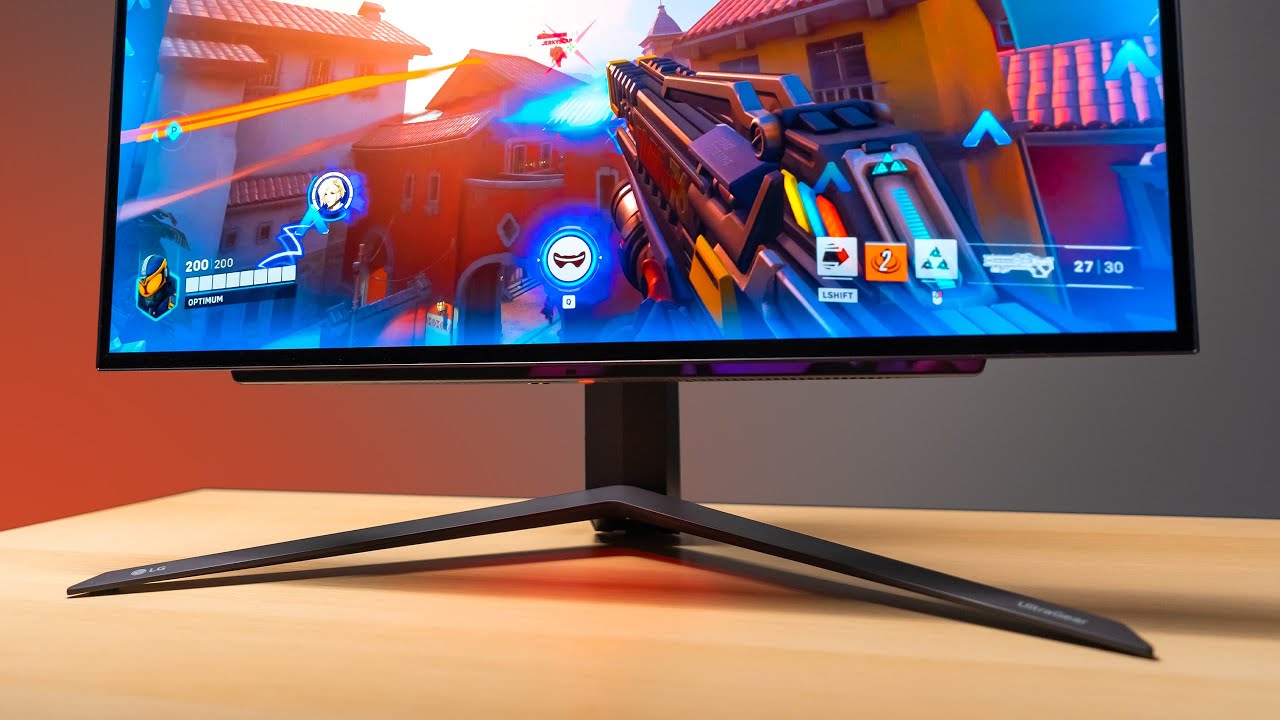
Check prices on Amazon below
LG OLED 27": https://geni.us/Rc1Ocr
ASUS 1440p 360Hz: https://geni.us/zbGIBZ1
Great value 1440p option: https://geni.us/Dnd4lo
Zowie 360Hz: https://geni.us/Nqa8
LG 27GR95QE on LG.COM: https://bit.ly/3XInv26
OLED has finally made it's way into a 27" form factor. The result is almost perfect.
need a new wallpaper? ...
Understand my reasons for suggesting this
Burn-in doesn't exist on this panel unless you crank it to 1000 nits
open elbow
I've been wanting an OLED monitor for years too so I'm glad they're affordable and decent now. I loved my old OLED Vita and have been wanting that for my PC setup
odd siren
OLED is the equivalent of several gpu upgrades alone
The latency gain is huge
It makes a genuine difference to reaction timing lol
So what I'm essentially doing is almost like recommending you a 4080, except you're getting a monitor upgrade too, with all the benefits of both
It's a real no-brainer now that they've dipped under 600
open elbow
yeah that'll be amazing
odd siren
odd siren
https://youtu.be/hMzCnEhfB18
This vid btw, the monitor is the same as the ktc, just a different brand
Both use LG panel
open elbow
I do only have the budget for one of these right now, the ~$1k budget was basically assuming I'd saved up most expendable income until January-ish, so if I were to prioritize one of these right now which one is the better deal?
open elbow
Cuz on paper both look like crazy deals but I know online retailers love to do the thing where they make a thing $100 cheaper "on sale" months before making it the new normal price
odd siren
The ktc is on sale
I've watched it for months
It's on sale often tho
So better question is does your pc lack fps or not
open elbow
odd siren
What's your games like rn
most games I play I handily get about 60-90fps @ mostly high settings on my 3060 Ti, it's really just MH Wilds that I'll truly need the added GPU oomph for
odd siren
When's wilds release
open elbow
Feb 28th so I have a while to go
odd siren
Alr
I'll humour this
I still think gre despite what 50 series seems rn
But go the oled
In jan if it seems like 50 series looks great, you can still go that route
If not, GRE imo
Though, GRE seems to be dipping out of stock a bit, so that might turn to 7800xt or 7900xt
open elbow
yeah that sounds good, I can work with that for sure
7900 xt is only a bit more expensive so I may just run with that anyways
odd siren
Any of the 3 are good picks for the middle of the stack
Just what makes sense for you, all 3 should be good on the monitor
open elbow
Do you think it's worth waiting for possible Cyber Monday deals on either of these things? or do you think they'll pretty much not go lower than this price until next year
odd siren
You could
Black friday cyber monday should see a good run this year
Pc building is in a real downturn so places like woot will be worth watching
open elbow
I'll probably just grab the monitor right now and then see what GPU sales look like next week, maybe there'll be decent sales since the new gen of both AMD and Nvidia are launching soon idk
open elbow
upwards? 
odd siren
Last gen at this time we had massive discounts, much much more than what we have now
Market has seen massive inflation since, people aren't trying to sell cheap anymore
I really wouldn't gamble on new gen causing big sales
We had that with this gen and last gen, but price stagnation has been pretty solid
If you want to jump, jump on black friday/cyber monday
Otherwise just keep waiting until you have enough lol
open elbow
ok, yeah I'll probably just roll what I can then, and this monitor deal looks much better than the $50 savings on the GRE haha
open elbow
is there a possibility the price of the 7900 XT and GRE might increase rather than go down since AMD are supposedly not making higher end cards anymore?
odd siren
Yeah possible
"Not making them" isn't what I'd attribute
I'd say more like, just in time supply is tighter
open elbow
ah ok
odd siren
The big thing is that at 550 and 700 respectively both are up near the top for value per dollar
7800xt/7900 GRE take the cake
So even if they do get cheaper, it's just a slightly better victory but still a victory, if that makes sense
Meanwhile the oled could still trend down, it's slowly dropped from 650 over the last 6 months
So make of that what you will
Anyway, gotta go, hope this helps anyway

open elbow
Looking beyond current deals bc I know the XFX 7900 GRE is cheap enough to go out of the way for (-$50 compared to other 7900 GREs), is it worth prioritizing Sapphire or something else if the prices end up equal-ish when I GPU shop?
like looking at the 7900 XTs the Sapphire one is only $10 more but not on sale
open elbow
ok good to know
thank you so much for the help and sorry again about the wall of text earlier! 🙏 I deleted it so it's not clogging the chat lol
silent cradle
Just to let yk, most 7900 GREs are out of stock
They’ll likely be back on the shelves by the time Prime Days come around
 west current
Anyone can know the proper mk or thickness of a thermal pad size for rog strix 3080ti looking to replace mine
forest oasis
use thermal putty

*It cannot be used as silicone grease on the CPU.UTP-8 is a high thermal performance, unique, fully cured thermal management solution for electronic assemblies, this material is not dry out.involving auto-dispensing equipment or stencil screen-printing.UTP-8 is RoHS compliant and halogen-free, of...
west current
I heard it was messy to clean up later and I don’t exactly know how much to put on each area or thick thin and lose contact
forest oasis
technically a bit messier, but gpus have multiple thicknesses of thermal pads
and also thermal putty just performs better

for most
west current
Saved that pic useful thank you also some areas require more thickness then other that I don’t get so I been hesitant to buy anything was thinking about getting the pre pad cuts from kritical but seen some bad reviews I just game not mine
forest oasis
yeah this was tested w/ mining, but it would also be better for gaming as well
west current
Did see more people on Reddit saying use putty
forest oasis
non-conductive so even if you use too much, the most it would do is make a bit more mess, but better than buying like 3 different thermal pad thicknesses and only use a tiny bit of it
west current
That is also true so with that it doesn’t matter how much you put will get mushed and lose thickness like shrink idk the word lol
livid idol
The nice thing about putty is you can't use too much. It squishes out like thermal paste.
west current
So doesn’t really matter how thick some area need thickness like pads do for certain area on the card right it will get squished but stays on that’s my concern
forest oasis
yes
for thermal pads, too thin and it doesnt contact
too thick and it could damage something
west current
I’ve replaced older cards like amd and just bought cheap pads lol was working idk about a 3080
forest oasis
honestly if you're going through the effort of repasting and re-padding, you should be using something of at least decent quality lol
livid idol
The 3080 uses much hotter GDDR6X so you need better pads or putty
forest oasis
also yeah gddr6x is a bit toasty
west current
I’ve noticed small lag spikes and temperature changes lately thinking it’s time to change the pads and paste
Had that card for few years now
livid idol
The stock paste is often garbage that dries out in 6 months
west current
Oh it’s been more then 6 months lol
Idle is around 50 right as the pc boots and rise a up a bit more from there games 76 and so
livid idol
I need to do my 3080 ti soon and this is exactly how I plan to do it, same as I've recommended. Good paste and putty.
west current
Does that work on the core too
livid idol
No
west current
What paste do I get for that core
livid idol
I recommend Arctic MX-6 for the core
forest oasis
mx6
livid idol
Good price for the performance
west current
I bought one from Amazon before I think it was a bad batch or fake how do I know it from a good seller
It was all watery
livid idol
Arctic prints a QR code that links to info on that batch on the side of the box
forest oasis
Fyi that paste was discontinued
west current
 forest oasis
Due to bad batch (and mx6 coming out)
west current
I as this one
livid idol
MX5 was recalled due to that bad batch and discontinued
MX-4 is good for a CPU but GPUs are a good bit hotter
west current
I see but like I said it was just very watery
Just bad or fake batch not sure
Amazon refunded
livid idol
I only buy directly from Arctic, they've had a lot of issues with fakes
west current
They have their own site
forest oasis
They made the arctic authenticity QR code because of it
livid idol
They have eBay, Amazon, and Newegg seller accounts
west current
Like grizzly one
forest oasis
But yeah, asides from mx5, mx4 and mx6 have proved to be solid options over the years they've been around (especially mx4)
west current
So mx 6 for core
forest oasis
Yep, the die
livid idol
And UTP-8 to replace the pads
west current
This one that you shared the link for

Is it actually pink or just for show in the pic
I will be pampering my card soon
livid idol
It's light pink yes
west current
lol

ARCTIC, a leading manufacturer of low-noise PC coolers and components, initiated and continues to shape the trend towards quiet cooling systems. In addition to an extensive range of CPU/GPU coolers and fans, ARCTIC produces high-quality monitor arms and wall brackets as well as practical tech equ...
Amazon link
Their official store I guess
forest oasis
Black Eagle retail doesn't look official LMFAO
west current
The store said artic on top lol
Arctic
Okay this one is https://a.co/d/9mGfIYv

ARCTIC, a leading manufacturer of low-noise PC coolers and components, initiated and continues to shape the trend towards quiet cooling systems. In addition to an extensive range of CPU coolers and fans, ARCTIC produces high-quality monitor arms, wall mounts, thermal paste as well as thermal pads...
forest oasis
Yeah arctic inc is official
west current
What about the putty do they have an official store or the link that was shared here will do
forest oasis
i dont think they have an official store on amazon
west current
It’s okay just placed the order for both $19.99
 olive bobcat
Has anyone had any experience with Intel GPUs?
livid idol
I know a few people that do. What's your question?
olive bobcat
Just wondering about the quality and any issues
livid idol
They fall somewhere between the 3060 and 3060 ti depending on the title. Ray tracing is better than AMD but not as good as Nvidia. Modern games have very few issues, it's older ones and less common ones that tend to have more problems.
olive bobcat
livid idol
They fall somewhere between the 3060 and 3060 ti depending on the title. Ray tra...
I have all these titles.


Plus mass effect
livid idol
A couple of those might have issues but most should be fine, or using things like DXVK would fix them
olive bobcat
Good to know.
 tough plinth
what happens when you run out of vram?
livid idol
It depends on the game and how much over the capacity it's trying to use. Some will outright crash, others will quietly load lower quality textures instead of high res to reduce VRAM load, and another trick is to pop textures in and out of view so closer objects stay high quality and further ones are reduced.
tough plinth
it only crashes the game and not the whole display?
livid idol
Usually yes but sometimes you can get a driver error resulting in a blue screen, in which case the code would be MEMORY_MANAGEMENT
west current
I got the putty 10 gram one from Amazon didn’t think it would be this small and it almost empty lol wtf

This might not be enough at all
livid idol
I would usually recommend the 25g one yeah
west current
I didn’t know it was gonna be that small lol
They have 10 and 20 and 50 grams
So maybe another 10
forest oasis
might be enough for 1 gpu
west current
Not a 3080ti plenty of spots to cover I saw some videos lol started a return for it
 naive bane
If I apply paste and pads abit wrong/wrong what will happen and how do I detect if I applied it wrong?
 pseudo apex
Hi everyone, I got a question about my purchase from newegg - I bought a 3070 Ti about year and a half ago and for the past few months ive noticed its been underperforming ALOT. For example when i first got this pc i would play FPS games on 800 fps average on low settings but now it drops to points when i can see it on the screen (I have 360hz monitor and sometimes my frames drop to 200)
I ran a benchmark and it showed me the GPU is underperforming
am I elgible for a replacement?
livid idol
pseudo apex
am I elgible for a replacement?
Probably not.
You likely just need to replace the thermal paste and pads.
I recommend Upsiren UTP-8 putty (20g) to replace the pads and Arctic MX-6 for the core
naive bane
livid idol
Probably not.
You likely just need to replace the thermal paste and pads.
I thought that this solution only helps with bad temperatures?
odd siren
naive bane
I thought that this solution only helps with bad temperatures?
Bad temps would cause the gpu to slow down so yes it's entirely related
tough plinth
i just got home and this happened, my gpu has been a little weird but its been mostly fine recently+i factory reset my drivers for the most recent update. the gpu is 5700 and the driver version is 24.9.1
i turned my monitor off and on and it was fixed
am i safe to play games or should i do something to make sure its ok?
cerulean rover
You'll probably want to DDU and then reinstall drivers, then check the cable
tough plinth
ok ty
tough plinth
the same exact thing happened today, yesterday i restarted my pc a couple of times to run ddu and get new drivers and there were no problems, but today the same distortion happened. i just turned my monitor off and on and it was fine 😭
i think its likely the monitor, its very very old
 rustic pulsar
tough plinth
i think its likely the monitor, its very very old
rustic pulsar
tough plinth
i think its likely the monitor, its very very old
You could try hooking the PC up to a TV or other monitor to test this
And try a different cable and port on the GPU
tough plinth
ok ty
odd siren
^seconded those suggestions
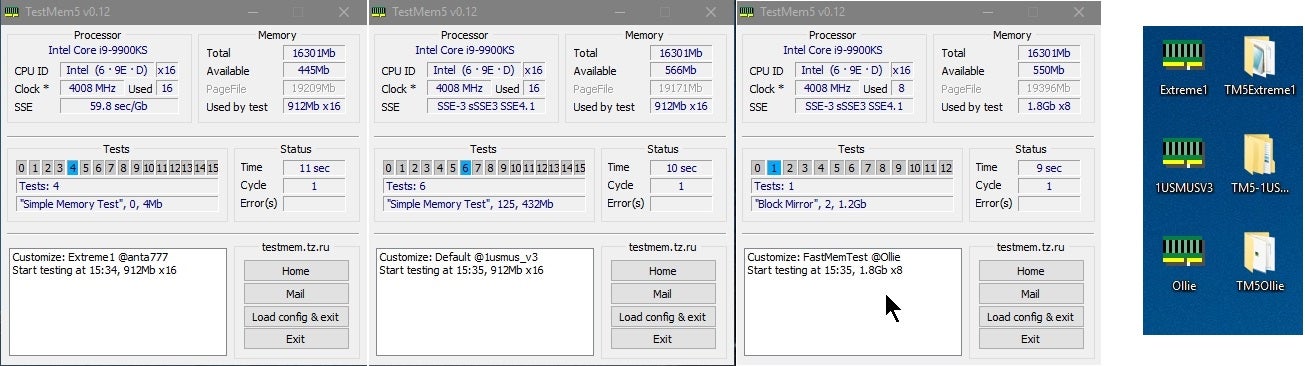
If neither work, try a ram test
Anta777 extreme config on TM5 is very good
Instructions all here:
https://www.overclock.net/threads/memory-testing-with-testmem5-tm5-with-custom-configs.1751608/
Overclock.net
Correct test will show 15 tests not 5
tough plinth
ty
tough plinth
what should i look for when doing a ram test?
cerulean rover
Let it do the test, it'll tell you if it has any errors
tough plinth
i did the test with 0 errors, and this morning the monitor showed all black display (not like it was off, but more like all of the pixels were showing lowest rgb values possible). turned the monitor off and on again and it worked fine
ill try a new monitor soon
i shut down the pc and turned it back on to see if the same problem would occur, instead it just booted normally
so far this has been a daily thing, not a startup issue
odd siren
Running any overclocks?
tough plinth
i think so, i have a powercolor 5700 OC, ill check the default clock speeds and compare them to mine
tough plinth
gpu clock by default is 1625, but mine is 1675. ram speeds are the same as default
odd siren
Interesting
Do an "sfc /scannow" command in windows command prompt as adming
If you see it fixed issues, great, if it failed to fix issues, we definitely have something unstable
If it finds nothing, even better
Then, do ddu
?ddu
 neat ventureBOT
DDU (Display Driver Uninstaller) Guide by Pato
https://github.com/NeweggTechie/Graphics-cards/wiki/How-to-use-DDU

GitHub
Contribute to NeweggTechie/Graphics-cards development by creating an account on GitHub.
odd siren
Update to latest driver
tough plinth
good thing that gpu has a 1 year warranty 💀
if doing those things doesn't fix anything i'll just get it refunded because a black screen on startup is certainly a problem under warranty
tough plinth
i ran the command and a transparent window showed up then disappeared
odd siren
It's not supposed to disappear
You have an unstable system @tough plinth
It could be the gpu, but my inclination is it's something else like dying ram
You're in the rabbit hole now 💀
Overclock.net
Follow these instructions
Correct loading of the test will say 15 tests not 5
cerulean rover
you can check the logs after its done to make sure it didn't have any errors before completing
tough plinth
odd siren
It could be the gpu, but my inclination is it's something else like dying ram
the ram is brand new, i highly doubt its that, also i ran that ram test with 0 errors
what else could it be?
 tough plinth
i saw 15 tests, it ran for like 50 minutes or something and the "errors:" box was empty
also every part other than the gpu was brand new, i really doubt its anything else
odd siren
Ok
Well the command prompt window disappearing is extremely unusual
That's not a video issue
If the screen went off sure, not the program
Maybe cpu is unstable? What cpu is this
tough plinth
12400f
odd siren
odd siren
Do an "sfc /scannow" command in windows command prompt as adming
Try this again
It can't disappear, if it does something is definitely functionally wrong
Maybe faulty ssd
odd siren
Supposed to scan your install for bad data
If it crashes something HAS to be wrong
Aint no way
Maybe faulty ssd
Got a spare ssd?
tough plinth
nah i dont
odd siren
Hdd?
tough plinth
yea but its external
odd siren
Damn
It's hard to say, but given the cpu choice and the ram didn't fail I'd suspect the ssd
Or psu
A new install could potentially either completely clear the symptoms or eventually fail like the current install and teach us a fortune of information
A failing command prompt is highly unstable behaviour
It's really hard to diagnose without creating controls
Isolating the install would knock out software and ssd, testing the ram rules that out, cpu is such a low bin you'd be lottery luck to have it unstable
Nothing about command prompt crashing points to gpu
Psu is a very difficult symptom, points to anything when you have a bad power cable
Can isolate that by changing the cables to spares
If they're available
Otherwise only a second psu can isolate that
We're getting to a weird juncture
Either we start trying extremes or buying new hardware to rule out old (new) hardware
Or, take it to a pc shop and submit a warranty claim or pay for a repair
I'm not saying it to not help but rather, the next steps are all pretty big
Only other thing I could think of would be the usb being delinquent
Short or unstable power in one of the devices, or related i/o chip/section of the cpu die
/chipset
Which would mean only having the mouse and keyboard plugged in
If that doesn't alleviate symptoms, maybe a changed gpu display cable
After that I'm grasping at straws
Maybe a shorting gpu pcb if anything I could label to the gpu at all, not command prompt tho, that's really telling to something completely different imo
tough plinth
i unplugged the usb headset and tried the command, the same thing happened
odd siren
Running out of easier ideas, try a different display cable
If that don't work I suggest filing for an rma or going to a repair shop
tough plinth
tried a new hmdi cable, the amd bug report tool popped up, i tried the sfc /scannow command and the same thing happened
tough plinth

it happens most times theres a crash, although it hasnt shown up recently execpt for now
tough plinth
when i tried to open the amd software with the hotkey it was open for a little bit and then closed, i opened it again and it stayed open
odd siren
Your system is wildly unstable ☠️☠️
tough plinth
oh dear
odd siren
Amd driver crashing can be a result of the instability
You could try ddu but I highly suggest finding another fix at this time
Randomly closing programs is highly suspect
Cpu errors this bad are typically watchdog errors which lead to blue screen
Something really strange is up, I am really sus of ssd, psu or windows install
tough plinth
is there any way to fix windows install without a fresh install?
forest oasis
not really
odd siren
Deep level corruption has no other fix when it's really bad
odd siren
I'm not entirely sure
Trying to treat the symptoms however might bring us closer to what did it
odd siren
tough plinth
also what would i file an rma for?
Completely unstable pc, programs crashing, closing, not working in general
tough plinth
would i send that to intel?
odd siren
Wherever you bought the pc/parts from
tough plinth
i bought it from a couple of different vendors: cpu, case, fans and cooler from amazon, gpu from ebay and mobo, ram, ssd and psu from newegg
odd siren
Ya so those would be the potential people to talk to
Or take it to a single place for a repair service
I would suggest testing a new install first with potentially an ssd tho personally
tough plinth
a new install on a new ssd?
odd siren
If you could afford it yeah
Can be as cheap as like $30 for a good one in small capacity
Or even free if you grab a really old hdd (potentially makes the test unreliable tho)
tough plinth
could i just test my current ssd?
 burnt venture
Are all these cards ive never heard of till recently actually good? Since i was out of the game until earlier this year. XFX, Powercolor? Or rather, are there ones to avoid regardless of how well known the brand is?
 random walrus
burnt venture
Are all these cards ive never heard of till recently actually good? Since i was ...
random walrus
burnt venture
Are all these cards ive never heard of till recently actually good? Since i was ...
MSI Ventus (nvidia) and Mech (amd) are pretty bad. Other than that I think everything else is fine
burnt venture
random walrus
MSI Ventus (nvidia) and Mech (amd) are pretty bad. Other than that I think every...
Lol figures. Thats what I currently have. They had a 3050 ventus cheap at bestbuy in February. So i picked it up for temporary till i can upgrade.
keen nacelle
I think asus dual on a good few amd cards is less than desirable, and asrock challenger isn't great
keen nacelle
burnt venture
Lol figures. Thats what I currently have. They had a 3050 ventus cheap at bestbu...
Outta curiosity
How much is cheap
random walrus
For a 3050 Ventus is probably fine
keen nacelle
Oh for sure
random walrus
3050 tho :/
burnt venture
keen nacelle
How much is cheap
 random walrus
Ouch
burnt venture
I haven’t pushed it at all. Fans don’t even kick on normally. Have only played ffxi am hoping to start gaming more
random walrus
Tbh if that's within it's return window I might suggest you swap it
(new) Rx 6600 can be had for cheaper and will beat the 3050
Or a used card
burnt venture
Needed something to run my 3 monitors. On board only had 1 DP, 1 HDMI
Naw. Bought in February. Best i could do is trade.
And the quick “research” i did turned me off amd at first because of all the driver problems people were posting about.
burnt venture
I am thinking of going AMD now though. In the 7600 xt, or 7700xt range
keen nacelle
burnt venture
I am thinking of going AMD now though. In the 7600 xt, or 7700xt range
7700xt was like $350 tdy
7800xt $430
burnt venture
keen nacelle
7800xt $430
I saw, thx! Lol. Thats what got me asking. 🙂
Probably gonna hold out till blkfriday though. I shouldn’t spend on something Im not gonna be truly using yet.
May even wait till tax season, lol
naive bane
I switched thermal pads and paste and I still get high temps super fast, card is dead?
odd siren
Wrong pad thickness/density
naive bane
odd siren
Wrong pad thickness/density
I bought this for 2080ti Thermal Pad 14.8 W/mK, 120x120x1.5mm, Non Conductive Heat Resistance High Temperature Resistance, Silicone Thermal Pads for Laptop Heatsink GPU CPU LED Cooler (1.5mm) https://a.co/d/9Kgb40J
I dont think its wrong

Thermal Pad 14.8 W/mK, Non Conductive Heat Resistance High Temperature Resistance, Silicone Thermal Pads for Laptop Heatsink/GPU/CPU/LED Cooler (0.5-3mm)
2080ti o11g
odd siren
naive bane
I bought this for 2080ti Thermal Pad 14.8 W/mK, 120x120x1.5mm, Non Conductive He...
Again, wrong thickness or density
Too dense, doesn't squish
Doesn't squish? Immediate throttle temps
Poor contact to cold plate
We don't recommend pads here anymore as putty has become comparable to pads in performance in exchange for being more messy, but good for far better repaste results, by a mile
UTP-8 is one of the best choices and it's cheap on amazon
If that didn't work, you'd have the 1 in a million bad luck of cracked heatpipes which is almost impossible unless the gpu was tossed off the side of an apartment building
 naive bane
odd siren
Use hwinfo64
naive bane
odd siren
Use hwinfo64
could it be that my gpu bios is faulty?
naive bane
odd siren
Icue is just confusing
It reaches 90C [the hotspot] but that doesn't make the fans spin at 100%
does that mean anything new? or still wrong thickness or density?
keen nacelle
90c hotspot is fine
naive bane
keen nacelle
90c hotspot is fine
welp it reaches 100 after like 10 minutes, after it reaches 90c lol
in just cause 4 it reaches 100c in 10minutes
and the fans did not reach 100%
odd siren
Either this is a noisy FE or again, the pads seem like they mightn't have been ideal
naive bane
Is this a must for 4060ti?
 livid idol
Not unless it's a big triple fan model
naive bane
It is
livid idol
Which model?
naive bane
Tuf
 forest oasis
i mean, it's smart to reuse something that would otherwise probably be thrown out or put in a drawer and forgotten
but how adjustable is it
livid idol
I think that would be fine without the stand honestly. It's a thicker model but mostly plastic, the heatsink isn't that big. Better safe than sorry though.
naive bane
livid idol
I think that would be fine without the stand honestly. It's a thicker model but ...
There is a problem

The x16 are too high
livid idol
You can use a lower slot without losing any performance
Assuming the slot is PCIe 4.0
livid idol
What model is the motherboard? I can double check for you
 odd siren
Z390 is 3.0 only
livid idol
Yep that's a very bad match for a 4060 ti that only has a x8 interface
naive bane
What can I do
livid idol
But I can confirm the second x16 slot runs at x8 mode so it'll perform the same as the top slot
odd siren
Also is that current gpu in the pic the GPU in question
Cos if it is that's a turing strix
naive bane
odd siren
Also is that current gpu in the pic the GPU in question
Nope thats 2080ti inside
livid idol
The 2080 ti is better than the 4060 ti though. By like 10%.
naive bane
But 4060ti has dlss 3
naive bane
Cod
 fading glacier
this is a nice chat as always
odd siren
Dlss 3 adds a latency hit
Massive hit
Imagine adding 60 ping to your internet connection, that's dlss 3 in a nutshell along with the fps boost
Laaaaaagggg
livid idol
Specifically the worst kind of latency because it's creating frames out of thin air
odd siren
Ya
fading glacier
ill be happy with that 2080ti
odd siren
If you haven't really done anything with the gpu yet, I highly suggest a return
fading glacier
instead of a 4060
livid idol
The CPU would be a better upgrade here unless you play at 4k for some reason
odd siren
Agreed
odd siren
Still would take the 2080ti
livid idol
In that case the 2080 ti is still better unless you got the 16GB model of 4060 ti
naive bane
T.T
livid idol
7900 XTX beats the 4090 in CoD at 1440p
odd siren
So radeon is the better take if you want improvement, and no latency added unlike what papa jensen tried to snake oil ya
Dlss 3 is great for AAA single player, wouldn't put it 10 feet of any reaction based game
odd siren
Nope
naive bane
Will 5xxx have it too?
naive bane
odd siren
Yep
Wtf
odd siren
I am very sure of it
TV's had this tech for years
Called "TrueMotion"
Back then the hit was more like 200ms instead of 60
And tons of ghosting on top
naive bane
Im getting 80ms now so ill get 30% more
odd siren
It's not easily fixed, the gpu needs to create frames quickly and the more it samples the bigger the latency gets
So if you increase the sample rate it just worsens
Or it would, if it wasn't a consistent imposed delay
All frame gen has this issue
You reaaaallllyyy don't want it on your cod games
Maybe for a cyberpunk game, not for cod
livid idol
It's literally just making up frames from data it already has, which requires it to be at least one frame behind to inject a frame in between
Sure the frame time goes down, but that's not going to help you when the frames are made of garbage data
odd siren
Ya, it will always need a delay unless it knows how you'll move ahead of time
Which requires a time machine
odd siren
Dlss 2 is fine, it's frame gen
But you can use dlss 2 with 2080ti
So doesn't really do anything with a 4060 ti
livid idol
DLSS 2 works by rendering at a lower resolution and then using machine learning to upscale the image to a higher output resolution
naive bane
150ms is fine...... T.T
odd siren
Bro's playing like he's on Australian internet
naive bane
How come I never heard about that latency thing
livid idol
It's the ugly truth that Nvidia and their shills don't talk about
naive bane
And that really does not exist with amd
livid idol
Once you find a more neutral community you'll hear all kinds of things you never were told or thought of before
livid idol
Yeah AMD has fluid motion frame tech, which is frame gen
It can be worse than Nvidia's too because instead of using the previous and next frames to generate a frame it uses the previous 2 frames and guesses where everything will be for the next frame
odd siren
Ya
They use algorithm and tensor cores to do a better job than those age old tv technologies, but they're still a long way away from basically negligible latency
naive bane
Well 130-100ms is fine really
odd siren
Sure, if you're comfortable with that, it's a genuine multiplayer disadvantage tho if you went out of your way to sidegrade like this
Whole point of increasing fps in fps games is to reduce latency
So it's counterintuitive is all I'm sayin'
I play most multiplayer at that latency to begin with, it's not unusable
I definitely notice dying easily to bad ping tho
The woes of Australian internet

naive bane
Latency aside what other reason is there to return the gpu
livid idol
It's genuinely worse than what you have in several other ways
Less VRAM for one, which matters a lot at your chosen resolution
naive bane
livid idol
Less VRAM for one, which matters a lot at your chosen resolution
But 10% less fps is the only result?
livid idol
In benchmarks it's 10% less FPS, but the real world difference is much more.
When you run out of VRAM either the game will crash or it will try to use tricks to reduce usage, like ignoring your quality settings or popping textures in and out. Halo Infinite is an especially egregious example, foliage looks like pure trash even if you tell it to run on ultra.
odd siren
naive bane
Latency aside what other reason is there to return the gpu
It's a pretty painful pick

When all the gpus around it are better value
The bus width issues make it a problem to play at anything more than 16:9 1440p as well
naive bane
 odd siren
It starts to suffer fps loss as the card is just built too cheap on the bus
naive bane
In many games here the 4060ti is abit better
odd siren
A bit tho man
livid idol
odd siren
The bus width issues make it a problem to play at anything more than 16:9 1440p ...
Especially since it's only going to be 3.0 x8
odd siren
You spent $400 for a bit, is what I'm getting at
naive bane
According to the video
odd siren
Close enough to call it not an upgrade
naive bane
I wasnt upgrading
I was Looking for something similar
And I looked at those videos and concluded the 4060ti as a fair choice
livid idol
naive bane
In many games here the 4060ti is abit better
Reviews are made using an ideal set of parts, in the case of the 4060 ti that's with a 7800X3D usually, which will run the card at full bandwidth. Your 8th/9th gen CPU is far from ideal and only support PCIe 3.0, which is half the bandwidth on an already gimped card. https://youtu.be/XfkJVio8gXo?si=q-EkZkZJ2YTwzNd6

ASUS ROG Strix XG27AQMR: https://rog.asus.com/au/monitors/27-to-31-5-inches/rog-strix-xg27aqmr/
Support us on Patreon: https://www.patreon.com/hardwareunboxed
Join us on Floatplane: https://www.floatplane.com/channel/HardwareUnboxed
Buy relevant products from Amazon, Newegg and others below:
GeForce RTX 4090 - https://geni.us/puJry
GeForce RTX...
This can mean as much as a 20% reduction in FPS
Sometimes it's no difference, a lot of the time there is one
odd siren
On 4.0 systems you can see it very easily at 4k
 livid idol
 odd siren
Starts genuinely becoming 10% or more, then you cripple it with 3.0 and it's getting like it's an egpu at that point
naive bane
I should have gotten a 3080/90 then?
livid idol
CS:GO literally losing 28% of its FPS at 1080p just because you only have a PCIe 3.0 slot
odd siren
Raw performance would have been almost as much as the frame gen
On 3080
Then you could even mod fsr 3 frame gen on top
Even more fps
💀
odd siren
Yeah if we're talking cod tbh
naive bane
3090ti is the best my system can get?
livid idol
You could get something better, it's the GPU itself that's the problem since it's a limited GPU by nature
 livid idol
A 4080 works fine on 3.0 x16 with minimal losses in perf, the issue is the 4060 ti is limited to half that but isn't half the perf to match the loss in bandwidth
odd siren
Ya, without being over complicated, the bus is small, and the bus, delivers all the data
Nvidia basically gave the bus the pizza delivery boy treatment
naive bane
I opened the box is it too late?
 odd siren
Instead of a nice car, he got the $500 bang up car
livid idol
Most places will still take it back
naive bane
I did that before the convo
odd siren
naive bane
I did that before the convo
Did you unseal the bag
naive bane
Uhh where is the seal
 odd siren
Seal intact, you're fine
You opened the box but you can clearly show you never opened the bag to use the gpu
Pretty sure you can return that without troubles, where did you buy
naive bane
odd siren
You opened the box but you can clearly show you never opened the bag to use the ...
Aint that Easy to be faken
odd siren
No
naive bane
odd siren
Pretty sure you can return that without troubles, where did you buy
Local store
odd siren
They use ink that spreads over the bag if you open it
It's anti tampering
It's very common on stuff like this, you can't fake that
It would be more impressive if you could
I'd hire you as my cat thief
naive bane
I wont be playing only cod, which one should I get?
odd siren
How much are you spending
naive bane
I have a budget of 650$
naive bane
9700k
odd siren

I think I would stop at about 7800xt
Just cos the cpu will be holding you back at that point
livid idol
Part List - Intel Core i5-12600KF, Radeon RX 6800 XT
odd siren
I like what fal is thinkin
naive bane
Aint the rumors about amd true, that they crash and they are noisy
livid idol
Only when people don't set them up right
odd siren
As much as nvidia does these days in my experience