#graphics-cards
1 messages · Page 37 of 1
 cyan vault
Insane how it's like half the weight of my old GPU and at least 50% better
Just gotta get used to AMD overclocking cause it's different than afterburner
 odd siren
Indeed
I have a thread that might be worth some reading if you are willing to put the hours in
One sec
cyan vault
I'd love to! Overclocking is super fun
odd siren

Overclock.net
Last updates:
15/03/23 - EVC - Hardware mod to "Raise the limits..." section added to OP
11/03/23 - AMDVBFLASH Information v5.0.567 section added to OP
09/03/23 - My OC tips for Navi31 daily use, stability testing and bench added to OP
-=XFX=- RX 7900 XT/XTX Merc Owners Club -=Force=-...
Incredibly useful thread. Overwhelming amounts of RDNA 3 info
cyan vault
Not sure if I'm crazy also; is there more sensors in this than previous cards? There's like 1500 for power that I don't remember before
cyan vault
Too many....
 odd siren
My XTX had like a whole page I sorted through
odd siren
It's really not
People underestimate it a lot with RDNA 3
But all things noted it's quite the improvement
cyan vault
Using fsr/rsr makes it on par with nvidia unless you wanna go crazy with like ultra ray tracing where it barely changes
odd siren
The market is to blame for a lot of this tho
4000 series also improved but they've priced it so what you pay for scales almost perfectly with the performance
cyan vault
I was really considering a 4070TI but the markups on the partner cards along with similar performance but just greedy nvidia I went with the XT
Can't deny the strength of a 4090 though. Those things are inhuman(?)
odd siren
I don't even blame it, the only caveats of the XT are RT, VR and blender
And even then VR isn't disgusting
cyan vault
I've heard people complain about VR, haven't tried it but will have to just to see
Doubt it's as bad as some reviews said. Someone gave it like 1 star and returned because vr was "unplayable"
odd siren
Some have called it pretty bad
I haven't really touched VR with mine yet either so can't really give any positive affirmations here lol
cyan vault
I do wonder; what's the point of 20GB of vram if most games don't even use 10? I'm at 1440P so that might be why, but even cyberpunk was around 8-10. Could also be for production I'm not sure
cyan vault
It seemed super overkill
odd siren
Definitely nicer than 12 on the 4070Ti
cyan vault
GCD hotspot maximum is around 94C under OCCT power, average is like 90
odd siren
That sounds fine
As long as sub 110 it's no issue, but sub 100 is ideal
Gives some room to breathe
odd siren
Spikes
Mine spikes to 550+
Nyooo dun give me ur covid

I'll be stuck if I got covid

Glue me to forks

I demand 1 5995wx for solvent
cyan vault
Is the radeon software the best OC tool for 7000 series?
Are there even any others?
odd siren
There's one other tool
MoreClockTool
It's like Adrenalin but simpler
Some people have better results/affinity to it
cyan vault
In your experience does fast timing actually do anything? Seems useless from everyone else I've seen mention it lol
cyan vault
Interesting
And for min frequency; I've seen conflicting ideas about it. Does setting it actually matter?
odd siren
Mins and maxes I've had conflicting results
Often it will ignore them but for some people they have
*helped
The main three are power, vram and voltage
Work out the best vram clocks then start undervolting the voltage until it's lower but still stable
It'll boost higher with lower voltage
A lot of this stuff should be in the thread I linked
I'm not sure about XT but XTX a lot of people end up in the 2740-2810 region for vram
Rarely lower
cyan vault
odd siren
Often it will ignore them but for some people they have
Yeah I’ve been trying to OC but keep running into an issue where screen just turns full black, I hear like a click and it’s off 😪
Gotta find the right area IG
Only in furmark though
Yeah it’s like the SECOND furmark opens there’s a click and it turns off
 vital oriole
Sounds like not enough power from psu
cyan vault
It runs every 3dmark test fine.. weird
Gonna try and log with heinfo and gpu z
Hm..

I have an igpu but it's disabled
So not sure what this could mean 😭
And it’s only in the 1440p benchmark preset
odd siren
cyan vault
Yeah it’s like the SECOND furmark opens there’s a click and it turns off
I wouldn't opt for furmark anyway, it's just a power virus, not a good stability test these days
If you wanna see big power number and temps go brr? Sure, but that's about all it's good for lol
 livid idol
At the same time, if it's crashing in furmark there's either an issue with the GPU or the PSU isn't up to snuff
There's a pretty quick spike in power when it starts so it's possible a transient load trips it
odd siren
I've never run furmark on the XTX
And tbh with the power profile it has I wouldn't be surprised if it straight up has issues
 oak rivet
I see no better way to test a psu or the cooling capacities
Furmark with prime 95+linpack seems best way to test worst case scenario for a psu
And keep clicking the space button
odd siren
Or just occt power
oak rivet
That's not long enough
odd siren
For a GPU it's plenty long enough
Neither are stability tests for a gpu, you'll work out what's thermally stable ±5C in under 30 minutes
 cerulean rover
Occt power is worse than both furmark and p95 smallffts iirc
Furmark just works its magic as a power virus
cerulean rover
Iirc I got it to draw like 10w more with furmark+p95 smallffts compared to occt, tracked with hwinfo64
Although that was a while ago
odd siren
But even then, OCCT 3D isn't as bad and still more than what you should see in daily gaming use
cerulean rover
It's way better for stability testing
Although I like just running 3dmark ts
Quicker results ime
odd siren
TS stress test or tse loop yeah
odd siren
I do that then +30-50mv on amd
cerulean rover
odd siren
TS stress test or tse loop yeah
Somehow my ocs often don't trip occt's 3d test in half an hour and crashes in time spy in the first minute
 fringe scroll
oak rivet
That's not long enough
fringe scroll
oak rivet
That's not long enough
You can change the length it runs for
odd siren
Yeah they won't
cerulean rover
Dunno why that happens but meh
odd siren
Cos occt 3d is a static load whereas TS is dynamic
cerulean rover
They do have a dynamic load setting iirc
fringe scroll
On occt my system was drawing 750 from the wall 💀
oak rivet
Have to pay tho
fringe scroll
No you dont for power
cerulean rover
But yea I just like ts over occt when applicable
cerulean rover
I like all the unigen benchmarks but I haven't used them in forever since I always have 3dmark downloaded and forget to download them
odd siren
I mean TS is fairly solid
cerulean rover
Heaven for testing vram though
odd siren
I always add margin onto it and I'm generally fine
cerulean rover
And superposition is an added layer to ensure stability
odd siren
Ye
odd siren
cyan vault
Furmark is messed up idk
Hearing a click is telling of the psu btw
livid idol
None of those power tests are good at finding transient issues tbh
odd siren
But yeah I wouldn't stress, I would rather disregard it tbh if occt runs
Cos occt is already extreme
oak rivet
The beginning of furmark is a spike
cerulean rover
Furmark spikes pretty hard
odd siren
Mhm
cerulean rover
It's not like spiking over and over but if it'll trip, furmark is probably going to trip it
oak rivet
Clicking space rerenders the donuts creating a spike
livid idol
Ah that I didn't know you could do
odd siren
I would call that extreme of extremes lol
@cyan vault what cpu, how many psu cables are plugged in and what wattage is the psu
cerulean rover
Also what PSU?
odd siren
Ye
cyan vault
odd siren
<@330030025799761921> what cpu, how many psu cables are plugged in and what watt...
Sorry, out rn! 7700X, it has two power cables 1 8 pin 1 4 pin but I don’t have a 4 pin
PSU is enermax d.f. Revolution 850W
odd siren
Ok I doubt the psu itself is defective or overwhelmed by the specs
It's probably just tripping from OCP
cerulean rover
How is the GPU connected?
cyan vault
Uhhh it just said pcie on them not sure
cerulean rover
I can't remember if it's 2 connectors on one rail or all on separate 12v rails
odd siren
Ooo if it's multi rail that could explain it
cerulean rover
Ye so how exactly it's connected might matter
odd siren
It'll def matter
cerulean rover
Means it has separate trip points for each rail, which means it'll trip if a single rail goes over ocp trip point and not just if it'll trip based off everything combined together
If it's like 2 connectors on one rail, one on the other, best to spread the load out
cyan vault
Lemme try to draw where they’re connected afaik
cerulean rover
Looking at it now it has a really interesting setup
2 of the 12v rails are rated for 40a, 2 of them are rated for 25a
 odd siren
cyan vault
It’s 2 of em
odd siren
cyan vault
It’s 2 of em
Maybe try shuffling the pcie connectors around
livid idol
Here's how the rails are arranged for reference

12V1 and 12V2 are 25A, 12V3 and 12V4 are 40A
cyan vault
Ok so put the CPU on the separate one, and the two GPU in the bottom pcie?
cyan vault
I might have one on the top pcie
livid idol
In which case it would be sharing with 12V3
cyan vault
I don’t remember I’ll check tomorrow
odd siren
It's better to have one in each rail isn't it
cyan vault
Oh maybe it’s on the bottom then
No clue
Ok I’ll make sure they’re all on their own
odd siren
Cos 40Ax12V is 480W
Which would make sense then if you're tripping the psu with furmark
It's tripping one rail
Granted somewhat over 480W
cyan vault
I think the max I saw was around 450 in other benchmarks
So I’ll check that and make sure
odd siren
If you have one in each rail it'd be a technical 960W of headroom (it wouldn't but it'd be higher than 480W+10%)
livid idol
It would be going higher than that during a spike
odd siren
Ye
oak rivet

Intel ARC on Assassin's Creed: Odyssey
At release: 20fps at 2560x1440, utterly unplayable
Latest driver : 55fps at 3440x1440 with imperfect frametimes, but it's definetly playable
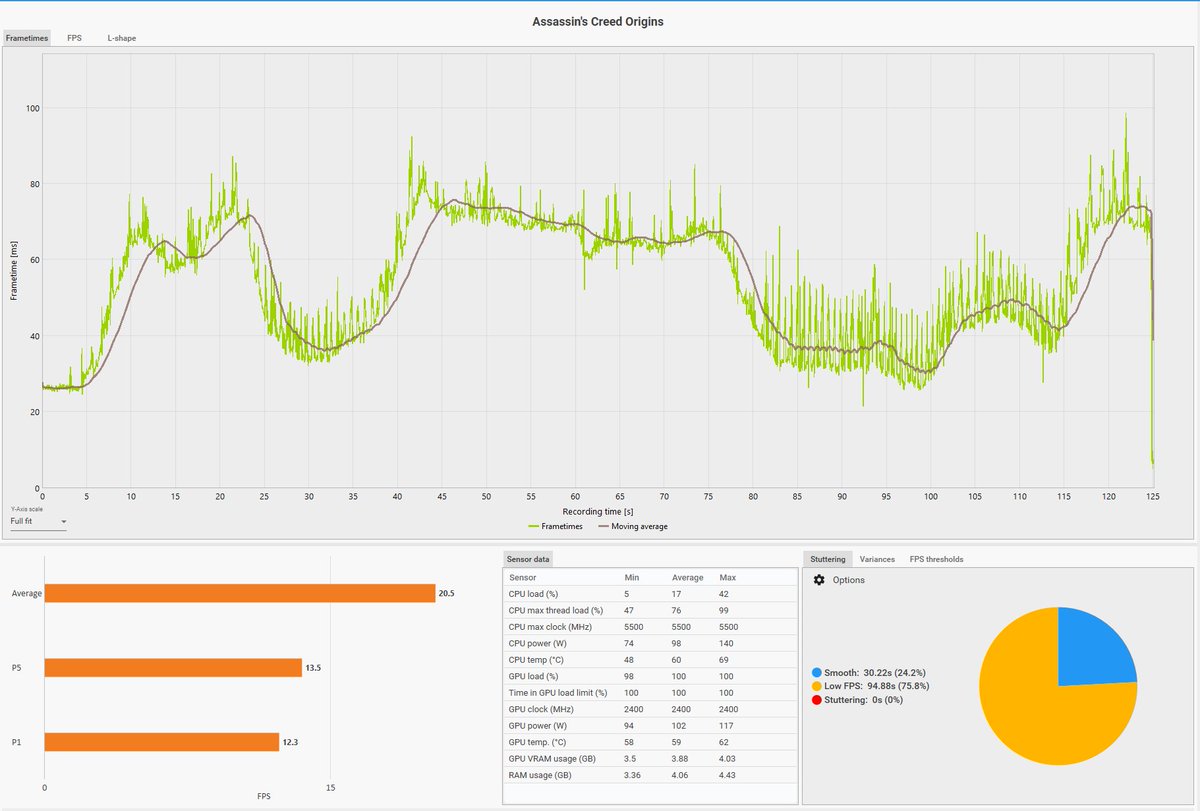
 Twitter
·
Twitter
·

 ebon parcel
trying to keep my GPU from getting so hot but even when I lower power limit on MSI Afterburner the HWMonitor still shows that whatever the hot spot is got over 101 C . I guess I'll have to take it to a repair shop
livid idol
Have you tried ramping up the fan curve so more air blows into the case?
 heady turtle
And or a custom gpu fan curve
 velvet grail
Finally figured it out, and the way my GPU drops frequency is a bit strange:
<40C 2085mhz
40C & <47C 2070mhz
47C & <57C 2055mhz
57C & <62C 2040mhz
62C & <72C 2025mhz
72C 2010mhz
oak rivet
2010nhz at 72c sounds high you probably got some oc applied?
oak rivet
What is the fan speed % at
velvet grail
It maxes out a 65C
I made my own curve to make the GPU as silent as possible, my GPU doesn't run really hot, I was able to get 72C+ by slowing down the fans a bit, else my GPU usually runs like 62C max at 90% fan speed
oak rivet
At what power consumption
oak rivet
What was the aib model
velvet grail
215 only in benchmarks and stress tests
oak rivet
Also your room ambient
velvet grail
oak rivet
What was the aib model
Gigabyte windforce 3x non oc
velvet grail
oak rivet
Also your room ambient
20C
velvet grail
Yeah I know
odd siren
velvet grail
Finally figured it out, and the way my GPU drops frequency is a bit strange:
<40...
That's the Nvidia boost table in play, its core temp dependent and will boost less as the temp goes higher
velvet grail
I know, I just wanted to figure out when the 15mhz drops occurred, because most card start from 50C and drop every +5C, but as you can see mine starts from 40 and drops every 7, 10 or 5C
ebon parcel
heady turtle
And or a custom gpu fan curve
I've tried, but it still peaks at 100+. Is it not high enough?
I've also tried lowering power limit
odd siren
velvet grail
I know, I just wanted to figure out when the 15mhz drops occurred, because most ...
It'll be written to the vbios. Whether it's a deviation from standard turing I'm not sure, but that's definitely very normal
I haven't played enough with turing specifically to tell you where the freq drops start
One stepping of frequency isn't much anyway
Wouldn't notice it in a blind test that's for sure
velvet grail
Of course, 15mhz would barely mean one single FPS drop probably
odd siren
Ye
With Nvidia as well, the better your undervolt curve the better you can manage to offset the boost drop as it's working faster with less voltage
You can't avoid the boost table but you can def fine tune a curve to run better if not already
I do it a lot with 3dmark synthetics
Even at higher voltages/power playing a better curve is still meta at ambient
velvet grail
I was able to get my 2080 to boost at 2085mhz at 0.981v (it basically never gets to this frequency as it drops after 40C) and 2070mhz at 0.968v
So my 2080 never ever exceeds 1v
odd siren
Ye, for my 3090 it would run like, 2070, 2085 at the start of synthetics but boost would drop down at least a bin or two as the card warmed up to near 50C
velvet grail
this is the curve i use
 odd siren
3080 did it too but at like, 2140 or something
That's a good curve
That's the proper way to do it
velvet grail
odd siren
Ye, for my 3090 it would run like, 2070, 2085 at the start of synthetics but boo...
what voltages were you able to get for those frequencies?
velvet grail
velvet grail
this is the curve i use
I never bothered changing the lower frequencies or trying to undervolt them because it'd take so long and its probably not worth it
odd siren
For ampere? Oh the voltages were quite different iirc
3090 I think was around 1.05(?)
My 4090 does 1.15 locked
3080 I don't remember at all nor the 1650
velvet grail
yeah but a 4090 also has much higher boost frequencies
odd siren
And I haven't touched the 1080 in a long time lol
Ye but ampere and turing are also dramatically different architectures, not really apples to apples
velvet grail
i do have a 1080 in my 2nd build but i never took the time to undervolt it properly, i did some to get rid of the annoying coil whine and it worked
odd siren
This stuff falls under Nvidia boost 3.0/4.0 behaviour btw with what you're curious about
 oak rivet
with 20c ambient ngl i think temps could be lower then 65c
odd siren
It'll read core and will downbin until it throttles at the core max
Think of it like, thermal velocity boost
Same principle but hardcoded
velvet grail
oak rivet
with 20c ambient ngl i think temps could be lower then 65c
if youre talking abt my 2080, nah, I guess is's fine and also I tried 100% fan speed and i cant go lower than 61C
oak rivet
4070ti owners flexing their giant coolers on us
velvet grail
btw my 2080 is just a 2 slot card with a relatively smll cooler, even if it is a 3 fan card
oak rivet
if my room was at 20c i could aim for sub 60c at 250w usage
velvet grail
it'll depend on many things
fan size, speed, (cfm), cooler dimensions, other heat producing components on the card pcb that also affect the overall temp...
you can't just say 250w should do <60C temperatures
velvet grail
yeah but he won't always be right
 limber flax
that's another issue
oak rivet
velvet grail
yeah but he won't always be right
currently idling at 27c in a 25c room
 limber flax
wooo idle temps low
odd siren
Skill issue
limber flax
effectively meaningless
velvet grail
same for my 2080, idles 23C with 40% fan speed
odd siren
Idle same as ambient when
velvet grail
using 40% cuz they're really quiet
oak rivet
oh the fans arent spinning
limber flax
oooo idlleeee
odd siren
Mine don't either
limber flax
under load is what truly matters
odd siren
Depends
Mobile is usually up to 100C
But pascal and ampere iirc throttle at 85 and 83-91
(adjusted ofc)
That's for desktop
I can't remember ada, one sec
velvet grail
my 2080 barely touches 28C with fans not spinning and few applications open (ds, hwinfo, afterburner...)
velvet grail
of course heat will build up after some time so the card will get slowly hotter
laptop gpus 🔥
odd siren
140W 4060 brrrr
velvet grail
I once undervolted my cousin's 1050ti mobile and was able to get it from 88 to 58C max
limber flax
odd siren
140W 4060 brrrr
 odd siren
Pascal has some renowned good scaling
I wouldn't mind dailying a 1080 again. It was nice

 oak rivet
have a strix 1070ti lying around
limber flax
velvet grail
just discovered you can set the curve to look like this lol
silence, then suddenly WHRRRRRRRRR
oak rivet
i think 10% within perf of a 1080
velvet grail
limber flax
silence, then suddenly WHRRRRRRRRR
nah, it's quiet til 80%
limber flax
oh that's nice
velvet grail
but then it gets pretty loud i'd say
odd siren
velvet grail
just discovered you can set the curve to look like this lol
The stepped curves are good for fan stop but if you don'tike sudden ramping it can get annoying lol
velvet grail
but i think it is just a way you see the graph, i'm not sure if it affects how it ramps up
odd siren
It does
velvet grail
ohh
odd siren
It's an instant jump from say 40 to 60
Instead of gradual
That's what I mean by sudden ramping
velvet grail
brah why does it even exist
odd siren
I mean, if you tune it well it can work quite nicely
Better to use the regular curve tho imo
velvet grail
i think it's better too
oak rivet
use the profiles with static fan %
velvet grail
I should lower my case fan speeds cuz they're a bit loud with gpu under load
oak rivet
just toggle the game profile on when playing a game
limber flax
yeah it's not a laptop
you really don't need to do that
takes out a whole hotkey from you
for what could be achieved using the fan curve
 limber flax
you can set a hotkey to each profile?
or are you really going to go and open afterburner, click on it, and then minimize it again
more steps for a result that could just be achieved automatically
velvet grail
you always have 5 profiles available on ab
 oak rivet
yeah
limber flax
yeah but you have to click on them to use them
oak rivet
precision has more iirc
limber flax
or you can set each one to a specific hotkey
why do that, when curve does fan speed for you?
that's literally my entire point
velvet grail
limber flax
yeah but you have to click on them to use them
if it is blue it means it's being applied (curve/offset/power limits...)
it'll depend on the type of gui u use in afterburner tho
limber flax
i know how it works lol
i'm just saying if you're using it just for a fan curve, there's no point
i set my undervolt overclock to my first profile because that's all I'll ever be using, and I set my fan curve from there so I don't have to swap off of it when I'm done gaming
velvet grail
isn't the fan curve the same for each profile?
oak rivet
ok thx for the idea got macros for days here
 limber flax
fan curves still better though
literal set and forget
boop fan curve once, and you're set until you're unhappy with it
velvet grail
oak rivet
ok thx for the idea got macros for days here
thicc spacebar
velvet grail
i'm probably the only one using a dell oem keyboard on a 1k build
limber flax
actually, wait i take that back
velvet grail
tomorrow i'm finally ordering the 5600x :]
limber flax
nice cpu
velvet grail
why does it keep changing : ) into 🙂
velvet grail
limber flax
not 3dx though?
nah
limber flax
it's a discord thing
velvet grail
limber flax
it's a discord thing
where do i disable it
i remember you could do it somehow, right?
i just cant find where
found it, i'm blind
 velvet grail
:)
limber flax
:(
limber flax
shee
velvet grail
Like if I don't already have 4 64gb cards and 2 32gb ones
I also had a 128gb I bought for 12€ but i lost it
heady turtle
ebon parcel
I've tried, but it still peaks at 100+. Is it not high enough?
What's your fan curve look like in afterburner?
ebon parcel
 heady turtle
Ah make it go to 100% at 70c imo
Because it throttles at 83 so that way even if you have to max fans it shouldn't hit 83
velvet grail
I found out why my 15mhz drops didn't look right the other day, I was looking at them while playing beamng drive, and using MSI afterburner (actually rtss) in game overlay but the sensor I chose for the frequency doesn't report correctly or doesn't report the actual one the GPU is running at
Gotta change that
I also discovered my GPU overclock/undervolt isn't stable in beamng (2055mhz crashes)
:'(
velvet grail
ebon parcel
You should also reduce that fan speed update period
2-3000 would already be better
cyan vault
odd siren
If you have one in each rail it'd be a technical 960W of headroom (it wouldn't b...
Yeah I had them on the same rail, moved it and it's good now!
Still an unstable OC but it doesn't turn off my pc lol
odd siren
Ooo what was the last card
cyan vault
It was also a defect in the model I had which is more likely lol
odd siren
Well, no use thinking about the spilt milk 
cyan vault
I have noticed a little bit of coil whine(?) when loading into graphically intense games
Not sure what it sounds like but its kinda like "tss tss tss"
odd siren
Yeah that could be coil whine
You can eliminate it with a frame cap if needed
(may/may not work)
cyan vault
It’s only been when loading up one game never like during gameplay
cyan vault
Oh fair
Not really a problem though, 7900 XT runs insanely quiet
Ah yeah the loading screen hits like 500 FPS sometimes
ebon parcel
is this better?
 velvet grail
Yes
oak rivet

The RTX 3060 Ti is one of the most competitively priced GPUs from Nvidia, but in the current market, the RX 6700 XT from AMD still undercuts it in pricing. But how do they stack up in the newest games, on the latest drivers, ray tracing on and off, FSR and DLSS on and off, 1080p, and 1440p, and even in Unreal Engine 5.1 using Lumen, Nanite, and ...
 normal hawk
oak rivet
https://youtu.be/iHzcdr3wL3E
normal hawk
oak rivet
https://youtu.be/iHzcdr3wL3E
Impressive tbh. Especially the Fortnite with HW RT enabled.
6700XT is matching the 3060 Ti with better 1% lows
But then beating it at high instead of epic.
oak rivet
Because the rt in fortnite is super lite anything heavy rt related it still takes a bit of a dump
6700xt still the stronger raster card tho
3060ti has console like rt and dlss 2 going for it
Buyer has to weigh in their pros and cons at this point
livid idol
Fortnite isn't hardware RT, it's software based
Or did they make that a toggle? Because it's a toggle in UE5
oak rivet
livid idol
Or did they make that a toggle? Because it's a toggle in UE5
There is a toggle for hardware based rt which makes the rt more accurate
That's where the Nvidia cards make some ground
livid idol
I see, so they did end up enabling that as an option. I don't play so I'm a little behind.
 woven compass
#imagine hail with rain
 rocky mortar
what manufacturers are good for gpus
 umbral granite
rocky mortar
what manufacturers are good for gpus
umbral granite
rocky mortar
what manufacturers are good for gpus
Gigabyte, ASUS, PNY, PowerColor, MSI, are probably some of the better ones. XFX, ASROCK, ZOTAC Sapphire are all good brands, too
rocky mortar
is $570 too much for a 3070
umbral granite
Yes
I wouldn't pay more than $500 for a new 3070
If you want to consider AMD, you can get a 6750xt for $410 right now or a 6800 for $500 which both can be comparable or even outperform in some cases the performance of a 3070. 6800 being a little better. If you're set on NVIDIA don't pay more than MSRP or look into the used market.
rocky mortar
good?
 livid idol
And with full warranty, renewed doesn't
 formal furnace

Would shared video memory make a difference
Instead of it being 3gb would it work better than that because of the 8gb basically would it run games better
livid idol
Shared memory is a BS marketing thing, it's drastically slower than having the 6GB
Not just that but the 3GB model is actually slower than the 6GB by about 10%
oak rivet
Infinetly slower when runs out of vram in any relatively modern game
livid idol
Yeah when I had my 1060 3GB I was running out of memory in fallout 4 on 1080p medium (no mods)
It would start artifacting really badly
oak rivet
Oh you actually can't even launch halo infinite on cards less then 4gb vram anymore
livid idol
Missing textures etc
formal furnace
So basically a 4gb card or over go for
oak rivet
6gb will atleast launch every game still not ideal
formal furnace
So a gtx1660 super or above
oak rivet
If at a good price pretty much yea
livid idol
Most modern games require a 1660 minimum for 1080p 60Hz yeah
oak rivet
The a750 dropped to like 230$ in the US iirc
livid idol
Yeah that would be a decent option now that it's mostly fixed
oak rivet
Now it's in the price bracket of the slower 6600
I will take the faster card even tho the perf range could still use some work
formal furnace
livid idol
Shared memory is a BS marketing thing, it's drastically slower than having the 6...
what other gpu that you can find cheap on facebook would be able to go with that pc and also what should i offer on it since its listed at 299 i can show you the pc pictures if you want to see it.
 molten river
I have a t3060 TI - some good gaming monitor

 livid idol
HUB again? I just started the video
Hmmmmm
This is why I have been recommending gigabyte lol

It doesn't apply to all games though, naturally
limber flax
Gigglebyte superiority
oak rivet

very much soo looks like broken rebar on intel
could test with rebar on in the intel system and black list horizon from rebar in profile inspector
 hardy badge
Help!
I upgraded to a 3070 ti and for some reason the frames for CSGO have gotten worse. I can barely pull 200fps. I have a i7-10700KF processor with 32GB of ram. Any suggestions are welcome
vital oriole
From what gpu did you upgrade from?
This sounds like the cpu becoming the bottleneck from the gpu being too fast
vital oriole
I'm just making early speculations
Anyway it can just be that you might have to run ddu and reinstall gpu drivers
 hot bough
livid idol
It doesn't apply to all games though, naturally
hot bough
livid idol
It doesn't apply to all games though, naturally
Is this because of the better XMP on Gigabyte boards?
hot bough
What is Rebar?
livid idol
Resizable BAR
Also called SAM on AMD
It lets the CPU have direct access to the GPU memory. It has a couple percent gain in some games, a couple percent loss in others.
Or in the case of LGA1700, a 15-20% loss apparently
hot bough
Oh geez.
 hasty monolith
Playing at 1080p using a 5600xt is more dependent on the cpu than gpu right
livid idol
Also depends on the game in question
hasty monolith
like persona 5 royal on pc
oak rivet
Lol they removed hzd from rebar whitelist in the new studio drivers
ebon parcel
For thermal paste should I get Arctic Silver 5 or MX 4? Also does anyone have recommendations for thermal pads?
odd siren
Mx4
Gc extreme thermal pads iirc are good, nice and squishy
Remember to measure 3 times before ordering the exact thickness you need
odd siren
No mx5 was discontinued
4 is better cos it doesn't separate
And MX6 is better than both
oak rivet

Neowin
AMD's driver team has delivered the Adrenalin Edition 23.3.2 release with support for the soon-releasing titles Resident Evil 4 remake, The Last of Us Part I, as well as a number of bug fixes.

New Game Ready Driver for Diablo IV Beta, The Last of Us Part I, Smalland: Survive the Wild, Deceive Inc., Resident Evil 4, Cyberpunk 2077’s Ray Tracing: Overdrive Mode, and the arrival of DLSS 3 support for Forza Horizon 5!
Twitter
·
For those on Nvidia
Frame generation adoption rate is soo much faster then dlss 2 initially is crazy
 wicked hound
Well those doing Dlss2 are more then likely not doing too much extra work for dlss3 frame gen (afaik at least). Now that Dlss in general has been out for a long time and 2/3 are pretty usable the adoption rates should be pretty good.
ebon parcel
Is gc a specific brand of thermal pad?
 waxen orbit
 oak rivet

Intel® Game On Driver support on Intel® Arc™ A-series Graphics for: Resident Evil 4 Remake Performance optimizations on Intel® Arc™ A-series Graphics for: Marvel’s Guardians of the Galaxy D5 Render Blender in Material Preview viewport mode Counter Strike Global Offensive on Intel® Arc™ Graphics for Laptops
everyone on top of their game for re lol
 ebon parcel
Is there a way to find out how thick the thermal pads are on my GPU without disassembling it? Also if I can't get the pads in the thickness I need, should I layer thinner ones together?
livid idol
You can try to find out if someone has disassembled your exact model of GPU and reported the pad thickness, but odds are slim.
Layering pads makes them transfer heat much worse.
 fallen vault
What should I upgrade my rx 5700 xt to? My budget is $450
livid idol
fallen vault
What should I upgrade my rx 5700 xt to? My budget is $450
You could get a new 6750 XT for that. Probably won't need to upgrade your power supply that way. https://pcpartpicker.com/products/compare/GDvdnQ,RbYmP6/
ASRock Challenger Pro OC Radeon RX 6750 XT 12 GB Video Card vs. Gigabyte GAMING OC Radeon RX 6750 XT 12 GB Video Card
Or if your PSU has enough oomph you can get a used 6800 XT
oak rivet
Or a new 6800
livid idol
Cheapest one of those I saw was $464 though, a little out of budget
And honestly not much better than the 6750 to warrant the $90 extra cost
oak rivet
 odd siren
that's an amazing buy
livid idol
That works I guess, didn't see that earlier
livid idol
And sometimes referral links but yeah. Metadata in general.
livid idol
? is after ref=
 livid idol

Unleash the power of the world’s No.1 memory flash drive brand since 2003. Samsung 980 PRO PCIe 4.0 NVMe SSD for next-level computing delivers twice the data transfer rate of PCIe 3.0, while maintaining compatibility with PCIe 3.0. Experience SSD performance with read speeds of up to 7,000 MB/s² ...
wicked hound
odd siren
works for every website
Except for Canada Computers: www.canadacomputers.com/product_info.php?cPath=4_64_1969&item_id=183432
oak rivet
Also those who want a 4080 class product
 odd siren
whoooaaahhhh
livid idol
yooooo
odd siren

livid idol

odd siren
lol
livid idol
Well technically it was a prosiphon elite but that one had the metadata stripped already
So that was the first link on that page

 vital oriole
a future where game devs has more excuse to optimize games less?
the tech is cool in theory, but the practice is instead the result we don't desire
livid idol
Yep we're already seeing too many examples of that. Can't get 60 fps with a high end GPU? Just enable DLSS!
vital oriole
we're at a never seen before rate of games getting heavier within a year
all thanks to these technologies existing
even non rt titles suffers from this
heady turtle
oak rivet
Also those who want a 4080 class product
Well if you're buying sure x)
 ancient crystal
so: i'm not gonna be able to get a 3060 for a long time, i've got this silly intel graphics at the moment.
i was thinking about buying an RX 6400 so i can enjoy some diablo 3 and a few other not too demanding games
is this a good idea?
it's cheaper by a lot than the GTX 1650 and offers pretty similar performance.
cheaper by a lot.
heady turtle
ancient crystal
cheaper by a lot.
I'd highly recommend buying used instead
heady turtle
You can get like 1060 6gbs for under 100$ now if you're in the us
heady turtle
Wdym?
ancient crystal
i bought an HP and i'm living with it.
heady turtle
Ah no pcie power?
heady turtle
That complicates things:/
ancient crystal
so the card i was going to buy is actually a close equivalent to a 3060, the RTX Quadro A2000. but I can't buy that right now, not for a long time.
heady turtle
Yeah hmm probably 6400 then
ancient crystal
they've got these SATA to 6pin/8pin adapters
heady turtle
What price are they used btw?
ancient crystal
but i still don't think the power supply will work
heady turtle
Never convert sata
ancient crystal
they're $127 where I looked for a nice not too large powercolor
heady turtle
Molex is ehh but sata is rated for maybe like 25w iirc
ancient crystal
lol @ that
heady turtle
ancient crystal
they're $127 where I looked for a nice not too large powercolor
Used?
heady turtle
Hmm because you can get them for 134 new lol
ancient crystal
where
heady turtle

Sapphire PULSE Low Profile Radeon RX 6400 4 GB Video Card (11315-01-20G)
Maybe you can use that to leverage price a little more down?
ancient crystal
hmmm i'll be damned.
i can't get it lower because the $127 seller is a refurb on amazon
i don't really think of refurbs/used as being different
because used is used, and refurb is rarely much work
vital oriole
A used 1650 is feasible tho
heady turtle
I would yeah I'd say refurb is way closed to new and because it's from an actual retailer
ancient crystal
vital oriole
A used 1650 is feasible tho
why do i choose the 1650 over an RX 6400
vital oriole
But 1650 low profile is hard to get anyway
ancient crystal
oh i don't need low profile
vital oriole
6400 is about the same performance iirc
ancient crystal
the card i was looking at is just the "ITX" but not low profile.
you suggested the 1650. I was wondering what about it makes it somehow a better idea
that's all
of course, brand loyalty isn't a factor for me
vital oriole
there's no brand royalty
1650 offers similar perf and is older, thus is generally cheaper used
ancient crystal
ah
ancient crystal
i found the RX 6400 i want on amazon for $99.99 but it's a low profile refurb and i'm not sure if it has the regular full length bracket

 narrow rune
ancient crystal
i found the RX 6400 i want on amazon for $99.99 but it's a low profile refurb an...
narrow rune
ancient crystal
i found the RX 6400 i want on amazon for $99.99 but it's a low profile refurb an...
99.99 gonna blow your pc up
ancient crystal
it's an RX 6400, most used ones go for about $125-130
 lone pond
Is it possible to put a gpu in my lenovo flex 5
vital oriole
nope
heady turtle
ancient crystal
i found the RX 6400 i want on amazon for $99.99 but it's a low profile refurb an...
I mean it doesn't matter if it does or not tbh
ancient crystal
it does
you need to have a bracket that fits
low profile does not fit my PC
i don't want to go through the whole
contact manufacturer
pay them more money
wait 6-7y business weeks
the problem is, it's advertised as low profile and as a renewed product it is likely a refurb
which means, it probably was sent back with whatever bracket the user used and not the other
which means, it likely has a low profile bracket installed and is missing the standard one
oak rivet

Is 8GB of VRAM enough? In some recent games, the answer is a clear NO. I began by testing out Resident Evil 4 Remake, and noticing that the RTX 3070 Ti cannot even run the game without crashing unless turning down textures to control VRAM, which is a shame because it clearly has enough performance to run the game maxed out, but is just running o...
funny how a 6700xt and 6800 can actually play the game at those settings despite being cheaper
ancient crystal
i think this is mostly because AMD is just throwing raw specs out whereas nvidia is focusing on their unique technologies a bit more
i don't think either way is better or worse, but in the end the end-user should get the thing that suits their usage patterns most
velvet grail
Found a 3060 12gb (inno 3d) for 170€ near me, should I pick it up?
Sounds a bit too good to be real 
heady turtle
ancient crystal
low profile does not fit my PC
The only thing is you won't be able to screw into the case as long as you don't shake the pc around it'll be fine
heady turtle
velvet grail
Found a 3060 12gb (inno 3d) for 170€ near me, should I pick it up?
Sounds a bit...
It would be a good deal if not broke or something
ancient crystal
heady turtle
The only thing is you won't be able to screw into the case as long as you don't ...
i don't want to ghetto rig anything like that. i'll pay the extra $25.

heady turtle
Up to you but it really won't make much of a diff
ancient crystal
yeah i'm fine with the thing i'm gettijng
 fast timber
Would it be worth buying a 7900xtx? Currently have a 3090 and 5900x.
 ivory herald
If not 4k, then no
 keen nacelle
fast timber
Would it be worth buying a 7900xtx? Currently have a 3090 and 5900x.
keen nacelle
fast timber
Would it be worth buying a 7900xtx? Currently have a 3090 and 5900x.
Imo the only worthwhile upgrade is 4090
And that's only if you play at 4k 144hz and have money burning a hole in your pocket, or if you do workstation tasks that require gpu power like machine learning
 gilded crystal
Im looking at getting a 7900 xt for my desktop and was hoping someone has found a good vertical mount
Also open to recommended upgrades to go with it. Ryzen 9 5900x, MSI MPG X570 Gaming Plus, 32 GB (2x16) 3600 Mhz and 16 gb (1x16) 3200Mhz ram, EVGA 650W 80+ gold power supply
odd siren
Probably just the psu depending on the model
For vertical mount look up cooler master vertical gpu mount v3
gilded crystal
odd siren
Probably just the psu depending on the model
When you say model what do you mean? The graphics card would be a MSI Gaming 7900 xt Gaming Trio Classic 20G. The PSU I think I labelled correctly but its also been 7 years since I originally built this thing
odd siren
Considering the power profile of the cpu and gpu I would think a particularly good evga psu like a g6 could (probably) handle those two in the system
Also btw the classic is a bit of a meme card, 10$, 20$ more for a different variant will get you an actual performance gain between XT's
It runs the lowest possible power of all RDNA 3, less than even the AMD reference cards lol
So ye, depending on the psu I would say yay or nay on still using it
gilded crystal
odd siren
Considering the power profile of the cpu and gpu I would think a particularly go...
The PSU is a supernova NEX650G according to the box lol. In terms of graphics card im just looking for something under $1k and will hold its own for year to come. The classic was just 850 so it caught my eye
odd siren
When did you buy this psu?
gilded crystal
odd siren
When did you buy this psu?
Roughly 7 years ago lol. Its been running this poor rig the entire time. The PSU, RAM, GPU, and case are all from the original build 7 years ago roughly
gilded crystal
odd siren
Wait are you running 48gb ram?
Will be lol. I have a slow 16gb right now and was told to get higher speed and match it to the Graphic card. Figured may as well leave the original 16gb in there when I throw 2 more faster 16gbs in lol
odd siren
Nah sell the 16gb then go with the 2x16
You'll be slowing all the ram down by mixing kits
32gb is fine
But 32gb as a set, mixing is where ram gets really slow
Part List - Radeon RX 7900 XT
gilded crystal
odd siren
You'll be slowing all the ram down by mixing kits
I thought as long as they were 2 seperate channels it would be fine?
odd siren
Nah man
Mixing is mixing, it trains the ram to slower timings
There's a good 30+ unique timings in ram set that a board sets up to run the ram at a certain speed so it's fast, and by mixing kits it has to run a set of timings that works for both different sets, which is often much slower
For the XT I picked, it has one of the best pcb's and best power limits for the GPU so you'll get the maximum 7900XT performance
And the PSU is solid, it'll handle the crazy power behaviour of rdna 3
Only 50$ more than just the classic MSI too lol
gilded crystal
The ram is all from Corsair. Im trying to find out what the actual speed of it is. I couldnt find that XT when I was looking but I also wasnt looking at brands I havent used before.
odd siren
It all being from corsair almost guarantees both sets are unique and built different underneath
Lol
They use a literal lottery of chips, it's extremely inconsistent
gilded crystal
Ive basically only used MSI, Gigabtye and Asus
odd siren
Asrock is a sub brand of asus, they're quite good with amd stuff
gilded crystal
odd siren
They use a literal lottery of chips, it's extremely inconsistent
Ill have to check what speed its running because I remember over building the ram lol. Ill look at the ASRock stuff but ive mainly been on Newegg because it all has to make it to Japan
 gilded crystal
Oh i definetly dont have good ram lol. Task manager shows 2133 lol
gilded crystal
odd siren
Do you want rgb?
I cant squeeze RGB sadly. I only have 40mm of clearance
gilded crystal
odd siren
Ah I see, so you've already bought the 32gb 3600?
nope its sitting in the cart with the classic right now
odd siren
I see
gilded crystal
yeah they are all lpx because it fit before
odd siren
Alr one moment
gilded crystal
It seems if I throw an extra 200 at it I can get an XTX which leads me to an entire new arena lol
Honestly at this point if raising the limit to 1250 is what it takes to make a future proof build for just the GPU then its a possibility. I just want to be able to run it for 7 years like I am doing with my poor 1060 6gb right now lol
odd siren
https://pcpartpicker.com/list/P3Vc8r @gilded crystal
Part List - 2 x Radeon RX 7900 XT
If I were to choose between xtx and xt rn? Xt is better value
Xtx represents 16% more performance for 20% more cash
But if you want to go XTX, the same asrock model is yet again one of the best and it's msrp (999)
gilded crystal
odd siren
But if you want to go XTX, the same asrock model is yet again one of the best an...
Is it worth the extra cash to get the Taichi over the Phantom? All these make no sense to me lol. My 1060 was self explanatory with its name
odd siren
The best rdna 3 cards are liquid devil, nitro+, merc310, asrock phantom/taichi, asrock aqua, gigabyte elite
odd siren
gilded crystal
Is it worth the extra cash to get the Taichi over the Phantom? All these make no...
Same card just different aesthetics
gilded crystal
odd siren
Same card just different aesthetics
Oh ok then lol. Neither of them fit the build color anyways so it doesnt much matter to me lol. As long as they are them same then the cheaper is my option
odd siren
Oh well what colour is the build?
gilded crystal
odd siren
Oh well what colour is the build?
I was originally going for white because it didnt use to be as common but then realized that those parts are ridiculous. Want to stick with white and blue as much as possible since its in a case that was DCed in 2017
odd siren
What about black white and blue?
 gilded crystal
odd siren
What about black white and blue?
gilded crystal
odd siren
What about black white and blue?
Its not really a big thing for me. The case only has one small Plexiglass window on it that looks directly at the Ram and CPU so the graphics card is kind of hidden
gilded crystal
odd siren
I say white but it's silverish
It wont get scene so the black is probably the best otion
odd siren
alr
gilded crystal
 odd siren
then yeah the asrock phantom gaming
gilded crystal
Thats the side view of the case lol. You cant see much in them
odd siren
ahh I feel like I recognise it
gilded crystal
odd siren
ahh I feel like I recognise it

Maybe. It seemed to be one of the largest you could buy for a while. I remember getting it and seeing that it could fit a 300mm Graphics card and just losing my mind at how small my 1060 looked
gilded crystal
340mm correction
odd siren
oh ok 340 fits
safe

Alright here's the list
https://pcpartpicker.com/list/WwMvXy
Part List - Radeon RX 7900 XT, Radeon RX 7900 XTX
I put both the XT and XTX in
gilded crystal
Yeah sent myself into panic there. I could alway remove some hard drive bays to fit it though lol. It only has like 15 HDD drive slots lol
odd siren
both will work with that psu
 odd siren
damn that's hella traditional
gilded crystal
odd siren
damn that's hella traditional
oh yeah lol.
hasty monolith
Last of us part 1 comes out tomorrow. It says i need a 7900xt to get 4k. I have 6800xt with 5600 non x and 32 gigs ram i should be able to run the game at 4k right?
fringe scroll
Yes lol
If it actually needs that powerfull of a card just to be playable in 4k that's an issue
gilded crystal
ancient crystal
that looks straight out of 2005
apparently it was launched in 2013 and discontinued in 2016 or 2017. Ive asked AZZA about the case and they had even forgotten about this giant hunk of steel
ancient crystal
lmao
AZZA has wild designs anyway
i used to buy apevia and raidmax cases back in the early 2000s
like the first half or so
the Antec 900 was the best t hing at the time
but I couldn't afford it
gilded crystal
I think I mainly chose this case because it was cheap and large enough for a 340mm graphics card. By the time i remembered that I needed a case my entire budget was already spent on the other parts lol
ancient crystal
yeah, fair
the cable management isn't bad either
nor is the construction
people just immediately dismiss cases like that these days because it looks silly or whatever
ivory herald
Looks very similar to my circa 2008 CM RC690 in some ways, then cranked up to 11 in size
ebon parcel
I started to clear the old paste and pads when I noticed one of these matte black rectangular pieces is missing. Should I be concerned?

 brisk flame
ebon parcel
brisk flame
ebon parcel
alrighty
livid idol
Having one VRAM slot unoccupied is pretty common
ivory herald
Even 2 on some cards obviously(mine). Does that one above have 11GB or what?
keen nacelle
Could be 2080 ti or 1080 ti
ivory herald
That's what my pre-edit asked too.  -- it's like if we ask someone if they drive a ford Chevy or dodge & just answer yes, lol.
oak rivet

The RTX 3070 launched at a lower price than the RX 6800, but now in the 2023 market the 6800 actually costs significantly less for double the VRAM. But how do they perform in the latest games, with the latest drivers, with the latest upscaling technologies like DLSS and FSR2, with and without ray tracing? Let's find out!
Buy an RTX 3070: https:/...
for anyone wondering its pretty one sided battle
velvet grail
I've found 2 used gpus online but I'm not too sure which one to choose...:
Evga SC 1080ti 11gb (220€)
And Asus dual 2070 super (200€)
Which one should I get? The main benefit I'd probably get from the 1080 is the 11gb vram but not much else, as it is has higher tdp (this model in particular is apparently a bit loud), and overall slightly worse FPS, I didn't find much about that 2070s model but I guess it'd be better... Right?
It's also a bit more difficult for a 2070s to pop it at this price so I think it'll be worth it even more, 1080tis sometimes come out for 200/220 but they're also older cards and less features
Should I go 2070 then?
keen nacelle
2070 super
keen nacelle
If the 1080 ti were like 30+ euro cheaper than the 2070 super, then sure, but especially with the 1080 ti more expensive the 2070 super is the better buy. It has dlss, rtx though that's meh, longer driver support, and better performance
Extra vram won't help a card of that tier in 95% of scenarios, and unless you do video editing, virtual machines, machine learning, or some other obscure uses, you are not in that 5%
ebon parcel
livid idol
Having one VRAM slot unoccupied is pretty common
Oh is that where the RAM is on a GPU? I had thought the extra length of the 1080 compared to the 1060 was where the RAM was stored. Kind of weird, I guess, that they built the card to hold 12 but when they wanted it to just be an 11 GB card they just only put in 11. I had always been frustrated with how we can get more RAM but to get more VRAM we have to buy a whole new part
vital oriole
There's more to a gpu design than empty solder spots being left for higher end models
Like extra circuitry that enables the use of SLI (dead tech now but utilized with 1080 and such to enable multi gpu technology) or extra power regulation and management circuitry
VRAM, or Video RAM is closely tied to the vbios and the sku of the product itself
The amount has a limit to its usefulness, cause different types and standards of VRAM are configurated accordingly to cost, specifications of the core itself and segmentation
It's like how a 3060 having 12 gigs of vram isn't faster than a 3080 with 10
There's only very rare cases where having excessive amount of vram on a gpu that couldn't correctly utilize the extra available memory would be faster than a faster gpu but with less vram
Of course there's also unreasonable, or unorthodox configurations that comes out sometimes
cough nvidia's 40 series pricing
 obtuse pike
Best graphics card under $250 tell me. Urgent
vital oriole
obtuse pike
Best graphics card under $250 tell me. Urgent
rx 6600xt
assuming you're in the us
obtuse pike
No bro. I am india
oak rivet
obtuse pike
No bro. I am india
Check how much a 6600xt or a 6600 costs in flipkart or India mart
heady turtle
obtuse pike
No bro. I am india
Maybe an rx 6600 or rtx 2060 or something
cerulean rover
looks like 6600 starts at 24500inr (300$) and 3060 starts at 27300inr (330$)
oak rivet
cerulean rover
looks like 6600 starts at 24500inr (300$) and 3060 starts at 27300inr (330$)
which sites?
cerulean rover
https://elitehubs.com/sapphire-radeon-rx-6600-gaming-8gb-gddr6-gaming-graphics-card/
https://mdcomputers.in/inno3d-rtx-3060-twin-x2-lhr-8gb-gddr6-n30602-08d6-11902130.html

EliteHubs.com | India's Leading Computer Store & Accessories Shop
Shop for Sapphire Radeon RX 6600 Gaming 8GB Gaming GPU at the best prices in India on EliteHubs.com! Best prices for Graphic Card and PC products.

Inno3d GeForce RTX 3060 Twin X2 LHR | 8GB GDDR6 128-bit Gaming Graphics Card | 1777 MHz Boost Clock | 12 Ultimate Direct X Support | PCIe 4.0 | Ampere NVIDIA Architecture...
oak rivet
3060 looks like the clear cut winner in this situation
oh its the 8gb 3060
💀
i would get the 6600 then for sure
 velvet grail
Where the heck did the 8gb 3060 come from...?? I've never heard of that lol
heady turtle
They silent launched it
 viscid vault
I mean isn't 12gb of vram just better than 8
livid idol
It depends
hot bough
viscid vault
I mean isn't 12gb of vram just better than 8
Ehh sorta, it's like having extra ram.
vital oriole
8 gigs 3060 is not just cut down in amount
livid idol
Bus width is more important at that class of card
hot bough
No point in having more ram if the app can't use it all.
viscid vault
I see
hot bough
What they pointed out as well.
livid idol
Also remember that the bus being small was one of the main complaints against the 3060 to begin with
viscid vault
The RE Remakes graphics menu I guess spoiled me for knowing which settings add what amount of data
livid idol
Should have called it a 3050 super or something
livid idol
But no, they didn't learn from the 4080 fiasco and decided to be deceptive again
livid idol
Another thing to point out is the 3060 ti, which has 8GB of VRAM but a larger bus, getting a peak of 448 GB/s over the 3060 which has 360GB/s.
Then there's the G6X variant of 3060 ti that has 608 GB/s but that matters less at this class
 granite orbit
hi. any suggestions for Graphic card under $550?
livid idol
US?
granite orbit
livid idol
Assuming US, this https://www.newegg.com/asrock-radeon-rx-6800-xt-rx6800xt-pgd-1...
yes sir, thanks
granite orbit
livid idol
Assuming US, this https://www.newegg.com/asrock-radeon-rx-6800-xt-rx6800xt-pgd-1...
Just to be sure it will worj with Intel right? i see it says AMD RDNA 2
livid idol
Yes you can mix and match GPU and CPU as you like
 soft flume
How much is the 4070 gonna cost?
livid idol

Nvidia doesn't even know what the price is until the day it's announced. Literally. That's what happened with the 3080 ti.
 unique relic
does the tuf rtx 4080 on newegg have global warranty?
odd siren
Anything you buy should come with some degree of a warranty
unique relic
ok yes I meant for repair if it becomes needed
I think they do refunds if I face a problem but I'm not sure about international repair
vital oriole
nah they don't have international warranty
unique relic
what about the protection plan?
unique relic
ok
odd siren
I think it was 1440p?
I found the screenshot but not the original convo
Here

It spikes to 740+W, it's basically transients which are mostly ignored
That's at 1.1V too, so nominal power would look more like around 500W on average
This is specifically with overwatch 2. Haven't tried it myself (dunno if I will tbh
hot bough

Si tiene alguna pregunta, no dude en preguntar y le responderé a su correo electrónico dentro de las 24 horas.
What the heck is this rtx 4090....
 wooden fern
Would a Ryzen 3 4100 pair well with an Arc a380? I dont really know about its backward compatibility with Cpus
livid idol
wooden fern
Would a Ryzen 3 4100 pair well with an Arc a380? I dont really know about its ba...
In general the GPU doesn't care what CPU you use. In the case of Arc you want a platform that has ReBAR which that CPU and at least a B450 board would have.
wooden fern
livid idol
In general the GPU doesn't care what CPU you use. In the case of Arc you want a ...
Thank you so much this really helps since my friend really didnt want to spend a lot.
wicked hound
oak rivet
Rumoured to be 750$
Might actually be perf/$ regression from 3080-10. I dont think even Turing ever had perf/$ regression when comparing an older higher tier to newer lower tier GPU.
My perf estimates for 4070 are just above 3080-10 given Ada spec to perf curve. Hopefully Nvidia prices it well and my estimation is incorrect, but idk about that.
 sacred ore
hot bough
https://www.amazon.com.mx/HUNTVE-GeForce-Neptune-Tarjeta-gr%C3%A1fica/dp/B0BW6TT...
sacred ore
hot bough
https://www.amazon.com.mx/HUNTVE-GeForce-Neptune-Tarjeta-gr%C3%A1fica/dp/B0BW6TT...
Wtf 💀

Oh that’s in pesos
But $5500 is still insane
hot bough
Ikr.
odd siren
Great card, not worth more than 1700 usd
velvet grail
sacred ore
Better.
 sacred ore
Is that 175k or $175 and 971 cents
ivory herald
The former, because some places like to mixup comma & period for numbers. Note the currency symbol at the end.
heady turtle
The dot and comma being swapped annoys me because it doesn't make any sense lol
.x Implies x is less than 1
sacred ore
heady turtle
.x Implies x is less than 1
Yeah literally
 random walrus
heady turtle
.x Implies x is less than 1
random walrus
heady turtle
.x Implies x is less than 1
and commas are meant to just be separators for visual/ease of reading purposes
..do their numpads have a comma instead of a dot/period/decimal?
heady turtle
random walrus
..do their numpads have a comma instead of a dot/period/decimal?
Afaik no
 frozen crag
Why do I experience frame drops in like every game
keen nacelle
frozen crag
Why do I experience frame drops in like every game
There are many pissivke causes
Possible
Could you make a pcpartpicker.com list of your build?
 autumn sonnet
anyone know a 230$ pc build😅
if so please dm me
keen nacelle
autumn sonnet
anyone know a 230$ pc build😅
if so please dm me
a used optiplex
livid idol
Random used Xeon desktop from a recycler with an A380
sacred ore
autumn sonnet
anyone know a 230$ pc build😅
if so please dm me
You can get a chromebook for that price
oak rivet
livid idol
Random used Xeon desktop from a recycler with an A380
performance gets crippled tho without rebar
livid idol
X99 has rebar
And you can always use this on any UEFI board https://github.com/xCuri0/ReBarUEFI

GitHub
Resizable BAR for (almost) any UEFI system. Contribute to xCuri0/ReBarUEFI development by creating an account on GitHub.
oak rivet
Older then 10th gen known to have buggy rebar iirc
livid idol
Better than nothing. And that package has worked as far back as the 2500k apparently.


 hot bough
odd siren
https://www.instagram.com/p/CqdEbk8ONOO/?igshid=YmMyMTA2M2Y=
hot bough
odd siren
https://www.instagram.com/p/CqdEbk8ONOO/?igshid=YmMyMTA2M2Y=
Nzxt 4090?
fringe scroll
odd siren
https://www.instagram.com/p/CqdEbk8ONOO/?igshid=YmMyMTA2M2Y=
The all new nzxt hot box now with even less airflow 😁
ancient crystal
it looks pretty but probably not the best
all white designs like that are gorgeous, i've always thought
but, computers are not about looks
it's about what is best functionality-wise, otherwise you sacrifice some of that functionality for something prettier
fringe scroll
odd siren
btw guys it's April fools thought I'd mention it
Its the 31st kangaroo man
odd siren

 fringe scroll
oak rivet
 heady turtle
odd siren
<:skillissue:955431836031533126>
heady turtle
odd siren
<:skillissue:955431836031533126>
Sleepy tim flex
 oak rivet
Part List - AMD Ryzen 5 7600, GeForce RTX 4090, Fractal Design Focus 2 RGB ATX Mid Tower
was just making a build out of curiosity
and when the a620 comes could probably cut the board cost even more
oak rivet
that is 6 cores which far outpace a 13400f and 12600k
vital oriole
i still don't like having 6 cores in the long run lol
oak rivet
fair
but i think of it like the 1600 and you get the last 600 something chip which was the 5600 for am4
vital oriole
can always upgrade once something like 7800x3d drops i suppose
since that mobo do be cheap
thanks to am5's insane standards even an hdv is decent
odd siren
I'd do 7700 with a 4090
If you wanted AM5
That or x3d
Can also do a cheaper cooler like ag620 or even ag400
And then put that towards a better ssd
I also think 10$ more gets you a better ddr5 kit iirc
Oops
Wrong cpu
Part List - AMD Ryzen 7 7700, GeForce RTX 4090, Fractal Design Focus 2 RGB ATX Mid Tower
There we go
I would do this instead
oak rivet
Iirc the jump from 5600 to 6000 is more noticeable right?
odd siren
No, the sub timings are just as big if not bigger
Also any decent hynix kit should straight up do 6000 anyway lol
oak rivet
And the cooler seems good enough as all the non x chips are 65w targeted
odd siren
Yep
You can technically run all am5 just fine on a single tower if you're smart about it
But more importantly 7700 scales a bit better
That's sorta where I draw the line, like a 12700K, it's just barely there for a 4090 imo
And even then, I feel like there's benefits to pushing harder
Ideally, X3D or 13600K+
oak rivet
i mean if you use the 4090 at the res people recommend it for
 odd siren
Meh, I'm still in that camp of taking the 8 core
heady turtle
oak rivet
850w is perfectly fine for a 4090 tho
Only 30$ more for a 1kw and if you 4090 money you can afford it, technically you could do 850w but i just can't recommend buying an 850w for it
odd siren
If you're gonna do zen do the best zen for games
oak rivet
i like intel but lga 1700 straight up seems dead at this point
heady turtle
It is dead but amd have only promised basically 2 more gens on am5
odd siren
I'd just go straight to x3d if you're considering an upgrade like this
heady turtle
Most people won't go from a 7000 to a 9000 series for gaming unless amd make some massive jumps in the next 2 gens
odd siren
X3D is likely going to match next-gen anyway
heady turtle
Depends on the games tbh
oak rivet
ofc if you have the money for it
heady turtle
Did you watch the ltt x3d vid felix?
odd siren
If you have 4090 money you def have x3d money
oak rivet
the point of the build was ultimate min maxed am5 build
odd siren
heady turtle
Did you watch the ltt x3d vid felix?
Yes
odd siren
oak rivet
the point of the build was ultimate min maxed am5 build
X3d is still minmax lol
heady turtle
Yeah i mean x3d is fine but at current pricing (like 800$ for the x3d and the 900x3d doesn't make much sense cuz 6 cores just wait for 7800x3d)
odd siren
Well I am saying 7800x3d
I guess I'm not being super clear about it
PICKIE DA 8 CORE FASS BOI
heady turtle
Whens that's supposed to come out I thought it was end of march ie now?
odd siren

odd siren
heady turtle
Whens that's supposed to come out I thought it was end of march ie now?
Maybe now idk
oak rivet
it seems promising
 heady turtle
No reviews from usual sources yet
oak rivet
official amd chart but still
heady turtle
You can never trust those
odd siren
Let's go post in r/AMD that we have one and see when they tell us the release date
heady turtle
Cherry picked
oak rivet
i expect perf to be in line with 7950x3d one ccd disabled
heady turtle
7900x3d is a silly billy
oak rivet
except a lot cooler overall on a better platform then a 13900k
heady turtle
odd siren
Eh 7900x3d is funny cute
Kinda makies no senses
heady turtle
If you need multi core get the 50x3d if you don't get the 50x3d or just wait til 800x3d
odd siren
oak rivet
except a lot cooler overall on a better platform then a 13900k
Sure but you sacrifice a fair bit in production workloads
Like CAD zen 4 falls off a cliff
Absolutely no contest to 13th gen
oak rivet
e cores go brrr ig